---
description: At $699.99 the Lenovo Legion Go offers great value. It's a gamer's device, but in our lab, we love to use small devices like this off-label.
title: "Lenovo Legion Go Review: Portable Blend of Work and Play"
image: https://www.storagereview.com/wp-content/uploads/2023/12/StorageReview-Lenovo-Legion-Go-10.jpg
---
[![Storage Review]()](https://storagereview.com/)
---
[Facebook](https://www.facebook.com/@storagereview) [X (Twitter)](https://twitter.twitter.com/storagereview) [Instagram](https://www.instagram.com/storagereview/) [LinkedIn](https://www.linkedin.com/company/storagereview-com) [YouTube](https://www.youtube.com/user/storagereview?sub_confirmation=1) [Email](mailto:info@storagereview.com) [Spotify](https://open.spotify.com/show/1y6VnznABhHeOSMOmbDTz0) [Reddit](https://www.reddit.com/r/StorageReview/) [Discord](https://discord.gg/TwMHb4azdC) [RSS Feed](https://www.storagereview.com/rss.xml) [TikTok](https://www.tiktok.com/@storagereview)
[Facebook](https://www.facebook.com/@storagereview) [X (Twitter)](https://twitter.com/storagereview) [Instagram](https://www.instagram.com/storagereview/) [LinkedIn](https://www.linkedin.com/company/storagereview-com) [YouTube](https://www.youtube.com/user/storagereview?sub_confirmation=1) [Email](mailto:info@storagereview.com) [Spotify](https://open.spotify.com/show/1y6VnznABhHeOSMOmbDTz0) [Reddit](https://www.reddit.com/r/StorageReview/) [Discord](https://discord.gg/TwMHb4azdC) [RSS Feed](https://www.storagereview.com/rss.xml) [TikTok](https://www.tiktok.com/@storagereview)
[![StorageReview.com]()](https://www.storagereview.com)
≡ Menu
- [Home](https://www.storagereview.com/)
- [Storage Reviews](https://www.storagereview.com/review)
- [End User Reviews](https://www.storagereview.com/consumer)
- [Enterprise Reviews](https://www.storagereview.com/enterprise)
- [Ubiquiti Reviews](https://www.storagereview.com/best/ubiquiti-reviews)
- [SR Merch](https://store.storagereview.com)
- [Leaderboards](https://www.storagereview.com/best)
- [Best Storage Arrays](https://www.storagereview.com/best/storage-arrays)
- [Best Enterprise SSDs](https://www.storagereview.com/best/enterprise-ssds)
- [Best Servers](https://www.storagereview.com/best/servers)
- [Best Enterprise GPUs](https://www.storagereview.com/best/enterprise-gpus)
- [Best Desktops for Local AI](https://www.storagereview.com/best/desktops-local-ai)
- [Best Laptops for Local AI](https://www.storagereview.com/best/laptops-local-ai)
- [Best Local LLM Tools](https://www.storagereview.com/best/local-llm-tools)
- [Agentic AI Hardware](https://www.storagereview.com/best/agentic-ai-hardware)
- [Best SSDs & Hard Drives](https://www.storagereview.com/best_drives)
- [Best Portable SSDs](https://www.storagereview.com/best/portable-ssds)
- [Best Business Laptops](https://www.storagereview.com/best/business-laptops)
- [Best Mobile Workstations](https://www.storagereview.com/best/mobile-workstations)
- [Best Desktop Workstations](https://www.storagereview.com/best/desktop-workstations)
- [Best Mini PCs](https://www.storagereview.com/best/mini-pcs)
- [Best Laptop Battery Life](https://www.storagereview.com/best/laptop-battery-life)
- [Storage Reference Guide](https://www.storagereview.com/storage-reference-guide)
- [About SR](https://www.storagereview.com/about-storagereview)
- [StorageReview.com Sweepstakes Rules and Regulations](https://www.storagereview.com/storagereview-com-sweepstakes-rules-and-regulations)
Search
[Home](https://www.storagereview.com/) » [Review](https://www.storagereview.com/review) » Lenovo Legion Go Review: Portable Blend of Work and Play
# Lenovo Legion Go Review: Portable Blend of Work and Play
by Jordan Ranous on December 29, 2023
[End User](https://www.storagereview.com/consumer) ◇ [Workstation](https://www.storagereview.com/consumer/workstation)
In an era where technological convenience has become an expectation of devices, the Lenovo Legion Go enters the handheld gaming market, seamlessly melding high-end gaming with the potential for professional-grade applications. With its robust architecture and innovative features, this handheld device is not just another entry in the noisy market of portable gaming consoles. It’s a statement that the future of computing is not confined to traditional desktops or laptops.
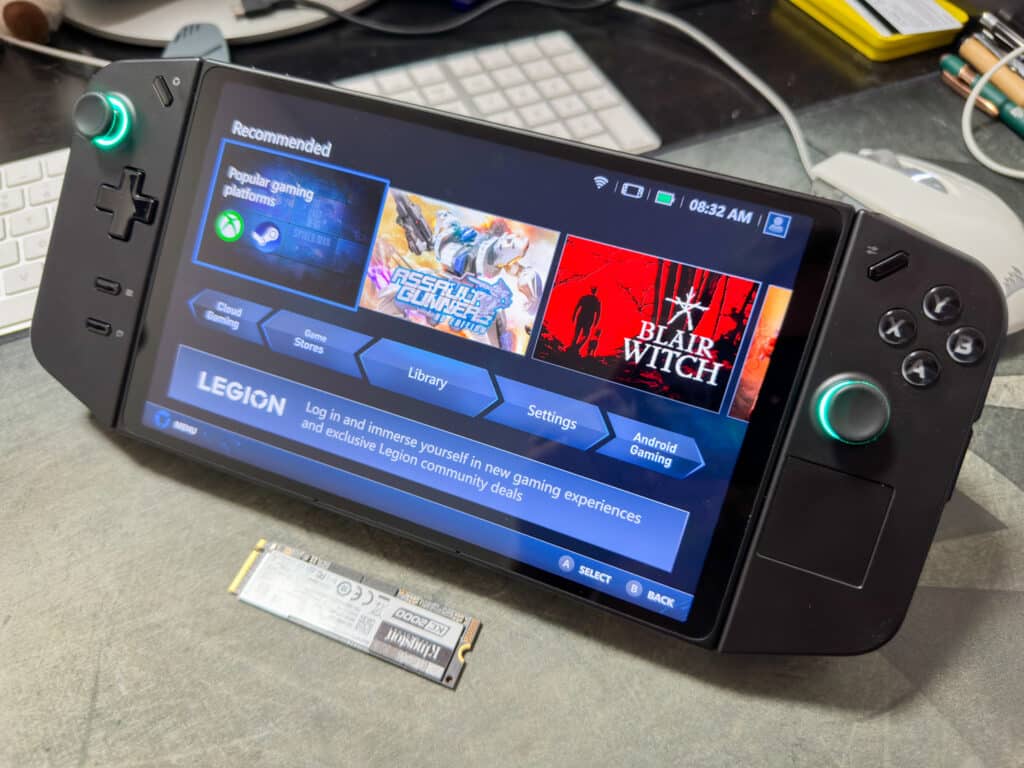
With its AMD Ryzen Z1 Extreme processor and RDNA 3 graphics, the Legion Go ventures beyond the gaming universe, hinting at intriguing possibilities in areas like data center management and remote IT support. This review delves into the myriad facets of the Legion Go, scrutinizing its capabilities as a gaming powerhouse while exploring its potential to revolutionize the approach to mobile computing in professional environments.
## **Lenovo Legion Go Design and Ergonomics**
The device boasts a sleek, ergonomic design, with detachable controllers that offer versatility for various use cases. The build quality is solid, reassuring users of its durability in gaming and professional settings.
The Lenovo Legion Go’s design philosophy pivots on a fusion of functionality and aesthetics, encapsulating the essence of modern handheld gaming devices while pushing the boundaries into professional domains. The chassis, a sleek amalgamation of high-grade materials, exudes a sense of durability and sophistication. One of its most notable characteristics is its detachable controllers. This design choice enhances the gaming experience and adds a layer of versatility, making the device adaptable for various professional scenarios.
![Lenovo Legion Go top]()
The build quality is what one would expect in a Lenovo product. It balances sturdiness with a comfortable grip, ensuring that prolonged usage in gaming sessions does not lead to discomfort. The attention to detail is evident in the tactile response of the buttons and joysticks, designed to withstand extensive use without losing responsiveness.
The buttons, joysticks, and triggers feature solid construction and deliver satisfactory feedback. Buttons on the back of the device are great for action items in games, with different layouts on each side, and the scroll wheel is better positioned for use in “FPS Mode” but is functional when the controller is traditionally attached. The D-Pad, on the other hand, doesn’t quite meet expectations, leaving room for improvement.
![Lenovo Legion Go back]()
The detachable game controllers resemble an XBOX-style layout and incorporate a small touchpad for the mouse on the right side; however, without dedicated mouse click buttons, navigation of the native Windows OS can be challenging. The touchscreen being highly responsive and accurate does make up for the shortcomings at the expense of fingerprints on the screen. In our testing, we used the app “Synergy” to seamlessly drive the mouse and keyboard inputs from a workstation over the network, a highly recommended configuration for users to consider. It made management, configuration, and benchmarking significantly easier when outside touch or controller-optimized applications.
The party trick of the Legion Go is the detachable controllers, with the right side having “FPS Mode,” which is an optical mouse sensor in the bottom of the controller that can be used, with dedicated left and right click buttons. Lenovo includes a small circular cradle that the controller sits upright in. The ergonomics are better than the touchpad, but there is a bit of a learning curve for gaming to proficiently use the unique mouse design with half of the controller in the left hand.
## BIOS Updates and Continual Improvement
In this Lenovo Legion Go review, a BIOS update was pivotal in enhancing the device’s performance. Initially, the GPU clock speeds did not maintain expected levels, specifically for battery power, affecting both synthetic benchmarks and gaming experiences.
![Lenovo Legion Go bottom]()
After applying the BIOS update (version N3CN28WW) provided by Lenovo on their website and pointed out to us by Lenovo’s Product Technologist Joseph Bell, there was a noticeable improvement. This update brought the device’s performance closer to expectations and significantly enhanced the gaming experience.
This improvement emphasizes the importance of keeping the Legion Go and all devices updated for optimal performance. It also highlights the potential for future updates to further refine and enhance the capabilities of Windows 11 handhelds like the Legion Go.
## Compact and Sturdy
Further complementing its design is the Legion Go’s size and weight. It is compact enough for portability yet substantial enough to provide a reassuring heft, indicative of its robust internal components. The device’s portability is a significant factor, especially considering the potential applications in data center environments where mobility is necessary.
The aesthetic appeal of the Legion Go is not just skin deep. The layout of ports, vents, and buttons has been thoughtfully arranged, ensuring easy access while maintaining a clean, uncluttered look. This ergonomic consideration extends to its use in a professional context, where easy access to connectivity options can streamline workflows.
The design and build of the Lenovo Legion Go are a testament to Lenovo’s commitment to innovation and quality. It’s a device that caters to the gaming community’s needs and piques the interest of professionals looking for robust, portable computing solutions. The 8.8-inch QHD+ display offers vibrant, crisp visuals for detailed data analysis, content creation, and immersive gaming experiences.
![]()
## **Innovative Applications in Data Centers**
While primarily designed for gaming, the Legion Go’s robust processing capabilities and the removable controllers open up imaginative possibilities in data center applications. Imagine utilizing this device for real-time monitoring and management of server operations, offering a portable and (albeit larger) pocketable solution to data center technicians for on-site diagnostics and adjustments.
The Legion Go’s high-performance hardware has an efficient cooling system that maintains optimal performance during intensive tasks. The fan at max speed is a bit loud but more than sufficient to cool the 30-watt AMD APU, but not so loud that standard headphones at moderate volume can mask the noise.
## Lenovo Legion Go Specifications
| **Product** | |
| --- | --- |
| **OS** | |
| **Processor** | - AMD Ryzen Z1 Extreme (8C, 16T, 3.3GHz)
|
| **Graphics** | - AMD Radeon (RDNA™ 3 Architecture)
|
| **Memory** | - 16GB LPDDR5x-7500, soldered
|
| **Storage** | - 1TB or 512GB M.2 2242 SSD
|
| **Display** | - 8.8” WQXGA (2560×1600), Multi-touch, IPS, 500nits, 16:10, 144Hz, Corning Gorilla Glass 5
|
| **Audio** | - Stereo speakers, 2W x2, dual-array microphone
|
| **Connectivity** | - 802.11ax 2×2 Wi-Fi + Bluetooth® 5.1
|
| **Touchpad** | - Buttonless Mylar® surface touchpad (on the right controller), 28.5 x 28.5 mm (1.12 x 1.12 inches)
|
| **Ports** | - 1x microSD card reader1x
- Headphone/microphone combo jack (3.5mm)
- 2x Pogo pin connector (5-point)
- 2x USB4 40Gbps (support data transfer, Power Delivery 3.0, and DisplayPort™ 1.4)
|
| **Sensors** | - 6–axis Gyroscope sensor
- Ambient light sensor (ALS)
- Mouse sensor
|
| **Battery** | - 49.2 Wh, supports Super Rapid Charge (10min charge 0\~30% capacity, 30min charge.
- 0\~70% capacity, 80min charge 0\~100% capacity)
|
| **Dimensions** | Gamepad with controllers:- 298.83 x 131 x 40.7 mm (11.76 x 5.16 x 1.60 inches), Less than 854 g (1.88 lbs)
|
| **Materials** | - PC + GF (gamepad), PC–ABS (controllers)
|
| **Color** | |
| **Carry Bag** | - 332 x 162 x 83 mm (13.07 x 6.38 x 3.27 inches)
|
## **Software Ecosystem**
The Lenovo Legion Go’s software experience out of the box is anchored by the Legion Space software, a unique interface designed to enhance gaming. While this software offers streamlined access to games and settings, it has limitations. Its gaming-centric focus, while effective, can feel restrictive for users seeking a broader computing experience. However, the true flexibility of the Legion Go lies in its underlying operating system: Windows 11.
Pressing the control button on the top of the right controller brings up a screen overlay that can quickly change key things like performance presets, screen refresh rate and resolution, as well as the controller mode.
![]()
Running standard Windows 11 Home, the Legion Go has some extra capabilities over a dedicated gaming device, opening up a vast ecosystem of applications and functionalities. This flexibility is crucial, especially considering potential professional applications. Users can install specialized software, use the device for various networking tasks, or use it as a portable server management tool.
The integration of Windows 11 also means that users familiar with the Windows environment will find the transition to the Legion Go seamless. Despite some navigation challenges due to the device’s smaller screen, running a full-fledged operating system in such a compact form is a significant advantage. It enhances the device’s versatility, making it not just a gaming gadget but a powerful tool for various computing needs.
## **Performance: Wall or Battery Power?**
As mentioned in the BIOS section, users can experience significant performance improvements when using wall power instead of relying solely on battery power. We tested all of the permutations of the mobile-optimized 3D Mark benchmarks on wall and battery power, comparing the performance vs. power saving modes.
![]()
The following graphs illustrate the differences quite dramatically. Keep in mind these graphs are meant to show performance through rigorous testing.
The graph below is an aggregate of all test results to show you the differences between wall power, battery power, and setting Power Saving or Performance presets. It makes sense that consistent wall power to the GPU will provide better performance results than running solely on battery power. This is the case for all tests.
![]()
Performance vs Power Saving – Wall vs Battery
The Lenovo Legion Go has presets for performance or power saving. In the following graph, we look at the presets when running on battery power. Performance is dramatically improved when the performance preset is used. Enabling the power-saving preset reduces the performance significantly.
![]()
Performance vs Power Saving – Battery
When on wall power, users can opt for performance or power saving. Again, as illustrated in the graph below, enabling the performance preset positively impacts the Legion Go, especially in the Night Raid test.
![]()
Performance vs Power Saving – Wall Power
When the performance preset is enabled, the wall and battery power results are close. The differences are negligible in all tests, with the Fire Strike test giving an edge to battery power.
![]()
Wall Power vs Battery Power – Performance Preset
When the power saving preset is enabled, wall power shows a dramatic performance improvement over battery power, except in the Night Raid test. It makes sense since wall power is still consistent even if the power-saving preset is on.
![]()
Wall Power vs Battery Power – Power Saving Preset
## Benchmark Testing
All benchmark tests were performed with the Performance preset of Legion Space. The Z1 Extreme performs quite well for a 30w CPU, but the 16GB of shared memory does leave some to be desired.
![StorageReview-legion-go-CPUz]()
## SPECviewperf 2020
Our next test is SPECviewperf 2020, the worldwide standard for measuring graphics performance of professional applications under the OpenGL and Direct X application programming interfaces. The viewsets (or benchmarks) represent graphics content and behavior from actual applications, without having to install the applications themselves.
We have results of the OptiPlex 7410 here as well for a look at another AIO, but non-portable device.
| **SPECviewperf 2020 (1900 x 1060)** | **Lenovo Legion Go (AMD RYZEN Z1 Extreme)** | **Dell OptiPlex All-in-One (7410) (Core i7-13700)** |
| --- | --- | --- |
| 3dsmax-07 | 32.83 | 38.38 |
| Catia-06 | 37.27 | 38.38 |
| Creo-03 | 57.69 | 38.38 |
| Energy-03 | 23.09 | 38.38 |
| Maya-06 | 123.33 | 38.38 |
| Medical-03 | 24.67 | 38.38 |
| Snx-04 | 135.57 | 38.38 |
| Sw-05 | 68.06 | 38.38 |
## Luxmark
Next is LuxMark, an OpenCL GPU benchmarking utility. The Legion Go’s Radeon graphics card gave it a substantial advantage.
| **Luxmark (Higher is better)** | **Lenovo Legion Go (AMD RYZEN Z1 Extreme)** | **Dell OptiPlex Micro Plus 7010 (Core i7-13700)** |
| --- | --- | --- |
| **Hallbench** | 1,626 | 1,331 |
| **food** | 858 | 593 |
## Blender 3.6
Next up is Blender, an open-source 3D modeling application. This benchmark was run using the Blender Benchmark utility. CPU Rendering was the chosen render method, as Blender-cli benchmark would not run on the GPU. The score is in samples per minute, with higher being better. We only have results for the Legion Go here.
| **Blender 3.6, samples per minute (higher is better)** | **Lenovo Legion Go (AMD RYZEN Z1 Extreme)** |
| --- | --- |
| **Monster** | 67.92 |
| **Junkshop** | 43.85 |
| **Classroom** | 33.91 |
## Blackmagic RAW Speed Test
Our next test is the Blackmagic RAW speed test, which tests decoding speed of Blackmagic RAW frames. Here we see the Legion Go performs about on par with a NUC 13 Pro, not bad for a handheld portable.
| **Blackmagic RAW Speed Test (Higher is better)** | **Lenovo Legion Go (AMD RYZEN Z1 Extreme)** | **Intel NUC 13 Pro (Core i7-1360P)** |
| --- | --- | --- |
| 8K CPU | 44 fps | 44 fps |
| 8K OPENCL | 30 fps | 25 fps |
## y-cruncher 0.8.3
Due to the limitations of the DRAM the only test that was able to be run for y-cruncher was the 1 Billion digit calculation, coming in with a time of **48.788 Seconds**.
## Crystal Disk Mark
![]()
The 1TB drive in the Legion go, a SKHynix HFS001TEJ4X112N, performs fine for the application, with respectable throughput and ability to handle a 70/30 read/write mix.
![]()
## Lenovo Legion Go Upgrades
The Lenovo Legion Go is relatively easy to upgrade and service, with internal parts just one panel away from being accessed. This means that aftermarket upgrades to the SSD are easy to do, although with a slight catch. While many of the handheld game platforms on the market leverage the 2230 (30mm) NVMe M.2 SSD, Lenovo opted to go with the 2242 (42mm) length.
![Lenovo Legion Go internals]()
Opening the Legion Go is simple, but a bit fiddly. After removing the 6, easy-to-access Phillips screws in the back, the whole back cover can be removed. The clips are sturdy and require significant care and patience to remove without damage. It is recommended to look at the [Lenovo Hardware Maintenance Manual for the Legion Go](https://download.lenovo.com/consumer/mobiles_pub/legion_go_hmm.pdf) as a guide.
At face value, you might think this limits your available upgrade options, as we are seeing a huge influx of 2230 SSD options hit the market. When you dig into it though, the 2242 size SSD has been in the market for far longer, with a wide range of options from almost all SSD vendors as an OEM drive for tablets and notebooks. 2230 is much more limited both in terms of performance and capacity.
## **Conclusion**
The Lenovo Legion Go is not just a gaming device; it’s a harbinger of the future, where the boundaries between gaming technology and professional computing are increasingly blurred. Its powerful APU, versatile design, and potential for innovative applications in data centers make it a noteworthy contender in handheld computing.
![]()
For a $699.99 asking price, we find the Legion Go offers pretty great value. Of course, this is intended as a gamer’s device, but in our lab, we routinely find great utility in using small devices like this off-label. Typically we use a ruggedized tablet for quick systems admin tasks, but when you consider the cost of something like a full-blown tablet vs. this little system, you get a lot of value from the tiny Lenovo. Plus it has twin USB4 ports, so you could add a display, keyboard, and mouse and use it like a pretty reasonable desktop. Alternatively, you could use it as a thin client and connect to a VM in the data center. Or just use it to game and move on, it’s pretty great at that too.
[Lenovo Legion Go](https://www.lenovo.com/us/en/p/handheld/legion-go/len106g0001?orgRef=https%253A%252F%252Fwww.google.com%252F)
**Engage with StorageReview**
[Newsletter](https://www.storagereview.com/storage_newsletter) | [YouTube](https://www.youtube.com/user/StorageReview "Opens in a new window") | Podcast [iTunes](https://podcasts.apple.com/gb/podcast/storagereview-com-storage-reviews/id1060681115 "Opens in a new window")/ [Spotify](https://open.spotify.com/show/1y6VnznABhHeOSMOmbDTz0 "Opens in a new window") | [Instagram](https://www.instagram.com/storagereview/ "Opens in a new window") | [Twitter](https://twitter.com/storagereview "Opens in a new window") | [TikTok](https://www.tiktok.com/@storagereview? "Opens in a new window") | [RSS Feed](https://www.storagereview.com/rss.xml)
![]()
### Jordan Ranous
AI Specialist; navigating you through the world of Enterprise AI. Writer and Analyst for Storage Review, coming from a background of Financial Big Data Analytics, Datacenter Ops/DevOps, and CX Analytics. Pilot, Astrophotographer, LTO Tape Guru, and Battery/Solar Enthusiast.
Previous post: [Dell PowerEdge R7615 Review](https://www.storagereview.com/review/dell-poweredge-r7615-review)
Next post: [LaCie Rugged Mini Portable SSD Review](https://www.storagereview.com/review/lacie-rugged-mini-portable-ssd)
Trusted Vendors
Products and solutions from our affiliate partners:
- [
![Ubiquiti Logo]()
Ubiquiti
](https://store.ui.com/us/en?a_aid=StorageReview "Opens in a new window")
- [

Newegg
](https://click.linksynergy.com/fs-bin/click?id=g5terNMDhz0&offerid=1207190.18&subid=0&type=4 "Opens in a new window")
- [
 Amazon
](https://amzn.to/4fLJUEW "Opens in a new window")
Newsletter
Subscribe to the StorageReview newsletter to stay up to date on the latest news and reviews. We promise no spam!
1
Leave this field empty if you’re human:
## Advertisement
Content Categories
[Facebook](https://www.facebook.com/@storagereview) [X](https://twitter.com/storagereview) [Instagram](https://www.instagram.com/storagereview/) [LinkedIn](https://www.linkedin.com/company/storagereview-com) [YouTube](https://www.youtube.com/user/storagereview?sub_confirmation=1) [Email](mailto:info@storagereview.com) [Spotify](https://open.spotify.com/show/1y6VnznABhHeOSMOmbDTz0) [Reddit](https://www.reddit.com/r/StorageReview/) [Discord](https://discord.gg/TwMHb4azdC) [RSS](https://www.storagereview.com/rss.xml) [TikTok](https://www.tiktok.com/@storagereview)
Copyright © 1998-2025 Flying Pig Ventures, LLC Cincinnati, Ohio. All rights reserved.
Manage your privacy
To provide the best experiences, we and our partners use technologies like cookies to store and/or access device information. Consenting to these technologies will allow us and our partners to process personal data such as browsing behavior or unique IDs on this site and show (non-) personalized ads. Not consenting or withdrawing consent, may adversely affect certain features and functions.
Click below to consent to the above or make granular choices. Your choices will be applied to this site only. You can change your settings at any time, including withdrawing your consent, by using the toggles on the Cookie Policy, or by clicking on the manage consent button at the bottom of the screen.
Functional Functional Always active
The technical storage or access is strictly necessary for the legitimate purpose of enabling the use of a specific service explicitly requested by the subscriber or user, or for the sole purpose of carrying out the transmission of a communication over an electronic communications network.
Preferences Preferences
The technical storage or access is necessary for the legitimate purpose of storing preferences that are not requested by the subscriber or user.
Statistics Statistics
The technical storage or access that is used exclusively for statistical purposes. The technical storage or access that is used exclusively for anonymous statistical purposes. Without a subpoena, voluntary compliance on the part of your Internet Service Provider, or additional records from a third party, information stored or retrieved for this purpose alone cannot usually be used to identify you.
Marketing Marketing
The technical storage or access is required to create user profiles to send advertising, or to track the user on a website or across several websites for similar marketing purposes.
Statistics
Marketing
Features
Always active
Special features
Special purposes
Always active
- Manage options
- Manage services
- Manage {vendor\_count} vendors
- [Read more about these purposes](https://cookiedatabase.org/tcf/purposes/)
Accept Deny Manage options Save preferences Manage options
- {title}
- {title}
- {title}
Manage your privacy
To provide the best experiences, we use technologies like cookies to store and/or access device information. Consenting to these technologies will allow us to process data such as browsing behavior or unique IDs on this site. Not consenting or withdrawing consent, may adversely affect certain features and functions.
Functional Functional Always active
The technical storage or access is strictly necessary for the legitimate purpose of enabling the use of a specific service explicitly requested by the subscriber or user, or for the sole purpose of carrying out the transmission of a communication over an electronic communications network.
Preferences Preferences
The technical storage or access is necessary for the legitimate purpose of storing preferences that are not requested by the subscriber or user.
Statistics Statistics
The technical storage or access that is used exclusively for statistical purposes. The technical storage or access that is used exclusively for anonymous statistical purposes. Without a subpoena, voluntary compliance on the part of your Internet Service Provider, or additional records from a third party, information stored or retrieved for this purpose alone cannot usually be used to identify you.
Marketing Marketing
The technical storage or access is required to create user profiles to send advertising, or to track the user on a website or across several websites for similar marketing purposes.
Statistics
Marketing
Features
Always active
Special features
Special purposes
Always active
- Manage options
- Manage services
- Manage {vendor\_count} vendors
- [Read more about these purposes](https://cookiedatabase.org/tcf/purposes/)
Accept Deny Manage options Save preferences Manage options
- {title}
- {title}
- {title}
Manage consent Manage consent
```json
{"@context":"https:\/\/schema.org","@graph":[{"@type":"WebPage","@id":"https:\/\/www.storagereview.com\/review\/lenovo-legion-go-review-portable-blend-of-work-and-play","url":"https:\/\/www.storagereview.com\/review\/lenovo-legion-go-review-portable-blend-of-work-and-play","name":"Lenovo Legion Go Review: Portable Blend of Work and Play - StorageReview.com","isPartOf":{"@id":"https:\/\/www.storagereview.com\/#website"},"primaryImageOfPage":{"@id":"https:\/\/www.storagereview.com\/review\/lenovo-legion-go-review-portable-blend-of-work-and-play#primaryimage"},"image":{"@id":"https:\/\/www.storagereview.com\/review\/lenovo-legion-go-review-portable-blend-of-work-and-play#primaryimage"},"thumbnailUrl":"https:\/\/www.storagereview.com\/wp-content\/uploads\/2023\/12\/StorageReview-Lenovo-Legion-Go-10.jpg","datePublished":"2023-12-29T20:38:03+00:00","dateModified":"2024-01-18T21:11:03+00:00","description":"At $699.99 the Lenovo Legion Go offers great value. It's a gamer's device, but in our lab, we love to use small devices like this off-label.","breadcrumb":{"@id":"https:\/\/www.storagereview.com\/review\/lenovo-legion-go-review-portable-blend-of-work-and-play#breadcrumb"},"inLanguage":"en-US","potentialAction":[{"@type":"ReadAction","target":["https:\/\/www.storagereview.com\/review\/lenovo-legion-go-review-portable-blend-of-work-and-play"]}]},{"@type":"ImageObject","inLanguage":"en-US","@id":"https:\/\/www.storagereview.com\/review\/lenovo-legion-go-review-portable-blend-of-work-and-play#primaryimage","url":"https:\/\/www.storagereview.com\/wp-content\/uploads\/2023\/12\/StorageReview-Lenovo-Legion-Go-10.jpg","contentUrl":"https:\/\/www.storagereview.com\/wp-content\/uploads\/2023\/12\/StorageReview-Lenovo-Legion-Go-10.jpg","width":1500,"height":1125},{"@type":"BreadcrumbList","@id":"https:\/\/www.storagereview.com\/review\/lenovo-legion-go-review-portable-blend-of-work-and-play#breadcrumb","itemListElement":[{"@type":"ListItem","position":1,"name":"Home","item":"https:\/\/www.storagereview.com\/"},{"@type":"ListItem","position":2,"name":"Review","item":"https:\/\/www.storagereview.com\/review"},{"@type":"ListItem","position":3,"name":"Lenovo Legion Go Review: Portable Blend of Work and Play"}]},{"@type":"WebSite","@id":"https:\/\/www.storagereview.com\/#website","url":"https:\/\/www.storagereview.com\/","name":"StorageReview.com","description":"StorageReview.com is a leading provider of news and reviews throughout the entire IT stack - from the datacenter to the edge, and all points in between.","publisher":{"@id":"https:\/\/www.storagereview.com\/#organization"},"potentialAction":[{"@type":"SearchAction","target":{"@type":"EntryPoint","urlTemplate":"https:\/\/www.storagereview.com\/?s={search_term_string}"},"query-input":{"@type":"PropertyValueSpecification","valueRequired":true,"valueName":"search_term_string"}}],"inLanguage":"en-US"},{"@type":"Organization","@id":"https:\/\/www.storagereview.com\/#organization","name":"StorageReview.com","url":"https:\/\/www.storagereview.com\/","logo":{"@type":"ImageObject","inLanguage":"en-US","@id":"https:\/\/www.storagereview.com\/#\/schema\/logo\/image\/","url":"https:\/\/www.storagereview.com\/wp-content\/uploads\/2020\/02\/Storage-Reviews-2-2.png","contentUrl":"https:\/\/www.storagereview.com\/wp-content\/uploads\/2020\/02\/Storage-Reviews-2-2.png","width":344,"height":61,"caption":"StorageReview.com"},"image":{"@id":"https:\/\/www.storagereview.com\/#\/schema\/logo\/image\/"},"sameAs":["https:\/\/x.com\/storagereview","http:\/\/youtube.com\/user\/storagereview"]}]}
```