---
description: We wanted to gauge the performance of 22TB Golds when used in an SMB environment. Synology DiskStation DS1821+ and WD Gold 22TB HDDs.
title: WD Gold 22TB and Synology DiskStation DS1821+ Review
image: https://www.storagereview.com/wp-content/uploads/2022/09/StorageReview-Synology-WD-Gold-22TB-1.jpg
---
[![Storage Review]()](https://storagereview.com/)
---
[Facebook](https://www.facebook.com/@storagereview) [X (Twitter)](https://twitter.twitter.com/storagereview) [Instagram](https://www.instagram.com/storagereview/) [LinkedIn](https://www.linkedin.com/company/storagereview-com) [YouTube](https://www.youtube.com/user/storagereview?sub_confirmation=1) [Email](mailto:info@storagereview.com) [Spotify](https://open.spotify.com/show/1y6VnznABhHeOSMOmbDTz0) [Reddit](https://www.reddit.com/r/StorageReview/) [Discord](https://discord.gg/TwMHb4azdC) [RSS Feed](https://www.storagereview.com/rss.xml) [TikTok](https://www.tiktok.com/@storagereview)
[Facebook](https://www.facebook.com/@storagereview) [X (Twitter)](https://twitter.com/storagereview) [Instagram](https://www.instagram.com/storagereview/) [LinkedIn](https://www.linkedin.com/company/storagereview-com) [YouTube](https://www.youtube.com/user/storagereview?sub_confirmation=1) [Email](mailto:info@storagereview.com) [Spotify](https://open.spotify.com/show/1y6VnznABhHeOSMOmbDTz0) [Reddit](https://www.reddit.com/r/StorageReview/) [Discord](https://discord.gg/TwMHb4azdC) [RSS Feed](https://www.storagereview.com/rss.xml) [TikTok](https://www.tiktok.com/@storagereview)
[](https://www.storagereview.com)
≡ Menu
- [Home](https://www.storagereview.com/)
- [Storage Reviews](https://www.storagereview.com/review)
- [End User Reviews](https://www.storagereview.com/consumer)
- [Enterprise Reviews](https://www.storagereview.com/enterprise)
- [Ubiquiti Reviews](https://www.storagereview.com/best/ubiquiti-reviews)
- [SR Merch](https://store.storagereview.com)
- [Leaderboards](https://www.storagereview.com/best)
- [Best Storage Arrays](https://www.storagereview.com/best/storage-arrays)
- [Best Enterprise SSDs](https://www.storagereview.com/best/enterprise-ssds)
- [Best Servers](https://www.storagereview.com/best/servers)
- [Best Enterprise GPUs](https://www.storagereview.com/best/enterprise-gpus)
- [Best Desktops for Local AI](https://www.storagereview.com/best/desktops-local-ai)
- [Best Laptops for Local AI](https://www.storagereview.com/best/laptops-local-ai)
- [Best Local LLM Tools](https://www.storagereview.com/best/local-llm-tools)
- [Agentic AI Hardware](https://www.storagereview.com/best/agentic-ai-hardware)
- [Best SSDs & Hard Drives](https://www.storagereview.com/best_drives)
- [Best Portable SSDs](https://www.storagereview.com/best/portable-ssds)
- [Best Business Laptops](https://www.storagereview.com/best/business-laptops)
- [Best Mobile Workstations](https://www.storagereview.com/best/mobile-workstations)
- [Best Desktop Workstations](https://www.storagereview.com/best/desktop-workstations)
- [Best Mini PCs](https://www.storagereview.com/best/mini-pcs)
- [Best Laptop Battery Life](https://www.storagereview.com/best/laptop-battery-life)
- [Storage Reference Guide](https://www.storagereview.com/storage-reference-guide)
- [About SR](https://www.storagereview.com/about-storagereview)
- [StorageReview.com Sweepstakes Rules and Regulations](https://www.storagereview.com/storagereview-com-sweepstakes-rules-and-regulations)
Search
[Home](https://www.storagereview.com/) » [Review](https://www.storagereview.com/review) » WD Gold 22TB and Synology DiskStation DS1821+ Review
# WD Gold 22TB and Synology DiskStation DS1821+ Review
by Lyle Smith on September 16, 2022
[Enterprise](https://www.storagereview.com/enterprise) ◇ [Medium NAS](https://www.storagereview.com/enterprise/medium-nas)
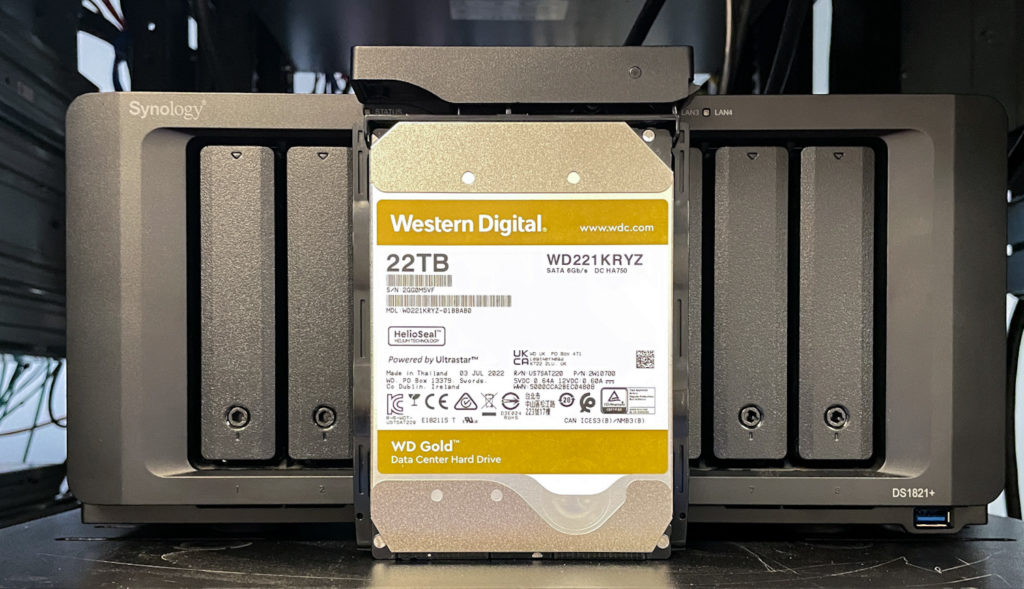
Back in August, we [reviewed the WD Gold 22TB CMR HDD](https://www.storagereview.com/review/wd-gold-22tb-hdd-review), which was highlighted by OptiNAND-enabled ArmorCache technology. We previously tested the Golds via our [36-bay Supermicro Storage SuperServer (SSG-540P-E1CTR36H)](https://www.storagereview.com/review/supermicro-storage-superserver-review-36-bay-3rd-gen-xeon) with TrueNAS installed (RAID2Z); however, we wanted to gauge the performance (and value) of the 22TB Golds when used in an SMB environment. For this review, we will be looking at how well they fare inside a [Synology DiskStation DS1821+](https://www.storagereview.com/review/synology-diskstation-ds1821-review).
## WD Gold 22TB Synology DS1821+
Powered by an AMD Ryzen CPU, the Synology DS1821+ is an easy-to-use 8-bay NAS aimed more at SMBs that require a bit more performance and capacity. It features two M.2 slots for NVMe SSD cache as well as 10GbE connectivity (though this must be added via one of its PCIe expansions slots). Overall, the Synology DiskStation DS1821+ is a strong performer for an SMB NAS.
![]() Combining the WD Gold 22TB drives with the DS1821+ creates a huge potential storage repository for SMBs via a small physical footprint. While this might be a more specialized use case (as most businesses won’t likely this amount of storage in an 8-bay NAS), small professional offices like architects or content creation companies might start out with 4 or 5 of the WD 22TB drives, with the other bays available for expansion when needed. And yes we know, WD Red Pros would be preferred here, but we don’t have them in the lab.
![]()
The combination of the Synology SMB NAS and the 22TB Gold drives would also make for an ideal internal backup solution. For example, an organization could use most of the drive bays as their main storage pool, while leaving a few available for online backups.
No matter the use case, however, the massive WD Gold 22TB drives will give organizations a lot of flexibility on how they manage their data with tons of opportunities for scalability.
![]()
## Setup and Configuration
As usual, we used the [DSM](https://www.storagereview.com/review/synology-dsm-7-0-review) Storage Manager app to manage the WD Gold populated-DS1821+. It also makes it incredibly easy to set up RAID, pools, and volumes as well as to view the health of the drive.
![]()
That said, when setting up the Gold HDDs, we actually hit a limitation of the filesystem. There is an upper limit on volume size, so we first had to make a volume with the max size of 103.5TB (as you can see in the image below). ![]()
We then had to make a second volume to use the rest of the pool space.![]()
## **WD Gold HDD 22TB Specifications**
| Model Number | **WD221KRYZ** |
| --- | --- |
| Form factor | 3.5-inch |
| Interface | SATA 6 Gb/s |
| 512n / 512e user sectors per drive4 | 512e |
| Formatted capacity | 22TB |
| OptiNAND technology | Yes |
| RoHS compliant | Yes |
| Performance | |
| Data transfer rate (max Sustained) | 291MB/s |
| RPM | 7200 |
| Cache | 512MB |
| Power Management | |
| Average power requirements (W) | |
| Operational | 7.1W |
| Idle | 5.7W |
| Power efficiency index (W/TB, idle) | 0.26 |
| Reliability | |
| MTBF (hours, projected) | 2,500,000 |
| Annualized Failure Rate2 (AFR, %) | 0.35 |
| Limited Warranty | 5 years |
| Environmental | |
| Operating temperature | 5°C to 60°C |
| Non-operating temperature | -40°C to 70°C |
| Shock (Read/Write) Operating (half-sine wave, 2ms) | 40G/40G |
| Non-operating (half-sine wave, 2ms) | 200G |
| Acoustics (average) | |
| Idle Mode | 20 dBA |
| Seek Mode | 32 dBA |
| Physical Dimensions | |
| Height (max) | 26.1mm |
| Length (max) | 147.0mm |
| Width (± .01 in.) | 101.6mm |
| Weight | 1.47 lb (.67 kg) ± 10% |
## **Synology DiskStation DS1821+ Specifications**
| CPU | - AMD Ryzen V1500B
- CPU Architecture: 64-bit
- CPU Frequency: 4-core 2.2 GHz
- Hardware Encryption Engine: (AES-NI)
|
| --- | --- |
| Memory | |
| System Memory | 4 GB DDR4 ECC SODIMM |
| Memory Module Pre-installed | 4 GB (4 GB x 1) |
| Total Memory Slots | 2 |
| Maximum Memory Capacity | 32 GB (16 GB x 2) |
| Storage | |
| Drive Bays | 8 |
| Maximum Drive Bays with Expansion Unit | 18 (DX517 x 2) |
| M.2 Drive Slots | 2 (NVMe) |
| Compatible Drive Type | - 3.5″ SATA HDD
- 2.5″ SATA HDD
- 2.5″ SATA SSD
- M.2 2280 NVMe SSD
|
| Maximum Single Volume Size | 108 TB |
| Hot-Swappable Drive | Yes |
| External Ports | |
| RJ-45 1GbE LAN Port | 4 (with Link Aggregation / Failover support) |
| USB 3.2 Gen 1 Port | 4 |
| eSATA Port | 2 |
| PCIe | |
| PCIe Expansion | 1 x Gen3 x8 slot (x4 link) |
| File System | |
| Internal Drives | |
| External Drives | - Btrfs
- EXT4
- EXT3
- FAT
- NTFS
- HFS+
- exFAT
|
| Appearance | |
| Size (Height x Width x Depth) | 166 mm x 343 mm x 243 mm |
| Weight | 6 kg |
| Others | |
| System Fan | 120 mm x 120 mm x 2 pcs |
| Fan Speed Mode | - Full-Speed Mode
- Cool Mode
- Quiet Mode
|
| Easy Replacement System Fan | Yes |
| Brightness Adjustable Front LED Indicators | Yes |
| Power Recovery | Yes |
| Noise Level | 22.2 dB(A) |
| Scheduled Power On / Off | Yes |
| Wake on LAN / WAN | Yes |
| Power Supply Unit / Adapter | 250W |
| AC Input Power Voltage | 100 V to 240 V AC |
| Power Frequency | 50/60 Hz, Single Phase |
| Power Consumption | 59.8 W (Access) 26.18 W (HDD Hibernation) |
| British Thermal Unit | 204.05 BTU/hr (Access) 89.33 BTU/hr (HDD Hibernation) |
| Environment | RoHS Compliant |
| Packaging Content | - Main Unit X 1
- Accessory Pack X 1
- AC Power Cord X 1
- RJ-45 LAN Cable X 2
- Quick Installation Guide X 1
|
| Warranty | 3 Years |
## **WD Gold HDD 22TB Performance**
### **Enterprise Synthetic Workload Analysis**
As we indicated above, we previously review the WD Gold 22TB inside the Supermicro server; however, for these sets of benchmarks, we installed eight of them into our [Synology DiskStation DS1821+](https://www.storagereview.com/review/synology-diskstation-ds1821-review) configured in RAID6. We will be testing in both iSCSI and SMB protocols.
Our enterprise hard drive benchmark process preconditions each drive-set into steady-state with the same workload the device will be tested with under a heavy load of 16 threads, with an outstanding queue of 16 per thread. The device is then tested in set intervals in multiple thread/queue depth profiles to show performance under light and heavy usage. Since hard drives reach their rated performance level very quickly, we only graph out the main sections of each test.
Preconditioning and Primary Steady-State Tests:
- Throughput (Read+Write IOPS Aggregate)
- Average Latency (Read+Write Latency Averaged Together)
- Max Latency (Peak Read or Write Latency)
- Latency Standard Deviation (Read+Write Standard Deviation Averaged Together)
Our Enterprise Synthetic Workload Analysis includes four profiles based on real-world tasks. These profiles have been developed to make it easier to compare to our past benchmarks, as well as widely-published values such as max 4K read and write speed and 8K 70/30, which is commonly used for enterprise drives.
4K
- 100% Read or 100% Write
- 100% 4K
8K 70/30
- 70% Read, 30% Write
- 100% 8K
128K (Sequential)
- 100% Read or 100% Write
- 100% 128K
Our first throughput test measures 4K random performance when inside the Synology DS1821+. Here, the WD Gold 22TB posted 328 IOPS in reads and 1,477 IOPS write (SMB) and 5,204 IOPS read and 1,513 IOPS write (iSCSI).
![Synology WD Gold 22TB 8K throughput performance]()
In average latency, the 22TB WD Gold was able to reach read and writes of 778.4ms and 174.4ms, respectively, in SMB, while iSCSI posted 49.2ms read and 169.1ms write.
![Synology WD Gold 22TB 4K write performance]()
Moving on to the max latency, the WD Gold hit 2,453.2ms read and 3,779.2ms write in SMB, while the reaching 1,461.1ms read and 846.9ms write in iSCSI.
![Synology WD Gold 22TB 4K read performance]()
For standard deviation, the WD Gold recorded 611.48ms read and 333.9ms write in SMB, and 51.12ms read and 165.22ms write in iSCSI.
![]()
Our next benchmark subjects the drives to 100% read and write activity at 8K sequential throughput. When inside the Synology DS1821+, the 22TB WD Gold drive posted 43,709 IOPS read and 30,951 IOPS write in SMB, while hitting 140,877 IOPS read and 56,623 IOPS write in iSCSI.
![Synology WD Gold 22TB 8K throughput performance]()
Our next test shifts focus from a pure 8K sequential 100% read/write scenario to a mixed 8K 70/30 workload, which will demonstrate how performance scales in a setting from 2T/2Q up to 16T/16Q.
In our first test, which measures throughput, the WD Gold 22TB had a range of 354 IOPS to 412 IOPS in SMB and 526 IOPS to 1,700 IOPS in iSCSI.
![Synology WD Gold 22TB 8K7030 throughput performance]()
With average latency at 8K 70/30 using a Synology DS1821+, the 22TB Gold 22TB posted 11.26ms through 619.27ms in SMB, while iSCSI recorded a range of 7.57ms through 150.39ms.
![]()
Moving on to max latency numbers, the 22TB WD Gold had a range of 710.87ms to 4,883.6ms while the iSCSI showed 1,309.31ms through 1,902.51ms.
![]()
For our standard deviation latency results, the 22TB Gold hit 14.04ms through 408.46ms (SMB) and 16.83ms to 245.49ms (iSCSI).
![]()
Our last test is the 128K benchmark, a large-block sequential test showing the highest sequential transfer speed. Here, the WD Gold 22TB posted 2.3GB/s read and 1.33GB/s write in SMB, while iSCSI showed 1.88GB/s read and 615MB/s write. It’s worth noting that 2.3GB/s number effectively is capped by the interface on the Synology.
![Synology WD Gold 22TB 128K throughput performance]()
## Conclusion
The WD Gold 22TB drive is designed to lower TCO for organizations, as they allow for more capacity without having to increase physical footprint or the same capacity at a lower physical footprint. Not only that, the Golds are one of the best-performing 3.5″ HDDs we’ve seen in our lab.
While this certainly makes them a perfect fit for enterprise-level data centers, they are also a great choice for SMBs that need to store huge amounts of data and for those who want to future-proof their repository (capacity-wise). So, it made sense for us to see what it is capable of outputting using some of the leading desktop (or SMB) NAS form factors.
![]()
As such, we populated the Synology DS1821+ (a strong performing 8-bay SMB NAS) with eight WD Gold 22TB drives and put it through our usual gauntlet of tests. Overall, we saw great throughput results across all of our benchmarking, especially when configured with the iSCSI protocol.
This includes 328 IOPS read / 1,477 IOPS write (SMB) and 5,204 IOPS read / 1,513 IOPS write (iSCSI) in random 4K, and 43,709 IOPS read / 30,951 IOPS write (SMB), and 140,877 IOPS read / 56,623 IOPS write (iSCSI) during the 8K sequential workload. In addition, the WD Gold was able to record a range of 354 IOPS to 412 IOPS in SMB and 526 IOPS to 1,700 IOPS in iSCSI. For our large-block sequential test, it posted 2.3GB/s read (capping the interface) and 1.33GB/s write in SMB, while iSCSI showed 1.88GB/s read and 615MB/s write.
The WD Gold 22TB did not disappoint at the SMB level, posting solid numbers throughout. Professional offices like architects and content creators will find that these massive hard drives will bring a lot of flexibility, performance, and room for growth when combining them with a NAS solution like the Synology DS1821+.
[WD Gold Product Page](https://www.westerndigital.com/products/internal-drives/wd-gold-sata-hdd#WD221KRYZ "Opens in a new window")
[Synology DiskStation DS1821+](https://www.synology.com/en-global/products/DS1821+)
**Engage with StorageReview**
[Newsletter](https://www.storagereview.com/storage_newsletter) | [YouTube](https://www.youtube.com/user/StorageReview "Opens in a new window") | Podcast [iTunes](https://podcasts.apple.com/gb/podcast/storagereview-com-storage-reviews/id1060681115 "Opens in a new window")/ [Spotify](https://open.spotify.com/show/1y6VnznABhHeOSMOmbDTz0 "Opens in a new window") | [Instagram](https://www.instagram.com/storagereview/ "Opens in a new window") | [Twitter](https://twitter.com/storagereview "Opens in a new window") | [TikTok](https://www.tiktok.com/@storagereview? "Opens in a new window") | [RSS Feed](https://www.storagereview.com/rss.xml)
![]()
### Lyle Smith
Lyle is a writer for StorageReview, covering a broad set of end user and enterprise IT topics.
Previous post: [QNAP Koibox-100W Review](https://www.storagereview.com/review/qnap-koibox-100w-review)
Next post: [Extreme Edge – Enabling Astrophotography With HCI](https://www.storagereview.com/review/extreme-edge-enabling-astrophotography-with-hci)
Trusted Vendors
Products and solutions from our affiliate partners:
- [

Ubiquiti
](https://store.ui.com/us/en?a_aid=StorageReview "Opens in a new window")
- [

Newegg
](https://click.linksynergy.com/fs-bin/click?id=g5terNMDhz0&offerid=1207190.18&subid=0&type=4 "Opens in a new window")
- [
 Amazon
](https://amzn.to/4fLJUEW "Opens in a new window")
Newsletter
Subscribe to the StorageReview newsletter to stay up to date on the latest news and reviews. We promise no spam!
1
Leave this field empty if you’re human:
## Advertisement
Content Categories
[Facebook](https://www.facebook.com/@storagereview) [X](https://twitter.com/storagereview) [Instagram](https://www.instagram.com/storagereview/) [LinkedIn](https://www.linkedin.com/company/storagereview-com) [YouTube](https://www.youtube.com/user/storagereview?sub_confirmation=1) [Email](mailto:info@storagereview.com) [Spotify](https://open.spotify.com/show/1y6VnznABhHeOSMOmbDTz0) [Reddit](https://www.reddit.com/r/StorageReview/) [Discord](https://discord.gg/TwMHb4azdC) [RSS](https://www.storagereview.com/rss.xml) [TikTok](https://www.tiktok.com/@storagereview)
Copyright © 1998-2025 Flying Pig Ventures, LLC Cincinnati, Ohio. All rights reserved.
Manage your privacy
To provide the best experiences, we and our partners use technologies like cookies to store and/or access device information. Consenting to these technologies will allow us and our partners to process personal data such as browsing behavior or unique IDs on this site and show (non-) personalized ads. Not consenting or withdrawing consent, may adversely affect certain features and functions.
Click below to consent to the above or make granular choices. Your choices will be applied to this site only. You can change your settings at any time, including withdrawing your consent, by using the toggles on the Cookie Policy, or by clicking on the manage consent button at the bottom of the screen.
Functional Functional Always active
The technical storage or access is strictly necessary for the legitimate purpose of enabling the use of a specific service explicitly requested by the subscriber or user, or for the sole purpose of carrying out the transmission of a communication over an electronic communications network.
Preferences Preferences
The technical storage or access is necessary for the legitimate purpose of storing preferences that are not requested by the subscriber or user.
Statistics Statistics
The technical storage or access that is used exclusively for statistical purposes. The technical storage or access that is used exclusively for anonymous statistical purposes. Without a subpoena, voluntary compliance on the part of your Internet Service Provider, or additional records from a third party, information stored or retrieved for this purpose alone cannot usually be used to identify you.
Marketing Marketing
The technical storage or access is required to create user profiles to send advertising, or to track the user on a website or across several websites for similar marketing purposes.
Statistics
Marketing
Features
Always active
Special features
Special purposes
Always active
- Manage options
- Manage services
- Manage {vendor\_count} vendors
- [Read more about these purposes](https://cookiedatabase.org/tcf/purposes/)
Accept Deny Manage options Save preferences Manage options
- {title}
- {title}
- {title}
Manage your privacy
To provide the best experiences, we use technologies like cookies to store and/or access device information. Consenting to these technologies will allow us to process data such as browsing behavior or unique IDs on this site. Not consenting or withdrawing consent, may adversely affect certain features and functions.
Functional Functional Always active
The technical storage or access is strictly necessary for the legitimate purpose of enabling the use of a specific service explicitly requested by the subscriber or user, or for the sole purpose of carrying out the transmission of a communication over an electronic communications network.
Preferences Preferences
The technical storage or access is necessary for the legitimate purpose of storing preferences that are not requested by the subscriber or user.
Statistics Statistics
The technical storage or access that is used exclusively for statistical purposes. The technical storage or access that is used exclusively for anonymous statistical purposes. Without a subpoena, voluntary compliance on the part of your Internet Service Provider, or additional records from a third party, information stored or retrieved for this purpose alone cannot usually be used to identify you.
Marketing Marketing
The technical storage or access is required to create user profiles to send advertising, or to track the user on a website or across several websites for similar marketing purposes.
Statistics
Marketing
Features
Always active
Special features
Special purposes
Always active
- Manage options
- Manage services
- Manage {vendor\_count} vendors
- [Read more about these purposes](https://cookiedatabase.org/tcf/purposes/)
Accept Deny Manage options Save preferences Manage options
- {title}
- {title}
- {title}
Manage consent Manage consent
```json
{"@context":"https:\/\/schema.org","@graph":[{"@type":"WebPage","@id":"https:\/\/www.storagereview.com\/review\/wd-gold-22tb-and-synology-diskstation-ds1821-review","url":"https:\/\/www.storagereview.com\/review\/wd-gold-22tb-and-synology-diskstation-ds1821-review","name":"WD Gold 22TB and Synology DiskStation DS1821+ Review - StorageReview.com","isPartOf":{"@id":"https:\/\/www.storagereview.com\/#website"},"primaryImageOfPage":{"@id":"https:\/\/www.storagereview.com\/review\/wd-gold-22tb-and-synology-diskstation-ds1821-review#primaryimage"},"image":{"@id":"https:\/\/www.storagereview.com\/review\/wd-gold-22tb-and-synology-diskstation-ds1821-review#primaryimage"},"thumbnailUrl":"https:\/\/www.storagereview.com\/wp-content\/uploads\/2022\/09\/StorageReview-Synology-WD-Gold-22TB-1.jpg","datePublished":"2022-09-16T20:07:00+00:00","description":"We wanted to gauge the performance of 22TB Golds when used in an SMB environment. Synology DiskStation DS1821+ and WD Gold 22TB HDDs.","breadcrumb":{"@id":"https:\/\/www.storagereview.com\/review\/wd-gold-22tb-and-synology-diskstation-ds1821-review#breadcrumb"},"inLanguage":"en-US","potentialAction":[{"@type":"ReadAction","target":["https:\/\/www.storagereview.com\/review\/wd-gold-22tb-and-synology-diskstation-ds1821-review"]}]},{"@type":"ImageObject","inLanguage":"en-US","@id":"https:\/\/www.storagereview.com\/review\/wd-gold-22tb-and-synology-diskstation-ds1821-review#primaryimage","url":"https:\/\/www.storagereview.com\/wp-content\/uploads\/2022\/09\/StorageReview-Synology-WD-Gold-22TB-1.jpg","contentUrl":"https:\/\/www.storagereview.com\/wp-content\/uploads\/2022\/09\/StorageReview-Synology-WD-Gold-22TB-1.jpg","width":1500,"height":863},{"@type":"BreadcrumbList","@id":"https:\/\/www.storagereview.com\/review\/wd-gold-22tb-and-synology-diskstation-ds1821-review#breadcrumb","itemListElement":[{"@type":"ListItem","position":1,"name":"Home","item":"https:\/\/www.storagereview.com\/"},{"@type":"ListItem","position":2,"name":"Review","item":"https:\/\/www.storagereview.com\/review"},{"@type":"ListItem","position":3,"name":"WD Gold 22TB and Synology DiskStation DS1821+ Review"}]},{"@type":"WebSite","@id":"https:\/\/www.storagereview.com\/#website","url":"https:\/\/www.storagereview.com\/","name":"StorageReview.com","description":"StorageReview.com is a leading provider of news and reviews throughout the entire IT stack - from the datacenter to the edge, and all points in between.","publisher":{"@id":"https:\/\/www.storagereview.com\/#organization"},"potentialAction":[{"@type":"SearchAction","target":{"@type":"EntryPoint","urlTemplate":"https:\/\/www.storagereview.com\/?s={search_term_string}"},"query-input":{"@type":"PropertyValueSpecification","valueRequired":true,"valueName":"search_term_string"}}],"inLanguage":"en-US"},{"@type":"Organization","@id":"https:\/\/www.storagereview.com\/#organization","name":"StorageReview.com","url":"https:\/\/www.storagereview.com\/","logo":{"@type":"ImageObject","inLanguage":"en-US","@id":"https:\/\/www.storagereview.com\/#\/schema\/logo\/image\/","url":"https:\/\/www.storagereview.com\/wp-content\/uploads\/2020\/02\/Storage-Reviews-2-2.png","contentUrl":"https:\/\/www.storagereview.com\/wp-content\/uploads\/2020\/02\/Storage-Reviews-2-2.png","width":344,"height":61,"caption":"StorageReview.com"},"image":{"@id":"https:\/\/www.storagereview.com\/#\/schema\/logo\/image\/"},"sameAs":["https:\/\/x.com\/storagereview","http:\/\/youtube.com\/user\/storagereview"]}]}
```