

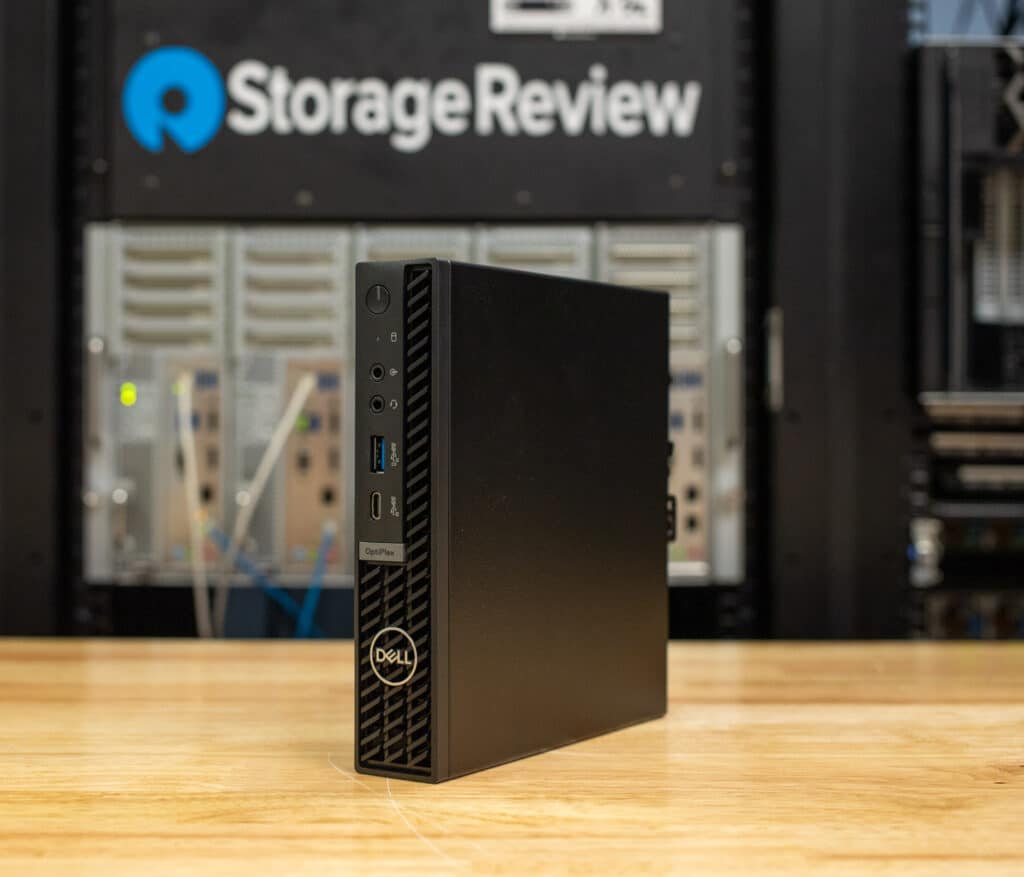
Der Dell OptiPlex Micro Plus 7020 ist eine kompakte Desktop-Workstation für Geschäftsumgebungen mit begrenztem Platzangebot. Aufgrund seines kleinen Formfaktors eignet er sich für Callcenter, kleine Büros oder Einzelhandelsumgebungen. Mit anpassbaren Hardwareoptionen kann er für verschiedene professionelle Aufgaben konfiguriert werden, von Multitasking bis zu moderaten Arbeitslasten, und lässt sich problemlos in verschiedene Arbeitsbereichskonfigurationen integrieren.
OptiPlex 7020 Micro Plus: Prozessoren
Der Dell OptiPlex Micro Plus 7020 bietet eine Vielzahl von Prozessoroptionen, sodass Unternehmen die Leistung ganz einfach an ihre spezifischen Anforderungen anpassen können. Mit Unterstützung für Intel Core-Prozessoren der 13. Generation soll ein Gleichgewicht zwischen Leistung und Energieeffizienz geschaffen werden, vom Intel Core i3 für grundlegende Büroaufgaben bis zum Core i9 für intensivere Arbeitslasten. Diese Flexibilität ermöglicht es Unternehmen, ein Setup auszuwählen, das am besten zu ihren Abläufen passt.
Lassen Sie uns die Prozessoroptionen aufschlüsseln:
- Intel Core i3 14100 und i3 14100T: Diese Prozessoren der Einstiegsklasse sind ideal für grundlegende Aufgaben wie das Surfen im Internet, die Bearbeitung von Dokumenten und leichtes Multitasking. Beide Prozessoren verfügen über 4 Kerne und 8 Fädenmit Turbo-Taktraten von bis zu 4.7 GHz. Diese eignen sich hervorragend für Unternehmen mit minimalen Verarbeitungsanforderungen und bieten zuverlässige Leistung zu geringeren Kosten.
- Intel Core i5 14500, i5 14500T, i5 14600 und i5 14600T: Diese Core i65-Prozessoren sind sowohl in der Standard- (35 W) als auch in der Low-Power-T-Variante (5 W) erhältlich und bieten einen guten Mittelweg für Benutzer, die etwas mehr Leistung für Multitasking, Tabellenkalkulationsverwaltung und Datenbankoperationen benötigen. Mit 6 Leistungskerne, 8 effiziente Kerne und 20-Threads, diese Prozessoren können höhere Arbeitslasten bewältigen und sind daher eine gute Wahl für Benutzer, die regelmäßig mehrere Anwendungen gleichzeitig ausführen.
- Intel Core i7 14700 und i7 14700T: Diese Prozessoren bieten 8 Leistungskerne, 12 effiziente Kerne und 28-Threads, wodurch sie besser für anspruchsvollere Umgebungen geeignet sind, wie etwa Grafikdesign, einfache Videobearbeitung oder Datenanalyse. Sie sind außerdem energieeffizient und erreichen Turbo-Taktraten von bis zu 5.4 GHz.
- Intel Core i9 14900 und i9 14900T: Die Core i9-Prozessoren der Spitzenklasse sind für diejenigen gedacht, die hohe Leistung benötigen. Mit 24 Kerne (8 Performance-Kerne und 16 effiziente Kerne) und 32-Threadssind diese Prozessoren für hochintensives Multitasking und Virtualisierung optimiert. Turbo-Geschwindigkeiten erreichen bis zu 5.6 GHz, und bietet ausreichende Verarbeitungsleistung für Unternehmen, die auf intensive Rechenleistung angewiesen sind.
Jeder Prozessor ist außerdem mit Intel UHD Graphics (UHD 730 bei Core i3-Modellen und UHD 770 bei Core i5- bis i9-Modellen) gekoppelt, die je nach Konfiguration bis zu drei oder vier externe Displays unterstützen kann.
Als integrierte GPU ist sie zwar nicht für anspruchsvolle Grafikarbeiten ausgelegt, eignet sich aber gut für die Hauptanwendungsfälle der Workstation. Diese GPU unterstützt problemlos Aufgaben wie Präsentationen, Videokonferenzen, Datenverwaltung und webbasierte Anwendungen. Sie ist eine praktische Wahl für Umgebungen, in denen Produktivität und Multitasking im Vordergrund stehen, ohne dass hohe Grafikanforderungen gestellt werden.
OptiPlex 7020 Micro Plus: Speicher und Arbeitsspeicher
Der OptiPlex 7020 bietet außerdem eine Reihe von Speicher- und Arbeitsspeicheroptionen. Er unterstützt DDR5-Speicher mit Geschwindigkeiten von bis zu 5600 MT/s und Sie können ihn mit bis zu 64 GB RAM konfigurieren. Das klingt zwar im Vergleich zu leistungsstärkeren Workstations nicht nach viel, reicht aber immer noch für die Verarbeitung von anspruchsvollem Multitasking und speicherhungrigen Anwendungen aus. Was den Speicher betrifft, können Sie den OptiPlex Micro Plus 7020 mit PCIe NVMe SSDs einrichten, wodurch Sie bis zu 2 TB schnellen Speicher erhalten. Außerdem unterstützt er RAID-Konfigurationen, wenn Sie zusätzlichen Datenschutz wünschen.
OptiPlex 7020 Micro Plus: Designen und Bauen
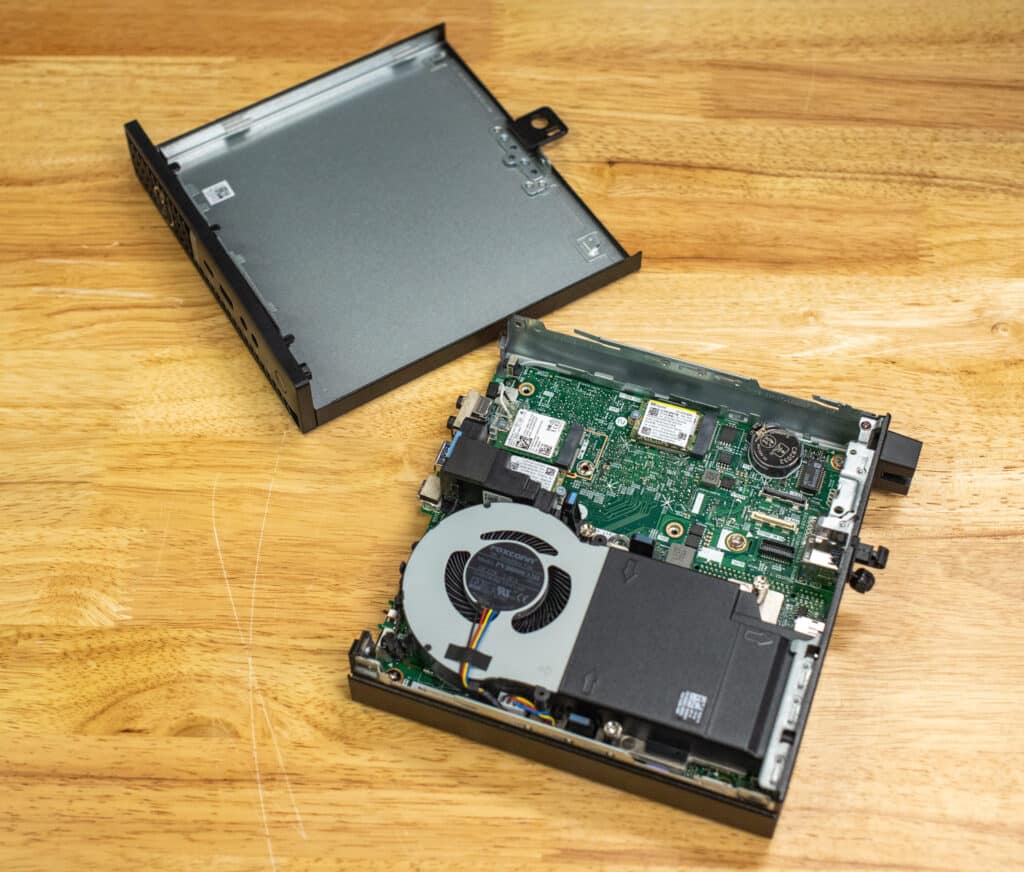
Mit nur 182 mm Höhe, 36 mm Breite und 178 mm Tiefe ist es klein genug, um es hinter einem Monitor, unter einem Schreibtisch oder sogar an einer Wand zu montieren, wodurch wertvoller Platz auf dem Schreibtisch frei wird. Trotz seiner geringen Stellfläche bietet dieses System solide Leistung und zahlreiche Anschlussmöglichkeiten, was es perfekt für moderne Büros mit wenig Platz macht. Es ist außerdem VESA-kompatibel, sodass es sich leicht hinter einem Monitor oder an einer Wand montieren lässt, was Platz spart und Kabelgewirr reduziert. Das 7020 verfügt außerdem über ein werkzeugloses Gehäusedesign für einfache Wartung oder Upgrades, wie z. B. das Hinzufügen von Speicher oder den Austausch von Speicher.
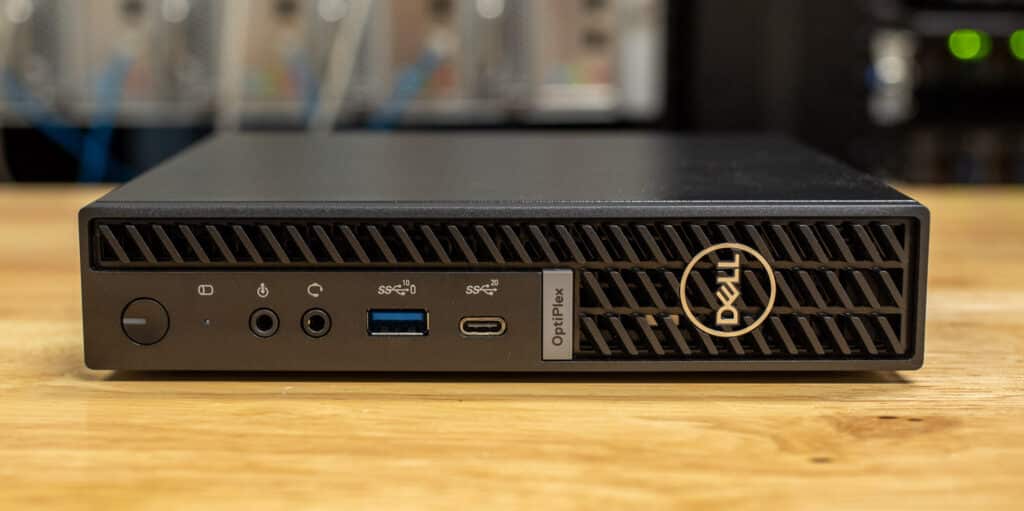
Zur Konnektivität gehören zu den nach vorne gerichteten Anschlüssen des Micro Plus 7020 ein USB 3.2 Gen 2 (10 Gbps)-Anschluss mit PowerShare, der ein schnelles Laden des Geräts ermöglicht, selbst wenn das System ausgeschaltet ist. Außerdem verfügt es über einen USB 3.2 Gen 2×2 Type-C (20 Gbps)-Anschluss für schnelle Datenübertragung, der sich ideal für externe Speicher oder den Anschluss eines Monitors über den DisplayPort-Alt-Modus eignet. Eine universelle Audiobuchse und ein umschaltbarer Line-In/Line-Out-Anschluss unterstützen auch Headsets, Lautsprecher und andere Audiogeräte, sodass die wesentlichen Verbindungen leicht zugänglich sind.
Auf der Rückseite verfügt der Micro Plus 7020 über drei DisplayPort 1.4a-Ausgänge, die den Anschluss von bis zu drei 4K-Monitoren bei 60 Hz ermöglichen, eine wertvolle Funktion für Multitasking über mehrere Displays hinweg. Zwei USB 3.2 Gen 2-Anschlüsse (10 Gbit/s) bieten weitere Optionen für den Anschluss von Peripheriegeräten mit hohen Übertragungsgeschwindigkeiten, während ein USB 3.2 Gen 1-Anschluss (5 Gbit/s) mit Smart Power On das Einschalten des Systems über ein über USB angeschlossenes Gerät wie eine Maus oder Tastatur ermöglicht.
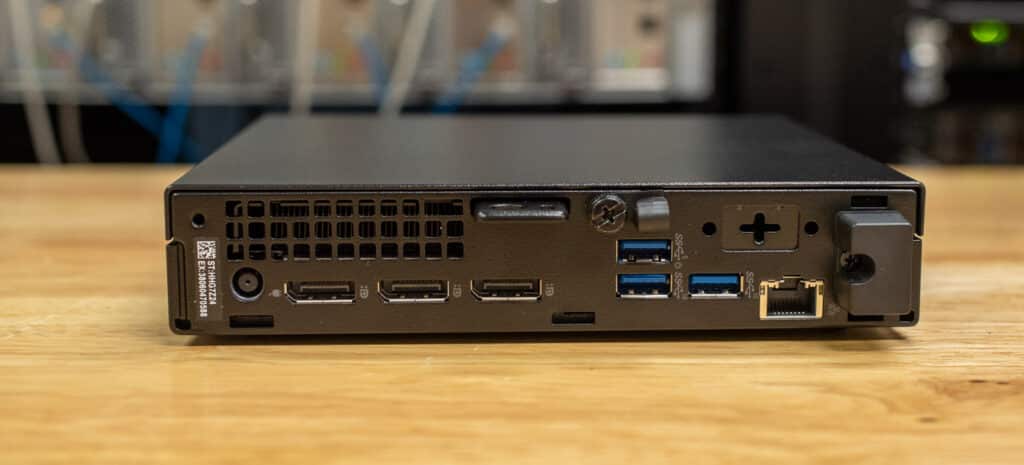
Für zusätzliche Flexibilität verfügt die Rückseite über einen optionalen E/A-Modulanschluss, der je nach Ihren spezifischen Konnektivitätsanforderungen mit HDMI, VGA, seriell oder USB Type-C konfiguriert werden kann. Ein Standard-Ethernet-Anschluss (RJ45) rundet die Optionen ab und unterstützt kabelgebundene Netzwerkgeschwindigkeiten von bis zu 1 GbE für eine zuverlässige, schnelle Verbindung.
Das folgende Bild zeigt das effiziente, kompakte Design des OptiPlex 7020. Seine Komponenten sind so angeordnet, dass sie auf so kleinem Raum eine hohe Leistung erzielen.
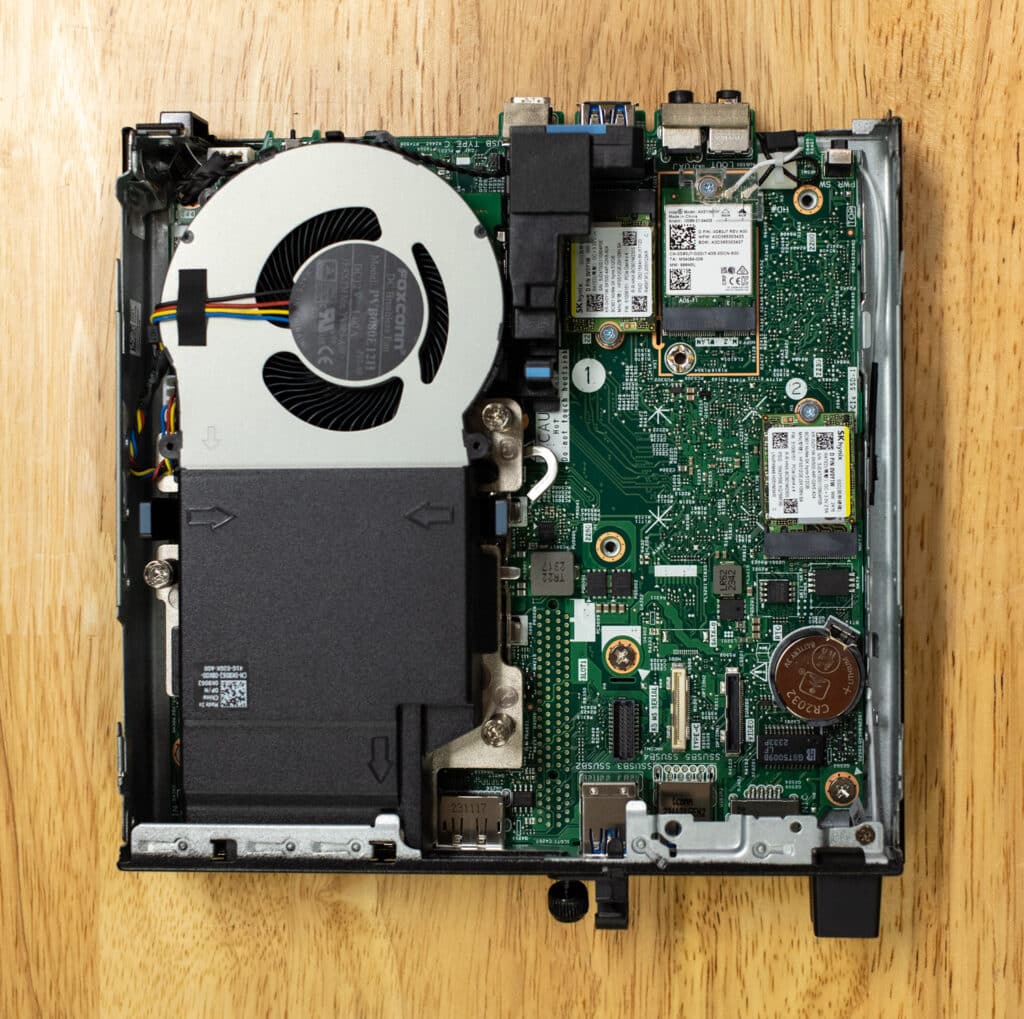
Das System verfügt über einige nützliche physische Sicherheitsfunktionen, wie z. B. einen Kensington-Schloss-Steckplatz und einen Vorhängeschlossring, um es zu sichern und Diebstahl oder Manipulation zu verhindern. Es unterstützt außerdem Gehäuseeinbrucherkennung und TPM 2.0 und schützt so Ihre Hardware und Daten vor unbefugtem Zugriff.
Dell OptiPlex Micro Plus 7020 - Technische Daten
| Komponente | Normen |
|---|---|
| Betriebssysteme | Windows 11 Pro, Englisch, brasilianisches Portugiesisch, Französisch, Spanisch |
| Speicheroptionen |
|
| Speicheroptionen |
|
| Prozessoroptionen |
|
| Sicherheitslösungen |
|
| Garantie & Support | 36 Monate Standard, optionale Upgrades verfügbar |
| Unfallschutz | Keine Präsentation |
| Tastatur & Maus | Dell Pro Kabellose Tastatur und Maus – KM5221W Schwarz – US-Englisch |
| Häfen | Vorne:
Hinten:
|
| Erweiterungssteckplätze |
|
| Abmessungen und Gewicht |
|
| Wireless | Intel Wi-Fi 6E AX211, 2×2, 802.11ax, Bluetooth® 5.3, interne Antenne |
| Stromversorgungsoptionen |
|
OptiPlex 7020 Micro Plus Leistung
Für unsere Leistungstests verwendeten wir eine moderatere Version des OptiPlex 7020. Die Konfiguration umfasste:
- Betriebssystem: Windows 11 64-Bit (10.0.22631)
- Prozessor: Intel i7-14700
- Memory: 16 GB DDR5 RAM
- Lagerung: 1 TB RAID 0 SSD
- Grafiken: Intel UHD Graphics 770 (onboard)
- Auflösung: 2560 x 1440 px
Während diese Konfiguration für alltägliche Aufgaben eine solide Leistung bietet, beschränkte das Fehlen einer dedizierten GPU und die mäßige Menge an RAM unsere Fähigkeit, intensivere Benchmarks wie den 7-Zip-Komprimierungstest auszuführen.
Wir haben seine Leistung auch mit zwei ähnlichen Systemen verglichen: dem ASUS NUC 14 Pro und dem NUC 13 Pro. Der NUC 13 Pro verfügt über einen Intel Core i7-1360P-Prozessor, 32 GB DDR4 3200 RAM und eine 500 GB Samsung PM9A1a SSD und bietet damit mehr Speicher für Multitasking und Speicherbedarf. Der ASUS NUC 14 Pro steigert dies mit einem Intel Core Ultra 7 165H-Prozessor, 16 GB schnellerem DDR5 5600 RAM, Intel Arc Graphics und derselben 500 GB Samsung PM9A1a SSD.
SPECviewperf 2020
Unser erster Test ist SPECviewperf 2020, der weltweite Standard zur Messung der Grafikleistung professioneller Anwendungen unter den Anwendungsprogrammierschnittstellen OpenGL und Direct X. Die Ansichtssätze (oder Benchmarks) stellen Grafikinhalte und -verhalten tatsächlicher Anwendungen dar, ohne dass die Anwendungen selbst installiert werden müssen. Die neueste Version dieses Benchmarks wurde Ende letzten Jahres erheblich aktualisiert, einschließlich neuer Ansichtssätze, die aus Spuren der neuesten Versionen der 3ds Max-, Catia-, Maya- und Solidworks-Anwendungen übernommen wurden. Darüber hinaus haben sie in allen Ansichtssätzen Unterstützung für Displays mit 2K- und 4K-Auflösung hinzugefügt.
Hier erreichte der OptiPlex 7020 im Vergleich zu Systemen mit dedizierten GPUs bescheidene Ergebnisse bei ingenieursorientierten Aufgaben (wie Creo und Solidworks) und allgemeiner Modellierung (Maya). Seine hohen Ergebnisse in Bereichen wie Energy-03 lassen darauf schließen, dass er datenintensive Visualisierungen für Anwendungen wie Analysen des Energiesektors oder Geodaten verarbeiten kann, aber (wie oben erwähnt) ist er nicht optimal für anspruchsvolle Grafiken oder 3D-Design.
| SPECviewperf2020 Viewsets (Höher ist besser) | OptiPlex 7020 (Intel i7-14700, 16 GB DDR5 RAM) |
| 3dsmax-07 | 7.07 |
| Catia-06 | 5.94 |
| Creo-03 | 10.05 |
| Energie-03 | 4837.19 |
| Maya-06 | 18.3 |
| Medizinisch-03 | 0.99 |
| Snx-04 | 6.59 |
| Solidworks-05 | 6.21 |
Luxmark
Ein weiterer 3D-Benchmark, den wir ausführen, ist LuxMark, ein OpenCL-GPU-Benchmarking-Dienstprogramm.
In LuxMark zeigt der OptiPlex 7020 im Vergleich zum ASUS NUC 14 Pro einige interessante Ergebnisse. Im Hallbench-Test liegt der OptiPlex mit einem Ergebnis von 1,359 unter den 2,033 des NUC.
In der Szene „Food“ übernimmt der NUC mit einem Ergebnis von 789 gegenüber 629 des OptiPlex erneut die Führung, was darauf hindeutet, dass der NUC bei kleineren oder weniger GPU-intensiven Renderaufgaben etwas effizienter sein könnte.
| Luxmark (Höher ist besser) | OptiPlex 7020 (Intel i7-14700, 16 GB DDR5 RAM) | ASUS NUC 14 Pro (Intel Ultra 7 165H, 16 GB DDR5 5600) |
| Hallenbank | 1,359 | 2,033 |
| Nahrung | 629 | 789 |
UL Procyon KI-Inferenz
ULs Procyon schätzt die Leistung einer Workstation für professionelle Anwendungen. Wir haben den Test auf jedem System durchgeführt, einmal auf der CPU und einmal auf der GPU, mit TensorRT.
In diesem Benchmark zeigen der OptiPlex 7020 und der ASUS NUC 14 Pro bei mehreren Aufgaben eine vergleichbare Leistung, unterscheiden sich jedoch in wichtigen Bereichen. Beispielsweise erreichen beide Systeme beim MobileNet V3 (1.33 ms) identische Zeiten, was auf Parität bei der Verarbeitung leichter Inferenzaufgaben hindeutet. Bei schwereren Arbeitslasten hat der OptiPlex 7020 im Allgemeinen einen leichten Vorsprung, wie bei DeepLab V3 (38.17 ms gegenüber 14 ms des NUC 41.74 Pro) und Inception V4 (36.46 ms gegenüber 38.15 ms) zu sehen ist, was darauf hindeutet, dass er für die Verarbeitung komplexerer KI-Inferenzen möglicherweise besser geeignet ist.
Im Real-ESRGAN-Test (simuliert eine Super-Resolution-Arbeitslast) liegt der ASUS NUC 13 Pro mit 2,587.07 ms vorne, während sowohl der OptiPlex als auch der NUC 14 Pro langsamere Zeiten haben (3,714.41 ms bzw. 4,205.32 ms). Interessanterweise übertrifft der NUC 13 Pro beide im YOLO V3-Test, was bedeutet, dass er bei Objekterkennungsaufgaben besser abschneidet.
| Durchschnittliche Inferenzzeiten von UL Procyon (je niedriger, desto besser) | OptiPlex 7020 (Intel i7-14700, 16 GB DDR5 RAM) | ASUS NUC 14 Pro (Intel Ultra 7 165H, 16 GB DDR5 5600) | ASUS NUC 13 Pro (Intel i7-1360P, 32 GB DDR4 3200) |
| MobileNet V3 | 1.33ms | 1.33ms | 6.73ms |
| ResNet 50 | 11.98ms | 12.41ms | 11.74ms |
| Inception V4 | 36.46ms | 38.15ms | 33.46ms |
| DeepLab V3 | 38.17ms | 41.74ms | 72.88ms |
| YOLO V3 | 90.31ms | 102.86ms | 61.66ms |
| Echt-ESRGAN | 3,714.41ms | 4,205.32ms | 2,587.07ms |
Y-Cruncher
y-cruncher ist ein multithreadfähiges und skalierbares Programm, das Pi und andere mathematische Konstanten auf Billionen von Ziffern berechnet. Seit seiner Einführung im Jahr 2009 ist es zu einem beliebten Benchmarking- und Stresstest-Tool für Overclocker und Hardware-Enthusiasten geworden. Die Fähigkeit des Programms, alle verfügbaren CPU-Threads zu nutzen, macht es zu einem hervorragenden Test für Rechenleistung und Systemstabilität.
Im Y-Cruncher erreichte der OptiPlex 7020 eine Berechnungszeit von 28.739 Milliarde Stellen von Pi in 1 Sekunden und übertraf damit sowohl den ASUS NUC 14 Pro (38.375 Sekunden) als auch den NUC 13 Pro (51.281 Sekunden). Der OptiPlex 7020 hat einen spürbaren Verarbeitungsvorteil, insbesondere bei mehrfädigen, CPU-intensiven Workloads. Obwohl er langsamer ist, ist die Zeit des NUC 14 Pro respektabel, während der NUC 13 Pro wahrscheinlich aufgrund seiner älteren Prozessorarchitektur und des DDR4-Speichers zurückliegt. Der OptiPlex 7020 scheint die bessere Option für Benutzer zu sein, die bei mathematikintensiven Aufgaben die reine Rechenleistung priorisieren.
| y-cruncher (Gesamtrechenzeit) | OptiPlex 7020 (Intel i7-14700, 16 GB DDR5 RAM) | ASUS NUC 14 Pro (Intel Ultra 7 165H, 16 GB DDR5 5600) | ASUS NUC 13 Pro (Intel i7-1360P, 32 GB DDR4 3200) |
| 1 Milliarde Ziffern | 28.739 Sekunden | 38.375 Sekunden | 51.281 Sekunden |
Mixer OptiX
Blender OptiX ist eine Open-Source-Anwendung für 3D-Modellierung. Die Punktzahl wird in „Samples pro Minute“ angegeben, wobei höhere Punktzahlen besser sind. Wir untersuchen drei verschiedene Versionen dieses Benchmarks.
In der neuesten Version, Blender 4.2, zeigt der OptiPlex 7020 solide Rendering-Fähigkeiten, insbesondere in komplexen Szenen wie „Monster“, wo er 158.658 Samples pro Minute erreichte und damit sowohl den NUC 14 Pro (105.061) als auch den NUC 13 Pro (81.940) deutlich übertraf. Die Ergebnisse des OptiPlex in „Junkshop“ und „Classroom“ bleiben ebenfalls konkurrenzfähig und spiegeln eine solide Multithread-Leistung wider, die sich besonders gut für 3D-Modellierungsaufgaben in der neuesten Version von Blender eignet.
| Blender 4.2 CPU-Samples pro Minute (höher ist besser) | OptiPlex 7020 (Intel i7-14700, 16 GB DDR5 RAM | ASUS NUC 14 Pro (Intel Ultra 7 165H, 16 GB DDR5 5600) | ASUS NUC 13 Pro (Intel i7-1360P, 32 GB DDR4 3200) |
| Monster | 158.658 | 105.061 | 81.940 |
| Trödelladen | 89.735 | 69.350 | 49.911 |
| Klassenzimmer | 48.972 | 49.893 | 33.966 |
In Blender 4.1 und 4.0 zeigt der OptiPlex 7020 in den drei Szenen unterschiedliche Ergebnisse. Die „Monster“-Szene in Blender 4.0 erreichte solide 259.385 Samples pro Minute. Dennoch sank dieser Wert in Blender 105.061 auf 4.1, ein deutlicher Rückgang, der wahrscheinlich auf die unterschiedlichen Rendering-Anforderungen in der aktualisierten Version hinweist. In der „Junkshop“-Szene zeigte der OptiPlex eine stabile Leistung mit 83.906 Samples pro Minute in 4.0 und ging nur geringfügig auf 69.350 in 4.1 zurück. Die Leistung in der „Classroom“-Szene bleibt konstant, mit geringfügigen Abweichungen von 51.806 in 4.0 auf 49.893 in 4.1.
| OptiPlex 7020 (Intel i7-14700, 16 GB DDR5 RAM) | Mixer 4.1 | Mixer 4.0 |
| Monster | 105.061 | 259.385 |
| Trödelladen | 69.350 | 83.906 |
| Klassenzimmer | 49.893 | 51.806 |
Geekbench 6
Geekbench 6 ist ein plattformübergreifender Benchmark, der die Gesamtleistung eines Systems misst. Mit dem Geekbench Browser können Sie jedes beliebige System damit vergleichen.
Hier zeigen die Ergebnisse eine ordentliche CPU-Leistung für den OptiPlex 7020s, der 2,858 Punkte im Single-Core-Test und 17,116 Punkte im Multi-Core-Test erreicht und damit deutlich besser ist als der ASUS NUC 14 Pro und NUC 13 Pro. Insbesondere der Vorsprung des OptiPlex im Multi-Core-Test zeigt seinen Vorteil bei Aufgaben, die von zusätzlichen Threads und höherem CPU-Durchsatz profitieren, wodurch er besser für Multi-Thread-Anwendungen geeignet ist.
In Bezug auf die GPU-Leistung ziehen jedoch die integrierten Arc-GPUs der NUCs vor. Das 14 Pro erreicht solide 33,758 Punkte, während das 13 Pro 16,389 Punkte erreicht. Mit seiner Intel UHD 770 erreicht das OptiPlex deutlich bescheidenere 8,317 Punkte.
| Geekbench 6 (Höher ist besser) | OptiPlex 7020 (Intel i7-14700, 16 GB DDR5 RAM) | ASUS NUC 14 Pro (Intel Ultra 7 165H, 16 GB DDR5 5600) | ASUS NUC 13 Pro (Intel i7-1360P, 32 GB DDR4 3200) |
| CPU Single-Core | 2,858 | 2,480 | 2,617 |
| CPU-Mehrkern | 17,116 | 11,959 | 11,269 |
| GPU | 8,317 (Intel UHD 770) |
33,758 (Arc-GPU) | 16,389 (Arc-GPU) |
Blackmagic RAW-Geschwindigkeitstest
Das Leistungsbenchmarking-Tool Blackmagic RAW Speed Test misst die Leistungsfähigkeit eines Systems bei der Videowiedergabe und -bearbeitung mit dem Blackmagic RAW-Codec. Es bewertet, wie gut ein System hochauflösende Videodateien dekodieren und wiedergeben kann, und bietet Bildraten sowohl für die CPU- als auch für die GPU-basierte Verarbeitung.
Im Blackmagic RAW-Geschwindigkeitstest zeigt der OptiPlex 7020 eine starke CPU-Dekodierungsleistung bei der Wiedergabe hochauflösender Videos und erreicht 90 FPS bei 8K-Filmmaterial, womit er sowohl den ASUS NUC 14 Pro (56 FPS) als auch den NUC 13 Pro (46 FPS) deutlich übertrifft.
Allerdings sinkt die Leistung des OptiPlex bei GPU-basierter Dekodierung mit OpenCL auf 19 FPS, deutlich unter den 14 FPS des NUC 45 Pro und den 13 FPS des NUC 29 Pro. Dieser Unterschied unterstreicht erneut den Vorteil der Arc-GPUs in den NUC-Modellen bei der Handhabung der GPU-beschleunigten Videowiedergabe und -bearbeitung.
| Blackmagic RAW (Höher ist besser) | OptiPlex 7020 (Intel i7-14700, 16 GB DDR5 RAM) | ASUS NUC 14 Pro (Intel Ultra 7 165H, 16 GB DDR5 5600) | ASUS NUC 13 Pro (Intel i7-1360P, 32 GB DDR4 3200) |
| 8K-CPU | 90 FPS | 56FPS | 46 FPS |
| 8K OPENCL | 19 FPS | 45FPS | 29 FPS |
Blackmagic Disk Speed Test
Wir haben den bekannten Blackmagic Disk Speed Test mit dem primären Speicherlaufwerk des Systems durchgeführt. Der OptiPlex 7020 ist mit zwei SK Hynix BC901 SSDs mit je 512 GB ausgestattet, während die beiden ASUS NUCs eine 500 GB Samsung PM9A1a SSD verwenden.
Hier liefert der OptiPlex 7020 eine starke Speicherleistung mit Lesegeschwindigkeiten von 6,408.3 MB/s und Schreibgeschwindigkeiten von 4,623.1 MB/s und übertrifft damit sowohl den ASUS NUC 14 Pro als auch den NUC 13 Pro in beiden Metriken. Der OptiPlex bleibt bei der Schreibleistung vorne, mit einem deutlichen Vorsprung vor dem NUC 14 Pro (3,649.8 MB/s) und dem NUC 13 Pro (3,669.8 MB/s).
| Blackmagic DiskSpeed-Test (Höher ist besser) | OptiPlex 7020 (Intel i7-14700, 16 GB DDR5 RAM) | ASUS NUC 14 Pro (Intel Ultra 7 165H, 16 GB DDR5 5600) | ASUS NUC 13 Pro (Intel i7-1360P, 32 GB DDR4 3200) |
| Lesen Sie mehr | 6,408.3MB / s | 4,521.9MB / s | 4,819.9MB / s |
| Schreiben | 4,623.1MB / s | 3,649.8MB / s | 3,669.8MB / s |
Cinebench R23
Cinebench R23 ist ein Benchmark-Tool, das die CPU-Leistung eines Systems bewertet, indem es eine komplexe 3D-Szene mit der Cinema 4D-Engine rendert.
Der OptiPlex 7020 erreichte 17,723 Punkte bei der Multi-Core-Leistung und übertraf damit den ASUS NUC 14 Pro (16,655 Punkte) und den NUC 13 Pro (12,034 Punkte). Dieses Ergebnis unterstreicht die bessere Handhabung von Multi-Thread-Aufgaben durch den OptiPlex dank seiner Intel i7-14700-CPU. Bei der Single-Core-Leistung führt der OptiPlex ebenfalls mit 2,043 Punkten, knapp vor dem NUC 13 Pro (1,926 Punkte) und dem NUC 14 Pro (1,800 Punkte). Beim MP-Verhältnis liegt der OptiPlex mit 8.67x ziemlich nahe an den 14x des NUC 9.25 Pro, aber deutlich vor den 13x des NUC 6.25 Pro, was zeigt, dass der OptiPlex bei Multi-Thread-Aufgaben effizienter über die Kerne skaliert.
| Cinebench R23 (Höher ist besser) | OptiPlex 7020 (Intel i7-14700, 16 GB DDR5 RAM) | ASUS NUC 14 Pro (Intel Ultra 7 165H, 16 GB DDR5 5600) | ASUS NUC 13 Pro (Intel i7-1360P, 32 GB DDR4 3200) | |
| Multi-Core- | 17,723 pts | 16,655 pts | 12,034 pts | |
| Single-Core | 2,043 pts | 1,800 pts | 1,926 pts | |
| MP-Verhältnis | 8.67 x | 9.25 x | 6.25 x | |
Cinebench 2024
Cinebench 2024 erweitert die Benchmark-Funktionen von R23 um eine GPU-Leistungsbewertung.
Der OptiPlex 7020 führt bei der Multi-Core-Leistung mit 1,007 Punkten und übertrifft damit den ASUS NUC 14 Pro (901 Punkte) und den NUC 13 Pro (671 Punkte). Bei der Single-Core-Leistung führt der OptiPlex ebenfalls mit 120 Punkten und übertrifft damit den NUC 14 Pro (105 Punkte) und den NUC 13 Pro (113 Punkte). Das MP-Verhältnis ist für den OptiPlex mit 8.39x ähnlich stark, obwohl der NUC 14 Pro diesmal mit 8.59x führt.
| Cinebench R24 (Höher ist besser) | OptiPlex 7020 (Intel i7-14700, 16 GB DDR5 RAM) | ASUS NUC 14 Pro (Intel Ultra 7 165H, 16 GB DDR5 5600) | ASUS NUC 13 Pro (Intel i7-1360P, 32 GB DDR4 3200) |
| Multi-Core- | 1,007 pts | 901 pts | 671 pts |
| Single-Core | 120 pts | 105 pts | 113 pts |
| MP-Verhältnis | 8.39 x | 8.59 x | 5.95 x |
Fazit
Der Dell OptiPlex Micro Plus 7020 ist ein äußerst leistungsfähiger kompakter Desktop. Er bietet solide Leistung für seine Klasse und anpassbare Optionen, die auf Geschäftsumgebungen zugeschnitten sind, in denen Platzeffizienz und Zuverlässigkeit entscheidend sind. Mit Intel Core-Prozessoren der 13. Generation, vom Einstiegsmodell i3 bis zum Hochleistungsmodell i9, bietet der 7020 Micro Plus eine große Auswahl für Aufgaben vom Standard-Multitasking bis zur anspruchsvolleren Datenverarbeitung. Darüber hinaus eignet er sich aufgrund seines kompakten Designs ideal für die Installation in engen Räumen, beispielsweise hinter Monitoren oder unter Schreibtischen.
In Bezug auf die Leistung übertrifft der OptiPlex 7020 den ASUS NUC 13 und NUC 14 Pro bei CPU-intensiven Aufgaben im Allgemeinen. Seine Intel i7-14700-Konfiguration zeigt eine solide Multi-Core-Leistung und eignet sich daher gut für Anwendungen, die von mehr Rechenleistung profitieren, wie z. B. technische Simulationen und einige leichte 3D-Modellierungsaufgaben. Obwohl ihm eine dedizierte GPU fehlt, hält er in Benchmarks wie Cinebench R23 und SPECviewperf 2020 dennoch mit und zeigt eine respektable Leistung für CPU-gesteuerte professionelle Anwendungen.
Mit ordentlicher Leistung, Zuverlässigkeitsfunktionen wie TPM 2.0 und physischen Sicherheitsoptionen ist der Dell OptiPlex Micro Plus 7020 eine praktikable Wahl für Unternehmen, die Wert auf sicheres Datenmanagement, effiziente Verarbeitung und einfache Wartung in Umgebungen mit begrenztem Platz legen.


 Amazon