---
description: The HP Z2 SFF G9 tower maximizes possibilities in a SFF workstation chassis. It accepts 125-watt Intel Core K-class CPUs and full GPU.
title: HP Z2 SFF G9 Workstation Review
image: https://www.storagereview.com/wp-content/uploads/2022/08/StorageReview-HP-Z2-SFF-G9-10.jpg
---
[![Storage Review]()](https://storagereview.com/)
---
[Facebook](https://www.facebook.com/@storagereview) [X (Twitter)](https://twitter.twitter.com/storagereview) [Instagram](https://www.instagram.com/storagereview/) [LinkedIn](https://www.linkedin.com/company/storagereview-com) [YouTube](https://www.youtube.com/user/storagereview?sub_confirmation=1) [Email](mailto:info@storagereview.com) [Spotify](https://open.spotify.com/show/1y6VnznABhHeOSMOmbDTz0) [Reddit](https://www.reddit.com/r/StorageReview/) [Discord](https://discord.gg/TwMHb4azdC) [RSS Feed](https://www.storagereview.com/rss.xml) [TikTok](https://www.tiktok.com/@storagereview)
[Facebook](https://www.facebook.com/@storagereview) [X (Twitter)](https://twitter.com/storagereview) [Instagram](https://www.instagram.com/storagereview/) [LinkedIn](https://www.linkedin.com/company/storagereview-com) [YouTube](https://www.youtube.com/user/storagereview?sub_confirmation=1) [Email](mailto:info@storagereview.com) [Spotify](https://open.spotify.com/show/1y6VnznABhHeOSMOmbDTz0) [Reddit](https://www.reddit.com/r/StorageReview/) [Discord](https://discord.gg/TwMHb4azdC) [RSS Feed](https://www.storagereview.com/rss.xml) [TikTok](https://www.tiktok.com/@storagereview)
[](https://www.storagereview.com)
≡ Menu
- [Home](https://www.storagereview.com/)
- [Storage Reviews](https://www.storagereview.com/review)
- [End User Reviews](https://www.storagereview.com/consumer)
- [Enterprise Reviews](https://www.storagereview.com/enterprise)
- [Ubiquiti Reviews](https://www.storagereview.com/best/ubiquiti-reviews)
- [SR Merch](https://store.storagereview.com)
- [Leaderboards](https://www.storagereview.com/best)
- [Best Storage Arrays](https://www.storagereview.com/best/storage-arrays)
- [Best Enterprise SSDs](https://www.storagereview.com/best/enterprise-ssds)
- [Best Servers](https://www.storagereview.com/best/servers)
- [Best Enterprise GPUs](https://www.storagereview.com/best/enterprise-gpus)
- [Best Desktops for Local AI](https://www.storagereview.com/best/desktops-local-ai)
- [Best Laptops for Local AI](https://www.storagereview.com/best/laptops-local-ai)
- [Best Local LLM Tools](https://www.storagereview.com/best/local-llm-tools)
- [Agentic AI Hardware](https://www.storagereview.com/best/agentic-ai-hardware)
- [Best SSDs & Hard Drives](https://www.storagereview.com/best_drives)
- [Best Portable SSDs](https://www.storagereview.com/best/portable-ssds)
- [Best Business Laptops](https://www.storagereview.com/best/business-laptops)
- [Best Mobile Workstations](https://www.storagereview.com/best/mobile-workstations)
- [Best Desktop Workstations](https://www.storagereview.com/best/desktop-workstations)
- [Best Mini PCs](https://www.storagereview.com/best/mini-pcs)
- [Best Laptop Battery Life](https://www.storagereview.com/best/laptop-battery-life)
- [Storage Reference Guide](https://www.storagereview.com/storage-reference-guide)
- [About SR](https://www.storagereview.com/about-storagereview)
- [StorageReview.com Sweepstakes Rules and Regulations](https://www.storagereview.com/storagereview-com-sweepstakes-rules-and-regulations)
Search
[Home](https://www.storagereview.com/) » [Review](https://www.storagereview.com/review) » HP Z2 SFF G9 Workstation Review
# HP Z2 SFF G9 Workstation Review
by Charles P. Jefferies on September 1, 2022
[End User](https://www.storagereview.com/consumer) ◇ [Workstation](https://www.storagereview.com/consumer/workstation)
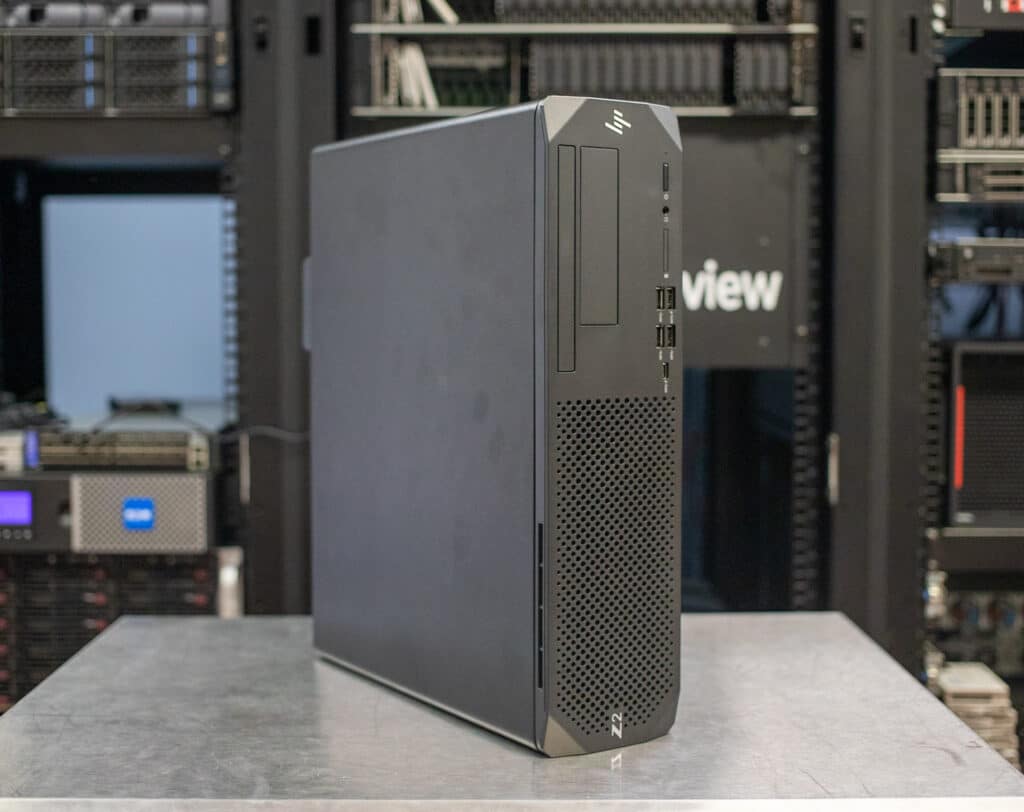
HP’s Z desktop workstations have long been industry standards. The Z2 SFF G9 delivers impressive expansion for being a small-form-factor tower, supporting full-size graphics cards and Intel “Alder Lake” Core K-series processors. It’s great for packing power where full-size towers don’t fit.
## **HP Z2 SFF G9 Specifications**
The Z2 SFF G9 is an evolution of the [Z2 SFF G8](https://www.storagereview.com/review/hp-z2-sff-g8-workstation-review), with a revised chassis and newer technology. Its most important change is a move to Intel’s 12th generation “Alder Lake” Core-class processors, topping out with the 16-core [Core i9-12900K](https://www.storagereview.com/review/intel-core-i9-12900k-alder-lake-review). (See that link for an Alder Lake rundown.) This gives it significantly more potential than the last model, which was based on 11th generation “Rocket Lake” chips that topped out with the 8-core Core i9-11900K. It also allows the Z2 SFF G9 to use higher-bandwidth DDR5 memory. It also supports ECC memory with Core processors. (Intel has discontinued entry-level Xeons for workstations like this.)
New graphics options include the latest professional boards from AMD and Nvidia. The primary graphics card goes to the 16GB [Nvidia RTX A4000](https://www.storagereview.com/review/nvidia-rtx-a4000-review); a second graphics card is available up to the 8GB Nvidia T1000.
Storage expansion has improved this generation; the Z2 SFF G9 now accommodates three M.2 Gen4 drives, up from two. It also fits two 3.5-inch drives. Memory expands to 128GB of DDR5-4800 via four UDMM slots. Overall, the Z2 SFF G9 offers lots of power and expansion for a small-form-factor tower. Its full specifications are as follows:
| **Operating System** | - Windows 11 Pro – HP recommends Windows 11 Pro for business
- Windows 10 Pro (available through downgrade rights from Windows 11 Pro)
- Windows 10 Pro (available through downgrade rights from Windows 11 Pro)
- Windows 11 Home
- Ubuntu Linux 20.04
- Linux-ready
|
| --- | --- |
| **Processor** | - Intel® Core™ i3-12100 Processor (3.3 GHz, up to 4.3 GHz w/Boost, 12 MB cache, 4 core) + Intel® UHD Graphics 730
- Intel® Core™ i3-12300 Processor (3.5 GHz, up to 4.4 GHz w/Boost, 12 MB cache, 4 core, 60W) + Intel® UHD Graphics 730
- Intel® Core™ i5-12400 Processor (2.5 GHz, up to 4.4 GHz w/Boost, 18 MB cache, 6 core, 65W) + Intel® UHD Graphics 730
- Intel® Core™ i5-12500 Processor (3.0 GHz, up to 4.6 GHz w/Boost, 18 MB cache, 6 core, 65W) + Intel® UHD Graphics 770
- Intel® Core™ i5-12600 Processor (3.3 GHz, up to 4.8 GHz w/Boost, 18 MB cache, 6 core, 65W) ECC + Intel® UHD Graphics 770
- Intel® Core™ i5-12600K Processor (2.8 GHz, up to 4.9 GHz w/Boost, 20 MB cache, 10 core, 125W) ECC + Intel® UHD Graphics 770
- Intel® Core™ i7-12700 Processor (2.1 GHz, up to 4.9 GHz w/Boost, 25 MB cache, 12 core, 65W) ECC + Intel® UHD Graphics 770
- Intel® Core™ i7-12700K Processor (3.6 GHz, up to 5 GHz w/Boost, 25 MB cache, 12 core, 125W) ECC + Intel® UHD Graphics 770
- Intel® Core™ i9-12900 Processor (2.4 GHz, up to 5.1 GHz w/Boost, 30 MB cache, 16 core, 65W) + Intel® UHD Graphics 770
- Intel® Core™ i9-12900K Processor (3.2 GHz, up to 5.2 GHz w/Boost, 30 MB cache, 16 core, 125W) ECC + Intel® UHD Graphics 770
|
| **Memory** | 4x DDR5-4800 UDIMM slots, 128GB max. (4x 32GB) |
| **Internal M.2 Storage** | Up to 3x Gen4 drives, 4TB per drive |
| **Other Internal Storage** | Up to 2x 3.5-inch drives, 12TB per drive |
| **Internal Storage Removeable** | - HP QX118 Removable SSD Drive Carrier
- HP QX328 3.5 in Removable w/M.2 Adapter 2-in-1 Adapter Kit
|
| **Graphics** | - NVIDIA® T400 (4 GB GDDR6, 3 x Mini DisplayPort) Graphics
- NVIDIA® T1000 (4 GB GDDR5, 4xMini DisplayPort, PCIe x16) Graphics
- NVIDIA® T1000 (8 GB GDDR5, 4xMini DisplayPort, PCIe x16) Graphics
- NVIDIA RTX™ A2000 (12 GB GDDR6, 4 x Mini DisplayPort 1.4) Graphics
- AMD Radeon™ RX 6700 XT Graphics (12 GB GDDR6, FH, PCIe x16) Graphics
- AMD Radeon™ PRO W6600 (8 GB GDDR6, 4x DisplayPort 1.4 with DSC) Graphics Card
- NVIDIA RTX™ A4000 (16 GB GDDR6 ECC, 4 x DisplayPort 1.4; FH) Blower Fan Graphics
- AMD Radeon™ RX 6400 Graphics (4 GB GDDR6; FH; PCIe x16)
|
| **Second Graphics Card** | - NVIDIA® T400 (4 GB GDDR6, 3 x Mini DisplayPort) 2nd Graphics
- NVIDIA® T600 (2 GB GDDR6, LP, 4 x Mini DisplayPort 1.4, PCIe x16) 2nd Graphics
- NVIDIA® T1000 (4 GB GDDR5, 4xMini DisplayPort, Blower Fan, PCIe x16) 2nd Graphics
- NVIDIA® T1000 (8 GB GDDR5, 4xMini DisplayPort, PCIe x16) 2nd Graphics
|
| **Additional Networking Options** | - Intel Ethernet Network Adapter I225-T1
- Intel® 2 x 2.5 GBE Ethernet Network Adapter I225-T1
- NVIDIA® Mellanox ConnectX®-6 Dx Dual Port 10/25GBE SFP28 Network Interface Card
|
| **Media Reader** | SD 4.0 card reader Flex IO |
| **Optical Drive** | Up to 9.5mm DVD-Writer |
| **Wireless LAN** | - Intel® Wi-Fi 6 AX211 + Bluetooth® 5.2
- Intel® Wi-Fi 6 AX211 + Bluetooth® 5.2 – External Antenna
|
| **External I/O Ports** | - Front:4 SuperSpeed USB Type-A 10Gbps signaling rate (1 charging); 1 universal audio jack
- Rear:1 audio-in; 1 audio-out; 1 RJ-45; 2 DisplayPort™ 1.4; 2 SuperSpeed USB Type-A 10Gbps signaling rate; 1 SuperSpeed USB Type-A 5Gbps signaling rate; 3 USB Type-A 480Mbps signaling rate
|
| **Expansion Slots** | 1 PCIe 3 x4 (x16 connector); 1 PCIe 3 x4 (x4 connector); 1 PCIe 3 x1 (x4 connector); 1 PCIe 4 x16 (x16 connector); 3 M.2 2280 PCIe 4 X4 for NVMe; 1 M.2 2230 PCIe 3 X1 for WLAN1 M.2 2230 slot for WLAN and 3 M.2 2280 slots for storage |
| **Weight** | Starting at 13.1 lb |
| **Dimensions (WDH)** | 15.1 x 12.1 x 3.95 in |
| **Warranty** | 3-year limited |
## **HP Z2 SFF G9 Build and Design**
The Z2 SFF G9 is a small desktop, 15.1 by 12.1 by 3.95 inches (WDH) and starting at 13.1 pounds. The black case looks clean and professional and can orient vertically or horizontally. Reflective logos on the front panel hint this is a premium model. Most of the chassis is metal.
The front panel’s left half is perforated for airflow. HP offers a dust filter bezel for protection in particle-rich environments. It has four USB-A 3.2 Gen 2 ports (10Gbps), an optional USB-C 3.2 Gen 2×2 port (20Gbps), a universal audio jack, and an optional SD card reader. There’s also room for a slim optical drive and a flex bay, which can fit an externally accessible 3.5-inch drive via caddy.
![HP Z2 SFF G9 Front Panel]()
Around back, the motherboard’s backplane provides Ethernet, two DisplayPort video outputs, audio in and out jacks, and six USB-A ports (one 3.2 Gen 1, two 3.2 Gen 2, and three legacy 2.0). The Nvidia RTX A4000 graphics card in our unit has four DisplayPort video outputs. An optional flex port (not populated in our unit; it’s left of the USB ports) lets you add video outputs, USB ports, Ethernet, or Thunderbolt 3 ports. Wireless connectivity is optional.
![HP Z2 SFF G9 Rear Connectivity]()
The top panel comes off for servicing. HP offers an optional tamper lock, and for added security, a Computrace BIOS module.
Working space is tight yet components are well laid out. The large CPU air cooler takes much of the space. The power supply is far right; the Z2 SFF G9 tops out at 550 watts. For storage, the 3.5-inch bay is upper right and there are three M.2 Gen4 slots on the motherboard.
![HP Z2 SFF G9 3.5-inch Drive]()
Also note the four DIMM slots right of the CPU cooler.
![HP Z2 SFF G9 DIMM Slots]()
Partially visible below are the expansion slots, including one PCIe 4.0 x16 (x16 connector), one PCIe 3.0 x4 (x16), one PCIe 3.0 x4 (x4), and one PCIe 3.0 x1 (x4). The M.2 drive in our unit (below the CPU cooler) is wisely covered by a heatsink.
![HP Z2 SFF G9 Expansion]()
The expansion slots are only fully accessible with the graphics card and auxiliary fan module removed. Seen here, the RTX A4000 graphics card has a server-style riser card. Its blower-style cooler sends its cooling air outside the case.
![HP Z2 SFF G9 Graphics Card]()
![HP Z2 SFF G9 Auxiliary Fan]() Overall, the Z2 SFF G9 offers good serviceability and expansion.
## **HP Z2 SFF G9 Performance**
The HP Z2 SFF G9 we’re testing has the following:
- Windows 11 Pro
- Intel Core i7-12700K (12 cores – 8-Performance, 4-Efficiency – 125-watt base power, up to 5.0GHz P-core)
- 64GB DDR5-4800 dual-channel RAM (2x 32GB)
- 16GB [Nvidia RTX A4000](https://www.storagereview.com/review/nvidia-rtx-a4000-review) graphics card
- 1TB Gen4 SSD (Samsung PM9A1)
- 550-watt power supply
This configuration is well-balanced for design work, opting for the Core i7-12700K over the hotter-running Core i9-12900K. The available 65-watt CPUs can be a better choice if you don’t need the higher sustained clockspeeds of K-class chips. Meanwhile, the RTX A4000 graphics card is the most powerful GPU this tower accepts and is the single most expensive upgrade. Getting a faster graphics card than that means stepping up to HP’s full-size Z2 G9 tower.
We are using the [Intel NUC 12 Extreme Kit](https://www.storagereview.com/review/intel-nuc-12-extreme-dragon-canyon-review) for performance comparisons, the only small desktop we’ve tested through our current benchmarks. It’s competitively equipped with a Core i9-12900 and an RTX A4000.
**SPECviewperf 2020**
The SPECviewperf 2020 benchmark is the worldwide standard for measuring the graphics performance of professional applications running under the OpenGL and Direct X application programming interfaces. The viewsets (or benchmarks) represent graphics content and behavior from actual applications, without having to install the applications themselves. These viewsets include 3D Max, CATIA, Creo, Energy, Maya, Medical, Siemens NX, and Solidworks.
The Z2 SFF G9 and the NUC 12 Extreme Kit performed similar as expected since they are using the same graphics card, though the Z2 SFF G9 showed the slight edge, probably thanks to its more potent K-series processor and DDR5 memory. (The NUC 12 Extreme Kit uses DDR4.)
| **Viewsets** | **HP Z2 SFF G9 (Core i7-12700K, RTX A4000)** | Intel NUC 12 Extreme Kit (Core i9-12900, RTX A4000) |
| --- | --- | --- |
| **3dsmax-07** | 93.26 | 92.45 |
| **Catia-06** | 71.66 | 69.78 |
| **Creo-03** | 120.3 | 118.65 |
| **Energy-03** | 21.61 | 21.73 |
| **Maya-06** | 233.73 | 227.22 |
| **Medical-03** | 20.37 | 19.98 |
| **Snx-04** | 328.32 | 298.97 |
| **Sw-05** | 108.48 | 107.7 |
**ESRI**
Next up is the Environmental Systems Research Institute (Esri) benchmark. Esri is a supplier of Geographic Information System (GIS) software. Esri’s Performance Team designed their PerfTool add-in scripts to automatically launch the ArcGIS Pro. This application uses a “ZoomToBookmarks” function to browse various predefined bookmarks and create a log file with all the key data points required to predict the user experience. The script automatically loops the bookmarks three times to account for caching (memory and disk cache). In other words, this benchmark simulates heavy graphical use that one might see through Esri’s ArcGIS Pro software.
First is the Montreal model. The Z2 SFF G9 and the NUC 12 Extreme Kit performed almost identically.
| **ESRI ArcGIS Pro 2.3 Montreal** | |
| --- | --- |
| **Average FPS** | **Average** |
| **HP Z2 SFF G9 (Core i7-12700K, RTX A4000)** | 354.75 |
| Intel NUC 12 Extreme Kit (Core i9-12900, RTX A4000) | 356.88 |
| **Minimum FPS** | **Average** |
| **HP Z2 SFF G9 (Core i7-12700K, RTX A4000)** | 182.60 |
| Intel NUC 12 Extreme Kit (Core i9-12900, RTX A4000) | 179.89 |
Next is Philly; the Z2 SFF G9 showed a significant lead. Possible driver improvements and the HP’s stronger processor and DDR5 memory likely contributed.
| **ESRI ArcGIS Pro 2.3 Philly** | |
| --- | --- |
| **Average FPS** | **Average** |
| **HP Z2 SFF G9 (Core i7-12700K, RTX A4000)** | 334.05 |
| Intel NUC 12 Extreme Kit (Core i9-12900, RTX A4000) | 266.31 |
| **Minimum FPS** | **Average** |
| **HP Z2 SFF G9 (Core i7-12700K, RTX A4000)** | 191.99 |
| Intel NUC 12 Extreme Kit (Core i9-12900, RTX A4000) | 166.07 |
The Portland model is last, and we’re back to the Z2 SFF G9 and the NUC 12 Extreme Kit performing similarly.
| **ESRI ArcGIS Pro 2.3 Portland** | |
| --- | --- |
| **Average FPS** | **Average** |
| **HP Z2 SFF G9 (Core i7-12700K, RTX A4000)** | 2444.24 |
| Intel NUC 12 Extreme Kit (Core i9-12900, RTX A4000) | 2529.59 |
| **Minimum FPS** | **Average** |
| **HP Z2 SFF G9 (Core i7-12700K, RTX A4000)** | 1016.62 |
| Intel NUC 12 Extreme Kit (Core i9-12900, RTX A4000) | 984.32 |
**LuxMark**
LuxMark is an OpenCL cross-platform benchmarking tool from those who maintain the open-source 3D rending engine, LuxRender. This tool looks at GPU performance in the areas of 3D modeling, lighting, and video work. For this review, we used the newest version, v4alpha0. In LuxMark, higher is better when it comes to the score. The HP trailed here, possibly because its Core i7 processor has fewer cores than the NUC 12 Extreme Kit’s Core i9.
| **LuxMark v4.0alpha** | | |
| --- | --- | --- |
| **Benchmark** | **HP Z2 SFF G9 (Core i7-12700K, RTX A4000)** | Intel NUC 12 Extreme Kit (Core i9-12900, RTX A4000) |
| **Food** | 4,868 | 5,423 |
| **Hall** | 12,440 | 13,590 |
**Blender**
Next up is the ubiquitous Blender, an open-source 3D modeling application. This benchmark was run using the Blender Benchmark utility (OptiX enabled). The scores are samples per minute, with higher being better. Using the same graphics cards means the Z2 SFF G9 and the NUC 12 Extreme Kit again performed almost identically.
| ** ** | **HP Z2 SFF G9 (Core i7-12700K, RTX A4000)** | Intel NUC 12 Extreme Kit (Core i9-12900, RTX A4000) |
| --- | --- | --- |
| Classroom | 845 | 834 |
| Monster | 1,634 | 1,621 |
| Junkshop | 937 | 929 |
**OctaneBench**
OctaneBench is a benchmarking utility for OctaneRender, which is a 3D renderer with RTX support that is similar to V-Ray. Like Luxmark, OctaneBench is large GPU-dependent, and we saw little difference between the Z2 SFF G9 and the NUC 12 Extreme Kit both using an RTX A4000 GPU.
| **Scene** | **Kernel** | **HP Z2 SFF G9 (Core i7-12700K, RTX A4000)** | Intel NUC 12 Extreme Kit (Core i9-12900, RTX A4000) |
| --- | --- | --- | --- |
| Interior | Info channels | 11.20 | 11.14 |
| | Direct lighting | 39.33 | 39.12 |
| | Path tracing | 49.77 | 49.57 |
| Idea | Info channels | 6.80 | 6.78 |
| | Direct lighting | 30.77 | 29.88 |
| | Path tracing | 37.64 | 36.24 |
| ATV | Info channels | 16.91 | 16.81 |
| | Direct lighting | 43.18 | 43.13 |
| | Path tracing | 54.21 | 52.16 |
| Box | Info channels | 9.41 | 9.33 |
| | Direct lighting | 38.72 | 38.33 |
| | Path tracing | 43.79 | 42.21 |
**SiSoftware Sandra 2021**
Our last test is the popular SiSoftware Sandra 2021 suite. Higher numbers are better in all subtests. The Z2 SFF G9 showed much stronger memory bandwidth than the DDR4-equipped NUC 12 Extreme Kit, though the overall memory score was about the same.
| **SiSoftware Sandra 2021** | **HP Z2 SFF G9 (Core i7-12700K, RTX A4000)** | Intel NUC 12 Extreme Kit (Core i9-12900, RTX A4000) |
| --- | --- | --- |
| **Memory Bandwidth** | 51.000GB/s | 39.481GB/s |
| **Cache & Memory Latency** | 37.1ns | 32.8ns |
| **Cache & Memory Bandwidth** | 361.927GB/s | 398.745GB/s |
| **Overall Memory Score** | 2.00kPT | 1.98kPT |
## **Conclusion**
The HP Z2 SFF G9 tower maximizes possibilities in a small-form-factor workstation chassis. It accepts 125-watt Intel Core K-class processors, a full-size graphics card, and most notably has four UDIMM; often, SFF towers often have just two. HP also improved storage for this G9 generation, now with three Gen4 drives and a 3.5-inch bay.
![HP Z2 SFF G9 Servicing]()
The main shortcoming of this tower is that its top graphics card is the Nvidia RTX A4000, but that’s a potent enough card for tasks with which a workstation like this would be tasked. It’s also much more GPU power than was available in the G8 version of this system. The extra blower for the GPU is a nice touch too.
As with all of their Z systems, HP supports [HP Anyware](https://www.storagereview.com/news/hp-anyware-for-digital-workspaces-combines-teradici-and-remote-boost-tech) (previously ZCentral REmote Boost) which is a free remote access and collaboration application. For remote teams, this can add a lot of value. Lastly, the system is easy to service and carries a 3-year warranty. For its combination of power and moderate footprint, the Z2 SFF G9 earns our recommendation for a SFF workstation tower.
[HP Product Link](https://www.hp.com/us-en/shop/pdp/hp-z2-small-form-factor-g9-workstation-customizable-4n3t7av-mb)
**Engage with StorageReview**
[Newsletter](https://www.storagereview.com/storage_newsletter) | [YouTube](https://www.youtube.com/user/StorageReview "Opens in a new window") | Podcast [iTunes](https://podcasts.apple.com/gb/podcast/storagereview-com-storage-reviews/id1060681115 "Opens in a new window")/ [Spotify](https://open.spotify.com/show/1y6VnznABhHeOSMOmbDTz0 "Opens in a new window") | [Instagram](https://www.instagram.com/storagereview/ "Opens in a new window") | [Twitter](https://twitter.com/storagereview "Opens in a new window") | [TikTok](https://www.tiktok.com/@storagereview? "Opens in a new window") | [RSS Feed](https://www.storagereview.com/rss.xml)
![]()
### Charles P. Jefferies
I'm a lifelong technology enthusiast and have been reviewing consumer and enterprise technology since 2005. I specialize in laptops, tablets, and enterprise hardware. I'm a graduate of Rochester Institute of Technology. Outside of work, I love the gym, reading, and photography.
Previous post: [Solidigm P41 Plus SSD Review](https://www.storagereview.com/review/solidigm-p41-plus-ssd-review)
Next post: [GRECELL T-1000 Portable Power Station Review](https://www.storagereview.com/review/grecell-t-1000-portable-power-station-review)
Trusted Vendors
Products and solutions from our affiliate partners:
- [

Ubiquiti
](https://store.ui.com/us/en?a_aid=StorageReview "Opens in a new window")
- [

Newegg
](https://click.linksynergy.com/fs-bin/click?id=g5terNMDhz0&offerid=1207190.18&subid=0&type=4 "Opens in a new window")
- [
 Amazon
](https://amzn.to/4fLJUEW "Opens in a new window")
Newsletter
Subscribe to the StorageReview newsletter to stay up to date on the latest news and reviews. We promise no spam!
1
Leave this field empty if you’re human:
## Advertisement
Content Categories
[Facebook](https://www.facebook.com/@storagereview) [X](https://twitter.com/storagereview) [Instagram](https://www.instagram.com/storagereview/) [LinkedIn](https://www.linkedin.com/company/storagereview-com) [YouTube](https://www.youtube.com/user/storagereview?sub_confirmation=1) [Email](mailto:info@storagereview.com) [Spotify](https://open.spotify.com/show/1y6VnznABhHeOSMOmbDTz0) [Reddit](https://www.reddit.com/r/StorageReview/) [Discord](https://discord.gg/TwMHb4azdC) [RSS](https://www.storagereview.com/rss.xml) [TikTok](https://www.tiktok.com/@storagereview)
Copyright © 1998-2025 Flying Pig Ventures, LLC Cincinnati, Ohio. All rights reserved.
Manage your privacy
To provide the best experiences, we and our partners use technologies like cookies to store and/or access device information. Consenting to these technologies will allow us and our partners to process personal data such as browsing behavior or unique IDs on this site and show (non-) personalized ads. Not consenting or withdrawing consent, may adversely affect certain features and functions.
Click below to consent to the above or make granular choices. Your choices will be applied to this site only. You can change your settings at any time, including withdrawing your consent, by using the toggles on the Cookie Policy, or by clicking on the manage consent button at the bottom of the screen.
Functional Functional Always active
The technical storage or access is strictly necessary for the legitimate purpose of enabling the use of a specific service explicitly requested by the subscriber or user, or for the sole purpose of carrying out the transmission of a communication over an electronic communications network.
Preferences Preferences
The technical storage or access is necessary for the legitimate purpose of storing preferences that are not requested by the subscriber or user.
Statistics Statistics
The technical storage or access that is used exclusively for statistical purposes. The technical storage or access that is used exclusively for anonymous statistical purposes. Without a subpoena, voluntary compliance on the part of your Internet Service Provider, or additional records from a third party, information stored or retrieved for this purpose alone cannot usually be used to identify you.
Marketing Marketing
The technical storage or access is required to create user profiles to send advertising, or to track the user on a website or across several websites for similar marketing purposes.
Statistics
Marketing
Features
Always active
Special features
Special purposes
Always active
- Manage options
- Manage services
- Manage {vendor\_count} vendors
- [Read more about these purposes](https://cookiedatabase.org/tcf/purposes/)
Accept Deny Manage options Save preferences Manage options
- {title}
- {title}
- {title}
Manage your privacy
To provide the best experiences, we use technologies like cookies to store and/or access device information. Consenting to these technologies will allow us to process data such as browsing behavior or unique IDs on this site. Not consenting or withdrawing consent, may adversely affect certain features and functions.
Functional Functional Always active
The technical storage or access is strictly necessary for the legitimate purpose of enabling the use of a specific service explicitly requested by the subscriber or user, or for the sole purpose of carrying out the transmission of a communication over an electronic communications network.
Preferences Preferences
The technical storage or access is necessary for the legitimate purpose of storing preferences that are not requested by the subscriber or user.
Statistics Statistics
The technical storage or access that is used exclusively for statistical purposes. The technical storage or access that is used exclusively for anonymous statistical purposes. Without a subpoena, voluntary compliance on the part of your Internet Service Provider, or additional records from a third party, information stored or retrieved for this purpose alone cannot usually be used to identify you.
Marketing Marketing
The technical storage or access is required to create user profiles to send advertising, or to track the user on a website or across several websites for similar marketing purposes.
Statistics
Marketing
Features
Always active
Special features
Special purposes
Always active
- Manage options
- Manage services
- Manage {vendor\_count} vendors
- [Read more about these purposes](https://cookiedatabase.org/tcf/purposes/)
Accept Deny Manage options Save preferences Manage options
- {title}
- {title}
- {title}
Manage consent Manage consent
```json
{"@context":"https:\/\/schema.org","@graph":[{"@type":"WebPage","@id":"https:\/\/www.storagereview.com\/review\/hp-z2-sff-g9-workstation-review","url":"https:\/\/www.storagereview.com\/review\/hp-z2-sff-g9-workstation-review","name":"HP Z2 SFF G9 Workstation Review - StorageReview.com","isPartOf":{"@id":"https:\/\/www.storagereview.com\/#website"},"primaryImageOfPage":{"@id":"https:\/\/www.storagereview.com\/review\/hp-z2-sff-g9-workstation-review#primaryimage"},"image":{"@id":"https:\/\/www.storagereview.com\/review\/hp-z2-sff-g9-workstation-review#primaryimage"},"thumbnailUrl":"https:\/\/www.storagereview.com\/wp-content\/uploads\/2022\/08\/StorageReview-HP-Z2-SFF-G9-10.jpg","datePublished":"2022-09-01T18:34:04+00:00","description":"The HP Z2 SFF G9 tower maximizes possibilities in a SFF workstation chassis. It accepts 125-watt Intel Core K-class CPUs and full GPU.","breadcrumb":{"@id":"https:\/\/www.storagereview.com\/review\/hp-z2-sff-g9-workstation-review#breadcrumb"},"inLanguage":"en-US","potentialAction":[{"@type":"ReadAction","target":["https:\/\/www.storagereview.com\/review\/hp-z2-sff-g9-workstation-review"]}]},{"@type":"ImageObject","inLanguage":"en-US","@id":"https:\/\/www.storagereview.com\/review\/hp-z2-sff-g9-workstation-review#primaryimage","url":"https:\/\/www.storagereview.com\/wp-content\/uploads\/2022\/08\/StorageReview-HP-Z2-SFF-G9-10.jpg","contentUrl":"https:\/\/www.storagereview.com\/wp-content\/uploads\/2022\/08\/StorageReview-HP-Z2-SFF-G9-10.jpg","width":1500,"height":1075,"caption":"HP Z2 SFF G9 Servicing"},{"@type":"BreadcrumbList","@id":"https:\/\/www.storagereview.com\/review\/hp-z2-sff-g9-workstation-review#breadcrumb","itemListElement":[{"@type":"ListItem","position":1,"name":"Home","item":"https:\/\/www.storagereview.com\/"},{"@type":"ListItem","position":2,"name":"Review","item":"https:\/\/www.storagereview.com\/review"},{"@type":"ListItem","position":3,"name":"HP Z2 SFF G9 Workstation Review"}]},{"@type":"WebSite","@id":"https:\/\/www.storagereview.com\/#website","url":"https:\/\/www.storagereview.com\/","name":"StorageReview.com","description":"StorageReview.com is a leading provider of news and reviews throughout the entire IT stack - from the datacenter to the edge, and all points in between.","publisher":{"@id":"https:\/\/www.storagereview.com\/#organization"},"potentialAction":[{"@type":"SearchAction","target":{"@type":"EntryPoint","urlTemplate":"https:\/\/www.storagereview.com\/?s={search_term_string}"},"query-input":{"@type":"PropertyValueSpecification","valueRequired":true,"valueName":"search_term_string"}}],"inLanguage":"en-US"},{"@type":"Organization","@id":"https:\/\/www.storagereview.com\/#organization","name":"StorageReview.com","url":"https:\/\/www.storagereview.com\/","logo":{"@type":"ImageObject","inLanguage":"en-US","@id":"https:\/\/www.storagereview.com\/#\/schema\/logo\/image\/","url":"https:\/\/www.storagereview.com\/wp-content\/uploads\/2020\/02\/Storage-Reviews-2-2.png","contentUrl":"https:\/\/www.storagereview.com\/wp-content\/uploads\/2020\/02\/Storage-Reviews-2-2.png","width":344,"height":61,"caption":"StorageReview.com"},"image":{"@id":"https:\/\/www.storagereview.com\/#\/schema\/logo\/image\/"},"sameAs":["https:\/\/x.com\/storagereview","http:\/\/youtube.com\/user\/storagereview"]}]}
```