---
description: HP’s ZBook Firefly G8 is a nice-looking mobile workstation that offers enough power to suit the needs of lighter professional use cases
title: HP ZBook Firefly G8 Review
image: https://www.storagereview.com/wp-content/uploads/2021/06/StorageReview-hp-firefly-g8-lifestyle4.jpg
---
[![Storage Review]()](https://storagereview.com/)
---
[Facebook](https://www.facebook.com/@storagereview) [X (Twitter)](https://twitter.twitter.com/storagereview) [Instagram](https://www.instagram.com/storagereview/) [LinkedIn](https://www.linkedin.com/company/storagereview-com) [YouTube](https://www.youtube.com/user/storagereview?sub_confirmation=1) [Email](mailto:info@storagereview.com) [Spotify](https://open.spotify.com/show/1y6VnznABhHeOSMOmbDTz0) [Reddit](https://www.reddit.com/r/StorageReview/) [Discord](https://discord.gg/TwMHb4azdC) [RSS Feed](https://www.storagereview.com/rss.xml) [TikTok](https://www.tiktok.com/@storagereview)
[Facebook](https://www.facebook.com/@storagereview) [X (Twitter)](https://twitter.com/storagereview) [Instagram](https://www.instagram.com/storagereview/) [LinkedIn](https://www.linkedin.com/company/storagereview-com) [YouTube](https://www.youtube.com/user/storagereview?sub_confirmation=1) [Email](mailto:info@storagereview.com) [Spotify](https://open.spotify.com/show/1y6VnznABhHeOSMOmbDTz0) [Reddit](https://www.reddit.com/r/StorageReview/) [Discord](https://discord.gg/TwMHb4azdC) [RSS Feed](https://www.storagereview.com/rss.xml) [TikTok](https://www.tiktok.com/@storagereview)
[](https://www.storagereview.com)
≡ Menu
- [Home](https://www.storagereview.com/)
- [Storage Reviews](https://www.storagereview.com/review)
- [End User Reviews](https://www.storagereview.com/consumer)
- [Enterprise Reviews](https://www.storagereview.com/enterprise)
- [Ubiquiti Reviews](https://www.storagereview.com/best/ubiquiti-reviews)
- [SR Merch](https://store.storagereview.com)
- [Leaderboards](https://www.storagereview.com/best)
- [Best Storage Arrays](https://www.storagereview.com/best/storage-arrays)
- [Best Enterprise SSDs](https://www.storagereview.com/best/enterprise-ssds)
- [Best Servers](https://www.storagereview.com/best/servers)
- [Best Enterprise GPUs](https://www.storagereview.com/best/enterprise-gpus)
- [Best Desktops for Local AI](https://www.storagereview.com/best/desktops-local-ai)
- [Best Laptops for Local AI](https://www.storagereview.com/best/laptops-local-ai)
- [Best Local LLM Tools](https://www.storagereview.com/best/local-llm-tools)
- [Agentic AI Hardware](https://www.storagereview.com/best/agentic-ai-hardware)
- [Best SSDs & Hard Drives](https://www.storagereview.com/best_drives)
- [Best Portable SSDs](https://www.storagereview.com/best/portable-ssds)
- [Best Business Laptops](https://www.storagereview.com/best/business-laptops)
- [Best Mobile Workstations](https://www.storagereview.com/best/mobile-workstations)
- [Best Desktop Workstations](https://www.storagereview.com/best/desktop-workstations)
- [Best Mini PCs](https://www.storagereview.com/best/mini-pcs)
- [Best Laptop Battery Life](https://www.storagereview.com/best/laptop-battery-life)
- [Storage Reference Guide](https://www.storagereview.com/storage-reference-guide)
- [About SR](https://www.storagereview.com/about-storagereview)
- [StorageReview.com Sweepstakes Rules and Regulations](https://www.storagereview.com/storagereview-com-sweepstakes-rules-and-regulations)
Search
[Home](https://www.storagereview.com/) » [Review](https://www.storagereview.com/review) » HP ZBook Firefly G8 Review
# HP ZBook Firefly G8 Review
by Lyle Smith on June 17, 2021
[End User](https://www.storagereview.com/consumer) ◇ [Workstation](https://www.storagereview.com/consumer/workstation)
The HP ZBook Firefly G8 is the line’s most portable to date. Available in both 14- and 15-inch versions, the new HP laptop is a highly customizable workstation that weighs in at just 2.98lbs and 3.74lbs, respectively, and features Wi-Fi 3, gigabit-class 5G, and long battery life.
The ZBook is a versatile line comprised of workstations that fit a range of both professional and casual needs. The Firefly G8 is from the newest generation and fits somewhere near the lower end of the spectrum as far as performance goes. As such, it can be outfitted with up to NVIDIA T500 graphics (a GPU designed for professional apps), 11th gen Intel processors, up to 2TB of speedy NVMe storage, and an improved HP DreamColor display that is highlighted deeper blacks, brighter whites, and full-spectrum color precision.
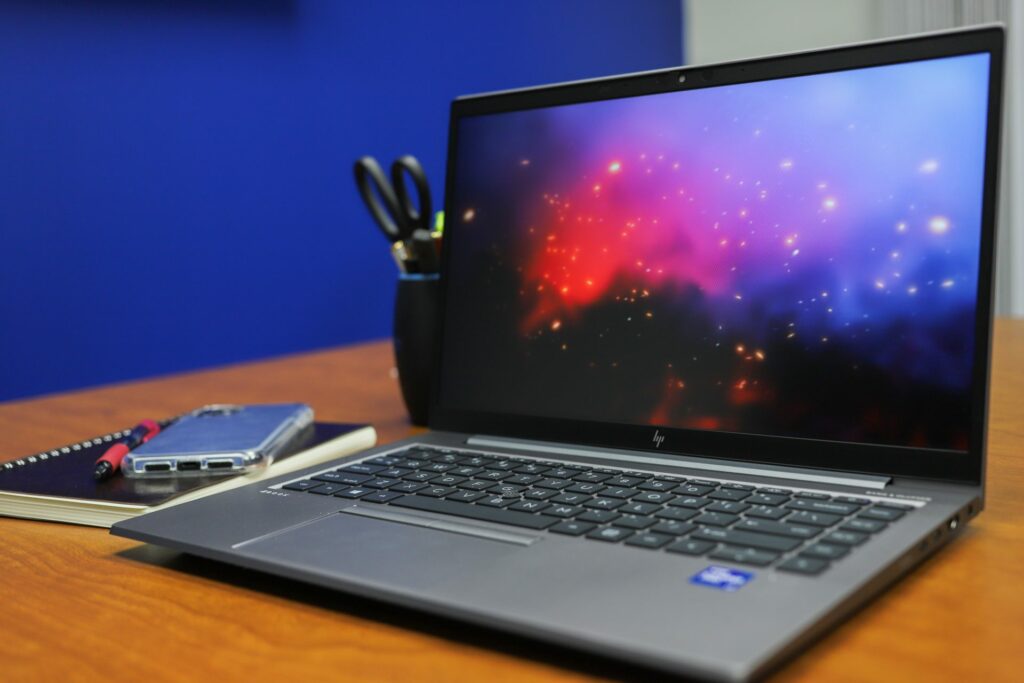
## **HP ZBook Firefly G8 Components**
For this review, we will be looking at the 14-inch model, which features a flexible range of component options that will fit pretty much any budget and performance need. This includes several choices in CPUs; from an Intel Core i5-1135G7 (with 2.4 GHz, up to 4.2 GHz with Turbo Boost, 8 MB cache, and 4 cores) all the way up to the powerful i7-1185G7 vPro (with 1.8 GHz, up to 4.4 GHz with Turbo Boost, 12 MB cache, and 4 cores) with two other options in between.
There are also two GPU options: The Intel Iris Xᵉ GPU (275W8AV) and the NVIDIA T500. The T500 is available to the marketing in both 2GB and 4GB models. HP used the 4GB T500 in this build. The former graphics option is an onboard GPU that is designed specifically for Intel’s 11th generation laptop chips. Intel indicates that it is [meant for gaming](https://www.storagereview.com/review/intel-iris-xe-good-enough-for-gaming), and though it will certainly be very limited in what it can produce in more demanding titles (like all onboard options), it will definitely suit light gaming needs. The NVIDIA T500 is the discrete graphics card option and brings more flexibility to the ZBook Firefly G8. Ultimately, this is the GPU you will want to go with if plan on running any kind of professional software package.
![HP ZBook Firefly G8 keyboard close up]()
Memory options include 8GB to 64GB of DDR4 3200 RAM, while internal storage ranges from a 128 GB PCIe TLC SSD to a 2TB PCIe NVMe TLC SSD. For connectivity, the ZBook Firefly G8 is highlighted by its dual USB4 Type-C Thunderbolt 4 ports. Users who need extra real estate for their workflows can also connect the workstation to an HP Thunderbolt Dock to add two external 4K displays. It also features two USB 3.1 Gen 1 Type-A ports, HDMI, and an optional smart card reader.
If you don’t have a wireless access point available or don’t want to risk connecting to an unsecured wireless network, the optional 4G LTE or 5G can use the SIM card from your mobile provider, so you can access the Internet anywhere your phone can. This type of connectivity is becoming more common as mobile networks are becoming more reliable and is certainly a very useful feature for workers who find themselves constantly on the go.
The display features a billion on-screen colors and 100% DCI-P3 coverage with DreamColor. Developed in partnership with DreamWorks Studio, this technology is an important feature for design professionals who need a mobile workstation (or with any display in general), as it is meant specifically for use cases that require color-critical work due to its superior color accuracy and predictability. This is the first time a DreamColor panel has been offered in a 14-inch display-size model. Coupling a great display with a super-portable is something that isn’t very common on the mobile workstation market.
![HP Firefly G8 top]()
Other options include an FHD LED UWVA Anti-Glare display with 100 nits (the unit used to determine luminance) for the standard model, which can be upgraded to an HP Sure View Reflect Integrated Privacy Screen and Ambient Light Sensor with an impressive 1000 nits.
Our review units consist of an HP DreamColor display, 11th Gen Intel Core i7-1185G7 processor, NVIDIA T500 graphics (4GB model), 32GB of DDR4 memory, and a 512GB SSD. The HP ZBook Firefly G8 can be [configured to order](https://tidd.ly/3q5ICvB) on HP’s site with a starting price of around $1500.
## **HP ZBook Firefly G8** **Specifications**
| Processors | - Intel Core i5-1135G7 processor (2.4 GHz, up to 4.2 GHz with Turbo Boost, 8 MB cache, 4 core
- Intel Core i5-1145G7 vPro processor (2.6 GHz, up to 4.4 GHz with Turbo Boost, 8 MB cache, 4 core)
- Intel Core i7-1165G7 processor (2.8 GHz, up to 4.7 GHz with Turbo Boost, 12 MB cache, 4 core)
- Intel Core i7-1185G7 vPro processor (1.8 GHz, up to 4.4 GHz with Turbo Boost, 12 MB cache, 4 core)
|
| --- | --- |
| Chipset | Integrated in System on Chip (SOC) |
| Graphics | Integrated: Intel Iris Xe Graphics Discrete: NVIDIA T500 (4 GB GDDR6 dedicated) |
| Display | Non-touch:- 14″ diagonal, FHD (1920 x 1080), IPS, anti-glare, 400 nits, low power 100% sRGB
- 14″ diagonal, FHD (1920 x 1080), IPS, anti-glare, 250 nits, 45% NTSC
- 14″ diagonal, FHD (1920 x 1080), IPS, anti-glare, 1000 nits, 72% NTSC, HP Sure View Reflect integrated privacy screen
- 14″ diagonal, FHD (1920 x 1080), IPS, anti-glare, 500 nits, 100% DCI-P3, HP DreamColor panel
Touch:- 14″ diagonal, FHD (1920 x 1080), touch, IPS, anti-glare, 250 nits, 45% NTSC
|
| Storage and drives | PCIe NVMe M.2 2280 Storage- 256 GB PCIe Gen3 x4 NVMe M.2 2280 TLC Self Encrypting (SED) Solid State Drive (SSD)
- 512 GB PCIe Gen3 x4 NVMe M.2 2280 TLC Self Encrypting (SED) Solid State Drive (SSD)
- 256 GB PCIe Gen3 x4 NVMe M.2 2280 TLC Solid State Drive (SSD)
- 512 GB PCIe Gen3 x4 NVMe M.2 2280 TLC Solid State Drive (SSD)
- 1 TB PCIe Gen3 x4 NVMe M.2 2280 TLC Solid State Drive (SSD)
- 2 TB PCIe Gen3 x4 NVMe M.2 2280 TLC Solid State Drive (SSD)
- 256 GB PCIe Gen3 x4 NVMe M.2 2280 TLC Value Solid State Drive (SSD)
- 128 GB PCIe Gen3 x2 NVMe M.2 2280 TLC Solid State Drive (SSD)
Intel Optane Memory H10 with Solid State Storage- 512 GB PCIe Gen3 x4 NVMe M.2 2280 QLC Solid State Drive (SSD) + 32 GB Intel Optane Memory
|
| Drive controllers | - M.2 Storage Bay (PCIe NVMe): PCIe Gen3 x4 lanes NVMe Solid State Drive
- RAID: Not supported·
|
| Memory | Maximum Memory for configuration without discrete graphics- 64 GB DDR4-3200 non-ECC SDRAM
- 2 DDR4 SODIMMS
- Supports Dual Channel Memory
Maximum Memory for configuration with discrete graphics- 32 GB DDR4-3200 non-ECC SDRAM
- Memory soldered Down
- Supports Dual Channel Memory
|
| Networking/communications | WLAN: Intel Wi-Fi 6 AX201 (2×2) and Bluetooth 5 combo, non-vPro WWAN: Intel XMM 7360 LTE Advanced CAT 9 Qualcomm Snapdragon X55 5G Modem Optional Near Field Communication (NFC) module |
| Audio / Multimedia | Audio: Audio by Bang & Olufsen, dual stereo speakers, HP World Facing Microphone dual array digital microphone, function keys for volume up and down, combo microphone/headphone jack, HD audio Camera:- 720p HD webcam with IR
- 720p HD webcam
|
| Keyboards / functions | Keyboard- HP Premium Quiet Keyboard, full-size, spill-resistant, backlit, with DuraKeys, clickpad with an image sensor and glass surface, multi-touch gestures, and taps enabled
- HP Premium Quiet Keyboard, full-size, spill-resistant, with DuraKeys, clickpad with an image sensor and glass surface, multitouch gestures, and taps enabled
Pointing Devices- Dual pointstick; Clickpad with multi-touch gestures enabled, taps enabled as default; Microsoft Precision Touchpad Default
- Gestures Support
|
| Power | Power Supply- Up to 14 hours
- HP Long Life 3-cell, 53 Wh Li-ion polymer
- HP Smart 65 W External AC Power Adapter
- HP Smart 45 W External AC Power Adapter
- Supports battery fast charge: approximately 50% in 30 minutes
|
| Environmental | - ENERGY STAR certified and EPEAT Gold registered configurations available
- Low halogen
|
| **Physical** | Dimensions (w x d x h)- 32.3 x 21.46 x 1.79 cm
- 12.73 x 8.45 x 0.71 in
Weights- Starting at 1.35kg (2.98 lb)
- Weight varies by configuration and components.
|
| Ports | Left side- 1 headphone/microphone combo
- 1 SuperSpeed USB Type-A 5Gbps signaling rate \[USB 3.1 Gen 1 Type A]
- 1 SuperSpeed USB Type-A 5Gbps signaling rate (charging) \[USB 3.1 Gen 1 Type-A charging]
- 1 Smart card reader (optional)
Right side- 1 4.5mm AC power connector
- 1 HDMI 2.0b
- 2 Thunderbolt 4 with USB4 Type-C 40Gbps signaling rate (USB Power Delivery, DisplayPort 1.4, HP Sleep and Charge) \[USB Type-C with Thunderbolt 4]
- 1 SIM Card Slot (optional)
|
| Warranty | 3-year limited warranty options available, depending on country. Batteries have a default one-year limited warranty except for Long Life Batteries which will have the same 1-year or 3-year limited warranty as to the platform. Optional HP Care Pack |
## **HP ZBook Firefly G8** **Design and build**
As we indicated earlier, the Firefly G8 is one of HP’s most portable mobile workstations to date, weighing in at just under 3 pounds for the 14-inch model. The design is very slick and has a premium-like feel to it. The Firefly G8 also uses recycled ocean-bound plastics, features plastic-free packaging, reduces the amount of hazardous material, and has fantastic power consumption. So, if you are someone who constantly looks for environmentally-friendly products, HP has certainly put some effort into making it appealing.
![hp zbook firefly g8 open]()
The Firefly G8 is also extremely flexible when it comes to viewing: it can open up to 170 degrees (the hinges can almost lay completely flat), making it easy when you need to collaborate and show off your screen at different angles. The keyboard has features new rubber domes, a dual-point stick, a power button, and a near-silent click pad, all of which help make working a more comfortable and quiet experience.
![HP ZBook Firefly G8 side keyboard view]()
Along the top of the Firefly G8 is the webcam (HD camera or UR camera depending on the model) and HP privacy camera shutter. The fingerprint sensor is located at the bottom right, just below the keyboard.
On the right side of the mobile workstation are the two USB Type-C (Thunderbolt 4) ports, HDMI 2.0 port, a Nano SIM card slot, and a 4.5mm AC power connector.
![hp zbook firefly g8 right ports]()
Turning the Firefly G8 around to the left side reveals the nano security lock slot, two USB 3.1 Gen 1 Type-A ports (one of which is for charging), the headphone/microphone combo jack, and an optional HP Smart Card Reader. The fan venting is located underneath the mobile workstation.
**![hp zbook firefly g8 left ports]()**
We outfitted the Firefly G8 with an NVIDIA T500, the company’s newest lower mid-range PCIe 4.0 professional graphics card based on the Turing architecture. It features 896 NVIDIA CUDA cores, 2GB or 4GB of GPU memory (depending on the model you choose), and 80GB/s in memory bandwidth.
**NVIDIA Quadro T500 Specifications**
| NVIDIA CUDA processing cores | 896 |
| --- | --- |
| GPU memory | 2GB or 4GB |
| Memory type | GDDR6 |
| Memory interface | 64-bit |
| TGP Max power consumption | 18 – 25 W |
| Open GL | 4.6 |
| Shader model | 5.1 |
| DirectX | 21.1 |
| Single-Precision FloatingPoint Performance (TFLOPS, Peak) | 3.0 |
| PCIe generation | 4 |
| Other features | - NVIDIA FXAA / TXAA
- Anti-Aliasing
- NVIDIA nView Display
- Management Technology
- Vulkan Support
- NVIDIA 3D Vision Pro
- NVIDIA Optimus
|
## **HP ZBook Firefly G8** **Performance**
To gauge the performance of the Firefly G8, we put it through a series of resource-intensive tests using the following build:
- HP DreamColor display
- 11th Gen Intel Core i7-1185G7 processor
- NVIDIA T500 graphics (4GB GDDR6)
- 32GB memory
- 512GB SSD
First up is PCMark10, a system benchmark for Windows PCs with a focus on modern office tasks. It offers a variety of workloads categorized into three groups. The Essentials group includes web browsing, video conferencing, and app start-up time. The Productivity group includes tests based on spreadsheets and writing. The Digital Content Creation group includes photo editing, video editing, and a rendering and visualization test.
Here, the ZBook Firefly G8 showed solid results for its class with an overall score of 5,343, comprising 9,010 in essentials, 8,414 in productivity, and 5,460 in digital content. The latter score was brought down by the video editing/rendering section due to the FPS limitations of the 4TB NVIDIA GPU
The SPECviewperf 2020 benchmark is the worldwide standard for measuring the graphics performance of professional applications running under the OpenGL and Direct X application programming interfaces. The viewsets (or benchmarks) represent graphics content and behavior from actual applications, without having to install the applications themselves. These viewsets include 3D Max, CATIA, Creo, Energy, Maya, Medical, Siemens NX, and Solidworks.
| Viewsets | HP ZBook Firefly G8
(NVIDIA T500) |
| --- | --- |
| 3dsmax-07 | 28.36 |
| Catia-06 | 22.77 |
| Creo-03 | 39.2 |
| Energy-03 | 10.99 |
| Maya-06 | 72.86 |
| Medical-03 | 14.47 |
| Snx-04 | 86.69 |
| Sw-05 | 42.17 |
Here, the new ZBook showed some pretty solid numbers for its class and size. The only area where it posted weaker results was in Siemens NX (advanced high-end CAD software).
Next, we ran SPECworkstation3, a test that specializes in benchmarks designed for testing all key aspects of workstation performance; it uses over 30 workloads to test CPU, graphics, I/O, and memory bandwidth. The workloads fall into broader categories such as Media and Entertainment, Financial Services, Product Development, Energy, Life Sciences, and General Operations. We are going to list the broad-category results for each, as opposed to the individual workloads. The results are an average of all the individual workloads in each category.
| **Category** | HP ZBook Firefly G8
(NVIDIA T500) |
| --- | --- |
| **M&E** | 1.26 |
| **ProdDev** | 1.67 |
| **LifeSci** | 1.5 |
| **Energy** | 0.89 |
| **FSI** | 1.15 |
| **GeneralOps** | 1.71 |
| **GPU Compute** | 1.22 |
The last of the tests is the Environmental Systems Research Institute (Esri) benchmark. Esri is a supplier of Geographic Information System (GIS) software. Esri’s Performance Team designed their PerfTool add-in scripts to automatically launch the ArcGIS Pro. This application uses a “ZoomToBookmarks” function to browse various predefined bookmarks and create a log file with all the key data points required to predict the user experience. The script automatically loops the bookmarks three times to account for caching (memory and disk cache). In other words, this benchmark simulates heavy graphical use that one might see through Esri’s ArcGIS Pro software.
The tests consist of three main datasets. Two are 3-D city views of Philadelphia, PA, and Montreal, QC. These city views contain textured 3-D multipatch buildings draped on a terrain model and draped aerial images. The third dataset is a 2-D map view of the Portland, OR region. This data contains detailed information for roads, land use parcels, parks and schools, rivers, lakes, and hill shaded terrain.
Looking at the Montreal model, the HP ZBook Firefly G8 Gen 3 posted an average and minimum FPS recorded 187.86 and 70.76, respectively.
| **ESRI ArcGIS Pro 2.3 Montreal** | |
| --- | --- |
| **Average FPS** | **Average** |
| **HP ZBook Firefly G8** | 187.86 |
| **Minimum FPS** | **Average** |
| **HP ZBook Firefly G8** | 70.76 |
Next up is our Philly model, where the Firefly G8 showed an average and minimum FPS showed 178.57 and 83.20.
| **ESRI ArcGIS Pro 2.3 Philly** | |
| --- | --- |
| **Average FPS** | **Average** |
| **HP ZBook Firefly G8** | 178.57 |
| **Minimum FPS** | **Average** |
| **HP ZBook Firefly G8** | 83.20 |
Our last model is of Portland. Here, the new ZBook had an average FPS that showed 647.70 while the minimum FPS posted 460.41.
| **ESRI ArcGIS Pro 2.3 Portland** | |
| --- | --- |
| **Average FPS** | **Average** |
| **HP ZBook Firefly G8** | 647.70 |
| **Minimum FPS** | **Average** |
| **HP ZBook Firefly G8** | 460.41 |
**Blender**
Next up is the ubiquitous Blender, an open-source 3D modeling application. This benchmark was run using the Blender Benchmark utility (OptiX enabled), which measures in seconds (lower is better).![HP ZBook Firefly G8 NVIDIA T500 Blender performance]()
This benchmark was extremely slow to run, though this was certainly expected from a lower-end workstation outfitted with an entry-level professional graphics card (Iris Xᵉ).
**LuxMark**
LuxMark is an OpenCL cross-platform benchmarking tool from those who maintain the open-source 3D rending engine, LuxRender. This tool looks at GPU performance in the areas of 3D modeling, lighting, and video work. For this review, we used the newest version, v4alpha0. In LuxMark, higher is better when it comes to the score.
![HP ZBook Firefly G8 NVIDIA T500 LuxMark performance]()
In the food rendering category, the Firefly G8 scored 868 when equipped with the NVIDIA T500, while the Hallbench rendering category showed 2,412. Again, these were very slow results, and those opting for the onboard GPU option will likely not be able to run the Blender or LuxMark.
## **Conclusion**
HP’s ZBook Firefly G8 is a great-looking, ultra-portable mobile workstation that offers just enough power to suit the needs of lighter professional use cases and even some casual gaming. Though it’s considered a lower-end model in the ZBook line, it still offers a range of configuration options.
Users can outfit the new ZBook with an Intel Core i5-1135G7 (up to 4.2 GHz) or the higher-end i7-1185G7 vPro (up to 4.4 GHz with Turbo Boost), with two other options in the middle. Memory configurations include up to 64GB of DDR4 3200 RAM, while internal storage ranges from a 128GB PCIe TLC SSD up to a 2TB PCIe NVMe TLC SSD. Users also have two GPU choices: The onboard Intel Iris Xᵉ (275W8AV) and the NVIDIA T500 discrete graphics card with 4GB of memory.
![firefly g8 open corner]()
For connectivity, the Firefly G8 features two USB4 Type-C Thunderbolt 4 ports, two USB 3.1 Gen 1 Type-A ports, HDMI, and an optional smart card reader. Users who need extra real estate for their workflows can connect the workstation to an HP Thunderbolt Dock for an additional two external 4K displays.
What sets the ZBook Firefly G8 apart from others is the HP DreamColor panel, as it is the first 14-inch mobile workstation to feature this technology. One of the biggest problems that HP DreamColor solves for content creators is colors appearing differently on different displays as well as rendering differently on different output devices. This technology allows devices to produce high color accuracy and predictability, making the Firefly G8 a unique combination of display quality and small form-factor.
![]()
All of this makes the Firefly G8 is an interesting option for both professionals and consumers alike. Though the new HP workstation is behind the more performance-driven models from the ZBook line, it features a great display, a range of component configurations, and one of the most portable builds we’ve seen in the workstation market. The Firefly G8 certainly checks some of the more important boxes, though the dedicated graphics card option is a must-have for anyone looking to run professional software packages.
Those who need a workstation that can handle resource-intensive applications will definitely want to look for a higher-end model with a more powerful GPU – there are plenty of options in the ZBook family. But for its part, the HP ZBook Firefly G8 is a really good option for professionals looking to get into a highly mobile workstation that carries a wonderful display.
[HP ZBook Firefly G8 Workstations](https://tidd.ly/3q5ICvB)
**Engage with StorageReview**
[Newsletter](https://www.storagereview.com/storage_newsletter) | [YouTube](https://www.youtube.com/user/StorageReview "Opens in a new window") | Podcast [iTunes](https://podcasts.apple.com/gb/podcast/storagereview-com-storage-reviews/id1060681115 "Opens in a new window")/ [Spotify](https://open.spotify.com/show/1y6VnznABhHeOSMOmbDTz0 "Opens in a new window") | [Instagram](https://www.instagram.com/storagereview/ "Opens in a new window") | [Twitter](https://twitter.com/storagereview "Opens in a new window") | [TikTok](https://www.tiktok.com/@storagereview? "Opens in a new window") | [RSS Feed](https://www.storagereview.com/rss.xml)
![]()
### Lyle Smith
Lyle is a writer for StorageReview, covering a broad set of end user and enterprise IT topics.
Previous post: [Supermicro 1124US-TNRP Server Review](https://www.storagereview.com/review/supermicro-1124us-tnrp-server-review)
Next post: [ScaleFlux CSD 2000 Review](https://www.storagereview.com/review/scaleflux-csd-2000-review)
Trusted Vendors
Products and solutions from our affiliate partners:
- [

Ubiquiti
](https://store.ui.com/us/en?a_aid=StorageReview "Opens in a new window")
- [

Newegg
](https://click.linksynergy.com/fs-bin/click?id=g5terNMDhz0&offerid=1207190.18&subid=0&type=4 "Opens in a new window")
- [
 Amazon
](https://amzn.to/4fLJUEW "Opens in a new window")
Newsletter
Subscribe to the StorageReview newsletter to stay up to date on the latest news and reviews. We promise no spam!
1
Leave this field empty if you’re human:
## Advertisement
Content Categories
[Facebook](https://www.facebook.com/@storagereview) [X](https://twitter.com/storagereview) [Instagram](https://www.instagram.com/storagereview/) [LinkedIn](https://www.linkedin.com/company/storagereview-com) [YouTube](https://www.youtube.com/user/storagereview?sub_confirmation=1) [Email](mailto:info@storagereview.com) [Spotify](https://open.spotify.com/show/1y6VnznABhHeOSMOmbDTz0) [Reddit](https://www.reddit.com/r/StorageReview/) [Discord](https://discord.gg/TwMHb4azdC) [RSS](https://www.storagereview.com/rss.xml) [TikTok](https://www.tiktok.com/@storagereview)
Copyright © 1998-2025 Flying Pig Ventures, LLC Cincinnati, Ohio. All rights reserved.
Manage your privacy
To provide the best experiences, we and our partners use technologies like cookies to store and/or access device information. Consenting to these technologies will allow us and our partners to process personal data such as browsing behavior or unique IDs on this site and show (non-) personalized ads. Not consenting or withdrawing consent, may adversely affect certain features and functions.
Click below to consent to the above or make granular choices. Your choices will be applied to this site only. You can change your settings at any time, including withdrawing your consent, by using the toggles on the Cookie Policy, or by clicking on the manage consent button at the bottom of the screen.
Functional Functional Always active
The technical storage or access is strictly necessary for the legitimate purpose of enabling the use of a specific service explicitly requested by the subscriber or user, or for the sole purpose of carrying out the transmission of a communication over an electronic communications network.
Preferences Preferences
The technical storage or access is necessary for the legitimate purpose of storing preferences that are not requested by the subscriber or user.
Statistics Statistics
The technical storage or access that is used exclusively for statistical purposes. The technical storage or access that is used exclusively for anonymous statistical purposes. Without a subpoena, voluntary compliance on the part of your Internet Service Provider, or additional records from a third party, information stored or retrieved for this purpose alone cannot usually be used to identify you.
Marketing Marketing
The technical storage or access is required to create user profiles to send advertising, or to track the user on a website or across several websites for similar marketing purposes.
Statistics
Marketing
Features
Always active
Special features
Special purposes
Always active
- Manage options
- Manage services
- Manage {vendor\_count} vendors
- [Read more about these purposes](https://cookiedatabase.org/tcf/purposes/)
Accept Deny Manage options Save preferences Manage options
- {title}
- {title}
- {title}
Manage your privacy
To provide the best experiences, we use technologies like cookies to store and/or access device information. Consenting to these technologies will allow us to process data such as browsing behavior or unique IDs on this site. Not consenting or withdrawing consent, may adversely affect certain features and functions.
Functional Functional Always active
The technical storage or access is strictly necessary for the legitimate purpose of enabling the use of a specific service explicitly requested by the subscriber or user, or for the sole purpose of carrying out the transmission of a communication over an electronic communications network.
Preferences Preferences
The technical storage or access is necessary for the legitimate purpose of storing preferences that are not requested by the subscriber or user.
Statistics Statistics
The technical storage or access that is used exclusively for statistical purposes. The technical storage or access that is used exclusively for anonymous statistical purposes. Without a subpoena, voluntary compliance on the part of your Internet Service Provider, or additional records from a third party, information stored or retrieved for this purpose alone cannot usually be used to identify you.
Marketing Marketing
The technical storage or access is required to create user profiles to send advertising, or to track the user on a website or across several websites for similar marketing purposes.
Statistics
Marketing
Features
Always active
Special features
Special purposes
Always active
- Manage options
- Manage services
- Manage {vendor\_count} vendors
- [Read more about these purposes](https://cookiedatabase.org/tcf/purposes/)
Accept Deny Manage options Save preferences Manage options
- {title}
- {title}
- {title}
Manage consent Manage consent
```json
{"@context":"https:\/\/schema.org","@graph":[{"@type":"WebPage","@id":"https:\/\/www.storagereview.com\/review\/hp-zbook-firefly-g8-review","url":"https:\/\/www.storagereview.com\/review\/hp-zbook-firefly-g8-review","name":"HP ZBook Firefly G8 Review - StorageReview.com","isPartOf":{"@id":"https:\/\/www.storagereview.com\/#website"},"primaryImageOfPage":{"@id":"https:\/\/www.storagereview.com\/review\/hp-zbook-firefly-g8-review#primaryimage"},"image":{"@id":"https:\/\/www.storagereview.com\/review\/hp-zbook-firefly-g8-review#primaryimage"},"thumbnailUrl":"https:\/\/www.storagereview.com\/wp-content\/uploads\/2021\/06\/StorageReview-hp-firefly-g8-lifestyle4.jpg","datePublished":"2021-06-17T20:43:45+00:00","dateModified":"2021-06-17T21:01:55+00:00","description":"HP’s ZBook Firefly G8 is a nice-looking mobile workstation that offers enough power to suit the needs of lighter professional use cases","breadcrumb":{"@id":"https:\/\/www.storagereview.com\/review\/hp-zbook-firefly-g8-review#breadcrumb"},"inLanguage":"en-US","potentialAction":[{"@type":"ReadAction","target":["https:\/\/www.storagereview.com\/review\/hp-zbook-firefly-g8-review"]}]},{"@type":"ImageObject","inLanguage":"en-US","@id":"https:\/\/www.storagereview.com\/review\/hp-zbook-firefly-g8-review#primaryimage","url":"https:\/\/www.storagereview.com\/wp-content\/uploads\/2021\/06\/StorageReview-hp-firefly-g8-lifestyle4.jpg","contentUrl":"https:\/\/www.storagereview.com\/wp-content\/uploads\/2021\/06\/StorageReview-hp-firefly-g8-lifestyle4.jpg","width":1920,"height":1280},{"@type":"BreadcrumbList","@id":"https:\/\/www.storagereview.com\/review\/hp-zbook-firefly-g8-review#breadcrumb","itemListElement":[{"@type":"ListItem","position":1,"name":"Home","item":"https:\/\/www.storagereview.com\/"},{"@type":"ListItem","position":2,"name":"Review","item":"https:\/\/www.storagereview.com\/review"},{"@type":"ListItem","position":3,"name":"HP ZBook Firefly G8 Review"}]},{"@type":"WebSite","@id":"https:\/\/www.storagereview.com\/#website","url":"https:\/\/www.storagereview.com\/","name":"StorageReview.com","description":"StorageReview.com is a leading provider of news and reviews throughout the entire IT stack - from the datacenter to the edge, and all points in between.","publisher":{"@id":"https:\/\/www.storagereview.com\/#organization"},"potentialAction":[{"@type":"SearchAction","target":{"@type":"EntryPoint","urlTemplate":"https:\/\/www.storagereview.com\/?s={search_term_string}"},"query-input":{"@type":"PropertyValueSpecification","valueRequired":true,"valueName":"search_term_string"}}],"inLanguage":"en-US"},{"@type":"Organization","@id":"https:\/\/www.storagereview.com\/#organization","name":"StorageReview.com","url":"https:\/\/www.storagereview.com\/","logo":{"@type":"ImageObject","inLanguage":"en-US","@id":"https:\/\/www.storagereview.com\/#\/schema\/logo\/image\/","url":"https:\/\/www.storagereview.com\/wp-content\/uploads\/2020\/02\/Storage-Reviews-2-2.png","contentUrl":"https:\/\/www.storagereview.com\/wp-content\/uploads\/2020\/02\/Storage-Reviews-2-2.png","width":344,"height":61,"caption":"StorageReview.com"},"image":{"@id":"https:\/\/www.storagereview.com\/#\/schema\/logo\/image\/"},"sameAs":["https:\/\/x.com\/storagereview","http:\/\/youtube.com\/user\/storagereview"]}]}
```