---
description: The ThinkCentre Neo Ultra is a small-form-factor desktop with an independent NPU and NVIDIA GeForce RTX 4060 graphics.
title: Lenovo ThinkCentre Neo Ultra Review
image: https://www.storagereview.com/wp-content/uploads/2024/11/StorageReview-Lenovo-ThinkCentre-Neo-Ultra-AI-4.jpg
---
[![Storage Review]()](https://storagereview.com/)
---
[Facebook](https://www.facebook.com/@storagereview) [X (Twitter)](https://twitter.twitter.com/storagereview) [Instagram](https://www.instagram.com/storagereview/) [LinkedIn](https://www.linkedin.com/company/storagereview-com) [YouTube](https://www.youtube.com/user/storagereview?sub_confirmation=1) [Email](mailto:info@storagereview.com) [Spotify](https://open.spotify.com/show/1y6VnznABhHeOSMOmbDTz0) [Reddit](https://www.reddit.com/r/StorageReview/) [Discord](https://discord.gg/TwMHb4azdC) [RSS Feed](https://www.storagereview.com/rss.xml) [TikTok](https://www.tiktok.com/@storagereview)
[Facebook](https://www.facebook.com/@storagereview) [X (Twitter)](https://twitter.com/storagereview) [Instagram](https://www.instagram.com/storagereview/) [LinkedIn](https://www.linkedin.com/company/storagereview-com) [YouTube](https://www.youtube.com/user/storagereview?sub_confirmation=1) [Email](mailto:info@storagereview.com) [Spotify](https://open.spotify.com/show/1y6VnznABhHeOSMOmbDTz0) [Reddit](https://www.reddit.com/r/StorageReview/) [Discord](https://discord.gg/TwMHb4azdC) [RSS Feed](https://www.storagereview.com/rss.xml) [TikTok](https://www.tiktok.com/@storagereview)
[](https://www.storagereview.com)
≡ Menu
- [Home](https://www.storagereview.com/)
- [Storage Reviews](https://www.storagereview.com/review)
- [End User Reviews](https://www.storagereview.com/consumer)
- [Enterprise Reviews](https://www.storagereview.com/enterprise)
- [Ubiquiti Reviews](https://www.storagereview.com/best/ubiquiti-reviews)
- [SR Merch](https://store.storagereview.com)
- [Leaderboards](https://www.storagereview.com/best)
- [Best Storage Arrays](https://www.storagereview.com/best/storage-arrays)
- [Best Enterprise SSDs](https://www.storagereview.com/best/enterprise-ssds)
- [Best Servers](https://www.storagereview.com/best/servers)
- [Best Enterprise GPUs](https://www.storagereview.com/best/enterprise-gpus)
- [Best Desktops for Local AI](https://www.storagereview.com/best/desktops-local-ai)
- [Best Laptops for Local AI](https://www.storagereview.com/best/laptops-local-ai)
- [Best Local LLM Tools](https://www.storagereview.com/best/local-llm-tools)
- [Agentic AI Hardware](https://www.storagereview.com/best/agentic-ai-hardware)
- [Best SSDs & Hard Drives](https://www.storagereview.com/best_drives)
- [Best Portable SSDs](https://www.storagereview.com/best/portable-ssds)
- [Best Business Laptops](https://www.storagereview.com/best/business-laptops)
- [Best Mobile Workstations](https://www.storagereview.com/best/mobile-workstations)
- [Best Desktop Workstations](https://www.storagereview.com/best/desktop-workstations)
- [Best Mini PCs](https://www.storagereview.com/best/mini-pcs)
- [Best Laptop Battery Life](https://www.storagereview.com/best/laptop-battery-life)
- [Storage Reference Guide](https://www.storagereview.com/storage-reference-guide)
- [About SR](https://www.storagereview.com/about-storagereview)
- [StorageReview.com Sweepstakes Rules and Regulations](https://www.storagereview.com/storagereview-com-sweepstakes-rules-and-regulations)
Search
[Home](https://www.storagereview.com/) » [Review](https://www.storagereview.com/review) » Lenovo ThinkCentre Neo Ultra Review
# Lenovo ThinkCentre Neo Ultra Review
by Brian Beeler on November 26, 2024
[End User](https://www.storagereview.com/consumer) ◇ [Workstation](https://www.storagereview.com/consumer/workstation)
## Lenovo ThinkCentre Neo Ultra Specifications
The ThinkCentre Neo Ultra is a small-form-factor desktop for high-performance use, including AI applications. Lenovo describes it as a creator in a backpack with its onboard NPU and NVIDIA 4060 GPU. It’s based on 14th-generation Intel “Raptor Lake” Core processors and has a base power rating of 35W or 65W.
Unusually for a desktop this size, it comes standard with dedicated graphics like the NVIDIA GeForce RTX 4060. It can also have a dedicated Kinara Ara-2 NPU for edge AI applications.
ThinkCentre Neo Ultra specifications are as follows:
| **Processor** | 14th Gen Intel Core processors, 35W or 65W |
| --- | --- |
| **NPU** | Optional Kinara Ara-2 (M.2 form factor) |
| **Graphics** | NVIDIA GeForce RTX 4060 |
| **Memory** | Up to 64GB DDR5 (2x SODIMM) |
| **Storage** | 2x M.2 PCIe drives |
| **Power Supply** | 350W |
| **Ports/Slots** | Front:- USB-C® (USB 20Gbps)
- 2 x USB-A (USB 10Gbps, 1 always on)
- Headphone/mic combo
Rear:- 2 x USB-A (USB 10Gbps)
- 2 x USB-A (USB 5Gbps)
- HDMI® 2.1 (supports resolution up to 4K@60Hz)
- DisplayPort 1.4
- Ethernet (RJ45)
- HDMI® 2.1 (supports resolution up to 4K@60Hz) & 3 x DP 1.4 (for discrete graphics option only)
- Optional (35W CPU models only): Flex I/O port #1 (VGA/DP/HDMI®/USB-C®/serial)
- Optional: Flex I/O port #2 (VGA/DP/HDMI®/serial/ethernet – RJ45)
|
| **Wireless** | WiFi 6E\* AX211 802.11AX (2 x 2) Bluetooth® 5.3 |
| **Dimensions (HWD)** | 107mm x 195mm x 196mm / 4.21” x 7.67” x 7.67” |
| **Weight** | Starting at 3.25kg / 7.16lbs |
| **Material** | - 85% post-consumer content (PCC) used in the chassis
- 50% hydro aluminum & 50% recycled aluminum used in the top cover
- Aluminum used in the side casings
- Plastic textured biomass used in internal top and bottom covers
|
| **Certifications/Registries** | - ENERGY STAR® 8.0
- EPEAT® Gold\*
- ERP LOT 3
- RoHS
- TÜV Low Noise
- TCO 9.0
|
| **ThinkShield Security** | - BIOS-based Smart USB Protection
- BIOS-based I/O port disablement
- Discrete Trusted Platform Module (dTPM) 2.0
- Kensington Security Slot™
- Optional: Intel vPro® Enterprise platform security
|
## Lenovo ThinkCentre Neo Ultra Design
The ThinkCentre Neo Ultra is small, measuring 4.21″ x 7.67″ x 7.67″ for a volume of just 3.6 liters. Its ultra-modern look suits the home and office.
![Lenovo ThinkCentre Neo Ultra Front]()
This PC is exceptionally well built. It’s all metal and feels rock solid. Lenovo builds this PC with the environment in mind; 85% of its content is post-consumer, including 50% hydro aluminum and 50% recycled aluminum in the top cover and middle body. It also carries several energy-efficient certifications.
Front ports include a 3.5mm audio jack, two 10Gbps USB Type-A ports (one always on), and a 20Gbps USB Type-C port. The power button is also here.
![Lenovo ThinkCentre Neo Ultra Front Ports]()
The rear port selection includes four DisplayPort 1.4 monitor outputs, an HDMI 2.1 monitor output, two 5Gbps USB Type-A ports, and an Ethernet jack. Flex I/O slots (only one is available for 35W CPUs) allow you to add additional ports of your choosing; available ports include VGA, DisplayPort, HDMI, USB Type-C, and Serial. The ThinkCentre Neo Ultra can support eight independent displays with additional monitor outputs.
![Lenovo ThinkCentre Neo Ultra Rear Ports]()
This desktop also has wireless, specifically Intel Wi-Fi 6E and Bluetooth 5.3.
## Lenovo ThinkCentre Neo Ultra Upgradeability
Accessing the ThinkCentre Neo Ultra’s innards requires removing the bottom panel; there are screws behind the feet.
![Lenovo ThinkCentre Neo Ultra Bottom]()
The two SODIMM RAM slots and two M.2 2280 drive bays are easily upgraded.
![Lenovo ThinkCentre Neo Ultra Bottom Cover Removed]()
This desktop is built like a layer cake. This side view depicts the Ultra with the rest of the case removed; the graphics card takes the top half of the chassis.
![Lenovo ThinkCentre Neo Ultra Side Open]()
In this view, the CPU cooler is on the left, and the graphics card is on the right.
![Lenovo ThinkCentre Neo Ultra Top Open]()
Removing the CPU cooling shroud reveals the copper heatsink underneath.
![Lenovo ThinkCentre Neo Ultra GPU Removed]()
The GPU is a small, replaceable board, unlike soldered components.
![Lenovo ThinkCentre Neo Ultra GPU Removed]()
Meanwhile, the M.2-format Kinara NPU lives on the side of the unit; the heatsink even has a tiny cooling fan, which gets its power from the board. This NPU has a rating of 40 TOPS, which gives it significantly more processing power than the NPUs built into even the most advanced CPUs.
![Lenovo ThinkCentre Neo Ultra M.2]()![Lenovo ThinkCentre Neo Ultra M.2]()
## On-the-Go Performance
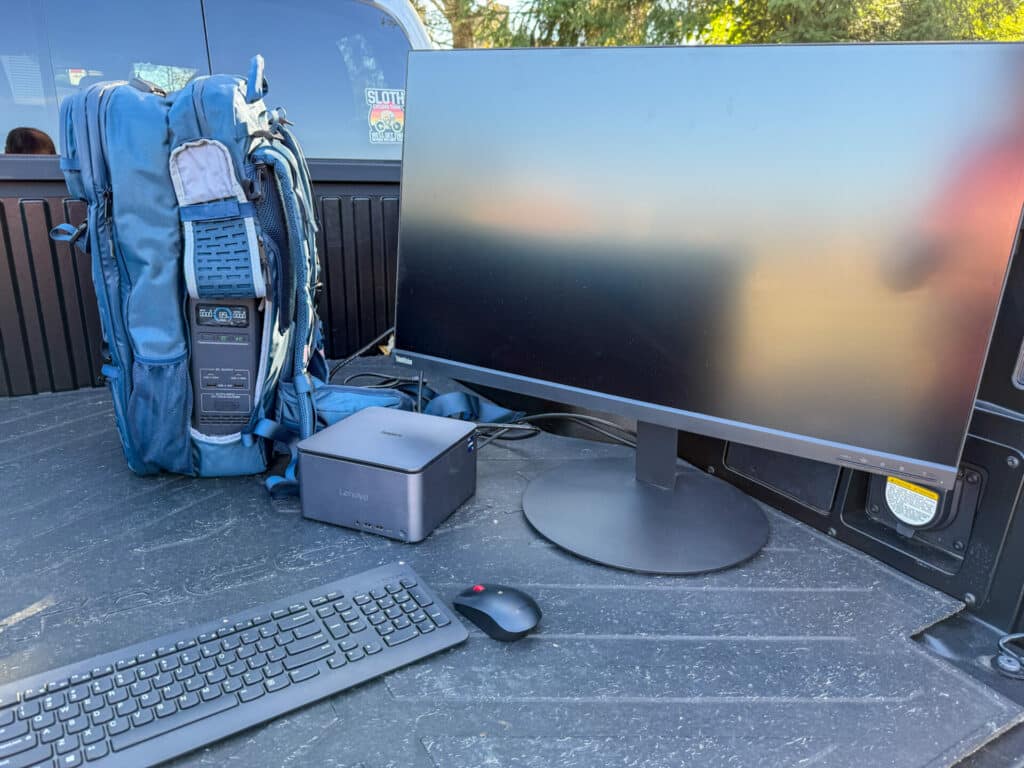
Lenovo is pitching the ThinkCentre Neo Ultra as a creator in a backpack, and we wanted to show it doing just that. We contacted Bluetti to get our hands on the [Handfree 2 Backpack Power Station](https://www.bluettipower.com/products/handsfree2-portable-backpack-power?srsltid=AfmBOorL7rb6onY1NmjD7nKX2m-o0aQArVzqYG0GYX0_ebX45CxHm0pe), a rugged backpack housing a 700W portable power station. The backpack unit can run numerous devices and has an onboard 512Wh battery. We tested the Handsfree 2 Backpack Power Station in the lab, offering a total battery capacity of 430Wh under discharge.
![]()
We loaded the Lenovo ThinkCentre Neo Ultra alongside a 32″ 4K Lenovo monitor in the bed of a pickup truck. The ThinkCentre desktop’s compact size made it relatively easy to transport. While most users might not take the Neo Ultra on the road quite literally, the form factor enables many scenarios from which larger systems would be excluded.
Power consumption will vary depending on the workload, which didn’t push over 300W in our tests. The ThinkCentre Neo Ultra comes equipped with an onboard 350W PSU, which fits in well with the compact size. Many systems in this form factor have an external PSU, adding bulk to the hardware you need to carry around.
![]()
In our tests, including running GPU-heavy workloads from the Bluetti Handsfree 2, we saw under 2 hours of estimated runtime. You’d get a much longer runtime with the platform scaled back or not pushed to the brink. While unconventional, it was pretty fun operating the system, quite literally, out of a backpack.
## Lenovo ThinkCentre Neo Ultra Performance
Our ThinkCentre Neo Ultra review unit features an Intel Core i7-14700 CPU (65W), a 512GB SSD, 32GB of RAM, and a GeForce RTX 4060 GPU. It retails for $2,210 from CDW. Other configurations are available directly from Lenovo, starting at $1,843 with a Core i5-14500 processor.
We compare the ThinkCentre to the [Dell OptiPlex 7020 Micro Plus](https://www.storagereview.com/review/dell-optiplex-micro-plus-7020-review), tested with a Core i7-14700, 16GB of RAM, and Intel UHD 770 integrated graphics.
### SPECworkstation 3
SPECworkstation3 specializes in benchmarks designed for testing all key aspects of workstation performance; it uses over 30 workloads to test CPU, graphics, I/O, and memory bandwidth. The workloads fall into broader categories such as Media and Entertainment, Financial Services, Product Development, Energy, Life Sciences, and General Operations. We will list the broad-category results for each instead of the individual workloads. The results are an average of all the individual workloads in each category.
We only have results for the ThinkCentre in this test.
| **SPECworkstation 3 (Higher is better)** | **Lenovo ThinkCentre Neo Ultra** |
| --- | --- |
| Media and Entertainment | N/A |
| Product Development | 3.25 |
| Life Sciences | 3.98 |
| Financial Services | 4.91 |
| Energy | 4.07 |
| General Operations | 3.05 |
| GPU Compute | 0.33 |
### SPECviewperf 2020
Our next test is SPECviewperf 2020, the worldwide standard for measuring graphics performance of professional applications under the OpenGL and Direct X application programming interfaces. The viewsets (or benchmarks) represent graphics content and behavior from actual applications without having to install the applications themselves. The newest version of this benchmark went through major updates late last year, including new viewsets taken from traces of the latest versions of 3ds Max, Catia, Maya, and Solidworks applications. In addition, they added support within all viewsets for both 2K and 4K resolution displays.
As expected, the ThinkCentre did far better in this test, thanks to its dedicated GPU; Dell’s integrated GPU could barely complete the test.
| **SPECviewperf2020 Viewsets (Higher is better)** | **Lenovo ThinkCentre Neo Ultra** | **Dell OptiPlex 7020 Micro Plus** |
| --- | --- | --- |
| 3dsmax-07 | 65.81 | 7.07 |
| Catia-06 | 34.98 | 5.94 |
| Creo-03 | 84.69 | 10.05 |
| Energy-03 | 15.49 | N/A |
| Maya-06 | 193.6 | 18.3 |
| Medical-03 | 10.49 | 0.99 |
| Snx-04 | 30.94 | 6.59 |
| Solidworks-05 | 113.56 | 6.21 |
### Luxmark
Another 3D benchmark is LuxMark, an OpenCL GPU benchmarking utility. The ThinkCentre produces far higher numbers because of its dedicated GPU.
| **Luxmark (Higher is better)** | **Lenovo ThinkCentre Neo Ultra** | **Dell OptiPlex 7020 Micro Plus** |
| --- | --- | --- |
| **Hallbench** | 12,649 | 1,359 |
| **food** | 5,156 | 629 |
### OctaneBench
Next is OctaneBench, a benchmarking utility for OctaneRender, another 3D renderer with RTX support similar to V-Ray. In this test, we only have numbers for the ThinkCentre.
| **OctaneBench (Score, higher is better)** | **Kernel** | **Lenovo ThinkCentre Neo Ultra** |
| --- | --- | --- |
| Interior | Info channels | 12.8 |
| Interior | Direct lighting | 36.2 |
| Interior | Path tracing | 44.3 |
| Idea | Info channels | 7.5 |
| Idea | Direct lighting | 29.5 |
| Idea | Path tracing | 35.7 |
| ATV | Info channels | 17.9 |
| ATV | Direct lighting | 38.5 |
| ATV | Path tracing | 48.5 |
| Box | Info channels | 10.4 |
| Box | Direct lighting | 35.6 |
| Box | Path tracing | 39.4 |
### Blackmagic RAW Speed Test
We have also started running Blackmagic’s RAW speed test, which tests video playback. The CPU numbers were similar between the ThinkCentre and the Dell.
| **Blackmagic RAW Speed Test (Higher is better)** | **Lenovo ThinkCentre Neo Ultra** | **Dell OptiPlex 7020 Micro Plus** |
| --- | --- | --- |
| **8K CPU** | 68 | 90 |
| **8K CUDA** | 75 | 19 |
### Blackmagic Disk Speed Test
We run the popular Blackmagic Disk Speed Test against the system’s primary storage drive. The ThinkCentre’s included drive has respectable performance for an OEM Gen4 SSD.
*![Lenovo ThinkCentre Neo Ultra Disk Speed Test]()*
### UL Procyon AI Inference
UL’s [Procyon](https://benchmarks.ul.com/procyon) estimates a workstation’s performance for professional apps. We only include results for Tensor RT run on the dedicated Nvidia GPU. We only have numbers for the ThinkCentre in this test.
| **UL Procyon Average Inference Times** **(ms, lower is better)** | **Lenovo ThinkCentre Neo Ultra** |
| --- | --- |
| MobileNet V3 | 0.57 |
| ResNet 50 | 1.70 |
| Inception V4 | 4.54 |
| DeepLab V3 | 6.20 |
| YOLO V3 | 7.51 |
| Real-ESRGAN | 247.61 |
| Overall Score | 821 |
### y-cruncher
y-cruncher is a multi-threaded and scalable program that can compute Pi and other mathematical constants to trillions of digits. Since its launch in 2009, it has become a popular benchmarking and stress-testing application for overclockers and hardware enthusiasts. The Dell couldn’t complete the 2.5 or 5 billion digit calculations because it had only 16GB of RAM.
| **y-cruncher (Total Computation time in seconds)** | **Lenovo ThinkCentre Neo Ultra** | **Dell OptiPlex 7020 Micro Plus** |
| --- | --- | --- |
| 1 billion digits | 31.131 | 28.739 |
| 2.5 billion digits | 93.452 | N/A |
| 5 billion digits | 213.803 | N/A |
### Geekbench 6
[Geekbench 6](https://www.geekbench.com/) is a cross-platform benchmark that measures overall system performance. You can find comparisons to any system you want in the [Geekbench Browser](https://browser.geekbench.com/). The Dell produced noticeably better scores despite using the same CPU as the ThinkCentre.
| **Geekbench 6 (Higher is better)** | **Lenovo ThinkCentre Neo Ultra** | **Dell OptiPlex 7020 Micro Plus** |
| --- | --- | --- |
| CPU Single-Core | 2,804 | 2,858 |
| CPU Multi-Core | 14,399 | 17,116 |
| GPU | 102,362 | 8,317 |
### Cinebench R24
We also started running the latest Cinebench test, where the ThinkCentre jumped ahead of the Dell in multi-core but essentially tied in single-core.
| **Cinebench R23 (Higher is better)** | **Lenovo ThinkCentre Neo Ultra** | **Dell OptiPlex 7020 Micro Plus** |
| --- | --- | --- |
| Multi-Core | 1,340 | 1,007 |
| Single-Core | 123 | 120 |
| GPU | 10,244 | N/A |
## Conclusion
The ThinkCentre Neo Ultra is an impressive mini-PC. Its 65W CPU and dedicated NVIDIA GeForce GPU give it the performance required for more advanced tasks, including content creation. It even includes a dedicated NPU (Kinara Ara-2) for edge AI applications (our build is $2210). We’re also impressed by this desktop’s upgradeability and maintainability. Overall, the ThinkCentre Neo Ultra gets our recommendation as a high-performance mini-PC.
[Lenovo ThinkCentre Neo Ultra](https://www.lenovo.com/us/en/p/desktops/thinkcentre/thinkcentre-neo-series/lenovo-thinkcentre-neo-ultra-intel-usff/len102c0053?orgRef=https%253A%252F%252Fduckduckgo.com%252F)
**Engage with StorageReview**
[Newsletter](https://www.storagereview.com/storage_newsletter) | [YouTube](https://www.youtube.com/user/StorageReview "Opens in a new window") | Podcast [iTunes](https://podcasts.apple.com/gb/podcast/storagereview-com-storage-reviews/id1060681115 "Opens in a new window")/ [Spotify](https://open.spotify.com/show/1y6VnznABhHeOSMOmbDTz0 "Opens in a new window") | [Instagram](https://www.instagram.com/storagereview/ "Opens in a new window") | [Twitter](https://twitter.com/storagereview "Opens in a new window") | [TikTok](https://www.tiktok.com/@storagereview? "Opens in a new window") | [RSS Feed](https://www.storagereview.com/rss.xml)
![]()
### Brian Beeler
Brian is located in Cincinnati, Ohio and is the chief analyst and President of StorageReview.com.
Previous post: [Lenovo ThinkStation P3 Tiny Review](https://www.storagereview.com/review/lenovo-thinkstation-p3-tiny-review)
Next post: [HPE XP8 Storage Array Surpasses Ten-Year Zero Downtime Milestone](https://www.storagereview.com/review/hpe-xp8-storage-array-surpasses-ten-year-zero-downtime-milestone)
Trusted Vendors
Products and solutions from our affiliate partners:
- [

Ubiquiti
](https://store.ui.com/us/en?a_aid=StorageReview "Opens in a new window")
- [

Newegg
](https://click.linksynergy.com/fs-bin/click?id=g5terNMDhz0&offerid=1207190.18&subid=0&type=4 "Opens in a new window")
- [
 Amazon
](https://amzn.to/4fLJUEW "Opens in a new window")
Newsletter
Subscribe to the StorageReview newsletter to stay up to date on the latest news and reviews. We promise no spam!
1
Leave this field empty if you’re human:
## Advertisement
Content Categories
[Facebook](https://www.facebook.com/@storagereview) [X](https://twitter.com/storagereview) [Instagram](https://www.instagram.com/storagereview/) [LinkedIn](https://www.linkedin.com/company/storagereview-com) [YouTube](https://www.youtube.com/user/storagereview?sub_confirmation=1) [Email](mailto:info@storagereview.com) [Spotify](https://open.spotify.com/show/1y6VnznABhHeOSMOmbDTz0) [Reddit](https://www.reddit.com/r/StorageReview/) [Discord](https://discord.gg/TwMHb4azdC) [RSS](https://www.storagereview.com/rss.xml) [TikTok](https://www.tiktok.com/@storagereview)
Copyright © 1998-2025 Flying Pig Ventures, LLC Cincinnati, Ohio. All rights reserved.
Manage your privacy
To provide the best experiences, we and our partners use technologies like cookies to store and/or access device information. Consenting to these technologies will allow us and our partners to process personal data such as browsing behavior or unique IDs on this site and show (non-) personalized ads. Not consenting or withdrawing consent, may adversely affect certain features and functions.
Click below to consent to the above or make granular choices. Your choices will be applied to this site only. You can change your settings at any time, including withdrawing your consent, by using the toggles on the Cookie Policy, or by clicking on the manage consent button at the bottom of the screen.
Functional Functional Always active
The technical storage or access is strictly necessary for the legitimate purpose of enabling the use of a specific service explicitly requested by the subscriber or user, or for the sole purpose of carrying out the transmission of a communication over an electronic communications network.
Preferences Preferences
The technical storage or access is necessary for the legitimate purpose of storing preferences that are not requested by the subscriber or user.
Statistics Statistics
The technical storage or access that is used exclusively for statistical purposes. The technical storage or access that is used exclusively for anonymous statistical purposes. Without a subpoena, voluntary compliance on the part of your Internet Service Provider, or additional records from a third party, information stored or retrieved for this purpose alone cannot usually be used to identify you.
Marketing Marketing
The technical storage or access is required to create user profiles to send advertising, or to track the user on a website or across several websites for similar marketing purposes.
Statistics
Marketing
Features
Always active
Special features
Special purposes
Always active
- Manage options
- Manage services
- Manage {vendor\_count} vendors
- [Read more about these purposes](https://cookiedatabase.org/tcf/purposes/)
Accept Deny Manage options Save preferences Manage options
- {title}
- {title}
- {title}
Manage your privacy
To provide the best experiences, we use technologies like cookies to store and/or access device information. Consenting to these technologies will allow us to process data such as browsing behavior or unique IDs on this site. Not consenting or withdrawing consent, may adversely affect certain features and functions.
Functional Functional Always active
The technical storage or access is strictly necessary for the legitimate purpose of enabling the use of a specific service explicitly requested by the subscriber or user, or for the sole purpose of carrying out the transmission of a communication over an electronic communications network.
Preferences Preferences
The technical storage or access is necessary for the legitimate purpose of storing preferences that are not requested by the subscriber or user.
Statistics Statistics
The technical storage or access that is used exclusively for statistical purposes. The technical storage or access that is used exclusively for anonymous statistical purposes. Without a subpoena, voluntary compliance on the part of your Internet Service Provider, or additional records from a third party, information stored or retrieved for this purpose alone cannot usually be used to identify you.
Marketing Marketing
The technical storage or access is required to create user profiles to send advertising, or to track the user on a website or across several websites for similar marketing purposes.
Statistics
Marketing
Features
Always active
Special features
Special purposes
Always active
- Manage options
- Manage services
- Manage {vendor\_count} vendors
- [Read more about these purposes](https://cookiedatabase.org/tcf/purposes/)
Accept Deny Manage options Save preferences Manage options
- {title}
- {title}
- {title}
Manage consent Manage consent
```json
{"@context":"https:\/\/schema.org","@graph":[{"@type":"WebPage","@id":"https:\/\/www.storagereview.com\/review\/lenovo-thinkcentre-neo-ultra-review","url":"https:\/\/www.storagereview.com\/review\/lenovo-thinkcentre-neo-ultra-review","name":"Lenovo ThinkCentre Neo Ultra Review - StorageReview.com","isPartOf":{"@id":"https:\/\/www.storagereview.com\/#website"},"primaryImageOfPage":{"@id":"https:\/\/www.storagereview.com\/review\/lenovo-thinkcentre-neo-ultra-review#primaryimage"},"image":{"@id":"https:\/\/www.storagereview.com\/review\/lenovo-thinkcentre-neo-ultra-review#primaryimage"},"thumbnailUrl":"https:\/\/www.storagereview.com\/wp-content\/uploads\/2024\/11\/StorageReview-Lenovo-ThinkCentre-Neo-Ultra-AI-4.jpg","datePublished":"2024-11-26T18:06:13+00:00","dateModified":"2025-09-30T14:21:53+00:00","description":"The ThinkCentre Neo Ultra is a small-form-factor desktop with an independent NPU and NVIDIA GeForce RTX 4060 graphics.","breadcrumb":{"@id":"https:\/\/www.storagereview.com\/review\/lenovo-thinkcentre-neo-ultra-review#breadcrumb"},"inLanguage":"en-US","potentialAction":[{"@type":"ReadAction","target":["https:\/\/www.storagereview.com\/review\/lenovo-thinkcentre-neo-ultra-review"]}]},{"@type":"ImageObject","inLanguage":"en-US","@id":"https:\/\/www.storagereview.com\/review\/lenovo-thinkcentre-neo-ultra-review#primaryimage","url":"https:\/\/www.storagereview.com\/wp-content\/uploads\/2024\/11\/StorageReview-Lenovo-ThinkCentre-Neo-Ultra-AI-4.jpg","contentUrl":"https:\/\/www.storagereview.com\/wp-content\/uploads\/2024\/11\/StorageReview-Lenovo-ThinkCentre-Neo-Ultra-AI-4.jpg","width":1920,"height":1440},{"@type":"BreadcrumbList","@id":"https:\/\/www.storagereview.com\/review\/lenovo-thinkcentre-neo-ultra-review#breadcrumb","itemListElement":[{"@type":"ListItem","position":1,"name":"Home","item":"https:\/\/www.storagereview.com\/"},{"@type":"ListItem","position":2,"name":"Review","item":"https:\/\/www.storagereview.com\/review"},{"@type":"ListItem","position":3,"name":"Lenovo ThinkCentre Neo Ultra Review"}]},{"@type":"WebSite","@id":"https:\/\/www.storagereview.com\/#website","url":"https:\/\/www.storagereview.com\/","name":"StorageReview.com","description":"StorageReview.com is a leading provider of news and reviews throughout the entire IT stack - from the datacenter to the edge, and all points in between.","publisher":{"@id":"https:\/\/www.storagereview.com\/#organization"},"potentialAction":[{"@type":"SearchAction","target":{"@type":"EntryPoint","urlTemplate":"https:\/\/www.storagereview.com\/?s={search_term_string}"},"query-input":{"@type":"PropertyValueSpecification","valueRequired":true,"valueName":"search_term_string"}}],"inLanguage":"en-US"},{"@type":"Organization","@id":"https:\/\/www.storagereview.com\/#organization","name":"StorageReview.com","url":"https:\/\/www.storagereview.com\/","logo":{"@type":"ImageObject","inLanguage":"en-US","@id":"https:\/\/www.storagereview.com\/#\/schema\/logo\/image\/","url":"https:\/\/www.storagereview.com\/wp-content\/uploads\/2020\/02\/Storage-Reviews-2-2.png","contentUrl":"https:\/\/www.storagereview.com\/wp-content\/uploads\/2020\/02\/Storage-Reviews-2-2.png","width":344,"height":61,"caption":"StorageReview.com"},"image":{"@id":"https:\/\/www.storagereview.com\/#\/schema\/logo\/image\/"},"sameAs":["https:\/\/x.com\/storagereview","http:\/\/youtube.com\/user\/storagereview"]}]}
```