---
description: The Lenovo ThinkPad P1 Gen 6 blends portability and performance. It's not as fast as the P16, but the P1 Gen 6 is more portable.
title: Lenovo ThinkPad P1 Gen 6 Review
image: https://www.storagereview.com/wp-content/uploads/2023/10/StorageReview-Lenovo-P1-Gen6-1.jpg
---
[![Storage Review]()](https://storagereview.com/)
---
[Facebook](https://www.facebook.com/@storagereview) [X (Twitter)](https://twitter.twitter.com/storagereview) [Instagram](https://www.instagram.com/storagereview/) [LinkedIn](https://www.linkedin.com/company/storagereview-com) [YouTube](https://www.youtube.com/user/storagereview?sub_confirmation=1) [Email](mailto:info@storagereview.com) [Spotify](https://open.spotify.com/show/1y6VnznABhHeOSMOmbDTz0) [Reddit](https://www.reddit.com/r/StorageReview/) [Discord](https://discord.gg/TwMHb4azdC) [RSS Feed](https://www.storagereview.com/rss.xml) [TikTok](https://www.tiktok.com/@storagereview)
[Facebook](https://www.facebook.com/@storagereview) [X (Twitter)](https://twitter.com/storagereview) [Instagram](https://www.instagram.com/storagereview/) [LinkedIn](https://www.linkedin.com/company/storagereview-com) [YouTube](https://www.youtube.com/user/storagereview?sub_confirmation=1) [Email](mailto:info@storagereview.com) [Spotify](https://open.spotify.com/show/1y6VnznABhHeOSMOmbDTz0) [Reddit](https://www.reddit.com/r/StorageReview/) [Discord](https://discord.gg/TwMHb4azdC) [RSS Feed](https://www.storagereview.com/rss.xml) [TikTok](https://www.tiktok.com/@storagereview)
[](https://www.storagereview.com)
≡ Menu
- [Home](https://www.storagereview.com/)
- [Storage Reviews](https://www.storagereview.com/review)
- [End User Reviews](https://www.storagereview.com/consumer)
- [Enterprise Reviews](https://www.storagereview.com/enterprise)
- [Ubiquiti Reviews](https://www.storagereview.com/best/ubiquiti-reviews)
- [SR Merch](https://store.storagereview.com)
- [Leaderboards](https://www.storagereview.com/best)
- [Best Storage Arrays](https://www.storagereview.com/best/storage-arrays)
- [Best Enterprise SSDs](https://www.storagereview.com/best/enterprise-ssds)
- [Best Servers](https://www.storagereview.com/best/servers)
- [Best Enterprise GPUs](https://www.storagereview.com/best/enterprise-gpus)
- [Best Desktops for Local AI](https://www.storagereview.com/best/desktops-local-ai)
- [Best Laptops for Local AI](https://www.storagereview.com/best/laptops-local-ai)
- [Best Local LLM Tools](https://www.storagereview.com/best/local-llm-tools)
- [Agentic AI Hardware](https://www.storagereview.com/best/agentic-ai-hardware)
- [Best SSDs & Hard Drives](https://www.storagereview.com/best_drives)
- [Best Portable SSDs](https://www.storagereview.com/best/portable-ssds)
- [Best Business Laptops](https://www.storagereview.com/best/business-laptops)
- [Best Mobile Workstations](https://www.storagereview.com/best/mobile-workstations)
- [Best Desktop Workstations](https://www.storagereview.com/best/desktop-workstations)
- [Best Mini PCs](https://www.storagereview.com/best/mini-pcs)
- [Best Laptop Battery Life](https://www.storagereview.com/best/laptop-battery-life)
- [Storage Reference Guide](https://www.storagereview.com/storage-reference-guide)
- [About SR](https://www.storagereview.com/about-storagereview)
- [StorageReview.com Sweepstakes Rules and Regulations](https://www.storagereview.com/storagereview-com-sweepstakes-rules-and-regulations)
Search
[Home](https://www.storagereview.com/) » [Review](https://www.storagereview.com/review) » Lenovo ThinkPad P1 Gen 6 Review
# Lenovo ThinkPad P1 Gen 6 Review
by Charles P. Jefferies on October 22, 2023
[End User](https://www.storagereview.com/consumer) ◇ [Workstation](https://www.storagereview.com/consumer/workstation)
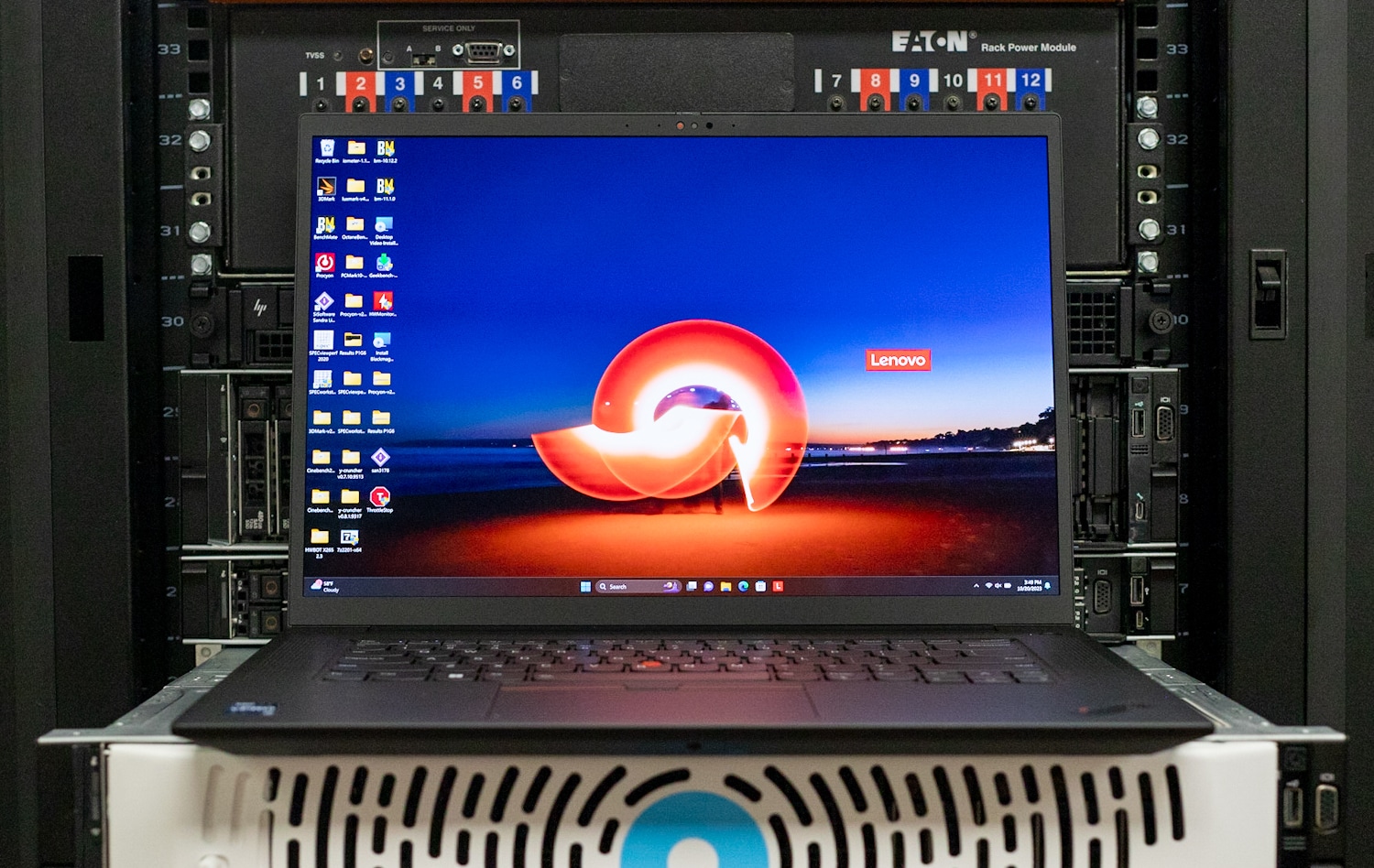
The Lenovo ThinkPad P1 Gen 6 is a 16-inch workstation with serious power, including a choice of GeForce or professional RTX graphics.
## Lenovo ThinkPad P1 Gen 6 Specifications
The ThinkPad P1 Gen 6 is Lenovo’s thin-and-light 16-inch mobile workstation, a more portable alternative to the [ThinkPad P16](https://www.storagereview.com/review/lenovo-thinkpad-p16-gen-1-review). It competes directly with the [Dell Precision 5680](https://www.storagereview.com/review/dell-precision-5680-review).
Under the hood is a 13th-generation Intel Core i7 or i9 H-class CPU with available Intel vPro Enterprise remote management and security. Graphics options are where this workstation diversifies by offering both consumer GeForce and prosumer RTX-class options, the top choices being the GeForce RTX 4090 and the RTX 5000 Ada Generation.
One limitation of this platform is that it has just two SODIMM slots, limiting it to 96GB of RAM, it also doesn’t support ECC RAM. The workstation is also limited to one storage drive in configurations with a higher-end GPU. Overall, though, it meets expectations for this class.
The ThinkPad P1 Gen 6’s full specifications are as follows:
| **Processor** | 13th Gen Intel Core i7 or i9, H-class, vPro Enterprise available |
| --- | --- |
| **Operating System** | Windows 11 Home/Pro |
| **Memory** | 8-96GB DDR5-5600 (2x SODIMM) |
| **Storage** | - Gen 4 M.2 2280 SSD
- 2x slots with RTX A1000/RTX 2000 Ada Generation; RAID 0/1 available
- 1x slot with other GPUs
|
| **Display** | 16-inch:- 1920×1200 IPS 300-nit 60Hz
- 2560×1600 IPS 500-nit 165Hz
- 3840×2400 OLED 400-nit 60Hz 10-point touch
|
| **Graphics** | NVIDIA:- RTX A1000 6GB
- RTX 2000 Ada Generation 8GB
- RTX 3500 Ada Generation 12GB
- RTX 4000 Ada Generation 12GB
- RTX 5000 Ada Generation 16GB
- GeForce RTX 4060 6GB
- GeForce RTX 4080 12GB
- GeForce RTX 4090 16GB
|
| **Webcam** | 5MP with IR |
| **WLAN + Bluetooth** | Intel AX211 Wi-Fi 6E + Bluetooth 5.1 |
| **Ports** | - 1x HDMI 2.1
- 1x audio jack
- 1x SD card reader
- 2x Thunderbolt 4
- 2x USB-A Gen 1 (one always on)
|
| **Security** | - TPM 2.0
- Fingerprint reader
- Kensington Nano security slot
- Camera privacy shutter
- Bottom cover tamper detection
|
| **Battery** | 90Wh |
| **Power Adapter** | 230W |
| **Dimensions (WDH)** | 14.15 x 9.99 x 0.68 inches |
| **Weight** | Starting at 3.92 pounds |
## Lenovo ThinkPad P1 Gen 6 Build and Design
This sixth-generation ThinkPad P1 looks much like the Gen 4 model [we reviewed](https://www.storagereview.com/review/lenovo-thinkpad-p1-g4-review) not long ago, keeping the all-black, squared-off classic ThinkPad look. A special woven carbon-fiber lid design sets it apart from other ThinkPads.
The chassis is exceptionally strong as expected from a top-end ThinkPad, with no significant flex in the chassis or lid. It’s not ultra-portable, but for a laptop with a 16-inch screen, it’s reasonably trim at 14.15 x 9.99 x 0.68 inches (WDH). Its starting weight is 3.92 pounds.
![Lenovo ThinkPad P1 Gen 6 left]()
Port selection starts on the left edge with the proprietary power connector, two Thunderbolt 4 (USB-C) ports, an HDMI 2.1 video output, and a headphone/microphone jack.
![Lenovo ThinkPad P1 Gen 6 right]()
The rest of the ports on the right edge include a full-size SD card reader (always appreciated on a professional laptop), two 5Gbps USB-A ports, and a Kensington Nano security lock slot.
The ThinkPad P1 Gen 6’s keyboard is first-class and the best in the business as far as this writer is concerned. Keys are comfortably spaced, have wonderful tactile feedback, and have two levels of white backlighting. The layout is also excellent, with dedicated Home, End, Insert, and Delete keys at the top right and a properly separated arrow-key cluster.
![Lenovo ThinkPad P1 Gen 6 keyboard]()
ThinkPads are the last bastion for eraser-head track stick fans; the familiar red nub sits in the keyboard center and has three dedicated buttons. Meanwhile, the buttonless touchpad has plenty of space and excellent tactile feedback when pressed. The Dolby Atmos-tuned speakers flanking the keyboard have expansive sound.
Our review model has a gorgeous 3840×2400 OLED screen, which Lenovo rates for 400 nits of brightness and 100% DCI-P3 gamut coverage. It also supports touch, which isn’t always a given with OLED panels. You’ll be hard-pressed to find a better-looking screen on a laptop.
![Lenovo ThinkPad P1 Gen 6 with sloth]()
For biometrics, the ThinkPad P1 Gen 6 has a fingerprint reader built into its power button (at the keyboard’s top right) and a 5MP webcam with infrared (IR) facial recognition. The webcam has a sliding privacy shutter.
## Lenovo ThinkPad P1 Gen 6 Upgradeability
The ThinkPad P1 Gen 6’s bottom panel comes off after loosening the retainer Philips-head screws; the panel can then be pried up from the back. As visible through the rear cover, Lenovo provides plenty of airflow through the read cover, allowing the CPU and GPU get ample airflow under heavy workloads. It then ejects this exhaust through the hinge area under the screen. Fan noise is minimal under most conditions, although under peak sustained load you will hear air movement through the chassis.
![Lenovo ThinkPad P1 Gen 6 bottom]()
Inside, upgradeable components include two DDR5-5600 SODIMM slots, the 90Wh battery, and the M.2 2280 SSD slot. As noted, models with entry-level GPUs will have two M.2 slots, but our GeForce RTX 4080 model has only one.
![Lenovo ThinkPad P1 Gen 6 inside]()
One area that was nice to see is the ability to upgrade the RAM down the road. Our configuration left one slot open, which is easily accessible once removing the rear cover.
![]()
## Lenovo ThinkPad P1 Gen 6 Performance
Our ThinkPad P1 Gen 6 review unit has the following specifications:
- 16-inch 3840×2400 OLED touch display
- Windows 11 Pro
- Intel Core i7-13800H (6P + 8E, up to 5.2GHz) with Intel vPro
- NVIDIA GeForce RTX 4080 (12GB)
- 32GB DDR5-5600 RAM (1x 32GB)
- 1TB Gen4 SSD
- 90Wh battery
- Intel Wi-Fi 6E AX211
- 3-year warranty
- Retail price: $2,999.15 (Lenovo.com)
The price above is the retail single-unit price; businesses buying in bulk are likely to get a discount. Otherwise, that’s about the going rate for a high-end configuration with an OLED display and a high-end GPU. This model is available to customize on Lenovo.com and there are many preconfigured models available from channel partners like CDW.
The configurable ThinkPad P1 Gen 6 starts with a Core i7-13700H (non-vPro), a 1920×1200 screen, and NVIDIA RTX A1000 6GB graphics. A backlit keyboard, a 5MP webcam, and a one-year warranty are standard. As noted, both consumer (GeForce) and professional (RTX A-class or RTX Ada Generation) GPUs are available. It could even double as a gaming laptop when equipped with a GeForce GPU and the optional 2560×1600 165Hz high-refresh display!
For our benchmarks, we’ll be comparing the ThinkPad P1 Gen 6 to the Dell Precision 5680 outfitted with a Core i9-13900H, 32GB of RAM, an RTX 5000 Ada Generation GPU, and 2x 512GB Gen4 SSDs in RAID 0. Laptop performance comparisons are rarely apples to apples, and this one certainly won’t be, but the Dell’s components are available in the ThinkPad P1 Gen 6.
### SPECworkstation 3
SPECworkstation3 specializes in benchmarks designed for testing all key aspects of workstation performance; it uses over 30 workloads to test CPU, graphics, I/O, and memory bandwidth. The workloads fall into broader categories such as Media and Entertainment, Financial Services, Product Development, Energy, Life Sciences, and General Operations. We are going to list the broad-category results for each, as opposed to the individual workloads. The results are an average of all the individual workloads in each category.
The ThinkPad took a back seat to the Dell in most tests but was surprisingly close in the GPU Compute test. Outside of that, the ThinkPad’s Core i7-13700H has the same core and thread count as the Dell’s Core i9-13900H, so its performance was otherwise similar.
| **SPECworkstation 3 (Higher is better)** | **Lenovo ThinkPad P1 Gen 6 (Core i7-13700H, GeForce RTX 4080)** | **Dell Precision 5680 Laptop (Core i9-13900H, RTX A5000 Ada)** |
| --- | --- | --- |
| **Media and Entertainment** | 3.82 | 3.55 |
| **Product Development** | 3.23 | 3.69 |
| **Life Sciences** | N/A | 3.6 |
| **Financial Services** | 3.39 | 3.6 |
| **Energy** | N/A | 3.77 |
| **General Operations** | 2.88 | 2.49 |
| **GPU Compute** | 6.23 | 7.04 |
### ESRI
Next up is the Environmental Systems Research Institute (Esri) benchmark. Esri is a supplier of Geographic Information System (GIS) software. Esri’s Performance Team designed their PerfTool add-in scripts to automatically launch the ArcGIS Pro. This application uses a “ZoomToBookmarks” function to browse various predefined bookmarks and create a log file with all the key data points required to predict the user experience. The script automatically loops the bookmarks three times to account for caching (memory and disk cache). In other words, this benchmark simulates heavy graphical use that one might see through Esri’s ArcGIS Pro software.
The tests consist of three main datasets. Two are 3-D city views of Philadelphia, PA, and Montreal, QC. These city views contain textured 3-D multipatch buildings draped on a terrain model and draped aerial images. The third dataset is a 2-D map view of the Portland, OR region. This data contains detailed information for roads, land use parcels, parks and schools, rivers, lakes, and hill shaded terrain.
The test results showed the ThinkPad just behind the Precision, an expected result given their GPU differences.
First up is the Montreal model.
| **ESRI ArcGIS Pro 2.3 Montreal** | |
| --- | --- |
| **Average FPS** | **Average** |
| **Lenovo ThinkPad P1 Gen 6 (Core i7-13700H, GeForce RTX 4080)** | 92.36 |
| **Dell Precision 5680 Laptop (Core i9-13900H, RTX A5000 Ada)** | 108.22 |
| **Minimum FPS** | **Average** |
| **Lenovo ThinkPad P1 Gen 6 (Core i7-13700H, GeForce RTX 4080)** | 45.39 |
| **Dell Precision 5680 Laptop (Core i9-13900H, RTX A5000 Ada)** | 44.86 |
Next up is Philly.
| **ESRI ArcGIS Pro 2.3 Philly** | |
| --- | --- |
| **Average FPS** | **Average** |
| **Lenovo ThinkPad P1 Gen 6 (Core i7-13700H, GeForce RTX 4080)** | 88.24 |
| **Dell Precision 5680 Laptop (Core i9-13900H, RTX A5000 Ada)** | 111.37 |
| **Minimum FPS** | **Average** |
| **Lenovo ThinkPad P1 Gen 6 (Core i7-13700H, GeForce RTX 4080)** | 51.32 |
| **Dell Precision 5680 Laptop (Core i9-13900H, RTX A5000 Ada)** | 52.35 |
Last is the Portland model.
| **ESRI ArcGIS Pro 2.3 Portland** | |
| --- | --- |
| **Average FPS** | **Average** |
| **Lenovo ThinkPad P1 Gen 6 (Core i7-13700H, GeForce RTX 4080)** | 112.27 |
| **Dell Precision 5680 Laptop (Core i9-13900H, RTX A5000 Ada)** | 132.68 |
| **Minimum FPS** | **Average** |
| **Lenovo ThinkPad P1 Gen 6 (Core i7-13700H, GeForce RTX 4080)** | 83.34 |
| **Dell Precision 5680 Laptop (Core i9-13900H, RTX A5000 Ada)** | 93.01 |
## Blender OptiX
Blender is an open-source 3D modeling application. This benchmark was run using the Blender Benchmark utility. The score is samples per minute, with higher being better. Here again we see the Lenovo’s GeForce RTX 4080 not quite able to match the Dell’s RTX 5000 Ada Generation, but that was expected.
| **Blender OptiX (Samples per minute, Higher is better)** | **Lenovo ThinkPad P1 Gen 6 (Core i7-13700H, GeForce RTX 4080)** | **Dell Precision 5680 Laptop (Core i9-13900H, RTX A5000 Ada)** |
| --- | --- | --- |
| **Monster** | 2,683.40 | 3,221.34 |
| **Junkshop** | 1,362.90 | 1,650.02 |
| **Classroom** | 1,279.96 | N/A |
### Luxmark
Another 3D benchmark we will be looking at is LuxMark, an OpenCL GPU benchmarking utility. The Lenovo continues to put up good numbers for its GeForce RTX 4080.
| **Luxmark (Higher is better)** | **Lenovo ThinkPad P1 Gen 6 (Core i7-13700H, GeForce RTX 4080)** | **Dell Precision 5680 Laptop (Core i9-13900H, RTX A5000 Ada)** |
| --- | --- | --- |
| **Hallbench** | 17,440 | 21,105 |
| **food** | 6,820 | 7,878 |
### OctaneBench
Next, we look OctaneBench, a benchmarking utility for OctaneRender, which is another 3D renderer with RTX support that is similar to V-Ray. The ThinkPad P1 and the Precision 5680 traded places in a few subtests and were close elsewhere.
| **OctaneBench (Score, higher is better)** | **Kernel** | **Lenovo ThinkPad P1 Gen 6 (Core i7-13700H, GeForce RTX 4080)** | **Dell Precision 5680 Laptop (Core i9-13900H, RTX A5000 Ada)** |
| --- | --- | --- | --- |
| Interior | Info channels | 20.27 | 20.38 |
| Interior | Direct lighting | 61.28 | 63.04 |
| Interior | Path tracing | 68.81 | 75.75 |
| Idea | Info channels | 11.58 | 11.78 |
| Idea | Direct lighting | 44.75 | 48.23 |
| Idea | Path tracing | 54.10 | 58.89 |
| ATV | Info channels | 30.49 | 30.64 |
| ATV | Direct lighting | 55.94 | 64.19 |
| ATV | Path tracing | 72.68 | 80.33 |
| Box | Info channels | 15.42 | 16.29 |
| Box | Direct lighting | 54.45 | 61.83 |
| Box | Path tracing | 60.10 | 66.23 |
### Blackmagic RAW Speed Test
We have also started running Blackmagic’s RAW speed test to test video playback performance. The ThinkPad and the Precision are both well capable of 8K, the Precision slightly more so with its RTX 5000 Ada Generation GPU.
| **Blackmagic RAW Speed Test (Higher is better)** | **Lenovo ThinkPad P1 Gen 6 (Core i7-13700H, GeForce RTX 4080)** | **Dell Precision 5680 Laptop (Core i9-13900H, RTX A5000 Ada)** |
| --- | --- | --- |
| **8K CPU** | 61 fps | 68 fps |
| **8K CUDA** | 77 fps | 89 fps |
### 7-Zip Compression
The built-in memory benchmark in the popular 7-Zip utility shows the ThinkPad a touch behind the Precision, the latter’s Core i9 and dual-channel memory probably giving it the edge.
| **7-Zip Compression Benchmark (Higher is better)** | **Lenovo ThinkPad P1 Gen 6 (Core i7-13700H, GeForce RTX 4080)** | **Dell Precision 5680 Laptop (Core i9-13900H, RTX A5000 Ada)** |
| --- | --- | --- |
| **Current CPU Usage** | 937% | 863% |
| **Current Rating/Usage** | 7.374 GIPS | 9.330 GIPS |
| **Current Rating** | 69.111 GIPS | 80.486 GIPS |
| **Resulting CPU Usage** | 872% | 875% |
| **Resulting Rating/Usage** | 8.183 GIPS | 9.352 GIPS |
| **Resulting Rating** | 71.210 GIPS | 81.748 GIPS |
| ***Decompressing*** | | |
| **Current CPU Usage** | 1885% | 1870% |
| **Current Rating/Usage** | 5.594 GIPS | 5.054 GIPS |
| **Current Rating** | 105.421 GIPS | 94.481 GIPS |
| **Resulting CPU Usage** | 1895% | 1845% |
| **Resulting Rating/Usage** | 5.555 GIPS | 5.091 GIPS |
| **Resulting Rating** | 105.285 GIPS | 93.878 GIPS |
| ***Total Rating*** | | |
| **Total CPU Usage** | 1384% | 1360% |
| **Total Rating/Usage** | 6.869 GIPS | 7.221 GIPS |
| **Total Rating** | 88.248 GIPS | 87.813 GIPS |
### Blackmagic Disk Speed Test
We run the popular Blackmagic Disk Speed Test against the system’s primary storage drive.
![Lenovo ThinkPad P1 Gen 6 Blackmagic Disk Speed Test]()
### UL Procyon AI Inference
UL’s [Procyon](https://benchmarks.ul.com/procyon) estimates a workstation’s performance for professional apps. On each system, we ran the test once on the CPU and once on the GPU. The Dell’s RTX 5000 Ada and Core i9 predictably proved faster here, but not by overwhelming margins.
| **UL Procyon Average Inference Times (Lower is better)** | **Lenovo ThinkPad P1 Gen 6 (Core i7-13700H)** | **Lenovo ThinkPad P1 Gen 6 (GeForce RTX 4080)** | **Dell Precision 5680 (Intel Core i9-13900H)** | **Dell Precision 5680 (RTX A5000 Ada)** |
| --- | --- | --- | --- | --- |
| **MobileNet V3** | 1.49 ms | 0.76 ms | 1.69 ms | 0.62 ms |
| **ResNet 50** | 14.39 ms | 1.71 ms | 15.23 ms | 1.69 ms |
| **Inception V4** | 38.50 ms | 5.08 ms | 46.06 ms | 5.20 ms |
| **DeepLab V3** | 55.23 ms | 6.88 ms | 51.84 ms | 4.84 ms |
| **YOLO V3** | 104.73 ms | 7.39 ms | 107.40 ms | 5.20 ms |
| **Real-ESRGAN** | 5,170.65 ms | 169.69 ms | 4,825.08 ms | 145.23 ms |
### 3DMark Testing
We have also been running 3DMark on late systems. We only have results for the ThinkPad P1 Gen 6 here.
| **3DMark Benchmark (Overall score; higher numbers are better)** | **Lenovo ThinkPad P1 Gen 6 (Core i7-13700H, GeForce RTX 4080)** |
| --- | --- |
| **Fire Strike** | 28,523 |
| **Fire Strike Extreme** | 16,368 |
| **Fire Strike Ultra** | 8,684 |
| **Time Spy** | 13,640 |
| **Time Spy Extreme** | 6,620 |
| **Speedway** | 3,589 |
| **Port Royal** | 8,709 |
### Geekbench 6
Geekbench is a cross-platform CPU and GPU test that we started running. We only have results for the ThinkPad P1 Gen 6.
| **Geekbench 6 (Higher is better)** | **Lenovo ThinkPad P1 Gen 6 (Core i7-13700H, GeForce RTX 4080)** |
| --- | --- |
| **CPU Single-Core** | 2,783 |
| **CPU Multi-Core** | 12,641 |
| **GPU OpenCL** | 155,229 |
### GPU PI
GPU Pi calculates digits of Pi using the GPU.
| **GPU PI (Lower is better)** | **Lenovo ThinkPad P1 Gen 6 (Core i7-13700H, GeForce RTX 4080)** |
| --- | --- |
| **GPU PI Calculation + Reduction Time** | 204.384s + 17.892s |
### y-cruncher
y-cruncher uses the CPU to calculate digits of Pi.
| **y-cruncher (Total Computation Time; lower is better)** | **Lenovo ThinkPad P1 Gen 6 (Core i7-13700H, GeForce RTX 4080)** |
| --- | --- |
| **1 billion digits** | 38.449s |
| **2.5 billion digits** | 109.749s |
### Cinebench
Cinebench is a CPU rendering benchmark that uses all cores and threads and includes a GPU test. We tested using versions R23 and R24.
| **Cinebench (Higher numbers are better)** | **Lenovo ThinkPad P1 Gen 6 (Core i7-13700H, GeForce RTX 4080)** |
| --- | --- |
| Cinebench R24 CPU (Multi Core) | 948 points |
| Cinebench R24 CPU (Single Core) | 119 points |
| Cinebench R24 GPU | 15,489 points |
| Cinebench R23 CPU (Multi Core) | 17,081 points |
| Cinebench R23 CPU (Single Core) | 1,996 points |
## Verdict
Lenovo’s ThinkPad P1 Gen 6 expertly blends portability and performance. It might not offer the brute performance and excellent expansion of the company’s ThinkPad P16, but the P1 Gen 6 is more portable and can perform similar tasks.
![Lenovo ThinkPad P1 Gen 6 hero shot]()
We especially like that this model can be ordered with consumer GeForce graphics silicon in case you don’t need an expensive professional GPU. Other highlights include a stellar OLED touchscreen option, comfortable input devices, and strong build quality. The ThinkPad P1 Gen 6 gets our recommendation for a 16-inch thin-and-light workstation.
[Lenovo ThinkPad P1 Gen 6 Product Page]()
**Engage with StorageReview**
[Newsletter](https://www.storagereview.com/storage_newsletter) | [YouTube](https://www.youtube.com/user/StorageReview "Opens in a new window") | Podcast [iTunes](https://podcasts.apple.com/gb/podcast/storagereview-com-storage-reviews/id1060681115 "Opens in a new window")/ [Spotify](https://open.spotify.com/show/1y6VnznABhHeOSMOmbDTz0 "Opens in a new window") | [Instagram](https://www.instagram.com/storagereview/ "Opens in a new window") | [Twitter](https://twitter.com/storagereview "Opens in a new window") | [TikTok](https://www.tiktok.com/@storagereview? "Opens in a new window") | [RSS Feed](https://www.storagereview.com/rss.xml)
![]()
### Charles P. Jefferies
I'm a lifelong technology enthusiast and have been reviewing consumer and enterprise technology since 2005. I specialize in laptops, tablets, and enterprise hardware. I'm a graduate of Rochester Institute of Technology. Outside of work, I love the gym, reading, and photography.
Previous post: [NVIDIA RTX 6000 Ada vs RTX A6000 Review](https://www.storagereview.com/review/nvidia-rtx-6000-ada-vs-rtx-a6000-review)
Next post: [Dell UltraSharp 27 (U2723QE) and UltraSharp 43 (U4323QE) Monitor Review](https://www.storagereview.com/review/dell-ultrasharp-27-u2723qe-and-ultrasharp-43-u4323qe-monitor-review)
Trusted Vendors
Products and solutions from our affiliate partners:
- [

Ubiquiti
](https://store.ui.com/us/en?a_aid=StorageReview "Opens in a new window")
- [

Newegg
](https://click.linksynergy.com/fs-bin/click?id=g5terNMDhz0&offerid=1207190.18&subid=0&type=4 "Opens in a new window")
- [
 Amazon
](https://amzn.to/4fLJUEW "Opens in a new window")
Newsletter
Subscribe to the StorageReview newsletter to stay up to date on the latest news and reviews. We promise no spam!
1
Leave this field empty if you’re human:
## Advertisement
Content Categories
[Facebook](https://www.facebook.com/@storagereview) [X](https://twitter.com/storagereview) [Instagram](https://www.instagram.com/storagereview/) [LinkedIn](https://www.linkedin.com/company/storagereview-com) [YouTube](https://www.youtube.com/user/storagereview?sub_confirmation=1) [Email](mailto:info@storagereview.com) [Spotify](https://open.spotify.com/show/1y6VnznABhHeOSMOmbDTz0) [Reddit](https://www.reddit.com/r/StorageReview/) [Discord](https://discord.gg/TwMHb4azdC) [RSS](https://www.storagereview.com/rss.xml) [TikTok](https://www.tiktok.com/@storagereview)
Copyright © 1998-2025 Flying Pig Ventures, LLC Cincinnati, Ohio. All rights reserved.
Manage your privacy
To provide the best experiences, we and our partners use technologies like cookies to store and/or access device information. Consenting to these technologies will allow us and our partners to process personal data such as browsing behavior or unique IDs on this site and show (non-) personalized ads. Not consenting or withdrawing consent, may adversely affect certain features and functions.
Click below to consent to the above or make granular choices. Your choices will be applied to this site only. You can change your settings at any time, including withdrawing your consent, by using the toggles on the Cookie Policy, or by clicking on the manage consent button at the bottom of the screen.
Functional Functional Always active
The technical storage or access is strictly necessary for the legitimate purpose of enabling the use of a specific service explicitly requested by the subscriber or user, or for the sole purpose of carrying out the transmission of a communication over an electronic communications network.
Preferences Preferences
The technical storage or access is necessary for the legitimate purpose of storing preferences that are not requested by the subscriber or user.
Statistics Statistics
The technical storage or access that is used exclusively for statistical purposes. The technical storage or access that is used exclusively for anonymous statistical purposes. Without a subpoena, voluntary compliance on the part of your Internet Service Provider, or additional records from a third party, information stored or retrieved for this purpose alone cannot usually be used to identify you.
Marketing Marketing
The technical storage or access is required to create user profiles to send advertising, or to track the user on a website or across several websites for similar marketing purposes.
Statistics
Marketing
Features
Always active
Special features
Special purposes
Always active
- Manage options
- Manage services
- Manage {vendor\_count} vendors
- [Read more about these purposes](https://cookiedatabase.org/tcf/purposes/)
Accept Deny Manage options Save preferences Manage options
- {title}
- {title}
- {title}
Manage your privacy
To provide the best experiences, we use technologies like cookies to store and/or access device information. Consenting to these technologies will allow us to process data such as browsing behavior or unique IDs on this site. Not consenting or withdrawing consent, may adversely affect certain features and functions.
Functional Functional Always active
The technical storage or access is strictly necessary for the legitimate purpose of enabling the use of a specific service explicitly requested by the subscriber or user, or for the sole purpose of carrying out the transmission of a communication over an electronic communications network.
Preferences Preferences
The technical storage or access is necessary for the legitimate purpose of storing preferences that are not requested by the subscriber or user.
Statistics Statistics
The technical storage or access that is used exclusively for statistical purposes. The technical storage or access that is used exclusively for anonymous statistical purposes. Without a subpoena, voluntary compliance on the part of your Internet Service Provider, or additional records from a third party, information stored or retrieved for this purpose alone cannot usually be used to identify you.
Marketing Marketing
The technical storage or access is required to create user profiles to send advertising, or to track the user on a website or across several websites for similar marketing purposes.
Statistics
Marketing
Features
Always active
Special features
Special purposes
Always active
- Manage options
- Manage services
- Manage {vendor\_count} vendors
- [Read more about these purposes](https://cookiedatabase.org/tcf/purposes/)
Accept Deny Manage options Save preferences Manage options
- {title}
- {title}
- {title}
Manage consent Manage consent
```json
{"@context":"https:\/\/schema.org","@graph":[{"@type":"WebPage","@id":"https:\/\/www.storagereview.com\/review\/lenovo-thinkpad-p1-gen-6-review","url":"https:\/\/www.storagereview.com\/review\/lenovo-thinkpad-p1-gen-6-review","name":"Lenovo ThinkPad P1 Gen 6 Review - StorageReview.com","isPartOf":{"@id":"https:\/\/www.storagereview.com\/#website"},"primaryImageOfPage":{"@id":"https:\/\/www.storagereview.com\/review\/lenovo-thinkpad-p1-gen-6-review#primaryimage"},"image":{"@id":"https:\/\/www.storagereview.com\/review\/lenovo-thinkpad-p1-gen-6-review#primaryimage"},"thumbnailUrl":"https:\/\/www.storagereview.com\/wp-content\/uploads\/2023\/10\/StorageReview-Lenovo-P1-Gen6-1.jpg","datePublished":"2023-10-22T12:41:55+00:00","description":"The Lenovo ThinkPad P1 Gen 6 blends portability and performance. It's not as fast as the P16, but the P1 Gen 6 is more portable.","breadcrumb":{"@id":"https:\/\/www.storagereview.com\/review\/lenovo-thinkpad-p1-gen-6-review#breadcrumb"},"inLanguage":"en-US","potentialAction":[{"@type":"ReadAction","target":["https:\/\/www.storagereview.com\/review\/lenovo-thinkpad-p1-gen-6-review"]}]},{"@type":"ImageObject","inLanguage":"en-US","@id":"https:\/\/www.storagereview.com\/review\/lenovo-thinkpad-p1-gen-6-review#primaryimage","url":"https:\/\/www.storagereview.com\/wp-content\/uploads\/2023\/10\/StorageReview-Lenovo-P1-Gen6-1.jpg","contentUrl":"https:\/\/www.storagereview.com\/wp-content\/uploads\/2023\/10\/StorageReview-Lenovo-P1-Gen6-1.jpg","width":1500,"height":948},{"@type":"BreadcrumbList","@id":"https:\/\/www.storagereview.com\/review\/lenovo-thinkpad-p1-gen-6-review#breadcrumb","itemListElement":[{"@type":"ListItem","position":1,"name":"Home","item":"https:\/\/www.storagereview.com\/"},{"@type":"ListItem","position":2,"name":"Review","item":"https:\/\/www.storagereview.com\/review"},{"@type":"ListItem","position":3,"name":"Lenovo ThinkPad P1 Gen 6 Review"}]},{"@type":"WebSite","@id":"https:\/\/www.storagereview.com\/#website","url":"https:\/\/www.storagereview.com\/","name":"StorageReview.com","description":"StorageReview.com is a leading provider of news and reviews throughout the entire IT stack - from the datacenter to the edge, and all points in between.","publisher":{"@id":"https:\/\/www.storagereview.com\/#organization"},"potentialAction":[{"@type":"SearchAction","target":{"@type":"EntryPoint","urlTemplate":"https:\/\/www.storagereview.com\/?s={search_term_string}"},"query-input":{"@type":"PropertyValueSpecification","valueRequired":true,"valueName":"search_term_string"}}],"inLanguage":"en-US"},{"@type":"Organization","@id":"https:\/\/www.storagereview.com\/#organization","name":"StorageReview.com","url":"https:\/\/www.storagereview.com\/","logo":{"@type":"ImageObject","inLanguage":"en-US","@id":"https:\/\/www.storagereview.com\/#\/schema\/logo\/image\/","url":"https:\/\/www.storagereview.com\/wp-content\/uploads\/2020\/02\/Storage-Reviews-2-2.png","contentUrl":"https:\/\/www.storagereview.com\/wp-content\/uploads\/2020\/02\/Storage-Reviews-2-2.png","width":344,"height":61,"caption":"StorageReview.com"},"image":{"@id":"https:\/\/www.storagereview.com\/#\/schema\/logo\/image\/"},"sameAs":["https:\/\/x.com\/storagereview","http:\/\/youtube.com\/user\/storagereview"]}]}
```