---
description: The WD My Cloud Mirror is a personal dual-drive (2-bay) NAS designed specifically for mainstream consumers looking for data protection with the ability to...
title: WD My Cloud Mirror Review
image: https://www.storagereview.com/wp-content/uploads/2014/06/StorageReview-WD-My-Cloud-Mirror-Thumb.jpg
---

[![Storage Review]()](https://storagereview.com/)

---

[Facebook](https://www.facebook.com/@storagereview) [X (Twitter)](https://twitter.twitter.com/storagereview) [Instagram](https://www.instagram.com/storagereview/) [LinkedIn](https://www.linkedin.com/company/storagereview-com) [YouTube](https://www.youtube.com/user/storagereview?sub_confirmation=1) [Email](mailto:info@storagereview.com) [Spotify](https://open.spotify.com/show/1y6VnznABhHeOSMOmbDTz0) [Reddit](https://www.reddit.com/r/StorageReview/) [Discord](https://discord.gg/TwMHb4azdC) [RSS Feed](https://www.storagereview.com/rss.xml) [TikTok](https://www.tiktok.com/@storagereview)

[Facebook](https://www.facebook.com/@storagereview) [X (Twitter)](https://twitter.com/storagereview) [Instagram](https://www.instagram.com/storagereview/) [LinkedIn](https://www.linkedin.com/company/storagereview-com) [YouTube](https://www.youtube.com/user/storagereview?sub_confirmation=1) [Email](mailto:info@storagereview.com) [Spotify](https://open.spotify.com/show/1y6VnznABhHeOSMOmbDTz0) [Reddit](https://www.reddit.com/r/StorageReview/) [Discord](https://discord.gg/TwMHb4azdC) [RSS Feed](https://www.storagereview.com/rss.xml) [TikTok](https://www.tiktok.com/@storagereview)

[![StorageReview.com](https://www.storagereview.com/wp-content/uploads/2026/07/Storage-Review-2x.png)](https://www.storagereview.com)

≡ Menu

- [Home](https://www.storagereview.com/)
- [Storage Reviews](https://www.storagereview.com/review)
  - [Consumer Reviews](https://www.storagereview.com/consumer)
  - [Enterprise Reviews](https://www.storagereview.com/enterprise)
  - [Ubiquiti Reviews](https://www.storagereview.com/best/ubiquiti-reviews)
- [SR Merch](https://store.storagereview.com)
- [Leaderboards](https://www.storagereview.com/best)
  - [Best Storage Arrays](https://www.storagereview.com/best/storage-arrays)
  - [Best Enterprise SSDs](https://www.storagereview.com/best/enterprise-ssds)
  - [Best Servers](https://www.storagereview.com/best/servers)
  - [Best Desktops for Local AI](https://www.storagereview.com/best/desktops-local-ai)
  - [Best Laptops for Local AI](https://www.storagereview.com/best/laptops-local-ai)
  - [Best Local LLM Tools](https://www.storagereview.com/best/local-llm-tools)
  - [Agentic AI Hardware](https://www.storagereview.com/best/agentic-ai-hardware)
  - [Best SSDs & Hard Drives](https://www.storagereview.com/best_drives)
  - [Best Portable SSDs](https://www.storagereview.com/best/portable-ssds)
  - [Best Business Laptops](https://www.storagereview.com/best/business-laptops)
  - [Best Mobile Workstations](https://www.storagereview.com/best/mobile-workstations)
  - [Best Desktop Workstations](https://www.storagereview.com/best/desktop-workstations)
  - [Best Mini PCs](https://www.storagereview.com/best/mini-pcs)
  - [Best Laptop Battery Life](https://www.storagereview.com/best/laptop-battery-life)
- [Storage Reference Guide](https://www.storagereview.com/storage-reference-guide)
- [About SR](https://www.storagereview.com/about-storagereview)
  - [StorageReview.com Sweepstakes Rules and Regulations](https://www.storagereview.com/storagereview-com-sweepstakes-rules-and-regulations)

Search

[Home](https://www.storagereview.com/) » [Review](https://www.storagereview.com/review) » WD My Cloud Mirror Review

# WD My Cloud Mirror Review

by Lyle Smith on June 16, 2014

[Consumer](https://www.storagereview.com/consumer)  ◇  [NAS](https://www.storagereview.com/consumer/nas)

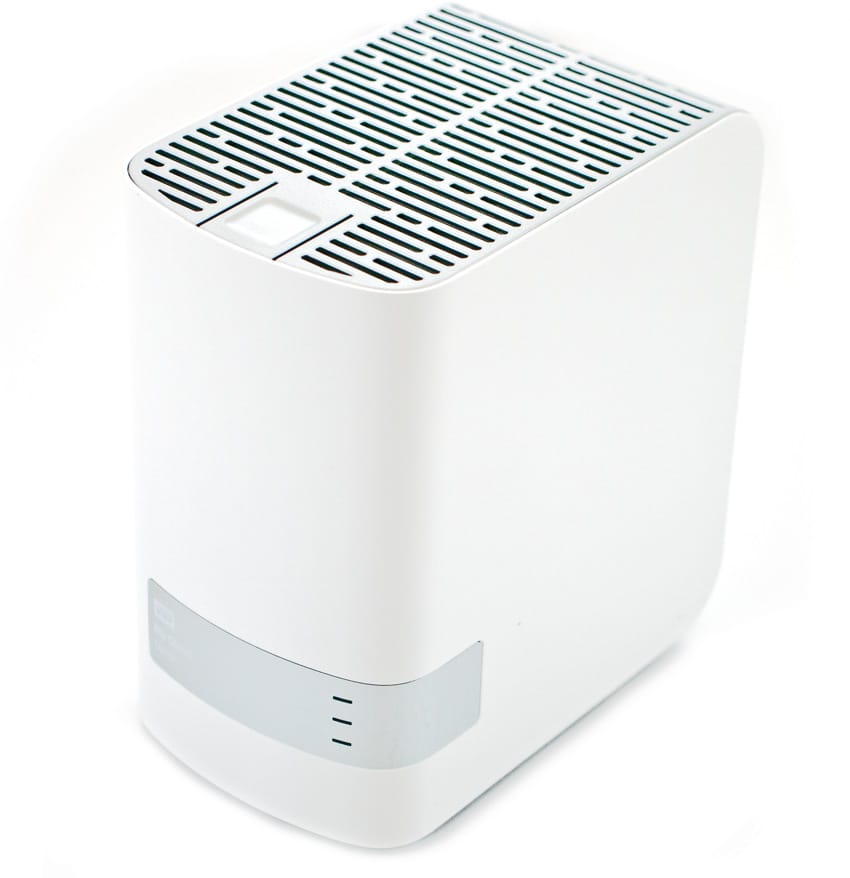
The WD My Cloud Mirror is a personal dual-drive (2-bay) NAS designed specifically for mainstream consumers looking for data protection with the ability to access content anywhere from computers, tablets, and smartphones. It is equipped with Gigabit Ethernet and a 1.2GHz processor to deliver file transfers and high-speed streaming to suit the needs of consumers with different use cases. The My Cloud Mirror is very similar to the SOHO focused  [My Cloud EX2](https://www.storagereview.com/wd_my_cloud_ex2_review), the core differences come down to feature set. The EX2 includes SNMP, DFS, Active Directory, iSCSI and Volume Encryption for the business set, while the Mirror is more streamlined to appeal to the typical home user.

![](https://www.storagereview.com/wp-content/uploads/2014/06/StorageReview-WD-My-Cloud-Mirror.jpg)

As the product name indicates, its mirrored data protection (Mirror Mode, RAID1) is the default setting. This means that its capacity is divided in half, with one half storing user data and the other half used as a duplicate copy for backup purposes in event that one drive fails. This may be a bit of a confusing pitch to consumers, as it is marketed as a 4TB, 6TB, and 8TB NAS when the recommended RAID setting only allows users get access to half of the capacity. That’s not to say the RAID1 setting isn’t a good idea, because it is; however, the product marketing just may be a bit bewildering to the average consumer.

The My Cloud Mirror works concurrently with all kinds of platforms including Mac OS, Windows, iOS and Android with mobile apps. In addition, it allows users to transfer files between their personal Cloud, Dropbox, and virtually any other public cloud accounts with WD's free My Cloud mobile app. The My Cloud Mirror also allows users to attach a compatible USB 3.0 hard drive directly to one of the two USB ports to expand their storage capacity.

The WD My Cloud Mirror goes for $390, $450, and $550 for the 4TB, 6TB, and 8TB, respectively, and is backed by a two-year warranty. Our review is of the 4TB capacity.

**Product Specifications**

- Models and Capacities
  - 8TB (WDBZVM0080JWT)
  - 6TB (WDBZVM0060JWT)
  - 4TB (WDBZVM0040JWT)
- Interface: Gigabit Ethernet
- Transfer Rates
  - Ethernet: 10/100/1000Mb/s capable     
- Physical Dimensions      
  - Height: 6.75"
  - Depth:  6.10"
  - Width:  3.90"
  - Weight: 4.60"
- Environmental Specifications     
  - Operating: 41°F to 95°F
  - Non-operating: -4°F to 149°F
- Power Dissipation
  - AC Input Voltage:  100-240VAC
  - AC Input Frequency: 50-60Hz
- Compatibility:  
  - Operating System: Windows/Mac
- Warranty: 2 years

**Design and Build**

The WD My Cloud Mirror looks virtually identical to its single bay My Cloud (and My Book) brethren, the only difference being that it is about twice as thick. Like all WD storage products, the My Cloud Mirror is a very nice looking device with its sleek and shiny white plastic enclosure. Not only does it look good, we also found it to be very quiet as well as sturdy; especially with the rubber padding on each of the bottom corners.

![]()

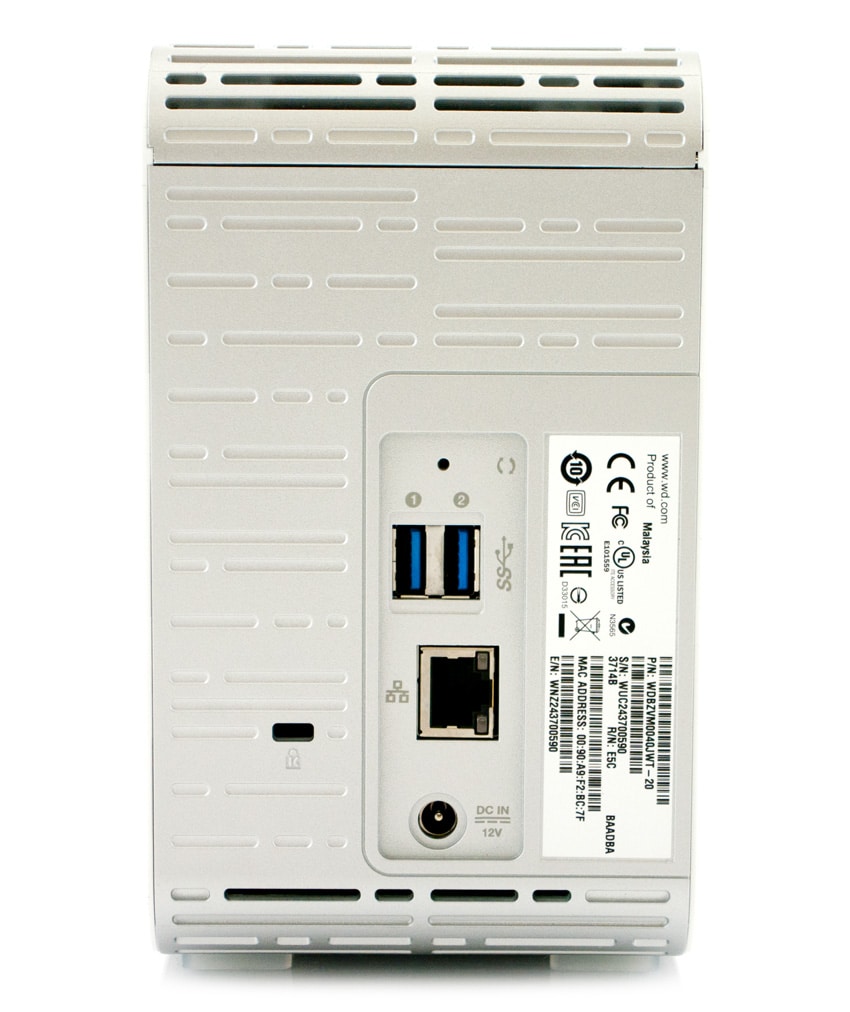
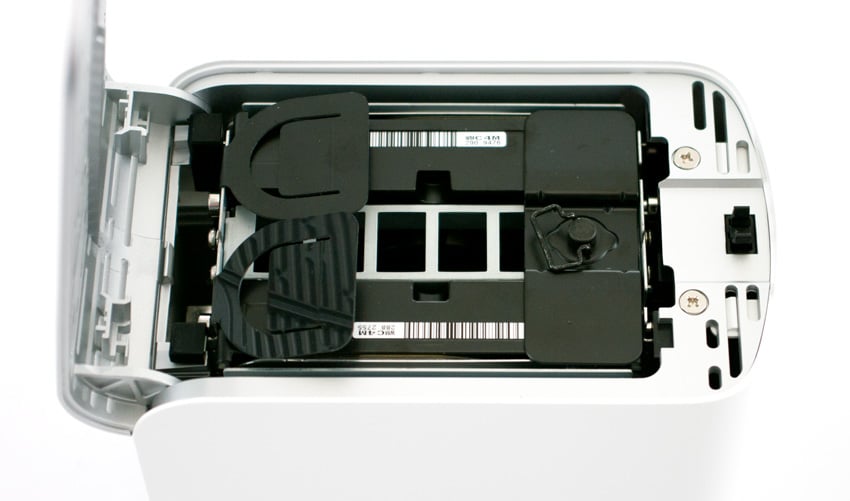
Located on the front panel’s grey plate are the LEDs: two drive status indicators as well as the power LED. The WD logo and product name are also located on the front panel. The top of the device can be opened to expose the two drives, although the drives cannot be easily removed. The back panel includes two USB 3.0 ports, an Ethernet port, reset button, and a power port. The My Cloud Mirror also supports a standard Kensington security cable.

![]()

The drives inside the Mirror are easily accessible, should the time come where a drive needs to be replaced or otherwise removed for some reason. The My Cloud Mirror comes with an Ethernet cable, AC power adapter, and a Quick Install Guide.

**Usability**

Like the other My Cloud units, the Mirror is very simple to set up. Simply connect the Ethernet cable to the Ethernet port located on the back of the device and connect the other end of the Ethernet cable directly into a router or network switch port. Connect the power adapter, and it should automatically turn on and the blue LED on the front panel should eventually turn solid blue. You’re now ready to go.

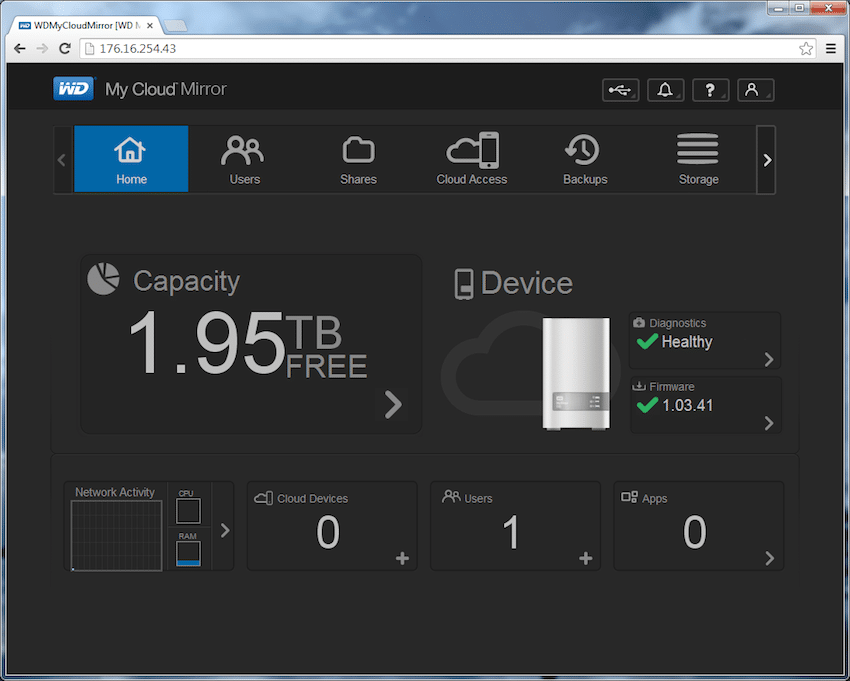
The setup process is straightforward and simple, the configuration application yields a status screen upon logging in that shows capacity, users, shares, and other administrative information at-a-glance. 

![]()

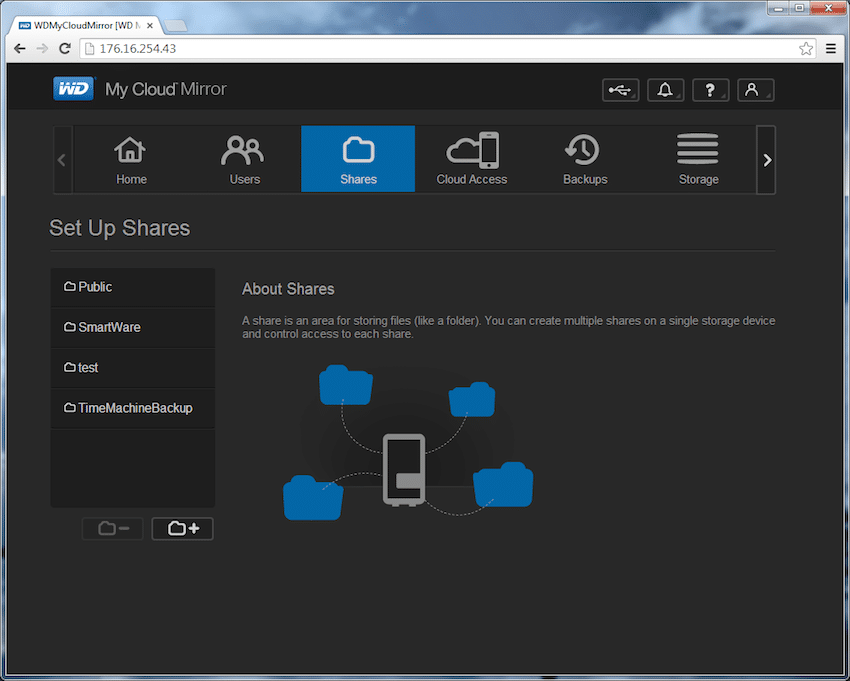
Shares can be accessed and managed via the "Shares" tab, with a simple adding function. The user can see existing shares on the left side of the screen.

![]()

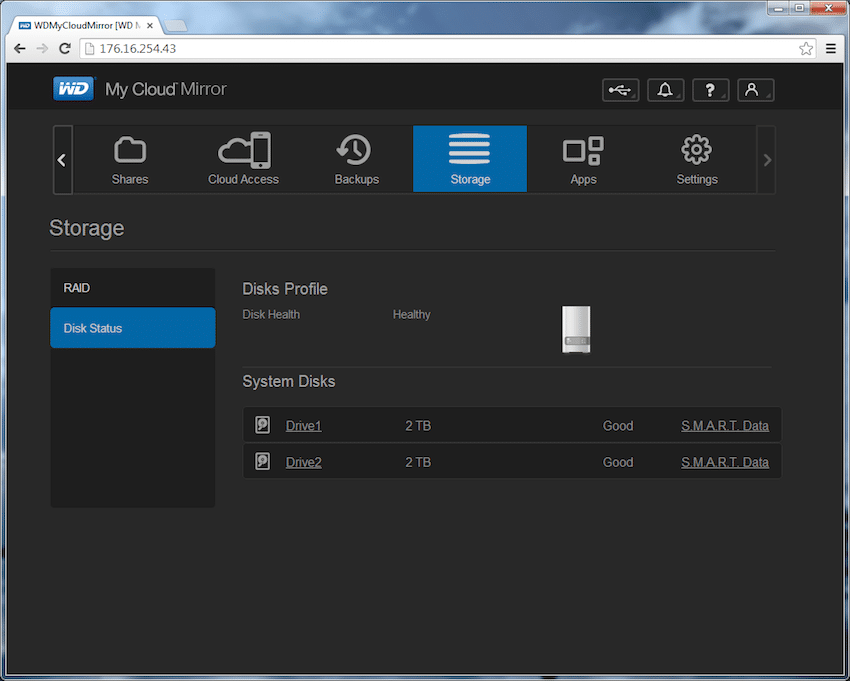
The status of the disks can also be easily checked via the "Storage" tab. This is also where RAID management occurs.

![]()

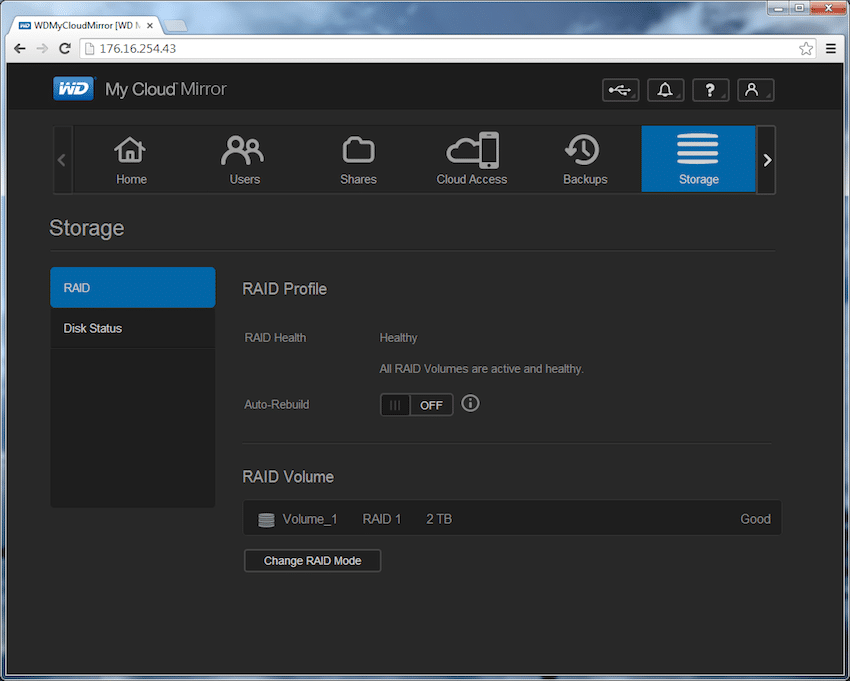
The RAID Profile shows the health of the RAID and allows for some administrative functions.

![]()

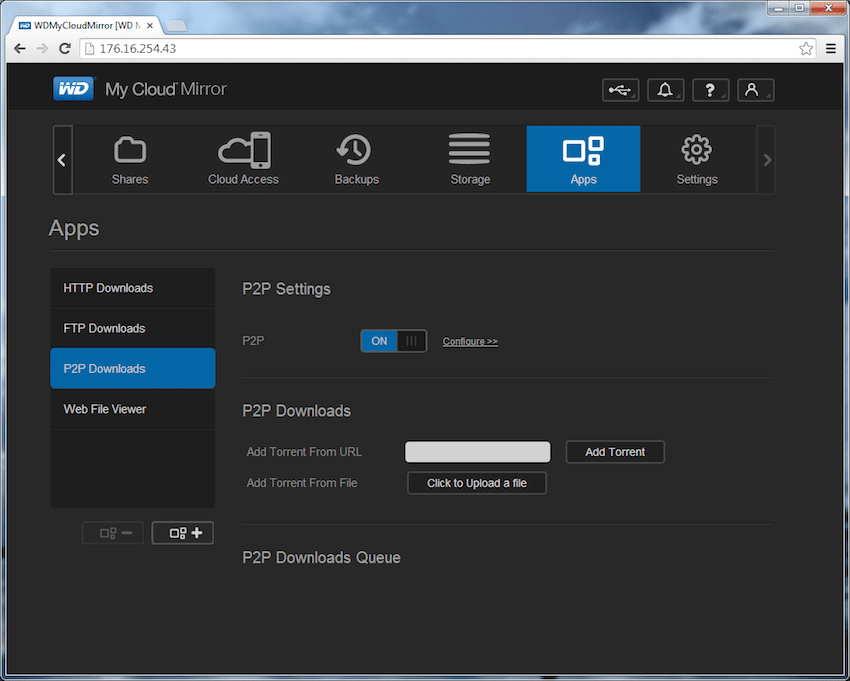
Third party apps can be downloaded and managed, with the option to access FTP and P2P apps via torrenting.

![]()

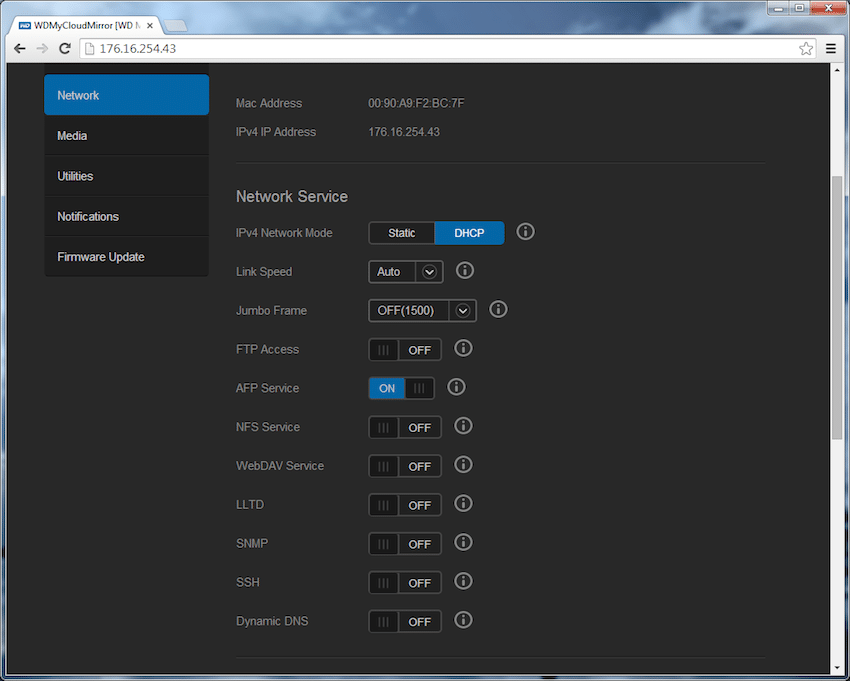
More extensive management can be done in the "Settings" tab. Administrators can manage under Network, Media, Utilities, Notifications, and Firmware Update tabs.

![]()

In aggregate, the web-based tools and applications for mobile devices make it extremely easy to configure the Mirror as well as consume or load content on the go. WD has managed to make NAS setup the most fluid process for any NAS targeted to the home user. Other NAS units may be more powerful or have deeper libraries of third party tools, but from a pure usability standpoint, it goes no easier than My Cloud.

**E****nterprise Synthetic Workload Analysis**

We tested both SMB and iSCSI performance using a RAID1 configuration across the included two WD Red 2TB HDDs.

Our standard StorageReview Enterprise Test Lab regimen runs the device through its paces with a battery of varying performance levels and throughput activity workloads. For the WD My Cloud EX2, the following profiles were utilized to compare performance between different networking standard protocols (SMB and iSCSI):

- 4K 100% Read/100% Write throughput
- 8K 100% Read/100% Write throughput
- 8K 70% Read/30% Write throughput
- 128K 100% Read/100% Write throughput

Our first testing benchmark measures 4K performance at 100% read/100% write activity across a wide range of thread/queue combinations (from 2/2 all the way to 16/16). In this category, the My Cloud Mirror posted 114IOPS read and 308IOPS write at 16T/16Q.

In our benchmark section that compares 8k transfers sequential throughput, the My Cloud Mirror showed results of 4,400IOPS read and 2,600IOPS write, while the mixed profile of 70% read/30% write hit a peak throughput of 128IOPS at 16T/16Q.

Our final testing benchmark looks at our 128K transfer test, which demonstrates the highest sequential transfer speed available. This workload showed the WD My Cloud Mirror boasting an average of 112MB/s read, and 71MB/s write.

**Conclusion**

The WD My Cloud Mirror is an easy-to-use NAS designed specifically for mainstream consumers looking for data protection as well as the ability to access this data from anywhere, on any device with an Internet connection. Since the Mirror default setting is RAID1 (or Mirror Mode), getting the Mirror up and running on your network only takes only a few minutes and requires no detailed configuration. In addition, the mobile apps and interface of the web configuration application are very user-friendly. 

As far as performance goes, it posted results on par for its class, though generally it was a bit slower in the read column than similarly classed Cloud devices like the [DS214se](https://www.storagereview.com/synology_diskstation_ds214se_review) and WD’s own My Cloud EX2. However, it showed faster write results than the other devices. For example, the Mirror posted 114IOPS read and 308IOPS write respectively at 16T/16Q in our random 4k 100% workload. For comparison, we measured the IOPS of the DS214se at 307 read and 215 write in the iSCSI configuration and 86 read and 273 write in the SMB configuration. For the EX2, we saw read and write speeds of 139IOPS and 292IOPS, respectively, for iSCSI and 114IOPS and 340IOPS, respectively, for SMB.

The WD My Cloud Mirror is competitively priced, going for roughly $350 with x2 WD 2TB drives under the hood. The two-bay My Cloud EX2 goes for approximately $200 for the diskless model, while the 4TB unit is priced at $370. The DS214se carries a street price of $159 for the diskless unit. Like all of the My Cloud/Book devices, the WD Mirror is simple and easy to use and can handle most consumer needs when it comes to backing up work. Its usability coupled with its very affordable price point allows it to hold an advantage over other NAS solutions of the same class.

**Pros**

- Easy-to-use
- Affordable
- Pre-set in RAID1, little out of box config needed

**Cons**

- No diskless model

**Bottom Line**

The WD My Cloud Mirror provides mainstream users with an attractive NAS that has robust consumer-centric functionality and the easiest setup on the market; all at a very competitive price. 

[WD My Cloud Mirror at Amazon](http://www.amazon.com/s/?_encoding=UTF8&camp=1789&creative=390957&field-keywords=WD%20My%20Cloud%20Mirror&linkCode=ur2&tag=storagereviewcom-20&url=search-alias%3Daps)![]()

[Discuss This Review](http://forums.storagereview.com/index.php/topic/36819-wd-my-cloud-mirror-review-discussion/)

**Engage with StorageReview**

[Newsletter](https://www.storagereview.com/storage_newsletter) |  [YouTube](https://www.youtube.com/user/StorageReview "Opens in a new window") | Podcast  [iTunes](https://podcasts.apple.com/gb/podcast/storagereview-com-storage-reviews/id1060681115 "Opens in a new window")/ [Spotify](https://open.spotify.com/show/1y6VnznABhHeOSMOmbDTz0 "Opens in a new window") |  [Instagram](https://www.instagram.com/storagereview/ "Opens in a new window") |  [Twitter](https://twitter.com/storagereview "Opens in a new window") |  [TikTok](https://www.tiktok.com/@storagereview? "Opens in a new window") |  [RSS Feed](https://www.storagereview.com/rss.xml)

![]()

### Lyle Smith

Lyle is a writer for StorageReview, covering a broad set of end user and enterprise IT topics.

Previous post: [Synology DiskStation DS414j Review](https://www.storagereview.com/review/synology-diskstation-ds414j-review)

Next post: [SanDisk Extreme PRO SSD Review](https://www.storagereview.com/review/sandisk-extreme-pro-ssd-review)

Trusted Vendors

Products and solutions from our affiliate partners:

- [  
  ![Ubiquiti Logo](https://www.storagereview.com/wp-content/uploads/2024/11/2-1.webp)  
   Ubiquiti  
  ](https://store.ui.com/us/en?a_aid=StorageReview "Opens in a new window")
- [  
  ![Newegg Logo](https://www.storagereview.com/wp-content/uploads/2025/11/newegg.webp)  
   Newegg  
  ](https://click.linksynergy.com/fs-bin/click?id=g5terNMDhz0&offerid=1207190.18&subid=0&type=4 "Opens in a new window")
- [  
  ![Amazon Logo](https://www.storagereview.com/wp-content/uploads/2025/11/amazon.webp) Amazon  
  ](https://amzn.to/4fLJUEW "Opens in a new window")

Newsletter

Subscribe to the StorageReview newsletter to stay up to date on the latest news and reviews. We promise no spam!

1  

Leave this field empty if you’re human:

## Advertisement

Content Categories

[Facebook](https://www.facebook.com/@storagereview) [X](https://twitter.com/storagereview) [Instagram](https://www.instagram.com/storagereview/) [LinkedIn](https://www.linkedin.com/company/storagereview-com) [YouTube](https://www.youtube.com/user/storagereview?sub_confirmation=1) [Email](mailto:info@storagereview.com) [Spotify](https://open.spotify.com/show/1y6VnznABhHeOSMOmbDTz0) [Reddit](https://www.reddit.com/r/StorageReview/) [Discord](https://discord.gg/TwMHb4azdC) [RSS](https://www.storagereview.com/rss.xml) [TikTok](https://www.tiktok.com/@storagereview)

Copyright © 1998-2025 Flying Pig Ventures, LLC Cincinnati, Ohio. All rights reserved.

Manage your privacy

To provide the best experiences, we and our partners use technologies like cookies to store and/or access device information. Consenting to these technologies will allow us and our partners to process personal data such as browsing behavior or unique IDs on this site and show (non-) personalized ads. Not consenting or withdrawing consent, may adversely affect certain features and functions.

Click below to consent to the above or make granular choices. Your choices will be applied to this site only. You can change your settings at any time, including withdrawing your consent, by using the toggles on the Cookie Policy, or by clicking on the manage consent button at the bottom of the screen.

Functional Functional Always active

The technical storage or access is strictly necessary for the legitimate purpose of enabling the use of a specific service explicitly requested by the subscriber or user, or for the sole purpose of carrying out the transmission of a communication over an electronic communications network.

Preferences Preferences

The technical storage or access is necessary for the legitimate purpose of storing preferences that are not requested by the subscriber or user.

Statistics Statistics

The technical storage or access that is used exclusively for statistical purposes. The technical storage or access that is used exclusively for anonymous statistical purposes. Without a subpoena, voluntary compliance on the part of your Internet Service Provider, or additional records from a third party, information stored or retrieved for this purpose alone cannot usually be used to identify you.

Marketing Marketing

The technical storage or access is required to create user profiles to send advertising, or to track the user on a website or across several websites for similar marketing purposes.

Statistics

Marketing

Features

Always active

Always active

- Manage options
- Manage services
- Manage {vendor\_count} vendors
- [Read more about these purposes](https://cookiedatabase.org/tcf/purposes/)

Accept Deny Manage options Save preferences Manage options

- {title}
- {title}
- {title}

Manage your privacy

To provide the best experiences, we use technologies like cookies to store and/or access device information. Consenting to these technologies will allow us to process data such as browsing behavior or unique IDs on this site. Not consenting or withdrawing consent, may adversely affect certain features and functions.

Functional Functional Always active

The technical storage or access is strictly necessary for the legitimate purpose of enabling the use of a specific service explicitly requested by the subscriber or user, or for the sole purpose of carrying out the transmission of a communication over an electronic communications network.

Preferences Preferences

The technical storage or access is necessary for the legitimate purpose of storing preferences that are not requested by the subscriber or user.

Statistics Statistics

The technical storage or access that is used exclusively for statistical purposes. The technical storage or access that is used exclusively for anonymous statistical purposes. Without a subpoena, voluntary compliance on the part of your Internet Service Provider, or additional records from a third party, information stored or retrieved for this purpose alone cannot usually be used to identify you.

Marketing Marketing

The technical storage or access is required to create user profiles to send advertising, or to track the user on a website or across several websites for similar marketing purposes.

Statistics

Marketing

Features

Always active

Always active

- Manage options
- Manage services
- Manage {vendor\_count} vendors
- [Read more about these purposes](https://cookiedatabase.org/tcf/purposes/)

Accept Deny Manage options Save preferences Manage options

- {title}
- {title}
- {title}

Manage consent Manage consent

```json
{"@context":"https:\/\/schema.org","@graph":[{"@type":"WebPage","@id":"https:\/\/www.storagereview.com\/review\/wd-my-cloud-mirror-review","url":"https:\/\/www.storagereview.com\/review\/wd-my-cloud-mirror-review","name":"WD My Cloud Mirror Review - StorageReview.com","isPartOf":{"@id":"https:\/\/www.storagereview.com\/#website"},"primaryImageOfPage":{"@id":"https:\/\/www.storagereview.com\/review\/wd-my-cloud-mirror-review#primaryimage"},"image":{"@id":"https:\/\/www.storagereview.com\/review\/wd-my-cloud-mirror-review#primaryimage"},"thumbnailUrl":"https:\/\/www.storagereview.com\/wp-content\/uploads\/2014\/06\/StorageReview-WD-My-Cloud-Mirror-Thumb.jpg","datePublished":"2014-06-16T16:07:59+00:00","dateModified":"2020-02-06T10:15:42+00:00","breadcrumb":{"@id":"https:\/\/www.storagereview.com\/review\/wd-my-cloud-mirror-review#breadcrumb"},"inLanguage":"en-US","potentialAction":[{"@type":"ReadAction","target":["https:\/\/www.storagereview.com\/review\/wd-my-cloud-mirror-review"]}]},{"@type":"ImageObject","inLanguage":"en-US","@id":"https:\/\/www.storagereview.com\/review\/wd-my-cloud-mirror-review#primaryimage","url":"https:\/\/www.storagereview.com\/wp-content\/uploads\/2014\/06\/StorageReview-WD-My-Cloud-Mirror-Thumb.jpg","contentUrl":"https:\/\/www.storagereview.com\/wp-content\/uploads\/2014\/06\/StorageReview-WD-My-Cloud-Mirror-Thumb.jpg","width":100,"height":103},{"@type":"BreadcrumbList","@id":"https:\/\/www.storagereview.com\/review\/wd-my-cloud-mirror-review#breadcrumb","itemListElement":[{"@type":"ListItem","position":1,"name":"Home","item":"https:\/\/www.storagereview.com\/"},{"@type":"ListItem","position":2,"name":"Review","item":"https:\/\/www.storagereview.com\/review"},{"@type":"ListItem","position":3,"name":"WD My Cloud Mirror Review"}]},{"@type":"WebSite","@id":"https:\/\/www.storagereview.com\/#website","url":"https:\/\/www.storagereview.com\/","name":"StorageReview.com","description":"StorageReview.com is a leading provider of news and reviews throughout the entire IT stack - from the datacenter to the edge, and all points in between.","publisher":{"@id":"https:\/\/www.storagereview.com\/#organization"},"potentialAction":[{"@type":"SearchAction","target":{"@type":"EntryPoint","urlTemplate":"https:\/\/www.storagereview.com\/?s={search_term_string}"},"query-input":{"@type":"PropertyValueSpecification","valueRequired":true,"valueName":"search_term_string"}}],"inLanguage":"en-US"},{"@type":"Organization","@id":"https:\/\/www.storagereview.com\/#organization","name":"StorageReview.com","url":"https:\/\/www.storagereview.com\/","logo":{"@type":"ImageObject","inLanguage":"en-US","@id":"https:\/\/www.storagereview.com\/#\/schema\/logo\/image\/","url":"https:\/\/www.storagereview.com\/wp-content\/uploads\/2020\/02\/Storage-Reviews-2-2.png","contentUrl":"https:\/\/www.storagereview.com\/wp-content\/uploads\/2020\/02\/Storage-Reviews-2-2.png","width":344,"height":61,"caption":"StorageReview.com"},"image":{"@id":"https:\/\/www.storagereview.com\/#\/schema\/logo\/image\/"},"sameAs":["https:\/\/x.com\/storagereview","http:\/\/youtube.com\/user\/storagereview"]}]}
```