---
description: The LaCie 1big Dock SSD Pro is a dock for creative pros that comes with up to 4TB of NVMe capacity and hits its claimed speeds of 2.8GB/s.
title: LaCie 1big Dock SSD Pro Review
image: https://www.storagereview.com/wp-content/uploads/2020/08/AEV_3837.jpg
---
[![Storage Review]()](https://storagereview.com/)
---
[Facebook](https://www.facebook.com/@storagereview) [X (Twitter)](https://twitter.twitter.com/storagereview) [Instagram](https://www.instagram.com/storagereview/) [LinkedIn](https://www.linkedin.com/company/storagereview-com) [YouTube](https://www.youtube.com/user/storagereview?sub_confirmation=1) [Email](mailto:info@storagereview.com) [Spotify](https://open.spotify.com/show/1y6VnznABhHeOSMOmbDTz0) [Reddit](https://www.reddit.com/r/StorageReview/) [Discord](https://discord.gg/TwMHb4azdC) [RSS Feed](https://www.storagereview.com/rss.xml) [TikTok](https://www.tiktok.com/@storagereview)
[Facebook](https://www.facebook.com/@storagereview) [X (Twitter)](https://twitter.com/storagereview) [Instagram](https://www.instagram.com/storagereview/) [LinkedIn](https://www.linkedin.com/company/storagereview-com) [YouTube](https://www.youtube.com/user/storagereview?sub_confirmation=1) [Email](mailto:info@storagereview.com) [Spotify](https://open.spotify.com/show/1y6VnznABhHeOSMOmbDTz0) [Reddit](https://www.reddit.com/r/StorageReview/) [Discord](https://discord.gg/TwMHb4azdC) [RSS Feed](https://www.storagereview.com/rss.xml) [TikTok](https://www.tiktok.com/@storagereview)
[](https://www.storagereview.com)
≡ Menu
- [Home](https://www.storagereview.com/)
- [Storage Reviews](https://www.storagereview.com/review)
- [End User Reviews](https://www.storagereview.com/consumer)
- [Enterprise Reviews](https://www.storagereview.com/enterprise)
- [Ubiquiti Reviews](https://www.storagereview.com/best/ubiquiti-reviews)
- [SR Merch](https://store.storagereview.com)
- [Leaderboards](https://www.storagereview.com/best)
- [Best Storage Arrays](https://www.storagereview.com/best/storage-arrays)
- [Best Enterprise SSDs](https://www.storagereview.com/best/enterprise-ssds)
- [Best Servers](https://www.storagereview.com/best/servers)
- [Best Enterprise GPUs](https://www.storagereview.com/best/enterprise-gpus)
- [Best Desktops for Local AI](https://www.storagereview.com/best/desktops-local-ai)
- [Best Laptops for Local AI](https://www.storagereview.com/best/laptops-local-ai)
- [Best Local LLM Tools](https://www.storagereview.com/best/local-llm-tools)
- [Agentic AI Hardware](https://www.storagereview.com/best/agentic-ai-hardware)
- [Best SSDs & Hard Drives](https://www.storagereview.com/best_drives)
- [Best Portable SSDs](https://www.storagereview.com/best/portable-ssds)
- [Best Business Laptops](https://www.storagereview.com/best/business-laptops)
- [Best Mobile Workstations](https://www.storagereview.com/best/mobile-workstations)
- [Best Desktop Workstations](https://www.storagereview.com/best/desktop-workstations)
- [Best Mini PCs](https://www.storagereview.com/best/mini-pcs)
- [Best Laptop Battery Life](https://www.storagereview.com/best/laptop-battery-life)
- [Storage Reference Guide](https://www.storagereview.com/storage-reference-guide)
- [About SR](https://www.storagereview.com/about-storagereview)
- [StorageReview.com Sweepstakes Rules and Regulations](https://www.storagereview.com/storagereview-com-sweepstakes-rules-and-regulations)
Search
[Home](https://www.storagereview.com/) » [Review](https://www.storagereview.com/review) » LaCie 1big Dock SSD Pro Review
# LaCie 1big Dock SSD Pro Review
by Adam Armstrong on October 16, 2020
[Desktop Storage (External)](https://www.storagereview.com/consumer/desktop-storage-external) ◇ [End User](https://www.storagereview.com/consumer)
Creative professionals looking to streamline their workflow with a big capacity bump should look into the [LaCie 1big Dock](https://www.storagereview.com/review/lacie-1big-dock-review), it goes up to 16TB. On the other hand, if you happen to be a professional that needs extra speed, the company offers the LaCie 1big Dock SSD Pro. This dock comes with dual Thunderbolt 3 ports and an internal NVMe SSD to hit speeds up to 2.8GB/s.
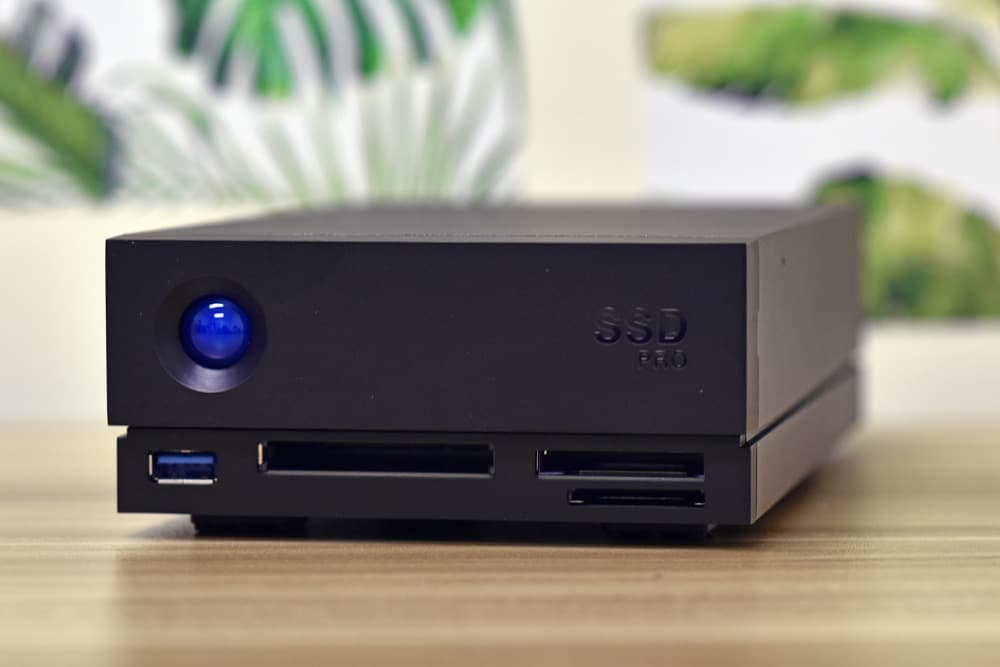
A dock takes various peripherals and replaces them all with one device and/or acts as a hub for several, combining them into one connection for a notebook. This is important in this day and age where certain companies like to only give us a few ports to work within a notebook. Docks are also great for creative professionals so they don’t have to go through various adapters and readers to get their content where it can be stored and edited.
With the LaCie 1big Dock SSD Pro creative professionals will have a dock where they can quickly move and store 6K and 8K video footage. If one needs to charge their notebook, no problem, the dock charges up to 70W through its host Thunderbolt 3 port.
For other needs, the dock also has cinema-grade card readers as well as a few ports. This includes a CFast 2.0 slot and a CFexpress slot as well as an SD Card reader. LaCie states that the card readers are ready for high bitrate footage. Other peripherals can be connected as well through the USB 3.0 port or through one of the Thunderbolt 3 ports. The dock comes with a DisplayPort 1.4 port out as well for connecting with a 4K monitor.
The LaCie 1big Dock SSD Pro comes with a 5-year warranty and in [2TB and 4TB capacities for $1,300 and $2,500 respectively](https://amzn.to/3dsIyPW). For our review, we are looking at the 2TB model.
## **LaCie 1big Dock SSD Pro Specifications**
| Capacity | 2TB, 4TB |
| --- | --- |
| Performance | Up to 2800MB/s |
| Interface | Dual Thunderbolt 3
DisplayPort 1.4
USB 3.0
SD/CF card slots |
| Dimensions (in/mm) | Length 4.646in/118mm
Width 2.217in/56.3mm
Depth 8.543in/217mm
Weight 2.866lb/1.3kg |
| Warranty and Rescue | 5 years |
| Rescue Data Recovery Services | 5 years |
## **LaCie 1big Dock SSD Pro Design and Build**
The LaCie 1big Dock SSD Pro is similar to the HDD version only a bit smaller. While smaller, it retains all of the features and ports needed for creative professionals. The body is still fully aluminum (self-cooling), black in color with the big blue indicator light that then entire “big” line shares. The front of the device has the aforementioned indicator light, a USB 3.0 port, a CFast 2.0 slot, an SDXC slot, and a CFexpress slot.
![LaCie 1big DOCK SSD PRO side at scale]()
Flipping around to the rear, the fan is roughly in the middle. To the left of the fan is a Kensington lock port. Beneath that is the power input, followed by two Thunderbolt 3 ports (the host port and a peripheral port), a DisplayPort 1.4 port, a manual shutdown button, and squeezed in between the thunderbolt ports is a firmware update button.
![LaCie 1big DOCK SSD PRO back]()
Removing the drive caddy and taking the enclosure apart we can see the internal setup as well as the drive.
![Lacie 1 big dock pro inside the inside]()
What is of interest here is how LaCie built the heat dissipation around the drive in order to keep it running at high performance longer. They’ve created a custom metal enclosure that holds an [M.2 NVMe FireCuda inside](https://www.storagereview.com/review/seagate-firecuda-gaming-ssd-review). With all that space it would have been interesting to have a second drive, but that’s outside the scope of this design.
![Lacie 1 big dock pro inside]()
## **LaCie 1big Dock SSD Pro ****Performance**
To test the LaCie 1big Dock SSD Pro we did a few different things. For starters, we ran IOMeter and Blackmagic on the internal SSD using a [Lenovo X1 Extreme](https://www.storagereview.com/review/lenovo-thinkpad-x1-extreme-gen-2-review). We also ran IOMeter and Blackmagic on the [Lexar Professional CFexpress Type B Card](https://www.storagereview.com/review/lexar-professional-cfexpress-type-b-card-review) with the dock to see how connected devices will perform.
For Blackmagic, the internal drive in the dock was able to hit 2.23GB/s read and 1.5GB/s write.
![]()
For IOMeter, we first looked at 2MB sequential with both 1 and 4 thread, the latter which is a higher load that pushes the drive a bit more. For 1 thread, the LaCie 1big Dock SSD Pro hit 1.82GB/s read and 1.15GB/s write. For 2MB random, the dock saw 1.81GB/s read and 1.23GB/s write. For 1 thread 4K we saw 9,640 IOPS read and 32,028 IOPS write.
Looking at a 4-thread workload, the LaCie 1big Dock SSD Pro saw 2MB sequential speeds of 2.8GB/s read and 1.67GB/s write. With 2MB random we got 2.8GB/s read and 1.65GB/s write. For 4 thread 4K random the dock hit 35,636 IOPS read and 99,827 IOPS write.
It should be noted here that the CFExpress card slot connects at 10Gb, not TB3. With that in mind, the Blackmagic test gave us 837.2MB/s read and 808.4MB/s write.
![]()
We ran 4 thread IOMeter on the card as well. For 2MB sequential, we saw 937MB/s read and 853MB/s write. 2MB random on the card showed 830MB/s read and 804MB/s write. For 4K random, the card in the dock gave us 4,107 IOPS read and 22,903 IOPS write.
## **Conclusion**
The LaCie 1Big SSD Pro is a dock aimed at creative professionals that need both capacity and speed while decluttering their desks. The dock leverages dual Thunderbolt 3 and an internal NVMe (Seagate FireCuda NVMe SSD) with either 2TB or 4TB of capacity. The above allows it to claim speeds up to 2.8GB/s or as LaCie put it, 165GB worth of high-res footage in 60 seconds. The dock has cinema-grad pard readers including a CFast 2.0 slot, an SDXC slot, and a CFexpress slot (10Gb). There is a USB 3.0 port, two Thunderbolt 3 ports (one with 70W power pass-through), as well as a DisplayPort 1.4 out for a 4K monitor.
For performance, we tested both the internal drive as well as a Lexar CFExpress card using both Blackmagic and IOMeter 1 thread and 4 thread on the internal and 4 thread on the card. Blackmagic on the internal drive gave us 2.23GB/s read and 1.5GB/s write. With IOMeter 1 thread we saw 1.82GB/s read and 1.15GB/s write for 2MB sequential, 1.81GB/s read and 1.23GB/s write for 2MB random, and 9,640 IOPS read and 32,028 IOPS write in 4K random. For 4 threads we saw the dock hit its claimed speed in both 2MB sequential read (2.8GB/s) and 2MB random read (2.8GB/s). For write, we saw 1.67GB/s in sequential and 1.65GB/s in random. For 4K random, the dock hit 35,636 IOPS read and a whopping 99,827 IOPS write.
We also tested a CFExpress card through the dock. It is important to note that the CFExpress card slot connects at 10Gb, not Thunderbolt 3. In Blackmagic, we saw 837.2MB/s read and 808.4MB/s write. In 4 thread IOMeter, the card gave us 937MB/s read and 853MB/s write in 2MB sequential, 830MB/s read, and 804MB/s write in 2MB random, and 4,107 IOPS read and 22,903 IOPS write in 4K random.
The LaCie 1big Dock SSD Pro is, as the name implies, a one-stop dock for creative professionals that comes with up to 4TB of NVMe capacity and hits its claimed speeds of 2.8GB/s. The dock checks all the boxes for those that need capacity, speed, ports, and slots for their camera cards. This would be nice for someone that is working on location and need a portable kit. Aside from their camera equipment, they can use this dock and a notebook for their primary setup on location.
[LaCie 1big Dock SSD Pro on Amazon](https://amzn.to/3dsIyPW)
**Engage with StorageReview**
[Newsletter](https://www.storagereview.com/storage_newsletter) | [YouTube](https://www.youtube.com/user/StorageReview "Opens in a new window") | Podcast [iTunes](https://podcasts.apple.com/gb/podcast/storagereview-com-storage-reviews/id1060681115 "Opens in a new window")/ [Spotify](https://open.spotify.com/show/1y6VnznABhHeOSMOmbDTz0 "Opens in a new window") | [Instagram](https://www.instagram.com/storagereview/ "Opens in a new window") | [Twitter](https://twitter.com/storagereview "Opens in a new window") | [TikTok](https://www.tiktok.com/@storagereview? "Opens in a new window") | [RSS Feed](https://www.storagereview.com/rss.xml)
![]()
### Adam Armstrong
Adam is the chief news editor for StorageReview.com, managing our internal and freelance content teams.
Previous post: [Samsung EVO Plus SDXC Card Review](https://www.storagereview.com/review/samsung-evo-plus-sdxc-card-review)
Next post: [Seagate IronWolf Pro 18TB Review](https://www.storagereview.com/review/seagate-ironwolf-pro-18tb-review)
Trusted Vendors
Products and solutions from our affiliate partners:
- [

Ubiquiti
](https://store.ui.com/us/en?a_aid=StorageReview "Opens in a new window")
- [

Newegg
](https://click.linksynergy.com/fs-bin/click?id=g5terNMDhz0&offerid=1207190.18&subid=0&type=4 "Opens in a new window")
- [
 Amazon
](https://amzn.to/4fLJUEW "Opens in a new window")
Newsletter
Subscribe to the StorageReview newsletter to stay up to date on the latest news and reviews. We promise no spam!
1
Leave this field empty if you’re human:
## Advertisement
Content Categories
[Facebook](https://www.facebook.com/@storagereview) [X](https://twitter.com/storagereview) [Instagram](https://www.instagram.com/storagereview/) [LinkedIn](https://www.linkedin.com/company/storagereview-com) [YouTube](https://www.youtube.com/user/storagereview?sub_confirmation=1) [Email](mailto:info@storagereview.com) [Spotify](https://open.spotify.com/show/1y6VnznABhHeOSMOmbDTz0) [Reddit](https://www.reddit.com/r/StorageReview/) [Discord](https://discord.gg/TwMHb4azdC) [RSS](https://www.storagereview.com/rss.xml) [TikTok](https://www.tiktok.com/@storagereview)
Copyright © 1998-2025 Flying Pig Ventures, LLC Cincinnati, Ohio. All rights reserved.
Manage your privacy
To provide the best experiences, we and our partners use technologies like cookies to store and/or access device information. Consenting to these technologies will allow us and our partners to process personal data such as browsing behavior or unique IDs on this site and show (non-) personalized ads. Not consenting or withdrawing consent, may adversely affect certain features and functions.
Click below to consent to the above or make granular choices. Your choices will be applied to this site only. You can change your settings at any time, including withdrawing your consent, by using the toggles on the Cookie Policy, or by clicking on the manage consent button at the bottom of the screen.
Functional Functional Always active
The technical storage or access is strictly necessary for the legitimate purpose of enabling the use of a specific service explicitly requested by the subscriber or user, or for the sole purpose of carrying out the transmission of a communication over an electronic communications network.
Preferences Preferences
The technical storage or access is necessary for the legitimate purpose of storing preferences that are not requested by the subscriber or user.
Statistics Statistics
The technical storage or access that is used exclusively for statistical purposes. The technical storage or access that is used exclusively for anonymous statistical purposes. Without a subpoena, voluntary compliance on the part of your Internet Service Provider, or additional records from a third party, information stored or retrieved for this purpose alone cannot usually be used to identify you.
Marketing Marketing
The technical storage or access is required to create user profiles to send advertising, or to track the user on a website or across several websites for similar marketing purposes.
Statistics
Marketing
Features
Always active
Special features
Special purposes
Always active
- Manage options
- Manage services
- Manage {vendor\_count} vendors
- [Read more about these purposes](https://cookiedatabase.org/tcf/purposes/)
Accept Deny Manage options Save preferences Manage options
- {title}
- {title}
- {title}
Manage your privacy
To provide the best experiences, we use technologies like cookies to store and/or access device information. Consenting to these technologies will allow us to process data such as browsing behavior or unique IDs on this site. Not consenting or withdrawing consent, may adversely affect certain features and functions.
Functional Functional Always active
The technical storage or access is strictly necessary for the legitimate purpose of enabling the use of a specific service explicitly requested by the subscriber or user, or for the sole purpose of carrying out the transmission of a communication over an electronic communications network.
Preferences Preferences
The technical storage or access is necessary for the legitimate purpose of storing preferences that are not requested by the subscriber or user.
Statistics Statistics
The technical storage or access that is used exclusively for statistical purposes. The technical storage or access that is used exclusively for anonymous statistical purposes. Without a subpoena, voluntary compliance on the part of your Internet Service Provider, or additional records from a third party, information stored or retrieved for this purpose alone cannot usually be used to identify you.
Marketing Marketing
The technical storage or access is required to create user profiles to send advertising, or to track the user on a website or across several websites for similar marketing purposes.
Statistics
Marketing
Features
Always active
Special features
Special purposes
Always active
- Manage options
- Manage services
- Manage {vendor\_count} vendors
- [Read more about these purposes](https://cookiedatabase.org/tcf/purposes/)
Accept Deny Manage options Save preferences Manage options
- {title}
- {title}
- {title}
Manage consent Manage consent
```json
{"@context":"https:\/\/schema.org","@graph":[{"@type":"WebPage","@id":"https:\/\/www.storagereview.com\/review\/lacie-1big-dock-ssd-pro-review","url":"https:\/\/www.storagereview.com\/review\/lacie-1big-dock-ssd-pro-review","name":"LaCie 1big Dock SSD Pro Review - StorageReview.com","isPartOf":{"@id":"https:\/\/www.storagereview.com\/#website"},"primaryImageOfPage":{"@id":"https:\/\/www.storagereview.com\/review\/lacie-1big-dock-ssd-pro-review#primaryimage"},"image":{"@id":"https:\/\/www.storagereview.com\/review\/lacie-1big-dock-ssd-pro-review#primaryimage"},"thumbnailUrl":"https:\/\/www.storagereview.com\/wp-content\/uploads\/2020\/08\/AEV_3837.jpg","datePublished":"2020-10-16T18:33:53+00:00","dateModified":"2021-07-08T13:50:29+00:00","description":"The LaCie 1big Dock SSD Pro is a dock for creative pros that comes with up to 4TB of NVMe capacity and hits its claimed speeds of 2.8GB\/s.","breadcrumb":{"@id":"https:\/\/www.storagereview.com\/review\/lacie-1big-dock-ssd-pro-review#breadcrumb"},"inLanguage":"en-US","potentialAction":[{"@type":"ReadAction","target":["https:\/\/www.storagereview.com\/review\/lacie-1big-dock-ssd-pro-review"]}]},{"@type":"ImageObject","inLanguage":"en-US","@id":"https:\/\/www.storagereview.com\/review\/lacie-1big-dock-ssd-pro-review#primaryimage","url":"https:\/\/www.storagereview.com\/wp-content\/uploads\/2020\/08\/AEV_3837.jpg","contentUrl":"https:\/\/www.storagereview.com\/wp-content\/uploads\/2020\/08\/AEV_3837.jpg","width":1000,"height":668,"caption":"LaCie 1big DOCK SSD PRO plugged in at scale"},{"@type":"BreadcrumbList","@id":"https:\/\/www.storagereview.com\/review\/lacie-1big-dock-ssd-pro-review#breadcrumb","itemListElement":[{"@type":"ListItem","position":1,"name":"Home","item":"https:\/\/www.storagereview.com\/"},{"@type":"ListItem","position":2,"name":"Review","item":"https:\/\/www.storagereview.com\/review"},{"@type":"ListItem","position":3,"name":"LaCie 1big Dock SSD Pro Review"}]},{"@type":"WebSite","@id":"https:\/\/www.storagereview.com\/#website","url":"https:\/\/www.storagereview.com\/","name":"StorageReview.com","description":"StorageReview.com is a leading provider of news and reviews throughout the entire IT stack - from the datacenter to the edge, and all points in between.","publisher":{"@id":"https:\/\/www.storagereview.com\/#organization"},"potentialAction":[{"@type":"SearchAction","target":{"@type":"EntryPoint","urlTemplate":"https:\/\/www.storagereview.com\/?s={search_term_string}"},"query-input":{"@type":"PropertyValueSpecification","valueRequired":true,"valueName":"search_term_string"}}],"inLanguage":"en-US"},{"@type":"Organization","@id":"https:\/\/www.storagereview.com\/#organization","name":"StorageReview.com","url":"https:\/\/www.storagereview.com\/","logo":{"@type":"ImageObject","inLanguage":"en-US","@id":"https:\/\/www.storagereview.com\/#\/schema\/logo\/image\/","url":"https:\/\/www.storagereview.com\/wp-content\/uploads\/2020\/02\/Storage-Reviews-2-2.png","contentUrl":"https:\/\/www.storagereview.com\/wp-content\/uploads\/2020\/02\/Storage-Reviews-2-2.png","width":344,"height":61,"caption":"StorageReview.com"},"image":{"@id":"https:\/\/www.storagereview.com\/#\/schema\/logo\/image\/"},"sameAs":["https:\/\/x.com\/storagereview","http:\/\/youtube.com\/user\/storagereview"]}]}
```