---
description: The Dell OptiPlex 7040 Series is a small form factor (SFF) computer that can pack quite the power punch per square inch and is offered in two form factors.
title: Dell OptiPlex 7040 Series (SFF) Review
image: https://www.storagereview.com/wp-content/uploads/2016/11/StorageReview-Dell-Optiplex-7040.jpg
---
[![Storage Review]()](https://storagereview.com/)
---
[Facebook](https://www.facebook.com/@storagereview) [X (Twitter)](https://twitter.twitter.com/storagereview) [Instagram](https://www.instagram.com/storagereview/) [LinkedIn](https://www.linkedin.com/company/storagereview-com) [YouTube](https://www.youtube.com/user/storagereview?sub_confirmation=1) [Email](mailto:info@storagereview.com) [Spotify](https://open.spotify.com/show/1y6VnznABhHeOSMOmbDTz0) [Reddit](https://www.reddit.com/r/StorageReview/) [Discord](https://discord.gg/TwMHb4azdC) [RSS Feed](https://www.storagereview.com/rss.xml) [TikTok](https://www.tiktok.com/@storagereview)
[Facebook](https://www.facebook.com/@storagereview) [X (Twitter)](https://twitter.com/storagereview) [Instagram](https://www.instagram.com/storagereview/) [LinkedIn](https://www.linkedin.com/company/storagereview-com) [YouTube](https://www.youtube.com/user/storagereview?sub_confirmation=1) [Email](mailto:info@storagereview.com) [Spotify](https://open.spotify.com/show/1y6VnznABhHeOSMOmbDTz0) [Reddit](https://www.reddit.com/r/StorageReview/) [Discord](https://discord.gg/TwMHb4azdC) [RSS Feed](https://www.storagereview.com/rss.xml) [TikTok](https://www.tiktok.com/@storagereview)
[](https://www.storagereview.com)
≡ Menu
- [Home](https://www.storagereview.com/)
- [Storage Reviews](https://www.storagereview.com/review)
- [End User Reviews](https://www.storagereview.com/consumer)
- [Enterprise Reviews](https://www.storagereview.com/enterprise)
- [Ubiquiti Reviews](https://www.storagereview.com/best/ubiquiti-reviews)
- [SR Merch](https://store.storagereview.com)
- [Leaderboards](https://www.storagereview.com/best)
- [Best Storage Arrays](https://www.storagereview.com/best/storage-arrays)
- [Best Enterprise SSDs](https://www.storagereview.com/best/enterprise-ssds)
- [Best Servers](https://www.storagereview.com/best/servers)
- [Best Enterprise GPUs](https://www.storagereview.com/best/enterprise-gpus)
- [Best Desktops for Local AI](https://www.storagereview.com/best/desktops-local-ai)
- [Best Laptops for Local AI](https://www.storagereview.com/best/laptops-local-ai)
- [Best Local LLM Tools](https://www.storagereview.com/best/local-llm-tools)
- [Agentic AI Hardware](https://www.storagereview.com/best/agentic-ai-hardware)
- [Best SSDs & Hard Drives](https://www.storagereview.com/best_drives)
- [Best Portable SSDs](https://www.storagereview.com/best/portable-ssds)
- [Best Business Laptops](https://www.storagereview.com/best/business-laptops)
- [Best Mobile Workstations](https://www.storagereview.com/best/mobile-workstations)
- [Best Desktop Workstations](https://www.storagereview.com/best/desktop-workstations)
- [Best Mini PCs](https://www.storagereview.com/best/mini-pcs)
- [Best Laptop Battery Life](https://www.storagereview.com/best/laptop-battery-life)
- [Storage Reference Guide](https://www.storagereview.com/storage-reference-guide)
- [About SR](https://www.storagereview.com/about-storagereview)
- [StorageReview.com Sweepstakes Rules and Regulations](https://www.storagereview.com/storagereview-com-sweepstakes-rules-and-regulations)
Search
[Home](https://www.storagereview.com/) » [Review](https://www.storagereview.com/review) » Dell OptiPlex 7040 Series (SFF) Review
# Dell OptiPlex 7040 Series (SFF) Review
by Adam Armstrong on November 18, 2016
[End User](https://www.storagereview.com/consumer) ◇ [Workstation](https://www.storagereview.com/consumer/workstation)
The Dell OptiPlex 7040 Series is a small form factor (SFF) computer that can pack quite the power punch per square inch. The OptiPlex 7040 comes equipped with the latest sixth generation Intel Core Processor. The OptiPlex 7040 is offered in two form factors: the mini tower and the SFF. Both of these form factors have been scaled down from the previous models. For our review we will be looking at the SFF.
Like several of Dell’s products, the OptiPlex 7040 Series is highly customizable. For the SFF, there is up to 16GB in memory, CPUs up to a quad core i7-6700, multiple drive options including PCIe NVMe SSD with up to 512GB of capacity. The NVMe SSDs one can choose from include Samsung’s NVMe SSDs, which are far and away some of the best performing NVMe SSDs we have tested. The desktop is designed for businesses of all sizes and comes with BIOS setting and system configurations that can be manipulated to fit the user’s specific IT requirements. Dell also enables users to keep their BIOS and system configurations flexible with its Client Command Suite of free tools. Administrators can remotely manage the desktop with optional Intel vPro technology, plus Dell’s unique capabilities for out-of-band BIOS management.
While businesses need both performance and flexibility, there is a big concern for security. To this end, Dell is claiming the best security “right out of the box.” With Dell Data Protection, OptiPlex users can expect centralized remote management and encryption, authentication options, secure credential storage, the ability to stop even advanced forms of malware, and single console security.
Our system has a street price of $1,400, which consists of an Intel Core i7-6700 CPU, an AMD Radeon R7 M350X, 16GB of DDR4 RAM and a Samsung PM951 M.2 256GB NVMe SSD.
**Dell OptiPlex 7040 SFF specifications:**
- CPU options:
- Intel Core i5-6500 Processor (Quad Core, 6MB, 4T, 3.2GHz, 65W)
- Intel Core i5-6600 Processor (Quad Core, 6MB, 4T, 3.3GHz, 65W)
- **Intel Core i7-6700 Processor (Quad Core, 8MB, 8T, 3.4GHz, 65W)**
- Operating system options:
- **Windows 10 Pro, 64bit**
- Windows 7 Professional 64bit (Includes Windows 10 Pro License)
- Memory options:
- 4GB (1x4G) 2133MHz DDR4 Memory
- 8GB (2x4G) 2133MHz DDR4 Memory
- **16GB (2x8G) 2133MHz DDR4 Memory**
- Hard Drive options:
- 3.5 inch 500GB 7200rpm HDD
- 3.5 inch 1TB 7200rpm HDD
- M.2 128GB SATA Class 20 SSD
- M.2 512GB PCIe NVMe Class 40 SSD
- **M.2 256GB PCIe NVMe Class 40 SSD**
- GPU options:
- Intel Integrated Graphics
- AMD Radeon R5 340X (2GB DP/DVI-I)
- **AMD Radeon R7 350X (4GB DP/DVI-I)**
- Dual AMD Radeon R5 340X (2GB DP/DVI-I)
- Optical Drive options:
- **8x DVD+/-RW 9.5mm Optical Disk Drive **
- 8x DVD-ROM 9.5mm Optical Disk Drive
- No Optical Disk Drive
- Ports:
- 6 USB 3.0 (2 front/4 rear-1 with PowerShare)
- 4 USB 2.0 (2 front/2 rear-1 front with PowerShare)
- 1 Internal USB 3.0 with smart power on
- 1 RJ-45
- 1 P2/Serial
- 2 Display Port 1.2
- 1 HDMI
- 1 UAJ
- 1 Line-out
- 1 VGA (optional)
- Slots:
- 1 half height PCIe x16
- 1 half height PCIe x4
- 1 M.2 (22x80mm)
- Dimensions
- Height: 11.4″ (29 cm)
- Width: 11.5″ (29.2 cm)
- Depth: 3.6″ (9.26 cm)
- Weight: 2.82lbs (1.28kg)
- Warranty: 3-Year Hardware Service with Onsite/In-Home Service After Remote Diagnosis
**Design and Build**
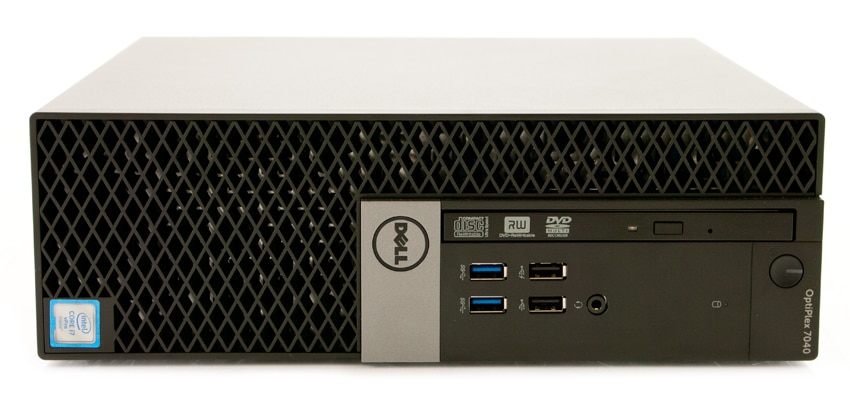
The Dell OptiPlex 7040 Series SFF is a very small desktop computer; in fact, it could easily be placed on a desktop next to a monitor and not take up too much room. It could also be turned on its side and placed under a monitor–more akin to how computers were set up in the early-to-mid 1990s. The front of the computer is predominately taken up by ventilation. In the upper right hand corner, there is the Dell branding, four USB ports (2 x 2.0 and 2 x 3.0), an optical drive, and the power button.
![Dell OptiPlex 7040 Series]()
One side of the computer has rubber feet so users can, as stated above, turn the device on its side.
![Dell OptiPlex 7040 Series - connectors]()
The rear of the computer is a quasi-reflection of the front, with the same amount of real estate taken up by ventilation. The left-hand corner that isn’t ventilation is filled with ports including an HDMI port, two DisplayPorts, a serial port, a keyboard and mouse port, 4 USB 3.0 ports, 2 USB 2.0 ports, and a RJ45 port. Near the bottom of the computer is a DVI-I dual link port next to another DisplayPort, with the power port beneath them.
![Dell OptiPlex 7040 Series - open]()
The OptiPlex 7040 has been designed for easy maintenance, with a tool-less enclosure that can be popped open at the flip of a retention clip. IT admins can easily get inside of the unit if something needs to be repaired, replaced, or upgraded.
**Performance**
In order to test the Dell OptiPlex 7040 Series SFF, we put it through a series of benchmarks to demonstrate its performance when confronted with resource-intensive workloads and to examine the performance of its equipped AMD Radeon R7 M350X graphics card. We will be testing the OptiPlex alongside the [Dell Precision 7810](https://www.storagereview.com/dell_precision_tower_7810_workstation_broadwell_review). We are sure that the T7810 will out perform the OptiPlex, but we are not running the comparison in an effort to state one is better than the other. Though the T7810 will have better performance, it does show users the type of performance they can expect from this SFF desktop model.
The first benchmark is SPECviewperf 12, the worldwide standard for measuring graphics performance based on professional applications. SPECviewperf runs 8 benchmarks it calls viewsets, all of which represent graphics content and behavior from actual applications. These viewsets include: CATIA, Creo, Energy, Maya, Medical, Showcase, Siemens NX, and Solidworks.
Looking at the results as it compares to the T7810, there is no real surprise that the OptiPlex falls behind in every category. The 7810 does have better graphics capabilities across the board. That being said, the results pretty much are on par with similarly built computers.
| SPECviewperf 12 | | |
| --- | --- | --- |
| Viewsets | T7810 | **OptiPlex 7040** |
| catia-04 | 112.02 | **20.46** |
| creo-01 | 72.96 | **17.00** |
| energy-01 | 9.65 | **0.74** |
| maya-04 | 71.24 | **16.69** |
| medical-01 | 41.68 | **5.15** |
| showcase-01 | 58.68 | **9.03** |
| snx-02 | 112.32 | **7.20** |
| sw-03 | 123.50 | **35.38** |
In addition to SPECviewperf, we also ran SPECwpc. SPECwpc is a benchmark designed specifically for testing all key aspects of workstation performance and has over 30 workloads it uses to test CPU, graphics, I/O, and memory bandwidth. The workloads fall under broader categories such as Media and Entertainment, Financial Services, Product Development, Energy, Life Sciences, and General Operations. We are going to list the broad-category results for each, as opposed to the individual workloads. The results are an average of all the individual workloads in each category.
Again, the results reflected the difference in the two machines. While the Dell OptiPlex 7040 numbers were lower, it did score higher than the non-workstation notebooks we’ve tested over the last few months.
| SPECwpc v2.0 | | |
| --- | --- | --- |
| Category | T7810 | **OptiPlex 7040** |
| M&E | 2.28 | **1.61** |
| ProdDev | 4.9 | **1.38** |
| LifeSci | 6.12 | **1.46** |
| Energy | 7.6 | **1.53** |
| FSI | 5.02 | **1.29** |
| GeneralOps | 1.57 | **1.01** |
Next up is the Environmental Systems Research Institute (ESRI) benchmark. ESRI is a supplier of Geographic Information System (GIS) software. ESRI’s Performance Team designed their PerfTool add-in scripts to automatically launch the ArcGIS Pro. This application uses a “ZoomToBookmarks” function to browse various predefined bookmarks and create a log file with all the key data points required to predict the user experience. The script automatically loops the bookmarks three times to account for caching (memory and disk cache). In other words, this benchmark simulates heavy graphical use that one might see through ESRI’s ArcGIS software. It’s a safe bet that similar graphics-intensive programs, such as Autodesk’s AutoCAD, will fare closely with the results in this benchmark.
With the ESRI benchmark, the Dell OptiPlex 7040 is one of our lower performers with an average drawtime of 20.625 seconds, and Average FPS of 58.348, and a Minimum FPS of 41.288. This isn’t too surprising, though, as it’s not billed as a graphics workstation, but instead offers strong business productivity with some graphics capabilities if the need arises.
| ESRI Benchmark | |
| --- | --- |
| Drawtime | Average |
| OptiPlex 7040 | **0:00:20.625** |
| Precision T7810 | 0:00:06.498 |
| Average FPS | Average |
| OptiPlex 7040 | **58.348** |
| Precision T7810 | 368.473 |
| Minimum FPS | Average |
| OptiPlex | **41.288** |
| Precision T7810 | 192.335 |
In our last benchmark, we will leverage PCMark, a tool that calculates the performance at the system and component level–and most often represents typical home user workloads for all types of PCs, including tablets, mobile workstations, and desktops. While there are multiple categories that PCMark tests (including typical work usage, home usage, and creative usage), we will only be looking at Storage and Home Conventional benchmarks.
The Storage PCMark tests the performance of any drives installed in the system. Specifically, it leverages traces recorded from Adobe Creative Suite, Microsoft Office and a selection of more popular video games to measure real-world performance differences between storage devices. The Dell OptiPlex 7040 uses the Samsung PM951 M.2 NVMe SSD, the same SSD used in our T7810 review. Therefore, it is no surprise that the storage score is very similar, as the 7040 had a 5,016 to the T7810’s 5,036. Bandwidth is about half of the workstation’s at 327.3MB/s, but there most likely are other limiting factors, as the 7040 as a whole didn’t have nearly as much performance boost (lower RAM, CPU, and the like).
| PCMark Storage | | |
| --- | --- | --- |
| 1 | Score | Bandwidth |
| OptiPlex 7040 | **5,016** | **327.30MB/s** |
| T7810 | 5,036 | 676.85MB/s |
**Conclusion**
The Dell OptiPlex 7040 Series of SFF desktop computers is designed for businesses of all sizes, providing ample performance, flexibility, and security. The OptiPlex can be customized with an Intel Core i7-6700 CPU, 16GB of memory, and up to 512GB of NVMe SSD capacity. The OptiPlex also offers flexibility to IT by offering the ability to configure BIOS and the system to meet their needs by using the free tools in Dell’s Client Command Suite. Dell also offers its Dell Data Protection for the OptiPlex to make it what Dell refers to as “the world’s most secure desktop.”
Looking at performance, we compared the Dell OptiPlex 7040 to the Dell Precision T7810. This may seem like an odd choice, as it is definitely is not an apples-to-apples comparison. However, as stated above, we are less interested in saying one is better than the other versus giving users a clear guide on the performance they can expect when choosing a business tower versus a workstation.
In the graphics-intensive tests, the OptiPlex 7040 trailed behind the T7810 every step of the way. However if you look at some of our mobile workstation or business notebook reviews, the OptiPlex 7040 hung in performance-wise in the SpecviewPERF 12 and SpecWPC. With the ESRI benchmark, the OptiPlex 7040 trailed behind more than any other computer we’ve yet to run through the benchmark. So the computer may not be great with graphics-intensive use cases, but it will still do the job if needed.
Since the OptiPlex uses a similar class of Samsung NVMe SSDs as other Dell computers we’ve tested, the storage performance was right in line with what we expected. With the PCMark 8 storage benchmark, the OptiPlex gave us a score of 5,016, with a bandwidth of 327.3MB/s.
**Pros**
- Compact form factor; great for users with limited space
- Storage options of Samsung’s high performance NVMe SSDs
- Customizable to fit the right business need
**Cons**
- Limited storage capacity options
**The Bottom Line**
The OptiPlex 7040 SFF is a small desktop that can fit just about any compact space and can be loaded up to provide more than enough performance for most business needs.
[Dell OptiPlex 7040 SFF on Amazon](http://amzn.to/2gnDIsD)
[Special offer! Take an additional $100 off OptiPlex Desktops for your business! Free shipping! Coupon code $W99$D2LGFPZB6](https://track.flexlinkspro.com/a.ashx?foid=1095061.1462884&foc=1&fot=9999&fos=1)![flexlinkspro-tracking]()
Discuss this review
[Sign up for the StorageReview newsletter](https://www.storagereview.com/storage_newsletter)
**Engage with StorageReview**
[Newsletter](https://www.storagereview.com/storage_newsletter) | [YouTube](https://www.youtube.com/user/StorageReview "Opens in a new window") | Podcast [iTunes](https://podcasts.apple.com/gb/podcast/storagereview-com-storage-reviews/id1060681115 "Opens in a new window")/ [Spotify](https://open.spotify.com/show/1y6VnznABhHeOSMOmbDTz0 "Opens in a new window") | [Instagram](https://www.instagram.com/storagereview/ "Opens in a new window") | [Twitter](https://twitter.com/storagereview "Opens in a new window") | [TikTok](https://www.tiktok.com/@storagereview? "Opens in a new window") | [RSS Feed](https://www.storagereview.com/rss.xml)
![]()
### Adam Armstrong
Adam is the chief news editor for StorageReview.com, managing our internal and freelance content teams.
Previous post: [Dot Hill AssuredSAN 6004 Review](https://www.storagereview.com/review/dot-hill-assuredsan-6004-review)
Next post: [Veritas NetBackup 5240 Backup Appliance Review](https://www.storagereview.com/review/veritas-netbackup-5240-backup-appliance-review)
Trusted Vendors
Products and solutions from our affiliate partners:
- [

Ubiquiti
](https://store.ui.com/us/en?a_aid=StorageReview "Opens in a new window")
- [

Newegg
](https://click.linksynergy.com/fs-bin/click?id=g5terNMDhz0&offerid=1207190.18&subid=0&type=4 "Opens in a new window")
- [
 Amazon
](https://amzn.to/4fLJUEW "Opens in a new window")
Newsletter
Subscribe to the StorageReview newsletter to stay up to date on the latest news and reviews. We promise no spam!
1
Leave this field empty if you’re human:
## Advertisement
Content Categories
[Facebook](https://www.facebook.com/@storagereview) [X](https://twitter.com/storagereview) [Instagram](https://www.instagram.com/storagereview/) [LinkedIn](https://www.linkedin.com/company/storagereview-com) [YouTube](https://www.youtube.com/user/storagereview?sub_confirmation=1) [Email](mailto:info@storagereview.com) [Spotify](https://open.spotify.com/show/1y6VnznABhHeOSMOmbDTz0) [Reddit](https://www.reddit.com/r/StorageReview/) [Discord](https://discord.gg/TwMHb4azdC) [RSS](https://www.storagereview.com/rss.xml) [TikTok](https://www.tiktok.com/@storagereview)
Copyright © 1998-2025 Flying Pig Ventures, LLC Cincinnati, Ohio. All rights reserved.
Manage your privacy
To provide the best experiences, we and our partners use technologies like cookies to store and/or access device information. Consenting to these technologies will allow us and our partners to process personal data such as browsing behavior or unique IDs on this site and show (non-) personalized ads. Not consenting or withdrawing consent, may adversely affect certain features and functions.
Click below to consent to the above or make granular choices. Your choices will be applied to this site only. You can change your settings at any time, including withdrawing your consent, by using the toggles on the Cookie Policy, or by clicking on the manage consent button at the bottom of the screen.
Functional Functional Always active
The technical storage or access is strictly necessary for the legitimate purpose of enabling the use of a specific service explicitly requested by the subscriber or user, or for the sole purpose of carrying out the transmission of a communication over an electronic communications network.
Preferences Preferences
The technical storage or access is necessary for the legitimate purpose of storing preferences that are not requested by the subscriber or user.
Statistics Statistics
The technical storage or access that is used exclusively for statistical purposes. The technical storage or access that is used exclusively for anonymous statistical purposes. Without a subpoena, voluntary compliance on the part of your Internet Service Provider, or additional records from a third party, information stored or retrieved for this purpose alone cannot usually be used to identify you.
Marketing Marketing
The technical storage or access is required to create user profiles to send advertising, or to track the user on a website or across several websites for similar marketing purposes.
Statistics
Marketing
Features
Always active
Special features
Special purposes
Always active
- Manage options
- Manage services
- Manage {vendor\_count} vendors
- [Read more about these purposes](https://cookiedatabase.org/tcf/purposes/)
Accept Deny Manage options Save preferences Manage options
- {title}
- {title}
- {title}
Manage your privacy
To provide the best experiences, we use technologies like cookies to store and/or access device information. Consenting to these technologies will allow us to process data such as browsing behavior or unique IDs on this site. Not consenting or withdrawing consent, may adversely affect certain features and functions.
Functional Functional Always active
The technical storage or access is strictly necessary for the legitimate purpose of enabling the use of a specific service explicitly requested by the subscriber or user, or for the sole purpose of carrying out the transmission of a communication over an electronic communications network.
Preferences Preferences
The technical storage or access is necessary for the legitimate purpose of storing preferences that are not requested by the subscriber or user.
Statistics Statistics
The technical storage or access that is used exclusively for statistical purposes. The technical storage or access that is used exclusively for anonymous statistical purposes. Without a subpoena, voluntary compliance on the part of your Internet Service Provider, or additional records from a third party, information stored or retrieved for this purpose alone cannot usually be used to identify you.
Marketing Marketing
The technical storage or access is required to create user profiles to send advertising, or to track the user on a website or across several websites for similar marketing purposes.
Statistics
Marketing
Features
Always active
Special features
Special purposes
Always active
- Manage options
- Manage services
- Manage {vendor\_count} vendors
- [Read more about these purposes](https://cookiedatabase.org/tcf/purposes/)
Accept Deny Manage options Save preferences Manage options
- {title}
- {title}
- {title}
Manage consent Manage consent
```json
{"@context":"https:\/\/schema.org","@graph":[{"@type":"WebPage","@id":"https:\/\/www.storagereview.com\/review\/dell-optiplex-7040-series-sff-review","url":"https:\/\/www.storagereview.com\/review\/dell-optiplex-7040-series-sff-review","name":"Dell OptiPlex 7040 Series (SFF) Review - StorageReview.com","isPartOf":{"@id":"https:\/\/www.storagereview.com\/#website"},"primaryImageOfPage":{"@id":"https:\/\/www.storagereview.com\/review\/dell-optiplex-7040-series-sff-review#primaryimage"},"image":{"@id":"https:\/\/www.storagereview.com\/review\/dell-optiplex-7040-series-sff-review#primaryimage"},"thumbnailUrl":"https:\/\/www.storagereview.com\/wp-content\/uploads\/2016\/11\/StorageReview-Dell-Optiplex-7040.jpg","datePublished":"2016-11-18T18:23:35+00:00","dateModified":"2021-07-08T12:56:25+00:00","description":"The Dell OptiPlex 7040 Series is a small form factor (SFF) computer that can pack quite the power punch per square inch and is offered in two form factors.","breadcrumb":{"@id":"https:\/\/www.storagereview.com\/review\/dell-optiplex-7040-series-sff-review#breadcrumb"},"inLanguage":"en-US","potentialAction":[{"@type":"ReadAction","target":["https:\/\/www.storagereview.com\/review\/dell-optiplex-7040-series-sff-review"]}]},{"@type":"ImageObject","inLanguage":"en-US","@id":"https:\/\/www.storagereview.com\/review\/dell-optiplex-7040-series-sff-review#primaryimage","url":"https:\/\/www.storagereview.com\/wp-content\/uploads\/2016\/11\/StorageReview-Dell-Optiplex-7040.jpg","contentUrl":"https:\/\/www.storagereview.com\/wp-content\/uploads\/2016\/11\/StorageReview-Dell-Optiplex-7040.jpg","width":850,"height":467,"caption":"OptiPlex 7040"},{"@type":"BreadcrumbList","@id":"https:\/\/www.storagereview.com\/review\/dell-optiplex-7040-series-sff-review#breadcrumb","itemListElement":[{"@type":"ListItem","position":1,"name":"Home","item":"https:\/\/www.storagereview.com\/"},{"@type":"ListItem","position":2,"name":"Review","item":"https:\/\/www.storagereview.com\/review"},{"@type":"ListItem","position":3,"name":"Dell OptiPlex 7040 Series (SFF) Review"}]},{"@type":"WebSite","@id":"https:\/\/www.storagereview.com\/#website","url":"https:\/\/www.storagereview.com\/","name":"StorageReview.com","description":"StorageReview.com is a leading provider of news and reviews throughout the entire IT stack - from the datacenter to the edge, and all points in between.","publisher":{"@id":"https:\/\/www.storagereview.com\/#organization"},"potentialAction":[{"@type":"SearchAction","target":{"@type":"EntryPoint","urlTemplate":"https:\/\/www.storagereview.com\/?s={search_term_string}"},"query-input":{"@type":"PropertyValueSpecification","valueRequired":true,"valueName":"search_term_string"}}],"inLanguage":"en-US"},{"@type":"Organization","@id":"https:\/\/www.storagereview.com\/#organization","name":"StorageReview.com","url":"https:\/\/www.storagereview.com\/","logo":{"@type":"ImageObject","inLanguage":"en-US","@id":"https:\/\/www.storagereview.com\/#\/schema\/logo\/image\/","url":"https:\/\/www.storagereview.com\/wp-content\/uploads\/2020\/02\/Storage-Reviews-2-2.png","contentUrl":"https:\/\/www.storagereview.com\/wp-content\/uploads\/2020\/02\/Storage-Reviews-2-2.png","width":344,"height":61,"caption":"StorageReview.com"},"image":{"@id":"https:\/\/www.storagereview.com\/#\/schema\/logo\/image\/"},"sameAs":["https:\/\/x.com\/storagereview","http:\/\/youtube.com\/user\/storagereview"]}]}
```