---
description: The Lexar SL500 Portable SSD blends high-speed storage with a magnetic attachment, offering a way to expand storage without clutter.
title: "Lexar SL500 Portable SSD Review: High-Speed Storage with a Magnetic Twist"
image: https://www.storagereview.com/wp-content/uploads/2025/02/StorageReview-Lexar-SL500-4TB-2.jpg
---
[![Storage Review]()](https://storagereview.com/)
---
[Facebook](https://www.facebook.com/@storagereview) [X (Twitter)](https://twitter.twitter.com/storagereview) [Instagram](https://www.instagram.com/storagereview/) [LinkedIn](https://www.linkedin.com/company/storagereview-com) [YouTube](https://www.youtube.com/user/storagereview?sub_confirmation=1) [Email](mailto:info@storagereview.com) [Spotify](https://open.spotify.com/show/1y6VnznABhHeOSMOmbDTz0) [Reddit](https://www.reddit.com/r/StorageReview/) [Discord](https://discord.gg/TwMHb4azdC) [RSS Feed](https://www.storagereview.com/rss.xml) [TikTok](https://www.tiktok.com/@storagereview)
[Facebook](https://www.facebook.com/@storagereview) [X (Twitter)](https://twitter.com/storagereview) [Instagram](https://www.instagram.com/storagereview/) [LinkedIn](https://www.linkedin.com/company/storagereview-com) [YouTube](https://www.youtube.com/user/storagereview?sub_confirmation=1) [Email](mailto:info@storagereview.com) [Spotify](https://open.spotify.com/show/1y6VnznABhHeOSMOmbDTz0) [Reddit](https://www.reddit.com/r/StorageReview/) [Discord](https://discord.gg/TwMHb4azdC) [RSS Feed](https://www.storagereview.com/rss.xml) [TikTok](https://www.tiktok.com/@storagereview)
[](https://www.storagereview.com)
≡ Menu
- [Home](https://www.storagereview.com/)
- [Storage Reviews](https://www.storagereview.com/review)
- [End User Reviews](https://www.storagereview.com/consumer)
- [Enterprise Reviews](https://www.storagereview.com/enterprise)
- [Ubiquiti Reviews](https://www.storagereview.com/best/ubiquiti-reviews)
- [SR Merch](https://store.storagereview.com)
- [Leaderboards](https://www.storagereview.com/best)
- [Best Storage Arrays](https://www.storagereview.com/best/storage-arrays)
- [Best Enterprise SSDs](https://www.storagereview.com/best/enterprise-ssds)
- [Best Servers](https://www.storagereview.com/best/servers)
- [Best Enterprise GPUs](https://www.storagereview.com/best/enterprise-gpus)
- [Best Desktops for Local AI](https://www.storagereview.com/best/desktops-local-ai)
- [Best Laptops for Local AI](https://www.storagereview.com/best/laptops-local-ai)
- [Best Local LLM Tools](https://www.storagereview.com/best/local-llm-tools)
- [Agentic AI Hardware](https://www.storagereview.com/best/agentic-ai-hardware)
- [Best SSDs & Hard Drives](https://www.storagereview.com/best_drives)
- [Best Portable SSDs](https://www.storagereview.com/best/portable-ssds)
- [Best Business Laptops](https://www.storagereview.com/best/business-laptops)
- [Best Mobile Workstations](https://www.storagereview.com/best/mobile-workstations)
- [Best Desktop Workstations](https://www.storagereview.com/best/desktop-workstations)
- [Best Mini PCs](https://www.storagereview.com/best/mini-pcs)
- [Best Laptop Battery Life](https://www.storagereview.com/best/laptop-battery-life)
- [Storage Reference Guide](https://www.storagereview.com/storage-reference-guide)
- [About SR](https://www.storagereview.com/about-storagereview)
- [StorageReview.com Sweepstakes Rules and Regulations](https://www.storagereview.com/storagereview-com-sweepstakes-rules-and-regulations)
Search
[Home](https://www.storagereview.com/) » [Review](https://www.storagereview.com/review) » Lexar SL500 Portable SSD Review: High-Speed Storage with a Magnetic Twist
# Lexar SL500 Portable SSD Review: High-Speed Storage with a Magnetic Twist
by Lyle Smith on February 17, 2025
[End User](https://www.storagereview.com/consumer) ◇ [Portable Storage](https://www.storagereview.com/consumer/portable-storage)
The Lexar SL500 Portable SSD with Magnetic Set combines high-speed performance with a unique magnetic mounting system, making it a convenient storage solution for mobile users. While the original SL500 functioned as a standard portable SSD, this updated version adds a MagSafe-style attachment, allowing it to securely connect to smartphones, laptops, or other surfaces.
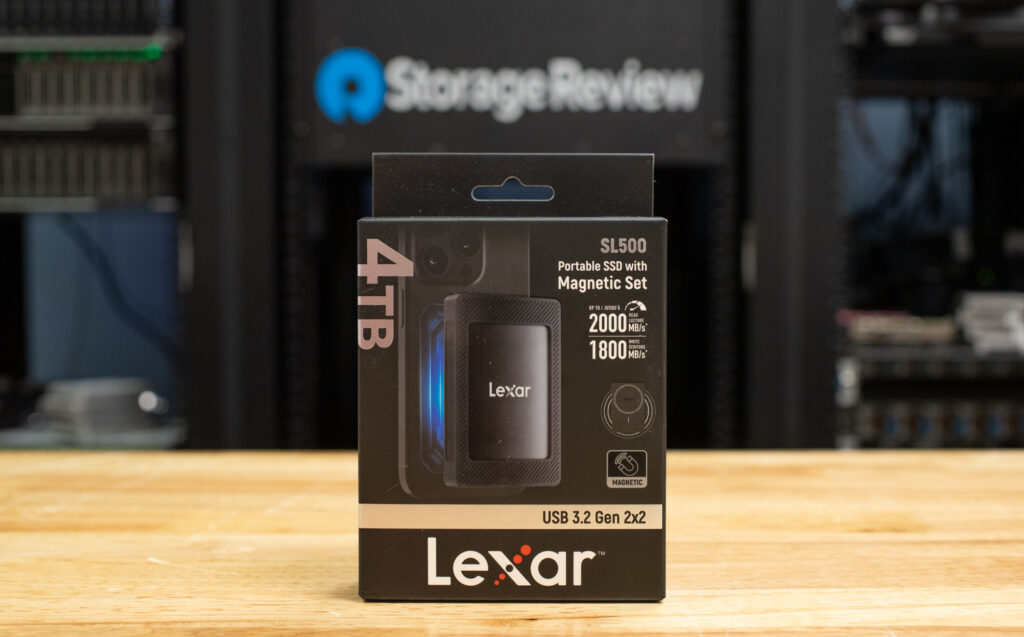
It includes a magnetized protective sleeve and an additional magnetic ring, giving users flexibility in how they attach it. This clutter-free approach benefits content creators, mobile professionals, and anyone needing quick access to high-speed storage on the go.
The SL500 is quoted with solid performance, indicating read speeds of up to 2000MB/s and write speeds of up to 1800MB/s via its USB 3.2 Gen 2×2 interface. This ensures users have quick data transfers for large files, making it ideal for professionals working with 4K video, high-resolution photos, and other data-intensive workloads. Additionally, it supports Apple ProRes recording, allowing iPhone 15/16 Pro and Pro Max users to shoot directly onto the drive at (up to) 4K 60 or 120FPS.
![]()
For security and durability, the SL500 features Lexar DataShield 256-bit AES encryption software, which lets you create a password-protected safe that encrypts data automatically and securely erases deleted files beyond recovery. It is also rated IP54 for dust and water resistance. It is drop-resistant up to 2 meters, making it a viable choice for users in environments susceptible to the elements.
With capacities ranging from 1TB to 4TB, the SL500 caters to a variety of storage needs. Whether you’re a photographer, social media influencer, filmmaker, gamer, or business professional, this drive offers a balance of speed, convenience, and security. However, its full performance potential depends on the device you’re using—Mac users, for example, may see slower speeds than usual due to limited USB 3.2 Gen 2×2 support.
Backed by a 5-year limited warranty, the Lexar SL500 Portable SSD with Magnetic Set goes for around $90 (1TB), $160 (2TB), and $280 (4TB) at [Amazon](https://amzn.to/3QoqRW0) (affiliate link).
## **Lexar SL500 Portable SSD with Magnetic Set Specifications**
| **Specification** | **Detail** |
| --- | --- |
| Capacity | 4TB \| 2TB \| 1TB |
| Performance | Up to 2000MB/s read, 1800MB/s write speeds |
| Operating Temperature | 0°C \~ 50°C (32°F to 122°F) |
| Storage Temperature | -40°C \~ 85°C (-40°F to 185°F) |
| Shock | 50 G, duration 11ms, Half Sine Wave |
| Vibration | 10-2000Hz, 1.5mm, 20G, 1 Oct/min, 30min/axis (X, Y, Z) |
| Dimensions (L x W x H) | 3.52” x 2.32” x 0.53” (89.5mm x 59mm x 13.6mm) |
| Weight | 0.209lbs (95g) |
## **Lexar SL500 Portable SSD with Magnetic Set** **Design, Build, and Setup**
The Lexar SL500 is designed for portability without sacrificing durability. It features a slim, solid aluminum unibody construction and is roughly the length and width of a credit card, though thicker at 13.6mm. Weighing only 95g means it is compact enough to slip into a pocket or bag when not attached to a device.
![]()
As noted above, the magnetized protective sleeve and additional magnetic ring securely attach to various surfaces. Being just 95 grams, there isn’t a huge weight impact on the device you are attaching it to.
The magnetic attachment force is strong enough to keep the SSD firmly in place while using your phone. However, since it’s just a magnet, it might shift around if you toss it in your pocket or bag with enough movement.
![Lexar SL500 4TB attached]()
We also found the included USB-C cable is well-designed and has the right length and flexibility for easy use. The connectors fit securely, even on phones with cases, so you won’t have to worry about a loose connection or awkward positioning.
Setting up the Lexar SL500 on a smartphone is simple and seamless. It’s compatible with Apple’s MagSafe system, so it can easily be secured to the back of the phone—though if you use a thick case, you may need to remove or use the adhesive metal ring for the best connection.
Just plug the USB-C cable into your iPhone’s charging port. Once connected, your phone may prompt you to allow access—tap “Allow” to proceed. From there, you can manage files directly through the Files app or set the SSD as a storage location for 4K 60FPS ProRes video recording by going to Settings > Camera > Formats and selecting “Record Video to External Storage.” While we didn’t test it for an Android phone, the setup will likely be as easy. You can then browse, move, and manage files using your phone’s File Manager (Google Files, Samsung My Files, etc.). If your phone supports external storage for video recording, you can go into your Camera settings and set the SSD as the save location for high-resolution footage.
## **Lexar SL500 Portable SSD with Magnetic Set Performance**
Let’s see how the Lexar SL500 performs regarding transfer speeds using the Blackmagic Disk Speed Test and IOMeter (1-thread and 4-thread) benchmarks. We’ll compare it against other USB 3.2 Gen 2×2 external drives, including:
- [TEAMGROUP PD20](https://www.storagereview.com/review/teamgroup-pd20-portable-ssd-review)
- [Lexar Armor 700](https://www.storagereview.com/review/lexar-armor-700-portable-ssd-review)
- [Lexar SL600](https://www.storagereview.com/review/lexar-sl600-portable-ssd-review)
- [Crucial X10 Pro](https://www.storagereview.com/review/crucial-x10-pro-portable-ssd-review)
- [Samsung T9](https://www.storagereview.com/review/samsung-t9-portable-ssd-review)
First up is the usual BlackMagic Disk Speed test, which gauges the real-world performance of external SSDs.
Here, the Lexar SL500 delivers solid performance in the Blackmagic Disk Speed Test, achieving **1,633.9MB/s write** and **1,780.1MB/s read** speeds. While it holds its own against competing models like the TEAMGROUP PD20 and Lexar Armor 700, it falls slightly behind the Lexar SL600 and Crucial X10 Pro in both metrics. The SL500’s read speeds are solid but don’t quite match the SL600’s 1,890.5MB/s, which may slightly impact workflows involving large file transfers or 4K video editing. However, the SL500 remains competitive for general high-speed external storage needs.
| **Disk
Speed Test** | **Lexar SL500** | **TEAMGROUP PD20** | **Lexar Armor 700** | **Lexar SL600** | **Crucial X10 Pro** | **Samsung T9** |
| --- | --- | --- | --- | --- | --- | --- |
| Write | 1,633.9MB/s | 1,633.5MB/s | 1,630.6MB/s | 1,728.3MB/s | 1,564.0MB/s | 1,581.6MB/s |
| Read | 1,780.1MB/s | 1,800.7MB/s | 1,771.4MB/s | 1,890.5MB/s | 1,723.1MB/s | 1,566.0MB/s |
### **IOMeter 1 Thread**
The next test is the Single-Threaded IOMeter test, which examines sequential and random read/write performance under a lighter load. The speeds here will be close to those in the BlackMagic test on the Sequential 2MB read and write portions, but we should see some differences in the 4-threaded portion.
The **Lexar SL500** delivers solid single-threaded performance, with **1,427MB/s sequential write** and **1,705.97MB/s sequential read speeds**. While it doesn’t quite match the top speeds of the **TEAMGROUP PD20** or **Lexar SL600**, it still holds its own in lighter workloads. Random 2MB read and write speeds are **1,336.21MB/s and 1,320.19MB/s**, respectively, showing decent responsiveness for general file handling. That said, its **random 4K write speed of 23,181 IOPS** outpaces every other drive in the test, making it a strong choice for tasks that require frequent small file writes, such as application loading or caching.
| **IOMeter
(1 Thread)** | **Lexar SL500** | **TEAMGROUP PD20** | **Lexar Armor 700** | **Lexar SL600** | **Crucial X10 Pro** | **Samsung T9** |
| --- | --- | --- | --- | --- | --- | --- |
| Seq 2MB Write | 1427.0MB/s | 1,497.28MB/s | 1,419.46MB/s | 1,423.40MB/s | 1,273.3MB/s | 1,284MB/s |
| Seq 2MB Read | 1705.97MB/s | 1,799.88MB/s | 1,692.62MB/s | 1,769.56MB/s | 1,591.5MB/s | 1,355MB/s |
| Random 2MB Write | 1320.19MB/s | 1,359.07MB/s | 1,287.16MB/s | 1,286.14MB/s | 1,104.1MB/s | 1,355MB/s |
| Random 2MB Read | 1336.21MB/s | 1,439.38MB/s | 1,358MB/s | 1,439.85MB/s | 1,242.8MB/s | 1,117MB/s |
| Random 4K Write | 23,181 IOPS | 21,381 IOPS | 20,885 IOPS | 20,635 IOPS | 19,988 IOPS | 16,643 IOPS |
| Random 4K Read | 4,901 IOPS | 5,198 IOPS | 4,901.93 IOPS | 4,878.83 IOPS | 4,609 IOPS | 4,441 IOPS |
### **IOMeter 4 Thread**
Our final performance test is the 4 Thread IOMeter test, which better simulates multitasking or heavier workloads.
Moving to the **IOMeter 4-thread test**, the **SL500** sees a notable performance jump, with **1,806MB/s sequential write** and **1,997.36MB/s sequential read speeds**, making it more competitive in heavier workloads. It also demonstrates strong **random 2MB performance**, with **1,693.18MB/s read** and **1,643.2MB/s write**, outpacing the **Crucial X10 Pro** and the **Samsung T9** in this category. Its **random 4K write speeds (72,622 IOPS)** show a significant boost with higher queue depths, proving its ability to handle multitasking and sustained workloads efficiently. While some premium models like the Lexar SL600 and Armor 700 edge ahead in certain areas, the SL500 remains a strong mid-range option.
| **IOMeter
(4 Thread)** | **Lexar SL500** | **TEAMGROUP PD20** | **Lexar Armor 700** | **Lexar SL600** | **Crucial X10 Pro** | **Samsung T9** |
| --- | --- | --- | --- | --- | --- | --- |
| Seq 2MB Write | 1,806.0MB/s | 1,759.06MB/s | 1,906.56MB/s | 1,906.68MB/s | 1,736.2MB/s | 1,766MB/s |
| Seq 2MB Read | 1,997.36MB/s | 1,505.85MB/s | 2,100.67MB/s | 2,101.49MB/s | 1,966.9MB/s | 1,944MB/s |
| Random 2MB Write | 1,643.2MB/s | 807.55MB/s | 1,738.48MB/s | 1,741.64MB/s | 1,447.9MB/s | 1,493MB/s |
| Random 2MB Read | 1,693.18MB/s | 913.25MB/s | 1,916.62MB/s | 1,959.41MB/s | 1,863.8MB/s | 1,468MB/s |
| Random 4K Write | 72,622 IOPS | 63,640 IOPS | 60,605.64 IOPS | 60,755.19 IOPS | 67,206 IOPS | 32,358 IOPS |
| Random 4K Read | 15623 IOPS | 15,396 IOPS | 16,356.82 IOPS | 16,361.77 IOPS | 15,333 IOPS | 18,925 IOPS |
## **Conclusion**
The Lexar SL500 Portable SSD is an interesting mix of high-speed storage and practical design. Its MagSafe-compatible magnetic attachment is an excellent option for mobile users, particularly iPhone 15 and 16 Pro owners who want to record ProRes video directly onto external storage. The compact form factor, USB 3.2 Gen 2×2 speeds, and strong durability make it a compelling choice for professionals on the go. However, while the magnetic attachment is convenient, it’s most beneficial for Apple users, as most Android devices lack MagSafe integration.
![]()
In performance benchmarks, the SL500 delivered solid results, with up to 1,806MB/s write and 1,997MB/s read speeds in multi-threaded workloads. It keeps up well with competitors like the TEAMGROUP PD20 and Lexar Armor 700, though it falls slightly behind premium options like the SL600 in raw speed. Its 4K random write speeds are particularly strong, making it an excellent choice for handling frequent small file operations, such as photo editing and application caching. However, Mac users should be aware of potential speed limitations, as USB 3.2 Gen 2×2 support on macOS is limited.
The Lexar SL500 is a good option for content creators, photographers, and professionals who need a fast, compact SSD with convenient attachment features. If you’re shooting 4K ProRes on an iPhone 15 or 16 Pro, handling large media files, or simply require a fast and reliable external SSD, the Lexar SL500 delivers on all fronts. It’s competitively priced, making it a strong alternative to similar high-speed portable drives.
[SL500 at Amazon](https://amzn.to/3QoqRW0) (affiliate link)
[Lexar SL500 Portable SSD with Magnetic Set Product Page](https://americas.lexar.com/product/lexar-sl500-portable-ssd-with-magnetic-set/ "Opens in a new window")
**Leaderboard:** This drive appears in the Also Tested section of our [Best Portable SSDs](https://www.storagereview.com/best/portable-ssds) leaderboard.
**Engage with StorageReview**
[Newsletter](https://www.storagereview.com/storage_newsletter) | [YouTube](https://www.youtube.com/user/StorageReview "Opens in a new window") | Podcast [iTunes](https://podcasts.apple.com/gb/podcast/storagereview-com-storage-reviews/id1060681115 "Opens in a new window")/ [Spotify](https://open.spotify.com/show/1y6VnznABhHeOSMOmbDTz0 "Opens in a new window") | [Instagram](https://www.instagram.com/storagereview/ "Opens in a new window") | [Twitter](https://twitter.com/storagereview "Opens in a new window") | [TikTok](https://www.tiktok.com/@storagereview? "Opens in a new window") | [RSS Feed](https://www.storagereview.com/rss.xml)
![]()
### Lyle Smith
Lyle is a writer for StorageReview, covering a broad set of end user and enterprise IT topics.
Previous post: [Starting off in AI: When a Gaming PC Becomes a Learning Tool](https://www.storagereview.com/review/starting-off-in-ai-when-a-gaming-pc-becomes-a-learning-tool)
Next post: [Micron 4600 SSD: The Ultimate Gen5 OEM Storage for Next-Gen Computing](https://www.storagereview.com/review/micron-4600-ssd-the-ultimate-gen5-oem-storage-for-next-gen-computing)
Trusted Vendors
Products and solutions from our affiliate partners:
- [

Ubiquiti
](https://store.ui.com/us/en?a_aid=StorageReview "Opens in a new window")
- [
![Newegg Logo]()
Newegg
](https://click.linksynergy.com/fs-bin/click?id=g5terNMDhz0&offerid=1207190.18&subid=0&type=4 "Opens in a new window")
- [
 Amazon
](https://amzn.to/4fLJUEW "Opens in a new window")
Newsletter
Subscribe to the StorageReview newsletter to stay up to date on the latest news and reviews. We promise no spam!
1
Leave this field empty if you’re human:
## Advertisement
Content Categories
[Facebook](https://www.facebook.com/@storagereview) [X](https://twitter.com/storagereview) [Instagram](https://www.instagram.com/storagereview/) [LinkedIn](https://www.linkedin.com/company/storagereview-com) [YouTube](https://www.youtube.com/user/storagereview?sub_confirmation=1) [Email](mailto:info@storagereview.com) [Spotify](https://open.spotify.com/show/1y6VnznABhHeOSMOmbDTz0) [Reddit](https://www.reddit.com/r/StorageReview/) [Discord](https://discord.gg/TwMHb4azdC) [RSS](https://www.storagereview.com/rss.xml) [TikTok](https://www.tiktok.com/@storagereview)
Copyright © 1998-2025 Flying Pig Ventures, LLC Cincinnati, Ohio. All rights reserved.
Manage your privacy
To provide the best experiences, we and our partners use technologies like cookies to store and/or access device information. Consenting to these technologies will allow us and our partners to process personal data such as browsing behavior or unique IDs on this site and show (non-) personalized ads. Not consenting or withdrawing consent, may adversely affect certain features and functions.
Click below to consent to the above or make granular choices. Your choices will be applied to this site only. You can change your settings at any time, including withdrawing your consent, by using the toggles on the Cookie Policy, or by clicking on the manage consent button at the bottom of the screen.
Functional Functional Always active
The technical storage or access is strictly necessary for the legitimate purpose of enabling the use of a specific service explicitly requested by the subscriber or user, or for the sole purpose of carrying out the transmission of a communication over an electronic communications network.
Preferences Preferences
The technical storage or access is necessary for the legitimate purpose of storing preferences that are not requested by the subscriber or user.
Statistics Statistics
The technical storage or access that is used exclusively for statistical purposes. The technical storage or access that is used exclusively for anonymous statistical purposes. Without a subpoena, voluntary compliance on the part of your Internet Service Provider, or additional records from a third party, information stored or retrieved for this purpose alone cannot usually be used to identify you.
Marketing Marketing
The technical storage or access is required to create user profiles to send advertising, or to track the user on a website or across several websites for similar marketing purposes.
Statistics
Marketing
Features
Always active
Special features
Special purposes
Always active
- Manage options
- Manage services
- Manage {vendor\_count} vendors
- [Read more about these purposes](https://cookiedatabase.org/tcf/purposes/)
Accept Deny Manage options Save preferences Manage options
- {title}
- {title}
- {title}
Manage your privacy
To provide the best experiences, we use technologies like cookies to store and/or access device information. Consenting to these technologies will allow us to process data such as browsing behavior or unique IDs on this site. Not consenting or withdrawing consent, may adversely affect certain features and functions.
Functional Functional Always active
The technical storage or access is strictly necessary for the legitimate purpose of enabling the use of a specific service explicitly requested by the subscriber or user, or for the sole purpose of carrying out the transmission of a communication over an electronic communications network.
Preferences Preferences
The technical storage or access is necessary for the legitimate purpose of storing preferences that are not requested by the subscriber or user.
Statistics Statistics
The technical storage or access that is used exclusively for statistical purposes. The technical storage or access that is used exclusively for anonymous statistical purposes. Without a subpoena, voluntary compliance on the part of your Internet Service Provider, or additional records from a third party, information stored or retrieved for this purpose alone cannot usually be used to identify you.
Marketing Marketing
The technical storage or access is required to create user profiles to send advertising, or to track the user on a website or across several websites for similar marketing purposes.
Statistics
Marketing
Features
Always active
Special features
Special purposes
Always active
- Manage options
- Manage services
- Manage {vendor\_count} vendors
- [Read more about these purposes](https://cookiedatabase.org/tcf/purposes/)
Accept Deny Manage options Save preferences Manage options
- {title}
- {title}
- {title}
Manage consent Manage consent
```json
{"@context":"https:\/\/schema.org","@graph":[{"@type":"WebPage","@id":"https:\/\/www.storagereview.com\/review\/lexar-sl500-portable-ssd-review-high-speed-storage-with-a-magnetic-twist","url":"https:\/\/www.storagereview.com\/review\/lexar-sl500-portable-ssd-review-high-speed-storage-with-a-magnetic-twist","name":"Lexar SL500 Portable SSD Review: High-Speed Storage with a Magnetic Twist - StorageReview.com","isPartOf":{"@id":"https:\/\/www.storagereview.com\/#website"},"primaryImageOfPage":{"@id":"https:\/\/www.storagereview.com\/review\/lexar-sl500-portable-ssd-review-high-speed-storage-with-a-magnetic-twist#primaryimage"},"image":{"@id":"https:\/\/www.storagereview.com\/review\/lexar-sl500-portable-ssd-review-high-speed-storage-with-a-magnetic-twist#primaryimage"},"thumbnailUrl":"https:\/\/www.storagereview.com\/wp-content\/uploads\/2025\/02\/StorageReview-Lexar-SL500-4TB-2.jpg","datePublished":"2025-02-17T16:42:09+00:00","dateModified":"2026-08-17T17:13:13+00:00","description":"The Lexar SL500 Portable SSD blends high-speed storage with a magnetic attachment, offering a way to expand storage without clutter.","breadcrumb":{"@id":"https:\/\/www.storagereview.com\/review\/lexar-sl500-portable-ssd-review-high-speed-storage-with-a-magnetic-twist#breadcrumb"},"inLanguage":"en-US","potentialAction":[{"@type":"ReadAction","target":["https:\/\/www.storagereview.com\/review\/lexar-sl500-portable-ssd-review-high-speed-storage-with-a-magnetic-twist"]}]},{"@type":"ImageObject","inLanguage":"en-US","@id":"https:\/\/www.storagereview.com\/review\/lexar-sl500-portable-ssd-review-high-speed-storage-with-a-magnetic-twist#primaryimage","url":"https:\/\/www.storagereview.com\/wp-content\/uploads\/2025\/02\/StorageReview-Lexar-SL500-4TB-2.jpg","contentUrl":"https:\/\/www.storagereview.com\/wp-content\/uploads\/2025\/02\/StorageReview-Lexar-SL500-4TB-2.jpg","width":1500,"height":1000},{"@type":"BreadcrumbList","@id":"https:\/\/www.storagereview.com\/review\/lexar-sl500-portable-ssd-review-high-speed-storage-with-a-magnetic-twist#breadcrumb","itemListElement":[{"@type":"ListItem","position":1,"name":"Home","item":"https:\/\/www.storagereview.com\/"},{"@type":"ListItem","position":2,"name":"Review","item":"https:\/\/www.storagereview.com\/review"},{"@type":"ListItem","position":3,"name":"Lexar SL500 Portable SSD Review: High-Speed Storage with a Magnetic Twist"}]},{"@type":"WebSite","@id":"https:\/\/www.storagereview.com\/#website","url":"https:\/\/www.storagereview.com\/","name":"StorageReview.com","description":"StorageReview.com is a leading provider of news and reviews throughout the entire IT stack - from the datacenter to the edge, and all points in between.","publisher":{"@id":"https:\/\/www.storagereview.com\/#organization"},"potentialAction":[{"@type":"SearchAction","target":{"@type":"EntryPoint","urlTemplate":"https:\/\/www.storagereview.com\/?s={search_term_string}"},"query-input":{"@type":"PropertyValueSpecification","valueRequired":true,"valueName":"search_term_string"}}],"inLanguage":"en-US"},{"@type":"Organization","@id":"https:\/\/www.storagereview.com\/#organization","name":"StorageReview.com","url":"https:\/\/www.storagereview.com\/","logo":{"@type":"ImageObject","inLanguage":"en-US","@id":"https:\/\/www.storagereview.com\/#\/schema\/logo\/image\/","url":"https:\/\/www.storagereview.com\/wp-content\/uploads\/2020\/02\/Storage-Reviews-2-2.png","contentUrl":"https:\/\/www.storagereview.com\/wp-content\/uploads\/2020\/02\/Storage-Reviews-2-2.png","width":344,"height":61,"caption":"StorageReview.com"},"image":{"@id":"https:\/\/www.storagereview.com\/#\/schema\/logo\/image\/"},"sameAs":["https:\/\/x.com\/storagereview","http:\/\/youtube.com\/user\/storagereview"]}]}
```