---
description: This desktop CPU with a GPU provides an affordable option for consumers. But what else is it capable of? Full AMD Ryzen 7 8700G Review.
title: AMD Ryzen 7 8700G Desktop APU Review
image: https://www.storagereview.com/wp-content/uploads/2024/01/StorageReview-AMD-APU-Ryzen-8000G-2.jpg
---
[![Storage Review]()](https://storagereview.com/)
---
[Facebook](https://www.facebook.com/@storagereview) [X (Twitter)](https://twitter.twitter.com/storagereview) [Instagram](https://www.instagram.com/storagereview/) [LinkedIn](https://www.linkedin.com/company/storagereview-com) [YouTube](https://www.youtube.com/user/storagereview?sub_confirmation=1) [Email](mailto:info@storagereview.com) [Spotify](https://open.spotify.com/show/1y6VnznABhHeOSMOmbDTz0) [Reddit](https://www.reddit.com/r/StorageReview/) [Discord](https://discord.gg/TwMHb4azdC) [RSS Feed](https://www.storagereview.com/rss.xml) [TikTok](https://www.tiktok.com/@storagereview)
[Facebook](https://www.facebook.com/@storagereview) [X (Twitter)](https://twitter.com/storagereview) [Instagram](https://www.instagram.com/storagereview/) [LinkedIn](https://www.linkedin.com/company/storagereview-com) [YouTube](https://www.youtube.com/user/storagereview?sub_confirmation=1) [Email](mailto:info@storagereview.com) [Spotify](https://open.spotify.com/show/1y6VnznABhHeOSMOmbDTz0) [Reddit](https://www.reddit.com/r/StorageReview/) [Discord](https://discord.gg/TwMHb4azdC) [RSS Feed](https://www.storagereview.com/rss.xml) [TikTok](https://www.tiktok.com/@storagereview)
[](https://www.storagereview.com)
≡ Menu
- [Home](https://www.storagereview.com/)
- [Storage Reviews](https://www.storagereview.com/review)
- [End User Reviews](https://www.storagereview.com/consumer)
- [Enterprise Reviews](https://www.storagereview.com/enterprise)
- [Ubiquiti Reviews](https://www.storagereview.com/best/ubiquiti-reviews)
- [SR Merch](https://store.storagereview.com)
- [Leaderboards](https://www.storagereview.com/best)
- [Best Storage Arrays](https://www.storagereview.com/best/storage-arrays)
- [Best Enterprise SSDs](https://www.storagereview.com/best/enterprise-ssds)
- [Best Servers](https://www.storagereview.com/best/servers)
- [Best Enterprise GPUs](https://www.storagereview.com/best/enterprise-gpus)
- [Best Desktops for Local AI](https://www.storagereview.com/best/desktops-local-ai)
- [Best Laptops for Local AI](https://www.storagereview.com/best/laptops-local-ai)
- [Best Local LLM Tools](https://www.storagereview.com/best/local-llm-tools)
- [Agentic AI Hardware](https://www.storagereview.com/best/agentic-ai-hardware)
- [Best SSDs & Hard Drives](https://www.storagereview.com/best_drives)
- [Best Portable SSDs](https://www.storagereview.com/best/portable-ssds)
- [Best Business Laptops](https://www.storagereview.com/best/business-laptops)
- [Best Mobile Workstations](https://www.storagereview.com/best/mobile-workstations)
- [Best Desktop Workstations](https://www.storagereview.com/best/desktop-workstations)
- [Best Mini PCs](https://www.storagereview.com/best/mini-pcs)
- [Best Laptop Battery Life](https://www.storagereview.com/best/laptop-battery-life)
- [Storage Reference Guide](https://www.storagereview.com/storage-reference-guide)
- [About SR](https://www.storagereview.com/about-storagereview)
- [StorageReview.com Sweepstakes Rules and Regulations](https://www.storagereview.com/storagereview-com-sweepstakes-rules-and-regulations)
Search
[Home](https://www.storagereview.com/) » [Review](https://www.storagereview.com/review) » AMD Ryzen 7 8700G Desktop APU Review
# AMD Ryzen 7 8700G Desktop APU Review
by Jordan Ranous on January 29, 2024
[End User](https://www.storagereview.com/consumer) ◇ [Workstation](https://www.storagereview.com/consumer/workstation)
We recently covered the [news of the 8000G series AMD APUs](https://www.storagereview.com/news/amd-8000g-series-and-5700x3d-desktop-processors-announced-at-ces) that were announced at CES 2024, and not long after, a mysterious brown box showed up in the Edge Lab. With a pair of AMD APUs, a ASUS ROG Strix motherboard, and some GSKILL RGB DDR5, we began testing the latest and greatest entry-level consumer platform with our standard workstation testing plan.
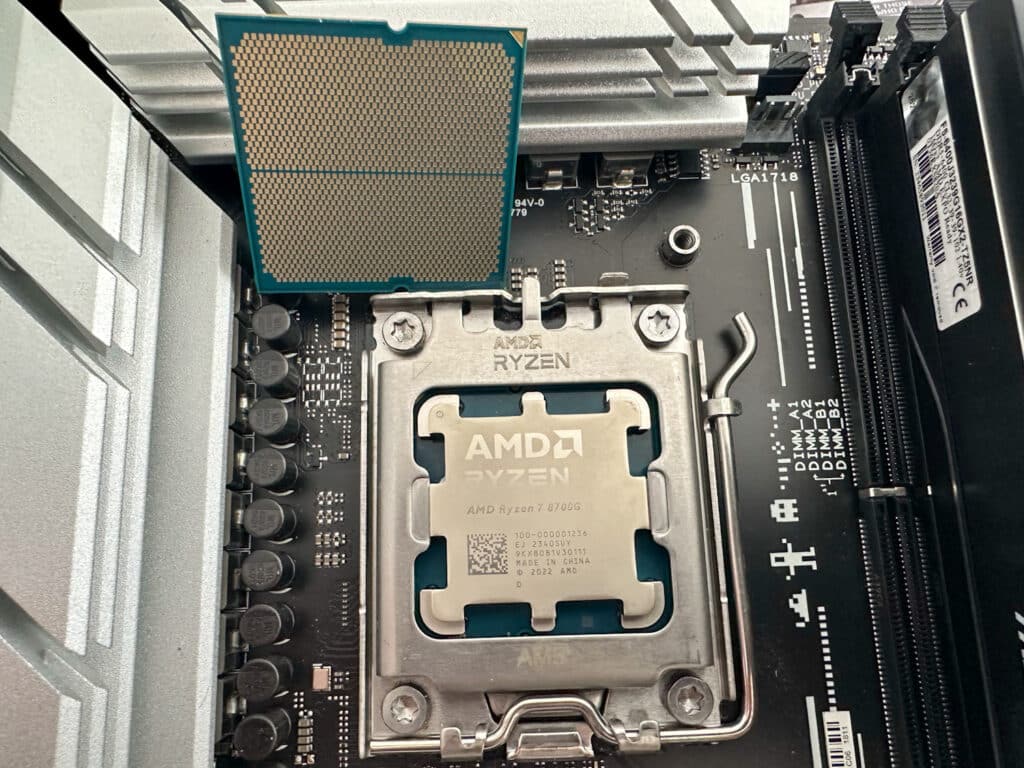
AMD Ryzen 7 8700G
##
## 8000G Series AMD APU
The SKU’s ‘G’ denotation indicates integrated CPU graphics. With the 8000G, AMD delivers the first desktop PC processor to include a dedicated AI neural processing unit (NPU).
![]()
Looking at the SKU stack, the AMD Ryzen 7 8700G and 8600G we received for testing fall in the top third, representing good value for those wanting to roll their own system. If you’re building a computer on a budget, choosing the correct motherboard can provide an upgrade path for when you’re ready to add a dedicated graphics card. This is especially useful for more creative uses, which we’ll explore in more detail later on. Specifically, the 8700G and 8600G APU are good options for this build type.
## AMD Ryzen 7 8700G Specifications
Our comparison choices were limited since we primarily work in enterprise and workstation hardware. Luckily, the Edge Lab had a first-generation Ryzen 1700X platform running in the corner. This provided a unique opportunity to see just how far the AMD Zen Desktop platform has come.
![]()
| | Ryzen 7 8700G | Ryzen 5 8600G | Ryzen 7 1700X |
| --- | --- | --- | --- |
| **Architecture** | Zen 4 | Zen 4 | Zen |
| **Socket** | AM5 | AM5 | AM4 |
| **CPU Cores** | 8 | 6 | 8 |
| **CPU Threads** | 16 | 12 | 16 |
| **Base Clock** | 4.2GHz | 4.2GHz | 3.4GHz |
| **Max Boost Clock** | Up to 5.1GHz | Up to 5.0GHz | Up to 3.8GHz |
| **L1 Cache** | Not Listed | Not Listed | 768KB |
| **L2 Cache** | 8MB | 6MB | 4MB |
| **L3 Cache** | 16MB | 16MB | 16MB |
| **Default TDP** | 65W | 65W | 95W |
| **AMD Configurable TDP (cTDP)** | 45-65W | 45-65W | N/A |
| **Memory Type** | DDR5 | DDR5 | DDR4 |
| **Memory Channels** | 2 | 2 | 2 |
| **Max Memory** | 256GB | 256GB | 64GB |
| **PCIe Version** | PCIe 4.0 | PCIe 4.0 | PCIe 3.0 |
| **PCIe Lanes (Total / Usable)** | 20/16 | 20/16 | 20/16 |
| **Graphics Model** | Radeon 780M | Radeon 760M | N/A |
| **Graphics Core Count** | 12 | 8 | N/A |
| **Graphics Frequency** | 2900MHz | 2800MHz | N/A |
| **DirectX Version** | 12 | 12 | N/A |
| **AI Engine Brand Name** | AMD Ryzen AI | AMD Ryzen AI | N/A |
| **AI Engine Performance** | Up to 16 TOPS | Up to 16 TOPS | N/A |
| **Launch Date** | Q1 2024 | Q1 2024 | Q1 2017 |
| **Complete Spec Sheets** | [R7 8700G](https://www.amd.com/en/product/14066) | [R5 8600G](https://www.amd.com/en/product/14071) | [R7 1700X](https://www.amd.com/en/product/1226) |
It is important to note here that the 1700X system was equipped with a top-of-the-line GPU for that time, an NVIDIA P6000. While still a highly capable GPU, especially in a home lab, it is a little long in the tooth in 2024. This was kept in the system for the testing since the 1700X does not have integrated graphics.
#### Pricing at Launch
- 8700G: $329 USD
- 8600G: $279 USD
- 8500G: $179 USD
## Test Bed
In addition to the 8700G and 8600G APUs, AMD also provided an ASUS ROG STRIX B650-A GAMING WIFI motherboard for testing and some GSKILL 6400MHz DDR5 that includes [AMD EXPO technology](https://www.amd.com/en/technologies/expo) for easy overclocking. Emphasis on easy: it’s a very simple point-and-click to get the DRAM to run at higher speeds, and everyone who has DRAM with this capability and a compatible CPU/APU should be using it.
![AMD Ryzen 7 8700G with DRAM]()
| Specification | Details |
| --- | --- |
| Chipset | AMD B650 |
| Memory | 4 x DIMM, Max. 192GB, DDR5 7600+(OC) |
| Graphics Outputs | 1 x DisplayPort, 1 x HDMI® port |
| Expansion Slots | 1 x PCIe 4.0 x16, 1 x PCIe 4.0 x16 (x4 mode), 2 x PCIe 4.0/3.0 x1 |
| Storage | 1 x M.2 slot Gen5, 2 x M.2 slots Gen4, 4 x SATA 6Gb/s ports |
| Ethernet | 1 x Intel® 2.5Gb Ethernet |
| Wireless & Bluetooth | Wi-Fi 6E, Bluetooth v5.2 |
| USB | 9 rear USB ports, 7 front USB ports including Type-C 10G |
| Audio | ROG SupremeFX 7.1 Surround Sound High Definition Audio CODEC ALC4080 |
| Form Factor | ATX Form Factor |
For all APU tests, we used an open-air test bench, a Corsair RM850x PSU, and the included stock AMD Wraith Stealth(8600G) and Wraith Spire(8700G) coolers included in the APU box.
#### Drive Specifications
Next, our wonderful friends at KIOXIA provided a set of 5 of their [XG8](https://www.storagereview.com/review/kioxia-xg8-ssd-review) 2TB Client SSDs for our build. While this won’t be important to CPU performance, you might see where this is going.
![Kioxia XG8 front 2]()
| KIOXIA XG8 2TB | |
| --- | --- |
| **Sequential Read (MB/s)** | 7,000 |
| **Sequential Write (MB/s)** | 5,800 |
| **Random Read (KIOPS)** | 900 |
| **Random Write (KIOPS)** | 620 |
#### Kioxia XG8 Blackmagic Disk Speed Test
The Blackmagic Disk Speed Test demonstrates a drive’s real-world read and write speeds, and these results are pulled from the original review of the [KIOXIA XG8](https://www.storagereview.com/review/kioxia-xg8-ssd-review) on the 2TB model.
## ![]()
## AMD Ryzen 7 8700G Performance
Since the party trick of the G Series AMD chips is the integrated graphics, and the new APU is being marketed as an entry-level gaming platform, let’s take a look at 3DMark tests first.
![AMD Ryzen 7 8700G feature photo]()
#### 3DMark CPU Profile
The 3DMark CPU Profile is a benchmarking tool tailored to gauge CPU performance through a series of custom simulations. This benchmark includes six distinct tests, each employing the same workload but with varying threading capacity. These tests are meticulously designed to challenge the CPU across different threading levels — 1, 2, 4, 8, 16, and up to the maximum available threads of a given system.
| 3DMARK CPU Profile | Ryzen 7 8700G
w/ Radeon 780M | Ryzen 5 8600G
w/ Radeon 760M | Ryzen 7 1700X
(NVIDIA P6000 GPU) |
| --- | --- | --- | --- |
| **Max Threads** | 8,256 | 6,333 | 4,298 |
| **16 Threads** | 8,244 | 6,268 | 4,299 |
| **8 Threads** | 7,002 | 5,518 | 3,556 |
| **4 Threads** | 3,878 | 3,641 | 1,877 |
| **2 Threads** | 2,066 | 1,855 | 958 |
| **1 Thread** | 1,044 | 903 | 485 |
#### 3DMark GPU Tests
3DMark Night Raid is a DirectX 12 benchmark tailored for devices with internal graphics, and Fire Strike is a DirectX 11 benchmark designed for gaming PCs. Fire Strike includes two graphics tests, one physics test, and a combined test for the CPU and GPU simultaneously.
| 3DMark Test | Ryzen 7 8700G
w/ Radeon 780M | Ryzen 5 8600G
w/ Radeon 760M | Ryzen 7 1700X
(NVIDIA P6000 GPU) |
| --- | --- | --- | --- |
| **Fire Strike** | 7,856 | 6,954 | 20,886 |
| **Night Raid** | 30,779 | 26,095 | 34,662 |
#### Geekbench 6
Geekbench 6 is a cross-platform benchmark that measures the performance of a system and provides a score for comparison. It is designed to work on multiple platforms and provides a consistent performance measure across many devices, from smartphones and tablets to desktops and servers.
| Geekbench 6 | Ryzen 7 8700G
w/ Radeon 780M | Ryzen 5 8600G
w/ Radeon 760M | Ryzen 7 1700X
(NVIDIA P6000 GPU) |
| --- | --- | --- | --- |
| **Single Core** | 2,663 | 2,552 | 1,104 |
| **Multi-Core** | 14,168 | 11,887 | 5,783 |
| **GPU Score** | 26,049 | 29,957 (Vulkan) | 61,871 |
The 8600G had some issues through our tests running OpenCL, which has since been fixed with driver updates. Make sure to keep updated with the latest drivers and firmware on your system, and if you build one of these, as usual with any new platform, plan on the first thing being BIOS and driver updates directly from AMD and your motherboard manufacturer and not rely on Windows Update.
#### Maxon Cinebench
Cinebench is a widely used benchmarking tool that measures the performance of CPUs and GPUs using Maxon Cinema 4D for rendering. It provides a score that can compare the performance of different systems and components. We ran four popular versions of Cinebench so you can compare the results on popular leaderboards online.
| Test | Ryzen 7 8700G | Ryzen 5 8600G | Ryzen 7 1700X
(NVIDIA P6000 GPU) |
| --- | --- | --- | --- |
| **Cinebench R15** | | | |
| **CPU (Multi Core)** | 2,836 | 2,135 | 1,517 |
| **CPU (Single Core)** | 292 | 283 | 143 |
| **MP Ratio** | 9.70x | 7.54x | 10.61x |
| **Cinebench R20** | | | |
| **CPU** | 6,882 | 5,016 | 3,431 |
| **Cinebench R23** | | | |
| **CPU (Multi Core)** | 17,535 | 13,305 | 8,761 |
| **CPU (Single Core)** | 1,829 | 1,767 | 918 |
| **MP Ratio** | 9.59x | 7.53x | 9.55x |
| **Cinebench 2024** | | | |
| **CPU (Multi Core)** | 987 | 770 | 510 |
| **CPU (Single Core)** | 109 | 107 | 56 |
| **MP Ratio** | 9.05x | 7.18x | 9.09x |
#### y-cruncher
And, of course, our old favorite, y-cruncher 0.8.3.9522, a multi-threaded and scalable program that can compute Pi and other mathematical constants to trillions of digits. Since its launch in 2009, it has become a popular benchmarking and stress-testing application for overclockers and hardware enthusiasts.
| y-cruncher Total Computation Time
(Lower is Better) | Ryzen 7 8700G | Ryzen 5 8600G | Ryzen 7 1700X
(NVIDIA P6000 GPU) |
| --- | --- | --- | --- |
| **1 Billion** | 26.376 Sec | 32.303 Sec | 88.851 Sec |
| **2.5 Billion** | 79.157 Sec | 90.525 Sec | 252.187 Sec |
| **5 Billion** | 172.172 Sec | 199.562 Sec | 560.745 Sec |
#### 7Zip Compression Benchmark
The popular 7-Zip utility has a built-in memory benchmark demonstrating the CPU’s performance. We run this test at a 128MB dictionary size when possible.
| 7-Zip Compression Benchmark (Higher is better) | Ryzen 7 8700G | Ryzen 5 8600G | Ryzen 7 1700X
(NVIDIA P6000 GPU) |
| --- | --- | --- | --- |
| **Current CPU Usage** | 548% | 337% | 1,495% |
| **Current Rating / Usage** | 15.803 GIPS | 20.427 GIPS | 2.435 GIPS |
| **Current Rating** | 85.766 GIPS | 68.792 GIPS | 36.404 GIPS |
| **Resulting CPU Usage** | 536% | 331% | 1,496% |
| **Resulting Rating / Usage** | 16.003 GIPS | 20.670 GIPS | 2.427 GIPS |
| **Resulting Rating** | 85.766 GIPS | 68.431 GIPS | 36.316 GIPS |
| **Decompressing** | | | |
| **Current CPU Usage** | 1,576% | 1,178% | 1,574% |
| **Current Rating / Usage** | 7.413 GIPS | 7.564 GIPS | 3.932 GIPS |
| **Current Rating** | 116.835 GIPS | 89.074 GIPS | 61.897 GIPS |
| **Resulting CPU Usage** | 1,581% | 1,173% | 1,574% |
| **Resulting Rating / Usage** | 7.375 GIPS | 7.548 GIPS | 3.905 GIPS |
| **Resulting Rating** | 116.640 GIPS | 88.568 GIPS | 61.473 GIPS |
| **Total Rating** | | | |
| **Total CPU Usage** | 1,059% | 752% | 1,535% |
| **Total Rating / Usage** | 11.689 GIPS | 14.109 GIPS | 3.166 GIPS |
| **Total Rating** | 101.203 GIPS | 78.500 GIPS | 48.894 GIPS |
#### Blender OptiX
Blender OptiX is an open-source 3D modeling application. This benchmark was run using the Blender Benchmark CLI utility. The score is samples per minute, with higher being better.
| Blender 4.0 CPU Samples Per Minute
(Higher is Better) | Ryzen 7 8700G | Ryzen 5 8600G | Ryzen 7 1700X |
| --- | --- | --- | --- |
| **Monster** | 111.940 | 79.492 | 59.600 |
| **Junkshop** | 47.413 | 57.776 | 38.152 |
| **Classroom** | 57.928 | 41.863 | 30.614 |
#### UL Procyon
UL’s [Procyon AI Inference](https://benchmarks.ul.com/procyon/ai-inference-benchmark-for-windows "Opens in a new window") benchmark suite tests how various AI inference engines perform using state-of-the-art neural networks. We ran these tests on the CPU only. Each number here is an average inference time, where lower is better, and the last row is an overall score where higher is better.
| UL Procyon Average
Inference Times
(Lower is Better) | Ryzen 7 8700G
CPU | Ryzen 7 8700G
780M GPU | Ryzen 5 8600G
CPU | Ryzen 5 8600G
760M GPU | Ryzen 7 1700X
CPU |
| --- | --- | --- | --- | --- | --- |
| **MobileNet V3** | 1.20 | 1.28 | 1.71 | 1.40 | 3.47 |
| **ResNet 50** | 9.78 | 6.90 | 12.45 | 7.27 | 21.83 |
| **Inception V4** | 32.46 | 18.64 | 41.22 | 22.41 | 73.19 |
| **DeepLab V3** | 35.66 | 29.19 | 46.11 | 31.01 | 81.11 |
| **YOLO V3** | 74.32 | 28.55 | 100.17 | 23.92 | 176.07 |
| **REAL-ESRGAN** | 3602.77 | 601.78 | 4360.14 | 663.15 | 8251.35 |
| **Overall Score**
**(Higher is Better)** | 127 | 239 | 98 | 227 | 53 |
#### Luxmark
Next is LuxMark, an OpenCL GPU benchmarking utility. The APU’s integrated graphics put up some impressive numbers for what it was. Unfortunately, we could not get a clean valid run on the 8600G.
| Luxmark
(Higher is Better) | Ryzen 7 8700G
w/ Radeon 780M | Ryzen 5 8600G
w/ Radeon 760M | Ryzen 7 1700X
NVIDIA P6000 |
| --- | --- | --- | --- |
| **Food** | 749 | N/A | 2,035 |
| **Hall Bench** | 1,824 | N/A | 5,096 |
#### SPECviewperf 2020
Our next test is SPECviewperf 2020, the worldwide standard for measuring graphics performance of professional applications under the OpenGL and Direct X application programming interfaces. The viewsets (or benchmarks) represent graphics content and behavior from actual applications, without having to install the applications themselves.
| SPECviewperf
(Higher is Better) | Ryzen 7 8700G
w/ Radeon 780M | Ryzen 5 8600G
w/ Radeon 760M | Ryzen 7 1700X
NVIDIA P6000 |
| --- | --- | --- | --- |
| **3dsmax-07** | 19.22 | 18.09 | 70.79 |
| **Catia-06** | 21.27 | 21.76 | 53.06 |
| **Creo-03** | 24.71 | 25.82 | 77.2 |
| **Energy-03** | 9.47 | 7.1 | 25.94 |
| **Maya-06** | 40.93 | 35.37 | N/A |
| **Medical-03** | 10.34 | 7.05 | 42.32 |
| **Snx-04** | 55.76 | 47.18 | N/A |
| **Solidworks-05** | 22 | 18.57 | 94.69 |
#### Blackmagic RAW
The last test, the Blackmagic RAW speed test, tested the decoding speed of Blackmagic RAW frames.
| Blackmagic RAW
(Higher is Better) | Ryzen 7 8700G
w/ Radeon 780M | Ryzen 5 8600G
w/ Radeon 760M | Ryzen 7 1700X
NVIDIA P6000 |
| --- | --- | --- | --- |
| **8K CPU** | 57 FPS | 45 FPS | 21 FPS |
| **8K OPENCL** | 35 FPS | N/A | N/A |
#### Anecdotal Gaming Performance
Since the AMD Ryzen 7 8700G is a consumer chip targeted at entry-level gaming builds, we decided to fire up a couple of popular titles. This section is more of a subjective analysis because our enterprise test lab and edge lab are not traditionally equipped for recording and benchmarking outside the synthetic gaming benchmarks.
First up we ran Counter Strike: Global Offensive 2. It is a popular e-sports FPS title and a cornerstone of any gamer library. Playing through a few maps at 1080p with high settings, without FSR, yielded respectable frame rates between 60 and 80 FPS throughout a match—more than enough for any casual gamer.
Next up, looking at Rocket League, the story was the same—respectable casual game performance, with no discernable issues with tearing or stuttering.
Finally, Grand Theft Auto 5 (GTA V) is an aging title but is still popular nonetheless and has enough settings to provide flexibility to tune for just about any setup. We used the in-game benchmarking tool and found that using 1080p again, with “High” set on all adjustable settings and max population density, yielded a great-looking 50-70 FPS across the run. With some minor tweaking on the setting, one could get a solid 60 while maintaining respectable visual fidelity.
## AMD Ryzen AI
Integrating AI into CPU architecture, one of the headline features of AMD’s Ryzen 8000G Series, involves embedding a dedicated AI neural processing unit (NPU) within the processor. This NPU is specialized hardware designed to efficiently handle AI-specific computations. Its inclusion enables the CPU to perform AI-related tasks more effectively, such as pattern recognition and data analysis, which are crucial for AI-driven applications.
With Microsoft Copilot’s imminent release, this AI integration should enhance user experiences by enabling faster, more efficient processing of AI tasks directly on the CPU, thereby improving performance in real-time AI applications and reducing reliance on external or cloud AI accelerators and APIs.
![]()
The inclusion of AI accelerators in Desktops will also help individuals and businesses alike to deploy and run AI Inference models locally. This acceleration can provide a better user experience, addressing privacy and data security concerns when the use of public or cloud APIs is not an option.
As of this review, there are not any viable inference benchmarks that can be point-and-click run that can provide a clear comparison, but we are working on this for a follow-up. AMD does [provide significant documentation and demo resources](https://www.amd.com/en/developer/resources/ryzen-ai-software.html) for taking advantage of the NPU included on the Ryzen chips. This includes support in TensorFlow, PyTorch, and Onnx.
## Versatile Platform, HL15 and 8700G In The Home Lab
This wouldn’t be a StorageReview Review if we didn’t turn things up to eleven. To help facilitate this, we filled the motherboard’s 3 M.2 slots with the XG8 SSDs provided by KIOXIA, some 14TB WD Red NAS drives, some Samsung SATA 2.5″ SSDs, and some older 1TB Toshiba SATA SSDs that were lying around the edge lab.
We liked the [45Homelab HL15 case so much](https://www.storagereview.com/review/45homelab-hl15-storage-server-review-top-shelf-homelab-kit) ([Podcast with 45 Drives](https://www.storagereview.com/podcast/podcast-125-45drives-and-the-creation-of-the-hl15-homelab-storage-server)) we decided to grab another one. Our friends at Noctua sent their NH-U12A cooler, which is validated to work inside the height of the HL15. We went to eBay and found a random PCIe RAID card to tie it all together.
![]()
Installation of the Noctua NH-U12A was straightforward and included the mounting kits for AMD and Intel platforms. The instructions are simple, the parts are well labeled, and the toolless fan clips are all made for a simple upgrade. Combined with the HL15 chassis’ airflow, the cooler has enough area to passively cool the AMD Ryzen 7 8700G in the rack mount case when not overclocked.
#### We Didn’t Do Windows (For Once)
To tie this all together, we decided, based on our [Discord community feedback](http://discord.gg/storagereview), to take a look at Unraid.
![]()
For the uninitiated, Unraid is a Linux-based operating system that has gained popularity among home lab enthusiasts for its unique approach to storage management and its versatility in handling various other functions. At its core, Unraid differentiates itself from traditional RAID setups by allowing for the independent operation of hard drives. This flexibility is particularly useful in a home lab setting where scalability and data security are important, but users may mix drive types and capacity.
##### Non-Standard RAID Functionality
Unlike conventional RAID configurations, Unraid doesn’t stripe data across all drives; instead, it stores files on individual disks and uses a single drive for parity. This setup provides two significant benefits: First, it allows for mixed drive sizes without the inefficiency of underutilized space. Second, in the event of a drive failure, only the data on the affected drive is at risk, not the entire array. A key here is that for parity protection, you must select the largest drive practical for the parity drive, as the limit to parity protection will be the size of this drive. In our case, we selected the [Solidigm 61.44TB D5-P5336](https://www.storagereview.com/review/solidigm-p5336-61-44tb-ssd-review) QLC SSD to prevent any near-term bottlenecks.
![AMD Ryzen 7 8700G with Noctua cooler]()
##### Enhanced Data Security and Recovery
Unraid’s dedicated parity drive offers a straightforward recovery process in case of a drive failure. As long as the parity drive remains intact, data from a failed drive can be reconstructed. This feature is particularly appealing for home lab users who prioritize data integrity but don’t require the level of redundancy found in traditional RAID setups.
##### Virtualization and Dockers
Beyond storage, Unraid also has several virtualization capabilities. It allows users to run multiple virtual machines and Docker containers. This flexibility is fantastic for labbers who need to run different operating systems or isolated environments for testing, development, or entertainment purposes.
##### Easy Scalability and User-Friendly Interface
Unraid’s user interface is another of its strengths. Its simplicity and fairly intuitive design make it approachable to less experienced users. Adding new drives to expand storage capacity is straightforward, with detailed documentation, making the system highly scalable. This ease of expansion, combined with its robust feature set, makes Unraid a compelling choice for home lab applications.
##### Community and Plugin Support
A vibrant community and an extensive range of plugins further enhance the appeal of Unraid. Users can customize and extend the functionality of their setup, from advanced network management tools to media servers and more.
It’s essential to remember that Unraid is more of a NAS on steroids that offers a lot of additional functionality in a clean, easy-to-use package, and it is not a RAID backup solution. There is a license cost associated with Unraid. Our setup required the $129 Pro version that allowed unlimited attached storage devices. There is a 30-day trial if you want to try it out, as well as cheaper licenses that limit the number of attached storage devices. Notably, Unraid is less turn-key than something like a Synology NAS but fits squarely into the market of power users and tinkerers.
## GPU Accelerated Transcoding
The AMD Ryzen 7 8700G APU with Radeon Graphic onboard presents an attractive, low-power GPU-accelerating media library transcoding solution. To maximize our disk bandwidth, we put the LSI RAID Card into the only x16 PCIe slot on our entry-level board, meaning we only have one more x16 PCIe slot(that is electrically x8 and on a switch) remaining to handle high-speed networking.
![]()
#### Jellyfin Media Library
Jellyfin is an open-source media solution that is a powerful alternative to proprietary media servers. It allows users to organize, manage, and stream their media content, such as movies, TV shows, music, and photos, from a centralized server to any compatible device. Jellyfin stands out for its commitment to privacy and lack of licensing fees or hidden costs.
![]()
With features such as live TV support, DVR capabilities, and extensive customization options, Jellyfin empowers users to create a highly personalized media experience without the constraints of commercial software. Its user-friendly interface and robust community support make it an increasingly popular choice among media enthusiasts seeking control over their digital media libraries.
Setting up a Docker container for Jellyfin on Unraid to leverage the APU was tricky. Still, plenty of resources are available online for specific APU’s and GPU’s. Another approach we looked at that was much simpler was to create a dedicated Virtual Machine to host Jellyfin. In the VM configuration, we could pass through the APU’s Phoenix GPU to the VM and then configure hardware transcoding from there.
## AMD Ryzen 7 8700G Overclockability
We did all of the above testing using the provided EXPO1 profile, which is what anyone who has one of the APUs should be using. But for those who like to squeeze out every last drop of performance, you can do some easy tweaks with a better-than-stock cooler.
![]()
- FCLK 2000Mhz->2427MHz
- CPU Boost offset +200
- GPU Clock 2900Mhz->3200Mhz
- Memory 6400->6600
With these settings and a few small tweaks for voltages, we essentially achieved a point-and-click stable overclock on the AMD Ryzen 8700G that yielded strikingly better performance. Thanks to the stout Noctua NH-U12A, the APU had no issues remaining under 90C under full sustained load, pulling 125 watts, or nearly double the 65-watt stock from AMD.
![]()
Here are the results of this simple overclock.
| Benchmark | Ryzen 7 8700G
w/ Radeon 780M
EXPO I Settings | Ryzen 7 8700G
w/ Radeon 780M
Overclocked |
| --- | --- | --- |
| **Night Raid** | 30,779 | 33,763 |
| **Fire Strike** | 7,856 | 8,729 |
| **y-cruncher** | 26.376 | 25.227 |
| **Cinebench 23** | 17,535 | 18,109 |
| **Geekbench 6 Multi/Single** | 14,168/2,663 | 14,329/2,730 |
## Conclusion
We went pretty far off the rails with this build, delving into a realm of borderline insanity by turning this particular motherboard into a NAS platform. Setting aside the limitation of the switched PCIe lanes, however, early testing is showing promising results for the very limited number of users that this build will see over the coming months in the Edge Lab. With a low idle power of around 60 watts when properly configured and a very low noise footprint, it’s still a compelling idea to consider, given a different motherboard choice. It is important to emphasize here, that we don’t dislike the board, but for this side quest, there are better options.
The first generation of Ryzen CPUs, launched by AMD in 2017, marked a paradigm shift in the CPU market, challenging Intel’s longstanding dominance. Featuring the innovative Zen architecture, these chips offered a substantial improvement in IPC and core counts compared to AMD’s previous offerings. The Ryzen 7 1700X, with its 8 cores and 16 threads, provided a compelling blend of multi-threaded performance and affordability, redefining expectations for consumer CPUs. Fast forward to the latest Ryzen generation today, AMD continues to build on Zen’s powerful legacy, while maintaining competitive pricing.
![]()
The new AMD Ryzen 7 8700G shows up as a mid-stack, highly affordable, and available APU, and is good for what it is. It won’t break many records but will let you ball on a budget. This would make an excellent platform for a first build for your kids with room to grow and add in a GPU at a later date, or fill in great for a low-power home theater PC with more than enough reserve compute in the background for light couch gaming, or as we explored, a fun NAS/media server solution(if you applied the proper motherboard). Given the low price of the CPU itself, motherboard availability, and DRAM costs, if you can leverage the AV1 encoders of the CPU in a media server, you’re gonna be happy.
Priced at $329 USD for the 8700G, and $279 USD for the 8600G, AMD has provided some compelling entry level APUs that are both capable, and efficient for casual use. Seeing the impressive performance of the AMD 8000G series compared to publicly available data of other similarly priced CPU’s with integrated graphics, makes the 8000G Series an obvious first choice.
## Build Sheet
- AMD Ryzen 7 8700G
- [Noctua NH-U12A](https://amzn.to/3S9izlw)
- [ASUS ROG Strix B650-A Gaming WiFi 6E AM5](https://amzn.to/3SCYju5)
- [G.SKILL Trident Z5 Neo RGB Series (AMD Expo) DDR5 RAM 32GB (2x16GB)](https://amzn.to/3SzU16p)
- [Western Digital 14TB WD Red Pro NAS Internal Hard Drive HDD](https://amzn.to/3SBYMN8)
- [45HomeLab HL15 Chassis + PSU](https://store.45homelab.com/configure/hl15)
- [3D Printer for Drive Adapters, Elegoo Neptune 3 Pro](https://amzn.to/3SxYJBR)
**Engage with StorageReview**
[Newsletter](https://www.storagereview.com/storage_newsletter) | [YouTube](https://www.youtube.com/user/StorageReview "Opens in a new window") | Podcast [iTunes](https://podcasts.apple.com/gb/podcast/storagereview-com-storage-reviews/id1060681115 "Opens in a new window")/ [Spotify](https://open.spotify.com/show/1y6VnznABhHeOSMOmbDTz0 "Opens in a new window") | [Instagram](https://www.instagram.com/storagereview/ "Opens in a new window") | [Twitter](https://twitter.com/storagereview "Opens in a new window") | [TikTok](https://www.tiktok.com/@storagereview? "Opens in a new window") | [RSS Feed](https://www.storagereview.com/rss.xml)
![]()
### Jordan Ranous
AI Specialist; navigating you through the world of Enterprise AI. Writer and Analyst for Storage Review, coming from a background of Financial Big Data Analytics, Datacenter Ops/DevOps, and CX Analytics. Pilot, Astrophotographer, LTO Tape Guru, and Battery/Solar Enthusiast.
Previous post: [HP Elite t755 Review – Powerful Thin Client for Demanding Users](https://www.storagereview.com/review/hp-elite-t755-review-powerful-thin-client-for-demanding-users)
Next post: [Samsung 990 EVO SSD Review](https://www.storagereview.com/review/samsung-990-evo-ssd-review)
Trusted Vendors
Products and solutions from our affiliate partners:
- [

Ubiquiti
](https://store.ui.com/us/en?a_aid=StorageReview "Opens in a new window")
- [

Newegg
](https://click.linksynergy.com/fs-bin/click?id=g5terNMDhz0&offerid=1207190.18&subid=0&type=4 "Opens in a new window")
- [
 Amazon
](https://amzn.to/4fLJUEW "Opens in a new window")
Newsletter
Subscribe to the StorageReview newsletter to stay up to date on the latest news and reviews. We promise no spam!
1
Leave this field empty if you’re human:
## Advertisement
Content Categories
[Facebook](https://www.facebook.com/@storagereview) [X](https://twitter.com/storagereview) [Instagram](https://www.instagram.com/storagereview/) [LinkedIn](https://www.linkedin.com/company/storagereview-com) [YouTube](https://www.youtube.com/user/storagereview?sub_confirmation=1) [Email](mailto:info@storagereview.com) [Spotify](https://open.spotify.com/show/1y6VnznABhHeOSMOmbDTz0) [Reddit](https://www.reddit.com/r/StorageReview/) [Discord](https://discord.gg/TwMHb4azdC) [RSS](https://www.storagereview.com/rss.xml) [TikTok](https://www.tiktok.com/@storagereview)
Copyright © 1998-2025 Flying Pig Ventures, LLC Cincinnati, Ohio. All rights reserved.
Manage your privacy
To provide the best experiences, we and our partners use technologies like cookies to store and/or access device information. Consenting to these technologies will allow us and our partners to process personal data such as browsing behavior or unique IDs on this site and show (non-) personalized ads. Not consenting or withdrawing consent, may adversely affect certain features and functions.
Click below to consent to the above or make granular choices. Your choices will be applied to this site only. You can change your settings at any time, including withdrawing your consent, by using the toggles on the Cookie Policy, or by clicking on the manage consent button at the bottom of the screen.
Functional Functional Always active
The technical storage or access is strictly necessary for the legitimate purpose of enabling the use of a specific service explicitly requested by the subscriber or user, or for the sole purpose of carrying out the transmission of a communication over an electronic communications network.
Preferences Preferences
The technical storage or access is necessary for the legitimate purpose of storing preferences that are not requested by the subscriber or user.
Statistics Statistics
The technical storage or access that is used exclusively for statistical purposes. The technical storage or access that is used exclusively for anonymous statistical purposes. Without a subpoena, voluntary compliance on the part of your Internet Service Provider, or additional records from a third party, information stored or retrieved for this purpose alone cannot usually be used to identify you.
Marketing Marketing
The technical storage or access is required to create user profiles to send advertising, or to track the user on a website or across several websites for similar marketing purposes.
Statistics
Marketing
Features
Always active
Special features
Special purposes
Always active
- Manage options
- Manage services
- Manage {vendor\_count} vendors
- [Read more about these purposes](https://cookiedatabase.org/tcf/purposes/)
Accept Deny Manage options Save preferences Manage options
- {title}
- {title}
- {title}
Manage your privacy
To provide the best experiences, we use technologies like cookies to store and/or access device information. Consenting to these technologies will allow us to process data such as browsing behavior or unique IDs on this site. Not consenting or withdrawing consent, may adversely affect certain features and functions.
Functional Functional Always active
The technical storage or access is strictly necessary for the legitimate purpose of enabling the use of a specific service explicitly requested by the subscriber or user, or for the sole purpose of carrying out the transmission of a communication over an electronic communications network.
Preferences Preferences
The technical storage or access is necessary for the legitimate purpose of storing preferences that are not requested by the subscriber or user.
Statistics Statistics
The technical storage or access that is used exclusively for statistical purposes. The technical storage or access that is used exclusively for anonymous statistical purposes. Without a subpoena, voluntary compliance on the part of your Internet Service Provider, or additional records from a third party, information stored or retrieved for this purpose alone cannot usually be used to identify you.
Marketing Marketing
The technical storage or access is required to create user profiles to send advertising, or to track the user on a website or across several websites for similar marketing purposes.
Statistics
Marketing
Features
Always active
Special features
Special purposes
Always active
- Manage options
- Manage services
- Manage {vendor\_count} vendors
- [Read more about these purposes](https://cookiedatabase.org/tcf/purposes/)
Accept Deny Manage options Save preferences Manage options
- {title}
- {title}
- {title}
Manage consent Manage consent
```json
{"@context":"https:\/\/schema.org","@graph":[{"@type":"WebPage","@id":"https:\/\/www.storagereview.com\/review\/amd-ryzen-7-8700g-desktop-apu-review","url":"https:\/\/www.storagereview.com\/review\/amd-ryzen-7-8700g-desktop-apu-review","name":"AMD Ryzen 7 8700G Desktop APU Review - StorageReview.com","isPartOf":{"@id":"https:\/\/www.storagereview.com\/#website"},"primaryImageOfPage":{"@id":"https:\/\/www.storagereview.com\/review\/amd-ryzen-7-8700g-desktop-apu-review#primaryimage"},"image":{"@id":"https:\/\/www.storagereview.com\/review\/amd-ryzen-7-8700g-desktop-apu-review#primaryimage"},"thumbnailUrl":"https:\/\/www.storagereview.com\/wp-content\/uploads\/2024\/01\/StorageReview-AMD-APU-Ryzen-8000G-2.jpg","datePublished":"2024-01-29T14:00:50+00:00","dateModified":"2024-02-01T21:10:46+00:00","description":"This desktop CPU with a GPU provides an affordable option for consumers. But what else is it capable of? Full AMD Ryzen 7 8700G Review.","breadcrumb":{"@id":"https:\/\/www.storagereview.com\/review\/amd-ryzen-7-8700g-desktop-apu-review#breadcrumb"},"inLanguage":"en-US","potentialAction":[{"@type":"ReadAction","target":["https:\/\/www.storagereview.com\/review\/amd-ryzen-7-8700g-desktop-apu-review"]}]},{"@type":"ImageObject","inLanguage":"en-US","@id":"https:\/\/www.storagereview.com\/review\/amd-ryzen-7-8700g-desktop-apu-review#primaryimage","url":"https:\/\/www.storagereview.com\/wp-content\/uploads\/2024\/01\/StorageReview-AMD-APU-Ryzen-8000G-2.jpg","contentUrl":"https:\/\/www.storagereview.com\/wp-content\/uploads\/2024\/01\/StorageReview-AMD-APU-Ryzen-8000G-2.jpg","width":1500,"height":1125,"caption":"AMD Ryzen 7 8700G feature photo"},{"@type":"BreadcrumbList","@id":"https:\/\/www.storagereview.com\/review\/amd-ryzen-7-8700g-desktop-apu-review#breadcrumb","itemListElement":[{"@type":"ListItem","position":1,"name":"Home","item":"https:\/\/www.storagereview.com\/"},{"@type":"ListItem","position":2,"name":"Review","item":"https:\/\/www.storagereview.com\/review"},{"@type":"ListItem","position":3,"name":"AMD Ryzen 7 8700G Desktop APU Review"}]},{"@type":"WebSite","@id":"https:\/\/www.storagereview.com\/#website","url":"https:\/\/www.storagereview.com\/","name":"StorageReview.com","description":"StorageReview.com is a leading provider of news and reviews throughout the entire IT stack - from the datacenter to the edge, and all points in between.","publisher":{"@id":"https:\/\/www.storagereview.com\/#organization"},"potentialAction":[{"@type":"SearchAction","target":{"@type":"EntryPoint","urlTemplate":"https:\/\/www.storagereview.com\/?s={search_term_string}"},"query-input":{"@type":"PropertyValueSpecification","valueRequired":true,"valueName":"search_term_string"}}],"inLanguage":"en-US"},{"@type":"Organization","@id":"https:\/\/www.storagereview.com\/#organization","name":"StorageReview.com","url":"https:\/\/www.storagereview.com\/","logo":{"@type":"ImageObject","inLanguage":"en-US","@id":"https:\/\/www.storagereview.com\/#\/schema\/logo\/image\/","url":"https:\/\/www.storagereview.com\/wp-content\/uploads\/2020\/02\/Storage-Reviews-2-2.png","contentUrl":"https:\/\/www.storagereview.com\/wp-content\/uploads\/2020\/02\/Storage-Reviews-2-2.png","width":344,"height":61,"caption":"StorageReview.com"},"image":{"@id":"https:\/\/www.storagereview.com\/#\/schema\/logo\/image\/"},"sameAs":["https:\/\/x.com\/storagereview","http:\/\/youtube.com\/user\/storagereview"]}]}
```