---
description: The QNAP TS-453D NAS is all about faster network connectivity with two 2.5GbE LAN ports onboard with the ability to port trunk up to 5GbE
title: QNAP TS-453D NAS Review
image: https://www.storagereview.com/wp-content/uploads/2020/09/QNAP-ts-453d-thumbnail.png
---
[![Storage Review]()](https://storagereview.com/)
---
[Facebook](https://www.facebook.com/@storagereview) [X (Twitter)](https://twitter.twitter.com/storagereview) [Instagram](https://www.instagram.com/storagereview/) [LinkedIn](https://www.linkedin.com/company/storagereview-com) [YouTube](https://www.youtube.com/user/storagereview?sub_confirmation=1) [Email](mailto:info@storagereview.com) [Spotify](https://open.spotify.com/show/1y6VnznABhHeOSMOmbDTz0) [Reddit](https://www.reddit.com/r/StorageReview/) [Discord](https://discord.gg/TwMHb4azdC) [RSS Feed](https://www.storagereview.com/rss.xml) [TikTok](https://www.tiktok.com/@storagereview)
[Facebook](https://www.facebook.com/@storagereview) [X (Twitter)](https://twitter.com/storagereview) [Instagram](https://www.instagram.com/storagereview/) [LinkedIn](https://www.linkedin.com/company/storagereview-com) [YouTube](https://www.youtube.com/user/storagereview?sub_confirmation=1) [Email](mailto:info@storagereview.com) [Spotify](https://open.spotify.com/show/1y6VnznABhHeOSMOmbDTz0) [Reddit](https://www.reddit.com/r/StorageReview/) [Discord](https://discord.gg/TwMHb4azdC) [RSS Feed](https://www.storagereview.com/rss.xml) [TikTok](https://www.tiktok.com/@storagereview)
[](https://www.storagereview.com)
≡ Menu
- [Home](https://www.storagereview.com/)
- [Storage Reviews](https://www.storagereview.com/review)
- [End User Reviews](https://www.storagereview.com/consumer)
- [Enterprise Reviews](https://www.storagereview.com/enterprise)
- [Ubiquiti Reviews](https://www.storagereview.com/best/ubiquiti-reviews)
- [SR Merch](https://store.storagereview.com)
- [Leaderboards](https://www.storagereview.com/best)
- [Best Storage Arrays](https://www.storagereview.com/best/storage-arrays)
- [Best Enterprise SSDs](https://www.storagereview.com/best/enterprise-ssds)
- [Best Servers](https://www.storagereview.com/best/servers)
- [Best Enterprise GPUs](https://www.storagereview.com/best/enterprise-gpus)
- [Best Desktops for Local AI](https://www.storagereview.com/best/desktops-local-ai)
- [Best Laptops for Local AI](https://www.storagereview.com/best/laptops-local-ai)
- [Best Local LLM Tools](https://www.storagereview.com/best/local-llm-tools)
- [Agentic AI Hardware](https://www.storagereview.com/best/agentic-ai-hardware)
- [Best SSDs & Hard Drives](https://www.storagereview.com/best_drives)
- [Best Portable SSDs](https://www.storagereview.com/best/portable-ssds)
- [Best Business Laptops](https://www.storagereview.com/best/business-laptops)
- [Best Mobile Workstations](https://www.storagereview.com/best/mobile-workstations)
- [Best Desktop Workstations](https://www.storagereview.com/best/desktop-workstations)
- [Best Mini PCs](https://www.storagereview.com/best/mini-pcs)
- [Best Laptop Battery Life](https://www.storagereview.com/best/laptop-battery-life)
- [Storage Reference Guide](https://www.storagereview.com/storage-reference-guide)
- [About SR](https://www.storagereview.com/about-storagereview)
- [StorageReview.com Sweepstakes Rules and Regulations](https://www.storagereview.com/storagereview-com-sweepstakes-rules-and-regulations)
Search
[Home](https://www.storagereview.com/) » [Review](https://www.storagereview.com/review) » QNAP TS-453D NAS Review
# QNAP TS-453D NAS Review
by Adam Armstrong on September 23, 2020
[End User](https://www.storagereview.com/consumer) ◇ [NAS](https://www.storagereview.com/consumer/nas)
The QNAP TS-453D is a 4-bay NAS that is designed to take advantage of faster speeds from 2.5GbE connections and extend those benefits to the devices connected to it. QNAP has made several changes recently to push the networking speeds form 1GbE to 2.5GbE connections through NAS, switches, and AICs. The TS-453D is yet another device that will help users past the networking bottleneck to faster connectivity speeds.
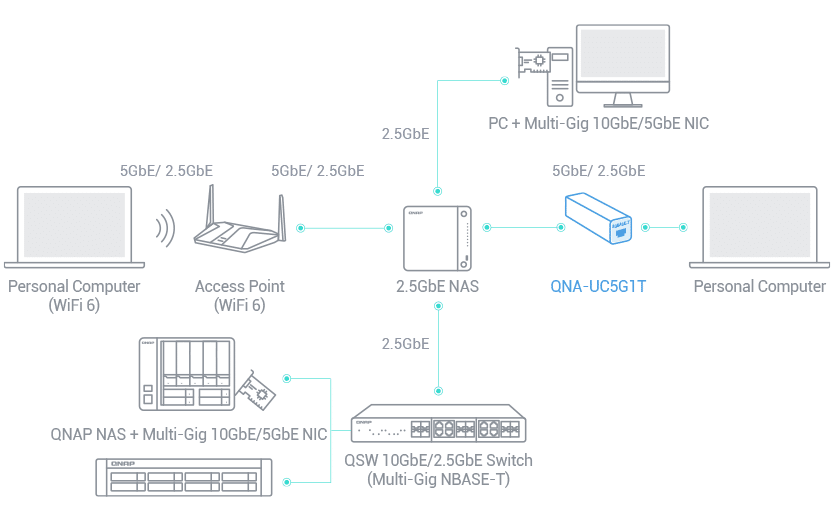
Looking first at networking, the QNAP TS-453D comes with two onboard 2.5GbE RJ45 LAN ports. Users can take their existing CAT5e cables and upgrade network connections from 1GbE to 2.5GbE. If 2.5GbE isn’t enough, through port trunking users can bump that up to 5GbE. To help hit those speeds, the NAS leverages an Intel Celeron J4125 quad-core 2.0 GHz processor. On top of that, the NAS can have up to 8GB of DDR4 memory for even faster performance.
![QNAP ts-453d]()
QNAP includes a PCIe expansion slot that can be used to add something like a 10GbE card for those looking to use the NAS for virtualization, fast backup and restores, and huge data transmissions. Faster connectivity lends itself well to Hybrid Backup Sync (HBS) to transfer data to local, remote or cloud storage spaces while using the company’s QuDedup, data reduction.
For storage the TS-453D has 4 3.5″ SATA bays. The NAS has an SSD caching capability, but to leverage it without giving up drive bays, users would need to utilize a PCIe adapter card for M.2 drives in the single PCIe slot. However, adding in SSDs can add several benefits such as flash volumes, SSD cache acceleration, and Qtier auto-tiering for overall better performance. If the four bays aren’t enough, one can add more storage through a USB 3.2 Gen 2 port to provide fast JBOD expansions.
The QNAP TS-453D comes in two flavors, 8G (reviewed here) and 4G. The main difference is the amount of RAM it comes with, in this case 8GB. Along with the TS-453D 4-bay model, there is the 2-bay TS-253D, and the 6-bay TS653D model. The [QNAP TS-453D NAS can be picked up today for $586](https://amzn.to/2RTW7hm).
## **QNAP TS-453D NAS Specifications**
| Model | TS-453D-8G |
| --- | --- |
| CPU | Intel Celeron J4125 quad-core 2.0 GHz processor (burst up to 2.7 GHz) |
| CPU Architecture | 64-bit x86 |
| Graphic Processors | Intel HD Graphics 600 |
| Floating Point Unit | Yes |
| Encryption Engine | (AES-NI) |
| Hardware-accelerated Transcoding | Yes |
| System Memory | 8 GB SO-DIMM DDR4 (2 x 4 GB) |
| Maximum Memory | 8 GB (2 x 4 GB) |
| Memory Slot | 2 x SO-DIMM DDR4 |
| Flash Memory | 4GB (Dual boot OS protection) |
| Drive Bay | 4 x 3.5-inch SATA 6Gb/s, 3Gb/s |
| Drive Compatibility | 3.5-inch SATA hard disk drives
2.5-inch SATA hard disk drives
2.5-inch SATA solid state drives |
| Hot-swappable | Yes |
| M.2 SSD Slot | Optional via a PCIe adapter |
| SSD Cache Acceleration Support | Yes |
| 2.5 Gigabit Ethernet Port (2.5G/1G/100M) | 2 |
| 5 Gigabit Ethernet Port (5G/2.5G/1G/100M) | Optional via PCIe expansion card |
| 10 Gigabit Ethernet Port | Optional via PCIe expansion card
Optional via PCIe expansion card |
| Jumbo Frame | Yes |
| PCIe Slot | 1
Slot 1: PCIe Gen 2 x2 |
| USB 2.0 port | 3 |
| USB 3.2 Gen 1 port | 2 |
| USB 3.2 Gen 2 (10Gbps) Port | Optional via a PCIe adapter |
| IR Sensor | (Optional QNAP RM-IR004 remote control) |
| HDMI Output | 1, HDMI 2.0 (up to 4096 x 2160 @ 60Hz) |
| Form Factor | Tower |
| LED Indicators | Power/Status, LAN, USB, HDD1-4 |
| Buttons | Power, USB copy, Reset |
| Dimensions (HxWxD) | 6.61 × 6.69 × 8.9 inch |
| Weight (Net) | 4.98 lbs |
| Weight (Gross) | 7.94 lbs |
| Operating temperature | 0 – 40 °C (32°F – 104°F) |
| Relative Humidity | 5-95% RH non-condensing, wet bulb: 27˚C (80.6˚F) |
| Power Supply Unit | 90W adapter, 100-240V |
| Power Consumption: HDD Sleep Mode | 11.3 W |
| Power Consumption: Operating Mode, Typical | 25.98 W |
| Fan | 1 x 120mm, 12VDC |
| Sound Level | 21.1 db(A) |
| System Warning | Buzzer |
| Kensington Security Slot | Yes |
| Max. Number of Concurrent Connections (CIFS) | 800 |
## **QNAP TS-453D Design and Build**
The QNAP TS-453D is a compact, tower form factor NAS. It is small enough to sit on a desk without being too intrusive. The front of the device has a shiny plastic cover with company branding that covers the drives bays. The cover slides off easily to access the toolless, hot-swap drives underneath. Along the right side is the power button at the top, the indicator LEDs running down the side, a USB 3.0 port and a USB copy button.
![QNAP ts-453d open]()
The rear of the device is mainly taken up by the fan. On the left side are the Kensington Security Slot, HDMI port, USB 3.2 Gen 2 port, three USB 2.0 ports, two 2.5 Gigabit Ethernet Ports, and the power connection. Right near the top is where the PCIe expansion slot is for adding cards.
![QNAP ts-453d rear]()
## **QNAP TS-453D Performance**
**Review Configuration**
For our testing, we configured the QNAP TS-453D in RAID6 using four [WD Red 14TB](https://www.storagereview.com/review/wd-red-14tb-nas-hdd-review) HDDs in both CIFS and iSCSI configurations. For networking, we leveraged the EnGenius Cloud ECS2512FP Multi-Gigabit Switch.
**Enterprise Synthetic Workload Analysis**
Our enterprise shared storage and hard drive benchmark process preconditions each drive into steady-state with the same workload the device will be tested with under a heavy load of 16 threads with an outstanding queue of 16 per thread, and then tested in set intervals in multiple thread/queue depth profiles to show performance under light and heavy usage. Since NAS solutions reach their rated performance level very quickly, we only graph out the main sections of each test.
Preconditioning and Primary Steady-State Tests:
- Throughput (Read+Write IOPS Aggregate)
- Average Latency (Read+Write Latency Averaged Together)
- Max Latency (Peak Read or Write Latency)
- Latency Standard Deviation (Read+Write Standard Deviation Averaged Together)
Our Enterprise Synthetic Workload Analysis includes four profiles based on real-world tasks. These profiles have been developed to make it easier to compare to our past benchmarks as well as widely-published values such as max 4k read and write speed and 8k 70/30, which is commonly used for enterprise drives.
- 4K
- 100% Read or 100% Write
- 100% 4K
- 8K 70/30
- 70% Read, 30% Write
- 100% 8K
- 8K (Sequential)
- 100% Read or 100% Write
- 100% 8K
- 128K (Sequential)
- 100% Read or 100% Write
- 100% 128K
First up are the enterprise workloads, where we measured a long sample of random 4K performance with 100% write and 100% read activity. For IOPS, the NAS gave us CIFS scores of 292 IOPS read and 669 IOPS write. iSCSI hit 2,553 IOPS read and 444 IOPS write.
![QNAP ts-453d 4k throughput]()
For 4K average latency, CIFS saw 874ms read and 382ms write while iSCSI hit 100ms read and 576ms write.
![QNAP ts-453d 4k avg latency]()
Max latency with 4K had CIFS scores of 3,182ms read and 4,024ms write and iSCSI of 6,113ms read and 10,535ms write.
![]()
Our last 4K test was standard deviation that gave us 735ms read and 458ms write in CIFS and 116ms read and 1,149ms write in iSCSI.
![]()
Our next benchmark measures 100% 8K sequential throughput with a 16T16Q load in 100% read and 100% write operations which showed near identical performance across the board. Here, the QNAP TS-453D NAS was able to hit 29,180 IOPS read and 22,775 IOPS write in CIFS as well as 71,666 IOPS read and 34,243 IOPS write in iSCSI.
![QNAP ts-453d 8k]()
Compared to the fixed 16 thread, 16 queue max workload we performed in the 100% 4K write test, our mixed workload profiles scale the performance across a wide range of thread/queue combinations. In these tests, we span workload intensity from 2 thread/2 queue up to 16 thread/16 queues. In throughput, the QNAP was fairly flat in CIFS starting at 178 IOPS and ending at 174 IOPS. There was a big improvement from beginning to end in iSCSI with a start of 372 IOPS and an end at 1,325 IOPS.
![]()
For 8K 70/30 average latency, the CIFS config started at 22.4ms and spiked up to 1,463ms at the end. The iSCSI started at 10.7ms and finished at a much milder 193ms.
![]()
With 8K 70/30 max latency the CIFS went from 387ms to 3,448ms and iSCSI went from 277ms to 6,235ms.
![]()
8K 70/30 standard deviation saw latency go from 35ms to 307ms in CIFS and 19.3ms to 281ms in iSCSI.
![]()
The last synthetic benchmark is our 128K test, which is a large-block sequential test that shows the highest sequential transfer speed for a device. In this workload scenario, the CIFS config saw speeds of 579MB/s read and 557MB/s write while iSCSI saw speeds of 579MB/s read and 524MB/s write.
![QNAP ts-453d 128k]()
## **Conclusion**
The QNAP TS-453D is a small tower NAS that is all about faster network connectivity. The NAS comes with two 2.5GbE LAN ports onboard with the ability to port trunk up to 5GbE or add a 5GbE or 10GbE port through the PCIe expansion slot. The NAS leverages an Intel Celeron J4125 quad-core 2.0 GHz processor and up to 8GB of DDR4 RAM. There are four, 3.5” storage bays running the capacity up to 72TB as well as a USB 3.2 Gen 2 port to expand to even more capacity. For caching, users can leverage two of the bays with SSDs or utilize the PCIe slot for M.2 flash storage.
For testing, we just did HDDs (WD Red 14TB) in RAID6, no SSD caching. The faster connectivity saw boosts in certain tests but not others. For CIFS configuration we saw 4K throughput of 292 IOPS read and 669 IOPS write, 4K average latency of 874ms read and 382ms write, 4K max latency of 3,182ms read and 4,024ms write, 8K sequential of 29,180 IOPS read and 22,775 IOPS write, and the biggest boost in performance was seen in the 128K large block with 579MB/s read and 557MB/s write in CIFS.
In iSCSI configurations we saw 4K throughput of 2,553 IOPS read and 444 IOPS write, 4K average latency of 100ms read and 576ms write, 4K max latency of 6,113ms read and 10,535ms write, 8K sequential of 71,666 IOPS read and 34,243 IOPS write, and, again, the biggest boost in performance was seen in the 128K large block with 579MB/s read and 524MB/s write.
2.5GbE connectivity can definitely add benefits to a NAS, particularly as we saw in 128K large block transfer. The QNAP TS-453D can remove the network bottleneck in NAS usage while providing ample features for most small to medium office users.
[QNAP TS-453D on Amazon](https://amzn.to/2RTW7hm)
**Engage with StorageReview**
[Newsletter](https://www.storagereview.com/storage_newsletter) | [YouTube](https://www.youtube.com/user/StorageReview "Opens in a new window") | Podcast [iTunes](https://podcasts.apple.com/gb/podcast/storagereview-com-storage-reviews/id1060681115 "Opens in a new window")/ [Spotify](https://open.spotify.com/show/1y6VnznABhHeOSMOmbDTz0 "Opens in a new window") | [Instagram](https://www.instagram.com/storagereview/ "Opens in a new window") | [Twitter](https://twitter.com/storagereview "Opens in a new window") | [TikTok](https://www.tiktok.com/@storagereview? "Opens in a new window") | [RSS Feed](https://www.storagereview.com/rss.xml)
![]()
### Adam Armstrong
Adam is the chief news editor for StorageReview.com, managing our internal and freelance content teams.
Previous post: [Samsung 980 PRO PCIe 4.0 NVMe SSD Review](https://www.storagereview.com/review/samsung-980-pro-pcie-4-0-nvme-ssd-review)
Next post: [Crucial X6 Portable SSD Review](https://www.storagereview.com/review/crucial-x6-portable-ssd-review)
Trusted Vendors
Products and solutions from our affiliate partners:
- [

Ubiquiti
](https://store.ui.com/us/en?a_aid=StorageReview "Opens in a new window")
- [

Newegg
](https://click.linksynergy.com/fs-bin/click?id=g5terNMDhz0&offerid=1207190.18&subid=0&type=4 "Opens in a new window")
- [
 Amazon
](https://amzn.to/4fLJUEW "Opens in a new window")
Newsletter
Subscribe to the StorageReview newsletter to stay up to date on the latest news and reviews. We promise no spam!
1
Leave this field empty if you’re human:
## Advertisement
Content Categories
[Facebook](https://www.facebook.com/@storagereview) [X](https://twitter.com/storagereview) [Instagram](https://www.instagram.com/storagereview/) [LinkedIn](https://www.linkedin.com/company/storagereview-com) [YouTube](https://www.youtube.com/user/storagereview?sub_confirmation=1) [Email](mailto:info@storagereview.com) [Spotify](https://open.spotify.com/show/1y6VnznABhHeOSMOmbDTz0) [Reddit](https://www.reddit.com/r/StorageReview/) [Discord](https://discord.gg/TwMHb4azdC) [RSS](https://www.storagereview.com/rss.xml) [TikTok](https://www.tiktok.com/@storagereview)
Copyright © 1998-2025 Flying Pig Ventures, LLC Cincinnati, Ohio. All rights reserved.
Manage your privacy
To provide the best experiences, we and our partners use technologies like cookies to store and/or access device information. Consenting to these technologies will allow us and our partners to process personal data such as browsing behavior or unique IDs on this site and show (non-) personalized ads. Not consenting or withdrawing consent, may adversely affect certain features and functions.
Click below to consent to the above or make granular choices. Your choices will be applied to this site only. You can change your settings at any time, including withdrawing your consent, by using the toggles on the Cookie Policy, or by clicking on the manage consent button at the bottom of the screen.
Functional Functional Always active
The technical storage or access is strictly necessary for the legitimate purpose of enabling the use of a specific service explicitly requested by the subscriber or user, or for the sole purpose of carrying out the transmission of a communication over an electronic communications network.
Preferences Preferences
The technical storage or access is necessary for the legitimate purpose of storing preferences that are not requested by the subscriber or user.
Statistics Statistics
The technical storage or access that is used exclusively for statistical purposes. The technical storage or access that is used exclusively for anonymous statistical purposes. Without a subpoena, voluntary compliance on the part of your Internet Service Provider, or additional records from a third party, information stored or retrieved for this purpose alone cannot usually be used to identify you.
Marketing Marketing
The technical storage or access is required to create user profiles to send advertising, or to track the user on a website or across several websites for similar marketing purposes.
Statistics
Marketing
Features
Always active
Special features
Special purposes
Always active
- Manage options
- Manage services
- Manage {vendor\_count} vendors
- [Read more about these purposes](https://cookiedatabase.org/tcf/purposes/)
Accept Deny Manage options Save preferences Manage options
- {title}
- {title}
- {title}
Manage your privacy
To provide the best experiences, we use technologies like cookies to store and/or access device information. Consenting to these technologies will allow us to process data such as browsing behavior or unique IDs on this site. Not consenting or withdrawing consent, may adversely affect certain features and functions.
Functional Functional Always active
The technical storage or access is strictly necessary for the legitimate purpose of enabling the use of a specific service explicitly requested by the subscriber or user, or for the sole purpose of carrying out the transmission of a communication over an electronic communications network.
Preferences Preferences
The technical storage or access is necessary for the legitimate purpose of storing preferences that are not requested by the subscriber or user.
Statistics Statistics
The technical storage or access that is used exclusively for statistical purposes. The technical storage or access that is used exclusively for anonymous statistical purposes. Without a subpoena, voluntary compliance on the part of your Internet Service Provider, or additional records from a third party, information stored or retrieved for this purpose alone cannot usually be used to identify you.
Marketing Marketing
The technical storage or access is required to create user profiles to send advertising, or to track the user on a website or across several websites for similar marketing purposes.
Statistics
Marketing
Features
Always active
Special features
Special purposes
Always active
- Manage options
- Manage services
- Manage {vendor\_count} vendors
- [Read more about these purposes](https://cookiedatabase.org/tcf/purposes/)
Accept Deny Manage options Save preferences Manage options
- {title}
- {title}
- {title}
Manage consent Manage consent
```json
{"@context":"https:\/\/schema.org","@graph":[{"@type":"WebPage","@id":"https:\/\/www.storagereview.com\/review\/qnap-ts-453d-nas-review","url":"https:\/\/www.storagereview.com\/review\/qnap-ts-453d-nas-review","name":"QNAP TS-453D NAS Review - StorageReview.com","isPartOf":{"@id":"https:\/\/www.storagereview.com\/#website"},"primaryImageOfPage":{"@id":"https:\/\/www.storagereview.com\/review\/qnap-ts-453d-nas-review#primaryimage"},"image":{"@id":"https:\/\/www.storagereview.com\/review\/qnap-ts-453d-nas-review#primaryimage"},"thumbnailUrl":"https:\/\/www.storagereview.com\/wp-content\/uploads\/2020\/09\/QNAP-ts-453d-thumbnail.png","datePublished":"2020-09-23T21:24:19+00:00","dateModified":"2020-09-24T20:09:37+00:00","description":"The QNAP TS-453D NAS is all about faster network connectivity with two 2.5GbE LAN ports onboard with the ability to port trunk up to 5GbE","breadcrumb":{"@id":"https:\/\/www.storagereview.com\/review\/qnap-ts-453d-nas-review#breadcrumb"},"inLanguage":"en-US","potentialAction":[{"@type":"ReadAction","target":["https:\/\/www.storagereview.com\/review\/qnap-ts-453d-nas-review"]}]},{"@type":"ImageObject","inLanguage":"en-US","@id":"https:\/\/www.storagereview.com\/review\/qnap-ts-453d-nas-review#primaryimage","url":"https:\/\/www.storagereview.com\/wp-content\/uploads\/2020\/09\/QNAP-ts-453d-thumbnail.png","contentUrl":"https:\/\/www.storagereview.com\/wp-content\/uploads\/2020\/09\/QNAP-ts-453d-thumbnail.png","width":1600,"height":900},{"@type":"BreadcrumbList","@id":"https:\/\/www.storagereview.com\/review\/qnap-ts-453d-nas-review#breadcrumb","itemListElement":[{"@type":"ListItem","position":1,"name":"Home","item":"https:\/\/www.storagereview.com\/"},{"@type":"ListItem","position":2,"name":"Review","item":"https:\/\/www.storagereview.com\/review"},{"@type":"ListItem","position":3,"name":"QNAP TS-453D NAS Review"}]},{"@type":"WebSite","@id":"https:\/\/www.storagereview.com\/#website","url":"https:\/\/www.storagereview.com\/","name":"StorageReview.com","description":"StorageReview.com is a leading provider of news and reviews throughout the entire IT stack - from the datacenter to the edge, and all points in between.","publisher":{"@id":"https:\/\/www.storagereview.com\/#organization"},"potentialAction":[{"@type":"SearchAction","target":{"@type":"EntryPoint","urlTemplate":"https:\/\/www.storagereview.com\/?s={search_term_string}"},"query-input":{"@type":"PropertyValueSpecification","valueRequired":true,"valueName":"search_term_string"}}],"inLanguage":"en-US"},{"@type":"Organization","@id":"https:\/\/www.storagereview.com\/#organization","name":"StorageReview.com","url":"https:\/\/www.storagereview.com\/","logo":{"@type":"ImageObject","inLanguage":"en-US","@id":"https:\/\/www.storagereview.com\/#\/schema\/logo\/image\/","url":"https:\/\/www.storagereview.com\/wp-content\/uploads\/2020\/02\/Storage-Reviews-2-2.png","contentUrl":"https:\/\/www.storagereview.com\/wp-content\/uploads\/2020\/02\/Storage-Reviews-2-2.png","width":344,"height":61,"caption":"StorageReview.com"},"image":{"@id":"https:\/\/www.storagereview.com\/#\/schema\/logo\/image\/"},"sameAs":["https:\/\/x.com\/storagereview","http:\/\/youtube.com\/user\/storagereview"]}]}
```