---
description: The TerraMaster F4-422 is dubbed a high-speed NAS by the company. It is outfitted with a quad-core processor and 10GbE onboard connectivity
title: TerraMaster F4-422 NAS Review
image: https://www.storagereview.com/wp-content/uploads/2020/08/AEV_3752.jpg
---
[![Storage Review]()](https://storagereview.com/)
---
[Facebook](https://www.facebook.com/@storagereview) [X (Twitter)](https://twitter.twitter.com/storagereview) [Instagram](https://www.instagram.com/storagereview/) [LinkedIn](https://www.linkedin.com/company/storagereview-com) [YouTube](https://www.youtube.com/user/storagereview?sub_confirmation=1) [Email](mailto:info@storagereview.com) [Spotify](https://open.spotify.com/show/1y6VnznABhHeOSMOmbDTz0) [Reddit](https://www.reddit.com/r/StorageReview/) [Discord](https://discord.gg/TwMHb4azdC) [RSS Feed](https://www.storagereview.com/rss.xml) [TikTok](https://www.tiktok.com/@storagereview)
[Facebook](https://www.facebook.com/@storagereview) [X (Twitter)](https://twitter.com/storagereview) [Instagram](https://www.instagram.com/storagereview/) [LinkedIn](https://www.linkedin.com/company/storagereview-com) [YouTube](https://www.youtube.com/user/storagereview?sub_confirmation=1) [Email](mailto:info@storagereview.com) [Spotify](https://open.spotify.com/show/1y6VnznABhHeOSMOmbDTz0) [Reddit](https://www.reddit.com/r/StorageReview/) [Discord](https://discord.gg/TwMHb4azdC) [RSS Feed](https://www.storagereview.com/rss.xml) [TikTok](https://www.tiktok.com/@storagereview)
[](https://www.storagereview.com)
≡ Menu
- [Home](https://www.storagereview.com/)
- [Storage Reviews](https://www.storagereview.com/review)
- [End User Reviews](https://www.storagereview.com/consumer)
- [Enterprise Reviews](https://www.storagereview.com/enterprise)
- [Ubiquiti Reviews](https://www.storagereview.com/best/ubiquiti-reviews)
- [SR Merch](https://store.storagereview.com)
- [Leaderboards](https://www.storagereview.com/best)
- [Best Storage Arrays](https://www.storagereview.com/best/storage-arrays)
- [Best Enterprise SSDs](https://www.storagereview.com/best/enterprise-ssds)
- [Best Servers](https://www.storagereview.com/best/servers)
- [Best Enterprise GPUs](https://www.storagereview.com/best/enterprise-gpus)
- [Best Desktops for Local AI](https://www.storagereview.com/best/desktops-local-ai)
- [Best Laptops for Local AI](https://www.storagereview.com/best/laptops-local-ai)
- [Best Local LLM Tools](https://www.storagereview.com/best/local-llm-tools)
- [Agentic AI Hardware](https://www.storagereview.com/best/agentic-ai-hardware)
- [Best SSDs & Hard Drives](https://www.storagereview.com/best_drives)
- [Best Portable SSDs](https://www.storagereview.com/best/portable-ssds)
- [Best Business Laptops](https://www.storagereview.com/best/business-laptops)
- [Best Mobile Workstations](https://www.storagereview.com/best/mobile-workstations)
- [Best Desktop Workstations](https://www.storagereview.com/best/desktop-workstations)
- [Best Mini PCs](https://www.storagereview.com/best/mini-pcs)
- [Best Laptop Battery Life](https://www.storagereview.com/best/laptop-battery-life)
- [Storage Reference Guide](https://www.storagereview.com/storage-reference-guide)
- [About SR](https://www.storagereview.com/about-storagereview)
- [StorageReview.com Sweepstakes Rules and Regulations](https://www.storagereview.com/storagereview-com-sweepstakes-rules-and-regulations)
Search
[Home](https://www.storagereview.com/) » [Review](https://www.storagereview.com/review) » TerraMaster F4-422 NAS Review
# TerraMaster F4-422 NAS Review
by Adam Armstrong on November 6, 2020
[End User](https://www.storagereview.com/consumer) ◇ [NAS](https://www.storagereview.com/consumer/nas)
The TerraMaster F4-422 is a small desktop NAS that is touted as a high-speed NAS. The high-speed handle comes from the device being loaded with a quad-core 1.5GHz Intel Celeron J355 CPU, an onboard 10 Gigabit LAN port, and up to 8GB of memory supported. This hardware (combined with the proper drives in the proper configuration) can lead to speeds as high as 670MB/s. Faster speeds can translate to more use cases such as video editing or transferring large volumes of data.
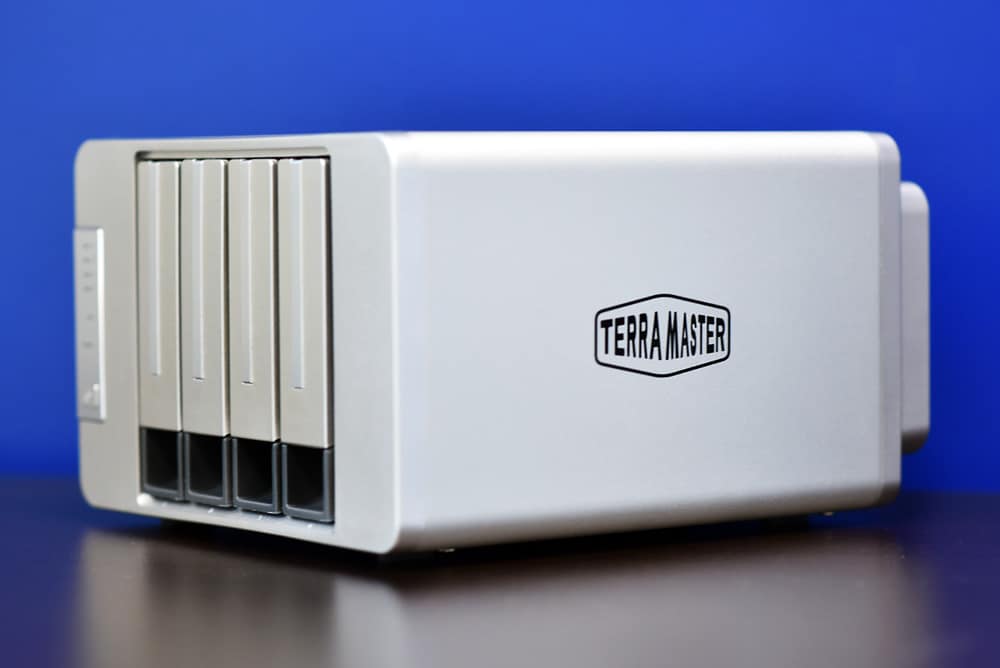
From a capacity standpoint, the TerraMaster F4-422 supports up to 80TB through four 16TB HDDs. Though 18TB HDDs are on the market, it isn’t clear at the time of this writing whether the NAS will support the new capacities. If faster performance is desired, the NAS supports 2.5” SSDs as well. All the support for storage is through the SATA interface. The device supports multiple RAID modes including RAID0, RAID1, RAID5, RAID6, RAID10, JBOD, and SINGLE.
![TerraMaster f4-422 inside]()
With the company’s TOS 4.1 OS, the NAS can support multiple file services (SMB/CIFS, NFS, AFP, FTP/SFTP, WebDAV files services, SMB, NFS, and iSCSI remote mounts) and over cross-platform access. The F4-422 can also be turned into a private cloud with anywhere access through the TNAS mobile app or TNAS.online. If multimedia is more your thing, The NAS supports Emby and Plex and can be played on nearly all multimedia players. The NAS allows real-time 4K transcoding.
The TerraMaster F4-422 comes with a two-year warranty and [can be picked up for $500](https://www.amazon.com/TerraMaster-Quad-core-Hardware-Encryption-Diskless/dp/B089KKRFP7/ref=sr_1_2?dchild=1&keywords=TerraMaster+F4-422&qid=1604341757&sr=8-2).
## **TerraMaster F4-422 NAS Specifications**
| Processor | |
| --- | --- |
| Processor Model | Intel Celeron J3455 |
| Processor Architecture | X.86 64-bit |
| Processor Frequency | Quad Core 1.5GHz (Max burst up to 2.3GHz) |
| Hardware Encryption Engine | Yes |
| Memory | |
| System Memory | 4GB |
| Total Memory Slot Number | 1 |
| Maximum Supported Memory | 8 GB (4 GB + 4 GB) |
| Storage | |
| Disk Slot Number | 4 |
| Compatible Drive types | 3.5″ SATA HDD
2.5″ SATA HDD
2.5″ SATA SSD |
| Maximum Internal Raw Storage Capacity | 64TB (16TB x 4) (Capacity may vary by RAID types) |
| Max Single Volume | 108TB |
| Drive Hot Swap | Yes |
| File System | |
| Internal Drive | EXT4, BTRFS |
| External Drive | EXT3, EXT4, NTFS, FAT32, HFS+ |
| External Ports | |
| RJ-45 1GbE Network Jack | 2 |
| RJ-45 10GbE Network Jack | 1 |
| USB 3.0 Port | 2 |
| Appearance | |
| Size (H\*W\*D) | 227 x 225 x 136 mm |
| Weight | Net Weight: 2.30Kg Gross Weight: 3.53Kg |
| Others | |
| System Fan | 80 mm x 80 mm x25mm 2 pcs |
| Fan Mode | Smart, High speed, Middle speed, Low speed |
| Noise Level | 19.8dB(A) |
| Power Supply | 90W |
| AC Input Voltage | 100V – 240V AC |
| Current Frequency | 50/60 Hz, Single frequency |
| Power Consumption | 46.6W (read & write) |
| Limited warranty | 2 years |
| Certificate | FCC, CE, CCC, KC |
| Environment | RoHS, WEEE |
| Temperature | |
| Working Temperature | 5°C \~ 40°C (40°F \~ 104°F) |
| Storage Temperature | -20°C \~ 60°C (-5°F \~ 140°F) |
| Relative Humidity | 5% \~ 95% RH |
## **Design and Build**
The TerraMaster F4-422 is a smallish desktop NAS a little larger than the four 3.5” drives it can house. It has an overall gray or aluminum appearance and a little bit of heft to it, especially if it is loaded with drives. The drives come out fairly easy through the front. Off to the left side is the power button as well as drive and networking indicator lights.
![TerraMaster f4-422 front]()
As with most small NAS devices, the back is mostly taken up by fans. Off to the right is a spot for an HDMI port (though not on this model), two USB 3.0 ports, two 1GbE ports, one 10GbE port, and the power connection.
![TerraMaster f4-422 back]()
## **Management**
As we noted in a [previous review](https://www.storagereview.com/review/terramaster-f2-221-review), the TerraMAster NAS devices leverage the company’s TOS operating system. While there are a lot of really nice GUIs out there in the SMB/SOHO NAS world, this isn’t one of them. It is simplistic (overly in some ways) and comes with odd quirks like the need to install a separate application to do iSCSI. That being said, the OS still supports the above mentions file services and multimedia uses.
![]()
Aside from the above users can also access both EXT 4 and Btrfs file systems, a slew of backup options, various popular cloud drives, and the ability to synchronize across them, multiple download tools, and now a multi-functional integrated mobile App, the TNAS mobile app.
![]()
The TerraMaster F4-422, through the TOS OS, gives users access to several popular enterprise applications as well as hundreds of other popular free apps through its app store.
![]()
## **Performance**
**Review Configuration**
For our testing, we configured the TerraMaster F4-422 in RAID6 using four [WD Red 14TB](https://www.storagereview.com/review/wd-red-14tb-nas-hdd-review) HDDs in both SMB and iSCSI configurations. For networking, we leveraged our Netgear M7100 10G Switch.
**Enterprise Synthetic Workload Analysis**
Our enterprise shared storage and hard drive benchmark process preconditions each drive into steady-state with the same workload the device will be tested with under a heavy load of 16 threads with an outstanding queue of 16 per thread, and then tested in set intervals in multiple thread/queue depth profiles to show performance under light and heavy usage. Since NAS solutions reach their rated performance level very quickly, we only graph out the main sections of each test.
Preconditioning and Primary Steady-State Tests:
- Throughput (Read+Write IOPS Aggregate)
- Average Latency (Read+Write Latency Averaged Together)
- Max Latency (Peak Read or Write Latency)
- Latency Standard Deviation (Read+Write Standard Deviation Averaged Together)
Our Enterprise Synthetic Workload Analysis includes four profiles based on real-world tasks. These profiles have been developed to make it easier to compare to our past benchmarks as well as widely-published values such as max 4k read and write speed and 8k 70/30, which is commonly used for enterprise drives.
- 4K
-
- 100% Read or 100% Write
- 100% 4K
- 8K 70/30
-
- 70% Read, 30% Write
- 100% 8K
- 8K (Sequential)
-
- 100% Read or 100% Write
- 100% 8K
- 128K (Sequential)
-
- 100% Read or 100% Write
- 100% 128K
First up are the enterprise workloads, where we measured a long sample of random 4K performance with 100% write and 100% read activity. For IOPS, the NAS gave us 1,441 IOPS read and 328 IOPS write in SMB. In iSCSI the NAS hit 1,113 IOPS read and 258 IOPS write.
![]()
With 4K average latency the TerraMaster F4-422 was able to hit 177.33ms read and 826.14ms write with SMB and an even worse 229.79ms read and 993.13ms write in iSCSI.
![]()
4K max latency didn’t see the NAS fair any better with SMB speeds of 46,429ms read and 30,876ms write and iSCSI peak response times of 1,686.1ms read and 78,130ms (or well over 1 minute) write.
![]()
4K standard deviation latency saw 516.67ms read and 2,731.67 write in SMB and 185.4ms read and 4,353.31ms write in iSCSI.
![]()
Our next benchmark measures 100% 8K sequential throughput with a 16T16Q load in 100% read and 100% write operations. Here, we saw SMB performance of 3,459 IOPS read and 6,299 IOPS write and an impressive 73,177 IOPS read and 9,815 write for iSCSI.
![]()
Compared to the fixed 16 thread, 16 queue max workload we performed in the 100% 4K write test, our mixed workload profiles scale the performance across a wide range of thread/queue combinations. In these tests, we span workload intensity from 2 thread/2 queue up to 16 thread/16 queues. In throughput, the SMB configuration went from 280 IOPS to 1,125 IOPS and iSCSI ranged from 234 IOPS to 979 IOPS before dropping off some.
![]()
With 8K 70/30 average latency the TerraMaster F4-422 saw SMB range from 14.21ms to 222.68ms and iSCSI went from as low as 15.88ms to 381.56ms.
![]()
8K 70/30 max latency gave us SMB performance a little better at the end versus the beginning 18,779ms from 20,972ms. With iSCSI we saw the opposite starting at 3,936ms and finishing at 38,031ms. Again, this is some abysmal latency.
![]()
For 8K 70/30 standard deviation, the NAS saw performance ranging from 181.98ms to 811.03ms in SMB and 59.91ms to 1,164.24ms in iSCSI.
![]()
The last synthetic benchmark is our 128K test, which is a large-block sequential test that shows the highest sequential transfer speed for a device. In this workload scenario, the SMB configuration saw 277MB/s read and 268MB/s write. With iSCSI we saw the NAS get close to its quoted performance with 652MB/s read but only 96MB/s write.
![]()
## **Conclusion**
The TerraMaster F4-422 is dubbed a high-speed NAS by the company. It is outfitted with a quad-core processor and 10GbE onboard connectivity to deliver on its quoted 670MB/s speeds. The 4-bay NAS can go up to 80TB in capacity and fits SATA HDDs and SSDs. The NAS comes with the company’s TOS for management that supports multiple file services and multimedia setups like Emby and Plex. The built-in app store gives users access to hundreds of free apps as well as popular enterprise applications.
For testing, we just did HDDs (WD Red 14TB) in RAID6 and leveraged the 10GbE port. The results weren’t earth-shattering but not bad either. In our SMB configuration, we saw 4K throughput of 1,441 IOPS read and 328 IOPS write, 4K average latency saw 177.33ms read and 826.14ms write, 4K max latency gave us 46,429ms read and 30,876ms write, and 4K standard deviation was 516.67ms read and 2,731.67 write. For 8K sequential SMB config was 3,459 IOPS read and 6,299 IOPS write. And large-block 128K sequential was 277MB/s read and 268MB/s write.
In our iSCSI configuration, we saw the NAS hit 1,113 IOPS read and 258 IOPS write in 4K throughput, 229.79ms read and 993.13ms write in 4K average latency, 1,686.1ms read and 78,130ms write in 4K max latency, and 185.4ms read and 4,353.31ms write in 4K standard deviation. In 8K 100% sequential iSCSI gave us a surprising 73,177 IOPS read and 9,815 IOPS write. And in large-block sequential 128K iSCSI configuration hit 652MB/s read and 96MB/s write coming near the quoted performance in read.
Overall the TerraMaster F4-422 NAS offers decent performance for a smaller NAS on some tests, however, it really has poor latency. For NAS technology in 2020, using quality HDDs, to have over a minute of latency on a 4K test is lackluster to say the least. The company would also do itself a huge favor with an update to TOS. The easier it is to leverage an OS and GUI the more likely it is for new customers to adopt it.
[TerraMaster F4-422 on Amazon](https://www.amazon.com/TerraMaster-Quad-core-Hardware-Encryption-Diskless/dp/B089KKRFP7/ref=pd_ybh_a_2?_encoding=UTF8&psc=1&refRID=WV31T69DK4NM3N630QKR)
**Engage with StorageReview**
[Newsletter](https://www.storagereview.com/storage_newsletter) | [YouTube](https://www.youtube.com/user/StorageReview "Opens in a new window") | Podcast [iTunes](https://podcasts.apple.com/gb/podcast/storagereview-com-storage-reviews/id1060681115 "Opens in a new window")/ [Spotify](https://open.spotify.com/show/1y6VnznABhHeOSMOmbDTz0 "Opens in a new window") | [Instagram](https://www.instagram.com/storagereview/ "Opens in a new window") | [Twitter](https://twitter.com/storagereview "Opens in a new window") | [TikTok](https://www.tiktok.com/@storagereview? "Opens in a new window") | [RSS Feed](https://www.storagereview.com/rss.xml)
![]()
### Adam Armstrong
Adam is the chief news editor for StorageReview.com, managing our internal and freelance content teams.
Previous post: [HP Z2 Mini G5 Workstation Review](https://www.storagereview.com/review/hp-z2-mini-g5-workstation-review)
Next post: [DapuStor H3900 SSD Review](https://www.storagereview.com/review/dapustor-h3900-ssd-review)
Trusted Vendors
Products and solutions from our affiliate partners:
- [

Ubiquiti
](https://store.ui.com/us/en?a_aid=StorageReview "Opens in a new window")
- [

Newegg
](https://click.linksynergy.com/fs-bin/click?id=g5terNMDhz0&offerid=1207190.18&subid=0&type=4 "Opens in a new window")
- [
 Amazon
](https://amzn.to/4fLJUEW "Opens in a new window")
Newsletter
Subscribe to the StorageReview newsletter to stay up to date on the latest news and reviews. We promise no spam!
1
Leave this field empty if you’re human:
## Advertisement
Content Categories
[Facebook](https://www.facebook.com/@storagereview) [X](https://twitter.com/storagereview) [Instagram](https://www.instagram.com/storagereview/) [LinkedIn](https://www.linkedin.com/company/storagereview-com) [YouTube](https://www.youtube.com/user/storagereview?sub_confirmation=1) [Email](mailto:info@storagereview.com) [Spotify](https://open.spotify.com/show/1y6VnznABhHeOSMOmbDTz0) [Reddit](https://www.reddit.com/r/StorageReview/) [Discord](https://discord.gg/TwMHb4azdC) [RSS](https://www.storagereview.com/rss.xml) [TikTok](https://www.tiktok.com/@storagereview)
Copyright © 1998-2025 Flying Pig Ventures, LLC Cincinnati, Ohio. All rights reserved.
Manage your privacy
To provide the best experiences, we and our partners use technologies like cookies to store and/or access device information. Consenting to these technologies will allow us and our partners to process personal data such as browsing behavior or unique IDs on this site and show (non-) personalized ads. Not consenting or withdrawing consent, may adversely affect certain features and functions.
Click below to consent to the above or make granular choices. Your choices will be applied to this site only. You can change your settings at any time, including withdrawing your consent, by using the toggles on the Cookie Policy, or by clicking on the manage consent button at the bottom of the screen.
Functional Functional Always active
The technical storage or access is strictly necessary for the legitimate purpose of enabling the use of a specific service explicitly requested by the subscriber or user, or for the sole purpose of carrying out the transmission of a communication over an electronic communications network.
Preferences Preferences
The technical storage or access is necessary for the legitimate purpose of storing preferences that are not requested by the subscriber or user.
Statistics Statistics
The technical storage or access that is used exclusively for statistical purposes. The technical storage or access that is used exclusively for anonymous statistical purposes. Without a subpoena, voluntary compliance on the part of your Internet Service Provider, or additional records from a third party, information stored or retrieved for this purpose alone cannot usually be used to identify you.
Marketing Marketing
The technical storage or access is required to create user profiles to send advertising, or to track the user on a website or across several websites for similar marketing purposes.
Statistics
Marketing
Features
Always active
Special features
Special purposes
Always active
- Manage options
- Manage services
- Manage {vendor\_count} vendors
- [Read more about these purposes](https://cookiedatabase.org/tcf/purposes/)
Accept Deny Manage options Save preferences Manage options
- {title}
- {title}
- {title}
Manage your privacy
To provide the best experiences, we use technologies like cookies to store and/or access device information. Consenting to these technologies will allow us to process data such as browsing behavior or unique IDs on this site. Not consenting or withdrawing consent, may adversely affect certain features and functions.
Functional Functional Always active
The technical storage or access is strictly necessary for the legitimate purpose of enabling the use of a specific service explicitly requested by the subscriber or user, or for the sole purpose of carrying out the transmission of a communication over an electronic communications network.
Preferences Preferences
The technical storage or access is necessary for the legitimate purpose of storing preferences that are not requested by the subscriber or user.
Statistics Statistics
The technical storage or access that is used exclusively for statistical purposes. The technical storage or access that is used exclusively for anonymous statistical purposes. Without a subpoena, voluntary compliance on the part of your Internet Service Provider, or additional records from a third party, information stored or retrieved for this purpose alone cannot usually be used to identify you.
Marketing Marketing
The technical storage or access is required to create user profiles to send advertising, or to track the user on a website or across several websites for similar marketing purposes.
Statistics
Marketing
Features
Always active
Special features
Special purposes
Always active
- Manage options
- Manage services
- Manage {vendor\_count} vendors
- [Read more about these purposes](https://cookiedatabase.org/tcf/purposes/)
Accept Deny Manage options Save preferences Manage options
- {title}
- {title}
- {title}
Manage consent Manage consent
```json
{"@context":"https:\/\/schema.org","@graph":[{"@type":"WebPage","@id":"https:\/\/www.storagereview.com\/review\/terramaster-f4-422-nas-review","url":"https:\/\/www.storagereview.com\/review\/terramaster-f4-422-nas-review","name":"TerraMaster F4-422 NAS Review - StorageReview.com","isPartOf":{"@id":"https:\/\/www.storagereview.com\/#website"},"primaryImageOfPage":{"@id":"https:\/\/www.storagereview.com\/review\/terramaster-f4-422-nas-review#primaryimage"},"image":{"@id":"https:\/\/www.storagereview.com\/review\/terramaster-f4-422-nas-review#primaryimage"},"thumbnailUrl":"https:\/\/www.storagereview.com\/wp-content\/uploads\/2020\/08\/AEV_3752.jpg","datePublished":"2020-11-06T22:27:14+00:00","description":"The TerraMaster F4-422 is dubbed a high-speed NAS by the company. It is outfitted with a quad-core processor and 10GbE onboard connectivity","breadcrumb":{"@id":"https:\/\/www.storagereview.com\/review\/terramaster-f4-422-nas-review#breadcrumb"},"inLanguage":"en-US","potentialAction":[{"@type":"ReadAction","target":["https:\/\/www.storagereview.com\/review\/terramaster-f4-422-nas-review"]}]},{"@type":"ImageObject","inLanguage":"en-US","@id":"https:\/\/www.storagereview.com\/review\/terramaster-f4-422-nas-review#primaryimage","url":"https:\/\/www.storagereview.com\/wp-content\/uploads\/2020\/08\/AEV_3752.jpg","contentUrl":"https:\/\/www.storagereview.com\/wp-content\/uploads\/2020\/08\/AEV_3752.jpg","width":1000,"height":667,"caption":"TerraMaster f4-422 side with bay out"},{"@type":"BreadcrumbList","@id":"https:\/\/www.storagereview.com\/review\/terramaster-f4-422-nas-review#breadcrumb","itemListElement":[{"@type":"ListItem","position":1,"name":"Home","item":"https:\/\/www.storagereview.com\/"},{"@type":"ListItem","position":2,"name":"Review","item":"https:\/\/www.storagereview.com\/review"},{"@type":"ListItem","position":3,"name":"TerraMaster F4-422 NAS Review"}]},{"@type":"WebSite","@id":"https:\/\/www.storagereview.com\/#website","url":"https:\/\/www.storagereview.com\/","name":"StorageReview.com","description":"StorageReview.com is a leading provider of news and reviews throughout the entire IT stack - from the datacenter to the edge, and all points in between.","publisher":{"@id":"https:\/\/www.storagereview.com\/#organization"},"potentialAction":[{"@type":"SearchAction","target":{"@type":"EntryPoint","urlTemplate":"https:\/\/www.storagereview.com\/?s={search_term_string}"},"query-input":{"@type":"PropertyValueSpecification","valueRequired":true,"valueName":"search_term_string"}}],"inLanguage":"en-US"},{"@type":"Organization","@id":"https:\/\/www.storagereview.com\/#organization","name":"StorageReview.com","url":"https:\/\/www.storagereview.com\/","logo":{"@type":"ImageObject","inLanguage":"en-US","@id":"https:\/\/www.storagereview.com\/#\/schema\/logo\/image\/","url":"https:\/\/www.storagereview.com\/wp-content\/uploads\/2020\/02\/Storage-Reviews-2-2.png","contentUrl":"https:\/\/www.storagereview.com\/wp-content\/uploads\/2020\/02\/Storage-Reviews-2-2.png","width":344,"height":61,"caption":"StorageReview.com"},"image":{"@id":"https:\/\/www.storagereview.com\/#\/schema\/logo\/image\/"},"sameAs":["https:\/\/x.com\/storagereview","http:\/\/youtube.com\/user\/storagereview"]}]}
```