---
description: The Lenovo ThinkCentre Neo 50q QC is Snapdragon based desktop that is compact, secure, and intelligently designed.
title: "Lenovo ThinkCentre Neo 50q QC Review: Ultra-Compact Snapdragon PC"
image: https://www.storagereview.com/wp-content/uploads/2025/11/StorageReview-Lenovo-ThinkCentre-Neo-50q-QC-7.jpg
---
[![Storage Review]()](https://storagereview.com/)
---
[Facebook](https://www.facebook.com/@storagereview) [X (Twitter)](https://twitter.twitter.com/storagereview) [Instagram](https://www.instagram.com/storagereview/) [LinkedIn](https://www.linkedin.com/company/storagereview-com) [YouTube](https://www.youtube.com/user/storagereview?sub_confirmation=1) [Email](mailto:info@storagereview.com) [Spotify](https://open.spotify.com/show/1y6VnznABhHeOSMOmbDTz0) [Reddit](https://www.reddit.com/r/StorageReview/) [Discord](https://discord.gg/TwMHb4azdC) [RSS Feed](https://www.storagereview.com/rss.xml) [TikTok](https://www.tiktok.com/@storagereview)
[Facebook](https://www.facebook.com/@storagereview) [X (Twitter)](https://twitter.com/storagereview) [Instagram](https://www.instagram.com/storagereview/) [LinkedIn](https://www.linkedin.com/company/storagereview-com) [YouTube](https://www.youtube.com/user/storagereview?sub_confirmation=1) [Email](mailto:info@storagereview.com) [Spotify](https://open.spotify.com/show/1y6VnznABhHeOSMOmbDTz0) [Reddit](https://www.reddit.com/r/StorageReview/) [Discord](https://discord.gg/TwMHb4azdC) [RSS Feed](https://www.storagereview.com/rss.xml) [TikTok](https://www.tiktok.com/@storagereview)
[](https://www.storagereview.com)
≡ Menu
- [Home](https://www.storagereview.com/)
- [Storage Reviews](https://www.storagereview.com/review)
- [End User Reviews](https://www.storagereview.com/consumer)
- [Enterprise Reviews](https://www.storagereview.com/enterprise)
- [Ubiquiti Reviews](https://www.storagereview.com/best/ubiquiti-reviews)
- [SR Merch](https://store.storagereview.com)
- [Leaderboards](https://www.storagereview.com/best)
- [Best Storage Arrays](https://www.storagereview.com/best/storage-arrays)
- [Best Enterprise SSDs](https://www.storagereview.com/best/enterprise-ssds)
- [Best Servers](https://www.storagereview.com/best/servers)
- [Best Enterprise GPUs](https://www.storagereview.com/best/enterprise-gpus)
- [Best Desktops for Local AI](https://www.storagereview.com/best/desktops-local-ai)
- [Best Laptops for Local AI](https://www.storagereview.com/best/laptops-local-ai)
- [Best Local LLM Tools](https://www.storagereview.com/best/local-llm-tools)
- [Agentic AI Hardware](https://www.storagereview.com/best/agentic-ai-hardware)
- [Best SSDs & Hard Drives](https://www.storagereview.com/best_drives)
- [Best Portable SSDs](https://www.storagereview.com/best/portable-ssds)
- [Best Business Laptops](https://www.storagereview.com/best/business-laptops)
- [Best Mobile Workstations](https://www.storagereview.com/best/mobile-workstations)
- [Best Desktop Workstations](https://www.storagereview.com/best/desktop-workstations)
- [Best Mini PCs](https://www.storagereview.com/best/mini-pcs)
- [Best Laptop Battery Life](https://www.storagereview.com/best/laptop-battery-life)
- [Storage Reference Guide](https://www.storagereview.com/storage-reference-guide)
- [About SR](https://www.storagereview.com/about-storagereview)
- [StorageReview.com Sweepstakes Rules and Regulations](https://www.storagereview.com/storagereview-com-sweepstakes-rules-and-regulations)
Search
[Home](https://www.storagereview.com/) » [Review](https://www.storagereview.com/review) » Lenovo ThinkCentre Neo 50q QC Review: Ultra-Compact Snapdragon PC
# Lenovo ThinkCentre Neo 50q QC Review: Ultra-Compact Snapdragon PC
by Conor Houser on November 10, 2025
[End User](https://www.storagereview.com/consumer) ◇ [Workstation](https://www.storagereview.com/consumer/workstation)
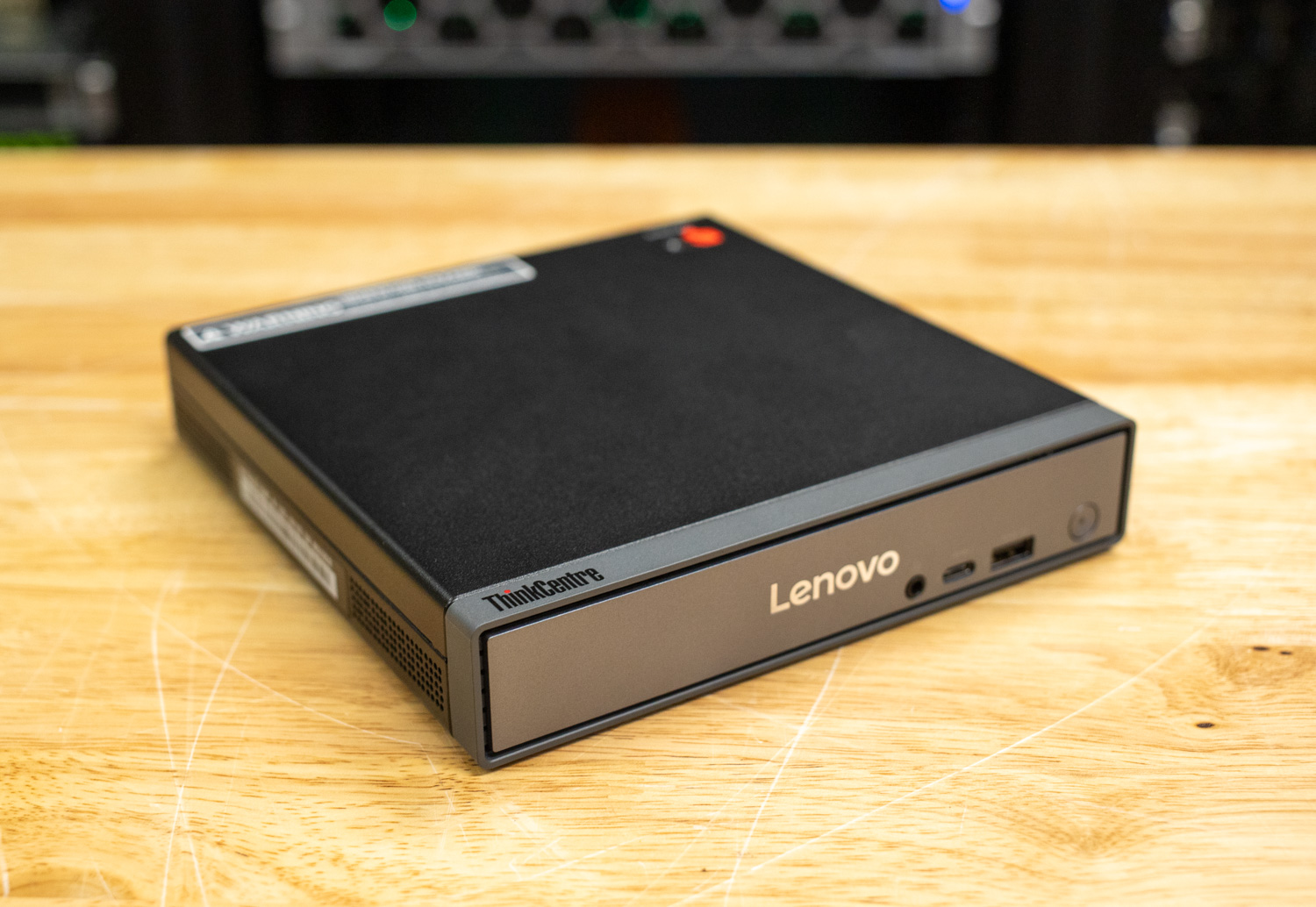
The Lenovo ThinkCentre Neo 50q Tiny (Qualcomm) represents a bold step into a new era of desktop computing as “the world’s first commercial AI-driven desktop PC powered by the Snapdragon X Series.” Marketed as a “tiny desktop with titan performance,” this ultra-compact system blends AI acceleration, low power consumption, and enterprise-grade security into a chassis only slightly larger than a paperback book. It’s designed for modern businesses seeking smarter, quieter, and more sustainable computing without the bulk of a traditional tower.
The ThinkCentre Neo 50q QC is designed for light professional workloads, including office productivity, administrative tasks, digital collaboration, and AI-assisted multitasking. The Snapdragon platform brings Copilot+ PC features to the desktop, including Windows Studio Effects, Live Captions, and Lenovo AI Now, which enhance communication and streamline workflows while consuming a fraction of the energy of comparable x86 systems.
Running Windows 11 Home or Pro (Copilot+ enabled), the Neo 50q QC benefits from AI-driven features that enhance hybrid work, particularly for video conferencing and transcription. However, while the Hexagon NPU efficiently handles background enhancements, the “AI PC” label doesn’t translate into significant productivity gains for most users. Performance feels similar to a high-end tablet: smooth for everyday tasks but limited for intensive workloads.
Pricing for the Neo 50q QC starts at about $604, with our configuration priced at $779.
### Configuration and Specifications
| **Model** | **ThinkCentre Neo 50q QC** |
| --- | --- |
| **Form Factor** | - Tiny (1L), Eclipse Black
- Dimensions (w/ feet): 179 × 182.9 × 36.5 mm (7.05 × 7.2 × 1.44 in)
- Weight: \~1.13 kg (2.49 lbs)
- Supports 100mm VESA mount
|
| **Processor Family** | Snapdragon X |
| **Processor Example** | Snapdragon X X1-26-100 (8 cores, up to 3.0 GHz, 30 MB cache) |
| **AI & NPU** | Integrated Qualcomm Hexagon™ NPU (up to 45 TOPS), Copilot+ PC certified |
| **Operating Systems** | - Windows 11 Pro (on ARM)
- Windows 11 Home (on ARM)
- Windows 11 Home Single Language (on ARM)
|
| **Graphics** | - Integrated Qualcomm Adreno™ GPU (shared memory)
- Max Resolution (HDMI/DP): 4096 × 2160 @ 60 Hz
- Max Resolution (VGA): 1920 × 1080 @ 60 Hz
- Supports up to 3 independent displays
|
| **Memory** | 16 GB or 32 GB LPDDR5x-8448 (soldered, dual-channel, not upgradable) |
| **Storage** | - Supports up to 2 × M.2 SSDs (PCIe NVMe 4.0 ×4, up to 1 TB each)
- Three M.2 slots total (1 WLAN, 2 SSD)
- Opal 2.0 support (on one SSD type)
|
| **Ports and Connectors** | **Front:**- 1 × Headphone/microphone combo (3.5 mm)
- 1 × USB-C (USB 3.2 Gen 2 10 Gbps, data + 5 V @ 0.9 A charging)
- 1 × USB-A (USB 3.2 Gen 2 10 Gbps, Always On + 5 V @ 2.1 A charging)
- 1 × Power button
**Rear:**- 1 × Power-in
- 1 × DisplayPort 1.4a (HBR2)
- 1 × HDMI 2.1 TMDS
- 2 × USB-A (USB 2.0)
- 2 × USB-A (USB 3.2 Gen 2 10 Gbps)
- 1 × Ethernet (RJ-45, Gigabit)
- 1 × Optional punch-out (VGA or 2nd DP 1.4a)
|
| **Connectivity** | - Qualcomm Wi-Fi 6E NFA765A (802.11ax 2×2) + Bluetooth 5.3 or No WLAN/Bluetooth
- Gigabit Ethernet (Realtek RTL8111K)
|
| **Audio** | - Qualcomm WCD9385 codec + WSA8845 amplifier
- Integrated mono speaker (2 W)
|
| **Power** | - 65 W or 90 W AC Adapter (89% efficiency)
- Auto-sensing feature
- Option for no included adapter
|
| **Security & Privacy** | - Discrete TPM 2.0 (TCG certified)
- Kensington Security Slot (3 × 7 mm)
- Optional fingerprint reader (touch type on mouse)
- BIOS features: Secure Boot, Supervisor/HDD password, Absolute persistence, Secure Wipe, Boot sequence control
|
| **Certifications & Environmental** | - ENERGY STAR 9.0, EPEAT Gold, GREENGUARD, RoHS, TCO Certified Gen10
- Optional TÜV Rheinland Ultra Low Noise
- Operating Temp: 5 °C – 35 °C (41 °F – 95 °F)
- Humidity: 20 % – 80 %
- Made with up to 90 % recycled plastic (PCC/OBP)
|
| **Warranty Options** | - 1-year courier/carry-in
- 1-year limited onsite
- 3-year limited onsite
|
Inside, the ThinkCentre Neo 50q QC is powered by a Snapdragon X1-26-100 processor clocked at 2.97GHz, paired with integrated graphics and a dedicated Hexagon NPU (Neural Processing Unit) to handle AI workloads. The review unit was shipped with 16 GB of LPDDR5X-8448MT/s memory and a 1 TB PCIe Gen4 SSD.
For general productivity, including spreadsheets, web apps, video calls, and documentation, its performance is solid. The system boots quickly, runs quietly, and remains responsive under light to moderate load. However, heavier multitasking or x86 emulation reveals the limits of the ARM platform. Large browser workloads or legacy desktop software often introduce latency, which reduces responsiveness.
Still, businesses that rely primarily on Microsoft 365, Teams, and cloud-based tools will find the Neo 50q QC capable and efficient. The integrated NPU enhances AI-driven features, such as noise suppression and transcription, without significantly impacting CPU performance or thermal output.
### Build and Design
Lenovo continues to uphold its reputation for practical and durable design. The Neo 50q QC’s 1L chassis features a clean “eclipse” black finish, a small ThinkCentre badge, and the robust build quality typical of Lenovo’s business line. Compact and lightweight at only about 2.49 lbs (1.13 kg), the system is just larger than a paperback novel and ships with a vertical stand for tidy desk placement. It also supports 100mm VESA mounting for even greater flexibility.
Thermally, the system excels, with minimal fan noise and negligible heat output. The trade-off, though, is the lack of expandability. With memory modules soldered, upgrades are essentially off the table, except for storage. It’s designed to perform consistently out of the box and stay that way.
![]()
Lenovo makes notable sustainability efforts, using 60% recycled post-industrial content (PIC) plastic for the thermal shell, 30% ocean-bound plastic (OBP) in both the device bag and packaging cushion, and FSC-certified cartons.
### Connectivity and Ports
Despite its compact footprint, Lenovo includes a comprehensive set of ports suitable for most office setups:
**Front:**
- Power button
- Always-on USB-A
- USB-C (10Gbps)
- Headphone/mic combo jack
![Lenovo ThinkCentre Neo 50q QC front ports]()
**Rear:**
- Power input
- DisplayPort 1.4a (4K@60Hz)
- HDMI 2.1 (4K@60Hz)
- Four USB-A ports
- Ethernet (RJ45)
- Configurable punch-out port (DisplayPort or VGA)
![Lenovo ThinkCentre Neo 50q QC rear ports]()
**Internal expansion:**
- Two M.2 PCIe SSD Gen4
- M.2 WiFi
![Lenovo ThinkCentre Neo 50q QC inside]()
### Certifications & Security
As expected from Lenovo’s business line, the Neo 50q QC delivers a comprehensive suite of enterprise-grade security features, including ThinkShield integration, a discrete TPM 2.0 chip (TCG certified), and a Kensington Security Slot™ (3 x 7 mm) for physical protection. While it does not include a chassis intrusion switch, select configurations offer a touch-style fingerprint reader integrated into the mouse for convenient biometric authentication.
At the BIOS level, the Neo 50q QC offers extensive protection options, including hard disk and supervisor passwords, an Absolute Persistence module, boot sequence control, booting without a keyboard or mouse, configuration change detection, secure wipe, and secure boot. These layered measures reinforce system integrity and safeguard sensitive data, ensuring robust security across hardware and firmware levels.
Designed for reliability and peace of mind, it upholds Lenovo’s reputation for dependable business performance and robust data protection. The Neo 50q QC also stands out for its strong sustainability credentials. It achieves EPEAT Gold and EPEAT Climate+ Gold certifications, incorporating up to 85% post-consumer recycled (PCR) content in select components. In addition, it meets a wide range of environmental and energy standards, including ENERGY STAR 9.0, ERP LOT 3, Forest Stewardship Council (FSC), GREENGUARD, Low Halogen, RoHS, TCO 10.0, and TÜV Ultra Low Noise certifications.
### Upgradeability
The Lenovo ThinkCentre Neo 50q QC, while impressively compact, offers limited room for hardware expansion, a trade-off typical of ultra-small-form-factor designs. Its LPDDR5X memory is soldered directly onto the motherboard, meaning RAM capacity is fixed at the time of purchase. Buyers seeking long-term flexibility should opt for the 32 GB configuration.
![]()
Storage, however, remains accessible and upgrade-friendly. The system features two M.2 PCIe Gen4 slots, enabling users to expand or replace SSDs as needed for increased capacity or enhanced performance. One slot is factory-populated with your chosen capacity, with the second available for additional storage.
Networking components are also modular, featuring a dedicated M.2 slot for Wi-Fi connectivity, which enables upgrades to newer wireless standards should they become available. Beyond these, no additional internal bays or PCIe expansion slots are available due to the 1L chassis’s constraints.
![Lenovo ThinkCentre Neo 50q QC SSD bays]()
Overall, the Neo 50q QC prioritizes efficiency, simplicity, and reliability over expandability. While its upgrade paths are limited to storage and wireless modules, the system’s design ensures minimal maintenance and consistent performance throughout its service life.
### Monitor
| **General Display Specifications** | - Brand: ThinkVision
- Screen Size: 27 inch
- Panel Type: In-Plane Switching
- Maximum Resolution: 2560 × 1440
- Aspect Ratio: 16:9
- Refresh Rate: 24Hz–120Hz
- Response Time: 4ms (Extreme Mode), 6ms (Normal Mode)
- Brightness: 350 cd/m²
- Contrast Ratio: 1500:1
- Backlight: WLED
- Viewing Angle: 178° / 178°
- Near Edgeless: 4-sided ultra thin
|
| --- | --- |
| **Color & Visual Fidelity** | - Color Coverage: 98% DCI-P3 (CIE 1976), 99% sRGB (CIE 1931), 99% BT709 (CIE 1931)
- Color Depth: 10-bit
- Color Support: 1.07 Billion
- Color Calibration Accuracy: Avg Delta E < 2
|
| **Connectivity & Ports** | - Video Inputs: 1 × HDMI 2.1, 1 × DP 1.4 (HBR2)
- Video Output (Daisy Chain): 1 × DP 1.4 Out
- USB Upstream: 1 × USB-B (USB 5Gbps / USB 3.2 Gen 1)
- USB Downstream: 3 × USB-A (USB 5Gbps / USB 3.2 Gen 1, incl. 1 × BC 1.2), 1 × USB-C (USB 5Gbps / USB 3.2 Gen 1, up to 15W PD, data only)
|
| **Mechanical & Dimensions** | - Stand Functions: Lift, Tilt, Pivot, Swivel
- Height-Adjustable: Yes
- Head-only Dimensions: 613.6 × 46.0 × 357.1 mm (24.16 × 1.81 × 14.06 in)
- Dimensions with Stand: 613.6 × 195.0 × 539.2 mm (24.16 × 7.68 × 21.22 in)
- Weight (Head Only): 4.3 kg / 9.5 lbs
- Weight (with Stand): 6.4 kg / 14.1 lbs
- Weight (Packaged): 9.2 kg / 20.3 lbs
|
| **Power, Compliance & Warranty** | - Power Requirement: 100–240 VAC, 40–60Hz
- Power Consumption: 15.0W typ. / 75.0W max.
- Energy Star: 8.0
- TCO Edge: 2.1
- Warranty: 3 years limited
- Kensington Lock: Yes
|
| **Included Accessories & Software** | - Included Accessories: HDMI cable, USB-A to USB-B cable, DP cable
- Software/Driver: Lenovo ThinkColour (Lenovo Accessories and Display Manager), LDFM (Lenovo Display Fleet Manager)
- Other Special Features: Multi-sync, Eye Caring, Optional Soundbar Support, Thin Client Support (Tiny)
|
The ThinkVision P27Q-40 27-inch Monitor is designed to meet the needs of modern professionals, enhancing visual clarity and comfort while remaining energy-efficient. Its 27-inch QHD (2560 x 1440) IPS panel delivers sharp images and vibrant colors, with factory-calibrated coverage of 98% DCI-P3 and 99% sRGB. This makes it well-suited for both creative and analytical work.
![]()
One of its standout features is the variable refresh rate, ranging from 24 to 120 Hz. The monitor automatically adjusts to content, providing smooth visuals for fast-moving images while reducing power consumption, benefiting both budgets and the environment.
Eye comfort is another focus. Natural Low Blue Light technology, combined with TÜV Rheinland Eye Comfort 5-star and Eyesafe 2.0 certifications, helps protect your eyes from strain during long work sessions.
The monitor also offers versatile connectivity. Daisy chaining allows you to connect two monitors, while ultra-thin bezels can create the illusion of a single, larger screen, provided you have more than one. An integrated USB hub with USB-C and 15W power delivery makes connecting peripherals or USB drives simple. For IT managers, Lenovo Display Fleet Manager provides remote management for firmware updates and asset control.
![Lenovo ThinkCentre Neo 50q QC on desktop]()
Finally, the full-function LTPS stand allows height adjustment, tilt, pivot, and swivel, delivering ergonomic comfort for any workspace. Overall, the P27Q-40 provides excellent performance, versatility, and sustainability, making it a reliable companion for the ThinkCentre Neo 50q QC.
### **Geekbench**
[Geekbench 6](https://www.geekbench.com/) is a cross-platform benchmark that measures overall system performance. The [Geekbench Browser](https://browser.geekbench.com/) allows you to compare any system.
In Geekbench 6.3.0, the Lenovo ThinkCentre Neo 50q QC achieved a single-core score of 2,148, a multi-core score of 8,565, and an OpenCL GPU score of 9,634, delivering balanced performance across various compute and graphics workloads. While the HP EliteBook 6 G1q maintained higher CPU throughput at 2,428/11,408, the ThinkCentre remained competitive in GPU output, nearly matching its mobile counterpart. Compared to the Dell Latitude 7455 and Latitude 7450 Ultralight, Lenovo’s desktop-class system showed stronger multi-core scaling than the 7455 but fell short of the 7450 Ultralight’s top-end throughput. Overall, the ThinkCentre Neo 50q QC delivers consistent general-purpose performance, well-suited for productivity and light GPU-accelerated tasks.
| **Geekbench 6.3.0** **(Higher is Better)** | **Lenovo ThinkCentre Neo 50q QC** | **HP EliteBook 6 G1q** | **Dell Latitude 7455** | **Dell Latitude 7450 Ultralight** |
| --- | --- | --- | --- | --- |
| **Single-Core Score** | 2,148 | 2,428 | 2,411 (Dell Optimized)
2,431 (Ultra Performance) | 2,407 |
| **Multi-Core Score** | 8,565 | 11,408 | 6,140 (Dell Optimized)
7,076 (Ultra Performance) | 9,922 |
| **GPU (OpenCL)** | 9,634 | 9,604 | 20,463 (Dell Optimized)
20,545 (Ultra Performance) | 17,052 |
### **y-cruncher**
y-cruncher 0.8.3.9522 is a multithreaded, scalable program that can compute Pi and other mathematical constants to trillions of digits. Since its launch in 2009, it has become a popular benchmarking and stress-testing application for overclockers and hardware enthusiasts. y-cruncher is running in emulation mode for this test, as it is not ARM-native.
The Lenovo ThinkCentre Neo 50q QC completed the 1-billion-digit computation in 186.9 seconds and the 2.5-billion-digit test in 497.7 seconds, outperforming both the HP EliteBook 6 G1q and Dell Latitude 7455 by a wide margin. While the Latitude 7450 Ultralight remained fastest overall, the ThinkCentre demonstrated strong throughput and efficient thermal scaling for a compact desktop system under sustained computational load.
| **y-cruncher Total Computation Time** ** (Lower is Better)** | **Lenovo ThinkCentre Neo 50q QC** | **HP EliteBook 6 G1q** | **Dell Latitude 7455** | **Dell Latitude 7450 Ultralight** |
| --- | --- | --- | --- | --- |
| **1 Billion** | 186.905 seconds | 255.128 seconds | 245.544 seconds | 65.402 seconds |
| **2.5 Billion** | 497.704 seconds | 690.283 seconds | 714.190 seconds | 208.399 seconds |
### **3DMark **
3DMark is a popular benchmarking tool that evaluates a computer’s GPU and CPU performance through simulations that reflect gaming and daily computing tasks. It offers various tests tailored to different system types and workloads, providing a comprehensive overview of how well the hardware handles graphics-intensive and computational tasks.
In 3DMark testing, the ThinkCentre Neo 50q QC scored 5,971 in Solar Bay (22.71 FPS) and 235 in Steel Nomad (2.36 FPS), effectively matching the HP EliteBook 6 G1q in general graphics capability. Its standout performance appeared in Wild Life, where it delivered 11,224 points at 67.2 FPS, far exceeding the EliteBook’s 3,290-point result. This indicates a significant GPU advantage in high-throughput graphics tasks, despite similar CPU behavior.
| **3DMark Benchmark Test** **(Score / FPS – Higher is Better)** | **Lenovo ThinkCentre Neo 50q QC** | **HP EliteBook 6 G1q** |
| --- | --- | --- |
| **Solar Bay** | 5,971 / 22.71 | 6,050 / 23.01 |
| **Steel Nomad** | 235 / 2.36 | 229 / 2.29 |
| **Wild Life** | 11,224 / 67.21 | 3,290 / 19.70 |
### **UL Procyon AI Inference**
UL’s [Procyon](https://benchmarks.ul.com/procyon) estimates a workstation’s performance for professional apps.
The ThinkCentre Neo 50q QC closely mirrored the HP EliteBook 6 G1q across most models, achieving slightly higher latency in MobileNet and Inception workloads but maintaining competitive overall performance. Its overall score of 1,905 placed it just behind the EliteBook (1,945) and ahead of the Dell Latitude 7455 (1,799), confirming efficient AI inference capability for general-purpose model execution.
| **UL Procyon Average Inference Times (Lower is better)** | **Lenovo ThinkCentre Neo 50q QC** | **HP EliteBook 6 G1q** | **Dell Latitude 7455** | **Dell Latitude 7450 Ultralight** |
| --- | --- | --- | --- | --- |
| **MobileNet V3** | 0.30ms | 0.29ms | 0.30ms | 1.72ms |
| **ResNet 50** | 0.73ms | 0.70ms | 0.70ms | 21.94ms |
| **Inception V4** | 1.53ms | 1.45ms | 1.42ms | 63.74ms |
| **DeepLab V3** | 3.31ms | 3.34ms | 4.85ms | 68.92ms |
| **YOLO V3** | 3.75ms | 3.76ms | 3.47ms | 175.95ms |
| **Real-ESRGAN** | 77.93ms | 77.40ms | 91.41 ms | 6,518.99ms |
| **Overall Score** | 1,905 | 1,945 | 1,799 | 65 |
### **7-Zip Compression Benchmark**
The built-in memory benchmark in the 7-Zip utility measures the performance of a system’s CPU and memory during compression and decompression, indicating how well the system handles data-intensive operations. We run this test at a 128MB dictionary size when possible.
The Lenovo ThinkCentre Neo 50q QC achieved a total rating of 50.0 GIPS, narrowly surpassing the HP EliteBook 6 G1q at 48.0 GIPS and significantly outperforming the Latitude 7450 Ultralight. While it lagged the Latitude 7455’s exceptional 93.7 GIPS, the ThinkCentre’s steady throughput and CPU utilization (765%) underscore efficient parallel execution and balanced memory interaction under sustained load.
| **7-Zip Compression** | **Lenovo ThinkCentre Neo 50q QC** | **HP EliteBook 6 G1q** | **Dell Latitude 7455** | **Dell Latitude 7450 Ultralight** |
| --- | --- | --- | --- | --- |
| ***Compressing*** | | | |
| Current CPU Usage | 744% | 717% | 1127% | 589% |
| Current Rating/Usage | 7.130 GIPS | 6.619 GIPS | 8.523 GIPS | 6.887 GIPS |
| Current Rating | 53.053 GIPS | 47.467 GIPS | 96.041 GIPS | 40.590 GIPS |
| Resulting CPU Usage | 741% | 711% | 1127% | 579% |
| Resulting Rating/Usage | 7.166 GIPS | 6.165 GIPS | 8.533 GIPS | 7.301 GIPS |
| Resulting Rating | 53.096 GIPS | 47.162 GIPS | 96.191 GIPS | 41.454 GIPS |
| ***Decompressing*** | | | |
| Current CPU Usage | 785 | 793% | 1176% | 1073% |
| Current Rating/Usage | 5.931 GIPS | 6.165 GIPS | 7.720 GIPS | 4.310 GIPS |
| Current Rating | 46.568 GIPS | 48.872 GIPS | 90.805 GIPS | 46.241 GIPS |
| Resulting CPU Usage | 789% | 790% | 1184% | 1122% |
| Resulting Rating/Usage | 5.959 GIPS | 6.188 GIPS | 7.704 GIPS | 4.480 GIPS |
| Resulting Rating | 46.998 GIPS | 48.896 GIPS | 91.214 GIPS | 50.290 GIPS |
| ***Total Rating*** | | | |
| Total CPU Usage | 765% | 751% | 1156% | 851% |
| Total Rating/Usage | 6.561 GIPS | 6.410 GIPS | 8.119 GIPS | 5.891 GIPS |
| Total Rating | 50.047 GIPS | 48.029 GIPS | 93.703 GIPS | 45.872 GIPS |
### 3DMark CPU
The 3DMark CPU Profile evaluates processor performance across six threading levels: 1, 2, 4, 8, 16, and max threads. Each test runs the same boid-based simulation workload to assess how well the CPU scales under different thread counts, with minimal GPU involvement. The benchmark helps identify single-thread efficiency and multithreaded potential for tasks such as gaming, content creation, and rendering. Scores across 8 threads often align with modern DirectX 12 gaming performance, while 1-4 thread results reflect older or esports game scenarios.
In this test, the ThinkCentre Neo 50q QC reached a maximum score of 3,370, roughly half of the EliteBook 6 G1q’s 6,224, with strong linear scaling through 8 threads (3,497) before plateauing. These results indicate capable multitasking performance suitable for productivity and light creative tasks, though not tuned for heavily threaded workloads.
| **3DMark CPU Profile (Higher is Better)** | **Lenovo ThinkCentre Neo 50q QC** | **HP EliteBook 6 G1q** |
| --- | --- | --- |
| **Max Threads** | 3,370 | 6,224 |
| **16 Threads** | 3,360 | 6,017 |
| **8 Threads** | 3,497 | 6,132 |
| **4 Threads** | 2,152 | 3,109 |
| **2 Threads** | 1,422 | 1,558 |
| **1 Thread** | 712 | 820 |
### 3DMark Storage
The 3DMark Storage Benchmark tests your SSD’s gaming performance by measuring tasks like loading games, saving progress, installing game files, and recording gameplay. It evaluates how well your storage performs in real-world gaming and supports the latest storage technologies to provide accurate performance insights.
Here, the ThinkCentre Neo 50q QC scored 2,871, outperforming the HP EliteBook 6 G1q’s 2,487. This suggests slightly faster read/write responsiveness and file transfer speeds, contributing to reduced load and save times in both everyday and gaming scenarios.
| **3DMark Storage (Higher is Better)** | **Lenovo ThinkCentre Neo 50q QC** | **HP EliteBook 6 G1q** |
| --- | --- | --- |
| **Score** | 2,871 | 2,487 |
### LM Studio
For this round of testing, we used LM Studio to evaluate how the HP EliteBook 6 G1q performs across a range of popular large language models, including Gemma 3 (1B and 4B), Llama 3.1 (1B and 3B). Each model was prompted with the same instruction:
***“Write a 500-word introduction to AI”***
The primary focus of this test is on tokens per second (throughput) and total time (completion duration), which together highlight how efficiently the HP EliteBook 6 G1q handles different model sizes and complexities under identical-generation conditions.
The EliteBook 6 G1q maintained smooth performance across all models, demonstrating the best throughput with the Gemma 3 1B and Llama 3.2 1B models, at roughly 48 tokens per second, completing generations in approximately 14 seconds or less. Scaling up to larger 3B and 4B models naturally increased total completion times, with Llama 3.2 3B averaging 21.86 tokens per second and Gemma 3 4B at 19.4 tokens per second. Despite the heavier computational load, inference remained stable, with no performance dips or throttling observed.
| **LM Studio (Model Inference Results)** | **Gemma 3 1B** | **Gemma 3 4B** | **llama 3.2 1B** | **llama 3.2 3B** |
| --- | --- | --- | --- | --- |
| **Tokens / Sec** | 48.43 | 19.40 | 46.70 | 21.86 |
| **Time to First Token (s)** | 0.096 | 0.405 | 0.1 | 0.651 |
| **Total Time (s)** | 14.02 | 37.51 | 12.824 | 31.8 |
| **Prompt Tokens** | 17 | 19 | 17 | 44 |
| **Predicted Tokens** | 679 | 728 | 5799 | 695 |
| **Total Tokens** | 696 | 747 | 616 | 739 |
### Conclusion
The Lenovo ThinkCentre Neo 50q QC proves to be a compact and efficient business desktop. It is quiet, draws very little power, and delivers stable performance for everyday work in a form factor that fits almost anywhere. The Snapdragon platform is fast enough for productivity and collaboration tasks, and the system stays cool and unobtrusive throughout the workday.
![]()
There are limitations to consider. Software compatibility can vary depending on how heavily an environment relies on legacy x86 applications. The soldered memory means that choosing the right configuration up front is crucial. Lastly, the GPU is optimized for everyday graphics and less demanding creative workloads.
Even so, the Neo 50q QC makes a strong case for organizations that want a small, reliable, and low-maintenance desktop. Combined with Lenovo’s business support options, sustainability focus, and clean industrial design, it offers a practical path forward for workplaces that value simplicity and efficiency over raw performance.
**Leaderboard:** The Lenovo ThinkCentre Neo 50q QC is part of the tested field on our [Best Mini PCs](https://www.storagereview.com/best/mini-pcs) leaderboard.
[Product Page](https://www.lenovo.com/us/en/p/desktops/thinkcentre/thinkcentre-neo-series/lenovo-thinkcentre-neo-50q-snapdragon-tiny/len102c0059)
**Engage with StorageReview**
[Newsletter](https://www.storagereview.com/storage_newsletter) | [YouTube](https://www.youtube.com/user/StorageReview "Opens in a new window") | Podcast [iTunes](https://podcasts.apple.com/gb/podcast/storagereview-com-storage-reviews/id1060681115 "Opens in a new window")/ [Spotify](https://open.spotify.com/show/1y6VnznABhHeOSMOmbDTz0 "Opens in a new window") | [Instagram](https://www.instagram.com/storagereview/ "Opens in a new window") | [Twitter](https://twitter.com/storagereview "Opens in a new window") | [TikTok](https://www.tiktok.com/@storagereview? "Opens in a new window") | [RSS Feed](https://www.storagereview.com/rss.xml)
![]()
### Conor Houser
Previous post: [HPE ProLiant DL380a Gen12 Review: Air Cooled 4U Server for Dense Multi GPU AI](https://www.storagereview.com/review/hpe-proliant-dl380a-gen12-review-air-cooled-4u-server-for-dense-multi-gpu-ai)
Next post: [AI at Sea: Oregon State Sets Sail to Study the Ocean in Real Time](https://www.storagereview.com/review/ai-at-sea-oregon-state-sets-sail-to-study-the-ocean-in-real-time)
Trusted Vendors
Products and solutions from our affiliate partners:
- [

Ubiquiti
](https://store.ui.com/us/en?a_aid=StorageReview "Opens in a new window")
- [

Newegg
](https://click.linksynergy.com/fs-bin/click?id=g5terNMDhz0&offerid=1207190.18&subid=0&type=4 "Opens in a new window")
- [
 Amazon
](https://amzn.to/4fLJUEW "Opens in a new window")
Newsletter
Subscribe to the StorageReview newsletter to stay up to date on the latest news and reviews. We promise no spam!
1
Leave this field empty if you’re human:
## Advertisement
Content Categories
[Facebook](https://www.facebook.com/@storagereview) [X](https://twitter.com/storagereview) [Instagram](https://www.instagram.com/storagereview/) [LinkedIn](https://www.linkedin.com/company/storagereview-com) [YouTube](https://www.youtube.com/user/storagereview?sub_confirmation=1) [Email](mailto:info@storagereview.com) [Spotify](https://open.spotify.com/show/1y6VnznABhHeOSMOmbDTz0) [Reddit](https://www.reddit.com/r/StorageReview/) [Discord](https://discord.gg/TwMHb4azdC) [RSS](https://www.storagereview.com/rss.xml) [TikTok](https://www.tiktok.com/@storagereview)
Copyright © 1998-2025 Flying Pig Ventures, LLC Cincinnati, Ohio. All rights reserved.
Manage your privacy
To provide the best experiences, we and our partners use technologies like cookies to store and/or access device information. Consenting to these technologies will allow us and our partners to process personal data such as browsing behavior or unique IDs on this site and show (non-) personalized ads. Not consenting or withdrawing consent, may adversely affect certain features and functions.
Click below to consent to the above or make granular choices. Your choices will be applied to this site only. You can change your settings at any time, including withdrawing your consent, by using the toggles on the Cookie Policy, or by clicking on the manage consent button at the bottom of the screen.
Functional Functional Always active
The technical storage or access is strictly necessary for the legitimate purpose of enabling the use of a specific service explicitly requested by the subscriber or user, or for the sole purpose of carrying out the transmission of a communication over an electronic communications network.
Preferences Preferences
The technical storage or access is necessary for the legitimate purpose of storing preferences that are not requested by the subscriber or user.
Statistics Statistics
The technical storage or access that is used exclusively for statistical purposes. The technical storage or access that is used exclusively for anonymous statistical purposes. Without a subpoena, voluntary compliance on the part of your Internet Service Provider, or additional records from a third party, information stored or retrieved for this purpose alone cannot usually be used to identify you.
Marketing Marketing
The technical storage or access is required to create user profiles to send advertising, or to track the user on a website or across several websites for similar marketing purposes.
Statistics
Marketing
Features
Always active
Special features
Special purposes
Always active
- Manage options
- Manage services
- Manage {vendor\_count} vendors
- [Read more about these purposes](https://cookiedatabase.org/tcf/purposes/)
Accept Deny Manage options Save preferences Manage options
- {title}
- {title}
- {title}
Manage your privacy
To provide the best experiences, we use technologies like cookies to store and/or access device information. Consenting to these technologies will allow us to process data such as browsing behavior or unique IDs on this site. Not consenting or withdrawing consent, may adversely affect certain features and functions.
Functional Functional Always active
The technical storage or access is strictly necessary for the legitimate purpose of enabling the use of a specific service explicitly requested by the subscriber or user, or for the sole purpose of carrying out the transmission of a communication over an electronic communications network.
Preferences Preferences
The technical storage or access is necessary for the legitimate purpose of storing preferences that are not requested by the subscriber or user.
Statistics Statistics
The technical storage or access that is used exclusively for statistical purposes. The technical storage or access that is used exclusively for anonymous statistical purposes. Without a subpoena, voluntary compliance on the part of your Internet Service Provider, or additional records from a third party, information stored or retrieved for this purpose alone cannot usually be used to identify you.
Marketing Marketing
The technical storage or access is required to create user profiles to send advertising, or to track the user on a website or across several websites for similar marketing purposes.
Statistics
Marketing
Features
Always active
Special features
Special purposes
Always active
- Manage options
- Manage services
- Manage {vendor\_count} vendors
- [Read more about these purposes](https://cookiedatabase.org/tcf/purposes/)
Accept Deny Manage options Save preferences Manage options
- {title}
- {title}
- {title}
Manage consent Manage consent
```json
{"@context":"https:\/\/schema.org","@graph":[{"@type":"WebPage","@id":"https:\/\/www.storagereview.com\/review\/lenovo-thinkcentre-neo-50q-qc-review-ultra-compact-snapdragon-pc","url":"https:\/\/www.storagereview.com\/review\/lenovo-thinkcentre-neo-50q-qc-review-ultra-compact-snapdragon-pc","name":"Lenovo ThinkCentre Neo 50q QC Review: Ultra-Compact Snapdragon PC - StorageReview.com","isPartOf":{"@id":"https:\/\/www.storagereview.com\/#website"},"primaryImageOfPage":{"@id":"https:\/\/www.storagereview.com\/review\/lenovo-thinkcentre-neo-50q-qc-review-ultra-compact-snapdragon-pc#primaryimage"},"image":{"@id":"https:\/\/www.storagereview.com\/review\/lenovo-thinkcentre-neo-50q-qc-review-ultra-compact-snapdragon-pc#primaryimage"},"thumbnailUrl":"https:\/\/www.storagereview.com\/wp-content\/uploads\/2025\/11\/StorageReview-Lenovo-ThinkCentre-Neo-50q-QC-7.jpg","datePublished":"2025-11-10T15:28:15+00:00","dateModified":"2026-10-08T19:21:25+00:00","description":"The Lenovo ThinkCentre Neo 50q QC is Snapdragon based desktop that is compact, secure, and intelligently designed.","breadcrumb":{"@id":"https:\/\/www.storagereview.com\/review\/lenovo-thinkcentre-neo-50q-qc-review-ultra-compact-snapdragon-pc#breadcrumb"},"inLanguage":"en-US","potentialAction":[{"@type":"ReadAction","target":["https:\/\/www.storagereview.com\/review\/lenovo-thinkcentre-neo-50q-qc-review-ultra-compact-snapdragon-pc"]}]},{"@type":"ImageObject","inLanguage":"en-US","@id":"https:\/\/www.storagereview.com\/review\/lenovo-thinkcentre-neo-50q-qc-review-ultra-compact-snapdragon-pc#primaryimage","url":"https:\/\/www.storagereview.com\/wp-content\/uploads\/2025\/11\/StorageReview-Lenovo-ThinkCentre-Neo-50q-QC-7.jpg","contentUrl":"https:\/\/www.storagereview.com\/wp-content\/uploads\/2025\/11\/StorageReview-Lenovo-ThinkCentre-Neo-50q-QC-7.jpg","width":1500,"height":874},{"@type":"BreadcrumbList","@id":"https:\/\/www.storagereview.com\/review\/lenovo-thinkcentre-neo-50q-qc-review-ultra-compact-snapdragon-pc#breadcrumb","itemListElement":[{"@type":"ListItem","position":1,"name":"Home","item":"https:\/\/www.storagereview.com\/"},{"@type":"ListItem","position":2,"name":"Review","item":"https:\/\/www.storagereview.com\/review"},{"@type":"ListItem","position":3,"name":"Lenovo ThinkCentre Neo 50q QC Review: Ultra-Compact Snapdragon PC"}]},{"@type":"WebSite","@id":"https:\/\/www.storagereview.com\/#website","url":"https:\/\/www.storagereview.com\/","name":"StorageReview.com","description":"StorageReview.com is a leading provider of news and reviews throughout the entire IT stack - from the datacenter to the edge, and all points in between.","publisher":{"@id":"https:\/\/www.storagereview.com\/#organization"},"potentialAction":[{"@type":"SearchAction","target":{"@type":"EntryPoint","urlTemplate":"https:\/\/www.storagereview.com\/?s={search_term_string}"},"query-input":{"@type":"PropertyValueSpecification","valueRequired":true,"valueName":"search_term_string"}}],"inLanguage":"en-US"},{"@type":"Organization","@id":"https:\/\/www.storagereview.com\/#organization","name":"StorageReview.com","url":"https:\/\/www.storagereview.com\/","logo":{"@type":"ImageObject","inLanguage":"en-US","@id":"https:\/\/www.storagereview.com\/#\/schema\/logo\/image\/","url":"https:\/\/www.storagereview.com\/wp-content\/uploads\/2020\/02\/Storage-Reviews-2-2.png","contentUrl":"https:\/\/www.storagereview.com\/wp-content\/uploads\/2020\/02\/Storage-Reviews-2-2.png","width":344,"height":61,"caption":"StorageReview.com"},"image":{"@id":"https:\/\/www.storagereview.com\/#\/schema\/logo\/image\/"},"sameAs":["https:\/\/x.com\/storagereview","http:\/\/youtube.com\/user\/storagereview"]}]}
```