---
description: The LaCie Rugged BOSS offers a unique set of features that are hard to find with a portable SSD. With capacities models up 1TB,
title: LaCie Rugged BOSS Review
image: https://www.storagereview.com/wp-content/uploads/2020/08/AEV_3796.jpg
---
[![Storage Review]()](https://storagereview.com/)
---
[Facebook](https://www.facebook.com/@storagereview) [X (Twitter)](https://twitter.twitter.com/storagereview) [Instagram](https://www.instagram.com/storagereview/) [LinkedIn](https://www.linkedin.com/company/storagereview-com) [YouTube](https://www.youtube.com/user/storagereview?sub_confirmation=1) [Email](mailto:info@storagereview.com) [Spotify](https://open.spotify.com/show/1y6VnznABhHeOSMOmbDTz0) [Reddit](https://www.reddit.com/r/StorageReview/) [Discord](https://discord.gg/TwMHb4azdC) [RSS Feed](https://www.storagereview.com/rss.xml) [TikTok](https://www.tiktok.com/@storagereview)
[Facebook](https://www.facebook.com/@storagereview) [X (Twitter)](https://twitter.com/storagereview) [Instagram](https://www.instagram.com/storagereview/) [LinkedIn](https://www.linkedin.com/company/storagereview-com) [YouTube](https://www.youtube.com/user/storagereview?sub_confirmation=1) [Email](mailto:info@storagereview.com) [Spotify](https://open.spotify.com/show/1y6VnznABhHeOSMOmbDTz0) [Reddit](https://www.reddit.com/r/StorageReview/) [Discord](https://discord.gg/TwMHb4azdC) [RSS Feed](https://www.storagereview.com/rss.xml) [TikTok](https://www.tiktok.com/@storagereview)
[](https://www.storagereview.com)
≡ Menu
- [Home](https://www.storagereview.com/)
- [Storage Reviews](https://www.storagereview.com/review)
- [End User Reviews](https://www.storagereview.com/consumer)
- [Enterprise Reviews](https://www.storagereview.com/enterprise)
- [Ubiquiti Reviews](https://www.storagereview.com/best/ubiquiti-reviews)
- [SR Merch](https://store.storagereview.com)
- [Leaderboards](https://www.storagereview.com/best)
- [Best Storage Arrays](https://www.storagereview.com/best/storage-arrays)
- [Best Enterprise SSDs](https://www.storagereview.com/best/enterprise-ssds)
- [Best Servers](https://www.storagereview.com/best/servers)
- [Best Enterprise GPUs](https://www.storagereview.com/best/enterprise-gpus)
- [Best Desktops for Local AI](https://www.storagereview.com/best/desktops-local-ai)
- [Best Laptops for Local AI](https://www.storagereview.com/best/laptops-local-ai)
- [Best Local LLM Tools](https://www.storagereview.com/best/local-llm-tools)
- [Agentic AI Hardware](https://www.storagereview.com/best/agentic-ai-hardware)
- [Best SSDs & Hard Drives](https://www.storagereview.com/best_drives)
- [Best Portable SSDs](https://www.storagereview.com/best/portable-ssds)
- [Best Business Laptops](https://www.storagereview.com/best/business-laptops)
- [Best Mobile Workstations](https://www.storagereview.com/best/mobile-workstations)
- [Best Desktop Workstations](https://www.storagereview.com/best/desktop-workstations)
- [Best Mini PCs](https://www.storagereview.com/best/mini-pcs)
- [Best Laptop Battery Life](https://www.storagereview.com/best/laptop-battery-life)
- [Storage Reference Guide](https://www.storagereview.com/storage-reference-guide)
- [About SR](https://www.storagereview.com/about-storagereview)
- [StorageReview.com Sweepstakes Rules and Regulations](https://www.storagereview.com/storagereview-com-sweepstakes-rules-and-regulations)
Search
[Home](https://www.storagereview.com/) » [Review](https://www.storagereview.com/review) » LaCie Rugged BOSS Review
# LaCie Rugged BOSS Review
by Lyle Smith on August 18, 2020
[End User](https://www.storagereview.com/consumer) ◇ [Portable Storage](https://www.storagereview.com/consumer/portable-storage)
LaCie is back at it with another addition to the company’s comprehensive, ultra-durable portable SSD family, the LaCie Rugged BOSS. With its padded build and on-the-go functionality, the Rugged BOSS is an ideal solution for professionals who often find themselves out in the field. Offering capacity models up to 1TB and support for Thunderbolt 3 connectivity, the main focus of this drive is durability and allowing users to manage their content without having to use a computer.
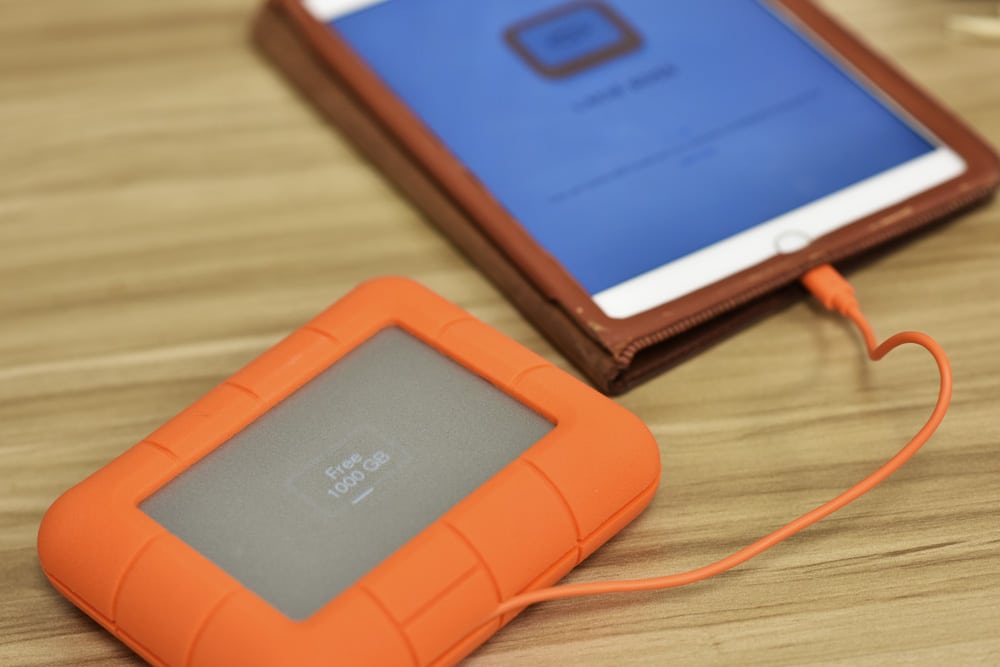
We’ve seen a lot of Rugged models over the years, so at first glance, you would notice anything new other than its rather large size and ability to directly copy files from SD cards and other connected USB devices via the fast copy button. However, the main draw of the Rugged BOSS is the slick LCD embedded right on the front panel of the enclosure, which displays a range of information transfer progress, drive capacity, and battery life. This is quite unique for portable storage and it’s something that really stands out.
The portable drive also features its very own LaCie BOSS mobile app, which allows you to manage and organize your files, as well as view footage when connected to an iOS or Android device. Essentially, this enables users to manage and review their content without the need of a computer, making it the ultimate portable storage device (though it does run on a battery and therefore you do have the charge it).
As far as performance goes, LaCie quotes up to 430MB/s read. Though this number is certainly on the lower side of portable SSDs with the SATA drive inside, the BOSS isn’t meant for performance-hungry consumers, but those who need a rugged storage solution that can be managed on the fly.
Backed by a 3-year warranty (and a one-month complimentary membership to Adobe Creative Cloud), the [Rugged BOSS SSD 1TB goes for roughly $450](https://amzn.to/3haigmz) ($0.44/GB).
## LaCie Rugged BOSS Specifications
| Model number | STJB1000800 |
| --- | --- |
| Capacity | 1TB |
| Interface | USB 3.1 Gen 2, Type-C |
| Thunderbolt 3 | Yes |
| Performance | 430MB/s read (up to) |
| Compatibility | Computer running Mac OS 10.11 or later / Windows 10 or later with an available USB-C (3.1), Thunderbolt 3, USB 3.0, or USB 2.0 port Mobile phone/tablet running iOS 11.0 or Android 6.0 or later |
| What’s included | - LaCie® Rugged® BOSS SSD
- USB-C cable (USB 3.1)
- USB-A cable (USB 3.0/2.0)
- Lightning cable (iOS)
- USB-C cable (iOS and Android®)
- Micro USB cable (Android)
- Power adapter
- Removable cover
- microSD to SD adapter
- BOSS mobile app
- LaCie Toolkit Software suite
- Quick start guide
- Adobe® Creative Cloud® All Apps Plan 1
|
| Dimensions and weight | - Length: 1.417in
- Width: 4.331in
- Depth: 5.354in
- 1.124lb
|
| Warranty | 3-year |
## Design and build
Like all Rugged devices, the BOSS enclosure features a silver design with the iconic bright orange removable silicone bumper around its edges. It is also drop, shock, water, and dust resistance.
The silicon port cover protects all the connectivity from the elements. Though it’s easy to remove, it’s snuggly fit and won’t fall out accidentally if you drop the device or carry it on the go. Nonetheless, once removed, you will have access to the power port, which charges the Rugged BOSS SSD for use and a USB Type-A port to connect to a range of devices to Rugged BOSS SSD.
![Lacie Boss SSD Ports]()
It also features a USB-C port to connect the Rugged BOSS SSD to both Windows and MacOS platforms, and an SD card port. Pressing the “action button” or “easy copy” will transfer all files to the card; coupling this super handy feature with the LaCie Boss app further demonstrates that you don’t need a laptop to manage or manage files.
The port on the far right allows you to connect to a mobile device via one of their three bundled custom cables.
Both the power adapter and the can be connected when the cover is on.
![LaCie Boss SSD plugged into computer]()
The most unique feature of the LaCie BOSS is the LCD on the front of the drive. Again, this helps eliminate the need for a computer, especially if you need basic information about your drive. Though it isn’t a tough-activated screen (it uses the action button located on the side of the device to confirm or cancel actions), the display is very cool: it’s bright, easy to use, and very slick-looking. Along the top of the LCD are the connection indicators, which tell users if a mobile device, SD card, USB device, or power supply is in use or if it is successfully connected to a computer. The prompt for copying content to the SD card will also show up here. When it pops up, simply do a short press of the action button (1 second) to confirm or press and hold for 3 seconds to cancel. While the files are being moved to the SD card, you can see the transfer speed and percentage remaining of the process, or you can cancel the action with a long press.
The storage meter is the rounded rectangle line that runs along the perimeter of the LCD. The more the line filled with white (grey indicates unused), the less capacity you have. When you’re nearing the capacity point of the SSD, the line will turn orange and when it’s full, it will turn red. You can also see the exact amount of storage left if need be.
The Rugged BOSS will also display an alert if the internal temperature is moderately exceeding a temperature threshold with a “Hot!” message or if it’s getting even higher with a “Too Hot” message. You’ll get a “Critical!” alert if it reaches a critical level. Be sure to shut it down and put it in a shaded or low-light area when that happens.
**Management**
The LaCie Rugged BOSS can be managed via the company’s mobile app as well as any device connected to its SD and USB ports (including drones, SD cards, USB storage, cameras, and video cameras). You can view and manage files, copy files from connected devices to the Rugged BOSS, confirm an easy copy (instead of the LCD on the device), queue ports for easy copy using your mobile device, and more. To start, simply download and install the app then connect the LaCie SSD to your mobile device. After loading, you can access the navigation menu on the left, which displays all connected devices, including supplemental storage such as the SD card.
![LaCie BOSS iOS App]() ![LaCie BOSS file copy SD card]()
You can also access the settings menu from here, which allows you to rename the device, choose the language, view the firmware, set notifications and even clone the LaCie Rugged Boss. Tapping the device displays all the files and folders of the BOSS. When you select a file, an options panel will display at the bottom, allowing you to share, move, or copy the file(s) or access more options.
![]() ![]()
It’s a fairly simple (yet comprehensive) file management app, that allows workers on the go to easily do simple tasks without having to whip out a laptop. Everything is clearly laid out and responsive.
## **LaCie Rugged BOSS Performance**
To gauge the performance of the LaCie Rugged BOSS, we tested it via BlackMagic on a gen -1 MacBook Air and IOMeter on a [Lenovo ThinkCentre M90n Nano](https://www.storagereview.com/review/lenovo-thinkcentre-m90n-nano-review).
In BlackMagic, the BOSS recorded 404.6MB/s read and 397MB/s write.
![]()
For IOMeter, we first looked at 2MB sequential with both 1 and 4 thread, the latter which is a higher load that pushes the drive a bit more. For 1 thread, the BOSS managed to hit 393.8MB/s read and 150.7MB/s write, while random performance posted 186.9MB/s read and 101.8MB/s write. For Random 4K, the LaCie SSD hit read speeds of 5,022 IOPS and writes speeds of 594 IOPS.
Looking at a 4-thread workload, the BOSS recorded 436.4MB/s read and 159.9MB/s write in 2MB sequential test, while 2MB random showed identical reads with 436.3MB/s read while writes hit 136.7MB/s. In random 4K performance, the BOSS recorded 19,601 IOPS read and 782 IOPS write.
## **Conclusion**
The LaCie Rugged BOSS offers a unique set of features that are hard to find with a portable SSD. With capacities models up 1TB, LaCie’s newest addition to their comprehensive Rugged SSD line features multi-device compatibility, decent performance, ultra-durability, and a unique LCD on the front of the drive. Coupled with its free mobile app, you can manage your files (and more) without having to connect the Rugged to a computer, including transferring files to and from devices via the easy copy button. It also features drop, shock, water and dust resistance.
The LaCie BOSS also showed some pretty decent performance numbers. In BlackMagic, it recorded 404.6MB/s read and 397MB/s write, while 2MB sequential (1 thread) managed to hit 393.8MB/s read and 150.7MB/s write and 2MB random posted 186.9MB/s read and 101.8MB/s write. With a 4-thread workload (which pushes the drive a bit more), we saw a bit better performance: 436.4MB/s read and 159.9MB/s write in 2MB sequential test, while 2MB random showed identical reads with 436.3MB/s read while writes hit 136.7MB/s.
Overall, this is a unique Rugged offering highlighted by its very cool-looking LCD and ability to be managed on the fly. This makes it a great portable storage solution for professionals out in the field who don’t want to carry around a laptop or don’t have access to one.
[LaCie BOSS at Amazon](https://amzn.to/3haigmz)
**Engage with StorageReview**
[Newsletter](https://www.storagereview.com/storage_newsletter) | [YouTube](https://www.youtube.com/user/StorageReview "Opens in a new window") | Podcast [iTunes](https://podcasts.apple.com/gb/podcast/storagereview-com-storage-reviews/id1060681115 "Opens in a new window")/ [Spotify](https://open.spotify.com/show/1y6VnznABhHeOSMOmbDTz0 "Opens in a new window") | [Instagram](https://www.instagram.com/storagereview/ "Opens in a new window") | [Twitter](https://twitter.com/storagereview "Opens in a new window") | [TikTok](https://www.tiktok.com/@storagereview? "Opens in a new window") | [RSS Feed](https://www.storagereview.com/rss.xml)
![]()
### Lyle Smith
Lyle is a writer for StorageReview, covering a broad set of end user and enterprise IT topics.
Previous post: [QNAP QSW-308-1C Unmanaged Switch Review](https://www.storagereview.com/review/qnap-qsw-308-1c-unmanaged-switch-review)
Next post: [SK hynix Gold P31 SSD Review](https://www.storagereview.com/review/sk-hynix-gold-p31-ssd-review)
Trusted Vendors
Products and solutions from our affiliate partners:
- [

Ubiquiti
](https://store.ui.com/us/en?a_aid=StorageReview "Opens in a new window")
- [

Newegg
](https://click.linksynergy.com/fs-bin/click?id=g5terNMDhz0&offerid=1207190.18&subid=0&type=4 "Opens in a new window")
- [
 Amazon
](https://amzn.to/4fLJUEW "Opens in a new window")
Newsletter
Subscribe to the StorageReview newsletter to stay up to date on the latest news and reviews. We promise no spam!
1
Leave this field empty if you’re human:
## Advertisement
Content Categories
[Facebook](https://www.facebook.com/@storagereview) [X](https://twitter.com/storagereview) [Instagram](https://www.instagram.com/storagereview/) [LinkedIn](https://www.linkedin.com/company/storagereview-com) [YouTube](https://www.youtube.com/user/storagereview?sub_confirmation=1) [Email](mailto:info@storagereview.com) [Spotify](https://open.spotify.com/show/1y6VnznABhHeOSMOmbDTz0) [Reddit](https://www.reddit.com/r/StorageReview/) [Discord](https://discord.gg/TwMHb4azdC) [RSS](https://www.storagereview.com/rss.xml) [TikTok](https://www.tiktok.com/@storagereview)
Copyright © 1998-2025 Flying Pig Ventures, LLC Cincinnati, Ohio. All rights reserved.
Manage your privacy
To provide the best experiences, we and our partners use technologies like cookies to store and/or access device information. Consenting to these technologies will allow us and our partners to process personal data such as browsing behavior or unique IDs on this site and show (non-) personalized ads. Not consenting or withdrawing consent, may adversely affect certain features and functions.
Click below to consent to the above or make granular choices. Your choices will be applied to this site only. You can change your settings at any time, including withdrawing your consent, by using the toggles on the Cookie Policy, or by clicking on the manage consent button at the bottom of the screen.
Functional Functional Always active
The technical storage or access is strictly necessary for the legitimate purpose of enabling the use of a specific service explicitly requested by the subscriber or user, or for the sole purpose of carrying out the transmission of a communication over an electronic communications network.
Preferences Preferences
The technical storage or access is necessary for the legitimate purpose of storing preferences that are not requested by the subscriber or user.
Statistics Statistics
The technical storage or access that is used exclusively for statistical purposes. The technical storage or access that is used exclusively for anonymous statistical purposes. Without a subpoena, voluntary compliance on the part of your Internet Service Provider, or additional records from a third party, information stored or retrieved for this purpose alone cannot usually be used to identify you.
Marketing Marketing
The technical storage or access is required to create user profiles to send advertising, or to track the user on a website or across several websites for similar marketing purposes.
Statistics
Marketing
Features
Always active
Special features
Special purposes
Always active
- Manage options
- Manage services
- Manage {vendor\_count} vendors
- [Read more about these purposes](https://cookiedatabase.org/tcf/purposes/)
Accept Deny Manage options Save preferences Manage options
- {title}
- {title}
- {title}
Manage your privacy
To provide the best experiences, we use technologies like cookies to store and/or access device information. Consenting to these technologies will allow us to process data such as browsing behavior or unique IDs on this site. Not consenting or withdrawing consent, may adversely affect certain features and functions.
Functional Functional Always active
The technical storage or access is strictly necessary for the legitimate purpose of enabling the use of a specific service explicitly requested by the subscriber or user, or for the sole purpose of carrying out the transmission of a communication over an electronic communications network.
Preferences Preferences
The technical storage or access is necessary for the legitimate purpose of storing preferences that are not requested by the subscriber or user.
Statistics Statistics
The technical storage or access that is used exclusively for statistical purposes. The technical storage or access that is used exclusively for anonymous statistical purposes. Without a subpoena, voluntary compliance on the part of your Internet Service Provider, or additional records from a third party, information stored or retrieved for this purpose alone cannot usually be used to identify you.
Marketing Marketing
The technical storage or access is required to create user profiles to send advertising, or to track the user on a website or across several websites for similar marketing purposes.
Statistics
Marketing
Features
Always active
Special features
Special purposes
Always active
- Manage options
- Manage services
- Manage {vendor\_count} vendors
- [Read more about these purposes](https://cookiedatabase.org/tcf/purposes/)
Accept Deny Manage options Save preferences Manage options
- {title}
- {title}
- {title}
Manage consent Manage consent
```json
{"@context":"https:\/\/schema.org","@graph":[{"@type":"WebPage","@id":"https:\/\/www.storagereview.com\/review\/lacie-rugged-boss-review","url":"https:\/\/www.storagereview.com\/review\/lacie-rugged-boss-review","name":"LaCie Rugged BOSS Review - StorageReview.com","isPartOf":{"@id":"https:\/\/www.storagereview.com\/#website"},"primaryImageOfPage":{"@id":"https:\/\/www.storagereview.com\/review\/lacie-rugged-boss-review#primaryimage"},"image":{"@id":"https:\/\/www.storagereview.com\/review\/lacie-rugged-boss-review#primaryimage"},"thumbnailUrl":"https:\/\/www.storagereview.com\/wp-content\/uploads\/2020\/08\/AEV_3796.jpg","datePublished":"2020-08-18T17:35:17+00:00","description":"The LaCie Rugged BOSS offers a unique set of features that are hard to find with a portable SSD. With capacities models up 1TB,","breadcrumb":{"@id":"https:\/\/www.storagereview.com\/review\/lacie-rugged-boss-review#breadcrumb"},"inLanguage":"en-US","potentialAction":[{"@type":"ReadAction","target":["https:\/\/www.storagereview.com\/review\/lacie-rugged-boss-review"]}]},{"@type":"ImageObject","inLanguage":"en-US","@id":"https:\/\/www.storagereview.com\/review\/lacie-rugged-boss-review#primaryimage","url":"https:\/\/www.storagereview.com\/wp-content\/uploads\/2020\/08\/AEV_3796.jpg","contentUrl":"https:\/\/www.storagereview.com\/wp-content\/uploads\/2020\/08\/AEV_3796.jpg","width":1000,"height":667,"caption":"LaCie Boss SSD Display Ipad App Plugged in"},{"@type":"BreadcrumbList","@id":"https:\/\/www.storagereview.com\/review\/lacie-rugged-boss-review#breadcrumb","itemListElement":[{"@type":"ListItem","position":1,"name":"Home","item":"https:\/\/www.storagereview.com\/"},{"@type":"ListItem","position":2,"name":"Review","item":"https:\/\/www.storagereview.com\/review"},{"@type":"ListItem","position":3,"name":"LaCie Rugged BOSS Review"}]},{"@type":"WebSite","@id":"https:\/\/www.storagereview.com\/#website","url":"https:\/\/www.storagereview.com\/","name":"StorageReview.com","description":"StorageReview.com is a leading provider of news and reviews throughout the entire IT stack - from the datacenter to the edge, and all points in between.","publisher":{"@id":"https:\/\/www.storagereview.com\/#organization"},"potentialAction":[{"@type":"SearchAction","target":{"@type":"EntryPoint","urlTemplate":"https:\/\/www.storagereview.com\/?s={search_term_string}"},"query-input":{"@type":"PropertyValueSpecification","valueRequired":true,"valueName":"search_term_string"}}],"inLanguage":"en-US"},{"@type":"Organization","@id":"https:\/\/www.storagereview.com\/#organization","name":"StorageReview.com","url":"https:\/\/www.storagereview.com\/","logo":{"@type":"ImageObject","inLanguage":"en-US","@id":"https:\/\/www.storagereview.com\/#\/schema\/logo\/image\/","url":"https:\/\/www.storagereview.com\/wp-content\/uploads\/2020\/02\/Storage-Reviews-2-2.png","contentUrl":"https:\/\/www.storagereview.com\/wp-content\/uploads\/2020\/02\/Storage-Reviews-2-2.png","width":344,"height":61,"caption":"StorageReview.com"},"image":{"@id":"https:\/\/www.storagereview.com\/#\/schema\/logo\/image\/"},"sameAs":["https:\/\/x.com\/storagereview","http:\/\/youtube.com\/user\/storagereview"]}]}
```