---
description: Though the QNAP TBS-464 isn’t inexpensive, especially after adding drives, it can easily pay for itself as a portable storage device.
title: QNAP TBS-464 Mini All-Flash NAS Review
image: https://www.storagereview.com/wp-content/uploads/2022/04/StorageReview-QNAP-TBS-464-Open.jpg
---
[![Storage Review]()](https://storagereview.com/)
---
[Facebook](https://www.facebook.com/@storagereview) [X (Twitter)](https://twitter.twitter.com/storagereview) [Instagram](https://www.instagram.com/storagereview/) [LinkedIn](https://www.linkedin.com/company/storagereview-com) [YouTube](https://www.youtube.com/user/storagereview?sub_confirmation=1) [Email](mailto:info@storagereview.com) [Spotify](https://open.spotify.com/show/1y6VnznABhHeOSMOmbDTz0) [Reddit](https://www.reddit.com/r/StorageReview/) [Discord](https://discord.gg/TwMHb4azdC) [RSS Feed](https://www.storagereview.com/rss.xml) [TikTok](https://www.tiktok.com/@storagereview)
[Facebook](https://www.facebook.com/@storagereview) [X (Twitter)](https://twitter.com/storagereview) [Instagram](https://www.instagram.com/storagereview/) [LinkedIn](https://www.linkedin.com/company/storagereview-com) [YouTube](https://www.youtube.com/user/storagereview?sub_confirmation=1) [Email](mailto:info@storagereview.com) [Spotify](https://open.spotify.com/show/1y6VnznABhHeOSMOmbDTz0) [Reddit](https://www.reddit.com/r/StorageReview/) [Discord](https://discord.gg/TwMHb4azdC) [RSS Feed](https://www.storagereview.com/rss.xml) [TikTok](https://www.tiktok.com/@storagereview)
[](https://www.storagereview.com)
≡ Menu
- [Home](https://www.storagereview.com/)
- [Storage Reviews](https://www.storagereview.com/review)
- [End User Reviews](https://www.storagereview.com/consumer)
- [Enterprise Reviews](https://www.storagereview.com/enterprise)
- [Ubiquiti Reviews](https://www.storagereview.com/best/ubiquiti-reviews)
- [SR Merch](https://store.storagereview.com)
- [Leaderboards](https://www.storagereview.com/best)
- [Best Storage Arrays](https://www.storagereview.com/best/storage-arrays)
- [Best Enterprise SSDs](https://www.storagereview.com/best/enterprise-ssds)
- [Best Servers](https://www.storagereview.com/best/servers)
- [Best Enterprise GPUs](https://www.storagereview.com/best/enterprise-gpus)
- [Best Desktops for Local AI](https://www.storagereview.com/best/desktops-local-ai)
- [Best Laptops for Local AI](https://www.storagereview.com/best/laptops-local-ai)
- [Best Local LLM Tools](https://www.storagereview.com/best/local-llm-tools)
- [Agentic AI Hardware](https://www.storagereview.com/best/agentic-ai-hardware)
- [Best SSDs & Hard Drives](https://www.storagereview.com/best_drives)
- [Best Portable SSDs](https://www.storagereview.com/best/portable-ssds)
- [Best Business Laptops](https://www.storagereview.com/best/business-laptops)
- [Best Mobile Workstations](https://www.storagereview.com/best/mobile-workstations)
- [Best Desktop Workstations](https://www.storagereview.com/best/desktop-workstations)
- [Best Mini PCs](https://www.storagereview.com/best/mini-pcs)
- [Best Laptop Battery Life](https://www.storagereview.com/best/laptop-battery-life)
- [Storage Reference Guide](https://www.storagereview.com/storage-reference-guide)
- [About SR](https://www.storagereview.com/about-storagereview)
- [StorageReview.com Sweepstakes Rules and Regulations](https://www.storagereview.com/storagereview-com-sweepstakes-rules-and-regulations)
Search
[Home](https://www.storagereview.com/) » [Review](https://www.storagereview.com/review) » QNAP TBS-464 Mini All-Flash NAS Review
# QNAP TBS-464 Mini All-Flash NAS Review
by Charles P. Jefferies on April 5, 2022
[End User](https://www.storagereview.com/consumer) ◇ [NAS](https://www.storagereview.com/consumer/nas)
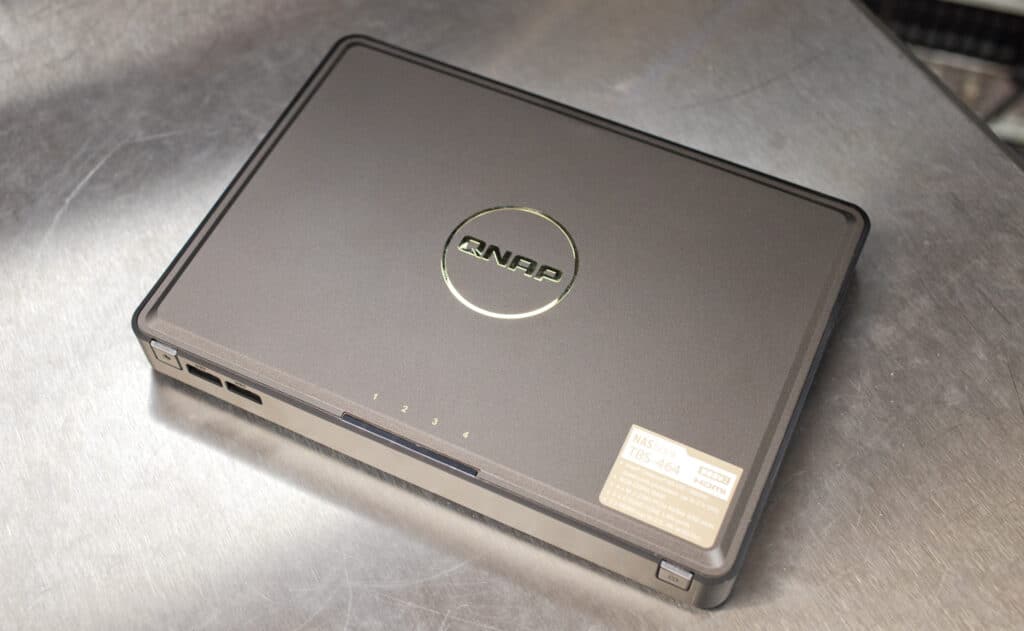
The QNAP TBS-464 is a tiny NAS that can go with you anywhere. It accepts four M.2 SSDs, runs silently, and has the same management features as QNAP’s full-sized units. Networking is somewhat limited, with just two 2.5GbE, but the TBS-464 is still a great portable storage and productivity hub.
## **QNAP TBS-464 Specifications**
The TBS-464 stands alone in the NAS world as a truly portable device, with no direct competition. It’s more likely to be contrasted with [desktop external storage drives](https://www.storagereview.com/consumer/desktop-storage-external) or a multi-drive enclosure, such as the [OWC Express 4M2](https://www.storagereview.com/review/owc-express-4m2-review), than mini-NAS towers, which are far from portable. It sells for $599 without drives [on Amazon](https://amzn.to/3Kgu6Ks).
The TBS-464 accepts four M.2 2280 PCIe Gen3 drives. The largest drive in that form factor is 8TB, for a maximum of 32TB. Drives that size mean QLC storage, though the performance limitation in the TBS-464 is its dual 2.5GbE networking ports, not drive performance. It would have been nice to have 10GbE as an option, though that would have increased heat output and, of course, upped the price.
For management, the TBS-464 runs the QTS 5.0 operating system; see our review of the similar [QTS 4.3](https://www.storagereview.com/review/qnap-qts-4-3-x-review). It’s reasonably responsive on the NAS’s Celeron N5105 quad-core CPU and 8GB of RAM. The latter isn’t expandable.
![QNAP TBS-464 QTS 5.0 Disks]() ![QNAP TBS-464 QTS 5.0 Storage Management]()
The TBS-464’s full specifications are as follows:
| **CPU** | Intel Celeron N5105 4-core/4-thread, up to 2.9GHz |
| --- | --- |
| **Graphics** | Intel UHD Graphics |
| **System Memory** | 8GB DDR4, not expandable |
| **Flash Memory** | 4GB (Dual boot OS protection) |
| **M.2 Slot** | 4x M.2 2280 NVMe Gen3 x2 slots |
| **SSD Cache Acceleration Support** | Yes |
| **2.5 Gigabit Ethernet Port (2.5G/1G/100M)** | 2 (also support 10M) |
| **Wake on LAN (WOL)** | Yes |
| **USB 2.0 Port** | 3 |
| **USB 3.2 Gen 1 Port** | 2 |
| **IR Sensor** | Yes (RM-IR004) |
| **HDMI Output** | 2 HDMI (up to 2.0 resolution 3840×2160 @ 60Hz) |
| **LED Indicators** | SSD1-4 |
| **Buttons** | Power, Reset, Copy |
| **Dimensions (HxWxD)** | 1.18 x 9.06 x 6.5 inch |
| **Weight Net/Gross** | 1.76 lbs/3.75 lbs |
| **Operating Temperature** | 0-40 degrees C |
| **Storage Temperature** | -20-70 degrees C |
| **Power Supply Unit** | External Power Adapter, 65W, 100-240V |
| **Power Consumption: HDD Sleep Mode** | 18W |
| **Power Consumption: Operating Mode, Typical** | 28W (Tested with drives fully populated) |
| **Fan** | 1x system fan |
| **Kensington Security Slot** | Yes |
| **Operating System** | QTS 5.0.0 |
| **Supported Client Operating Systems** | - Apple Mac OS 10.10 or later
- Ubuntu 14.04, CentOS 7, RHEL 6.6, SUSE 12 or later Linux
- IBM AIX 7, Solaris 10 or later UNIX
- Microsoft Windows 7, 8, 10 and 11
- Microsoft Windows Server 2008 R2, 2012, 2012 R2, 2016, and 2019
|
| **Supported Browsers** | - Apple Safari (latest version)
- Google Chrome (latest version)
- Microsoft Edge (latest version)
- Mozilla Firefox (latest version)
|
## **QNAP TBS-464 Build and Design**
The TBS-464 is compact enough for daily travel at 1.18 x 9.06 x 6.5 inches (HWD). Its starting weight is 1.8 pounds, plus about another pound for its external power adapter. The latter is inevitable given this device’s size.
Front port selection includes two USB-A 3.2 Gen 1 ports for data transfer. The power button is also here, and there are four drive indicator lights along the top edge. There’s also an IR receiver for use with the optional remote control.
![QNAP TBS-464 Front]()
Most of the ports are on the rear; there are two legacy USB 2.0 ports, two 2.5GbE LAN, and two HDMI 2.0 video outputs (good for 4K @ 60Hz). You’ll also see the power jack and a Kensington lock slot.
![QNAP TBS-464 Rear]()
There’s one more USB 2.0 port on the right.
![QNAP TBS-464 Right]()
Getting inside the TBS-464 is a straightforward affair, with knurled flathead screws holding the bottom cover. There’s not much to do inside besides install the M.2 drives. We installed the four-drive maximum in our unit. Notice the included heatsinks and thermal pads at top right.
![QNAP TBS-464 Drive Installation]()
The small cooling fan next to the drives is important for keeping thermals under control. It made next to no noise in our testing. Speaking of which, let’s get the TBS-464 on the bench.
Also, if you want to see videos of the unboxing or drive loading, we have videos on social media:
- Unboxing – [Instagram](https://www.instagram.com/p/Ca27gxoOybX/) | [TikTok](https://www.tiktok.com/@storagereview/video/7072849147841367339?is_copy_url=1&is_from_webapp=v1&lang=en) | [YouTube](https://www.youtube.com/shorts/ofkL4xFW7WA)
- Loading – [Instagram](https://www.instagram.com/p/Ca5H--zplkO/) | TikTok [TLC](https://www.tiktok.com/@storagereview/video/7073167482353192238?is_copy_url=1&is_from_webapp=v1&lang=en) and [QLC](https://www.tiktok.com/@storagereview/video/7075411354672385326?is_copy_url=1&is_from_webapp=v1&lang=en) | YouTube [TLC](https://www.youtube.com/shorts/TQmvjVW6ADw) and [QLC](https://www.youtube.com/shorts/cIj3OHaSogQ)
## **QNAP TBS-464 Performance**
We tested the TBS-464 with the following drives:
- 4x 2TB [Sabrent Rocket 4 Plus](https://www.storagereview.com/review/sabrent-rocket-4-plus-ssd-review-update) (RAID 5)
- 4x 8TB [Sabrent Rocket Q4](https://www.storagereview.com/review/sabrent-rocket-q4-pcie-4-0-nvme-ssd) (RAID 5)
Though these are PCIe Gen4 drives, they will be limited to Gen3 speeds in the TBS-464. The Rocket 4 Plus has the potential to perform much better than the QLC-based Rocket Q4, but in this NAS, performance is (as noted) chiefly limited by the two 2.5GbE ports. Because of that, QLC drives are a practical and economical choice for this NAS. We are testing using both 2.5GbE ports via port trunking.
**Enterprise Synthetic Workload Analysis**
Our enterprise shared storage and hard drive benchmark process preconditions each drive into steady-state with the same workload the device will be tested with under a heavy load of 16 threads with an outstanding queue of 16 per thread, and then tested in set intervals in multiple thread/queue depth profiles to show performance under light and heavy usage. Since NAS solutions reach their rated performance level very quickly, we only graph out the main sections of each test.
Preconditioning and Primary Steady-State Tests:
- Throughput (Read+Write IOPS Aggregate)
- Average Latency (Read+Write Latency Averaged Together)
- Max Latency (Peak Read or Write Latency)
- Latency Standard Deviation (Read+Write Standard Deviation Averaged Together)
Our Enterprise Synthetic Workload Analysis includes four profiles based on real-world tasks. These profiles have been developed to make it easier to compare to our past benchmarks as well as widely-published values such as max 4k read and write speed and 8k 70/30, which is commonly used for enterprise drives.
- 4K
*
- 100% Read or 100% Write
- 100% 4K
- 8K 70/30
*
- 70% Read, 30% Write
- 100% 8K
- 8K (Sequential)
*
- 100% Read or 100% Write
- 100% 8K
- 128K (Sequential)
*
- 100% Read or 100% Write
We start with a long sample of random 4K performance with 100% and 100% read activity. The performance differences between the drives we used is almost negligible, so we are already running into the performance limitations of the twin 2.5GbE ports. Highlighting this, in iSCSI read we saw 88,672 IOPS from the Rocket 4 Plus drives and 89,711 read IOPS from the Rocket Q4 drives, a difference of around one percent. The other testing pairs fared similarly.
![QNAP TBS-464 4K Throughput]()
Next is 4K average latency. The latencies are nice and low to begin with, though as with the previous test, differences between the drive models are minimal. If anything, the higher-capacity Rocket Q4 drives demonstrated lower latency.
![QNAP TBS-464 4K Average Latency]()
That observation also holds true in our next test, 4K max latency, where the Rocket Q4 drives showed more stable performance.
![QNAP TBS-464 4K Max Latency]()
Our last 4K test is standard deviation, where we continue seeing competitive numbers from the drive pairs.
![QNAP TBS-464 4K Standard Deviation]()
Up next are our mixed workload 70% read/30% write tests, which scale from two threads, two queues to 16 threads, 16 queues. Our first test is throughput. The SMB numbers improved relative to 4K throughput, though iSCSI IOPS remain limited. In iSCSi write, the TBS-464 peaked at 49,578 IOPS with the Rocket 4 Plus drives and 52,370 IOPS with the Rocket Q4s.
![QNAP TBS-464 8K Throughput]()
Next is 8K 70/30 average latency. The drive pairs continued to show little differentiation. Latencies spiked after 16 threads/two queue.
![QNAP TBS-464 8K Average Latency]()
Now we’ll look at 8K 70/30 max latency. The lines are hard to follow, but we see more consistency from the Rocket Q4 drives.
![QNAP TBS-464 8K Max Latency]()
The last 8K 70/30 test is standard deviation. These mixed-workload latencies are lower than our 4K standard deviation test latencies, and all the lines are quite close.
![QNAP TBS-464 8K Standard Deviation]()
The last synthetic benchmark is our large block 128K sequential test which shows the highest sequential transfer speed for a device. QNAP claims the TBS-464 can do 586MB/s read and 574MB/s write, and our numbers are right about there. As we’ve seen in the other tests, overall performance is limited by the 2.5GbE ports.
![QNAP TBS-464 128K Throughput]()
## **Conclusion**
QNAP carves a niche with the TBS-464. This portable NAS has no direct competition, packing four M.2 2280 PCIe drives into a space smaller than a laptop. It runs almost without noise.
Our performance testing validated QNAP’s claimed throughput. Using Sabrent Rocket drives, we saw 578MB/s read and 572MB/s write in both SMB and iSCSI in our 128K sequential test. Those are the best numbers you can hope for, as the TBS-464 is bottlenecked by its two 2.5GbE ports. Having 10GbE ports would have given it much more headroom, though with increased heat and cost. We would at least like the option.
Though the TBS-464 isn’t inexpensive, especially after adding drives, it can easily pay for itself as a portable storage device, offering far superior management and productivity features than could a standalone storage drive enclosure. Provided you don’t need massive throughput and can benefit from the shrunken size and noise profile, this little NAS gets our recommendation.
[Product Link at Amazon](https://amzn.to/3Kgu6Ks)
**Engage with StorageReview**
[Newsletter](https://www.storagereview.com/storage_newsletter) | [YouTube](https://www.youtube.com/user/StorageReview "Opens in a new window") | Podcast [iTunes](https://podcasts.apple.com/gb/podcast/storagereview-com-storage-reviews/id1060681115 "Opens in a new window")/ [Spotify](https://open.spotify.com/show/1y6VnznABhHeOSMOmbDTz0 "Opens in a new window") | [Instagram](https://www.instagram.com/storagereview/ "Opens in a new window") | [Twitter](https://twitter.com/storagereview "Opens in a new window") | [TikTok](https://www.tiktok.com/@storagereview? "Opens in a new window") | [RSS Feed](https://www.storagereview.com/rss.xml)
![]()
### Charles P. Jefferies
I'm a lifelong technology enthusiast and have been reviewing consumer and enterprise technology since 2005. I specialize in laptops, tablets, and enterprise hardware. I'm a graduate of Rochester Institute of Technology. Outside of work, I love the gym, reading, and photography.
Previous post: [Sabrent DS-SKRT Docking Station Review](https://www.storagereview.com/review/sabrent-ds-skrt-docking-station-review)
Next post: [Lexar Professional 1800x SDXC UHS-II Card GOLD Series Review](https://www.storagereview.com/review/lexar-professional-1800x-sdxc-uhs-ii-card-gold-series-review)
Trusted Vendors
Products and solutions from our affiliate partners:
- [

Ubiquiti
](https://store.ui.com/us/en?a_aid=StorageReview "Opens in a new window")
- [

Newegg
](https://click.linksynergy.com/fs-bin/click?id=g5terNMDhz0&offerid=1207190.18&subid=0&type=4 "Opens in a new window")
- [
 Amazon
](https://amzn.to/4fLJUEW "Opens in a new window")
Newsletter
Subscribe to the StorageReview newsletter to stay up to date on the latest news and reviews. We promise no spam!
1
Leave this field empty if you’re human:
## Advertisement
Content Categories
[Facebook](https://www.facebook.com/@storagereview) [X](https://twitter.com/storagereview) [Instagram](https://www.instagram.com/storagereview/) [LinkedIn](https://www.linkedin.com/company/storagereview-com) [YouTube](https://www.youtube.com/user/storagereview?sub_confirmation=1) [Email](mailto:info@storagereview.com) [Spotify](https://open.spotify.com/show/1y6VnznABhHeOSMOmbDTz0) [Reddit](https://www.reddit.com/r/StorageReview/) [Discord](https://discord.gg/TwMHb4azdC) [RSS](https://www.storagereview.com/rss.xml) [TikTok](https://www.tiktok.com/@storagereview)
Copyright © 1998-2025 Flying Pig Ventures, LLC Cincinnati, Ohio. All rights reserved.
Manage your privacy
To provide the best experiences, we and our partners use technologies like cookies to store and/or access device information. Consenting to these technologies will allow us and our partners to process personal data such as browsing behavior or unique IDs on this site and show (non-) personalized ads. Not consenting or withdrawing consent, may adversely affect certain features and functions.
Click below to consent to the above or make granular choices. Your choices will be applied to this site only. You can change your settings at any time, including withdrawing your consent, by using the toggles on the Cookie Policy, or by clicking on the manage consent button at the bottom of the screen.
Functional Functional Always active
The technical storage or access is strictly necessary for the legitimate purpose of enabling the use of a specific service explicitly requested by the subscriber or user, or for the sole purpose of carrying out the transmission of a communication over an electronic communications network.
Preferences Preferences
The technical storage or access is necessary for the legitimate purpose of storing preferences that are not requested by the subscriber or user.
Statistics Statistics
The technical storage or access that is used exclusively for statistical purposes. The technical storage or access that is used exclusively for anonymous statistical purposes. Without a subpoena, voluntary compliance on the part of your Internet Service Provider, or additional records from a third party, information stored or retrieved for this purpose alone cannot usually be used to identify you.
Marketing Marketing
The technical storage or access is required to create user profiles to send advertising, or to track the user on a website or across several websites for similar marketing purposes.
Statistics
Marketing
Features
Always active
Special features
Special purposes
Always active
- Manage options
- Manage services
- Manage {vendor\_count} vendors
- [Read more about these purposes](https://cookiedatabase.org/tcf/purposes/)
Accept Deny Manage options Save preferences Manage options
- {title}
- {title}
- {title}
Manage your privacy
To provide the best experiences, we use technologies like cookies to store and/or access device information. Consenting to these technologies will allow us to process data such as browsing behavior or unique IDs on this site. Not consenting or withdrawing consent, may adversely affect certain features and functions.
Functional Functional Always active
The technical storage or access is strictly necessary for the legitimate purpose of enabling the use of a specific service explicitly requested by the subscriber or user, or for the sole purpose of carrying out the transmission of a communication over an electronic communications network.
Preferences Preferences
The technical storage or access is necessary for the legitimate purpose of storing preferences that are not requested by the subscriber or user.
Statistics Statistics
The technical storage or access that is used exclusively for statistical purposes. The technical storage or access that is used exclusively for anonymous statistical purposes. Without a subpoena, voluntary compliance on the part of your Internet Service Provider, or additional records from a third party, information stored or retrieved for this purpose alone cannot usually be used to identify you.
Marketing Marketing
The technical storage or access is required to create user profiles to send advertising, or to track the user on a website or across several websites for similar marketing purposes.
Statistics
Marketing
Features
Always active
Special features
Special purposes
Always active
- Manage options
- Manage services
- Manage {vendor\_count} vendors
- [Read more about these purposes](https://cookiedatabase.org/tcf/purposes/)
Accept Deny Manage options Save preferences Manage options
- {title}
- {title}
- {title}
Manage consent Manage consent
```json
{"@context":"https:\/\/schema.org","@graph":[{"@type":"WebPage","@id":"https:\/\/www.storagereview.com\/review\/qnap-tbs-464-mini-all-flash-nas-review","url":"https:\/\/www.storagereview.com\/review\/qnap-tbs-464-mini-all-flash-nas-review","name":"QNAP TBS-464 Mini All-Flash NAS Review - StorageReview.com","isPartOf":{"@id":"https:\/\/www.storagereview.com\/#website"},"primaryImageOfPage":{"@id":"https:\/\/www.storagereview.com\/review\/qnap-tbs-464-mini-all-flash-nas-review#primaryimage"},"image":{"@id":"https:\/\/www.storagereview.com\/review\/qnap-tbs-464-mini-all-flash-nas-review#primaryimage"},"thumbnailUrl":"https:\/\/www.storagereview.com\/wp-content\/uploads\/2022\/04\/StorageReview-QNAP-TBS-464-Open.jpg","datePublished":"2022-04-05T18:25:03+00:00","description":"Though the QNAP TBS-464 isn’t inexpensive, especially after adding drives, it can easily pay for itself as a portable storage device.","breadcrumb":{"@id":"https:\/\/www.storagereview.com\/review\/qnap-tbs-464-mini-all-flash-nas-review#breadcrumb"},"inLanguage":"en-US","potentialAction":[{"@type":"ReadAction","target":["https:\/\/www.storagereview.com\/review\/qnap-tbs-464-mini-all-flash-nas-review"]}]},{"@type":"ImageObject","inLanguage":"en-US","@id":"https:\/\/www.storagereview.com\/review\/qnap-tbs-464-mini-all-flash-nas-review#primaryimage","url":"https:\/\/www.storagereview.com\/wp-content\/uploads\/2022\/04\/StorageReview-QNAP-TBS-464-Open.jpg","contentUrl":"https:\/\/www.storagereview.com\/wp-content\/uploads\/2022\/04\/StorageReview-QNAP-TBS-464-Open.jpg","width":1500,"height":949,"caption":"QNAP TBS-464 Drive Installation"},{"@type":"BreadcrumbList","@id":"https:\/\/www.storagereview.com\/review\/qnap-tbs-464-mini-all-flash-nas-review#breadcrumb","itemListElement":[{"@type":"ListItem","position":1,"name":"Home","item":"https:\/\/www.storagereview.com\/"},{"@type":"ListItem","position":2,"name":"Review","item":"https:\/\/www.storagereview.com\/review"},{"@type":"ListItem","position":3,"name":"QNAP TBS-464 Mini All-Flash NAS Review"}]},{"@type":"WebSite","@id":"https:\/\/www.storagereview.com\/#website","url":"https:\/\/www.storagereview.com\/","name":"StorageReview.com","description":"StorageReview.com is a leading provider of news and reviews throughout the entire IT stack - from the datacenter to the edge, and all points in between.","publisher":{"@id":"https:\/\/www.storagereview.com\/#organization"},"potentialAction":[{"@type":"SearchAction","target":{"@type":"EntryPoint","urlTemplate":"https:\/\/www.storagereview.com\/?s={search_term_string}"},"query-input":{"@type":"PropertyValueSpecification","valueRequired":true,"valueName":"search_term_string"}}],"inLanguage":"en-US"},{"@type":"Organization","@id":"https:\/\/www.storagereview.com\/#organization","name":"StorageReview.com","url":"https:\/\/www.storagereview.com\/","logo":{"@type":"ImageObject","inLanguage":"en-US","@id":"https:\/\/www.storagereview.com\/#\/schema\/logo\/image\/","url":"https:\/\/www.storagereview.com\/wp-content\/uploads\/2020\/02\/Storage-Reviews-2-2.png","contentUrl":"https:\/\/www.storagereview.com\/wp-content\/uploads\/2020\/02\/Storage-Reviews-2-2.png","width":344,"height":61,"caption":"StorageReview.com"},"image":{"@id":"https:\/\/www.storagereview.com\/#\/schema\/logo\/image\/"},"sameAs":["https:\/\/x.com\/storagereview","http:\/\/youtube.com\/user\/storagereview"]}]}
```