---
description: The 8-bay QNAP TVS-h874 NAS has a 12th Gen Intel processor, allowing it to run the ZFS-based QuTS hero operating system with efficiency.
title: QNAP TVS-h874 NAS Review
image: https://www.storagereview.com/wp-content/uploads/2023/05/StorageReview-QNAP-TVS-h874-6.jpg
---
[![Storage Review]()](https://storagereview.com/)
---
[Facebook](https://www.facebook.com/@storagereview) [X (Twitter)](https://twitter.twitter.com/storagereview) [Instagram](https://www.instagram.com/storagereview/) [LinkedIn](https://www.linkedin.com/company/storagereview-com) [YouTube](https://www.youtube.com/user/storagereview?sub_confirmation=1) [Email](mailto:info@storagereview.com) [Spotify](https://open.spotify.com/show/1y6VnznABhHeOSMOmbDTz0) [Reddit](https://www.reddit.com/r/StorageReview/) [Discord](https://discord.gg/TwMHb4azdC) [RSS Feed](https://www.storagereview.com/rss.xml) [TikTok](https://www.tiktok.com/@storagereview)
[Facebook](https://www.facebook.com/@storagereview) [X (Twitter)](https://twitter.com/storagereview) [Instagram](https://www.instagram.com/storagereview/) [LinkedIn](https://www.linkedin.com/company/storagereview-com) [YouTube](https://www.youtube.com/user/storagereview?sub_confirmation=1) [Email](mailto:info@storagereview.com) [Spotify](https://open.spotify.com/show/1y6VnznABhHeOSMOmbDTz0) [Reddit](https://www.reddit.com/r/StorageReview/) [Discord](https://discord.gg/TwMHb4azdC) [RSS Feed](https://www.storagereview.com/rss.xml) [TikTok](https://www.tiktok.com/@storagereview)
[](https://www.storagereview.com)
≡ Menu
- [Home](https://www.storagereview.com/)
- [Storage Reviews](https://www.storagereview.com/review)
- [End User Reviews](https://www.storagereview.com/consumer)
- [Enterprise Reviews](https://www.storagereview.com/enterprise)
- [Ubiquiti Reviews](https://www.storagereview.com/best/ubiquiti-reviews)
- [SR Merch](https://store.storagereview.com)
- [Leaderboards](https://www.storagereview.com/best)
- [Best Storage Arrays](https://www.storagereview.com/best/storage-arrays)
- [Best Enterprise SSDs](https://www.storagereview.com/best/enterprise-ssds)
- [Best Servers](https://www.storagereview.com/best/servers)
- [Best Enterprise GPUs](https://www.storagereview.com/best/enterprise-gpus)
- [Best Desktops for Local AI](https://www.storagereview.com/best/desktops-local-ai)
- [Best Laptops for Local AI](https://www.storagereview.com/best/laptops-local-ai)
- [Best Local LLM Tools](https://www.storagereview.com/best/local-llm-tools)
- [Agentic AI Hardware](https://www.storagereview.com/best/agentic-ai-hardware)
- [Best SSDs & Hard Drives](https://www.storagereview.com/best_drives)
- [Best Portable SSDs](https://www.storagereview.com/best/portable-ssds)
- [Best Business Laptops](https://www.storagereview.com/best/business-laptops)
- [Best Mobile Workstations](https://www.storagereview.com/best/mobile-workstations)
- [Best Desktop Workstations](https://www.storagereview.com/best/desktop-workstations)
- [Best Mini PCs](https://www.storagereview.com/best/mini-pcs)
- [Best Laptop Battery Life](https://www.storagereview.com/best/laptop-battery-life)
- [Storage Reference Guide](https://www.storagereview.com/storage-reference-guide)
- [About SR](https://www.storagereview.com/about-storagereview)
- [StorageReview.com Sweepstakes Rules and Regulations](https://www.storagereview.com/storagereview-com-sweepstakes-rules-and-regulations)
Search
[Home](https://www.storagereview.com/) » [Review](https://www.storagereview.com/review) » QNAP TVS-h874 NAS Review
# QNAP TVS-h874 NAS Review
by Lyle Smith on June 6, 2023
[End User](https://www.storagereview.com/consumer) ◇ [NAS](https://www.storagereview.com/consumer/nas)
The 8-bay QNAP TVS-h874 leverages a 12th Gen Intel Core multicore processor, allowing the NAS to run the ZFS-based QuTS hero operating system with efficiency. The TVS-h874 supports block-level inline data deduplication and compression, provides near-endless snapshot capabilities, and real-time SnapSync. This makes it a great choice for various use cases, such as a file server, virtualization server, collaborative video editing hub, and efficient data backup and recovery target.
QuTS hero is a NAS operating system that leverages the comprehensive and powerful ZFS file system. It offers a range of useful features for things like storage management, such as advanced data protection, integrity, and efficient storage utilization (which is achieved via data deduplication, compression, snapshots, and RAID-Z). This helps make the TVS-h874 a great choice for businesses and professionals who need a robust and feature-rich storage solution.
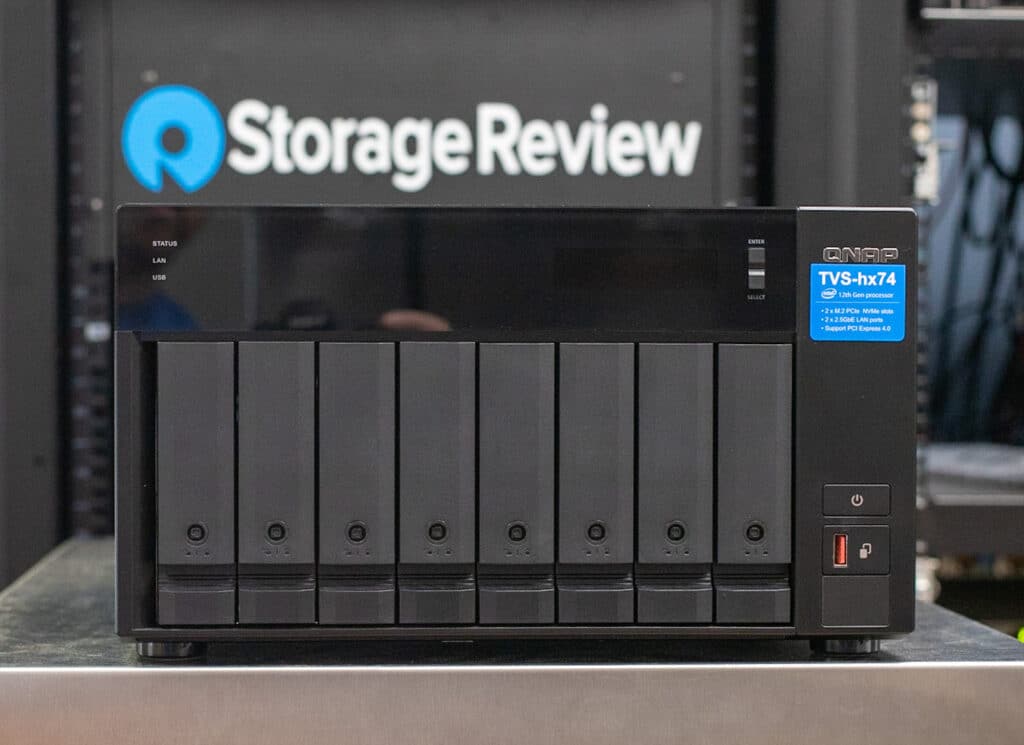
## **QNAP TVS-h874 NAS Hardware**
The TVS-h874 focuses on speed and expandability capabilities as well. It features two M.2 PCIe Gen4 slots, which enables enhanced SSD caching or SSD storage pools for a performance boost making it ideal for high-speed virtualization network environments. QNAP also supports Coral accelerators in the M.2/USB slots that can extend the NAS’s functionality into the realm of artificial intelligence via the QNAP surveillance and photos applications.
![]()
QNAP’s NAS supports 3.5-inch and 2.5-inch HDDs and 2.5-inch SSDs via the eight front bays, with more expansion options than probably necessary. For example, you can connect it to four TL-R1220Sep-RP SAS 12Gb/s storage expansion enclosures (which are specifically designed to expand the storage capacity of QTS or QuTS hero NAS). While this uncommon setup would require the purchase of an HBA (Host Bus Adapter), it will enable users to have up to 56x 22TB HDDs for an impressive storage capacity of 1.232PB. That’s likely overkill for most use cases, but it’s available if a business needs it.
The QNAP line is available in three different models, each with slightly different specifications, allowing the TVS-h874 to offer flexibility depending on unique needs. This includes the i5-12400 6-core/12-thread processor model (TVS-h874-i5-32G), the mid-range Intel Core i7 12-core /20-thread processor model (TVS-h874-i7-32G) and the high-end i9 16-core (8P+8E)/24-thread processor variant (TVS-h874-i9-64G), the latter of which can be purchased by request.
The TVS-h874 series also comes equipped with 2.5GbE ports so it can work well in bandwidth-hungry use cases when compared to legacy 1GbE ports. The TVS-h874-i9-64G model comes preinstalled with a dual-port 10GBASE-T network card for even more powerful networking capabilities. The NAS also comes with USB connectivity (two Type-A USB 3.2 Gen2 ports and one Type-C USB 3.2 Gen2 port) and an HDMI port.
Rounding off its feature set, the TVS-h874 hosts multiple virtual machines and containers, optimizing resource utilization. Its PCIe slots can be used to install 2.5/5/10/25GbE adapters, QM2 cards, or even entry-level graphics cards, enhancing application performance. Moreover, the built-in Intel OpenVINO and Intel UHD Graphics bolster AI image recognition and help alleviate strain off CPU workloads.
Backed by a standard 2-year warranty, our review unit QNAP TVS-h874 NAS is powered by a 12-gen Intel Core i5-12400 6-core/12-thread Processor (with burst up to 4.4 GHz) and 32GB SODIMM DDR4 RAM (2 x 16 GB) with QuTS hero version h5.0.1.2376. Bare this unit [retails for about $2,165](https://amzn.to/3OS3eWu).
## **QNAP TVS h874 NAS** **Specifications**
| CPU | Intel Core i5-12400 6-core/12-thread processor w/ burst up to 4.4 GHz |
| --- | --- |
| CPU Architecture | 64-bit x86 |
| Graphic Processors | Intel UHD Graphics 730 |
| Floating Point Unit | Yes |
| Encryption Engine | (AES-NI) |
| Hardware-accelerated Transcoding | Yes |
| System Memory | 32 GB SODIMM DDR4 (2 x 16GB) |
| Maximum Memory | 64 GB (2 x 32GB) |
| Memory Slot | 2 x SODIMM DDR4 |
| Flash Memory | 5GB (Dual boot OS protection) |
| Drive Bay | 8 x 3.5-inch SATA 6Gb/s, 3Gb/s |
| Drive Compatibility | 3.5-inch bays:- 3.5-inch SATA hard disk drives
- 2.5-inch SATA solid state drives
|
| Hot-swappable | Yes |
| M.2 Slot | 2 x M.2 2280 PCIe Gen 4 x4 slots |
| SSD Cache Acceleration Support | Yes |
| GPU pass-through | Yes |
| 2.5 Gigabit Ethernet Port (2.5G/1G/100M) | 2 (2.5G/1G/100M/10M) |
| 5 Gigabit Ethernet Port (5G/2.5G/1G/100M) | Optional via PCIe expansion card |
| 10 Gigabit Ethernet Port | Optional via PCIe expansion card |
| Wake on LAN (WOL) | Yes |
| Jumbo Frame | Yes |
| PCIe Slot | 2:- Slot 1: PCIe Gen 4 x16
- Slot 2: PCIe Gen 4 x4
Card dimensions for PCIe slot 1\~Slot 2:185 x 131.15 x 18.76 mm / 7.28 x 5.16 x 0.74 inches.
Wider cards can be installed if the next PCIe slot will not be used. |
| USB 3.2 Gen 2 (10Gbps) Port | - 1 x Type-C USB 3.2 Gen2 10Gbps
- 2 x Type-A USB 3.2 Gen2 10Gbps
|
| HDMI Output | 1, HDMI 1.4b (up to 4096 x 2160 @ 30Hz) |
| Form Factor | Tower |
| LED Indicators | HDD 1-8, Status, LAN, USB port, M.2 port |
| LCD Display/ Button | Yes |
| Buttons | Power, Reset, USB Copy |
| Dimensions (HxWxD) | 7.41 × 12.96 × 11.06 inch |
| Weight (Net) | 15.74 lbs |
| Weight (Gross) | 19.73 lbs |
| Operating Temperature | 0 – 40 °C (32°F – 104°F) |
| Storage Temperature | -20 – 70°C (-4°F – 158°F) |
| Relative Humidity | 5-95% RH non-condensing, wet bulb: 27˚C (80.6˚F) |
| Power Supply Unit | 250W, 100-240V |
| Power Consumption: HDD Sleep Mode | 58.127 W |
| Power Consumption: Operating Mode, Typical | 81.865 W Tested fully populated with WD10EFRX hard drives. |
| Fan | System fan: 2 x 120mm, 12VDC
CPU fan: 1 x 60mm, 12VDC |
| System Warning | Buzzer |
| Kensington Security Slot | Yes |
| Max. Number of Concurrent Connections (CIFS) – with Max. Memory | 3500 |
## **QNAP TVS h874 NAS Design and Build**
The TVS h874 NAS features the same tried and true build we often see from QNAP with its nice black and charcoal design. This means it will look nice sitting on your workstation area if need be as well as being tucked away in a closet.
The front panel is home to the vertically stacked drive bays, which are easily accessed by simply pulling the drive bay handle mechanism toward you. To install a drive, position the SSD or HDD on the tray, aligning the side holes. Secure the drive using the fastening panels. For extra security, you can add screws. Finally, slide the tray into the bay and push the handle.
![]()
Also on the front panel are the status, LAN, USB, and M.2 LEDs on the top left, while the top right has the LCD panel and buttons. Just below this are the power button and the USB One Touch copy button. When a USB storage device (e.g., a flash drive or an external hard drive), is connected to the USB 3.2 Gen2 Type-A port just to the left of it, pressing the One Touch Copy button will automatically copy data either from the USB device to the NAS or vice versa. This depends on the settings configured in the QNAP QTS operating system.
Turning around the NAS to the rear, reveals further connectivity, including an HDMI port, two 2.5 Gigabit Ethernet ports, and two USB ports (One Type A and one Type C USB 3.2 Gen2 port). Also located on the back are the dual PCIe full-height covers, reset button, Kensington security slot, power input, and fan exhausts.
![]()
To access the dual PCIe Gen4 slots (and other internal components), turn off the device, unplug it, and detach all cables and external devices. To remove the cover, unscrew it, slide it back, and then lift it off. Though compact, you will notice in the image below, that there’s still a lot of room for airflow. The Gen4 M.2 slots are located just below the DIMMs and the Intel CPU/heatsink.
![]()
## QNAP TVS-h874 NAS Performance
For this review, we are using 8 x [22TB WD Red Pro](https://www.storagereview.com/review/wd-red-pro-22tb-review) in a RAID6 configuration with QNAP’s 10GbE NIC.
Our enterprise NAS testing process preconditions each drive-set into steady-state with the same workload the device will be tested with under a heavy load of 16 threads, with an outstanding queue of 16 per thread. The device is then tested in set intervals in multiple thread/queue depth profiles to show performance under light and heavy usage. Since hard drives reach their rated performance level very quickly, we only graph out the main sections of each test.
![]()
Preconditioning and Primary Steady-State Tests:
- Throughput (Read+Write IOPS Aggregate)
- Average Latency (Read+Write Latency Averaged Together)
- Max Latency (Peak Read or Write Latency)
- Latency Standard Deviation (Read+Write Standard Deviation Averaged Together)
Our Enterprise Synthetic Workload Analysis includes three profiles based on common workload sizes. These profiles have been developed to make it easier to compare to our past benchmarks, as well as widely-published values such as max 4K read and write speed and 8K 70/30, which is commonly used for storage devices. When testing NAS platforms, for each storage pool we benchmark, we provision four shared folders for 25GB files and four 25GB iSCSI luns.
4K
- 100% Read or 100% Write
- 100% 4K
8K 70/30
- 70% Read, 30% Write
- 100% 8K
128K (Sequential)
- 100% Read or 100% Write
- 100% 128K
**Note:** In our analysis of the QNAP TVS-h874, we will be using the QNAP TVS-h1288X as a valuable point of comparison. Both systems were configured with the same number of 22TB WD Red Pro drives in RAID6 with the QuTS OS running ZFS.
![]()
Our first throughput test measures 4K random performance of the QNAP TVS-h874. Here, it posted similar performance in iSCSI and SMB configurations showing 2,035 IOPS in write and 2,384 IOPS read (SMB) and 2,167 IOPS write and 3,033 IOPS read (iSCSI). The TS-h1288X recorded 1,490 IOPS write and 5,807 IOPS read (SMB) and 1,498 write, and 5,911 IOPS read (iSCSI).
![QNAP TVS-h874 4k throughput read/write performance]() In average latency, the TVS-h874 posted read and writes of 107.36ms and 125.8ms (SMB) and 84.37ms and 118.13ms (iSCSI).
![]()
Moving on to the max latency, the TVS-h874 showed better performance with the SMB protocol, posting 451ms read and 916ms write while iSCSI showed 835.93ms read and 1,418.8ms write (HDD).
![]()
For standard deviation, the TVS-h874 recorded 36.47ms read and 71.16ms write in SMB, and 77.87ms read and 141.62ms write in iSCSI with our RAID6 config.
![QNAP TVS-h874 4k throughput standard deviation performance]()
Our next benchmark subjects the drives to 100% read and write activity at 8K sequential throughput. Populated with 22TB WD Red Pro HDDs, the QNAP TVS-h874 showed 176,694 IOPS read and 70,562 IOPS write in SMB, while reaching 189,265 IOPS read and 188,332 IOPS write in iSCSI.
![QNAP TVS-h874 8k throughput performance]()
Our next test shifts from a pure 8K sequential 100% read/write scenario to a mixed 8K 70/30 workload to demonstrate how performance scales in a setting from 2T/2Q up to 16T/16Q. In throughput, the TVS-h874 posted a range of 598 IOPS to 21,72 IOPS in SMB and 487 IOPS to 2337 IOPS in iSCSI. The QNAP TVS-h1288X recorded a range of 770 IOPS to 1,972 IOPS (SMB) and 643 IOPS to 1,944 IOPS (iSCSI).
![QNAP TVS-h874 8k 7030 mixed throughput performance]()
Looking at average latency at 8K 70/30, the QNAP TVS-h874 posted a range of 6.68ms and 117.74ms, and 8.19ms to 109.45ms for SMB and iSCSI, respectively. The QNAP TVS-h1288X recorded a range of 770 IOPS to 1,972 IOPS and 643 IOPS to 1,944 IOPS for SMB and iSCSI, respectively.
![]()
In max latency, the QNAP TVS-h874 showed its best performance with SMB, where it showed a range of 205.95ms and 596.71ms, while iSCSI posted 209.14ms to 880.2ms.
![]()
For standard deviation latency, SMB was the better performing protocol again with the TVS-h874, posting a range of 7.34ms to 59.05ms while hitting 7.88ms to 107.3ms for iSCSI. Looking at the TVS-h1288X, we saw ranges of 12.29ms to 150.22ms (SMB) and 19.18ms to 281.8ms (iSCSI).
![QNAP TVS-h874 128k performance]()
Our last test is the 128K benchmark, a large-block sequential test showing the highest sequential transfer speed. For SMB, the QNAP TVS-h874 posted 2.316GB/s read and 2.308GB/s write, while iSCSI recorded 2.292GB/s read and 1.08GB/s write.
![QNAP TVS-h874 128k throughput performance]()
## Conclusion
The QNAP TVS-h874 NAS is a highly capable and versatile storage solution designed specifically for the SMB sector. Powered by the 12th generation Intel Core multicore processor, it offers solid performance and efficiency when running the ZFS-based QuTS hero operating system. The NAS also has a range of important data integrity and efficiency features such as block-level inline data deduplication, compression, and snapshot capabilities. These make it well suited for a wide range of applications, including mission-critical file servers, virtualization servers, collaborative video editing, and data backup and recovery.
![QNAP TVS-h874 inside]()
Giving users both speed and extensive expandability options was also important to QNAP with the TVS-h874. Its dual M.2 PCIe Gen4 slots allow for enhanced SSD caching or SSD storage pools, which means improved performance–particularly in high-speed virtualization network environments. Users also have the option to connect the NAS to multiple storage expansion enclosures and achieve an impressive storage capacity of up to 1.232PB via 56x 22TB HDDs, though this may not be necessary for typical use cases. Moreover, the inclusion of Edge TPU support empowers AI image recognition, expanding its capabilities into the QNAP photo and surveillance apps.
With its ability to host multiple virtual machines and containers, support for various storage configurations, and compatibility with PCIe adapters for networking and dedicated GPUs, the QNAP TVS-h874 also provides users with flexibility and optimization for a range of different use cases. In addition, the availability of three different models within the QNAP line allows users to choose the specific specifications that best meet their unique needs, catering to a wide range of requirements that include a 6-core/12-thread processor to the high-end 16-core/24-thread processor.
Overall, the QNAP TVS-h874 NAS offers an impressive set of features and solid performance, which make it a compelling choice for SMBs in need of a reliable and efficient storage solution with a pretty robust set of data services.
[QNAP TVS h874 Product Page](https://www.qnap.com/en/product/tvs-h874)
[TVS-h874 at Amazon](https://amzn.to/3OS3eWu)
**Engage with StorageReview**
[Newsletter](https://www.storagereview.com/storage_newsletter) | [YouTube](https://www.youtube.com/user/StorageReview "Opens in a new window") | Podcast [iTunes](https://podcasts.apple.com/gb/podcast/storagereview-com-storage-reviews/id1060681115 "Opens in a new window")/ [Spotify](https://open.spotify.com/show/1y6VnznABhHeOSMOmbDTz0 "Opens in a new window") | [Instagram](https://www.instagram.com/storagereview/ "Opens in a new window") | [Twitter](https://twitter.com/storagereview "Opens in a new window") | [TikTok](https://www.tiktok.com/@storagereview? "Opens in a new window") | [RSS Feed](https://www.storagereview.com/rss.xml)
![]()
### Lyle Smith
Lyle is a writer for StorageReview, covering a broad set of end user and enterprise IT topics.
Previous post: [New Dell Technologies PowerVault MD JBODs Tame Data Explosion](https://www.storagereview.com/review/new-dell-technologies-powervault-md-jbods-tame-data-explosion)
Next post: [Dell Latitude 9440 2-in-1 Review](https://www.storagereview.com/review/dell-latitude-9440-2-in-1-review)
Trusted Vendors
Products and solutions from our affiliate partners:
- [

Ubiquiti
](https://store.ui.com/us/en?a_aid=StorageReview "Opens in a new window")
- [

Newegg
](https://click.linksynergy.com/fs-bin/click?id=g5terNMDhz0&offerid=1207190.18&subid=0&type=4 "Opens in a new window")
- [
 Amazon
](https://amzn.to/4fLJUEW "Opens in a new window")
Newsletter
Subscribe to the StorageReview newsletter to stay up to date on the latest news and reviews. We promise no spam!
1
Leave this field empty if you’re human:
## Advertisement
Content Categories
[Facebook](https://www.facebook.com/@storagereview) [X](https://twitter.com/storagereview) [Instagram](https://www.instagram.com/storagereview/) [LinkedIn](https://www.linkedin.com/company/storagereview-com) [YouTube](https://www.youtube.com/user/storagereview?sub_confirmation=1) [Email](mailto:info@storagereview.com) [Spotify](https://open.spotify.com/show/1y6VnznABhHeOSMOmbDTz0) [Reddit](https://www.reddit.com/r/StorageReview/) [Discord](https://discord.gg/TwMHb4azdC) [RSS](https://www.storagereview.com/rss.xml) [TikTok](https://www.tiktok.com/@storagereview)
Copyright © 1998-2025 Flying Pig Ventures, LLC Cincinnati, Ohio. All rights reserved.
Manage your privacy
To provide the best experiences, we and our partners use technologies like cookies to store and/or access device information. Consenting to these technologies will allow us and our partners to process personal data such as browsing behavior or unique IDs on this site and show (non-) personalized ads. Not consenting or withdrawing consent, may adversely affect certain features and functions.
Click below to consent to the above or make granular choices. Your choices will be applied to this site only. You can change your settings at any time, including withdrawing your consent, by using the toggles on the Cookie Policy, or by clicking on the manage consent button at the bottom of the screen.
Functional Functional Always active
The technical storage or access is strictly necessary for the legitimate purpose of enabling the use of a specific service explicitly requested by the subscriber or user, or for the sole purpose of carrying out the transmission of a communication over an electronic communications network.
Preferences Preferences
The technical storage or access is necessary for the legitimate purpose of storing preferences that are not requested by the subscriber or user.
Statistics Statistics
The technical storage or access that is used exclusively for statistical purposes. The technical storage or access that is used exclusively for anonymous statistical purposes. Without a subpoena, voluntary compliance on the part of your Internet Service Provider, or additional records from a third party, information stored or retrieved for this purpose alone cannot usually be used to identify you.
Marketing Marketing
The technical storage or access is required to create user profiles to send advertising, or to track the user on a website or across several websites for similar marketing purposes.
Statistics
Marketing
Features
Always active
Special features
Special purposes
Always active
- Manage options
- Manage services
- Manage {vendor\_count} vendors
- [Read more about these purposes](https://cookiedatabase.org/tcf/purposes/)
Accept Deny Manage options Save preferences Manage options
- {title}
- {title}
- {title}
Manage your privacy
To provide the best experiences, we use technologies like cookies to store and/or access device information. Consenting to these technologies will allow us to process data such as browsing behavior or unique IDs on this site. Not consenting or withdrawing consent, may adversely affect certain features and functions.
Functional Functional Always active
The technical storage or access is strictly necessary for the legitimate purpose of enabling the use of a specific service explicitly requested by the subscriber or user, or for the sole purpose of carrying out the transmission of a communication over an electronic communications network.
Preferences Preferences
The technical storage or access is necessary for the legitimate purpose of storing preferences that are not requested by the subscriber or user.
Statistics Statistics
The technical storage or access that is used exclusively for statistical purposes. The technical storage or access that is used exclusively for anonymous statistical purposes. Without a subpoena, voluntary compliance on the part of your Internet Service Provider, or additional records from a third party, information stored or retrieved for this purpose alone cannot usually be used to identify you.
Marketing Marketing
The technical storage or access is required to create user profiles to send advertising, or to track the user on a website or across several websites for similar marketing purposes.
Statistics
Marketing
Features
Always active
Special features
Special purposes
Always active
- Manage options
- Manage services
- Manage {vendor\_count} vendors
- [Read more about these purposes](https://cookiedatabase.org/tcf/purposes/)
Accept Deny Manage options Save preferences Manage options
- {title}
- {title}
- {title}
Manage consent Manage consent
```json
{"@context":"https:\/\/schema.org","@graph":[{"@type":"WebPage","@id":"https:\/\/www.storagereview.com\/review\/qnap-tvs-h874-nas-review","url":"https:\/\/www.storagereview.com\/review\/qnap-tvs-h874-nas-review","name":"QNAP TVS-h874 NAS Review - StorageReview.com","isPartOf":{"@id":"https:\/\/www.storagereview.com\/#website"},"primaryImageOfPage":{"@id":"https:\/\/www.storagereview.com\/review\/qnap-tvs-h874-nas-review#primaryimage"},"image":{"@id":"https:\/\/www.storagereview.com\/review\/qnap-tvs-h874-nas-review#primaryimage"},"thumbnailUrl":"https:\/\/www.storagereview.com\/wp-content\/uploads\/2023\/05\/StorageReview-QNAP-TVS-h874-6.jpg","datePublished":"2023-06-06T18:19:18+00:00","dateModified":"2023-06-06T18:23:59+00:00","description":"The 8-bay QNAP TVS-h874 NAS has a 12th Gen Intel processor, allowing it to run the ZFS-based QuTS hero operating system with efficiency.","breadcrumb":{"@id":"https:\/\/www.storagereview.com\/review\/qnap-tvs-h874-nas-review#breadcrumb"},"inLanguage":"en-US","potentialAction":[{"@type":"ReadAction","target":["https:\/\/www.storagereview.com\/review\/qnap-tvs-h874-nas-review"]}]},{"@type":"ImageObject","inLanguage":"en-US","@id":"https:\/\/www.storagereview.com\/review\/qnap-tvs-h874-nas-review#primaryimage","url":"https:\/\/www.storagereview.com\/wp-content\/uploads\/2023\/05\/StorageReview-QNAP-TVS-h874-6.jpg","contentUrl":"https:\/\/www.storagereview.com\/wp-content\/uploads\/2023\/05\/StorageReview-QNAP-TVS-h874-6.jpg","width":1500,"height":1046},{"@type":"BreadcrumbList","@id":"https:\/\/www.storagereview.com\/review\/qnap-tvs-h874-nas-review#breadcrumb","itemListElement":[{"@type":"ListItem","position":1,"name":"Home","item":"https:\/\/www.storagereview.com\/"},{"@type":"ListItem","position":2,"name":"Review","item":"https:\/\/www.storagereview.com\/review"},{"@type":"ListItem","position":3,"name":"QNAP TVS-h874 NAS Review"}]},{"@type":"WebSite","@id":"https:\/\/www.storagereview.com\/#website","url":"https:\/\/www.storagereview.com\/","name":"StorageReview.com","description":"StorageReview.com is a leading provider of news and reviews throughout the entire IT stack - from the datacenter to the edge, and all points in between.","publisher":{"@id":"https:\/\/www.storagereview.com\/#organization"},"potentialAction":[{"@type":"SearchAction","target":{"@type":"EntryPoint","urlTemplate":"https:\/\/www.storagereview.com\/?s={search_term_string}"},"query-input":{"@type":"PropertyValueSpecification","valueRequired":true,"valueName":"search_term_string"}}],"inLanguage":"en-US"},{"@type":"Organization","@id":"https:\/\/www.storagereview.com\/#organization","name":"StorageReview.com","url":"https:\/\/www.storagereview.com\/","logo":{"@type":"ImageObject","inLanguage":"en-US","@id":"https:\/\/www.storagereview.com\/#\/schema\/logo\/image\/","url":"https:\/\/www.storagereview.com\/wp-content\/uploads\/2020\/02\/Storage-Reviews-2-2.png","contentUrl":"https:\/\/www.storagereview.com\/wp-content\/uploads\/2020\/02\/Storage-Reviews-2-2.png","width":344,"height":61,"caption":"StorageReview.com"},"image":{"@id":"https:\/\/www.storagereview.com\/#\/schema\/logo\/image\/"},"sameAs":["https:\/\/x.com\/storagereview","http:\/\/youtube.com\/user\/storagereview"]}]}
```