---
description: The Synology BC500 surveillance camera offers a cost-effective, user-friendly solution for simple yet comprehensive surveillance needs.
title: Synology BC500 IP Camera Review
image: https://www.storagereview.com/wp-content/uploads/2023/06/StorageReview-Synology-TC500-2.jpg
---
[![Storage Review]()](https://storagereview.com/)
---
[Facebook](https://www.facebook.com/@storagereview) [X (Twitter)](https://twitter.twitter.com/storagereview) [Instagram](https://www.instagram.com/storagereview/) [LinkedIn](https://www.linkedin.com/company/storagereview-com) [YouTube](https://www.youtube.com/user/storagereview?sub_confirmation=1) [Email](mailto:info@storagereview.com) [Spotify](https://open.spotify.com/show/1y6VnznABhHeOSMOmbDTz0) [Reddit](https://www.reddit.com/r/StorageReview/) [Discord](https://discord.gg/TwMHb4azdC) [RSS Feed](https://www.storagereview.com/rss.xml) [TikTok](https://www.tiktok.com/@storagereview)
[Facebook](https://www.facebook.com/@storagereview) [X (Twitter)](https://twitter.com/storagereview) [Instagram](https://www.instagram.com/storagereview/) [LinkedIn](https://www.linkedin.com/company/storagereview-com) [YouTube](https://www.youtube.com/user/storagereview?sub_confirmation=1) [Email](mailto:info@storagereview.com) [Spotify](https://open.spotify.com/show/1y6VnznABhHeOSMOmbDTz0) [Reddit](https://www.reddit.com/r/StorageReview/) [Discord](https://discord.gg/TwMHb4azdC) [RSS Feed](https://www.storagereview.com/rss.xml) [TikTok](https://www.tiktok.com/@storagereview)
[](https://www.storagereview.com)
≡ Menu
- [Home](https://www.storagereview.com/)
- [Storage Reviews](https://www.storagereview.com/review)
- [End User Reviews](https://www.storagereview.com/consumer)
- [Enterprise Reviews](https://www.storagereview.com/enterprise)
- [Ubiquiti Reviews](https://www.storagereview.com/best/ubiquiti-reviews)
- [SR Merch](https://store.storagereview.com)
- [Leaderboards](https://www.storagereview.com/best)
- [Best Storage Arrays](https://www.storagereview.com/best/storage-arrays)
- [Best Enterprise SSDs](https://www.storagereview.com/best/enterprise-ssds)
- [Best Servers](https://www.storagereview.com/best/servers)
- [Best Enterprise GPUs](https://www.storagereview.com/best/enterprise-gpus)
- [Best Desktops for Local AI](https://www.storagereview.com/best/desktops-local-ai)
- [Best Laptops for Local AI](https://www.storagereview.com/best/laptops-local-ai)
- [Best Local LLM Tools](https://www.storagereview.com/best/local-llm-tools)
- [Agentic AI Hardware](https://www.storagereview.com/best/agentic-ai-hardware)
- [Best SSDs & Hard Drives](https://www.storagereview.com/best_drives)
- [Best Portable SSDs](https://www.storagereview.com/best/portable-ssds)
- [Best Business Laptops](https://www.storagereview.com/best/business-laptops)
- [Best Mobile Workstations](https://www.storagereview.com/best/mobile-workstations)
- [Best Desktop Workstations](https://www.storagereview.com/best/desktop-workstations)
- [Best Mini PCs](https://www.storagereview.com/best/mini-pcs)
- [Best Laptop Battery Life](https://www.storagereview.com/best/laptop-battery-life)
- [Storage Reference Guide](https://www.storagereview.com/storage-reference-guide)
- [About SR](https://www.storagereview.com/about-storagereview)
- [StorageReview.com Sweepstakes Rules and Regulations](https://www.storagereview.com/storagereview-com-sweepstakes-rules-and-regulations)
Search
[Home](https://www.storagereview.com/) » [Review](https://www.storagereview.com/review) » Synology BC500 IP Camera Review
# Synology BC500 IP Camera Review
by Lyle Smith on June 26, 2023
[Client Accessories](https://www.storagereview.com/consumer/client-accessories) ◇ [End User](https://www.storagereview.com/consumer)
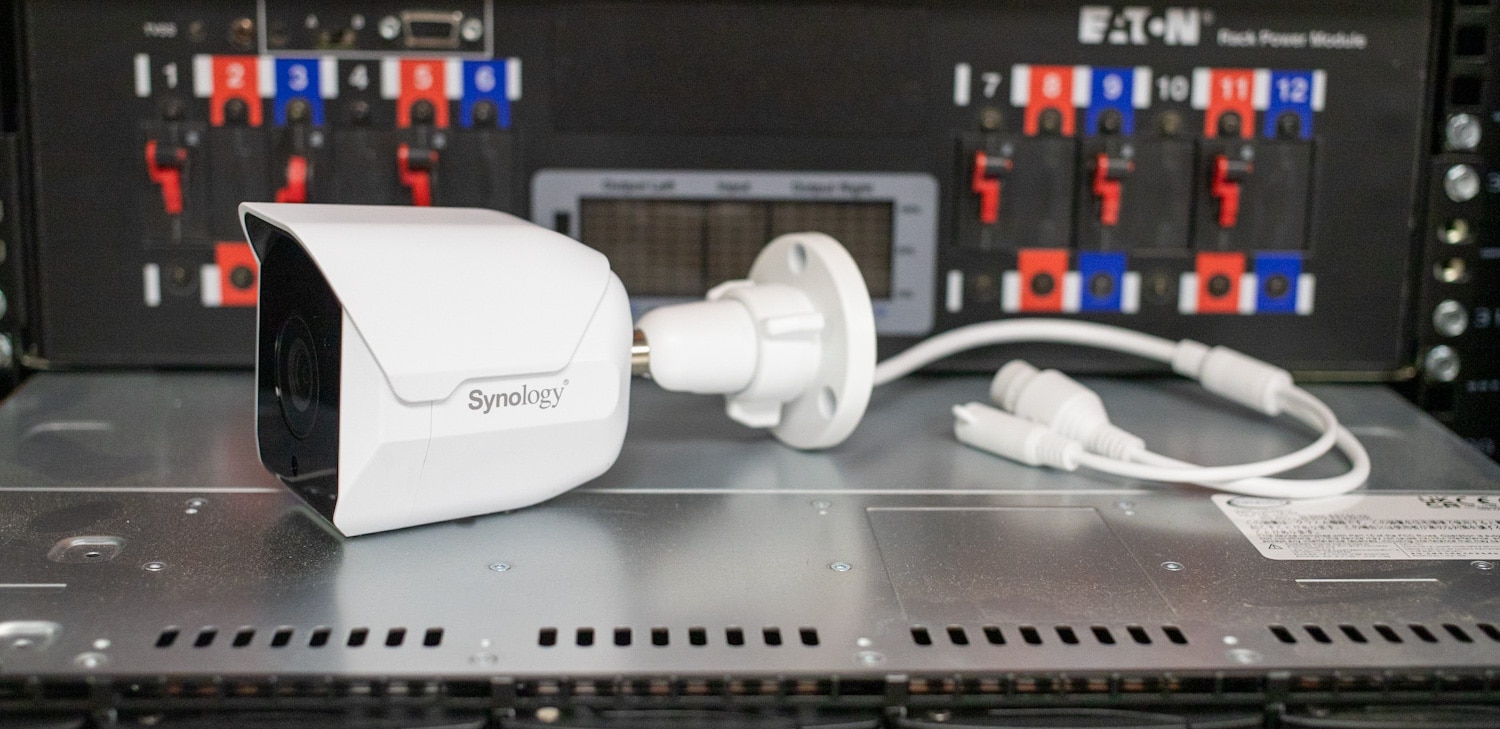
The Synology BC500 IP camera is an IP67-rated, 5-megapixel wide-angle camera designed for indoor and outdoor use. IP cameras (also known as network cameras) are essentially surveillance cameras that transmit video and audio data over a network. Features like night vision and motion detection are particularly useful for businesses to monitor and capture suspicious activity remotely.
This “bullet”-like camera features an HD resolution of 2880×1620 at 30 FPS, a 110° horizontal wide-angle view, and night vision capabilities, ensuring that all crucial details are captured. It is also explicitly designed to work seamlessly with Surveillance Station, offering a seamless setup process (or integration into your current ecosystem), easy configuration, and hassle-free firmware updates. In addition, IP cameras from this family incorporate AI technology to enhance surveillance capabilities with intelligent features.
## Synology BC500 IP Camera Capture Quality
The BC500 camera is specifically built to capture high-quality footage, regardless of lighting conditions. With its 5MP sensor and wide-angle lens, it can provide clear and detailed videos.
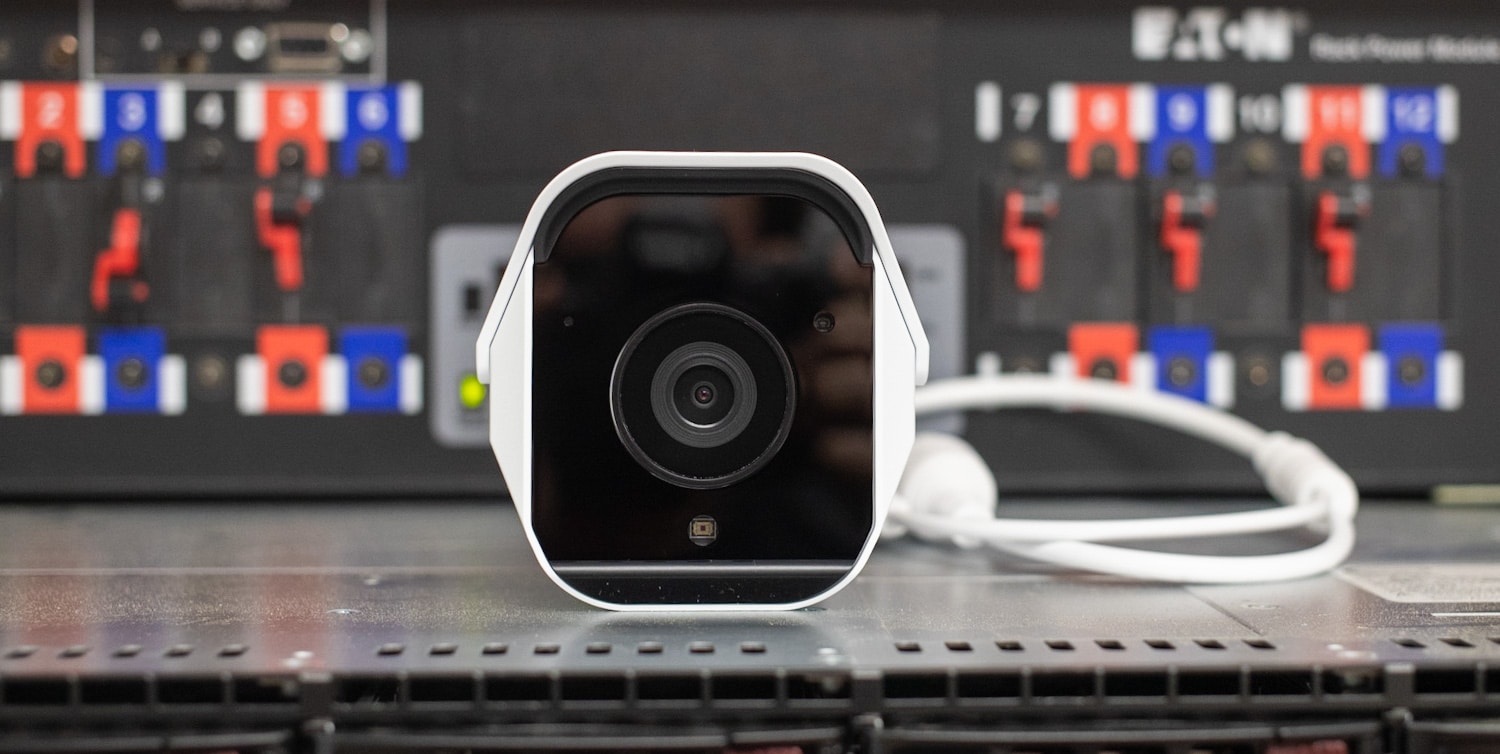
The BC500’s 100°-angle view allows the camera to cover a larger area compared to models that might have narrower specs, which reduces the need for multiple cameras to monitor the same space. This can undoubtedly save on costs (especially in use cases where a lot of ground needs to be covered, like warehouses, larger parking lots, or open fields) and simplifies installation. Anything greater than 110° might introduce distortion at the edges of the image, so this seems like a sweet spot.
![Synology BC500 IP Camera Rear]()
The BC500 camera’s large aperture and multi-exposure HDR technology also deliver impressive low-light performance without overexposing brighter areas. Night vision capabilities are provided by a high-power infrared LED, allowing clear visibility up to 30 meters. The range will undoubtedly offer adequate coverage for most surveillance scenarios.
These cameras retail for [$220 at Amazon](https://amzn.to/3NQcR7f). It’s also worth noting Synology offers a TC500 which is essentially the same IP camera in a turret form factor.
## Synology BC500 IP Camera AI Features
The BC500 has advanced AI features that empower surveillance systems with intelligent analytics. The on-camera AI capabilities enable accurate people and vehicle detection, ensuring that important events are precisely identified.
The intrusion detection feature alerts users when a virtual border is crossed from a designated direction, enhancing security measures. This enables precise detection of people and vehicles, making them ideal for applications such as perimeter security, crowd monitoring, and traffic management.
![Synology TC500 IP Camera AI]()
The Instant Search function is also a handy tool. It helps to facilitate quick investigations by enabling virtually instantaneous searches for things like people, vehicles, and motion within a specific timeline from the past. The cameras can be paired with Synology DVA models for more sophisticated analytics, enabling face recognition, license plate recognition, and people counting. Areas like access control, traffic monitoring, and retail analytics would find these features particularly valuable, as it enhances security measures and offers valuable insights.
## Synology BC500 IP Camera and Surveillance Station
The BC500’s integration with Synology’s Surveillance Station and DS cam app helps simplify the deployment and maintenance process, whether it’s a single camera or multiple. More importantly, however, is that no additional Surveillance Device Licenses are required for these cameras, which saves costs and helps streamline the overall process.
Camera settings adjustment and maintenance tasks can be performed directly within Surveillance Station or DS cam. At the same time, firmware updates are regularly provided with new features and security enhancements that can be applied in batch—with or without an internet connection. Additionally, failover edge storage ensures system reliability by automatically switching to microSD recording in the event of a network failure.
## Synology BC500 IP Camera Security Features
Synology also strongly emphasizes security and privacy, as the camera supports both HTTPS and SRTP, which enables encrypted network and video transfer, authentication, and integrity protection. Users also maintain full ownership and control over their footage recordings stored on Synology devices.
![Synology TC500 IP Camera AI Settings]()
In the “People & Vehicle” section, you can use advanced AI-powered analytics to detect and categorize people and vehicles within your surveillance footage. You can set specific parameters to detect people, such as a specific number of people to trigger a crowd or loitering detection. You can also detect all people or set it to ignore people in general. You can set it for vehicles so that it detects cars with a specific number of people or ignore them entirely.
Privacy masks can be applied to live views that are irreversibly embedded into the recorded footage, allowing sensitive areas to be obscured. Moreover, the system provides a comprehensive overview of connected devices per camera, allowing users to maintain security by disconnecting or blocking unrecognized devices. Synology cameras also comply with the NDAA and TAA regulations, meet the requirements for US government procurement, and have long-term firmware support (like security patches and updates) to safeguard the system’s integrity.
## **Synology BC500 IP Camera Specifications**
| Lens | 2.8 mm (110° H, 56° V, 132° D LDC ON) |
| --- | --- |
| Aperture | F1.8 |
| Night vision | 30 meters |
| Shutter speed | 1/16000s\~1/30s |
| DORI | D: 60m, O: 24m, R: 12m, I: 6m |
| Max. streaming resolution | 5 MP (2880×1620) @ 30 FPS |
| Sub streaming capability | 1920×1080 @ 15 FPS or 1280×720 @ 30 FPS |
| Video compression | H.264, H.265 |
| Image settings | Brightness, contrast, saturation, sharpness, white balance, High Dynamic Range (HDR), 3D/2D noise reduction, exposure control, 50/60 Hz flicker reduction, day/night mode, overlay, privacy mask |
| Video Orientation | Rotation (0°, 90°, 180°, 270°), Flip, Mirror |
| Event analytics2 | People G Vehicle Detection (including Crowd Detection and Loitering Detection), Intrusion Detection, Motion Detection, Tampering Detection, Audio Detection |
| Instant Search | People, Vehicle, Motion |
| SD Card Event Recording | Event recording can be triggered by the following:- Disconnection from NAS
- People G Vehicle Detection, Intrusion Detection, Motion Detection, Audio Detection, Tampering Detection
|
| Microphone | Yes |
| Audio compression | G.711 |
| Dimensions | 97 x 88 mm (3.82 x 3.46”) |
| Weight | 387 g (0.85 lbs) |
| Weather resistance | IP67 |
| Impact resistance | IK10 |
| Power source | PoE (802.3af) or 12V DC |
| Power consumption | 4.8 W |
| Ethernet | 1 x RJ-45 10/100 Mbps Ethernet port |
| Edge storage | MicroSD (up to 128 GB3) |
| Operating environment | - Temperature (IR off): -30°C to 50°C (-22°F to 122°F)
- Temperature (IR on): -30°C to 40°C (-22°F to 104°F)
- Relative humidity: 5% to 95% RH (non-condensing)
|
| Storage environment | - Temperature: -40°C to 60°C (-40°F to 140°F)
- Relative humidity: 5% to 95% RH (non-condensing)
|
| Security | Connection management, IP filter, HTTPS encryption, SRTP connection, auto block, signed firmware |
## Synology BC500 IP Camera **Design and Build**
The Synology BC500 surveillance camera features a sturdy and practical design suitable for indoor and outdoor applications. Overall, the Synology BC500’s physical construction seems to stress durability and longevity. Its wide-angle lens also offers a horizontal viewing angle of 110°, enabling the camera to cover a substantial area with few hidden spots. As indicated above, this wide coverage reduces the need for multiple cameras and makes the installation process much more manageable. Moreover, its versatile form factor allows for flexible positioning and precise targeting of surveillance areas.
![Synology BC500 surveillance camera wall mount]()
If you already have a Power over Ethernet (PoE) infrastructure, installing the BC500 is straightforward. Connect the camera to the PoE network using an Ethernet cable, mount the bracket, and you’re good to go.
The camera’s front side is home to the microphone for audio capture and a status indicator to confirm its current operational status. On the rear side, you’ll find a microSD slot for convenient local storage and a reset button for easy restoration to default settings.
![Synology TC500 MicroSD]()
Having a microSD slot on the back of the BC500 brings a range of benefits, as it supports cards with up to 128GB. For example, it gives users a convenient local storage option and provides redundancy and backup capabilities on a highly compact and inexpensive form factor. In the event of a network outage, the camera will continue recording and storing footage by setting it to switch to microSD recording.
However, there is a potential drawback: If the camera is tampered with or stolen, the recorded footage stored on the SD memory card may be lost or compromised. At the same time, this cost-effective form factor enhances data security by keeping the footage physically secure within the camera itself.
Designed with an IP67 rating, the BC500 camera also has excellent resistance to dust and water ingress, ensuring reliable performance even when hit with outdoor elements.
## Synology BC500 IP Camera **Management Software**
To set up a Synology camera via the Surveillance Station app, first, ensure that the camera is connected to the same network as the Surveillance Station. Then, open the app, go to the camera settings, select “Add Camera,” and follow the on-screen instructions to configure the camera by entering the necessary details, such as the camera model, IP address, and login credentials.
Once you’re all set up, you’ll have a comprehensive range of features and options to configure the camera(s) based on your specific needs.
![]()
In the “Video & Audio Format” section, you can customize video and audio recording settings to meet your needs. For example, you can choose the desired video codec, resolution, and frame rate for your surveillance cameras via a dropdown menu to find a nice balance of video quality and storage utilization.
![]()
You can configure audio settings such as audio format, volume, and environment noise cancellation level.
![]()
Recording options are similar to other cameras added to the Surveillance Station platform, with motion capture buffers and retention settings.
![]()
Long-term management is also made easy with the new Synology cameras, with the firmware update process handled through the same camera setting interface. With third-party cameras, you’d need to log into the camera directly to manage this activity.
## **Conclusion**
The Synology BC500 IP camera is a reliable and versatile option for indoor and outdoor use. With its 5-megapixel resolution, wide-angle lens, and advanced night vision capabilities, it is more than capable of producing clear and detailed footage in various lighting conditions. Moreover, its wide horizontal viewing angle of 110° reduces the need for multiple cameras, which helps make the installation and monitoring process much easier while being more cost-effective (especially in use cases with a lot of physical ground to cover).
Setting up and managing the Synology BC500 camera is straightforward as well. The Surveillance Station’s intuitive interface allows easy navigation and quick access to essential features. It also simplifies deployment and maintenance, with easy camera configuration, firmware updates, and camera settings adjustment. The BC500’s AI-powered analytics add further flexibility, as it can accurately detect people and vehicles, enhancing security measures (and customization) while facilitating quick investigations via features like instant search and event analytics.
![]()
The build of the Synology BC500 camera is practical and durable, making it suitable for long-term use. Its IP67 rating ensures resistance to dust and water ingress. The camera also has a microSD slot on the rear, which provides convenient local storage options when on-premises networking failures inevitably occur. Moreover, with features like HTTPS encryption, SRTP connection, and signed firmware, Synology prioritizes security and privacy, ensuring that users maintain full ownership and control over their footage recordings.
One important area to consider is that the BC500 and TC500 cameras aren’t designed to compete against the premier cameras from other security vendors. With a retail price of $220, these cameras come in at an entry price point with certain advanced features. The Synology BC500 surveillance camera offers a cost-effective, user-friendly solution for simple yet comprehensive surveillance needs.
[Synology BC500 IP Camera at Amazon](https://amzn.to/3NQcR7f)
**Engage with StorageReview**
[Newsletter](https://www.storagereview.com/storage_newsletter) | [YouTube](https://www.youtube.com/user/StorageReview "Opens in a new window") | Podcast [iTunes](https://podcasts.apple.com/gb/podcast/storagereview-com-storage-reviews/id1060681115 "Opens in a new window")/ [Spotify](https://open.spotify.com/show/1y6VnznABhHeOSMOmbDTz0 "Opens in a new window") | [Instagram](https://www.instagram.com/storagereview/ "Opens in a new window") | [Twitter](https://twitter.com/storagereview "Opens in a new window") | [TikTok](https://www.tiktok.com/@storagereview? "Opens in a new window") | [RSS Feed](https://www.storagereview.com/rss.xml)
![]()
### Lyle Smith
Lyle is a writer for StorageReview, covering a broad set of end user and enterprise IT topics.
Previous post: [10ZiG 6000q Review](https://www.storagereview.com/review/10zig-6000q-review)
Next post: [Dell PowerEdge Direct Drives vs PERC 12 Review](https://www.storagereview.com/review/dell-poweredge-direct-drives-vs-perc-12-review)
Trusted Vendors
Products and solutions from our affiliate partners:
- [

Ubiquiti
](https://store.ui.com/us/en?a_aid=StorageReview "Opens in a new window")
- [

Newegg
](https://click.linksynergy.com/fs-bin/click?id=g5terNMDhz0&offerid=1207190.18&subid=0&type=4 "Opens in a new window")
- [
 Amazon
](https://amzn.to/4fLJUEW "Opens in a new window")
Newsletter
Subscribe to the StorageReview newsletter to stay up to date on the latest news and reviews. We promise no spam!
1
Leave this field empty if you’re human:
## Advertisement
Content Categories
[Facebook](https://www.facebook.com/@storagereview) [X](https://twitter.com/storagereview) [Instagram](https://www.instagram.com/storagereview/) [LinkedIn](https://www.linkedin.com/company/storagereview-com) [YouTube](https://www.youtube.com/user/storagereview?sub_confirmation=1) [Email](mailto:info@storagereview.com) [Spotify](https://open.spotify.com/show/1y6VnznABhHeOSMOmbDTz0) [Reddit](https://www.reddit.com/r/StorageReview/) [Discord](https://discord.gg/TwMHb4azdC) [RSS](https://www.storagereview.com/rss.xml) [TikTok](https://www.tiktok.com/@storagereview)
Copyright © 1998-2025 Flying Pig Ventures, LLC Cincinnati, Ohio. All rights reserved.
Manage your privacy
To provide the best experiences, we and our partners use technologies like cookies to store and/or access device information. Consenting to these technologies will allow us and our partners to process personal data such as browsing behavior or unique IDs on this site and show (non-) personalized ads. Not consenting or withdrawing consent, may adversely affect certain features and functions.
Click below to consent to the above or make granular choices. Your choices will be applied to this site only. You can change your settings at any time, including withdrawing your consent, by using the toggles on the Cookie Policy, or by clicking on the manage consent button at the bottom of the screen.
Functional Functional Always active
The technical storage or access is strictly necessary for the legitimate purpose of enabling the use of a specific service explicitly requested by the subscriber or user, or for the sole purpose of carrying out the transmission of a communication over an electronic communications network.
Preferences Preferences
The technical storage or access is necessary for the legitimate purpose of storing preferences that are not requested by the subscriber or user.
Statistics Statistics
The technical storage or access that is used exclusively for statistical purposes. The technical storage or access that is used exclusively for anonymous statistical purposes. Without a subpoena, voluntary compliance on the part of your Internet Service Provider, or additional records from a third party, information stored or retrieved for this purpose alone cannot usually be used to identify you.
Marketing Marketing
The technical storage or access is required to create user profiles to send advertising, or to track the user on a website or across several websites for similar marketing purposes.
Statistics
Marketing
Features
Always active
Special features
Special purposes
Always active
- Manage options
- Manage services
- Manage {vendor\_count} vendors
- [Read more about these purposes](https://cookiedatabase.org/tcf/purposes/)
Accept Deny Manage options Save preferences Manage options
- {title}
- {title}
- {title}
Manage your privacy
To provide the best experiences, we use technologies like cookies to store and/or access device information. Consenting to these technologies will allow us to process data such as browsing behavior or unique IDs on this site. Not consenting or withdrawing consent, may adversely affect certain features and functions.
Functional Functional Always active
The technical storage or access is strictly necessary for the legitimate purpose of enabling the use of a specific service explicitly requested by the subscriber or user, or for the sole purpose of carrying out the transmission of a communication over an electronic communications network.
Preferences Preferences
The technical storage or access is necessary for the legitimate purpose of storing preferences that are not requested by the subscriber or user.
Statistics Statistics
The technical storage or access that is used exclusively for statistical purposes. The technical storage or access that is used exclusively for anonymous statistical purposes. Without a subpoena, voluntary compliance on the part of your Internet Service Provider, or additional records from a third party, information stored or retrieved for this purpose alone cannot usually be used to identify you.
Marketing Marketing
The technical storage or access is required to create user profiles to send advertising, or to track the user on a website or across several websites for similar marketing purposes.
Statistics
Marketing
Features
Always active
Special features
Special purposes
Always active
- Manage options
- Manage services
- Manage {vendor\_count} vendors
- [Read more about these purposes](https://cookiedatabase.org/tcf/purposes/)
Accept Deny Manage options Save preferences Manage options
- {title}
- {title}
- {title}
Manage consent Manage consent
```json
{"@context":"https:\/\/schema.org","@graph":[{"@type":"WebPage","@id":"https:\/\/www.storagereview.com\/review\/synology-bc500-ip-camera-review","url":"https:\/\/www.storagereview.com\/review\/synology-bc500-ip-camera-review","name":"Synology BC500 IP Camera Review - StorageReview.com","isPartOf":{"@id":"https:\/\/www.storagereview.com\/#website"},"primaryImageOfPage":{"@id":"https:\/\/www.storagereview.com\/review\/synology-bc500-ip-camera-review#primaryimage"},"image":{"@id":"https:\/\/www.storagereview.com\/review\/synology-bc500-ip-camera-review#primaryimage"},"thumbnailUrl":"https:\/\/www.storagereview.com\/wp-content\/uploads\/2023\/06\/StorageReview-Synology-TC500-2.jpg","datePublished":"2023-06-26T20:29:59+00:00","dateModified":"2023-06-26T20:43:24+00:00","description":"The Synology BC500 surveillance camera offers a cost-effective, user-friendly solution for simple yet comprehensive surveillance needs.","breadcrumb":{"@id":"https:\/\/www.storagereview.com\/review\/synology-bc500-ip-camera-review#breadcrumb"},"inLanguage":"en-US","potentialAction":[{"@type":"ReadAction","target":["https:\/\/www.storagereview.com\/review\/synology-bc500-ip-camera-review"]}]},{"@type":"ImageObject","inLanguage":"en-US","@id":"https:\/\/www.storagereview.com\/review\/synology-bc500-ip-camera-review#primaryimage","url":"https:\/\/www.storagereview.com\/wp-content\/uploads\/2023\/06\/StorageReview-Synology-TC500-2.jpg","contentUrl":"https:\/\/www.storagereview.com\/wp-content\/uploads\/2023\/06\/StorageReview-Synology-TC500-2.jpg","width":1500,"height":754,"caption":"Synology TC500 IP Camera Front"},{"@type":"BreadcrumbList","@id":"https:\/\/www.storagereview.com\/review\/synology-bc500-ip-camera-review#breadcrumb","itemListElement":[{"@type":"ListItem","position":1,"name":"Home","item":"https:\/\/www.storagereview.com\/"},{"@type":"ListItem","position":2,"name":"Review","item":"https:\/\/www.storagereview.com\/review"},{"@type":"ListItem","position":3,"name":"Synology BC500 IP Camera Review"}]},{"@type":"WebSite","@id":"https:\/\/www.storagereview.com\/#website","url":"https:\/\/www.storagereview.com\/","name":"StorageReview.com","description":"StorageReview.com is a leading provider of news and reviews throughout the entire IT stack - from the datacenter to the edge, and all points in between.","publisher":{"@id":"https:\/\/www.storagereview.com\/#organization"},"potentialAction":[{"@type":"SearchAction","target":{"@type":"EntryPoint","urlTemplate":"https:\/\/www.storagereview.com\/?s={search_term_string}"},"query-input":{"@type":"PropertyValueSpecification","valueRequired":true,"valueName":"search_term_string"}}],"inLanguage":"en-US"},{"@type":"Organization","@id":"https:\/\/www.storagereview.com\/#organization","name":"StorageReview.com","url":"https:\/\/www.storagereview.com\/","logo":{"@type":"ImageObject","inLanguage":"en-US","@id":"https:\/\/www.storagereview.com\/#\/schema\/logo\/image\/","url":"https:\/\/www.storagereview.com\/wp-content\/uploads\/2020\/02\/Storage-Reviews-2-2.png","contentUrl":"https:\/\/www.storagereview.com\/wp-content\/uploads\/2020\/02\/Storage-Reviews-2-2.png","width":344,"height":61,"caption":"StorageReview.com"},"image":{"@id":"https:\/\/www.storagereview.com\/#\/schema\/logo\/image\/"},"sameAs":["https:\/\/x.com\/storagereview","http:\/\/youtube.com\/user\/storagereview"]}]}
```