---
description: Check our latest AI Setup Guide tuned to help get organizations up to speed quickly with our learnings over the last many months.
title: The Storage Review Bare-Bones AI Setup Guide
image: https://www.storagereview.com/wp-content/uploads/2023/04/StorageReview-Supermicro-SSG-121E-NES24R-2.jpg
---

[![Storage Review]()](https://storagereview.com/)

---

[Facebook](https://www.facebook.com/@storagereview) [X (Twitter)](https://twitter.twitter.com/storagereview) [Instagram](https://www.instagram.com/storagereview/) [LinkedIn](https://www.linkedin.com/company/storagereview-com) [YouTube](https://www.youtube.com/user/storagereview?sub_confirmation=1) [Email](mailto:info@storagereview.com) [Spotify](https://open.spotify.com/show/1y6VnznABhHeOSMOmbDTz0) [Reddit](https://www.reddit.com/r/StorageReview/) [Discord](https://discord.gg/TwMHb4azdC) [RSS Feed](https://www.storagereview.com/rss.xml) [TikTok](https://www.tiktok.com/@storagereview)

[Facebook](https://www.facebook.com/@storagereview) [X (Twitter)](https://twitter.com/storagereview) [Instagram](https://www.instagram.com/storagereview/) [LinkedIn](https://www.linkedin.com/company/storagereview-com) [YouTube](https://www.youtube.com/user/storagereview?sub_confirmation=1) [Email](mailto:info@storagereview.com) [Spotify](https://open.spotify.com/show/1y6VnznABhHeOSMOmbDTz0) [Reddit](https://www.reddit.com/r/StorageReview/) [Discord](https://discord.gg/TwMHb4azdC) [RSS Feed](https://www.storagereview.com/rss.xml) [TikTok](https://www.tiktok.com/@storagereview)

[![StorageReview.com]()](https://www.storagereview.com)

≡ Menu

- [Home](https://www.storagereview.com/)
- [Storage Reviews](https://www.storagereview.com/review)
  - [Consumer Reviews](https://www.storagereview.com/consumer)
  - [Enterprise Reviews](https://www.storagereview.com/enterprise)
  - [Ubiquiti Reviews](https://www.storagereview.com/best/ubiquiti-reviews)
- [SR Merch](https://store.storagereview.com)
- [Leaderboards](https://www.storagereview.com/best)
  - [Best Storage Arrays](https://www.storagereview.com/best/storage-arrays)
  - [Best Enterprise SSDs](https://www.storagereview.com/best/enterprise-ssds)
  - [Best Servers](https://www.storagereview.com/best/servers)
  - [Best Desktops for Local AI](https://www.storagereview.com/best/desktops-local-ai)
  - [Best Laptops for Local AI](https://www.storagereview.com/best/laptops-local-ai)
  - [Best Local LLM Tools](https://www.storagereview.com/best/local-llm-tools)
  - [Agentic AI Hardware](https://www.storagereview.com/best/agentic-ai-hardware)
  - [Best SSDs & Hard Drives](https://www.storagereview.com/best_drives)
  - [Best Portable SSDs](https://www.storagereview.com/best/portable-ssds)
  - [Best Business Laptops](https://www.storagereview.com/best/business-laptops)
  - [Best Mobile Workstations](https://www.storagereview.com/best/mobile-workstations)
  - [Best Desktop Workstations](https://www.storagereview.com/best/desktop-workstations)
  - [Best Laptop Battery Life](https://www.storagereview.com/best/laptop-battery-life)
- [Storage Reference Guide](https://www.storagereview.com/storage-reference-guide)
- [About SR](https://www.storagereview.com/about-storagereview)
  - [StorageReview.com Sweepstakes Rules and Regulations](https://www.storagereview.com/storagereview-com-sweepstakes-rules-and-regulations)

Search

[Home](https://www.storagereview.com/) » [Review](https://www.storagereview.com/review) » The Storage Review Bare-Bones AI Setup Guide

# The Storage Review Bare-Bones AI Setup Guide

by Jordan Ranous on April 27, 2023

[Enterprise](https://www.storagereview.com/enterprise)  ◇  [In the Lab](https://www.storagereview.com/enterprise/in-the-lab)

Recently we have been working extensively with  [AI in the lab](https://www.storagereview.com/review/meta-llama-and-alpacas-loose-in-the-lab-running-large-language-models-locally). This has had wide-ranging results, from accidentally borking an entire OS with various configurations and software to needing to set up and have a baseline image to work with across platforms. We decided that it would be worth outlining the basic getting started steps as we go through the process of setting up a base image for working with artificial intelligence (AI) and development.

This will apply whether you are focusing on inferencing or training. Having a clean, organized environment is essential for efficient development, so for the purpose of this guide, we will assume that you have a clean install of your preferred operating system (OS).

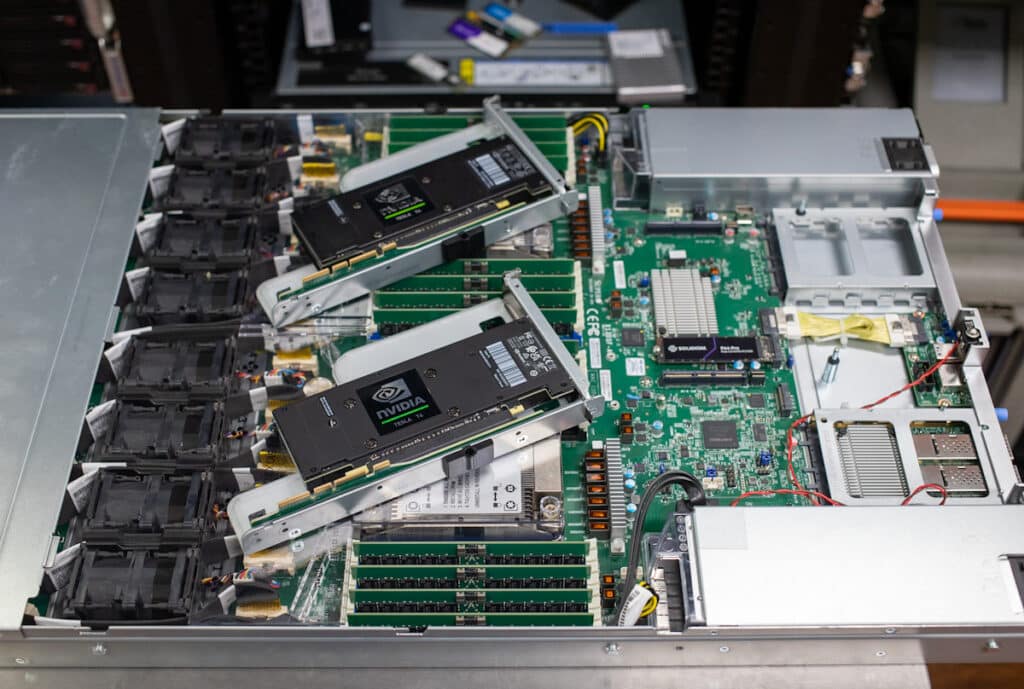
![AI Setup Guide base platform]()

Our new favorite inferencing box

### AI Setup Guide – Keeping it Consistent

Since implementing this standard base image for my AI and ML projects, I have seen remarkable improvements in efficiency repeatability and productivity. The well-structured and comprehensive environment has significantly reduced the time I spend on setting up and troubleshooting various servers and workstations that we test on. Since part of our work with AI is to help with testing and reviewing new platforms, the repeatability ensures that we can consistently reproduce our results, strengthening the validity and reliability of our findings.

One particularly noteworthy outcome of adopting this standard has been the transformation of Kevin. Before the introduction of this baseline, Kevin had to bear the brunt of all the work, often single-handedly dealing with the chaos caused by conflicting libraries and mismatched tool versions.

However, since the introduction of the standardized base image, Kevin has been able to delegate more tasks and focus on what really matters – like finding the perfect office chair. It seems that both Kevin and I have finally discovered the secret to a harmonious and efficient AI development environment. Now, Kevin can finally enjoy his morning coffee without having to worry about how he is going to fix the latest compatibility crisis I created overnight.

This guide is designed to be versatile, catering to various needs and preferences. Whether you’re an IT professional looking to create a standardized base image for deployment across your organization, or an individual developer seeking to set up a clean and efficient AI development environment, this guide provides the essential steps and insights as to why you may or may not need a particular tool to achieve your goal. By following the outlined steps, you’ll be well-equipped to create a robust, repeatable, and reliable foundation for your AI and machine learning projects.

### Steps for Getting a Base Clean Environment for Working with AI

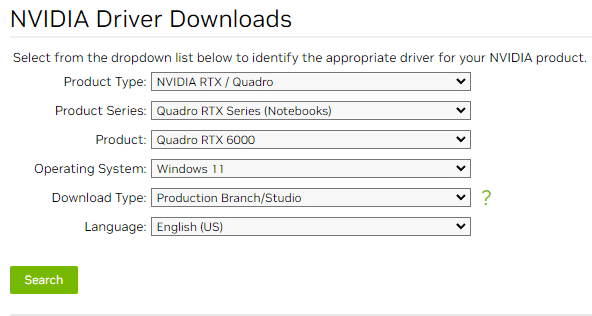
1. [Install proper NVIDIA Drivers](https://www.nvidia.com/download/index.aspx) for your card(s): To utilize the full potential of your GPU for AI tasks, it’s essential to install the proper NVIDIA drivers. These drivers enable communication between the GPU and the OS, ensuring optimal performance and stability.

![]()

Select the proper options for your system.

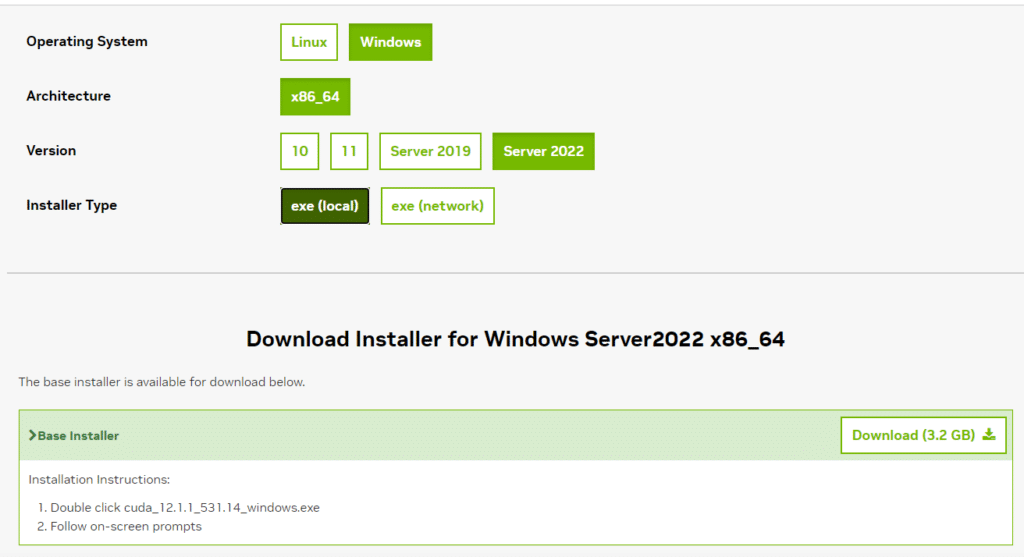
2. Install [NVIDIA CUDA Toolkit](https://developer.nvidia.com/cuda-toolkit): The NVIDIA CUDA Toolkit is a parallel computing platform and programming model that allows developers to utilize the power of NVIDIA GPUs for general-purpose computing tasks, including AI and deep learning applications. By installing the CUDA Toolkit, you can leverage the GPU’s capabilities for faster, more efficient AI development.

![]()

We are assuming you are also using windows.

**Why is the NVIDIA CUDA Toolkit important?**

It provides a comprehensive development environment that includes GPU-accelerated libraries, debugging and optimization tools, and a programming model that makes it easier to write and maintain GPU code.

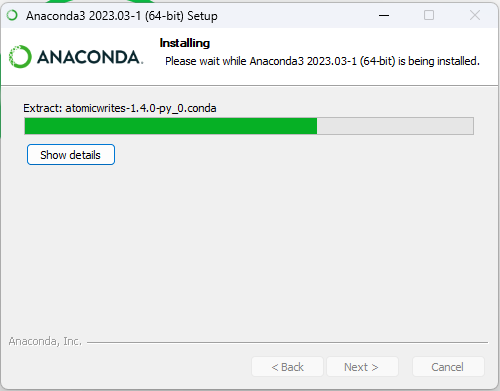
3. Install [Anaconda](https://www.anaconda.com/download/): Anaconda is a popular distribution of Python and R programming languages, focused on data science and machine learning. It comes preloaded with a wide range of essential libraries and tools for AI development, such as NumPy, pandas, TensorFlow, and PyTorch.

![]()

It’s an installer! Yay!

**Why is Anaconda important?**

Anaconda simplifies the process of setting up and managing different programming environments, making it easier to work with various AI frameworks and libraries without compatibility issues.

Anaconda environments are a powerful feature that allows you to create isolated spaces for different projects, each with its own unique set of libraries and packages. These environments help maintain the cleanliness and organization of your development workspace, as they prevent conflicts between dependencies of different projects. For someone like me, who is prone to installing an excessive number of Python packages, Anaconda environments are a lifesaver – they save me from turning my Python base environment into a nightmarish hodgepodge of conflicting libraries.

The use of Anaconda environments is essential for efficient AI development, as it enables developers to manage and switch between multiple projects effortlessly. This is particularly important when working with AI frameworks and libraries, which often have specific version requirements and dependencies.

By keeping your projects separate and self-contained, Anaconda environments allow you to indulge in your love for Python packages without sacrificing stability and reproducibility. They promote best practices in development, ensuring that your AI projects remain organized, reliable, and easy to collaborate on, all while keeping your sanity intact.

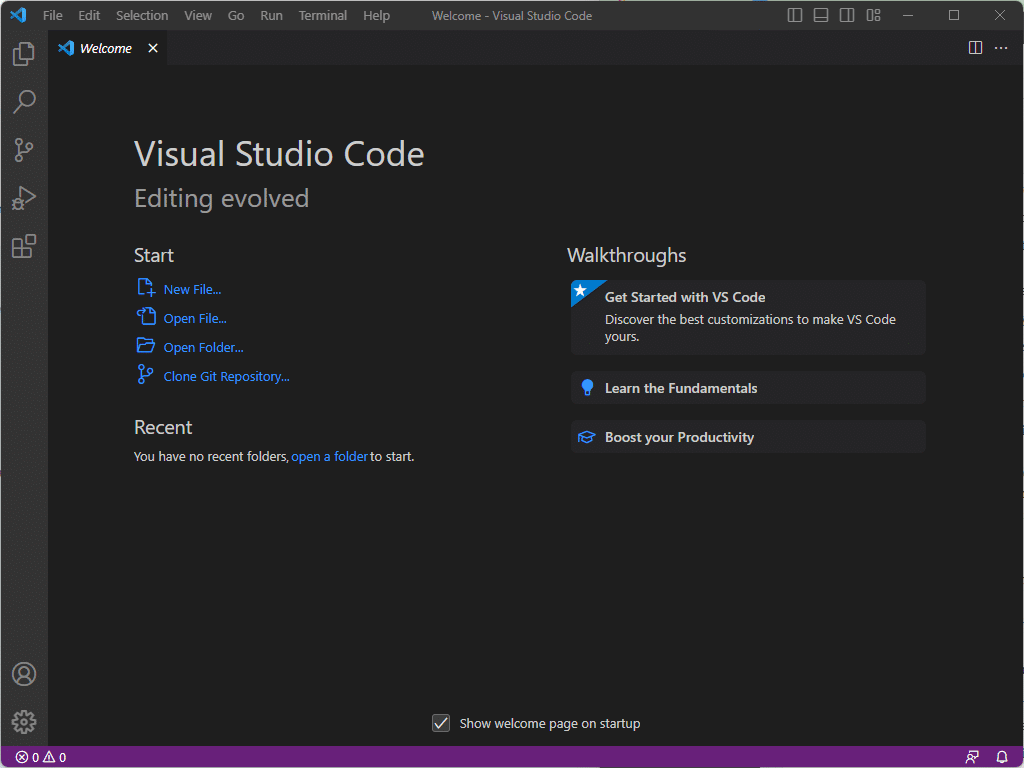
4. Install [Visual Studio Code](https://code.visualstudio.com/) and [Visual Studio 2022 Community](https://visualstudio.microsoft.com/vs/community/): Visual Studio Code (VSCode) and Visual Studio 2022 Community are two powerful integrated development environments (IDEs) for AI development. Both IDEs offer advanced code editing, debugging, and collaboration features, making it easier to write, test, and share your AI projects.

![]()

Dark mode by default, this is the way.

**Why are these IDEs important, and what are their differences?**

VSCode is a lightweight, cross-platform IDE with a vast ecosystem of extensions, making it highly customizable and suitable for various programming languages and frameworks. In contrast, Visual Studio 2022 Community is a more feature-rich, Windows-only IDE that provides additional tools and services, such as built-in support for Git version control and Microsoft Azure integration.

Depending on your specific needs and preferences, you may find it advantageous to have both IDEs installed on your system for greater flexibility. Note, if you don’t elect to go with the path of using Visual Studio Community, you will want to install Git, we like [Git for Windows](https://gitforwindows.org/).

5. Install [Jupyter Notebook:](https://jupyter.org/install) Jupyter Notebook is a web-based interactive computing environment that allows you to create and share documents containing live code, equations, visualizations, and narrative text. It is widely used in data science and machine learning for experimentation, visualization, and collaboration.

Install JupyterLab in your Anaconda environment with `pip` like this:  
`pip install jupyterlab`

**Why is Jupyter Notebook important?**

It enables you to rapidly prototype and share your AI projects, making it easier to collaborate with others and iterate on your work.

6. Install [TensorBoard](https://www.tensorflow.org/tensorboard/get_started): TensorBoard is a visualization tool for TensorFlow that helps you understand, debug, and optimize your AI models. It provides various visualizations and metrics that can aid in the development and tuning of deep learning models.

###### Why is TensorBoard important?

It offers valuable insights into the training process of your AI models, allowing you to track progress, identify issues, and make data-driven decisions on how to improve your models.

7. Install [MLflow](https://mlflow.org/docs/latest/tutorials-and-examples/tutorial.html): MLflow is an open-source platform for managing the end-to-end machine learning lifecycle, including experimentation, reproducibility, and deployment. It provides a centralized system for tracking experiments, storing artifacts, and deploying models.

###### Why is MLflow important?

It streamlines the machine learning workflow by enabling you to manage and organize your experiments, share results, and deploy models more efficiently. This makes it easier to collaborate with teammates and ensure that your AI projects are consistent and reproducible.

### Parting Thoughts

Supplementing your own standard suite of software for office and security, these tools and packages can create a comprehensive base image for deployment within a subset of an organization, providing a strong foundation for AI and ML development. This base image is particularly useful for organizations that are just beginning to explore AI and ML capabilities, as it ensures that the necessary tools and frameworks are readily available for developers to start working with right away.

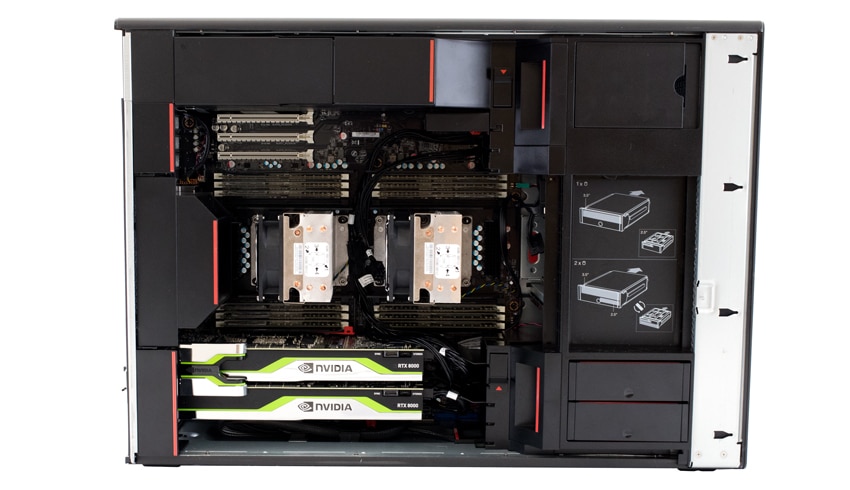
![Lenovo ThinkStation P920 open]()

This is one of our main development systems, that inspired this article.

It is well known that standardizing the development environment with a base image can greatly benefit organization, as it streamlines the setup process. With todays blistering fast evolving and changing AI landscape it is even more important to reduce potential compatibility issues among different AI frameworks and libraries. While at the time of writing, these are some of the most popular go-to set of tools and packages, it is important to keep up to date with the latest trends.

While this base install provides a broad and dynamic environment, developers still have the flexibility to customize their workspace based on their specific needs and projects. They can easily add or remove libraries, frameworks, and tools as required, tailoring their development environment to the unique challenges and objectives of their AI and ML projects. It will be key to balance between standardization and customization ensures that your organization can effectively and efficiently harness the power of AI and ML to drive innovation and success.


**Engage with StorageReview**

[Newsletter](https://www.storagereview.com/storage_newsletter) |  [YouTube](https://www.youtube.com/user/StorageReview "Opens in a new window") | Podcast  [iTunes](https://podcasts.apple.com/gb/podcast/storagereview-com-storage-reviews/id1060681115 "Opens in a new window")/ [Spotify](https://open.spotify.com/show/1y6VnznABhHeOSMOmbDTz0 "Opens in a new window") |  [Instagram](https://www.instagram.com/storagereview/ "Opens in a new window") |  [Twitter](https://twitter.com/storagereview "Opens in a new window") |  [TikTok](https://www.tiktok.com/@storagereview? "Opens in a new window") |  [RSS Feed](https://www.storagereview.com/rss.xml)

![]()

### Jordan Ranous

AI Specialist; navigating you through the world of Enterprise AI. Writer and Analyst for Storage Review, coming from a background of Financial Big Data Analytics, Datacenter Ops/DevOps, and CX Analytics. Pilot, Astrophotographer, LTO Tape Guru, and Battery/Solar Enthusiast.

Previous post: [Lexar ARES RGB DDR5 Review](https://www.storagereview.com/review/lexar-ares-rgb-ddr5-review)

Next post: [Anker PowerHouse 555 Portable Power Station Review](https://www.storagereview.com/review/anker-powerhouse-555-portable-power-station-review)

Trusted Vendors

Products and solutions from our affiliate partners:

- [  
  ![Ubiquiti Logo]()  
   Ubiquiti](https://store.ui.com/us/en?a_aid=StorageReview "Opens in a new window")
- [  
  ![Newegg Logo]()  
   Newegg](https://click.linksynergy.com/fs-bin/click?id=g5terNMDhz0&offerid=1207190.18&subid=0&type=4 "Opens in a new window")
- [  
  ![Amazon Logo]() Amazon](https://amzn.to/4fLJUEW "Opens in a new window")

Newsletter

Subscribe to the StorageReview newsletter to stay up to date on the latest news and reviews. We promise no spam!

1  

Leave this field empty if you’re human:

## Advertisement

Content Categories

[Facebook](https://www.facebook.com/@storagereview) [X](https://twitter.com/storagereview) [Instagram](https://www.instagram.com/storagereview/) [LinkedIn](https://www.linkedin.com/company/storagereview-com) [YouTube](https://www.youtube.com/user/storagereview?sub_confirmation=1) [Email](mailto:info@storagereview.com) [Spotify](https://open.spotify.com/show/1y6VnznABhHeOSMOmbDTz0) [Reddit](https://www.reddit.com/r/StorageReview/) [Discord](https://discord.gg/TwMHb4azdC) [RSS](https://www.storagereview.com/rss.xml) [TikTok](https://www.tiktok.com/@storagereview)

Copyright © 1998-2025 Flying Pig Ventures, LLC Cincinnati, Ohio. All rights reserved.

Manage your privacy

To provide the best experiences, we and our partners use technologies like cookies to store and/or access device information. Consenting to these technologies will allow us and our partners to process personal data such as browsing behavior or unique IDs on this site and show (non-) personalized ads. Not consenting or withdrawing consent, may adversely affect certain features and functions.

Click below to consent to the above or make granular choices. Your choices will be applied to this site only. You can change your settings at any time, including withdrawing your consent, by using the toggles on the Cookie Policy, or by clicking on the manage consent button at the bottom of the screen.

Functional Functional Always active

The technical storage or access is strictly necessary for the legitimate purpose of enabling the use of a specific service explicitly requested by the subscriber or user, or for the sole purpose of carrying out the transmission of a communication over an electronic communications network.

Preferences Preferences

The technical storage or access is necessary for the legitimate purpose of storing preferences that are not requested by the subscriber or user.

Statistics Statistics

The technical storage or access that is used exclusively for statistical purposes. The technical storage or access that is used exclusively for anonymous statistical purposes. Without a subpoena, voluntary compliance on the part of your Internet Service Provider, or additional records from a third party, information stored or retrieved for this purpose alone cannot usually be used to identify you.

Marketing Marketing

The technical storage or access is required to create user profiles to send advertising, or to track the user on a website or across several websites for similar marketing purposes.

Statistics

Marketing

Features

Always active

Always active

- Manage options
- Manage services
- Manage {vendor\_count} vendors
- [Read more about these purposes](https://cookiedatabase.org/tcf/purposes/)

Accept Deny Manage options Save preferences Manage options

- {title}
- {title}
- {title}

Manage your privacy

To provide the best experiences, we use technologies like cookies to store and/or access device information. Consenting to these technologies will allow us to process data such as browsing behavior or unique IDs on this site. Not consenting or withdrawing consent, may adversely affect certain features and functions.

Functional Functional Always active

The technical storage or access is strictly necessary for the legitimate purpose of enabling the use of a specific service explicitly requested by the subscriber or user, or for the sole purpose of carrying out the transmission of a communication over an electronic communications network.

Preferences Preferences

The technical storage or access is necessary for the legitimate purpose of storing preferences that are not requested by the subscriber or user.

Statistics Statistics

The technical storage or access that is used exclusively for statistical purposes. The technical storage or access that is used exclusively for anonymous statistical purposes. Without a subpoena, voluntary compliance on the part of your Internet Service Provider, or additional records from a third party, information stored or retrieved for this purpose alone cannot usually be used to identify you.

Marketing Marketing

The technical storage or access is required to create user profiles to send advertising, or to track the user on a website or across several websites for similar marketing purposes.

Statistics

Marketing

Features

Always active

Always active

- Manage options
- Manage services
- Manage {vendor\_count} vendors
- [Read more about these purposes](https://cookiedatabase.org/tcf/purposes/)

Accept Deny Manage options Save preferences Manage options

- {title}
- {title}
- {title}

Manage consent Manage consent

```json
{"@context":"https:\/\/schema.org","@graph":[{"@type":"WebPage","@id":"https:\/\/www.storagereview.com\/review\/the-storage-review-bare-bones-ai-setup-guide","url":"https:\/\/www.storagereview.com\/review\/the-storage-review-bare-bones-ai-setup-guide","name":"The Storage Review Bare-Bones AI Setup Guide - StorageReview.com","isPartOf":{"@id":"https:\/\/www.storagereview.com\/#website"},"primaryImageOfPage":{"@id":"https:\/\/www.storagereview.com\/review\/the-storage-review-bare-bones-ai-setup-guide#primaryimage"},"image":{"@id":"https:\/\/www.storagereview.com\/review\/the-storage-review-bare-bones-ai-setup-guide#primaryimage"},"thumbnailUrl":"https:\/\/www.storagereview.com\/wp-content\/uploads\/2023\/04\/StorageReview-Supermicro-SSG-121E-NES24R-2.jpg","datePublished":"2023-04-28T01:37:34+00:00","dateModified":"2023-05-02T14:00:56+00:00","description":"Check our latest AI Setup Guide tuned to help get organizations up to speed quickly with our learnings over the last many months.","breadcrumb":{"@id":"https:\/\/www.storagereview.com\/review\/the-storage-review-bare-bones-ai-setup-guide#breadcrumb"},"inLanguage":"en-US","potentialAction":[{"@type":"ReadAction","target":["https:\/\/www.storagereview.com\/review\/the-storage-review-bare-bones-ai-setup-guide"]}]},{"@type":"ImageObject","inLanguage":"en-US","@id":"https:\/\/www.storagereview.com\/review\/the-storage-review-bare-bones-ai-setup-guide#primaryimage","url":"https:\/\/www.storagereview.com\/wp-content\/uploads\/2023\/04\/StorageReview-Supermicro-SSG-121E-NES24R-2.jpg","contentUrl":"https:\/\/www.storagereview.com\/wp-content\/uploads\/2023\/04\/StorageReview-Supermicro-SSG-121E-NES24R-2.jpg","width":1200,"height":808,"caption":"Our new favorite inferencing box."},{"@type":"BreadcrumbList","@id":"https:\/\/www.storagereview.com\/review\/the-storage-review-bare-bones-ai-setup-guide#breadcrumb","itemListElement":[{"@type":"ListItem","position":1,"name":"Home","item":"https:\/\/www.storagereview.com\/"},{"@type":"ListItem","position":2,"name":"Review","item":"https:\/\/www.storagereview.com\/review"},{"@type":"ListItem","position":3,"name":"The Storage Review Bare-Bones AI Setup Guide"}]},{"@type":"WebSite","@id":"https:\/\/www.storagereview.com\/#website","url":"https:\/\/www.storagereview.com\/","name":"StorageReview.com","description":"StorageReview.com is a leading provider of news and reviews throughout the entire IT stack - from the datacenter to the edge, and all points in between.","publisher":{"@id":"https:\/\/www.storagereview.com\/#organization"},"potentialAction":[{"@type":"SearchAction","target":{"@type":"EntryPoint","urlTemplate":"https:\/\/www.storagereview.com\/?s={search_term_string}"},"query-input":{"@type":"PropertyValueSpecification","valueRequired":true,"valueName":"search_term_string"}}],"inLanguage":"en-US"},{"@type":"Organization","@id":"https:\/\/www.storagereview.com\/#organization","name":"StorageReview.com","url":"https:\/\/www.storagereview.com\/","logo":{"@type":"ImageObject","inLanguage":"en-US","@id":"https:\/\/www.storagereview.com\/#\/schema\/logo\/image\/","url":"https:\/\/www.storagereview.com\/wp-content\/uploads\/2020\/02\/Storage-Reviews-2-2.png","contentUrl":"https:\/\/www.storagereview.com\/wp-content\/uploads\/2020\/02\/Storage-Reviews-2-2.png","width":344,"height":61,"caption":"StorageReview.com"},"image":{"@id":"https:\/\/www.storagereview.com\/#\/schema\/logo\/image\/"},"sameAs":["https:\/\/x.com\/storagereview","http:\/\/youtube.com\/user\/storagereview"]}]}
```