

Zapewnienie bezpieczeństwa serwera NAS ma kluczowe znaczenie dla ochrony cennych danych przed cyberzagrożeniami w dzisiejszym cyfrowym świecie. Konsekwencje naruszenia bezpieczeństwa systemu, takie jak kradzież tożsamości, straty finansowe czy szkody wizerunkowe, mogą być poważne. Postępując zgodnie z tymi kompleksowymi wytycznymi bezpieczeństwa, użytkownicy mogą zminimalizować ryzyko infekcji złośliwym oprogramowaniem, nieautoryzowanych prób dostępu i ataków ransomware, wykorzystując dostępne możliwości w celu utrzymania integralności ekosystemu NAS. W tym artykule wykorzystamy serwer NAS firmy QNAP, aby zilustrować proces zabezpieczania serwera NAS.
1) Wyłącz domyślne loginy i zaktualizuj oprogramowanie układowe
Ogólnie rzecz biorąc, rozwiązania NAS mogą osiągnąć akceptowalny poziom bezpieczeństwa, stosując się do dwóch podstawowych zasad. Po pierwsze, i to jest kluczowe, należy unikać używania domyślnych danych logowania administratora/hasła, które są dołączone do urządzenia NAS. Często jest to pierwszy (i jedyny) atak wykorzystywany w celu uzyskania nieautoryzowanego dostępu. Wyłączenie domyślnego logowania i utworzenie nowych, silnych danych logowania administratora znacznie zmniejsza ryzyko nieautoryzowanego dostępu.
Po drugie, regularne aktualizowanie oprogramowania układowego NAS jest niezbędne do naprawy znanych luk w zabezpieczeniach. Dostępne są opcje automatycznego przeprowadzania tych aktualizacji, więc po stronie klienta nie ma to dużego znaczenia. Utrzymywanie aktualnego oprogramowania układowego NAS jest kluczowe dla zapobiegania dużej liczbie ataków złośliwego oprogramowania i ransomware. Więcej na ten temat omówimy w dalszej części artykułu. QNAP umożliwia użytkownikom łatwą zmianę/dezaktywację kont logowania i oferuje opcję włączenia automatycznych aktualizacji oprogramowania układowego.
Przestrzeganie tych dwóch fundamentalnych zasad jest kluczowe dla ochrony niezliczonych systemów NAS. Takie podejście ochroni wiele z tych urządzeń przed potencjalnymi zagrożeniami bezpieczeństwa i zwiększy ogólne bezpieczeństwo ekosystemu NAS.
Oprócz tych podstawowych praktyk, istnieje kilka bardziej kompleksowych kroków, które można podjąć, aby jeszcze bardziej zwiększyć bezpieczeństwo NAS. W dobie coraz bardziej zaawansowanego złośliwego oprogramowania, zaawansowanych technik hakerskich i uporczywych ataków siłowych, niezwykle ważne jest zachowanie jak największej staranności podczas zabezpieczania NAS. Przyjrzyjmy się szczegółowo tym zaawansowanym praktykom.
2) Silne hasła i uwierzytelnianie dwuetapowe
Silne hasła i włączenie uwierzytelniania dwuetapowego dla wszystkich kont użytkowników są również kluczowe w zapobieganiu nieautoryzowanym próbom dostępu. Zaleca się wdrożenie polityki haseł w organizacjach i firmach, która będzie egzekwować następujące zasady:
- Stosowanie skomplikowanych haseł
- Regularne zmiany hasła
Wdrażając silne hasła i włączając uwierzytelnianie dwuetapowe, użytkownicy mogą wzmocnić bezpieczeństwo swoich urządzeń NAS. QNAP oferuje funkcje, które z łatwością ułatwiają te środki bezpieczeństwa. Aplikacja QNAP Authenticator oferuje wiele opcji logowania do serwera NAS, takich jak jednorazowe hasła czasowe (z których można korzystać offline), skanowanie kodów QR, zatwierdzanie logowania oraz kody weryfikacyjne online. Dodatkowo, istnieje możliwość dostępu do systemu NAS bez użycia hasła. Skanując kod QR lub zatwierdzając prośbę o zalogowanie, można bez problemu zalogować się do serwera NAS.
3) Ochrona dostępu IP zapobiega atakom siłowym
Atak siłowy polega na tym, że intruz próbuje wielu kombinacji logowania, używając różnych nazw użytkowników i haseł, aby uzyskać nieautoryzowany dostęp do serwera NAS. Ta metoda wymaga wytrwałości i mocy obliczeniowej atakującego, aby przełamać słabe dane logowania, co podkreśla wagę silnych, unikalnych haseł i dodatkowych środków bezpieczeństwa, takich jak blokady kont.
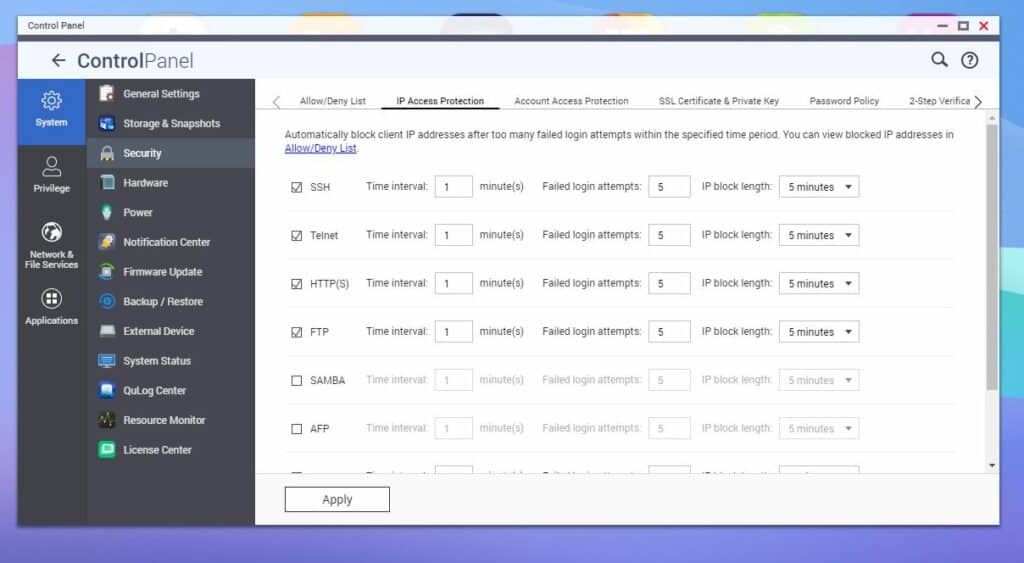
Włączenie ochrony dostępu IP firmy QNAP pomaga aktywnie zabezpieczyć się przed tym problemem, ponieważ umożliwia skonfigurowanie blokad kont, które zostaną aktywowane po określonej liczbie nieudanych prób logowania.
Aby uzyskać dostęp do tej funkcji z Panelu sterowania, przejdź do System > Zabezpieczenia , a następnie kliknij Ochrona dostępu IP u góry. W tym miejscu możesz zmienić interwał czasowy i dostosować dozwolone nieudane próby logowania dla różnych typów połączeń.
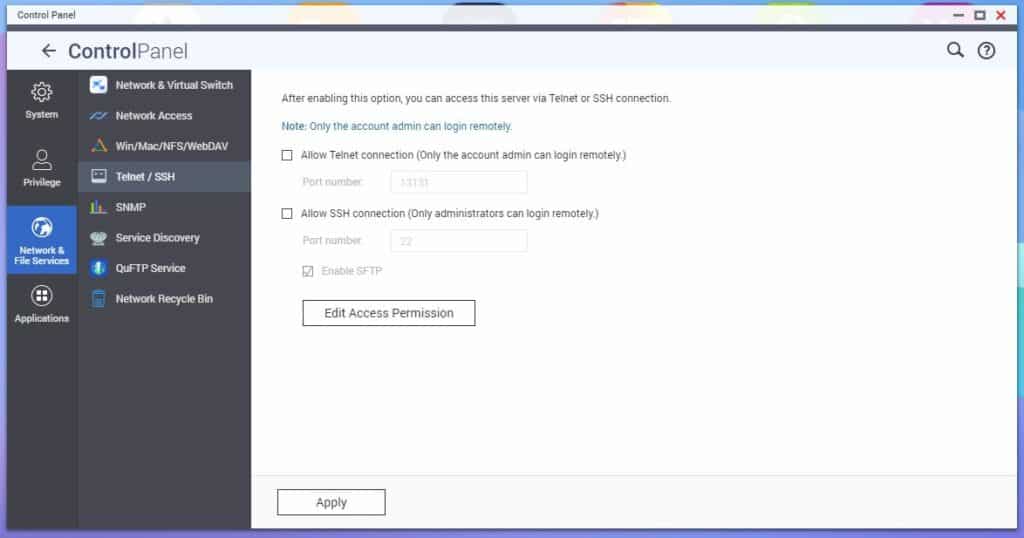
Mimo to wyłączenie nieużywanych usług, takich jak SSH (popularny protokół sieciowy umożliwiający zdalny dostęp do systemów, nawet przez niezabezpieczone sieci) i Telnet (inny protokół zdalnego dostępu, w którym użytkownicy korzystają z interfejsu wiersza poleceń systemu ze zdalnej lokalizacji) minimalizuje potencjalne punkty wejścia dla atakujących.
Można tę funkcję wyłączyć na serwerze QNAP NAS w sekcji Usługi sieciowe i pliki > Telnet/SSH.
4) Bezpieczeństwo portu
Jeśli nie posiadasz zaawansowanej wiedzy z zakresu bezpieczeństwa sieci, unikaj włączania ręcznego lub automatycznego przekierowywania portów oraz konfiguracji strefy zdemilitaryzowanej (DMZ). Brak doświadczenia może prowadzić do błędnych konfiguracji, narażając serwer NAS na zagrożenia zewnętrzne. Ponadto należy unikać używania domyślnych numerów portów, które są często celem ataków, takich jak 433 i 8080.
Zdalny dostęp do serwera NAS jest łatwy dzięki usłudze myQNAPcloud firmy QNAP i nie wymaga otwierania żadnych portów. To najbezpieczniejszy i najprostszy sposób zdalnego dostępu do serwera NAS.
5) Włącz migawki, aby szybko tworzyć kopie zapasowe i odzyskiwać dane
Migawki odgrywają kluczową rolę w strategiach ochrony i odzyskiwania danych. Stanowią one kopię (lub obraz) systemu plików/przechowywanych danych w danym momencie. Jest to szczególnie przydatne w przypadku ataków ransomware, które pozwalają użytkownikom łatwo i szybko odzyskać dane i przywrócić ich poprzedni stan.
Blokowe migawki QNAP oferują wydajny sposób tworzenia kopii zapasowych danych, rejestrując tylko zmiany od ostatniej migawki, co zmniejsza zapotrzebowanie na pamięć masową i skraca czas tworzenia kopii zapasowych. Funkcja ta pozwala użytkownikom szybko przywrócić dane do poprzedniego, nienaruszonego stanu, niwelując ryzyko ataku ransomware. Funkcja replikacji migawek umożliwia bezproblemową replikację migawek na innym serwerze NAS QNAP, zapewniając redundancję kopii zapasowych.
Czasami ransomware jest programowany do ciągłego zapisywania danych, aby zmaksymalizować wpływ i szkody wyrządzone systemowi NAS ofiary. Ostatecznym celem jest wywołanie większej paniki i poczucia pilności, skłaniając wielu użytkowników do szybkiego zapłacenia okupu. Ta technika pomaga również hakerom omijać zabezpieczenia systemu poprzez ukrywanie wzorców szyfrowania, naśladowanie legalnych modyfikacji plików i generowanie dużego ruchu sieciowego.
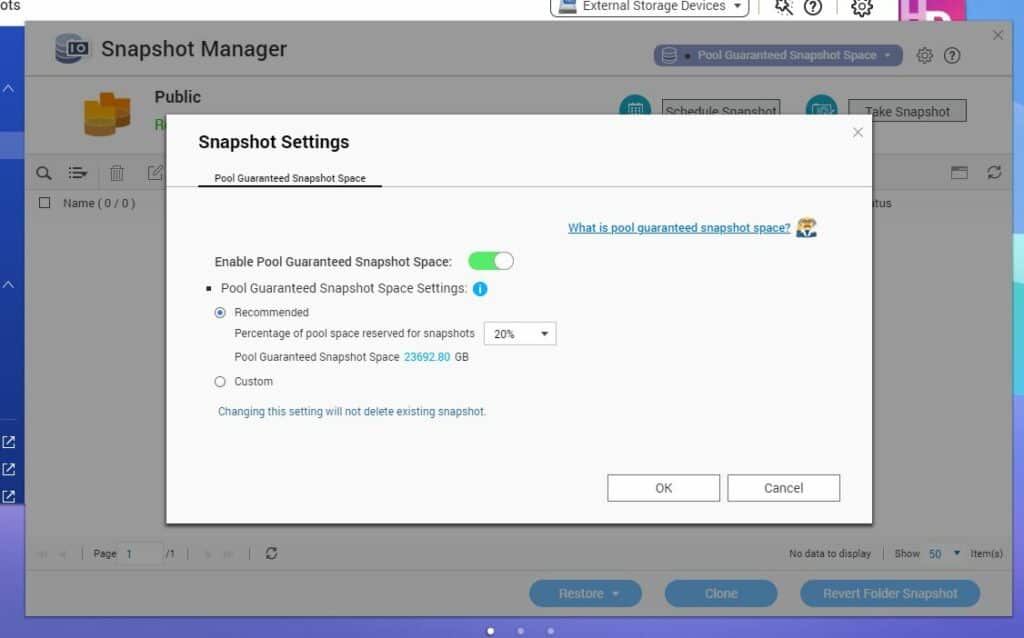
Funkcja rezerwowej przestrzeni na migawki firmy QNAP (Pool Guaranteed Snapshot Space) rozwiązuje ten problem poprzez rezerwowanie dedykowanej przestrzeni dyskowej na migawki, zapobiegając awariom spowodowanym niewystarczającą pojemnością.
Aby uzyskać dostęp do tej funkcji, przejdź do ustawień „Magazyn i migawki” , a następnie do sekcji „Magazyn/Migawki” w menu „Magazyn” . Następnie wybierz wolumin gruby lub cienki albo jednostkę LUN, a następnie kliknij opcję „Migawka” i wybierz „Menedżer migawek” . W Menedżerze migawek kliknij przycisk „Zagwarantowana przestrzeń na migawki w puli” w prawym górnym rogu okna i kliknij „Konfiguruj” . Aktywuj opcję „Włącz gwarantowaną przestrzeń na migawki w puli”, a następnie określ żądaną ilość zarezerwowanego miejsca. Zatwierdź wszystko, klikając „OK”.
6) Wdrożenie solidnego planu odzyskiwania po awarii
Katastrofy, takie jak awarie sprzętu, klęski żywiołowe czy nieprzewidziane zdarzenia, stanowią poważne ryzyko dla rozwiązań NAS, mogąc skutkować trwałą utratą lub uszkodzeniem danych. Zaleca się wdrożenie kompleksowego planu odzyskiwania po awarii, aby zapewnić integralność i dostępność danych przechowywanych w ekosystemie NAS.
Dywersyfikacja lokalizacji kopii zapasowych pomaga zminimalizować ryzyko utraty danych i zwiększa ich odporność na awarie sprzętowe, a nawet w przypadku katastrof. Różnorodne przestrzenie dyskowe obejmują między innymi:
- inne urządzenia NAS
- zdalne serwery
- usługi w chmurze
- jednostki rozszerzające pamięć masową
- Zewnętrzne dyski twarde
Firma QNAP zajęła się kwestią różnorodności kopii zapasowych, wdrażając zasadę „3-2-1” dotyczącą tworzenia kopii zapasowych danych, czyli usługę QNAP Hybrid Backup Sync , która zdecydowanie zaleca użytkownikom przechowywanie wielu kopii danych na różnych typach nośników i w oddzielnych lokalizacjach w celu zmaksymalizowania ochrony przed tego typu utratą danych.
Ogólna zasada 3-2-1 dotycząca tworzenia kopii zapasowych obejmuje następujące elementy:
- Utrzymać trzy kopie Twoich danych,
- przechowywane w co najmniej drugiej różne rodzaje mediów,
- w pierwszej kopia zapisana poza siedzibą.
7) Automatyczne aktualizacje oprogramowania układowego i aplikacji
Włączenie funkcji automatycznej aktualizacji oprogramowania sprzętowego jest kluczowe dla utrzymania bezpieczeństwa i wydajności serwera NAS. Jak wspomniano powyżej, samo aktualizowanie oprogramowania sprzętowego zapobiega wielu łatwym atakom.
Oto kilka sposobów, w jaki zaktualizowane oprogramowanie sprzętowe może pomóc w zabezpieczeniu serwera NAS.
- Naprawianie luk w zabezpieczeniachAktualizacje oprogramowania sprzętowego usuwają znane luki w zabezpieczeniach systemu operacyjnego i sprzętu, uszczelniając potencjalne luki w zabezpieczeniach, które atakujący mogą wykorzystać do uzyskania nieautoryzowanego dostępu lub zaszyfrowania plików.
- Ulepszone funkcje bezpieczeństwaAktualizacje oprogramowania sprzętowego często wprowadzają nowe funkcje bezpieczeństwa lub ulepszają istniejące, wzmacniając ogólne bezpieczeństwo serwera NAS. Te ulepszenia utrudniają atakującym włamanie się do danych i systemów NAS.
- Wykrywanie i zapobieganie najnowszemu złośliwemu oprogramowaniu:Włączając funkcję automatycznej aktualizacji, Twój serwer NAS może automatycznie instalować aktualizacje oprogramowania układowego i aplikacji, w tym zaawansowane funkcje bezpieczeństwa, które wykrywają i zapobiegają najnowszym atakom złośliwego oprogramowania. Zmniejsza to potrzebę ręcznych aktualizacji, zapewniając jednocześnie, że Twój serwer NAS jest zawsze na bieżąco z najnowszymi poprawkami zabezpieczeń, poprawkami błędów i udoskonaleniami.
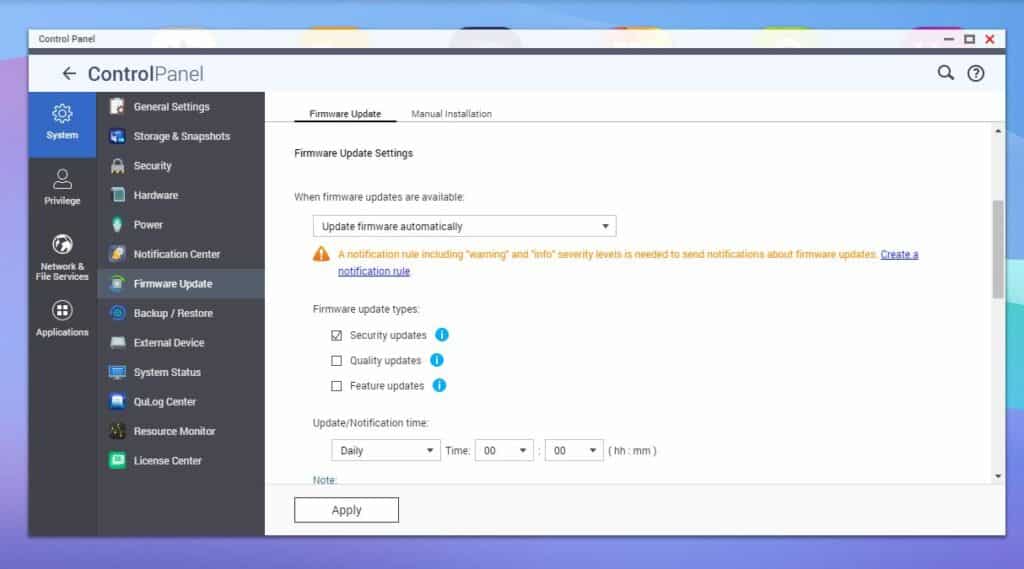
QNAP oferuje łatwy sposób włączenia tej funkcji z Panelu sterowania. Przejdź do sekcji Aktualizacja oprogramowania układowego i wybierz opcję Automatyczna aktualizacja oprogramowania układowego w Ustawieniach aktualizacji oprogramowania układowego . Dostępna jest nawet opcja wyboru typu automatycznej aktualizacji oprogramowania układowego.
8) Aplikacje zabezpieczające
Aplikacje zabezpieczające NAS, dostępne za pośrednictwem internetowego systemu operacyjnego urządzenia oraz w sklepie z aplikacjami NAS, zapewniają dodatkową ochronę i wzmacniają bezpieczeństwo rozwiązań NAS. Aplikacje te oferują specjalistyczne funkcje, takie jak skanowanie w poszukiwaniu luk w zabezpieczeniach, usuwanie złośliwego oprogramowania, alerty bezpieczeństwa w czasie rzeczywistym oraz funkcje zapory sieciowej, zapewniając kompleksową ochronę systemu przed potencjalnymi słabościami i zagrożeniami. Korzystając z tych dedykowanych aplikacji zabezpieczających, użytkownicy mogą znacząco zwiększyć ogólne bezpieczeństwo swojego NAS-a.
Dostępny za pośrednictwem systemu operacyjnego QTS, QNAP App Center to kompleksowe repozytorium oferujące szereg dedykowanych aplikacji zabezpieczających, które zwiększają ogólną ochronę Twojego serwera NAS. Oto niektóre z nich:
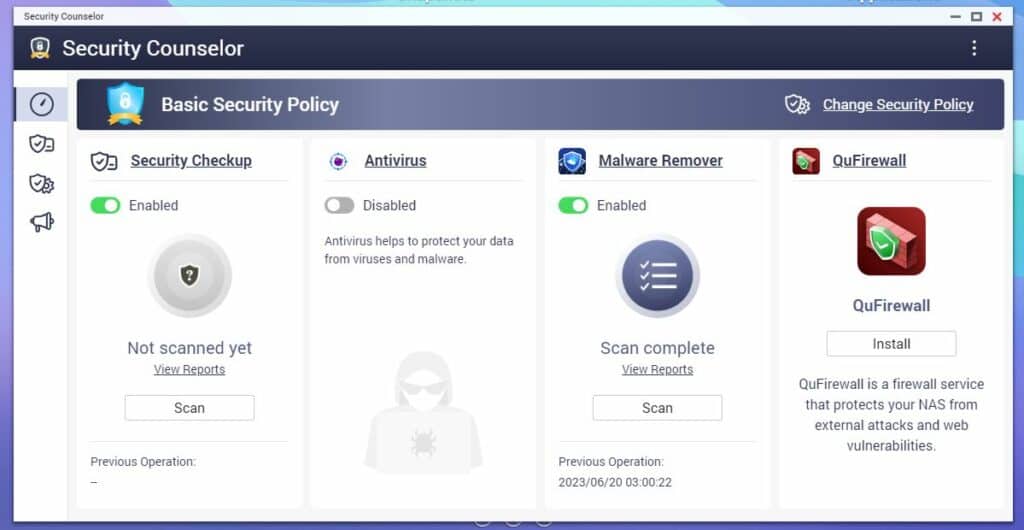
- Doradca ds. bezpieczeństwaQNAP Security Counselor to kompleksowe rozwiązanie zabezpieczające dla urządzeń NAS QNAP, obejmujące skanowanie w poszukiwaniu luk w zabezpieczeniach, usuwanie złośliwego oprogramowania oraz alerty bezpieczeństwa w czasie rzeczywistym, zapewniające ochronę systemu. Oferuje praktyczne rekomendacje i proaktywne środki w celu wyeliminowania potencjalnych luk i zagrożeń, zwiększając ogólne bezpieczeństwo NAS.
- QuFirewall:QNAP QuFirewall to solidna aplikacja zapory sieciowej przeznaczona dla urządzeń QNAP NAS, oferująca szczegółową kontrolę ruchu sieciowego w celu zwiększenia bezpieczeństwa NAS. Umożliwia definiowanie profili ruchu i kontrolę dostępu. Aplikacja oferuje również funkcje takie jak przekierowanie portów, ochrona przed atakami DDoS, blokowanie adresów IP oraz kompleksowe funkcje rejestrowania i monitorowania w celu wykrywania i reagowania na podejrzaną aktywność sieciową.
Wniosek
Chociaż Twoje dane nigdy nie są w 100% bezpieczne, przestrzeganie tych najlepszych praktyk znacząco wzmocni architekturę bezpieczeństwa Twojego systemu NAS. Wdrażając kompleksowy fundament, wykorzystując technologię migawek do tworzenia kopii zapasowych i przywracania danych, tworząc plan odzyskiwania po awarii (taki jak strategia tworzenia kopii zapasowych 3-2-1 firmy QNAP), będąc na bieżąco z aktualizacjami oprogramowania sprzętowego i aplikacji oraz korzystając z dedykowanych aplikacji zabezpieczających, możesz skutecznie chronić swoje najważniejsze dane i zachować integralność ekosystemu NAS.


 Amazon