---
description: The LaCie 1big Dock is a great Thunderbolt 3 storage hub. It is highlighted by its built-in CF and SD card slots and ample storage
title: LaCie 1big Dock Review
image: https://www.storagereview.com/wp-content/uploads/2020/08/AEV_3837.jpg
---
[![Storage Review]()](https://storagereview.com/)
---
[Facebook](https://www.facebook.com/@storagereview) [X (Twitter)](https://twitter.twitter.com/storagereview) [Instagram](https://www.instagram.com/storagereview/) [LinkedIn](https://www.linkedin.com/company/storagereview-com) [YouTube](https://www.youtube.com/user/storagereview?sub_confirmation=1) [Email](mailto:info@storagereview.com) [Spotify](https://open.spotify.com/show/1y6VnznABhHeOSMOmbDTz0) [Reddit](https://www.reddit.com/r/StorageReview/) [Discord](https://discord.gg/TwMHb4azdC) [RSS Feed](https://www.storagereview.com/rss.xml) [TikTok](https://www.tiktok.com/@storagereview)
[Facebook](https://www.facebook.com/@storagereview) [X (Twitter)](https://twitter.com/storagereview) [Instagram](https://www.instagram.com/storagereview/) [LinkedIn](https://www.linkedin.com/company/storagereview-com) [YouTube](https://www.youtube.com/user/storagereview?sub_confirmation=1) [Email](mailto:info@storagereview.com) [Spotify](https://open.spotify.com/show/1y6VnznABhHeOSMOmbDTz0) [Reddit](https://www.reddit.com/r/StorageReview/) [Discord](https://discord.gg/TwMHb4azdC) [RSS Feed](https://www.storagereview.com/rss.xml) [TikTok](https://www.tiktok.com/@storagereview)
[](https://www.storagereview.com)
≡ Menu
- [Home](https://www.storagereview.com/)
- [Storage Reviews](https://www.storagereview.com/review)
- [End User Reviews](https://www.storagereview.com/consumer)
- [Enterprise Reviews](https://www.storagereview.com/enterprise)
- [Ubiquiti Reviews](https://www.storagereview.com/best/ubiquiti-reviews)
- [SR Merch](https://store.storagereview.com)
- [Leaderboards](https://www.storagereview.com/best)
- [Best Storage Arrays](https://www.storagereview.com/best/storage-arrays)
- [Best Enterprise SSDs](https://www.storagereview.com/best/enterprise-ssds)
- [Best Servers](https://www.storagereview.com/best/servers)
- [Best Enterprise GPUs](https://www.storagereview.com/best/enterprise-gpus)
- [Best Desktops for Local AI](https://www.storagereview.com/best/desktops-local-ai)
- [Best Laptops for Local AI](https://www.storagereview.com/best/laptops-local-ai)
- [Best Local LLM Tools](https://www.storagereview.com/best/local-llm-tools)
- [Agentic AI Hardware](https://www.storagereview.com/best/agentic-ai-hardware)
- [Best SSDs & Hard Drives](https://www.storagereview.com/best_drives)
- [Best Portable SSDs](https://www.storagereview.com/best/portable-ssds)
- [Best Business Laptops](https://www.storagereview.com/best/business-laptops)
- [Best Mobile Workstations](https://www.storagereview.com/best/mobile-workstations)
- [Best Desktop Workstations](https://www.storagereview.com/best/desktop-workstations)
- [Best Mini PCs](https://www.storagereview.com/best/mini-pcs)
- [Best Laptop Battery Life](https://www.storagereview.com/best/laptop-battery-life)
- [Storage Reference Guide](https://www.storagereview.com/storage-reference-guide)
- [About SR](https://www.storagereview.com/about-storagereview)
- [StorageReview.com Sweepstakes Rules and Regulations](https://www.storagereview.com/storagereview-com-sweepstakes-rules-and-regulations)
Search
[Home](https://www.storagereview.com/) » [Review](https://www.storagereview.com/review) » LaCie 1big Dock Review
# LaCie 1big Dock Review
by Lyle Smith on October 1, 2020
[Desktop Storage (External)](https://www.storagereview.com/consumer/desktop-storage-external) ◇ [End User](https://www.storagereview.com/consumer)
The LaCie 1big Dock is a desktop storage solution specifically designed for creative professionals and prosumers who need to streamline and optimize their workflows and perhaps their workspaces as well. Available in 4TB, 8TB, and 16TB HDD capacities, the LaCie 1big Dock is highlighted by its ability to store and back up large amounts of footage and other data, charge phones and USB devices, connect to 4K monitors, daisy-chain additional drives, and even power laptops. It is able to do all of this using Thunderbolt 3 connectivity via a single cable.
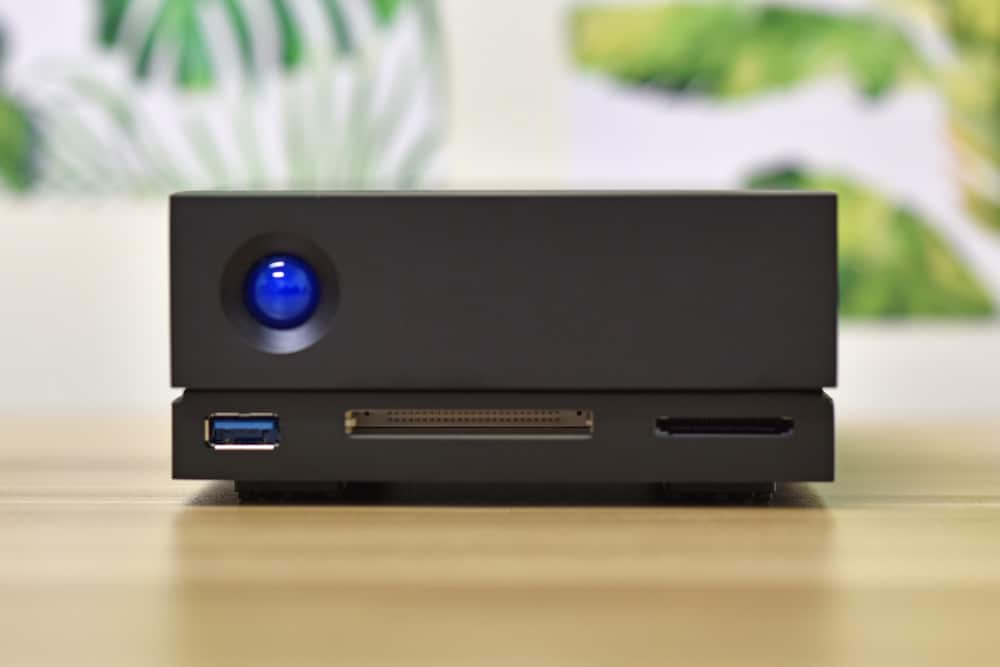
From a design perspective, photographers will definitely find a lot to love with the LaCie 1big dock. In this type of profession, a range of hardware is required to properly and effectively do your job, which certainly can create a cluttered workspace. The 1big, however, acts as a single piece of hardware to potentially replace a lot of your devices while still having DP out and TB3 passthrough.
For example, the LaCie solution features a wide range of connectivity, including an SD card slot, CompactFlash slot, a USB 3.0 port, a DisplayPort 1.4, and dual Thunderbolt 3 ports. This adds a ton of flexibility to the device and eliminates the need for excess cables, dongles, and adapters. Creative professionals like photographers and enthusiasts have pretty much everything they need in a multi-functional media hub with this complete LaCie package.
The 1big Dock also can deliver up to 45W of power to a laptop or 30W when daisy-chaining compatible devices, the latter which is further improved by LaCie’s new Power Pass-Through technology. Those who need to daisy-chain can receive up to 80W from the 1big via the laptop’s USB-C power cable.
Backed by a standard 5-year warranty, the LaCie 1big comes bundled with Rescue Data Recovery Services and a complimentary 1-month Adobe Creative Cloud All-Apps plan. The former is the company’s file recovery plan, which can help retrieve lost data from unforeseen events like accidental file deletions, viruses, damaging malware, power surges, and water damage. LaCie indicates that all causes of data loss are covered claiming a 90% success rate in recovery.
The LaCie 1big Dock is priced at roughly [$369 (4TB), $469 (8TB), and $679 (16TB)](https://amzn.to/3l2m235). We will be looking at the 16TB for this review.
## **LaCie 1big Dock Specifications**
| Capacity | 4TB, 8TB, **16TB** |
| --- | --- |
| RPM / SSD | 7200RPM |
| Read/Write Speed | - Up to 280MB/s read
- Up to 240MB/s write
|
| Interface | - Dual Thunderbolt 3
- DisplayPort 1.4
- USB 3.0
- SD/CF card slots
|
| Works With | - Thunderbolt 1, 2, 3
- USB-C, USB 3.0
|
| Inc. Cables & Adapters | |
| Dimensions | - Length (in/mm): 4.646in/118mm
- Width (in/mm): 2.217in/56.3mm
- Depth (in/mm): 8.543in/217mm
- Weight (lb/kg): 3.748lb/1.7kg
|
| Warranty and Rescue | 5 years |
| Rescue Data Recovery Services | 5 years |
## **LaCie 1big Dock Design and Build**
The LaCie 1big Dock has a really nice polygonal build and almost looks like a small video game console when sitting nicely next to your workstation. It features a metal chassis and weighs in at roughly 3.8 pounds (similar to a light-weight Ultrabook laptop), making it very easy to move around the office/home or transport in a backpack. On-the-go professionals will certainly appreciate that.
![LaCie 1big DOCK back (connected at scale)]()
The front of the 1big Dock features a range of connectivity: the USB 3.0 Hub, which charges devices like mobile phones (5W power output) and is used to connect to devices like shuttle drives and digital cameras to transfer files; and the CompactFlash (CF)/Secure Digital (SDXC) slots, which are used to read their respective memory card types. On the left is the status LED, which indicates if the device is powered on and provides users with status signals.
The right side houses the hard drive tray, which is very easy to use. Simply push on the small hole on the right side of the disk tray and gently pull towards you. Once the drive bay unlocks and disconnects from the SATA connector, slide the drive out. You’ll need a Phillips head screwdriver to unfasten all four screws from their four slots to swap drives.
The populated drive that ships with the 1big are the [Seagate IronWolf Pro](https://www.storagereview.com/review/seagate-ironwolf-pro-16tb-nas-hdd-review), a NAS HDD purpose-built for designed for 24×7 performance. We reviewed this drive and found it to offer strong performance.
Moving on to the rear panel reveals the rest of the connectivity. Along the bottom are the two Thunderbolt 3 ports. The left one is a host-port, which connects to a Thunderbolt 3 or USB 3.1 port on the host computer. The other is a peripheral port, which allows users to connect compatible devices and displays including daisy-chaining multiple Thunderbolt devices. It is also used to connect a laptop’s USB-C power supply, which delivers up to 80W to the laptop connected to the host port.
Also on the back panel is the power input, DisplayPort, sleep button, Kensington lock port, and a firmware update button.
![LaCie 1big DOCK SSD PRO back]()
We’ve seen many docks have feature more ports than the LaCie 1big, but this is meant as a nice quick, and easy solution for accessing a large HDD and a display. It certainly succeeds in this.
![LaCie 1big DOCK inside]()
There is one annoying design flaw that’s worth mentioning: as you can see in the image below and above, the 1big doesn’t have a rubber isolator or bumpers between the drive, caddy, and case. This means that the drive can get pretty noisy at times, especially during random workloads. Users should take note of this in case they require a solution that is quiet 24/7 no matter the activity on the drive.
![LaCie 1big DOCK sides with no rubber]()
## **LaCie 1big Dock Performance**
To gauge the performance of the LaCie 1big Dock, we tested it via Blackmagic on a gen-1 MacBook Air and IOMeter on a [Lenovo ThinkCentre M90n Nano](https://www.storagereview.com/review/lenovo-thinkcentre-m90n-nano-review).
In Blackmagic, the 1big recorded 245.1MB/s read and 241.6MB/s write. Though it didn’t quite meet its quoted read speeds, it did surpass the expected write performance.
![]() For IOMeter, we first looked at 2MB sequential with both 1 and 4 thread, the latter which is a higher load that pushes the drive a bit more. For 1 thread, the LaCie 1big Dock reached 122.4MB/s read and 121.3MB/s write, while random performance hit 136.6MB/s read and 131.9MB/s write. Looking at random 4K, the LaCie 1big Dock posted speeds of 169 IOPS read and 150 IOPS write.
Looking at a 4-thread workload, the LaCie 1big Dock showed 243.7MB/s read and 240.9MB/s write in 2MB sequential test, while 2MB random posted 170.5MB/s read and 163.8MB/s write. In random 4K performance, the LaCie 1big Dock recorded 327 IOPS read and 264 IOPS write.
## **Conclusion**
The LaCie 1big Dock is a great Thunderbolt 3 storage hub. It is highlighted by its built-in CF and SD card slots for quick transfer of files between cameras and other digital recording devices and allows users to connect two 4K displays, daisy-chain their devices, and charge laptops via 80W of power.
Not only does a single 1big replace several different devices users need to do their job, but it does all this through a single cable, allowing for easy cord-management around your workspace. The LaCie solution also features a slick-looking design with advanced-cooling technology and supports enterprise-class drives that are meant for 24×7 environments, which promotes reliability and longevity of user data.
![]()
Performance-wise, the 1big recorded a decent 245.1MB/s read and 241.6MB/s write in our BlackMagic test. For IOMeter 1 thread transfer speeds, the LaCie storage solution reached 122.4MB/s read and 121.3MB/s write, while random performance hit 136.6MB/s read and 131.9MB/s write. Looking at random 4K, the LaCie 1big Dock posted speeds of 169 IOPS read and 150 IOPS write. In a 4-thread workload, the LaCie 1big Dock showed 243.7MB/s read and 240.9MB/s write in 2MB sequential test, while 2MB random posted 170.5MB/s read and 163.8MB/s write. In random 4K performance, the LaCie 1big Dock recorded 327 IOPS read and 264 IOPS write.
Minor quibbles aside (e.g., the noise under heavy writes), there is a lot to like with the LaCie 1big Dock. It’s a cool piece of technology that is ideal for photographers who need a single piece of hardware to replace their external HDDs, card readers, and laptop chargers while still having a DisplayPort out and TB3 passthrough.
Those dealing with a more performance-oriented workload might want to use an SSD with this dock. But for those with a capacity need, this is certainly a great all-in-one option that is ideal for photographers or other professionals who move a lot of files around using a range of different storage devices.
[LaCie 1big Dock on Amazon](https://amzn.to/3l2m235)
**Engage with StorageReview**
[Newsletter](https://www.storagereview.com/storage_newsletter) | [YouTube](https://www.youtube.com/user/StorageReview "Opens in a new window") | Podcast [iTunes](https://podcasts.apple.com/gb/podcast/storagereview-com-storage-reviews/id1060681115 "Opens in a new window")/ [Spotify](https://open.spotify.com/show/1y6VnznABhHeOSMOmbDTz0 "Opens in a new window") | [Instagram](https://www.instagram.com/storagereview/ "Opens in a new window") | [Twitter](https://twitter.com/storagereview "Opens in a new window") | [TikTok](https://www.tiktok.com/@storagereview? "Opens in a new window") | [RSS Feed](https://www.storagereview.com/rss.xml)
![]()
### Lyle Smith
Lyle is a writer for StorageReview, covering a broad set of end user and enterprise IT topics.
Previous post: [SanDisk Extreme Pro Portable SSD V2 Review](https://www.storagereview.com/review/sandisk-extreme-pro-portable-ssd-v2-review)
Next post: [NetApp AFF C190 Review](https://www.storagereview.com/review/netapp-aff-c190-review)
Trusted Vendors
Products and solutions from our affiliate partners:
- [

Ubiquiti
](https://store.ui.com/us/en?a_aid=StorageReview "Opens in a new window")
- [

Newegg
](https://click.linksynergy.com/fs-bin/click?id=g5terNMDhz0&offerid=1207190.18&subid=0&type=4 "Opens in a new window")
- [
 Amazon
](https://amzn.to/4fLJUEW "Opens in a new window")
Newsletter
Subscribe to the StorageReview newsletter to stay up to date on the latest news and reviews. We promise no spam!
1
Leave this field empty if you’re human:
## Advertisement
Content Categories
[Facebook](https://www.facebook.com/@storagereview) [X](https://twitter.com/storagereview) [Instagram](https://www.instagram.com/storagereview/) [LinkedIn](https://www.linkedin.com/company/storagereview-com) [YouTube](https://www.youtube.com/user/storagereview?sub_confirmation=1) [Email](mailto:info@storagereview.com) [Spotify](https://open.spotify.com/show/1y6VnznABhHeOSMOmbDTz0) [Reddit](https://www.reddit.com/r/StorageReview/) [Discord](https://discord.gg/TwMHb4azdC) [RSS](https://www.storagereview.com/rss.xml) [TikTok](https://www.tiktok.com/@storagereview)
Copyright © 1998-2025 Flying Pig Ventures, LLC Cincinnati, Ohio. All rights reserved.
Manage your privacy
To provide the best experiences, we and our partners use technologies like cookies to store and/or access device information. Consenting to these technologies will allow us and our partners to process personal data such as browsing behavior or unique IDs on this site and show (non-) personalized ads. Not consenting or withdrawing consent, may adversely affect certain features and functions.
Click below to consent to the above or make granular choices. Your choices will be applied to this site only. You can change your settings at any time, including withdrawing your consent, by using the toggles on the Cookie Policy, or by clicking on the manage consent button at the bottom of the screen.
Functional Functional Always active
The technical storage or access is strictly necessary for the legitimate purpose of enabling the use of a specific service explicitly requested by the subscriber or user, or for the sole purpose of carrying out the transmission of a communication over an electronic communications network.
Preferences Preferences
The technical storage or access is necessary for the legitimate purpose of storing preferences that are not requested by the subscriber or user.
Statistics Statistics
The technical storage or access that is used exclusively for statistical purposes. The technical storage or access that is used exclusively for anonymous statistical purposes. Without a subpoena, voluntary compliance on the part of your Internet Service Provider, or additional records from a third party, information stored or retrieved for this purpose alone cannot usually be used to identify you.
Marketing Marketing
The technical storage or access is required to create user profiles to send advertising, or to track the user on a website or across several websites for similar marketing purposes.
Statistics
Marketing
Features
Always active
Special features
Special purposes
Always active
- Manage options
- Manage services
- Manage {vendor\_count} vendors
- [Read more about these purposes](https://cookiedatabase.org/tcf/purposes/)
Accept Deny Manage options Save preferences Manage options
- {title}
- {title}
- {title}
Manage your privacy
To provide the best experiences, we use technologies like cookies to store and/or access device information. Consenting to these technologies will allow us to process data such as browsing behavior or unique IDs on this site. Not consenting or withdrawing consent, may adversely affect certain features and functions.
Functional Functional Always active
The technical storage or access is strictly necessary for the legitimate purpose of enabling the use of a specific service explicitly requested by the subscriber or user, or for the sole purpose of carrying out the transmission of a communication over an electronic communications network.
Preferences Preferences
The technical storage or access is necessary for the legitimate purpose of storing preferences that are not requested by the subscriber or user.
Statistics Statistics
The technical storage or access that is used exclusively for statistical purposes. The technical storage or access that is used exclusively for anonymous statistical purposes. Without a subpoena, voluntary compliance on the part of your Internet Service Provider, or additional records from a third party, information stored or retrieved for this purpose alone cannot usually be used to identify you.
Marketing Marketing
The technical storage or access is required to create user profiles to send advertising, or to track the user on a website or across several websites for similar marketing purposes.
Statistics
Marketing
Features
Always active
Special features
Special purposes
Always active
- Manage options
- Manage services
- Manage {vendor\_count} vendors
- [Read more about these purposes](https://cookiedatabase.org/tcf/purposes/)
Accept Deny Manage options Save preferences Manage options
- {title}
- {title}
- {title}
Manage consent Manage consent
```json
{"@context":"https:\/\/schema.org","@graph":[{"@type":"WebPage","@id":"https:\/\/www.storagereview.com\/review\/lacie-1big-dock-review","url":"https:\/\/www.storagereview.com\/review\/lacie-1big-dock-review","name":"LaCie 1big Dock Review - StorageReview.com","isPartOf":{"@id":"https:\/\/www.storagereview.com\/#website"},"primaryImageOfPage":{"@id":"https:\/\/www.storagereview.com\/review\/lacie-1big-dock-review#primaryimage"},"image":{"@id":"https:\/\/www.storagereview.com\/review\/lacie-1big-dock-review#primaryimage"},"thumbnailUrl":"https:\/\/www.storagereview.com\/wp-content\/uploads\/2020\/08\/AEV_3837.jpg","datePublished":"2020-10-01T17:50:43+00:00","dateModified":"2020-10-01T17:50:59+00:00","description":"The LaCie 1big Dock is a great Thunderbolt 3 storage hub. It is highlighted by its built-in CF and SD card slots and ample storage","breadcrumb":{"@id":"https:\/\/www.storagereview.com\/review\/lacie-1big-dock-review#breadcrumb"},"inLanguage":"en-US","potentialAction":[{"@type":"ReadAction","target":["https:\/\/www.storagereview.com\/review\/lacie-1big-dock-review"]}]},{"@type":"ImageObject","inLanguage":"en-US","@id":"https:\/\/www.storagereview.com\/review\/lacie-1big-dock-review#primaryimage","url":"https:\/\/www.storagereview.com\/wp-content\/uploads\/2020\/08\/AEV_3837.jpg","contentUrl":"https:\/\/www.storagereview.com\/wp-content\/uploads\/2020\/08\/AEV_3837.jpg","width":1000,"height":668,"caption":"LaCie 1big DOCK SSD PRO plugged in at scale"},{"@type":"BreadcrumbList","@id":"https:\/\/www.storagereview.com\/review\/lacie-1big-dock-review#breadcrumb","itemListElement":[{"@type":"ListItem","position":1,"name":"Home","item":"https:\/\/www.storagereview.com\/"},{"@type":"ListItem","position":2,"name":"Review","item":"https:\/\/www.storagereview.com\/review"},{"@type":"ListItem","position":3,"name":"LaCie 1big Dock Review"}]},{"@type":"WebSite","@id":"https:\/\/www.storagereview.com\/#website","url":"https:\/\/www.storagereview.com\/","name":"StorageReview.com","description":"StorageReview.com is a leading provider of news and reviews throughout the entire IT stack - from the datacenter to the edge, and all points in between.","publisher":{"@id":"https:\/\/www.storagereview.com\/#organization"},"potentialAction":[{"@type":"SearchAction","target":{"@type":"EntryPoint","urlTemplate":"https:\/\/www.storagereview.com\/?s={search_term_string}"},"query-input":{"@type":"PropertyValueSpecification","valueRequired":true,"valueName":"search_term_string"}}],"inLanguage":"en-US"},{"@type":"Organization","@id":"https:\/\/www.storagereview.com\/#organization","name":"StorageReview.com","url":"https:\/\/www.storagereview.com\/","logo":{"@type":"ImageObject","inLanguage":"en-US","@id":"https:\/\/www.storagereview.com\/#\/schema\/logo\/image\/","url":"https:\/\/www.storagereview.com\/wp-content\/uploads\/2020\/02\/Storage-Reviews-2-2.png","contentUrl":"https:\/\/www.storagereview.com\/wp-content\/uploads\/2020\/02\/Storage-Reviews-2-2.png","width":344,"height":61,"caption":"StorageReview.com"},"image":{"@id":"https:\/\/www.storagereview.com\/#\/schema\/logo\/image\/"},"sameAs":["https:\/\/x.com\/storagereview","http:\/\/youtube.com\/user\/storagereview"]}]}
```