---
description: The Synology DiskStation DS3622xs+ is a large 12-bay NAS for business. While it includes 10GbE onboard, it is missing built-in M.2 SSD slots.
title: Synology DiskStation DS3622xs+ Review
image: https://www.storagereview.com/wp-content/uploads/2022/01/BB10C5EF-B03D-4386-BC6C-2F130AE58278.jpeg
---
[![Storage Review]()](https://storagereview.com/)
---
[Facebook](https://www.facebook.com/@storagereview) [X (Twitter)](https://twitter.twitter.com/storagereview) [Instagram](https://www.instagram.com/storagereview/) [LinkedIn](https://www.linkedin.com/company/storagereview-com) [YouTube](https://www.youtube.com/user/storagereview?sub_confirmation=1) [Email](mailto:info@storagereview.com) [Spotify](https://open.spotify.com/show/1y6VnznABhHeOSMOmbDTz0) [Reddit](https://www.reddit.com/r/StorageReview/) [Discord](https://discord.gg/TwMHb4azdC) [RSS Feed](https://www.storagereview.com/rss.xml) [TikTok](https://www.tiktok.com/@storagereview)
[Facebook](https://www.facebook.com/@storagereview) [X (Twitter)](https://twitter.com/storagereview) [Instagram](https://www.instagram.com/storagereview/) [LinkedIn](https://www.linkedin.com/company/storagereview-com) [YouTube](https://www.youtube.com/user/storagereview?sub_confirmation=1) [Email](mailto:info@storagereview.com) [Spotify](https://open.spotify.com/show/1y6VnznABhHeOSMOmbDTz0) [Reddit](https://www.reddit.com/r/StorageReview/) [Discord](https://discord.gg/TwMHb4azdC) [RSS Feed](https://www.storagereview.com/rss.xml) [TikTok](https://www.tiktok.com/@storagereview)
[](https://www.storagereview.com)
≡ Menu
- [Home](https://www.storagereview.com/)
- [Storage Reviews](https://www.storagereview.com/review)
- [End User Reviews](https://www.storagereview.com/consumer)
- [Enterprise Reviews](https://www.storagereview.com/enterprise)
- [Ubiquiti Reviews](https://www.storagereview.com/best/ubiquiti-reviews)
- [SR Merch](https://store.storagereview.com)
- [Leaderboards](https://www.storagereview.com/best)
- [Best Storage Arrays](https://www.storagereview.com/best/storage-arrays)
- [Best Enterprise SSDs](https://www.storagereview.com/best/enterprise-ssds)
- [Best Servers](https://www.storagereview.com/best/servers)
- [Best Enterprise GPUs](https://www.storagereview.com/best/enterprise-gpus)
- [Best Desktops for Local AI](https://www.storagereview.com/best/desktops-local-ai)
- [Best Laptops for Local AI](https://www.storagereview.com/best/laptops-local-ai)
- [Best Local LLM Tools](https://www.storagereview.com/best/local-llm-tools)
- [Agentic AI Hardware](https://www.storagereview.com/best/agentic-ai-hardware)
- [Best SSDs & Hard Drives](https://www.storagereview.com/best_drives)
- [Best Portable SSDs](https://www.storagereview.com/best/portable-ssds)
- [Best Business Laptops](https://www.storagereview.com/best/business-laptops)
- [Best Mobile Workstations](https://www.storagereview.com/best/mobile-workstations)
- [Best Desktop Workstations](https://www.storagereview.com/best/desktop-workstations)
- [Best Mini PCs](https://www.storagereview.com/best/mini-pcs)
- [Best Laptop Battery Life](https://www.storagereview.com/best/laptop-battery-life)
- [Storage Reference Guide](https://www.storagereview.com/storage-reference-guide)
- [About SR](https://www.storagereview.com/about-storagereview)
- [StorageReview.com Sweepstakes Rules and Regulations](https://www.storagereview.com/storagereview-com-sweepstakes-rules-and-regulations)
Search
[Home](https://www.storagereview.com/) » [Review](https://www.storagereview.com/review) » Synology DiskStation DS3622xs+ Review
# Synology DiskStation DS3622xs+ Review
by Charles P. Jefferies on February 1, 2022
[Enterprise](https://www.storagereview.com/enterprise) ◇ [Medium NAS](https://www.storagereview.com/enterprise/medium-nas)
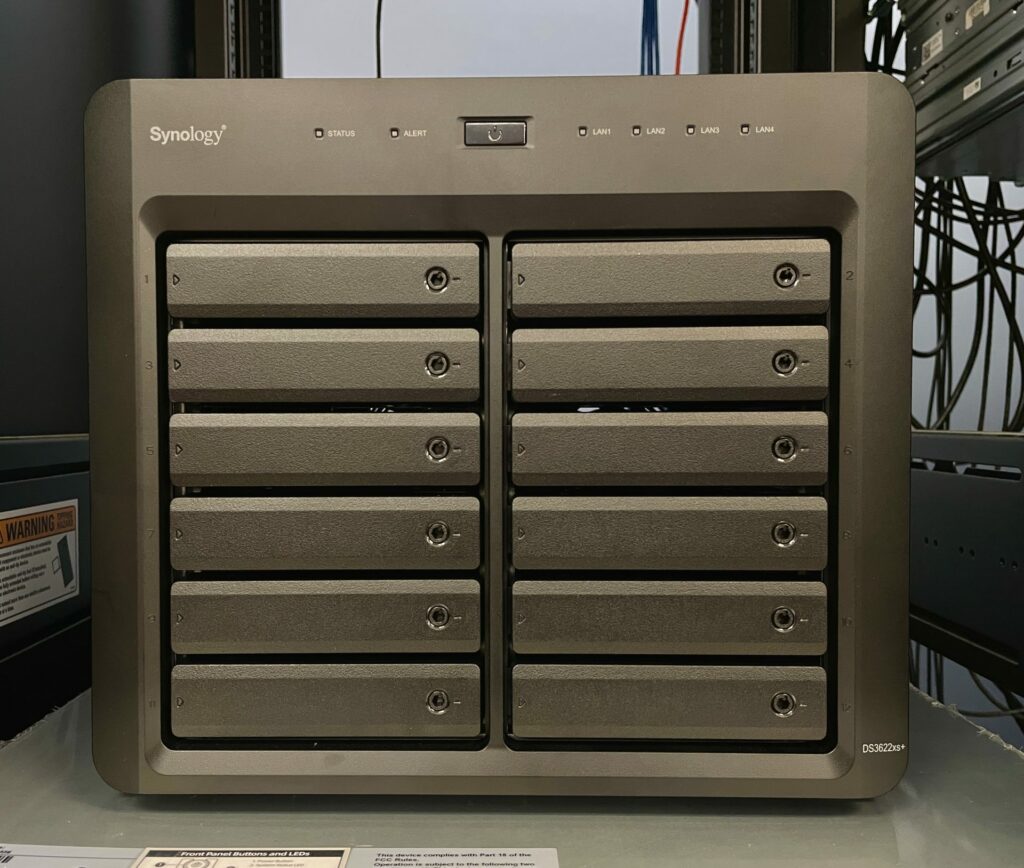
The Synology DiskStation DS3622xs+ is a large 12-bay NAS for business. While it includes 10GbE onboard, it is missing some components like built-in M.2 SSD slots. The DS3622xs+ is ultimately a strong contender though thanks to its expansion capability, OOB management, and Synology’s [DiskStation Manager OS](https://www.storagereview.com/review/synology-dsm-7-0-review) and app platform.
## **Synology DiskStation DS3622xs+ Specifications**
NAS units remain in high demand, especially at businesses that don’t want to or can’t for data locality/security reasons, pay a cloud subscription for storage or office services. That’s where a large NAS like the DiskStation DS3622xs+ comes in. This is Synology’s largest desktop NAS, offering 12 drive bays. It can be expanded to 36 bays by connecting two [DX1222 expansion units](https://www.synology.com/en-global/products/DX1222) (12 bays each).
This NAS checks the networking boxes with two 1GbE and two 10GbE LAN, plus one more for OOB management. It offers a PCIe slot for expansion; you can add a 25GbE LAN card or an M.2 carrier for SSD caching. See our review of the [Synology E10M20-T1 M.2 SSD & 10GbE Card](https://www.storagereview.com/review/synology-e10m20-t1-review).
Synology rates the DS3622xs+’s performance at up to 4,719MB/s sequential read and 260,691 4K random read IOPS, making this NAS suitable for demanding workloads. Its six-core Intel Xeon D-1531 (2.2GHz base, up to 2.7GHz Turbo Boost) helps it achieve those numbers, though calling that circa-2015 CPU outdated is kind. It’s coupled with a standard 16GB (2x8GB) of ECC So-DIMM RAM, which can be expanded to 48GB.
One of our main complaints with the DS3622xs+ is Synology’s insistence, though not a requirement, that you use their brand storage drives. They’re expensive — a 16TB Synology [SATA HDD HAT5300](https://www.synology.com/en-global/products/hard_drives/HAT5300) is $659 on Amazon, almost double the $369 to $379 you’d pay for a Seagate IronWolf Pro or Western Digital Red Pro NAS drive. Nothing prevents you from installing your own drives, though it is annoying that the DS3622xs+ throws a message if you use a non-whitelisted drive. (Synology told us it is going to make the message less severe.) The [DS3622xs+ is $2,999 without drives](https://amzn.to/3saz5ED) and backed by a five-year warranty.
Apps are a real strength for Synology NAS products. The DiskStation DS3622xs+ runs Synology’s [DiskStation Manager operating system](https://www.storagereview.com/review/synology-dsm-7-0-review) and is compatible with many Synology technologies, such as Synology Drive for private cloud support and Synology Surveillance Station, which allows you to connect up to 90 IP cameras. The DS3622xs+ can also be part of a failover cluster if it’s paired with another DS3622xs+ since it’s compatible with Synology’s High Availability.
Comparatively, QNAP’s similarly priced 12-bay TVS-h1688X offers stiff competition on paper. It’s powered by a newer Intel Xeon W-1250 CPU supporting up to 128GB of RAM, has better networking (two 2.5GbE and two 10GbE), two native M.2 PCIe Gen3 slots for SSD caching, an additional PCIe expansion slot (for a total of two), and four 2.5-inch bays alongside its 12 3.5-inch bays. This is definitely a net win for buyers, as there are a lot of options in the pre-build NAS world.
The DiskStation DS3622xs+’s full specifications are as follows:
| **CPU** | Intel Xeon D-1531 (6-core/12-thread, 2.2GHz base, 2.7GHz Turbo Boost) |
| --- | --- |
| **Memory** | - Included 16GB (2x 8GB) DDR4 ECC SODIMM
- 4 total slots support up to 48GB (2x 8GB + 2x 16GB).
|
| **Storage** | |
| *Drive Bays* | 12 |
| *Maximum Drive Bays with Expansion Unit* | 36 (DX1222 x 2) |
| *Compatible Drive Type* | - 3.5-inch SATA HDD
- 2.5-inch SATA HDD
- 2.5-inch SATA SSD
|
| *Supports Hot-Swappable Drive* | Yes |
| **External Ports** | |
| *RJ-45 1GbE LAN Port* | 2 (with Link Aggregation / Failover support) |
| *RJ-45 10GbE LAN Port* | 2 (with Link Aggregation / Failover support) |
| *Management LAN Port* | 1 |
| *USB 3.2 Gen 1 Port* | 2 |
| *Expansion Port* | 2 |
| **PCIe** | |
| *PCIe Expansion* | 1x Gen3 x8 slot (x8 link) |
| **File System** | |
| *Internal Drives* | |
| *External Drives* | - Btrfs
- EXT4
- EXT3
- FAT
- NTFS
- HFS+
- exFAT\*
\* exFAT Access can be installed for free from Package Center in DSM 7.0. In DSM 6.2 or earlier versions, exFAT Access needs to be purchased in Package Center. |
| **Appearance** | |
| *Size (HWD)* | 270 x 300 x 340mm (10.6 x 11.8 x 13.4 in) |
| Weight | 9.8kg (21.6 lbs) |
| **Others** | |
| *System Fan* | (2) 120x120mm fans |
| *Fan Speed Mode* | - Full-Speed Mode
- Cool Mode
- Quiet Mode
|
| *Easy Replacement System Fan* | Yes |
| *Power Recovery* | Yes |
| *Noise Level* | 25 dB(A) |
| *Scheduled Power On/Off* | Yes |
| *Wake on LAN/WAN* | Yes |
| *Power Supply Unit/Adapter* | 550W |
| *AC Input Power Voltage* | 100V to 240V AC |
| *Power Frequency* | 50/60Hz, Single Phase |
| *Power Consumption* | - 94.42W (Access)
- 54.33W (HDD Hibernation)
|
| *British Thermal Unit* | - 322.39 BTU/hr (Access)
- 185.51 BTU/hr (HDD Hibernation)
|
| **Certification** | - FCC
- CE
- BSMI
- VCCI
- RCM
- UKCA
- EAC
- KC
- UL
|
| **Warranty** | 5 years |
| **Packaging Content** | - Main Unit X 1
- Accessory Pack X 1
- AC Power Cord X 1
- RJ-45 LAN Cable X 2
- Quick Installation Guide X 1
|
| **Environment** | RoHS Compliant |
| **Optional Accessories** | - DDR4 ECC SODIMM: D4ES02-8G/D4ES01-16G
- Expansion Units: DX1222
- 3.5″ SATA HDD: HAT5300
- 2.5″ SATA SSD: SAT5210
- M.2 SSD & 10GbE Combo Adapter Card: E10M20-T1
- M.2 SSD Adapter Card: M2D20
- 25GbE Network Interface Card: E25G21-F2
- 10GbE Network Interface Card: E10G21-F2/E10G18-T2/E10G18-T1
- VisualStation: VS360HD
- Surveillance Device License Pack
|
## **Synology DiskStation DS3622xs+ Design and Build**
The DiskStation DS3622xs+ is a large desktop NAS. Its squarish, all-black design has Synology’s logos on either side. The 12 front 3.5-inch drive bays have locks, status LEDs, and support hot-swapping. Removing the drives is simple; they slide out once unlocked.
![Synology DiskStation DS3622xs+ Drive Removal]()
Below you can see one tray with a 16TB Synology HAT5300 SATA hard drive (left) and another with a 480GB [Synology SAT5200 SATA SSD](https://www.synology.com/en-global/products/solid_state_drives/SAT5200).
![Synology DiskStation DS3622xs+ with Synology Storage Drives]()
Along the top edge are status, alert, and LAN LEDs. The power button sits between them.
![Synology DiskStation DS3622xs+ Front Ports]()
Rear connectivity includes two USB 3.2 Gen 1 Type-A ports, a console (Serial) port, two expansion ports (used for connecting DX1222 expansion units), and the reset button. As mentioned, networking is good, with two 1GbE LAN, two 10GbE LAN, and one Ethernet jack for OOB management. The PCIe expansion slot cover is visible at the top right; it’s unpopulated in our unit but can be used for additional networking or M.2 caching, as noted.
![Synology DiskStation DS3622xs+ Rear Ports]()
The two 120mm cooling fans are also visible back here.
![Synology DiskStation DS3622xs+ Rear]()
Finally, the connector for the 550-watt power supply is at the lower left.
![Synology DiskStation DS3622xs+ Power Connector]()
## **Synology DiskStation DS3622xs+ Performance**
We are testing the DiskStation DS3622xs+ in two configurations:
- 16TB RAID6 (Synology Enterprise HAT5300 3.5-inch hard drives)
- 480GB RAID6 (Synology SAT5200 2.5-inch SATA SSDs)
We tested each disk configuration in SMB and iSCSI. We will be comparing the DS3622xs+ to Synology’s recently announced DiskStation [ DS2422+](https://www.storagereview.com/review/synology-diskstation-ds2422-review), which is similar to the DS3622xs+ but has only one expansion port, tops out with 1GbE networking (it still allows faster networking via PCIe expansion), uses a slower quad-core, 2.2GHz AMD Ryzen V1500B CPU, and comes with a three- instead of a five-year warranty.
**Enterprise Synthetic Workload Analysis**
Our enterprise shared storage and hard drive benchmark process preconditions each drive into steady-state with the same workload the device will be tested with under a heavy load of 16 threads with an outstanding queue of 16 per thread, and then tested in set intervals in multiple thread/queue depth profiles to show performance under light and heavy usage. Since NAS solutions reach their rated performance level very quickly, we only graph out the main sections of each test.
Preconditioning and Primary Steady-State Tests:
- Throughput (Read+Write IOPS Aggregate)
- Average Latency (Read+Write Latency Averaged Together)
- Max Latency (Peak Read or Write Latency)
- Latency Standard Deviation (Read+Write Standard Deviation Averaged Together)
Our Enterprise Synthetic Workload Analysis includes four profiles based on real-world tasks. These profiles have been developed to make it easier to compare to our past benchmarks as well as widely-published values such as max 4k read and write speed and 8k 70/30, which is commonly used for enterprise drives.
4K
- 100% Read or 100% Write
- 100% 4K
8K 70/30
- 70% Read, 30% Write
- 100% 8K
8K (Sequential)
- 100% Read or 100% Write
- 100% 8K
128K (Sequential)
- 100% Read or 100% Write
First up are the enterprise workloads, where we measure a long sample of random 4K performance with 100% write and 100% read activity. Here we saw the DS3622xs+’s performance scale to 244,115 read IOPS in SSD RAID6 iSCSI, or close enough to Synology’s claims. The DS2422+ wasn’t nearly as fast in that situation, achieving 81,238 IOPS. The DS3622xs+ also demonstrated much higher throughput than the DS2422+ when tested with hard drives.
![Synology DiskStation DS3622xs+ 4K Read Write Throughput]()
Next is 4K average latency. We saw lower latencies from the DS3622xs+ than we did from the DS2422+ in nearly all scenarios, as expected. With the 16TB Synology HDDs, the DS3622xs+’s read/write latencies averaged 720ms/31ms in SMB versus 783ms/109ms for the DS2422+ and 40ms/31ms in iSCSI versus 58ms/107ms.
![Synology DiskStation DS3622xs+ 4K Average Latency]()
Now we look at 4K max latency. Curiously, the DS3622xs+ generally showed higher max read latencies than the DS2422+, though its max write latencies were almost always lower.
![Synology DiskStation DS3622xs+ 4K Max Latency]()
The 4K standard deviation test is last. The DS3622xs+ performed almost universally better than the DS2422+.
![Synology DiskStation DS3622xs+ 4K Standard Deviation]()
We also look at mixed workload 70% read/30% write tests, which scale workloads from two threads, two queues to 16 threads, 16 queues. First up is 100% 8K sequential throughput. In the SSD configurations, the DS3622xs+ and the DS2422+ behave similarly up to about 4 threads/8 queue, after which the DS3622xs+ wasn’t caught again. It climbed past 100,000 IOPS around 16 threads/8 queue whereas the DS2422+’s performance flatlined around 8 threads/16 queue.
![Synology DiskStation DS3622xs+ 8K 70/30 Throughput]()
Next is 8K 70/30 average latency. The DS3622xs+ generally shows lower latency than the DS2422+ as it did in 4K average write latency.
![Synology DiskStation DS3622xs+ 8K 70/30 Average Latency]()
The results are similar in 8K 70/30 max latency, where the DS3622xs+ has lower numbers and smoother i.e., more consistent lines.
![Synology DiskStation DS3622xs+ 8K 70/30 Max Latency]()
Last in our mixed workload tests is 8K 70/30 standard deviation. The hard drive testing lines are hard to tell apart, but the DS3622xs+ manages lower (better) numbers than the DS2422+, a pattern that’s well established by now. Its stronger 6-core Xeon CPU is the main factor behind its superior performance.
![Synology DiskStation DS3622xs+ 8K 70/30 Standard Deviation]()
The last synthetic benchmark is our large block 128K sequential test which shows the highest sequential transfer speed for a device. Read numbers were predictably similar between the DS3622xs+ and the DS2422+, though the DS3622xs+ showed far better write performance. Using SSDs, it achieved 2.32GB/s read and 1.78GB/s write in SMB and 1.77GB/s read and 2.13GB/s write in iSCSI. Its hard drive numbers were 2.31GB/s read and 1.63GB/s write in SMB and 1.74GB/s read and 1.30GB/s write in iSCSI.
![Synology DiskStation DS3622xs+ 128K Throughput]()
### Conclusion
The DiskStation DS3622xs+ is a solid 12-bay NAS for business. Running Synology’s DiskStation Manager OS, it has extensive support for Synology’s app infrastructure and OOB management. It can be expanded to 36 drives via two 12-bay DX1222 expansion units and pairs with an identical unit for failover support. If you’re looking for a NAS that’s easy to set up and manage, Synology remains the industry’s benchmark.
We find it unfortunate that the DS3622xs+ does not have any built-in M.2 slots, which mandates Synology’s PCIe expansion card if you want SSD caching. We also aren’t happy how Synology’s storage drives are considerably more expensive than major brand NAS drives, though you can still install your own drives in this NAS. And though the DS3622xs+ performed well in our testing — it achieved 2.32GB/s read and 1.78GB/s write in our 128K sequential test when equipped with Synology’s 480GB SSDs in RAID6 — it relies on a CPU many generations old that could stand a refresh.
But it’s all about the package; the DS3622xs+’s capable hardware, expansion room, and all-important very deep app support makes it a strong contender for a business-friendly NAS that’s ready to roll out of the box.
[Synology DS3622xs+ at Amazon](https://amzn.to/3saz5ED)
**Engage with StorageReview**
[Newsletter](https://www.storagereview.com/storage_newsletter) | [YouTube](https://www.youtube.com/user/StorageReview "Opens in a new window") | Podcast [iTunes](https://podcasts.apple.com/gb/podcast/storagereview-com-storage-reviews/id1060681115 "Opens in a new window")/ [Spotify](https://open.spotify.com/show/1y6VnznABhHeOSMOmbDTz0 "Opens in a new window") | [Instagram](https://www.instagram.com/storagereview/ "Opens in a new window") | [Twitter](https://twitter.com/storagereview "Opens in a new window") | [TikTok](https://www.tiktok.com/@storagereview? "Opens in a new window") | [RSS Feed](https://www.storagereview.com/rss.xml)
![]()
### Charles P. Jefferies
I'm a lifelong technology enthusiast and have been reviewing consumer and enterprise technology since 2005. I specialize in laptops, tablets, and enterprise hardware. I'm a graduate of Rochester Institute of Technology. Outside of work, I love the gym, reading, and photography.
Previous post: [iStorage datAshur SD Review](https://www.storagereview.com/review/istorage-datashur-sd-review)
Next post: [WD BLACK SN770 SSD Review](https://www.storagereview.com/review/wd-black-sn770-ssd-review)
Trusted Vendors
Products and solutions from our affiliate partners:
- [

Ubiquiti
](https://store.ui.com/us/en?a_aid=StorageReview "Opens in a new window")
- [

Newegg
](https://click.linksynergy.com/fs-bin/click?id=g5terNMDhz0&offerid=1207190.18&subid=0&type=4 "Opens in a new window")
- [
 Amazon
](https://amzn.to/4fLJUEW "Opens in a new window")
Newsletter
Subscribe to the StorageReview newsletter to stay up to date on the latest news and reviews. We promise no spam!
1
Leave this field empty if you’re human:
## Advertisement
Content Categories
[Facebook](https://www.facebook.com/@storagereview) [X](https://twitter.com/storagereview) [Instagram](https://www.instagram.com/storagereview/) [LinkedIn](https://www.linkedin.com/company/storagereview-com) [YouTube](https://www.youtube.com/user/storagereview?sub_confirmation=1) [Email](mailto:info@storagereview.com) [Spotify](https://open.spotify.com/show/1y6VnznABhHeOSMOmbDTz0) [Reddit](https://www.reddit.com/r/StorageReview/) [Discord](https://discord.gg/TwMHb4azdC) [RSS](https://www.storagereview.com/rss.xml) [TikTok](https://www.tiktok.com/@storagereview)
Copyright © 1998-2025 Flying Pig Ventures, LLC Cincinnati, Ohio. All rights reserved.
Manage your privacy
To provide the best experiences, we and our partners use technologies like cookies to store and/or access device information. Consenting to these technologies will allow us and our partners to process personal data such as browsing behavior or unique IDs on this site and show (non-) personalized ads. Not consenting or withdrawing consent, may adversely affect certain features and functions.
Click below to consent to the above or make granular choices. Your choices will be applied to this site only. You can change your settings at any time, including withdrawing your consent, by using the toggles on the Cookie Policy, or by clicking on the manage consent button at the bottom of the screen.
Functional Functional Always active
The technical storage or access is strictly necessary for the legitimate purpose of enabling the use of a specific service explicitly requested by the subscriber or user, or for the sole purpose of carrying out the transmission of a communication over an electronic communications network.
Preferences Preferences
The technical storage or access is necessary for the legitimate purpose of storing preferences that are not requested by the subscriber or user.
Statistics Statistics
The technical storage or access that is used exclusively for statistical purposes. The technical storage or access that is used exclusively for anonymous statistical purposes. Without a subpoena, voluntary compliance on the part of your Internet Service Provider, or additional records from a third party, information stored or retrieved for this purpose alone cannot usually be used to identify you.
Marketing Marketing
The technical storage or access is required to create user profiles to send advertising, or to track the user on a website or across several websites for similar marketing purposes.
Statistics
Marketing
Features
Always active
Special features
Special purposes
Always active
- Manage options
- Manage services
- Manage {vendor\_count} vendors
- [Read more about these purposes](https://cookiedatabase.org/tcf/purposes/)
Accept Deny Manage options Save preferences Manage options
- {title}
- {title}
- {title}
Manage your privacy
To provide the best experiences, we use technologies like cookies to store and/or access device information. Consenting to these technologies will allow us to process data such as browsing behavior or unique IDs on this site. Not consenting or withdrawing consent, may adversely affect certain features and functions.
Functional Functional Always active
The technical storage or access is strictly necessary for the legitimate purpose of enabling the use of a specific service explicitly requested by the subscriber or user, or for the sole purpose of carrying out the transmission of a communication over an electronic communications network.
Preferences Preferences
The technical storage or access is necessary for the legitimate purpose of storing preferences that are not requested by the subscriber or user.
Statistics Statistics
The technical storage or access that is used exclusively for statistical purposes. The technical storage or access that is used exclusively for anonymous statistical purposes. Without a subpoena, voluntary compliance on the part of your Internet Service Provider, or additional records from a third party, information stored or retrieved for this purpose alone cannot usually be used to identify you.
Marketing Marketing
The technical storage or access is required to create user profiles to send advertising, or to track the user on a website or across several websites for similar marketing purposes.
Statistics
Marketing
Features
Always active
Special features
Special purposes
Always active
- Manage options
- Manage services
- Manage {vendor\_count} vendors
- [Read more about these purposes](https://cookiedatabase.org/tcf/purposes/)
Accept Deny Manage options Save preferences Manage options
- {title}
- {title}
- {title}
Manage consent Manage consent
```json
{"@context":"https:\/\/schema.org","@graph":[{"@type":"WebPage","@id":"https:\/\/www.storagereview.com\/review\/synology-diskstation-ds3622xs-review","url":"https:\/\/www.storagereview.com\/review\/synology-diskstation-ds3622xs-review","name":"Synology DiskStation DS3622xs+ Review - StorageReview.com","isPartOf":{"@id":"https:\/\/www.storagereview.com\/#website"},"primaryImageOfPage":{"@id":"https:\/\/www.storagereview.com\/review\/synology-diskstation-ds3622xs-review#primaryimage"},"image":{"@id":"https:\/\/www.storagereview.com\/review\/synology-diskstation-ds3622xs-review#primaryimage"},"thumbnailUrl":"https:\/\/www.storagereview.com\/wp-content\/uploads\/2022\/01\/BB10C5EF-B03D-4386-BC6C-2F130AE58278.jpeg","datePublished":"2022-02-01T12:32:14+00:00","dateModified":"2022-02-08T01:47:44+00:00","description":"The Synology DiskStation DS3622xs+ is a large 12-bay NAS for business. While it includes 10GbE onboard, it is missing built-in M.2 SSD slots.","breadcrumb":{"@id":"https:\/\/www.storagereview.com\/review\/synology-diskstation-ds3622xs-review#breadcrumb"},"inLanguage":"en-US","potentialAction":[{"@type":"ReadAction","target":["https:\/\/www.storagereview.com\/review\/synology-diskstation-ds3622xs-review"]}]},{"@type":"ImageObject","inLanguage":"en-US","@id":"https:\/\/www.storagereview.com\/review\/synology-diskstation-ds3622xs-review#primaryimage","url":"https:\/\/www.storagereview.com\/wp-content\/uploads\/2022\/01\/BB10C5EF-B03D-4386-BC6C-2F130AE58278.jpeg","contentUrl":"https:\/\/www.storagereview.com\/wp-content\/uploads\/2022\/01\/BB10C5EF-B03D-4386-BC6C-2F130AE58278.jpeg","width":1920,"height":1440,"caption":"Synology DiskStation DS3622xs+ with Synology Storage Drives"},{"@type":"BreadcrumbList","@id":"https:\/\/www.storagereview.com\/review\/synology-diskstation-ds3622xs-review#breadcrumb","itemListElement":[{"@type":"ListItem","position":1,"name":"Home","item":"https:\/\/www.storagereview.com\/"},{"@type":"ListItem","position":2,"name":"Review","item":"https:\/\/www.storagereview.com\/review"},{"@type":"ListItem","position":3,"name":"Synology DiskStation DS3622xs+ Review"}]},{"@type":"WebSite","@id":"https:\/\/www.storagereview.com\/#website","url":"https:\/\/www.storagereview.com\/","name":"StorageReview.com","description":"StorageReview.com is a leading provider of news and reviews throughout the entire IT stack - from the datacenter to the edge, and all points in between.","publisher":{"@id":"https:\/\/www.storagereview.com\/#organization"},"potentialAction":[{"@type":"SearchAction","target":{"@type":"EntryPoint","urlTemplate":"https:\/\/www.storagereview.com\/?s={search_term_string}"},"query-input":{"@type":"PropertyValueSpecification","valueRequired":true,"valueName":"search_term_string"}}],"inLanguage":"en-US"},{"@type":"Organization","@id":"https:\/\/www.storagereview.com\/#organization","name":"StorageReview.com","url":"https:\/\/www.storagereview.com\/","logo":{"@type":"ImageObject","inLanguage":"en-US","@id":"https:\/\/www.storagereview.com\/#\/schema\/logo\/image\/","url":"https:\/\/www.storagereview.com\/wp-content\/uploads\/2020\/02\/Storage-Reviews-2-2.png","contentUrl":"https:\/\/www.storagereview.com\/wp-content\/uploads\/2020\/02\/Storage-Reviews-2-2.png","width":344,"height":61,"caption":"StorageReview.com"},"image":{"@id":"https:\/\/www.storagereview.com\/#\/schema\/logo\/image\/"},"sameAs":["https:\/\/x.com\/storagereview","http:\/\/youtube.com\/user\/storagereview"]}]}
```