---
description: The QNAP TVS-h1288x leverages the QuTS hero operating system to provide creative professionals with even more options for their storage.
title: QNAP TVS-h1288x Review
image: https://www.storagereview.com/wp-content/uploads/2021/07/storagereview-qnap-tvs-h1288x-full.jpg
---
[![Storage Review]()](https://storagereview.com/)
---
[Facebook](https://www.facebook.com/@storagereview) [X (Twitter)](https://twitter.twitter.com/storagereview) [Instagram](https://www.instagram.com/storagereview/) [LinkedIn](https://www.linkedin.com/company/storagereview-com) [YouTube](https://www.youtube.com/user/storagereview?sub_confirmation=1) [Email](mailto:info@storagereview.com) [Spotify](https://open.spotify.com/show/1y6VnznABhHeOSMOmbDTz0) [Reddit](https://www.reddit.com/r/StorageReview/) [Discord](https://discord.gg/TwMHb4azdC) [RSS Feed](https://www.storagereview.com/rss.xml) [TikTok](https://www.tiktok.com/@storagereview)
[Facebook](https://www.facebook.com/@storagereview) [X (Twitter)](https://twitter.com/storagereview) [Instagram](https://www.instagram.com/storagereview/) [LinkedIn](https://www.linkedin.com/company/storagereview-com) [YouTube](https://www.youtube.com/user/storagereview?sub_confirmation=1) [Email](mailto:info@storagereview.com) [Spotify](https://open.spotify.com/show/1y6VnznABhHeOSMOmbDTz0) [Reddit](https://www.reddit.com/r/StorageReview/) [Discord](https://discord.gg/TwMHb4azdC) [RSS Feed](https://www.storagereview.com/rss.xml) [TikTok](https://www.tiktok.com/@storagereview)
[](https://www.storagereview.com)
≡ Menu
- [Home](https://www.storagereview.com/)
- [Storage Reviews](https://www.storagereview.com/review)
- [End User Reviews](https://www.storagereview.com/consumer)
- [Enterprise Reviews](https://www.storagereview.com/enterprise)
- [Ubiquiti Reviews](https://www.storagereview.com/best/ubiquiti-reviews)
- [SR Merch](https://store.storagereview.com)
- [Leaderboards](https://www.storagereview.com/best)
- [Best Storage Arrays](https://www.storagereview.com/best/storage-arrays)
- [Best Enterprise SSDs](https://www.storagereview.com/best/enterprise-ssds)
- [Best Servers](https://www.storagereview.com/best/servers)
- [Best Enterprise GPUs](https://www.storagereview.com/best/enterprise-gpus)
- [Best Desktops for Local AI](https://www.storagereview.com/best/desktops-local-ai)
- [Best Laptops for Local AI](https://www.storagereview.com/best/laptops-local-ai)
- [Best Local LLM Tools](https://www.storagereview.com/best/local-llm-tools)
- [Agentic AI Hardware](https://www.storagereview.com/best/agentic-ai-hardware)
- [Best SSDs & Hard Drives](https://www.storagereview.com/best_drives)
- [Best Portable SSDs](https://www.storagereview.com/best/portable-ssds)
- [Best Business Laptops](https://www.storagereview.com/best/business-laptops)
- [Best Mobile Workstations](https://www.storagereview.com/best/mobile-workstations)
- [Best Desktop Workstations](https://www.storagereview.com/best/desktop-workstations)
- [Best Mini PCs](https://www.storagereview.com/best/mini-pcs)
- [Best Laptop Battery Life](https://www.storagereview.com/best/laptop-battery-life)
- [Storage Reference Guide](https://www.storagereview.com/storage-reference-guide)
- [About SR](https://www.storagereview.com/about-storagereview)
- [StorageReview.com Sweepstakes Rules and Regulations](https://www.storagereview.com/storagereview-com-sweepstakes-rules-and-regulations)
Search
[Home](https://www.storagereview.com/) » [Review](https://www.storagereview.com/review) » QNAP TVS-h1288x Review
# QNAP TVS-h1288x Review
by Adam Armstrong on July 20, 2021
[Enterprise](https://www.storagereview.com/enterprise) ◇ [Small NAS](https://www.storagereview.com/enterprise/small-nas)
The QNAP TVS-h1288x NAS is a recent addition to the company’s [QuTS hero](https://www.qnap.com/quts-hero/en-us/) line of ZFS-based devices. ZFS allows for better data integrity and several enterprise features. The TVS-h1288x NAS uses an Intel Xeon W CPU, 14 total drive bays, and a vast array of options when it comes to expansion and connectivity.
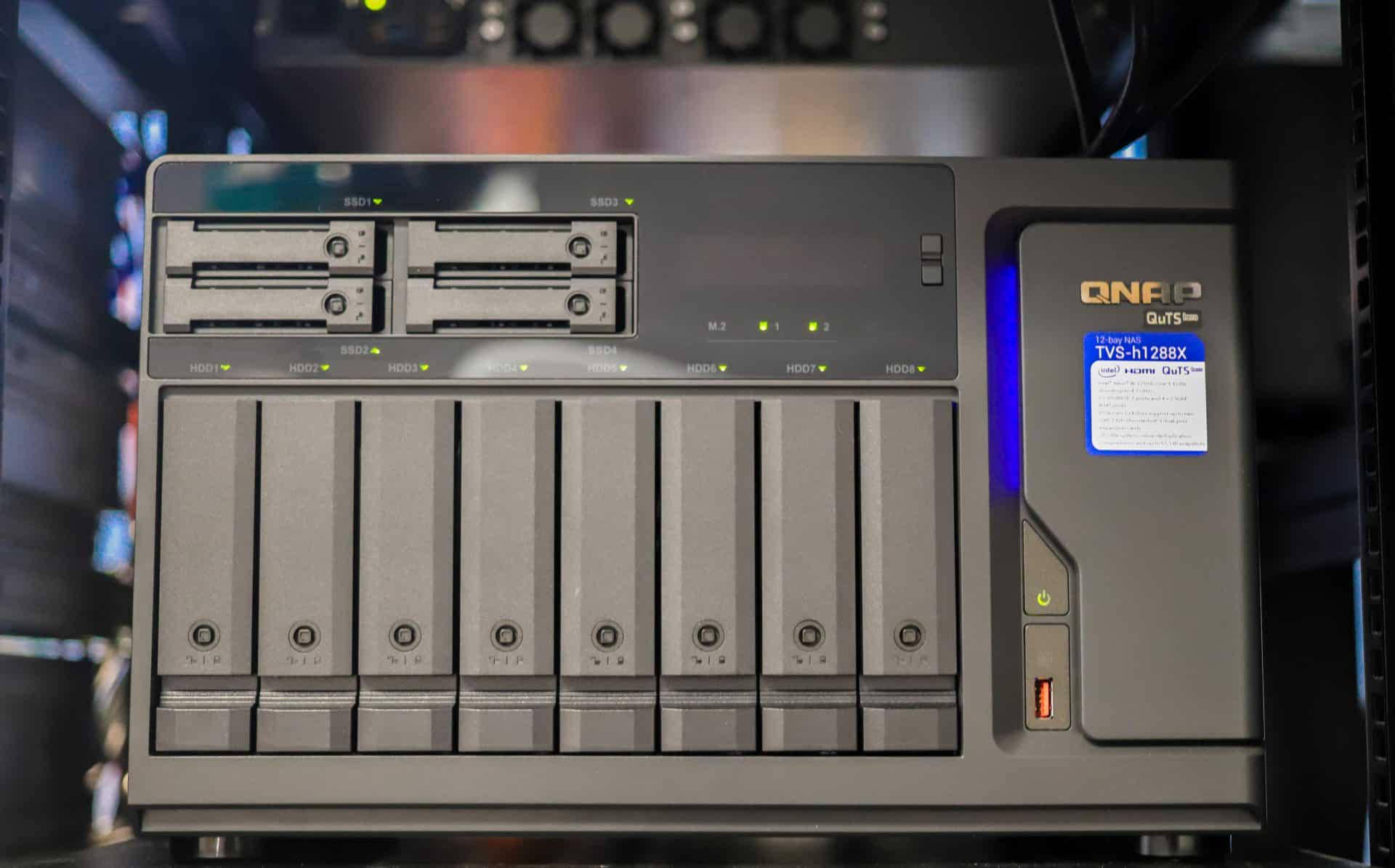
Let’s look at the hardware on this guy first. As mentioned, the NAS leverages an Intel Xeon W CPU giving it six cores and support for up to two QNAP QXP-T32P Thunderbolt 3 PCIe expansion cards for a total of four Thunderbolt 3 ports. This is great for fast file transfers from devices that support Thunderbolt 3, which is most of the newer computers.
The QNAP TVS-h1288x can support up to 128GB of ECC DDR4 RAM, though 16GB is more common. The ability to toss in extra RAM is critical for use cases that are going to leverage more of the enterprise features, like virtualization. For connectivity, the NAS has built-in 10GbE and 2.5GbE (though 5 and 25 can be added through expansion slots).
![QNAP TVS-h1288x 2.5]()
The TVS-h1288x has lots of options when it comes to storage as well. On the front of the NAS, there are 12 hot-swappable bays (4x 2.5″ and 8x 3.5″). All the front bays are SATA. For those looking to see a bump in storage performance, there are two NVMe M.2 slots on the side (under the cover) of the NAS. These slots can be used for caching, tiering, or for a high-performance volume.
There is also a 4K HDMI output and the NAS supports hardware decoding and real-time transcoding. This means HD content on the NAS can be viewed on a high-quality screen.
The [QNAP TVS-h1288x can be picked up today for about $2,800](https://amzn.to/3eAk89e).
## **QNAP TVS-h1288x Specifications**
| CPU | Intel Xeon W-1250 6-core 3.3 GHz processor (boost up to 4.7 GHz) |
| --- | --- |
| CPU Architecture | 64-bit x86 |
| Graphics Processors | Intel UHD Graphics P630 |
| Floating Point Unit | Yes |
| Encryption Engine | Yes (AES-NI) |
| Hardware-accelerated Transcoding | Yes |
| System Memory | 16GB ECC UDIMM DDR4 (2 x 8 GB) |
| Maximum Memory | 128GB (4 x 32 GB) |
| Memory Slot | 4 x Long-DIMM DDR4 |
| Flash Memory | 5GB (Dual boot OS protection) |
| Drive Bay | 8 x 3.5-inch SATA 6Gb/s, 3Gb/s + 4 x 2.5-inch SATA 6Gb/s, 3Gb/s |
| Drive Compatibility | - 3.5-inch bays:
- 3.5-inch SATA hard disk drives
- 2.5-inch SATA hard disk drives
- 2.5-inch SATA solid-state drives
- 2.5-inch bays:
- 2.5-inch SATA solid-state drives
|
| Hot-swappable | Yes |
| M.2 SSD Slot | 2 x M.2 22110/2280 NVMe PCIe Gen3 x4 slots |
| SSD Cache Acceleration Support | Yes |
| 2.5 Gigabit Ethernet Port (2.5G/1G/100M) | 4 (also support 10M) |
| 5 Gigabit Ethernet Port (5G/2.5G/1G/100M) | Optional via an adapter |
| 10 Gigabit Ethernet Port | 2 x 10GBASE-T (10G/1G) |
| 25 Gigabit Ethernet Port | Optional via an adapter |
| Wake on LAN (WOL) | Yes |
| Jumbo Frame | Yes |
| Thunderbolt Port | Optional via the QXP-T32P 2-port Thunderbolt 3 PCIe adapter |
| PCIe Slot | - 3
- Slot 1: PCIe Gen3 x8
- Slot 2: PCIe Gen3 x4
- Slot 3: PCIe Gen3 x4
|
| USB 3.2 Gen 2 (10Gbps) | 2 x Type-C Port 3 x Type-A |
| HDMI Output | 1, HDMI 1.4b (up to 4096 x 2160 @ 30Hz) |
| Form Factor | Tower |
| Dimensions (HxWxD) | 9.24 × 14.56 × 12.59 inch |
| Weight (Net) | 24.85 lbs |
| Weight (Gross) | 32.96 lbs |
| Operating temperature | 0 – 40°C (32°F – 104°F) |
| Storage Temperature | -20 – 70°C (-4°F – 158°F) |
| Relative Humidity | 5-95% RH non-condensing, wet bulb: 27 ̊C (80.6 ̊F) |
| Power Supply Unit | 550W PSU, 100\~240V |
| Power Consumption:
HDD Sleep Mode | 85.216 W |
| Power Consumption:
Operating Mode, Typical | 97.492 W |
| Fan | System fan: 3 x 80mm, 12VDC CPU fan: 2 x 97mm, 12VDC |
| Sound Level | 26 db(A) |
| System Warning | Buzzer |
| Kensington Security Slot | Yes |
| Max. Number of Concurrent Connections (CIFS) – with Max. Memory | 10000 |
## **Design and Build**
Most of the larger tower QNAP NAS units have similar builds. The QNAP TVS-h1288x is no exception. Across the bottom of the front are the eight 3.5″ bays for your high-capacity storage. The upper left has the four 2.5″ bays. The right side above the larger bays has an LCD screen for manually working on settings. The far-right has branding/model number, a power button, and a USB 3.2 Gen2 port.
![QNAP TVS-h1288x rear]()
The rear is mainly taken up by the three fans for cooling. Below the fans are the power connection and the PSU on/off switch. The top left corner has the two PCIe Gen3 x4 expansion slots. Right next to them are the two 10GBASE-T Ethernet ports. Beneath those ports are the Audio in and out ports, followed by the rest of the USB ports, followed by four 2.5GbE ports, and the HDMI output.
![QNAP TVS-h1288x cache]()
Lifting the cover off we can see the CPU covered by a heatsink. Next to that are the DIMM slots. And near the front are the two M.2 slots.
![QNAP TS-h1283XU-RP snapshots]()
As mentioned, this NAS leverages the QuTS hero operating system versus the regular [QTS](https://www.storagereview.com/review/qnap-qts-4-3-x-review). While the two OSs aren’t terribly different, we did go into a bit more depth when [we first review a hero system here](https://www.storagereview.com/review/qnap-ts-h1283xu-rp-nas-review). There should only be a mild learning curve between the two.
## **QNAP TVS-h1288x Performance**
To test the QNAP TVS-h1288X we configured it using eight WD Red 14TB HDDs in a RAID6 storage pool. The filesystem for the SMB shares had compression and deduplication off and used a 32K block size. The 4 iSCSI LUNs were configured the same way, with a 32K block size and compression and deduplication turned off. For the footprint of each test, SMB tests leverage 4 25GB files placed inside the shares, while iSCSI tests utilize 4 25GB LUNs.
![QNAP TVS-h1288x drive]()
**Enterprise Synthetic Workload Analysis**
Our enterprise shared storage and hard drive benchmark process preconditions each drive into steady-state with the same workload the device will be tested with under a heavy load of 16 threads with an outstanding queue of 16 per thread, and then tested in set intervals in multiple thread/queue depth profiles to show performance under light and heavy usage. Since hard drives reach their rated performance level very quickly, we only graph out the main sections of each test.
Preconditioning and Primary Steady-State Tests:
- Throughput (Read+Write IOPS Aggregate)
- Average Latency (Read+Write Latency Averaged Together)
- Max Latency (Peak Read or Write Latency)
- Latency Standard Deviation (Read+Write Standard Deviation Averaged Together)
Our Enterprise Synthetic Workload Analysis includes four profiles based on real-world tasks. These profiles have been developed to make it easier to compare to our past benchmarks as well as widely-published values such as max 4k read and write speed and 8k 70/30, which is commonly used for enterprise drives.
- 4K
-
- 100% Read or 100% Write
- 100% 4K
- 8K 70/30
- 70% Read, 30% Write
- 100% 8K
- 8K (Sequential)
- 100% Read or 100% Write
- 100% 8K
- 128K (Sequential)
- 100% Read or 100% Write
- 100% 128K
For our testing, we configured the QNAP TVS-h1288x in RAID6 in both iSCSI and SMB using an HDD configuration using the following drives:
- 8 x [WD Red NAS HDD](https://www.storagereview.com/review/wd-red-14tb-nas-hdd-review) (14TB)
In the first of our enterprise workloads, we measured a long sample of random 4K performance with 100% write and 100% read activity. Looking at IOPS, the QNAP in iSCSI hit 2,050 IOPS in read and 1,744 IOPS in write. In SMB the NAS hit 1,965 IOPS read and 1,770 IOPS in write.
![QNAP TVS-h1288x 4k hops]()
In 4K average latency (where lower is better), for iSCSI, we saw 124.9ms in read and 146.8ms in write. SMB configuration gave us 130.3ms in read and 144.5ms in write.
![]()
Moving to 4K max latency, in the iSCSI configuration, the NAS hit 2,146ms in read and 1,568ms in write. SMB did much better with 832ms in read and 879ms in write.
![]()
For our last 4K test, we looked at standard deviation. iSCSI was once again a bit higher with 141.5ms read and 140.1ms write while SMB came in at 56.8ms read and 80.4ms write.
![]()
Our next benchmark measures 100% 8K sequential throughput with a 16T16Q load in 100% read and 100% write operations. Here, the QNAP TVS-h1288x in iSCSI hit 138,245 IOPS read and 146,766 IOPS write. Configured in SMB it had 68,781 IOPS read and 127,370 IOPS write.
![QNAP TVS-h1288x 8k]()
Compared to the fixed 16 thread, 16 queue max workload we performed in the 100% 4K write test, our mixed workload profiles scale the performance across a wide range of thread/queue combinations. In these tests, we span workload intensity from 2 thread/2 queue up to 16 thread/16 queue. With throughput, we saw iSCSI slightly higher with a range of 418 IOPS to 2,199 IOPS. For SMB we saw a range of 384 IOPS to 2,060 IOPS.
![]()
Looking at average latency performance figures we saw a range of 9.5ms to 116.3ms for iSCSI and 10.4ms to 124.1ms for SMB.
![]()
For maximum latency, we saw a range of 227ms to 957ms in iSCSI and 267ms to 596ms in SMB.
![]()
Looking at standard deviation, the NAS had ranges of 5.9ms to 106.7ms in iSCSI and 7.1ms to 36.9ms in SMB.
![]()
The last Enterprise Synthetic Workload benchmark is our 128K test, which is a large-block sequential test that shows the highest sequential transfer speed for a device. In this workload scenario, the iSCSI config gave us 1.15GB/s read and 1.38GB/s write while SMB was able to hit 1.15GB/s read and 1.73GB/s write.
![QNAP TVS-h1288x 128k]()
## **Conclusion**
The QNAP TVS-h1288x is a tower NAS with 12 bays on the front for plenty of storage. The little “h” indicates that this is a QuTS hero version of the NAS, meaning that it leverages ZFS and the enterprise features that come with ZFS. The NAS uses an Intel Xeon W processor and can support up to 128GB of DDR4 RAM and 10GbE connectivity for optimum performance. The NAS has a creative professional bent with support for Thunderbolt 3 ports and a 4K HDMI output.
To gauge its performance, we configured the NAS with HDDs ([WD Red 14TB drives](https://www.storagereview.com/review/wd-red-14tb-nas-hdd-review)) and tested with both iSCSI and SMB. In 4K read, we saw 2,050 IOPS read and 1,744 IOPS write in iSCSI and 1,965 IOPS read and 1,770 IOPS write with SMB. 4K average latency gave us 124.9ms read and 146.8ms write for iSCSI and 130.3ms read and 144.5ms write in SMB. For 4K max latency, the NAS hit 832ms read and 879ms write when configured in SMB and 2,146ms read and 1,568ms write in iSCSI. With 4K standard deviation the QNAP hit 141.5ms read and 140.1ms write in iSCSI and 56.8ms read and 80.4ms write in SMB.
For sequential workloads, the NAS hit 138K IOPS read and 147K IOPS write in iSCSI and 69K IOPS read and 127K IOPS write in SMB. 128K saw 1.15GB/s read and 1.38GB/s write in iSCSI while SMB was able to hit 1.15GB/s read and 1.73GB/s write.
The QNAP TVS-h1288x leverages the QuTS hero operating system to provide creative professionals and small businesses with a ton of options when it comes to their storage. The NAS has plenty of performance options as well, though it did really well in our benchmarks as shipped. Overall QNAP continues to be one of the most flexible NAS solutions around, the NVMe M.2 bays are the most usable (cache/tier/volume) in the category for instance. The TVS-h1288x hits an excellent mix of features and configurability making it one of our favorites in this price range.
[QNAP TVS-h1288x on Amazon](https://amzn.to/3eAk89e)
**Engage with StorageReview**
[Newsletter](https://www.storagereview.com/storage_newsletter) | [YouTube](https://www.youtube.com/user/StorageReview "Opens in a new window") | Podcast [iTunes](https://podcasts.apple.com/gb/podcast/storagereview-com-storage-reviews/id1060681115 "Opens in a new window")/ [Spotify](https://open.spotify.com/show/1y6VnznABhHeOSMOmbDTz0 "Opens in a new window") | [Instagram](https://www.instagram.com/storagereview/ "Opens in a new window") | [Twitter](https://twitter.com/storagereview "Opens in a new window") | [TikTok](https://www.tiktok.com/@storagereview? "Opens in a new window") | [RSS Feed](https://www.storagereview.com/rss.xml)
![]()
### Adam Armstrong
Adam is the chief news editor for StorageReview.com, managing our internal and freelance content teams.
Previous post: [Intel P5510 NVMe Enterprise SSD Review](https://www.storagereview.com/review/intel-p5510-nvme-enterprise-ssd-review)
Next post: [HP ZBook Power G8 Review (15.6″)](https://www.storagereview.com/review/hp-zbook-power-g8-review-15-6)
Trusted Vendors
Products and solutions from our affiliate partners:
- [

Ubiquiti
](https://store.ui.com/us/en?a_aid=StorageReview "Opens in a new window")
- [

Newegg
](https://click.linksynergy.com/fs-bin/click?id=g5terNMDhz0&offerid=1207190.18&subid=0&type=4 "Opens in a new window")
- [
 Amazon
](https://amzn.to/4fLJUEW "Opens in a new window")
Newsletter
Subscribe to the StorageReview newsletter to stay up to date on the latest news and reviews. We promise no spam!
1
Leave this field empty if you’re human:
## Advertisement
Content Categories
[Facebook](https://www.facebook.com/@storagereview) [X](https://twitter.com/storagereview) [Instagram](https://www.instagram.com/storagereview/) [LinkedIn](https://www.linkedin.com/company/storagereview-com) [YouTube](https://www.youtube.com/user/storagereview?sub_confirmation=1) [Email](mailto:info@storagereview.com) [Spotify](https://open.spotify.com/show/1y6VnznABhHeOSMOmbDTz0) [Reddit](https://www.reddit.com/r/StorageReview/) [Discord](https://discord.gg/TwMHb4azdC) [RSS](https://www.storagereview.com/rss.xml) [TikTok](https://www.tiktok.com/@storagereview)
Copyright © 1998-2025 Flying Pig Ventures, LLC Cincinnati, Ohio. All rights reserved.
Manage your privacy
To provide the best experiences, we and our partners use technologies like cookies to store and/or access device information. Consenting to these technologies will allow us and our partners to process personal data such as browsing behavior or unique IDs on this site and show (non-) personalized ads. Not consenting or withdrawing consent, may adversely affect certain features and functions.
Click below to consent to the above or make granular choices. Your choices will be applied to this site only. You can change your settings at any time, including withdrawing your consent, by using the toggles on the Cookie Policy, or by clicking on the manage consent button at the bottom of the screen.
Functional Functional Always active
The technical storage or access is strictly necessary for the legitimate purpose of enabling the use of a specific service explicitly requested by the subscriber or user, or for the sole purpose of carrying out the transmission of a communication over an electronic communications network.
Preferences Preferences
The technical storage or access is necessary for the legitimate purpose of storing preferences that are not requested by the subscriber or user.
Statistics Statistics
The technical storage or access that is used exclusively for statistical purposes. The technical storage or access that is used exclusively for anonymous statistical purposes. Without a subpoena, voluntary compliance on the part of your Internet Service Provider, or additional records from a third party, information stored or retrieved for this purpose alone cannot usually be used to identify you.
Marketing Marketing
The technical storage or access is required to create user profiles to send advertising, or to track the user on a website or across several websites for similar marketing purposes.
Statistics
Marketing
Features
Always active
Special features
Special purposes
Always active
- Manage options
- Manage services
- Manage {vendor\_count} vendors
- [Read more about these purposes](https://cookiedatabase.org/tcf/purposes/)
Accept Deny Manage options Save preferences Manage options
- {title}
- {title}
- {title}
Manage your privacy
To provide the best experiences, we use technologies like cookies to store and/or access device information. Consenting to these technologies will allow us to process data such as browsing behavior or unique IDs on this site. Not consenting or withdrawing consent, may adversely affect certain features and functions.
Functional Functional Always active
The technical storage or access is strictly necessary for the legitimate purpose of enabling the use of a specific service explicitly requested by the subscriber or user, or for the sole purpose of carrying out the transmission of a communication over an electronic communications network.
Preferences Preferences
The technical storage or access is necessary for the legitimate purpose of storing preferences that are not requested by the subscriber or user.
Statistics Statistics
The technical storage or access that is used exclusively for statistical purposes. The technical storage or access that is used exclusively for anonymous statistical purposes. Without a subpoena, voluntary compliance on the part of your Internet Service Provider, or additional records from a third party, information stored or retrieved for this purpose alone cannot usually be used to identify you.
Marketing Marketing
The technical storage or access is required to create user profiles to send advertising, or to track the user on a website or across several websites for similar marketing purposes.
Statistics
Marketing
Features
Always active
Special features
Special purposes
Always active
- Manage options
- Manage services
- Manage {vendor\_count} vendors
- [Read more about these purposes](https://cookiedatabase.org/tcf/purposes/)
Accept Deny Manage options Save preferences Manage options
- {title}
- {title}
- {title}
Manage consent Manage consent
```json
{"@context":"https:\/\/schema.org","@graph":[{"@type":"WebPage","@id":"https:\/\/www.storagereview.com\/review\/qnap-tvs-h1288x-review","url":"https:\/\/www.storagereview.com\/review\/qnap-tvs-h1288x-review","name":"QNAP TVS-h1288x Review - StorageReview.com","isPartOf":{"@id":"https:\/\/www.storagereview.com\/#website"},"primaryImageOfPage":{"@id":"https:\/\/www.storagereview.com\/review\/qnap-tvs-h1288x-review#primaryimage"},"image":{"@id":"https:\/\/www.storagereview.com\/review\/qnap-tvs-h1288x-review#primaryimage"},"thumbnailUrl":"https:\/\/www.storagereview.com\/wp-content\/uploads\/2021\/07\/storagereview-qnap-tvs-h1288x-full.jpg","datePublished":"2021-07-20T19:24:47+00:00","description":"The QNAP TVS-h1288x leverages the QuTS hero operating system to provide creative professionals with even more options for their storage.","breadcrumb":{"@id":"https:\/\/www.storagereview.com\/review\/qnap-tvs-h1288x-review#breadcrumb"},"inLanguage":"en-US","potentialAction":[{"@type":"ReadAction","target":["https:\/\/www.storagereview.com\/review\/qnap-tvs-h1288x-review"]}]},{"@type":"ImageObject","inLanguage":"en-US","@id":"https:\/\/www.storagereview.com\/review\/qnap-tvs-h1288x-review#primaryimage","url":"https:\/\/www.storagereview.com\/wp-content\/uploads\/2021\/07\/storagereview-qnap-tvs-h1288x-full.jpg","contentUrl":"https:\/\/www.storagereview.com\/wp-content\/uploads\/2021\/07\/storagereview-qnap-tvs-h1288x-full.jpg","width":1920,"height":1119},{"@type":"BreadcrumbList","@id":"https:\/\/www.storagereview.com\/review\/qnap-tvs-h1288x-review#breadcrumb","itemListElement":[{"@type":"ListItem","position":1,"name":"Home","item":"https:\/\/www.storagereview.com\/"},{"@type":"ListItem","position":2,"name":"Review","item":"https:\/\/www.storagereview.com\/review"},{"@type":"ListItem","position":3,"name":"QNAP TVS-h1288x Review"}]},{"@type":"WebSite","@id":"https:\/\/www.storagereview.com\/#website","url":"https:\/\/www.storagereview.com\/","name":"StorageReview.com","description":"StorageReview.com is a leading provider of news and reviews throughout the entire IT stack - from the datacenter to the edge, and all points in between.","publisher":{"@id":"https:\/\/www.storagereview.com\/#organization"},"potentialAction":[{"@type":"SearchAction","target":{"@type":"EntryPoint","urlTemplate":"https:\/\/www.storagereview.com\/?s={search_term_string}"},"query-input":{"@type":"PropertyValueSpecification","valueRequired":true,"valueName":"search_term_string"}}],"inLanguage":"en-US"},{"@type":"Organization","@id":"https:\/\/www.storagereview.com\/#organization","name":"StorageReview.com","url":"https:\/\/www.storagereview.com\/","logo":{"@type":"ImageObject","inLanguage":"en-US","@id":"https:\/\/www.storagereview.com\/#\/schema\/logo\/image\/","url":"https:\/\/www.storagereview.com\/wp-content\/uploads\/2020\/02\/Storage-Reviews-2-2.png","contentUrl":"https:\/\/www.storagereview.com\/wp-content\/uploads\/2020\/02\/Storage-Reviews-2-2.png","width":344,"height":61,"caption":"StorageReview.com"},"image":{"@id":"https:\/\/www.storagereview.com\/#\/schema\/logo\/image\/"},"sameAs":["https:\/\/x.com\/storagereview","http:\/\/youtube.com\/user\/storagereview"]}]}
```