---
description: The Wyse 5470 client is geared towards mobile virtual desktop infrastructure (VDI) users that need a laptop form factor VDI client. To give a brief overview of its specifications, the Wyse 5470 is a laptop format, VDI client that has a 14” screen.
title: Dell Wyse 5470 Mobile Thin Client Review
image: https://www.storagereview.com/wp-content/uploads/2020/03/StorageReview-Dell-Wyse-5470.jpg
---
[![Storage Review]()](https://storagereview.com/)
---
[Facebook](https://www.facebook.com/@storagereview) [X (Twitter)](https://twitter.twitter.com/storagereview) [Instagram](https://www.instagram.com/storagereview/) [LinkedIn](https://www.linkedin.com/company/storagereview-com) [YouTube](https://www.youtube.com/user/storagereview?sub_confirmation=1) [Email](mailto:info@storagereview.com) [Spotify](https://open.spotify.com/show/1y6VnznABhHeOSMOmbDTz0) [Reddit](https://www.reddit.com/r/StorageReview/) [Discord](https://discord.gg/TwMHb4azdC) [RSS Feed](https://www.storagereview.com/rss.xml) [TikTok](https://www.tiktok.com/@storagereview)
[Facebook](https://www.facebook.com/@storagereview) [X (Twitter)](https://twitter.com/storagereview) [Instagram](https://www.instagram.com/storagereview/) [LinkedIn](https://www.linkedin.com/company/storagereview-com) [YouTube](https://www.youtube.com/user/storagereview?sub_confirmation=1) [Email](mailto:info@storagereview.com) [Spotify](https://open.spotify.com/show/1y6VnznABhHeOSMOmbDTz0) [Reddit](https://www.reddit.com/r/StorageReview/) [Discord](https://discord.gg/TwMHb4azdC) [RSS Feed](https://www.storagereview.com/rss.xml) [TikTok](https://www.tiktok.com/@storagereview)
[](https://www.storagereview.com)
≡ Menu
- [Home](https://www.storagereview.com/)
- [Storage Reviews](https://www.storagereview.com/review)
- [End User Reviews](https://www.storagereview.com/consumer)
- [Enterprise Reviews](https://www.storagereview.com/enterprise)
- [Ubiquiti Reviews](https://www.storagereview.com/best/ubiquiti-reviews)
- [SR Merch](https://store.storagereview.com)
- [Leaderboards](https://www.storagereview.com/best)
- [Best Storage Arrays](https://www.storagereview.com/best/storage-arrays)
- [Best Enterprise SSDs](https://www.storagereview.com/best/enterprise-ssds)
- [Best Servers](https://www.storagereview.com/best/servers)
- [Best Enterprise GPUs](https://www.storagereview.com/best/enterprise-gpus)
- [Best Desktops for Local AI](https://www.storagereview.com/best/desktops-local-ai)
- [Best Laptops for Local AI](https://www.storagereview.com/best/laptops-local-ai)
- [Best Local LLM Tools](https://www.storagereview.com/best/local-llm-tools)
- [Agentic AI Hardware](https://www.storagereview.com/best/agentic-ai-hardware)
- [Best SSDs & Hard Drives](https://www.storagereview.com/best_drives)
- [Best Portable SSDs](https://www.storagereview.com/best/portable-ssds)
- [Best Business Laptops](https://www.storagereview.com/best/business-laptops)
- [Best Mobile Workstations](https://www.storagereview.com/best/mobile-workstations)
- [Best Desktop Workstations](https://www.storagereview.com/best/desktop-workstations)
- [Best Mini PCs](https://www.storagereview.com/best/mini-pcs)
- [Best Laptop Battery Life](https://www.storagereview.com/best/laptop-battery-life)
- [Storage Reference Guide](https://www.storagereview.com/storage-reference-guide)
- [About SR](https://www.storagereview.com/about-storagereview)
- [StorageReview.com Sweepstakes Rules and Regulations](https://www.storagereview.com/storagereview-com-sweepstakes-rules-and-regulations)
Search
[Home](https://www.storagereview.com/) » [Review](https://www.storagereview.com/review) » Dell Wyse 5470 Mobile Thin Client Review
# Dell Wyse 5470 Mobile Thin Client Review
by Tom Fenton on March 3, 2020
[Enterprise](https://www.storagereview.com/enterprise) ◇ [Thin Client](https://www.storagereview.com/enterprise/thin-client)
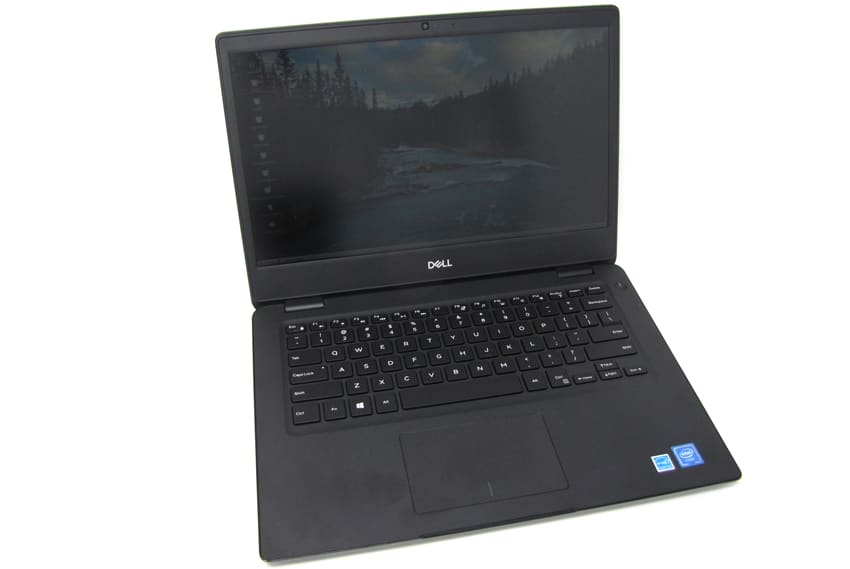
The Wyse 5470 client is geared towards mobile virtual desktop infrastructure (VDI) users that need a laptop form factor VDI client. To give a brief overview of its specifications, the Wyse 5470 is a laptop format, VDI client that has a 14” screen. It is powered by an Intel Celeron N4000 (2 Cores/4MB) or an Intel Celeron N4100 (4 Cores/4MB), it runs [Wyse ThinOS](https://www.storagereview.com/news/dell-updates-its-wyse-thin-clint-software-management-suite) (with optional PCoIP), Wyse ThinLinux or Windows 10 IoT Enterprise. It supports all major VDI environments.
In this article, we will give an in-depth overview of the Wyse 5470 VDI client’s specifications, design and build quality, and a summary of the testing that we carried out on it over two weeks. We will then lay out the key findings from those tests and provide our thoughts about the device and briefly discuss who would benefit from this product.
The product is labeled as a Wyse 5470 but the outer cover and the screen bezel have the Dell logo. In this article we will refer to it as a Wyse.
## Wyse 5470 Specifications
| Manufacturer | WYSE |
| --- | --- |
| Model | Wyse 5470 |
| MSRP | starting at $699 USD |
| Client type | mobile thin client |
| Form factor | 14” laptop |
| OS | Wyse ThinOS (with optional PCoIP)
Wyse ThinLinux or Windows 10 IoT Enterprise |
| Supported remote display protocols | Microsoft RDP
VMware Horizon RDP/PCoIP
Blast Extreme
Citrix ICA/HDX (not all OS support all protocols) |
| CPU | Intel Celeron N4000 (2 Cores/4MB/2T/up to 2.6GHz/6W)
Intel Celeron N4100 (4 Cores/4MB/4T/up to 2.4GHz/6W) |
| Memory | 4GB 1x4GB, 2400MHz DDR4 |
| Storage | 16GB eMMC Included in assis |
| Display | 14.0″ HD (1366×768) Anti-Glare, Non-Touch, Camera
14.0″ FHD (1920 x 1080) Anti-Glare, Non-Touch, Camera
14.0″ FHD (1920 x 1080) Anti-Glare, Touch, Camera |
| Battery capacity | 3 Cell 42Whr ExpressCharge Capable Battery |
| Power | 19V, 65W, 3.33A external power adapter |
| Ports | 1 x SD Memory Card Reader
1 x USB 2.0 with PowerShare
1 x VGA out
1 x Noble Wedge Lock Slot
1 x Power Connection
1 x USB Type C 3.1 Gen 1 with Power Delivery & DisplayPort 1.2
1 x HDMI 2.0a for 4K external display
1 x RJ-45
2 x USB 3.0
Audio Jack |
| Multimedia | Integrated Stereo Speakers
3.5 mm audio out/in jack |
| Network connectivity | RJ45 – 10/100/1000Mb
Intel Wireless-AC 9560, Dual-band 2×2 802.11ac Wi-Fi with MU-MIMO
Bluetooth 5 Combo |
| Keyboard | Single Pointing Backlit Keyboard |
| Touch Pad | Wyse Clickpad with multi-touch gestures enabled |
| Webcam | HD camera |
| Physical size: | 0.81″ (20.6mm) x 13″ (330.3mm) x 9.3″ (238mm) |
| Weight | 3.96 lbs. (1.8 kg) |
| Warranty | 3-year parts and labor |
## Design and Build
The cardboard packaging box that the device came in was heavy and well designed, the device itself was nestled between three black foam blocks and wrapped in an antistatic plastic bag, and it had a piece of black material between the screen and the keyboard. The box also contained the power supply, and a warranty and setup guide.
The right side of the device has a SD Memory Card Reader, USB 2.0 with PowerShare, VGA out, Noble Wedge Lock Slot. The left side of the device has the power connection port, USB type C 3.1 Gen 1 with power delivery & DisplayPort 1.2, HDMI 2.0a for 4K external display, RJ-45, USB 3, and a 3.5mm audio jack.
![Dell Wyse 5470 side]()
The entire case is made of black plastic with ventilation holes on the bottom. Opening the lid exposes a 14” LED screen that has a built-in web cam at the top of it. The web cam has an LED to the right of it to indicate if it is on. The monitor is framed with a 17mm black plastic boarder on the top, 33mm on the bottom and 10mm on the sides. The device has a full-sized keyboard, it does not have a separate number pad. The touchpad beneath the keyboard it 104mm x 65mm. The power button is at the upper right corner of the keyboard. Overall, the case on this device is on par with what you would expect on a business laptop.
![Dell Wyse 5470 Bottom]()
The case is held together with 9 Phillips-head screws on the bottom of the device. After removing these screws, we couldn’t pry the bottom off the device to inspect the motherboard of the device to inspect the build quality of the motherboard.
## Usability
The real test of a VDI client is its usability; to test the usability of the 5470, we used the client for two weeks in our Pacific Northwest lab with various configurations. Below are the key results we noted during our time using the client.
To test the 5470, we connected it to our network via a Cat 6 cable through the device’s RJ45 port which was connected to our network via a 1Gb network through a switch that was connected to either a server or a WAN router. The server was hosting our local VMware Horizon virtual desktop. In order to create a controlled environment, the network was monitored during testing to ensure that no other traffic was present on the network.
## Initial Configuration
We powered on the device and it took the device 28 seconds to boot, obtain an IP address from our DNS server. We did not need to log in to the system but were log us in as a preconfigured use. The screen looked like a regular desktop; the start menu had icons for System setup and configuration. We needed to configure the system to use a static name server to do this we clicked on the desktop menu, clicked **System Setup**, and then click **Network Setup**and entered our DNS domain and server.
![Dell Wyse 5470 config net]()
## Local Horizon Desktop
For two weeks we used the device with a local Horizon virtual desktop to do our daily tasks.
We brought up the Horizon client and configured it to connect to our local Horizon desktop.
![Dell Wyse 5470 config ]()
Once we were connected to our Horizon desktop, we noticed that the resolution of the Horizon desktop was set to the native 1920 x 1080 resolution of the 5470. The virtual desktop that we used ran Windows 10 (1607), had 2 vCPUs, 8 GB of memory, and 50 GB of NVMe-based storage.
The first test we conducted was to use VLC to play a video (1280 x 720 @ 712kbs) that was stored on the virtual desktop. First, we played the video using a quarter of the display, and then once again in full-screen mode. In quarter-scale the video played without any frames dropping and in full-screen mode the video played with just a slight amount of jitter. The audio played flawlessly through the devices built-in speaker when the video was displayed in both quarter-scale and full screen modes. The speakers were loud and clear.
![Dell Wyse 5470 video capture]()
While playing the video in ¼ scale mode we monitored the connection using ControlUp to see bandwidth consumption and user input delay. We hope to use these metrics going further to quantify a VDI client performance. We noticed a user input delay of 16ms when playing the video in full screen mode vs 0ms when the video was playing in ¼ scale mode.
![Dell Wyse 5470 cpu 1]() ![Dell Wyse 5470 cpu 2]()
To further test the device, we connected a Jabra voice 150 headset to a USB connection; the Jabra headset was discovered by the virtual desktop and worked without any issues.
We used the client for daily activities for two weeks without any problems. This included using Microsoft Office applications, Chrome web browser, playing internet-streaming music, etc. During this time the device performed flawlessly.
## Using Other Protocols
WYSE advertises the device as working with PCoIP, VMware Horizon Blast, and Citrix HDX. We tested it with Blast and PCoIP without any noticeable difference.
## Other Configurations
As this is a basic review of the device, we only tested it using tow VDI client protocols (PCoIP and Blast); we did not test the device in the following circumstances: adverse network conditions, using communication software such as Skype, or using any of the advanced features of the device such as accessing local storage on the device from the virtual desktop. However, we did test it with a secondary monitor and wireless keyboard and mouse.
## Device Management
The device can be used with Wyse Management Suite (WMS) for centralized, server-based administration of Wyse thin clients. WMS is beyond the scope of this review.
## Conclusion
Wyse did a good job bringing a business quality VDI laptop to the market. Aesthetically it compares favorably with a Dell Latitude, HP Pavilion, and other business laptops. As VDI becomes more and more mainstream we will see more VDI devices that allow workers to take work with them. This would be a fine choice for VDI users that need a portable, rugged and perfectly capable mobile VDI
[Wyse 5470](https://www.dell.com/en-us/work/shop/cty/pdp/spd/wyse-5470-mobile-thin-client/xctowyse5470us?gacd=9646510-1029-5761040-0-0&dgc=st&gclsrc=aw.ds&&&gclid=EAIaIQobChMI3cG0gdb85wIVhZOzCh249gG5EAAYAiAAEgLQy_D_BwE)
[Discuss on Reddit](https://www.reddit.com/r/StorageReview/comments/fd04d4/dellwyse_5470_mobile_thin_client_review/)
**Engage with StorageReview**
[Newsletter](https://www.storagereview.com/storage_newsletter) | [YouTube](https://www.youtube.com/user/StorageReview "Opens in a new window") | Podcast [iTunes](https://podcasts.apple.com/gb/podcast/storagereview-com-storage-reviews/id1060681115 "Opens in a new window")/ [Spotify](https://open.spotify.com/show/1y6VnznABhHeOSMOmbDTz0 "Opens in a new window") | [Instagram](https://www.instagram.com/storagereview/ "Opens in a new window") | [Twitter](https://twitter.com/storagereview "Opens in a new window") | [TikTok](https://www.tiktok.com/@storagereview? "Opens in a new window") | [RSS Feed](https://www.storagereview.com/rss.xml)
![]()
### Tom Fenton
Tom Fenton has a wealth of hands-on IT experience gained over the past 27 years in a variety of technologies, with the past 20 years focusing on virtualization and storage. He previously worked at VMware as a Senior Course Developer, Solutions Engineer, and in the Competitive Marketing group. He has also worked as a Senior Validation Engineer with The Taneja Group, where he headed the Validation Service Lab and was instrumental in starting up its vSphere Virtual Volumes practice. He's on Twitter @vDoppler
Previous post: [Lenovo ThinkCentre M90n Nano Review](https://www.storagereview.com/review/lenovo-thinkcentre-m90n-nano-review)
Next post: [HP ZBook Studio x360 G5 Review Update](https://www.storagereview.com/review/hp-zbook-studio-x360-g5-review-update)
Trusted Vendors
Products and solutions from our affiliate partners:
- [

Ubiquiti
](https://store.ui.com/us/en?a_aid=StorageReview "Opens in a new window")
- [

Newegg
](https://click.linksynergy.com/fs-bin/click?id=g5terNMDhz0&offerid=1207190.18&subid=0&type=4 "Opens in a new window")
- [
 Amazon
](https://amzn.to/4fLJUEW "Opens in a new window")
Newsletter
Subscribe to the StorageReview newsletter to stay up to date on the latest news and reviews. We promise no spam!
1
Leave this field empty if you’re human:
## Advertisement
Content Categories
[Facebook](https://www.facebook.com/@storagereview) [X](https://twitter.com/storagereview) [Instagram](https://www.instagram.com/storagereview/) [LinkedIn](https://www.linkedin.com/company/storagereview-com) [YouTube](https://www.youtube.com/user/storagereview?sub_confirmation=1) [Email](mailto:info@storagereview.com) [Spotify](https://open.spotify.com/show/1y6VnznABhHeOSMOmbDTz0) [Reddit](https://www.reddit.com/r/StorageReview/) [Discord](https://discord.gg/TwMHb4azdC) [RSS](https://www.storagereview.com/rss.xml) [TikTok](https://www.tiktok.com/@storagereview)
Copyright © 1998-2025 Flying Pig Ventures, LLC Cincinnati, Ohio. All rights reserved.
Manage your privacy
To provide the best experiences, we and our partners use technologies like cookies to store and/or access device information. Consenting to these technologies will allow us and our partners to process personal data such as browsing behavior or unique IDs on this site and show (non-) personalized ads. Not consenting or withdrawing consent, may adversely affect certain features and functions.
Click below to consent to the above or make granular choices. Your choices will be applied to this site only. You can change your settings at any time, including withdrawing your consent, by using the toggles on the Cookie Policy, or by clicking on the manage consent button at the bottom of the screen.
Functional Functional Always active
The technical storage or access is strictly necessary for the legitimate purpose of enabling the use of a specific service explicitly requested by the subscriber or user, or for the sole purpose of carrying out the transmission of a communication over an electronic communications network.
Preferences Preferences
The technical storage or access is necessary for the legitimate purpose of storing preferences that are not requested by the subscriber or user.
Statistics Statistics
The technical storage or access that is used exclusively for statistical purposes. The technical storage or access that is used exclusively for anonymous statistical purposes. Without a subpoena, voluntary compliance on the part of your Internet Service Provider, or additional records from a third party, information stored or retrieved for this purpose alone cannot usually be used to identify you.
Marketing Marketing
The technical storage or access is required to create user profiles to send advertising, or to track the user on a website or across several websites for similar marketing purposes.
Statistics
Marketing
Features
Always active
Special features
Special purposes
Always active
- Manage options
- Manage services
- Manage {vendor\_count} vendors
- [Read more about these purposes](https://cookiedatabase.org/tcf/purposes/)
Accept Deny Manage options Save preferences Manage options
- {title}
- {title}
- {title}
Manage your privacy
To provide the best experiences, we use technologies like cookies to store and/or access device information. Consenting to these technologies will allow us to process data such as browsing behavior or unique IDs on this site. Not consenting or withdrawing consent, may adversely affect certain features and functions.
Functional Functional Always active
The technical storage or access is strictly necessary for the legitimate purpose of enabling the use of a specific service explicitly requested by the subscriber or user, or for the sole purpose of carrying out the transmission of a communication over an electronic communications network.
Preferences Preferences
The technical storage or access is necessary for the legitimate purpose of storing preferences that are not requested by the subscriber or user.
Statistics Statistics
The technical storage or access that is used exclusively for statistical purposes. The technical storage or access that is used exclusively for anonymous statistical purposes. Without a subpoena, voluntary compliance on the part of your Internet Service Provider, or additional records from a third party, information stored or retrieved for this purpose alone cannot usually be used to identify you.
Marketing Marketing
The technical storage or access is required to create user profiles to send advertising, or to track the user on a website or across several websites for similar marketing purposes.
Statistics
Marketing
Features
Always active
Special features
Special purposes
Always active
- Manage options
- Manage services
- Manage {vendor\_count} vendors
- [Read more about these purposes](https://cookiedatabase.org/tcf/purposes/)
Accept Deny Manage options Save preferences Manage options
- {title}
- {title}
- {title}
Manage consent Manage consent
```json
{"@context":"https:\/\/schema.org","@graph":[{"@type":"WebPage","@id":"https:\/\/www.storagereview.com\/review\/dell-wyse-5470-mobile-thin-client-review","url":"https:\/\/www.storagereview.com\/review\/dell-wyse-5470-mobile-thin-client-review","name":"Dell Wyse 5470 Mobile Thin Client Review - StorageReview.com","isPartOf":{"@id":"https:\/\/www.storagereview.com\/#website"},"primaryImageOfPage":{"@id":"https:\/\/www.storagereview.com\/review\/dell-wyse-5470-mobile-thin-client-review#primaryimage"},"image":{"@id":"https:\/\/www.storagereview.com\/review\/dell-wyse-5470-mobile-thin-client-review#primaryimage"},"thumbnailUrl":"https:\/\/www.storagereview.com\/wp-content\/uploads\/2020\/03\/StorageReview-Dell-Wyse-5470.jpg","datePublished":"2020-03-03T19:32:07+00:00","dateModified":"2020-03-03T22:28:39+00:00","description":"The Wyse 5470 client is geared towards mobile virtual desktop infrastructure (VDI) users that need a laptop form factor VDI client. To give a brief overview of its specifications, the Wyse 5470 is a laptop format, VDI client that has a 14” screen.","breadcrumb":{"@id":"https:\/\/www.storagereview.com\/review\/dell-wyse-5470-mobile-thin-client-review#breadcrumb"},"inLanguage":"en-US","potentialAction":[{"@type":"ReadAction","target":["https:\/\/www.storagereview.com\/review\/dell-wyse-5470-mobile-thin-client-review"]}]},{"@type":"ImageObject","inLanguage":"en-US","@id":"https:\/\/www.storagereview.com\/review\/dell-wyse-5470-mobile-thin-client-review#primaryimage","url":"https:\/\/www.storagereview.com\/wp-content\/uploads\/2020\/03\/StorageReview-Dell-Wyse-5470.jpg","contentUrl":"https:\/\/www.storagereview.com\/wp-content\/uploads\/2020\/03\/StorageReview-Dell-Wyse-5470.jpg","width":850,"height":569,"caption":"Dell Wyse 5470"},{"@type":"BreadcrumbList","@id":"https:\/\/www.storagereview.com\/review\/dell-wyse-5470-mobile-thin-client-review#breadcrumb","itemListElement":[{"@type":"ListItem","position":1,"name":"Home","item":"https:\/\/www.storagereview.com\/"},{"@type":"ListItem","position":2,"name":"Review","item":"https:\/\/www.storagereview.com\/review"},{"@type":"ListItem","position":3,"name":"Dell Wyse 5470 Mobile Thin Client Review"}]},{"@type":"WebSite","@id":"https:\/\/www.storagereview.com\/#website","url":"https:\/\/www.storagereview.com\/","name":"StorageReview.com","description":"StorageReview.com is a leading provider of news and reviews throughout the entire IT stack - from the datacenter to the edge, and all points in between.","publisher":{"@id":"https:\/\/www.storagereview.com\/#organization"},"potentialAction":[{"@type":"SearchAction","target":{"@type":"EntryPoint","urlTemplate":"https:\/\/www.storagereview.com\/?s={search_term_string}"},"query-input":{"@type":"PropertyValueSpecification","valueRequired":true,"valueName":"search_term_string"}}],"inLanguage":"en-US"},{"@type":"Organization","@id":"https:\/\/www.storagereview.com\/#organization","name":"StorageReview.com","url":"https:\/\/www.storagereview.com\/","logo":{"@type":"ImageObject","inLanguage":"en-US","@id":"https:\/\/www.storagereview.com\/#\/schema\/logo\/image\/","url":"https:\/\/www.storagereview.com\/wp-content\/uploads\/2020\/02\/Storage-Reviews-2-2.png","contentUrl":"https:\/\/www.storagereview.com\/wp-content\/uploads\/2020\/02\/Storage-Reviews-2-2.png","width":344,"height":61,"caption":"StorageReview.com"},"image":{"@id":"https:\/\/www.storagereview.com\/#\/schema\/logo\/image\/"},"sameAs":["https:\/\/x.com\/storagereview","http:\/\/youtube.com\/user\/storagereview"]}]}
```