---
description: Ubiquiti’s UniFi UPS tower adds smart, affordable power management, with 1kVA tower and 1.44kVA rack models integrated in UniFi Network.
title: "Ubiquiti UPS Tower Review: Compact UniFi Power Protection for Home Labs and Network Closets"
image: https://www.storagereview.com/wp-content/uploads/2025/10/StorageReview-Ubiquiti-Desktop-UPS-4.jpg
---
[![Storage Review]()](https://storagereview.com/)
---
[Facebook](https://www.facebook.com/@storagereview) [X (Twitter)](https://twitter.twitter.com/storagereview) [Instagram](https://www.instagram.com/storagereview/) [LinkedIn](https://www.linkedin.com/company/storagereview-com) [YouTube](https://www.youtube.com/user/storagereview?sub_confirmation=1) [Email](mailto:info@storagereview.com) [Spotify](https://open.spotify.com/show/1y6VnznABhHeOSMOmbDTz0) [Reddit](https://www.reddit.com/r/StorageReview/) [Discord](https://discord.gg/TwMHb4azdC) [RSS Feed](https://www.storagereview.com/rss.xml) [TikTok](https://www.tiktok.com/@storagereview)
[Facebook](https://www.facebook.com/@storagereview) [X (Twitter)](https://twitter.com/storagereview) [Instagram](https://www.instagram.com/storagereview/) [LinkedIn](https://www.linkedin.com/company/storagereview-com) [YouTube](https://www.youtube.com/user/storagereview?sub_confirmation=1) [Email](mailto:info@storagereview.com) [Spotify](https://open.spotify.com/show/1y6VnznABhHeOSMOmbDTz0) [Reddit](https://www.reddit.com/r/StorageReview/) [Discord](https://discord.gg/TwMHb4azdC) [RSS Feed](https://www.storagereview.com/rss.xml) [TikTok](https://www.tiktok.com/@storagereview)
[](https://www.storagereview.com)
≡ Menu
- [Home](https://www.storagereview.com/)
- [Storage Reviews](https://www.storagereview.com/review)
- [End User Reviews](https://www.storagereview.com/consumer)
- [Enterprise Reviews](https://www.storagereview.com/enterprise)
- [Ubiquiti Reviews](https://www.storagereview.com/best/ubiquiti-reviews)
- [SR Merch](https://store.storagereview.com)
- [Leaderboards](https://www.storagereview.com/best)
- [Best Storage Arrays](https://www.storagereview.com/best/storage-arrays)
- [Best Enterprise SSDs](https://www.storagereview.com/best/enterprise-ssds)
- [Best Servers](https://www.storagereview.com/best/servers)
- [Best Enterprise GPUs](https://www.storagereview.com/best/enterprise-gpus)
- [Best Desktops for Local AI](https://www.storagereview.com/best/desktops-local-ai)
- [Best Laptops for Local AI](https://www.storagereview.com/best/laptops-local-ai)
- [Best Local LLM Tools](https://www.storagereview.com/best/local-llm-tools)
- [Agentic AI Hardware](https://www.storagereview.com/best/agentic-ai-hardware)
- [Best SSDs & Hard Drives](https://www.storagereview.com/best_drives)
- [Best Portable SSDs](https://www.storagereview.com/best/portable-ssds)
- [Best Business Laptops](https://www.storagereview.com/best/business-laptops)
- [Best Mobile Workstations](https://www.storagereview.com/best/mobile-workstations)
- [Best Desktop Workstations](https://www.storagereview.com/best/desktop-workstations)
- [Best Mini PCs](https://www.storagereview.com/best/mini-pcs)
- [Best Laptop Battery Life](https://www.storagereview.com/best/laptop-battery-life)
- [Storage Reference Guide](https://www.storagereview.com/storage-reference-guide)
- [About SR](https://www.storagereview.com/about-storagereview)
- [StorageReview.com Sweepstakes Rules and Regulations](https://www.storagereview.com/storagereview-com-sweepstakes-rules-and-regulations)
Search
[Home](https://www.storagereview.com/) » [Review](https://www.storagereview.com/review) » Ubiquiti UPS Tower Review: Compact UniFi Power Protection for Home Labs and Network Closets
# Ubiquiti UPS Tower Review: Compact UniFi Power Protection for Home Labs and Network Closets
by Dylan Dougherty on October 7, 2025
[End User](https://www.storagereview.com/consumer) ◇ [Power](https://www.storagereview.com/consumer/power)
Ubiquiti is expanding its ecosystem once again with the introduction of its first uninterruptible power systems (UPS), marking the beginning of a broader UniFi Power Strategy designed to bring clean, intelligent power management into a unified environment. This environment already supports networking, cameras, and storage. The new lineup debuts with two models: the UPS-Tower 1 kVA (600 W) and the UPS-2U, a rack-mountable 1.44 kVA (1000 W) solution. These devices represent the company’s initial step toward a comprehensive suite of UniFi-managed power products, combining affordability, simplicity, and integration in a way that mirrors how Ubiquiti has approached every other category it has entered.
The UPS Tower is priced affordably at $159 and is currently available from the UniFi Store. Compact and lightweight, the tower model is ideal for smaller offices, home labs, and network closets where space and efficiency matter. Despite the lower capacity compared to traditional rack-mount UPS units, it includes a replaceable battery and provides seamless integration with the UniFi Network application. Using the application, users can monitor real-time load, battery health, and runtime in real time. Compatible UniFi storage systems can automatically initiate safe shutdowns during extended outages.
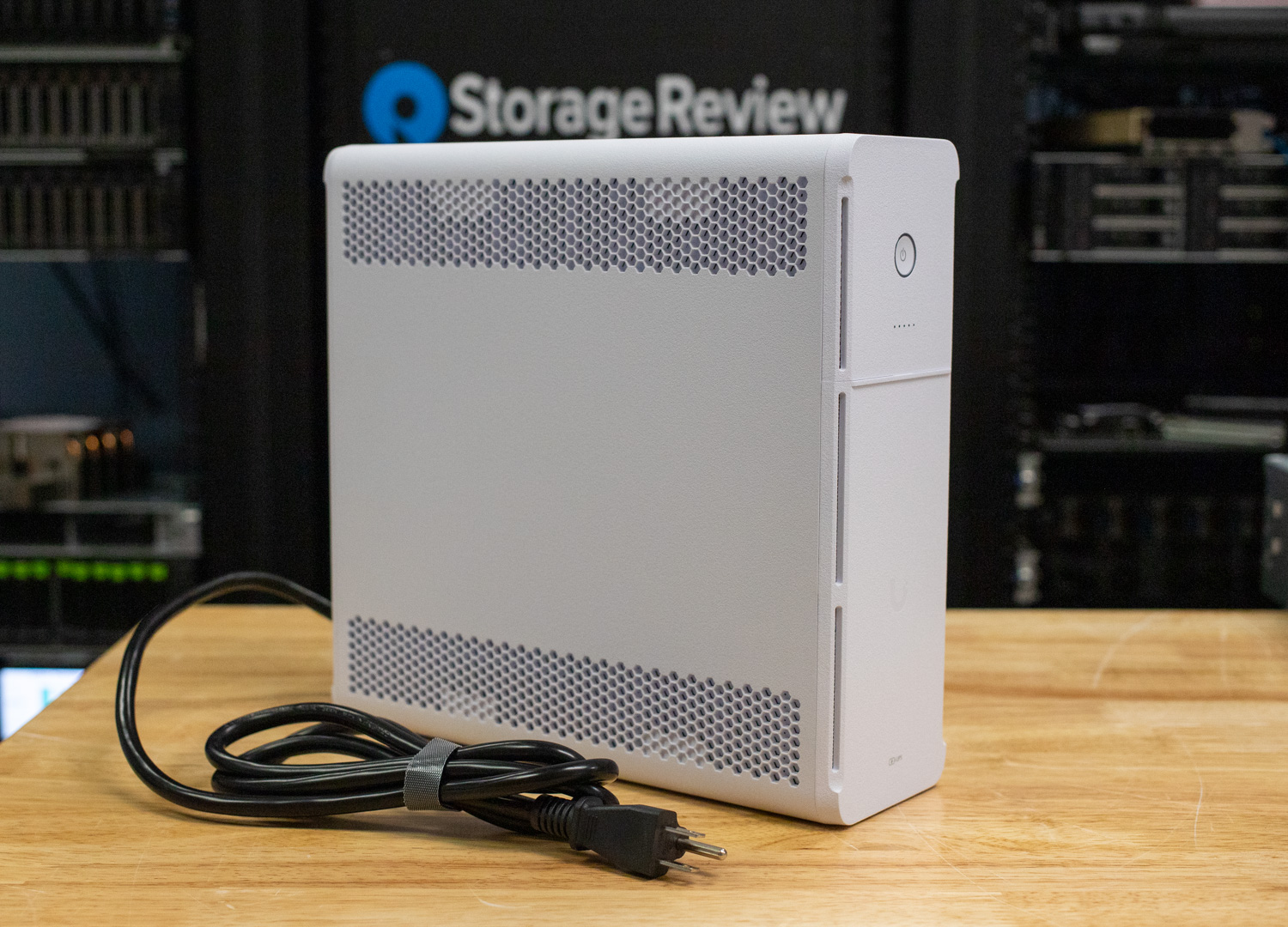
The UPS-2U, arriving in late October, is priced at $279 and offers a 1.44 kVA capacity suited for rack deployments and higher-power network environments. The UPS-2U utilizes the same network application, delivering simple adoption, network-aware monitoring, and compatibility with UniFi and third-party systems through its built-in Network UPS Tools (NUT) server functionality.
This release marks only the start of Ubiquiti’s entry into the power protection market. Future additions to the UniFi UPS family are expected to introduce higher capacities, pure sine-wave output, and advanced lithium-ion technology, rounding out a full-scale ecosystem for dependable and intelligent power delivery.
## Ubiquiti UPS Tower Specifications
The following table outlines the specifications of the Ubiquiti UPS Tower UPS.
| Specification | Details |
| --- | --- |
| **Mechanical** | |
| Dimensions | 288 × 99 × 280.5 mm (11.33 × 3.9 × 11.0″) |
| Weight | 8.17 kg (18.0 lb) |
| Enclosure Material | Polycarbonate and acrylonitrile styrene blend |
| Form Factor | Desktop |
| Weatherproofing | IP20 |
| **Hardware** | |
| Management | Ethernet |
| Networking Interface | 10/100/1000 MbE port for network connection; (2) 1 GbE ports for UPS |
| **Power** | |
| AC Input | (1) Outlet: NEMA 5-15R |
| Battery Backup / Surge | (6) Battery backup + surge protection: NEMA 5-15R; (5) Surge protection: NEMA 5-15R |
| Capacity (typ.) | 1000 VA / 600 W |
| Type | Line-interactive |
| AC Voltage Range | 89 – 145 VAC |
| Power Method | 3-wire system, 120 VAC, 12 A max, 50/60 Hz |
| Nominal Input Voltage | 120 VAC |
| Output Voltage | 120 VAC |
| Frequency Range | AC mode: 50/60 Hz ± 5 Hz (auto sensing); battery mode: 60 Hz ± 1 Hz |
| AC Voltage Regulation | ±10% (battery mode) |
| Transfer Time | 0 ms typical; 10 ms (battery mode) |
| Wave Form | Simulated sine wave (battery mode) |
| **Battery** | |
| Battery Type | Lead acid (12 V) |
| Recharge Time | 6-8 hours to 90% capacity |
| Overload in Online Mode | 110-130%: go to battery in 2 min; ≥130%: go to fault immediately |
| Overload at Battery Mode | 110%: shutdown in 5 sec; ≥120%: shutdown immediately |
| Short-Circuit Protection (Online) | Breaker, 250 VAC, 15 A |
| Output Short-Circuit Current | Peak 33.4 A; RMS 8.2 A |
| **Controls & Indicators** | |
| Buttons | (1) Power; (1) Factory reset |
| LED – Status | Off: device not turned on
Flashing white: initializing / factory default
Steady white: waiting for adoption
Flashing blue: heartbeat
Alternating white/blue: firmware upgrading
Rapid flashing blue: locating
Steady red: high temperature
Steady green: on battery |
| LED – Battery Indicator | (1) Off
(2) Steady blue: battery ≤ 20%
(3) Steady blue: battery 21–40%
(4) Steady blue: battery 41–60%
(5) Steady blue: battery 61–80%
(6) Steady blue: battery 81–100% |
| **Environment** | |
| Operating Altitude | 3,000 m (approx. 9,843 ft) |
| Operating Temperature | 0 to 40°C (32 to 104°F) |
| Storage Temperature | -15 to 45°C (5 to 113°F) |
| Ambient Operating Temperature | 0 to 40°C (32 to 104°F) |
| Ambient Operating Humidity | 5% to 95% noncondensing |
| **Compliance** | |
| NDAA Compliant | Yes |
| Certifications | FCC, IC, UL 1778, CSA C22.2 No. 107.3 |
## Ubiquiti UPS Tower Design & Build
The Ubiquiti UPS Tower is constructed with a polycarbonate and acrylonitrile styrene blend enclosure, providing durability while keeping the overall weight manageable at 18.0 lb (8.17 kg). Measuring 11.33″ × 3.9″ × 11.0″ (288 × 99 × 280.5 mm), it maintains a compact desktop form factor suitable for small network setups or office environments. The unit carries an IP20 weatherproofing rating, indicating it is designed for indoor use only.
On the front, users will find a power button and a factory reset button, along with LED indicators that display operational and battery status. These include clear visual cues for initialization, adoption, heartbeat, firmware upgrades, temperature warnings, and battery level progression from 0 to 100 percent. The front cover is removable, allowing direct access to the internal battery for easy replacement or servicing.
![Ubiquiti UPS Tower front view]()
### Rear Connectivity
On the rear of the Ubiquiti UPS Tower, a permanently attached NEMA 5-15P power cord is provided for AC input, offering a straightforward plug-and-play setup. The unit offers a total of 10 NEMA 5-15R outlets, split between two functional groups: the left bank features battery backup with surge protection, while the right bank provides surge protection only. This layout allows users to prioritize critical equipment on the protected side while reserving the surge-only outlets for non-essential peripherals.
Also located on the rear panel are a network surge protection port with both in and out RJ45 jacks, a resettable fuse, and a 10/100Mb Ethernet port used for management and integration into the UniFi Network interface. This connection enables real-time monitoring of power conditions, load status, and automated responses during outages, ensuring the UPS remains fully integrated into the broader UniFi ecosystem.
![Ubiquiti UPS Tower rear view]()
### Battery
The Ubiquiti UPS Tower uses a 12V 9Ah maintenance-free sealed lead-acid (SLA) battery, specifically an MHB MS9-12 unit. This chemical mix is commonly found in compact line-interactive UPS systems, offering a solid balance between cost, capacity, and reliability. The design allows for straightforward servicing, as the front panel can be easily removed to expose the battery compartment. The internal battery is connected via standard quick-disconnect leads for tool-free replacement.
![]()
Ubiquiti rates the recharge time between 6 and 8 hours to reach 90% capacity, ensuring quick turnaround after discharge events. The use of a replaceable, user-accessible battery is a welcome feature at this price point, helping extend the usable lifespan of the UPS Tower without requiring complete replacement of the device.
## UniFi Network Overview and Management
Integrating the UPS Tower into the UniFi Network is quick and seamless. In our setup, the unit was connected to a UDM SE, immediately appearing in the UniFi Network application for adoption without any manual configuration. After being adopted, the device connected to the network and updated, showing live status within the topology view alongside other devices in the network.
![]()
Within the UniFi Devices pane of the UniFi Network application, the UPS Tower appears alongside other connected hardware for direct management. Selecting it opens a detailed status view that displays key information at a glance. From the start, users can view the port layout, indicating which outlets are currently online, which ones are on battery-backed ports, and which ones are on surge-only ports. The built-in 10/100Mb Ethernet port is shown as active, confirming communication with the network.
The dashboard view also presents power utilization, battery capacity, and basic device data, including model name, firmware version, IP address, MAC address, and input voltage. This allows administrators to quickly verify runtime status or diagnose connectivity issues without leaving the UniFi interface. During testing, the unit reported stable input voltage and battery readiness at 100 percent, while maintaining a clear visual indicator for each protected outlet group.
![]()
On the device’s Settings page, users can adjust key configuration options for the UPS Tower. The unit can be renamed for easier identification and assigned either a DHCP or static IP address, depending on deployment needs.
One of the standout features is the built-in NUT server integration. Enabling this feature allows the UPS Tower to communicate power state information to other systems on the network, including UniFi storage appliances or third-party servers, facilitating safe shutdown operations during extended power loss. The inclusion of NUT support is notable for a device in this class, as it brings enterprise-grade power management capability into an affordable and easy-to-use platform. Additional management functions include options to toggle the LED indicator, locate the device within the network, restart, or manually update firmware.
![]()
To validate performance, we simulated a power outage while the UPS Tower was powering the UniFi Dream Machine SE and the ISP modem. Immediately upon loss of AC input, the UniFi interface displayed an alert indicating a power failure, with the system automatically switching to battery mode. The surge-only outlets correctly went offline, while the battery-backed outlets remained active, ensuring network operations and internet connectivity continued uninterrupted.
During the test, the UPS reported a load of 36-48 W, maintaining stable output power throughout the discharge period. The UniFi dashboard provided real-time updates, showing an estimated runtime of approximately 50 minutes at that load level and a battery capacity of 96% at the start of discharge.
![]()
Once power was restored, the UPS Tower seamlessly transitioned back to line power without any interruption to the connected devices. The UniFi Network interface reflected this change instantly, showing that all outlets had returned to regular operation and the battery had entered charging mode. In our test, the unit began recharging at around 40% capacity, with power utilization still hovering between 36 and 48 W as the connected UDM SE and modem continued to run.
![]()
## Conclusion
The Ubiquiti UPS Tower is a strong first entry into the company’s UniFi Power lineup. Priced at $159, it offers excellent value for users who want to keep essential networking devices, such as a gateway, modem, or small server, online during power interruptions. The setup process is quick, and integration into the UniFi Network interface is seamless, providing real-time visibility of power status, load, and battery health in the same dashboard that manages networking and storage devices.
During testing, the UPS Tower performed reliably, maintaining stable output when switching to battery power and recovering cleanly once utility power was restored. The addition of NUT server support extends its usefulness beyond UniFi devices, allowing it to coordinate safe shutdowns with third-party systems. The replaceable 12V sealed lead-acid battery also makes servicing straightforward, giving the unit a longer practical lifespan compared to many sealed, non-serviceable UPS options.
While the UPS Tower is an impressive start, it still lacks a few advanced features that would enhance the overall experience. Currently, the unit does not include a built-in self-test or a runtime calibration function, which would help verify battery performance and load handling over time. It would also be beneficial to see expanded reporting options and deeper logging in future updates. Given Ubiquiti’s consistent track record of adding features through software updates, these capabilities may be introduced later as the UniFi Power ecosystem grows.
Overall, the UPS Tower is an easy-to-use, well-built, and affordable backup solution that brings power protection into the UniFi ecosystem for the first time. It provides a dependable safeguard for small networks, home labs, or office environments, establishing a solid foundation for Ubiquiti’s future development of higher-capacity, enterprise-grade power solutions.
[Product Page](https://store.ui.com/us/en/category/integrations-power-tech/collections/unifi-power-tech-ups/products/ups-tower-us?a_aid=StorageReview)
**Engage with StorageReview**
[Newsletter](https://www.storagereview.com/storage_newsletter) | [YouTube](https://www.youtube.com/user/StorageReview "Opens in a new window") | Podcast [iTunes](https://podcasts.apple.com/gb/podcast/storagereview-com-storage-reviews/id1060681115 "Opens in a new window")/ [Spotify](https://open.spotify.com/show/1y6VnznABhHeOSMOmbDTz0 "Opens in a new window") | [Instagram](https://www.instagram.com/storagereview/ "Opens in a new window") | [Twitter](https://twitter.com/storagereview "Opens in a new window") | [TikTok](https://www.tiktok.com/@storagereview? "Opens in a new window") | [RSS Feed](https://www.storagereview.com/rss.xml)
![]()
### Dylan Dougherty
IT professional specializing in network administration and writer for StorageReview.
Previous post: [Short, Quiet, Capable: Supermicro IoT SYS-E403-14B-FRN2T Review](https://www.storagereview.com/review/short-quiet-capable-supermicro-iot-sys-e403-14b-frn2t-review)
Next post: [NVIDIA RTX PRO 6000 Workstation GPU Review: Blackwell Architecture and 96 GB for Pro Workflows](https://www.storagereview.com/review/nvidia-rtx-pro-6000-workstation-gpu-review-blackwell-architecture-and-96-gb-for-pro-workflows)
Trusted Vendors
Products and solutions from our affiliate partners:
- [

Ubiquiti
](https://store.ui.com/us/en?a_aid=StorageReview "Opens in a new window")
- [

Newegg
](https://click.linksynergy.com/fs-bin/click?id=g5terNMDhz0&offerid=1207190.18&subid=0&type=4 "Opens in a new window")
- [
 Amazon
](https://amzn.to/4fLJUEW "Opens in a new window")
Newsletter
Subscribe to the StorageReview newsletter to stay up to date on the latest news and reviews. We promise no spam!
1
Leave this field empty if you’re human:
## Advertisement
Content Categories
[Facebook](https://www.facebook.com/@storagereview) [X](https://twitter.com/storagereview) [Instagram](https://www.instagram.com/storagereview/) [LinkedIn](https://www.linkedin.com/company/storagereview-com) [YouTube](https://www.youtube.com/user/storagereview?sub_confirmation=1) [Email](mailto:info@storagereview.com) [Spotify](https://open.spotify.com/show/1y6VnznABhHeOSMOmbDTz0) [Reddit](https://www.reddit.com/r/StorageReview/) [Discord](https://discord.gg/TwMHb4azdC) [RSS](https://www.storagereview.com/rss.xml) [TikTok](https://www.tiktok.com/@storagereview)
Copyright © 1998-2025 Flying Pig Ventures, LLC Cincinnati, Ohio. All rights reserved.
Manage your privacy
To provide the best experiences, we and our partners use technologies like cookies to store and/or access device information. Consenting to these technologies will allow us and our partners to process personal data such as browsing behavior or unique IDs on this site and show (non-) personalized ads. Not consenting or withdrawing consent, may adversely affect certain features and functions.
Click below to consent to the above or make granular choices. Your choices will be applied to this site only. You can change your settings at any time, including withdrawing your consent, by using the toggles on the Cookie Policy, or by clicking on the manage consent button at the bottom of the screen.
Functional Functional Always active
The technical storage or access is strictly necessary for the legitimate purpose of enabling the use of a specific service explicitly requested by the subscriber or user, or for the sole purpose of carrying out the transmission of a communication over an electronic communications network.
Preferences Preferences
The technical storage or access is necessary for the legitimate purpose of storing preferences that are not requested by the subscriber or user.
Statistics Statistics
The technical storage or access that is used exclusively for statistical purposes. The technical storage or access that is used exclusively for anonymous statistical purposes. Without a subpoena, voluntary compliance on the part of your Internet Service Provider, or additional records from a third party, information stored or retrieved for this purpose alone cannot usually be used to identify you.
Marketing Marketing
The technical storage or access is required to create user profiles to send advertising, or to track the user on a website or across several websites for similar marketing purposes.
Statistics
Marketing
Features
Always active
Special features
Special purposes
Always active
- Manage options
- Manage services
- Manage {vendor\_count} vendors
- [Read more about these purposes](https://cookiedatabase.org/tcf/purposes/)
Accept Deny Manage options Save preferences Manage options
- {title}
- {title}
- {title}
Manage your privacy
To provide the best experiences, we use technologies like cookies to store and/or access device information. Consenting to these technologies will allow us to process data such as browsing behavior or unique IDs on this site. Not consenting or withdrawing consent, may adversely affect certain features and functions.
Functional Functional Always active
The technical storage or access is strictly necessary for the legitimate purpose of enabling the use of a specific service explicitly requested by the subscriber or user, or for the sole purpose of carrying out the transmission of a communication over an electronic communications network.
Preferences Preferences
The technical storage or access is necessary for the legitimate purpose of storing preferences that are not requested by the subscriber or user.
Statistics Statistics
The technical storage or access that is used exclusively for statistical purposes. The technical storage or access that is used exclusively for anonymous statistical purposes. Without a subpoena, voluntary compliance on the part of your Internet Service Provider, or additional records from a third party, information stored or retrieved for this purpose alone cannot usually be used to identify you.
Marketing Marketing
The technical storage or access is required to create user profiles to send advertising, or to track the user on a website or across several websites for similar marketing purposes.
Statistics
Marketing
Features
Always active
Special features
Special purposes
Always active
- Manage options
- Manage services
- Manage {vendor\_count} vendors
- [Read more about these purposes](https://cookiedatabase.org/tcf/purposes/)
Accept Deny Manage options Save preferences Manage options
- {title}
- {title}
- {title}
Manage consent Manage consent
```json
{"@context":"https:\/\/schema.org","@graph":[{"@type":"WebPage","@id":"https:\/\/www.storagereview.com\/review\/ubiquiti-ups-tower-review-compact-unifi-power-protection-for-home-labs-and-network-closets","url":"https:\/\/www.storagereview.com\/review\/ubiquiti-ups-tower-review-compact-unifi-power-protection-for-home-labs-and-network-closets","name":"Ubiquiti UPS Tower Review: Compact UniFi Power Protection for Home Labs and Network Closets - StorageReview.com","isPartOf":{"@id":"https:\/\/www.storagereview.com\/#website"},"primaryImageOfPage":{"@id":"https:\/\/www.storagereview.com\/review\/ubiquiti-ups-tower-review-compact-unifi-power-protection-for-home-labs-and-network-closets#primaryimage"},"image":{"@id":"https:\/\/www.storagereview.com\/review\/ubiquiti-ups-tower-review-compact-unifi-power-protection-for-home-labs-and-network-closets#primaryimage"},"thumbnailUrl":"https:\/\/www.storagereview.com\/wp-content\/uploads\/2025\/10\/StorageReview-Ubiquiti-Desktop-UPS-4.jpg","datePublished":"2025-10-07T13:08:36+00:00","dateModified":"2026-08-16T00:07:38+00:00","description":"Ubiquiti’s UniFi UPS tower adds smart, affordable power management, with 1kVA tower and 1.44kVA rack models integrated in UniFi Network.","breadcrumb":{"@id":"https:\/\/www.storagereview.com\/review\/ubiquiti-ups-tower-review-compact-unifi-power-protection-for-home-labs-and-network-closets#breadcrumb"},"inLanguage":"en-US","potentialAction":[{"@type":"ReadAction","target":["https:\/\/www.storagereview.com\/review\/ubiquiti-ups-tower-review-compact-unifi-power-protection-for-home-labs-and-network-closets"]}]},{"@type":"ImageObject","inLanguage":"en-US","@id":"https:\/\/www.storagereview.com\/review\/ubiquiti-ups-tower-review-compact-unifi-power-protection-for-home-labs-and-network-closets#primaryimage","url":"https:\/\/www.storagereview.com\/wp-content\/uploads\/2025\/10\/StorageReview-Ubiquiti-Desktop-UPS-4.jpg","contentUrl":"https:\/\/www.storagereview.com\/wp-content\/uploads\/2025\/10\/StorageReview-Ubiquiti-Desktop-UPS-4.jpg","width":1500,"height":1080},{"@type":"BreadcrumbList","@id":"https:\/\/www.storagereview.com\/review\/ubiquiti-ups-tower-review-compact-unifi-power-protection-for-home-labs-and-network-closets#breadcrumb","itemListElement":[{"@type":"ListItem","position":1,"name":"Home","item":"https:\/\/www.storagereview.com\/"},{"@type":"ListItem","position":2,"name":"Review","item":"https:\/\/www.storagereview.com\/review"},{"@type":"ListItem","position":3,"name":"Ubiquiti UPS Tower Review: Compact UniFi Power Protection for Home Labs and Network Closets"}]},{"@type":"WebSite","@id":"https:\/\/www.storagereview.com\/#website","url":"https:\/\/www.storagereview.com\/","name":"StorageReview.com","description":"StorageReview.com is a leading provider of news and reviews throughout the entire IT stack - from the datacenter to the edge, and all points in between.","publisher":{"@id":"https:\/\/www.storagereview.com\/#organization"},"potentialAction":[{"@type":"SearchAction","target":{"@type":"EntryPoint","urlTemplate":"https:\/\/www.storagereview.com\/?s={search_term_string}"},"query-input":{"@type":"PropertyValueSpecification","valueRequired":true,"valueName":"search_term_string"}}],"inLanguage":"en-US"},{"@type":"Organization","@id":"https:\/\/www.storagereview.com\/#organization","name":"StorageReview.com","url":"https:\/\/www.storagereview.com\/","logo":{"@type":"ImageObject","inLanguage":"en-US","@id":"https:\/\/www.storagereview.com\/#\/schema\/logo\/image\/","url":"https:\/\/www.storagereview.com\/wp-content\/uploads\/2020\/02\/Storage-Reviews-2-2.png","contentUrl":"https:\/\/www.storagereview.com\/wp-content\/uploads\/2020\/02\/Storage-Reviews-2-2.png","width":344,"height":61,"caption":"StorageReview.com"},"image":{"@id":"https:\/\/www.storagereview.com\/#\/schema\/logo\/image\/"},"sameAs":["https:\/\/x.com\/storagereview","http:\/\/youtube.com\/user\/storagereview"]}]}
```