---
description: The Dell U3419W monitor is a new 34 inch monitor that Dell has added to their Ultrasharp product line replacing the U3417W. This monitor is a behemoth that matches it’s ultra wide curved display with ultra high quality.
title: Dell Ultrasharp 34 Curved USB-C Monitor (U3419W) Review
image: https://www.storagereview.com/wp-content/uploads/2019/08/StorageReview-Dell-UltraSharp-34-Curved-USB-C-Thumb.jpg
---
[![Storage Review]()](https://storagereview.com/)
---
[Facebook](https://www.facebook.com/@storagereview) [X (Twitter)](https://twitter.twitter.com/storagereview) [Instagram](https://www.instagram.com/storagereview/) [LinkedIn](https://www.linkedin.com/company/storagereview-com) [YouTube](https://www.youtube.com/user/storagereview?sub_confirmation=1) [Email](mailto:info@storagereview.com) [Spotify](https://open.spotify.com/show/1y6VnznABhHeOSMOmbDTz0) [Reddit](https://www.reddit.com/r/StorageReview/) [Discord](https://discord.gg/TwMHb4azdC) [RSS Feed](https://www.storagereview.com/rss.xml) [TikTok](https://www.tiktok.com/@storagereview)
[Facebook](https://www.facebook.com/@storagereview) [X (Twitter)](https://twitter.com/storagereview) [Instagram](https://www.instagram.com/storagereview/) [LinkedIn](https://www.linkedin.com/company/storagereview-com) [YouTube](https://www.youtube.com/user/storagereview?sub_confirmation=1) [Email](mailto:info@storagereview.com) [Spotify](https://open.spotify.com/show/1y6VnznABhHeOSMOmbDTz0) [Reddit](https://www.reddit.com/r/StorageReview/) [Discord](https://discord.gg/TwMHb4azdC) [RSS Feed](https://www.storagereview.com/rss.xml) [TikTok](https://www.tiktok.com/@storagereview)
[](https://www.storagereview.com)
≡ Menu
- [Home](https://www.storagereview.com/)
- [Storage Reviews](https://www.storagereview.com/review)
- [End User Reviews](https://www.storagereview.com/consumer)
- [Enterprise Reviews](https://www.storagereview.com/enterprise)
- [Ubiquiti Reviews](https://www.storagereview.com/best/ubiquiti-reviews)
- [SR Merch](https://store.storagereview.com)
- [Leaderboards](https://www.storagereview.com/best)
- [Best Storage Arrays](https://www.storagereview.com/best/storage-arrays)
- [Best Enterprise SSDs](https://www.storagereview.com/best/enterprise-ssds)
- [Best Servers](https://www.storagereview.com/best/servers)
- [Best Enterprise GPUs](https://www.storagereview.com/best/enterprise-gpus)
- [Best Desktops for Local AI](https://www.storagereview.com/best/desktops-local-ai)
- [Best Laptops for Local AI](https://www.storagereview.com/best/laptops-local-ai)
- [Best Local LLM Tools](https://www.storagereview.com/best/local-llm-tools)
- [Agentic AI Hardware](https://www.storagereview.com/best/agentic-ai-hardware)
- [Best SSDs & Hard Drives](https://www.storagereview.com/best_drives)
- [Best Portable SSDs](https://www.storagereview.com/best/portable-ssds)
- [Best Business Laptops](https://www.storagereview.com/best/business-laptops)
- [Best Mobile Workstations](https://www.storagereview.com/best/mobile-workstations)
- [Best Desktop Workstations](https://www.storagereview.com/best/desktop-workstations)
- [Best Mini PCs](https://www.storagereview.com/best/mini-pcs)
- [Best Laptop Battery Life](https://www.storagereview.com/best/laptop-battery-life)
- [Storage Reference Guide](https://www.storagereview.com/storage-reference-guide)
- [About SR](https://www.storagereview.com/about-storagereview)
- [StorageReview.com Sweepstakes Rules and Regulations](https://www.storagereview.com/storagereview-com-sweepstakes-rules-and-regulations)
Search
[Home](https://www.storagereview.com/) » [Review](https://www.storagereview.com/review) » Dell Ultrasharp 34 Curved USB-C Monitor (U3419W) Review
# Dell Ultrasharp 34 Curved USB-C Monitor (U3419W) Review
by StorageReview Consumer Desk on August 14, 2019
[Client Accessories](https://www.storagereview.com/consumer/client-accessories) ◇ [End User](https://www.storagereview.com/consumer)
The Dell U3419W monitor is a new 34 inch monitor that Dell has added to their Ultrasharp product line replacing the [U3417W](https://www.storagereview.com/dell_ultrasharp_34_curved_monitor_review_u3417w). This monitor is a behemoth that matches it’s ultra wide curved display with ultra high quality. Designed with photo and video work in mind as well as entertainment; whatever your use this monitor offers an immersive experience.
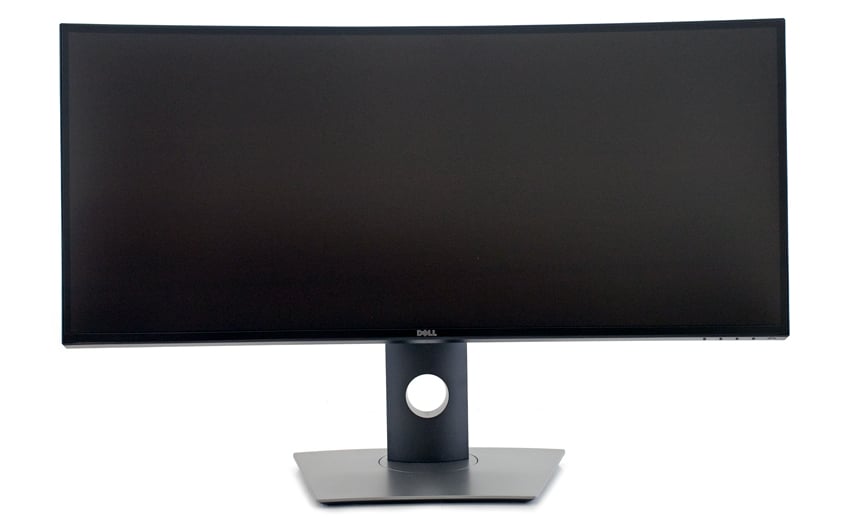
A key distinction of the Dell UltraSharp 34 Curved USB-C Monitor is in its name. This monitor offers USB-C compatibility which is advantageous in a world where modern computers are moving towards USB-C as the standard and sometimes the only option for connection on computers like new MacBooks. The curve of this monitor is another feature that deserves to be recognized. Eye strain is no longer the name of the game when working for long hours because the curvature improves your field of view adding in peripheral vision. This reduces eye movement across the screen which in turn decreases the strain on your eyes. With a comfort view this monitor also features a flicker free TUV certified screen with WQHD 3440 x 1440 resolution and 99% sRGB color calibration straight out of the box.
With a moderately expensive price tag this monitor won’t be an impulse buy as the cost is around $850 according to Dell’s website. But, showing that Dell stands behind their product it does come with a 3 year warranty, 3-Years Advanced Exchange Service, and a Premium Panel Guarantee.
## **Dell U3419W Monitor Specifications**
| Screen type | Active Matrix: TFT LCD |
| --- | --- |
| Panel technology | In-Plane Switching Technology |
| Viewable Image | Diagonal: 34.14 inches
Horizontal, active area: 31.49 inches
Vertical, active Area: 13.18 inches |
| Maximum resolution | 3440 x 1440 at 60Hz |
| Curve radius | 1900 R |
| Pixel pitch | 0.233 mm x 0.233 mm |
| Pixel per inch | 109 |
| Viewing angle | 178° (typical) |
| Brightness output | 00 cd/m²3 |
| Contrast ratio | 1000 to 1 (typical) |
| Response time FAST mode | 5ms |
| NORMAL mode | 8ms |
| Color depth | 1.07 billion colors |
| Integrated speakers | 2 x 9W |
| Power Consumption Operational | 54 Watt |
| Power Consumption Sleep | 0.5 Watt |
| Connectors | 2 x HDMI 2.0 (HDCP 2.2)
1 x DP 1.2 (HDCP 2.2)
2 x USB 3.0 Upstream port
2 x USB 3.0 Downstream port (side)
2 x USB 3.0 Downstream port (bottom)
1 x USB Type-C (DisplayPort DP1.2 Alternate Mode, Power Delivery upto 90W (Typical), and USB2.0) |
## **Dell U3419W Usability and Features**
As this monitor also leverages Dell Display Manager, a detailed write up of the software can be found here in the Usability and Features section of our prior [curved monitor review](https://www.storagereview.com/dell_ultrasharp_34_curved_monitor_review_u3417w). However, a unique feature I would like to highlight about the Dell U3419W monitor is the Picture By Picture (PBP) functionality. When setup for PBP the monitor takes input from two different PC sources and displays them side by side on one monitor. This is a feature I’ve never seen before in a monitor and while in a way it is similar to having a dual monitor setup PBP is an intriguing new technology for those who utilize multiple PC’s. Additionally, the Keyboard, Video, Mouse (KVM) feature pairs nicely with PBP and lets you toggle and control two PC’s with only one mouse and keyboard.
## **Dell U3419W Design and Build**
The Dell Ultrasharp 34 Curved USB-C monitor is definitely a pretty piece of technology with the sleek design in line with Dell’s UltraSharp line of monitors. It features a cure radius of 1900r and WQHD 3440 x 1440 native resolution. The thin bezel along the outside is a feature I find really nice. It’s about as seamless as possible with the display.
![Dell Ultrasharp Curved Monitor (U3419W)]()
The monitor comes with a full motion stand that tilts, swivels, and moves up and down with ease. Although, the base is pretty large and not well suited to small skinny desks but there are other stand options available. Organizationally, the keyhole through the center manages cords nicely. Visible on the bottom right corner the monitor also has four navigation buttons to control the display and built in menus and a power button.
![Dell Ultrasharp 34 Curved USB-C Monitor U3419W]()
Featuring easy access connectivity on the side. There are two USB downstream ports with the bottom port also offering power charging.
![Dell Ultrasharp 34 Curved USB-C Monitor (U3419W) connectors]()
Last but not least a bottom view of all the connectors and ports. Going from left to right there is an AC power connector, security lock slot, two HDMI port connectors, a DisplayPort in connector, USB Type-C port, audio-line out, two USB upstream ports, a USB downstream port, and a USB downstream port with power charging.
## **Conclusion**
The Dell Ultrasharp 34 Curved USB-C monitor is an elegant and streamlined piece of technology with a niche in the monitor market due to it’s ultra wide display, accurate colors, and USB-C. The monitor is aimed at creative professionals who do photo and video work. It offers multiple avenues of customization through accessories and software to satisfy users in any given environment. There are multiple mounting options with a provided stand and VESA holes. The Dell display manager adds another layer of useful customization. It manages the basics you’d find with any monitor and more advanced functions like easy arrange which allows you to customize your workflow and input manager to easily manage the PIP/PBP mode.
My day to day use of this monitor didn’t fully utilize it to it’s potential. This monitor displays 1.07 billion colors but most of the day 75% of my screen space is some shade of white. My use of a computer mainly includes light internet browsing, a word processor, and email. However, I did try to explore all the features to be able to give my two cents. Admittedly, as somebody who has never used such a large monitor it was an adjustment for me to get used to using it and it took some time to learn how to take advantage of all the screen space. My life is all about portability and taking my work with me wherever I may need to go. So, I’m not used to having a gigantic monitor at my disposal.
I have found there is plenty of room on this monitor for everything I need and then some. I started off with two full size applications running at the same time. With further testing I found a configuration that allowed me to have my most important windows, a word processor and internet browser, ⅔ size with three smaller tabs along the top for email, my music player, and a search bar. I can say that I definitely don’t need to squint anymore and I have found I can work longer with less fatigue. In the past I’ve worked with monitors that have given me migraines after 2 hours of use. So, coming into work knowing that I can be on the computer all day and leave feeling good is a huge plus. The comfort view and curve are definitely easier on my eyes than a standard display.
[Dell U3419W at Amazon](https://amzn.to/2TBJ3NY)
[Discuss this review](http://forums.storagereview.com/index.php?/topic/41995-dell-ultrasharp-34-curved-usb-c-monitor-u3419w-review-discussion/)
[Sign up for the StorageReview newsletter](https://www.storagereview.com/storagereview_newsletter_signup)
**Engage with StorageReview**
[Newsletter](https://www.storagereview.com/storage_newsletter) | [YouTube](https://www.youtube.com/user/StorageReview "Opens in a new window") | Podcast [iTunes](https://podcasts.apple.com/gb/podcast/storagereview-com-storage-reviews/id1060681115 "Opens in a new window")/ [Spotify](https://open.spotify.com/show/1y6VnznABhHeOSMOmbDTz0 "Opens in a new window") | [Instagram](https://www.instagram.com/storagereview/ "Opens in a new window") | [Twitter](https://twitter.com/storagereview "Opens in a new window") | [TikTok](https://www.tiktok.com/@storagereview? "Opens in a new window") | [RSS Feed](https://www.storagereview.com/rss.xml)
![]()
### StorageReview Consumer Desk
Previous post: [Lacie Rugged Raid Shuttle Review](https://www.storagereview.com/review/lacie-rugged-raid-shuttle-review)
Next post: [Synology DiskStation DS620slim Review](https://www.storagereview.com/review/synology-diskstation-ds620slim-review)
Trusted Vendors
Products and solutions from our affiliate partners:
- [

Ubiquiti
](https://store.ui.com/us/en?a_aid=StorageReview "Opens in a new window")
- [

Newegg
](https://click.linksynergy.com/fs-bin/click?id=g5terNMDhz0&offerid=1207190.18&subid=0&type=4 "Opens in a new window")
- [
 Amazon
](https://amzn.to/4fLJUEW "Opens in a new window")
Newsletter
Subscribe to the StorageReview newsletter to stay up to date on the latest news and reviews. We promise no spam!
1
Leave this field empty if you’re human:
## Advertisement
Content Categories
[Facebook](https://www.facebook.com/@storagereview) [X](https://twitter.com/storagereview) [Instagram](https://www.instagram.com/storagereview/) [LinkedIn](https://www.linkedin.com/company/storagereview-com) [YouTube](https://www.youtube.com/user/storagereview?sub_confirmation=1) [Email](mailto:info@storagereview.com) [Spotify](https://open.spotify.com/show/1y6VnznABhHeOSMOmbDTz0) [Reddit](https://www.reddit.com/r/StorageReview/) [Discord](https://discord.gg/TwMHb4azdC) [RSS](https://www.storagereview.com/rss.xml) [TikTok](https://www.tiktok.com/@storagereview)
Copyright © 1998-2025 Flying Pig Ventures, LLC Cincinnati, Ohio. All rights reserved.
Manage your privacy
To provide the best experiences, we and our partners use technologies like cookies to store and/or access device information. Consenting to these technologies will allow us and our partners to process personal data such as browsing behavior or unique IDs on this site and show (non-) personalized ads. Not consenting or withdrawing consent, may adversely affect certain features and functions.
Click below to consent to the above or make granular choices. Your choices will be applied to this site only. You can change your settings at any time, including withdrawing your consent, by using the toggles on the Cookie Policy, or by clicking on the manage consent button at the bottom of the screen.
Functional Functional Always active
The technical storage or access is strictly necessary for the legitimate purpose of enabling the use of a specific service explicitly requested by the subscriber or user, or for the sole purpose of carrying out the transmission of a communication over an electronic communications network.
Preferences Preferences
The technical storage or access is necessary for the legitimate purpose of storing preferences that are not requested by the subscriber or user.
Statistics Statistics
The technical storage or access that is used exclusively for statistical purposes. The technical storage or access that is used exclusively for anonymous statistical purposes. Without a subpoena, voluntary compliance on the part of your Internet Service Provider, or additional records from a third party, information stored or retrieved for this purpose alone cannot usually be used to identify you.
Marketing Marketing
The technical storage or access is required to create user profiles to send advertising, or to track the user on a website or across several websites for similar marketing purposes.
Statistics
Marketing
Features
Always active
Special features
Special purposes
Always active
- Manage options
- Manage services
- Manage {vendor\_count} vendors
- [Read more about these purposes](https://cookiedatabase.org/tcf/purposes/)
Accept Deny Manage options Save preferences Manage options
- {title}
- {title}
- {title}
Manage your privacy
To provide the best experiences, we use technologies like cookies to store and/or access device information. Consenting to these technologies will allow us to process data such as browsing behavior or unique IDs on this site. Not consenting or withdrawing consent, may adversely affect certain features and functions.
Functional Functional Always active
The technical storage or access is strictly necessary for the legitimate purpose of enabling the use of a specific service explicitly requested by the subscriber or user, or for the sole purpose of carrying out the transmission of a communication over an electronic communications network.
Preferences Preferences
The technical storage or access is necessary for the legitimate purpose of storing preferences that are not requested by the subscriber or user.
Statistics Statistics
The technical storage or access that is used exclusively for statistical purposes. The technical storage or access that is used exclusively for anonymous statistical purposes. Without a subpoena, voluntary compliance on the part of your Internet Service Provider, or additional records from a third party, information stored or retrieved for this purpose alone cannot usually be used to identify you.
Marketing Marketing
The technical storage or access is required to create user profiles to send advertising, or to track the user on a website or across several websites for similar marketing purposes.
Statistics
Marketing
Features
Always active
Special features
Special purposes
Always active
- Manage options
- Manage services
- Manage {vendor\_count} vendors
- [Read more about these purposes](https://cookiedatabase.org/tcf/purposes/)
Accept Deny Manage options Save preferences Manage options
- {title}
- {title}
- {title}
Manage consent Manage consent
```json
{"@context":"https:\/\/schema.org","@graph":[{"@type":"WebPage","@id":"https:\/\/www.storagereview.com\/review\/dell-ultrasharp-34-curved-usb-c-monitor-u3419w-review","url":"https:\/\/www.storagereview.com\/review\/dell-ultrasharp-34-curved-usb-c-monitor-u3419w-review","name":"Dell Ultrasharp 34 Curved USB-C Monitor (U3419W) Review - StorageReview.com","isPartOf":{"@id":"https:\/\/www.storagereview.com\/#website"},"primaryImageOfPage":{"@id":"https:\/\/www.storagereview.com\/review\/dell-ultrasharp-34-curved-usb-c-monitor-u3419w-review#primaryimage"},"image":{"@id":"https:\/\/www.storagereview.com\/review\/dell-ultrasharp-34-curved-usb-c-monitor-u3419w-review#primaryimage"},"thumbnailUrl":"https:\/\/www.storagereview.com\/wp-content\/uploads\/2019\/08\/StorageReview-Dell-UltraSharp-34-Curved-USB-C-Thumb.jpg","datePublished":"2019-08-14T20:12:55+00:00","dateModified":"2020-03-20T16:47:28+00:00","description":"The Dell U3419W monitor is a new 34 inch monitor that Dell has added to their Ultrasharp product line replacing the U3417W. This monitor is a behemoth that matches it’s ultra wide curved display with ultra high quality.","breadcrumb":{"@id":"https:\/\/www.storagereview.com\/review\/dell-ultrasharp-34-curved-usb-c-monitor-u3419w-review#breadcrumb"},"inLanguage":"en-US","potentialAction":[{"@type":"ReadAction","target":["https:\/\/www.storagereview.com\/review\/dell-ultrasharp-34-curved-usb-c-monitor-u3419w-review"]}]},{"@type":"ImageObject","inLanguage":"en-US","@id":"https:\/\/www.storagereview.com\/review\/dell-ultrasharp-34-curved-usb-c-monitor-u3419w-review#primaryimage","url":"https:\/\/www.storagereview.com\/wp-content\/uploads\/2019\/08\/StorageReview-Dell-UltraSharp-34-Curved-USB-C-Thumb.jpg","contentUrl":"https:\/\/www.storagereview.com\/wp-content\/uploads\/2019\/08\/StorageReview-Dell-UltraSharp-34-Curved-USB-C-Thumb.jpg","width":100,"height":63},{"@type":"BreadcrumbList","@id":"https:\/\/www.storagereview.com\/review\/dell-ultrasharp-34-curved-usb-c-monitor-u3419w-review#breadcrumb","itemListElement":[{"@type":"ListItem","position":1,"name":"Home","item":"https:\/\/www.storagereview.com\/"},{"@type":"ListItem","position":2,"name":"Review","item":"https:\/\/www.storagereview.com\/review"},{"@type":"ListItem","position":3,"name":"Dell Ultrasharp 34 Curved USB-C Monitor (U3419W) Review"}]},{"@type":"WebSite","@id":"https:\/\/www.storagereview.com\/#website","url":"https:\/\/www.storagereview.com\/","name":"StorageReview.com","description":"StorageReview.com is a leading provider of news and reviews throughout the entire IT stack - from the datacenter to the edge, and all points in between.","publisher":{"@id":"https:\/\/www.storagereview.com\/#organization"},"potentialAction":[{"@type":"SearchAction","target":{"@type":"EntryPoint","urlTemplate":"https:\/\/www.storagereview.com\/?s={search_term_string}"},"query-input":{"@type":"PropertyValueSpecification","valueRequired":true,"valueName":"search_term_string"}}],"inLanguage":"en-US"},{"@type":"Organization","@id":"https:\/\/www.storagereview.com\/#organization","name":"StorageReview.com","url":"https:\/\/www.storagereview.com\/","logo":{"@type":"ImageObject","inLanguage":"en-US","@id":"https:\/\/www.storagereview.com\/#\/schema\/logo\/image\/","url":"https:\/\/www.storagereview.com\/wp-content\/uploads\/2020\/02\/Storage-Reviews-2-2.png","contentUrl":"https:\/\/www.storagereview.com\/wp-content\/uploads\/2020\/02\/Storage-Reviews-2-2.png","width":344,"height":61,"caption":"StorageReview.com"},"image":{"@id":"https:\/\/www.storagereview.com\/#\/schema\/logo\/image\/"},"sameAs":["https:\/\/x.com\/storagereview","http:\/\/youtube.com\/user\/storagereview"]}]}
```