

O Ubiquiti UNAS Pro é uma das mais recentes adições ao crescente ecossistema de dispositivos em rede da Ubiquiti, oferecendo uma solução NAS de alto desempenho que se integra perfeitamente à plataforma UniFi. Projetado para usuários residenciais e empresariais, o UNAS Pro combina opções de armazenamento flexíveis, recursos robustos de proteção de dados e uma experiência de usuário otimizada por meio do aplicativo UniFi Drive recém-adicionado. Este sistema de montagem em rack 2U oferece uma solução versátil para armazenamento de arquivos, backups e acesso remoto, atendendo a usuários que buscam uma plataforma de armazenamento com gerenciamento local e sem assinatura.
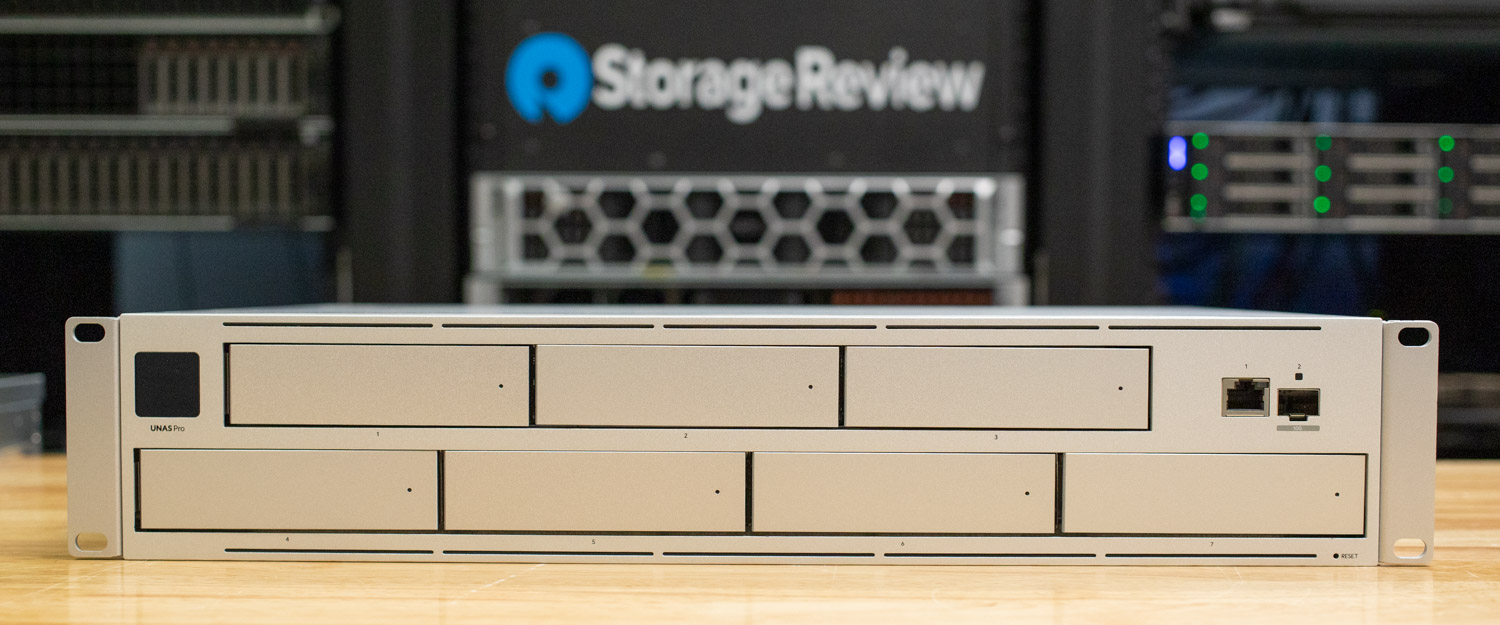
No momento da análise, o UNAS Pro está sendo vendido por US$ 499 na loja da Ubiquiti (link de afiliado).
Especificações do UNAS Pro
| Mecânico | Especificações do UNAS Pro |
| Dimensões | (17.4 x 12.8 x 3.4″) 442 x 325 x 87 mm |
| Peso | Sem suportes de montagem: 9.2 kg (20.3 lb) Com suportes de montagem: 9.5 kg (20.8 lb) |
| Material do invólucro | aço SGCC |
| Material de montagem | aço SGCC |
| Hardware | |
| Subcontratante | ARM® Cortex®-A57 de quatro núcleos a 1.7 GHz |
| A memória do sistema | 8 GB |
| Interface de gerenciamento | Ethernet em banda |
| Interface de rede | (1) Porta GbE RJ45 (1) porta SFP+ de 1/10 GbE |
| Interface RF | 4.1 Bluetooth |
| Energia | |
| Método de energia | (1) Entrada CA universal, 100—240 V CA, 3 A máx., 50/60 Hz (1) Entrada USP-RPS CC, 11.5 V CC, 13.91 A |
| Fonte de energia | CA/CC, interno, 200W |
| Faixa de tensão suportada | 100—240 V CA |
| Máx. consumo de energia | 160W |
| Responsabilidade | |
| Temperatura ambiente de operação | -5 a 40 ° C (23 a 104 ° F) |
| Umidade operacional ambiente | 5 a 95% sem condensação |
| Certificações | FCC, CE, IC |
| Requisitos da aplicação | |
| Unidade UniFi | Versão 1.16.0 e posterior |
Construção e design UNAS Pro
O UNAS Pro compartilha um design semelhante ao do UNVR Pro, apresentando um formato de montagem em rack 2U e uma construção robusta em aço SGCC. Suas dimensões compactas de (17.4 x 12.8 x 3.4″) 442 x 325 x 87 mm o tornam ideal para racks de rede e servidores. O UNAS Pro oferece uma memória total do sistema aumentada para 8 GB, proporcionando melhor desempenho no processamento de grandes volumes de dados e cache. Ele utiliza o software UniFi Drive, projetado para armazenamento e gerenciamento eficientes de arquivos, em vez do software UniFi Protect encontrado no UNVR Pro.
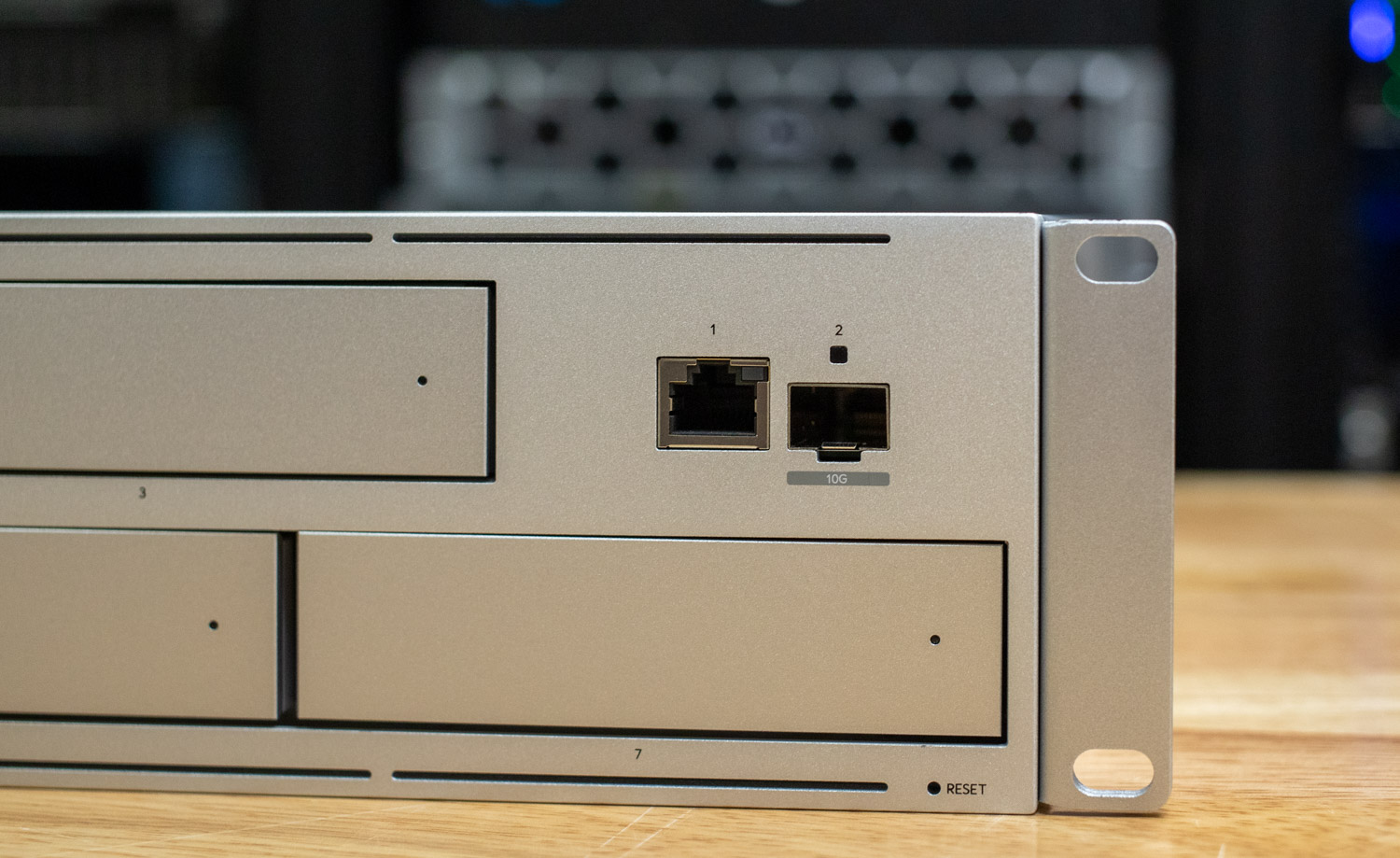
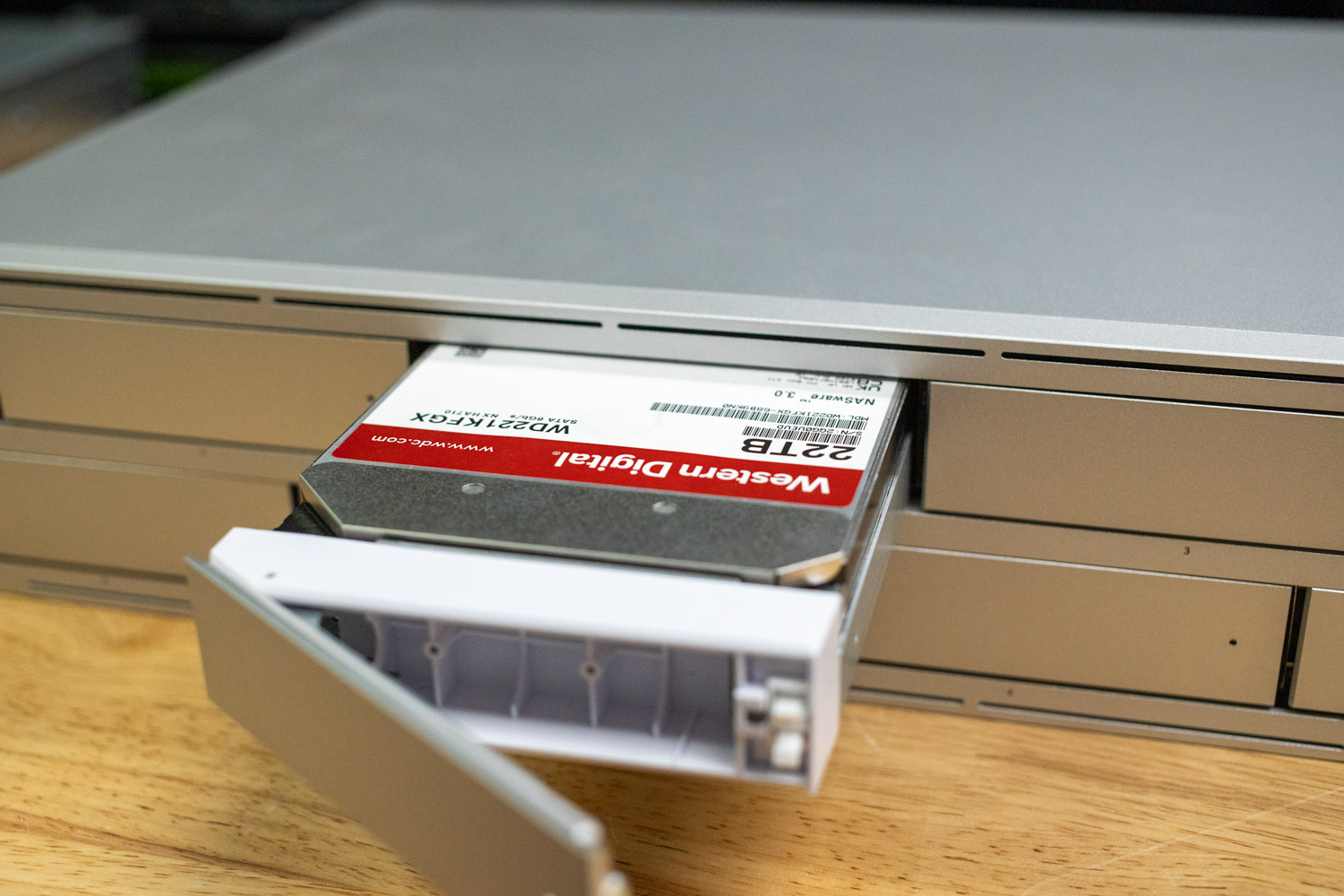
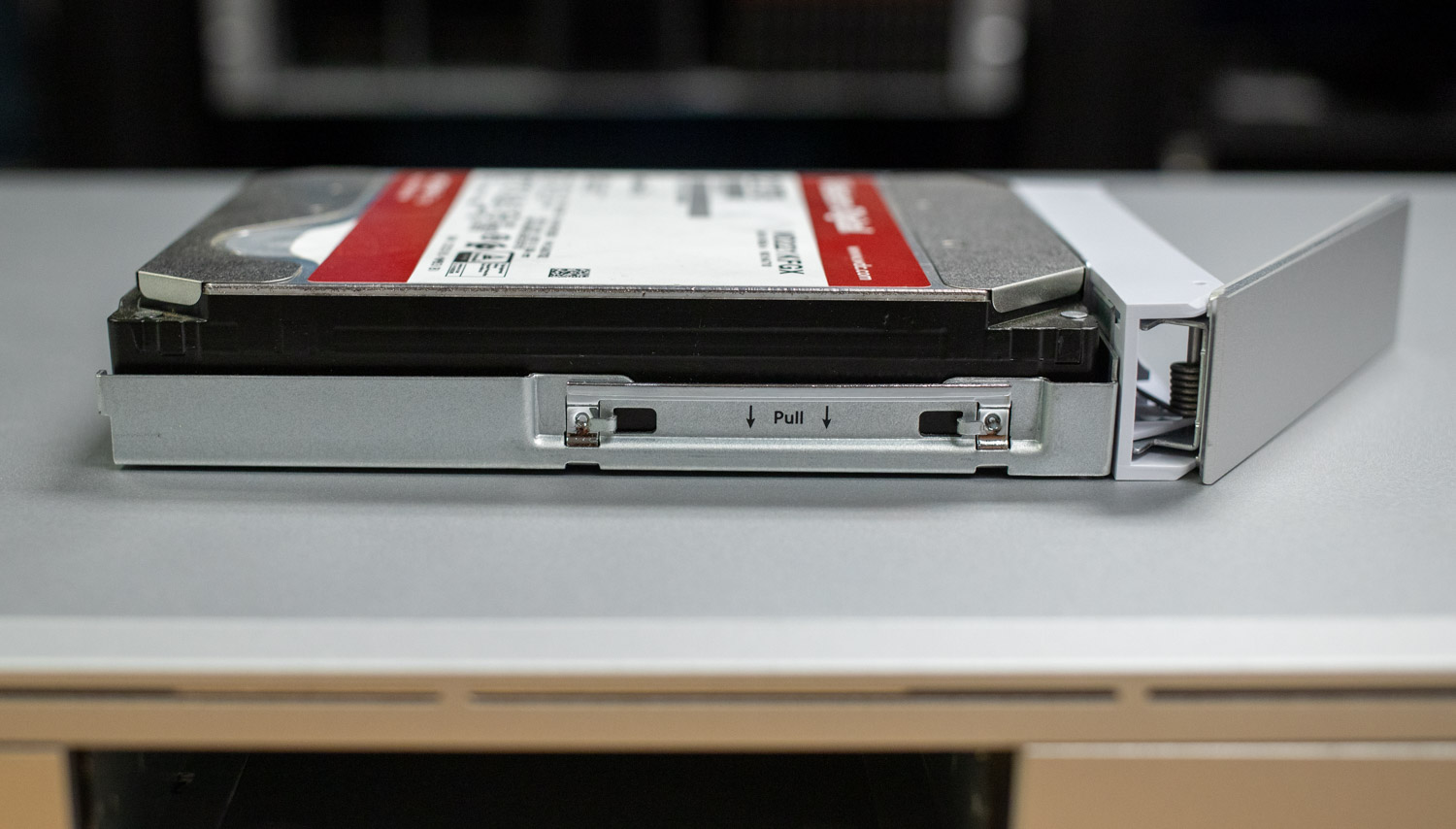
A parte frontal do UNAS Pro conta com sete baias de 2.5/3.5" sem necessidade de ferramentas, compatíveis com HDD e SSD, cada uma com LEDs indicadores para monitoramento em tempo real da energia, atividade e status de erro da unidade. Uma tela sensível ao toque de 1.3" permite o gerenciamento intuitivo dos dispositivos. Além disso, as opções de conectividade incluem um uplink SFP+ 1/10G, uma porta RJ1 45 GbE para rede flexível e um switch de reinicialização de dispositivos.
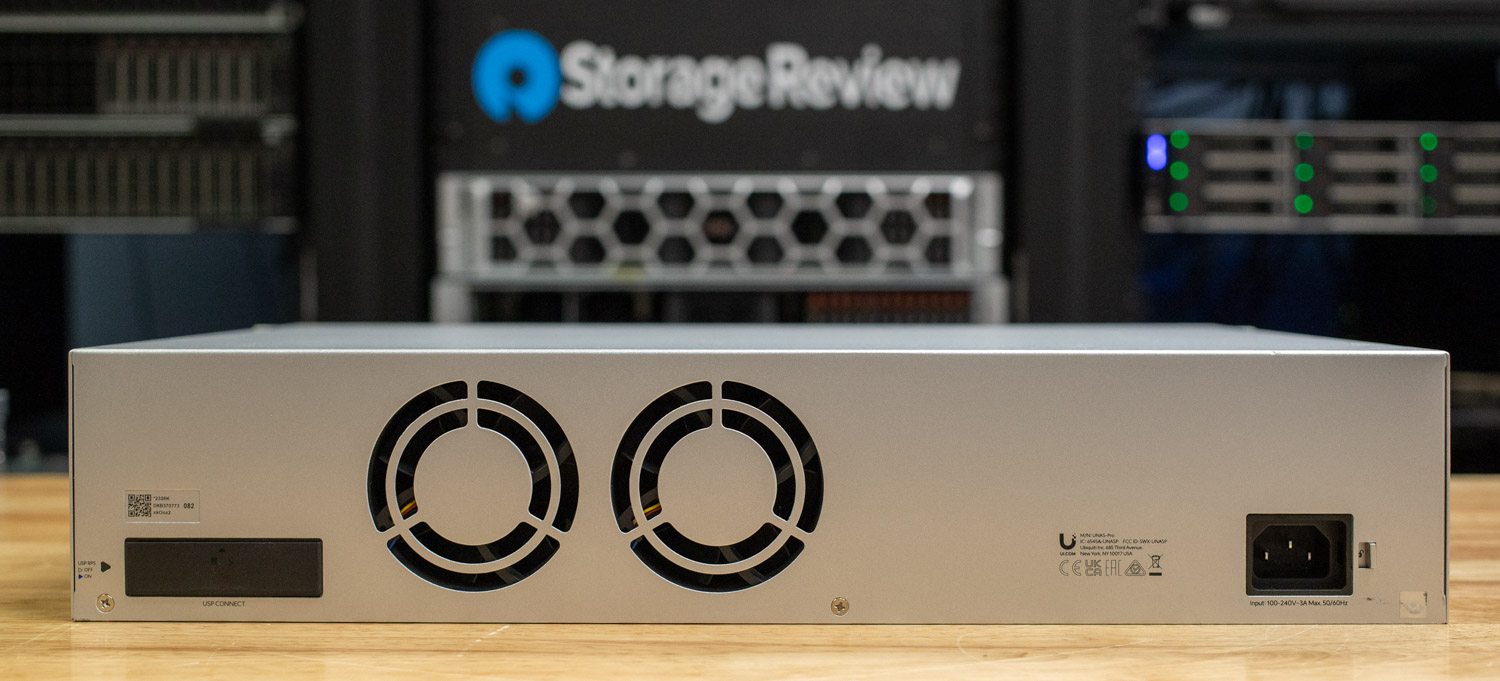
A parte traseira da unidade é equipada com duas ventoinhas para garantir o resfriamento ideal dos discos. Ela também possui uma porta de entrada de energia C13 com trava para conexões de energia seguras e uma porta USP-RPS para alimentação redundante, aumentando a confiabilidade e o tempo de atividade do sistema.
Proteção e segurança de dados
O UNAS Pro garante a segurança dos arquivos com múltiplas camadas de proteção, incluindo redundância RAID, criptografia de unidade e snapshots automáticos. As configurações RAID oferecem vários níveis de tolerância a falhas, incluindo:
- RAID 5 (Proteção Básica): Requer no mínimo três unidades.
- RAID 6 (proteção média): requer no mínimo quatro unidades para proteção contra falhas de dois discos.
- RAID 10 (maior proteção): requer pelo menos quatro unidades para redundância aprimorada.
Unidades criptografadas protegem ainda mais os dados, bloqueando-os automaticamente ao reiniciar ou desligar o sistema. Os administradores devem inserir novamente a chave de criptografia para acessar os arquivos após a reinicialização.
Recursos de backup e instantâneo
O sistema suporta até 4,096 instantâneos em todas as unidades, com limites individuais de:
- 128 instantâneos por unidade pessoal
- 256 instantâneos por unidade compartilhada
Snapshots regulares permitem que os usuários restaurem versões anteriores de arquivos com eficiência, minimizando os riscos de perda de dados.
Compartilhamento e acesso a arquivos
O UNAS Pro suporta diversos protocolos de compartilhamento de arquivos, incluindo SMB, CIFS e NFS, garantindo acesso contínuo em diferentes sistemas operacionais. Além disso, a integração com o Active Directory (AD) e o LDAP permite que os administradores importem usuários e gerenciem credenciais de serviços de arquivos de forma eficaz.
Os usuários podem acessar o UniFi Drive diretamente via SMB em seus desktops, oferecendo uma maneira familiar e eficiente de gerenciar arquivos. O aplicativo Identity Endpoint, disponível para desktops e dispositivos móveis, oferece uma experiência de login sem necessidade de licença e integrada.
Opções de backup remoto e em nuvem
O UNAS Pro permite backups para:
- Outros dispositivos remotos UNAS Pro
- Dispositivos via SMB/CIFS
- Google Drive para redundância baseada em nuvem
- Suporte OneDrive
Suporte para macOS Time Machine
Para usuários do macOS, o UNAS Pro é compatível com o Apple Time Machine, permitindo backups automatizados sem esforço. Instruções detalhadas de configuração estão disponíveis no guia oficial.
Cobertura estendida de cuidados de UI
Para usuários que buscam proteção adicional, a UI Care oferece um plano de cobertura estendida opcional por US$ 99 por unidade. Este plano estende o período de proteção de substituição para cinco anos e inclui benefícios exclusivos, como:
- Serviços prioritários de RMA: receba um dispositivo de substituição antes de devolver o original.
- Frete de devolução grátis: uma etiqueta de envio pré-paga é fornecida para devoluções sem complicações.
- Cobertura estendida: proteção de substituição de cinco anos para total tranquilidade.
Com o UI Care, os usuários se beneficiam de substituições mais rápidas e tempo de inatividade minimizado, o que o torna um complemento valioso para aqueles que dependem de armazenamento ininterrupto e proteção de dados.
Visão geral do aplicativo UniFi Drive
O aplicativo UniFi Drive amplia o ecossistema da Ubiquiti, oferecendo uma solução de armazenamento otimizada que se integra diretamente aos dispositivos UniFi. Desenvolvido com simplicidade e segurança em mente, o aplicativo oferece armazenamento local fora da nuvem, sem a necessidade de assinaturas recorrentes. Seja gerenciando backups, compartilhando arquivos ou protegendo dados críticos, o UniFi Drive oferece opções flexíveis de armazenamento, aproveitando a interface familiar do UniFi.
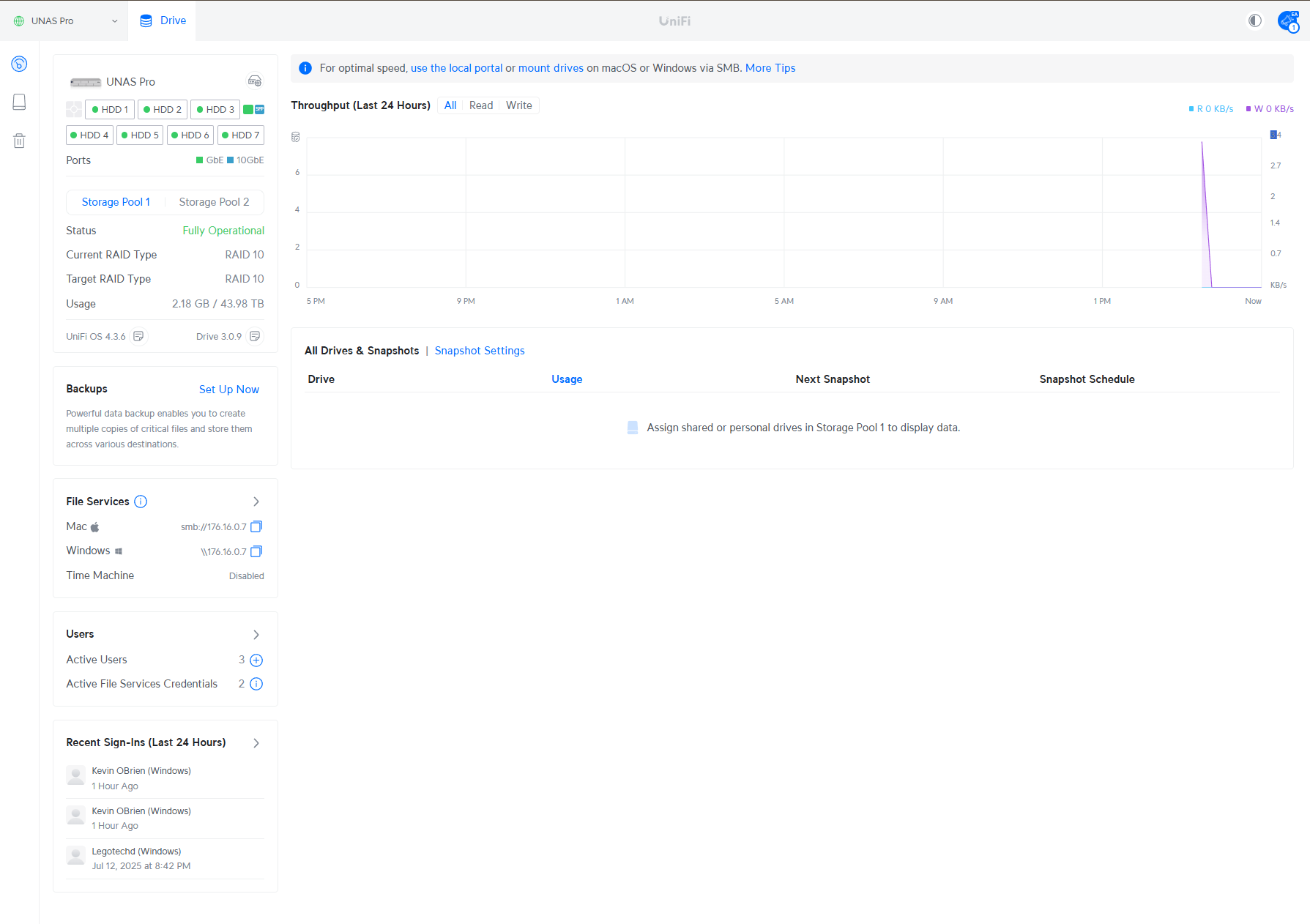
O painel do UniFi Drive no UNAS Pro segue um layout familiar, consistente com outros aplicativos UniFi, como Network e Protect. Seu diferencial está nos insights específicos do NAS, que oferecem uma visão centralizada da integridade da unidade, backups ativos, serviços de arquivo e atividades recentes do usuário. O painel também fornece estatísticas de throughput em tempo real e detalhes sobre unidades ativas e snapshots, oferecendo aos usuários uma visão geral abrangente do sistema de armazenamento. No momento da análise, o UNAS Pro do nosso laboratório estava executando a versão 4.3.6 do sistema operacional com a versão 3.0.9 do Drive, refletindo as versões atuais do software durante os testes.
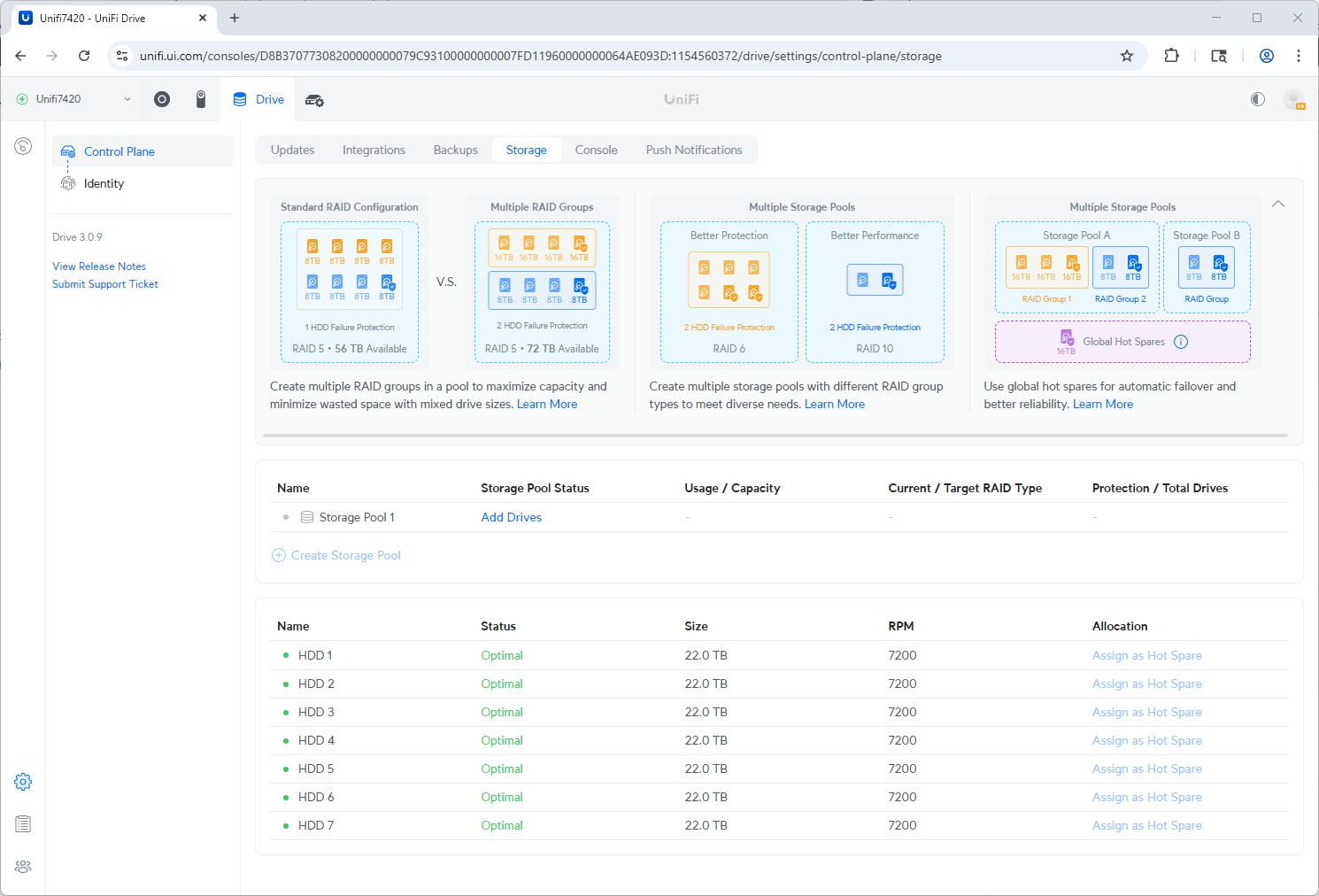
Em Configurações > Plano de Controle > Armazenamento , os usuários podem visualizar a configuração de armazenamento atual e a integridade geral do armazenamento. O proprietário do dispositivo pode selecionar o nível de proteção do armazenamento, com opções como RAID 5 ou RAID 10. A partir das atualizações recentes do UniFi Drive, foi adicionado suporte a RAID 6, acessível conectando-se ao endereço IP local do dispositivo.
Opções adicionais incluem dedicar um disco de reserva (hot spare) ou reformatar os discos, embora a reformatação resulte em perda de dados. Na aba "Discos", os sete discos instalados são exibidos com o status operacional e estatísticas, incluindo tamanho, temperatura, horas de funcionamento, RPM e contagem de setores defeituosos. Para os testes, o sistema foi configurado com sete discos Western Digital Red de 22 TB , fornecendo 132 TB de armazenamento utilizável, com um disco configurado para proteção e outro como reserva (hot spare). O RAID 5 oferece alta eficiência de capacidade, com 132 TB disponíveis de um total de 154 TB brutos, e protege contra a falha de um único disco. O monitoramento de integridade via SMART está integrado, permitindo que os usuários acompanhem as temperaturas dos discos, o tempo de execução e possíveis problemas. A versão 3.0.9 também adiciona flexibilidade para expansão e gerenciamento de armazenamento por meio de uma interface de usuário simplificada.
O UniFi Drive 3.0 também oferece suporte a grupos RAID flexíveis, resolvendo o problema comum de incompatibilidade de capacidades de disco. Os usuários agora podem combinar discos de tamanhos diferentes sem sacrificar a eficiência ou exigir atualizações de hardware. Essa abordagem ajuda a maximizar o espaço utilizável, mantendo a proteção dos dados por meio de configurações RAID padrão.
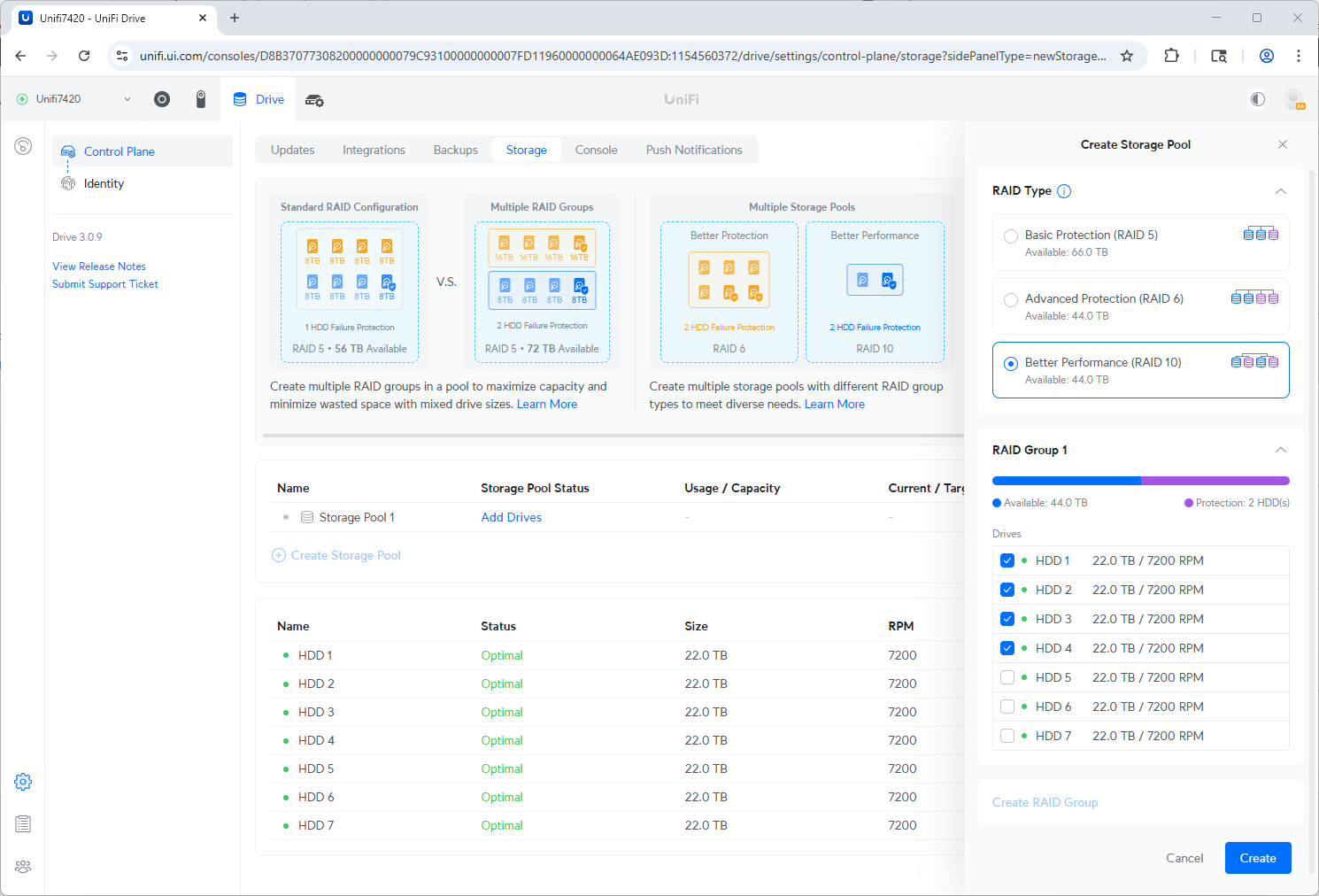
Para criar um grupo RAID, selecione as unidades e defina o nível de proteção.
Além disso, o novo recurso de Pools de Armazenamento permite que vários grupos RAID independentes operem simultaneamente. Isso possibilita personalizar cada pool para necessidades específicas, por exemplo, atribuindo um a tarefas de alto desempenho e outro ao armazenamento de arquivamento tolerante a falhas. Com essa flexibilidade, o UniFi Drive suporta cargas de trabalho mistas sem conflitos operacionais, tornando-o ideal para ambientes com demandas de armazenamento diversificadas.
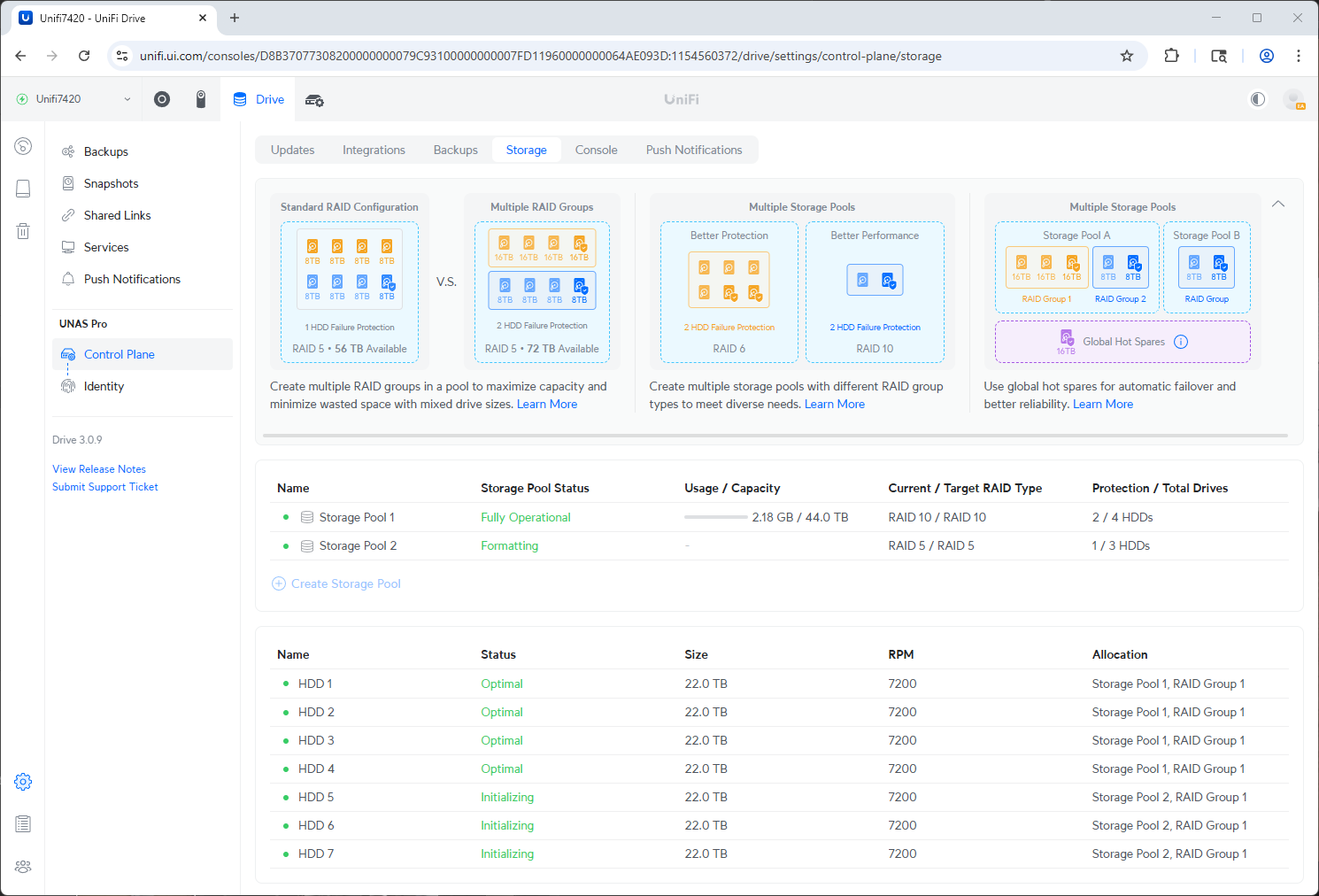
Formato do pool de armazenamento dois após a criação.
Após a conclusão do processo de formatação do grupo RAID, a interface do UniFi Drive exibe o novo layout de armazenamento na seção Plano de Controle > Armazenamento. Neste exemplo, dois pools de armazenamento foram configurados: um usando RAID 10 em quatro unidades (Pool de Armazenamento 1) e o outro usando RAID 5 em três unidades (Pool de Armazenamento 2).
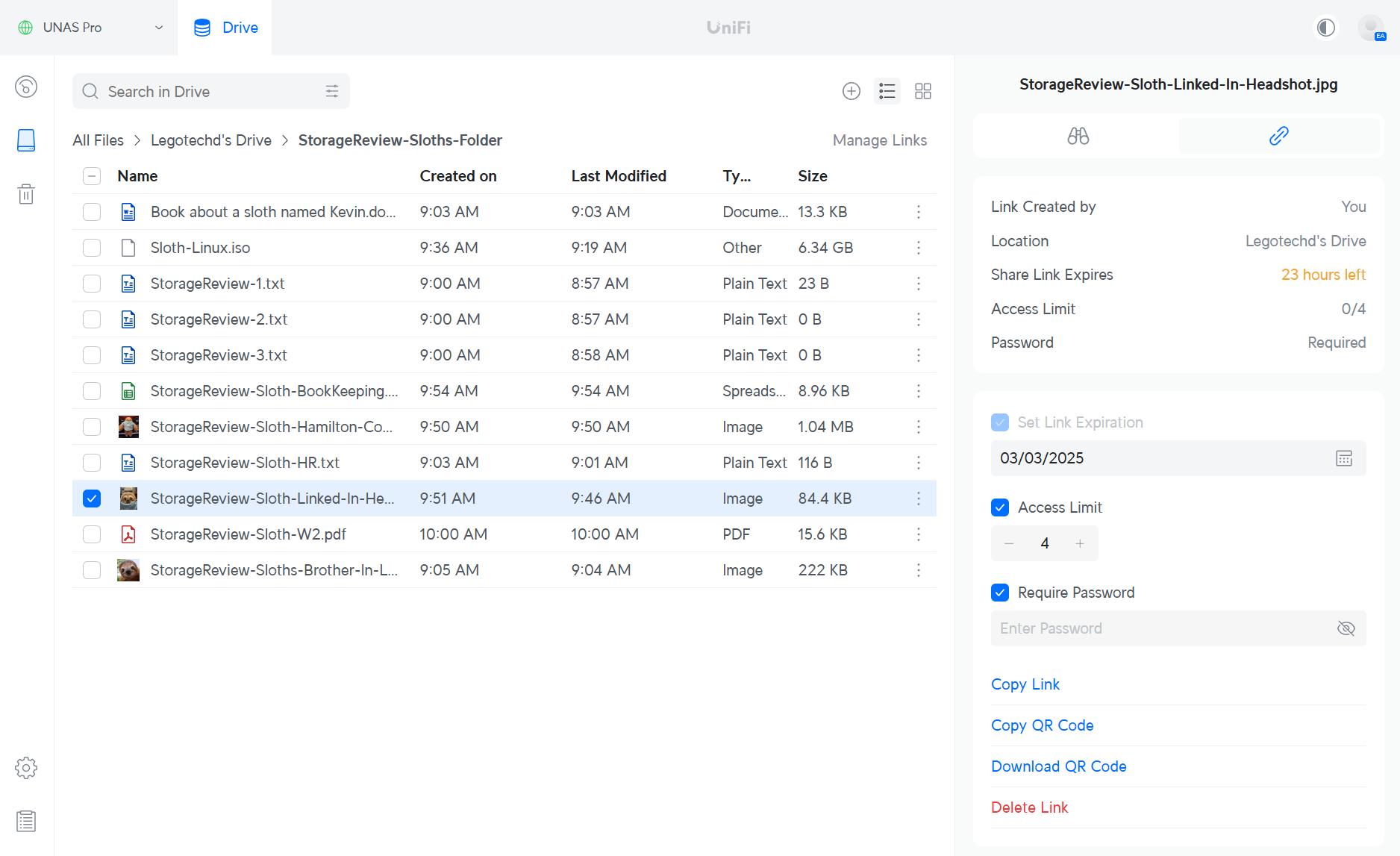
Em Todos os Arquivos > Pasta StorageReview-Sloth , podemos ver que a preguiça do laboratório doou alguns de seus arquivos como exemplo para testes. O UniFi Drive oferece uma experiência de gerenciamento de arquivos simples e segura, permitindo que os usuários compartilhem arquivos facilmente por meio de Links de Compartilhamento. Ao selecionar um arquivo ou pasta, os usuários podem configurar opções de compartilhamento, como expiração do link, limites de acesso (quantas vezes o arquivo pode ser acessado) e se o link requer uma senha. Uma vez configurado, o link de compartilhamento pode ser distribuído para usuários externos por meio de um link padrão ou código QR, oferecendo maneiras flexíveis de colaborar e, ao mesmo tempo, manter os dados seguros.
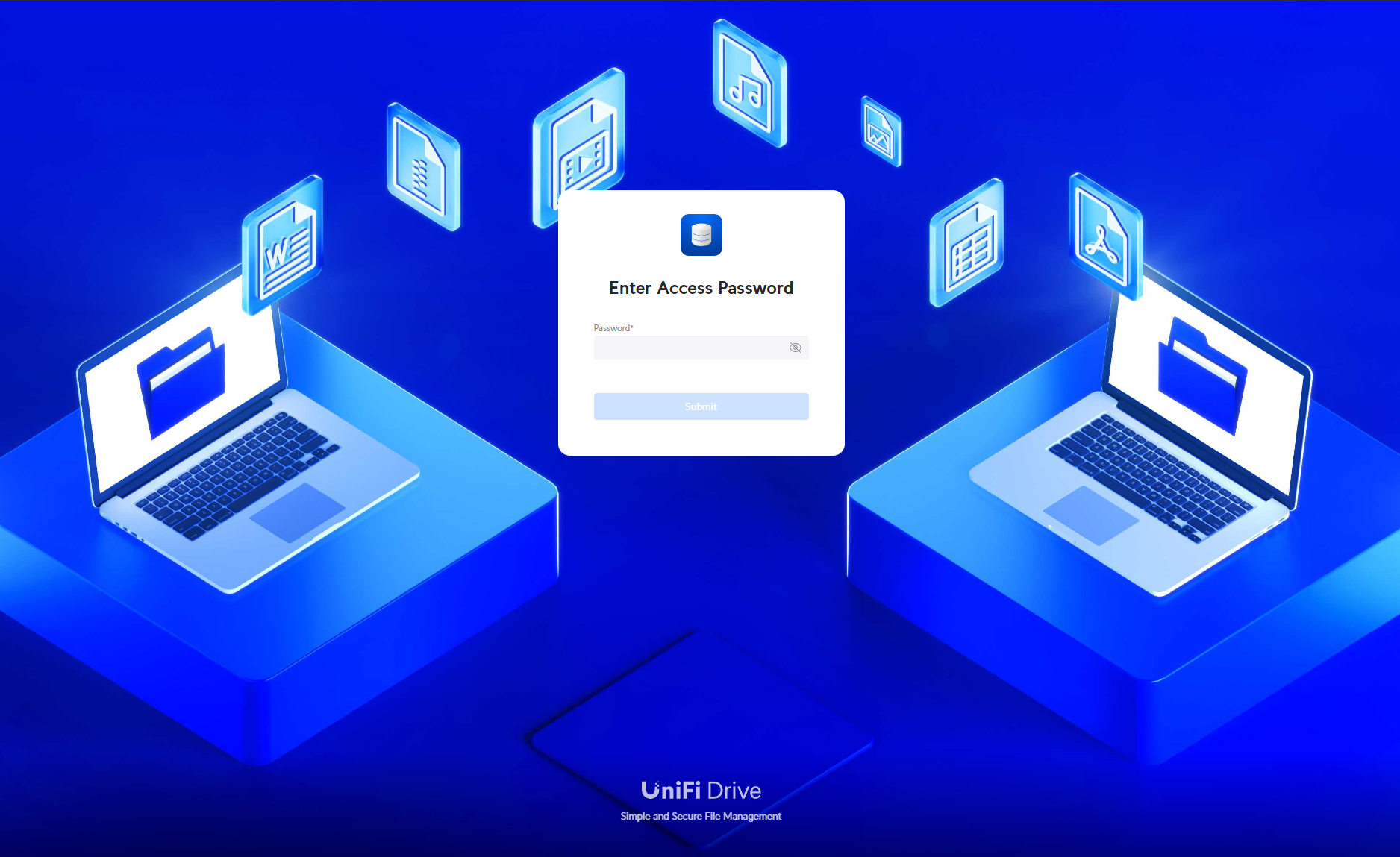
Quando um link de compartilhamento é usado com uma senha, o acesso ao arquivo nos leva à página de acesso do UniFi Drive , onde a senha deve ser inserida antes de visualizar o conteúdo compartilhado. Essa camada extra de segurança garante que apenas usuários autorizados com a senha possam acessar os arquivos, adicionando mais um nível de proteção aos dados compartilhados do bicho-preguiça do laboratório.
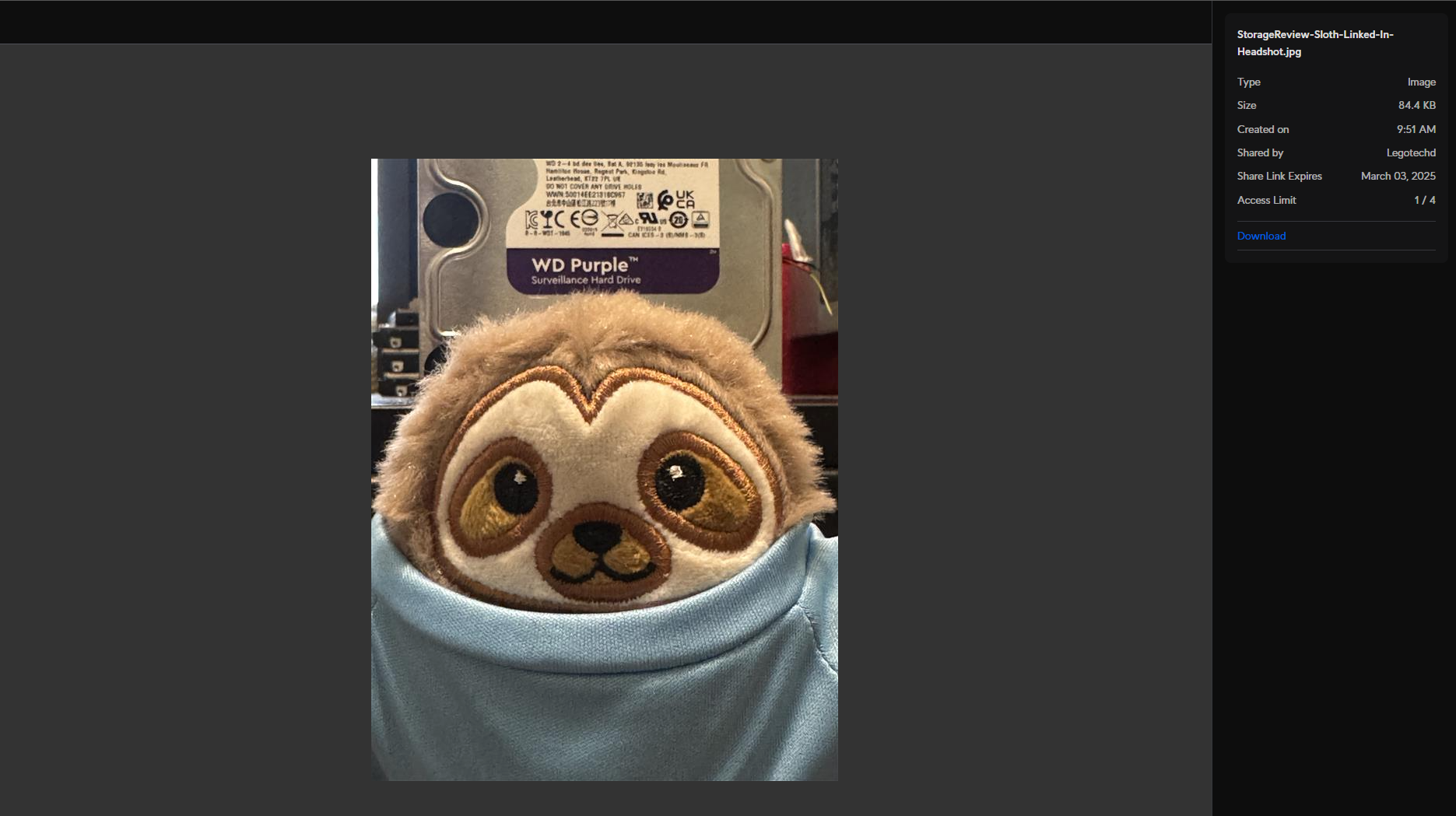
Após inserir a senha, a pré-visualização do arquivo é exibida, mostrando o conteúdo compartilhado. A página fornece detalhes importantes, incluindo quantas vezes o arquivo ainda pode ser acessado, o tamanho do arquivo, o usuário que o compartilhou e, o mais importante, uma opção para baixá-lo.
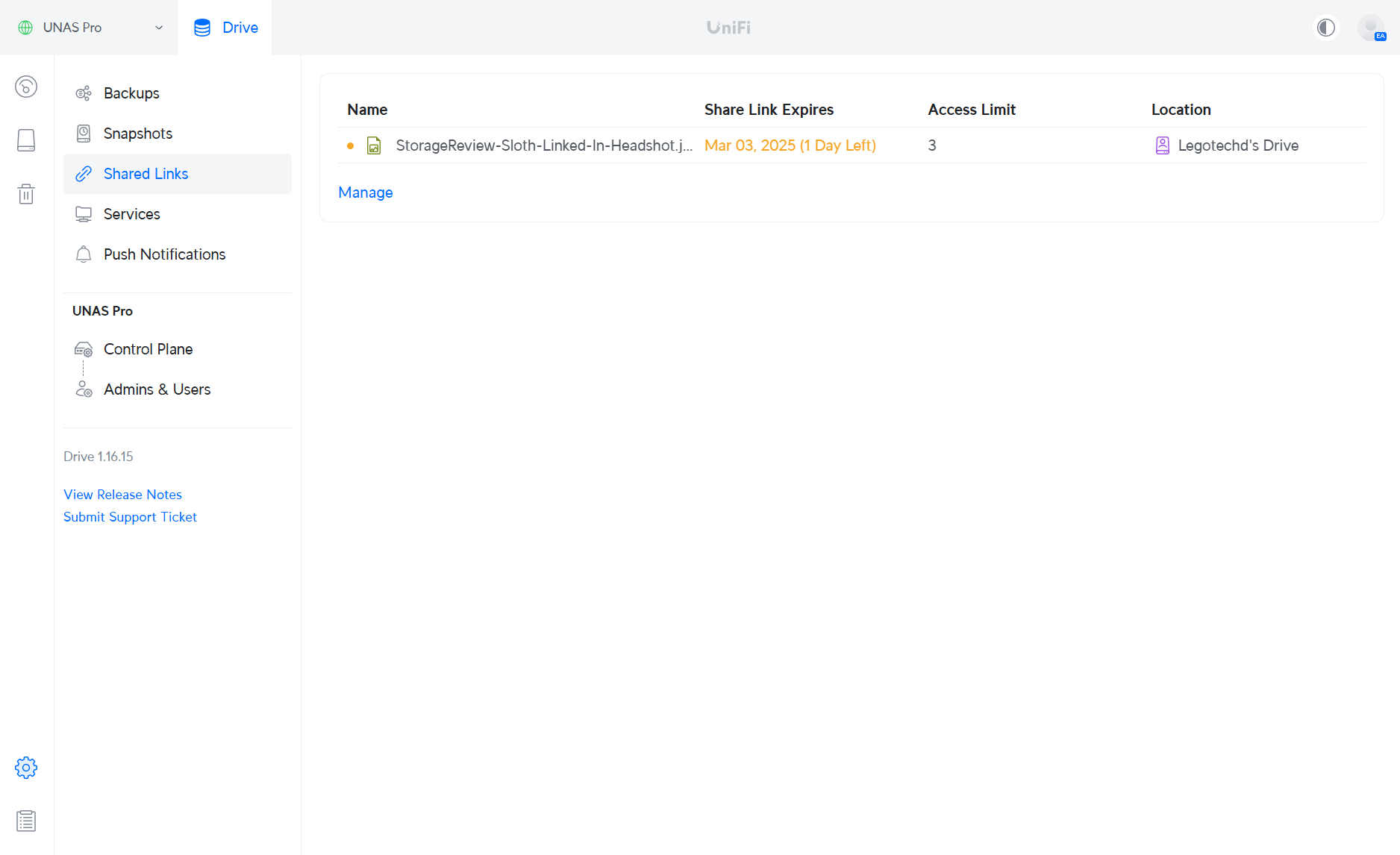
In Configurações > Links compartilhados, os usuários podem gerenciar todos os links compartilhados que criaram, incluindo o que acabamos de configurar. Aqui, podemos ver quantas vezes o arquivo pode ser acessado, o período de tempo em que o link fica ativo e a localização da unidade onde os dados estão armazenados. Esta página de gerenciamento central fornece uma visão geral de todos os compartilhamentos ativos, permitindo que os usuários administradores acompanhem as configurações de compartilhamento de arquivos.
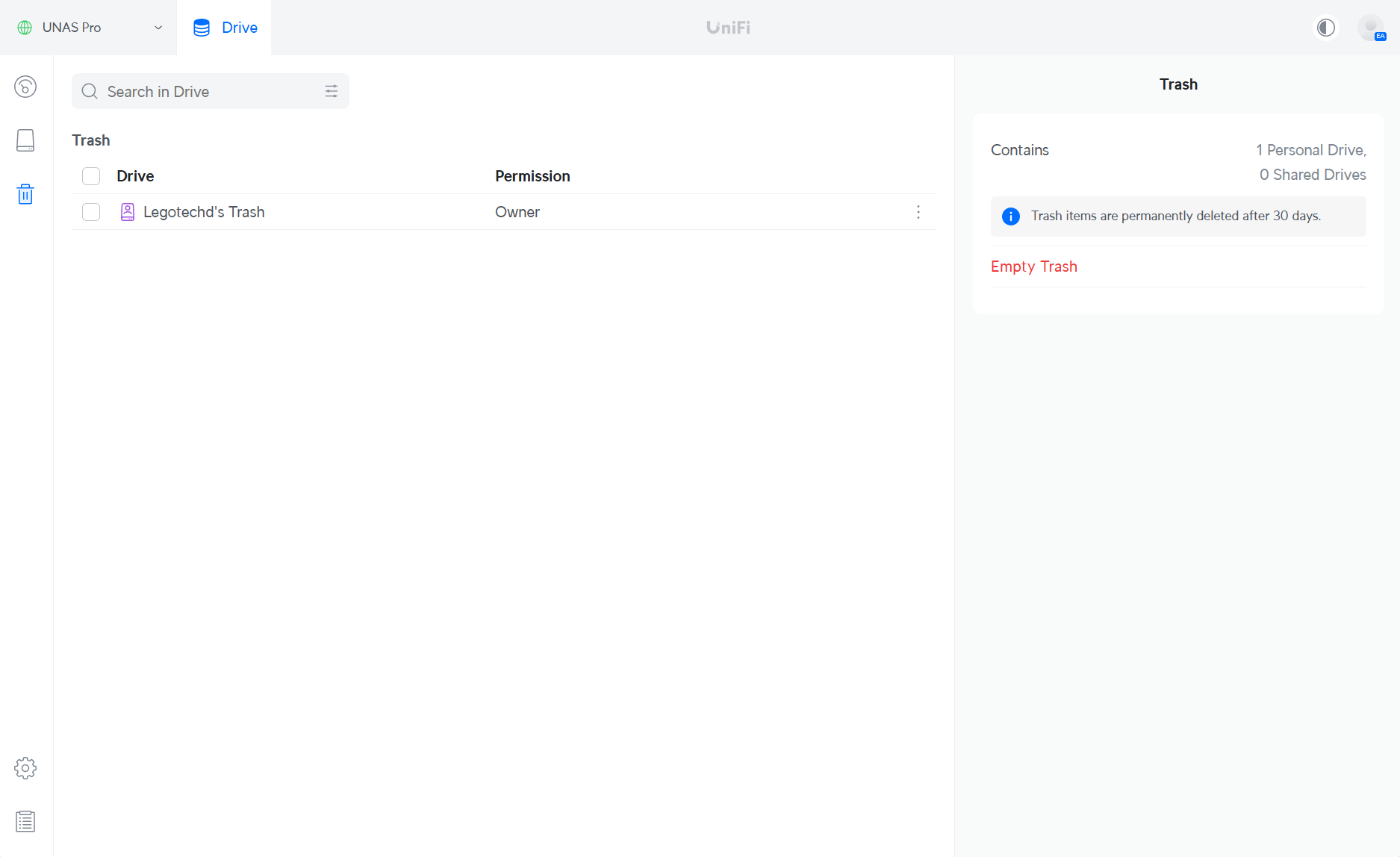
O UniFi Drive oferece alguma proteção contra exclusões acidentais. No painel da lixeira, podemos ver todos os arquivos ou pastas excluídos, que são limpos automaticamente após 30 dias. Como alternativa, os arquivos podem ser excluídos manualmente e instantaneamente, dando aos usuários controle sobre a retenção dos dados excluídos. Esse recurso ajuda a evitar a perda permanente de arquivos devido à exclusão acidental.
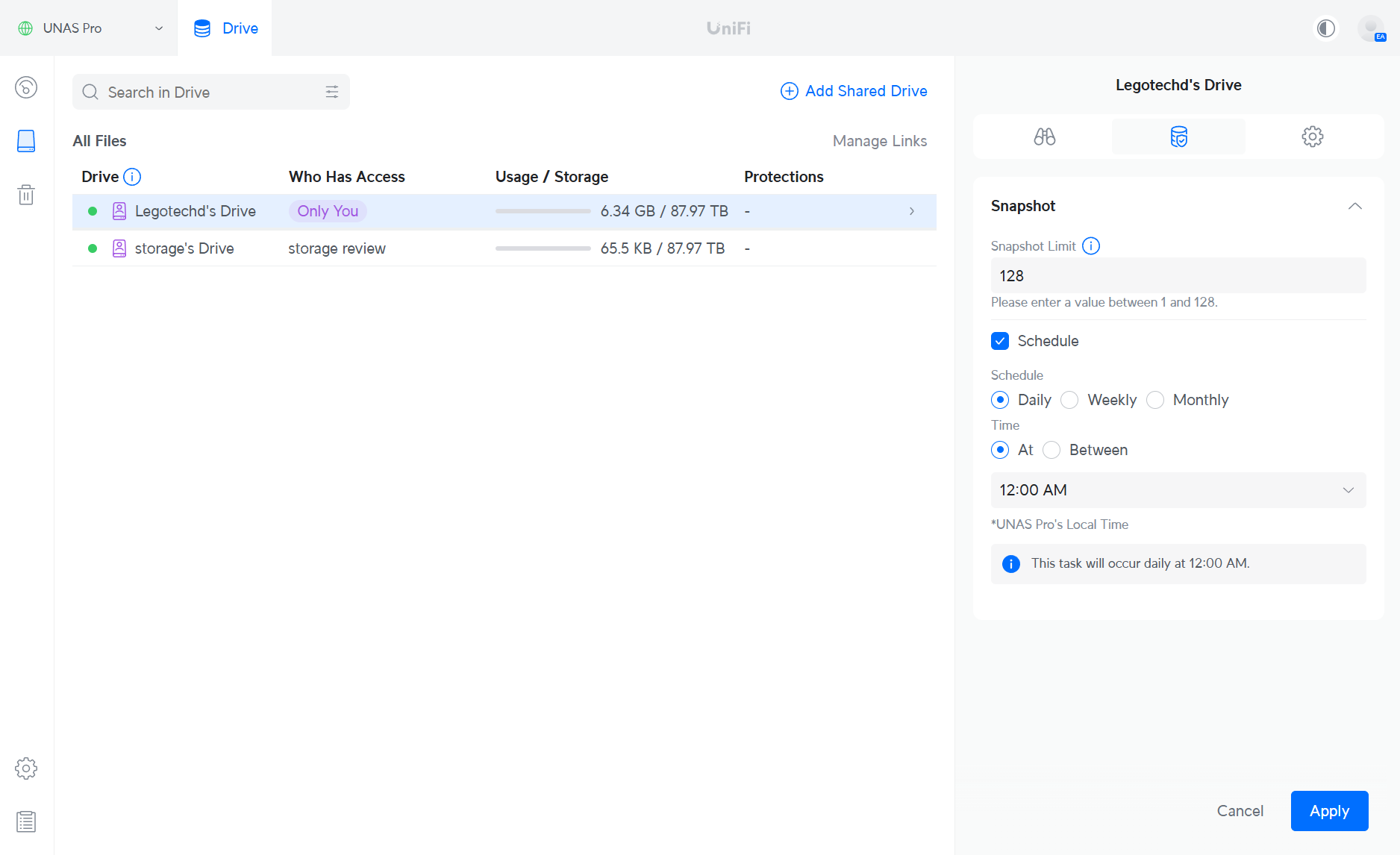 O UniFi Drive também oferece suporte a snapshots para unidades de usuários, com a capacidade de agendar snapshots em incrementos que variam de diários, semanais e mensais, além de especificar o horário para os snapshots. Os usuários podem agendar entre 1 e 128 snapshots, proporcionando flexibilidade no gerenciamento de backups e garantindo a proteção de dados em intervalos regulares. Esse recurso ajuda a manter pontos de recuperação confiáveis para dados críticos.
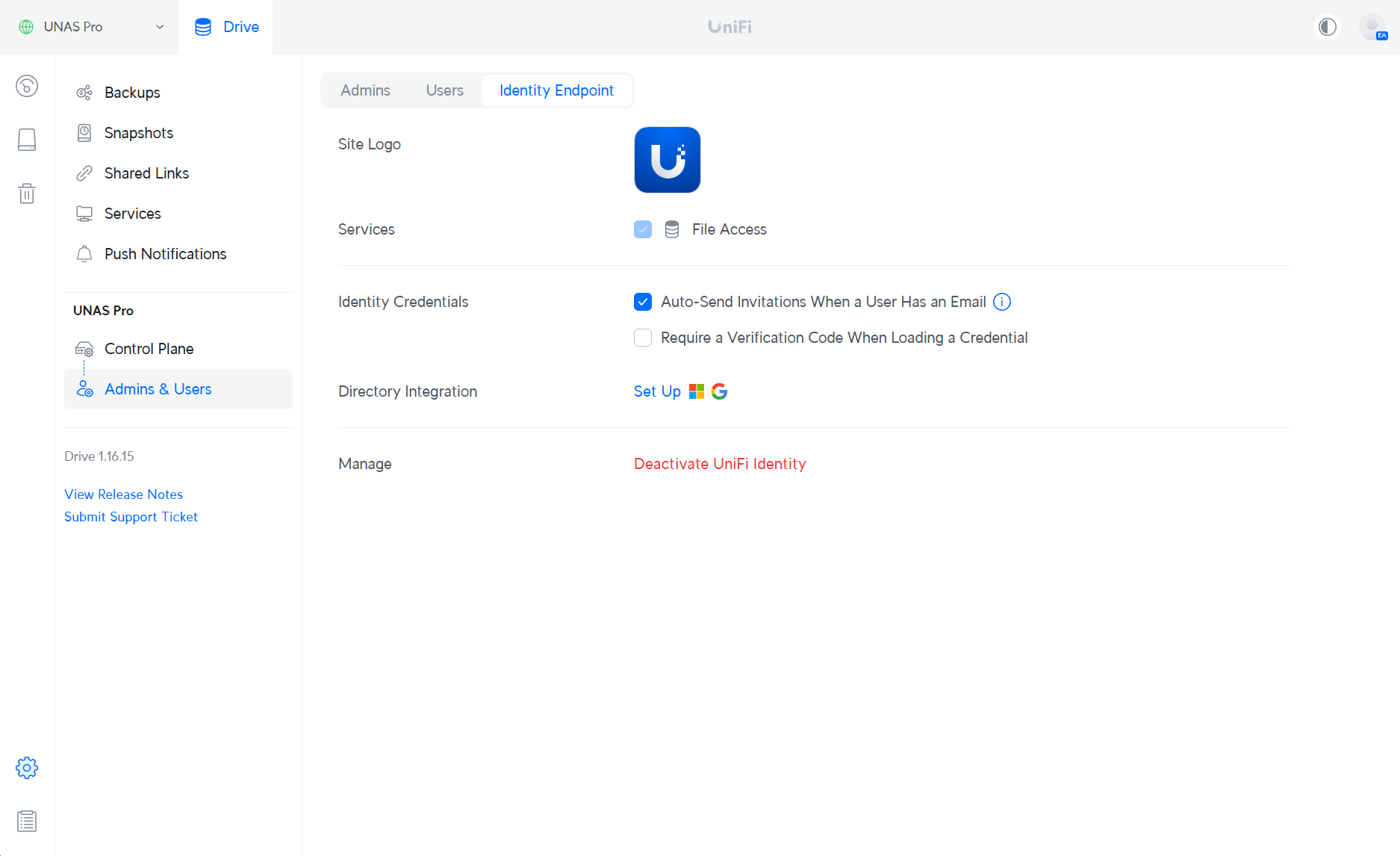
In Configurações > Administradores e Usuários > Ponto de Extremidade de Identidade, os usuários podem configurar diversos recursos essenciais, incluindo a identidade visual do site e a configuração de credenciais de identidade. Para empresas ou negócios maiores, o UniFi Drive também oferece suporte à integração de diretórios com diversos serviços, como Google Secure LDAP, Microsoft Entra ID, Local Active Directory, LDAP e JumpCloud LDAP. Essas integrações ajudam a otimizar o gerenciamento e a autenticação de usuários, facilitando a manutenção de acesso consistente e seguro em seus sistemas.
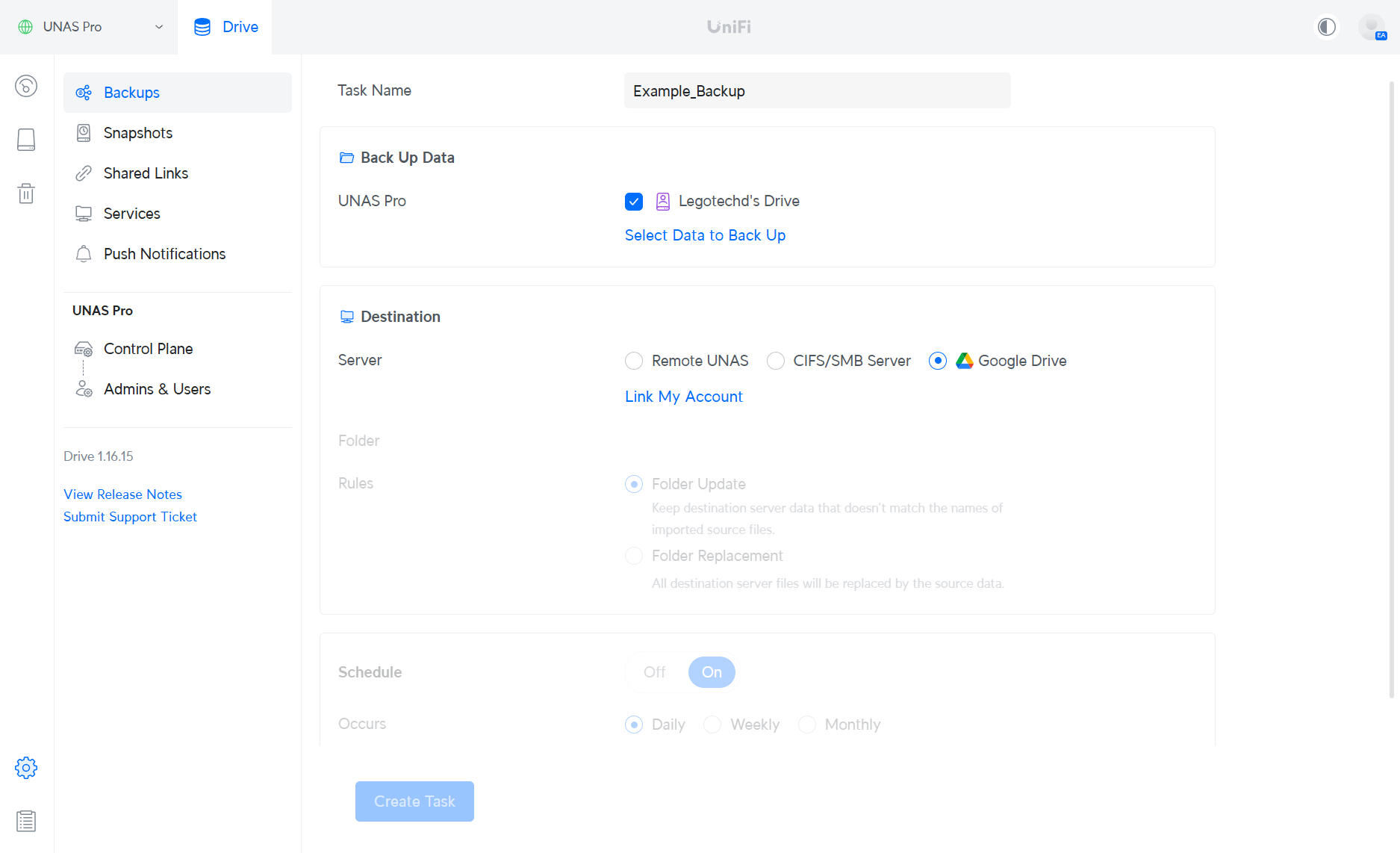
Em Configurações > Backups , o UNAS oferece a possibilidade de fazer backup de unidades de usuário em destinos remotos, incluindo servidores como outros UNAS Pros remotos, servidores CIFS/SMB ou Google Drive. Os usuários podem aplicar regras, como substituir pastas pelos dados originais ou atualizar pastas para refletir alterações em arquivos que não existem mais. Os intervalos de backup podem ser agendados com ocorrências diárias, semanais ou mensais, oferecendo flexibilidade na frequência com que os dados são copiados. Isso garante que os dados sejam armazenados com segurança e estejam atualizados em diferentes locais. Observe que, nas próximas versões, as atualizações de recursos do UniFi Drive 3.0 integrarão o S3, o Backblaze e o Wasabi.
Desempenho UNAS
Para avaliar o desempenho do sistema UNAS, utilizamos o CrystalDiskMark e o testamos em três configurações RAID: RAID 5, RAID 6 e RAID 10. O UNAS foi compartilhado com uma estação de trabalho em nosso ambiente de laboratório pela rede, através de sua porta de 10 GbE, onde cada configuração foi testada para medir suas capacidades de E/S sequencial e aleatória. O teste foi realizado em cinco etapas e com um tamanho de teste de 64 GiB, com uma carga de trabalho de leitura/gravação de 70% de leitura e 30% de gravação.
- RAID10 apresentou o desempenho geral mais equilibrado, combinando altas velocidades sequenciais e rendimento consistente de cargas de trabalho mistas. Com alto rendimento de leitura e gravação e IOPS respeitáveis, é ideal para ambientes que exigem velocidade e redundância, como cargas de trabalho virtualizadas ou compartilhamentos de arquivos ativos.
- RAID6 priorizou a tolerância a falhas com proteção de paridade dupla, ao mesmo tempo em que oferecia desempenho de gravação competitivo. Registrou a menor latência e o maior IOPS de gravação aleatória do grupo, tornando-se uma ótima opção para sistemas críticos ou com alta demanda de gravação, onde o tempo de atividade e a proteção de dados são essenciais.
- RAID5 Liderou em velocidades de gravação sequencial e IOPS de leitura aleatória, apresentando forte desempenho orientado à leitura. No entanto, apresentou a maior latência durante gravações aleatórias devido à sobrecarga de paridade, tornando-o mais adequado para armazenamento com capacidade eficiente, onde o desempenho de leitura é priorizado em detrimento da capacidade de resposta de gravação.
| métrico | RAID10 UNAS | RAID6 UNAS | RAID5 UNAS |
| Leitura sequencial (Q8T1) | 799 MB / s | 535 MB / s | 704 MB / s |
| Gravação sequencial (Q8T1) | 675 MB / s | 648 MB / s | 691 MB / s |
| Leitura aleatória de 4K (Q32T1) | 36.76 MB / s | 35.10 MB / s | 38.41 MB / s |
| Gravação aleatória de 4K (Q32T1) | 4.18 MB / s | 4.99 MB / s | 4.00 MB / s |
| IOPS de leitura aleatória | 8,974 | 8,570 | 9,377 |
| Random Write IOPS | 1,020 | 1,219 | 977 |
| Latência de gravação aleatória (µs) | 30,747 μs | 23,717 μs | 32,150 μs |
| Carga de trabalho mista (70R/30W) | 672.51 MB / s | 424.00 MB / s | 674.66 MB / s |
Conclusão
Em resumo, o Ubiquiti UNAS Pro, com preço de US$ 499, é uma opção acessível em comparação com muitas outras soluções NAS de consumo do mesmo tamanho ou menores disponíveis no mercado. Esse preço, combinado com seus recursos robustos e capacidade de disco de 7 baias de 2.5/3.5", o torna uma opção atraente para usuários domésticos e empresariais que buscam uma solução de armazenamento de médio porte com boa relação custo-benefício.
O UNAS Pro suporta diversas configurações RAID, incluindo RAID 5, 6 e 10. Agora, ele oferece grupos RAID flexíveis, permitindo que os usuários combinem tamanhos de unidades e criem vários pools de armazenamento independentes, adaptados a diferentes necessidades. O UNAS Pro também oferece funcionalidade de acesso remoto e compartilhamento fácil de arquivos, facilitando o acesso aos seus arquivos de qualquer lugar. O aplicativo UniFi Drive oferece uma interface amigável para gerenciar seu armazenamento, e o dispositivo suporta conectividade de 1GbE e 10GbE para transferências de dados flexíveis e de alta velocidade.
No entanto, uma desvantagem notável é o ecossistema limitado de aplicativos de terceiros. Ao contrário de outros sistemas NAS que oferecem uma ampla gama de aplicativos de terceiros, o UNAS Pro atualmente não possui muitos desses aplicativos NAS típicos. Isso pode limitar sua funcionalidade para usuários que dependem de opções de software específicas para seus fluxos de trabalho. Dito isso, o sólido histórico da Ubiquiti em expandir e aprimorar sua oferta de produtos ao longo do tempo sugere que o ecossistema de aplicativos para o UNAS Pro pode crescer, potencialmente resolvendo essa limitação em atualizações futuras.
Página do produto (link de afiliado)


 Amazon