---
description: The Lexar Professional Workflow HR2 is a four-bay reader and storage drive hub that uses both Thunderbolt 2 and USB 3.0 connectivity, allowing for...
title: Lexar Professional Workflow HR2 Review
image: https://www.storagereview.com/wp-content/uploads/2015/04/StorageReview-Lexar-Professional-Workflow-H2-Thumb.jpg
---

[![Storage Review]()](https://storagereview.com/)

---

[Facebook](https://www.facebook.com/@storagereview) [X (Twitter)](https://twitter.twitter.com/storagereview) [Instagram](https://www.instagram.com/storagereview/) [LinkedIn](https://www.linkedin.com/company/storagereview-com) [YouTube](https://www.youtube.com/user/storagereview?sub_confirmation=1) [Email](mailto:info@storagereview.com) [Spotify](https://open.spotify.com/show/1y6VnznABhHeOSMOmbDTz0) [Reddit](https://www.reddit.com/r/StorageReview/) [Discord](https://discord.gg/TwMHb4azdC) [RSS Feed](https://www.storagereview.com/rss.xml) [TikTok](https://www.tiktok.com/@storagereview)

[Facebook](https://www.facebook.com/@storagereview) [X (Twitter)](https://twitter.com/storagereview) [Instagram](https://www.instagram.com/storagereview/) [LinkedIn](https://www.linkedin.com/company/storagereview-com) [YouTube](https://www.youtube.com/user/storagereview?sub_confirmation=1) [Email](mailto:info@storagereview.com) [Spotify](https://open.spotify.com/show/1y6VnznABhHeOSMOmbDTz0) [Reddit](https://www.reddit.com/r/StorageReview/) [Discord](https://discord.gg/TwMHb4azdC) [RSS Feed](https://www.storagereview.com/rss.xml) [TikTok](https://www.tiktok.com/@storagereview)

[![StorageReview.com]()](https://www.storagereview.com)

≡ Menu

- [Home](https://www.storagereview.com/)
- [Storage Reviews](https://www.storagereview.com/review)
  - [Consumer Reviews](https://www.storagereview.com/consumer)
  - [Enterprise Reviews](https://www.storagereview.com/enterprise)
  - [Ubiquiti Reviews](https://www.storagereview.com/best/ubiquiti-reviews)
- [SR Merch](https://store.storagereview.com)
- [Leaderboards](https://www.storagereview.com/best)
  - [Best Storage Arrays](https://www.storagereview.com/best/storage-arrays)
  - [Best Enterprise SSDs](https://www.storagereview.com/best/enterprise-ssds)
  - [Best Servers](https://www.storagereview.com/best/servers)
  - [Best Desktops for Local AI](https://www.storagereview.com/best/desktops-local-ai)
  - [Best Laptops for Local AI](https://www.storagereview.com/best/laptops-local-ai)
  - [Best Local LLM Tools](https://www.storagereview.com/best/local-llm-tools)
  - [Agentic AI Hardware](https://www.storagereview.com/best/agentic-ai-hardware)
  - [Best SSDs & Hard Drives](https://www.storagereview.com/best_drives)
  - [Best Portable SSDs](https://www.storagereview.com/best/portable-ssds)
  - [Best Business Laptops](https://www.storagereview.com/best/business-laptops)
  - [Best Mobile Workstations](https://www.storagereview.com/best/mobile-workstations)
  - [Best Desktop Workstations](https://www.storagereview.com/best/desktop-workstations)
  - [Best Laptop Battery Life](https://www.storagereview.com/best/laptop-battery-life)
- [Storage Reference Guide](https://www.storagereview.com/storage-reference-guide)
- [About SR](https://www.storagereview.com/about-storagereview)
  - [StorageReview.com Sweepstakes Rules and Regulations](https://www.storagereview.com/storagereview-com-sweepstakes-rules-and-regulations)

Search

[Home](https://www.storagereview.com/) » [Review](https://www.storagereview.com/review) » Lexar Professional Workflow HR2 Review

# Lexar Professional Workflow HR2 Review

by Lyle Smith on April 14, 2015

[Client Accessories](https://www.storagereview.com/consumer/client-accessories)  ◇  [Consumer](https://www.storagereview.com/consumer)

The Lexar Professional Workflow HR2 is a four-bay reader and storage drive hub that uses both Thunderbolt 2 and USB 3.0 connectivity, allowing for compatibility with both Windows and Mac OS platforms. We previously review its predecessor, [Professional Workflow Reader](https://www.storagereview.com/lexar_professional_workflow_reader_review), and were very impressed with its multi-card performance speeds and sturdy build. With the new Lexar hub, users can pick and choose from a variety of combinations of readers and storage drives to suit specific use cases and specialized workflows. The biggest advantage of Lexar’s Professional Workflow line is that users will be able to save time due to its ability to transfer and back up data from multiple cards at once, which allows professionals to quickly edit and share their files. Not only does the Professional Workflow HR2 offer quite a bit of flexibility, Lexar indicates that the hub provides the performance needed for high-speed transfer and backup of RAW images, high-res photos, and HD, 3D, and 4K video. In addition, the HR2 is also backwards compatible with Thunderbolt and USB 2.0 using the same cables and connectors.

![]()

The Professional Workflow HR2 gives users the choice of six readers and two storage drives with the readers supporting SDHC/SDXC UHS-I and UHS-II, CompactFlash UDMA 7, XQD, CFast 2.0 (USB 3.0 or Thunderbolt), and microSDHC /microSDXC UHS-I formats. The storage drives are offered in 256GB and 512GB capacities and are quoted to deliver read transfer speeds up to 450MB/s and write speeds up to 245MB/s using USB 3.0 connectivity (with faster performance using Thunderbolt 2). In addition, Lexar has conveniently packaged their readers and storage drives with USB cables so workers can use them on their own as a mobile storage solution. Because the Professional Workflow HR2 has modular design, it has the ability to adapt to changing technology standards. When Lexar, or other companies, release new card formats and additional storage drives for the HR2 hub, users can easily swap in the newer technology making it a “future-proof” card reader.

The Professional Workflow HR2 is priced at roughly $200 and also comes in an H1 USB 3.0-only model, which goes for only $56. Both devices are backed by a 2-year warranty.

**Lexar Professional Workflow HR2 Specifications**

- Transfers and backs up images and video from multiple memory cards at once
- Thunderbolt 2 and USB 3.0 technology for high-speed transfer and backup of RAW images, high-res photos, and HD, 3D, and 4K video
- Supports FAT32, exFAT, and NTFS files systems.
- Performance: 450MB/s read, 245MB/s write using USB 3.0 connectivity
- Readers support today’s latest card formats: SDHC/SDXC UHS-I and UHS-II, CompactFlash UDMA 7, XQD, CFast 2.0 (Thunderbolt or USB 3.0), and microSDHC/microSDXC UHS-I
- USB 3.0 storage drives provide 256GB or 512GB of storage
- Modular design
- Readers:
  - Lexar Professional Workflow SR2 (SDHCTM/SDXCTM UHS-II USB 3.0 reader)
  - Lexar Professional Workflow CFR1 (CompactFlash USB 3.0 reader)
  - Lexar Professional Workflow XR1 (XQDTM USB 3.0 reader)
  - Lexar Professional Workflow CR1 (CFastTM 2.0 USB 3.0 reader)
  - Lexar Professional Workflow CR2 (CFastTM 2.0 ThunderboltTM/USB 3.0 reader)
  - Lexar Professional Workflow UR1 (three-slot microSDHCTM/microSDXCTM UHS-I USB 3.0 reader)
- Storage drives:
  - Lexar Professional Workflow DD256 (256GB USB 3.0 storage drive)
  - Lexar Professional Workflow DD512 (512GB USB 3.0 storage drive)
- Warranty: Two-year limited warranty on all products

**Design and build**

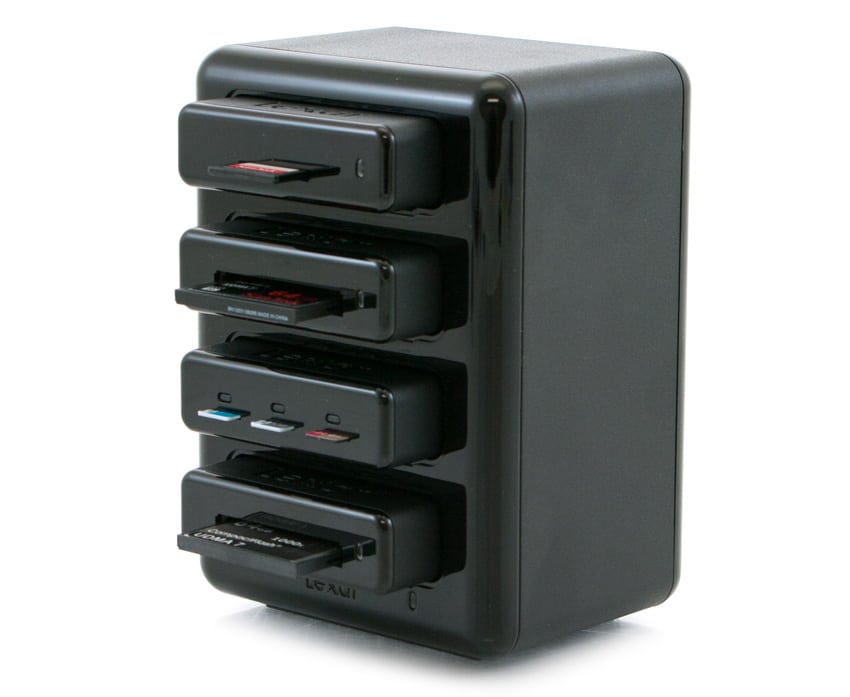
The Lexar Professional Workflow HR2 looks very similar to its predecessor, with its rugged build and slick looking design. It is comprised of a shiny, black chassis and is branded with the Lexar logo at the bottom, while the 4 bays are accessible via the front panel in between the ventilation grills.

![]()

The card readers and storage drives come with a silicone cover, which can be used to protect it from dust and other elements; this is pretty useful for workers who travel with their readers or frequently store them in and out of a bag. The drives are also equipped with an LED capacity meter, so users can quickly see the available storage space.

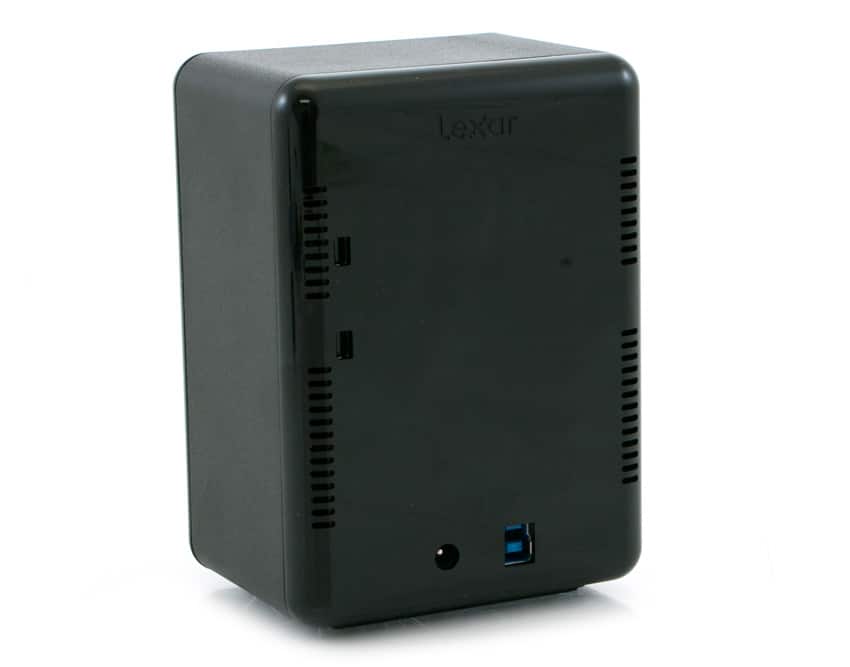
The back panel is home to the power connector and USB 3.0 and Thunderbolt 2 connectors. For users looking to daisy-chain the hub, simply connect one Thunderbolt 2 cable from the HR2 to your computer or other device and then connect the hub to the Thunderbolt 2 cable from the next device (e.g. a monitor or hard drive). The Lexar Professional Workflow HR2 allows up to six devices for daisy-chaining using one port on your computer. In addition, Lexar says to place the hub at the beginning of the chain, closest to your computer, in order to ensure the best possible performance.

**Performance**

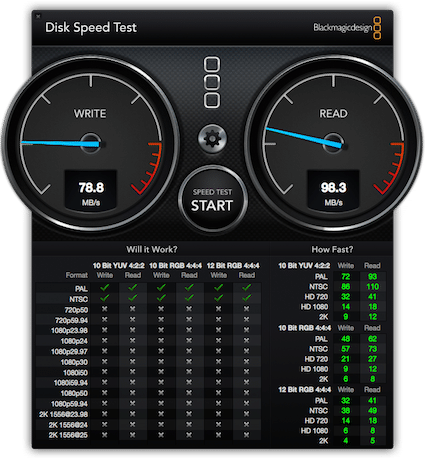
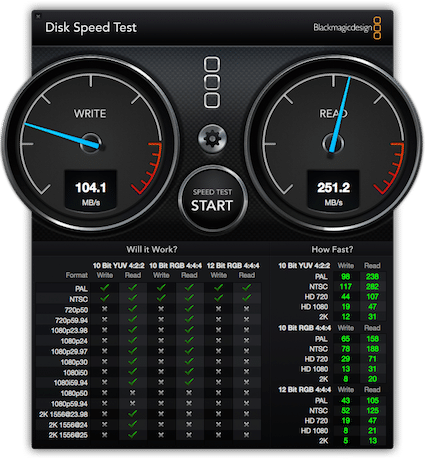
To test the performance of the Lexar Professional Workflow HR2, we used a current gen MacBook Pro with a Thunderbolt 2 connection using the Blackmagic Disk Speed Test tool. For our testing we used a [SanDisk Extreme PRO 64GB CompactFlash Memory Card](https://www.storagereview.com/sandisk_extreme_pro_compactflash_memory_card_review) and a [SanDisk Extreme PRO SDHC/SDXC UHS-II 16GB Memory Card](https://www.storagereview.com/sandisk_extreme_pro_sdhc_sdxc_uhsii_memory_card_review). Each card was tested separately using a 5GB files size.

![]()![]()

Our compact flash configuration posted 98.3MB/s read and 78.8MB/s write during a 5GB file transfer. Using our SD card setup, we measured read and write speeds of 251MB/s and 104.1MB/s, respectively.

**Conclusion**

The Professional Workflow Reader HR2 reader and storage drive hub is targeted mainly towards multi-media enthusiasts, offering a ton of flexibility for those who use a variety of different memory cards throughout their workflow, staying true to its name. With the release of the HR2 (and HR1), Lexar certainly has an even stronger grip on this specialized market, as their readers offer unique functionality when compared to its competition. While there *are* an abundance of multi-card readers available, none of them have the modular design that the Professional Workflow has, giving Lexar’s reader a huge edge in the market since it can adapt when newer technology is released. This flexibility makes the HR2 significantly more valuable as well, eliminating the need to buy an entire new device as technology changes. As such, the Professional Workflow HR2 reader and storage drive hub is available at a street price of roughly $200 (not including the card readers) while the R1 model is available at only $56 dollars for who simply need a USB 3.0 connection.

As far as its performance goes, the Professional Workflow HR2 offered results that were below what was quoted by Lexar. When using our compact flash configuration, we measured the hub with 98.3MB/s read and 78.8MB/s write during a 5GB file transfer, while our SD card setup recorded read and write speeds of 251MB/s and 104.1MB/s, respectively. Performance is going to be based on the specific media used. The limitation would be in a specific media card, not necessarily the dock itself. Looking at the testing from our reviews of the SD card and compact flash, the speed for the SD card is better through the dock and the compact flash is about the same. However, the speeds we saw are more than sufficient for most editing professionals.

**Pros**

- Adapts to new technology with modular design
- Supports both Thunderbolt and USB 3.0
- Individual card readers can come out for mobile workflows

**Cons**

- Can be a bit expensive after purchasing the four readers/storage drives

**Bottom Line**

Though a bit pricey, the Professional Workflow Reader HR2 is an excellent reader and storage drive hub, offering users the peace-of-mind that their purchased device will be able to adapt new technology.

[Lexar Professional Workflow HR2 at Amazon](http://www.amazon.com/gp/product/B00KYK1KZK/ref=as_li_tl?ie=UTF8&camp=1789&creative=390957&creativeASIN=B00KYK1KZK&linkCode=as2&tag=storagereviewcom-20&linkId=R4MNTZNOQEHUKSS6)![]()

[Discuss this review](http://forums.storagereview.com/index.php/topic/37588-lexar-professional-workflow-h2-review/)

**Engage with StorageReview**

[Newsletter](https://www.storagereview.com/storage_newsletter) |  [YouTube](https://www.youtube.com/user/StorageReview "Opens in a new window") | Podcast  [iTunes](https://podcasts.apple.com/gb/podcast/storagereview-com-storage-reviews/id1060681115 "Opens in a new window")/ [Spotify](https://open.spotify.com/show/1y6VnznABhHeOSMOmbDTz0 "Opens in a new window") |  [Instagram](https://www.instagram.com/storagereview/ "Opens in a new window") |  [Twitter](https://twitter.com/storagereview "Opens in a new window") |  [TikTok](https://www.tiktok.com/@storagereview? "Opens in a new window") |  [RSS Feed](https://www.storagereview.com/rss.xml)

![]()

### Lyle Smith

Lyle is a writer for StorageReview, covering a broad set of end user and enterprise IT topics.

Previous post: [Netstor TurboBox Thunderbolt 2 Review (NA211TB-LD)](https://www.storagereview.com/review/netstor-turbobox-thunderbolt-2-review-na211tb-ld)

Next post: [Dot Hill AssuredSAN 4824 Review](https://www.storagereview.com/review/dot-hill-assuredsan-4824-review)

Trusted Vendors

Products and solutions from our affiliate partners:

- [  
  ![Ubiquiti Logo]()  
   Ubiquiti](https://store.ui.com/us/en?a_aid=StorageReview "Opens in a new window")
- [  
  ![Newegg Logo]()  
   Newegg](https://click.linksynergy.com/fs-bin/click?id=g5terNMDhz0&offerid=1207190.18&subid=0&type=4 "Opens in a new window")
- [  
  ![Amazon Logo]() Amazon](https://amzn.to/4fLJUEW "Opens in a new window")

Newsletter

Subscribe to the StorageReview newsletter to stay up to date on the latest news and reviews. We promise no spam!

1  

Leave this field empty if you’re human:

## Advertisement

Content Categories

[Facebook](https://www.facebook.com/@storagereview) [X](https://twitter.com/storagereview) [Instagram](https://www.instagram.com/storagereview/) [LinkedIn](https://www.linkedin.com/company/storagereview-com) [YouTube](https://www.youtube.com/user/storagereview?sub_confirmation=1) [Email](mailto:info@storagereview.com) [Spotify](https://open.spotify.com/show/1y6VnznABhHeOSMOmbDTz0) [Reddit](https://www.reddit.com/r/StorageReview/) [Discord](https://discord.gg/TwMHb4azdC) [RSS](https://www.storagereview.com/rss.xml) [TikTok](https://www.tiktok.com/@storagereview)

Copyright © 1998-2025 Flying Pig Ventures, LLC Cincinnati, Ohio. All rights reserved.

Manage your privacy

To provide the best experiences, we and our partners use technologies like cookies to store and/or access device information. Consenting to these technologies will allow us and our partners to process personal data such as browsing behavior or unique IDs on this site and show (non-) personalized ads. Not consenting or withdrawing consent, may adversely affect certain features and functions.

Click below to consent to the above or make granular choices. Your choices will be applied to this site only. You can change your settings at any time, including withdrawing your consent, by using the toggles on the Cookie Policy, or by clicking on the manage consent button at the bottom of the screen.

Functional Functional Always active

The technical storage or access is strictly necessary for the legitimate purpose of enabling the use of a specific service explicitly requested by the subscriber or user, or for the sole purpose of carrying out the transmission of a communication over an electronic communications network.

Preferences Preferences

The technical storage or access is necessary for the legitimate purpose of storing preferences that are not requested by the subscriber or user.

Statistics Statistics

The technical storage or access that is used exclusively for statistical purposes. The technical storage or access that is used exclusively for anonymous statistical purposes. Without a subpoena, voluntary compliance on the part of your Internet Service Provider, or additional records from a third party, information stored or retrieved for this purpose alone cannot usually be used to identify you.

Marketing Marketing

The technical storage or access is required to create user profiles to send advertising, or to track the user on a website or across several websites for similar marketing purposes.

Statistics

Marketing

Features

Always active

Always active

- Manage options
- Manage services
- Manage {vendor\_count} vendors
- [Read more about these purposes](https://cookiedatabase.org/tcf/purposes/)

Accept Deny Manage options Save preferences Manage options

- {title}
- {title}
- {title}

Manage your privacy

To provide the best experiences, we use technologies like cookies to store and/or access device information. Consenting to these technologies will allow us to process data such as browsing behavior or unique IDs on this site. Not consenting or withdrawing consent, may adversely affect certain features and functions.

Functional Functional Always active

The technical storage or access is strictly necessary for the legitimate purpose of enabling the use of a specific service explicitly requested by the subscriber or user, or for the sole purpose of carrying out the transmission of a communication over an electronic communications network.

Preferences Preferences

The technical storage or access is necessary for the legitimate purpose of storing preferences that are not requested by the subscriber or user.

Statistics Statistics

The technical storage or access that is used exclusively for statistical purposes. The technical storage or access that is used exclusively for anonymous statistical purposes. Without a subpoena, voluntary compliance on the part of your Internet Service Provider, or additional records from a third party, information stored or retrieved for this purpose alone cannot usually be used to identify you.

Marketing Marketing

The technical storage or access is required to create user profiles to send advertising, or to track the user on a website or across several websites for similar marketing purposes.

Statistics

Marketing

Features

Always active

Always active

- Manage options
- Manage services
- Manage {vendor\_count} vendors
- [Read more about these purposes](https://cookiedatabase.org/tcf/purposes/)

Accept Deny Manage options Save preferences Manage options

- {title}
- {title}
- {title}

Manage consent Manage consent

```json
{"@context":"https:\/\/schema.org","@graph":[{"@type":"WebPage","@id":"https:\/\/www.storagereview.com\/review\/lexar-professional-workflow-hr2-review","url":"https:\/\/www.storagereview.com\/review\/lexar-professional-workflow-hr2-review","name":"Lexar Professional Workflow HR2 Review - StorageReview.com","isPartOf":{"@id":"https:\/\/www.storagereview.com\/#website"},"primaryImageOfPage":{"@id":"https:\/\/www.storagereview.com\/review\/lexar-professional-workflow-hr2-review#primaryimage"},"image":{"@id":"https:\/\/www.storagereview.com\/review\/lexar-professional-workflow-hr2-review#primaryimage"},"thumbnailUrl":"https:\/\/www.storagereview.com\/wp-content\/uploads\/2015\/04\/StorageReview-Lexar-Professional-Workflow-H2-Thumb.jpg","datePublished":"2015-04-14T17:24:51+00:00","dateModified":"2020-03-20T16:53:03+00:00","breadcrumb":{"@id":"https:\/\/www.storagereview.com\/review\/lexar-professional-workflow-hr2-review#breadcrumb"},"inLanguage":"en-US","potentialAction":[{"@type":"ReadAction","target":["https:\/\/www.storagereview.com\/review\/lexar-professional-workflow-hr2-review"]}]},{"@type":"ImageObject","inLanguage":"en-US","@id":"https:\/\/www.storagereview.com\/review\/lexar-professional-workflow-hr2-review#primaryimage","url":"https:\/\/www.storagereview.com\/wp-content\/uploads\/2015\/04\/StorageReview-Lexar-Professional-Workflow-H2-Thumb.jpg","contentUrl":"https:\/\/www.storagereview.com\/wp-content\/uploads\/2015\/04\/StorageReview-Lexar-Professional-Workflow-H2-Thumb.jpg","width":100,"height":82},{"@type":"BreadcrumbList","@id":"https:\/\/www.storagereview.com\/review\/lexar-professional-workflow-hr2-review#breadcrumb","itemListElement":[{"@type":"ListItem","position":1,"name":"Home","item":"https:\/\/www.storagereview.com\/"},{"@type":"ListItem","position":2,"name":"Review","item":"https:\/\/www.storagereview.com\/review"},{"@type":"ListItem","position":3,"name":"Lexar Professional Workflow HR2 Review"}]},{"@type":"WebSite","@id":"https:\/\/www.storagereview.com\/#website","url":"https:\/\/www.storagereview.com\/","name":"StorageReview.com","description":"StorageReview.com is a leading provider of news and reviews throughout the entire IT stack - from the datacenter to the edge, and all points in between.","publisher":{"@id":"https:\/\/www.storagereview.com\/#organization"},"potentialAction":[{"@type":"SearchAction","target":{"@type":"EntryPoint","urlTemplate":"https:\/\/www.storagereview.com\/?s={search_term_string}"},"query-input":{"@type":"PropertyValueSpecification","valueRequired":true,"valueName":"search_term_string"}}],"inLanguage":"en-US"},{"@type":"Organization","@id":"https:\/\/www.storagereview.com\/#organization","name":"StorageReview.com","url":"https:\/\/www.storagereview.com\/","logo":{"@type":"ImageObject","inLanguage":"en-US","@id":"https:\/\/www.storagereview.com\/#\/schema\/logo\/image\/","url":"https:\/\/www.storagereview.com\/wp-content\/uploads\/2020\/02\/Storage-Reviews-2-2.png","contentUrl":"https:\/\/www.storagereview.com\/wp-content\/uploads\/2020\/02\/Storage-Reviews-2-2.png","width":344,"height":61,"caption":"StorageReview.com"},"image":{"@id":"https:\/\/www.storagereview.com\/#\/schema\/logo\/image\/"},"sameAs":["https:\/\/x.com\/storagereview","http:\/\/youtube.com\/user\/storagereview"]}]}
```