---
description: The U3818DW is another slick-looking curved monitor offering from Dell, with a generous 37.5-inch size with a 21:9 aspect ratio, roughly 25% more screen...
title: Dell UltraSharp 38 Curved Monitor (U3818DW) Review
image: https://www.storagereview.com/wp-content/uploads/2018/06/StorageReview-Dell-U3417W-Thumb.jpg
---

[![Storage Review]()](https://storagereview.com/)

---

[Facebook](https://www.facebook.com/@storagereview) [X (Twitter)](https://twitter.twitter.com/storagereview) [Instagram](https://www.instagram.com/storagereview/) [LinkedIn](https://www.linkedin.com/company/storagereview-com) [YouTube](https://www.youtube.com/user/storagereview?sub_confirmation=1) [Email](mailto:info@storagereview.com) [Spotify](https://open.spotify.com/show/1y6VnznABhHeOSMOmbDTz0) [Reddit](https://www.reddit.com/r/StorageReview/) [Discord](https://discord.gg/TwMHb4azdC) [RSS Feed](https://www.storagereview.com/rss.xml) [TikTok](https://www.tiktok.com/@storagereview)

[Facebook](https://www.facebook.com/@storagereview) [X (Twitter)](https://twitter.com/storagereview) [Instagram](https://www.instagram.com/storagereview/) [LinkedIn](https://www.linkedin.com/company/storagereview-com) [YouTube](https://www.youtube.com/user/storagereview?sub_confirmation=1) [Email](mailto:info@storagereview.com) [Spotify](https://open.spotify.com/show/1y6VnznABhHeOSMOmbDTz0) [Reddit](https://www.reddit.com/r/StorageReview/) [Discord](https://discord.gg/TwMHb4azdC) [RSS Feed](https://www.storagereview.com/rss.xml) [TikTok](https://www.tiktok.com/@storagereview)

[![StorageReview.com](https://www.storagereview.com/wp-content/uploads/2026/07/Storage-Review-2x.png)](https://www.storagereview.com)

≡ Menu

- [Home](https://www.storagereview.com/)
- [Storage Reviews](https://www.storagereview.com/review)
  - [Consumer Reviews](https://www.storagereview.com/consumer)
  - [Enterprise Reviews](https://www.storagereview.com/enterprise)
  - [Ubiquiti Reviews](https://www.storagereview.com/best/ubiquiti-reviews)
- [SR Merch](https://store.storagereview.com)
- [Leaderboards](https://www.storagereview.com/best)
  - [Best Storage Arrays](https://www.storagereview.com/best/storage-arrays)
  - [Best Enterprise SSDs](https://www.storagereview.com/best/enterprise-ssds)
  - [Best Servers](https://www.storagereview.com/best/servers)
  - [Best Desktops for Local AI](https://www.storagereview.com/best/desktops-local-ai)
  - [Best Laptops for Local AI](https://www.storagereview.com/best/laptops-local-ai)
  - [Best Local LLM Tools](https://www.storagereview.com/best/local-llm-tools)
  - [Agentic AI Hardware](https://www.storagereview.com/best/agentic-ai-hardware)
  - [Best SSDs & Hard Drives](https://www.storagereview.com/best_drives)
  - [Best Portable SSDs](https://www.storagereview.com/best/portable-ssds)
  - [Best Business Laptops](https://www.storagereview.com/best/business-laptops)
  - [Best Mobile Workstations](https://www.storagereview.com/best/mobile-workstations)
  - [Best Desktop Workstations](https://www.storagereview.com/best/desktop-workstations)
  - [Best Laptop Battery Life](https://www.storagereview.com/best/laptop-battery-life)
- [Storage Reference Guide](https://www.storagereview.com/storage-reference-guide)
- [About SR](https://www.storagereview.com/about-storagereview)
  - [StorageReview.com Sweepstakes Rules and Regulations](https://www.storagereview.com/storagereview-com-sweepstakes-rules-and-regulations)

Search

[Home](https://www.storagereview.com/) » [Review](https://www.storagereview.com/review) » Dell UltraSharp 38 Curved Monitor (U3818DW) Review

# Dell UltraSharp 38 Curved Monitor (U3818DW) Review

by Kevin OBrien on June 22, 2018

[Client Accessories](https://www.storagereview.com/consumer/client-accessories)  ◇  [Consumer](https://www.storagereview.com/consumer)

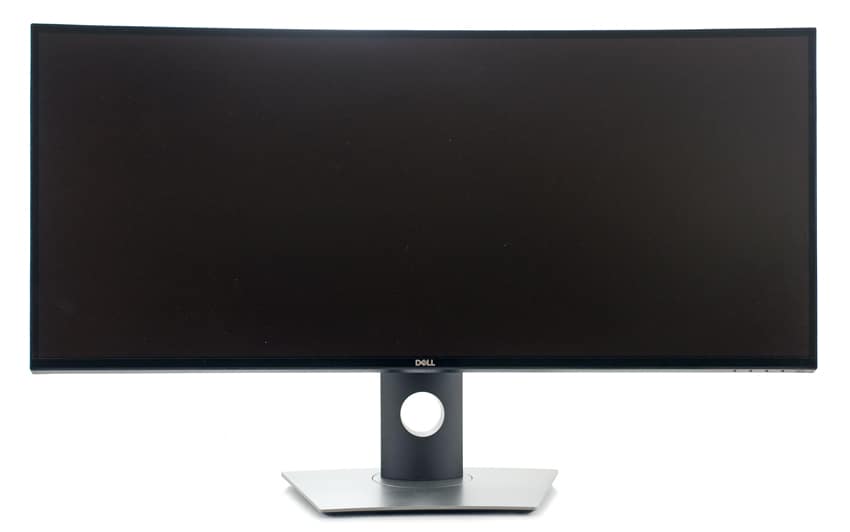
The U3818DW is another slick-looking curved monitor offering from Dell, with a generous 37.5-inch size with a 21:9 aspect ratio, roughly 25% more screen real estate than the company’s 34-inch monitor ([p3418hw](https://www.storagereview.com/dell_34_curved_monitor_review_p3418hw)). This thing is big and gives users a ton of space to work with. Moreover, it features a minimal bezel via the company’s InfinityEdge technology, which essentially means an “edge-to-edge” display surface. Dell believes that this design promotes efficient productivity by reducing user eye-movement across the screen while working, as users can easily fit multiple windows on the screen.

![](https://www.storagereview.com/wp-content/uploads/2018/06/StorageReview-Dell-U3417W.jpg)

The new Dell curved monitor has a WQHD+ 3840 x 1600 native screen resolution, making it ideal for photo and video editing The U3818DW also features 99% sRGB factory calibration and is a flicker-free ComfortView display. The former allows for color precision at Delta-E less than 2 while the latter technology prevents harmful blue light emissions to optimize eye comfort.

The Dell 38” curved U3818DW monitor comes with a three-year limited warranty and goes for roughly $1,170.

## **Dell U3818DW Specifications**

| Diagonally Viewable Size: | 95.3 cm (37.5 inches) |
| --- | --- |
| Preset Display Area (H x V) | 34.63 inches x 14.43 inches |
| Panel Type, Surface | In-Plane Switching Technology |
| Maximum Preset Resolution | 3840 x 1600 at 60Hz |
| Border Width (Edge of Monitor active area) | <ul><li>10.5 mm (Top)</li><li>10.0 mm (Left/Right)</li><li>19.8 mm (Bottom)</li></ul> |
| Color Gamut (typical) | 99% sRGB, 99% Rec 709, 78.1% DCI-P3 |
| Color Depth | 1.07 Billion colors |
| Calibration accuracy | sRGB at Delta E |
| Audio Output | 2 x 9W speakers, 1 x Analog 2.0 audio line out (3.5mm jack) |
| Display Screen Coating | Anti-glare with 3H hardness |
| Ports | 1x DP 1.2 (HDCP 2.2) |
|  | 2x HDMI 2.0 (HDCP 2.2) |
|  | 2 x USB 3.0 Upstream port |
|  | 2 x USB 3.0 Downstream port (side) |
|  | 2 x USB 3.0 Downstream port (bottom) |
|  | 1 x USB Type-C (Alternate mode with DP1.2, Power Delivery, and USB2.0) |
| Built-in Devices | <ul><li>USB3.0 Hi-Speed Hub (2 USB upstream port and 4 USB downstream, with 2 x BC1.2 charging capability at 2A (max)).</li><li>USB Type-C (Alternate mode with DP1.2, Power Delivery, and USB2.0)</li></ul> |
| Weight | <ul><li>Weight (panel only) for VESA mount: 9.05 kg – 19.95 lb</li><li>Weight (with stand assembly and cables): 12.14 kg – 26.76 lb</li><li>Weight with packaging: 19.7kg – 43.42 lb</li></ul> |
| Voltage Required | <ul><li>100 VAC to 240 VAC / 50 Hz or</li><li>60 Hz + 3 Hz / 3 A (typical)</li></ul> |
| Power consumption | <ul><li>Power Consumption (Operational): 56W (typical) / 250W (maximum)</li><li>Power Consumption Standby / Sleep: Less than 0.3W</li></ul> |

## **Usability and Features**

As this monitor also leverages Dell Display Manager, a detailed write up of the software can be found  [here in the Usability and Features section](https://www.storagereview.com/dell_ultrasharp_34_curved_monitor_review_u3417w) of a prior curved monitor review.

## **Design and Build**

With more experience under my belt when it comes to ultra-wide curved monitors one of the biggest changes is in how my IT workflow has changed. Managing VMware vCenter, running some Putty sessions, having an Excel sheet open and maybe a few browser sessions running are all possible to do now…. at the same time. What used to take two screens to handle can now be easily done on one, and the size of the screen surface has increased to the point where the native resolution size is very similar to two good size monitors side by side.

With the increase to roughly 38″ across, text size and window usability has hit a fantastic sweet spot on my desk. While I used to joke about how larger monitors might seem excessive, I’m starting to realize just how useful and comfortable they are to use in an office setting. Going to 32″ or lower, even while the resolution is the same, the items displayed start to get too small unless you sit much closer to your screen. My back actually feels better since I’m not leaning towards my screen. The other difference is how much I’m appreciating the curved monitor design, making it easier glancing back and forth without rotating my head as much. This is one area that ultra-wide monitors have been able to improve upon version two separate monitors side by side; cleaner displays, less stuff on your desk and fewer cables back to your notebook or workstation.

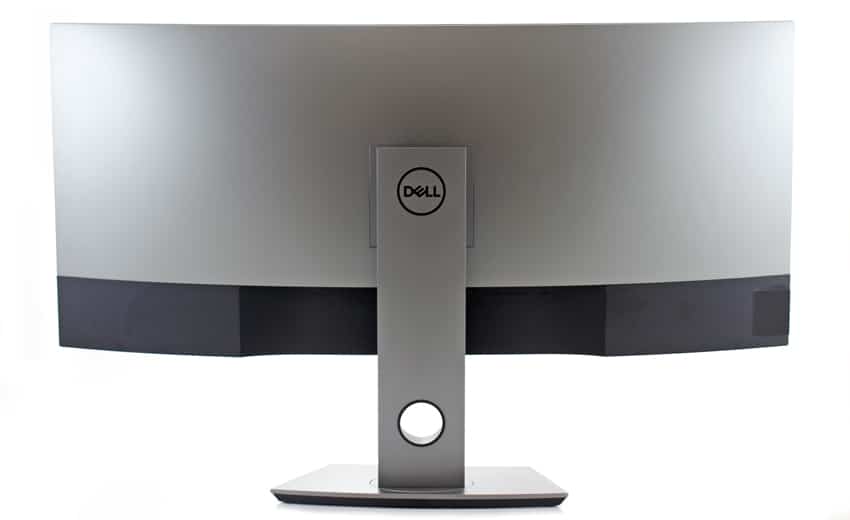
Like all recent higher-end Dell models, this is a very nice-looking monitor. This is mostly due to its ultra-thin bezel, which gives you a minimal edge wrapped around the perimeter of the screen. If you happen to have the budget or the use-case to have two of these monitors side by side, the thin bezel also helps to limit an excessive gap between both screen surfaces. As you might also notice that this monitor looks very similar to the Dell UltraSharp 34 Curved Monitor (U3417W) we previously reviewed, as they have the exact same stand riser/base design as well as a similar display design.

![]()

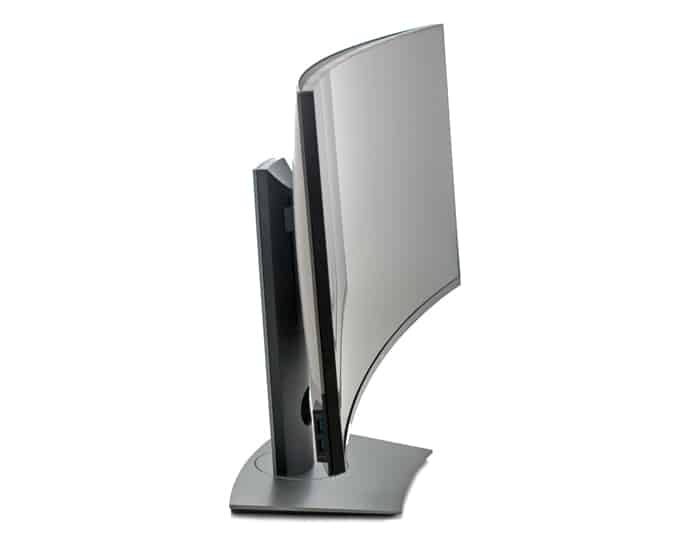
The monitor itself was very easy to put together. Just insert the stand base into the stand slot and turn the screw handle clockwise until its fully tightened, then simply fit the two tabs on the upper part of the stand into the groove located on the back of the monitor. Lightly press the stand down until you feel it snap into place and then you’re done.

Once set up, we were able to maneuver the display quite easily. Though the U3818DW display and base do take up quite a bit of space on a desk, it eliminates the need for more monitors (e.g., you might need one of these instead of two smaller displays), which would most definitely take up more real estate and make your work set up more complicated. It also features several other stand options that help to make your specific work area more efficient.

This monitor is equipped with four control/navigation function buttons, which is located by the power button at the bottom right. This includes Shortcut key/Preset Modes and shortcut key/volume button, the latter that allows users to choose from a range of preset color modes. This is a nice little feature, as it allows users to quickly switch their viewing mode depending on what they are doing. Among the presets is the comfort display mode that lowers both the brightness and blue light levels, which is ideal for users working long hours and at night.

![]()

Next is the menu button, which is used to launch the on-screen display, and the Exit button, which is used to exit the main menu.

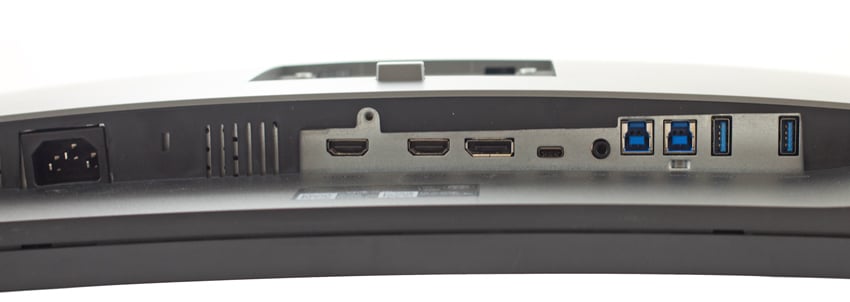
Most of the connectivity is located on the bottom of the display. Though it doesn’t have a DisplayPort out connector, it does offer a ton of connectivity ideal for its target use cases. From left to right are two HDMI port connectors, a DisplayPort in-connector, a USB Type-C port, an Audio-Line out, two USB upstream ports, and two USB downstream ports (one with the Power Charging feature). The stand/security lock and power port are also located on the bottom.

![]()

On the side of the monitor are two USB downstream ports, one of which features Power Charging.

## **Conclusion**

Dell’s U3818DW 38-inch Curved Monitor is their biggest yet, allowing users to maximize their productivity as much as possible. Though it looks virtually identical to 34” UltraSharp P3418HW, this new monitor comes with true 4K and approximately 25% more screen space to work with. The latter is especially important to those who need multiple windows visible at all times, such as live server analytics and media monitoring and editing. Like their other recent displays, Dell’s U3818DW is beautifully-designed, has a bright and beautiful screen and offers a ton of versatility and maneuverability via various mounting options, allowing this monitor to fit in most workspaces.

The new Dell monitor also features the regular connectivity, including two HDMI ports, a DisplayPort in, a USB Type-C port, an Audio-Line out, two USB upstream and four downstream ports, and two USB downstream ports (two with the Power Charging feature).

The downside to all of this is its price, as it starts at around $1,170 USD—roughly 4 times more than that of Dell’s 34-inch monitors. This means that the 38-inch monitor is really meant for a very specific audience; professionals who need the highest image/video quality and largest screen space they can get. In that, the U3818DW certainly delivers.

## **The Bottom Line**

Though expensive, the Dell 38” Curved U3818DW Monitor is perfect for media professional and those looking to maximize both their digital and physical workspace.

[Dell 38” Curved U3818DW Monitor](https://www.dell.com/en-us/shop/dell-ultrasharp-38-curved-monitor-u3818dw/apd/210-amrc/monitors-monitor-accessories)

[Dell Curved Monitors at Amazon](https://amzn.to/2MQGZNZ)

[Discuss this review](http://forums.storagereview.com/index.php?/topic/40671-dell-ultrasharp-38-curved-monitor-u3818dw-review-discussion/)

[Sign up for the StorageReview newsletter](https://www.storagereview.com/storagereview_newsletter_signup)

**Engage with StorageReview**

[Newsletter](https://www.storagereview.com/storage_newsletter) |  [YouTube](https://www.youtube.com/user/StorageReview "Opens in a new window") | Podcast  [iTunes](https://podcasts.apple.com/gb/podcast/storagereview-com-storage-reviews/id1060681115 "Opens in a new window")/ [Spotify](https://open.spotify.com/show/1y6VnznABhHeOSMOmbDTz0 "Opens in a new window") |  [Instagram](https://www.instagram.com/storagereview/ "Opens in a new window") |  [Twitter](https://twitter.com/storagereview "Opens in a new window") |  [TikTok](https://www.tiktok.com/@storagereview? "Opens in a new window") |  [RSS Feed](https://www.storagereview.com/rss.xml)

![]()

### Kevin OBrien

Inside the StorageReview Lab evaluating products and working with industry leaders to develop new testing environments. At home I'm raising a family.

Previous post: [Toshiba OCZ RC100 Series SSD Review](https://www.storagereview.com/review/toshiba-ocz-rc100-series-ssd-review)

Next post: [Samsung PRO Endurance Card Review (128GB)](https://www.storagereview.com/review/samsung-pro-endurance-card-review-128gb)

Trusted Vendors

Products and solutions from our affiliate partners:

- [  
  ![Ubiquiti Logo](https://www.storagereview.com/wp-content/uploads/2024/11/2-1.webp)  
   Ubiquiti](https://store.ui.com/us/en?a_aid=StorageReview "Opens in a new window")
- [  
  ![Newegg Logo](https://www.storagereview.com/wp-content/uploads/2025/11/newegg.webp)  
   Newegg](https://click.linksynergy.com/fs-bin/click?id=g5terNMDhz0&offerid=1207190.18&subid=0&type=4 "Opens in a new window")
- [  
  ![Amazon Logo](https://www.storagereview.com/wp-content/uploads/2025/11/amazon.webp) Amazon](https://amzn.to/4fLJUEW "Opens in a new window")

Newsletter

Subscribe to the StorageReview newsletter to stay up to date on the latest news and reviews. We promise no spam!

1  

Leave this field empty if you’re human:

## Advertisement

Content Categories

[Facebook](https://www.facebook.com/@storagereview) [X](https://twitter.com/storagereview) [Instagram](https://www.instagram.com/storagereview/) [LinkedIn](https://www.linkedin.com/company/storagereview-com) [YouTube](https://www.youtube.com/user/storagereview?sub_confirmation=1) [Email](mailto:info@storagereview.com) [Spotify](https://open.spotify.com/show/1y6VnznABhHeOSMOmbDTz0) [Reddit](https://www.reddit.com/r/StorageReview/) [Discord](https://discord.gg/TwMHb4azdC) [RSS](https://www.storagereview.com/rss.xml) [TikTok](https://www.tiktok.com/@storagereview)

Copyright © 1998-2025 Flying Pig Ventures, LLC Cincinnati, Ohio. All rights reserved.

Manage your privacy

To provide the best experiences, we and our partners use technologies like cookies to store and/or access device information. Consenting to these technologies will allow us and our partners to process personal data such as browsing behavior or unique IDs on this site and show (non-) personalized ads. Not consenting or withdrawing consent, may adversely affect certain features and functions.

Click below to consent to the above or make granular choices. Your choices will be applied to this site only. You can change your settings at any time, including withdrawing your consent, by using the toggles on the Cookie Policy, or by clicking on the manage consent button at the bottom of the screen.

Functional Functional Always active

The technical storage or access is strictly necessary for the legitimate purpose of enabling the use of a specific service explicitly requested by the subscriber or user, or for the sole purpose of carrying out the transmission of a communication over an electronic communications network.

Preferences Preferences

The technical storage or access is necessary for the legitimate purpose of storing preferences that are not requested by the subscriber or user.

Statistics Statistics

The technical storage or access that is used exclusively for statistical purposes. The technical storage or access that is used exclusively for anonymous statistical purposes. Without a subpoena, voluntary compliance on the part of your Internet Service Provider, or additional records from a third party, information stored or retrieved for this purpose alone cannot usually be used to identify you.

Marketing Marketing

The technical storage or access is required to create user profiles to send advertising, or to track the user on a website or across several websites for similar marketing purposes.

Statistics

Marketing

Features

Always active

Always active

- Manage options
- Manage services
- Manage {vendor\_count} vendors
- [Read more about these purposes](https://cookiedatabase.org/tcf/purposes/)

Accept Deny Manage options Save preferences Manage options

- {title}
- {title}
- {title}

Manage your privacy

To provide the best experiences, we use technologies like cookies to store and/or access device information. Consenting to these technologies will allow us to process data such as browsing behavior or unique IDs on this site. Not consenting or withdrawing consent, may adversely affect certain features and functions.

Functional Functional Always active

The technical storage or access is strictly necessary for the legitimate purpose of enabling the use of a specific service explicitly requested by the subscriber or user, or for the sole purpose of carrying out the transmission of a communication over an electronic communications network.

Preferences Preferences

The technical storage or access is necessary for the legitimate purpose of storing preferences that are not requested by the subscriber or user.

Statistics Statistics

The technical storage or access that is used exclusively for statistical purposes. The technical storage or access that is used exclusively for anonymous statistical purposes. Without a subpoena, voluntary compliance on the part of your Internet Service Provider, or additional records from a third party, information stored or retrieved for this purpose alone cannot usually be used to identify you.

Marketing Marketing

The technical storage or access is required to create user profiles to send advertising, or to track the user on a website or across several websites for similar marketing purposes.

Statistics

Marketing

Features

Always active

Always active

- Manage options
- Manage services
- Manage {vendor\_count} vendors
- [Read more about these purposes](https://cookiedatabase.org/tcf/purposes/)

Accept Deny Manage options Save preferences Manage options

- {title}
- {title}
- {title}

Manage consent Manage consent

```json
{"@context":"https:\/\/schema.org","@graph":[{"@type":"WebPage","@id":"https:\/\/www.storagereview.com\/review\/dell-ultrasharp-38-curved-monitor-u3818dw-review","url":"https:\/\/www.storagereview.com\/review\/dell-ultrasharp-38-curved-monitor-u3818dw-review","name":"Dell UltraSharp 38 Curved Monitor (U3818DW) Review - StorageReview.com","isPartOf":{"@id":"https:\/\/www.storagereview.com\/#website"},"primaryImageOfPage":{"@id":"https:\/\/www.storagereview.com\/review\/dell-ultrasharp-38-curved-monitor-u3818dw-review#primaryimage"},"image":{"@id":"https:\/\/www.storagereview.com\/review\/dell-ultrasharp-38-curved-monitor-u3818dw-review#primaryimage"},"thumbnailUrl":"https:\/\/www.storagereview.com\/wp-content\/uploads\/2018\/06\/StorageReview-Dell-U3417W-Thumb.jpg","datePublished":"2018-06-22T16:04:23+00:00","dateModified":"2020-03-20T16:48:20+00:00","breadcrumb":{"@id":"https:\/\/www.storagereview.com\/review\/dell-ultrasharp-38-curved-monitor-u3818dw-review#breadcrumb"},"inLanguage":"en-US","potentialAction":[{"@type":"ReadAction","target":["https:\/\/www.storagereview.com\/review\/dell-ultrasharp-38-curved-monitor-u3818dw-review"]}]},{"@type":"ImageObject","inLanguage":"en-US","@id":"https:\/\/www.storagereview.com\/review\/dell-ultrasharp-38-curved-monitor-u3818dw-review#primaryimage","url":"https:\/\/www.storagereview.com\/wp-content\/uploads\/2018\/06\/StorageReview-Dell-U3417W-Thumb.jpg","contentUrl":"https:\/\/www.storagereview.com\/wp-content\/uploads\/2018\/06\/StorageReview-Dell-U3417W-Thumb.jpg","width":100,"height":63},{"@type":"BreadcrumbList","@id":"https:\/\/www.storagereview.com\/review\/dell-ultrasharp-38-curved-monitor-u3818dw-review#breadcrumb","itemListElement":[{"@type":"ListItem","position":1,"name":"Home","item":"https:\/\/www.storagereview.com\/"},{"@type":"ListItem","position":2,"name":"Review","item":"https:\/\/www.storagereview.com\/review"},{"@type":"ListItem","position":3,"name":"Dell UltraSharp 38 Curved Monitor (U3818DW) Review"}]},{"@type":"WebSite","@id":"https:\/\/www.storagereview.com\/#website","url":"https:\/\/www.storagereview.com\/","name":"StorageReview.com","description":"StorageReview.com is a leading provider of news and reviews throughout the entire IT stack - from the datacenter to the edge, and all points in between.","publisher":{"@id":"https:\/\/www.storagereview.com\/#organization"},"potentialAction":[{"@type":"SearchAction","target":{"@type":"EntryPoint","urlTemplate":"https:\/\/www.storagereview.com\/?s={search_term_string}"},"query-input":{"@type":"PropertyValueSpecification","valueRequired":true,"valueName":"search_term_string"}}],"inLanguage":"en-US"},{"@type":"Organization","@id":"https:\/\/www.storagereview.com\/#organization","name":"StorageReview.com","url":"https:\/\/www.storagereview.com\/","logo":{"@type":"ImageObject","inLanguage":"en-US","@id":"https:\/\/www.storagereview.com\/#\/schema\/logo\/image\/","url":"https:\/\/www.storagereview.com\/wp-content\/uploads\/2020\/02\/Storage-Reviews-2-2.png","contentUrl":"https:\/\/www.storagereview.com\/wp-content\/uploads\/2020\/02\/Storage-Reviews-2-2.png","width":344,"height":61,"caption":"StorageReview.com"},"image":{"@id":"https:\/\/www.storagereview.com\/#\/schema\/logo\/image\/"},"sameAs":["https:\/\/x.com\/storagereview","http:\/\/youtube.com\/user\/storagereview"]}]}
```