---
description: Productivity-focused buyers should strongly consider the Lenovo ThinkPad X1 Carbon Gen 12 it delivers an exceptionally high-quality user experience....
title: Lenovo ThinkPad X1 Carbon Gen 12 Review
image: https://www.storagereview.com/wp-content/uploads/2024/07/StorageReview-Lenovo-Thinkpad-X1-Carbon-Gen12-3.jpg
---

[![Storage Review]()](https://storagereview.com/)

---

[Facebook](https://www.facebook.com/@storagereview) [X (Twitter)](https://twitter.twitter.com/storagereview) [Instagram](https://www.instagram.com/storagereview/) [LinkedIn](https://www.linkedin.com/company/storagereview-com) [YouTube](https://www.youtube.com/user/storagereview?sub_confirmation=1) [Email](mailto:info@storagereview.com) [Spotify](https://open.spotify.com/show/1y6VnznABhHeOSMOmbDTz0) [Reddit](https://www.reddit.com/r/StorageReview/) [Discord](https://discord.gg/TwMHb4azdC) [RSS Feed](https://www.storagereview.com/rss.xml) [TikTok](https://www.tiktok.com/@storagereview)

[Facebook](https://www.facebook.com/@storagereview) [X (Twitter)](https://twitter.com/storagereview) [Instagram](https://www.instagram.com/storagereview/) [LinkedIn](https://www.linkedin.com/company/storagereview-com) [YouTube](https://www.youtube.com/user/storagereview?sub_confirmation=1) [Email](mailto:info@storagereview.com) [Spotify](https://open.spotify.com/show/1y6VnznABhHeOSMOmbDTz0) [Reddit](https://www.reddit.com/r/StorageReview/) [Discord](https://discord.gg/TwMHb4azdC) [RSS Feed](https://www.storagereview.com/rss.xml) [TikTok](https://www.tiktok.com/@storagereview)

[![StorageReview.com](https://www.storagereview.com/wp-content/uploads/2026/07/Storage-Review-2x.png)](https://www.storagereview.com)

≡ Menu

- [Home](https://www.storagereview.com/)
- [Storage Reviews](https://www.storagereview.com/review)
  - [Consumer Reviews](https://www.storagereview.com/consumer)
  - [Enterprise Reviews](https://www.storagereview.com/enterprise)
  - [Ubiquiti Reviews](https://www.storagereview.com/best/ubiquiti-reviews)
- [SR Merch](https://store.storagereview.com)
- [Leaderboards](https://www.storagereview.com/best)
  - [Best Storage Arrays](https://www.storagereview.com/best/storage-arrays)
  - [Best Enterprise SSDs](https://www.storagereview.com/best/enterprise-ssds)
  - [Best Servers](https://www.storagereview.com/best/servers)
  - [Best Desktops for Local AI](https://www.storagereview.com/best/desktops-local-ai)
  - [Best Laptops for Local AI](https://www.storagereview.com/best/laptops-local-ai)
  - [Best Local LLM Tools](https://www.storagereview.com/best/local-llm-tools)
  - [Agentic AI Hardware](https://www.storagereview.com/best/agentic-ai-hardware)
  - [Best SSDs & Hard Drives](https://www.storagereview.com/best_drives)
  - [Best Portable SSDs](https://www.storagereview.com/best/portable-ssds)
  - [Best Business Laptops](https://www.storagereview.com/best/business-laptops)
  - [Best Mobile Workstations](https://www.storagereview.com/best/mobile-workstations)
  - [Best Desktop Workstations](https://www.storagereview.com/best/desktop-workstations)
  - [Best Laptop Battery Life](https://www.storagereview.com/best/laptop-battery-life)
- [Storage Reference Guide](https://www.storagereview.com/storage-reference-guide)
- [About SR](https://www.storagereview.com/about-storagereview)
  - [StorageReview.com Sweepstakes Rules and Regulations](https://www.storagereview.com/storagereview-com-sweepstakes-rules-and-regulations)

Search

[Home](https://www.storagereview.com/) » [Review](https://www.storagereview.com/review) » Lenovo ThinkPad X1 Carbon Gen 12 Review

# Lenovo ThinkPad X1 Carbon Gen 12 Review

by Charles P. Jefferies on July 17, 2024

[Consumer](https://www.storagereview.com/consumer)  ◇  [Workstation](https://www.storagereview.com/consumer/workstation)

Lenovo’s ThinkPad X1 Carbon Gen 12 is a high-end business laptop that works well anywhere.

## Lenovo ThinkPad X1 Carbon Gen 12 Specifications

The ThinkPad X1 Carbon series is Lenovo’s flagship laptop from its infamous ThinkPad series. Despite its business audience, the ThinkPad X1 Carbon is also very well adapted for home, college, and prosumer use.

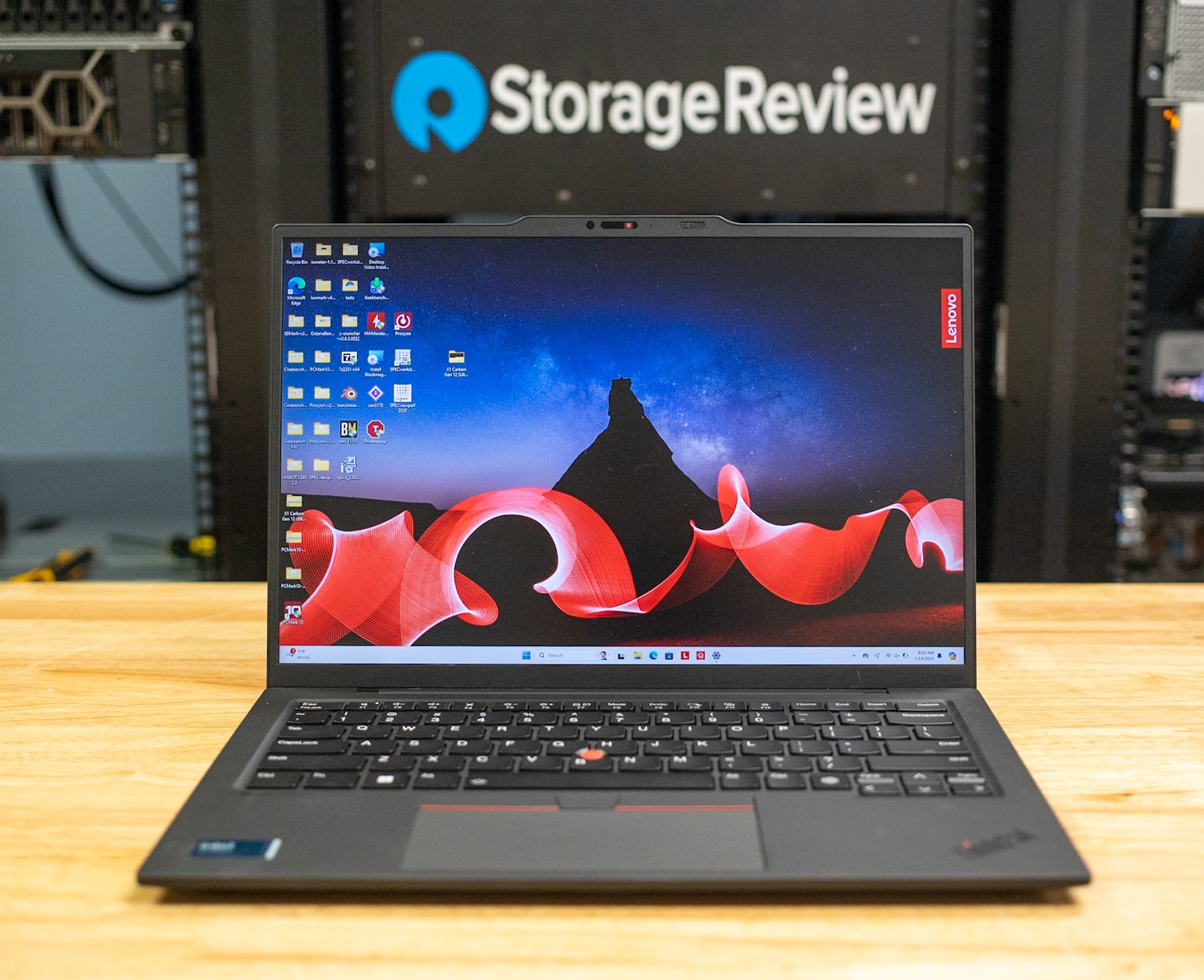
The ThinkPad X1 Carbon Gen 12 has a 14-inch screen and is designed for productivity. At its heart is an Intel “ [Meteor Lake](https://www.intel.com/content/www/us/en/content-details/788851/meteor-lake-architecture-overview.html)” Core Ultra U-class processor with a 15-watt power rating, which is a solid everyday performance CPU if not one for heavy computation. It does have a built in Neural Processing Unit (NPN) for localized AI processing. The processor has onboard Intel Graphics, which are not as powerful as the Arc integrated graphics found in the more powerful Core Ultra H-class chips.

![Lenovo ThinkPad X1 Carbon Gen 12 Front](https://www.storagereview.com/wp-content/uploads/2024/07/StorageReview-Lenovo-Thinkpad-X1-Carbon-Gen12-3.jpg)

Memory options scale to 64GB of LPDDR5X and there is also support for a single M.2 2280 Gen4 drive. Overall, the specifications are in line with what’s expected from a laptop in this class. The full specifications are as follows:

| **Processor** | <ul><li>Intel® Core™ Ultra 5 125U Processor (E-Core Max 3.60 GHz, P-Core Max 4.30 GHz with Turbo Boost, 12 Cores, 14 Threads, 12 MB Cache)</li><li>Intel® Core™ Ultra 5 135U Processor with vPro® (E-cores up to 3.60 GHz P-cores up to 4.40 GHz with Turbo Boost, 12 Cores, 14 Threads, 12 MB Cache)</li><li>Intel® Core™ Ultra 7 155U Processor (E-Core Max 3.80 GHz, P-Core Max 4.80 GHz with Turbo Boost, 12 Cores, 14 Threads, 12 MB Cache)</li><li>Intel® Core™ Ultra 7 165U Processor with vPro® (E-cores up to 3.80 GHz P-cores up to 4.90 GHz with Turbo Boost, 12 Cores, 14 Threads, 12 MB Cache)</li></ul> |
| --- | --- |
| **Operating System** | <ul><li>Windows 11 Pro</li><li>Windows 11 Home</li><li>Ubuntu Linux</li><li>Fedora Linux</li></ul> |
| **Graphics** | Integrated Intel Graphics |
| **Memory** | Up to 64GB LPDDR5X 6400MHz |
| **Storage** | Up to 2TB PCIe Gen4 Performance SSD |
| **Battery** | <ul><li>57Whr battery with optimized power distribution for longer life unplugged</li><li>Rapid Charge (60 minutes = 80% capacity), requires 65W or higher adapter</li></ul> |
| **Audio** | <ul><li>Dolby Atmos®</li><li>2 x speakers</li><li>2 x 360-degree quad-array microphones</li><li>Dolby Voice® certified for professional conferencing solution</li></ul> |
| **Camera** | <ul><li>1080p FHD & infrared (IR) with webcam privacy shutter</li><li>2160p UHD RGB+IR with Computer Vision</li></ul> |
| **Ports/Slots** | <ul><li>2 x USB-C® (Thunderbolt™ 4, USB 40Gbps)</li><li>2 x USB-A (USB 5Gbps)</li><li>Headphones / mic combo</li><li>HDMI 2.1 (supports resolution up to 4K@60Hz)</li><li>Optional: Nano SIM slot (Available Spring 2024)</li></ul> |
| **Wireless** | <ul><li>Intel® WiFi 6E\* AX211 802.11AX (2 x 2)</li><li>Bluetooth® 5.3</li><li>WWAN Optional : Quectel EM160R-GL 4G LTE CAT16</li><li>WWAN Optional : Quectel RM520N-GL 5G Sub6</li></ul> |
| **Display** | <ul><li>14ʺ WUXGA (1920 x 1200) IPS, touchscreen, antiglare, low power, 400nit, 100% sRGB, Eyesafe®</li><li>14ʺ WUXGA (1920 x 1200) IPS, antiglare, low power, 400nit, 100% sRGB, Eyesafe®</li><li>14″ 2.8K (2880 x 1800), OLED, Anti-Glare/Anti Reflection/Anti Smudge, Non-Touch, HDR 500, 100%DCI-P3, 400 nits, 120Hz, Low Blue Light</li><li>14″ 2.8K (2880 x 1800), OLED, Anti-Glare/Anti Reflection/Anti Smudge, Touch, HDR 500, 100%DCI-P3, 400 nits, 120Hz, Low Blue Light</li><li>14″ WUXGA (1920 x 1200), IPS, Anti-Glare, Non-Touch, 100%sRGB, 500 nits, 60Hz, ePrivacy Filter</li></ul> |
| **Dimensions** | 14.96mm x 312.8mm  x 214.75mm / 0.59ʺ x 12.31ʺ x 8.45ʺ |
| **Weight** | Starting at 1.09kg / 2.42bs |
| **Sustainability – Material** | <ul><li>3% post-industrial recycled carbon fiber on top cover (A side)</li><li>90% recycled magnesium on keyboard frame (C side)</li><li>55% recycled aluminum & 45% hydro-aluminum on bottom cover (D side)</li><li>90% post-consumer content (PCC) recycled plastic used in speaker enclosure</li><li>90% PCC recycled plastic used in the battery enclosure</li><li>90% PCC recycled plastic used in power adaptor</li><li>30% PCC recycled plastic in cable holders</li><li>85% PCC recycled plastic in keycaps</li><li>Low-temperature solder on memory modules, SSD board, & fingerprint module</li><li>Forest Stewardship Council® certified plastic-free packaging with bamboo-sugar cane packaging & standard cushions</li></ul> |
| **Certifications/Registries** | <ul><li>ENERGY STAR® 8.0</li><li>EPEAT® Gold, where applicable\*</li><li>Eyesafe®</li><li>Forest Stewardship Council® (FSC) certified packaging</li><li>Intel® Evo™</li><li>MIL-SPEC 810H</li><li>TCO 9</li><li>Zoom Certified – Premium Laptop</li></ul> |
| **ThinkShield Security** | <ul><li>Computer Vision Human Presence Detection (requires optional 8MP & IR Camera)</li><li>Discreet Trusted Platform Module (dTPM) 2.0</li><li>Facial recognition login via Windows Hello (requires IR camera)</li><li>Fingerprint reader (match-on-chip) on keyboard</li><li>Firmware Shield</li><li>Intel® Threat Detection Technology</li><li>Intel vPro® security (select models)</li><li>Kensington Nano Security Slot™</li><li>Microsoft Secured-core PCs (select models)</li><li>Optional: PrivacyGuard</li><li>Optional: PrivacyAlert with Glance app</li><li>Webcam privacy shutter</li></ul> |
| **Preloaded Software** | <ul><li>Lenovo Commercial Vantage</li><li>Lenovo View</li><li>Intel® Unison™ 2.0</li><li>Intel® Connectivity Performance Suite</li><li>Office 365 (trial)</li><li>TrackPoint Quick Menu</li></ul> |

## Lenovo ThinkPad X1 Carbon Gen 12 Build and Design

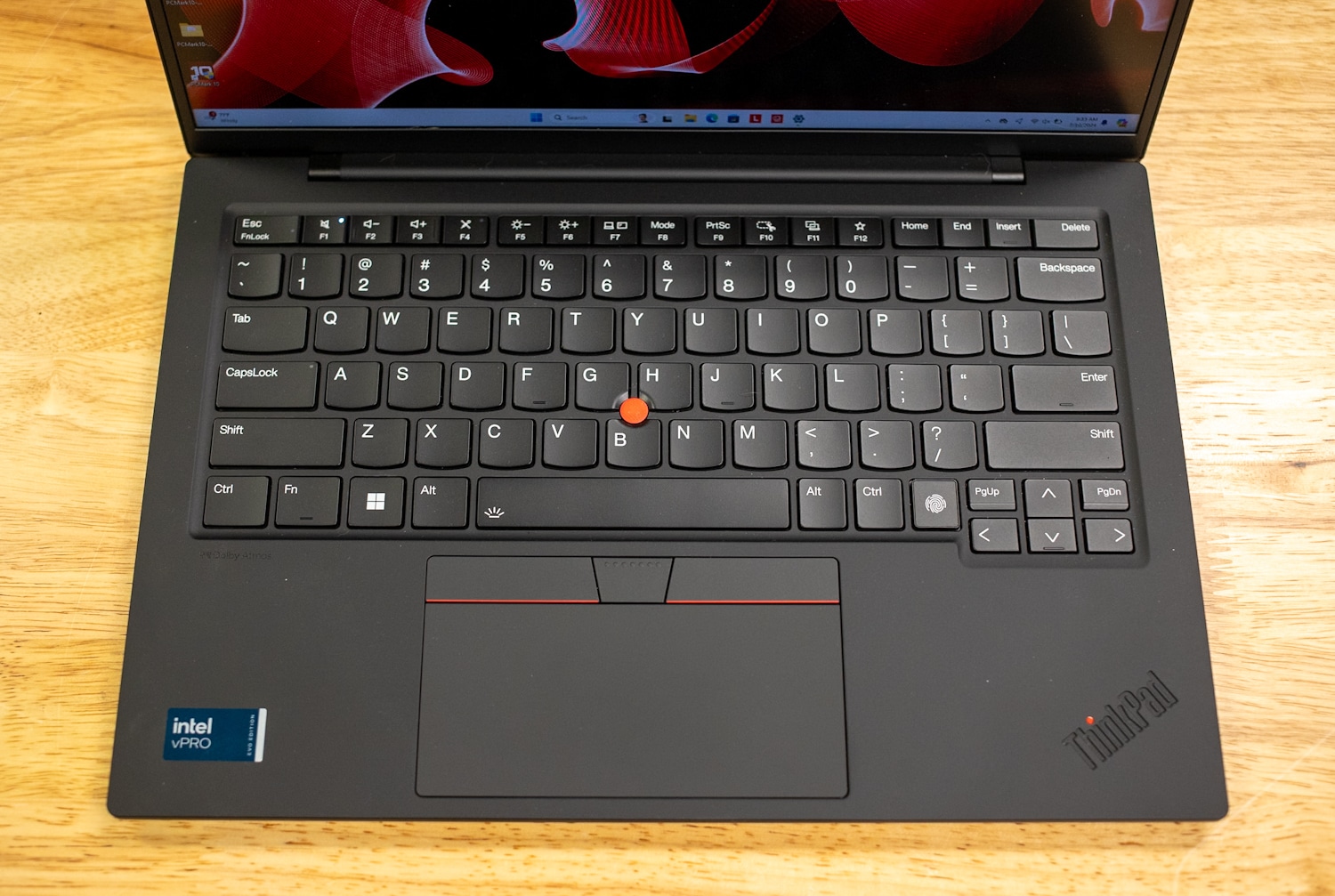
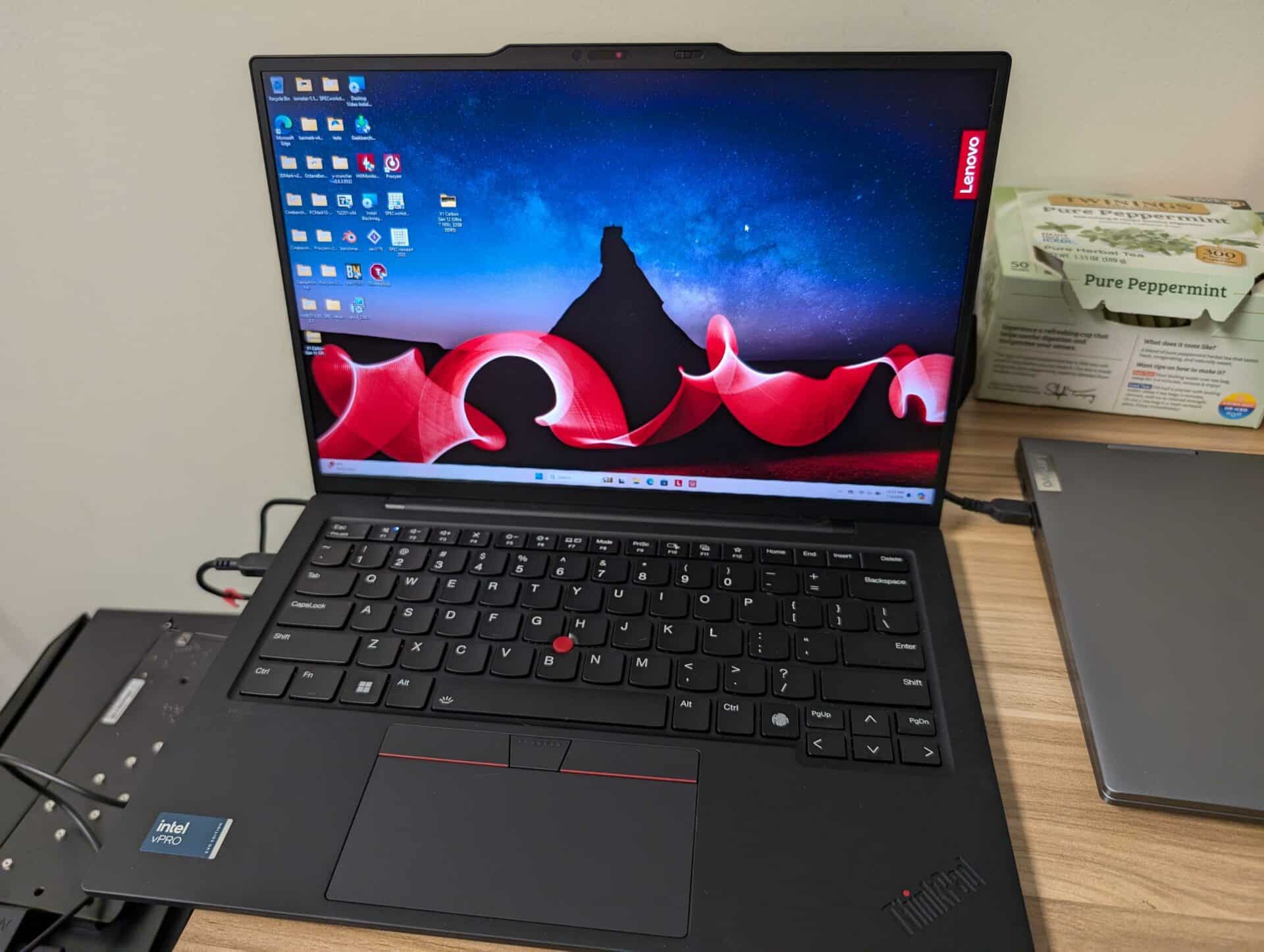
This latest ThinkPad X1 Carbon looks like ThinkPads have always looked, with a timeless all-black exterior and squared edges. The red eraser-head Trackpoint in the middle of the keyboard alone makes this laptop instantly recognizable as a ThinkPad; almost no other laptop maker bothers to include a trackpoint anymore. Personally, I find it highly useful since it doesn’t require me to move my hands from the keyboard to move the mouse. The trackpoint has three dedicated buttons, including center-click that is very useful in design apps, just below the spacebar.

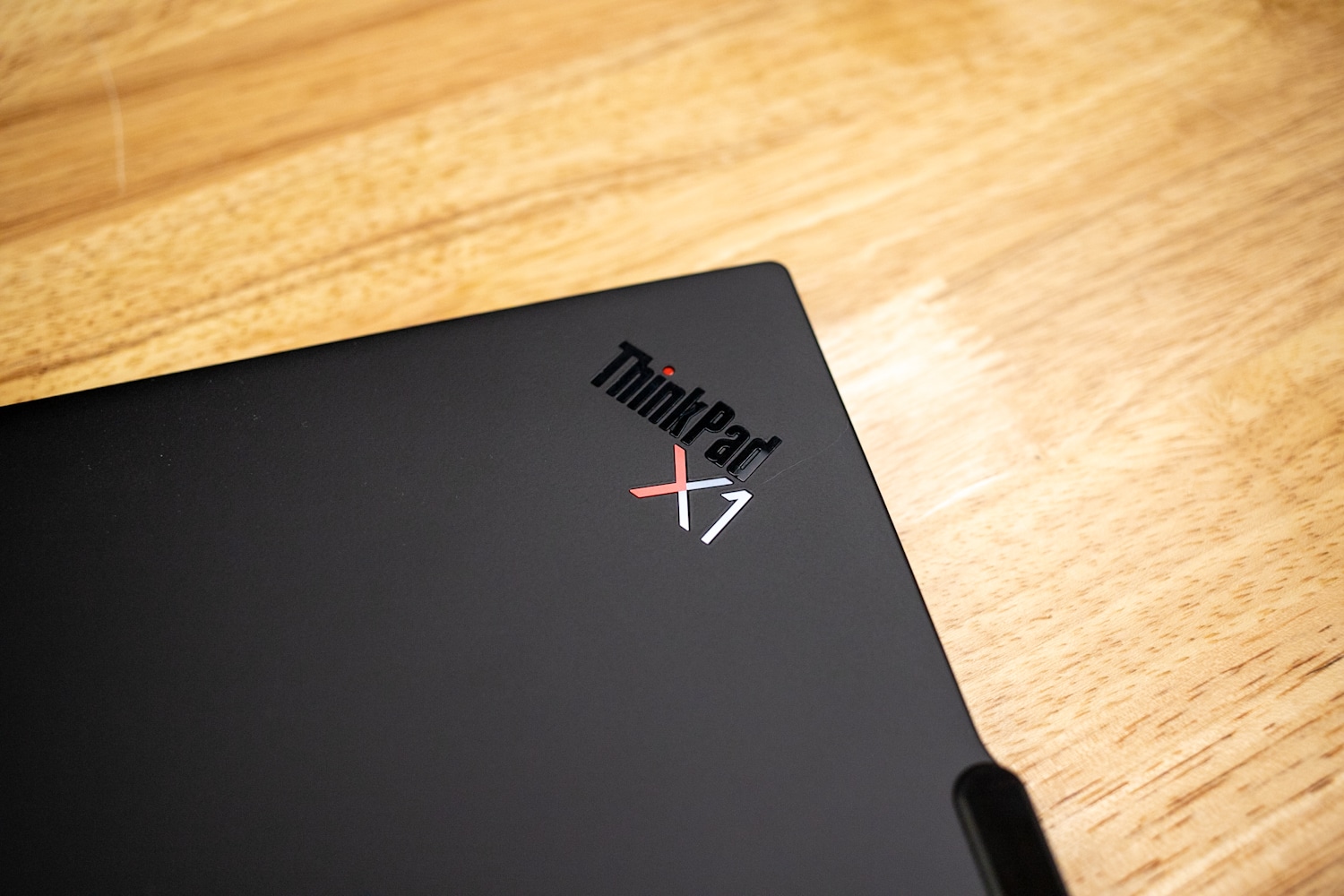
![Lenovo ThinkPad X1 Carbon Gen 12 Lid]()

This ThinkPad is 0.59ʺ x 12.31ʺ x 8.45ʺ and starts at 2.42 pounds. The semi-comparable [Dell Latitude 9450 2-in-1](https://www.storagereview.com/review/dell-latitude-9450-2-in-1-review) is 0.64 x 12.2 x 8.47 inches and much heavier at 3.38 pounds, but it is a convertible after all. (The ThinkPad X1 Carbon also has a convertible version, which we’ll be reviewing soon.) This is an overall very portable laptop and feels light. Our unit is all black, but Lenovo offers a carbon fiber weave lid on select models. The metal and carbon fiber build quality make it very strong, with almost no flex.

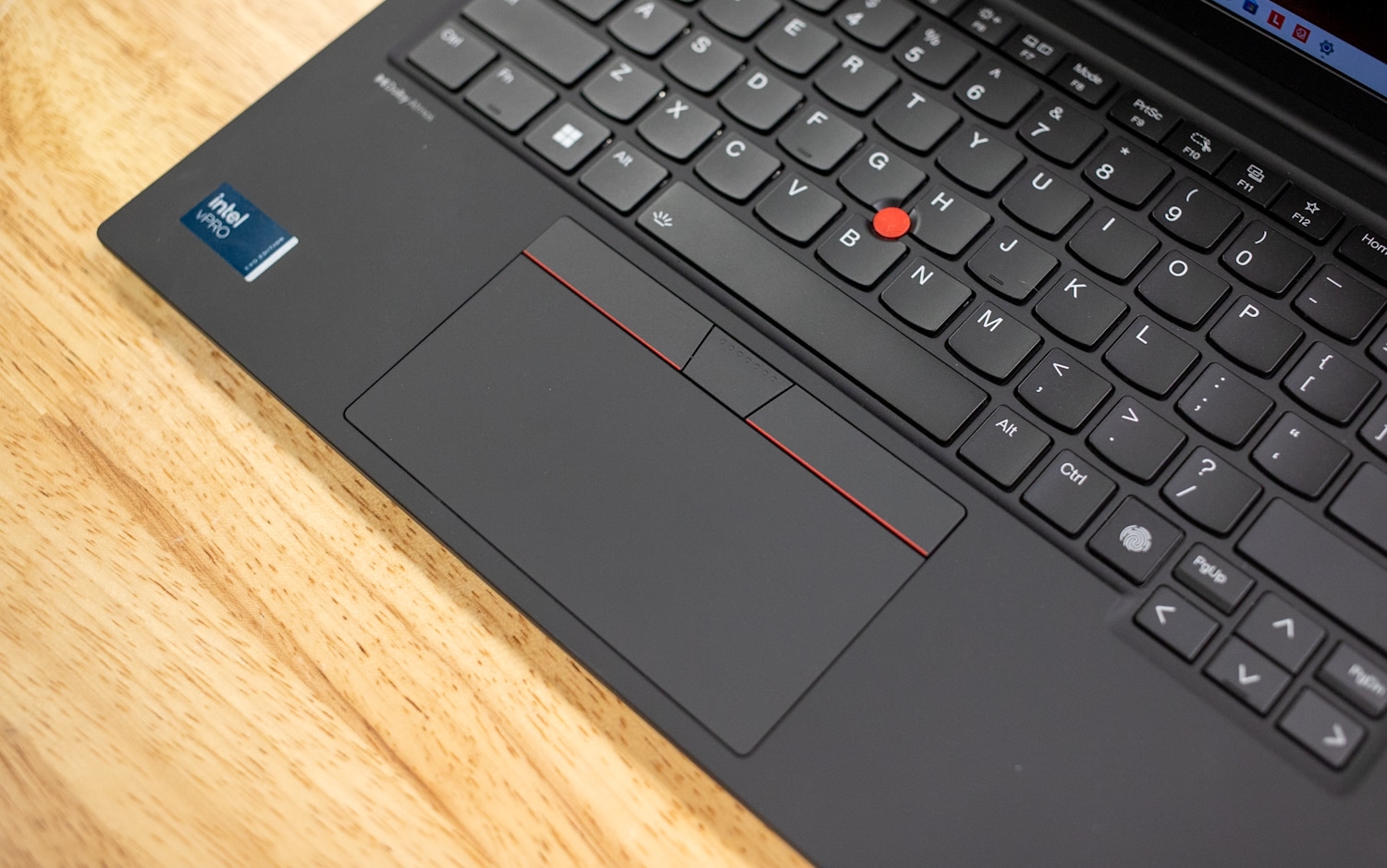
ThinkPad keyboards are second to none and the ThinkPad X1 Carbon is probably the best example in the ThinkPad line, with pleasant tactile feedback and two-level white backlighting that contrasts nicely with the black keycaps. Lenovo also does an excellent job with the keyboard layout, properly separating out the arrow-key cluster and putting dedicated Home, End, Insert, and Delete keys at the top right. Diehard ThinkPad users will lament that the Cntl and Fn keys at lower left are now “normal” i.e., not switched, but this can be changed virtually in the Lenovo Vantage app. This laptop doesn’t have a Copilot key. Below, the glass trackpad has a sure, communicative feel and provides plenty of space for sweeping gestures.

![Lenovo ThinkPad X1 Carbon Gen 12 Keyboard]()

A small feature Lenovo added this generation is that a double-tap to the trackpoint brings up a TrackPoint Quick Menu where you can change camera, microphone, and battery settings, though I didn’t find this useful in the sense that I was using it every day. There doesn’t appear to be a way to configure the double-tap to do something else, though Lenovo Vantage still lets you assign a user action to the F12 key as expected.

![Lenovo ThinkPad X1 Carbon Gen 12 Touchpad]()

Lenovo deserves credit for considering the environment with the ThinkPad X1 Carbon Gen 12, with ample use of recycled or post-consumer content and plastic-free packaging:

- 3% post-industrial recycled carbon fiber on top cover (A side)
- 90% recycled magnesium on keyboard frame (C side)
- 55% recycled aluminum & 45% hydro-aluminum on bottom cover (D side)
- 90% post-consumer content (PCC) recycled plastic used in speaker enclosure
- 90% PCC recycled plastic used in the battery enclosure
- 90% PCC recycled plastic used in power adaptor
- 30% PCC recycled plastic in cable holders
- 85% PCC recycled plastic in keycaps
- Low-temperature solder on memory modules, SSD board, & fingerprint module
- Forest Stewardship Council<sup>®</sup> certified plastic-free packaging with bamboo-sugar cane packaging & standard cushions

## Lenovo ThinkPad X1 Carbon Gen 12 Connectivity

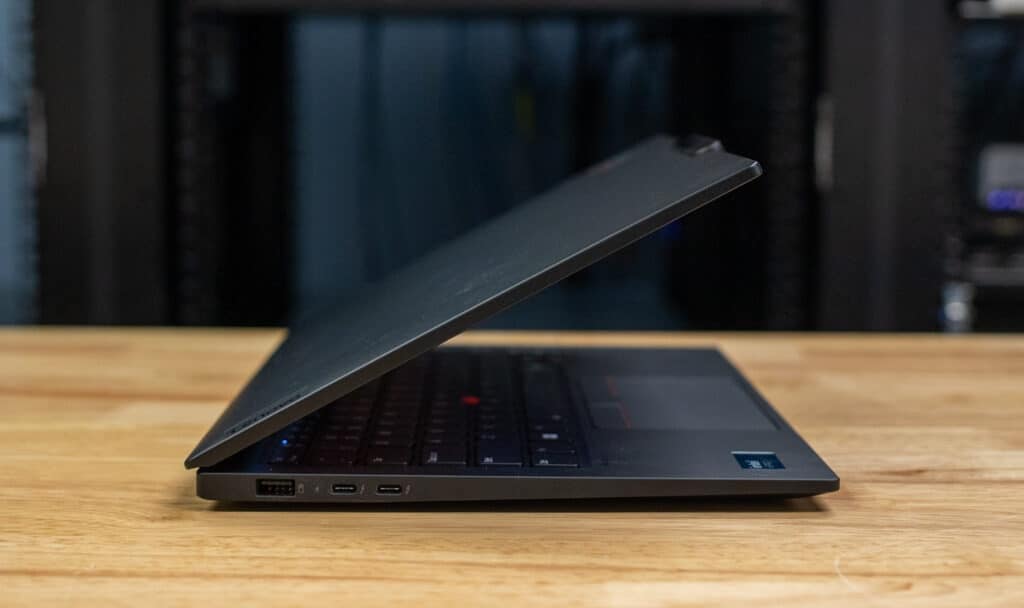
Port selection starts on the left edge with a traditional USB Type-A port and a pair of Thunderbolt 4/USB4/USB Type-C ports. The USB-A port supports device charging while the laptop is powered off, a feature that can be enabled in the Lenovo Vantage app. Either USB-C port can be used for charging. There’s also a uSIM slot here for models with cellular 4G/5G wireless. Inside, the laptop has an Intel AX211 Wi-Fi 6E and Bluetooth 5.3 card.

![]()

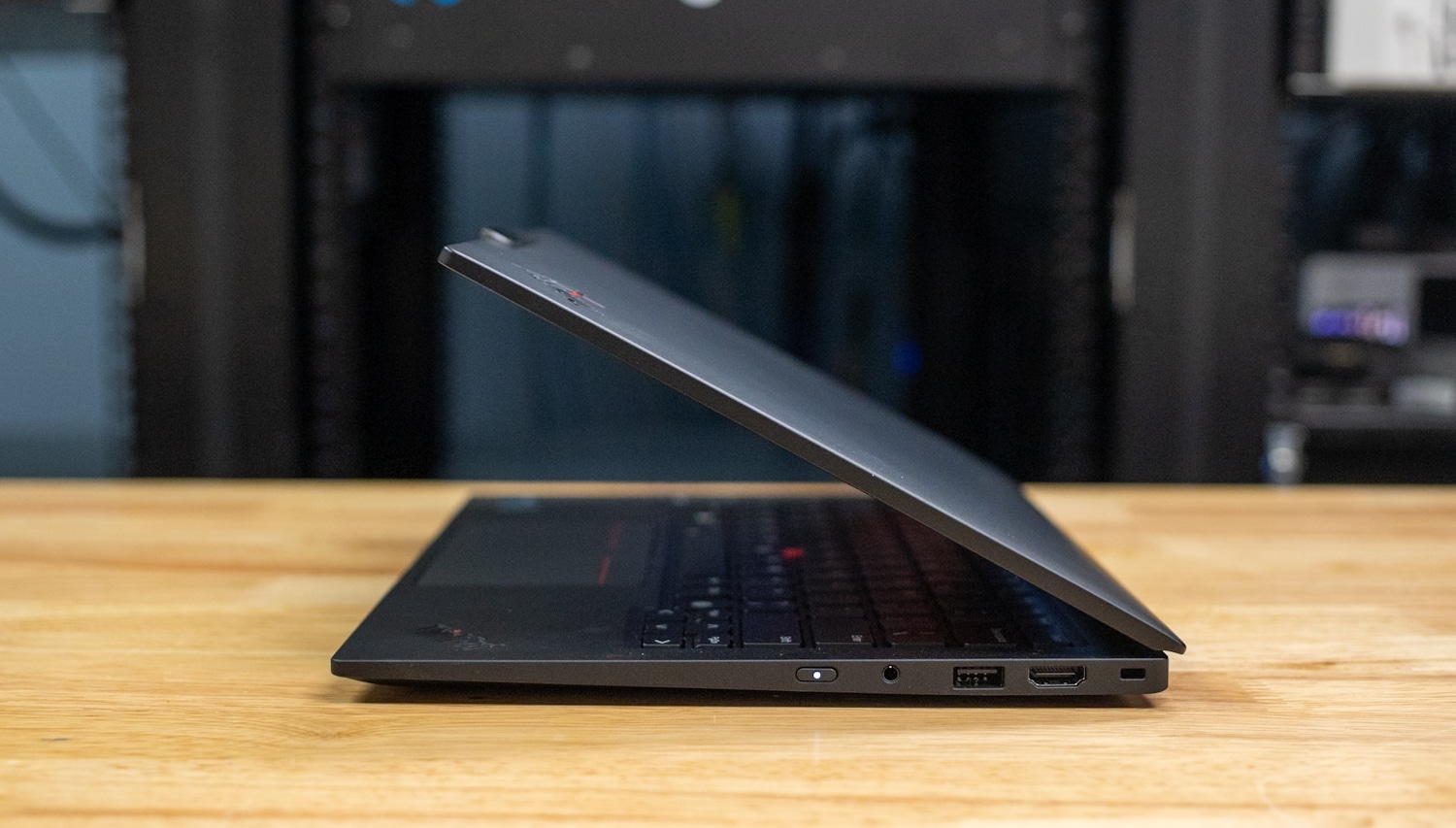
Meanwhile, the ports on the right edge include a 3.5mm headphone/microphone jack, another USB-A port, HDMI 2.1 video output, and a Kensington-style cable lock slot. Overall, this laptop provides good connectivity for a slim 14-inch laptop. A MicroSD card slot might be all we ask for in a future model. Enterprises might balk at the lack of a physical SmartCard slot.

![Lenovo ThinkPad X1 Carbon Gen 12 Right]()

## Lenovo ThinkPad X1 Carbon Gen 12 Display

The ThinkPad X1 Carbon’s 14-inch display options are all 16:10, a solid choice for seeing lots of content. The base panel is 1920×1200 and supports touch, with a reasonable 400-nit brightness rating and 100% sRGB coverage. A privacy version that restricts viewing angles to prevent prying eyes bumps the brightness to 500 nits. The top options are 2880×1800 OLED panels with 100% DCI-P3 coverage, a more fluid 120Hz refresh rate (the base panels are 60Hz), and a 400-nit brightness rating that is plenty high for OLED. Touch support is optional, which is good to see as many OLED laptops aren’t touch-enabled.

![Lenovo ThinkPad X1 Carbon Gen 12 Front]()

Notched above the display, the ThinkPad X1 Carbon has a 1080p webcam or an optional sharper 2160p model. There’s a sliding privacy shutter, though we’d prefer a physical kill switch that disconnects the webcam from the laptop for extra security. Infrared is supported for facial recognition. A biometric fingerprint reader also lives as a keyboard key next to the arrow key cluster.

## Upgrading the Lenovo ThinkPad X1 Carbon Gen 12

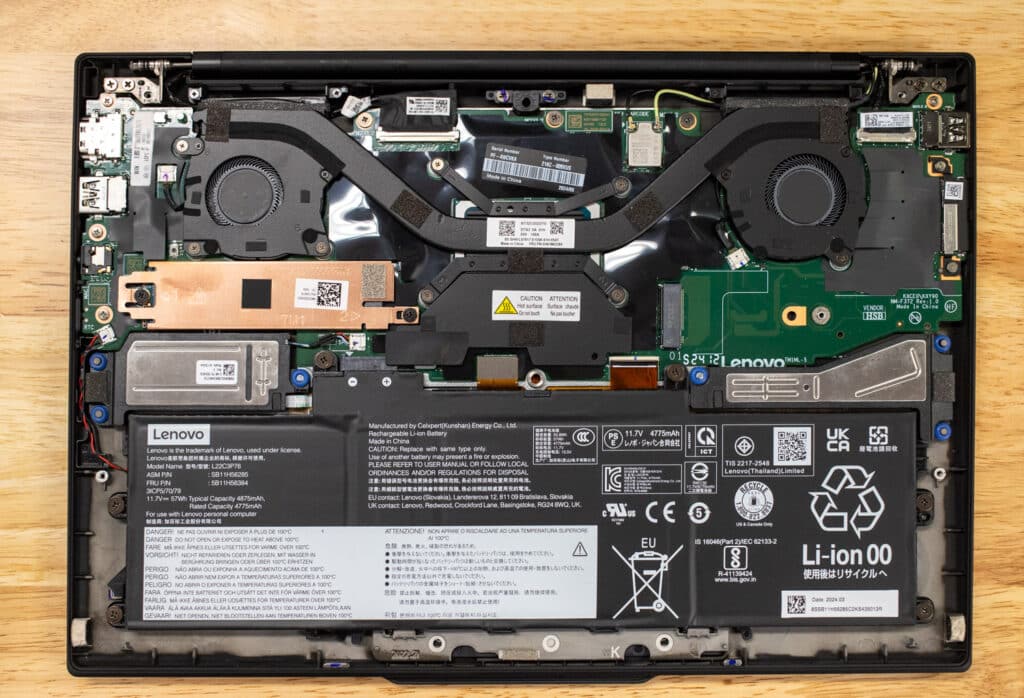
User-changeable components in the ThinkPad X1 Carbon Gen 12 include its M.2 2280 PCIe Gen4 solid-state drive and battery pack, but that’s it.

![Lenovo ThinkPad X1 Carbon Gen 12 Bottom]()

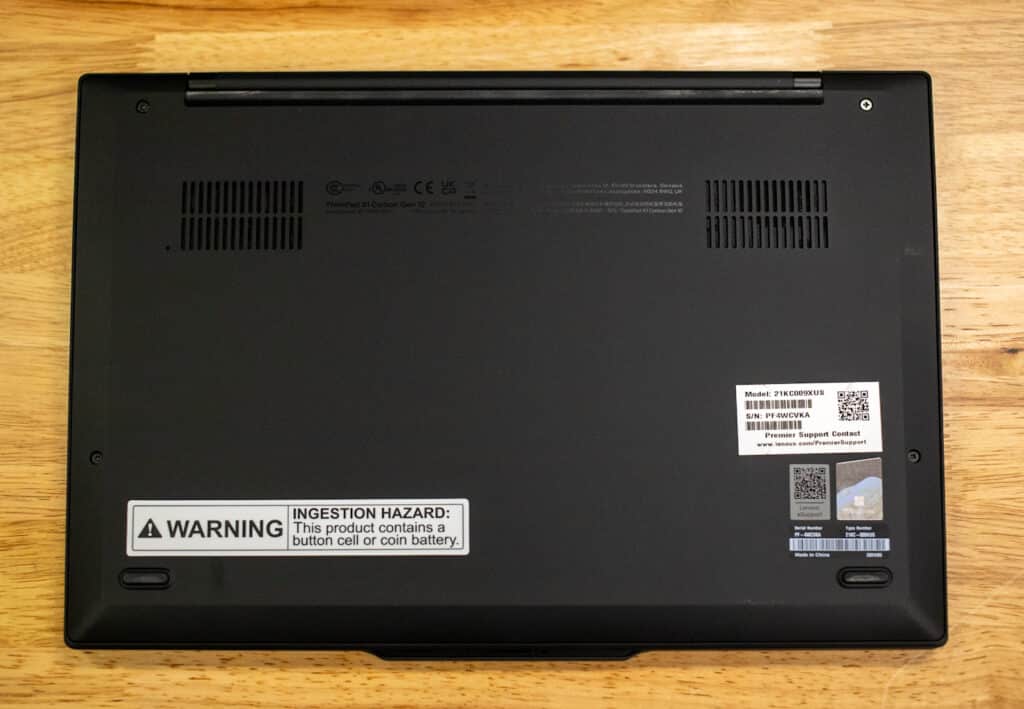
The M.2 drive is under a metal heatsink as it should be. The CPU/GPU are soldered (as is almost always the case with laptops). The RAM is also unfortunately soldered, so be sure to spec all you need from the factory. Accessing these components requires removing the bottom panel, which is secured by four Phillips-head screws. Cooling is handled with a large heat pipe directing heat out through two fans on the upper portion of the notebook (near the hinge).

![]()

## Lenovo ThinkPad X1 Carbon Gen 12 Performance

Lenovo sent our review unit with an Intel Core Ultra 7 165U processor, 32GB of RAM, Windows 11 Pro, and a 1TB SSD; it’s $1,902 as of this review with a 45% off coupon on Lenovo.com. It’s a step up from the $1,499 base model, which has a Core Ultra 5 125U, 16GB of RAM, and a 256GB SSD. Up to 64GB of RAM and a 2TB SSD are options, but all models use integrated Intel graphics. Note the RAM isn’t upgradeable, so be sure to get all you need from the get-go. Our model has the fastest CPU available. The base warranty is only one year, although longer terms and upgraded warranty options are available.

Our comparison laptop is the [Dell Latitude 9450 2-in-1](https://www.storagereview.com/review/dell-latitude-9450-2-in-1-review) with similar specifications – a Core Ultra 7 165U, 32GB of RAM, and a 512GB SSD. Our review unit was $2,983, but enterprises buying it can expect different pricing.

### Luxmark

The first 3D benchmark we will be looking at is LuxMark, an OpenCL GPU benchmarking utility. This probably isn’t an ideal test for these laptops considering they use integrated graphics, but the ThinkPad shows stronger performance than the Latitude here; perhaps it has a more effective thermal solution.

| **Luxmark (Higher is better)** | | |
| --- | --- | --- |
|  | **Lenovo ThinkPad X1 Carbon Gen 12 (Core Ultra 7 165U)** | **Dell Latitude 9450 2-in-1 (Core Ultra 7 165U)** |
| **Hallbench** | 1906 | 1,534 |
| **food** | 797 | 666 |

### 7-Zip Compression

We have also started running 7-Zip’s built-in memory benchmark on laptops. The ThinkPad also showed slightly stronger performance than the Dell here, but not to a degree where we’d call the ThinkPad a clear winner.

| **7-Zip Compression Benchmark** | | |
| --- | --- | --- |
| ** ** | **Lenovo ThinkPad X1 Carbon Gen 12 (Core Ultra 7 165U)** | **Dell Latitude 9450 2-in-1 (Core Ultra 7 165U)** |
| ***Compressing*** | | |
| **Current CPU Usage** | 616% | 649% |
| **Current Rating/Usage** | 6.700 GIPS | 6.698 GIPS |
| **Current Rating** | 41.259 GIPS | 43.476 GIPS |
| **Resulting CPU Usage** | 610% | 779% |
| **Resulting Rating/Usage** | 6.962 GIPS | 5.495 GIPS |
| **Resulting Rating** | 42.351 GIPS | 40.511 GIPS |
| ***Decompressing*** | | *** *** |
| **Current CPU Usage** | 1104% | 1125% |
| **Current Rating/Usage** | 4.498 GIPS | 4.789 GIPS |
| **Current Rating** | 49.654 GIPS | 53.858 GIPS |
| **Resulting CPU Usage** | 1120% | 1104% |
| **Resulting Rating/Usage** | 4.635 GIPS | 4.632 GIPS |
| **Resulting Rating** | 51.910 GIPS | 51.083 GIPS |
| ***Total Rating*** | | |
| **Total CPU Usage** | 865% | 941% |
| **Total Rating/Usage** | 5.799 GIPS | 5.063 GIPS |
| **Total Rating** | 47.131 GIPS | 45.797 GIPS |

### Blackmagic RAW Speed Test

Our next test is the new Blackmagic RAW Speed test. The differences between the ThinkPad and the Latitude were minimal.

| **Blackmagic RAW Speed Test** | | |
| --- | --- | --- |
| **Category** | **Lenovo ThinkPad X1 Carbon Gen 12 (Core Ultra 7 165U)** | **Dell Latitude 9450 2-in-1 (Core Ultra 7 165U)** |
| **8K CPU** | 36 | 35 |
| **8K OPENCL** | 27 | 29 |

### Blackmagic Disk Speed Test

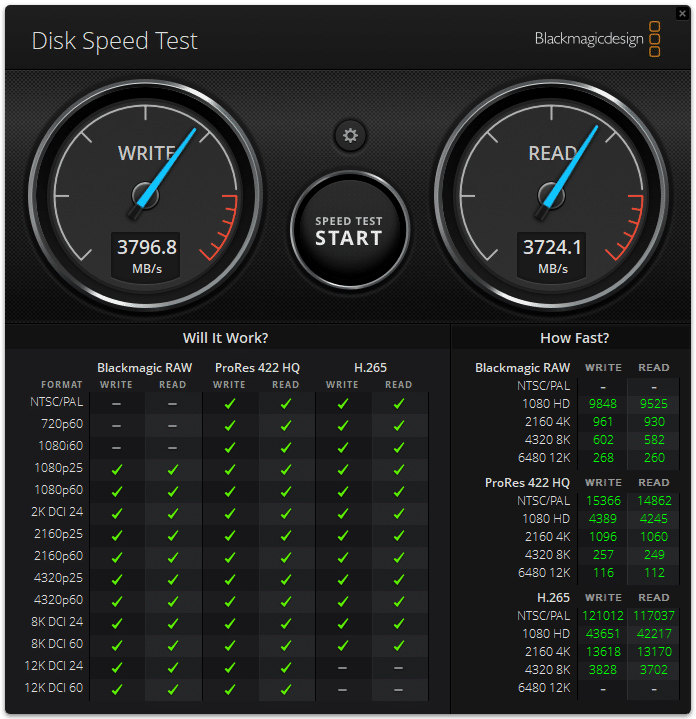
The included SSD in our ThinkPad review unit showed solid read/write performance for an OEM Gen4 drive.

![Lenovo ThinkPad X1 Carbon Gen 12 Disk Speed Test]()

### y-cruncher

y-cruncher is a multi-threaded and scalable program that can compute Pi and other mathematical constants to trillions of digits. Since its launch in 2009, it has become a popular benchmarking and stress-testing application for overclockers and hardware enthusiasts. The ThinkPad took slightly longer to complete the calculations than the Latitude.

| **y-cruncher (Total Computation Time)** | **Lenovo ThinkPad X1 Carbon Gen 12 (Core Ultra 7 165U)** | **Dell Latitude 9450 2-in-1 (Core Ultra 7 165U)** |
| --- | --- | --- |
| **1 billion digits** | 67.939 seconds | 65.027 seconds |
| **2.5 billion** | 216.438 seconds | 200.030 seconds |
| ** ** | 490.687 seconds | N/A |

### Geekbench 6

[Geekbench 6](https://www.geekbench.com/) is a cross-platform benchmark that measures overall system performance. You can find comparisons to any system you want in the  [Geekbench Browser](https://browser.geekbench.com/). The ThinkPad and the Latitude performed almost identically.

| **Geekbench 6 (Higher is better)** | **Lenovo ThinkPad X1 Carbon Gen 12 (Core Ultra 7 165U)** | **Dell Latitude 9450 2-in-1 (Core Ultra 7 165U)** |
| --- | --- | --- |
| CPU Single-Core | 2,369 | 2,362 |
| CPU Multi-Core | 9,838 | 10,008 |
| GPU | 17,318 | 17.748 |

### Cinebench R23

This benchmark uses all CPU cores and threads to generate an overall score. The scores were nearly the same, suggesting that the thermal solutions in these laptops are similarly effective for long-term loads.

| **Cinebench R23 (Higher is better)** | **Lenovo ThinkPad X1 Carbon Gen 12 (Core Ultra 7 165U)** | **Dell Latitude 9450 2-in-1 (Core Ultra 7 165U)** |
| --- | --- | --- |
| **Multi-Core** | 9,311 | 9,696 |
| **Single-Core** | 1,753 | 1,748 |

### Cinebench 2024

We also started running the latest Cinebench test. We see a repeat here of what we saw in Cinebench R23, with practically identical results.

| **Cinebench 2024 (Higher is better)** | **Lenovo ThinkPad X1 Carbon Gen 12 (Core Ultra 7 165U)** | **Dell Latitude 9450 2-in-1 (Core Ultra 7 165U)** |
| --- | --- | --- |
| **Multi-Core** | 538 | 561 |
| **Single-Core** | 101 | 99 |

### UL Procyon AI Inference

UL’s  [Procyon](https://benchmarks.ul.com/procyon) estimates a workstation’s performance for professional apps. The ThinkPad performed far better than the Latitude her for reasons unknown to us.

| **UL Procyon Average Inference Times (Lower is better)** | **Lenovo ThinkPad X1 Carbon Gen 12 (Core Ultra 7 165U)** | **Dell Latitude 9450 2-in-1 (Core Ultra 7 165U)** |
| --- | --- | --- |
| **MobileNet V3** | 1.71 | 3.71 |
| **ResNet 50** | 20.33 | 48.00 |
| **Inception V4** | 59.43 | 147.98 |
| **DeepLab V3** | 65.99 | 147.95 |
| **YOLO V3** | 159.83 | 348.92 |
| **Real-ESRGAN** | 6,575.43 | 10,423.52 |
| **Overall Score** | 69 | 32 |

## PCMark 10 Battery Life

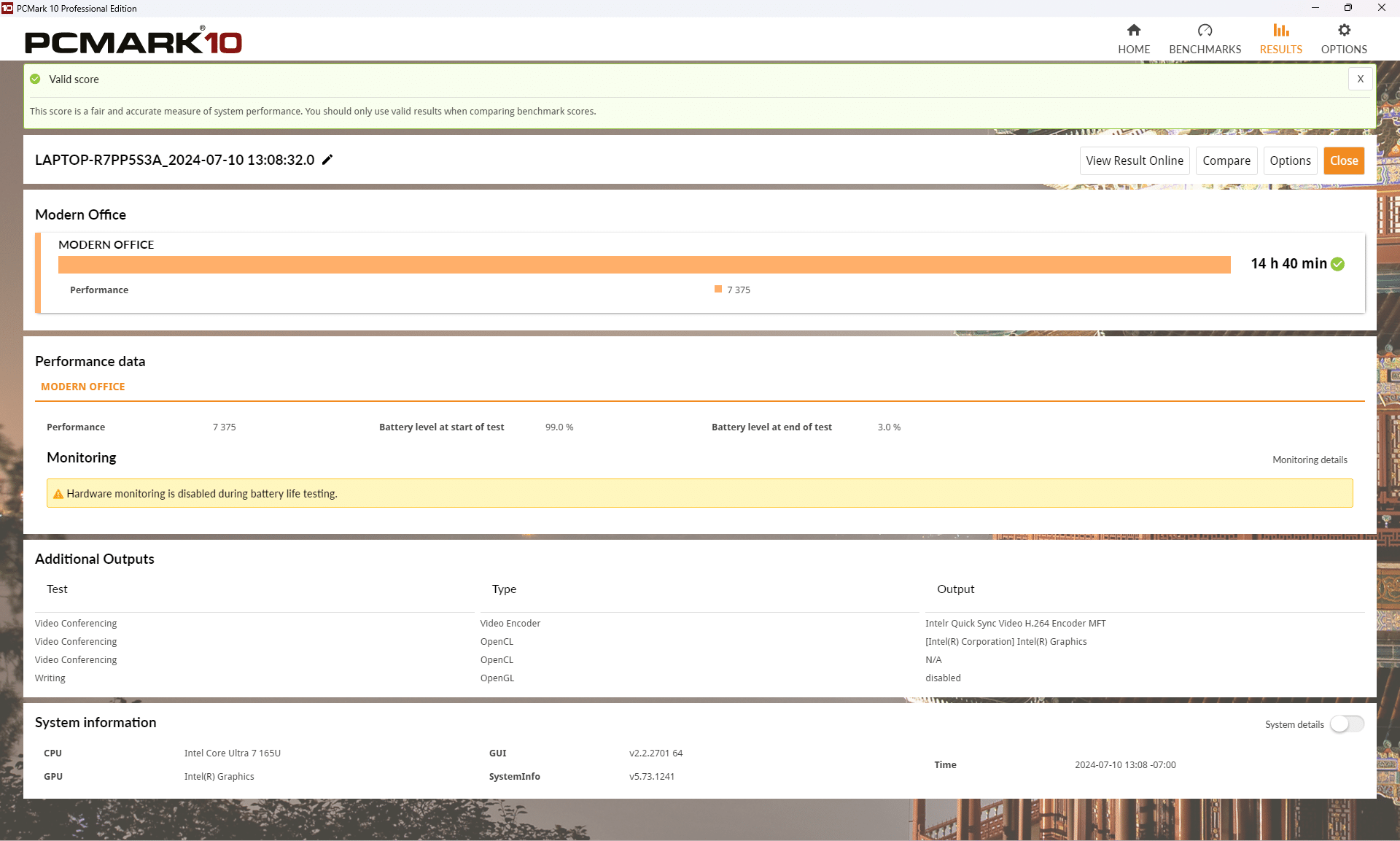
We run the PCMark 10 Battery Life benchmark in Moden Office mode. We saw 14 hours and 40 minutes from the ThinkPad, which suggests it should be usable all day without needing to plug in. Our test is run at 50% screen brightness.

![Lenovo ThinkPad X1 Carbon Gen 12 Battery Life]()

## Conclusion

Productivity-focused buyers should strongly consider the ThinkPad X1 Carbon Gen 12. This high-end laptop isn’t cheap, starting around $1,500, but it delivers an exceptionally high-quality user experience. We appreciated its lightweight design, excellent input devices, satisfactory connectivity, impressive screen options, and long battery life. Even under the load of these benchmarks, the Thinkpad stayed relatively quiet. The fans did spin up, but the noise wasn’t obscenely loud and with some ambient noise, it would fit right in. Diehard ThinkPad users will lament the Fn and Ctrl keys being switched to “normal”, but other than that, this ThinkPad does justice to the family name.

[System Configurator](<https://www.lenovo.com/us/en/p/laptops/thinkpad/thinkpadx1/thinkpad-x1-carbon-gen-12-(14-inch-intel)/len101t0083/?orgRef=https%253A%252F%252Fwww.google.com%252F>)

**Leaderboard:** The Lenovo ThinkPad X1 Carbon Gen 12 is part of the tested field on our [Best Business Laptops](https://www.storagereview.com/best/business-laptops) leaderboard.

**Engage with StorageReview**

[Newsletter](https://www.storagereview.com/storage_newsletter) |  [YouTube](https://www.youtube.com/user/StorageReview "Opens in a new window") | Podcast  [iTunes](https://podcasts.apple.com/gb/podcast/storagereview-com-storage-reviews/id1060681115 "Opens in a new window")/ [Spotify](https://open.spotify.com/show/1y6VnznABhHeOSMOmbDTz0 "Opens in a new window") |  [Instagram](https://www.instagram.com/storagereview/ "Opens in a new window") |  [Twitter](https://twitter.com/storagereview "Opens in a new window") |  [TikTok](https://www.tiktok.com/@storagereview? "Opens in a new window") |  [RSS Feed](https://www.storagereview.com/rss.xml)

![]()

### Charles P. Jefferies

I'm a lifelong technology enthusiast and have been reviewing consumer and enterprise technology since 2005. I specialize in laptops, tablets, and enterprise hardware. I'm a graduate of Rochester Institute of Technology. Outside of work, I love the gym, reading, and photography.

Previous post: [Lenovo ThinkVision 27 3D Monitor Review](https://www.storagereview.com/review/lenovo-thinkvision-27-3d-monitor-review)

Next post: [Lenovo ThinkPad X1 2-in-1 Gen 9 Review](https://www.storagereview.com/review/lenovo-thinkpad-x1-2-in-1-gen-9-review)

Trusted Vendors

Products and solutions from our affiliate partners:

- [  
  ![Ubiquiti Logo](https://www.storagereview.com/wp-content/uploads/2024/11/2-1.webp)  
   Ubiquiti](https://store.ui.com/us/en?a_aid=StorageReview "Opens in a new window")
- [  
  ![Newegg Logo](https://www.storagereview.com/wp-content/uploads/2025/11/newegg.webp)  
   Newegg](https://click.linksynergy.com/fs-bin/click?id=g5terNMDhz0&offerid=1207190.18&subid=0&type=4 "Opens in a new window")
- [  
  ![Amazon Logo](https://www.storagereview.com/wp-content/uploads/2025/11/amazon.webp) Amazon](https://amzn.to/4fLJUEW "Opens in a new window")

Newsletter

Subscribe to the StorageReview newsletter to stay up to date on the latest news and reviews. We promise no spam!

1  

Leave this field empty if you’re human:

## Advertisement

Content Categories

[Facebook](https://www.facebook.com/@storagereview) [X](https://twitter.com/storagereview) [Instagram](https://www.instagram.com/storagereview/) [LinkedIn](https://www.linkedin.com/company/storagereview-com) [YouTube](https://www.youtube.com/user/storagereview?sub_confirmation=1) [Email](mailto:info@storagereview.com) [Spotify](https://open.spotify.com/show/1y6VnznABhHeOSMOmbDTz0) [Reddit](https://www.reddit.com/r/StorageReview/) [Discord](https://discord.gg/TwMHb4azdC) [RSS](https://www.storagereview.com/rss.xml) [TikTok](https://www.tiktok.com/@storagereview)

Copyright © 1998-2025 Flying Pig Ventures, LLC Cincinnati, Ohio. All rights reserved.

Manage your privacy

To provide the best experiences, we and our partners use technologies like cookies to store and/or access device information. Consenting to these technologies will allow us and our partners to process personal data such as browsing behavior or unique IDs on this site and show (non-) personalized ads. Not consenting or withdrawing consent, may adversely affect certain features and functions.

Click below to consent to the above or make granular choices. Your choices will be applied to this site only. You can change your settings at any time, including withdrawing your consent, by using the toggles on the Cookie Policy, or by clicking on the manage consent button at the bottom of the screen.

Functional Functional Always active

The technical storage or access is strictly necessary for the legitimate purpose of enabling the use of a specific service explicitly requested by the subscriber or user, or for the sole purpose of carrying out the transmission of a communication over an electronic communications network.

Preferences Preferences

The technical storage or access is necessary for the legitimate purpose of storing preferences that are not requested by the subscriber or user.

Statistics Statistics

The technical storage or access that is used exclusively for statistical purposes. The technical storage or access that is used exclusively for anonymous statistical purposes. Without a subpoena, voluntary compliance on the part of your Internet Service Provider, or additional records from a third party, information stored or retrieved for this purpose alone cannot usually be used to identify you.

Marketing Marketing

The technical storage or access is required to create user profiles to send advertising, or to track the user on a website or across several websites for similar marketing purposes.

Statistics

Marketing

Features

Always active

Always active

- Manage options
- Manage services
- Manage {vendor\_count} vendors
- [Read more about these purposes](https://cookiedatabase.org/tcf/purposes/)

Accept Deny Manage options Save preferences Manage options

- {title}
- {title}
- {title}

Manage your privacy

To provide the best experiences, we use technologies like cookies to store and/or access device information. Consenting to these technologies will allow us to process data such as browsing behavior or unique IDs on this site. Not consenting or withdrawing consent, may adversely affect certain features and functions.

Functional Functional Always active

The technical storage or access is strictly necessary for the legitimate purpose of enabling the use of a specific service explicitly requested by the subscriber or user, or for the sole purpose of carrying out the transmission of a communication over an electronic communications network.

Preferences Preferences

The technical storage or access is necessary for the legitimate purpose of storing preferences that are not requested by the subscriber or user.

Statistics Statistics

The technical storage or access that is used exclusively for statistical purposes. The technical storage or access that is used exclusively for anonymous statistical purposes. Without a subpoena, voluntary compliance on the part of your Internet Service Provider, or additional records from a third party, information stored or retrieved for this purpose alone cannot usually be used to identify you.

Marketing Marketing

The technical storage or access is required to create user profiles to send advertising, or to track the user on a website or across several websites for similar marketing purposes.

Statistics

Marketing

Features

Always active

Always active

- Manage options
- Manage services
- Manage {vendor\_count} vendors
- [Read more about these purposes](https://cookiedatabase.org/tcf/purposes/)

Accept Deny Manage options Save preferences Manage options

- {title}
- {title}
- {title}

Manage consent Manage consent

```json
{"@context":"https:\/\/schema.org","@graph":[{"@type":"WebPage","@id":"https:\/\/www.storagereview.com\/review\/lenovo-thinkpad-x1-carbon-gen-12-review","url":"https:\/\/www.storagereview.com\/review\/lenovo-thinkpad-x1-carbon-gen-12-review","name":"Lenovo ThinkPad X1 Carbon Gen 12 Review - StorageReview.com","isPartOf":{"@id":"https:\/\/www.storagereview.com\/#website"},"primaryImageOfPage":{"@id":"https:\/\/www.storagereview.com\/review\/lenovo-thinkpad-x1-carbon-gen-12-review#primaryimage"},"image":{"@id":"https:\/\/www.storagereview.com\/review\/lenovo-thinkpad-x1-carbon-gen-12-review#primaryimage"},"thumbnailUrl":"https:\/\/www.storagereview.com\/wp-content\/uploads\/2024\/07\/StorageReview-Lenovo-Thinkpad-X1-Carbon-Gen12-3.jpg","datePublished":"2024-07-17T16:51:47+00:00","dateModified":"2026-08-14T20:49:04+00:00","breadcrumb":{"@id":"https:\/\/www.storagereview.com\/review\/lenovo-thinkpad-x1-carbon-gen-12-review#breadcrumb"},"inLanguage":"en-US","potentialAction":[{"@type":"ReadAction","target":["https:\/\/www.storagereview.com\/review\/lenovo-thinkpad-x1-carbon-gen-12-review"]}]},{"@type":"ImageObject","inLanguage":"en-US","@id":"https:\/\/www.storagereview.com\/review\/lenovo-thinkpad-x1-carbon-gen-12-review#primaryimage","url":"https:\/\/www.storagereview.com\/wp-content\/uploads\/2024\/07\/StorageReview-Lenovo-Thinkpad-X1-Carbon-Gen12-3.jpg","contentUrl":"https:\/\/www.storagereview.com\/wp-content\/uploads\/2024\/07\/StorageReview-Lenovo-Thinkpad-X1-Carbon-Gen12-3.jpg","width":1500,"height":1221,"caption":"Lenovo ThinkPad X1 Carbon Gen 12 Front"},{"@type":"BreadcrumbList","@id":"https:\/\/www.storagereview.com\/review\/lenovo-thinkpad-x1-carbon-gen-12-review#breadcrumb","itemListElement":[{"@type":"ListItem","position":1,"name":"Home","item":"https:\/\/www.storagereview.com\/"},{"@type":"ListItem","position":2,"name":"Review","item":"https:\/\/www.storagereview.com\/review"},{"@type":"ListItem","position":3,"name":"Lenovo ThinkPad X1 Carbon Gen 12 Review"}]},{"@type":"WebSite","@id":"https:\/\/www.storagereview.com\/#website","url":"https:\/\/www.storagereview.com\/","name":"StorageReview.com","description":"StorageReview.com is a leading provider of news and reviews throughout the entire IT stack - from the datacenter to the edge, and all points in between.","publisher":{"@id":"https:\/\/www.storagereview.com\/#organization"},"potentialAction":[{"@type":"SearchAction","target":{"@type":"EntryPoint","urlTemplate":"https:\/\/www.storagereview.com\/?s={search_term_string}"},"query-input":{"@type":"PropertyValueSpecification","valueRequired":true,"valueName":"search_term_string"}}],"inLanguage":"en-US"},{"@type":"Organization","@id":"https:\/\/www.storagereview.com\/#organization","name":"StorageReview.com","url":"https:\/\/www.storagereview.com\/","logo":{"@type":"ImageObject","inLanguage":"en-US","@id":"https:\/\/www.storagereview.com\/#\/schema\/logo\/image\/","url":"https:\/\/www.storagereview.com\/wp-content\/uploads\/2020\/02\/Storage-Reviews-2-2.png","contentUrl":"https:\/\/www.storagereview.com\/wp-content\/uploads\/2020\/02\/Storage-Reviews-2-2.png","width":344,"height":61,"caption":"StorageReview.com"},"image":{"@id":"https:\/\/www.storagereview.com\/#\/schema\/logo\/image\/"},"sameAs":["https:\/\/x.com\/storagereview","http:\/\/youtube.com\/user\/storagereview"]}]}
```