---
description: The Samsung Pro SD family is one of the newly launched lines of advanced SD and microSD cards that were announced in April of this year, all of which are...
title: Samsung 64GB SD PRO Memory Card (MB-SG64D)
image: https://www.storagereview.com/wp-content/uploads/2014/05/StorageReview-Samsung-64GB-SD-PRO-Memory-Card-Thumb.jpg
---

[![Storage Review]()](https://storagereview.com/)

---

[Facebook](https://www.facebook.com/@storagereview) [X (Twitter)](https://twitter.twitter.com/storagereview) [Instagram](https://www.instagram.com/storagereview/) [LinkedIn](https://www.linkedin.com/company/storagereview-com) [YouTube](https://www.youtube.com/user/storagereview?sub_confirmation=1) [Email](mailto:info@storagereview.com) [Spotify](https://open.spotify.com/show/1y6VnznABhHeOSMOmbDTz0) [Reddit](https://www.reddit.com/r/StorageReview/) [Discord](https://discord.gg/TwMHb4azdC) [RSS Feed](https://www.storagereview.com/rss.xml) [TikTok](https://www.tiktok.com/@storagereview)

[Facebook](https://www.facebook.com/@storagereview) [X (Twitter)](https://twitter.com/storagereview) [Instagram](https://www.instagram.com/storagereview/) [LinkedIn](https://www.linkedin.com/company/storagereview-com) [YouTube](https://www.youtube.com/user/storagereview?sub_confirmation=1) [Email](mailto:info@storagereview.com) [Spotify](https://open.spotify.com/show/1y6VnznABhHeOSMOmbDTz0) [Reddit](https://www.reddit.com/r/StorageReview/) [Discord](https://discord.gg/TwMHb4azdC) [RSS Feed](https://www.storagereview.com/rss.xml) [TikTok](https://www.tiktok.com/@storagereview)

[![StorageReview.com]()](https://www.storagereview.com)

≡ Menu

- [Home](https://www.storagereview.com/)
- [Storage Reviews](https://www.storagereview.com/review)
  - [End User Reviews](https://www.storagereview.com/consumer)
  - [Enterprise Reviews](https://www.storagereview.com/enterprise)
  - [Ubiquiti Reviews](https://www.storagereview.com/best/ubiquiti-reviews)
- [SR Merch](https://store.storagereview.com)
- [Leaderboards](https://www.storagereview.com/best)
  - [Best Storage Arrays](https://www.storagereview.com/best/storage-arrays)
  - [Best Enterprise SSDs](https://www.storagereview.com/best/enterprise-ssds)
  - [Best Servers](https://www.storagereview.com/best/servers)
  - [Best Enterprise GPUs](https://www.storagereview.com/best/enterprise-gpus)
  - [Best Desktops for Local AI](https://www.storagereview.com/best/desktops-local-ai)
  - [Best Laptops for Local AI](https://www.storagereview.com/best/laptops-local-ai)
  - [Best Local LLM Tools](https://www.storagereview.com/best/local-llm-tools)
  - [Agentic AI Hardware](https://www.storagereview.com/best/agentic-ai-hardware)
  - [Best SSDs & Hard Drives](https://www.storagereview.com/best_drives)
  - [Best Portable SSDs](https://www.storagereview.com/best/portable-ssds)
  - [Best Business Laptops](https://www.storagereview.com/best/business-laptops)
  - [Best Mobile Workstations](https://www.storagereview.com/best/mobile-workstations)
  - [Best Desktop Workstations](https://www.storagereview.com/best/desktop-workstations)
  - [Best Mini PCs](https://www.storagereview.com/best/mini-pcs)
  - [Best Laptop Battery Life](https://www.storagereview.com/best/laptop-battery-life)
- [Storage Reference Guide](https://www.storagereview.com/storage-reference-guide)
- [About SR](https://www.storagereview.com/about-storagereview)
  - [StorageReview.com Sweepstakes Rules and Regulations](https://www.storagereview.com/storagereview-com-sweepstakes-rules-and-regulations)

Search

[Home](https://www.storagereview.com/) » [Review](https://www.storagereview.com/review) » Samsung 64GB SD PRO Memory Card (MB-SG64D)

# Samsung 64GB SD PRO Memory Card (MB-SG64D)

by Lyle Smith on May 4, 2014

[End User](https://www.storagereview.com/consumer)  ◇  [Memory Card](https://www.storagereview.com/consumer/memory-card)

The Samsung Pro SD family is one of the [newly launched lines of advanced SD and microSD cards](https://www.storagereview.com/samsung_s_new_pro_evo_and_standard_sd_and_microsd_cards_now_available) that were announced in April of this year, all of which are designed specifically for high end digital imaging and mobile devices. The new cards, which are available in PRO, EVO and Standard categories, cater towards different use cases and performance levels for both consumers and professionals. The Pro line supports Ultra High Speed (UHS-I) Class 1 level performance and quoted to offer read speeds up to 90MB/s and writes of 50MB/s, respectively.

![]()

Our review of the previous iteration of Samsung’s Pro line posted some pretty impressive results; this time around the Pro line uses MLC NAND. The high quality NAND gives it a significant advantage in both performance and endurance as most flash devices like this are TLC and are generally made from the lowest cost NAND available. 

Samsung has designed their new cards to be water, temperature, X-ray, and magnet proof. This allows them to withstand some of the more harsh conditions that workers on the go might experience. All of models are also guaranteed to last up to 24 hours in seawater as well as enduring operating temperatures from -13°F to 185°F and non-operating temperatures from -40°F to 185°F (-25°C to 85°C and -40°C to 85°C, respectively). In addition, data on the cards will not be affected by X-rays, can resist up to 15,000 gauss magnetic force, and can withstand the weight of a 1.9 ton vehicle. These cards are built to withstand today's rigors. 

The Samsung SD Pro line comes in capacities of 16GB, 32GB, and 64GB and are priced at $24.99, $39.99 and $69.99 respectively. All cards are inclusive of a limited 10-year warranty. Our review unit is the 64GB capacity.

**Specifications:**

- Product Type: SDHC
- Family Line: PRO
- Compatible Device: Digital SLR, 3D Video
- Capacity:
  - 16GB (MB-SG16D/AM) 
  - 32GB (MB-SG32D/AM)
  - **64GB** **(MB-SG64D/AM)**
- Specification: SD 3.0
- Interface: UHS-1, compatible to HS interface
- Dimension: 5.4 x 3.5 x 0.1 inches
- Weight: 1.6 ounces
- Performance
  - Read: up to 90MB/s
  - Write: up to 50MB/s
- Speed Class: Grade 1, Class 10
- Operating Voltage: 2.7 \~ 3.6V
- Storage Temperature: -40°C to -85°C
- Operating Temperature: -25°C to -85°C
- Humidity: 40°C, 93%, 500 hours (storage)
- Durability: 10000 mating cycles
- Warranty: Limited 10 years

**Design and build**

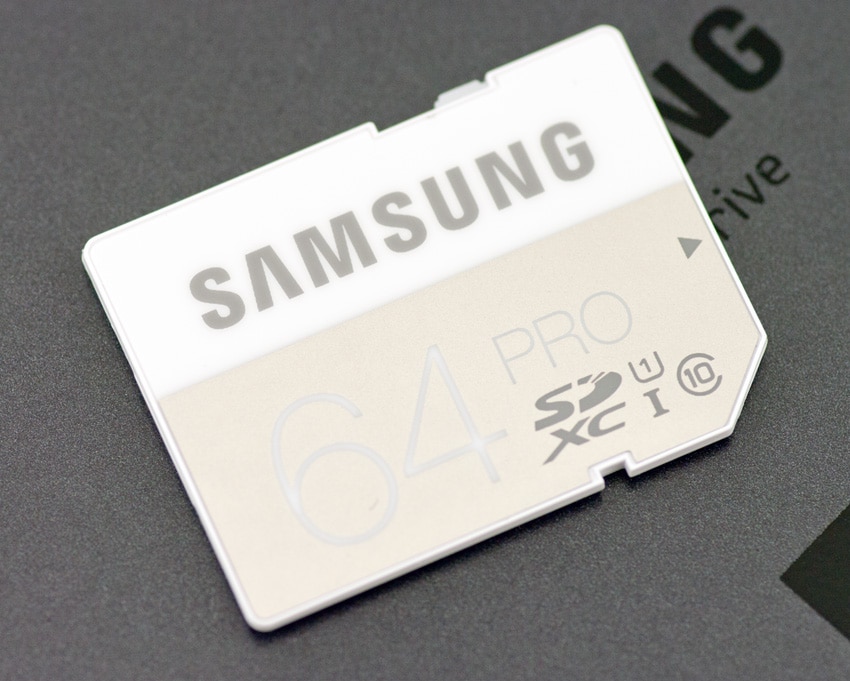
Samsung’s entire family of memory cards have newly designed exteriors and branding. The Pro line has a slick looking white casing, with distinctly printed white numbers that indicate the capacity; in our case, 64GB. The Samsung logo is nicely placed at the top. Also located on the front side is the speed class designation and SD card type. Not that they'll be seen often, but these are very nice looking cards that stand out from the typical black shell design.

![]()

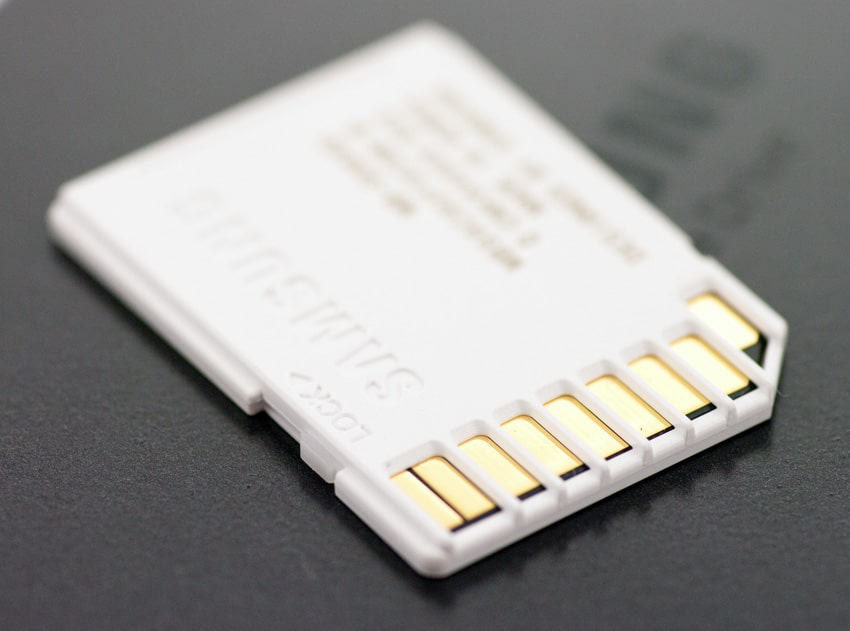
On the side, is a sliding lock mechanism for data protection, with the Lock indicator located on the front side. On the back side you will see the 9 connector pins as well as the model number. It also indicates that the cards were made in Korea and designed by Samsung.

**Performance**

In this review, we will include the following comparables with their respective advertised performance numbers:

- [Komputerbay 128GB SDXC 600X UHS-I](https://www.storagereview.com/komputerbay_128gb_sdxc_600x_uhsi_review) (90MB/s Read, 60MB/s Write)
- [Samsung SDXC Pro Series](https://www.storagereview.com/samsung_sdxc_pro_series_review) (80MB/s Read, 40MB/s Write)
- [Lexar Professional 600x SDXC UHS-I](https://www.storagereview.com/lexar_professional_600x_sdxc_uhsi_review) (90MB/s Read, 45MB/s Write)
- [Kingston SDXC 64GB SDHC/SDXC](https://www.storagereview.com/kingston_sdhc_sdxc_uhsi_u3_review) (80MB/s Write, 90MB/s Read)

Using our Consumer Testing Platform, we measured transfer speeds from the Samsung 64GB Pro SDHC, which boasted Sequential read speeds of 87.4MB/s, while write activity hit 75.8MB/s, pretty close to what Samsung quoted for read activity, though the write speed outperformed by a significant margin. Compared to its predecessor, the previous version of the Samsung Pro hit sequential read speeds at 75.2MB/s, while write activity hit 38.1MB/s. The new card shows substantial gains thanks in large part to the flash used. For the 64GB Kingston SDXC, sequential read speeds measured 89.6MB/s, while write activity hit 59MB/s. The Komputerbay 128GB SDXC card posted read/write speeds of 81.3MB/s/58.3MB/s. The Lexar Professional 600x SDXC posted very respectable numbers with 81.3MB/s read and 44.3MB/s write.

Switching to random large-block transfers, we measured 81.6MB/s read and a much lower 18.1MB/s write. The prior Samsung SDXC Pro Series posted a score of 67.5MB/s read and 7.0MB/s write. As for the other comparables, the 64GB Kingston SDXC boasted 86.8MB/s read and 11.2MB/s write while the Komputerbay SDXC 128GB card measured 79.2MB/s read with a write speed of 10.3MB/s. The Le75.8xar Professional marked in with an activity of 79.6MB/s read and 10.8MB/s write.

**Conclusion**

The new SD Samsung Pro Series line is designed for photographers and enthusiasts who use high end digital imaging and mobile devices and require superior performance from their flash cards. The Pro Series SDHC cards come in three different capacities, 16GB, 32GB, and 64GB in order cater towards different needs and use cases of consumers. As far as design goes, the Samsung Pro series really stands out from its competing SD cards with its attractive white and silver body. The device also feels pretty sturdy and rugged in our hands, despite its small size. This rugged little beast is also water, shock, magnet, X-ray and temperature proof to boot, which is a very welcomed feature for those who do a lot of work on the go.

Not only does the Samsung SDHC Pro Series line have a superior look-and-feel compared to most SD cards on the market, the new Pro 64GB quotes an impressive 90MB/s read and 50MB/s write activity, sporting a UHS Speed Class 1 and Class 10 video recording ratings. This is ideal for ensuring that users will have optimal read and writes even with HD video. As for how the Samsung SD card actually performed in our benchmark tests, it pretty much delivered on its claimed performance and then some. We measured 81.6MB/s read and 18.1MB/s write in our random large-block transfers tests, while sequential activity boasted an impressive 87.4MB/s read and 75.8MB/s write, the latter of which outperformed its quoted specs by a significant margin. This is definitely a top of its class SD card, showing big gains over the prior Pro cards.

What also impressed us is the cost of the Samsung Pro line, which goes for only $70 for the 64GB model and $25/$40 for the 16GB/32GB capacities. Comparatively speaking this is about the lowest priced card from a well-known brand name. Samsung appears to be intent to change the market with flash media cards the way they've done with SSDs by providing exceedingly good performance and market leading price point. 

**Pros**

- Solid, sleek design
- Bar setting performance in a few performance categories
- Great price

**Cons**

- None

**Bottom line**

The new Samsung Pro SD line offers class-leading performance and pricing, netting a supurb SD card. Enthusiasts need look no further than the Pro for photography, video and other portable recording/storage needs. 

[Samsung 64GB SD PRO Memory Cards at Amazon](<http://www.amazon.com/s/?_encoding=UTF8&camp=1789&creative=390957&field-keywords=Samsung%2064GB%20SD%20PRO%20Memory%20Card%20(MB-SG64D)&linkCode=ur2&tag=storagereviewcom-20&url=search-alias%3Daps&linkId=K5UKD3O5LVRVIFYL>)![]()

[Discuss This Review](http://forums.storagereview.com/index.php/topic/36626-samsung-64gb-sd-pro-memory-card-discussion/)

**Engage with StorageReview**

[Newsletter](https://www.storagereview.com/storage_newsletter) |  [YouTube](https://www.youtube.com/user/StorageReview "Opens in a new window") | Podcast  [iTunes](https://podcasts.apple.com/gb/podcast/storagereview-com-storage-reviews/id1060681115 "Opens in a new window")/ [Spotify](https://open.spotify.com/show/1y6VnznABhHeOSMOmbDTz0 "Opens in a new window") |  [Instagram](https://www.instagram.com/storagereview/ "Opens in a new window") |  [Twitter](https://twitter.com/storagereview "Opens in a new window") |  [TikTok](https://www.tiktok.com/@storagereview? "Opens in a new window") |  [RSS Feed](https://www.storagereview.com/rss.xml)

![]()

### Lyle Smith

Lyle is a writer for StorageReview, covering a broad set of end user and enterprise IT topics.

Previous post: [Seagate Enterprise Capacity 6TB 3.5 HDD Review (V.4)](https://www.storagereview.com/review/seagate-enterprise-capacity-6tb-3-5-hdd-review-v-4)

Next post: [Kingston SSDNow mS200 mSATA Review (240GB)](https://www.storagereview.com/review/kingston-ssdnow-ms200-msata-review-240gb)

Trusted Vendors

Products and solutions from our affiliate partners:

- [  
  ![Ubiquiti Logo]()  
   Ubiquiti  
  ](https://store.ui.com/us/en?a_aid=StorageReview "Opens in a new window")
- [  
  ![Newegg Logo]()  
   Newegg  
  ](https://click.linksynergy.com/fs-bin/click?id=g5terNMDhz0&offerid=1207190.18&subid=0&type=4 "Opens in a new window")
- [  
  ![Amazon Logo]() Amazon  
  ](https://amzn.to/4fLJUEW "Opens in a new window")

Newsletter

Subscribe to the StorageReview newsletter to stay up to date on the latest news and reviews. We promise no spam!

1  

Leave this field empty if you’re human:

## Advertisement

Content Categories

[Facebook](https://www.facebook.com/@storagereview) [X](https://twitter.com/storagereview) [Instagram](https://www.instagram.com/storagereview/) [LinkedIn](https://www.linkedin.com/company/storagereview-com) [YouTube](https://www.youtube.com/user/storagereview?sub_confirmation=1) [Email](mailto:info@storagereview.com) [Spotify](https://open.spotify.com/show/1y6VnznABhHeOSMOmbDTz0) [Reddit](https://www.reddit.com/r/StorageReview/) [Discord](https://discord.gg/TwMHb4azdC) [RSS](https://www.storagereview.com/rss.xml) [TikTok](https://www.tiktok.com/@storagereview)

Copyright © 1998-2025 Flying Pig Ventures, LLC Cincinnati, Ohio. All rights reserved.

Manage your privacy

To provide the best experiences, we and our partners use technologies like cookies to store and/or access device information. Consenting to these technologies will allow us and our partners to process personal data such as browsing behavior or unique IDs on this site and show (non-) personalized ads. Not consenting or withdrawing consent, may adversely affect certain features and functions.

Click below to consent to the above or make granular choices. Your choices will be applied to this site only. You can change your settings at any time, including withdrawing your consent, by using the toggles on the Cookie Policy, or by clicking on the manage consent button at the bottom of the screen.

Functional Functional Always active

The technical storage or access is strictly necessary for the legitimate purpose of enabling the use of a specific service explicitly requested by the subscriber or user, or for the sole purpose of carrying out the transmission of a communication over an electronic communications network.

Preferences Preferences

The technical storage or access is necessary for the legitimate purpose of storing preferences that are not requested by the subscriber or user.

Statistics Statistics

The technical storage or access that is used exclusively for statistical purposes. The technical storage or access that is used exclusively for anonymous statistical purposes. Without a subpoena, voluntary compliance on the part of your Internet Service Provider, or additional records from a third party, information stored or retrieved for this purpose alone cannot usually be used to identify you.

Marketing Marketing

The technical storage or access is required to create user profiles to send advertising, or to track the user on a website or across several websites for similar marketing purposes.

Statistics

Marketing

Features

Always active

Special features

Special purposes

Always active

- Manage options
- Manage services
- Manage {vendor\_count} vendors
- [Read more about these purposes](https://cookiedatabase.org/tcf/purposes/)

Accept Deny Manage options Save preferences Manage options

- {title}
- {title}
- {title}

Manage your privacy

To provide the best experiences, we use technologies like cookies to store and/or access device information. Consenting to these technologies will allow us to process data such as browsing behavior or unique IDs on this site. Not consenting or withdrawing consent, may adversely affect certain features and functions.

Functional Functional Always active

The technical storage or access is strictly necessary for the legitimate purpose of enabling the use of a specific service explicitly requested by the subscriber or user, or for the sole purpose of carrying out the transmission of a communication over an electronic communications network.

Preferences Preferences

The technical storage or access is necessary for the legitimate purpose of storing preferences that are not requested by the subscriber or user.

Statistics Statistics

The technical storage or access that is used exclusively for statistical purposes. The technical storage or access that is used exclusively for anonymous statistical purposes. Without a subpoena, voluntary compliance on the part of your Internet Service Provider, or additional records from a third party, information stored or retrieved for this purpose alone cannot usually be used to identify you.

Marketing Marketing

The technical storage or access is required to create user profiles to send advertising, or to track the user on a website or across several websites for similar marketing purposes.

Statistics

Marketing

Features

Always active

Special features

Special purposes

Always active

- Manage options
- Manage services
- Manage {vendor\_count} vendors
- [Read more about these purposes](https://cookiedatabase.org/tcf/purposes/)

Accept Deny Manage options Save preferences Manage options

- {title}
- {title}
- {title}

Manage consent Manage consent

```json
{"@context":"https:\/\/schema.org","@graph":[{"@type":"WebPage","@id":"https:\/\/www.storagereview.com\/review\/samsung-64gb-sd-pro-memory-card-mb-sg64d","url":"https:\/\/www.storagereview.com\/review\/samsung-64gb-sd-pro-memory-card-mb-sg64d","name":"Samsung 64GB SD PRO Memory Card (MB-SG64D) - StorageReview.com","isPartOf":{"@id":"https:\/\/www.storagereview.com\/#website"},"primaryImageOfPage":{"@id":"https:\/\/www.storagereview.com\/review\/samsung-64gb-sd-pro-memory-card-mb-sg64d#primaryimage"},"image":{"@id":"https:\/\/www.storagereview.com\/review\/samsung-64gb-sd-pro-memory-card-mb-sg64d#primaryimage"},"thumbnailUrl":"https:\/\/www.storagereview.com\/wp-content\/uploads\/2014\/05\/StorageReview-Samsung-64GB-SD-PRO-Memory-Card-Thumb.jpg","datePublished":"2014-05-04T21:01:02+00:00","dateModified":"2020-03-04T16:40:35+00:00","breadcrumb":{"@id":"https:\/\/www.storagereview.com\/review\/samsung-64gb-sd-pro-memory-card-mb-sg64d#breadcrumb"},"inLanguage":"en-US","potentialAction":[{"@type":"ReadAction","target":["https:\/\/www.storagereview.com\/review\/samsung-64gb-sd-pro-memory-card-mb-sg64d"]}]},{"@type":"ImageObject","inLanguage":"en-US","@id":"https:\/\/www.storagereview.com\/review\/samsung-64gb-sd-pro-memory-card-mb-sg64d#primaryimage","url":"https:\/\/www.storagereview.com\/wp-content\/uploads\/2014\/05\/StorageReview-Samsung-64GB-SD-PRO-Memory-Card-Thumb.jpg","contentUrl":"https:\/\/www.storagereview.com\/wp-content\/uploads\/2014\/05\/StorageReview-Samsung-64GB-SD-PRO-Memory-Card-Thumb.jpg","width":100,"height":80},{"@type":"BreadcrumbList","@id":"https:\/\/www.storagereview.com\/review\/samsung-64gb-sd-pro-memory-card-mb-sg64d#breadcrumb","itemListElement":[{"@type":"ListItem","position":1,"name":"Home","item":"https:\/\/www.storagereview.com\/"},{"@type":"ListItem","position":2,"name":"Review","item":"https:\/\/www.storagereview.com\/review"},{"@type":"ListItem","position":3,"name":"Samsung 64GB SD PRO Memory Card (MB-SG64D)"}]},{"@type":"WebSite","@id":"https:\/\/www.storagereview.com\/#website","url":"https:\/\/www.storagereview.com\/","name":"StorageReview.com","description":"StorageReview.com is a leading provider of news and reviews throughout the entire IT stack - from the datacenter to the edge, and all points in between.","publisher":{"@id":"https:\/\/www.storagereview.com\/#organization"},"potentialAction":[{"@type":"SearchAction","target":{"@type":"EntryPoint","urlTemplate":"https:\/\/www.storagereview.com\/?s={search_term_string}"},"query-input":{"@type":"PropertyValueSpecification","valueRequired":true,"valueName":"search_term_string"}}],"inLanguage":"en-US"},{"@type":"Organization","@id":"https:\/\/www.storagereview.com\/#organization","name":"StorageReview.com","url":"https:\/\/www.storagereview.com\/","logo":{"@type":"ImageObject","inLanguage":"en-US","@id":"https:\/\/www.storagereview.com\/#\/schema\/logo\/image\/","url":"https:\/\/www.storagereview.com\/wp-content\/uploads\/2020\/02\/Storage-Reviews-2-2.png","contentUrl":"https:\/\/www.storagereview.com\/wp-content\/uploads\/2020\/02\/Storage-Reviews-2-2.png","width":344,"height":61,"caption":"StorageReview.com"},"image":{"@id":"https:\/\/www.storagereview.com\/#\/schema\/logo\/image\/"},"sameAs":["https:\/\/x.com\/storagereview","http:\/\/youtube.com\/user\/storagereview"]}]}
```