---
description: The QNAP TS-464 is a 4-bay NAS solution offering professional-level performance and reliability features for small business.
title: QNAP TS-464 NAS Review
image: https://www.storagereview.com/wp-content/uploads/2022/10/StorageReview-QNAP-TS-464-5.jpg
---
[![Storage Review]()](https://storagereview.com/)
---
[Facebook](https://www.facebook.com/@storagereview) [X (Twitter)](https://twitter.twitter.com/storagereview) [Instagram](https://www.instagram.com/storagereview/) [LinkedIn](https://www.linkedin.com/company/storagereview-com) [YouTube](https://www.youtube.com/user/storagereview?sub_confirmation=1) [Email](mailto:info@storagereview.com) [Spotify](https://open.spotify.com/show/1y6VnznABhHeOSMOmbDTz0) [Reddit](https://www.reddit.com/r/StorageReview/) [Discord](https://discord.gg/TwMHb4azdC) [RSS Feed](https://www.storagereview.com/rss.xml) [TikTok](https://www.tiktok.com/@storagereview)
[Facebook](https://www.facebook.com/@storagereview) [X (Twitter)](https://twitter.com/storagereview) [Instagram](https://www.instagram.com/storagereview/) [LinkedIn](https://www.linkedin.com/company/storagereview-com) [YouTube](https://www.youtube.com/user/storagereview?sub_confirmation=1) [Email](mailto:info@storagereview.com) [Spotify](https://open.spotify.com/show/1y6VnznABhHeOSMOmbDTz0) [Reddit](https://www.reddit.com/r/StorageReview/) [Discord](https://discord.gg/TwMHb4azdC) [RSS Feed](https://www.storagereview.com/rss.xml) [TikTok](https://www.tiktok.com/@storagereview)
[](https://www.storagereview.com)
≡ Menu
- [Home](https://www.storagereview.com/)
- [Storage Reviews](https://www.storagereview.com/review)
- [End User Reviews](https://www.storagereview.com/consumer)
- [Enterprise Reviews](https://www.storagereview.com/enterprise)
- [Ubiquiti Reviews](https://www.storagereview.com/best/ubiquiti-reviews)
- [SR Merch](https://store.storagereview.com)
- [Leaderboards](https://www.storagereview.com/best)
- [Best Storage Arrays](https://www.storagereview.com/best/storage-arrays)
- [Best Enterprise SSDs](https://www.storagereview.com/best/enterprise-ssds)
- [Best Servers](https://www.storagereview.com/best/servers)
- [Best Enterprise GPUs](https://www.storagereview.com/best/enterprise-gpus)
- [Best Desktops for Local AI](https://www.storagereview.com/best/desktops-local-ai)
- [Best Laptops for Local AI](https://www.storagereview.com/best/laptops-local-ai)
- [Best Local LLM Tools](https://www.storagereview.com/best/local-llm-tools)
- [Agentic AI Hardware](https://www.storagereview.com/best/agentic-ai-hardware)
- [Best SSDs & Hard Drives](https://www.storagereview.com/best_drives)
- [Best Portable SSDs](https://www.storagereview.com/best/portable-ssds)
- [Best Business Laptops](https://www.storagereview.com/best/business-laptops)
- [Best Mobile Workstations](https://www.storagereview.com/best/mobile-workstations)
- [Best Desktop Workstations](https://www.storagereview.com/best/desktop-workstations)
- [Best Mini PCs](https://www.storagereview.com/best/mini-pcs)
- [Best Laptop Battery Life](https://www.storagereview.com/best/laptop-battery-life)
- [Storage Reference Guide](https://www.storagereview.com/storage-reference-guide)
- [About SR](https://www.storagereview.com/about-storagereview)
- [StorageReview.com Sweepstakes Rules and Regulations](https://www.storagereview.com/storagereview-com-sweepstakes-rules-and-regulations)
Search
[Home](https://www.storagereview.com/) » [Review](https://www.storagereview.com/review) » QNAP TS-464 NAS Review
# QNAP TS-464 NAS Review
by StorageReview Enterprise Lab on October 11, 2022
[End User](https://www.storagereview.com/consumer) ◇ [NAS](https://www.storagereview.com/consumer/nas)
The QNAP TS-464 is a 4-bay NAS solution designed for consumers and small businesses, offering professional-level performance and reliability features. Compared to the QNAP TS-453D, this new offering features the Intel Celeron N5105/N5095 quad-core processor, 16GB maximum memory, two M.2 slots, and two USB 3.2 Gen2 (10Gbps) ports.
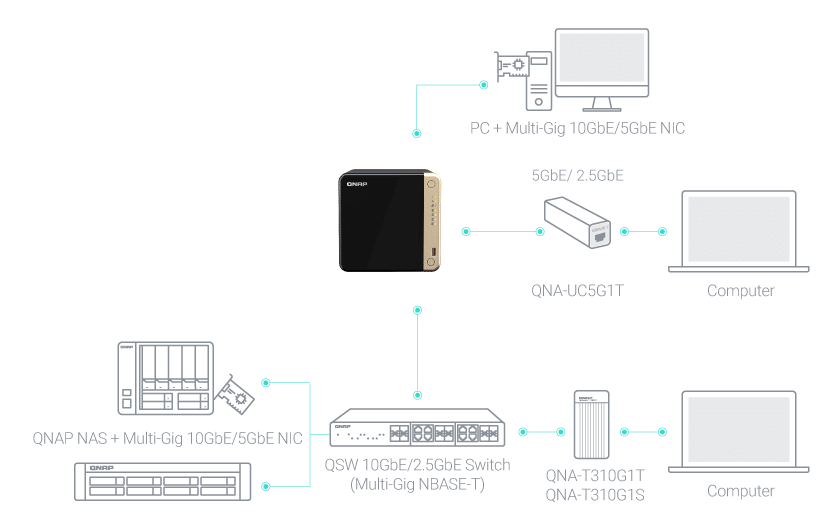
Powered by an Intel Celeron N5105/N5095, quad-core processor (burst up to 2.9GHz), the TS-464 features two 2.5GbE RJ45 ports and Port Trunking for up to 5Gbps combined bandwidth. With M.2 PCIe Gen3 and PCIe Gen 3 slots, the TS-464 provides flexibility in extending NAS functionality, allowing you to install a QM2 card for M.2 SSD caching, or Edge TPU for AI image recognition and various 10GbE/5GbE network cards.
![QNAP TS-464 front]()
The TS-464 comes with 4GB RAM (upgradable to 16GB) for running light VMs and Containers and supports multi-cloud backup, cloud storage gateways, 4K HDMI output, and real-time transcoding, alongside expandable storage capacity and feature-rich apps to perform as a cost-efficient, reliable 2.5GbE NAS.
![QNAP TS-464 back]()
Internally the QNAP TS-464 NAS provides 2 x M.2 2280 PCIe Gen 3 x1 slots for NVMe SSD caching, or SSD storage pools. Alternatively, an Edge TPU can be installed for AI image recognition. Additionally, the TS-464 has a PCIe Gen3 x2 slot which enables expansions with a 10GbE/5GbE network card, QM2 card, or a USB 3.2 Gen2 (10Gbps) card.
![]()
The QNAP TS-464 NAS includes License-free virtualization environments to host multiple containerized apps to run a wide range of applications and services.
![]()
The QNAP TS-464 is shipping now with a [street price of $549](https://amzn.to/3EvQSy4) diskless and 4GB of DRAM.
## Accelerate AI-powered image recognition with TPU
By leveraging a Google Edge TPU to QNAP AI Core (the AI-powered engine for image recognition), the TS-464 can perform high-speed face and object recognition. Google Edge TPU enables QuMagie to quickly process thousands of photos with high-speed AI Image recognition and classification, and QVR Face to analyze real-time video for instant facial recognition.
## SSD Caching and auto-tiering
The TS-464 supports SSD caching and features two M.2 slots supporting M.2 PCIe NVMe SSDs with 2280 form factors (sold separately) to boost overall NAS performance. Qtier technology can also be used to empower the TS-464 with auto tiering that helps continuously optimize storage efficiency across all installed storage devices.
| **SSD over-provisioning
(Over-provisioning)** | **SSD cache acceleration** | **Qtier for auto-tiering** |
| --- | --- | --- |
| You can add additional SSD over-provisioning (1% \~60%) to avoid write amplification and improve SSD random write speeds and endurance. You can potentially attain enterprise-grade SSD performance levels from affordable consumer SSDs! | Enables SSD caching for increasing IOPS performance and reducing latency for storage volume. This feature is perfect for IOPS-demanding applications including databases and virtualization. The TS-464 also supports a write-only cache to boost write-intensive applications. | Qtier technology drives auto-tiered storage with continuous data optimization across high-performance SSDs and high-capacity HDDs based on access frequency. I/O-Aware Qtier can reserve a cache-like space in the SSD tiered to handle burst I/O in real time. |
## Detailed Specifications – QNAP TS-464 vs QNAP TS-453D
| **Spec / Model** | **QNAP TS-464** | **QNAP TS-453D** |
| --- | --- | --- |
| CPU | Intel Celeron N5105/N5095 4-core/4-thread processor, burst up to 2.9 GHz | Intel Celeron J4125 quad-core 2.0 GHz processor (burst up to 2.7 GHz) |
| CPU Architecture | 64-bit x86 | 64-bit x86 |
| Graphic Processors | Intel UHD Graphics | Intel HD Graphics 600 |
| Floating Point Unit | Yes | Yes |
| Encryption Engine | (AES-NI) | (AES-NI) |
| Hardware-accelerated Transcoding | Yes | Yes |
| System Memory | 4GB SODIMM DDR4 (1 x 4 GB) | 8 GB SO-DIMM DDR4 (2 x 4 GB) |
| Maximum Memory | 16 GB (2 x 8GB) | 8 GB (2 x 4 GB) |
| Memory Slot | 2 x SODIMM DDR4
For dual-DIMM configuration, you must use a pair of identical DDR4 modules. | 2 x SO-DIMM DDR4 |
| Flash Memory | 4GB (Dual boot OS protection) | 4GB (Dual boot OS protection) |
| Drive Bay | 4 x 3.5-inch SATA 6Gb/s (TS-464-4G)
The system is shipped without HDD | 4 x 3.5-inch SATA 6Gb/s, 3Gb/s |
| Drive Compatibility | 3.5-inch SATA hard disk drives
2.5-inch SATA hard disk drives
2.5-inch SATA solid-state drives | 3.5-inch SATA hard disk drives
2.5-inch SATA hard disk drives
2.5-inch SATA solid-state drives |
| Hot-swappable | Yes | Yes |
| M.2 Slot | 2 x M.2 2280 PCIe Gen 3 x1 | Optional via a PCIe adapter |
| SSD Cache Acceleration Support | Yes | Yes |
| 2.5 Gigabit Ethernet Port (2.5G/1G/100M) | 2 (2.5G/1G/100M/10M) | 2 |
| 5 GbE Port (5G/2.5G/1G/100M) | Optional via PCIe expansion card | Optional via PCIe expansion card |
| 10 GbE Ethernet Port | Optional via PCIe expansion card | Optional via PCIe expansion card |
| Wake on LAN (WOL) | Yes | |
| Jumbo Frame | Yes | Yes |
| PCIe Slot | Slot 1: PCIe Gen 3 x2 | 1 Slot 1: PCIe Gen 2 x2 |
| USB 2.0 port | 2 | 3 |
| USB 3.2 Gen 1 Port | | 2 |
| USB 3.2 Gen 2 (10Gbps) Port | 2 x Type-A | Optional via PCIe adapter |
| IR Sensor | (Optional QNAP RM-IR004 remote control) | (Optional QNAP RM-IR004 remote control) |
| HDMI Output | 1, HDMI 2.0 | 1, HDMI 2.0 (up to 4096 x 2160 @ 60Hz) |
| Form Factor | Tower | Tower |
| LED Indicators | Power/Status, LAN, USB, HDD1-4 | Power/Status, LAN, USB, HDD1-4 |
| Buttons | Power, USB copy, Reset | Power, USB copy, Reset |
| Dimensions (HxWxD) | 6.61 × 6.69 × 8.9 inch | 6.61 × 6.69 × 8.9 inch |
| Weight (Net) | 4.98 lbs | 4.98 lbs |
| Weight (Gross) | 7.94 lbs | 7.94 lbs |
| Operating Temperature | 0 – 40 °C (32°F – 104°F) | 0 – 40 °C (32°F – 104°F) |
| Storage Temperature | -20 – 70°C (-4°F – 158°F) | |
| Relative Humidity | 5-95% RH non-condensing, wet bulb: 27˚C (80.6˚F) | 5-95% RH non-condensing, wet bulb: 27˚C (80.6˚F) |
| Power Supply Unit | 90W adapter, 100-240V | 90W adapter, 100-240V |
| Power Consumption: HDD Sleep Mode | 21.618 W | 11.3 W |
| Power Consumption: Operating Mode, Typical | 40.536 W
Tested with drives fully populated. | 25.98 W |
| Fan | 1 x 120mm, 12VDC | 1 x 120mm, 12VDC |
| Sound Level | | 21.1 dB(A) |
| System Warning | Buzzer | Buzzer |
| Kensington Security Slot | Yes | Yes |
| Max. Number of Concurrent Connections (CIFS) – with Max. Memory | 1500 | 800 |
## Other Key Features of the QNAP TS-464 NAS
- Comprehensive backup and disaster recovery options, including [Hyper Data Protector](https://www.qnap.com/go/solution/hyper-data-protector/) to provide VM Backups with source-side backups with recovery compression, [Hybrid Backup Sync](https://www.qnap.com/go/software/hybrid-backup-sync) for remotely backing up the TS-464 to another server, NAS, or Cloud, and [QuDedup technology](https://www.qnap.com/go/solution/hbs-qudedup/) to eliminate redundant data at the source, thereby backing up the deduplicated data which saves time and storage costs, while also providing efficient multi-version backups.
- Multi-version, block-based snapshots of volumes and LUNs, and these snapshots can be replicated to a remote NAS (Snapshot Replica), which only copies the changes made, saving time & bandwidth
- The QNAP TS-464 NAS can directly run multiple virtual machines and containers, as well as directly run Linux applications, all without requiring additional physical servers
- To support the growth of an organization, QNAP offers various options to expand the storage offered through the TS-464 NAS
## **QNAP TS-464 Performance vs the QNAP** **TS-453D**
### Review Configuration
For this review, the TS-464 was configured with four [WD Gold 22TB HDD](https://www.westerndigital.com/products/internal-drives/wd-gold-sata-hdd#WD221KRYZ)s, compared to the TS-453D which was configured with four Red 14TB HDDs.
![]()
### **Enterprise Synthetic Workload Analysis**
Our enterprise shared storage and hard drive benchmark process preconditions each drive into steady-state with the same workload the device will be tested with under a heavy load of 16 threads with an outstanding queue of 16 per thread, and then tested in set intervals in multiple thread/queue depth profiles to show performance under light and heavy usage. Since NAS solutions reach their rated performance level very quickly, we only graph out the main sections of each test.
Preconditioning and Primary Steady-State Tests:
- Throughput (Read+Write IOPS Aggregate)
- Average Latency (Read+Write Latency Averaged Together)
- Max Latency (Peak Read or Write Latency)
- Latency Standard Deviation (Read+Write Standard Deviation Averaged Together)
Our Enterprise Synthetic Workload Analysis includes four profiles based on real-world tasks. These profiles have been developed to make it easier to compare to our past benchmarks as well as widely-published values such as max 4k read and write speed and 8k 70/30, which is commonly used for enterprise drives.
- 4K
-
- 16 threads
- 100% Read or 100% Write
- 100% 4K
- 8K 70/30
-
- 70% Read, 30% Write
- 100% 8K
- 8K (Sequential)
-
- 100% Read or 100% Write
- 100% 8K
- 128K (Sequential)
- 100% Read or 100% Write
- 100% 128K
### 4k Performance Results
First up are the enterprise workloads, where we measured a long sample of random 4K performance with 100% write and 100% read activity. The TS-464 NAS configuration outperformed the TS-453D in SMB read operations, but otherwise, they were very similar. For IOPS, the NAS gave SMB scores of 2,437 IOPS read and 678 IOPS write, compared to the TS-453D configuration which had 292 read IOPS and 669 write IOPS. For iSCSI, the TS-464 achieved 2,491 IOPS read and 715 IOPS write, compared to 2,553 read IOPS and 444 write IOPS for the TS-453D.
![]()
In our 4k Average Latency tests, the TS-464 NAS showed 105.02ms read and 378.85ms write in SMB, and iSCSI reported 102.72ms read and 357.55ms write. Comparatively, the TS-453D had 874.06ms read and 382.29ms write for SMB, and 100.26ms read and 575.87ms write for iSCSI.
![]()
Next, in our 4k Max Latency tests, the TS-464 NAS reported 1129.2ms read and 4004.2ms write for SMB, and 105.69ms read with 15127ms write for iSCSI. The TS-453D reported 3181.8ms read and 4024ms write for SMB, and 6112.7ms read and 10535ms write for iSCSI.
![]()
In our last 4K test (standard deviation), we saw the QNAP TS-464 NAS with 76.69ms read and 562.122ms write for SMB, and 84.44ms read and 905.26ms write for iSCSI performance. The TS-453D NAS scored 734.97ms read and 458.11ms write for SMB, and scored 115.60ms read and 1148.64ms write for iSCSI.
![]()
### 8k Performance Results
Our next benchmark measures 100% 8K sequential throughput with a 16T16Q load in 100% read and 100% write operations. Once again, the new TS-464 NAS configuration with the Gold 22TB drives outperforms the TS-453D configuration on the SMB operations, reaching 54,894 IOPS read and 37,598 write, vs 29,180 read and 22,775 write for the TS-453D. On iSCSI it’s a bit mixed where the read operations are pretty even at 7,129 IOPS and 71,666 IOPS respectively, but the TS-464 NAS wins on writes with 57,947 IOPS vs the TS-453D with 37,598 IOPS.
![]()
Compared to the fixed 16 thread, 16 queue max workload we performed in the 100% 4K write test, our mixed workload profiles scale the performance across a wide range of thread/queue combinations. In these tests, we span workload intensity from 2 thread/2 queues up to 16 thread/16 queues. In SMB the QNAP TS-464 configuration starts out over 3x as fast as the TS-464 580 vs 178 IOPS), and ends up 7.5x faster on 16T16Q tests with 1320 IOPS vs 174 for the TS-453D. For the iSCSI tests, the TS-464 NAS starts 71% faster on the 2T2Q test, giving 523 IOPS vs 372 for the TS-453D. From there on it’s a bit of a mixed bag on the overall throughput, with differences being mostly marginal.
![]()
Looking at average latency with 8k reads/writes at 70%/30%, the TS-464 NAS is considerably faster than the TS-453D on SMB operations, never exceeding 189ms vs the TS-453D hitting 1462.55ms. In fact, the TS-464 average latency for SMB and iSCSI are virtually equal and match up with the results for the TS-453D iSCSI operational latency.
![]()
For maximum latency in our HDD configuration, in the SMB tests, the TS-464 ranged from 1035.81ms to 3155.6ms, compared to 387ms to 3448.21ms for the TS-453D. In iSCSI tests, the max latency for the TS-464 NAS ranged from 267ms to 8304ms, while the TS-453D ranged from 277.17ms to 6234.55ms max latency.
![]()
Moving on to the 8K 70/30 standard deviation results, the TS-464 configuration, once again, greatly outperformed the TS-453D configuration on SMB tests, with the TS-464 ranging from 13.4ms to 261.38ms, compared to the TS-453D which recorded a range of 35.24ms to 306.09ms in the SMB tests. In the iSCSI tests, the TS-464 configuration came out mostly ahead, recording latency numbers mostly below the TS-453D configuration, with the TS-464 ranging from 8.04ms to 357.39ms vs. the TS-453D which ranged from 19.25ms to 280.88ms.
![]()
The last synthetic benchmark is our 128K tests, which is a large-block sequential test that shows the highest sequential transfer speed for a device. In this case of SMB tests, the TS-464 with Gold 22TB drives achieved 6.8% lower throughput than the TS-453D with Red 14TB drives on reads, however, it achieved about 3.1% more throughput on writes. In the iSCSI tests, they are pretty even on read throughput, but the write throughput has the TS-464 configuration 9.3% faster than the TS-453D configuration.
![]()
## Conclusion
With our two test configurations, the TS-464 meets or beats the older model TS-453D, which shouldn’t be too surprising. While in some cases these performance differences may not seem too great, considering the additional capabilities of the TS-464, much greater performance can be achieved.
While it’s great that the CPU processor in the newer TS-464 rates [over 35% higher in CPU Passmark scoring](https://www.cpubenchmark.net/compare/Intel-Celeron-N5105-vs-Intel-Celeron-J4125/4412vs3667), it also enables some of the additional capabilities that the TS-464 has over the TS-453D model, notably support for more memory, M.2 2280 NVMe Gen 3×1, PCIe Gen 3×2, and USB 3.2 Gen 2 (10Gb).
![]()
The TS-464 NAS can be expanded to 16GB of memory, which is twice the max memory available in the older model, and when coupled with the two onboard M.2 NVMe slots, the TS-464 can be configured with SSDs storage upgrades to achieve faster performance without needing to add an upgrade card. In addition, the newer PCIe Gen 3 x2 slot enables the addition of expansion cards that can achieve twice the performance of the TS-453D model.
The result of all of these differences is that the newer QNAP TS-464 NAS can enable much larger workload growth while achieving even better performance. Combining all of this with the enterprise-class capabilities for storage protection and tiering, and at the $549 price point for the base model (without disks), the TS-464 NAS is a great value for SMBs and home users looking to add a scalable NAS to their network.
[TS-464 at Amazon](https://amzn.to/3EvQSy4)
**Engage with StorageReview**
[Newsletter](https://www.storagereview.com/storage_newsletter) | [YouTube](https://www.youtube.com/user/StorageReview "Opens in a new window") | Podcast [iTunes](https://podcasts.apple.com/gb/podcast/storagereview-com-storage-reviews/id1060681115 "Opens in a new window")/ [Spotify](https://open.spotify.com/show/1y6VnznABhHeOSMOmbDTz0 "Opens in a new window") | [Instagram](https://www.instagram.com/storagereview/ "Opens in a new window") | [Twitter](https://twitter.com/storagereview "Opens in a new window") | [TikTok](https://www.tiktok.com/@storagereview? "Opens in a new window") | [RSS Feed](https://www.storagereview.com/rss.xml)
![]()
### StorageReview Enterprise Lab
Previous post: [PNY EliteX PRO60 SDXC Review](https://www.storagereview.com/review/pny-elitex-pro60-sdxc-review)
Next post: [Solidigm P41 Plus 2TB Review](https://www.storagereview.com/review/solidigm-p41-plus-2tb-review)
Trusted Vendors
Products and solutions from our affiliate partners:
- [

Ubiquiti
](https://store.ui.com/us/en?a_aid=StorageReview "Opens in a new window")
- [

Newegg
](https://click.linksynergy.com/fs-bin/click?id=g5terNMDhz0&offerid=1207190.18&subid=0&type=4 "Opens in a new window")
- [
 Amazon
](https://amzn.to/4fLJUEW "Opens in a new window")
Newsletter
Subscribe to the StorageReview newsletter to stay up to date on the latest news and reviews. We promise no spam!
1
Leave this field empty if you’re human:
## Advertisement
Content Categories
[Facebook](https://www.facebook.com/@storagereview) [X](https://twitter.com/storagereview) [Instagram](https://www.instagram.com/storagereview/) [LinkedIn](https://www.linkedin.com/company/storagereview-com) [YouTube](https://www.youtube.com/user/storagereview?sub_confirmation=1) [Email](mailto:info@storagereview.com) [Spotify](https://open.spotify.com/show/1y6VnznABhHeOSMOmbDTz0) [Reddit](https://www.reddit.com/r/StorageReview/) [Discord](https://discord.gg/TwMHb4azdC) [RSS](https://www.storagereview.com/rss.xml) [TikTok](https://www.tiktok.com/@storagereview)
Copyright © 1998-2025 Flying Pig Ventures, LLC Cincinnati, Ohio. All rights reserved.
Manage your privacy
To provide the best experiences, we and our partners use technologies like cookies to store and/or access device information. Consenting to these technologies will allow us and our partners to process personal data such as browsing behavior or unique IDs on this site and show (non-) personalized ads. Not consenting or withdrawing consent, may adversely affect certain features and functions.
Click below to consent to the above or make granular choices. Your choices will be applied to this site only. You can change your settings at any time, including withdrawing your consent, by using the toggles on the Cookie Policy, or by clicking on the manage consent button at the bottom of the screen.
Functional Functional Always active
The technical storage or access is strictly necessary for the legitimate purpose of enabling the use of a specific service explicitly requested by the subscriber or user, or for the sole purpose of carrying out the transmission of a communication over an electronic communications network.
Preferences Preferences
The technical storage or access is necessary for the legitimate purpose of storing preferences that are not requested by the subscriber or user.
Statistics Statistics
The technical storage or access that is used exclusively for statistical purposes. The technical storage or access that is used exclusively for anonymous statistical purposes. Without a subpoena, voluntary compliance on the part of your Internet Service Provider, or additional records from a third party, information stored or retrieved for this purpose alone cannot usually be used to identify you.
Marketing Marketing
The technical storage or access is required to create user profiles to send advertising, or to track the user on a website or across several websites for similar marketing purposes.
Statistics
Marketing
Features
Always active
Special features
Special purposes
Always active
- Manage options
- Manage services
- Manage {vendor\_count} vendors
- [Read more about these purposes](https://cookiedatabase.org/tcf/purposes/)
Accept Deny Manage options Save preferences Manage options
- {title}
- {title}
- {title}
Manage your privacy
To provide the best experiences, we use technologies like cookies to store and/or access device information. Consenting to these technologies will allow us to process data such as browsing behavior or unique IDs on this site. Not consenting or withdrawing consent, may adversely affect certain features and functions.
Functional Functional Always active
The technical storage or access is strictly necessary for the legitimate purpose of enabling the use of a specific service explicitly requested by the subscriber or user, or for the sole purpose of carrying out the transmission of a communication over an electronic communications network.
Preferences Preferences
The technical storage or access is necessary for the legitimate purpose of storing preferences that are not requested by the subscriber or user.
Statistics Statistics
The technical storage or access that is used exclusively for statistical purposes. The technical storage or access that is used exclusively for anonymous statistical purposes. Without a subpoena, voluntary compliance on the part of your Internet Service Provider, or additional records from a third party, information stored or retrieved for this purpose alone cannot usually be used to identify you.
Marketing Marketing
The technical storage or access is required to create user profiles to send advertising, or to track the user on a website or across several websites for similar marketing purposes.
Statistics
Marketing
Features
Always active
Special features
Special purposes
Always active
- Manage options
- Manage services
- Manage {vendor\_count} vendors
- [Read more about these purposes](https://cookiedatabase.org/tcf/purposes/)
Accept Deny Manage options Save preferences Manage options
- {title}
- {title}
- {title}
Manage consent Manage consent
```json
{"@context":"https:\/\/schema.org","@graph":[{"@type":"WebPage","@id":"https:\/\/www.storagereview.com\/review\/qnap-ts-464-nas-review","url":"https:\/\/www.storagereview.com\/review\/qnap-ts-464-nas-review","name":"QNAP TS-464 NAS Review - StorageReview.com","isPartOf":{"@id":"https:\/\/www.storagereview.com\/#website"},"primaryImageOfPage":{"@id":"https:\/\/www.storagereview.com\/review\/qnap-ts-464-nas-review#primaryimage"},"image":{"@id":"https:\/\/www.storagereview.com\/review\/qnap-ts-464-nas-review#primaryimage"},"thumbnailUrl":"https:\/\/www.storagereview.com\/wp-content\/uploads\/2022\/10\/StorageReview-QNAP-TS-464-5.jpg","datePublished":"2022-10-11T19:51:27+00:00","description":"The QNAP TS-464 is a 4-bay NAS solution offering professional-level performance and reliability features for small business.","breadcrumb":{"@id":"https:\/\/www.storagereview.com\/review\/qnap-ts-464-nas-review#breadcrumb"},"inLanguage":"en-US","potentialAction":[{"@type":"ReadAction","target":["https:\/\/www.storagereview.com\/review\/qnap-ts-464-nas-review"]}]},{"@type":"ImageObject","inLanguage":"en-US","@id":"https:\/\/www.storagereview.com\/review\/qnap-ts-464-nas-review#primaryimage","url":"https:\/\/www.storagereview.com\/wp-content\/uploads\/2022\/10\/StorageReview-QNAP-TS-464-5.jpg","contentUrl":"https:\/\/www.storagereview.com\/wp-content\/uploads\/2022\/10\/StorageReview-QNAP-TS-464-5.jpg","width":1500,"height":1064},{"@type":"BreadcrumbList","@id":"https:\/\/www.storagereview.com\/review\/qnap-ts-464-nas-review#breadcrumb","itemListElement":[{"@type":"ListItem","position":1,"name":"Home","item":"https:\/\/www.storagereview.com\/"},{"@type":"ListItem","position":2,"name":"Review","item":"https:\/\/www.storagereview.com\/review"},{"@type":"ListItem","position":3,"name":"QNAP TS-464 NAS Review"}]},{"@type":"WebSite","@id":"https:\/\/www.storagereview.com\/#website","url":"https:\/\/www.storagereview.com\/","name":"StorageReview.com","description":"StorageReview.com is a leading provider of news and reviews throughout the entire IT stack - from the datacenter to the edge, and all points in between.","publisher":{"@id":"https:\/\/www.storagereview.com\/#organization"},"potentialAction":[{"@type":"SearchAction","target":{"@type":"EntryPoint","urlTemplate":"https:\/\/www.storagereview.com\/?s={search_term_string}"},"query-input":{"@type":"PropertyValueSpecification","valueRequired":true,"valueName":"search_term_string"}}],"inLanguage":"en-US"},{"@type":"Organization","@id":"https:\/\/www.storagereview.com\/#organization","name":"StorageReview.com","url":"https:\/\/www.storagereview.com\/","logo":{"@type":"ImageObject","inLanguage":"en-US","@id":"https:\/\/www.storagereview.com\/#\/schema\/logo\/image\/","url":"https:\/\/www.storagereview.com\/wp-content\/uploads\/2020\/02\/Storage-Reviews-2-2.png","contentUrl":"https:\/\/www.storagereview.com\/wp-content\/uploads\/2020\/02\/Storage-Reviews-2-2.png","width":344,"height":61,"caption":"StorageReview.com"},"image":{"@id":"https:\/\/www.storagereview.com\/#\/schema\/logo\/image\/"},"sameAs":["https:\/\/x.com\/storagereview","http:\/\/youtube.com\/user\/storagereview"]}]}
```