---
description: HPE ProLiant DL380a Gen12 review: a 4U air-cooled AI server with dual Xeon 6, RTX PRO 6000 Server GPUs, E3.S NVMe, and iLO 7.
title: HPE ProLiant DL380a Gen12 Review: Air Cooled 4U Server for Dense Multi GPU AI
image: https://www.storagereview.com/wp-content/uploads/2025/10/StorageReview-HPE-ProLiant-DL380a-08.jpg
---


[](//storagereview.com/) 

---

[ ](https://www.facebook.com/@storagereview) [ ](https://twitter.com/storagereview) [ ](https://www.instagram.com/storagereview/) [ ](https://www.linkedin.com/company/storagereview-com) [ ](https://www.youtube.com/user/storagereview?sub%5Fconfirmation=1) [ ](mailto:info@storagereview.com) [ ](https://open.spotify.com/show/1y6VnznABhHeOSMOmbDTz0) [ ](https://www.reddit.com/r/StorageReview/) [ ](https://discord.gg/TwMHb4azdC) [ ](https://www.storagereview.com/rss.xml) [ ](https://www.tiktok.com/@storagereview) 

[![StorageReview.com](https://www.storagereview.com/wp-content/uploads/2026/07/Storage-Review-2x.png)](https://www.storagereview.com) 

≡ Menu 
* [Home](https://www.storagereview.com/)
* [Storage Reviews](https://www.storagereview.com/review)  
  * [Consumer Reviews](https://www.storagereview.com/consumer)
  * [Enterprise Reviews](https://www.storagereview.com/enterprise)
  * [Ubiquiti Reviews](https://www.storagereview.com/best/ubiquiti-reviews)
* [SR Merch](https://store.storagereview.com)
* [Leaderboards](https://www.storagereview.com/best)  
  * [Best Storage Arrays](https://www.storagereview.com/best/storage-arrays)
  * [Best Enterprise SSDs](https://www.storagereview.com/best/enterprise-ssds)
  * [Best Servers](https://www.storagereview.com/best/servers)
  * [Best Desktops for Local AI](https://www.storagereview.com/best/desktops-local-ai)
  * [Best Laptops for Local AI](https://www.storagereview.com/best/laptops-local-ai)
  * [Best Local LLM Tools](https://www.storagereview.com/best/local-llm-tools)
  * [Agentic AI Hardware](https://www.storagereview.com/best/agentic-ai-hardware)
  * [Best SSDs & Hard Drives](https://www.storagereview.com/best%5Fdrives)
  * [Best Portable SSDs](https://www.storagereview.com/best/portable-ssds)
  * [Best Business Laptops](https://www.storagereview.com/best/business-laptops)
  * [Best Mobile Workstations](https://www.storagereview.com/best/mobile-workstations)
  * [Best Desktop Workstations](https://www.storagereview.com/best/desktop-workstations)
  * [Best Laptop Battery Life](https://www.storagereview.com/best/laptop-battery-life)
* [Storage Reference Guide](https://www.storagereview.com/storage-reference-guide)
* [About SR](https://www.storagereview.com/about-storagereview)  
  * [StorageReview.com Sweepstakes Rules and Regulations](https://www.storagereview.com/storagereview-com-sweepstakes-rules-and-regulations)

Search 

[Home](https://www.storagereview.com/) » [Review](https://www.storagereview.com/review) » HPE ProLiant DL380a Gen12 Review: Air Cooled 4U Server for Dense Multi GPU AI

# HPE ProLiant DL380a Gen12 Review: Air Cooled 4U Server for Dense Multi GPU AI

by Kevin OBrien on November 6, 2025 

[Enterprise](https://www.storagereview.com/enterprise) ◇ [Server](https://www.storagereview.com/enterprise/server) 

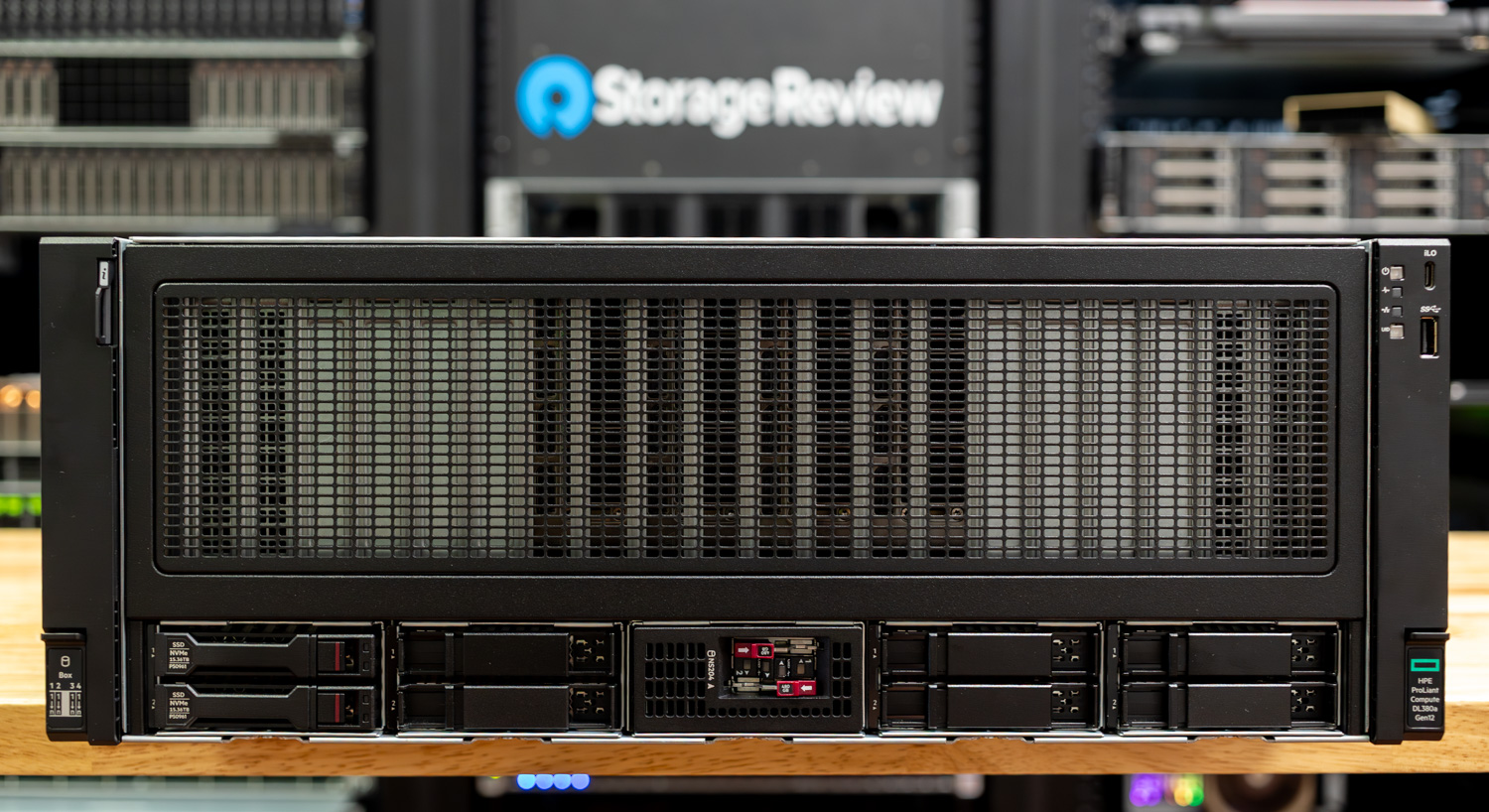
The HPE ProLiant Compute DL380a Gen12 targets mainstream enterprise AI teams that want density without altering their rack configurations. This 4U, air-cooled chassis drops in cleanly, supports up to eight double-wide GPUs, and offers PCIe Gen5 throughout. It can be configured with dual Intel Xeon 6 CPUs, each with up to 144 cores, 4TB of DDR5 across 32 DIMMs, and sixteen E3.S NVMe bays for high throughput and capacity. The goal is straightforward: to achieve production-grade inference and focused fine-tuning at scale without venturing into liquid-cooled territory.

![HPE ProLiant 380a Gen12](https://www.storagereview.com/wp-content/uploads/2025/10/StorageReview-HPE-ProLiant-DL380a-14.jpg) 

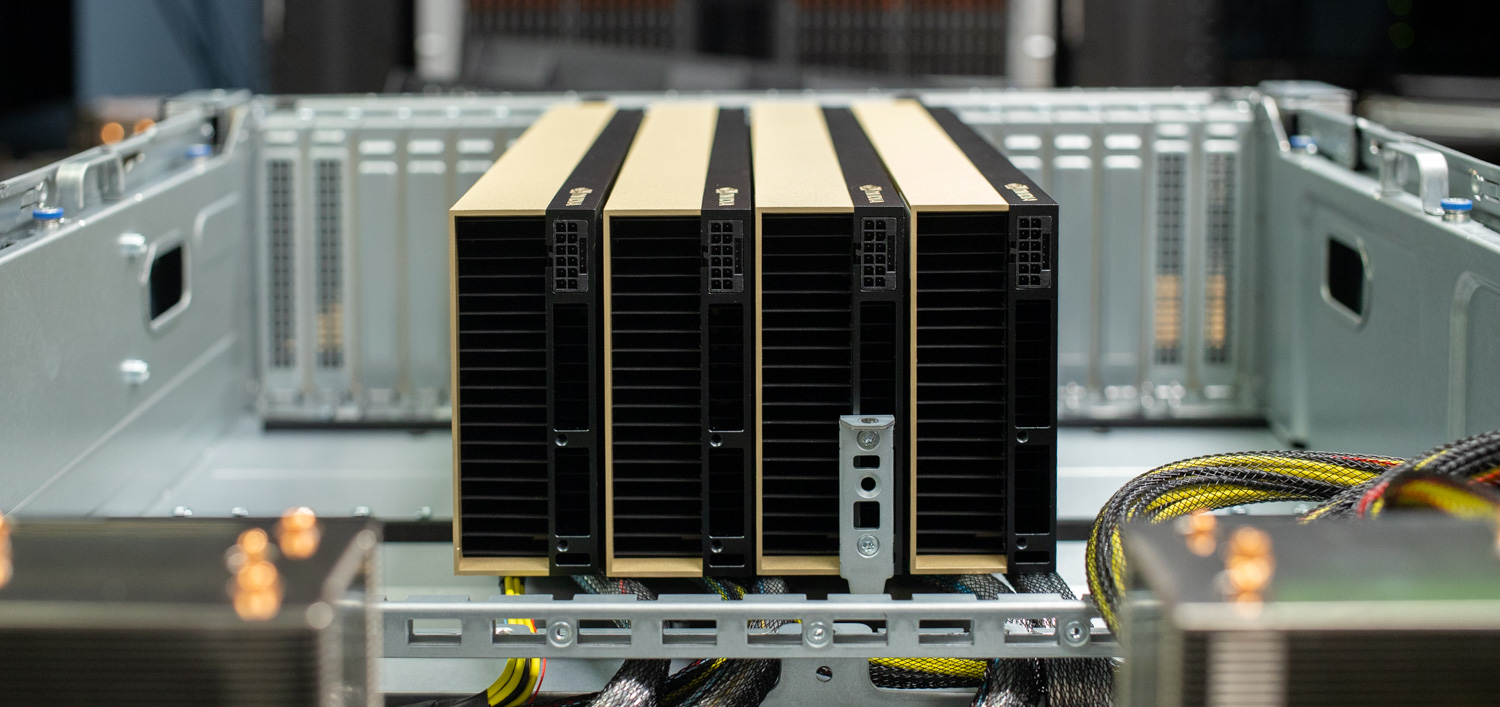
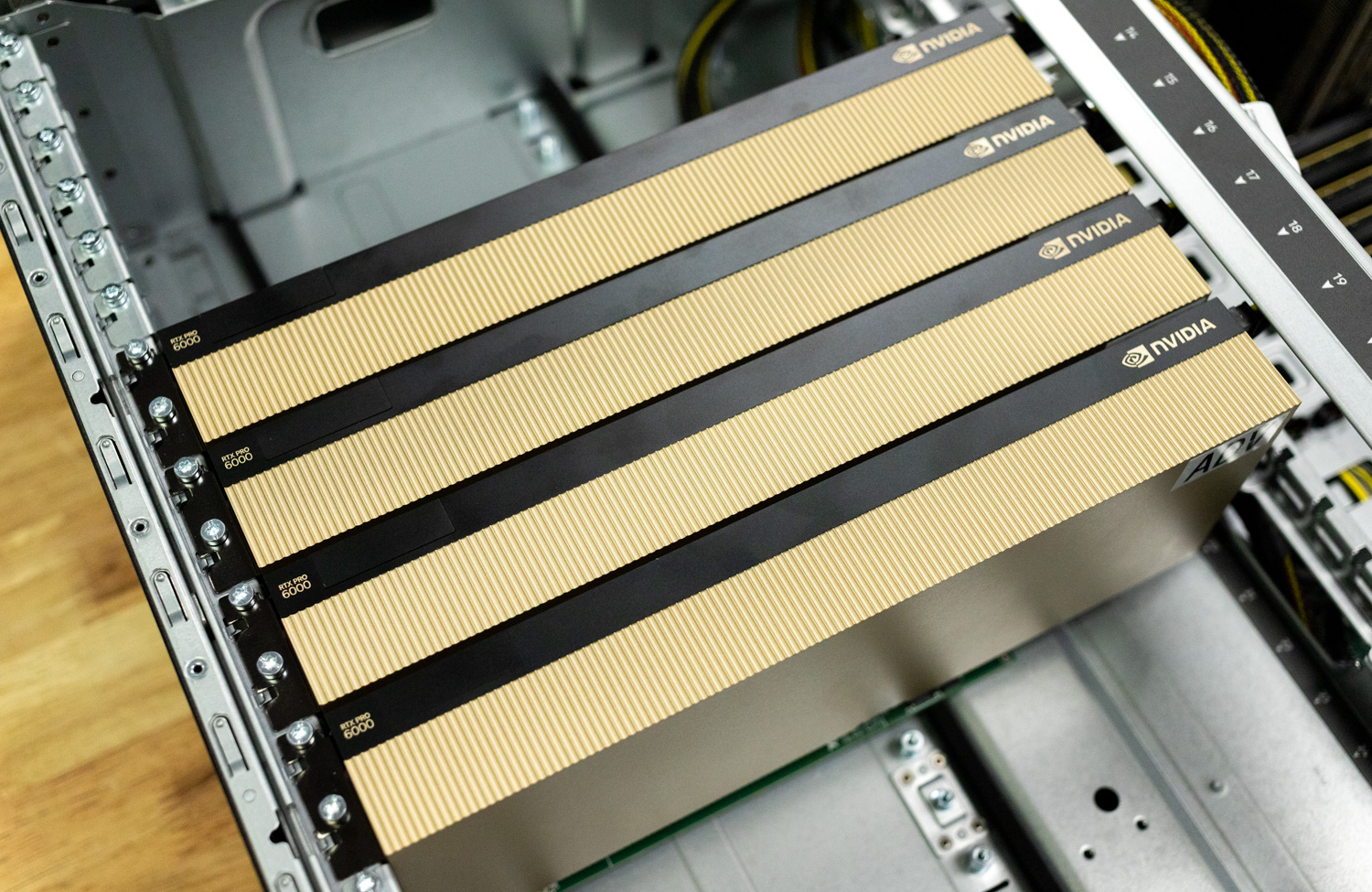
For accelerators, HPE validates a broad stack that spans NVIDIA H200 NVL, H100 NVL, L40S, L20, L4, and RTX PRO 6000 Blackwell Server Edition, with PSU options that support higher-draw components. For this review, we are focusing on the RTX PRO 6000 Server, which hits a practical sweet spot for enterprise AI. Each card brings 96GB of ECC GDDR7, PCIe Gen5 x16, FP4-capable Tensor cores, and a 600W envelope that works in air-cooled racks. Our rig shipped with four cards, which is a sensible starting point for high-throughput inference and targeted fine-tuning, with headroom to scale.

![HPE ProLiant 380a Gen12 - NVIDIA RTX PRO 6000 Server GPUs]() 

HPE rounds out the platform with the operational pieces that matter. iLO 7 handles out-of-band setup, health, and power control, anchored by the Silicon Root of Trust—a secure enclave for firmware integrity—support for 4096-bit RSA, and a detachable DC-MHS iLO module that strengthens supply chain verification. The server also ties into HPE’s Private Cloud AI framework for multi-team governance and repeatable deployments at fleet scale.

## HPE ProLiant Compute DL380a Gen12 – Technical Specifications

| Category                  | Specification                                                                                                                                                                |
| ------------------------- | ---------------------------------------------------------------------------------------------------------------------------------------------------------------------------- |
| Processor type            | HPE ProLiant Compute DL380a Gen12                                                                                                                                            |
| Processor family          | 6th Generation Intel® Xeon® Scalable Processors                                                                                                                              |
| Processor cores available | 64 to 144 cores, depending on the processor                                                                                                                                  |
| Processor count           | 2                                                                                                                                                                            |
| Processor speed           | Up to 2.4 GHz, depending on the processor                                                                                                                                    |
| Maximum memory            | 4 TB RDIMM (2 TB per processor)                                                                                                                                              |
| Memory slots              | 32 DIMM slots                                                                                                                                                                |
| Memory type               | HPE DDR5 Smart Memory                                                                                                                                                        |
| Memory protection         | RAS: Advanced ECC, online spare, mirroring, combined channel (lockstep) functionality, HPE Fast Fault Tolerant Memory (ADDDC)                                                |
| Drive support             | SFF NVMe and EDSFF                                                                                                                                                           |
| Security                  | Optional locking bezel, intrusion detection, and embedded HPE TPM 2.0                                                                                                        |
| Infrastructure management | HPE iLO Standard with Intelligent Provisioning (embedded), HPE OneView Standard (requires download) •Optional: HPE iLO Advanced and HPE OneView Advanced (licenses required) |
| Power supply              | Up to 8 M-CRPS. Single 1+1 redundancy for system board. Dual 2+1 redundancy for GPUs.                                                                                        |
| Expansion slots           | 6                                                                                                                                                                            |
| System fans               | 4 dual-rotor and 8 single-rotor hot-plug fans included                                                                                                                       |
| Form factor               | 4U rack                                                                                                                                                                      |
| Warranty                  | 3/3/3: Server Warranty                                                                                                                                                       |

## HPE ProLiant DL380a Gen12 Design and Build

The HPE ProLiant Compute DL380a Gen12 is a 4U, dual-socket rack server designed for high-performance, scalable deployments. Measuring 6.88 x 17.63 x 31.60 in, it combines dense CPU and GPU compute power with efficient air cooling for reliable operation under heavy workloads.

Weighing between 82.7 lbs and 137.8 lbs, depending on configuration, the chassis supports high-capacity components, redundant power, and easy front access for serviceability. Its design emphasizes performance, expandability, and robust thermal management, making it suited for enterprise and data center environments.  
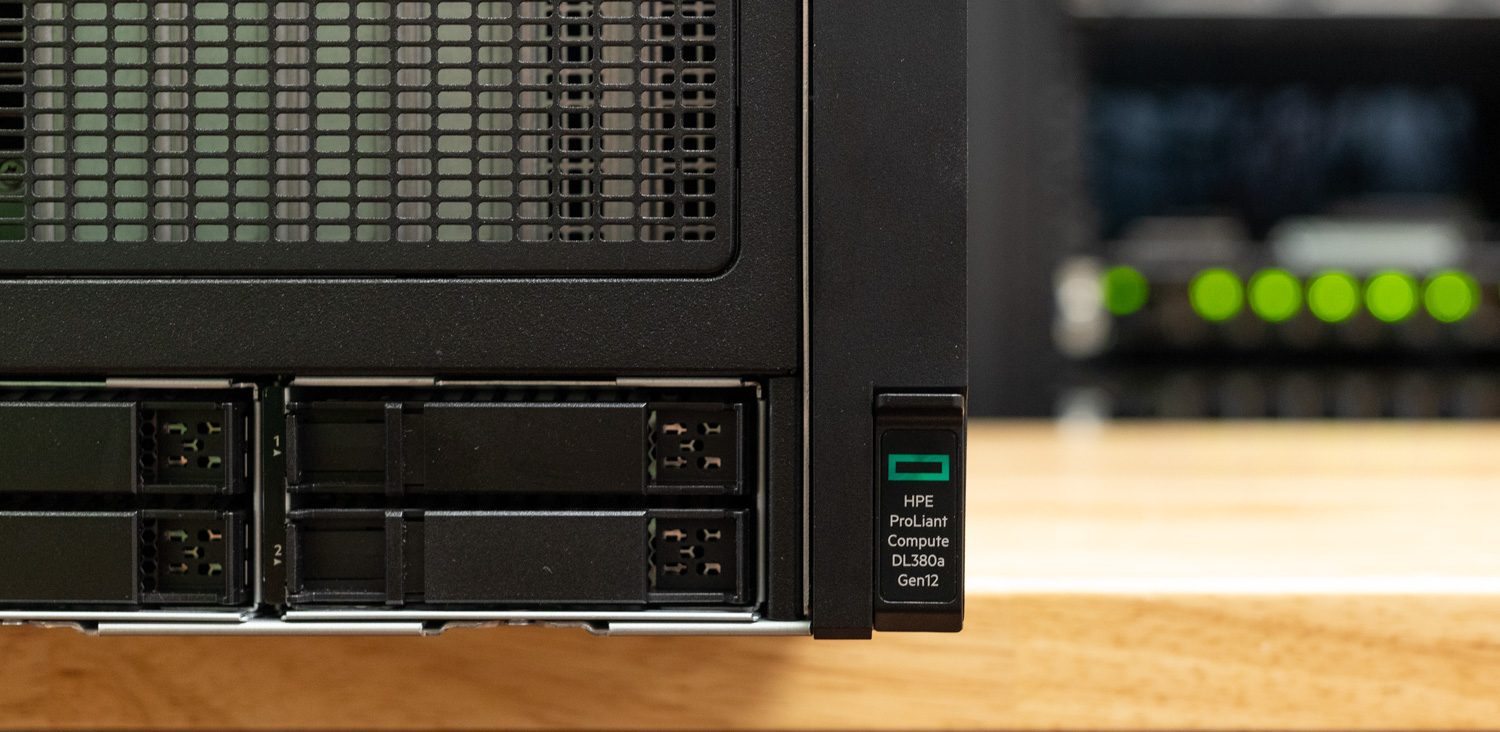
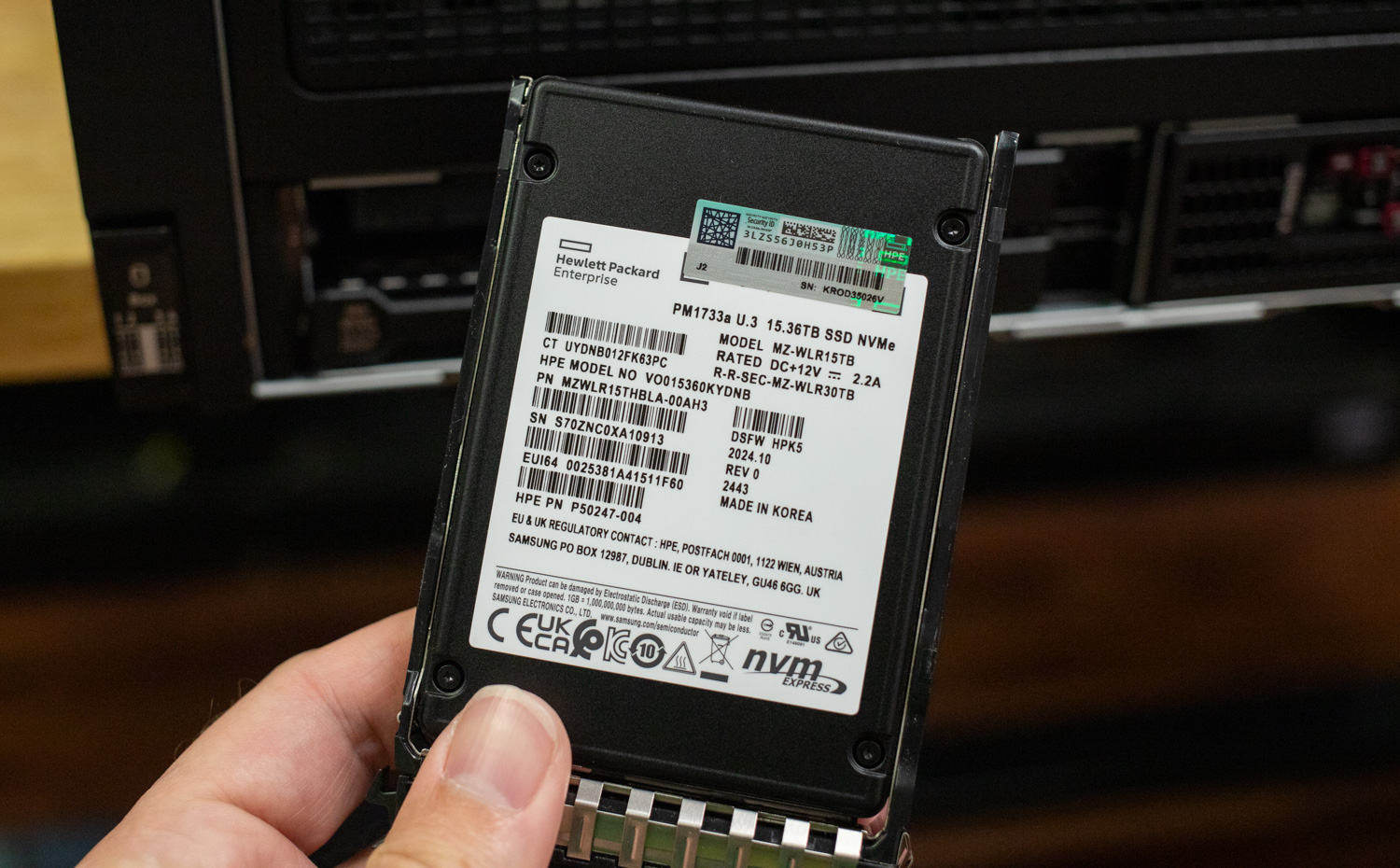
![]()Moving into storage, the HPE ProLiant DL380a Gen12 offers 4- and 8-bay configurations in either SFF or EDSFF formats. Our review unit came configured with the HPE DL380a Gen12 NS204i-u Front Cage Kit, supporting two NVMe M.2 hot-pluggable boot devices. The chassis also included eight 2.5-inch bays, populated with two HPE-branded U.3 SSDs with a capacity of 15.36 TB. HPE offers several front-bay options, enabling flexible scalability for diverse deployment needs.

![]()  
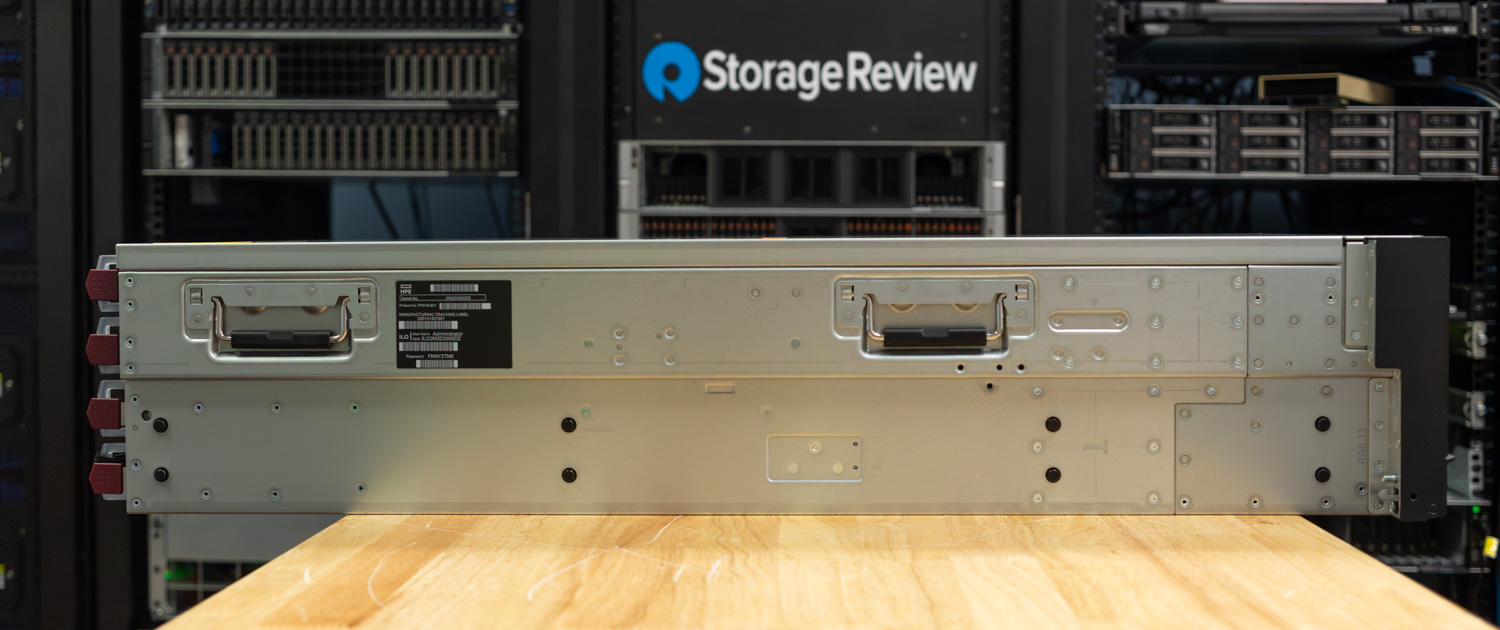
The unit can be transported using two handles on each side, meaning it requires at least two people to safely rack and install. It utilizes a 2U rail kit with telescoping rails, allowing for smooth installation and in-rack serviceability without requiring full rack removal.  
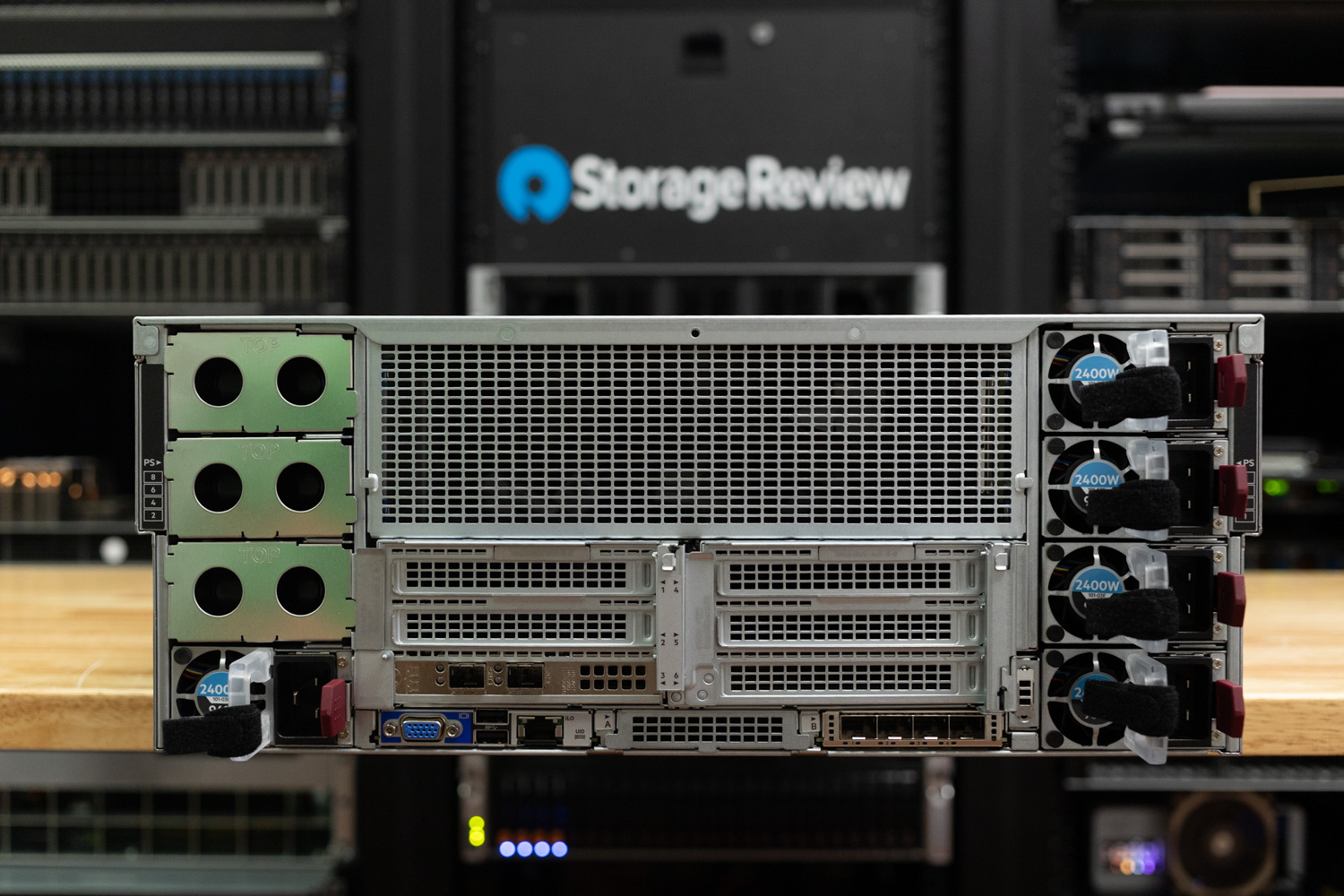
![]()On the rear of the HPE ProLiant DL380a Gen12, you’ll find a well-organized layout focused on airflow, expandability, and serviceability. The system supports up to eight MCRPS power supplies (1-8) with an integrated air ventilation wall, maintaining optimal cooling under load. Expansion is extensive, featuring multiple PCIe Gen5 x16 slots (slots 1-6) that accommodate both default and optional captive risers, as well as OCP slots A and B for flexible network adapter configurations.

Connectivity includes a dedicated iLO network port, several USB 3.2 Gen 1 ports, and a VGA port for local management. It’s worth noting that Slot 1 is available only when the HPE DL380a Gen12 4EDSFF Direct Cable for NVD (P74716-B21) is installed and cannot be used with SFF NVMe drives, while Slot 4 is not supported in configurations with 4 or 8 DW GPUs.

![HPE ProLiant 380a Gen12 rear]()  
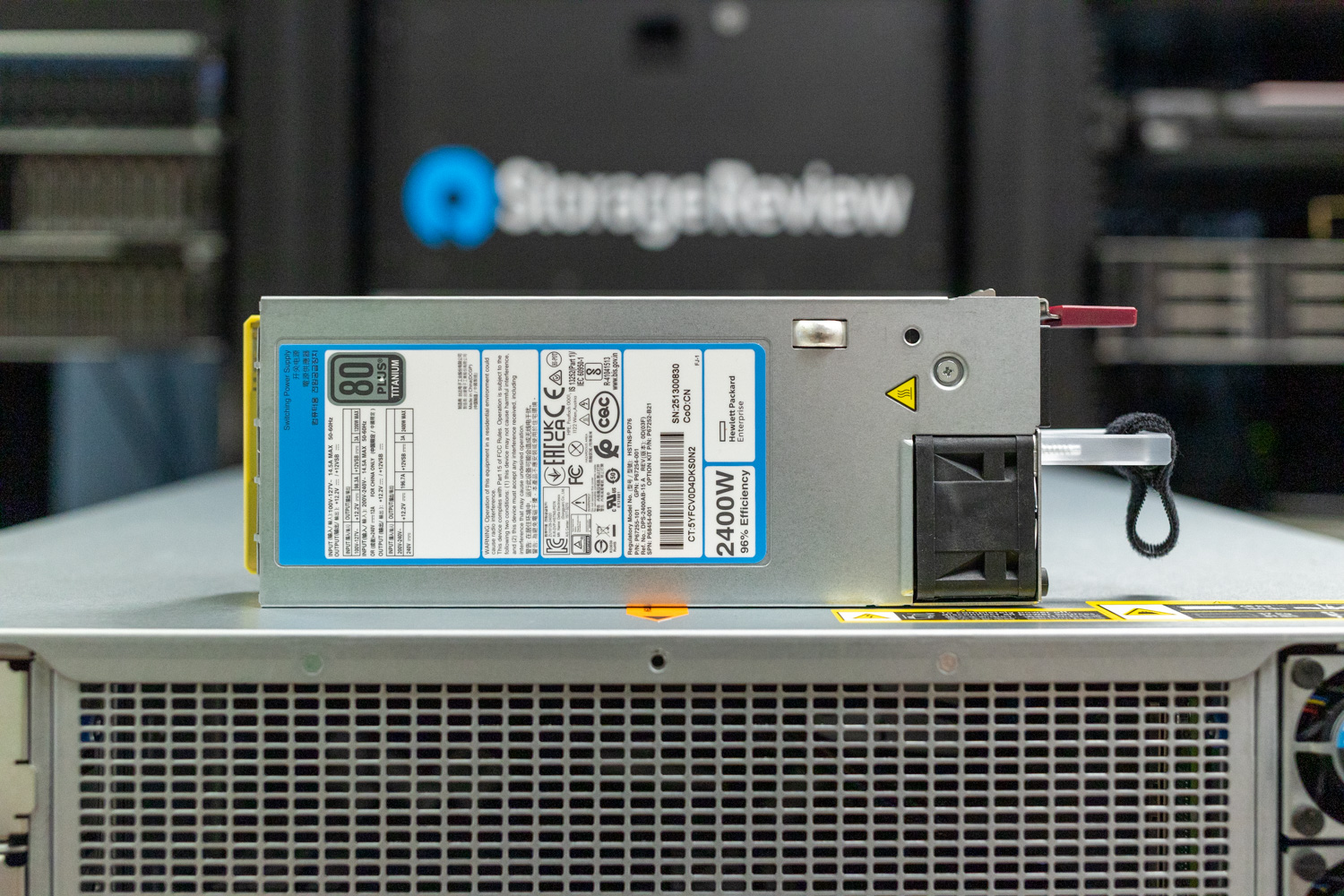
Power for the HPE ProLiant DL380a Gen12 is provided through modular M-CRPS Titanium Hot Plug Power Supply Kits, with supported options including the 1500W (P67244-B21), 2400W (P67252-B21), and 3200W (P67248-B21) models. The system supports up to eight PSUs, allowing for N+1 redundancy to ensure continuous operation even in the event of a power module failure. Depending on the GPU configuration, power requirements and distribution can vary. Our review unit came equipped with five 2400W M-CRPS power supplies, providing sufficient capacity to support the system’s four 600W TDP GPUs while maintaining reliable redundancy.  
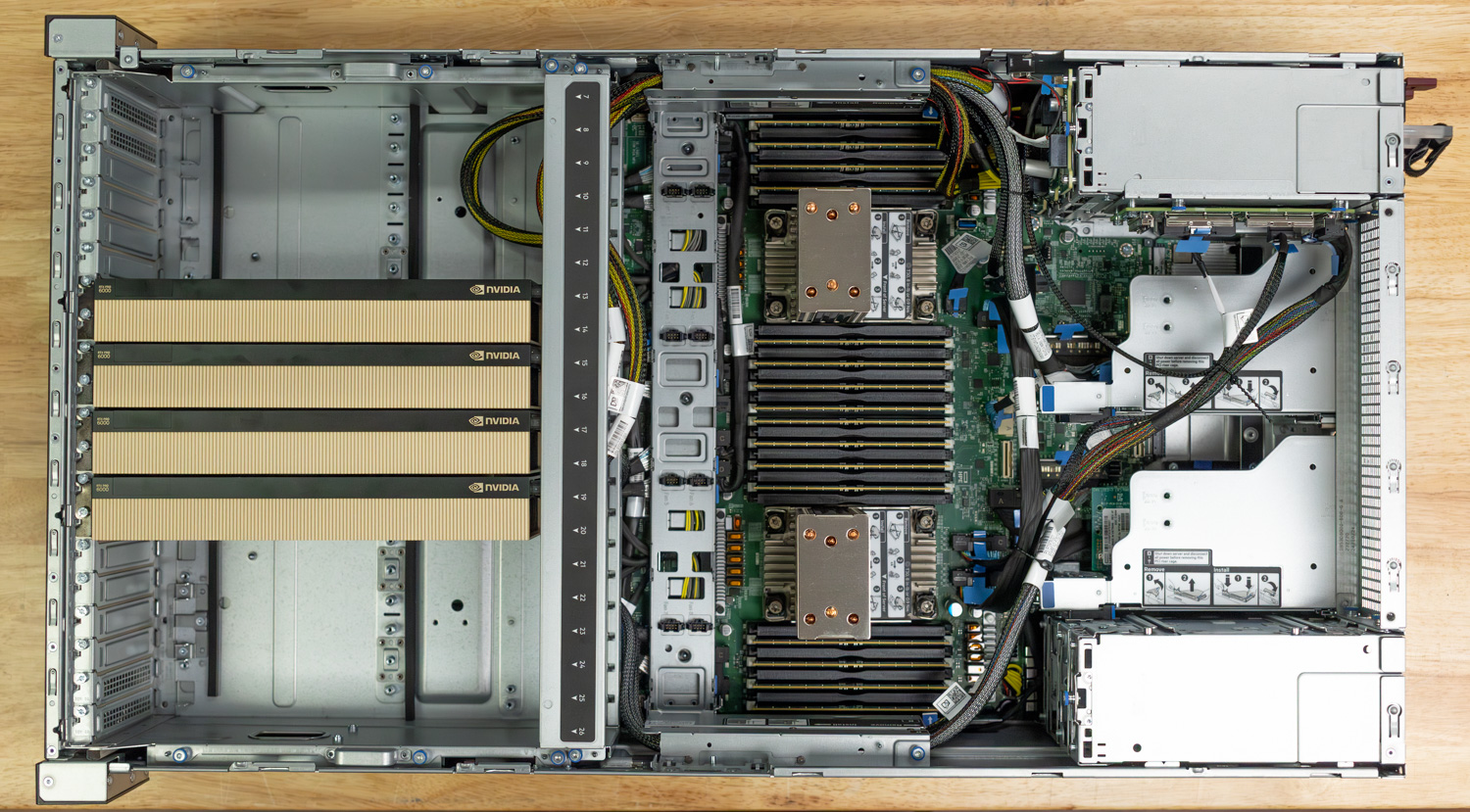
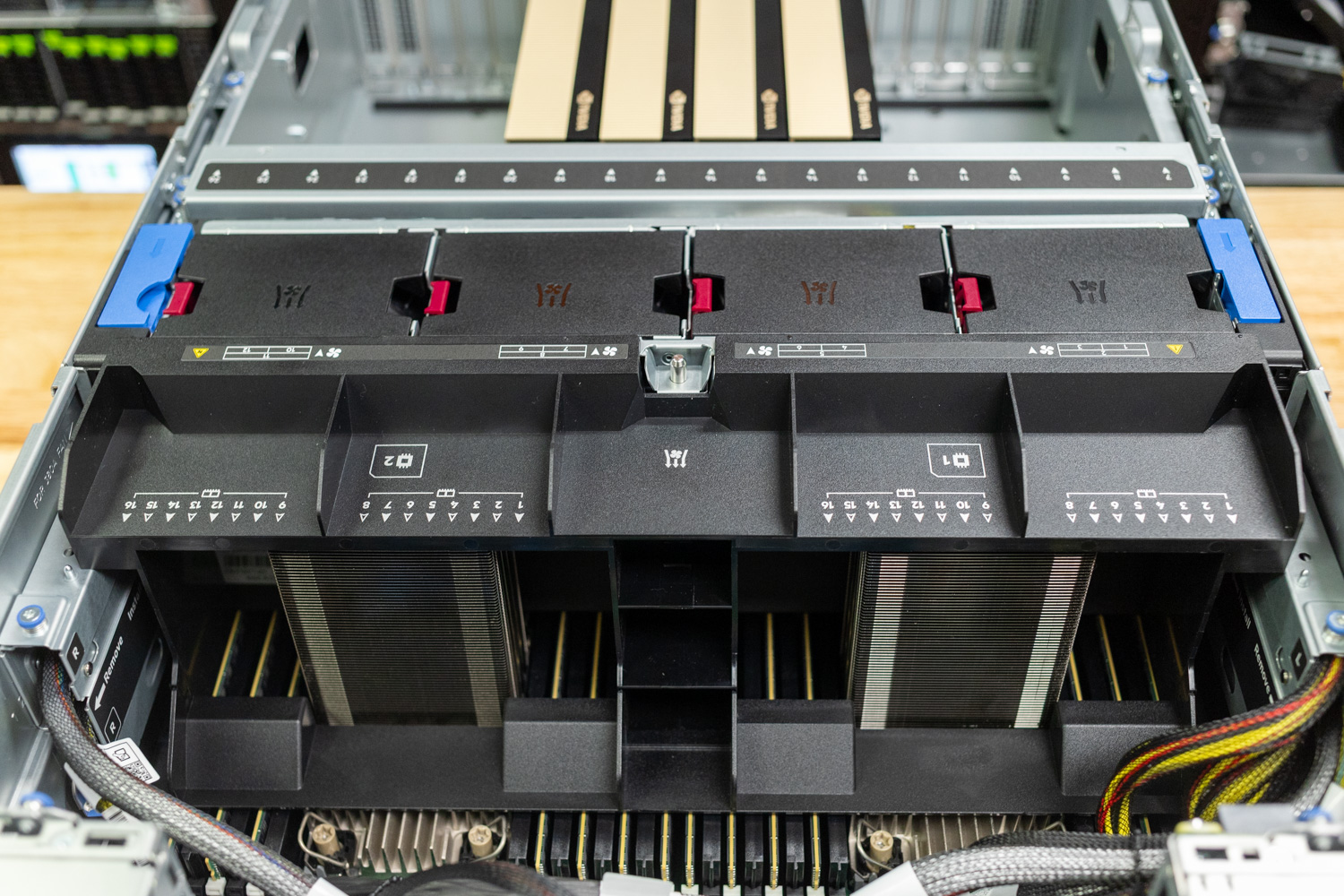
![]()Looking top-down inside the HPE ProLiant DL380a Gen12, it’s clear that HPE engineered this chassis with a GPU-first thermal strategy, positioning the GPUs at the front of the system to receive direct, unobstructed airflow. The cooling system features four hot-plug fan assemblies, each built with one dual-rotor 92x56mm fan and two single-rotor 40x28mm fans. The smaller fans focus airflow over the CPU and memory modules, ensuring efficient thermal management for lower components. In comparison, the larger dual-rotor fans are specifically designed to drive high-volume airflow directly across the GPU array. This balanced design ensures optimal cooling for both compute and accelerator components, even under sustained high-power workloads.

![]()  
Upon examining the GPU configuration, our unit was prewired for four PCIe 5.0 GPUs, each installed cleanly within the front GPU cage. The system was configured with NVIDIA RTX PRO 6000 GPUs (Blackwell Server Edition, 96GB), part of NVIDIA’s new professional lineup optimized for AI, rendering, and compute workloads. Depending on the build, the DL380a Gen12 can support 4 or 8 dual-width GPUs or up to 16 single-width accelerators, offering flexibility for a wide range of enterprise and AI deployments.

Supported GPUs for this platform include:

* NVIDIA RTX PRO 6000 Server Edition (96GB)
* NVIDIA H200 NVL (141GB)
* NVIDIA H100 NVL (94GB)
* NVIDIA L40S (48GB)
* NVIDIA L20 (48GB)
* NVIDIA L4 (24GB)

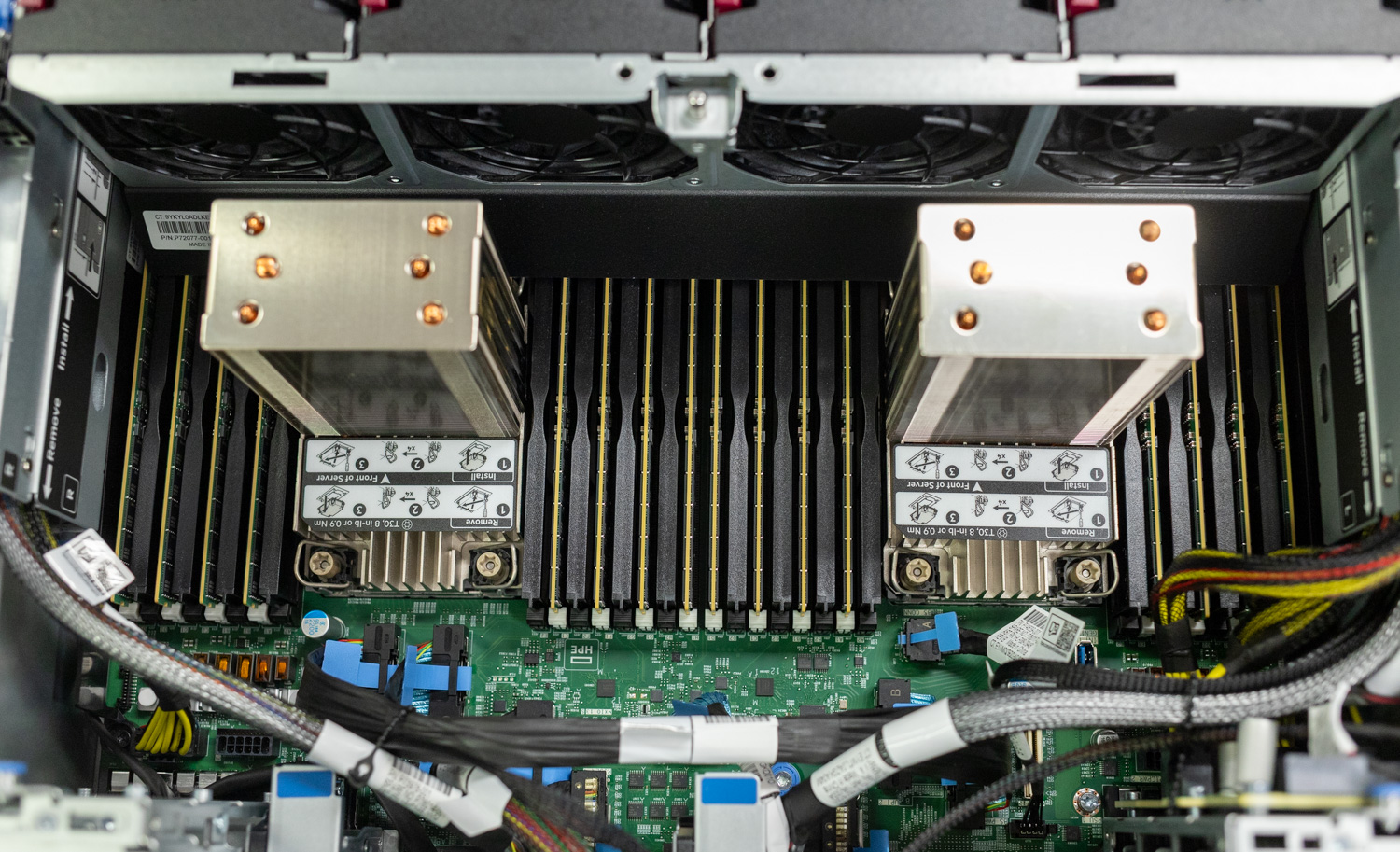
This flexible GPU layout, paired with high-bandwidth PCIe Gen5 lanes, ensures the DL380a Gen12 is ready for both dense inference tasks and large-scale AI training environments. Moving further back inside the chassis, with the cooling shroud installed, we can see HPE’s thoughtful engineering approach to airflow management. The shroud features a precisely molded baffle design that directs air efficiently across the CPUs, memory modules, and VRMs, ensuring even cooling throughout the system.

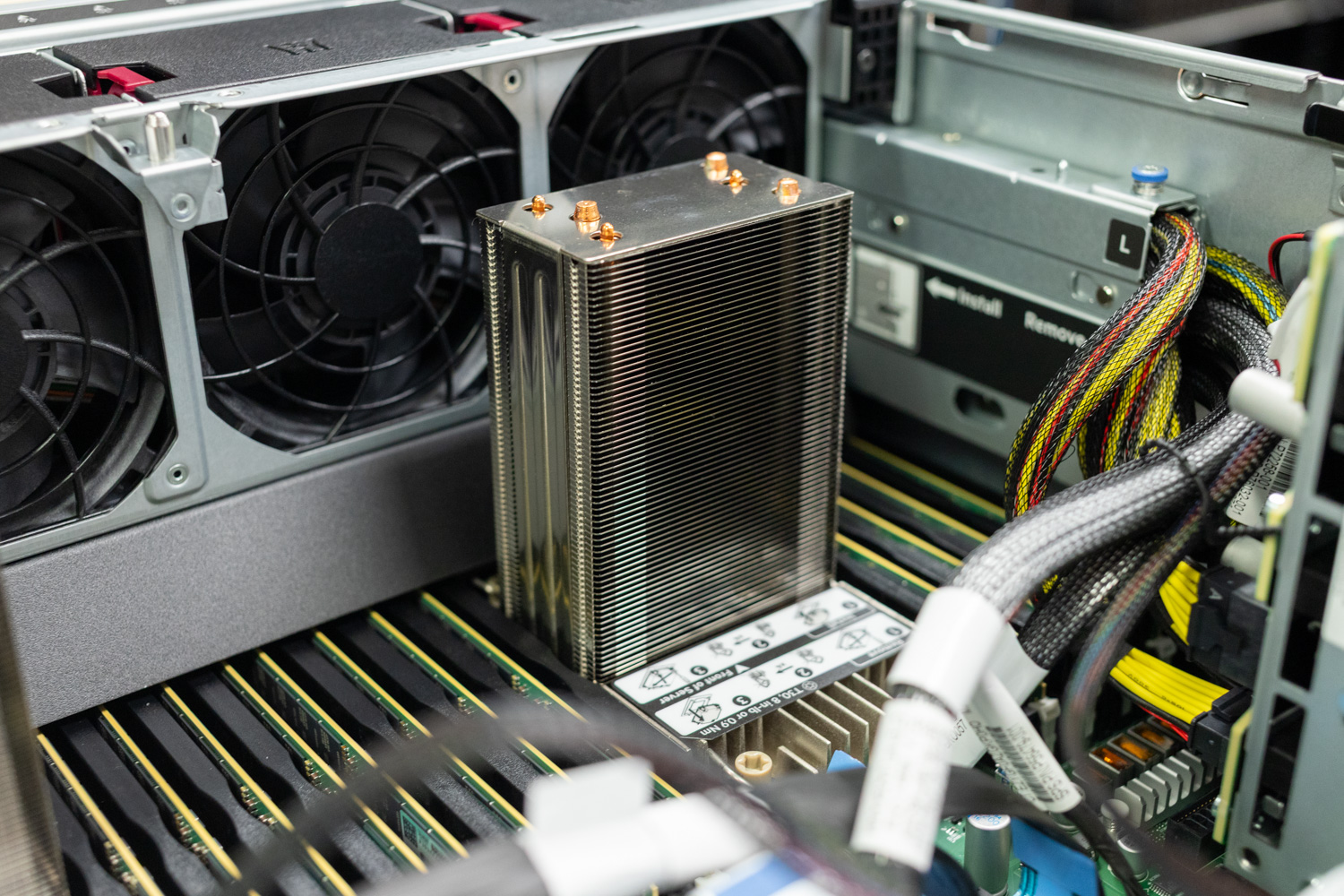
![]()Looking at the CPU coolers, HPE designed the DL380a Gen12 with thermal balance in mind. Each Xeon 6 processor is fitted with a tall, high-density heatsink, engineered to handle the CPU’s own thermal output and the additional heat generated by the GPUs positioned toward the front of the chassis. This design ensures consistent cooling performance even under heavy mixed workloads, where GPU exhaust can raise ambient temperatures around the CPU zone. When high-wattage GPUs are populated, the combination of taller heatsinks and HPE’s front-to-rear airflow design provides the necessary surface area and cooling efficiency to manage the additional thermal load effectively.

![]() 

## ILO 7 Overview

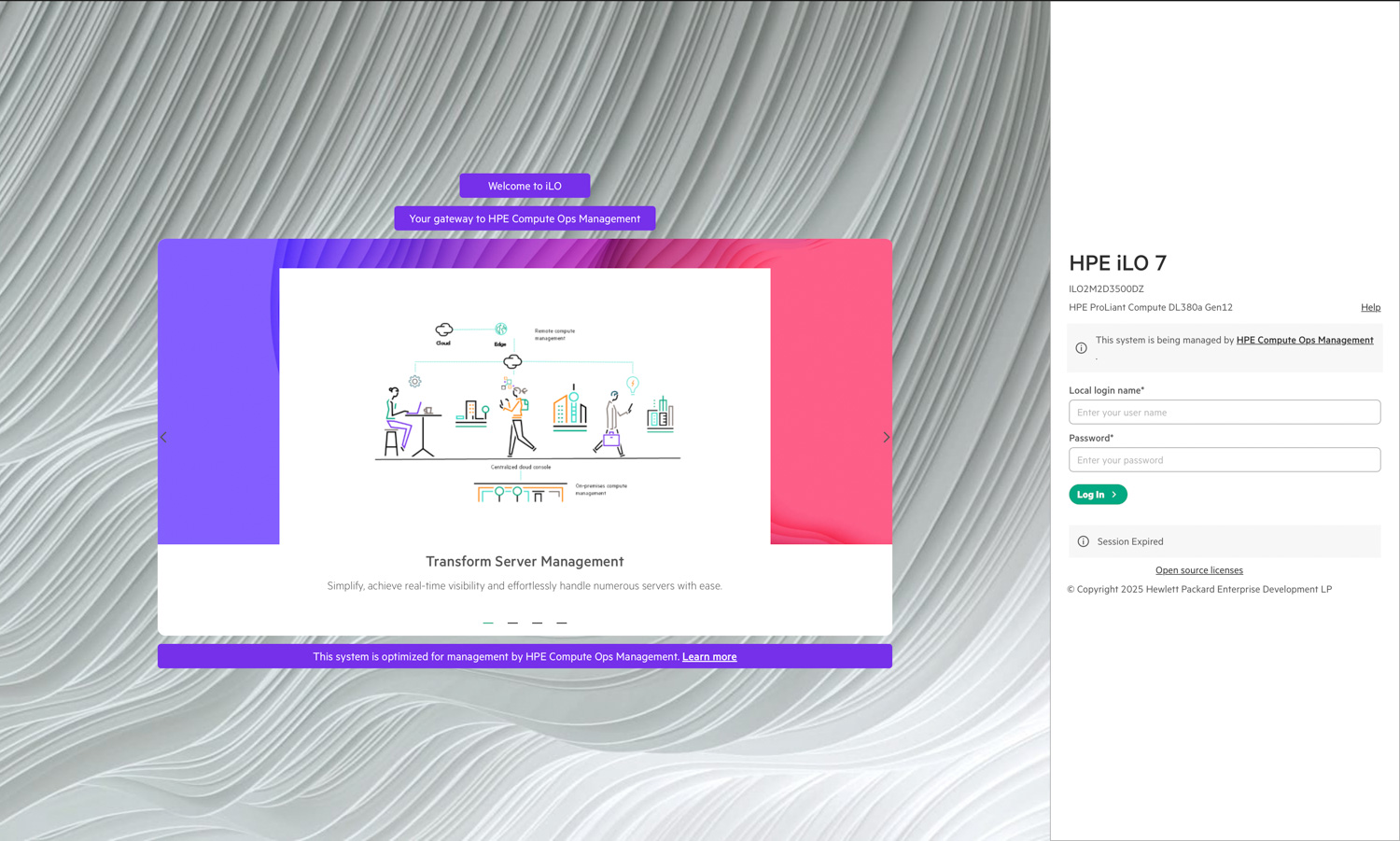
As mentioned, the system includes a dedicated iLO port that provides out-of-band management capabilities for complete server control and monitoring. This box comes with the new HPE iLO 7 interface, providing administrators with access to a refreshed interface and enhanced functionality, integrated with HPE Compute Ops Management for streamlined configuration, monitoring, and lifecycle management. Below is the new HPE iLO 7 login screen from our sample system.  
![]()  
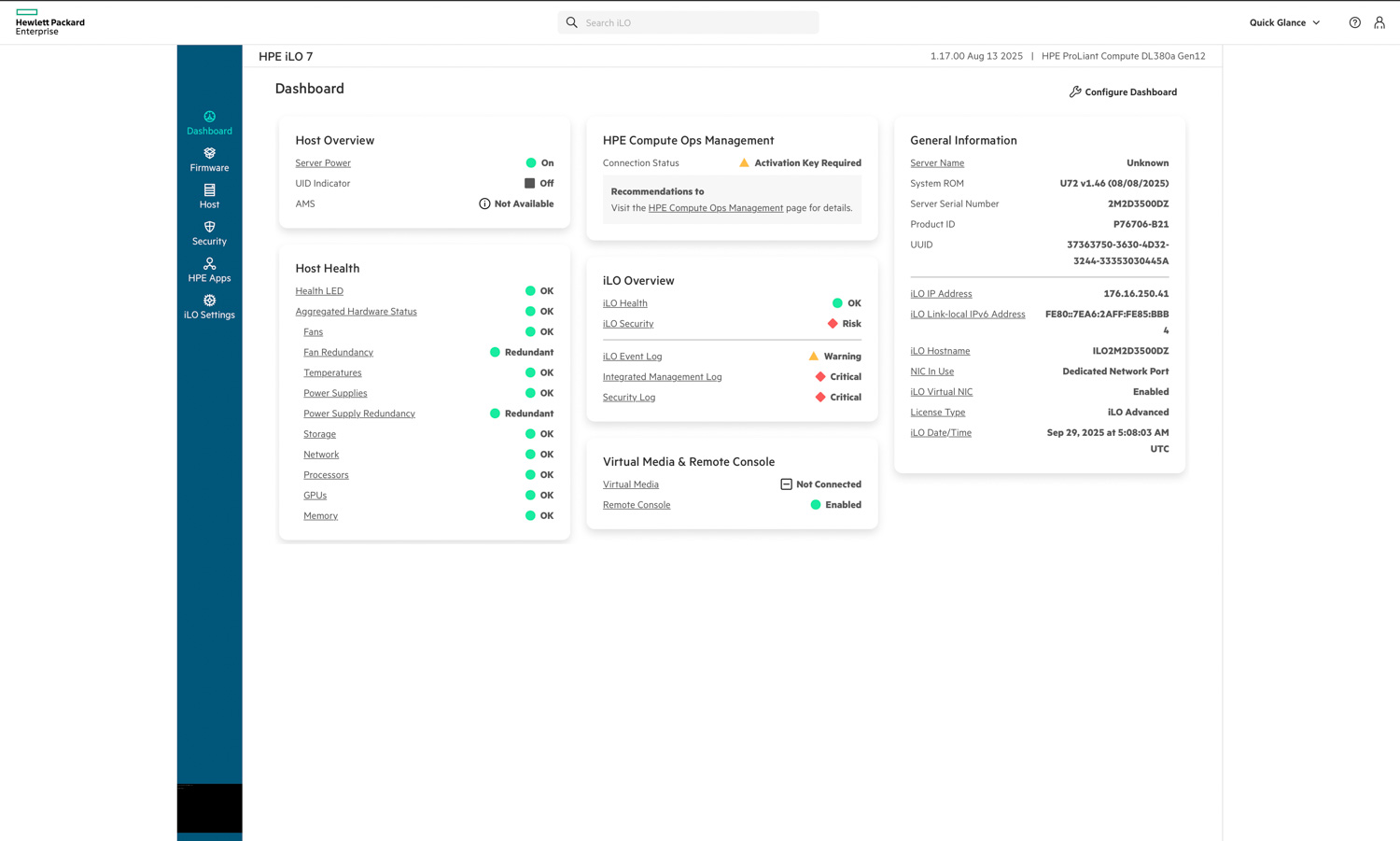
Starting with the dashboard, we can see that HPE iLO 7 presents a modernized interface that immediately highlights system status and key health indicators. The main panel provides an overview of host power state, health, and connection status with HPE Compute Ops Management. On the right, general system information such as the iLO IP address, hostname, and license type is displayed for quick reference.

The dashboard consolidates essential metrics—such as fan redundancy, power supply health, and temperature readings—into a clear, color-coded layout, making it easy to assess server conditions at a glance. Virtual media and remote console access are also accessible directly from the main page, streamlining common remote management tasks without additional navigation.  
![]()  
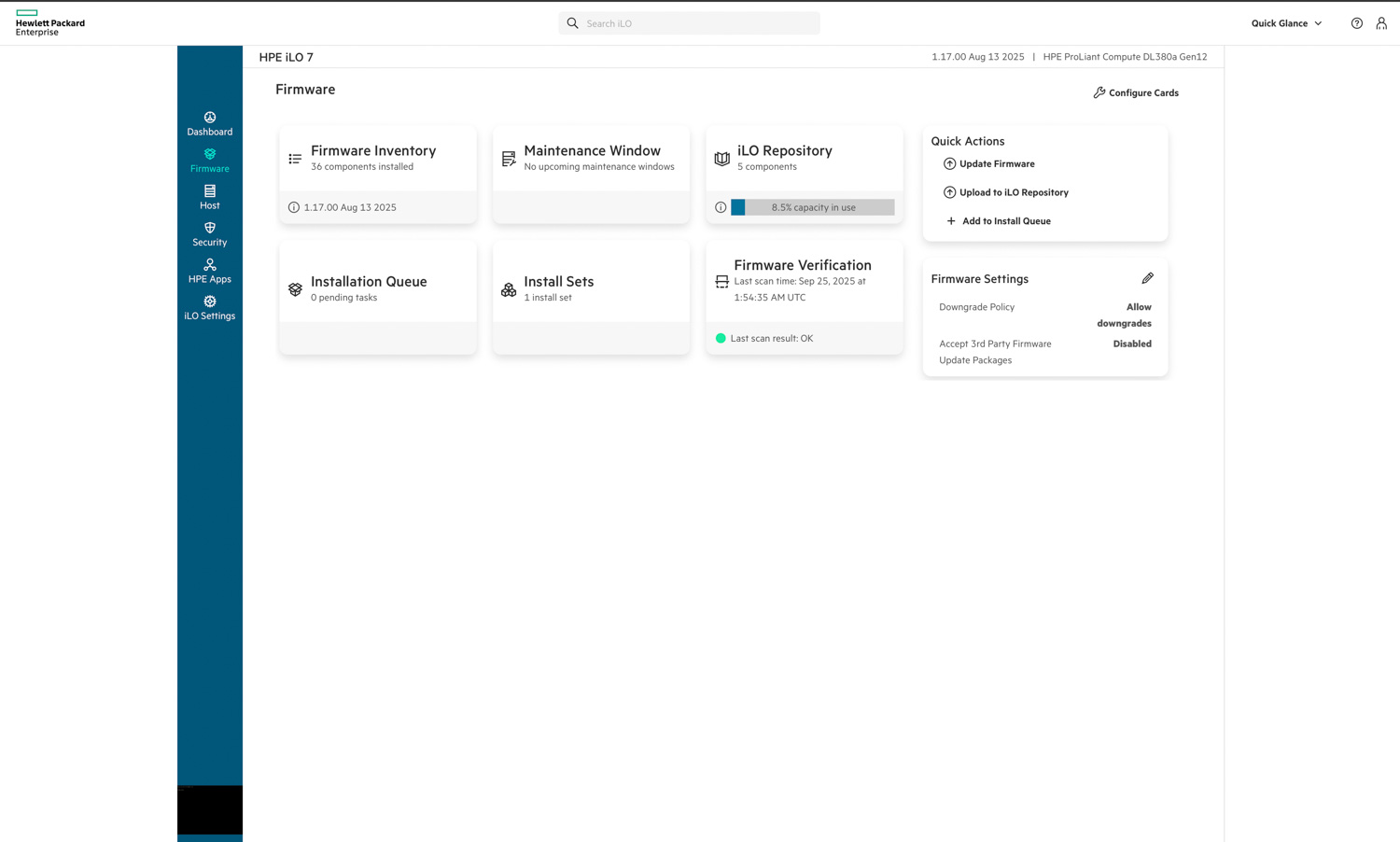
In the Firmware tab, HPE iLO 7 provides a clear and organized view of all components and update management tasks. The interface lists the firmware inventory, active installation queues, and verification results in a card-based layout that’s easy to navigate. Administrators can quickly initiate updates, upload packages to the iLO repository, or create install sets for batch deployment.

Firmware verification and repository management are built directly into this view, allowing users to confirm integrity and maintain version consistency across components. The Quick Actions menu on the right streamlines essential tasks, such as updating firmware or uploading new files. The Firmware Settings card provides control over downgrade policies and the acceptance of third-party packages.  
![]()  
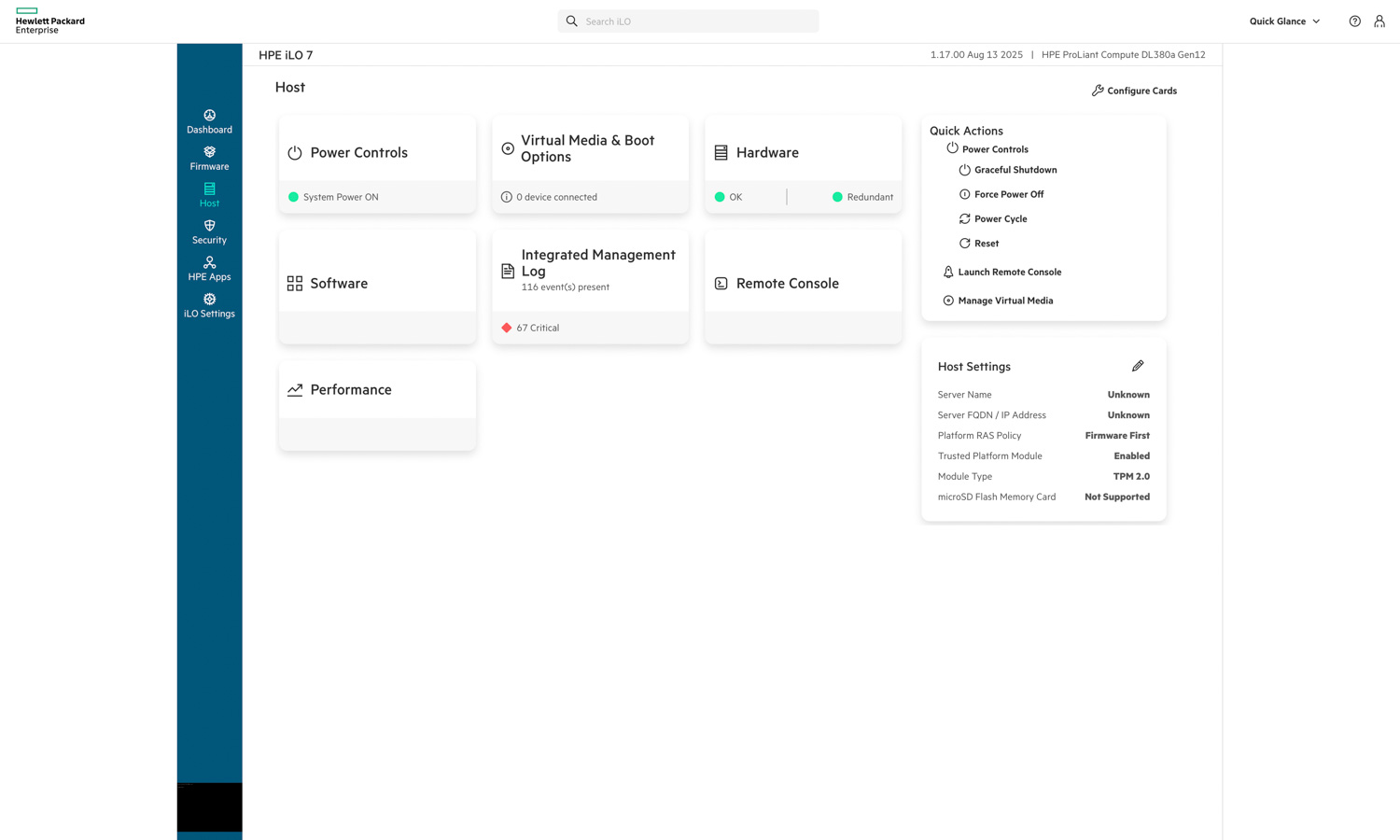
In the Host section, HPE iLO 7 provides quick access to critical server management functions, including power controls, virtual media, hardware health, and system performance. Administrators can view real-time hardware redundancy status, access the integrated management log, or launch the remote console directly from this interface. The layout also includes quick actions such as graceful shutdown, power cycling, and reset functions, enabling full remote control of the system without physical access.

The right-hand panel displays host settings, including TPM status, platform policy configuration, and hardware module information. Overall, this section highlights iLO 7’s role as a centralized control hub, allowing administrators to securely manage power, monitor events, and maintain operational oversight in a single view.  
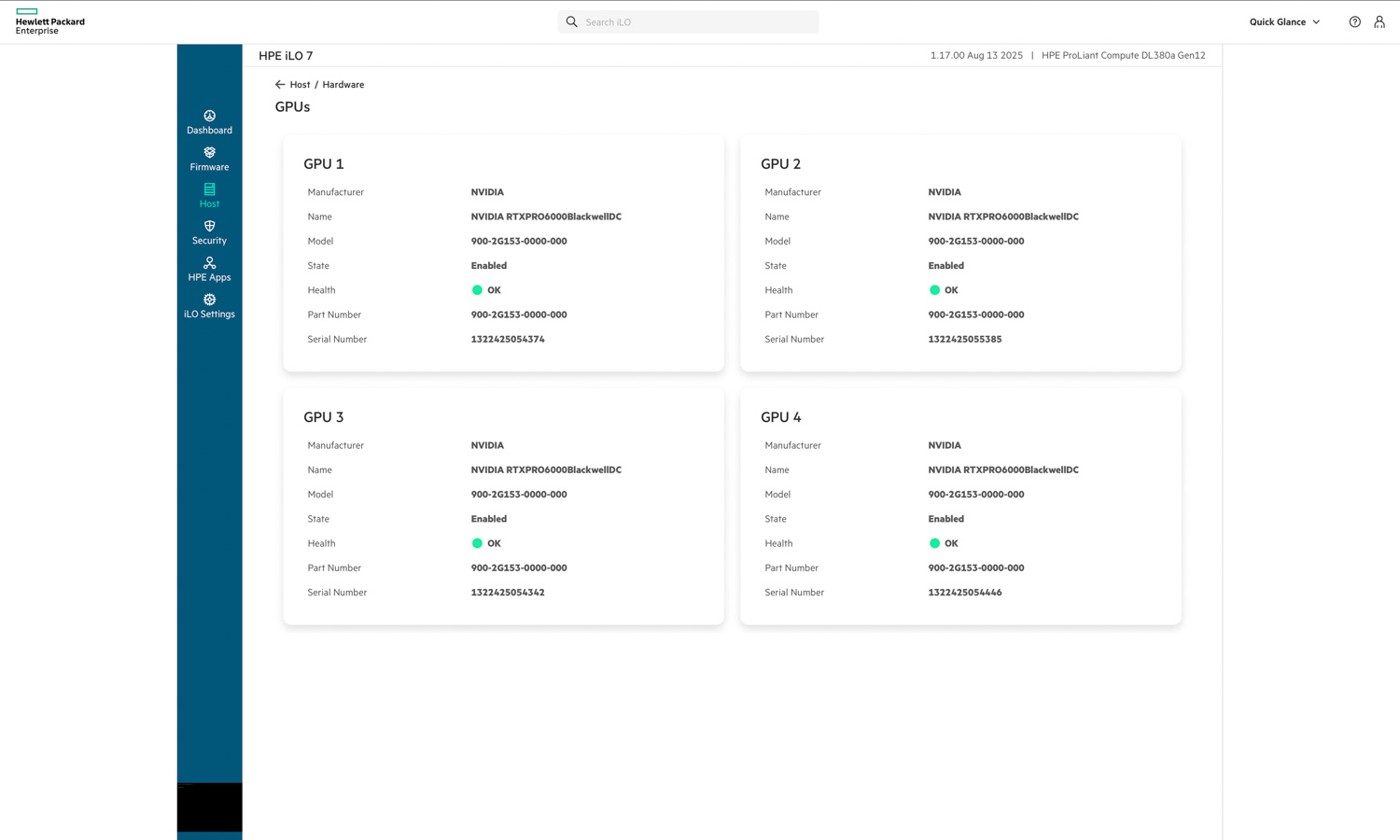
![]()From the Host > Hardware view, we can see the GPUs installed in the system. As noted, the unit is equipped with four NVIDIA RTX PRO 6000 Blackwell GPUs, each reported as enabled and operating normally. iLO 7 provides detailed hardware information, including model numbers, part numbers, and serial numbers, allowing administrators to verify component health at a glance.

![]()  
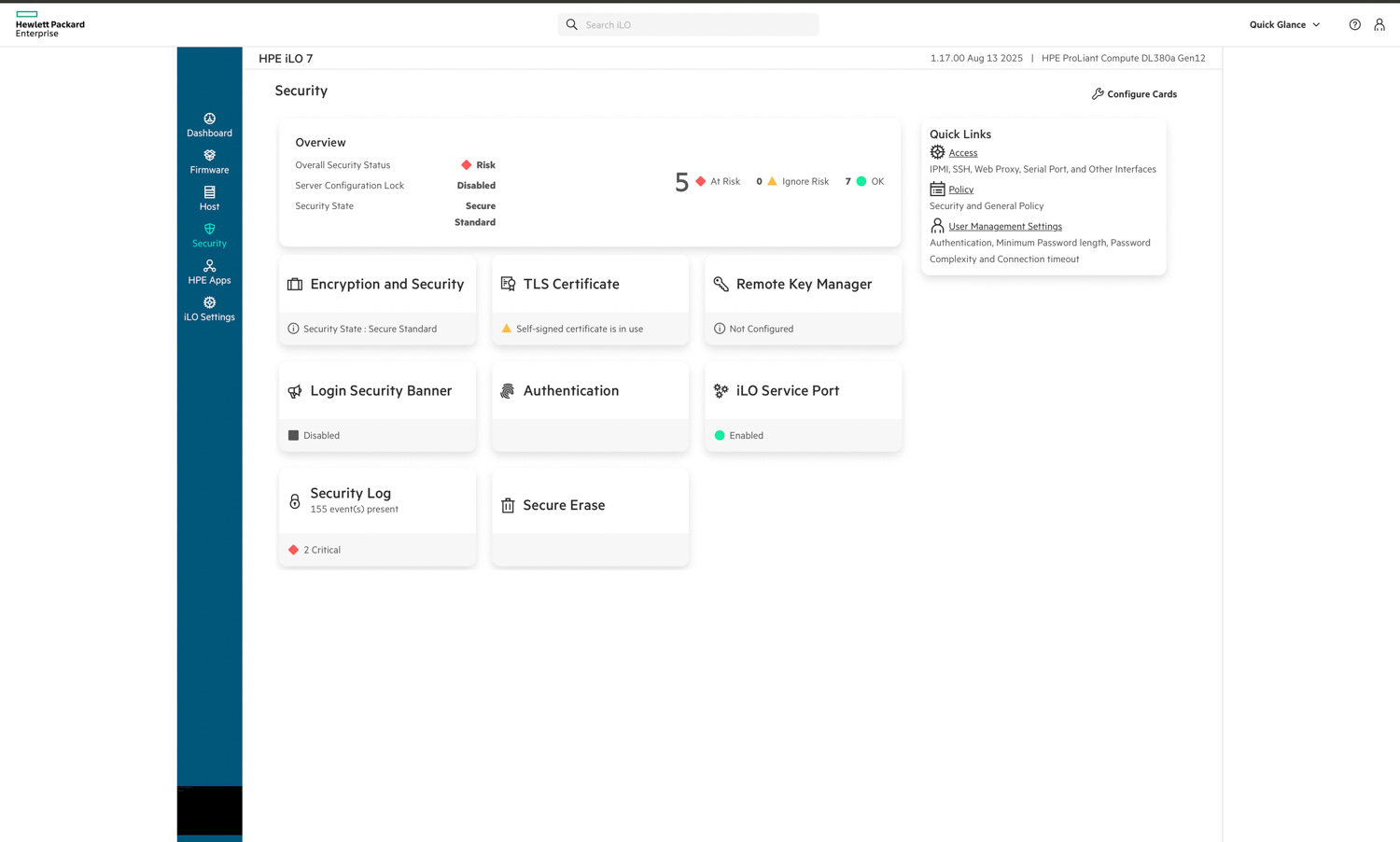
In the Security tab, HPE iLO 7 consolidates all key controls related to system protection and access management. The overview panel provides a high-level view of the overall security state, highlighting risk levels, configuration locks, and certificate status. From here, administrators can manage encryption settings, authentication methods, and TLS certificates, as well as configure secure erase and remote key management.

The interface clearly indicates areas that require attention, such as self-signed certificates or unconfigured key management, while still confirming secure operation where applicable. Security logs, user management policies, and access controls are easily accessible, providing administrators with a comprehensive view of the system’s security posture directly from the iLO environment.  
![]()  
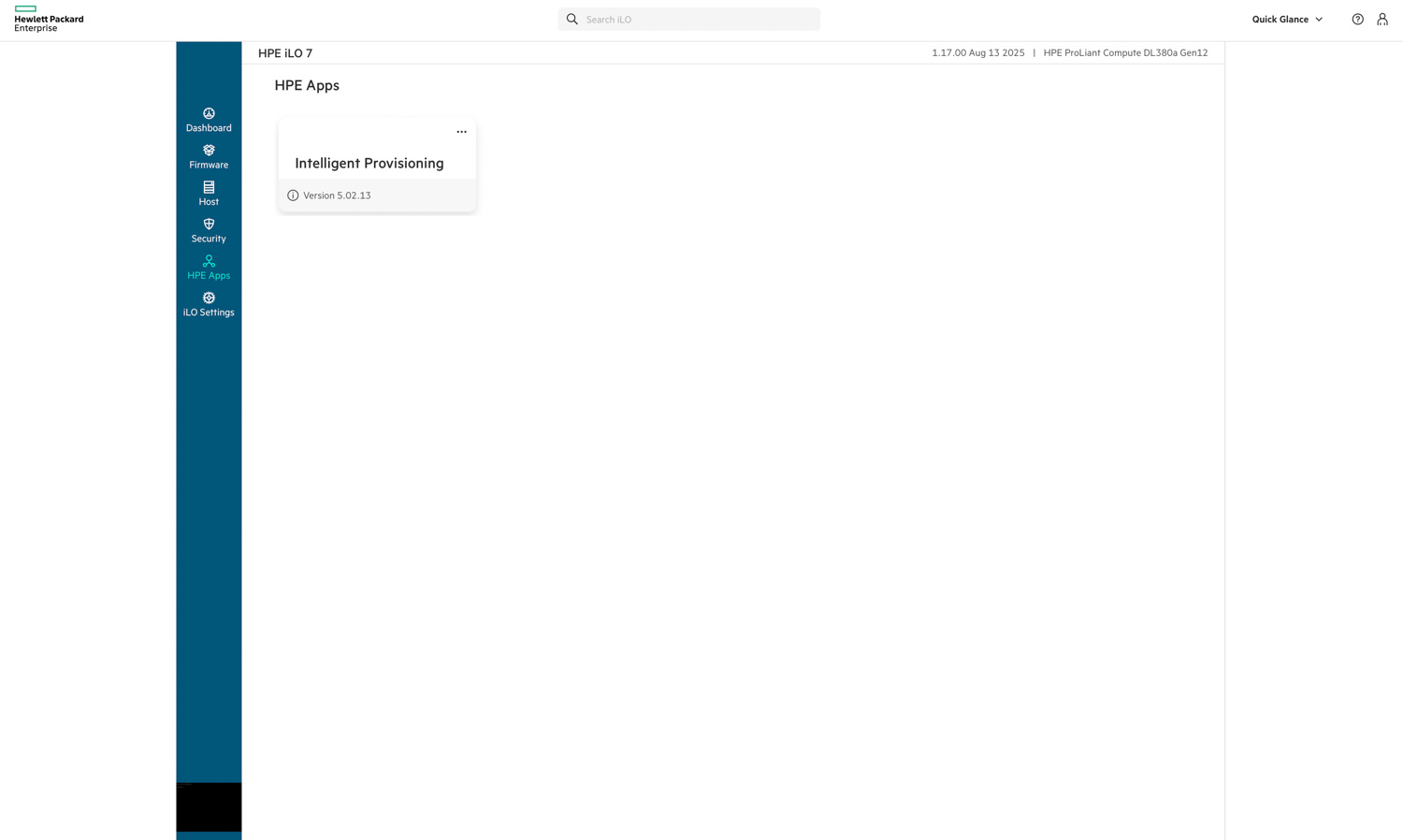
Under the HPE Apps tab, iLO 7 provides access to integrated tools that enhance server deployment and lifecycle management. From this view, administrators can launch Intelligent Provisioning, a built-in utility designed to simplify operating system installation, firmware updates, and system configuration without the need for external media.  
![]()

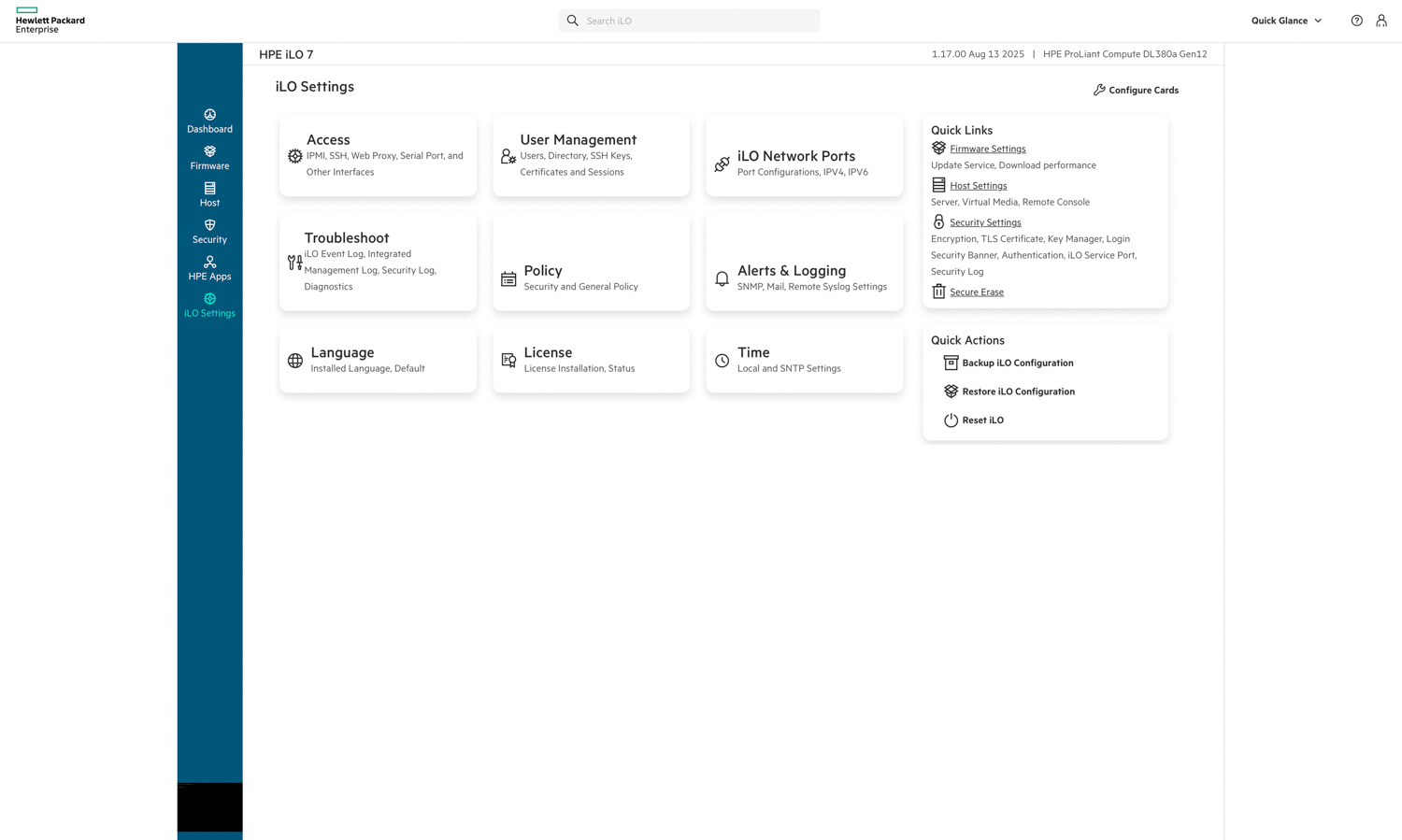
The iLO Settings tab consolidates all configuration and administrative options for managing the iLO interface. From here, administrators can control user access, network port configurations, authentication methods, and logging behavior. The menu also includes options for troubleshooting, policy enforcement, license management, and time synchronization.

Quick actions, such as backing up or restoring the iLO configuration and performing a reset, are conveniently available on the right, helping to streamline maintenance tasks. The layout mirrors the rest of iLO 7’s modern, card-based interface, providing a clean, organized way to manage security, connectivity, and operational parameters from a single centralized location.  
![]()

## Performance Testing

To evaluate the real-world capabilities of the DL380a Gen12, we conducted a comprehensive set of performance tests that covered both AI inference and general compute workloads. These include vLLM online serving benchmarks for large language models (LLMs) and Phoronix Test Suite benchmarks to measure CPU throughput, memory bandwidth, web-serving efficiency, and cryptographic performance.

**System Configuration**

* **CPU:** 2 x Intel Xeon 6527P CPU
* **Memory:** 16 x HPE 64GB 2Rx4 PC5-3400B-R Smart Kit
* **GPU:** 4 x NVIDIA RTX PRO 6000 (96GB)
* **Storage:** 2 x 15.63TB PM1733a U.3
![]() 

## **vLLM Online Serving – LLM Inference Performance**

vLLM is the most popular high-throughput inference and serving engine for LLMs. The vLLM online serving benchmark is a performance evaluation tool that measures the real-world serving capabilities of this inference engine under concurrent requests. It simulates production workloads by sending requests to a running vLLM server with configurable parameters, including request rate, input/output lengths, and the number of concurrent clients. The benchmark measures key metrics, including throughput (tok/s), time to first token, and time per output token, helping users understand how vLLM performs under different load conditions.

We tested the inference performance across three representative models spanning different scales and quantization approaches, evaluating how the HPE ProLiant DL380a Gen12’s four NVIDIA RTX PRO 6000 GPUs handle production inference workloads.

### **Dense Model Performance**

Dense models represent the conventional LLM architecture, where all parameters and activations are engaged during inference. We evaluated two dense model configurations: Llama-2-70b-chat-hf and Llama-3.2-90B-Vision-Instruct.

**Llama-2-70B-Chat Performance**

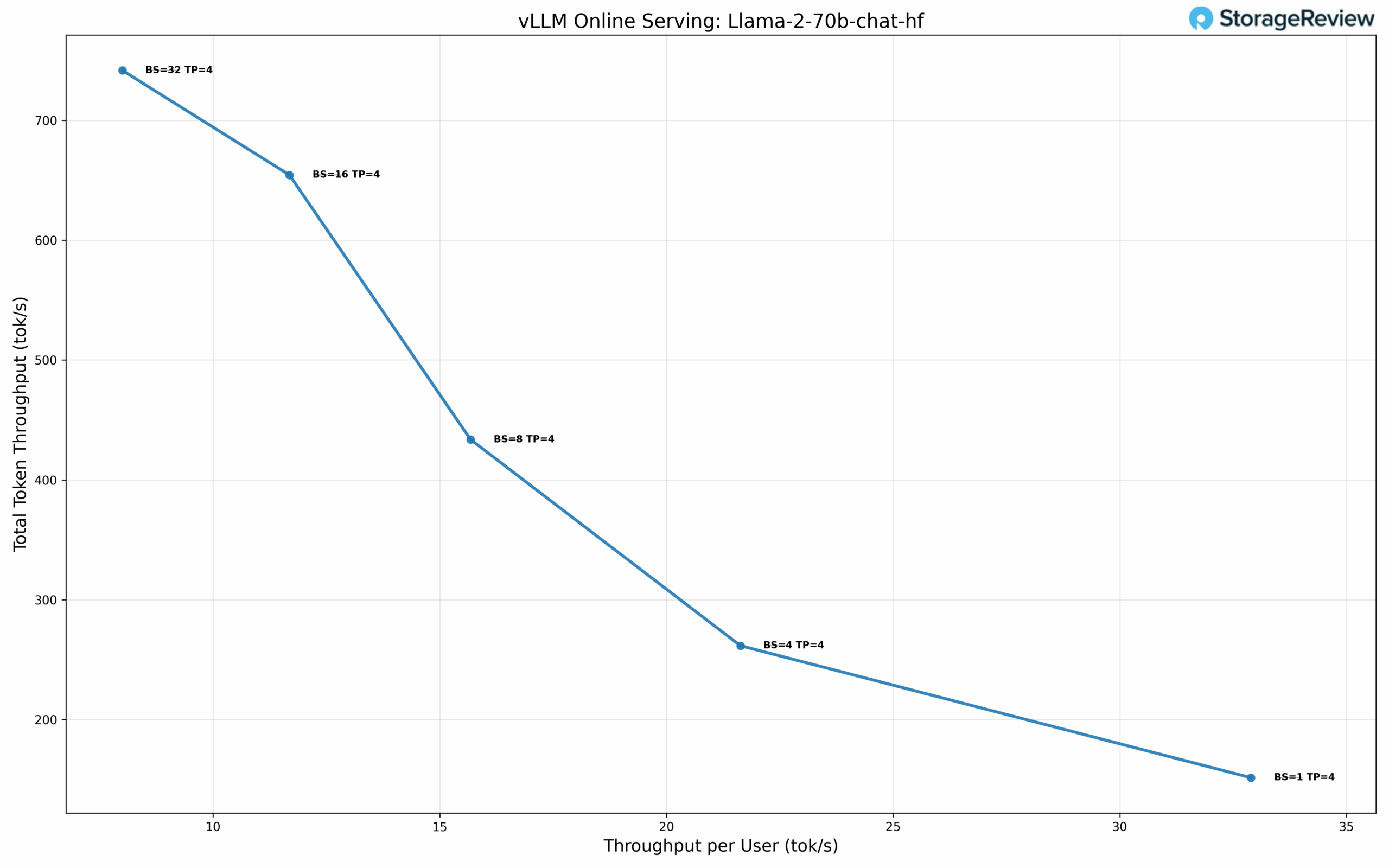
At single-user concurrency (BS=1) with TP=4, the model achieves 32.89 tok/s per user with a TPOT of 30.18 ms. At BS=8, performance reaches 15.68 tok/s per user with 433.62 tok/s total throughput and 35.98 ms TPOT. Scaling to BS=32, total throughput reaches 741.62 tok/s while maintaining 8.00 tok/s per user with 43.44 ms TPOT.

![]() 

**Llama-3.2-90B-Vision-Instruct Performance**

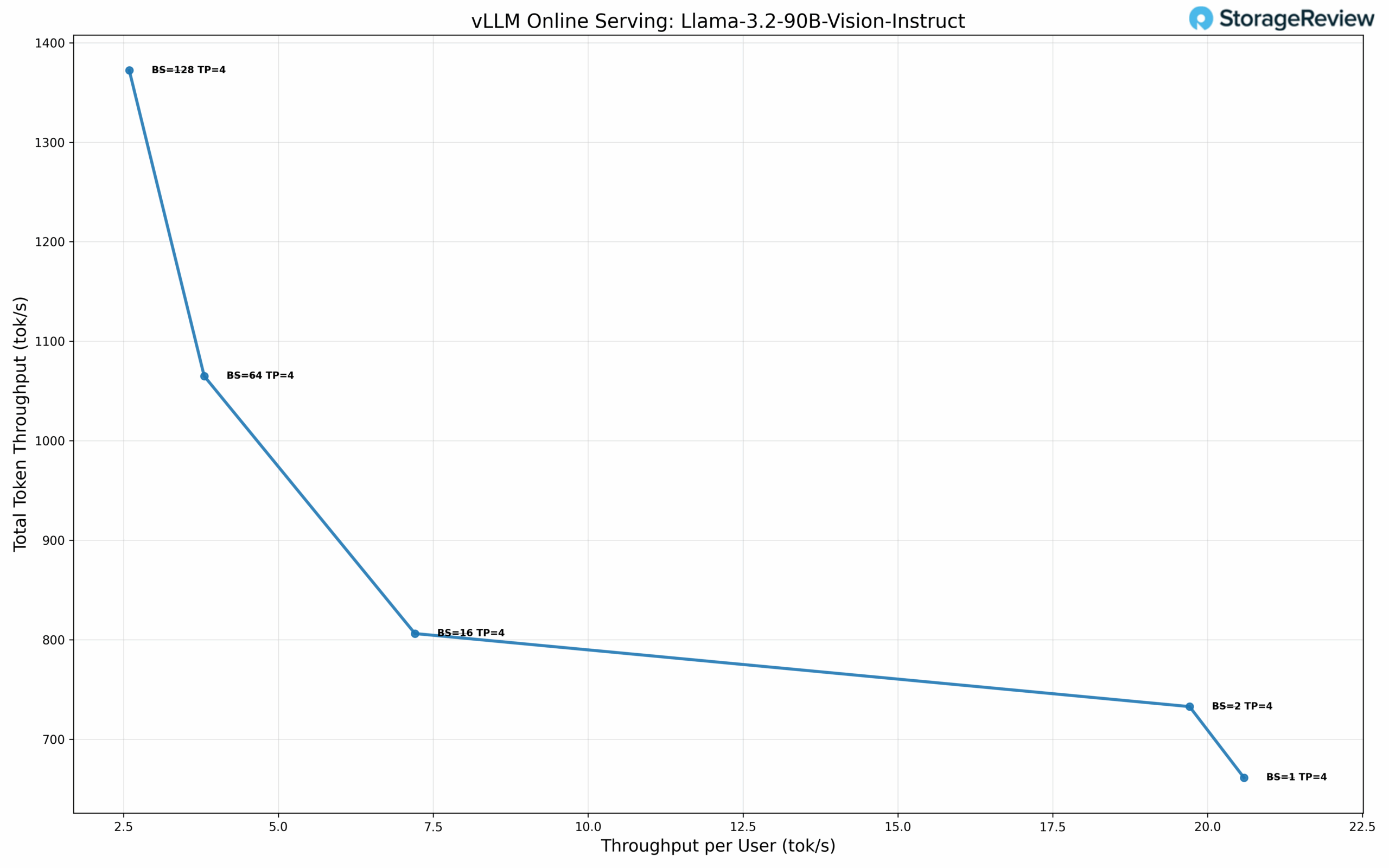
At BS=1 with TP=4, the model delivers 20.59 tok/s per user with 38.27 ms TPOT. At BS=16, performance scales to 7.20 tok/s per user with 806.14 tok/s total throughput and 54.98 ms TPOT. Maximum total throughput of 1372.21 tok/s is achieved at BS=128, delivering 2.59 tok/s per user with 122.75 ms TPOT.

![]() 

### **Microscaling Datatype Performance**

Microscaling represents an advanced quantization approach that applies fine-grained scaling factors to small blocks of weights rather than uniform quantization across large parameter groups. NVIDIA’s NVFP4 format implements this technique through a blocked floating-point representation where each microscale block of 8-32 values shares a common exponent as a scaling factor. This granular approach preserves numerical precision while achieving 4-bit representation, maintaining the dynamic range critical for transformer architectures. The format integrates with NVIDIA’s Tensor Core architecture on the RTX PRO 6000, enabling efficient mixed-precision computation with on-the-fly decompression during matrix operations.

**GPT-OSS-120B Performance**

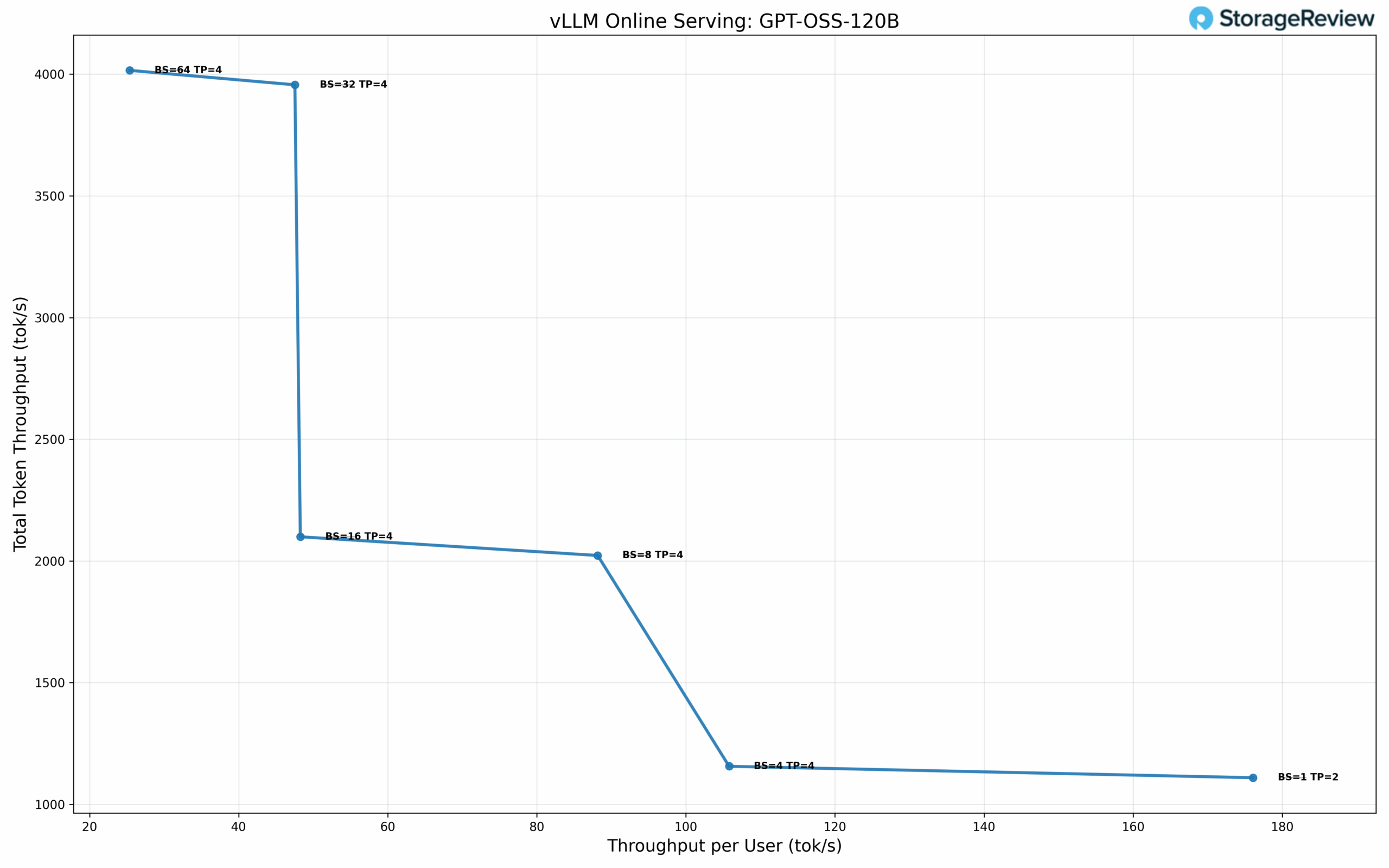
We evaluated OpenAI’s GPT-OSS-120B model using NVFP4 quantization. At single-user concurrency with TP=2, the model achieves 176.09 tok/s per user with 5.46 ms TPOT, the lowest latency in our test suite. At BS=4 with TP=4, performance reaches 105.79 tok/s per user while delivering 1155.94 tok/s total throughput with 7.79 ms TPOT. At BS=32 with TP=4, throughput scales to 47.54 tok/s per user and 3956.44 tok/s total with 13.86 ms TPOT. Maximum total throughput of 4015.77 tok/s is achieved at BS=64, delivering 25.38 tok/s per user with 14.78 ms TPOT.

![]() 

## Phoronix Benchmarks

Phoronix Test Suite is an open-source, automated benchmarking platform that supports over 450 test profiles and 100+ test suites via OpenBenchmarking.org. It handles everything from installing dependencies to running tests and collecting results, making it ideal for performance comparisons, hardware validation, and continuous integration. We will focus on the following tests: Stream, 7-Zip, Linux kernel build, Apache, and OpenSSL tests.

**Stream Memory Bandwidth**

In the Stream benchmark, which measures raw memory throughput, the HPE DL380a Gen12 achieved an impressive 542 GB/s, demonstrating the platform’s ability to sustain high data transfer rates under continuous load. This level of bandwidth makes the system particularly effective for workloads such as data modeling, simulation, and AI inference, where large datasets must move rapidly between memory and compute resources

**7-Zip Compression**  
The 7-Zip compression test measured 305 k MIPs, highlighting the system’s strong multithreaded efficiency for compute-intensive compression and decompression operations. These results make the DL380a Gen12 well-suited for environments involving frequent data packaging, archival tasks, or backup workflows that rely on consistent, repeatable CPU performance.  
**Kernel Compile**

When compiling a full Linux kernel (allmodconfig), the DL380a Gen12 completed the task in 316 seconds. This benchmark reflects the system’s ability to handle parallelized, code-heavy workloads with ease. Faster compile performance translates directly to shorter build times and improved iteration speed for developers working in large-scale software or CI/CD environments.

**Apache Web Server**

In web-serving performance, the DL380a Gen12 sustained 94,348 requests per second in the Apache benchmark. This result demonstrates balanced I/O handling and strong cache efficiency, providing the throughput and responsiveness needed for enterprise web applications, virtualization front ends, or internal service hosting.

**OpenSSL Verification**

Cryptographic performance was equally strong, with the DL380a Gen12 verifying 803 billion operations per second in OpenSSL. This showcases the system’s ability to manage encryption, authentication, and secure communications workloads at scale.

| **Phoronix Benchmarks**          | **HPE ProLiant DL380a Gen 12 (2x Intel Xeon 6527P)** |
| -------------------------------- | ---------------------------------------------------- |
| **Stream**                       | 542,720.7 MB/s                                       |
| **7-ZIP**                        | 304,907 MIP/s                                        |
| **Kernel Compile (allmod)**      | 316.166 Seconds                                      |
| **Apache (requests per second)** | 94,347.52 R/s                                        |
| **OpenSSL**                      | 803,597,895,087 Verify/s                             |

## Conclusion

The HPE ProLiant DL380a Gen12 stands out as one of the most practical and well-balanced AI servers designed for the mainstream enterprise AI market. Its 4U air-cooled design delivers serious compute density with dual Xeon 6 CPUs, support for up to 8 double-wide or 16 single-width GPUs, and 16 E3.S NVMe bays, all while maintaining reliability and straightforward serviceability. HPE’s engineering approach to airflow and thermal balance ensures consistent performance under heavy workloads, demonstrating that advanced AI acceleration can still thrive in traditional air-cooled environments.

The inclusion of iLO 7 provides a significant improvement in manageability, a huge advantage for tier-1 server vendors like HPE. The modernized interface, integration with HPE Compute Ops Management, and detailed hardware telemetry make remote administration intuitive and efficient. Each section, Dashboard, Firmware, Host, Security, Apps, and Settings, reflects HPE’s shift toward a cleaner, more cloud-integrated experience without sacrificing the on-prem control that enterprise teams depend on.  
![]()  
In performance testing, the server delivered excellent results. The four RTX PRO 6000 GPUs achieved impressive throughput across both dense and microscaled LLM models, with vLLM serving performance that rivals liquid-cooled systems. CPU benchmarks from Phoronix further highlight its balance, with over 540 GB/s of memory bandwidth, 94k RPS in Apache, and more than 800 billion OpenSSL verifications per second, showing strength across both AI and general-purpose compute.

HPE’s design goal is clear: to deliver high-density, production-ready AI performance using air cooling that fits within existing rack and power infrastructures. For data center teams seeking reliable, secure, and easily managed compute in an air-cooled form factor, the DL380a Gen12 is a capable, forward-looking solution for the growing mainstream AI market.

[HPE Product Page](https://www.hpe.com/us/en/compute/proliant-dl380a-gen12.html)

**Engage with StorageReview**

[Newsletter](https://www.storagereview.com/storage%5Fnewsletter) | [YouTube](https://www.youtube.com/user/StorageReview "Opens in a new window") | Podcast [iTunes](https://podcasts.apple.com/gb/podcast/storagereview-com-storage-reviews/id1060681115 "Opens in a new window")/[Spotify](https://open.spotify.com/show/1y6VnznABhHeOSMOmbDTz0 "Opens in a new window") | [Instagram](https://www.instagram.com/storagereview/ "Opens in a new window") | [Twitter](https://twitter.com/storagereview "Opens in a new window") | [TikTok](https://www.tiktok.com/@storagereview? "Opens in a new window") | [RSS Feed](https://www.storagereview.com/rss.xml)

![]()

### Kevin OBrien

Inside the StorageReview Lab evaluating products and working with industry leaders to develop new testing environments. At home I'm raising a family. 

Previous post: [Intel Arc Pro B50 GPU Review: An Affordable, Low-Power Workstation GPU](https://www.storagereview.com/review/intel-arc-pro-b50-gpu-review-an-affordable-low-power-workstation-gpu)

Next post: [Lenovo ThinkCentre Neo 50q QC Review: Ultra-Compact Snapdragon PC](https://www.storagereview.com/review/lenovo-thinkcentre-neo-50q-qc-review-ultra-compact-snapdragon-pc)

Trusted Vendors

Products and solutions from our affiliate partners:

* [ ![Ubiquiti Logo](https://www.storagereview.com/wp-content/uploads/2024/11/2-1.webp) Ubiquiti ](https://store.ui.com/us/en?a%5Faid=StorageReview "Opens in a new window")
* [ ![Newegg Logo](https://www.storagereview.com/wp-content/uploads/2025/11/newegg.webp) Newegg ](https://click.linksynergy.com/fs-bin/click?id=g5terNMDhz0&offerid=1207190.18&subid=0&type=4 "Opens in a new window")
* [ ![Amazon Logo](https://www.storagereview.com/wp-content/uploads/2025/11/amazon.webp) Amazon ](https://amzn.to/4fLJUEW "Opens in a new window")

Newsletter

Subscribe to the StorageReview newsletter to stay up to date on the latest news and reviews. We promise no spam!

1  

Leave this field empty if you’re human: 

## Advertisement

Content Categories

[ Facebook ](https://www.facebook.com/@storagereview) [ X ](https://twitter.com/storagereview) [ Instagram ](https://www.instagram.com/storagereview/) [ LinkedIn ](https://www.linkedin.com/company/storagereview-com) [ YouTube ](https://www.youtube.com/user/storagereview?sub%5Fconfirmation=1) [ Email ](mailto:info@storagereview.com) [ Spotify ](https://open.spotify.com/show/1y6VnznABhHeOSMOmbDTz0) [ Reddit ](https://www.reddit.com/r/StorageReview/) [ Discord ](https://discord.gg/TwMHb4azdC) [ RSS ](https://www.storagereview.com/rss.xml) [ TikTok ](https://www.tiktok.com/@storagereview) 

Copyright © 1998-2025 Flying Pig Ventures, LLC Cincinnati, Ohio. All rights reserved.

Manage your privacy

To provide the best experiences, we and our partners use technologies like cookies to store and/or access device information. Consenting to these technologies will allow us and our partners to process personal data such as browsing behavior or unique IDs on this site and show (non-) personalized ads. Not consenting or withdrawing consent, may adversely affect certain features and functions.

Click below to consent to the above or make granular choices. Your choices will be applied to this site only. You can change your settings at any time, including withdrawing your consent, by using the toggles on the Cookie Policy, or by clicking on the manage consent button at the bottom of the screen.

Functional Functional Always active 

The technical storage or access is strictly necessary for the legitimate purpose of enabling the use of a specific service explicitly requested by the subscriber or user, or for the sole purpose of carrying out the transmission of a communication over an electronic communications network. 

Preferences Preferences 

The technical storage or access is necessary for the legitimate purpose of storing preferences that are not requested by the subscriber or user. 

Statistics Statistics 

The technical storage or access that is used exclusively for statistical purposes. The technical storage or access that is used exclusively for anonymous statistical purposes. Without a subpoena, voluntary compliance on the part of your Internet Service Provider, or additional records from a third party, information stored or retrieved for this purpose alone cannot usually be used to identify you. 

Marketing Marketing 

The technical storage or access is required to create user profiles to send advertising, or to track the user on a website or across several websites for similar marketing purposes. 

Statistics

Marketing

Features

Always active

Always active

* [Manage options](#)
* [Manage services](#)
* [Manage {vendor\_count} vendors](#)
* [Read more about these purposes](https://cookiedatabase.org/tcf/purposes/)

Accept Deny Manage options Save preferences [Manage options](#) 

* [{title}](#)
* [{title}](#)
* [{title}](#)

Manage your privacy

To provide the best experiences, we use technologies like cookies to store and/or access device information. Consenting to these technologies will allow us to process data such as browsing behavior or unique IDs on this site. Not consenting or withdrawing consent, may adversely affect certain features and functions.

Functional Functional Always active 

The technical storage or access is strictly necessary for the legitimate purpose of enabling the use of a specific service explicitly requested by the subscriber or user, or for the sole purpose of carrying out the transmission of a communication over an electronic communications network. 

Preferences Preferences 

The technical storage or access is necessary for the legitimate purpose of storing preferences that are not requested by the subscriber or user. 

Statistics Statistics 

The technical storage or access that is used exclusively for statistical purposes. The technical storage or access that is used exclusively for anonymous statistical purposes. Without a subpoena, voluntary compliance on the part of your Internet Service Provider, or additional records from a third party, information stored or retrieved for this purpose alone cannot usually be used to identify you. 

Marketing Marketing 

The technical storage or access is required to create user profiles to send advertising, or to track the user on a website or across several websites for similar marketing purposes. 

Statistics

Marketing

Features

Always active

Always active

* [Manage options](#)
* [Manage services](#)
* [Manage {vendor\_count} vendors](#)
* [Read more about these purposes](https://cookiedatabase.org/tcf/purposes/)

Accept Deny Manage options Save preferences [Manage options](#) 

* [{title}](#)
* [{title}](#)
* [{title}](#)

Manage consent Manage consent

```json
{"@context":"https:\/\/schema.org","@graph":[{"@type":"WebPage","@id":"https:\/\/www.storagereview.com\/review\/hpe-proliant-dl380a-gen12-review-air-cooled-4u-server-for-dense-multi-gpu-ai","url":"https:\/\/www.storagereview.com\/review\/hpe-proliant-dl380a-gen12-review-air-cooled-4u-server-for-dense-multi-gpu-ai","name":"HPE ProLiant DL380a Gen12 Review: Air Cooled 4U Server for Dense Multi GPU AI - StorageReview.com","isPartOf":{"@id":"https:\/\/www.storagereview.com\/#website"},"primaryImageOfPage":{"@id":"https:\/\/www.storagereview.com\/review\/hpe-proliant-dl380a-gen12-review-air-cooled-4u-server-for-dense-multi-gpu-ai#primaryimage"},"image":{"@id":"https:\/\/www.storagereview.com\/review\/hpe-proliant-dl380a-gen12-review-air-cooled-4u-server-for-dense-multi-gpu-ai#primaryimage"},"thumbnailUrl":"https:\/\/www.storagereview.com\/wp-content\/uploads\/2025\/10\/StorageReview-HPE-ProLiant-DL380a-08.jpg","datePublished":"2025-11-06T20:48:53+00:00","dateModified":"2025-11-24T14:41:43+00:00","description":"HPE ProLiant DL380a Gen12 review: a 4U air-cooled AI server with dual Xeon 6, RTX PRO 6000 Server GPUs, E3.S NVMe, and iLO 7.","breadcrumb":{"@id":"https:\/\/www.storagereview.com\/review\/hpe-proliant-dl380a-gen12-review-air-cooled-4u-server-for-dense-multi-gpu-ai#breadcrumb"},"inLanguage":"en-US","potentialAction":[{"@type":"ReadAction","target":["https:\/\/www.storagereview.com\/review\/hpe-proliant-dl380a-gen12-review-air-cooled-4u-server-for-dense-multi-gpu-ai"]}]},{"@type":"ImageObject","inLanguage":"en-US","@id":"https:\/\/www.storagereview.com\/review\/hpe-proliant-dl380a-gen12-review-air-cooled-4u-server-for-dense-multi-gpu-ai#primaryimage","url":"https:\/\/www.storagereview.com\/wp-content\/uploads\/2025\/10\/StorageReview-HPE-ProLiant-DL380a-08.jpg","contentUrl":"https:\/\/www.storagereview.com\/wp-content\/uploads\/2025\/10\/StorageReview-HPE-ProLiant-DL380a-08.jpg","width":1500,"height":1000},{"@type":"BreadcrumbList","@id":"https:\/\/www.storagereview.com\/review\/hpe-proliant-dl380a-gen12-review-air-cooled-4u-server-for-dense-multi-gpu-ai#breadcrumb","itemListElement":[{"@type":"ListItem","position":1,"name":"Home","item":"https:\/\/www.storagereview.com\/"},{"@type":"ListItem","position":2,"name":"Review","item":"https:\/\/www.storagereview.com\/review"},{"@type":"ListItem","position":3,"name":"HPE ProLiant DL380a Gen12 Review: Air Cooled 4U Server for Dense Multi GPU AI"}]},{"@type":"WebSite","@id":"https:\/\/www.storagereview.com\/#website","url":"https:\/\/www.storagereview.com\/","name":"StorageReview.com","description":"StorageReview.com is a leading provider of news and reviews throughout the entire IT stack - from the datacenter to the edge, and all points in between.","publisher":{"@id":"https:\/\/www.storagereview.com\/#organization"},"potentialAction":[{"@type":"SearchAction","target":{"@type":"EntryPoint","urlTemplate":"https:\/\/www.storagereview.com\/?s={search_term_string}"},"query-input":{"@type":"PropertyValueSpecification","valueRequired":true,"valueName":"search_term_string"}}],"inLanguage":"en-US"},{"@type":"Organization","@id":"https:\/\/www.storagereview.com\/#organization","name":"StorageReview.com","url":"https:\/\/www.storagereview.com\/","logo":{"@type":"ImageObject","inLanguage":"en-US","@id":"https:\/\/www.storagereview.com\/#\/schema\/logo\/image\/","url":"https:\/\/www.storagereview.com\/wp-content\/uploads\/2020\/02\/Storage-Reviews-2-2.png","contentUrl":"https:\/\/www.storagereview.com\/wp-content\/uploads\/2020\/02\/Storage-Reviews-2-2.png","width":344,"height":61,"caption":"StorageReview.com"},"image":{"@id":"https:\/\/www.storagereview.com\/#\/schema\/logo\/image\/"},"sameAs":["https:\/\/x.com\/storagereview","http:\/\/youtube.com\/user\/storagereview"]}]}
```