---
description: The launch of the Lexar Professional CFexpress card has certainly made a huge impact on the next generation of media cards, as it marks a
title: Lexar Professional CFexpress Type B Card Review
image: https://www.storagereview.com/wp-content/uploads/2020/10/LexarCardReview-e1603823445713.gif
---


[](//storagereview.com/) 

---

[ ](https://www.facebook.com/@storagereview) [ ](https://twitter.com/storagereview) [ ](https://www.instagram.com/storagereview/) [ ](https://www.linkedin.com/company/storagereview-com) [ ](https://www.youtube.com/user/storagereview?sub%5Fconfirmation=1) [ ](mailto:info@storagereview.com) [ ](https://open.spotify.com/show/1y6VnznABhHeOSMOmbDTz0) [ ](https://www.reddit.com/r/StorageReview/) [ ](https://discord.gg/TwMHb4azdC) [ ](https://www.storagereview.com/rss.xml) [ ](https://www.tiktok.com/@storagereview) 

[![StorageReview.com](https://www.storagereview.com/wp-content/uploads/2026/07/Storage-Review-2x.png)](https://www.storagereview.com) 

≡ Menu 
* [Home](https://www.storagereview.com/)
* [Storage Reviews](https://www.storagereview.com/review)  
  * [Consumer Reviews](https://www.storagereview.com/consumer)
  * [Enterprise Reviews](https://www.storagereview.com/enterprise)
  * [Ubiquiti Reviews](https://www.storagereview.com/best/ubiquiti-reviews)
* [SR Merch](https://store.storagereview.com)
* [Leaderboards](https://www.storagereview.com/best)  
  * [Best Storage Arrays](https://www.storagereview.com/best/storage-arrays)
  * [Best Enterprise SSDs](https://www.storagereview.com/best/enterprise-ssds)
  * [Best Servers](https://www.storagereview.com/best/servers)
  * [Best Desktops for Local AI](https://www.storagereview.com/best/desktops-local-ai)
  * [Best Laptops for Local AI](https://www.storagereview.com/best/laptops-local-ai)
  * [Best Local LLM Tools](https://www.storagereview.com/best/local-llm-tools)
  * [Agentic AI Hardware](https://www.storagereview.com/best/agentic-ai-hardware)
  * [Best SSDs & Hard Drives](https://www.storagereview.com/best%5Fdrives)
  * [Best Portable SSDs](https://www.storagereview.com/best/portable-ssds)
  * [Best Business Laptops](https://www.storagereview.com/best/business-laptops)
  * [Best Mobile Workstations](https://www.storagereview.com/best/mobile-workstations)
  * [Best Desktop Workstations](https://www.storagereview.com/best/desktop-workstations)
  * [Best Laptop Battery Life](https://www.storagereview.com/best/laptop-battery-life)
* [Storage Reference Guide](https://www.storagereview.com/storage-reference-guide)
* [About SR](https://www.storagereview.com/about-storagereview)  
  * [StorageReview.com Sweepstakes Rules and Regulations](https://www.storagereview.com/storagereview-com-sweepstakes-rules-and-regulations)

Search 

[Home](https://www.storagereview.com/) » [Review](https://www.storagereview.com/review) » Lexar Professional CFexpress Type B Card Review

# Lexar Professional CFexpress Type B Card Review

by Lyle Smith on October 12, 2020 

[Consumer](https://www.storagereview.com/consumer) ◇ [Memory Card](https://www.storagereview.com/consumer/memory-card) 

The next generation of professional cameras are hitting the market, which means a significant increase in data due to higher image resolutions and color depth. Data transfer rates thus become more important than ever. To satisfy these needs, Lexar has released the Professional CFexpress Type B card, the company’s next-gen flash media specifically designed for these next-gen cameras. It supports both lanes of PCI Express Gen 3 protocol and is native NVMe and features a durable and reliable build.

![Lexar Professional CFexpress Type B card scenary](https://www.storagereview.com/wp-content/uploads/2020/10/Lexar-card-front.jpg) 

The Professional CFexpress offers staggering performance, as Lexar states that (in the right environment and hardware) it can reach reads speeds up to 1,750MB/s. This increase in performance over the prior cards is vital for on-set professionals like digital imaging technicians, as they need to be able to keep up with the media coming out of these new cameras. Simply put, it allows design professionals to capture and transfer high-quality images and RAW 4K video faster then ever so they can get the most out of their next-generation cinema cameras and DSLRs.

Though these cards have a very narrow target demographic and are meant for very specific (and very new) digital cameras, they are also backward compatible with select XQD cameras.

Backed by a limited lifetime warranty, the Lexar Professional CFexpress Type B cards are available in capacities of [64GB ($100), 128GB ($200), 256GB ($400), and 512GB ($600)](https://amzn.to/33SK0rY). We are looking at the 128GB capacity for this review.

## **Lexar Professional CFexpress Specifications**

| Capacity              | 64GB – 512GB                                            |
| --------------------- | ------------------------------------------------------- |
| Form Factor           | CFexpress Type B                                        |
| Interface             | PCIe Gen3x2                                             |
| Performance           | 64GB — 512GB Up to 1750MB/s read, up to 1,000MB/s write |
| Operating Temperature | \-10° C to 70° C (14°F to 158°F)                        |
| Storage Temperature   | \-40° C to 85° C (-40°F to 185°F)                       |
| Dimension (W x L x H) | 29.60 x 38.50 x 3.80 mm / 1.16” x 1.51” x 0.14”         |
| Weight                | 7.65 g / 0.016 lbs                                      |

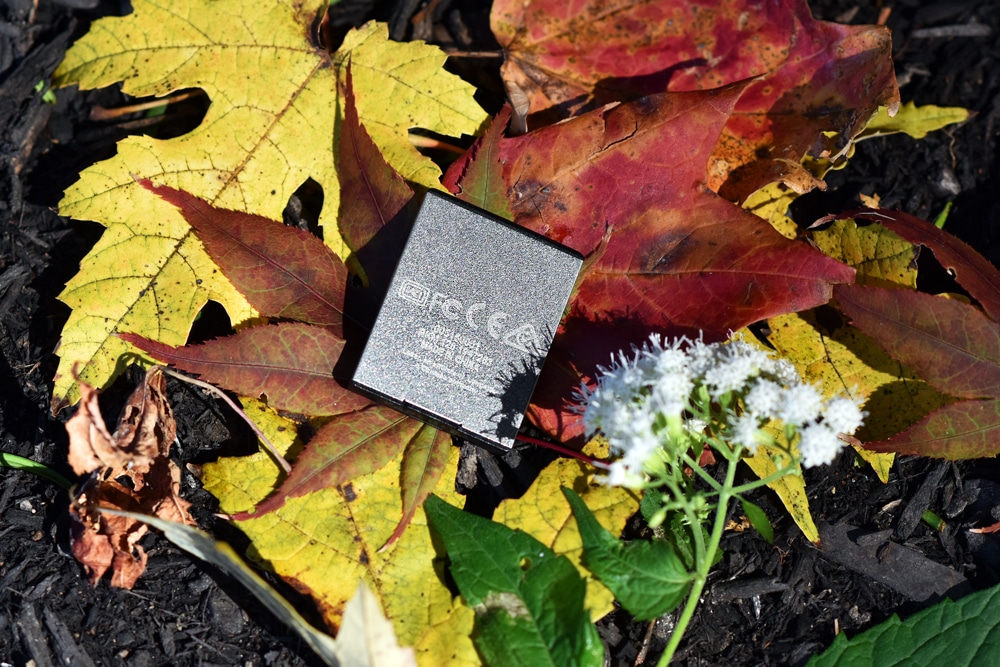
At almost roughly 1 and a half inches in length and just over an inch in width, the Lexar Professional CFexpress Type B cards are very small for something that can boast well over 1GB/s in performance. These things aren’t much bigger than SD cards, making them extremely portable when not inside your camera.

![Lexar CFExpress Card back side]() 

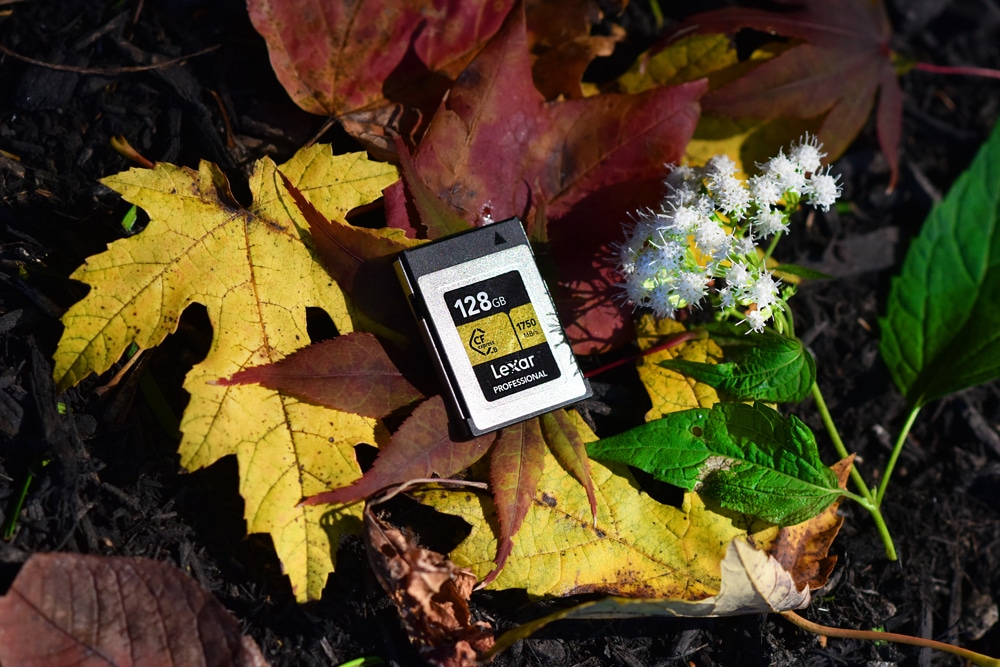
The card features a gold and black design, with the company name, capacity, and speed on the front.

## **Lexar Professional CFexpress Performance**

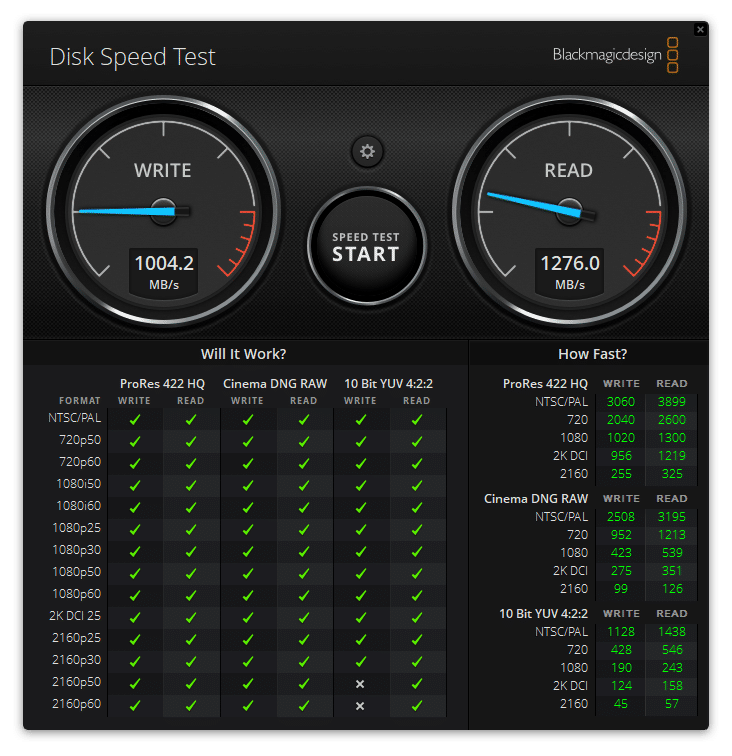
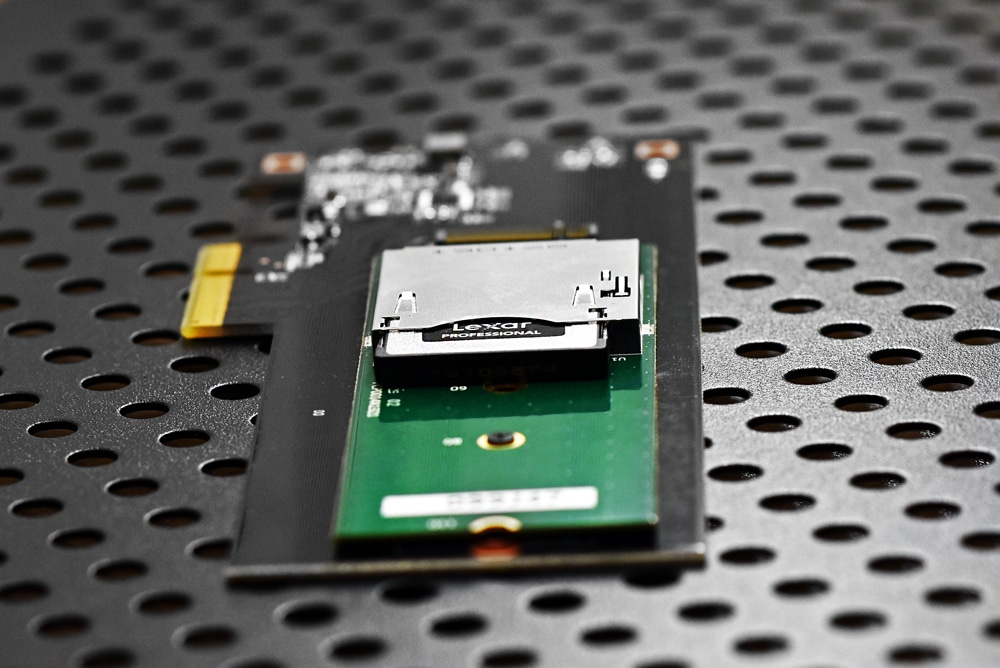
To gauge the performance of the Lexar Professional CFexpress card, we first tested it through the usual Blackmagic on a [Lenovo ThinkCentre P520](https://www.storagereview.com/review/lenovo-thinkstation-p520-review) via an edge card to M.2 to CFexpress adapter.

Here, the Lexar card hit 1,276MB/s read and 1,004MB/s write, checking off nearly all of the Blackmagic boxes.

![Lexar Professional CFexpress BlackMagice performance results]() 

In IOMeter, we first looked at 2MB sequential with both 1 and 4 thread, the latter which is a higher load that pushes the drive a bit more. For 1 thread, the Lexar Professional CFexpress hit 1.21GB/s read and 904MB/s write, while random performance hit 1.04GB/s read and 837MB/s write. For Random 4K, the Lexar card showed read speeds of 8,154 IOPS and writes speeds of 20,760 IOPS.

Looking at a 4-thread workload, the Lexar showed an impressive 1.65GB/s read and 1.03GB/s write in 2MB sequential test, while 2MB random posted 1.38GB/s read and 758MB/s write. Lastly, in random 4K performance, the Lexar Professional CFexpress hit 21,796 IOPS read and 54,995 IOPS write.

![Lexar CFexpress Type B card inside edge to m.2 to CFexpress adapter]() 

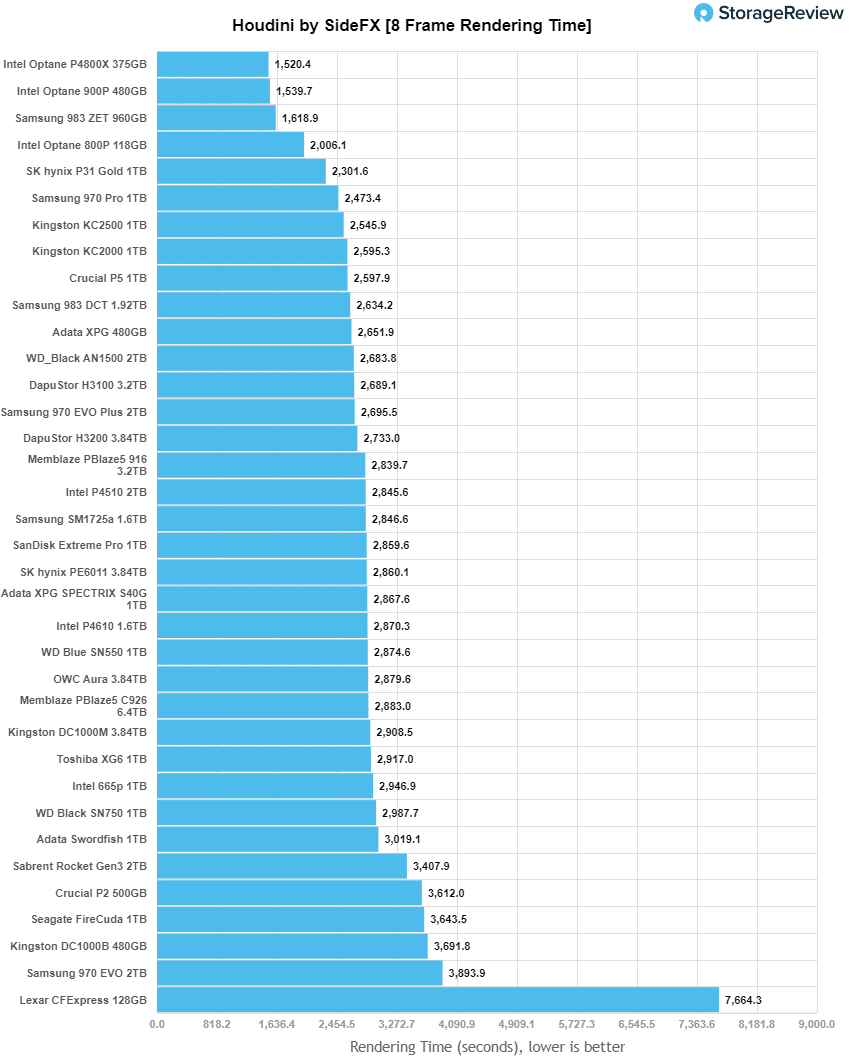
**Houdini by SideFX**

The Houdini test is specifically designed to evaluate storage performance as it relates to CGI rendering. The testbed for this application is a variant of the core Dell PowerEdge R740xd server type we use in the lab with dual Intel 6130 CPUs and 64GB DRAM. In this case, we installed Ubuntu Desktop (ubuntu-16.04.3-desktop-amd64) running bare metal. The output of the benchmark is measured in seconds to complete, with fewer being better.

The Maelstrom demo represents a section of the rendering pipeline that highlights the performance capabilities of storage by demonstrating its ability to effectively use the swap file as a form of extended memory. The test does not write out the result data or process the points in order to isolate the wall-time effect of the latency impact on the underlying storage component. The test itself is composed of five phases, three of which we run as part of the benchmark, which is as follows:

* Loads packed points from disk. This is the time to read from disk. This is single-threaded, which may limit overall throughput.
* Unpacks the points into a single flat array in order to allow them to be processed. If the points do not have a dependency on other points, the working set could be adjusted to stay in-core. This step is multi-threaded.
* (Not Run) Processes the points.
* Repacks them into bucketed blocks suitable for storing back to disk. This step is multi-threaded.
* (Not Run) Writes the bucketed blocks back out to disk.

Here, the Lexar Professional CFexpress had a score of 7,664.309\. Though it might be at the bottom of this chart, it isn’t a bad thing. This little memory card was so impressively fast, it was actually able to perform well across all of our other workloads as you will see below.

![]() 

**VDBench Workload Analysis**

When it comes to benchmarking storage devices, application testing is best, and synthetic testing comes in second place. While not a perfect representation of actual workloads, synthetic tests do help to baseline storage devices with a repeatability factor that makes it easy to do apples-to-apples comparison between competing solutions. These workloads offer a range of different testing profiles ranging from “four corners” tests, common database transfer size tests, to trace captures from different VDI environments.

All of these tests leverage the common vdBench workload generator, with a scripting engine to automate and capture results over a large compute testing cluster. This allows us to repeat the same workloads across a wide range of storage devices, including flash arrays and individual storage devices. Our testing process for these benchmarks fills the entire drive surface with data, then partitions a drive section equal to 5% of the drive capacity to simulate how the drive might respond to application workloads. This is different than full entropy tests which use 100% of the drive and take them into a steady state. As a result, these figures will reflect higher-sustained write speeds.

Profiles:

* 4K Random Read: 100% Read, 128 threads, 0-120% iorate
* 4K Random Write: 100% Write, 64 threads, 0-120% iorate
* 64K Sequential Read: 100% Read, 16 threads, 0-120% iorate
* 64K Sequential Write: 100% Write, 8 threads, 0-120% iorate

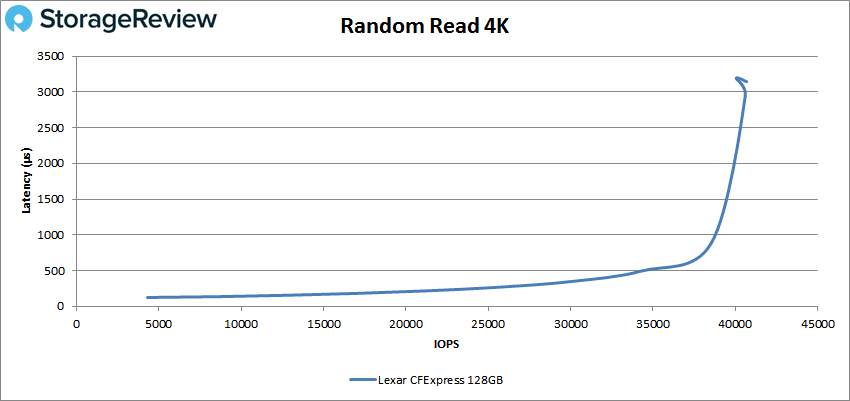
For random 4K read, the Lexar Professional CFexpress showed a peak score of 40,693 IOPS at a latency of 3,144.4µs (with a slight spike at the very end).![]()

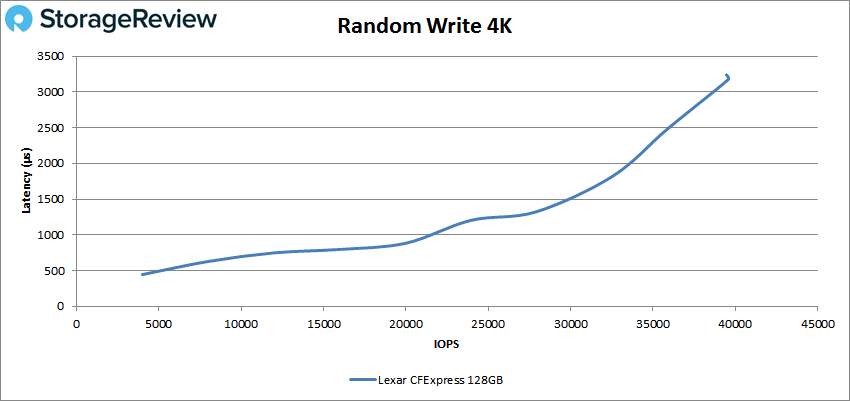
With random 4K write, the Lexar had a peak score of 39,578 IOPS with a latency of 3,175µs.![]()

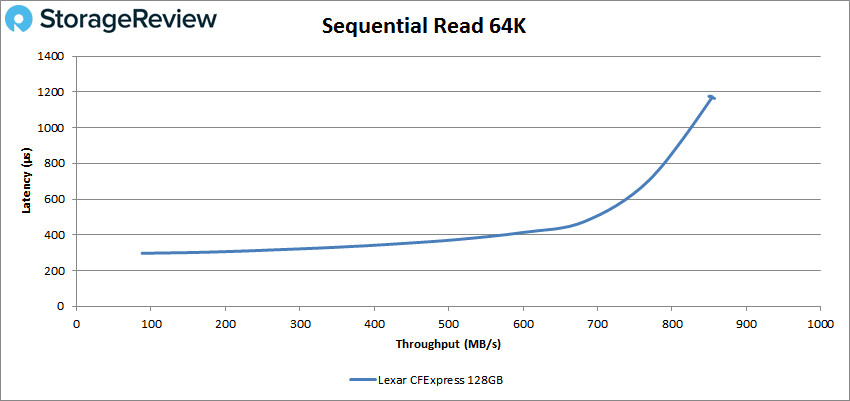
Moving on to sequential 64K read workloads, the Lexar CFexpress card posted a peak performance of 13,714 IOPS or 857MB/s at a latency of 1,164µs.

![]() 

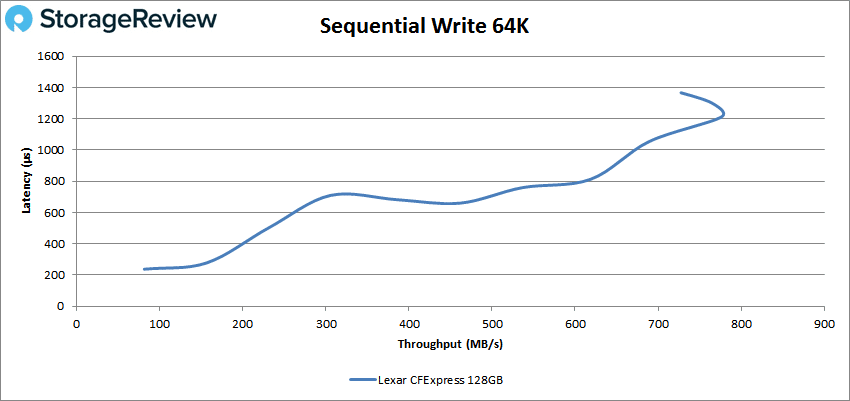
In write performance of the same test, the Lexar card peaked at 12,421 IOPS (or 776MB/s) at a latency of 1,212ms just before taking a noticeable spike in performance at the end.![]()

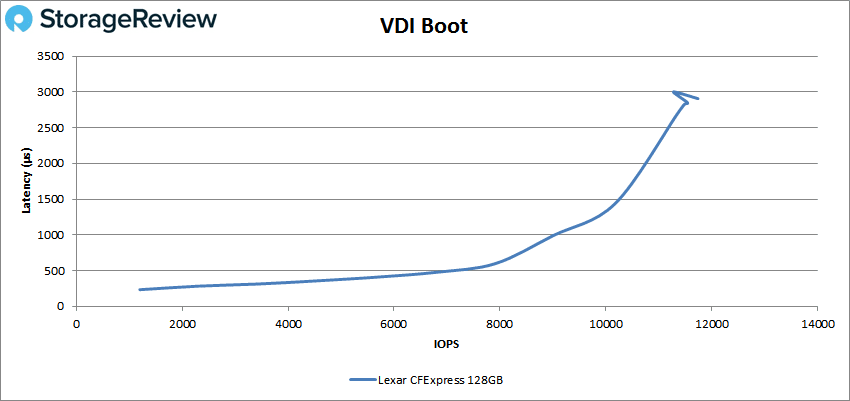
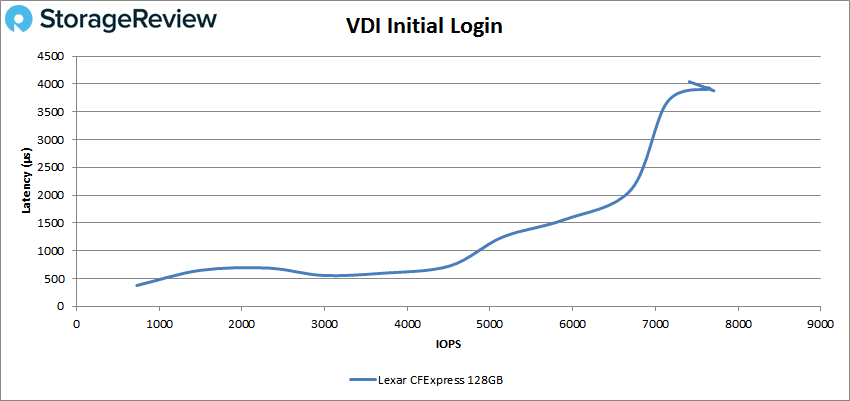
Next, we looked at our VDI benchmarks, which will tax the CFexpress card even further. These tests include Boot, Initial Login, and Monday Login. Looking at the Boot test, the Lexar Professional peaked at 11,742 IOPS with a latency of 2,906µs just before taking a slight spike in performance.![]() VDI Initial Login, the Lexar card showed some serious spikes in latency and IOPS throughout, peaking of 7,707 IOPS with a latency of 3,977µs before hitting a small spike at the very end again.![]()

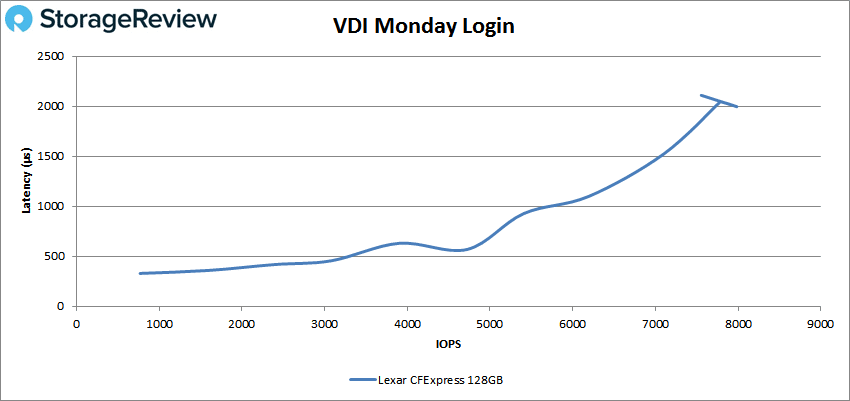
Finally, VDI Monday Login saw the Lexar card with a peak score of 7,976 IOPS and a latency of 1,998µs.

![]() 

## **Conclusion**

The launch of the Lexar Professional CFexpress card has certainly made a huge impact on the next generation of media cards, as it marks a huge step up in memory media technology. This Lexar CFexpress card is native NVMe, supports two lanes of PCI Express Gen 3, and is specifically designed for high-speed digital cameras. All of this means that media professionals will be able to effectively keep up with ever-increasing data that these cameras produce when using the new Lexar card, allowing them to capture and transfer high-quality images and RAW 4K video at impressively high speeds.

For testing, the NVMe-based Lexar Professional CFexpress card was fast enough to perform well across all of our workloads, as it is leaps and bounds better than other memory media. As such, we tested the card the same way we would any consumer SSD. We can’t stress enough how impressive it is that this little flash card was so fast it performed pretty much like a full system SSD. To put this in perspective, a while back we tried putting high-end SD cards through the same tests, but they immediately hit a wall and died.

We tested the Lexar card in both 1 and 4 thread tests, where it showed next-gen, bar-setting performance: For 1 thread, it posted 1.21GB/s read and 904MB/s write in 2MB sequential, 1.04GB/s read and 837MB/s write in 2MB random, and of 8,154 IOPS read and 20,760 IOPS write for random 4K. For a 4 thread workload, it showed 1.65GB/s read and 1.03GB/s write in 2MB sequential test, 1.38GB/s read, and 758MB/s write in 2MB random, and 21,796 IOPS read and 54,995 IOPS write in 4K performance.

Overall, the release of this new media storage solution was a huge success, even with limited platform support. The card offers leading performance at a decent cost (roughly $200 for the 128GB model, which is around $40 less than SanDisk’s CFexpress card), allowing photographers to keep up with the ever-changing technology and data requirements their industry demands.

[Lexar CFexpress Cards at Amazon](https://amzn.to/33SK0rY)

**Engage with StorageReview**

[Newsletter](https://www.storagereview.com/storage%5Fnewsletter) | [YouTube](https://www.youtube.com/user/StorageReview "Opens in a new window") | Podcast [iTunes](https://podcasts.apple.com/gb/podcast/storagereview-com-storage-reviews/id1060681115 "Opens in a new window")/[Spotify](https://open.spotify.com/show/1y6VnznABhHeOSMOmbDTz0 "Opens in a new window") | [Instagram](https://www.instagram.com/storagereview/ "Opens in a new window") | [Twitter](https://twitter.com/storagereview "Opens in a new window") | [TikTok](https://www.tiktok.com/@storagereview? "Opens in a new window") | [RSS Feed](https://www.storagereview.com/rss.xml)

![]()

### Lyle Smith

Lyle is a writer for StorageReview, covering a broad set of end user and enterprise IT topics. 

Previous post: [TYAN Transport HX TN83-B8251 Server Review](https://www.storagereview.com/review/tyan-transport-hx-tn83-b8251-server-review)

Next post: [Samsung PRO Plus SDXC Card Review](https://www.storagereview.com/review/samsung-pro-plus-sdxc-card-review)

Trusted Vendors

Products and solutions from our affiliate partners:

* [ ![Ubiquiti Logo](https://www.storagereview.com/wp-content/uploads/2024/11/2-1.webp) Ubiquiti ](https://store.ui.com/us/en?a%5Faid=StorageReview "Opens in a new window")
* [ ![Newegg Logo](https://www.storagereview.com/wp-content/uploads/2025/11/newegg.webp) Newegg ](https://click.linksynergy.com/fs-bin/click?id=g5terNMDhz0&offerid=1207190.18&subid=0&type=4 "Opens in a new window")
* [ ![Amazon Logo](https://www.storagereview.com/wp-content/uploads/2025/11/amazon.webp) Amazon ](https://amzn.to/4fLJUEW "Opens in a new window")

Newsletter

Subscribe to the StorageReview newsletter to stay up to date on the latest news and reviews. We promise no spam!

1  

Leave this field empty if you’re human: 

## Advertisement

Content Categories

[ Facebook ](https://www.facebook.com/@storagereview) [ X ](https://twitter.com/storagereview) [ Instagram ](https://www.instagram.com/storagereview/) [ LinkedIn ](https://www.linkedin.com/company/storagereview-com) [ YouTube ](https://www.youtube.com/user/storagereview?sub%5Fconfirmation=1) [ Email ](mailto:info@storagereview.com) [ Spotify ](https://open.spotify.com/show/1y6VnznABhHeOSMOmbDTz0) [ Reddit ](https://www.reddit.com/r/StorageReview/) [ Discord ](https://discord.gg/TwMHb4azdC) [ RSS ](https://www.storagereview.com/rss.xml) [ TikTok ](https://www.tiktok.com/@storagereview) 

Copyright © 1998-2025 Flying Pig Ventures, LLC Cincinnati, Ohio. All rights reserved.

Manage your privacy

To provide the best experiences, we and our partners use technologies like cookies to store and/or access device information. Consenting to these technologies will allow us and our partners to process personal data such as browsing behavior or unique IDs on this site and show (non-) personalized ads. Not consenting or withdrawing consent, may adversely affect certain features and functions.

Click below to consent to the above or make granular choices. Your choices will be applied to this site only. You can change your settings at any time, including withdrawing your consent, by using the toggles on the Cookie Policy, or by clicking on the manage consent button at the bottom of the screen.

Functional Functional Always active 

The technical storage or access is strictly necessary for the legitimate purpose of enabling the use of a specific service explicitly requested by the subscriber or user, or for the sole purpose of carrying out the transmission of a communication over an electronic communications network. 

Preferences Preferences 

The technical storage or access is necessary for the legitimate purpose of storing preferences that are not requested by the subscriber or user. 

Statistics Statistics 

The technical storage or access that is used exclusively for statistical purposes. The technical storage or access that is used exclusively for anonymous statistical purposes. Without a subpoena, voluntary compliance on the part of your Internet Service Provider, or additional records from a third party, information stored or retrieved for this purpose alone cannot usually be used to identify you. 

Marketing Marketing 

The technical storage or access is required to create user profiles to send advertising, or to track the user on a website or across several websites for similar marketing purposes. 

Statistics

Marketing

Features

Always active

Always active

* [Manage options](#)
* [Manage services](#)
* [Manage {vendor\_count} vendors](#)
* [Read more about these purposes](https://cookiedatabase.org/tcf/purposes/)

Accept Deny Manage options Save preferences [Manage options](#) 

* [{title}](#)
* [{title}](#)
* [{title}](#)

Manage your privacy

To provide the best experiences, we use technologies like cookies to store and/or access device information. Consenting to these technologies will allow us to process data such as browsing behavior or unique IDs on this site. Not consenting or withdrawing consent, may adversely affect certain features and functions.

Functional Functional Always active 

The technical storage or access is strictly necessary for the legitimate purpose of enabling the use of a specific service explicitly requested by the subscriber or user, or for the sole purpose of carrying out the transmission of a communication over an electronic communications network. 

Preferences Preferences 

The technical storage or access is necessary for the legitimate purpose of storing preferences that are not requested by the subscriber or user. 

Statistics Statistics 

The technical storage or access that is used exclusively for statistical purposes. The technical storage or access that is used exclusively for anonymous statistical purposes. Without a subpoena, voluntary compliance on the part of your Internet Service Provider, or additional records from a third party, information stored or retrieved for this purpose alone cannot usually be used to identify you. 

Marketing Marketing 

The technical storage or access is required to create user profiles to send advertising, or to track the user on a website or across several websites for similar marketing purposes. 

Statistics

Marketing

Features

Always active

Always active

* [Manage options](#)
* [Manage services](#)
* [Manage {vendor\_count} vendors](#)
* [Read more about these purposes](https://cookiedatabase.org/tcf/purposes/)

Accept Deny Manage options Save preferences [Manage options](#) 

* [{title}](#)
* [{title}](#)
* [{title}](#)

Manage consent Manage consent

```json
{"@context":"https:\/\/schema.org","@graph":[{"@type":"WebPage","@id":"https:\/\/www.storagereview.com\/review\/lexar-professional-cfexpress-type-b-card-review","url":"https:\/\/www.storagereview.com\/review\/lexar-professional-cfexpress-type-b-card-review","name":"Lexar Professional CFexpress Type B Card Review - StorageReview.com","isPartOf":{"@id":"https:\/\/www.storagereview.com\/#website"},"primaryImageOfPage":{"@id":"https:\/\/www.storagereview.com\/review\/lexar-professional-cfexpress-type-b-card-review#primaryimage"},"image":{"@id":"https:\/\/www.storagereview.com\/review\/lexar-professional-cfexpress-type-b-card-review#primaryimage"},"thumbnailUrl":"https:\/\/www.storagereview.com\/wp-content\/uploads\/2020\/10\/LexarCardReview-e1603823445713.gif","datePublished":"2020-10-12T15:44:01+00:00","dateModified":"2020-10-27T18:28:50+00:00","description":"The launch of the Lexar Professional CFexpress card has certainly made a huge impact on the next generation of media cards, as it marks a","breadcrumb":{"@id":"https:\/\/www.storagereview.com\/review\/lexar-professional-cfexpress-type-b-card-review#breadcrumb"},"inLanguage":"en-US","potentialAction":[{"@type":"ReadAction","target":["https:\/\/www.storagereview.com\/review\/lexar-professional-cfexpress-type-b-card-review"]}]},{"@type":"ImageObject","inLanguage":"en-US","@id":"https:\/\/www.storagereview.com\/review\/lexar-professional-cfexpress-type-b-card-review#primaryimage","url":"https:\/\/www.storagereview.com\/wp-content\/uploads\/2020\/10\/LexarCardReview-e1603823445713.gif","contentUrl":"https:\/\/www.storagereview.com\/wp-content\/uploads\/2020\/10\/LexarCardReview-e1603823445713.gif","width":400,"height":271,"caption":"Lexar Card Review"},{"@type":"BreadcrumbList","@id":"https:\/\/www.storagereview.com\/review\/lexar-professional-cfexpress-type-b-card-review#breadcrumb","itemListElement":[{"@type":"ListItem","position":1,"name":"Home","item":"https:\/\/www.storagereview.com\/"},{"@type":"ListItem","position":2,"name":"Review","item":"https:\/\/www.storagereview.com\/review"},{"@type":"ListItem","position":3,"name":"Lexar Professional CFexpress Type B Card Review"}]},{"@type":"WebSite","@id":"https:\/\/www.storagereview.com\/#website","url":"https:\/\/www.storagereview.com\/","name":"StorageReview.com","description":"StorageReview.com is a leading provider of news and reviews throughout the entire IT stack - from the datacenter to the edge, and all points in between.","publisher":{"@id":"https:\/\/www.storagereview.com\/#organization"},"potentialAction":[{"@type":"SearchAction","target":{"@type":"EntryPoint","urlTemplate":"https:\/\/www.storagereview.com\/?s={search_term_string}"},"query-input":{"@type":"PropertyValueSpecification","valueRequired":true,"valueName":"search_term_string"}}],"inLanguage":"en-US"},{"@type":"Organization","@id":"https:\/\/www.storagereview.com\/#organization","name":"StorageReview.com","url":"https:\/\/www.storagereview.com\/","logo":{"@type":"ImageObject","inLanguage":"en-US","@id":"https:\/\/www.storagereview.com\/#\/schema\/logo\/image\/","url":"https:\/\/www.storagereview.com\/wp-content\/uploads\/2020\/02\/Storage-Reviews-2-2.png","contentUrl":"https:\/\/www.storagereview.com\/wp-content\/uploads\/2020\/02\/Storage-Reviews-2-2.png","width":344,"height":61,"caption":"StorageReview.com"},"image":{"@id":"https:\/\/www.storagereview.com\/#\/schema\/logo\/image\/"},"sameAs":["https:\/\/x.com\/storagereview","http:\/\/youtube.com\/user\/storagereview"]}]}
```