---
description: The Seagate Personal Cloud is a small home or office NAS that acts as a private cloud for users when they are home or away. All the user&#039;s personal media...
title: Seagate Personal Cloud Review (2-Bay)
image: https://www.storagereview.com/wp-content/uploads/2015/03/StorageReview-Seagate-Personal-Cloud-Thumb.jpg
---

[![Storage Review]()](https://storagereview.com/)

---

[Facebook](https://www.facebook.com/@storagereview) [X (Twitter)](https://twitter.twitter.com/storagereview) [Instagram](https://www.instagram.com/storagereview/) [LinkedIn](https://www.linkedin.com/company/storagereview-com) [YouTube](https://www.youtube.com/user/storagereview?sub_confirmation=1) [Email](mailto:info@storagereview.com) [Spotify](https://open.spotify.com/show/1y6VnznABhHeOSMOmbDTz0) [Reddit](https://www.reddit.com/r/StorageReview/) [Discord](https://discord.gg/TwMHb4azdC) [RSS Feed](https://www.storagereview.com/rss.xml) [TikTok](https://www.tiktok.com/@storagereview)

[Facebook](https://www.facebook.com/@storagereview) [X (Twitter)](https://twitter.com/storagereview) [Instagram](https://www.instagram.com/storagereview/) [LinkedIn](https://www.linkedin.com/company/storagereview-com) [YouTube](https://www.youtube.com/user/storagereview?sub_confirmation=1) [Email](mailto:info@storagereview.com) [Spotify](https://open.spotify.com/show/1y6VnznABhHeOSMOmbDTz0) [Reddit](https://www.reddit.com/r/StorageReview/) [Discord](https://discord.gg/TwMHb4azdC) [RSS Feed](https://www.storagereview.com/rss.xml) [TikTok](https://www.tiktok.com/@storagereview)

[![StorageReview.com]()](https://www.storagereview.com)

≡ Menu

- [Home](https://www.storagereview.com/)
- [Storage Reviews](https://www.storagereview.com/review)
  - [Consumer Reviews](https://www.storagereview.com/consumer)
  - [Enterprise Reviews](https://www.storagereview.com/enterprise)
  - [Ubiquiti Reviews](https://www.storagereview.com/best/ubiquiti-reviews)
- [SR Merch](https://store.storagereview.com)
- [Leaderboards](https://www.storagereview.com/best)
  - [Best Storage Arrays](https://www.storagereview.com/best/storage-arrays)
  - [Best Enterprise SSDs](https://www.storagereview.com/best/enterprise-ssds)
  - [Best Servers](https://www.storagereview.com/best/servers)
  - [Best Desktops for Local AI](https://www.storagereview.com/best/desktops-local-ai)
  - [Best Laptops for Local AI](https://www.storagereview.com/best/laptops-local-ai)
  - [Best Local LLM Tools](https://www.storagereview.com/best/local-llm-tools)
  - [Agentic AI Hardware](https://www.storagereview.com/best/agentic-ai-hardware)
  - [Best SSDs & Hard Drives](https://www.storagereview.com/best_drives)
  - [Best Portable SSDs](https://www.storagereview.com/best/portable-ssds)
  - [Best Business Laptops](https://www.storagereview.com/best/business-laptops)
  - [Best Mobile Workstations](https://www.storagereview.com/best/mobile-workstations)
  - [Best Desktop Workstations](https://www.storagereview.com/best/desktop-workstations)
  - [Best Laptop Battery Life](https://www.storagereview.com/best/laptop-battery-life)
- [Storage Reference Guide](https://www.storagereview.com/storage-reference-guide)
- [About SR](https://www.storagereview.com/about-storagereview)
  - [StorageReview.com Sweepstakes Rules and Regulations](https://www.storagereview.com/storagereview-com-sweepstakes-rules-and-regulations)

Search

[Home](https://www.storagereview.com/) » [Review](https://www.storagereview.com/review) » Seagate Personal Cloud Review (2-Bay)

# Seagate Personal Cloud Review (2-Bay)

by Adam Armstrong on March 5, 2015

[Consumer](https://www.storagereview.com/consumer)  ◇  [NAS](https://www.storagereview.com/consumer/nas)

The [Seagate Personal Cloud](https://www.storagereview.com/seagate_personal_cloud_and_seagate_personal_cloud_2bay_announced) is a small home or office NAS that acts as a private cloud for users when they are home or away. All the user's personal media be it photos, videos, or multimedia collections can be stored on the Personal Cloud and streamed to a television, mobile device, or DLNA compatible device such as a gaming console. The Personal Cloud can also be used as a backup and sync device for mobile devices, PCs, and Macs.

![]()

The Personal Cloud uses Seagate’s Media application and Sdrive to stream its contents to several devices including: Smart TVs (LG and Samsung 2012 models or later), Blu-Ray players (with Smart-hub again 2012 models or later), iOS and Android smartphones, iPad, Android, Kindle, and Windows 8/RT tablets, streaming media players such as Roku, Google Chromecast, and Apple TV (via Apple AirPlay) and DLNA devices such as Sony’s PlayStation 3 & 4, and Xbox 360 & Xbox One. Users can access and manage their multimedia library from anywhere with the Seagate Media app or through a Seagate Access account.

Seagate Personal Cloud isn’t just a media repository/player. Lots of important data can be backuped and synced through Personal Cloud either at home or on the go. Not only does the Personal Cloud backup and sync computer and mobile device content automatically, it also allows users to set backup schedules and the 2-Bay has a mirrored configuration for further data protection. Another feature of Personal Cloud is using secondary cloud services to make yet an additional copy of users data, allows users to move data to public clouds to free up space, and allows data on public clouds to be moved into local storage. Personal Cloud works with: Amazon S3, Box, Baidu, DropBox, Google Drive, HiDrive, and Yandex.Disk.

The Seagate Personal Cloud 2-Bay starts at $269.99 for the 4TB and has a 2-year limited warranty.

**Seagate Personal Cloud 2-Bay Specifications:**

- Capacity: 4TB, 6TB, **8TB**
- System requirements:
- Windows 8, Windows 7, Windows Vista
- Mac OS X 10.7 or later
- Up to date Internet Explorer Firefox, Chrome, or Safari web browser
- External ports: Ethernet x 1
- Dimensions (LxWxH): 9.21 x 9.25 x 1.89 in (234 x 235.15 x 48 mm)
- Weight: 4.8 lbs. (2.18 kg)

**Design and build**

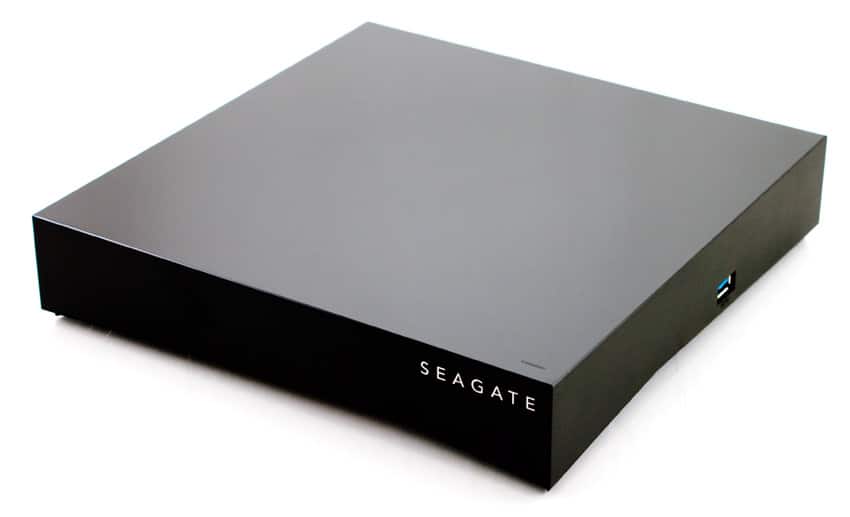
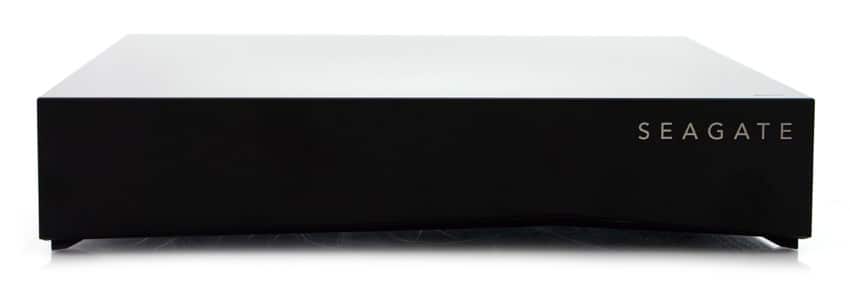
The Seagate Cloud 2-Bay is a black plastic box about two inches tall that is reflective on top and has a matt finish on the sides. The 2-bay model is twice as wide as the 1-bay as the drives are side by side as opposed to stacked. The front of the device has the Seagate branding on the top right hand side with an indicator light above the branding on the top of the device. 

![]()

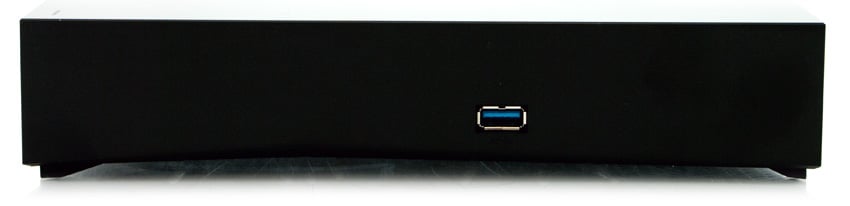
On the right hand side of the device is a USB 3.0 on the side.

![]()

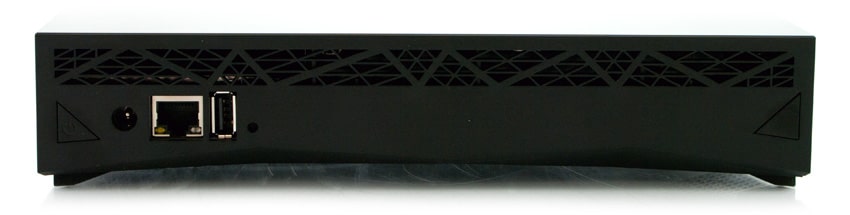
Moving around to the rear of the device, starting from left to right we see the power button, the power inlet, the Ethernet port, and a USB 2.0 port. Ventilation runs along the top of the rear of the device as well as most of the bottom. The ventilation is in the same tessellating triangle pattern that Seagate used on its Backup Plus without the blue bottom.

![]()

**Usability**

The Seagate Personal Cloud comes with a quick start guide. Essentially, plug it in, connect it to a wireless router via the Ethernet cable that is included in the box, turn it on, and then use the web interface on a network attached computer (access Personal Cloud through Networks on a PC and through Shared on a Mac). Follow the instructions on the web interface to finish the setup. 

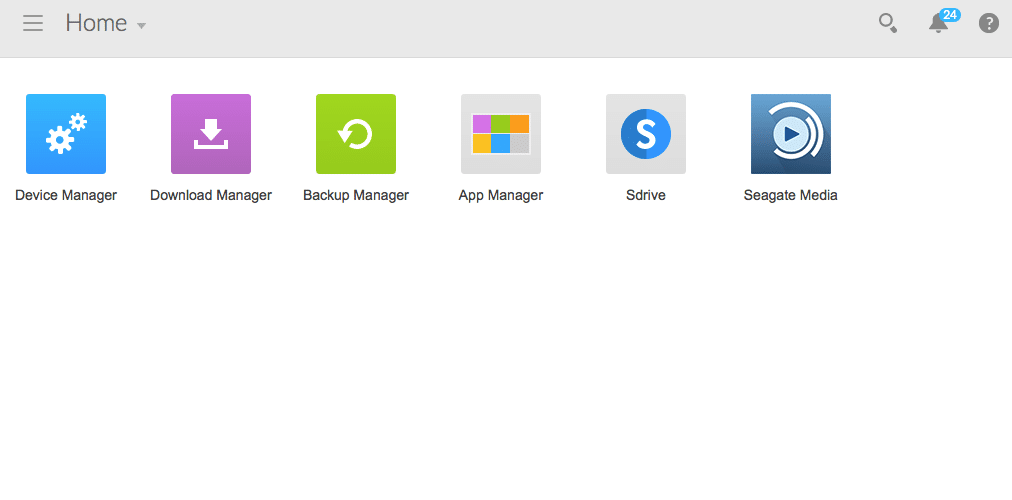
The device may have to go through a firmware update or two before it launches. Once setup is complete user will be brought to a home screen where they can access the default apps: Device Manager, Download Manager, Backup Manager, App manager, Sdrive, and Seagate Media.

![]()

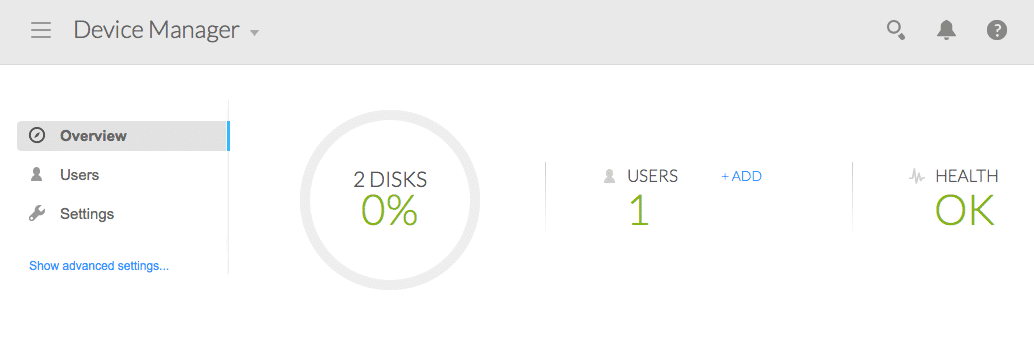
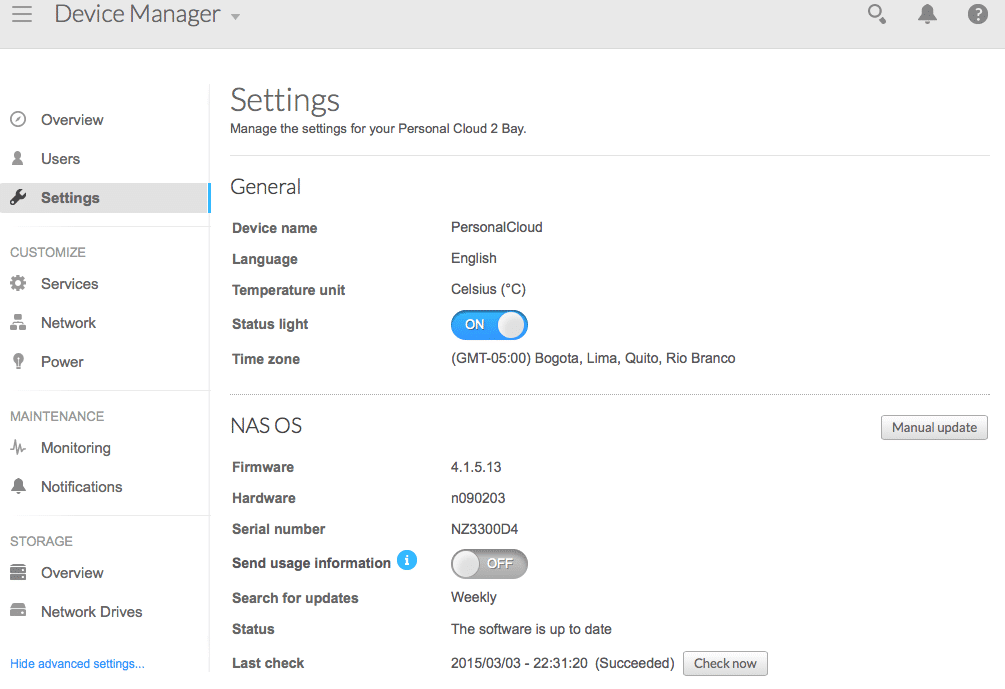
The Device Manager gives users an overall view of the capacity used, the health of the device, and a list of users. Through the setting tab on the left hand side users can get a more in-depth look at certain aspects such as network, power, operating system, and storage overview.

![]() ![]()

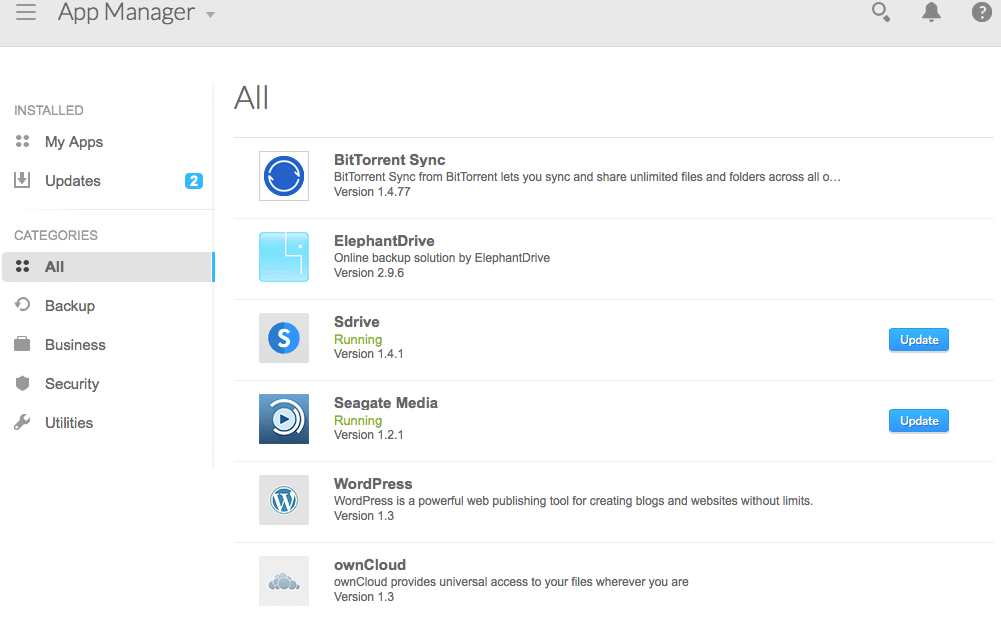
The App Manager is an app “store” where users can download various apps offered by Seagate.

![]()

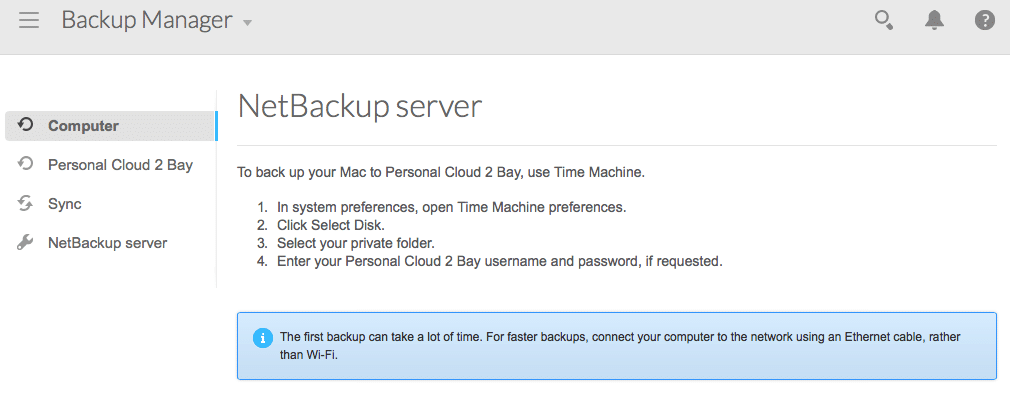
And Backup Manager allows users to schedule backups and syncs of their various network connected devices.

![]()

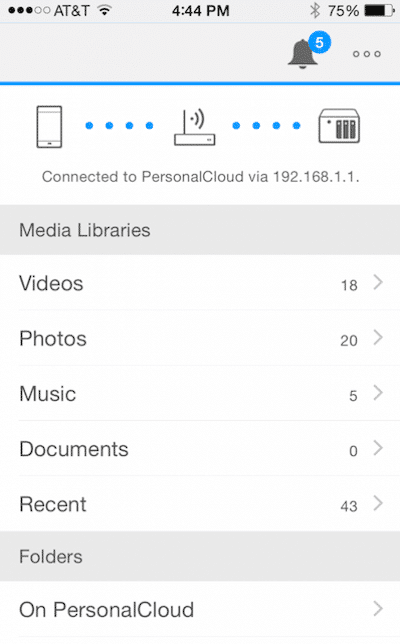
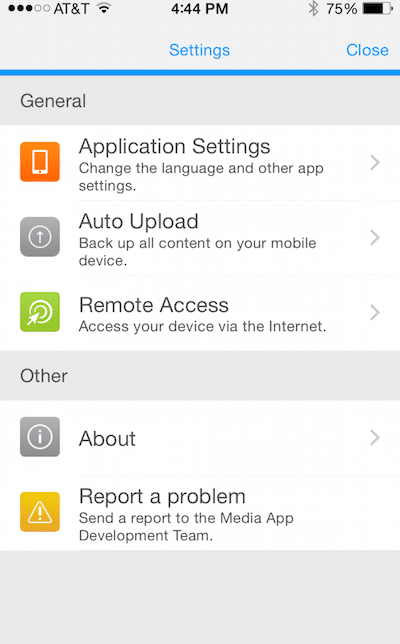
Seagate also provides mobile apps for remote access. Below is a Seagate Media app for iOS where users can access and manage their media library as well as upload and download files

![]()      ![]()  

**Performance**

Prior to initiating the [fio synthetic benchmarks](https://www.storagereview.com/fio_flexible_i_o_tester_synthetic_benchmark), our lab preconditions the device into steady state under a heavy load of 16 threads with an outstanding queue of 16 per thread. Using a 25GB test file from a single shared folder, the Personal Cloud (mirrored) posted speeds of 12.5MB/s read and 84.6MB/s write. These speeds should be enough for the everyday consumer under the use cases the device is intended. In the event more performance is desired, Seagate has a series of banded NAS solutions that scale up with higher usage/capacity needs. 

**Conclusion**

The Seagate Personal Cloud enables home users to have their own private cloud for media and data storage. Personal cloud streams locally to most devices including newer Smart TVs, tablets, smartphones, and data streaming devices. Users can access their Personal Clouds anywhere they have an Internet connection through Seagate’s Media app and Sdrive. Overall the configuration and usability of the device is very good, the iOS apps for instance have a nice, clean UI and should be pretty easy for anyone to pick up and run with. 

Our review is of the two-bay model, though both single and dual-drive models have the same software and features, the 2-bay simply allows for additional protection through drive mirroring. From a performance perspective the Personal Cloud isn't a screamer, but has enough speed for what the vast majority will use it for. The end result is a simple to use cloud device that has a lot of integration points for file access.

**Pros**

- Easy to set up (we had it up in running in a few minutes minus the firmware updates)
- Simple management, good UI
- Variety of backup options

**Cons**

- Limited amount of apps in the App Manager

**Bottom Line**

The Seagate Personal Cloud is ideal for the home user or workgroup that wants to access to their files anywhere, anytime. Users also have a backup and sync option with the ability to backup again to a public cloud or move data back and forth for additional peace of mind.

[Seagate Personal Cloud at Amazon](http://www.amazon.com/s/?_encoding=UTF8&camp=1789&creative=390957&field-keywords=Seagate%20Personal%20Cloud&linkCode=ur2&tag=storagereviewcom-20&url=search-alias%3Daps&linkId=2NKBGOI5F3HR2ZZF)![]()

[Discuss this review](http://forums.storagereview.com/index.php/topic/37458-seagate-personal-cloud-review-2-bay/)

**Engage with StorageReview**

[Newsletter](https://www.storagereview.com/storage_newsletter) |  [YouTube](https://www.youtube.com/user/StorageReview "Opens in a new window") | Podcast  [iTunes](https://podcasts.apple.com/gb/podcast/storagereview-com-storage-reviews/id1060681115 "Opens in a new window")/ [Spotify](https://open.spotify.com/show/1y6VnznABhHeOSMOmbDTz0 "Opens in a new window") |  [Instagram](https://www.instagram.com/storagereview/ "Opens in a new window") |  [Twitter](https://twitter.com/storagereview "Opens in a new window") |  [TikTok](https://www.tiktok.com/@storagereview? "Opens in a new window") |  [RSS Feed](https://www.storagereview.com/rss.xml)

![]()

### Adam Armstrong

Adam is the chief news editor for StorageReview.com, managing our internal and freelance content teams.

Previous post: [Blackmagic MultiDock Review](https://www.storagereview.com/review/blackmagic-multidock-review)

Next post: [Toshiba Canvio AeroCast Wireless HDD Review](https://www.storagereview.com/review/toshiba-canvio-aerocast-wireless-hdd-review)

Trusted Vendors

Products and solutions from our affiliate partners:

- [  
  ![Ubiquiti Logo]()  
   Ubiquiti](https://store.ui.com/us/en?a_aid=StorageReview "Opens in a new window")
- [  
  ![Newegg Logo]()  
   Newegg](https://click.linksynergy.com/fs-bin/click?id=g5terNMDhz0&offerid=1207190.18&subid=0&type=4 "Opens in a new window")
- [  
  ![Amazon Logo]() Amazon](https://amzn.to/4fLJUEW "Opens in a new window")

Newsletter

Subscribe to the StorageReview newsletter to stay up to date on the latest news and reviews. We promise no spam!

1  

Leave this field empty if you’re human:

## Advertisement

Content Categories

[Facebook](https://www.facebook.com/@storagereview) [X](https://twitter.com/storagereview) [Instagram](https://www.instagram.com/storagereview/) [LinkedIn](https://www.linkedin.com/company/storagereview-com) [YouTube](https://www.youtube.com/user/storagereview?sub_confirmation=1) [Email](mailto:info@storagereview.com) [Spotify](https://open.spotify.com/show/1y6VnznABhHeOSMOmbDTz0) [Reddit](https://www.reddit.com/r/StorageReview/) [Discord](https://discord.gg/TwMHb4azdC) [RSS](https://www.storagereview.com/rss.xml) [TikTok](https://www.tiktok.com/@storagereview)

Copyright © 1998-2025 Flying Pig Ventures, LLC Cincinnati, Ohio. All rights reserved.

Manage your privacy

To provide the best experiences, we and our partners use technologies like cookies to store and/or access device information. Consenting to these technologies will allow us and our partners to process personal data such as browsing behavior or unique IDs on this site and show (non-) personalized ads. Not consenting or withdrawing consent, may adversely affect certain features and functions.

Click below to consent to the above or make granular choices. Your choices will be applied to this site only. You can change your settings at any time, including withdrawing your consent, by using the toggles on the Cookie Policy, or by clicking on the manage consent button at the bottom of the screen.

Functional Functional Always active

The technical storage or access is strictly necessary for the legitimate purpose of enabling the use of a specific service explicitly requested by the subscriber or user, or for the sole purpose of carrying out the transmission of a communication over an electronic communications network.

Preferences Preferences

The technical storage or access is necessary for the legitimate purpose of storing preferences that are not requested by the subscriber or user.

Statistics Statistics

The technical storage or access that is used exclusively for statistical purposes. The technical storage or access that is used exclusively for anonymous statistical purposes. Without a subpoena, voluntary compliance on the part of your Internet Service Provider, or additional records from a third party, information stored or retrieved for this purpose alone cannot usually be used to identify you.

Marketing Marketing

The technical storage or access is required to create user profiles to send advertising, or to track the user on a website or across several websites for similar marketing purposes.

Statistics

Marketing

Features

Always active

Always active

- Manage options
- Manage services
- Manage {vendor\_count} vendors
- [Read more about these purposes](https://cookiedatabase.org/tcf/purposes/)

Accept Deny Manage options Save preferences Manage options

- {title}
- {title}
- {title}

Manage your privacy

To provide the best experiences, we use technologies like cookies to store and/or access device information. Consenting to these technologies will allow us to process data such as browsing behavior or unique IDs on this site. Not consenting or withdrawing consent, may adversely affect certain features and functions.

Functional Functional Always active

The technical storage or access is strictly necessary for the legitimate purpose of enabling the use of a specific service explicitly requested by the subscriber or user, or for the sole purpose of carrying out the transmission of a communication over an electronic communications network.

Preferences Preferences

The technical storage or access is necessary for the legitimate purpose of storing preferences that are not requested by the subscriber or user.

Statistics Statistics

The technical storage or access that is used exclusively for statistical purposes. The technical storage or access that is used exclusively for anonymous statistical purposes. Without a subpoena, voluntary compliance on the part of your Internet Service Provider, or additional records from a third party, information stored or retrieved for this purpose alone cannot usually be used to identify you.

Marketing Marketing

The technical storage or access is required to create user profiles to send advertising, or to track the user on a website or across several websites for similar marketing purposes.

Statistics

Marketing

Features

Always active

Always active

- Manage options
- Manage services
- Manage {vendor\_count} vendors
- [Read more about these purposes](https://cookiedatabase.org/tcf/purposes/)

Accept Deny Manage options Save preferences Manage options

- {title}
- {title}
- {title}

Manage consent Manage consent

```json
{"@context":"https:\/\/schema.org","@graph":[{"@type":"WebPage","@id":"https:\/\/www.storagereview.com\/review\/seagate-personal-cloud-review-2-bay","url":"https:\/\/www.storagereview.com\/review\/seagate-personal-cloud-review-2-bay","name":"Seagate Personal Cloud Review (2-Bay) - StorageReview.com","isPartOf":{"@id":"https:\/\/www.storagereview.com\/#website"},"primaryImageOfPage":{"@id":"https:\/\/www.storagereview.com\/review\/seagate-personal-cloud-review-2-bay#primaryimage"},"image":{"@id":"https:\/\/www.storagereview.com\/review\/seagate-personal-cloud-review-2-bay#primaryimage"},"thumbnailUrl":"https:\/\/www.storagereview.com\/wp-content\/uploads\/2015\/03\/StorageReview-Seagate-Personal-Cloud-Thumb.jpg","datePublished":"2015-03-05T05:00:00+00:00","dateModified":"2020-02-06T10:15:41+00:00","breadcrumb":{"@id":"https:\/\/www.storagereview.com\/review\/seagate-personal-cloud-review-2-bay#breadcrumb"},"inLanguage":"en-US","potentialAction":[{"@type":"ReadAction","target":["https:\/\/www.storagereview.com\/review\/seagate-personal-cloud-review-2-bay"]}]},{"@type":"ImageObject","inLanguage":"en-US","@id":"https:\/\/www.storagereview.com\/review\/seagate-personal-cloud-review-2-bay#primaryimage","url":"https:\/\/www.storagereview.com\/wp-content\/uploads\/2015\/03\/StorageReview-Seagate-Personal-Cloud-Thumb.jpg","contentUrl":"https:\/\/www.storagereview.com\/wp-content\/uploads\/2015\/03\/StorageReview-Seagate-Personal-Cloud-Thumb.jpg","width":100,"height":61},{"@type":"BreadcrumbList","@id":"https:\/\/www.storagereview.com\/review\/seagate-personal-cloud-review-2-bay#breadcrumb","itemListElement":[{"@type":"ListItem","position":1,"name":"Home","item":"https:\/\/www.storagereview.com\/"},{"@type":"ListItem","position":2,"name":"Review","item":"https:\/\/www.storagereview.com\/review"},{"@type":"ListItem","position":3,"name":"Seagate Personal Cloud Review (2-Bay)"}]},{"@type":"WebSite","@id":"https:\/\/www.storagereview.com\/#website","url":"https:\/\/www.storagereview.com\/","name":"StorageReview.com","description":"StorageReview.com is a leading provider of news and reviews throughout the entire IT stack - from the datacenter to the edge, and all points in between.","publisher":{"@id":"https:\/\/www.storagereview.com\/#organization"},"potentialAction":[{"@type":"SearchAction","target":{"@type":"EntryPoint","urlTemplate":"https:\/\/www.storagereview.com\/?s={search_term_string}"},"query-input":{"@type":"PropertyValueSpecification","valueRequired":true,"valueName":"search_term_string"}}],"inLanguage":"en-US"},{"@type":"Organization","@id":"https:\/\/www.storagereview.com\/#organization","name":"StorageReview.com","url":"https:\/\/www.storagereview.com\/","logo":{"@type":"ImageObject","inLanguage":"en-US","@id":"https:\/\/www.storagereview.com\/#\/schema\/logo\/image\/","url":"https:\/\/www.storagereview.com\/wp-content\/uploads\/2020\/02\/Storage-Reviews-2-2.png","contentUrl":"https:\/\/www.storagereview.com\/wp-content\/uploads\/2020\/02\/Storage-Reviews-2-2.png","width":344,"height":61,"caption":"StorageReview.com"},"image":{"@id":"https:\/\/www.storagereview.com\/#\/schema\/logo\/image\/"},"sameAs":["https:\/\/x.com\/storagereview","http:\/\/youtube.com\/user\/storagereview"]}]}
```