---
description: The Dell Latitude 7450 Ultralight more than impressed us with its low weight and business-friendly features.
title: Dell Latitude 7450 Ultralight Review
image: https://www.storagereview.com/wp-content/uploads/2024/07/StorageReview-Dell-Latitude-7450-07.jpg
---

[![Storage Review]()](https://storagereview.com/)

---

[Facebook](https://www.facebook.com/@storagereview) [X (Twitter)](https://twitter.twitter.com/storagereview) [Instagram](https://www.instagram.com/storagereview/) [LinkedIn](https://www.linkedin.com/company/storagereview-com) [YouTube](https://www.youtube.com/user/storagereview?sub_confirmation=1) [Email](mailto:info@storagereview.com) [Spotify](https://open.spotify.com/show/1y6VnznABhHeOSMOmbDTz0) [Reddit](https://www.reddit.com/r/StorageReview/) [Discord](https://discord.gg/TwMHb4azdC) [RSS Feed](https://www.storagereview.com/rss.xml) [TikTok](https://www.tiktok.com/@storagereview)

[Facebook](https://www.facebook.com/@storagereview) [X (Twitter)](https://twitter.com/storagereview) [Instagram](https://www.instagram.com/storagereview/) [LinkedIn](https://www.linkedin.com/company/storagereview-com) [YouTube](https://www.youtube.com/user/storagereview?sub_confirmation=1) [Email](mailto:info@storagereview.com) [Spotify](https://open.spotify.com/show/1y6VnznABhHeOSMOmbDTz0) [Reddit](https://www.reddit.com/r/StorageReview/) [Discord](https://discord.gg/TwMHb4azdC) [RSS Feed](https://www.storagereview.com/rss.xml) [TikTok](https://www.tiktok.com/@storagereview)

[![StorageReview.com]()](https://www.storagereview.com)

≡ Menu

- [Home](https://www.storagereview.com/)
- [Storage Reviews](https://www.storagereview.com/review)
  - [Consumer Reviews](https://www.storagereview.com/consumer)
  - [Enterprise Reviews](https://www.storagereview.com/enterprise)
  - [Ubiquiti Reviews](https://www.storagereview.com/best/ubiquiti-reviews)
- [SR Merch](https://store.storagereview.com)
- [Leaderboards](https://www.storagereview.com/best)
  - [Best Storage Arrays](https://www.storagereview.com/best/storage-arrays)
  - [Best Enterprise SSDs](https://www.storagereview.com/best/enterprise-ssds)
  - [Best Servers](https://www.storagereview.com/best/servers)
  - [Best Desktops for Local AI](https://www.storagereview.com/best/desktops-local-ai)
  - [Best Laptops for Local AI](https://www.storagereview.com/best/laptops-local-ai)
  - [Best Local LLM Tools](https://www.storagereview.com/best/local-llm-tools)
  - [Agentic AI Hardware](https://www.storagereview.com/best/agentic-ai-hardware)
  - [Best SSDs & Hard Drives](https://www.storagereview.com/best_drives)
  - [Best Portable SSDs](https://www.storagereview.com/best/portable-ssds)
  - [Best Business Laptops](https://www.storagereview.com/best/business-laptops)
  - [Best Mobile Workstations](https://www.storagereview.com/best/mobile-workstations)
  - [Best Desktop Workstations](https://www.storagereview.com/best/desktop-workstations)
  - [Best Laptop Battery Life](https://www.storagereview.com/best/laptop-battery-life)
- [Storage Reference Guide](https://www.storagereview.com/storage-reference-guide)
- [About SR](https://www.storagereview.com/about-storagereview)
  - [StorageReview.com Sweepstakes Rules and Regulations](https://www.storagereview.com/storagereview-com-sweepstakes-rules-and-regulations)

Search

[Home](https://www.storagereview.com/) » [Review](https://www.storagereview.com/review) » Dell Latitude 7450 Ultralight Review

# Dell Latitude 7450 Ultralight Review

by Charles P. Jefferies on July 30, 2024

[Consumer](https://www.storagereview.com/consumer)  ◇  [Workstation](https://www.storagereview.com/consumer/workstation)

Latitude is Dell’s renowned business laptop brand. The 14-inch Latitude 7450 reviewed here is part of the 7000 series, which sits above the entry-level 3000 and midrange 5000 series but isn’t quite as elite as the 9000 series.

The Latitude 7450’s three flavors include an aluminum model, an aluminum 2-in-1 convertible, and the Ultralight model we’re reviewing. Designed for everyday productivity, this laptop is based around Intel’s “Meteor Lake” Core Ultra processors and offers all the accouterments business IT looks for, including Intel vPro remote management and enterprise support.

## Dell Latitude 7450 Ultralight Design and Ports

How light is ultralight? It’s 2.33 pounds by Dell’s definition, which is scant for a 14-inch laptop. The Ultralight is over a half-pound lighter than the aluminum Latitude 7450 (2.92 pounds). It’s not the thinnest laptop we’ve tested, at 0.7 by 12.3 by 8.7 inches, but otherwise has about the same footprint as the [Lenovo ThinkPad X1 Carbon Gen 12](https://www.storagereview.com/review/lenovo-thinkpad-x1-carbon-gen-12-review) (0.6 x 12.3 x 8.5 inches). The Latitude is still lighter, if barely (the ThinkPad is 2.42 pounds).

![Dell Latitude 7450 Ultralight Lid](https://www.storagereview.com/wp-content/uploads/2024/07/StorageReview-Dell-Latitude-7450-10.jpg)

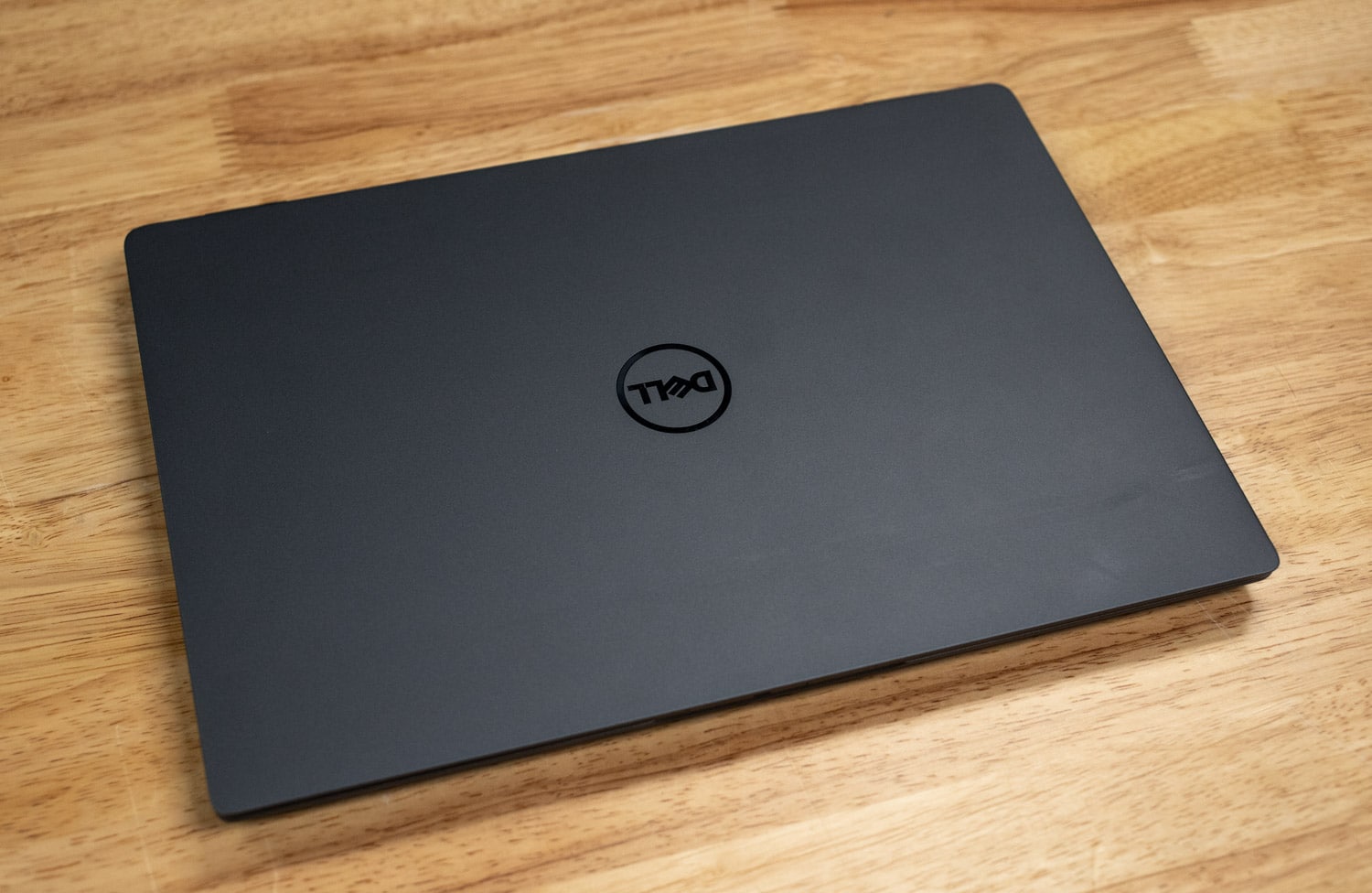
Much of the weight savings come from using magnesium instead of aluminum. It almost feels and looks like plastic; telltale signs it’s metal are a scratchy sound when you run your fingers across it and a naturally cool feel (temperature-wise, that is). To Dell’s credit, up to 90% of the magnesium is recycled.

![](https://www.storagereview.com/wp-content/uploads/2024/07/StorageReview-Dell-Latitude-7450-UL-Flex-1024x622.jpg)

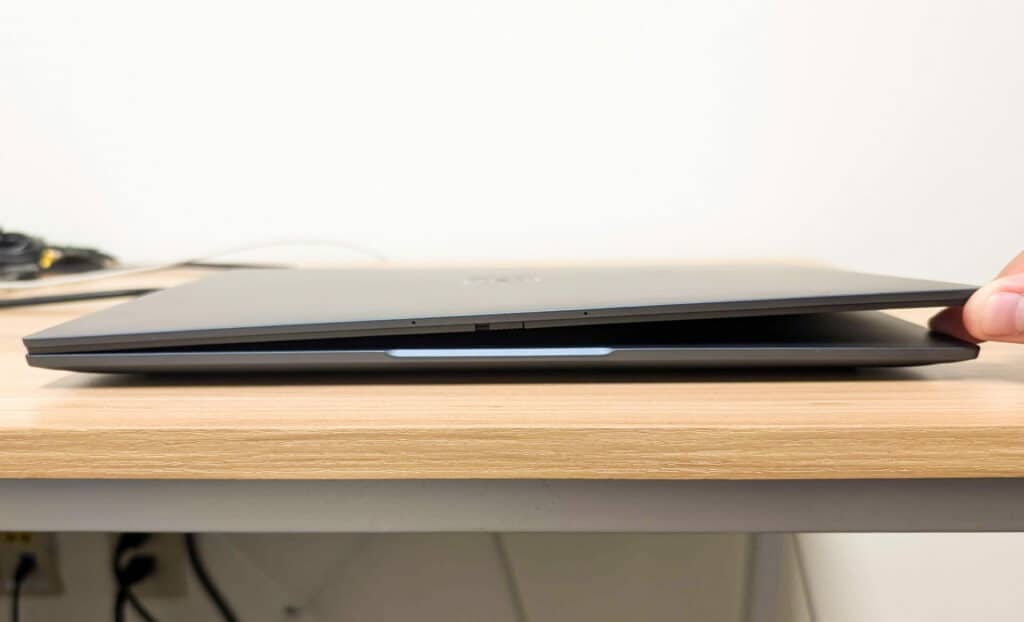
The strength of this laptop is less impressive; opening the lid by its corner creates rather severe flex and the chassis also shows a lot of flex, which we don’t care for. This probably isn’t a laptop you’d want to put in your bag without a protective sleeve and the lid should be opened carefully.

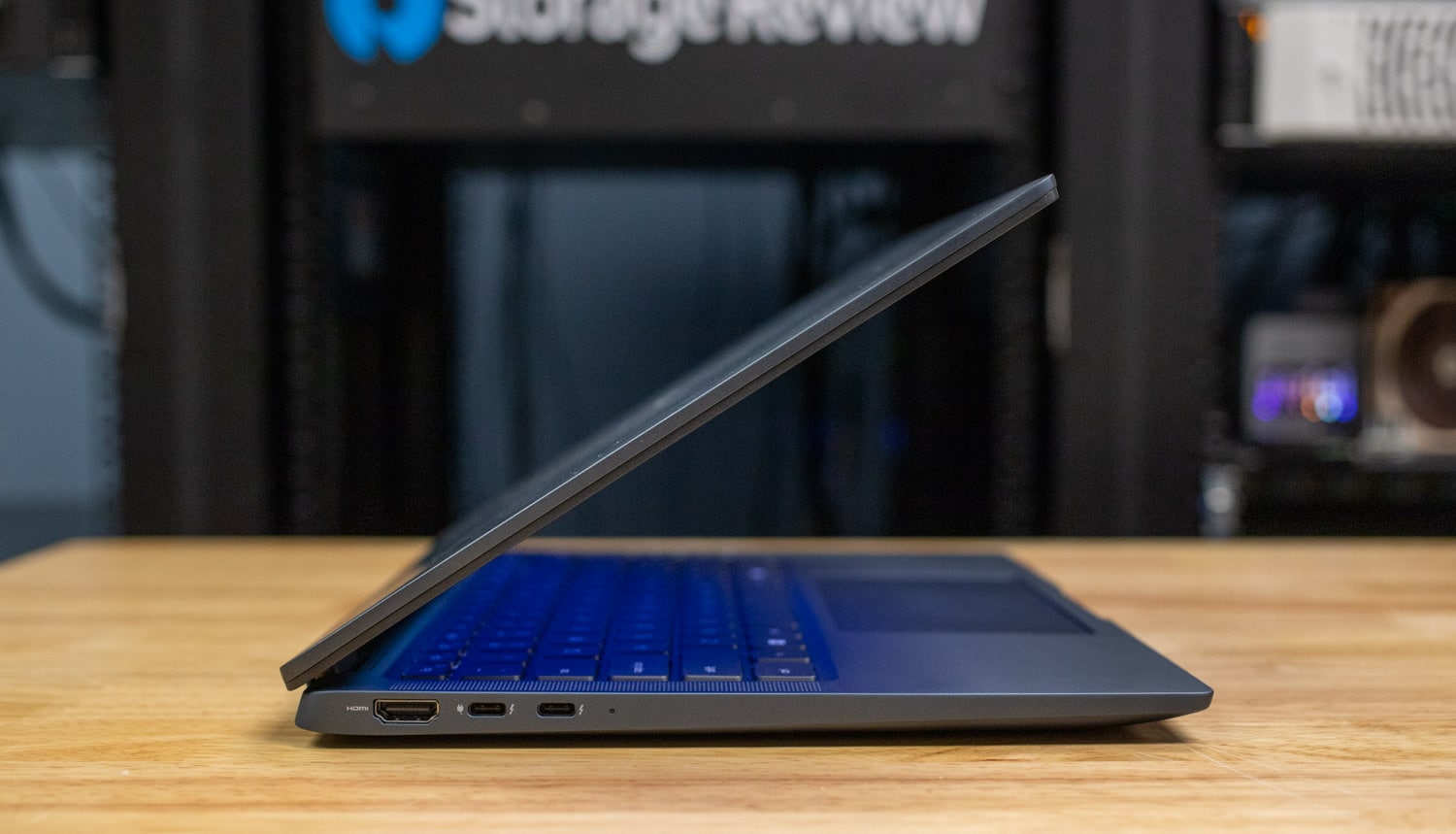
Port selection starts on the left edge with HDMI 2.1 video output and a pair of Thunderbolt 4/USB Type-C ports. The included power adapter plugs into either of the latter.

![Dell Latitude 7450 Ultralight Left Ports]()

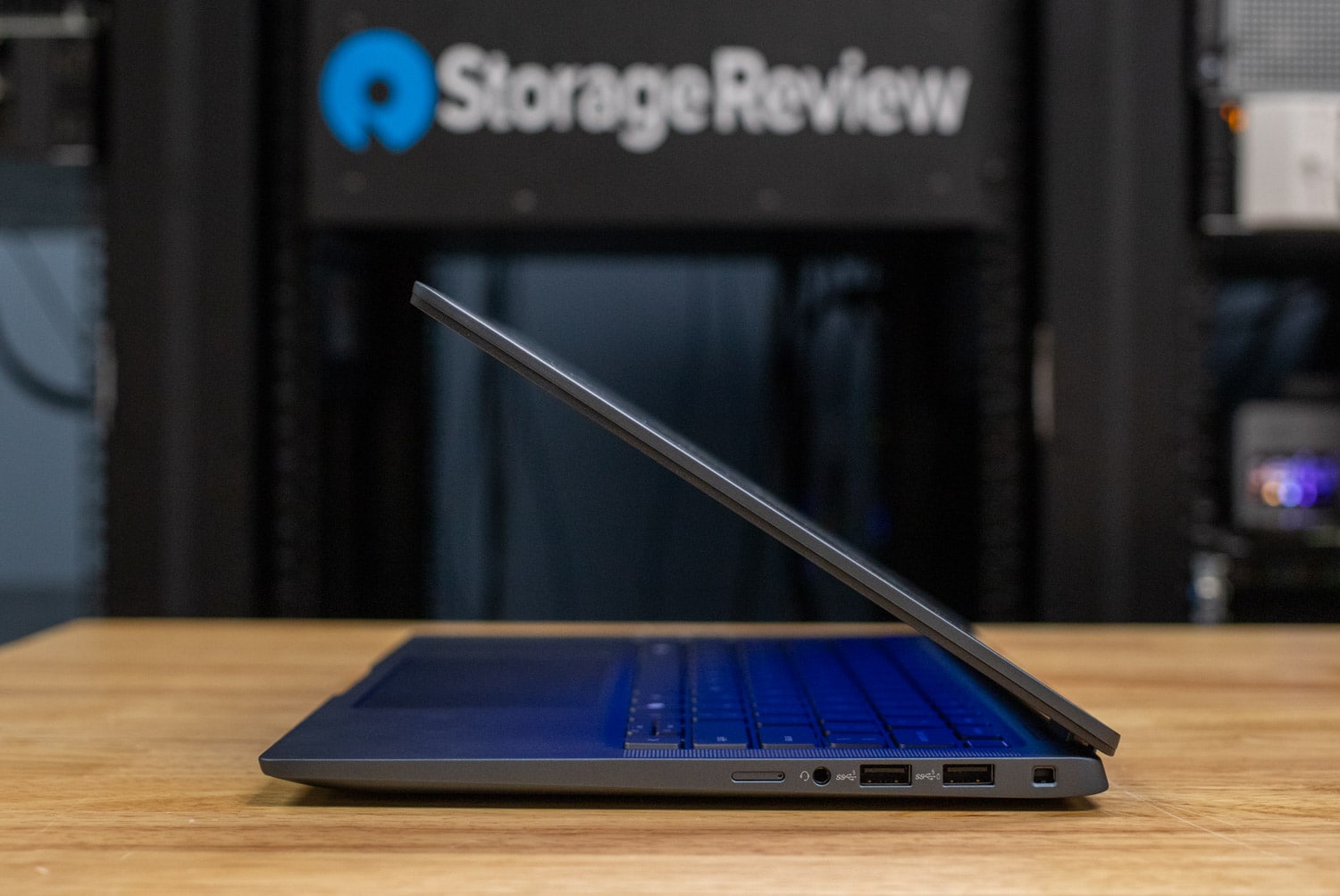
Right-edge ports include a 3.5mm universal audio jack, two USB 3.2 Type-A ports, and a Wedge lock slot. Mobile broadband models also have a SIM slot here. The traditional USB ports are a welcome sight.

![Dell Latitude 7450 Ultralight Right Ports]()

## Dell Latitude 7450 Screen and Input Devices

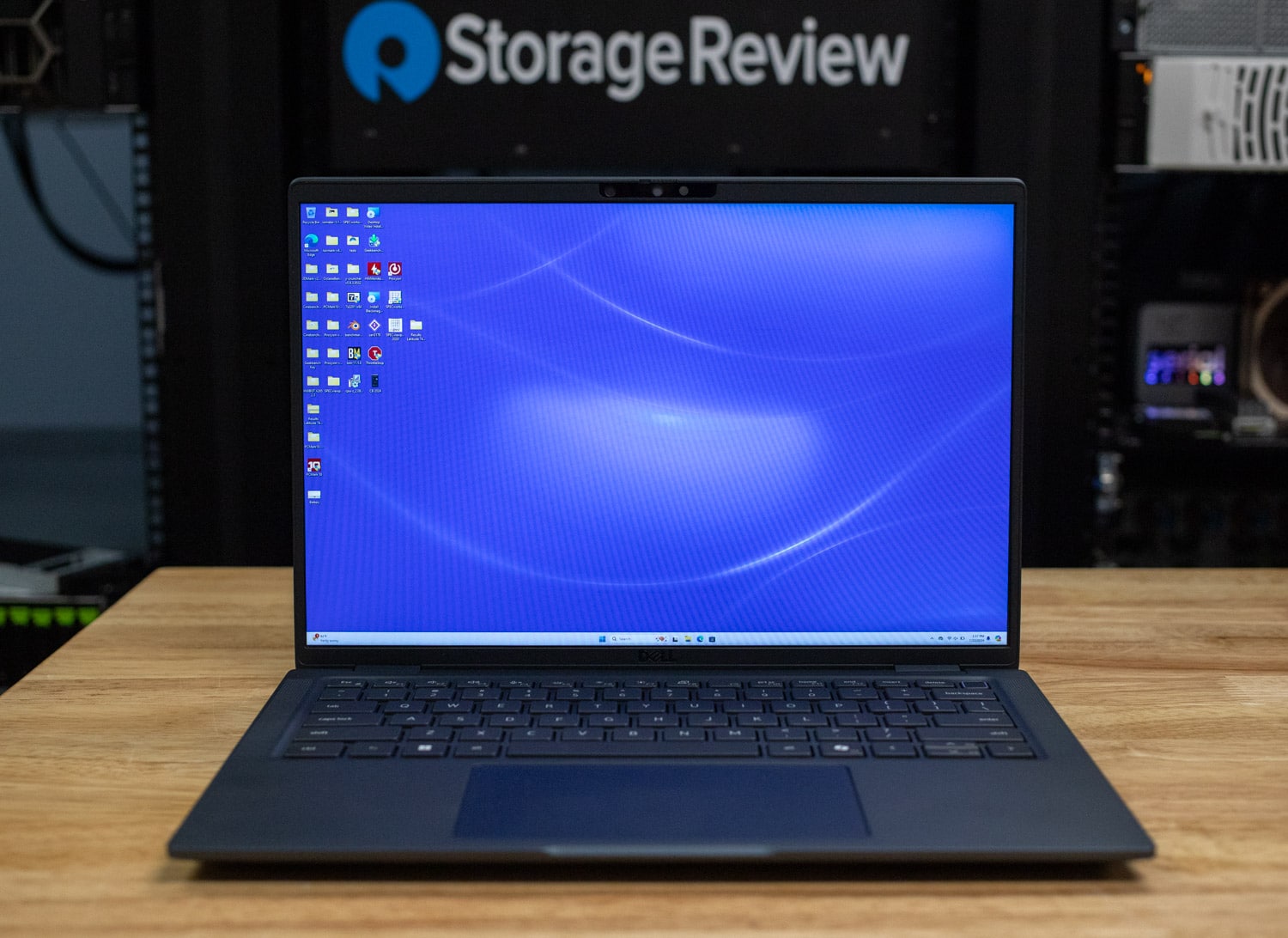
The 1920×1200 touchscreen on our review model looks bright and lively for almost everything. A sharper 2560×1600 screen is available but loses touch. Both screens include a 5MP webcam with infrared support for facial recognition and a manual sliding privacy shutter.

![Dell Latitude 7450 Ultralight Screen]()

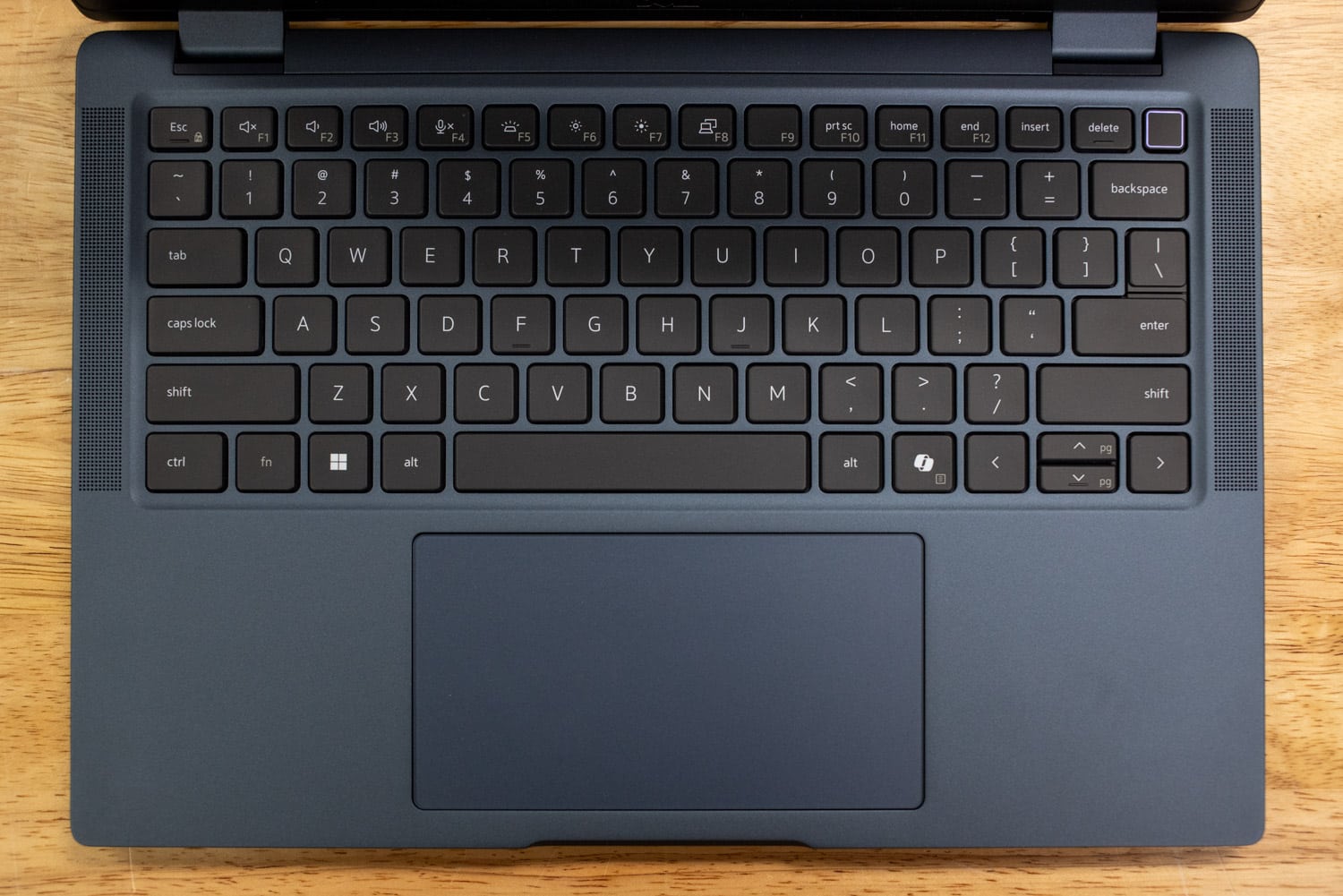
The Latitude’s keyboard has an assertive feel and is comfortable for long typing sessions. The white backlighting stands out nicely against the black keycaps. Layout-wise, the arrow key cluster confusingly combines half-height up and down keys with full-size left and right keys. The power button at the top right corner doubles as a fingerprint reader. This keyboard also has a Copilot key as we are seeing on many newer laptops.

![Dell Latitude 7450 Ultralight Keyboard]()

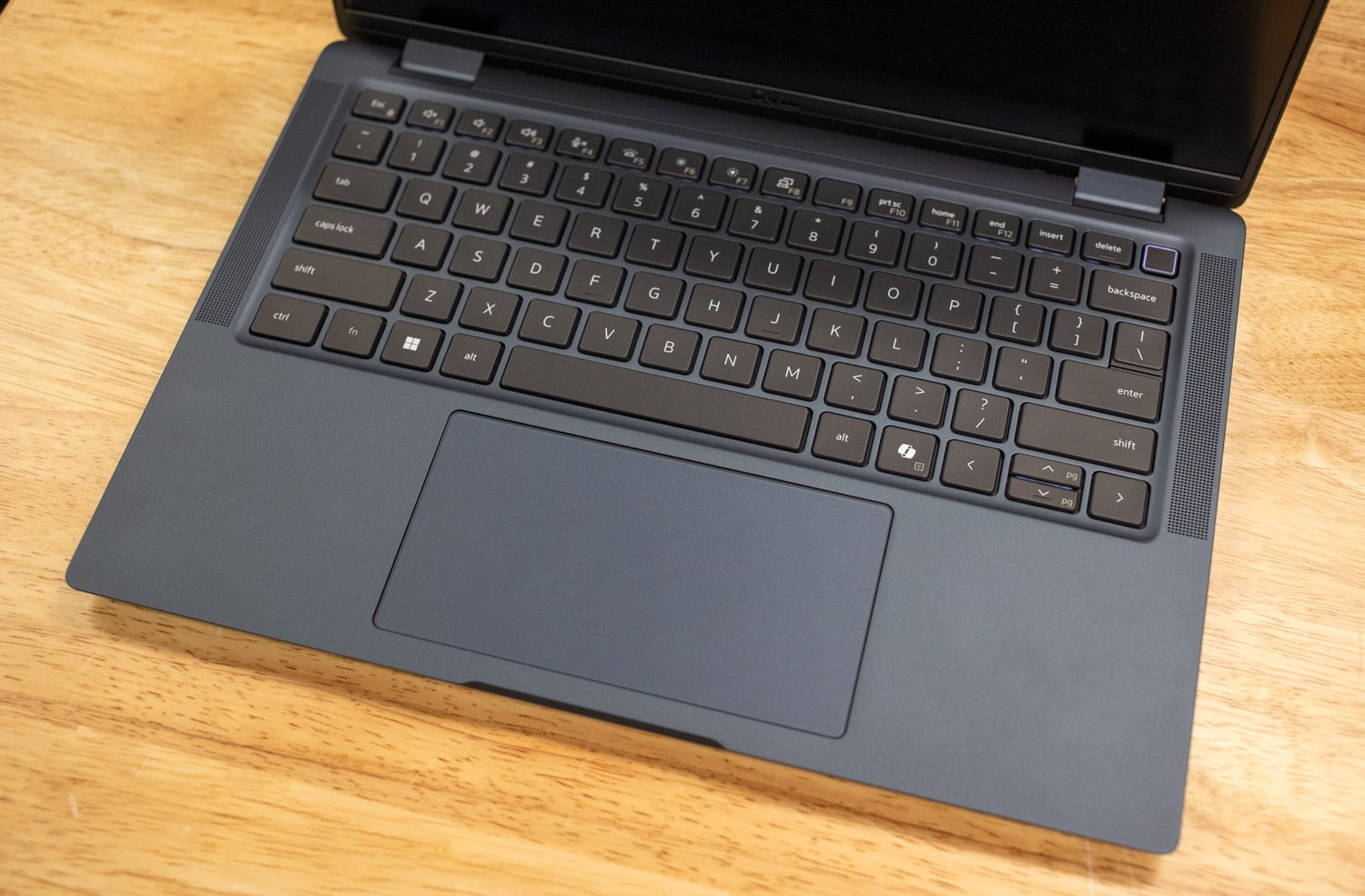
Below, the touchpad has an accurate feel and a smooth surface. The touchpad is sized quite well for the notebook, using just about all of the available space between the keyboard and front edge of the case.

![Dell Latitude 7450 Ultralight Touchpad]()

## Dell Latitude 7450 Ultralight Specifications

| **Display** | <ul><li>14.0” 16:10 FHD+, (1920×1200), IPS Non-Touch, 400 nits, Anti-glare, Battery-saving, ComfortView Plus Low Blue Light</li><li>14.0” 16:10 QHD+, (2560×1600), IPS Touch, 400 nits, sRGB 100%, Anti-glare, Battery-saving , ComfortView Plus Low Blue Light</li></ul> |
| --- | --- |
| **Processor** | Up to Intel® Core™ Ultra 7 processors, MTL-U, vPro |
| **Graphics** | Intel Graphics |
| **Memory** | Up to 64 GB LPDDR5x SDRAM 6400 MT/s (on board) |
| **Storage** | <ul><li>Up to 2 TB, M.2 2230, TLC PCIe Gen4 NVMe, SSD</li><li>512 GB, M.2 2280, TLC PCIe Gen4 NVMe Self Encrypting Opal 2.0, SSD</li></ul> |
| **Security** | <ul><li>TPM 2.0 FIPS-140-2 Certified / TCG Certified</li><li>Intel ME Verification – Verifies the integrity of critical firmware using a secure off-host source. Requires Intel vPro.</li><li>Chassis intrusion switch – Remotely detects hardware tampering and is integrated with</li><li>Dell SafeBIOS Indicators of Attack.</li><li>Optional Windows Hello compliant fingerprint reader in power button</li><li>Optional Face IR camera (Windows Hello compliant) with ExpressSign-in (Presence detection)</li><li>Camera Shutter</li><li>Optional Security Hardware Authentication Bundles</li><li>1: Touch Fingerprint Reader (in Power Button)</li></ul> |
| **Wireless** | <ul><li>Intel® BE200 Wi-Fi 7 2×2, BT 5.4 Wireless Card</li><li>5G – Qualcomm Snapdragon X62 Global 5G Modem (DW5932e), eSIM, WW5G – Qualcomm Snapdragon X62 Global 5G Modem (DW5932e), eSIM, AT&T, T-Mobile, Verizon</li></ul> |
| **Ports and Slots** | <ul><li>2 x USB Type-C Thunderbolt™ 4.0 with Power Delivery & DisplayPort 2.1</li><li>2 x USB 3.2 Gen 1 with Power share</li><li>1 x HDMI 2.0</li><li>1x Optional external uSIM card tray (WWAN only)</li><li>1x Optional Touch Fingerprint Reader in Power Button</li><li>1 x Universal Audio jack</li><li>Wedge Shaped Lock Slot</li></ul> |
| **Dimensions** | <ul><li>Height (rear): 17.95 mm (0.71 in.)</li><li>Height (front): 17.95 mm (0.71 in.)</li><li>Width: 313.00 mm (12.32 in.)</li><li>Depth: 220.20 mm (8.67 in.)</li><li>Starting Weight: 1.055 kg (2.33 lb)</li></ul> |

## Dell Latitude 7450 Upgradeability

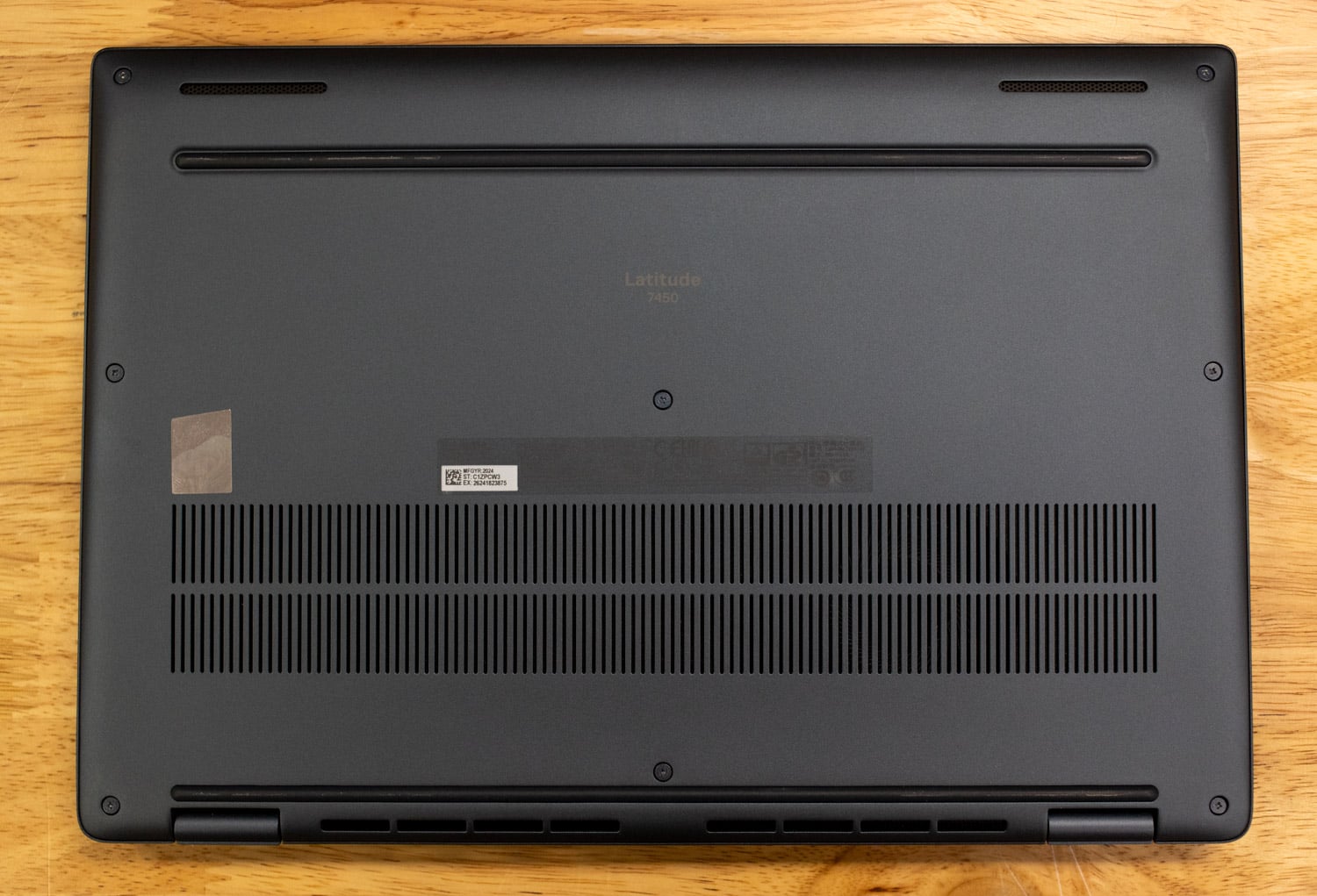
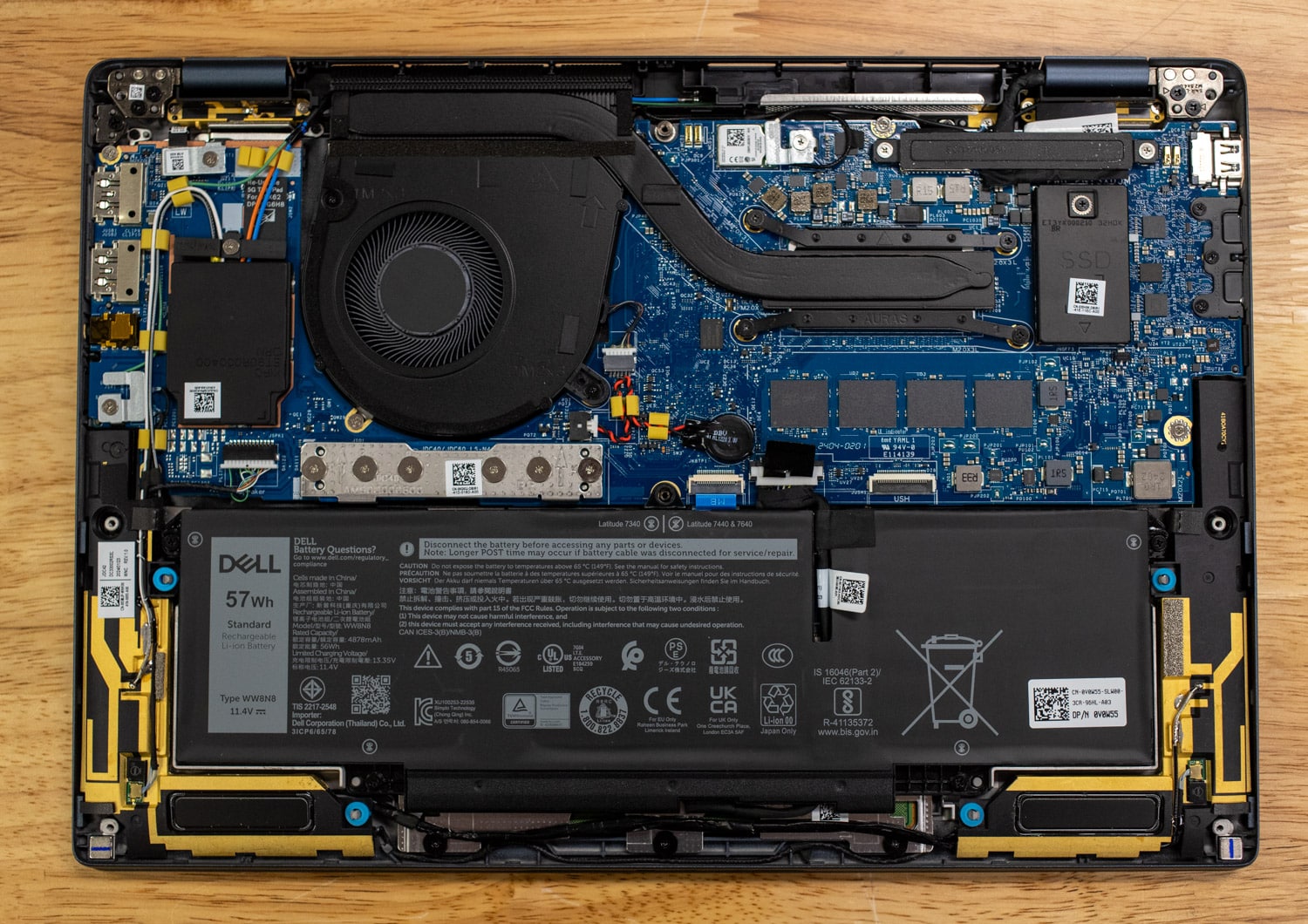
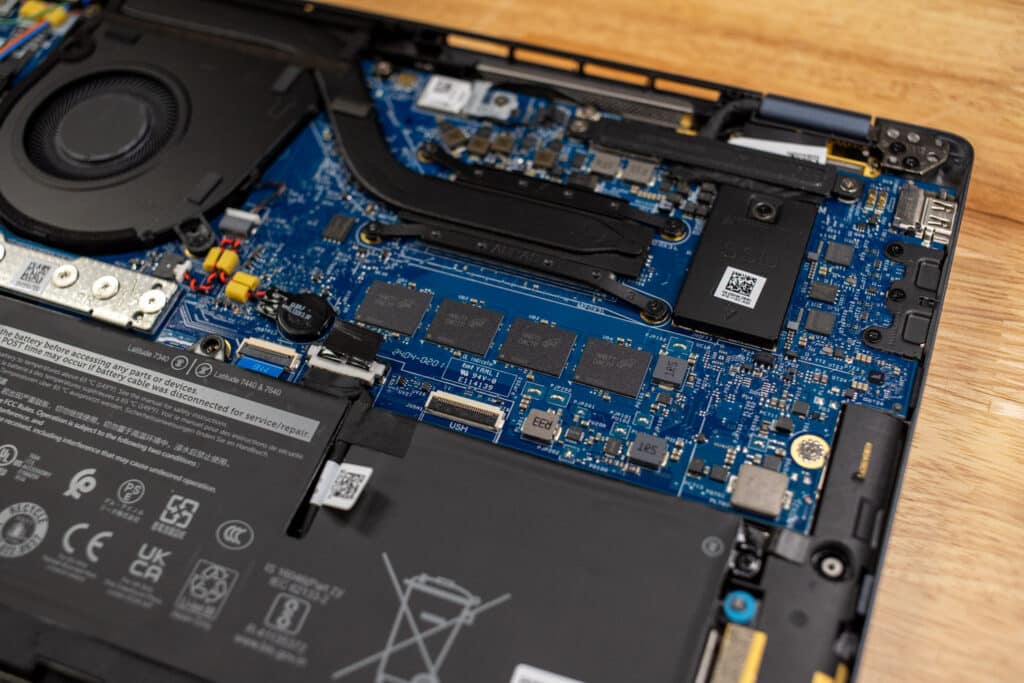
The Latitude’s bottom panel is held on by eight screws. The only upgradeable components are the battery pack, M.2 2230 wireless card, and M.2 2230 SSD. The LPDDR5X RAM is soldered to the motherboard and can’t be upgraded later, which is normal for a laptop in this class. (We’d still prefer it to be upgradeable, of course.)

![Dell Latitude 7450 Ultralight Bottom Cover]() ![Dell Latitude 7450 Ultralight Upgradeability]()

## Dell Latitude 7450 Ultralight Performance

Dell provided us with a Latitude 7450 Ultralight equipped as follows:

- Intel Core Ultra 7 165U CPU w/ Intel vPro
- Intel Graphics (integrated)
- 32GB RAM
- 512GB SSD
- Intel Wi-Fi 7
- Starting price: $1,529
- Price as tested: $2,369

Our model is a step up from the base model’s Core Ultra 5 135U, 16GB of RAM, 256GB SSD. The pricing we published here is from Dell.com, but Dell always tells us nearly all of its business PC purchases are through channel partners and not directly on its site, so your pricing mileage may vary. With the components of this platform leaning towards power efficiency, one benefit was the minimal noise and thermal activity on the notebook.

![Dell Latitude 7450 Ultralight Upgradeability]()

We will be comparing the Latitude 7450 Ultralight to the Lenovo ThinkPad X1 Carbon Gen 12, which we tested with the same Core Ultra 7 165U CPU.

### Luxmark

Our first test is LuxMark, an OpenCL GPU benchmarking utility. Neither of these laptops will be that useful for 3D work, but the Intel Graphics shared by the Latitude and ThinkPad performed about the same as we might have predicted.

| **Luxmark (Higher is better)** | | |
| --- | --- | --- |
|  | **Dell Latitude 7450 Ultralight (Core Ultra 7 165U)** | **Lenovo ThinkPad X1 Carbon Gen 12 (Core Ultra 7 165U)** |
| **Hallbench** | 1862 | 1906 |
| **food** | 743 | 797 |

### 7-Zip Compression

We also run 7-Zip’s built-in memory benchmark on laptops. The decompression testing is more telling as to which system is faster and the Lenovo has a minor edge, but the numbers are close enough that we won’t declare an outright winner.

| **7-Zip Compression Benchmark** | | |
| --- | --- | --- |
| ** ** | **Dell Latitude 7450 Ultralight (Core Ultra 7 165U)** | **Lenovo ThinkPad X1 Carbon Gen 12 (Core Ultra 7 165U)** |
| ***Compressing*** | | |
| **Current CPU Usage** | 589% | 616% |
| **Current Rating/Usage** | 6.887 GIPS | 6.700 GIPS |
| **Current Rating** | 40.590 GIPS | 41.259 GIPS |
| **Resulting CPU Usage** | 579% | 610% |
| **Resulting Rating/Usage** | 7.301 GIPS | 6.962 GIPS |
| **Resulting Rating** | 41.454 GIPS | 42.351 GIPS |
| ***Decompressing*** | | *** *** |
| **Current CPU Usage** | 1073% | 1104% |
| **Current Rating/Usage** | 4.310 GIPS | 4.498 GIPS |
| **Current Rating** | 46.241 GIPS | 49.654 GIPS |
| **Resulting CPU Usage** | 1122% | 1120% |
| **Resulting Rating/Usage** | 4.480 GIPS | 4.635 GIPS |
| **Resulting Rating** | 50.290 GIPS | 51.910 GIPS |
| ***Total Rating*** | | |
| **Total CPU Usage** | 851% | 865% |
| **Total Rating/Usage** | 5.891 GIPS | 5.799 GIPS |
| **Total Rating** | 45.872 GIPS | 47.131 GIPS |

### Blackmagic RAW Speed Test

Our next test is the new Blackmagic RAW Speed test. The Latitude dominated the OpenCL testing, but we suspect it’s more likely the ThinkPad hiccupped there.

| **Blackmagic RAW Speed Test** | | |
| --- | --- | --- |
| **Category** | **Dell Latitude 7450 Ultralight (Core Ultra 7 165U)** | **Lenovo ThinkPad X1 Carbon Gen 12 (Core Ultra 7 165U)** |
| **8K CPU** | 35 | 36 |
| **8K OPENCL** | 36 | 27 |

### Blackmagic Disk Speed Test

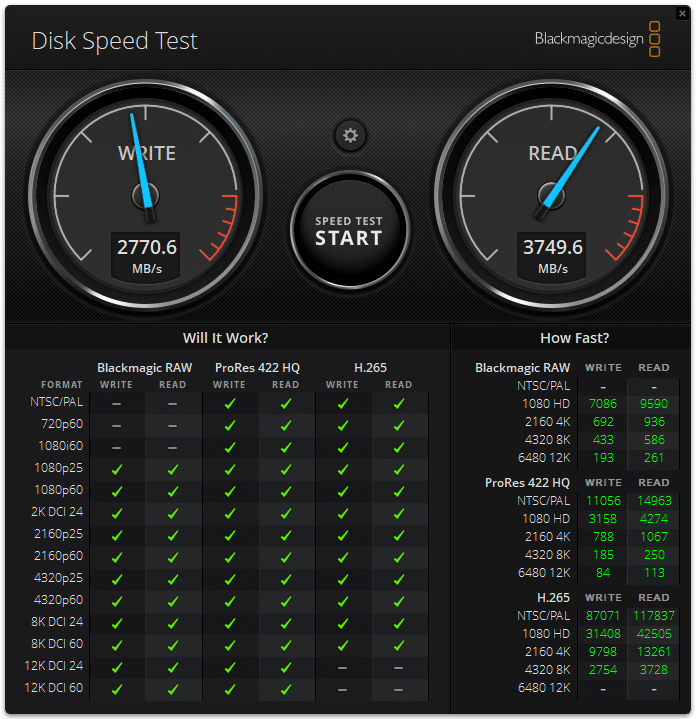
Our review unit’s 512GB has passable performance for a Gen4 drive. This laptop likely won’t be used for anything storage intensive, so not having the fastest disk performance should be a non-issue.

![Dell Latitude 7450 Ultralight Disk Speed Test]()

### y-cruncher

y-cruncher is a multi-threaded and scalable program that can compute Pi and other mathematical constants to trillions of digits. Since its launch in 2009, it has become a popular benchmarking and stress-testing application for overclockers and hardware enthusiasts. The Latitude and the ThinkPad continued to perform closely.

| **y-cruncher (Total Computation Time)** | **Dell Latitude 7450 Ultralight (Core Ultra 7 165U)** | **Lenovo ThinkPad X1 Carbon Gen 12 (Core Ultra 7 165U)** |
| --- | --- | --- |
| **1 billion digits** | 65.402 seconds | 67.939 seconds |
| **2.5 billion** | 208.399 seconds | 216.438 seconds |

### Geekbench 6

[Geekbench 6](https://www.geekbench.com/) is a cross-platform benchmark that measures overall system performance. You can find comparisons to any system you want in the  [Geekbench Browser](https://browser.geekbench.com/). We continued to see competitive performance between the Latitude and the ThinkPad.

| **Geekbench 6 (Higher is better)** | **Dell Latitude 7450 Ultralight (Core Ultra 7 165U)** | **Lenovo ThinkPad X1 Carbon Gen 12 (Core Ultra 7 165U)** |
| --- | --- | --- |
| CPU Single-Core | 2,407 | 2,369 |
| CPU Multi-Core | 9,922 | 9,838 |
| GPU | 17,052 | 17,318 |

### Cinebench R23

This benchmark uses all CPU cores and threads to generate an overall score. The multi-core test is a good test for long-running thermal stability, where the Lenovo showed a slight advantage.

| **Cinebench R23 (Higher is better)** | **Dell Latitude 7450 Ultralight (Core Ultra 7 165U)** | **Lenovo ThinkPad X1 Carbon Gen 12 (Core Ultra 7 165U)** |
| --- | --- | --- |
| **Multi-Core** | 8,690 | 9,311 |
| **Single-Core** | 1,778 | 1,753 |

### Cinebench 2024

We saw similar results in this latest Cinebench version as we did in R23, with the Lenovo having a slight advantage in the multi-core scenario.

| **Cinebench 2024 (Higher is better)** | **Dell Latitude 7450 Ultralight (Core Ultra 7 165U)** | **Lenovo ThinkPad X1 Carbon Gen 12 (Core Ultra 7 165U)** |
| --- | --- | --- |
| **Multi-Core** | 515 | 538 |
| **Single-Core** | 105 | 101 |

### UL Procyon AI Inference

UL’s  [Procyon](https://benchmarks.ul.com/procyon) estimates a workstation’s performance for professional apps. The Latitude did slightly better here but as in the other tests, the numbers are very close.

| **UL Procyon Average Inference Times (Lower is better)** | **Dell Latitude 7450 Ultralight (Core Ultra 7 165U)** | **Lenovo ThinkPad X1 Carbon Gen 12 (Core Ultra 7 165U)** |
| --- | --- | --- |
| **MobileNet V3** | 1.72 | 1.71 |
| **ResNet 50** | 21.94 | 20.33 |
| **Inception V4** | 63.74 | 59.43 |
| **DeepLab V3** | 68.92 | 65.99 |
| **YOLO V3** | 175.95 | 159.83 |
| **Real-ESRGAN** | 6,518.99 | 6,575.43 |
| **Overall Score** | 65 | 69 |

### PCMark 10 Battery Life

We run the PCMark Battery Life benchmark in Modern Office mode. The Lenovo clearly had the advantage here, lasting two and a half hours longer than the Latitude 7450 Ultralight.

| **PCMark 10 Battery Life Test (Modern Office) \[Higher is better]** | **Dell Latitude 7450 Ultralight (Core Ultra 7 165U)** | **Lenovo ThinkPad X1 Carbon Gen 12 (Core Ultra 7 165U)** |
| --- | --- | --- |
| **Battery Life** | 12 hours, 10 minutes | 14 hours, 40 minutes |

## Conclusion

The Dell Latitude 7450 Ultralight more than impressed us with its low weight and business-friendly features, including Intel vPro remote management and enterprise support. It works very well as a productivity platform, thanks to its high-resolution screen, comfortable input devices, and available mobile broadband. USB Type-A ports and HDMI video output also enhance its practicality. Build quality is our only major complaint, as we saw quite a bit of chassis flex in its otherwise well-made magnesium chassis. The Lenovo ThinkPad X1 Carbon Gen 12 is stronger and also offers longer battery life, so it remains our go-to 14-inch business laptop. The Latitude 7450 Ultralight is an excellent runner-up.

[Dell Latitude 7450 Ultralight Configurator](https://www.dell.com/en-us/shop/dell-laptops/latitude-7450-laptop-or-2-in-1/spd/latitude-14-7450-2-in-1-laptop/gctol7450usvp?redirectto=SOC&configurationid=32103ad9-6a7a-43b4-b22a-a729b54b8b78)


**Leaderboard:** The Dell Latitude 7450 Ultralight is part of the tested field on our [Best Business Laptops](https://www.storagereview.com/best/business-laptops) leaderboard.

**Engage with StorageReview**

[Newsletter](https://www.storagereview.com/storage_newsletter) |  [YouTube](https://www.youtube.com/user/StorageReview "Opens in a new window") | Podcast  [iTunes](https://podcasts.apple.com/gb/podcast/storagereview-com-storage-reviews/id1060681115 "Opens in a new window")/ [Spotify](https://open.spotify.com/show/1y6VnznABhHeOSMOmbDTz0 "Opens in a new window") |  [Instagram](https://www.instagram.com/storagereview/ "Opens in a new window") |  [Twitter](https://twitter.com/storagereview "Opens in a new window") |  [TikTok](https://www.tiktok.com/@storagereview? "Opens in a new window") |  [RSS Feed](https://www.storagereview.com/rss.xml)

![]()

### Charles P. Jefferies

I'm a lifelong technology enthusiast and have been reviewing consumer and enterprise technology since 2005. I specialize in laptops, tablets, and enterprise hardware. I'm a graduate of Rochester Institute of Technology. Outside of work, I love the gym, reading, and photography.

Previous post: [Zen5 Mobile Performance: The AMD Ryzen AI 9 HX 370 ASUS Zenbook S16 Review](https://www.storagereview.com/review/zen5-mobile-performance-the-amd-ryzen-ai-9-hx-370-asus-zenbook-s16-review)

Next post: [Advancing High-Performance Storage: DapuStor Haishen5 H5100 E3.S SSD](https://www.storagereview.com/review/advancing-high-performance-storage-dapustor-haishen5-h5100-e3-s-ssd)

Trusted Vendors

Products and solutions from our affiliate partners:

- [  
  ![Ubiquiti Logo]()  
   Ubiquiti](https://store.ui.com/us/en?a_aid=StorageReview "Opens in a new window")
- [  
  ![Newegg Logo]()  
   Newegg](https://click.linksynergy.com/fs-bin/click?id=g5terNMDhz0&offerid=1207190.18&subid=0&type=4 "Opens in a new window")
- [  
  ![Amazon Logo](https://www.storagereview.com/wp-content/uploads/2025/11/amazon.webp) Amazon](https://amzn.to/4fLJUEW "Opens in a new window")

Newsletter

Subscribe to the StorageReview newsletter to stay up to date on the latest news and reviews. We promise no spam!

1  

Leave this field empty if you’re human:

## Advertisement

Content Categories

[Facebook](https://www.facebook.com/@storagereview) [X](https://twitter.com/storagereview) [Instagram](https://www.instagram.com/storagereview/) [LinkedIn](https://www.linkedin.com/company/storagereview-com) [YouTube](https://www.youtube.com/user/storagereview?sub_confirmation=1) [Email](mailto:info@storagereview.com) [Spotify](https://open.spotify.com/show/1y6VnznABhHeOSMOmbDTz0) [Reddit](https://www.reddit.com/r/StorageReview/) [Discord](https://discord.gg/TwMHb4azdC) [RSS](https://www.storagereview.com/rss.xml) [TikTok](https://www.tiktok.com/@storagereview)

Copyright © 1998-2025 Flying Pig Ventures, LLC Cincinnati, Ohio. All rights reserved.

Manage your privacy

To provide the best experiences, we and our partners use technologies like cookies to store and/or access device information. Consenting to these technologies will allow us and our partners to process personal data such as browsing behavior or unique IDs on this site and show (non-) personalized ads. Not consenting or withdrawing consent, may adversely affect certain features and functions.

Click below to consent to the above or make granular choices. Your choices will be applied to this site only. You can change your settings at any time, including withdrawing your consent, by using the toggles on the Cookie Policy, or by clicking on the manage consent button at the bottom of the screen.

Functional Functional Always active

The technical storage or access is strictly necessary for the legitimate purpose of enabling the use of a specific service explicitly requested by the subscriber or user, or for the sole purpose of carrying out the transmission of a communication over an electronic communications network.

Preferences Preferences

The technical storage or access is necessary for the legitimate purpose of storing preferences that are not requested by the subscriber or user.

Statistics Statistics

The technical storage or access that is used exclusively for statistical purposes. The technical storage or access that is used exclusively for anonymous statistical purposes. Without a subpoena, voluntary compliance on the part of your Internet Service Provider, or additional records from a third party, information stored or retrieved for this purpose alone cannot usually be used to identify you.

Marketing Marketing

The technical storage or access is required to create user profiles to send advertising, or to track the user on a website or across several websites for similar marketing purposes.

Statistics

Marketing

Features

Always active

Always active

- Manage options
- Manage services
- Manage {vendor\_count} vendors
- [Read more about these purposes](https://cookiedatabase.org/tcf/purposes/)

Accept Deny Manage options Save preferences Manage options

- {title}
- {title}
- {title}

Manage your privacy

To provide the best experiences, we use technologies like cookies to store and/or access device information. Consenting to these technologies will allow us to process data such as browsing behavior or unique IDs on this site. Not consenting or withdrawing consent, may adversely affect certain features and functions.

Functional Functional Always active

The technical storage or access is strictly necessary for the legitimate purpose of enabling the use of a specific service explicitly requested by the subscriber or user, or for the sole purpose of carrying out the transmission of a communication over an electronic communications network.

Preferences Preferences

The technical storage or access is necessary for the legitimate purpose of storing preferences that are not requested by the subscriber or user.

Statistics Statistics

The technical storage or access that is used exclusively for statistical purposes. The technical storage or access that is used exclusively for anonymous statistical purposes. Without a subpoena, voluntary compliance on the part of your Internet Service Provider, or additional records from a third party, information stored or retrieved for this purpose alone cannot usually be used to identify you.

Marketing Marketing

The technical storage or access is required to create user profiles to send advertising, or to track the user on a website or across several websites for similar marketing purposes.

Statistics

Marketing

Features

Always active

Always active

- Manage options
- Manage services
- Manage {vendor\_count} vendors
- [Read more about these purposes](https://cookiedatabase.org/tcf/purposes/)

Accept Deny Manage options Save preferences Manage options

- {title}
- {title}
- {title}

Manage consent Manage consent

```json
{"@context":"https:\/\/schema.org","@graph":[{"@type":"WebPage","@id":"https:\/\/www.storagereview.com\/review\/dell-latitude-7450-ultralight-review","url":"https:\/\/www.storagereview.com\/review\/dell-latitude-7450-ultralight-review","name":"Dell Latitude 7450 Ultralight Review - StorageReview.com","isPartOf":{"@id":"https:\/\/www.storagereview.com\/#website"},"primaryImageOfPage":{"@id":"https:\/\/www.storagereview.com\/review\/dell-latitude-7450-ultralight-review#primaryimage"},"image":{"@id":"https:\/\/www.storagereview.com\/review\/dell-latitude-7450-ultralight-review#primaryimage"},"thumbnailUrl":"https:\/\/www.storagereview.com\/wp-content\/uploads\/2024\/07\/StorageReview-Dell-Latitude-7450-07.jpg","datePublished":"2024-07-30T19:30:32+00:00","dateModified":"2026-08-14T20:49:12+00:00","description":"The Dell Latitude 7450 Ultralight more than impressed us with its low weight and business-friendly features.","breadcrumb":{"@id":"https:\/\/www.storagereview.com\/review\/dell-latitude-7450-ultralight-review#breadcrumb"},"inLanguage":"en-US","potentialAction":[{"@type":"ReadAction","target":["https:\/\/www.storagereview.com\/review\/dell-latitude-7450-ultralight-review"]}]},{"@type":"ImageObject","inLanguage":"en-US","@id":"https:\/\/www.storagereview.com\/review\/dell-latitude-7450-ultralight-review#primaryimage","url":"https:\/\/www.storagereview.com\/wp-content\/uploads\/2024\/07\/StorageReview-Dell-Latitude-7450-07.jpg","contentUrl":"https:\/\/www.storagereview.com\/wp-content\/uploads\/2024\/07\/StorageReview-Dell-Latitude-7450-07.jpg","width":1500,"height":1092,"caption":"Dell Latitude 7450 Ultralight Screen"},{"@type":"BreadcrumbList","@id":"https:\/\/www.storagereview.com\/review\/dell-latitude-7450-ultralight-review#breadcrumb","itemListElement":[{"@type":"ListItem","position":1,"name":"Home","item":"https:\/\/www.storagereview.com\/"},{"@type":"ListItem","position":2,"name":"Review","item":"https:\/\/www.storagereview.com\/review"},{"@type":"ListItem","position":3,"name":"Dell Latitude 7450 Ultralight Review"}]},{"@type":"WebSite","@id":"https:\/\/www.storagereview.com\/#website","url":"https:\/\/www.storagereview.com\/","name":"StorageReview.com","description":"StorageReview.com is a leading provider of news and reviews throughout the entire IT stack - from the datacenter to the edge, and all points in between.","publisher":{"@id":"https:\/\/www.storagereview.com\/#organization"},"potentialAction":[{"@type":"SearchAction","target":{"@type":"EntryPoint","urlTemplate":"https:\/\/www.storagereview.com\/?s={search_term_string}"},"query-input":{"@type":"PropertyValueSpecification","valueRequired":true,"valueName":"search_term_string"}}],"inLanguage":"en-US"},{"@type":"Organization","@id":"https:\/\/www.storagereview.com\/#organization","name":"StorageReview.com","url":"https:\/\/www.storagereview.com\/","logo":{"@type":"ImageObject","inLanguage":"en-US","@id":"https:\/\/www.storagereview.com\/#\/schema\/logo\/image\/","url":"https:\/\/www.storagereview.com\/wp-content\/uploads\/2020\/02\/Storage-Reviews-2-2.png","contentUrl":"https:\/\/www.storagereview.com\/wp-content\/uploads\/2020\/02\/Storage-Reviews-2-2.png","width":344,"height":61,"caption":"StorageReview.com"},"image":{"@id":"https:\/\/www.storagereview.com\/#\/schema\/logo\/image\/"},"sameAs":["https:\/\/x.com\/storagereview","http:\/\/youtube.com\/user\/storagereview"]}]}
```