

Der Dell Precision 7820 Tower ist eine leistungsstarke Workstation, die für die Bewältigung datenintensiver Arbeitslasten entwickelt wurde und Dual-Socket-Leistung durch Intels skalierbare Xeon-Prozessorfamilie der aktuellen Generation (bis zu 28 Kerne pro Prozessor) bietet. Obwohl das T7820 ein recht kompaktes Design aufweist, handelt es sich um eine vollständig anpassbare Workstation, die je nach Bedarf skaliert werden kann. Beispielsweise kann der T7820 mit gewaltigen 384 GB 2666 MHz-Speicher und bis zu 24 TB Speicherkapazität ausgestattet werden.
Der T7820 verfügt außerdem über die professionellen Grafikoptionen AMD Radeon Pro und NVIDIA Quadro der nächsten Generation, was ihn zu einer leistungsfähigen Workstation für 3D-Rendering und andere grafikintensive Aufgaben macht. Zu den High-End-Optionen gehören die Karten NVIDIA Quadro GP100, NVIDIA Quadro P6000 und Radeon Pro WX 9100, während zu Mittelklasse- und Einstiegskarten die NVIDIA Quadro P4000 bzw. Radeon Pro WX 3100 gehören. Abhängig von Ihrem spezifischen Anwendungsfall gibt es noch viel mehr zur Auswahl als diese Optionen.
Der Dell Precision 7820 Tower wurde zudem speziell für professionelle Softwareanwendungen entwickelt. Mit dem Dell Precision Optimizer-Programm können Benutzer die Anwendungsleistung und Produktivität ihrer Dell Precision-Workstation steigern, indem sie die Systemeinstellungen automatisch an die Anforderungen bestimmter professioneller Softwareanwendungen anpassen.
Unser spezieller Build für diesen Test umfasst:
- NVIDIA Quadro P4000
- 96GB von DDR3 Speicher
- Duale Intel Xeon Gold 6148 CPU (2.40 GHz)
- Samsung SM961 NVMe M.2-Laufwerk.
Technische Daten des Dell Precision 7820 Tower
| -Prozessor-Optionen |
Ein oder zwei Intel |
| Betriebssystemoptionen | Windows 10 Pro für Workstations (bis zu 4 Kerne) |
| Windows 10 Pro für Workstations (4 Kerne Plus) | |
| Windows 10 Pro für Workstations Downgrade auf Windows 7 (bis zu 4 Kerne) | |
| Windows 10 Pro für Workstations Downgrade auf Windows 7 (4 Cores Plus) | |
| Red Hat Enterprise Linux 7.3 | |
| Ubuntu Linux 16.04 | |
| Suse Linux (SLES 12 SP2) wird unterstützt | |
| NeoKylin 6.0 SP3 (nur China) | |
| Speicheroptionen |
Sechs-Kanal-Speicher mit bis zu 384 GB 2666 MHz DDR4 ECC-Speicher mit zwei CPUs, 12 DIMM-Steckplätzen (6 DIMMs pro CPU). |
| Chipsatz | Intel C621 (Lewisburg) |
| Grafikoptionen |
Unterstützung für 2 PCI Express x16 Gen 3-Grafikkarten – bis zu 500 W mit maximal 2 x 250 W-Grafikkarten doppelter Breite bei Einzel-CPU-Konfigurationen. Bis zu 2 x 150-W-Grafikkarten mit einfacher Breite bei Dual-CPU-Konfigurationen. |
|
High-End-3D-Karten: Radeon Pro WX 9100 |
|
|
3D-Karten der Mittelklasse: Radeon Pro WX 7100 |
|
|
Eintritt 3D-Karten: Radeon Pro WX 3100 |
|
|
Professionelle 2D-Karten: NVIDIA NVS310 |
|
| Speicheroptionen |
Von vorne zugängliche FlexBays unterstützen bis zu 4 x 2.5-Zoll-/3.5-Zoll-SATA-Festplatten/SSDs und bis zu 6 x 2.5-Zoll- und 5 x 3.5-Zoll-Laufwerke mit bestücktem 5.25-Zoll-Schacht. |
|
Bis zu 2 von vorne zugängliche (Hot-Plug-fähige) M.2-NVMe-PCIe-SSDs werden in FlexBays auf aktivierten PCIe-Gehäusen mit integriertem Intel-Controller unterstützt. |
|
|
NVMe RAID 0,1-Option (Intel RSTe vROC). Dell M.2-Träger mit PCIe-SSD für PCIe-FlexBay als Kundenkit erhältlich. |
|
|
Bis zu 4 x M.2 NVMe PCIe SSDs über 1 x Dell Ultra-Speed Drive Quad x16 Karte. NVMe RAID 0,1,10-Option (Intel RSTe vROC). |
|
|
M.2 NVMe PCIe SSDs: Bis zu 4 x 1 TB Laufwerke auf 1 Dell Precision Ultra-Speed Drive Quad x16-Karte. |
|
|
Front FlexBay M.2 NVMe PCIe SSDs: Bis zu 2 x 1 TB Laufwerke |
|
|
2.5-Zoll-SATA-SSD: Bis zu 6 x 1 TB-Laufwerke |
|
|
3.5-Zoll-SAS 7200 U/min 12 Gbit/s: Bis zu 5 x 4 TB |
|
|
2.5-Zoll-SAS mit 10 U/min und 12 Gbit/s: Bis zu 6 x 1.8 TB |
|
|
Selbstverschlüsselnde 2.5-Zoll-Laufwerke: 512 GB 2.5-Zoll-SED-Festplatte (OPAL/FIPS (140-2). |
|
|
M.2 PCIe SED SSD: 512 GB und 1 TB |
|
| Abmessungen | Höhe: 417.9 mm (16.45 Zoll) x Breite: 176.5 mm (6.95 Zoll) x Tiefe: 518.3 mm (20.41 Zoll). Optionales 19-Zoll-Rackmount-Schienen-Kit. Ausgangsgewicht: 15.9 kg (35.1 lb) |
| Sicherheit | Trusted Platform Module (TPM 2.0); Optionaler CAC/PIV-Kartenleser für Slimline-Schacht, Gehäuseeinbruchschalter; Setup-/BIOS-Passwort; I/O-Schnittstellensicherheit; Steckplatz für Kensington-Schloss, Ring für Vorhängeschloss, abschließbares Netzteil; Optionale Festplattenverriegelungsschlitten (Tastensperre), Dell Data Guardian, Dell Endpoint Security Suite Enterprise |
| Häfen | Vorderreifen 2 USB 3.1 Typ A 2 USB 3.1 Typ C 1 Universal-Audiobuchse Bis zu 2 (zukünftig 4) PCIe-Steckplätze in PCIe-fähigen Gehäusen für M.2- und U.2-(zukünftige) PCIe-SSDs |
| Intern 1 USB 2.0 1 USB 2.0-Header. (erfordert Splitterkabel eines Drittanbieters zur Unterstützung von 3 USB 2 Typ A-Anschlüssen) 8 SATA mit 6 Gbit/s plus 1 SATA für optisch |
|
| Hinterreifen 6 USB 3.1 Typ A 1 Serial 1 RJ45-Netzwerk 2PS2 1 Audio-Line-Ausgang 1 Audioeingang/Mikrofon |
|
| Spielautomaten | Alle Steckplätze PCIe Gen 3 2 PCIe x16 1 PCIe x16 verkabelt als x8 1 PCie x16 als x4 verdrahtet 1 PCIe x16 verkabelt als x1 1 PCI 32/33 |
| Fahrgestell | Schächte: (2) FlexBays und (1) 5.25-Zoll-FlexBay (unterstützt 1 x 3.5-Zoll- oder 2 x 2.5-Zoll-HDD/SSD-Laufwerke als Werksoption oder Kundenkit) (1) Slimline-Optikschacht; (1) SD-Steckplatz UHS II Klasse 3 mit schreibgeschützter Unterstützung (SW aktiviert). Verfügbares PCIe-Gehäuse mit PCIe FlexBays, das M.2 NVMe PCIe SSDs und zukünftige U.2 NVMe PCIe SSDs unterstützt. PCIe FlexBay-Kundenkit verfügbar. |
| Regulatorisches | Energy Star-Konfigurationen verfügbar, einschließlich 80 PLUS-registrierter Gold-Netzteile; EPEAT-registriert (siehe epeat.net für spezifische Registrierungsbewertung/-status nach Land); China CECP; GS-Zeichen. Eine vollständige Liste der Erklärungen und Zertifizierungen finden Sie auf der Dell-Homepage zu Vorschriften und Compliance unter dell.com/regulatory_compliance |
Designen und Bauen
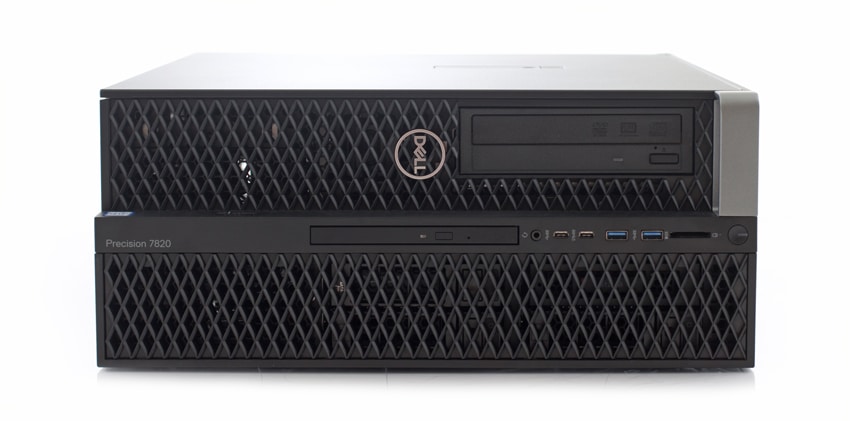
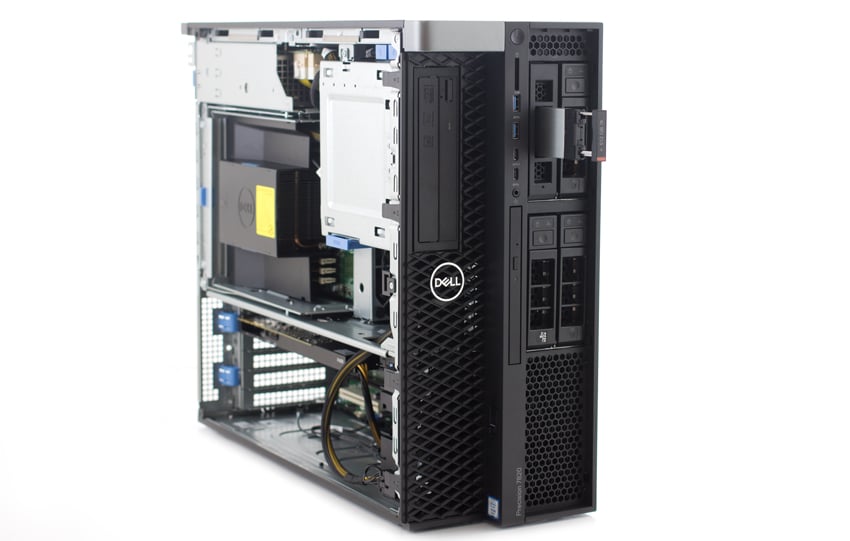
Mit einer Höhe von etwa 16 Zoll und einer Breite von fast 7 Zoll ist das 7820 eine recht kompakte Workstation für die Menge an Leistung, die es bietet. Es verfügt über zwei separate Blenden, die gleichzeitig als Belüftung dienen (d. h. Festplattenblende und Frontblende, die leicht entfernt werden können), wobei alle vorderen Anschlüsse vertikal in der Mitte gestapelt sind. Der 7820 ist außerdem mit einem praktischen Griff oben links ausgestattet, der einen einfachen Transport ermöglicht.
Für Konnektivität und Funktionalität verfügt die Vorderseite über eine Ein-/Aus-Taste/-Leuchte, eine Laufwerksaktivitätsleuchte, einen SD-Kartensteckplatz, 2x USB 3.0-Anschlüsse, zwei USB 3.0-Typ-C-Anschlüsse (einer mit PowerShare), einen Headset-Anschluss und einen optischen Laufwerksfach. Die Blende kann entfernt werden, um einen einfachen Zugriff auf die Laufwerke zu ermöglichen. Dell verfügt außerdem über einen PCIe-Schlitten, der einen einfachen Zugriff/Austausch des M.2-Laufwerks ermöglicht.
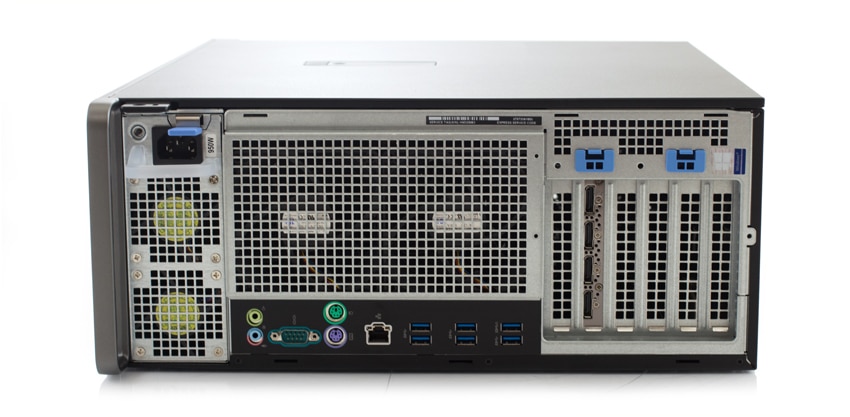
Auf der Rückseite des 7820 befinden sich der Mikrofon-/Line-In- und Line-Out-Anschluss, ein serieller Anschluss, PS/2-Maus- und Tastaturanschlüsse, ein Netzwerkanschluss, 6x USB 3.0-Anschlüsse, ein separater Grafikkartensteckplatz und Erweiterungskartensteckplätze. Die gesamte Rückwand dient gleichzeitig der Belüftung.
In unserem Testgerät haben wir das Dell 7820 damit ausgestattet Quadro P4000, eine der leistungsstarken professionellen Mittelklasse-Grafikkarten von NVIDIA. Der P4000 ist für anspruchsvolle professionelle Anwendungen konzipiert und verfügt über eine Pascal-GPU mit 1792 CUDA-Kern, 8 GB GDDR5-Speicher und fortschrittliche Anzeigetechnologien mit einer sehr energieeffizienten maximalen Leistungsaufnahme von 105 W.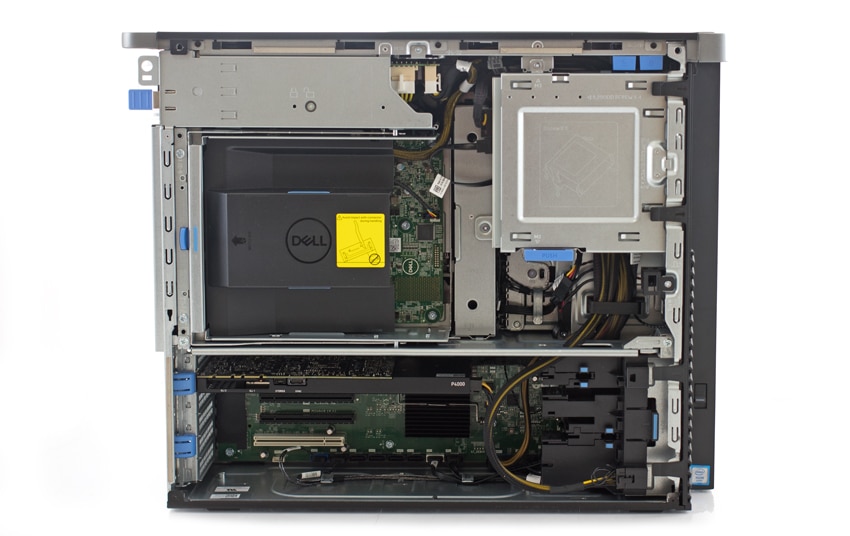
NVIDIA Quadro P4000-Spezifikationen
- GPU-Speicher: 8 GB GDDR5
- Speicherschnittstelle: 256-Bit
- Speicherbandbreite: Bis zu 243 GB/s
- NVIDIA CUDA-Kerne: 1792
- Systemschnittstelle: PCI Express 3.0 x16
- Maximaler Stromverbrauch: 105 W.
- Thermische Lösung
- Aktiver Formfaktor: 4.4 Zoll H x 9.5 Zoll L, Einzelsteckplatz, volle Höhe
- Displayanschlüsse 4x DP 1.4
- Maximale gleichzeitige Anzeige: 4 direkt, 4 DP 1.4 Multi-Stream
- Anzeigeauflösung 4x 4096×2160 bei 120 Hz 4x 5120×2880 bei 60 Hz Grafik-APIs Shader-Modell 5.1, OpenGL 4.54, DirectX 12.05, Vulkan 1.04
- Compute-APIs: CUDA, DirectCompute, OpenCL
Leistung
Um die Leistungsfähigkeit zu testen, haben wir die Precision T7820 verschiedenen Benchmarks unterzogen, die ihre Fähigkeit zur Performance in ressourcenintensiven Szenarien messen und die Leistungsfähigkeit der NVIDIA Quadro P4000 in Dells neuer Tower-Workstation prüfen. Wir vergleichen die T7820 mit dem Dell 5720 All-in-One und der Precision T7810.
Dieser erste Benchmark war der SPECviewperf 12 Benchmark – der weltweite Standard zur Messung der Grafikleistung basierend auf professionellen Anwendungen. SPECviewperf führt 9 Benchmarks durch, die es „Ansichtssätze“ nennt und die alle Grafikinhalte und -verhalten tatsächlicher Anwendungen darstellen. Zu diesen Ansichtssätzen gehören 3D Max, CATIA, Creo, Energy, Maya, Medical, Showcase, Siemens NX und Solidworks.
Ausgestattet mit der Quadro P4000 verzeichnete die T7820 einige ziemlich beeindruckende Ergebnisse, was bei einer leistungsgetriebenen mobilen Grafikkarte wie dieser zu erwarten war. Wir sehen auch eine deutliche Verbesserung gegenüber dem Vorgängermodell T7810.
| SPECviewperf 12 | |||
|---|---|---|---|
| Ansichtssätze | T7820 | 5720 | T7810 |
| 3dsmax-05 | 129.09 | N / A | N / A |
| catia-04 | 141.41 | 103.54 | 112.02 |
| creo-01 | 102.90 | 82.59 | 72.96 |
| Energie-01 | 11.88 | 4.35 | 9.65 |
| maya-04 | 84.58 | 81.01 | 71.24 |
| medizinisch-01 | 53.69 | 31.68 | 41.68 |
| Vitrine-01 | 80.73 | 62.30 | 58.68 |
| snx-02 | 152.65 | 102.55 | 112.32 |
| Sw-03 | 125.17 | 108.05 | 123.50 |
Wir haben auch SPECwpc ausgeführt, einen Benchmark, der speziell zum Testen aller wichtigen Aspekte der Workstation-Leistung entwickelt wurde. SPECwpc besteht aus über 30 Workloads, die zum Testen von CPU, Grafik, I/O und Speicherbandbreite verwendet werden. Die Arbeitsbelastungen fallen in breitere Kategorien (Durchschnitt aller einzelnen Arbeitsbelastungen in jeder Kategorie) und umfassen Medien und Unterhaltung, Finanzdienstleistungen, Produktentwicklung, Energie, Biowissenschaften und allgemeine Abläufe. Hier verzeichnete der T7820 äußerst beeindruckende Ergebnisse und demonstrierte deutlich die Fähigkeit des Systems, auch bei intensiver Arbeitsbelastung erfolgreich zu sein:
| SPECwpc v2.0 | |||
|---|---|---|---|
| Kategorie | T7820 | 5720 | T7810 |
| MICH | 5.12 | 2.57 | 2.28 |
| ProdDev | 6.45 | 2.42 | 4.9 |
| LifeScience | 10.66 | 2.51 | 6.12 |
| Energie | 8.51 | 2.27 | 7.6 |
| FSI | 24.52 | 1.32 | 5.02 |
| GeneralOps | 1.65 | 1.28 | 1.57 |
Mithilfe unseres ESRI-Benchmarks haben wir verschiedene Aspekte des ArcGIS-Programms untersucht. In solchen Fällen sind wir am meisten an der durchschnittlichen Zeichenzeit, den durchschnittlichen Bildern pro Sekunde und den minimalen Bildern pro Sekunde interessiert. Mit der Ziehzeit verzeichnete der T7820 eine durchschnittliche Zeit von nur 00:06.3430. Die durchschnittlichen FPS und die minimalen FPS zeigten mit 506.194 bzw. 266.549 erneut beeindruckende Ergebnisse.
| ESRI-Benchmark | |
|---|---|
| Ziehzeit | Durchschnittlich |
| Präzision T7820 | 00:06.3430 |
| Precision 5720 | 0:00:17.848 |
| Präzision T7810 | 0:00:06.498 |
| Durchschnittliche FPS | Durchschnittlich |
| Präzision T7820 | 506.194 |
| Precision 5720 | 132.018 |
| Präzision T7810 | 368.473 |
| Mindest-FPS | Durchschnittlich |
| Präzision T7820 | 266.549 |
| Precision 5720 | 73.025 |
| Präzision T7810 | 192.335 |
Fazit
Wie oben gezeigt, erwies sich Dells Precision T7820 als beeindruckende Desktop-Workstation, die einige ziemlich umfassende Anpassungsoptionen bietet, darunter eine große Auswahl an High-End-AMD- und NVIDIA-Grafikkarten wie die Quadro P4000. Benutzer können ihre T7820-Workstation auch mit zwei Intel Xeon-Prozessoren (mit bis zu 28 Kernen pro Prozessor) auf bis zu 384 GB DDR2666 ECC-Speicher mit 4 MHz aufrüsten. Dell bietet außerdem verschiedene Laufwerkskonfigurationen für maximal 24 TB Gesamtspeicher, einschließlich M.2 NVMe PCIe SSDs über die 6 verfügbaren PCIe Gen 3-Steckplätze. Es verfügt außerdem über die üblichen Anschlussmöglichkeiten wie USB 3.1 Typ A und C, USB 2.0 und einen Platz für ein optisches SATA-Laufwerk.
Um herauszufinden, wozu diese Workstation in der Lage ist, haben wir das T7820 drei verschiedenen grafikintensiven Benchmarks (den SPECviewperf-, SPECwpc- und ESRI-Tests) unterzogen und es mit dem 5720 All-in-One und dem Precision T7810 verglichen. Wir haben unseren Build mit High-End-Komponenten ausgestattet, darunter eine NVIDIA Quadro P4000, 96 GB DDR3-Speicher, eine Intel Xeon Gold 6148-CPU (2.40 GHz) und ein Samsung SM961 NVMe M.2-Laufwerk. Beim grafikintensiven SPECviewperf-Test zeigte der T7820 eine beeindruckende Leistung. In unserem SPECwpc-Benchmark (der die CPU-, Grafik-, I/O- und Speicherbandbreitenleistung misst) hat der T7820 deutlich die Fähigkeit des Systems unter Beweis gestellt, unter intensiver Arbeitslast zu funktionieren. In unserem ESRI-Test verzeichneten wir eine durchschnittliche Zeichenzeit von 00:06.3430, während die durchschnittliche FPS und die minimale FPS beeindruckende 506.194 bzw. 266.549 aufwiesen.
Der T7820 ist eine leistungsstarke Desktop-Workstation. Dank seiner Speicher-, Rechen- und Grafikleistung können Benutzer sicher sein, dass es auch die ressourcenintensivsten Arbeitslasten problemlos bewältigen kann, insbesondere wenn es mit noch hochwertigeren Komponenten ausgestattet ist als die, die wir hatten. Allerdings hängt dies wie bei allen anpassbaren Workstations davon ab, ob Sie bereit sind, Ihr Budget zu erweitern, da der T7820 schnell teuer werden kann.
Fazit
Der Dell Precision 7820 Tower ist eine leistungsstarke Desktop-Workstation mit einer Reihe beeindruckender Optionen, die den Anforderungen der ressourcenintensivsten Anwendungsfälle gerecht werden.
Produktseite zum Dell Precision 7820 Tower


 Amazon