---
description: Ubiquiti UX Express Gateway delivers flexible, VPN-ready Wi-Fi 6 connectivity anywhere, bridging home and office networks effortlessly.
title: "Ubiquiti UX Express Gateway: Ultimate Travel Router?"
image: https://www.storagereview.com/wp-content/uploads/2024/12/StorageReview-Ubiquiti-Unifi-Express-1.jpg
---

[![Storage Review]()](https://storagereview.com/)

---

[Facebook](https://www.facebook.com/@storagereview) [X (Twitter)](https://twitter.twitter.com/storagereview) [Instagram](https://www.instagram.com/storagereview/) [LinkedIn](https://www.linkedin.com/company/storagereview-com) [YouTube](https://www.youtube.com/user/storagereview?sub_confirmation=1) [Email](mailto:info@storagereview.com) [Spotify](https://open.spotify.com/show/1y6VnznABhHeOSMOmbDTz0) [Reddit](https://www.reddit.com/r/StorageReview/) [Discord](https://discord.gg/TwMHb4azdC) [RSS Feed](https://www.storagereview.com/rss.xml) [TikTok](https://www.tiktok.com/@storagereview)

[Facebook](https://www.facebook.com/@storagereview) [X (Twitter)](https://twitter.com/storagereview) [Instagram](https://www.instagram.com/storagereview/) [LinkedIn](https://www.linkedin.com/company/storagereview-com) [YouTube](https://www.youtube.com/user/storagereview?sub_confirmation=1) [Email](mailto:info@storagereview.com) [Spotify](https://open.spotify.com/show/1y6VnznABhHeOSMOmbDTz0) [Reddit](https://www.reddit.com/r/StorageReview/) [Discord](https://discord.gg/TwMHb4azdC) [RSS Feed](https://www.storagereview.com/rss.xml) [TikTok](https://www.tiktok.com/@storagereview)

[![StorageReview.com](https://www.storagereview.com/wp-content/uploads/2026/07/Storage-Review-2x.png)](https://www.storagereview.com)

≡ Menu

- [Home](https://www.storagereview.com/)
- [Storage Reviews](https://www.storagereview.com/review)
  - [Consumer Reviews](https://www.storagereview.com/consumer)
  - [Enterprise Reviews](https://www.storagereview.com/enterprise)
  - [Ubiquiti Reviews](https://www.storagereview.com/best/ubiquiti-reviews)
- [SR Merch](https://store.storagereview.com)
- [Leaderboards](https://www.storagereview.com/best)
  - [Best Storage Arrays](https://www.storagereview.com/best/storage-arrays)
  - [Best Enterprise SSDs](https://www.storagereview.com/best/enterprise-ssds)
  - [Best Servers](https://www.storagereview.com/best/servers)
  - [Best Desktops for Local AI](https://www.storagereview.com/best/desktops-local-ai)
  - [Best Laptops for Local AI](https://www.storagereview.com/best/laptops-local-ai)
  - [Best Local LLM Tools](https://www.storagereview.com/best/local-llm-tools)
  - [Agentic AI Hardware](https://www.storagereview.com/best/agentic-ai-hardware)
  - [Best SSDs & Hard Drives](https://www.storagereview.com/best_drives)
  - [Best Portable SSDs](https://www.storagereview.com/best/portable-ssds)
  - [Best Business Laptops](https://www.storagereview.com/best/business-laptops)
  - [Best Mobile Workstations](https://www.storagereview.com/best/mobile-workstations)
  - [Best Desktop Workstations](https://www.storagereview.com/best/desktop-workstations)
  - [Best Laptop Battery Life](https://www.storagereview.com/best/laptop-battery-life)
- [Storage Reference Guide](https://www.storagereview.com/storage-reference-guide)
- [About SR](https://www.storagereview.com/about-storagereview)
  - [StorageReview.com Sweepstakes Rules and Regulations](https://www.storagereview.com/storagereview-com-sweepstakes-rules-and-regulations)

Search

[Home](https://www.storagereview.com/) » [Review](https://www.storagereview.com/review) » Ubiquiti UX Express Gateway: Ultimate Travel Router?

# Ubiquiti UX Express Gateway: Ultimate Travel Router?

by Dylan Dougherty on December 17, 2024

[Enterprise](https://www.storagereview.com/enterprise)  ◇  [Networking](https://www.storagereview.com/enterprise/networking)

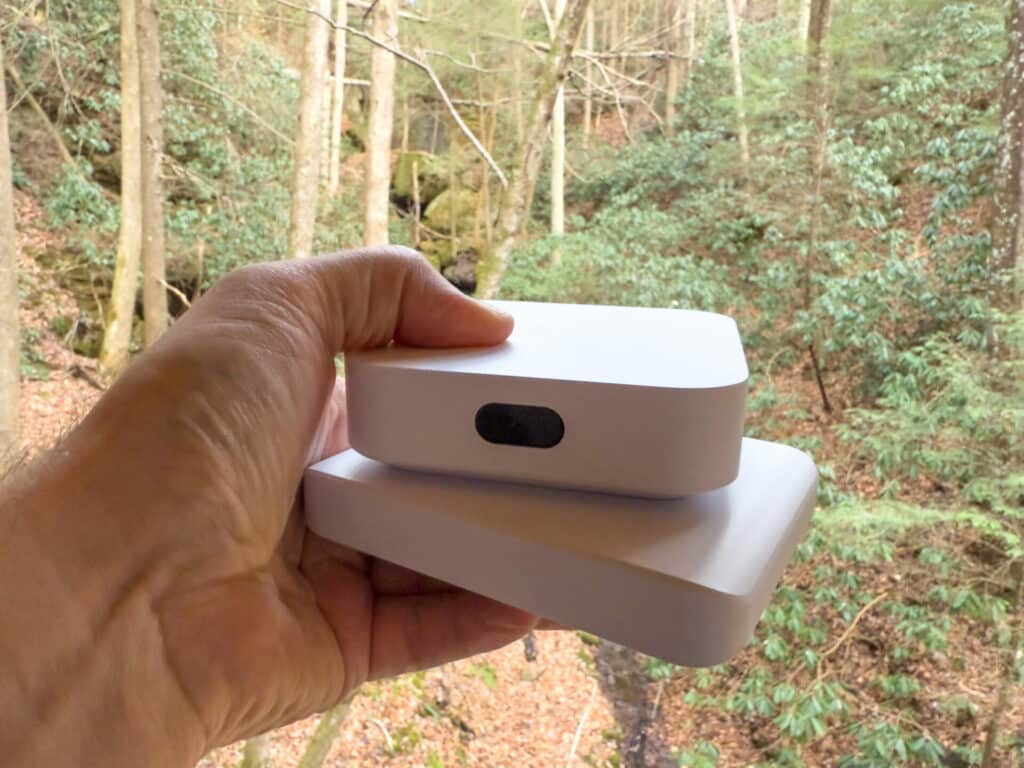
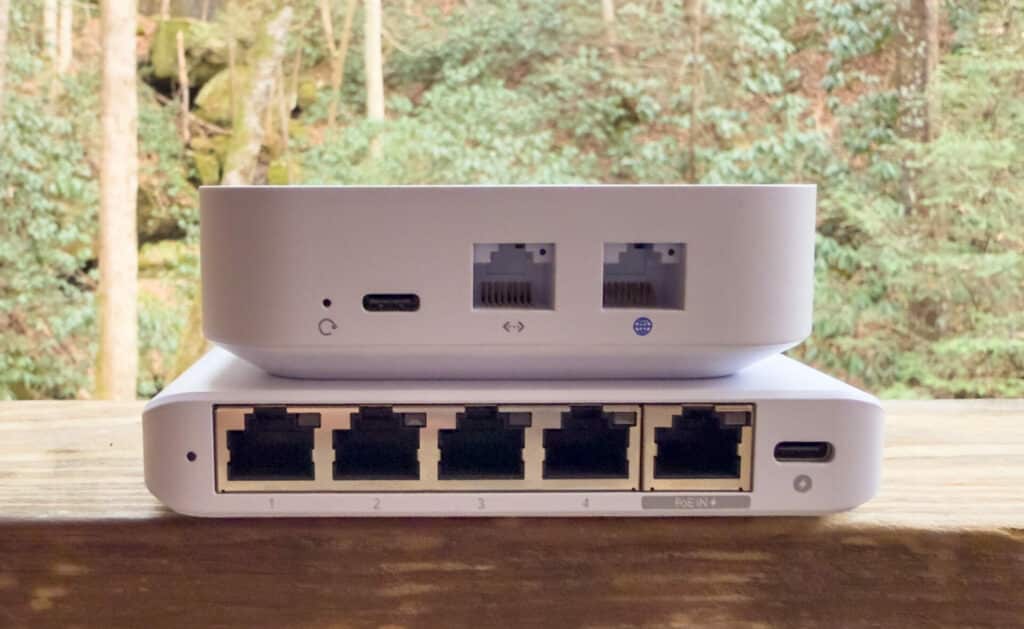
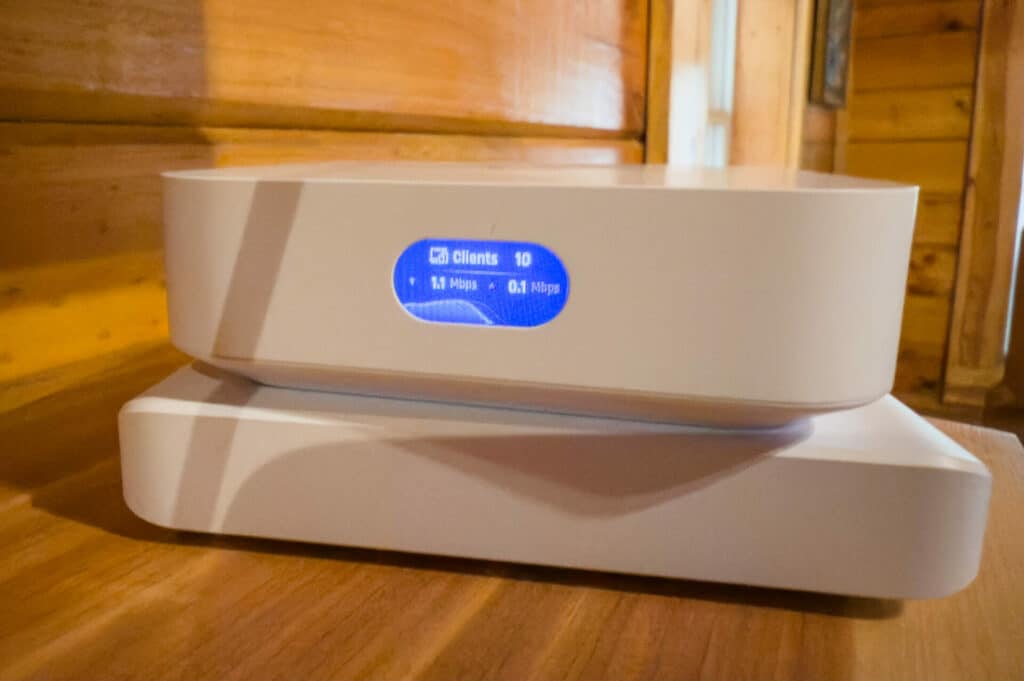
Very few solutions for staying connected on the go are as versatile and affordable as the Ubiquiti UX Express Gateway. [Priced at just $149.00](https://store.ui.com/us/en/products/ux?a_aid=StorageReview), this self-contained unit, which we’ll call the UX, includes a powerful Wi-Fi 6 access point and offers flexibility to create a robust, portable network setup. Whether gaming at a LAN party or traveling for work, the UX seamlessly integrates with your home and office environments while delivering high-performance connectivity.

![Ubiquiti UX Express Gateway in the wild](https://www.storagereview.com/wp-content/uploads/2024/12/StorageReview-Ubiquiti-Unifi-Express-1-1024x768.jpg)

## Ubiquiti UX Express Gateway Specifications

| Category | Feature | Details |
| --- | --- | --- |
| **Mechanical** | Dimensions | 98 x 98 x 30 mm (3.6 x 3.6 x 1.2″) |
|  | Weight | 302 g (10.7 oz) |
|  | Enclosure material | Polycarbonate |
| **Hardware** | Management interface | Ethernet, Bluetooth |
|  | Networking interface | LAN: (1) GbE RJ45 port<br> WAN: (1) GbE RJ45 port |
|  | Power method | USB type C (5V DC/3A) |
|  | Max. power consumption | 10W |
|  | Max. TX power | 2.4 GHz: 22 dBm<br> 5 GHz: 25 dBm |
|  | MIMO | 2.4 GHz: 2 x 2 (DL/UL MU-MIMO)<br> 5 GHz: 2 x 2 (DL/UL MU-MIMO) |
|  | Throughput rate | 2.4 GHz: 573.5 Mbps<br> 5 GHz: 2.4 Gbps |
|  | Antenna gain | 2.4 GHz: 4 dBi<br> 5 GHz: 5.15 dBi |
|  | Antennas | (2) Internal 2.4G/5G Wi-Fi dual-band antenna<br> (1) Internal 2.4G single-band BT antenna |
|  | LCM display | 0.96″ status display |
|  | Button | Factory reset |
|  | Ambient operating temperature | -10 to 45° C (14 to 113° F) |
|  | Ambient operating humidity | 5 to 95% non-condensing |
|  | Certifications | CE, FCC, IC |
| **Gateway Features** | Performance | Internet quality and outage reporting |
|  | Next-generation security | Application-aware firewall rules, Content, country, domain, and ad filtering, VLAN/subnet-based traffic segmentation, Full stateful firewall |
|  | Advanced networking | License-free SD-WAN, WireGuard, L2TP and OpenVPN server, OpenVPN client, OpenVPN and IPsec site-to-site VPN, One-click Teleport VPN, Policy-based WAN and VPN routing, |

## Travel Router Guide: Affordable, Portable, and Powerful Networking On-The-Go

The setup uses the UX as a VPN client, securely connecting to the Storagereview.com [UDM Pro Max Gateway](https://www.storagereview.com/review/ubiquiti-dream-machine-pro-max-review) and home UDM Pro’s VPN servers. Implementing policy-based routing, the UX assigns traffic to two distinct VLANs connected to home and office environments, tied to their respective Wi-Fi networks. This setup allows multiple devices like phones, laptops, and iPads to communicate as though they are physically at those locations, providing seamless and familiar network access. The result is a streamlined, efficient solution that bridges the gap between home and office while maintaining full functionality on the go.

![]()

To begin, we’ll follow these steps before demonstrating how it all comes together in the UniFi app:

- **Create client users** on UDM at home and work.
- **Download the configuration files** for both VPNs.
- On the UX, **add VPN clients** using the downloaded configuration files.
- **Create policy-based routes** for both home and work VPNs.
- **Create Wi-Fi SSIDs** for the two networks tied to the respective VLANs.
- **Verify connectivity** to ensure everything is working as intended.

With the steps laid out, let’s dive into the configuration process and see how to set up the UX in the UniFi app.

Before proceeding, the two networks are created on the UX: one for home and one for work. These networks are required for the subsequent steps, which will tie traffic to the appropriate VLANs and routes.

## Steps 1 & 2: creating and downloading VPN configurations

![]()

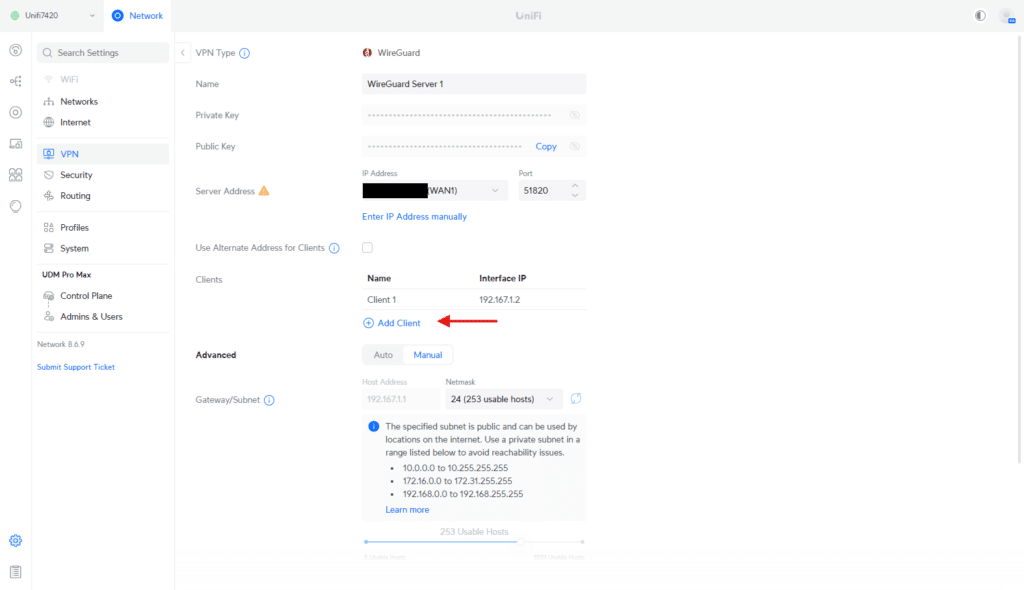
The first step in setting up your travel router is to create VPN client users on the **StorageReview UDM Pro Max Gateway** (work network) and Kevin’s home UDM (home network). This ensures the UX can connect securely to both networks as a VPN client.

#### Navigating to the VPN Server Menu

- Log in to the UniFi Controller interface for the respective UDM (home or work).
- Navigate to **Settings** → **VPN** → **WireGuard Server**.
- Click Add **Client**.

![]()

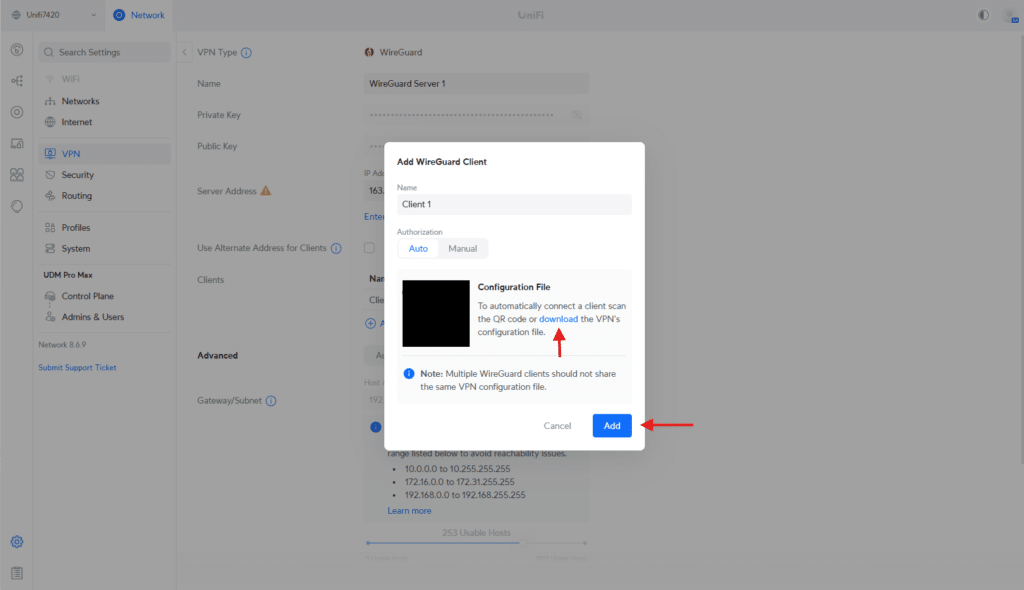
#### Adding a New Client

- Enter a **name** for the client (e.g., “UX-Home” for the home network and “UX-Work” for the work network).
- Click **Create Config** to generate the configuration file for the client.
- Download and save the generated configuration file; you’ll need it later to configure the UX.

You’ll need to repeat this process on **both gateways** (home and work) to create separate clients for each.

### Step 3: Adding VPN Clients to the UX<br> ![]()

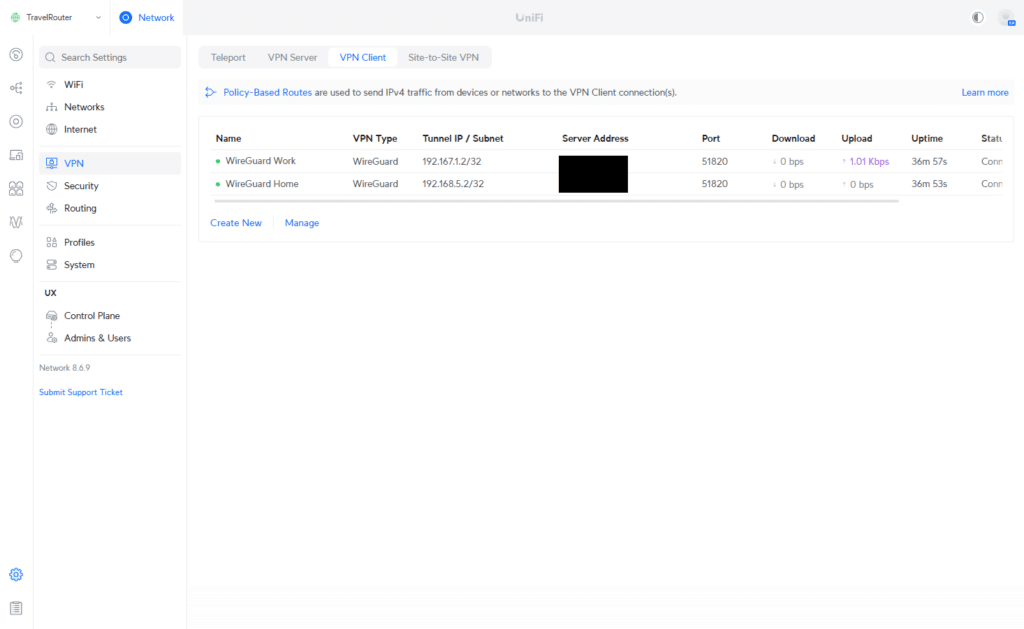
Now that you’ve downloaded the VPN configuration files for your home and work networks, you must add these VPN clients to the UX. This will allow the device to connect securely to both networks as needed.

#### Adding a VPN Client

- Open the **UniFi Network App** and navigate to the **UX device settings**.
- Go to **VPN Client** and click **Create New**.

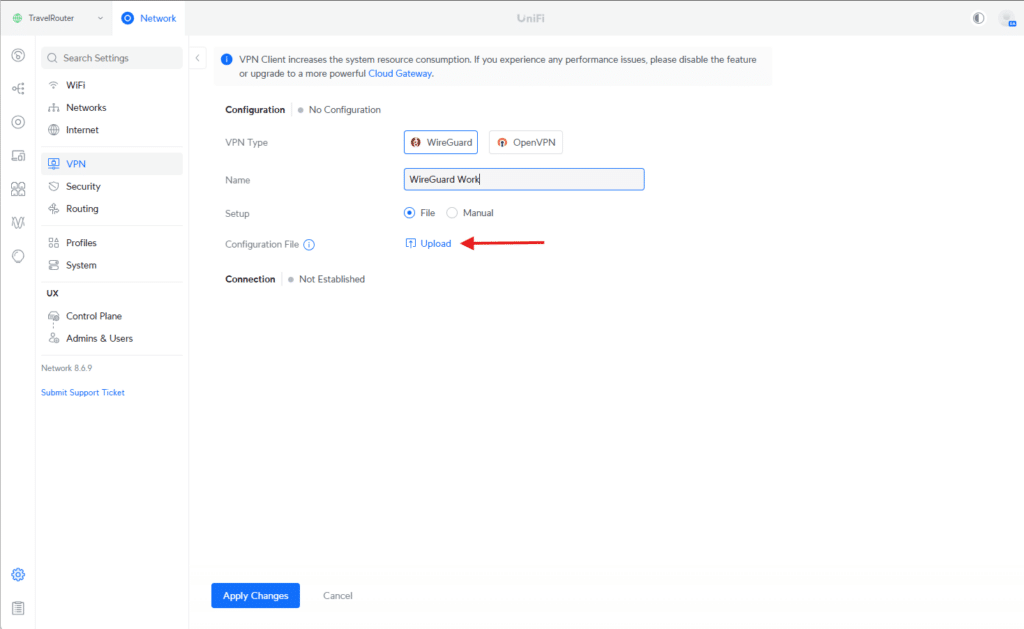
## ![]()

- Select **WireGuard** as the VPN type.
- Upload the configuration file for the work network you saved earlier.
- Review the details to ensure they are correct, and click **Save**.

The same steps are used to set up the Home Network.

## Step 4: Create Policy-Based Routes for each VPN

![]()

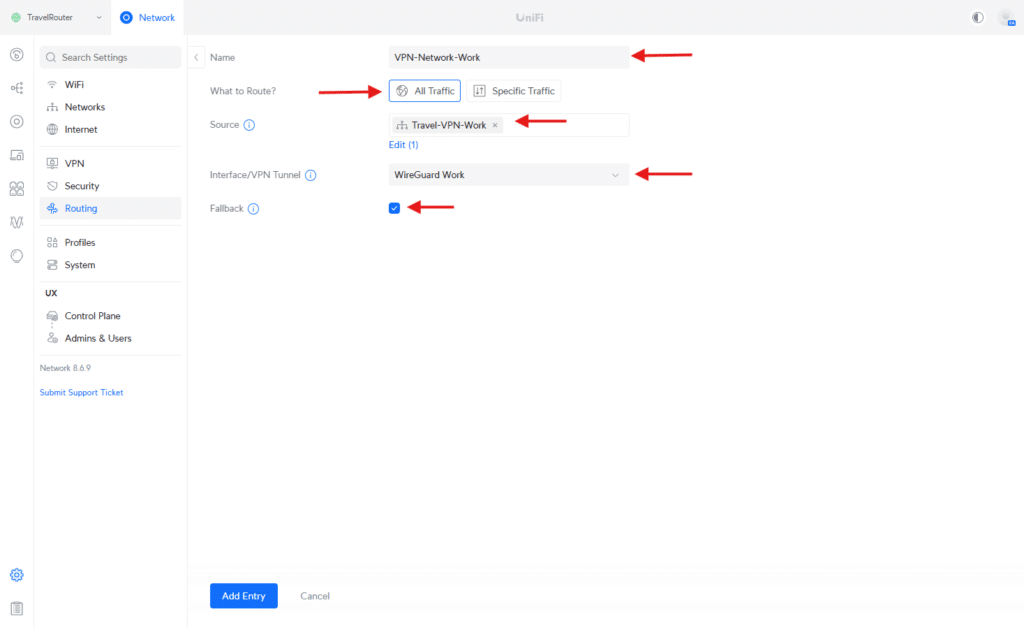
With the VPN clients configured on the UX, the next step is to create policy-based routes. These routes ensure traffic for each network is directed through the correct WireGuard VPN interface, allowing seamless but distinct access to home and work resources.

#### Creating a Policy-Based Route

- In the **UniFi Network App**, navigate to **Settings** → **Routing**  → **Policy-Based Routes**.
- Click **Create Entry**.

![]() Enter the following details for the work network:

- **Name**: Enter a descriptive name like “VPN-Network-Work.”
- **What to Route?:** (All Traffic)
- **Destination Network**: Specify the work VLAN or subnet
- **Next Hop**: Select the WireGuard interface associated with the work VPN (e.g., WireGuard Work)

Save the route, then repeat the same steps to create the policy route for the home network.

## Step 5: Create Wi-Fi Networks using each VLAN

## ![]()

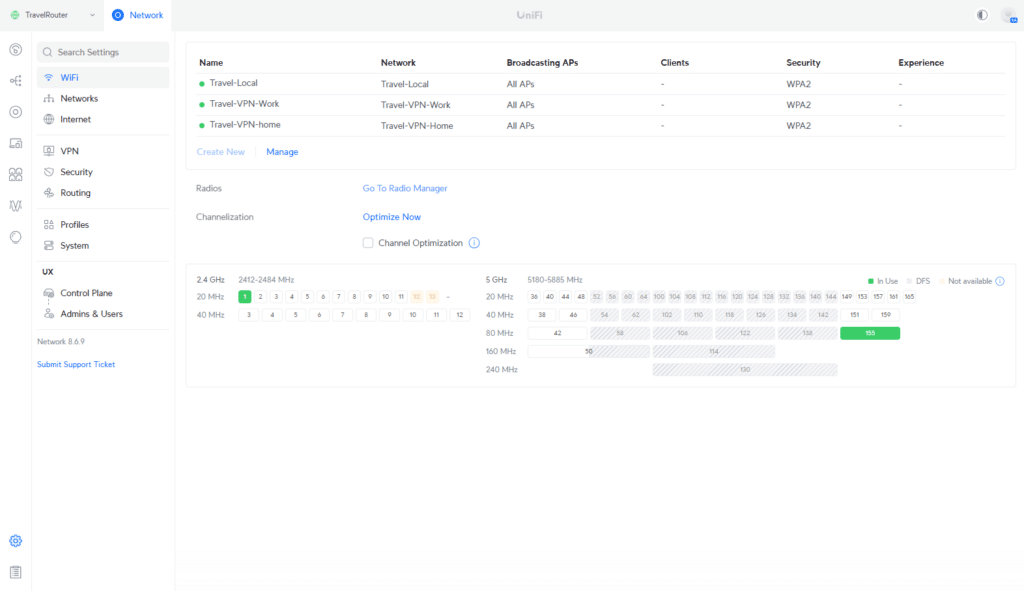
To allow devices to connect as though they are at home or work, create two separate Wi-Fi SSIDs on the UX, each linked to the corresponding network routes configured earlier.

#### Creating a Wi-Fi SSID

- Open the **UniFi Network App** and navigate to **Settings** → **Wi-Fi**.
- Click **Create New**.

![]()

- Enter the following details for the work network:
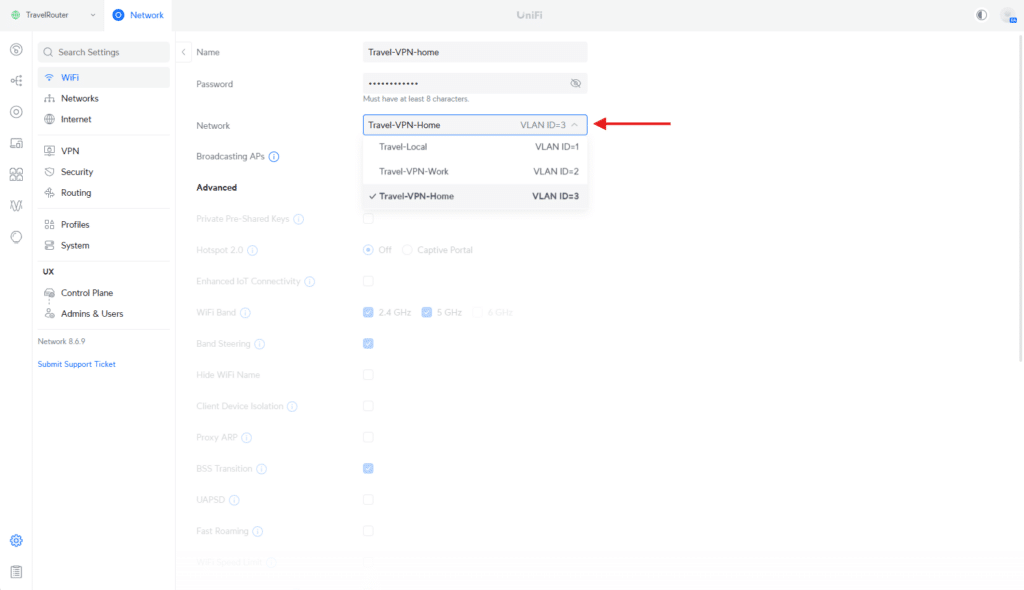
  - **Name (SSID)**: Choose a descriptive name, such as “Travel-VPN-home.”
  - **Network**: Select the VLAN or network associated with the work VPN policy route (e.g., Travel-VPN-Home).
  - **Security**: Configure the desired Wi-Fi security settings (e.g., WPA2-3).
  - **Password**: Set a strong password for the SSID.
- Save the SSID.

Once the work Wi-Fi is created, repeat the steps to set up the home Wi-Fi SSID.

## Step 6: Field Deployment

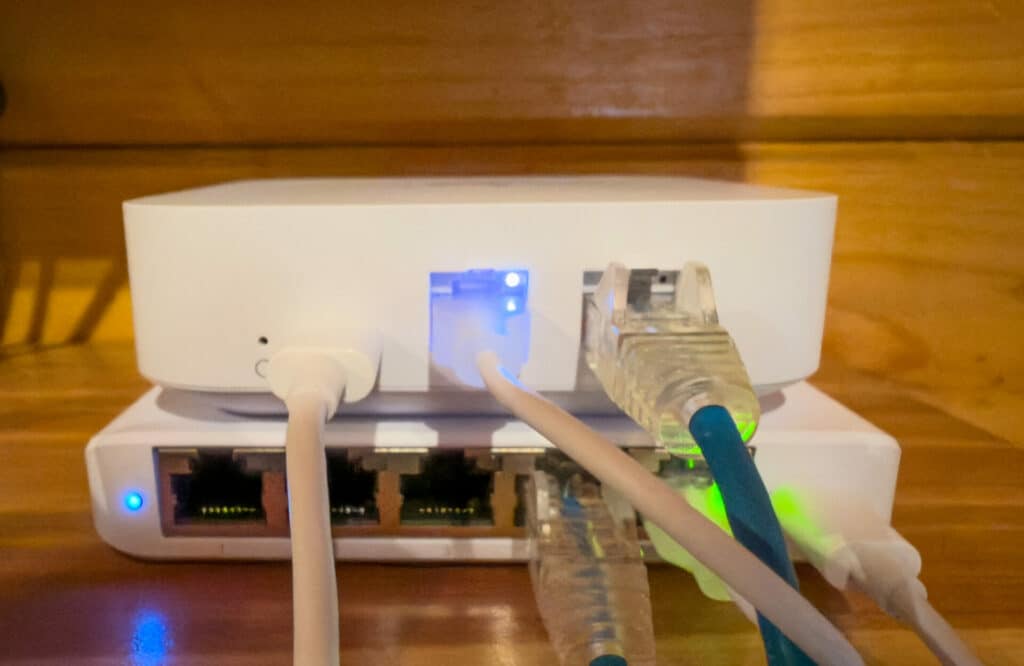
The Unifi Express provided networking connectivity on a recent trip into the wilderness. Although the cell signal was weak, the location offered a strong fiber internet connection. The Unifi Express was connected to the back of the cabin router, minimizing the number of devices attached to the new network.

![]()

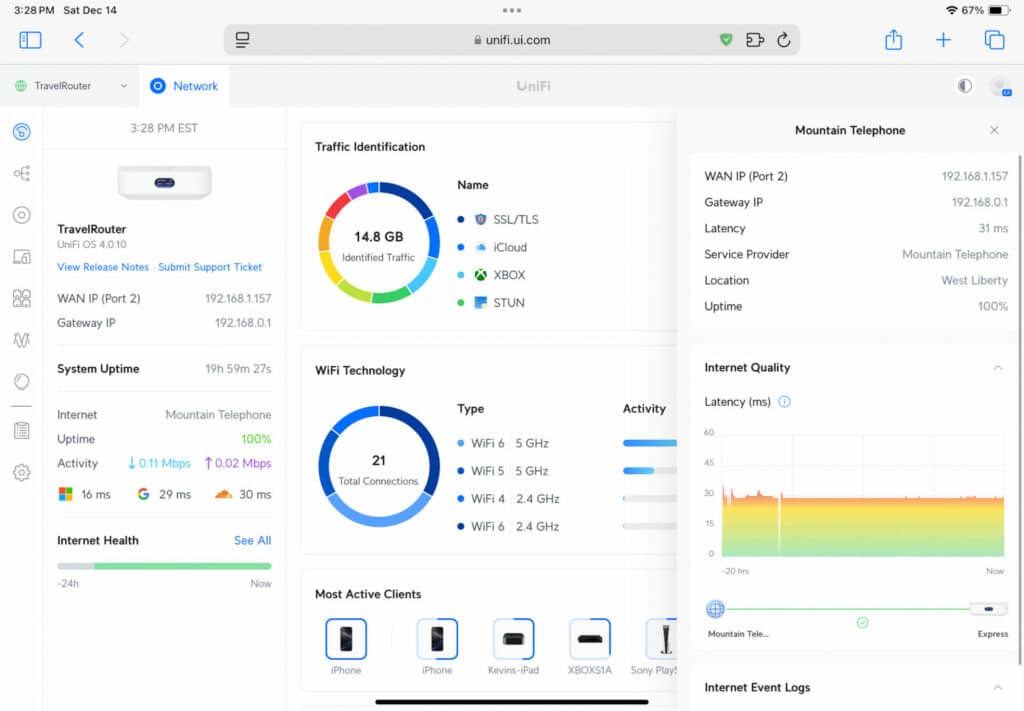
The experience was pretty painless despite a minor hiccup. The IP range for the default network chosen during our initial setup matched the router’s location, resulting in an IP conflict. We reset the router and redeployed the VPN configuration to fix that issue. Once online, it remained stable, offering a local network for traditional family devices and a sparingly used work network for business activity. The simple SSID made it easy for any device to gain native access to the lab quickly. Although the home VPN connection was configured, it wasn’t needed for this trip.

## ![]()

## Conclusion

This guide should have helped successfully transform the Ubiquiti UniFi UX Express Gateway (UX) into a versatile, portable travel router. With its built-in Wi-Fi 6 capabilities and seamless integration into the Ubiquiti UniFi ecosystem, the UX securely connects to home and work networks via WireGuard VPN.

![]()

This configuration ensures secure, policy-driven traffic routing and simplifies connectivity for multiple devices, like phones, laptops, and tablets. The dedicated Wi-Fi SSIDs for each network create a seamless experience, making it feel like you’re at home or the office, no matter where you are.

Whether you’re traveling for work or leisure, this setup demonstrates the flexibility and capability of UniFi’s solutions. The UX is an affordable yet powerful tool for extending your network’s reach and functionality wherever you go.

[Product Page](https://store.ui.com/us/en/products/ux?a_aid=StorageReview) (Affiliate Link)

**Engage with StorageReview**

[Newsletter](https://www.storagereview.com/storage_newsletter) |  [YouTube](https://www.youtube.com/user/StorageReview "Opens in a new window") | Podcast  [iTunes](https://podcasts.apple.com/gb/podcast/storagereview-com-storage-reviews/id1060681115 "Opens in a new window")/ [Spotify](https://open.spotify.com/show/1y6VnznABhHeOSMOmbDTz0 "Opens in a new window") |  [Instagram](https://www.instagram.com/storagereview/ "Opens in a new window") |  [Twitter](https://twitter.com/storagereview "Opens in a new window") |  [TikTok](https://www.tiktok.com/@storagereview? "Opens in a new window") |  [RSS Feed](https://www.storagereview.com/rss.xml)

![]()

### Dylan Dougherty

IT professional specializing in network administration and writer for StorageReview.

Previous post: [EnGenius EOC655 Outdoor 5GHz AP: Reliable Wireless Anywhere](https://www.storagereview.com/review/engenius-eoc655-outdoor-5ghz-ap-reliable-wireless-anywhere)

Next post: [Scaling AI Checkpoints: The Impact of High-Capacity SSDs on Model Training](https://www.storagereview.com/review/scaling-ai-checkpoints-the-impact-of-high-capacity-ssds-on-model-training)

Trusted Vendors

Products and solutions from our affiliate partners:

- [  
  ![Ubiquiti Logo](https://www.storagereview.com/wp-content/uploads/2024/11/2-1.webp)  
   Ubiquiti](https://store.ui.com/us/en?a_aid=StorageReview "Opens in a new window")
- [  
  ![Newegg Logo](https://www.storagereview.com/wp-content/uploads/2025/11/newegg.webp)  
   Newegg](https://click.linksynergy.com/fs-bin/click?id=g5terNMDhz0&offerid=1207190.18&subid=0&type=4 "Opens in a new window")
- [  
  ![Amazon Logo](https://www.storagereview.com/wp-content/uploads/2025/11/amazon.webp) Amazon](https://amzn.to/4fLJUEW "Opens in a new window")

Newsletter

Subscribe to the StorageReview newsletter to stay up to date on the latest news and reviews. We promise no spam!

1  

Leave this field empty if you’re human:

## Advertisement

Content Categories

[Facebook](https://www.facebook.com/@storagereview) [X](https://twitter.com/storagereview) [Instagram](https://www.instagram.com/storagereview/) [LinkedIn](https://www.linkedin.com/company/storagereview-com) [YouTube](https://www.youtube.com/user/storagereview?sub_confirmation=1) [Email](mailto:info@storagereview.com) [Spotify](https://open.spotify.com/show/1y6VnznABhHeOSMOmbDTz0) [Reddit](https://www.reddit.com/r/StorageReview/) [Discord](https://discord.gg/TwMHb4azdC) [RSS](https://www.storagereview.com/rss.xml) [TikTok](https://www.tiktok.com/@storagereview)

Copyright © 1998-2025 Flying Pig Ventures, LLC Cincinnati, Ohio. All rights reserved.

Manage your privacy

To provide the best experiences, we and our partners use technologies like cookies to store and/or access device information. Consenting to these technologies will allow us and our partners to process personal data such as browsing behavior or unique IDs on this site and show (non-) personalized ads. Not consenting or withdrawing consent, may adversely affect certain features and functions.

Click below to consent to the above or make granular choices. Your choices will be applied to this site only. You can change your settings at any time, including withdrawing your consent, by using the toggles on the Cookie Policy, or by clicking on the manage consent button at the bottom of the screen.

Functional Functional Always active

The technical storage or access is strictly necessary for the legitimate purpose of enabling the use of a specific service explicitly requested by the subscriber or user, or for the sole purpose of carrying out the transmission of a communication over an electronic communications network.

Preferences Preferences

The technical storage or access is necessary for the legitimate purpose of storing preferences that are not requested by the subscriber or user.

Statistics Statistics

The technical storage or access that is used exclusively for statistical purposes. The technical storage or access that is used exclusively for anonymous statistical purposes. Without a subpoena, voluntary compliance on the part of your Internet Service Provider, or additional records from a third party, information stored or retrieved for this purpose alone cannot usually be used to identify you.

Marketing Marketing

The technical storage or access is required to create user profiles to send advertising, or to track the user on a website or across several websites for similar marketing purposes.

Statistics

Marketing

Features

Always active

Always active

- Manage options
- Manage services
- Manage {vendor\_count} vendors
- [Read more about these purposes](https://cookiedatabase.org/tcf/purposes/)

Accept Deny Manage options Save preferences Manage options

- {title}
- {title}
- {title}

Manage your privacy

To provide the best experiences, we use technologies like cookies to store and/or access device information. Consenting to these technologies will allow us to process data such as browsing behavior or unique IDs on this site. Not consenting or withdrawing consent, may adversely affect certain features and functions.

Functional Functional Always active

The technical storage or access is strictly necessary for the legitimate purpose of enabling the use of a specific service explicitly requested by the subscriber or user, or for the sole purpose of carrying out the transmission of a communication over an electronic communications network.

Preferences Preferences

The technical storage or access is necessary for the legitimate purpose of storing preferences that are not requested by the subscriber or user.

Statistics Statistics

The technical storage or access that is used exclusively for statistical purposes. The technical storage or access that is used exclusively for anonymous statistical purposes. Without a subpoena, voluntary compliance on the part of your Internet Service Provider, or additional records from a third party, information stored or retrieved for this purpose alone cannot usually be used to identify you.

Marketing Marketing

The technical storage or access is required to create user profiles to send advertising, or to track the user on a website or across several websites for similar marketing purposes.

Statistics

Marketing

Features

Always active

Always active

- Manage options
- Manage services
- Manage {vendor\_count} vendors
- [Read more about these purposes](https://cookiedatabase.org/tcf/purposes/)

Accept Deny Manage options Save preferences Manage options

- {title}
- {title}
- {title}

Manage consent Manage consent

```json
{"@context":"https:\/\/schema.org","@graph":[{"@type":"WebPage","@id":"https:\/\/www.storagereview.com\/review\/ubiquiti-ux-express-gateway-ultimate-travel-router","url":"https:\/\/www.storagereview.com\/review\/ubiquiti-ux-express-gateway-ultimate-travel-router","name":"Ubiquiti UX Express Gateway: Ultimate Travel Router? - StorageReview.com","isPartOf":{"@id":"https:\/\/www.storagereview.com\/#website"},"primaryImageOfPage":{"@id":"https:\/\/www.storagereview.com\/review\/ubiquiti-ux-express-gateway-ultimate-travel-router#primaryimage"},"image":{"@id":"https:\/\/www.storagereview.com\/review\/ubiquiti-ux-express-gateway-ultimate-travel-router#primaryimage"},"thumbnailUrl":"https:\/\/www.storagereview.com\/wp-content\/uploads\/2024\/12\/StorageReview-Ubiquiti-Unifi-Express-1.jpg","datePublished":"2024-12-17T18:40:17+00:00","dateModified":"2026-08-16T00:08:12+00:00","description":"Ubiquiti UX Express Gateway delivers flexible, VPN-ready Wi-Fi 6 connectivity anywhere, bridging home and office networks effortlessly.","breadcrumb":{"@id":"https:\/\/www.storagereview.com\/review\/ubiquiti-ux-express-gateway-ultimate-travel-router#breadcrumb"},"inLanguage":"en-US","potentialAction":[{"@type":"ReadAction","target":["https:\/\/www.storagereview.com\/review\/ubiquiti-ux-express-gateway-ultimate-travel-router"]}]},{"@type":"ImageObject","inLanguage":"en-US","@id":"https:\/\/www.storagereview.com\/review\/ubiquiti-ux-express-gateway-ultimate-travel-router#primaryimage","url":"https:\/\/www.storagereview.com\/wp-content\/uploads\/2024\/12\/StorageReview-Ubiquiti-Unifi-Express-1.jpg","contentUrl":"https:\/\/www.storagereview.com\/wp-content\/uploads\/2024\/12\/StorageReview-Ubiquiti-Unifi-Express-1.jpg","width":1920,"height":1440},{"@type":"BreadcrumbList","@id":"https:\/\/www.storagereview.com\/review\/ubiquiti-ux-express-gateway-ultimate-travel-router#breadcrumb","itemListElement":[{"@type":"ListItem","position":1,"name":"Home","item":"https:\/\/www.storagereview.com\/"},{"@type":"ListItem","position":2,"name":"Review","item":"https:\/\/www.storagereview.com\/review"},{"@type":"ListItem","position":3,"name":"Ubiquiti UX Express Gateway: Ultimate Travel Router?"}]},{"@type":"WebSite","@id":"https:\/\/www.storagereview.com\/#website","url":"https:\/\/www.storagereview.com\/","name":"StorageReview.com","description":"StorageReview.com is a leading provider of news and reviews throughout the entire IT stack - from the datacenter to the edge, and all points in between.","publisher":{"@id":"https:\/\/www.storagereview.com\/#organization"},"potentialAction":[{"@type":"SearchAction","target":{"@type":"EntryPoint","urlTemplate":"https:\/\/www.storagereview.com\/?s={search_term_string}"},"query-input":{"@type":"PropertyValueSpecification","valueRequired":true,"valueName":"search_term_string"}}],"inLanguage":"en-US"},{"@type":"Organization","@id":"https:\/\/www.storagereview.com\/#organization","name":"StorageReview.com","url":"https:\/\/www.storagereview.com\/","logo":{"@type":"ImageObject","inLanguage":"en-US","@id":"https:\/\/www.storagereview.com\/#\/schema\/logo\/image\/","url":"https:\/\/www.storagereview.com\/wp-content\/uploads\/2020\/02\/Storage-Reviews-2-2.png","contentUrl":"https:\/\/www.storagereview.com\/wp-content\/uploads\/2020\/02\/Storage-Reviews-2-2.png","width":344,"height":61,"caption":"StorageReview.com"},"image":{"@id":"https:\/\/www.storagereview.com\/#\/schema\/logo\/image\/"},"sameAs":["https:\/\/x.com\/storagereview","http:\/\/youtube.com\/user\/storagereview"]}]}
```