---
description: The Kingston IronKey Locker+ 50 (LP50) is a ruggedly-built USB 3.1 Gen1 flash drive highlighted by its focus on security features.
title: Kingston IronKey Locker+ 50 (LP50) Review
image: https://www.storagereview.com/wp-content/uploads/2022/08/StorageReview-IronKey-Locker-50-3.jpg
---

[![Storage Review]()](https://storagereview.com/)

---

[Facebook](https://www.facebook.com/@storagereview) [X (Twitter)](https://twitter.twitter.com/storagereview) [Instagram](https://www.instagram.com/storagereview/) [LinkedIn](https://www.linkedin.com/company/storagereview-com) [YouTube](https://www.youtube.com/user/storagereview?sub_confirmation=1) [Email](mailto:info@storagereview.com) [Spotify](https://open.spotify.com/show/1y6VnznABhHeOSMOmbDTz0) [Reddit](https://www.reddit.com/r/StorageReview/) [Discord](https://discord.gg/TwMHb4azdC) [RSS Feed](https://www.storagereview.com/rss.xml) [TikTok](https://www.tiktok.com/@storagereview)

[Facebook](https://www.facebook.com/@storagereview) [X (Twitter)](https://twitter.com/storagereview) [Instagram](https://www.instagram.com/storagereview/) [LinkedIn](https://www.linkedin.com/company/storagereview-com) [YouTube](https://www.youtube.com/user/storagereview?sub_confirmation=1) [Email](mailto:info@storagereview.com) [Spotify](https://open.spotify.com/show/1y6VnznABhHeOSMOmbDTz0) [Reddit](https://www.reddit.com/r/StorageReview/) [Discord](https://discord.gg/TwMHb4azdC) [RSS Feed](https://www.storagereview.com/rss.xml) [TikTok](https://www.tiktok.com/@storagereview)

[![StorageReview.com](https://www.storagereview.com/wp-content/uploads/2026/07/Storage-Review-2x.png)](https://www.storagereview.com)

≡ Menu

- [Home](https://www.storagereview.com/)
- [Storage Reviews](https://www.storagereview.com/review)
  - [Consumer Reviews](https://www.storagereview.com/consumer)
  - [Enterprise Reviews](https://www.storagereview.com/enterprise)
  - [Ubiquiti Reviews](https://www.storagereview.com/best/ubiquiti-reviews)
- [SR Merch](https://store.storagereview.com)
- [Leaderboards](https://www.storagereview.com/best)
  - [Best Storage Arrays](https://www.storagereview.com/best/storage-arrays)
  - [Best Enterprise SSDs](https://www.storagereview.com/best/enterprise-ssds)
  - [Best Servers](https://www.storagereview.com/best/servers)
  - [Best Desktops for Local AI](https://www.storagereview.com/best/desktops-local-ai)
  - [Best Laptops for Local AI](https://www.storagereview.com/best/laptops-local-ai)
  - [Best Local LLM Tools](https://www.storagereview.com/best/local-llm-tools)
  - [Agentic AI Hardware](https://www.storagereview.com/best/agentic-ai-hardware)
  - [Best SSDs & Hard Drives](https://www.storagereview.com/best_drives)
  - [Best Portable SSDs](https://www.storagereview.com/best/portable-ssds)
  - [Best Business Laptops](https://www.storagereview.com/best/business-laptops)
  - [Best Mobile Workstations](https://www.storagereview.com/best/mobile-workstations)
  - [Best Desktop Workstations](https://www.storagereview.com/best/desktop-workstations)
  - [Best Laptop Battery Life](https://www.storagereview.com/best/laptop-battery-life)
- [Storage Reference Guide](https://www.storagereview.com/storage-reference-guide)
- [About SR](https://www.storagereview.com/about-storagereview)
  - [StorageReview.com Sweepstakes Rules and Regulations](https://www.storagereview.com/storagereview-com-sweepstakes-rules-and-regulations)

Search

[Home](https://www.storagereview.com/) » [Review](https://www.storagereview.com/review) » Kingston IronKey Locker+ 50 (LP50) Review

# Kingston IronKey Locker+ 50 (LP50) Review

by Lyle Smith on August 8, 2022

[Consumer](https://www.storagereview.com/consumer)  ◇  [Portable Storage](https://www.storagereview.com/consumer/portable-storage)

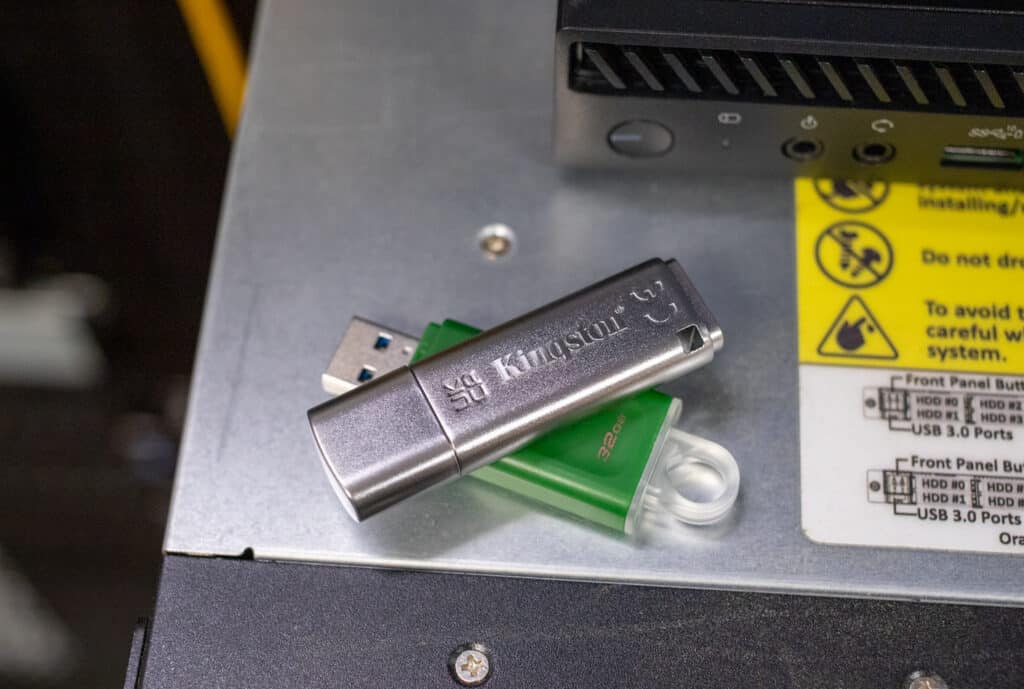
The Kingston IronKey Locker+ 50 (LP50) is a USB flash drive purpose-built for on-the-go consumers or professionals who require extra security for their data. The LP50 is highlighted by AES hardware-encryption XTS mode support, which helps protect against attacks like BadUSB (i.e., a security attack that uses USB devices programmed to unleash malicious software) with digitally-signed firmware and Brute Force password attacks. Kingston’s new security-driven flash drive is available in capacities ranging from 16GB to 128GB.

![Kingston IronKey Locker+ 50 (LP50) ](https://www.storagereview.com/wp-content/uploads/2022/08/StorageReview-IronKey-Locker-50-1-1024x689.jpg)

## Kingston IronKey Locker+ 50 Features

The IronKey Locker+ 50 features the USB 3.2 Gen 1 interface and is quoted to deliver up to 145MB/s read and 115MB/s write in sequential performance. Though it likely won’t be used in such a scenario, it also supports legacy 2.0 connectivity, which lowers speeds to just 30MB/s read and 20MB/s write. Of course, performance isn’t the lead story with this USB drive.

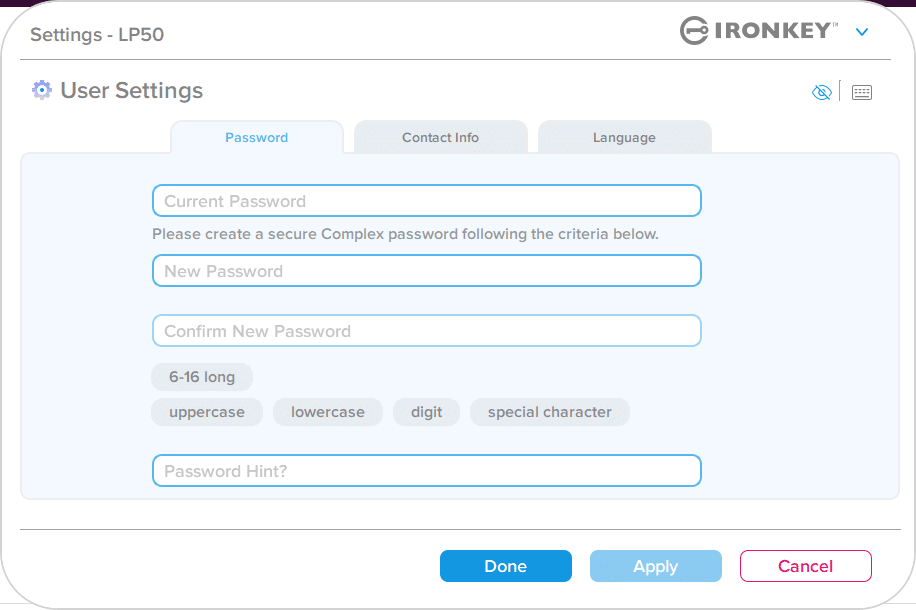
The main draw of Kingston’s IronKey flash drive is its password protection functionality. It allows users to choose either complex or passphrase mode when initially setting the drive password in the bundled setup wizard. The latter option can be a string of words and letters (it must be between 10 to 64 characters long) such as PIN numbers, a sentence with space characters, or just a list of words.

If using the “Complex,” users must type a password that is between 6-16 characters while using 3- out of 4-character sets (uppercase, lowercase, numbers and/or special characters). You can also enable the “admin and user passwords” option during the set-up process, which allows for a multi-password that admins can manage in addition to other useful features. That said, these cannot be changed unless the LP50 is reset.

![Kingston IronKey Locker+ 50 (LP50) software]()

Another useful security feature includes the option to reduce failed login attempts by enabling the “eye” button, which allows you to see your typed password. You can also use the embedded virtual keyboard when entering your password to help protect against both key and screen loggers.

## Kingston IronKey Locker+ 50 Software

As far as software goes (besides the initial set-up when you add a password and your contact information), it only really allows you to unlock and manage the flash drive, with no additional features. So, if you’re looking for something with extra features you might be out of luck here.

That said, Kingston includes an option to install a 3<sup>rd</sup>-party USB to Cloud software (from ClevX), which automatically back up your content to the cloud every time you plug in your drive and log in. The software installation wizard will pop up when you plug it in after the initial setup, though you can decline it and it will not show up again.

## Kingston IronKey Locker+ 50 Pricing and Capacities

Backed by a 5-year warranty, the Kingston IronKey Locker+ 50 [goes for roughly $32](https://amzn.to/3p1nAhE) (16GB), $42 (32GB), $77 (64GB), and $120 (128GB). We will be looking at the 128GB model for this review

## **Kingston IronKey Locker+ 50 (LP50) Specifications**

| Interface | USB 3.2 Gen 1 |
| --- | --- |
| Capacities<sup>1</sup> | 16GB, 32GB, 64GB, 128GB |
| Connector | Type-A |
| Speed | USB 3.2 Gen 1: 16GB – 128GB: 145MB/s read, 115MB/s write USB 2.0: 16GB – 128GB: 30MB/s read, 20MB/s write |
| Cloud Services Supported | Google Drive, OneDrive (Microsoft), Amazon S3, Dropbox, Box |
| Dimensions | 60.56mm x 18.6 mm x 9.75 mm |
| Operating Temperature | 0°C to 60°C |
| Storage Temperature | -20°C to 85°C |
| Compatibility | USB 3.0/USB 3.1/USB 3.2 Gen 1 |
| Minimum System Requirements | Two (2) free consecutive drive letters are required for use |
| Warranty/support | Limited 5-year warranty, free technical support. A 5-year license (upon activation) to USBtoCloud is included with every IKLP50 drive. Upon expiration of software license, USBtoCloud offers licensing options directly from ClevX |
| Compatible with | Windows 11, 10, 8.1, macOS (v. 10.14.x – 12.x.x) |

## **Kingston IronKey Locker+ 50 Design and Build**

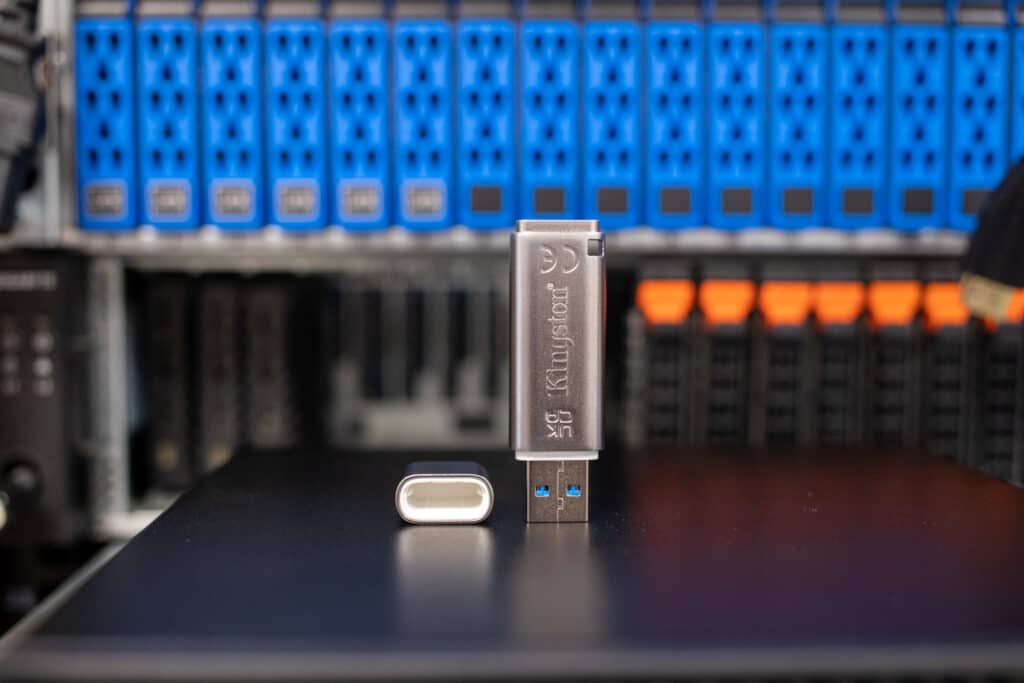
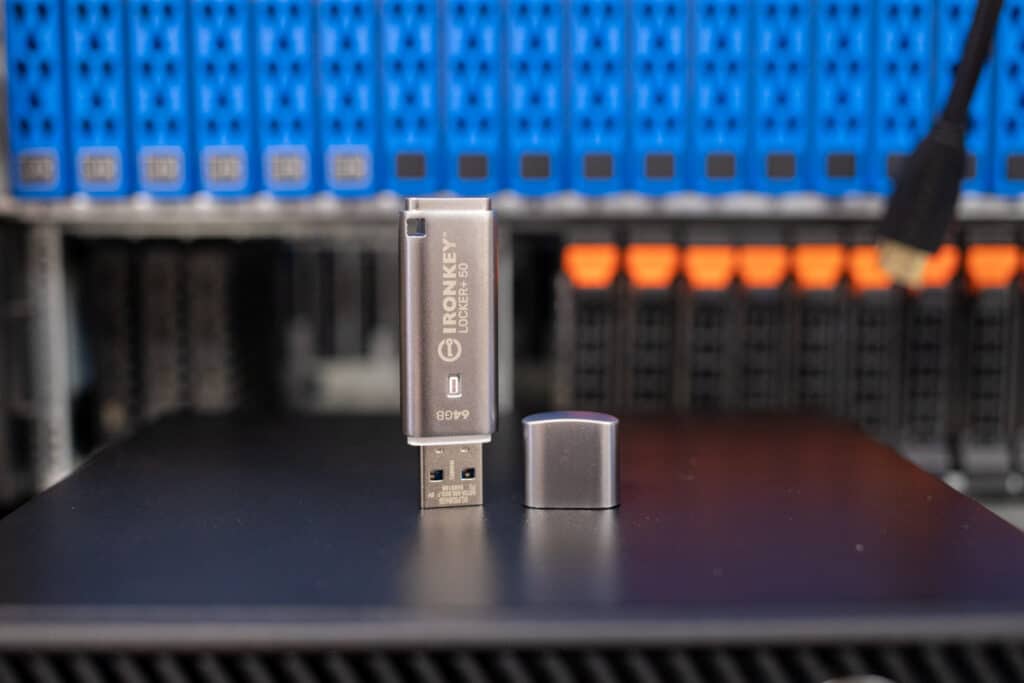
The Kingston IronKey is very hefty for a modern flash drive at almost two and a half inches in length and 0.4 inches in depth (though a rugged build is certainly preferred over something slight when security is your more important requirement for a USB flash key)

![Kingston IronKey Locker+ 50 (LP50) with cap off]()

That said, the LP50 has a really nice silver shine to it, so it would definitely stand out among other portable storage devices, which makes it easier to find and more difficult to lose. It also has a blue LED that lights up during drive activity.

It features the product name and capacity using a nice imprinted gold font. The lid snaps very securely into place, so you won’t be damaged carrying it around in your pocket or backpack.

## **Kingston IronKey Locker+ 50 Performance**

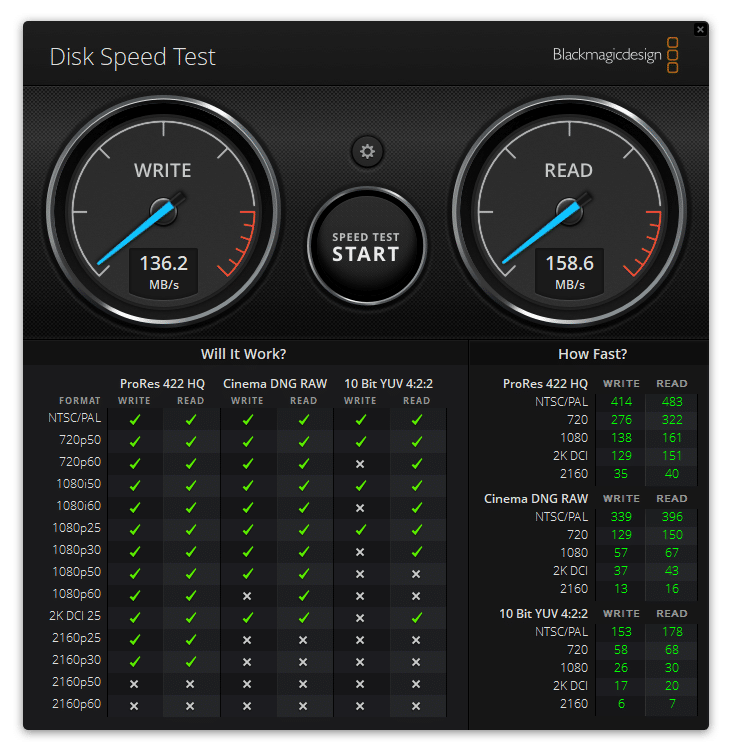
We used our [Lenovo ThinkStation P520](https://www.storagereview.com/review/lenovo-thinkstation-p520-review) for performance testing. The LP50 performed very well during our Blackmagic Disk Speed Test. Here, it recorded 158.6MB/s read and 136.2MB/s write, which was noticeably better than Kingston’s quoted 145MB/s read and 115MB/s write. While these numbers are certainly much lower than other portable drives on the market (like USB 3.2 Gen2 [Kingston DataTraveler Max](https://www.storagereview.com/review/kingston-datatraveler-max-review)), the LP50 is meant for users looking for an affordable security-focused solution over a performance-driven one.

![Kingston IronKey Locker+ 50 (LP50) BlackMagic test]()

The IronKey Locker+ 50 showed solid results in our last test, IOMeter, again exceeding the quoted numbers from Kingston.

| **IOMeter (1-Thread)** | |
| --- | --- |
| **Test** | **Result** |
| 2MB sequential write | 132MB/s, 66 IOPS |
| 2MB sequential read | 156.88MB/s, 78.44 IOPS |
| 2MB random write | 128.4MB/s, 64.2 IOPS |
| 2MB random read | 154.67MB/s, 77.33 IOPS |
| 4K random write | 13.02MB/s, 3,332.9 IOPS |
| 4K random read | 13.79MB/s, 3,367.5 IOPS |

## **Conclusion**

The Kingston IronKey Locker+ 50 (LP50) is a ruggedly-built USB 3.1 Gen1 flash drive highlighted by its focus on security features designed to protect your data from malicious intent and accidental deletion. For example, you can easily set complex password phrases to access the drive and install optional backup software that automatically uploads files to the Cloud every time you log in to your drive. The design is also excellent and stands out with its silver and gold branding.

![]()

The LP50 also exceeded Kingston’s transfer speed claims in our testing, as it recorded 158.6MB/s read and 136.2MB/s write during our BlackMagic test (a nice little improvement over the quoted 145MB/s read, 115MB/s write). IOmeter showed similar sequential performance as well. Performance isn’t the main story here, but it’s nice to have.

[Kingston LP50 at Amazon](https://amzn.to/3p1nAhE)

**Engage with StorageReview**

[Newsletter](https://www.storagereview.com/storage_newsletter) |  [YouTube](https://www.youtube.com/user/StorageReview "Opens in a new window") | Podcast  [iTunes](https://podcasts.apple.com/gb/podcast/storagereview-com-storage-reviews/id1060681115 "Opens in a new window")/ [Spotify](https://open.spotify.com/show/1y6VnznABhHeOSMOmbDTz0 "Opens in a new window") |  [Instagram](https://www.instagram.com/storagereview/ "Opens in a new window") |  [Twitter](https://twitter.com/storagereview "Opens in a new window") |  [TikTok](https://www.tiktok.com/@storagereview? "Opens in a new window") |  [RSS Feed](https://www.storagereview.com/rss.xml)

![]()

### Lyle Smith

Lyle is a writer for StorageReview, covering a broad set of end user and enterprise IT topics.

Previous post: [Dell Precision 5470 Review](https://www.storagereview.com/review/dell-precision-5470-review)

Next post: [WD BLACK SN850X SSD Review](https://www.storagereview.com/review/wd-black-sn850x-ssd-review)

Trusted Vendors

Products and solutions from our affiliate partners:

- [  
  ![Ubiquiti Logo](https://www.storagereview.com/wp-content/uploads/2024/11/2-1.webp)  
   Ubiquiti](https://store.ui.com/us/en?a_aid=StorageReview "Opens in a new window")
- [  
  ![Newegg Logo](https://www.storagereview.com/wp-content/uploads/2025/11/newegg.webp)  
   Newegg](https://click.linksynergy.com/fs-bin/click?id=g5terNMDhz0&offerid=1207190.18&subid=0&type=4 "Opens in a new window")
- [  
  ![Amazon Logo](https://www.storagereview.com/wp-content/uploads/2025/11/amazon.webp) Amazon](https://amzn.to/4fLJUEW "Opens in a new window")

Newsletter

Subscribe to the StorageReview newsletter to stay up to date on the latest news and reviews. We promise no spam!

1  

Leave this field empty if you’re human:

## Advertisement

Content Categories

[Facebook](https://www.facebook.com/@storagereview) [X](https://twitter.com/storagereview) [Instagram](https://www.instagram.com/storagereview/) [LinkedIn](https://www.linkedin.com/company/storagereview-com) [YouTube](https://www.youtube.com/user/storagereview?sub_confirmation=1) [Email](mailto:info@storagereview.com) [Spotify](https://open.spotify.com/show/1y6VnznABhHeOSMOmbDTz0) [Reddit](https://www.reddit.com/r/StorageReview/) [Discord](https://discord.gg/TwMHb4azdC) [RSS](https://www.storagereview.com/rss.xml) [TikTok](https://www.tiktok.com/@storagereview)

Copyright © 1998-2025 Flying Pig Ventures, LLC Cincinnati, Ohio. All rights reserved.

Manage your privacy

To provide the best experiences, we and our partners use technologies like cookies to store and/or access device information. Consenting to these technologies will allow us and our partners to process personal data such as browsing behavior or unique IDs on this site and show (non-) personalized ads. Not consenting or withdrawing consent, may adversely affect certain features and functions.

Click below to consent to the above or make granular choices. Your choices will be applied to this site only. You can change your settings at any time, including withdrawing your consent, by using the toggles on the Cookie Policy, or by clicking on the manage consent button at the bottom of the screen.

Functional Functional Always active

The technical storage or access is strictly necessary for the legitimate purpose of enabling the use of a specific service explicitly requested by the subscriber or user, or for the sole purpose of carrying out the transmission of a communication over an electronic communications network.

Preferences Preferences

The technical storage or access is necessary for the legitimate purpose of storing preferences that are not requested by the subscriber or user.

Statistics Statistics

The technical storage or access that is used exclusively for statistical purposes. The technical storage or access that is used exclusively for anonymous statistical purposes. Without a subpoena, voluntary compliance on the part of your Internet Service Provider, or additional records from a third party, information stored or retrieved for this purpose alone cannot usually be used to identify you.

Marketing Marketing

The technical storage or access is required to create user profiles to send advertising, or to track the user on a website or across several websites for similar marketing purposes.

Statistics

Marketing

Features

Always active

Always active

- Manage options
- Manage services
- Manage {vendor\_count} vendors
- [Read more about these purposes](https://cookiedatabase.org/tcf/purposes/)

Accept Deny Manage options Save preferences Manage options

- {title}
- {title}
- {title}

Manage your privacy

To provide the best experiences, we use technologies like cookies to store and/or access device information. Consenting to these technologies will allow us to process data such as browsing behavior or unique IDs on this site. Not consenting or withdrawing consent, may adversely affect certain features and functions.

Functional Functional Always active

The technical storage or access is strictly necessary for the legitimate purpose of enabling the use of a specific service explicitly requested by the subscriber or user, or for the sole purpose of carrying out the transmission of a communication over an electronic communications network.

Preferences Preferences

The technical storage or access is necessary for the legitimate purpose of storing preferences that are not requested by the subscriber or user.

Statistics Statistics

The technical storage or access that is used exclusively for statistical purposes. The technical storage or access that is used exclusively for anonymous statistical purposes. Without a subpoena, voluntary compliance on the part of your Internet Service Provider, or additional records from a third party, information stored or retrieved for this purpose alone cannot usually be used to identify you.

Marketing Marketing

The technical storage or access is required to create user profiles to send advertising, or to track the user on a website or across several websites for similar marketing purposes.

Statistics

Marketing

Features

Always active

Always active

- Manage options
- Manage services
- Manage {vendor\_count} vendors
- [Read more about these purposes](https://cookiedatabase.org/tcf/purposes/)

Accept Deny Manage options Save preferences Manage options

- {title}
- {title}
- {title}

Manage consent Manage consent

```json
{"@context":"https:\/\/schema.org","@graph":[{"@type":"WebPage","@id":"https:\/\/www.storagereview.com\/review\/kingston-ironkey-locker-50-lp50-review","url":"https:\/\/www.storagereview.com\/review\/kingston-ironkey-locker-50-lp50-review","name":"Kingston IronKey Locker+ 50 (LP50) Review - StorageReview.com","isPartOf":{"@id":"https:\/\/www.storagereview.com\/#website"},"primaryImageOfPage":{"@id":"https:\/\/www.storagereview.com\/review\/kingston-ironkey-locker-50-lp50-review#primaryimage"},"image":{"@id":"https:\/\/www.storagereview.com\/review\/kingston-ironkey-locker-50-lp50-review#primaryimage"},"thumbnailUrl":"https:\/\/www.storagereview.com\/wp-content\/uploads\/2022\/08\/StorageReview-IronKey-Locker-50-3.jpg","datePublished":"2022-08-08T15:46:01+00:00","dateModified":"2022-09-14T18:06:39+00:00","description":"The Kingston IronKey Locker+ 50 (LP50) is a ruggedly-built USB 3.1 Gen1 flash drive highlighted by its focus on security features.","breadcrumb":{"@id":"https:\/\/www.storagereview.com\/review\/kingston-ironkey-locker-50-lp50-review#breadcrumb"},"inLanguage":"en-US","potentialAction":[{"@type":"ReadAction","target":["https:\/\/www.storagereview.com\/review\/kingston-ironkey-locker-50-lp50-review"]}]},{"@type":"ImageObject","inLanguage":"en-US","@id":"https:\/\/www.storagereview.com\/review\/kingston-ironkey-locker-50-lp50-review#primaryimage","url":"https:\/\/www.storagereview.com\/wp-content\/uploads\/2022\/08\/StorageReview-IronKey-Locker-50-3.jpg","contentUrl":"https:\/\/www.storagereview.com\/wp-content\/uploads\/2022\/08\/StorageReview-IronKey-Locker-50-3.jpg","width":1500,"height":1000},{"@type":"BreadcrumbList","@id":"https:\/\/www.storagereview.com\/review\/kingston-ironkey-locker-50-lp50-review#breadcrumb","itemListElement":[{"@type":"ListItem","position":1,"name":"Home","item":"https:\/\/www.storagereview.com\/"},{"@type":"ListItem","position":2,"name":"Review","item":"https:\/\/www.storagereview.com\/review"},{"@type":"ListItem","position":3,"name":"Kingston IronKey Locker+ 50 (LP50) Review"}]},{"@type":"WebSite","@id":"https:\/\/www.storagereview.com\/#website","url":"https:\/\/www.storagereview.com\/","name":"StorageReview.com","description":"StorageReview.com is a leading provider of news and reviews throughout the entire IT stack - from the datacenter to the edge, and all points in between.","publisher":{"@id":"https:\/\/www.storagereview.com\/#organization"},"potentialAction":[{"@type":"SearchAction","target":{"@type":"EntryPoint","urlTemplate":"https:\/\/www.storagereview.com\/?s={search_term_string}"},"query-input":{"@type":"PropertyValueSpecification","valueRequired":true,"valueName":"search_term_string"}}],"inLanguage":"en-US"},{"@type":"Organization","@id":"https:\/\/www.storagereview.com\/#organization","name":"StorageReview.com","url":"https:\/\/www.storagereview.com\/","logo":{"@type":"ImageObject","inLanguage":"en-US","@id":"https:\/\/www.storagereview.com\/#\/schema\/logo\/image\/","url":"https:\/\/www.storagereview.com\/wp-content\/uploads\/2020\/02\/Storage-Reviews-2-2.png","contentUrl":"https:\/\/www.storagereview.com\/wp-content\/uploads\/2020\/02\/Storage-Reviews-2-2.png","width":344,"height":61,"caption":"StorageReview.com"},"image":{"@id":"https:\/\/www.storagereview.com\/#\/schema\/logo\/image\/"},"sameAs":["https:\/\/x.com\/storagereview","http:\/\/youtube.com\/user\/storagereview"]}]}
```