

Mini-PCs haben sich zu einem der wichtigsten Segmente im Markt für Client-Computing entwickelt. Sie bilden das Herzstück aufgeräumter Büroarbeitsplätze, treiben Digital Signage und Kiosksysteme an und kommen zunehmend am Netzwerkrand zum Einsatz, wo sie Inferenzprozesse in der Nähe von Kameras und Sensoren durchführen, wo Cloud-Anfragen zu langsam oder zu teuer sind. Was dieser Kategorie bisher fehlte, war eine überzeugende Arm-Option. Der ASUS Ascent QN10 bietet genau das: Er ist der erste Mini-PC mit Qualcomms Snapdragon X2 Elite und laut ASUS der weltweit erste Mini-PC mit einer 80 TOPS NPU.
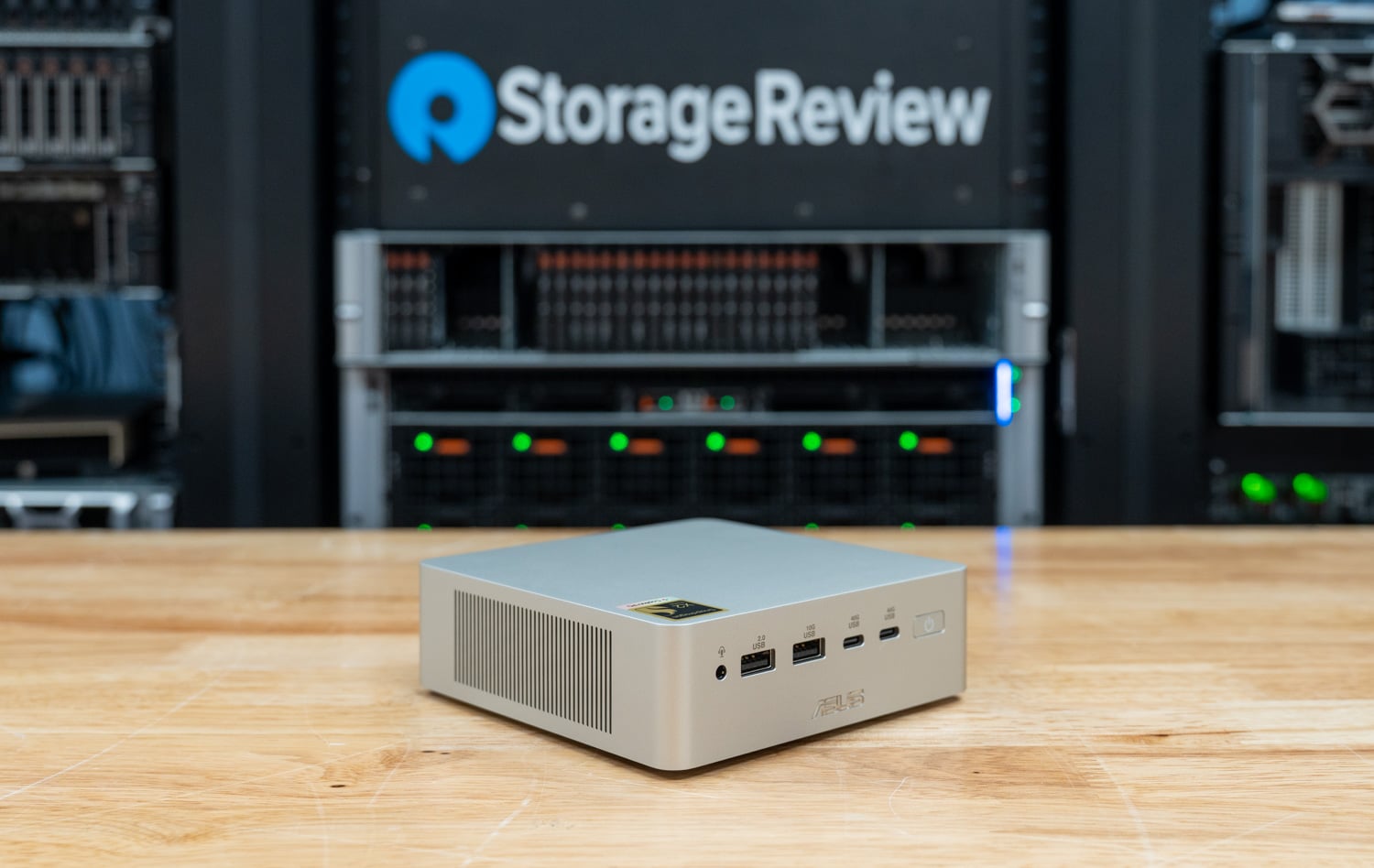
Die Geschichte des QN10 beginnt mit seinem Chipsatz: Der X2E-88-100 kombiniert 18 Oryon-Kerne der dritten Generation mit bis zu 4.7 GHz mit der Adreno X2-90 GPU und der 80 TOPS starken Hexagon NPU. Das alles in einem Gehäuse mit weniger als 0.7 Litern Volumen – so wenig Platz wie ein Stapel Müsliriegel auf dem Schreibtisch. Trotz seiner kompakten Größe bietet der ASUS QN10 eine Vapor-Chamber-Kühlung, einen separaten Lüfter für den PCIe Gen5 SSD-Steckplatz, sieben USB-Anschlüsse (darunter drei USB 4.0), HDMI 2.1, 2.5-GbE und Wi-Fi 7 sowie Unterstützung für bis zu vier 4K-Displays gleichzeitig. Für Geschäftskunden sorgen fTPM 2.0 und Qualcomms SPU mit Microsoft Pluton-Unterstützung für die nötige Sicherheit. Die hervorragende Leistung pro Watt ist der Grund für das 180-Watt-Netzteil: Dieser Copilot+-Desktop-PC verbraucht im Leerlauf nur wenig Strom und der Lüfter läuft sogar bis auf null Umdrehungen pro Minute.
ASUS positioniert das QN10 für KI-Entwickler, ambitionierte Anwender und Edge-Computing-Nutzer: Lokale Inferenz für Digital Signage und Kiosksysteme, Computer Vision für Industrie und Einzelhandel sowie permanente Assistenten-Workloads – unterstützt durch sofort einsatzbereite Modelle über den Qualcomm AI Hub. Die Konfiguration mit 16 GB RAM und 512 GB Speicher ist zum Zeitpunkt der Veröffentlichung dieses Artikels bei Best Buy für 1,349.99 US-Dollar erhältlich; wir haben die 32-GB-Variante getestet. Benchmarking eines Windows-on-Arm-Desktops erfordert nach wie vor die Analyse der tatsächlich nativ ausgeführten Anwendungen. Daher beschränkt sich unser Test auf die Arm-kompatiblen Systeme, und die Vergleichsgruppe spiegelt die aktuelle Situation in dieser Kategorie wider: Es gibt noch keinen anderen Snapdragon-X2-Desktop-PC.
ASUS Ascent QN10 Spezifikationen
| Normen | ASUS Ascent QN10 |
|---|---|
| Modell | ASUS Ascent QN10 |
| Prozessor | Qualcomm Snapdragon X2 Elite (X2E-88-100), Oryon-Prozessor der 3. Generation, 18 Kerne / 18 Threads, bis zu 4.7 GHz |
| Grafiken | Qualcomm Adreno X2-90 (integriert) |
| NPU | Qualcomm Hexagon NPU, 80 TOPS (INT8) |
| Memory | 32 GB LPDDR5x, 8533 MT/s, Onboard (16 GB und 32 GB Konfigurationen; 32 GB ist das Maximum) |
| Lagerung | 512 GB SanDisk PC SN5100S (getestet); 1x M.2 2280 PCIe Gen5 + 1x M.2 2280 PCIe Gen4 Steckplatz, bis zu 4 TB Gesamtspeicherkapazität |
| Netzwerken | Wi-Fi 7, Bluetooth 6.0, Realtek 2.5 GbE LAN |
| Anschlüsse (Vorderseite) | 2x USB4 Typ-C (DP1.4/PD, 40 Gbit/s) 1x USB-A 3.2 1x USB-A 2.0 1x 3.5-mm-Audiobuchse |
| Anschlüsse (hinten) | 1x USB4 Typ-C (DP1.4/PD, 40 Gbit/s) 2x USB-A 3.2 1x HDMI 2.1 FRL 1x RJ45 2.5GbE |
| Unterstützung anzeigen | Bis zu 4 Displays (HDMI + 3x USB-C) |
| Sicherheit | fTPM 2.0, Qualcomm SPU mit Microsoft Pluton-Unterstützung, Snapdragon Guardian |
| Kühlung: | CPU-Lüfter mit Dampfkammer, separater Gen5-SSD-Lüfter; maximal 53 dBA bei voller Drehzahl, 0 U/min im Leerlauf |
| Tuning | 180-W-Gleichstromadapter |
| Betriebssystem | Windows 11 Pro, Copilot+ PC |
| Abmessungen / Gewicht | 130 x 130 x 40 mm (43.5 mm mit Füßen), unter 0.7 l / 620 g |
| Langlebigkeit | MIL-STD 810H-geprüft (Schock, Vibration, Feuchtigkeit, Temperatur, Portbelastung) |
| Preis | 1,349.99 $ (16 GB/512 GB, zum Zeitpunkt der Veröffentlichung bei Best Buy); die getestete Konfiguration mit 32 GB/512 GB ist bei Newegg gelistet, aber derzeit nicht verfügbar und es wird kein Preis angezeigt. |
Wo sich der QN10 in ASUS' Mini-PC-Produktpalette einordnet
ASUS übernahm 2023 Intels NUC-Geschäft und hat die x86-Produktreihe seitdem kontinuierlich weiterentwickelt: vom von uns getesteten Meteor Lake NUC 14 Pro über den aktuellen Arrow Lake NUC 15 Pro bis hin zu leistungsstärkeren Modellen, die Arrow Lake mit dedizierter RTX-Grafikkarte für Gaming und kreative Anwendungen kombinieren. Die NUC Pro-Reihe gilt aus gutem Grund als Standard in ihrer Kategorie: Barebone-Systeme mit gesockeltem Arbeitsspeicher und Speicher, volle x86-Windows-Kompatibilität und ein Preisniveau, das es ermöglicht, ein selbstkonfiguriertes System heute unter 850 US-Dollar zu halten.
Ascent ist der neuere, KI-orientierte Zweig der Familie, und der QN10 ist sein zweiter Versuch. Der erste war der Ascent GX10 , der NVIDIAs Grace Blackwell GB10 in einem kompakten Desktop-PC für CUDA-Entwickler im Umgang mit Datacenter-Toolchains integrierte. Der QN10 verfolgt einen anderen Ansatz: Qualcomm-Chip, ein Windows Copilot+-Stack und ein NPU-basiertes Design, das auf Inferenz mit geringem Stromverbrauch und nicht auf Modellentwicklung ausgelegt ist. Während der GX10 eine kleine Workstation für die KI-Entwicklung darstellt, ähnelt der QN10 eher einem Mini-System für deren Ausführung.
Die Aufteilung zwischen Arm und x86 in dieser Produktreihe spiegelt diese Aufteilung wider: Der NUC Pro bleibt die erste Wahl, wenn Konfigurierbarkeit, Upgrade-Möglichkeiten oder bedingungslose Anwendungskompatibilität den Kauf entscheiden; der QN10 hingegen punktet mit seiner Leistung pro Watt, der 80 TOPS NPU und seinen geschlossenen, wartungsfreien Einsatzmöglichkeiten wie Digital Signage, Kiosksystemen und Edge-Inferenz. Dank der ausreichenden CPU-Leistung, wie die folgenden Ergebnisse zeigen, muss die Effizienz nicht länger mit Leistungseinbußen einhergehen.
Aufbau und Design
Das QN10 ist 130 mm breit, 40 mm hoch und wiegt 620 Gramm bei einem Volumen von unter 0.7 Litern. Das schlichte, silberfarbene Metallgehäuse mit ASUS-Schriftzug auf der Vorderseite passt perfekt zu den Einsatzszenarien, für die dieses Gerät konzipiert wurde. Es ist so gestaltet, dass es unauffällig hinter einem Monitor oder in einem Kioskgehäuse platziert werden kann – genau dort, wo ASUS es sieht.
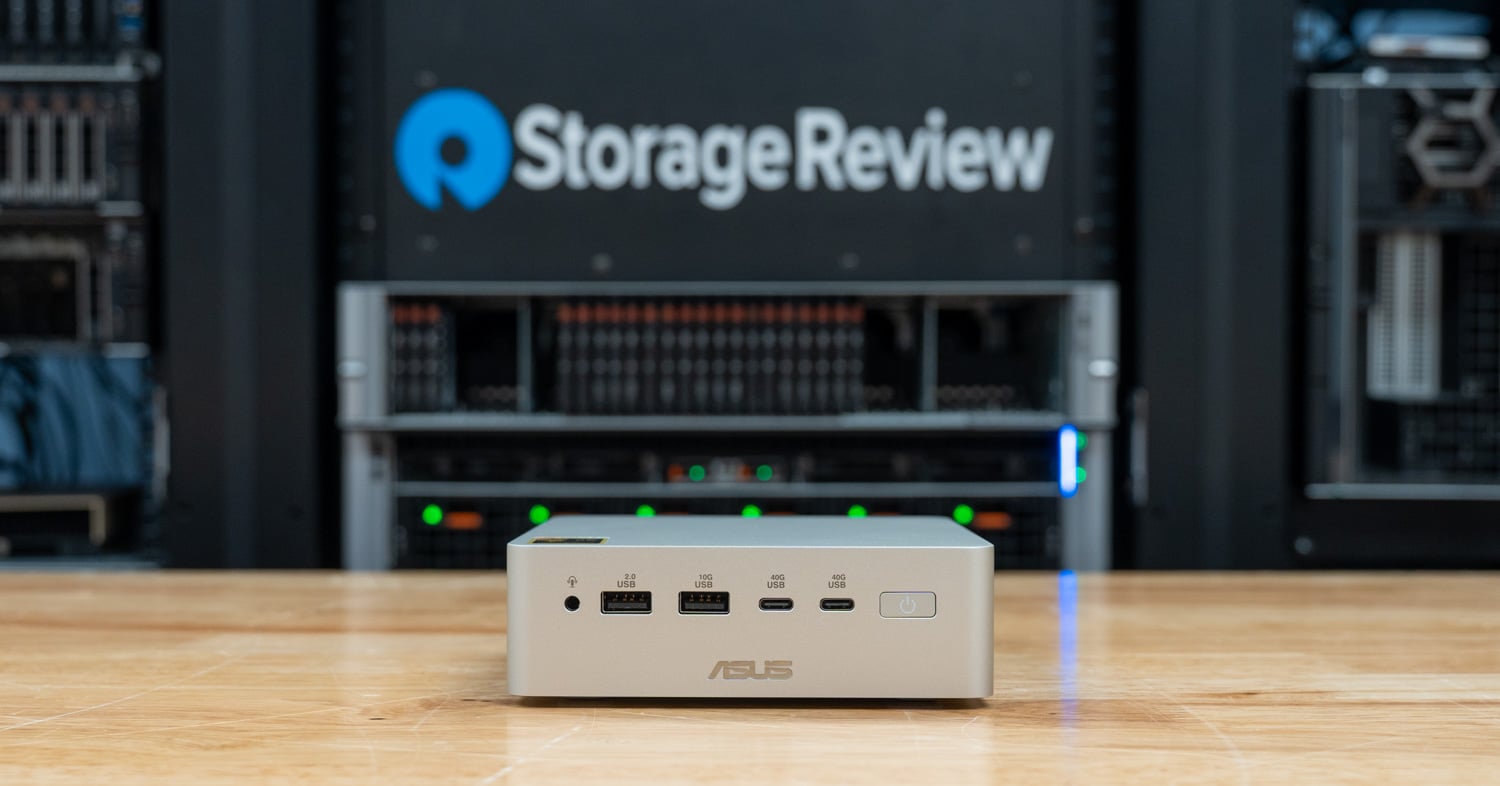
Die Vorderseite beherbergt die Anschlüsse für den täglichen Gebrauch: zwei der drei USB4-Typ-C-Anschlüsse (DP 1.4 und Power Delivery, 40 Gbit/s), einen USB-A 3.2-Anschluss neben einem USB-A 2.0-Anschluss, eine 3.5-mm-Audiobuchse und den Ein-/Ausschalter. Die beiden vollwertigen USB4-Anschlüsse an der Vorderseite sind ein praktisches Detail; Dockingstationen, Aufnahmegeräte und externe NVMe-SSDs lassen sich so problemlos anschließen, ohne dass man die Rückseite des Geräts öffnen muss.
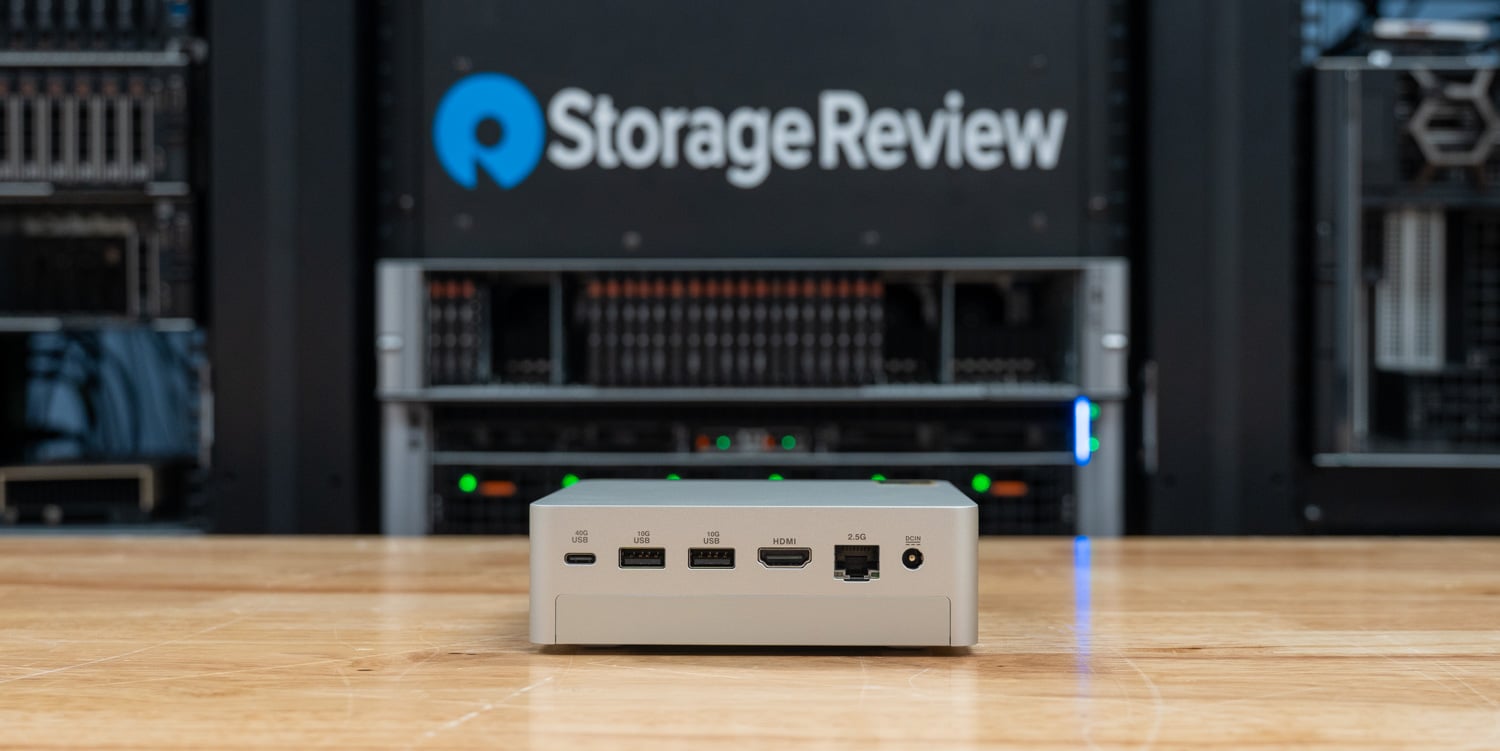
Auf der Rückseite befinden sich der dritte USB4-Typ-C-Anschluss, zwei weitere USB-A 3.2-Anschlüsse, HDMI 2.1 mit FRL, der RJ45-Anschluss für den Realtek 2.5-GbE-Controller und der DC-Eingang für das externe 180-W-Netzteil. Dank HDMI und den drei USB4-Anschlüssen kann der QN10 bis zu vier Displays ansteuern. Mit insgesamt sieben USB-Anschlüssen eignet er sich ideal für eine komplette Desktop- oder Digital Signage-Installation ohne Hub.
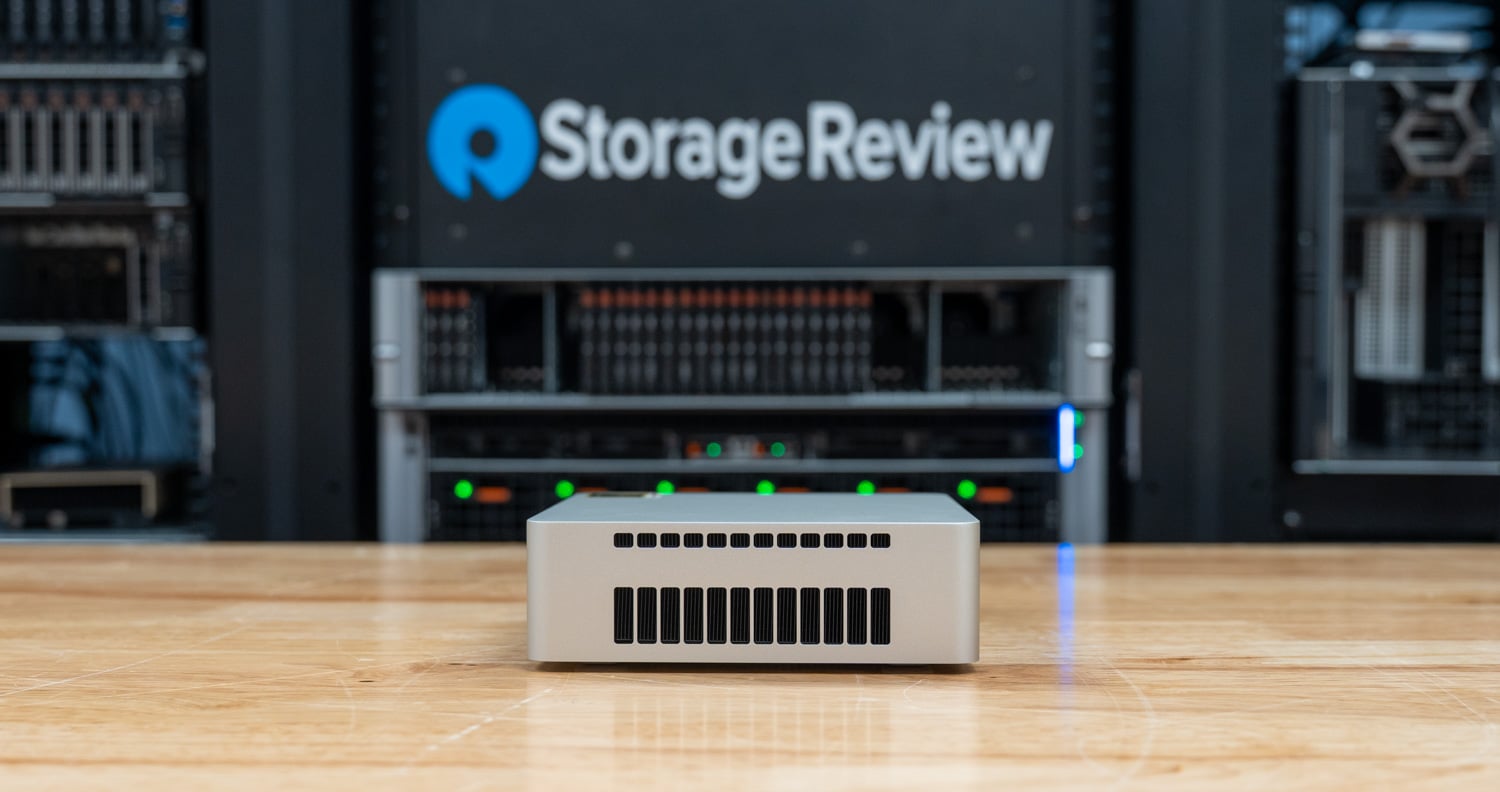
Die rechte Seite des Gehäuses verfügt über einen Lufteinlass für ein Kühlsystem, das für diese Klasse deutlich überdimensioniert ist: ein CPU-Lüfter über einer Dampfkammer sowie ein zweiter, separater Lüfter für den PCIe-Gen5-SSD-Einschub. ASUS gibt die maximale Lautstärke des Geräts mit 53 dBA bei voller Lüfterdrehzahl an; im Leerlauf laufen die Lüfter komplett ab (0 U/min).
Beim Öffnen des Gehäuses wird deutlich, wo die Wärmeableitung erfolgt und was der Käufer ändern kann und was nicht. Das Gehäuse verfügt über Kupfer-Wärmeleitpads, die mit den M.2-Laufwerken, einem PCIe-Gen5-Steckplatz (mit G5 gekennzeichnet, in unserem Testgerät unbestückt) und einem Gen4-Steckplatz für die SanDisk-Festplatte ausgestattet sind. Der Speicher ist auf insgesamt 4 TB erweiterbar (der Nutzer kann aber bei Bedarf auch eine höhere Kapazität einbauen). Auf dem Mainboard befindet sich unter der Vapor Chamber der Snapdragon-Chip, daneben sind 32 GB LPDDR5x-Arbeitsspeicher verlötet. Der Speicher ist die einzige Komponente, die vor Ort ausgetauscht werden kann; der Arbeitsspeicher ist beim Kauf fest eingestellt und auf maximal 32 GB erweiterbar.
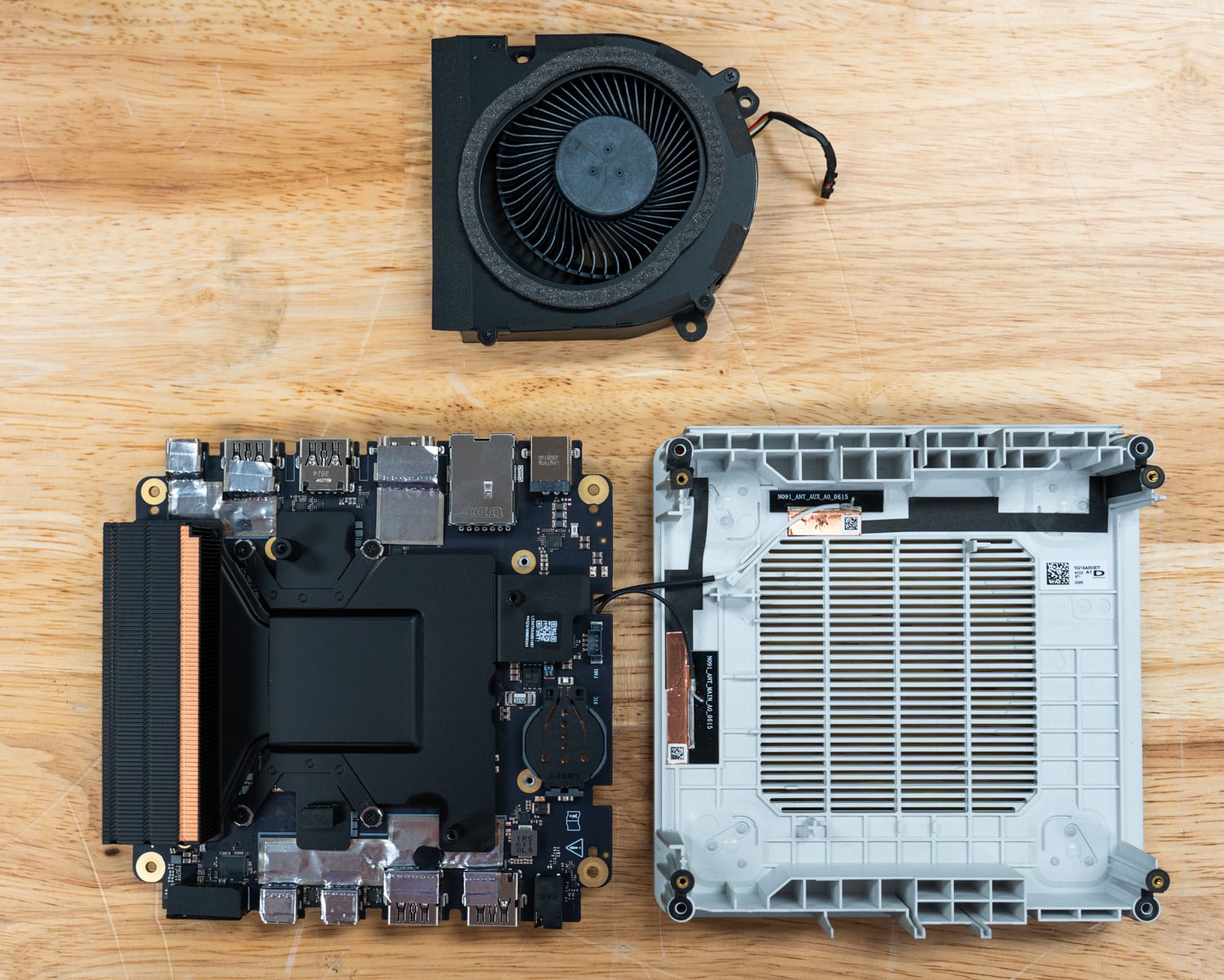
Mit abgenommenem Lüfter überspannt die Dampfkammer den SoC und versorgt einen einzelnen Heatpipe-Kreislauf – eine Lösung, die man sonst nur von Laptops kennt, aber in einem Desktop-PC zum Einsatz kommt, wo die Dauerlast und nicht die Akkulaufzeit den limitierenden Faktor darstellt. Die folgenden Benchmarks bestätigen die Funktionsfähigkeit, und auch unsere Höreindrücke stimmen überein: Vom Leerlauf bis hin zu dauerhaft hoher Last bleibt der QN10 flüsterleise; die Lüfter sind aus einem Meter Entfernung kaum hörbar. Nur unter extremer Systembelastung, wie beispielsweise bei einem BIOS-Update, waren sie in unseren Tests hörbar.
ASUS Ascent QN10 Leistung
Unser Testgerät ist mit einem Snapdragon X2 Elite X2E-88-100, 32 GB LPDDR5x-Arbeitsspeicher und einer 512 GB SSD unter Windows 11 Pro ausgestattet. Alle Benchmarks wurden im Energiesparplan „Höchstleistung“ durchgeführt. Windows on Arm schränkt die Benchmark-Tabelle ein: Alle unten aufgeführten Tests wurden nativ auf ARM64 ausgeführt, sofern eine native Version verfügbar ist. Bei den KI-Workloads ist jeweils die verwendete Inferenz-Engine und das verwendete Rechengerät angegeben, da die Wahl der Engine die Ergebnisse ebenso stark beeinflusst wie die Hardware. PCMark 10 fehlt, da für diesen wichtigsten Produktivitäts-Benchmark keine ARM-Version existiert. Lediglich die Speicher- und Akkutests laufen nativ, und keiner von beiden gibt Aufschluss über die Leistung dieses Desktop-PCs.
Vergleichbare Geräte sind zwar einfach, aber nicht perfekt, da kein anderes Gerät im Testlabor Architektur und Klasse dieses Rechners erreicht. Der ASUS NUC 14 Pro (Core Ultra 7 165H) dient als Maßstab für x86-Mini-PCs, da wir ihn selbst getestet haben. ASUS hat die Produktreihe inzwischen auf den Arrow Lake NUC 15 Pro umgestellt, den wir jedoch nicht getestet haben. Daher dient der Meteor Lake NUC 14 als Ersatz für ein x86-Gerät der vorherigen Generation. In den untenstehenden Ergebnissen schlägt er sich besser, als sein Alter vermuten lässt, und der Preis macht den Vergleich interessant, anders als der Veröffentlichungskalender. Unsere NUC 14-Konfiguration, der Core Ultra 7 165H mit 16 GB RAM und 512 GB Speicher, der bei Best Buy für 1,522.61 US-Dollar angeboten wurde, ist mittlerweile nicht mehr im Neuzustand erhältlich. Die vergleichbare QN10-Konfiguration mit 16 GB RAM und 512 GB Speicher kostet hingegen 1,349.99 US-Dollar. Somit liegt der Preis des ARM-Systems, gemessen an der tatsächlichen Konfiguration, unter dem, was diese Klasse von x86-Mini-PCs tatsächlich kostete. Demgegenüber steht die deutlich niedrigere Einstiegsklasse: Ein aktuelles NUC 15 Pro Barebone-Kit kostet zum Zeitpunkt dieses Artikels etwa 700 US-Dollar und mit zusätzlichem Arbeitsspeicher und Speicher unter 850 US-Dollar – ein Preisniveau, das der fest verlötete QN10 nicht erreichen kann. Die Speicherbegrenzung des NUC auf 16 GB schränkt die Durchführung umfangreicher Rechentests ein. Einige Tests, die auf dieser Plattform fehlschlugen oder übersprungen wurden, sind an den entsprechenden Stellen vermerkt. Der Lenovo ThinkCentre Neo 50q QC ist der am nächsten mit einem ARM-Prozessor vergleichbare Prozessor in unserem Test. Er basiert auf dem Snapdragon X der vorherigen Generation. Da dieses Gerät unser Labor bereits verlassen hat, beschränken sich die Vergleiche auf die damals veröffentlichten Benchmarks. Wir haben außerdem mehrere ältere Tests auf dem QN10 wiederholt, um einen direkten Vergleich zu ermöglichen. Neuere Tests wie Geekbench 7 enthalten aus diesem Grund keine Lenovo-Spalte und dienen lediglich der Einordnung.
Geekbench 7
Geekbench 7 ergänzt die Vergleichsdatenreihe neben Geekbench 6. Die CPU-Werte basieren auf einem Basiswert von 2,500 Punkten, der vom AMD Ryzen 7700 vorgegeben wurde, während die GPU-Werte auf einem Basiswert von 100,000 Punkten basieren, der von der NVIDIA GeForce RTX 4060 vorgegeben wurde. Höhere Werte sind besser, und eine Verdopplung des Wertes bedeutet die doppelte Leistung. Da Geekbench 7 neue Workloads und neue Basiswerte verwendet, sind die Ergebnisse nicht mit denen von Geekbench 6 vergleichbar. Geekbench 7 wurde erst nach dem Verlassen des Labors durch den Neo 50q veröffentlicht, daher bleibt die Lenovo-Spalte leer, und diese Vergleiche basieren auf dem kürzlich neu getesteten NUC 14 Pro. Der QN10 lief mit der nativen AArch64-Version.
| Geekbench 7 (höher ist besser) | ASUS Ascent QN10 | ASUS NUC 14 Pro (Core Ultra 7 165H) | Lenovo ThinkCentre Neo 50q QC |
|---|---|---|---|
| CPU Single-Core | 3,272 | 2,291 | N / A |
| CPU-Mehrkern | 24,049 | 13,911 | N / A |
| GPU OpenCL | 30,982 | 27,790 | N / A |
| GPU Vulkan | 40,042 | 25,088 | N / A |
Die wichtigsten Ergebnisse: 3,272 Punkte im Single-Core- und 24,049 Punkte im Multi-Core-Test – 43 % bzw. 73 % mehr als der Core Ultra 7 165H des NUC 14 Pro im selben Test. Zum Vergleich: Der Multi-Core-Wert übertrifft auch alle Panther-Lake-Systeme, die wir dieses Jahr getestet haben – Geräte, die drei- bis viermal so viel kosten. Die Adreno X2-90 erreicht 40,042 Punkte im Vulkan-Test, 60 % mehr als die Arc-Grafikkarte des NUC, und 30,982 Punkte im OpenCL-Test. Damit liegt sie eher im Bereich von Arc B390-Laptops mit 12 Xe-Kernen als bei einfachen integrierten Grafikkarten.
Geekbench 6
Geekbench 6 misst die Prozessorleistung anhand einer Mischung gängiger Aufgaben und liefert separate Ergebnisse für Single-Core- und Multi-Core-Workloads sowie GPU-Rechenleistung über OpenCL und Vulkan. Höhere Werte sind besser. Es ist eine Generation älter als Geekbench 7, weshalb es hier verwendet wird: Es handelt sich um die Testsuite, die wir für beide Vergleichssysteme veröffentlicht haben, und wir haben sie auf dem QN10 mit der nativen Arm-Version erneut ausgeführt, um einen direkten Vergleich zu ermöglichen.
| Geekbench 6 (höher ist besser) | ASUS Ascent QN10 | ASUS NUC 14 Pro (Core Ultra 7 165H) | Lenovo ThinkCentre Neo 50q QC |
|---|---|---|---|
| CPU Single-Core | 3,667 | 2,517 | 2,148 |
| CPU-Mehrkern | 19,884 | 12,477 | 8,565 |
| GPU OpenCL | 39,761 | 35,449 | 9,634 |
| GPU Vulkan | 43,942 | 36,089 | N / A |
Im Vergleich zum Snapdragon X der vorherigen Generation im Neo 50q erzielt der QN10 3,667 Punkte im Single-Core-Test gegenüber 2,148 Punkten und 19,884 Punkte im Multi-Core-Test gegenüber 8,565 Punkten – ein 2.3-facher Sprung im Multi-Core-Test innerhalb einer Arm-Generation. Der Vergleich mit x86-Prozessoren fällt ähnlich deutlich aus: Der Core Ultra 7 165H des NUC 14 Pro erreicht im Wiederholungstest 12,477 Punkte im Multi-Core-Test, 63 % des Ergebnisses des QN10. Auch die GPU-Berechnungen bestätigen dieses Bild: Der Adreno erzielt 39,761 Punkte im OpenCL-Test gegenüber 9,634 Punkten des Neo 50q und liegt vor dem Arc des NUC mit 35,449 Punkten.
Cinebench 2026
Cinebench 2026 ist die aktuelle Version der Cinebench-Reihe und die einzige, über die wir berichten. Der Benchmark testet die CPU- und GPU-Leistung mit Maxons Redshift-Rendering-Engine, die auf dem neuesten Cinema 4D 2026-Code basiert. Er soll zeigen, ob ein System unter hoher CPU-Last stabil läuft, ob seine Kühlung längere Renderaufgaben bewältigen kann und wie es anspruchsvolle 3D-Anwendungen in der Praxis bewältigt. Da Code- und Compileränderungen das Szenen-Rendering beschleunigt haben, verwenden die Cinebench 2026-Ergebnisse einen angepassten Bereich und sollten nicht mit Ergebnissen früherer Cinebench-Versionen verglichen werden. Der Benchmark wird als native ARM64-Version ausgeliefert, die auf dem QN10 ausgeführt wurde. Der GPU-Test unterstützt weder Adreno noch die integrierte Intel-Grafik des NUC, daher werden hier nur die CPU-Ergebnisse angezeigt.
| Cinebench 2026 (höher ist besser) | ASUS Ascent QN10 | ASUS NUC 14 Pro (Core Ultra 7 165H) | Lenovo ThinkCentre Neo 50q QC |
|---|---|---|---|
| CPU-Single-Thread | 639 | 444 | N / A |
| CPU mit mehreren Threads | 6,476 | 3,684 | N / A |
| MP-Verhältnis | 10.13x | 8.29x | N / A |
Mit 639 Punkten im Single-Thread-Test erzielt der QN10 den höchsten jemals gemessenen Cinebench-2026-Wert in dieser Klasse. Laut Maxons eigener Referenztabelle liegt er zwischen dem Apple M4 Max und Intels Desktop-Prozessor Core Ultra 9 285K. Im Multi-Thread-Test erreicht er 6,476 Punkte mit einem Multi-Thread-Verhältnis von 10.13x gegenüber 3,684 Punkten beim NUC 14 Pro mit einem Verhältnis von 8.29x – ein Vorsprung von 76 %. Auch der Unterschied im Single-Thread-Test von 639 zu 444 Punkten bleibt gleich, was beide Ergebnisse für ein 0.7-Liter-Gerät bemerkenswert macht.
3DMark CPU-Profil
Der 3DMark CPU Profile Benchmark misst die CPU-Leistung bei fester Anzahl von Threads, von einem einzelnen Thread bis hin zur maximal verfügbaren Anzahl, und zeigt, wie die Leistung mit zunehmender Anzahl aktivierter Kerne skaliert. Höhere Werte sind besser. Da es sich um einen der Tests handelt, die wir für das Neo 50q veröffentlicht haben, haben wir ihn auf dem QN10 erneut ausgeführt, um den Vergleich aktuell zu halten.
| 3DMark-CPU-Profil (höher ist besser) | ASUS Ascent QN10 | ASUS NUC 14 Pro (Core Ultra 7 165H) | Lenovo ThinkCentre Neo 50q QC |
|---|---|---|---|
| Maximale Threads | 9,544 | 7,680 | 3,370 |
| 16-Threads | 9,118 | 6,899 | 3,360 |
| 8-Threads | 5,327 | 5,617 | 3,497 |
| 4-Threads | 3,209 | 3,582 | 2,152 |
| 2-Threads | 1,702 | 1,914 | 1,422 |
| 1 Thema | 857 | 1,002 | 712 |
Der Generationsunterschied ist an jedem Punkt der Kurve deutlich: 9,544 maximale Threads gegenüber 3,370 beim Neo 50q und 857 Single-Thread-Punkte gegenüber 712. Besonders bemerkenswert ist der Übergang bei 8 Threads: 5,327 gegenüber 3,497, da die meisten Desktop-Anwendungen in diesem Bereich liegen. Die Kurve flacht beim QN10 zwischen 16 Threads und dem Maximum merklich ab – die erwartete Form für einen 18-Kern-Prozessor ohne SMT. Im Vergleich zum NUC 14 ist das Bild differenzierter als die Geekbench-Ergebnisse vermuten lassen: Der QN10 führt zwar im oberen Bereich mit 9,544 zu 7,680 Punkten, aber der 165H holt sich den Single-Thread-Punkt mit 1,002 zu 857 und hat bis zu 8 Threads einen leichten Vorsprung. Diese Arbeitslast belohnt Burst-Taktraten auf eine Weise, die das Oryon-Design nicht unterstützt, was man bei Desktop-Anwendungen mit geringer Thread-Auslastung berücksichtigen sollte.
3DMark-Grafiken
Die 3DMark-Grafiksuite deckt ein breites Spektrum an Rendering-Workloads ab: Solar Bay und Wild Life sind plattformübergreifende Tests für integrierte und mobile Grafikkarten, Steel Nomad und Time Spy sind anspruchsvolle DirectX-12-Rasterisierungstests, Fire Strike ist der DirectX-11-Benchmark und Port Royal und Speed Way testen DirectX-Raytracing. Höhere Werte sind durchweg besser. Solar Bay, Steel Nomad und Wild Life überschneiden sich mit unseren veröffentlichten Neo-50q-Daten; die übrigen Tests legen die Basislinie des QN10 im Vergleich zum erneut getesteten NUC 14 Pro fest, einschließlich der ersten DXR-Raytracing-Läufe, die wir auf einem Windows-on-ARM-System durchgeführt haben.
| 3DMark-Grafik (je höher, desto besser) | ASUS Ascent QN10 | ASUS NUC 14 Pro (Core Ultra 7 165H) | Lenovo ThinkCentre Neo 50q QC |
|---|---|---|---|
| Solarbucht | 21,561 | 11,630 | 5,971 |
| Stahlnomad | 1,042 | 611 | 235 |
| Tierwelt | 19,996 | N / A | 11,224 |
| Zeit Spion | 4,014 | 3,643 | N / A |
| Feuer-Schlag | 9,949 | 6,591 | N / A |
| Port Royal | 1,520 | 1,429 | N / A |
| Geschwindigkeitsweg | 324 | 335 | N / A |
Solar Bay mit 21,561 Punkten ist 3.6-mal so gut wie der Neo 50q und 1.9-mal so gut wie der NUC 14. Steel Nomad mit 1,042 Punkten ist 4.4-mal so gut wie die vorherige Arm-Generation und 70 % besser als der Arc. Time Spy mit 4,014 Punkten und Fire Strike mit 9,949 Punkten positionieren den QN10 im Bereich der Einsteiger-Grafikkarten und nicht am Ende der iGPU-Wertung. Raytracing ist der einzige Bereich, in dem der Arc wieder aufholt: Port Royal liegt mit 1,520 zu 1,429 Punkten knapp vor dem QN10, während Speed Way mit 335 zu 324 Punkten für den NUC endet – praktisch ein Gleichstand. Niemand kauft einen der beiden Prozessoren wegen Raytracing, aber die Fähigkeit von Arm ist durchaus vorhanden. Der NUC 14 hat keinen Eintrag für Wild Life, da dieser Test nicht Teil des erneuten Benchmarks war.
3DMark-Speicher
3DMark Storage misst die Leistung einer SSD bei spielbezogenen Aufgaben wie dem Laden von Spielen, der Installation von Software, dem Speichern von Spielständen und dem Verschieben von Spieldateien. Der Test läuft nativ auf ARM-basierten Systemen. Je höher der Wert, desto besser. Die Punktzahl spiegelt die jeweils im System verbaute SSD wider; es handelt sich also um einen Vergleich der Speicheroptionen der Hersteller und nicht der Plattformen selbst.
| 3DMark-Speicher (höher ist besser) | ASUS Ascent QN10 | ASUS NUC 14 Pro (Core Ultra 7 165H) | Lenovo ThinkCentre Neo 50q QC |
|---|---|---|---|
| Speicherwert | 2,393 | 1,887 | 2,871 |
Mit 2,393 MB/s liegt die 512 GB große SanDisk PC SN5100S des QN10 unter der des Neo 50q mit 2,871 MB/s, aber vor der des NUC 14 mit 1,887 MB/s. Die SN5100S ist eine Client-Festplatte der 4. Generation und befindet sich im Gen4-Steckplatz. Der Gen5-Steckplatz, auf dem Mainboard mit G5 gekennzeichnet, ist leer und für den Einbau einer schnelleren Festplatte vorgesehen, da die verbaute 512-GB-Festplatte noch nutzbar ist.
7-Zip-Komprimierung
Der integrierte 7-Zip-Benchmark misst die Geschwindigkeit der Datenkomprimierung und -dekomprimierung durch den Prozessor mithilfe mehrerer Threads. Dabei wird ein 128 MB großes Wörterbuch in zehn Durchläufen verwendet. Die Dekomprimierung skaliert tendenziell mit der Anzahl der Threads, während die Komprimierung stark von der Speicherlatenz abhängt. Daher liefern die beiden Aspekte oft unterschiedliche Ergebnisse. Höhere GIPS-Werte sind besser. 7-Zip 26.03 wird als native ARM64-Version ausgeliefert, die auch im QN10 zum Einsatz kam.
| 7-Zip (GIPS, je höher, desto besser) | ASUS Ascent QN10 | ASUS NUC 14 Pro (Core Ultra 7 165H) | Lenovo ThinkCentre Neo 50q QC |
|---|---|---|---|
| Komprimieren | 96.729 | N / A | 53.096 |
| Dekomprimieren | 120.205 | N / A | 46.998 |
| Gesamtbewertung | 108.467 | N / A | 50.047 |
Die 108.467 GIPS des QN10 übertreffen die 50.047 GIPS des Neo 50q um mehr als das Doppelte, wobei die Dekomprimierung mit 120.205 GIPS die herausragende Hälfte des Tests darstellt. Zur Kalibrierung: Dieser Wert übertrifft alle Laptops in unserem aktuellen Panther-Lake-Test; es handelt sich hier um echten Multi-Core-Durchsatz, nicht um ein skaliertes Ergebnis für Mobilgeräte. Die Spalte für den NUC 14 ist leer, da der 7-Zip-Benchmark in unserem ursprünglichen Test auf diesem System kein Ergebnis lieferte und es auch nicht Teil des Wiederholungstests war.
Y-Cruncher
y-cruncher misst, wie schnell der Prozessor eine große Anzahl von Nachkommastellen von Pi berechnen kann, was die CPU und den Arbeitsspeicher stark beansprucht. BBP hingegen extrahiert hexadezimale Nachkommastellen von Pi in einer fast rein CPU-lastigen Anwendung. Die Ergebnisse werden in Sekunden angegeben, daher sind kürzere Zeiten besser. Der Benchmark läuft nativ auf Arm-Prozessoren. Der Testlauf mit 5 Milliarden Nachkommastellen auf dem QN10 wurde aufgrund des verfügbaren Arbeitsspeichers – der erwarteten Obergrenze für ein 32-GB-System – übersprungen. Der 16-GB-NUC 14 konnte in den Standardläufen keine Berechnungen über 1 Milliarde Nachkommastellen hinaus durchführen.
| y-cruncher (Sekunden, je niedriger, desto besser) | ASUS Ascent QN10 | ASUS NUC 14 Pro (Core Ultra 7 165H) | Lenovo ThinkCentre Neo 50q QC |
|---|---|---|---|
| Pi 1B | 71.531 | 36.561 | 186.905 |
| Pi 2.5B | 218.332 | N / A | 497.704 |
| Pi BBP 1B | 5.844 | 2.306 | N / A |
| Pi BBP 10B | 67.701 | 25.144 | N / A |
| Pi BBP 100B | 778.722 | 296.970 | N / A |
Der QN10 verarbeitet 1 Milliarde Ziffern in 71.5 Sekunden, 2.6-mal schneller als der Neo 50q mit 186.9 Sekunden. Der NUC 14 Pro zeigt mit 36.6 Sekunden jedoch, dass Intels Speichersubsystem diese bandbreitenintensive Aufgabe weiterhin um fast das Doppelte übertrifft. Die reinen CPU-Belastungstests (BBP) zeichnen bei großen Datenmengen ein anderes Bild: Der NUC verarbeitet 100 Milliarden Hexadezimalziffern in 297.0 Sekunden, der QN10 benötigt dafür 778.7 Sekunden. Der 16-GB-NUC konnte in den Standardtests keine Datenmengen über 1 Milliarde Ziffern verarbeiten, daher geht der Vergleich mit 2.5 Milliarden Ziffern an Lenovo. Hier hält der QN10 mit 218.3 Sekunden gegenüber 497.7 Sekunden den 2.3-fachen Generationsvorsprung.
Mixer
Der Blender-Benchmark misst die Rendering-Leistung anhand von drei verschiedenen 3D-Szenen: Monster, Schrottplatz und Klassenzimmer. Die Ergebnisse werden in Samples pro Minute (SPM) angegeben, höhere Werte sind also besser. Da die Ergebnisse nicht zwischen verschiedenen Blender-Versionen vergleichbar sind, berichten wir nur über die aktuellen Ergebnisse von Blender 5.2. Blender 5.2 bietet einen nativen ARM64-CPU-Pfad, der auf dem QN10 ausgeführt wurde. Die Adreno-GPU wird jedoch nicht als Rendering-Gerät unterstützt. Daher basieren die Ergebnisse dieser Tabelle – anders als bei unseren Laptop-Tests – für beide Systeme ausschließlich auf der CPU-Leistung.
| Blender 5.2 CPU (Samples/Min., je höher, desto besser) | ASUS Ascent QN10 | ASUS NUC 14 Pro (Core Ultra 7 165H) | Lenovo ThinkCentre Neo 50q QC |
|---|---|---|---|
| Monster | 188.04 | 109.16 | N / A |
| Trödelladen | 133.21 | 81.08 | N / A |
| Klassenzimmer | 93.93 | 57.41 | N / A |
Die 18 Oryon-Kerne rendern „Monster“ mit 188 Samples pro Minute, verglichen mit 109 beim NUC 14 – ein Vorsprung von 72 %, der sich in allen drei Szenen bestätigt. Dieser Wert übertrifft alle Ergebnisse von x86-basierten, leichten CPUs in unserem aktuellen Laptop-Test. Der fehlende GPU-Pfad ist jedoch relevant: Renderer, die stark auf die GPU setzen, lassen hier Leistungspotenzial ungenutzt. Dies ist ein Software- und kein Hardware-Problem.
UL Procyon KI
Die KI-Suite von UL Procyon deckt drei Anwendungsbereiche ab. Die KI-Bildgenerierung misst die Inferenz mit Stable Diffusion von stromsparenden NPUs bis hin zu High-End-GPUs. Wir berichten über den Stable Diffusion 1.5 INT8-Test, der für stromsparende Beschleuniger optimiert wurde. Die KI-Textgenerierung verwendet lokale LLMs und bewertet die Generierungsleistung anhand der Zeit bis zum ersten Token und der Token pro Sekunde. Die Arm-Version unterstützt Phi und Llama3. Die KI-Computer Vision misst die Inferenz in den Bereichen Bildklassifizierung, Objekterkennung, Segmentierung und Super-Resolution-Modelle. Die neuere Computer Vision 2-Suite nutzt dabei den jeweiligen nativen Pfad der Hersteller. Höhere Werte bedeuten durchweg bessere Ergebnisse. Die Engine-Labels sind hier wichtiger als an allen anderen Stellen des Tests: Auf dem QN10 liefen Bild- und Textgenerierung auf der Hexagon NPU über Qualcomms QNN-Stack, Computer Vision über SNPE auf der NPU und erneut über WinML, und der NUC 14 nutzte die jeweils besten verfügbaren Pfade: OpenVINO auf der Arc iGPU und WinML. Keiner dieser Werte ist mit den OpenVINO- und ONNX-Ergebnissen in unseren x86-Laptop-Tests vergleichbar, da Procyon-Ergebnisse nur innerhalb derselben Engine und desselben Geräts vergleichbar sind.
| Procyon KI (je höher, desto besser) | ASUS Ascent QN10 | ASUS NUC 14 Pro (Core Ultra 7 165H) | Lenovo ThinkCentre Neo 50q QC |
|---|---|---|---|
| Bildgenerierung, SD 1.5 INT8 | 5,457 (QNN, NPU) | 1,004 (OpenVINO, iGPU) | N / A |
| Textgenerierung Phi | 1,394 (QNN, NPU) | 528 (OpenVINO, iGPU) | N / A |
| Textgenerierung Lama3 | 1,371 (QNN, NPU) | 434 (OpenVINO, iGPU) | N / A |
| Computer Vision | 4,254 (SNPE, NPU) | 135 (WinML, GPU) | N / A |
| Computer Vision 2 (WinML) | 2,161 | N / A | N / A |
| Computer Vision 2 (SNPE) | 1,897 | N / A | N / A |
Für sich genommen liefert der 80 TOPS Hexagon folgende Ergebnisse: Die Bildgenerierung von 5,457 Punkten in SD 1.5 INT8 entspricht etwa dem 1.9-Fachen dessen, was wir mit x86-NPUs der 50 TOPS-Klasse und ihren jeweiligen besten Engines gemessen haben. Die Textgenerierung erreicht 35.7 Token pro Sekunde auf Phi und 25.2 auf Llama3, wobei die ersten Token in unter 0.6 Sekunden generiert werden – und das alles ausschließlich auf der NPU, ohne die CPU zu belasten. Der Testlauf mit hybrider HTP+CPU-Textgenerierung schnitt etwas schlechter ab als der reine NPU-Test, was darauf hindeutet, dass die NPU nicht der Flaschenhals ist. Computer Vision 2 mit 2,161 Punkten über WinML gegenüber 1,897 Punkten über SNPE ist ein seltener Fall, in dem der generische Ansatz den herstellerspezifischen Ansatz übertrifft. Der Vergleich mit dem NUC 14 verdeutlicht die Einschränkung bezüglich der Engines: Seine besten Pfade, OpenVINO auf der Arc iGPU, landen bei der Bildgenerierung bei 1,004 und bei Phi bei 528, und sein NPU-Textgenerierungslauf schlug komplett fehl, sodass der fünffache Vorsprung des QN10 bei der Bildgenerierung eine Mischung aus Silizium- und Softwarevorteilen ist, die nicht vollständig getrennt werden können.
Fazit
Der ASUS Ascent QN10 ist der erste Arm-Mini-PC in unserem Test, der seine x86-Klasse übertrifft, ohne dabei Kompromisse bei Leistung und Effizienz einzugehen. Im Vergleich zum NUC 14 Pro liegt der Snapdragon X2 Elite bei den CPU-Tests mit 43 % bis 76 % vorn und bietet in der Grafikleistung etwa die doppelte Leistung. Und das in einem nur 0.7 Liter großen Gehäuse, das sowohl im Leerlauf als auch unter Volllast flüsterleise bleibt. Gegenüber der vorherigen Snapdragon-Generation im Neo 50q beträgt der Leistungssprung je nach Test das 2.3- bis 4.4-Fache. Auch die 80 TOPS der NPU sind keine leere Behauptung: 5,457 Punkte bei der SD 1.5-Bildgenerierung und 35.7 Token pro Sekunde bei Phi, allesamt auf dem Hexagon bei leerer CPU, zeigen, wie gut lokale Inferenz für Edge-KI funktioniert.
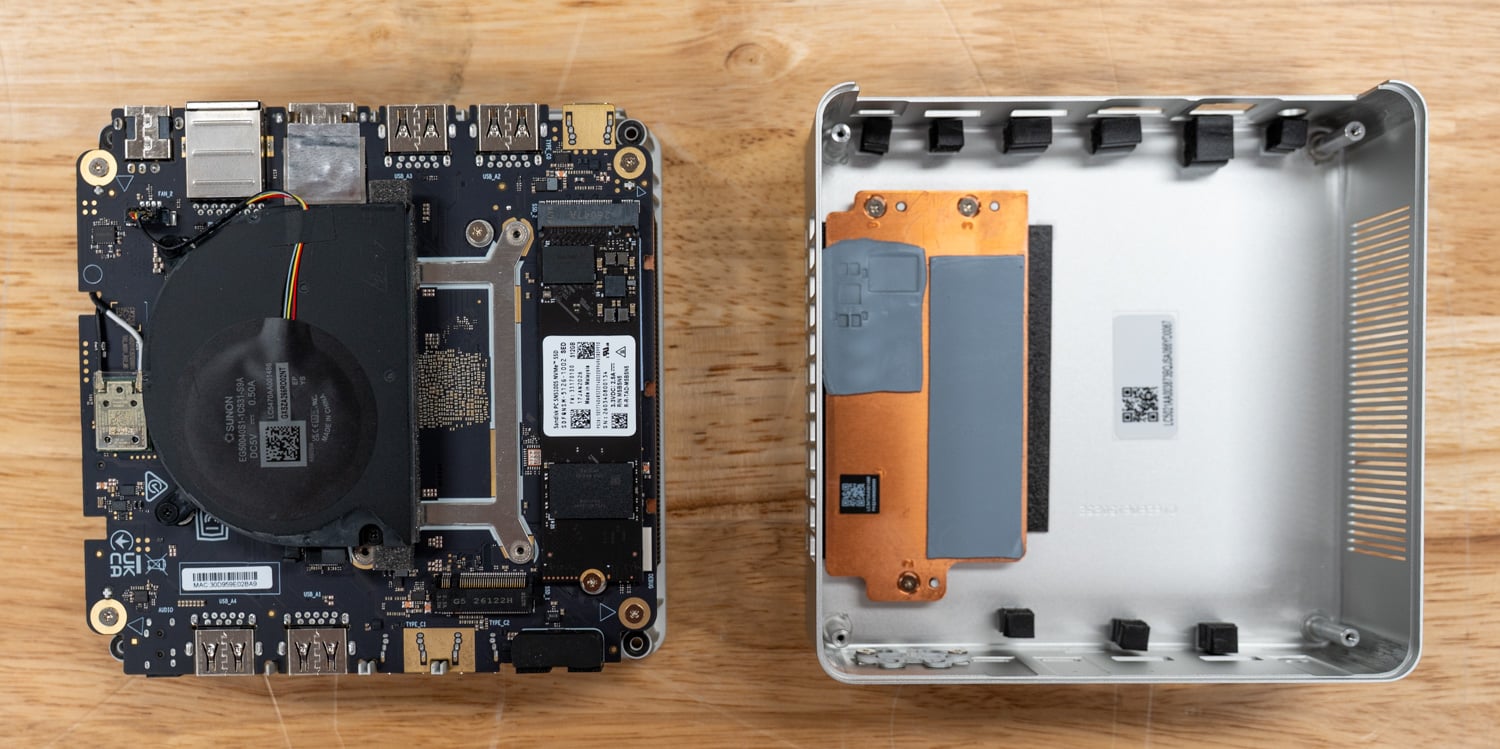
Unsere Bedenken beginnen beim Arbeitsspeicher: Die 32 GB LPDDR5x sind fest verlötet, und 32 GB stellen die maximale Speicherkapazität dar. Das Gerät wird bereits mit einer 16-GB-Konfiguration für 1,349.99 US-Dollar angeboten, und die 32-GB-Variante ist zwar gelistet, aber derzeit nicht verfügbar. Fest verlöteter Arbeitsspeicher ist bei diesem Preis schwer zu vermitteln, da die Kaufentscheidung dadurch nicht mehr geändert werden kann. Ein NUC 15 Pro Barebone-Kit für etwa 700 US-Dollar bietet hingegen die Möglichkeit, Arbeitsspeicher und Speicher nach Wunsch zu kombinieren. Auch technisch hat das x86-System einige Vorteile. Der Speicher ist der weniger gravierende Kritikpunkt: Die 512 GB große SanDisk SN5100S ist eine Gen4-SSD, die selbst der Neo 50q hinterherhinkt. Der freie Gen5-Steckplatz ermöglicht es dem Käufer jedoch, bei Bedarf mehr Speicherleistung nachzurüsten. Die Kompatibilität mit Windows on Arm ist weiterhin anwendungsabhängig und sollte von jedem Flottenkunden vor der Bestellung geklärt werden.
Das QN10 ist nach wie vor ein hervorragendes Gerät für Digital Signage, Kiosksysteme, Edge-Inferenz, Always-On-Assistenten und Entwickler, die auf dem Qualcomm AI Hub aufbauen – überall dort, wo ein leises, effizientes Gerät mit einer leistungsstarken NPU und 32 GB Arbeitsspeicher ausreicht. ASUS hat mit dem QN10 einen überzeugenden Einstieg in die Arm-Reihe der Ascent-Serie hingelegt. Es ist erfreulich zu sehen, dass Snapdragon in dieser Runde deutlich konkurrenzfähiger ist, und wir sind gespannt auf weitere Entwicklungen.

Bestenliste: Der ASUS Ascent QN10 hält den Rekord für den besten CPU-Durchsatz in unserer Bestenliste der Mini-PCs.


 Amazon