---
description: Comprised of a variety of different sizes and designs, the Seagate Backup Plus family is the company’s line of portable storage solutions focused on...
title: Seagate Backup Plus Ultra Slim Review
image: https://www.storagereview.com/wp-content/uploads/2016/04/StorageReview-Seagate-Ultra-Slim-2TB-Thumb.jpg
---


[](//storagereview.com/) 

---

[ ](https://www.facebook.com/@storagereview) [ ](https://twitter.com/storagereview) [ ](https://www.instagram.com/storagereview/) [ ](https://www.linkedin.com/company/storagereview-com) [ ](https://www.youtube.com/user/storagereview?sub%5Fconfirmation=1) [ ](mailto:info@storagereview.com) [ ](https://open.spotify.com/show/1y6VnznABhHeOSMOmbDTz0) [ ](https://www.reddit.com/r/StorageReview/) [ ](https://discord.gg/TwMHb4azdC) [ ](https://www.storagereview.com/rss.xml) [ ](https://www.tiktok.com/@storagereview) 

[![StorageReview.com](https://www.storagereview.com/wp-content/uploads/2026/07/Storage-Review-2x.png)](https://www.storagereview.com) 

≡ Menu 
* [Home](https://www.storagereview.com/)
* [Storage Reviews](https://www.storagereview.com/review)  
  * [Consumer Reviews](https://www.storagereview.com/consumer)
  * [Enterprise Reviews](https://www.storagereview.com/enterprise)
  * [Ubiquiti Reviews](https://www.storagereview.com/best/ubiquiti-reviews)
* [SR Merch](https://store.storagereview.com)
* [Leaderboards](https://www.storagereview.com/best)  
  * [Best Storage Arrays](https://www.storagereview.com/best/storage-arrays)
  * [Best Enterprise SSDs](https://www.storagereview.com/best/enterprise-ssds)
  * [Best Servers](https://www.storagereview.com/best/servers)
  * [Best Desktops for Local AI](https://www.storagereview.com/best/desktops-local-ai)
  * [Best Laptops for Local AI](https://www.storagereview.com/best/laptops-local-ai)
  * [Best Local LLM Tools](https://www.storagereview.com/best/local-llm-tools)
  * [Agentic AI Hardware](https://www.storagereview.com/best/agentic-ai-hardware)
  * [Best SSDs & Hard Drives](https://www.storagereview.com/best%5Fdrives)
  * [Best Portable SSDs](https://www.storagereview.com/best/portable-ssds)
  * [Best Business Laptops](https://www.storagereview.com/best/business-laptops)
  * [Best Mobile Workstations](https://www.storagereview.com/best/mobile-workstations)
  * [Best Desktop Workstations](https://www.storagereview.com/best/desktop-workstations)
  * [Best Laptop Battery Life](https://www.storagereview.com/best/laptop-battery-life)
* [Storage Reference Guide](https://www.storagereview.com/storage-reference-guide)
* [About SR](https://www.storagereview.com/about-storagereview)  
  * [StorageReview.com Sweepstakes Rules and Regulations](https://www.storagereview.com/storagereview-com-sweepstakes-rules-and-regulations)

Search 

[Home](https://www.storagereview.com/) » [Review](https://www.storagereview.com/review) » Seagate Backup Plus Ultra Slim Review

# Seagate Backup Plus Ultra Slim Review

by Lyle Smith on April 18, 2016 

[Consumer](https://www.storagereview.com/consumer) ◇ [Portable Storage](https://www.storagereview.com/consumer/portable-storage) 

Comprised of a variety of different sizes and designs, the Seagate Backup Plus family is the company’s line of portable storage solutions focused on capacity, performance, and portability. The Ultra Slim was [announced in January of this year](https://www.storagereview.com/seagate%5Freleases%5Fworld%5Fs%5Fthinnest%5F2tb%5Fportable%5Fhard%5Fdrive) and touted as one the thinnest 2TB portable hard drives on the market. Using the company's latest 7mm 2.5” HDD technology, the Ultra Slim follows the [Backup Plus Slim Drive](https://www.storagereview.com/seagate%5Fbackup%5Fplus%5Fslim%5Fportable%5Fdrive%5Freview), offering the same generous 2TB in storage capacity but in an even thinner form factor at just 9.6mm in overall thickness.

![](https://www.storagereview.com/wp-content/uploads/2016/04/StorageReview-Seagate-Ultra-Slim-2TB.jpg) 

The Seagate drive comes bundled with 200GB of Microsoft OneDrive cloud storage and is compatible with Lyve and Seagate Dashboard software, offering users an easy way to automatically back up photos, videos, and other content. The Ultra Slim is quoted to deliver transfer rates up to 120MB/s, which is more than enough speed to satisfy the needs of working professionals who are often on the go.

The Seagate Backup Plus Ultra Slim is available in capacities of 1TB and 2TB (in gold and platinum colors) and is backed by a 2-year warranty. We will be looking at the 2TB unit in this review. 

**Seagate’s Backup Plus Ultra Slim Specifications**

* Capacity: 1TB, **2TB**
* Interface: USB 3.0
* Colors: **Platinum**, Gold
* Max Data Transfer: 120MB/s
* Seagate Dashboard
* Lyve App
* OneDrive Cloud Services
* Formatting: PC
* Dimensions (L x W x H mm): 113.5 x 76 x 9.6 mm
* Warranty: 2 years

**Design and build**

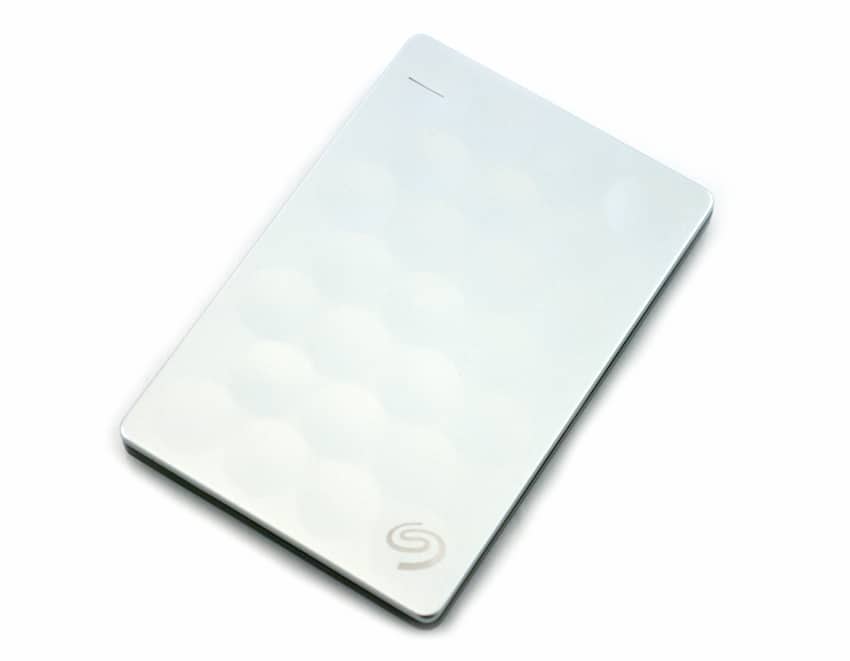
The Seagate Backup Plus Ultra Slim is a slick looking portable drive. Sporting either a platinum or gold color, the front cover is embossed with a dimple-like design, similar to a golf ball. Located on the bottom right dimple is the Seagate logo. These portable drives are incredibly slim, measuring in at just 9.6mm in thickness; they can easily slip inside a pocket or backpack.

![]() 

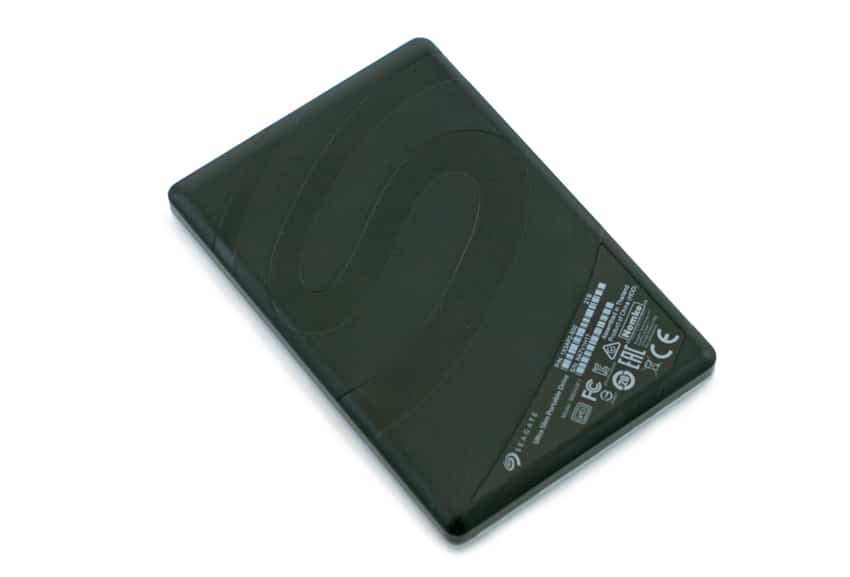
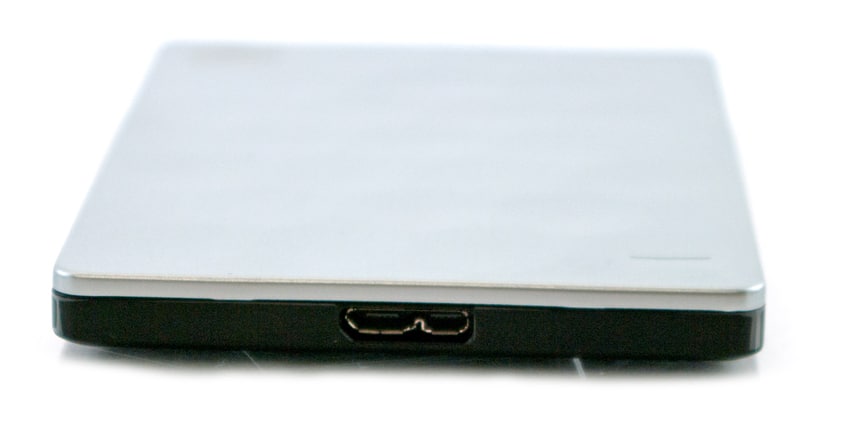
The side profile houses the USB 3.0 port, while the back panel uses a matte black design coupled with the embedded Seagate "S" logo.

![]() 

**Performance and Interface**

To test the performance of the Seagate Backup Plus Ultra Slim 2TB, we will go over two different areas of analysis: the BlackMagic disk speed test and 2MB sequential and random transfer speeds via IOMeter. We will also be comparing the drives to the recently reviewed [Lacie Porsche Design Mobile portable drives (2TB & 4TB models)](https://www.storagereview.com/lacie%5Fporsche%5Fdesign%5Fmobile%5F2tb%5F4tb%5Freview). Please note that the LaCie Porsche Design Mobile drives leverage USB-C while the Seagate Ultra Slim uses USB 3.0.

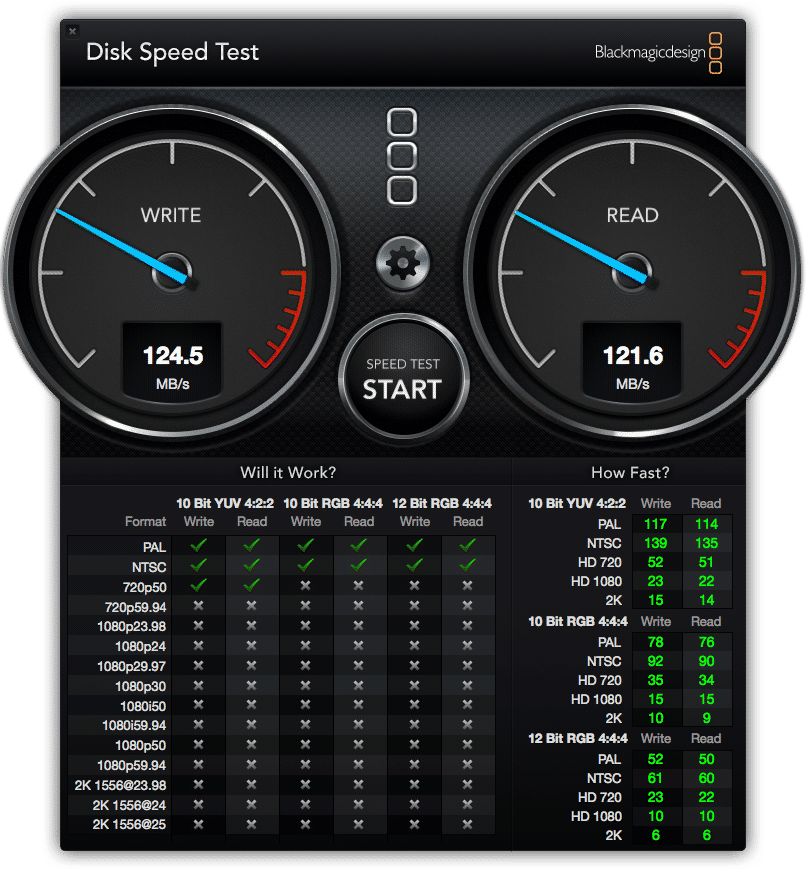
For the BlackMagic disk speed test, we used a current generation MacBook Pro with a 5GB test file. Here, the Plus Ultra Slim 2TB recorded 121.6MB/s read and 124.5MB/s write, which placed it in the middle. The LaCie 2TB drive boasted the top overall performance with a write speed of 133.4MB/s and a read speed of 132.3MB/s. The 4TB LaCie was the slowest performer of the three drives, recording a write speed of 123.2MB/s and a read speed of 115.8MB/s. Overall, however, there was little discrepancy in performance between the comparables.

![]() 

For the IOMeter benchmark, we connected all three drives to our [HP Z620 workstation](https://www.storagereview.com/hp%5Fz620%5Fworkstation%5Freview) where we recorded sequential and random transfer speeds via a 2MB test. The placement of the testing reflects that of the results above with the BlackMagic.

In this benchmark, the Seagate boasted speeds that placed it in the middle of the pack again with sequential results of 124.27MB/s read and 40.85MB/s write. Random tests told a similar story with 80.17MB/s read and 36.85MB/s write. As far as the LaCie drives go, the 2TB model had the best write speeds by a significant margin and was also the top performer in reads with 124.38MB/s and 131.93MB/s respectively. The 4TB LaCie, on the other hand, recorded 117.74MB/s read and 24MB/s write. Random scores of the 2TB LaCie showed 83.49MB/s read as well as another dominant write performance of 105.19MB/s. The 4TB LaCie was well behind its lower capacity brother once again with 44.42MB/s read and 23.46MB/s write.

| 2MB Test         | LaCie Porsche Design 2TB | LaCie Porsche Design 4TB | Seagate Ultra Slim 2TB |
| ---------------- | ------------------------ | ------------------------ | ---------------------- |
| Sequential Write | 124.38MB/s               | 24MB/s                   | 40.85MB/s              |
| Sequential Read  | 131.93MB/s               | 117.74MB/s               | 124.27MB/s             |
| Random Write     | 105.19MB/s               | 23.46MB/s                | 36.85MB/s              |
| Random read      | 83.49MB/s                | 44.42MB/s                | 80.17MB/s              |

The Ultra Slim uses the Seagate Dashboard software to manage the drive, which can seamlessly protect and backs up files to both your computer and mobile devices. We have looked at this software several times through our previous Seagate portable drive reviews, including the [Seagate Backup Plus External Hard Drive](https://www.storagereview.com/seagate%5Fbackup%5Fplus%5Fexternal%5Fhard%5Fdrive%5Freview%5F8tb) ([5TB](https://www.storagereview.com/seagate%5Fbackup%5Fplus%5F5tb%5Fexternal%5Fhard%5Fdrive%5Freview%5Fstdt5000100) and [8TB](https://www.storagereview.com/seagate%5Fbackup%5Fplus%5Fexternal%5Fhard%5Fdrive%5Freview%5F8tb) models). You can view those reviews for more details. The Dashboard also integrates well with the Seagate Mobile Backup app on iOS and Android devices. Combined, users can back up photos and videos directly from their mobile devices (iOS and Android) using Wi-Fi or through cloud services such as Dropbox or Google Drive.

**Conclusion**

Available in gold in platinum colors, the Backup Plus Ultra Slim is one of Seagate’s nicest looking drives and perfect for mainstream users. The new drives are available in capacities of 1TB and 2TB, both of which come in just under 0.4 inches thick. In addition, Seagate has bundled their new drive with some pretty useful stuff, including 200GB of Microsoft OneDrive cloud storage and Lyve software.

Leveraging a USB 3.0 interface, Seagate quotes their new Ultra Slim drive with 120MB/s for sequential reads. After running BlackMagic, the drive proved it could reach these speeds and more with 121.6MB/s read and 124.5MB/s write. We also looked its IOMeter via our [HP Z620 workstation](https://www.storagereview.com/hp%5Fz620%5Fworkstation%5Freview), which records sequential and random transfer speeds through a 2MB test. In this workload, the Seagate continued its performance speeds with sequential results of 124.27MB/s read and 40.85MB/s write while our random test recorded 80.17MB/s read and 36.85MB/s write. During these tests, we compared the drives to the recently released LaCie Porsche Design Mobile 2TB and 4TB drives, where it placed in the middle of the leader board for both benchmarks. 

As far as price-per-GB goes, the Ultra Plus has the slight edge. More specifically, the 1TB and 2TB capacities go for roughly $70 and $100, respectively, compared to the LaCie Porsche Design Mobile drives, which go for $85 and $120 for the same amount of storage.

**Pros**

* Slick design
* Good performance; exceeded quoted speeds
* Useful bundled software

**Cons**

* Write performance is middling

**Bottom Line**

Overall, the Ultra Slim portable hard drive is a great addition to their Backup Plus line, featuring a premium design and useful bundled software.

[Seagate Backup Plus Ultra Slim on Amazon](http://amzn.to/1MDVL99)

[Discuss this review](http://forums.storagereview.com/index.php/topic/39139-seagate-backup-plus-ultra-slim-review-discussion/)

[Sign up for the StorageReview newsletter](https://www.storagereview.com/storagereview%5Fnewsletter%5Fsignup)

**Engage with StorageReview**

[Newsletter](https://www.storagereview.com/storage%5Fnewsletter) | [YouTube](https://www.youtube.com/user/StorageReview "Opens in a new window") | Podcast [iTunes](https://podcasts.apple.com/gb/podcast/storagereview-com-storage-reviews/id1060681115 "Opens in a new window")/[Spotify](https://open.spotify.com/show/1y6VnznABhHeOSMOmbDTz0 "Opens in a new window") | [Instagram](https://www.instagram.com/storagereview/ "Opens in a new window") | [Twitter](https://twitter.com/storagereview "Opens in a new window") | [TikTok](https://www.tiktok.com/@storagereview? "Opens in a new window") | [RSS Feed](https://www.storagereview.com/rss.xml)

![]()

### Lyle Smith

Lyle is a writer for StorageReview, covering a broad set of end user and enterprise IT topics. 

Previous post: [Netgear Arlo Security Cameras for Home Security](https://www.storagereview.com/review/netgear-arlo-security-cameras-for-home-security)

Next post: [SanDisk X400 SSD Review](https://www.storagereview.com/review/sandisk-x400-ssd-review)

Trusted Vendors

Products and solutions from our affiliate partners:

* [ ![Ubiquiti Logo](https://www.storagereview.com/wp-content/uploads/2024/11/2-1.webp) Ubiquiti ](https://store.ui.com/us/en?a%5Faid=StorageReview "Opens in a new window")
* [ ![Newegg Logo](https://www.storagereview.com/wp-content/uploads/2025/11/newegg.webp) Newegg ](https://click.linksynergy.com/fs-bin/click?id=g5terNMDhz0&offerid=1207190.18&subid=0&type=4 "Opens in a new window")
* [ ![Amazon Logo](https://www.storagereview.com/wp-content/uploads/2025/11/amazon.webp) Amazon ](https://amzn.to/4fLJUEW "Opens in a new window")

Newsletter

Subscribe to the StorageReview newsletter to stay up to date on the latest news and reviews. We promise no spam!

1  

Leave this field empty if you’re human: 

## Advertisement

Content Categories

[ Facebook ](https://www.facebook.com/@storagereview) [ X ](https://twitter.com/storagereview) [ Instagram ](https://www.instagram.com/storagereview/) [ LinkedIn ](https://www.linkedin.com/company/storagereview-com) [ YouTube ](https://www.youtube.com/user/storagereview?sub%5Fconfirmation=1) [ Email ](mailto:info@storagereview.com) [ Spotify ](https://open.spotify.com/show/1y6VnznABhHeOSMOmbDTz0) [ Reddit ](https://www.reddit.com/r/StorageReview/) [ Discord ](https://discord.gg/TwMHb4azdC) [ RSS ](https://www.storagereview.com/rss.xml) [ TikTok ](https://www.tiktok.com/@storagereview) 

Copyright © 1998-2025 Flying Pig Ventures, LLC Cincinnati, Ohio. All rights reserved.

Manage your privacy

To provide the best experiences, we and our partners use technologies like cookies to store and/or access device information. Consenting to these technologies will allow us and our partners to process personal data such as browsing behavior or unique IDs on this site and show (non-) personalized ads. Not consenting or withdrawing consent, may adversely affect certain features and functions.

Click below to consent to the above or make granular choices. Your choices will be applied to this site only. You can change your settings at any time, including withdrawing your consent, by using the toggles on the Cookie Policy, or by clicking on the manage consent button at the bottom of the screen.

Functional Functional Always active 

The technical storage or access is strictly necessary for the legitimate purpose of enabling the use of a specific service explicitly requested by the subscriber or user, or for the sole purpose of carrying out the transmission of a communication over an electronic communications network. 

Preferences Preferences 

The technical storage or access is necessary for the legitimate purpose of storing preferences that are not requested by the subscriber or user. 

Statistics Statistics 

The technical storage or access that is used exclusively for statistical purposes. The technical storage or access that is used exclusively for anonymous statistical purposes. Without a subpoena, voluntary compliance on the part of your Internet Service Provider, or additional records from a third party, information stored or retrieved for this purpose alone cannot usually be used to identify you. 

Marketing Marketing 

The technical storage or access is required to create user profiles to send advertising, or to track the user on a website or across several websites for similar marketing purposes. 

Statistics

Marketing

Features

Always active

Always active

* [Manage options](#)
* [Manage services](#)
* [Manage {vendor\_count} vendors](#)
* [Read more about these purposes](https://cookiedatabase.org/tcf/purposes/)

Accept Deny Manage options Save preferences [Manage options](#) 

* [{title}](#)
* [{title}](#)
* [{title}](#)

Manage your privacy

To provide the best experiences, we use technologies like cookies to store and/or access device information. Consenting to these technologies will allow us to process data such as browsing behavior or unique IDs on this site. Not consenting or withdrawing consent, may adversely affect certain features and functions.

Functional Functional Always active 

The technical storage or access is strictly necessary for the legitimate purpose of enabling the use of a specific service explicitly requested by the subscriber or user, or for the sole purpose of carrying out the transmission of a communication over an electronic communications network. 

Preferences Preferences 

The technical storage or access is necessary for the legitimate purpose of storing preferences that are not requested by the subscriber or user. 

Statistics Statistics 

The technical storage or access that is used exclusively for statistical purposes. The technical storage or access that is used exclusively for anonymous statistical purposes. Without a subpoena, voluntary compliance on the part of your Internet Service Provider, or additional records from a third party, information stored or retrieved for this purpose alone cannot usually be used to identify you. 

Marketing Marketing 

The technical storage or access is required to create user profiles to send advertising, or to track the user on a website or across several websites for similar marketing purposes. 

Statistics

Marketing

Features

Always active

Always active

* [Manage options](#)
* [Manage services](#)
* [Manage {vendor\_count} vendors](#)
* [Read more about these purposes](https://cookiedatabase.org/tcf/purposes/)

Accept Deny Manage options Save preferences [Manage options](#) 

* [{title}](#)
* [{title}](#)
* [{title}](#)

Manage consent Manage consent

```json
{"@context":"https:\/\/schema.org","@graph":[{"@type":"WebPage","@id":"https:\/\/www.storagereview.com\/review\/seagate-backup-plus-ultra-slim-review","url":"https:\/\/www.storagereview.com\/review\/seagate-backup-plus-ultra-slim-review","name":"Seagate Backup Plus Ultra Slim Review - StorageReview.com","isPartOf":{"@id":"https:\/\/www.storagereview.com\/#website"},"primaryImageOfPage":{"@id":"https:\/\/www.storagereview.com\/review\/seagate-backup-plus-ultra-slim-review#primaryimage"},"image":{"@id":"https:\/\/www.storagereview.com\/review\/seagate-backup-plus-ultra-slim-review#primaryimage"},"thumbnailUrl":"https:\/\/www.storagereview.com\/wp-content\/uploads\/2016\/04\/StorageReview-Seagate-Ultra-Slim-2TB-Thumb.jpg","datePublished":"2016-04-18T20:18:06+00:00","dateModified":"2020-02-06T10:11:53+00:00","breadcrumb":{"@id":"https:\/\/www.storagereview.com\/review\/seagate-backup-plus-ultra-slim-review#breadcrumb"},"inLanguage":"en-US","potentialAction":[{"@type":"ReadAction","target":["https:\/\/www.storagereview.com\/review\/seagate-backup-plus-ultra-slim-review"]}]},{"@type":"ImageObject","inLanguage":"en-US","@id":"https:\/\/www.storagereview.com\/review\/seagate-backup-plus-ultra-slim-review#primaryimage","url":"https:\/\/www.storagereview.com\/wp-content\/uploads\/2016\/04\/StorageReview-Seagate-Ultra-Slim-2TB-Thumb.jpg","contentUrl":"https:\/\/www.storagereview.com\/wp-content\/uploads\/2016\/04\/StorageReview-Seagate-Ultra-Slim-2TB-Thumb.jpg","width":100,"height":101},{"@type":"BreadcrumbList","@id":"https:\/\/www.storagereview.com\/review\/seagate-backup-plus-ultra-slim-review#breadcrumb","itemListElement":[{"@type":"ListItem","position":1,"name":"Home","item":"https:\/\/www.storagereview.com\/"},{"@type":"ListItem","position":2,"name":"Review","item":"https:\/\/www.storagereview.com\/review"},{"@type":"ListItem","position":3,"name":"Seagate Backup Plus Ultra Slim Review"}]},{"@type":"WebSite","@id":"https:\/\/www.storagereview.com\/#website","url":"https:\/\/www.storagereview.com\/","name":"StorageReview.com","description":"StorageReview.com is a leading provider of news and reviews throughout the entire IT stack - from the datacenter to the edge, and all points in between.","publisher":{"@id":"https:\/\/www.storagereview.com\/#organization"},"potentialAction":[{"@type":"SearchAction","target":{"@type":"EntryPoint","urlTemplate":"https:\/\/www.storagereview.com\/?s={search_term_string}"},"query-input":{"@type":"PropertyValueSpecification","valueRequired":true,"valueName":"search_term_string"}}],"inLanguage":"en-US"},{"@type":"Organization","@id":"https:\/\/www.storagereview.com\/#organization","name":"StorageReview.com","url":"https:\/\/www.storagereview.com\/","logo":{"@type":"ImageObject","inLanguage":"en-US","@id":"https:\/\/www.storagereview.com\/#\/schema\/logo\/image\/","url":"https:\/\/www.storagereview.com\/wp-content\/uploads\/2020\/02\/Storage-Reviews-2-2.png","contentUrl":"https:\/\/www.storagereview.com\/wp-content\/uploads\/2020\/02\/Storage-Reviews-2-2.png","width":344,"height":61,"caption":"StorageReview.com"},"image":{"@id":"https:\/\/www.storagereview.com\/#\/schema\/logo\/image\/"},"sameAs":["https:\/\/x.com\/storagereview","http:\/\/youtube.com\/user\/storagereview"]}]}
```