

Quando all'inizio di quest'anno abbiamo analizzato a fondo Dell PowerStore Gen 3 , l'elemento centrale era l'hardware, e ce n'era in abbondanza. Dell ha ricostruito la piattaforma partendo dallo chassis: 40 alloggiamenti NVMe E3.S in un rack 3U senza slot dedicati alla cache, un midplane RDMA da 200 GbE tra i controller, disaccoppiato dalle generazioni di CPU, memoria persistente definita via software (SDM) al posto delle unità NVRAM, PCIe Gen 5 end-to-end e moduli I/O OCP 3.0 in sostituzione dei supporti SLIC proprietari. Ognuna di queste scelte è stata fatta per supportare un ciclo di vita di dieci anni con molteplici aggiornamenti dei controller in loco, il che ha reso concreta la strategia di estensione del ciclo di vita della piattaforma.
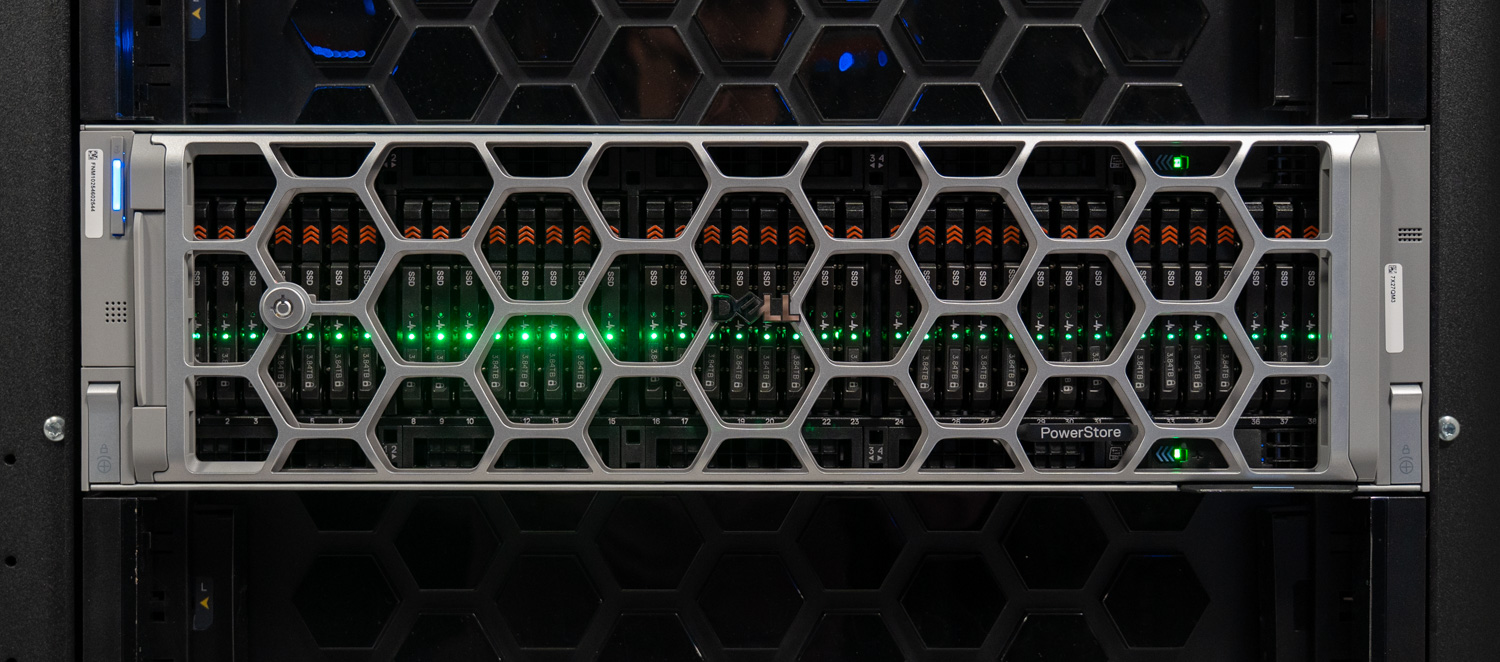
L'hardware Gen 3 completamente equipaggiato. L'altra metà della storia è PowerStoreOS 5.0.
Al momento del lancio di quell'hardware, PowerStoreOS 5.0 era ancora avvolto nel mistero. Ora è generalmente disponibile, installato sui nuovi sistemi di terza generazione e scaricabile per la base installata esistente, quindi abbiamo dato un'occhiata alle novità e ai miglioramenti apportati. In breve: il lavoro più interessante di questa versione è di natura operativa. OS 5.0 non si concentra su una singola funzionalità di punta, ma piuttosto sull'ottimizzazione del comportamento di un parco macchine eterogeneo di PowerStore di diverse generazioni, sfruttando al massimo l'efficienza del nuovo hardware e ponendo maggiore attenzione alle prestazioni e alla sicurezza.
Un unico sistema operativo, per ogni generazione.
L'aspetto più rilevante di PowerStoreOS 5.0 è la sua compatibilità con diverse piattaforme. Non si tratta di un'esclusiva della terza generazione; la stessa versione 5.0 preinstallata sui nuovi PowerStore 1500 può essere scaricata anche su appliance di prima e seconda generazione. Alcune funzionalità sono naturalmente limitate dall'hardware (le schede FC per la trasmissione di dati crittografati ne sono un esempio lampante), ma l'ambiente operativo è compatibile con l'intera base installata.
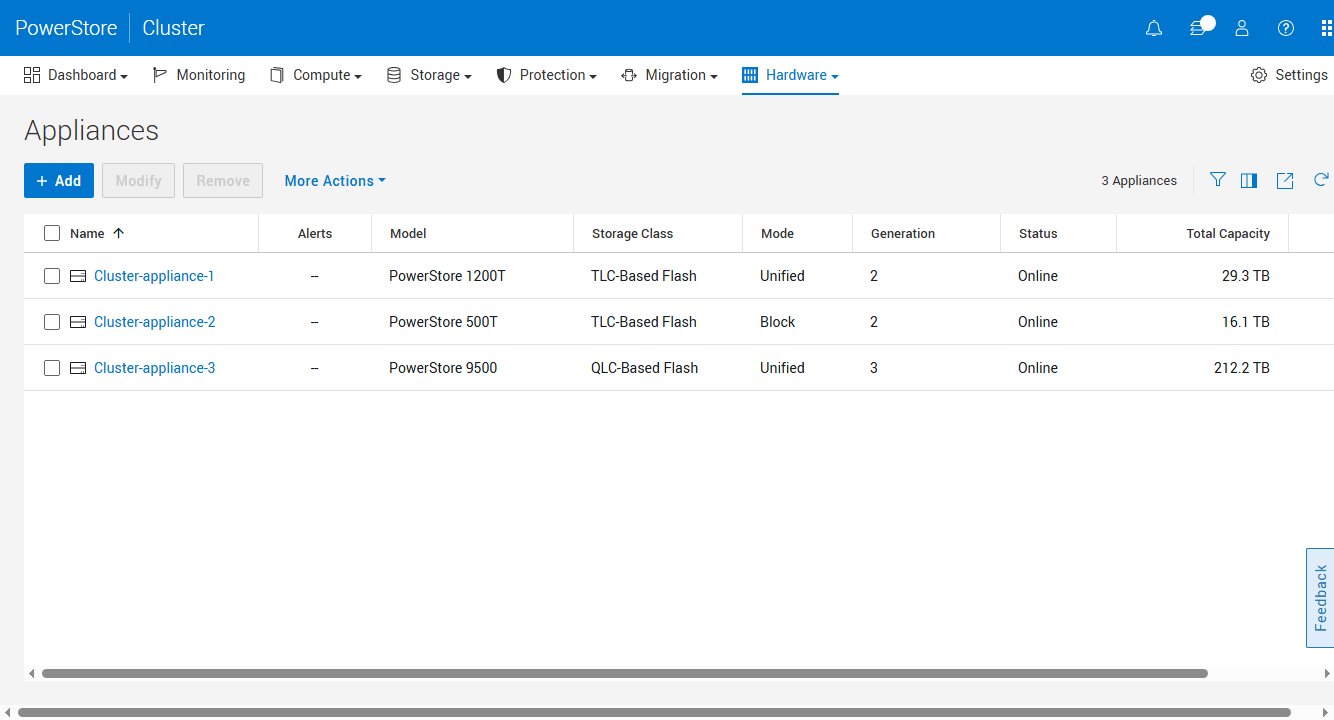
Un cluster, due generazioni, entrambi i tipi di supporto: un Gen 2 1200T e un 500T insieme a un Gen 3 9500 con tecnologia QLC.
Questo è importante per via del clustering: gli appliance di prima, seconda e terza generazione possono coesistere in un singolo cluster PowerStore con mobilità dei carichi di lavoro tra di essi senza interruzioni. L'ambiente demo che Dell ci ha mostrato chiarisce bene il concetto: un 1200T, originariamente un 1000T di prima generazione, aggiornato sul posto, in cluster con un appliance di terza generazione, il tutto gestito da una singola istanza di PowerStore Manager. PowerStore Manager ora visualizza la generazione di ciascun appliance nella vista del cluster, insieme alla sua classe di storage, in modo che un ambiente misto sia facilmente visibile a colpo d'occhio. Un'avvertenza importante: il clustering è unidirezionale per il nuovo hardware. Gli appliance di terza generazione possono unirsi a un cluster di seconda generazione, ma non viceversa. Una volta aggiunto un appliance di terza generazione, non è possibile aggiungerne altri di seconda generazione, una regola indicata fin da subito dalla procedura guidata di configurazione iniziale.
Per i clienti che utilizzano hardware PowerStore meno recente, questo è il percorso di migrazione. Aggiungere l'appliance di terza generazione al cluster esistente, migrare i volumi in modo nativo in PowerStore Manager con un passaggio automatico una volta completata la migrazione dei dati e dismettere o riutilizzare la vecchia appliance una volta che è vuota. La migrazione a blocchi funziona attualmente in questo modo; la migrazione di file tra appliance in un cluster è prevista per la prossima versione. Nel frattempo, Dell consiglia ai clienti che utilizzano file di utilizzare la replica, la migrazione di file nativa da Unity o VNX, oppure soluzioni basate sull'host, come Storage vMotion, per ambienti virtualizzati. Durante la nostra sessione abbiamo monitorato un'importazione NFS da Unity in tempo reale e il flusso risulterà familiare a chiunque abbia dismesso un array midrange dell'era EMC: individuare l'origine, associare i file system, copiare in background e quindi attendere un breve intervallo di tempo prima che PowerStore assuma le caratteristiche del vecchio sistema. Con decine di migliaia di sistemi Unity ancora in uso, secondo le stime di Dell, questo percorso di importazione rimarrà sicuramente molto utilizzato.
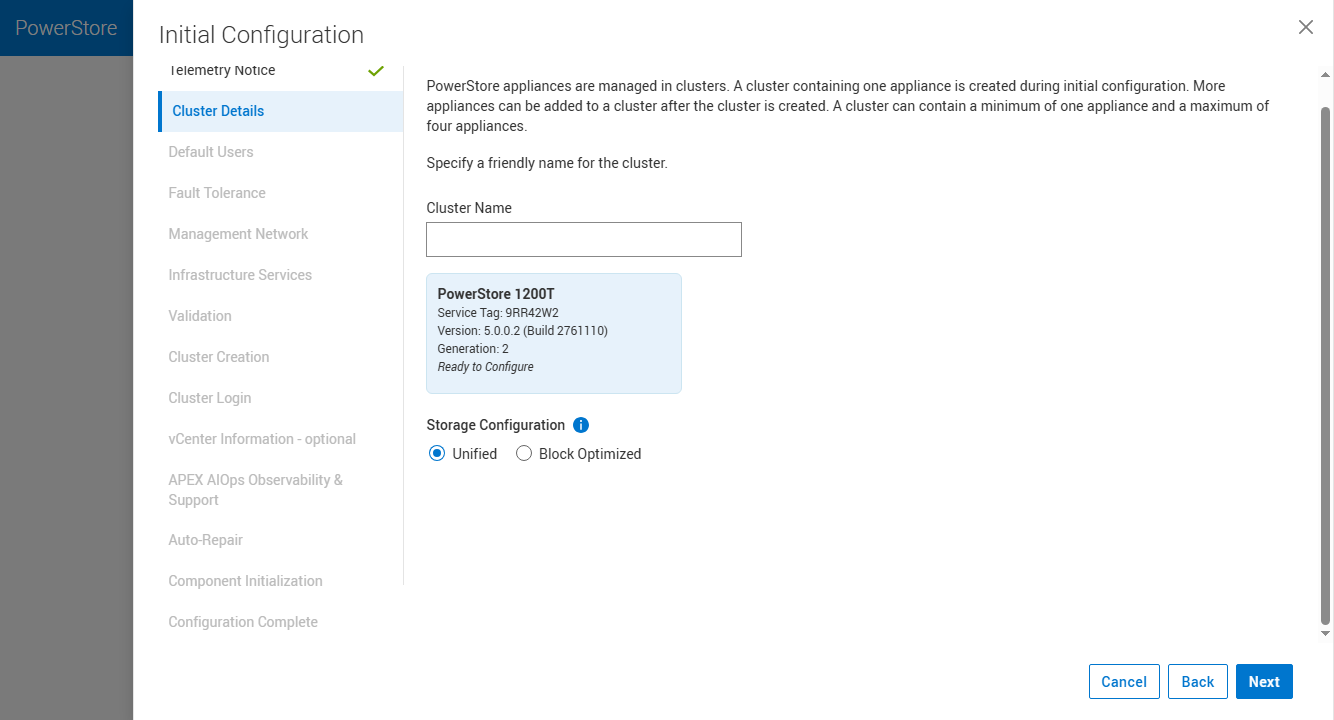
La configurazione iniziale di seconda generazione pone ancora la domanda: Unificata o ottimizzata a blocchi?
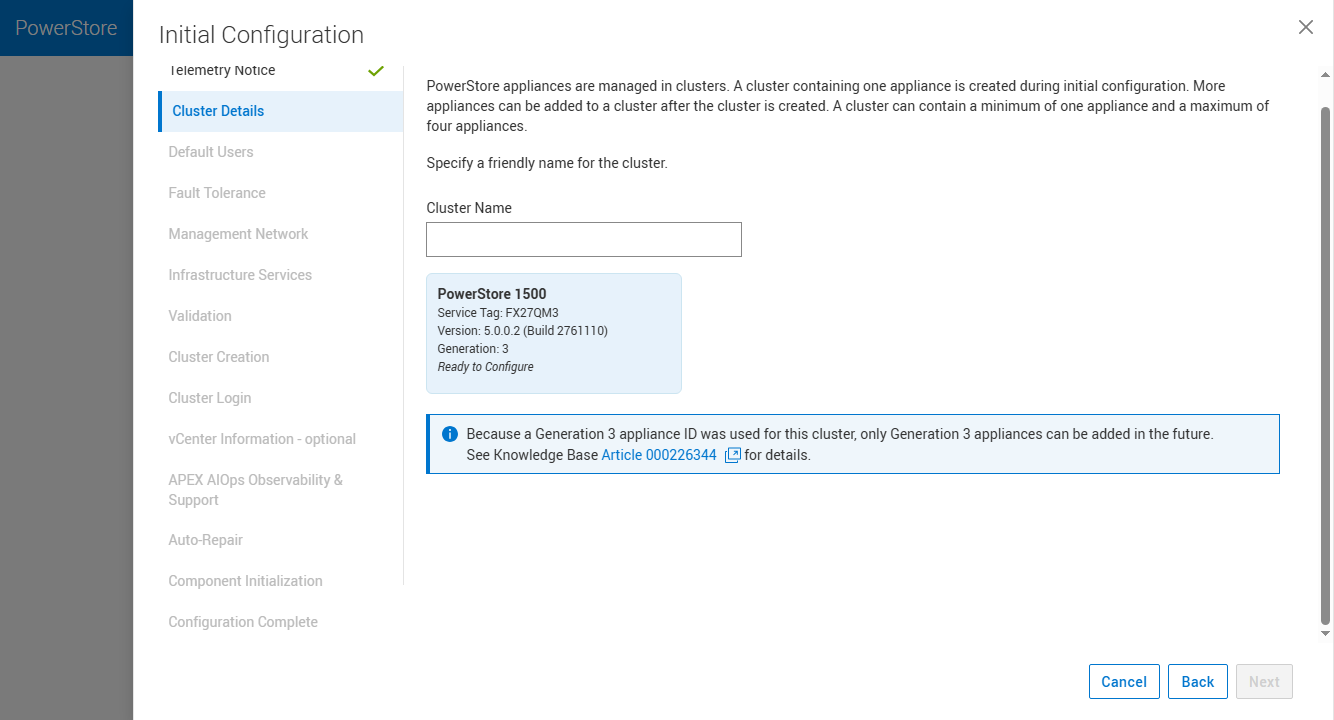
Con la terza generazione, la scelta è sparita: unificazione di default, con risorse allocate dinamicamente.
Sulle unità Gen 1 e Gen 2, la distribuzione inizia con una scelta: unificata o ottimizzata per i blocchi. Scegliendo l'opzione unificata, viene allocata staticamente una porzione di CPU e memoria per il container NAS, indipendentemente dal fatto che il file venga utilizzato o meno, il che significa che i carichi di lavoro a blocchi pagano per lo spazio di memoria del file che potrebbe rimanere inattivo. Sulla Gen 3, questa scelta non è più disponibile. Ogni appliance viene distribuita in modalità unificata e l'allocazione dinamica dei core condivide le risorse tra i servizi a blocchi e a file su richiesta. Il file ottiene le risorse di cui ha bisogno, anziché quelle stimate da una procedura guidata, e il blocco recupera tutto il resto. Anche la replica Metro è compatibile con le diverse generazioni; il cambio di ruolo preferito su una coppia di volumi Metro attivo-attivo tra un'appliance Gen 3 e una Gen 2 richiede un solo clic e il passaggio viene completato in meno di un secondo.
TLC o QLC: la soluzione di archiviazione più adatta al carico di lavoro.
Ogni modello di terza generazione, 1500, 5500 e 9500, accetta unità TLC o QLC E3.S senza alcuna distinzione tra i modelli e, secondo Dell, senza alcun compromesso in termini di prestazioni tra i diversi tipi di supporto. I suffissi T e Q, utilizzati in precedenza per suddividere la gamma, sono stati eliminati con la terza generazione; il modello definisce la piattaforma e il tipo di unità è quello più adatto alle specifiche esigenze.
Il software che rende tutto ciò possibile è il percorso dati autonomo di OS 5.0, che applica un'intelligenza per ogni operazione di I/O al posizionamento e allo smontaggio, in modo che le memorie QLC ad alta capacità abbiano spazio per esprimere al meglio le proprie potenzialità. Dietro le quinte, le scritture vengono memorizzate nella DRAM, replicate tra i nodi tramite l'interconnessione RDMA anziché attraverso il percorso mediato dalla CPU utilizzato dalle generazioni precedenti, e confermate all'host senza interagire con le unità. Durante lo smontaggio, il sistema aggrega i dati ridotti in scritture complete verso il back-end, mantenendo bassa l'amplificazione delle scritture, una caratteristica fondamentale per la durata delle memorie QLC. Dell attribuisce al percorso dati riprogettato velocità di lettura fino a 2 volte superiori, in linea con l'hardware sottostante.
Le capacità disponibili sono di 3.84 TB, 7.68 TB e 15.36 TB in TLC, più 30.72 TB in QLC; riempiendo tutti i 40 alloggiamenti con QLC, Dell dichiara una capacità effettiva di 5.8 PB in 3U, un dato che presuppone la riduzione completa di 6:1. Dell ha anche abbassato la soglia di accesso alla tecnologia QLC: un PowerStore 1500 di terza generazione parte da sette unità QLC da 30.72 TB, mentre le configurazioni QLC della generazione precedente ne richiedevano un minimo di undici. Abbiamo assistito all'evoluzione della strategia QLC di Dell sin da quando il PowerStore 5200Q ha introdotto la tecnologia QLC nei carichi di lavoro mainstream; con la terza generazione, la scelta tra QLC e TLC si riduce finalmente al costo per gigabyte e alla densità, anziché a una questione di prestazioni.
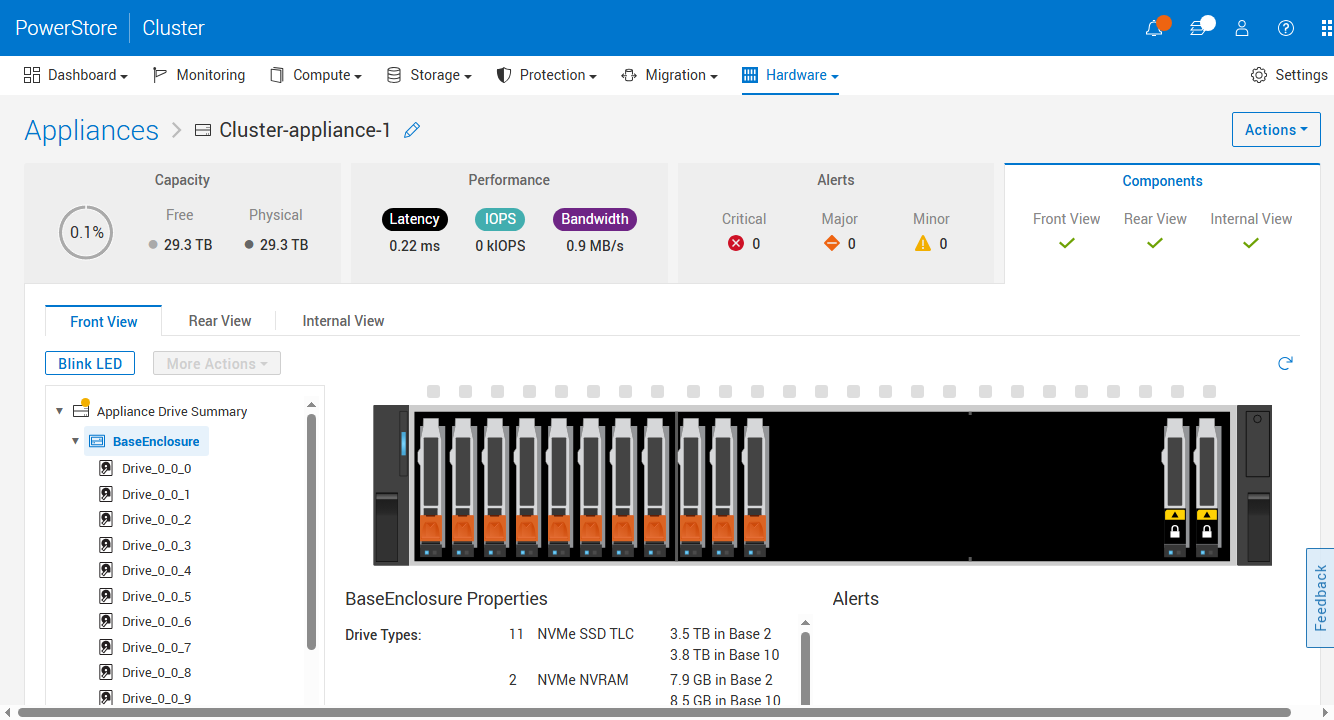
Nella Gen 2, gli alloggiamenti anteriori sono destinati alle unità cache NVRAM.
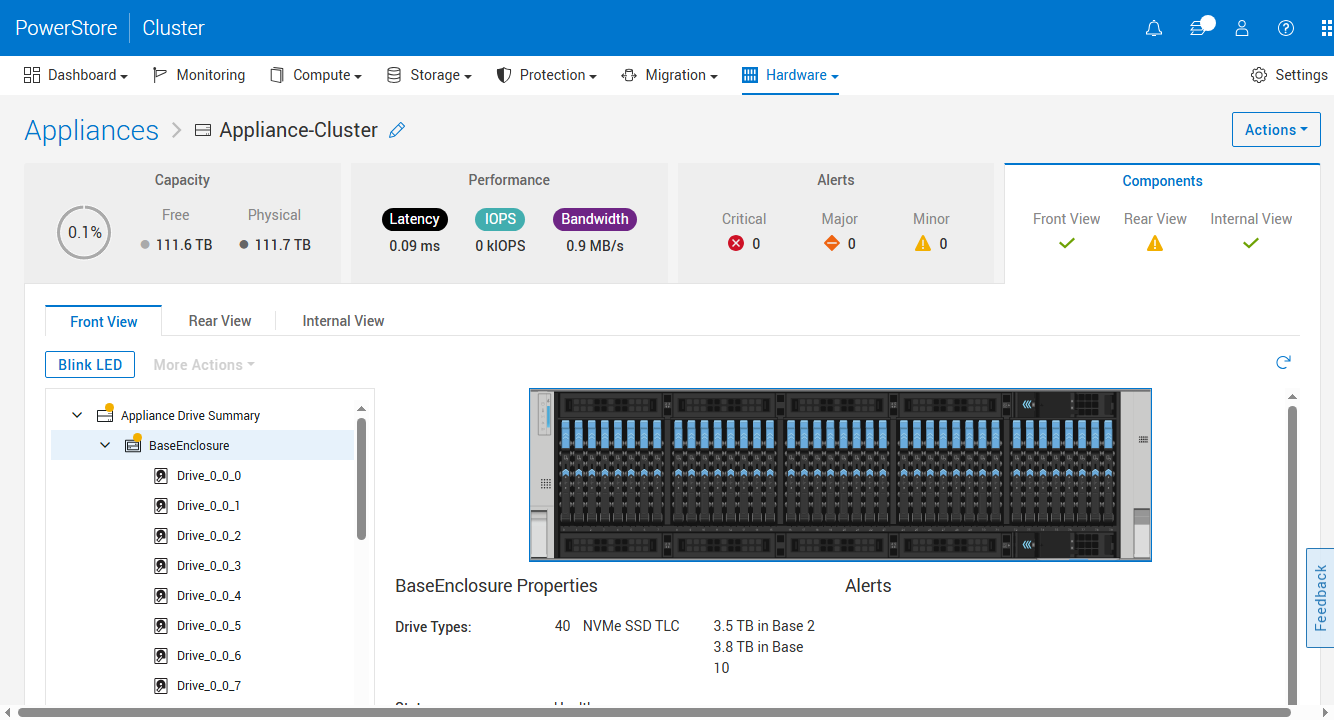
Nella Gen 3, tutti i 40 alloggiamenti contengono dati; la persistenza della cache è stata spostata nella memoria persistente definita dal software (SDPM).
Efficienza e garanzia 6:1
La terza generazione ha modificato la geometria su disco: la dimensione delle pagine è passata da 4 KB delle generazioni precedenti a 8 KB. Questo dimezza i metadati che il sistema deve gestire per terabyte, restituendo capacità e margine di elaborazione ai carichi di lavoro degli utenti. Tuttavia, di per sé, rappresenterebbe un passo indietro per la deduplicazione, poiché due blocchi da 4 KB che in precedenza venivano deduplicati indipendentemente potrebbero ora essere suddivisi su pagine da 8 KB diverse. La soluzione di OS 5.0 è la deduplicazione non allineata. Invece di abbinare solo le pagine sui confini da 8 KB, il sistema può trovare blocchi da 8 KB duplicati che si estendono su più pagine e ridurli comunque. Ciò richiede una maggiore potenza di elaborazione, che è esattamente il tipo di lavoro per cui l'hardware di terza generazione dispone di cicli di clock e di un silicio di offload più recente. Funzionalità di offload di compressione migliorate completano la pipeline di riduzione dei dati. La modifica della geometria è trasparente per host e applicazioni; non è necessario riconfigurare nulla sul lato dell'iniziatore.
Questa pipeline è ciò che sta alla base del dato principale relativo al DR (Distributed Recovery). Dell ha aumentato la sua garanzia di riduzione dei dati da 5:1 a 6:1 con questa piattaforma, e la precisazione è legata al numero: la garanzia di 6:1 si applica agli array di terza generazione installati inizialmente con OS 5.0, sui dati riducibili. Gli ingegneri di Dell sono stati chiari con noi riguardo al meccanismo: se un cliente idoneo non vede 6:1 sui dati riducibili, Dell rimedia fornendo unità aggiuntive. L'azienda attribuisce il merito alla combinazione di nuove generazioni di offload QAT, processori più veloci, schede RDMA che alleggeriscono il carico di trasporto tra i nodi per le CPU, striping dei dati rivisto e anni di telemetria della flotta da Dell AIOps (precedentemente CloudIQ) che ha mostrato dove gli algoritmi di riduzione non riuscivano a generare risparmi.
Dell ha fornito due screenshot del Capacity Dashboard da un cluster con carico leggero (1.4% della capacità fisica in uso) per mostrare come questi valori vengono visualizzati in PowerStore Manager. Il pannello Risparmio dati riporta un DRR complessivo per tutto ciò che è stato scritto e un DRR riducibile separato che esclude i dati che l'array ha classificato come non riducibili, con la porzione non riducibile indicata in GB. Nel primo screenshot, 2.5 TB di dati logici vengono memorizzati in 359 GB di spazio fisico, con un DRR complessivo di 7.2:1 e un DRR riducibile di 11.7:1.
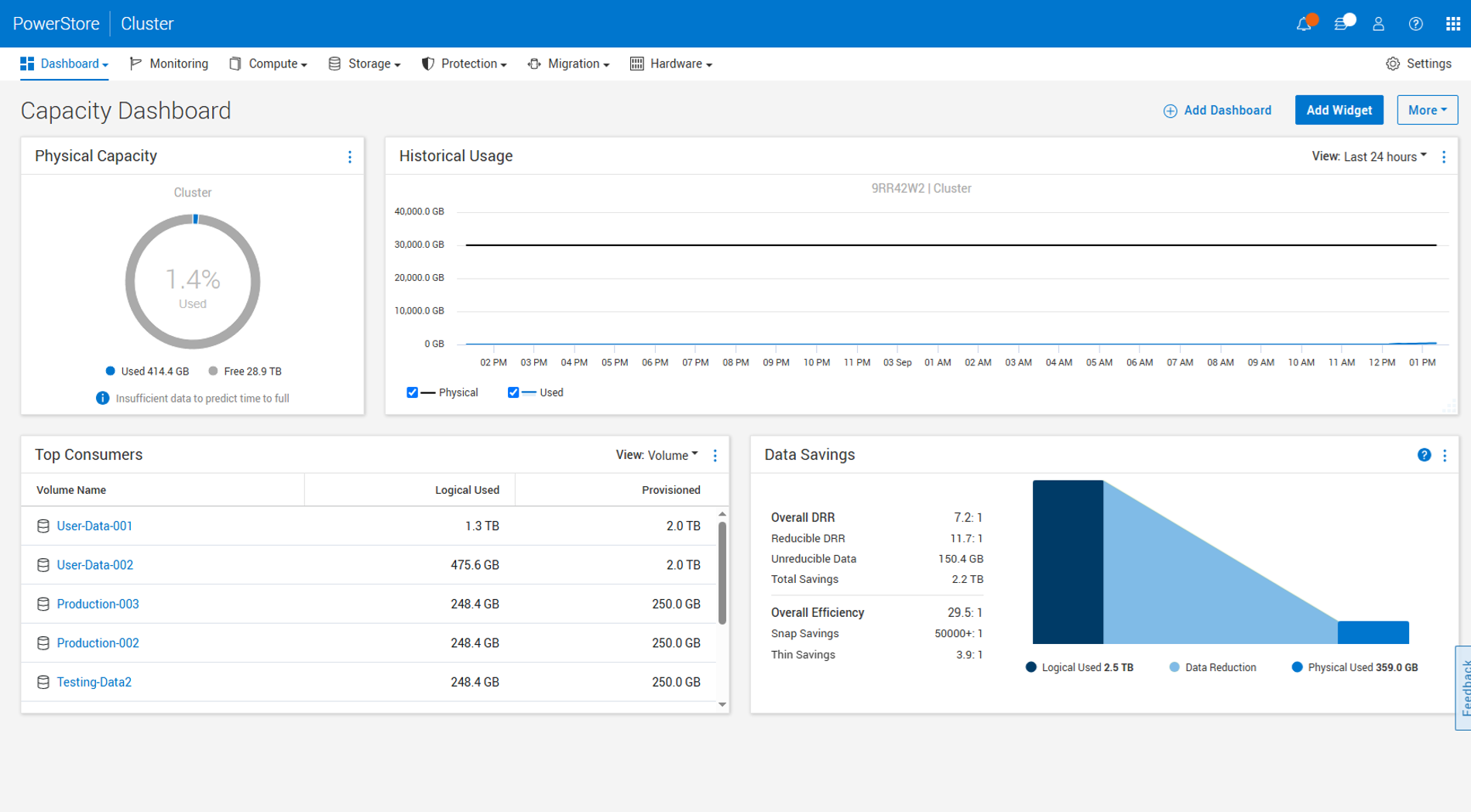
Dashboard della capacità di Dell PowerStore: DRR complessivo di 7.2:1 e DRR riducibile di 11.7:1 su 2.5 TB di dati logici (immagine fornita da Dell).
La seconda acquisizione, con più dati scritti sugli stessi volumi, mostra 2.7 TB logici su 376.4 GB fisici, per un rapporto complessivo di 7.4:1 e un rapporto di riduzione di 12.3:1. La dashboard include anche i risparmi derivanti da snapshot e thin provisioning in un dato di efficienza complessiva (29.5:1 e 28.2:1 in questo caso), che è il dato da escludere da qualsiasi discussione sul rapporto 6:1, poiché la garanzia è limitata alla riduzione dei dati sui dati riducibili. Si tratta di acquisizioni di Dell di un set di dati Dell, quindi vanno considerate come una dimostrazione del reporting. A quanto si riduce un determinato carico di lavoro di produzione è una questione a parte.
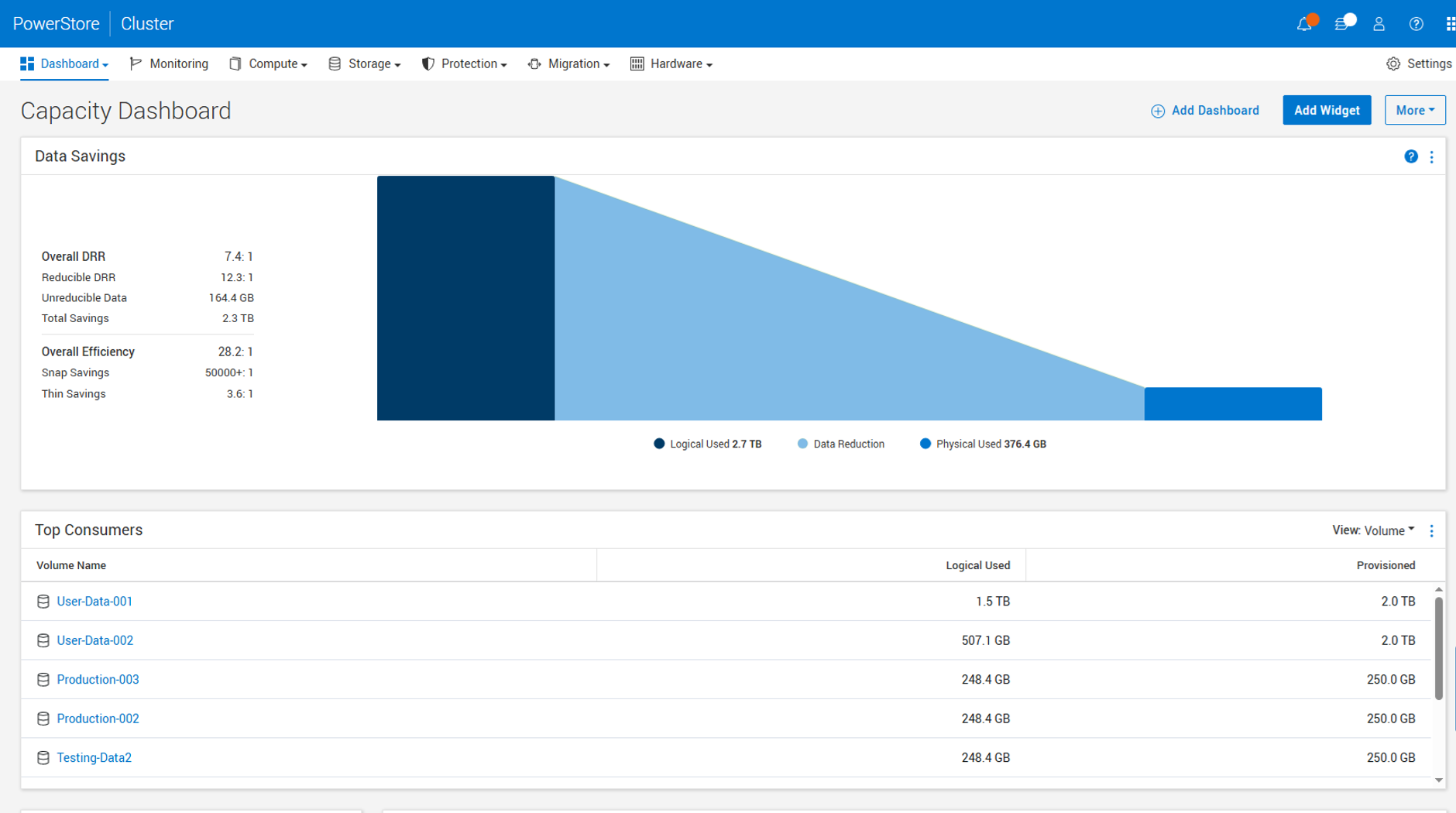
Il pannello Risparmio dati mostra un DRR complessivo di 7.4:1, con i risparmi derivanti da snapshot e thin provisioning che si traducono in un'efficienza complessiva di 28.2:1 (dato fornito da Dell).
NAS, Nutanix e la storia dello storage esterno
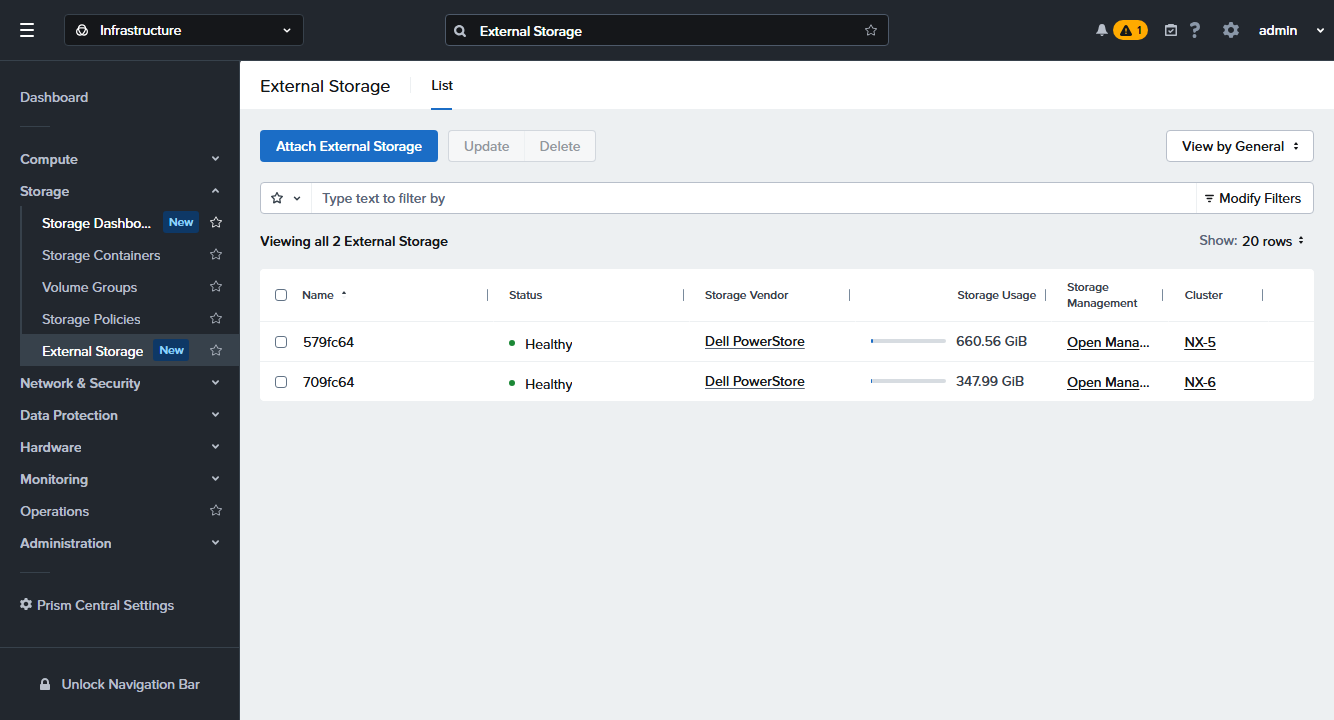
Prism Central collega PowerStore come storage esterno per i cluster AHV.
In seguito alla partnership che ha portato PowerStore su Nutanix NCI 7.6 come storage esterno all-flash per AHV , OS 5.0 consente a PowerStore Manager di integrarsi ulteriormente. Nutanix crea il proprio storage a partire da numerosi volumi, nello stesso modo in cui VMware scompone le VM in file; un paio di centinaia di VM su AHV possono tradursi in 4,000 volumi sull'array. Prima della versione 5.0, questi volumi apparivano nella visualizzazione generale dei volumi, nascondendo tutto il resto. Ora, quando viene collegato un cluster Nutanix, PowerStore Manager aggiunge una scheda "Volumi gestiti esternamente" (e una scheda corrispondente "Host gestiti esternamente") che isola gli oggetti Nutanix in una visualizzazione dedicata, ciascuno contrassegnato da un tipo di applicazione Nutanix. Gli amministratori dello storage riacquistano l'elenco dei volumi e la scheda semplicemente non è presente sui sistemi senza Nutanix collegato.
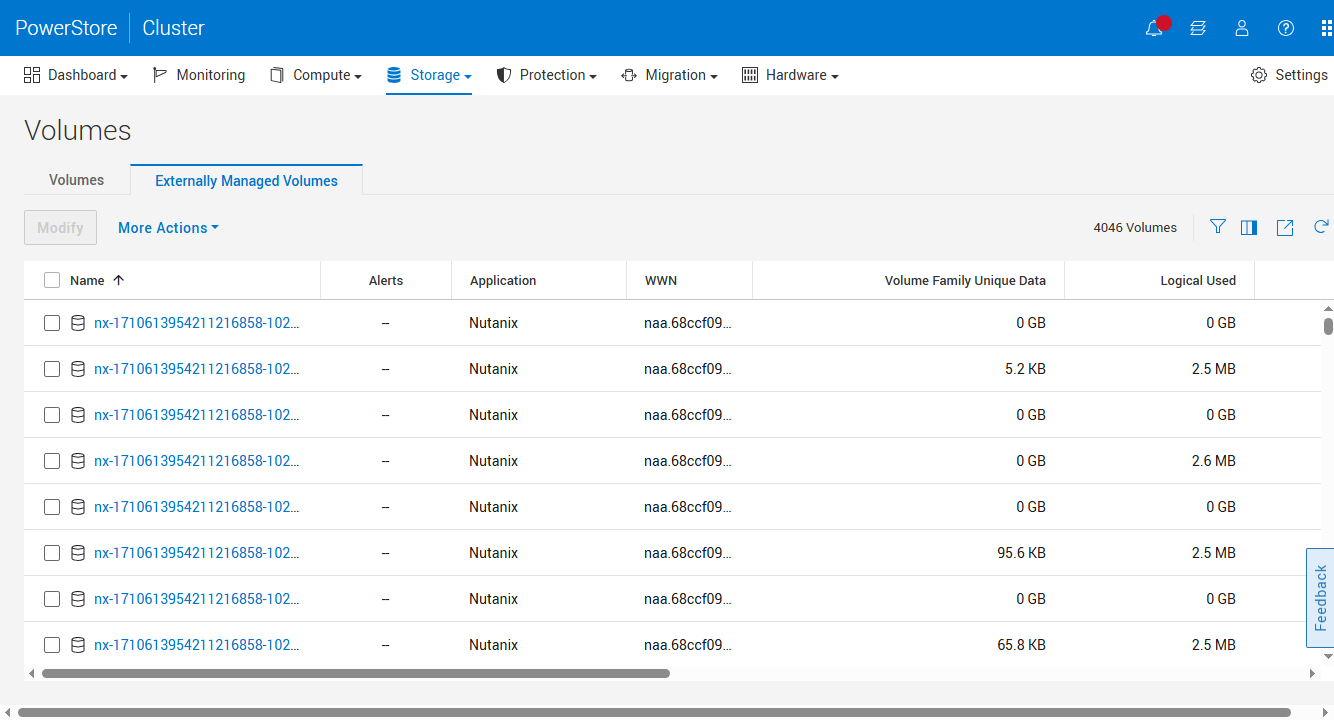
La scheda Volumi gestiti esternamente impedisce di visualizzare migliaia di volumi creati da Nutanix nella schermata principale.
L'integrazione di PowerStore avviene tramite Prism Central: basta selezionare Dell PowerStore come fornitore di storage esterno, configurarlo in PowerStore Manager e l'integrazione si occuperà della creazione e della mappatura dei volumi sul lato Nutanix. Per le aziende che adottano una strategia di hypervisor flessibile, l'array sottostante rimane invariato, mentre la piattaforma di livello superiore è negoziabile.
Le funzionalità di mobilità in PowerStoreOS 5.0 si estendono anche a OpenShift. PowerStoreOS 5.0 integra l'offload XCOPY con il Migration Toolkit for Virtualization di Red Hat, consentendo così alle migrazioni di macchine virtuali di delegare il lavoro di copia all'array anziché instradare i dati attraverso l'host tramite iSCSI o Fibre Channel, anche per le macchine virtuali multi-disco. Per i clienti che migrano le macchine virtuali verso KubeVirt, questo si integra perfettamente con la soluzione della piattaforma di automazione descritta più avanti in questo articolo: il traffico di migrazione non deve essere gestito dall'host.
Maggiore attenzione alle prestazioni
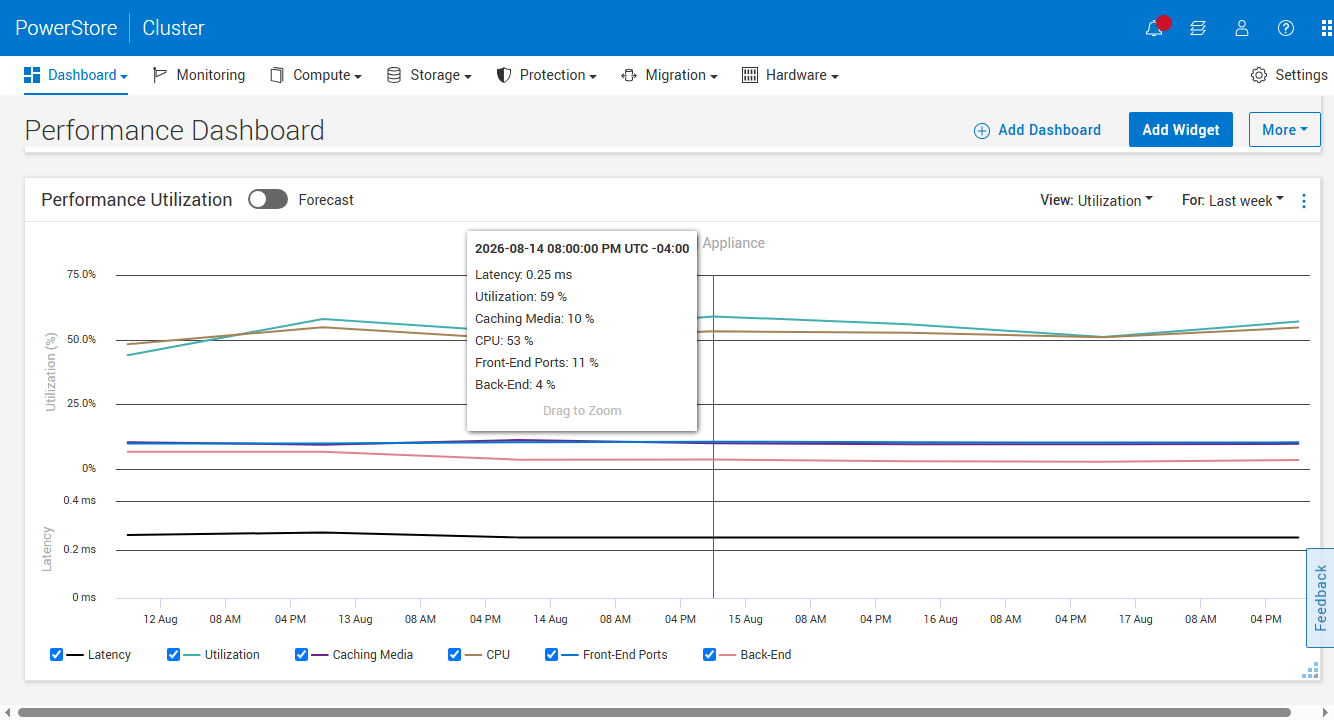
Analisi dettagliata dell'utilizzo: CPU, cache, porte front-end e back-end in sintesi.
Il sistema operativo 5.0 introduce una serie di nuovi widget per il dashboard delle prestazioni che semplificano la visualizzazione del margine di prestazioni dell'array. La funzione "Utilizzo delle prestazioni" scompone il carico dell'appliance nelle sue componenti, rendendo così il valore di utilizzo comprensibile a tutti: passando il mouse su un punto del grafico, è possibile visualizzare la quantità di utilizzo di CPU, supporti di cache, porte front-end e unità back-end in quel preciso istante, insieme alla latenza. Il widget include anche una visualizzazione degli IOPS sostenuti e, una volta che il sistema ha raccolto circa due settimane di dati storici, un interruttore "Previsione" proietta l'utilizzo e la latenza nel futuro con intervalli di confidenza, fino a tre mesi, come mostrato nelle nostre schermate.
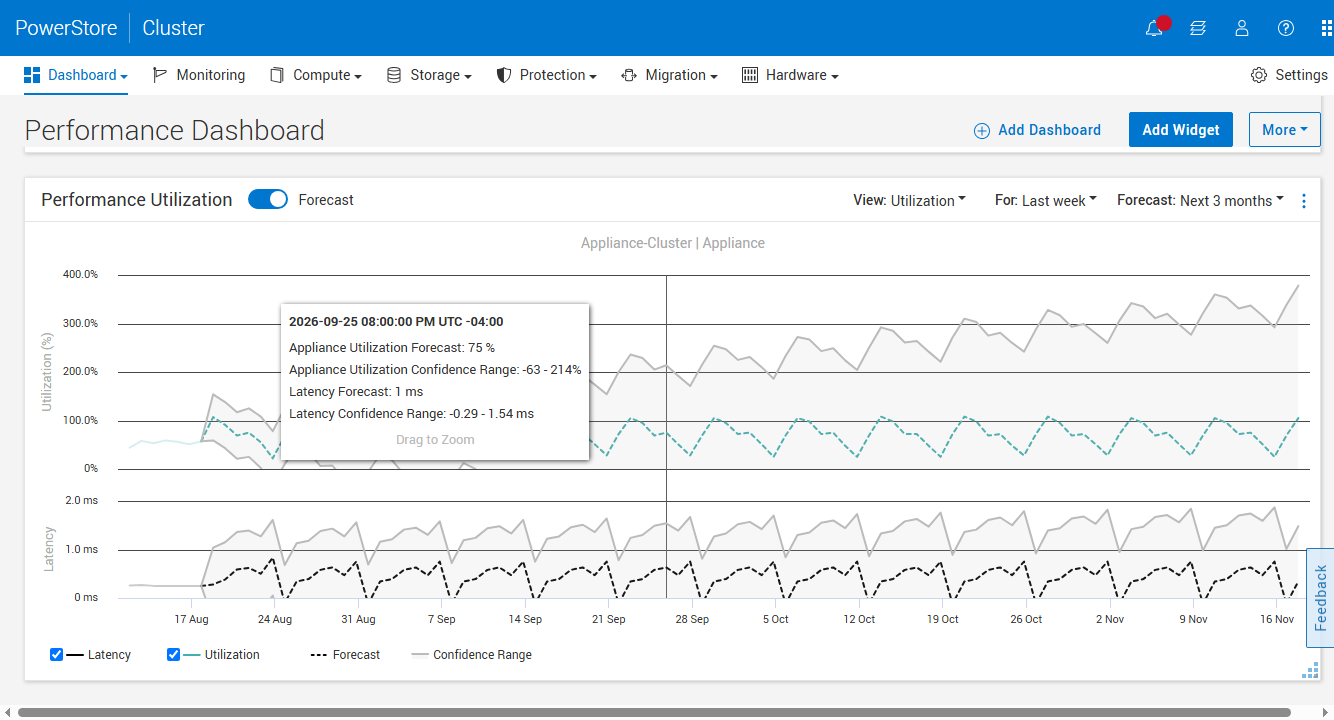
La previsione stima l'utilizzo e la latenza a tre mesi di distanza, con intervalli di confidenza.
La funzionalità di rilevamento delle anomalie è stata introdotta a livello di appliance con PowerStoreOS 4.2. La versione 5.0 introduce invece la sua integrazione nella dashboard, con un widget dedicato che visualizza sei metriche (larghezza di banda, IOPS totali, di lettura e di scrittura, latenza e dimensione media delle operazioni di I/O), un confronto affiancato tra le appliance e la possibilità di esportare i risultati. Il funzionamento rimane invariato: dopo aver creato una baseline di circa 72 ore di dati storici, l'array apprende il comportamento di ciascun carico di lavoro e definisce l'intervallo previsto in base alla metrica in tempo reale, segnalando le anomalie anziché attendere il raggiungimento di una soglia fissa. Gli screenshot illustrano chiaramente il funzionamento: la larghezza di banda oscilla all'interno di un intervallo grigio che rappresenta la stagionalità storica, con il tooltip che riporta il valore osservato, l'intervallo previsto e un esplicito verdetto di anomalia.
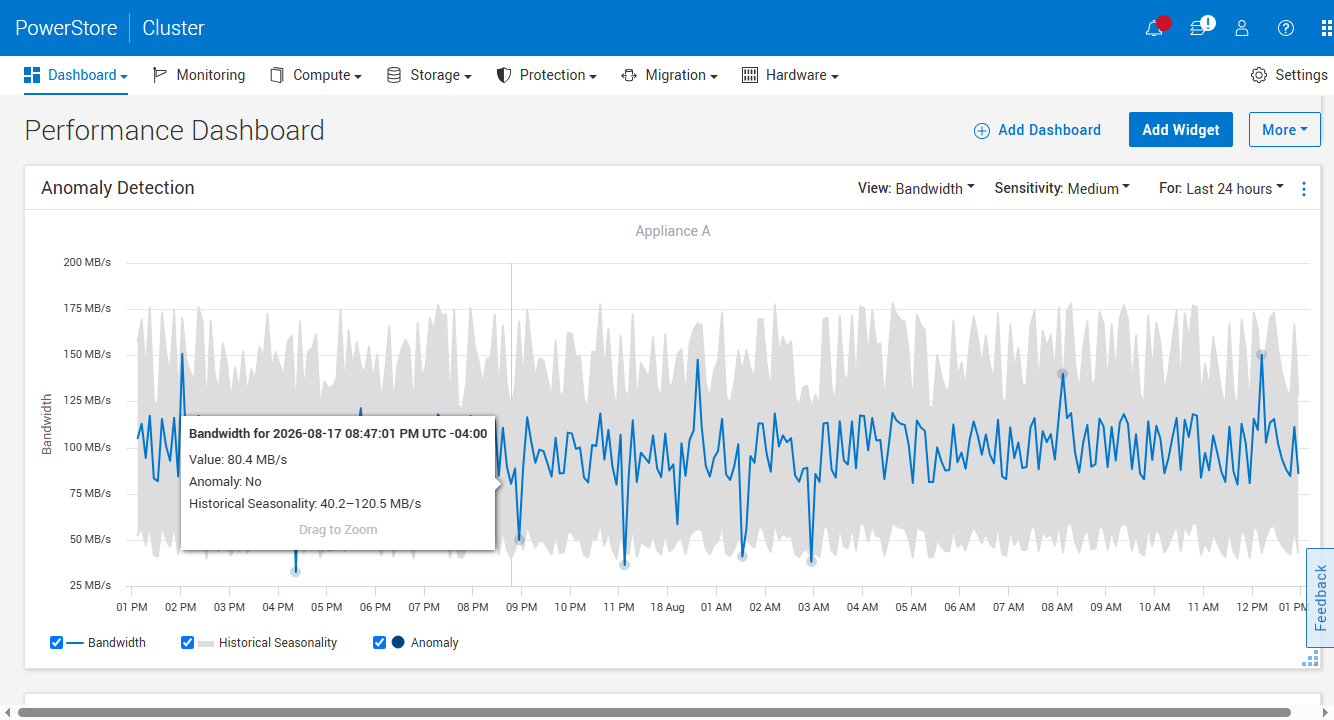
Il rilevamento delle anomalie evidenzia la stagionalità prevista dietro la metrica in tempo reale e segnala le anomalie.
Anche la tabella dei limiti aumenta. La versione 5.0 innalza il limite di clonazione per famiglia di volumi da 256 a 1,000 (modelli Gen 2 superiori a 500 e tutti i modelli Gen 3, automaticamente all'aggiornamento), raddoppia le mappature volume-host NVMe a 32,000 sui modelli 9XXX di fascia alta, porta le interfacce server NAS a 1,000 e i file system a 14,000 sui sistemi Gen 2 e Gen 3 più grandi e aggiunge notifiche di superamento del limite di file all'80%, 90% e 99%, in modo che il limite massimo non arrivi mai come una sorpresa.
La stessa telemetria a livello di I/O alla base di queste visualizzazioni costituisce il terreno fertile che Dell ha gettato per il rilevamento in linea del ransomware direttamente sull'array, una funzionalità che l'azienda prevede di implementare a breve.
Resilienza informatica: MPA, Dell Cyber Detect e Keys
Il lavoro sulla sicurezza nella versione 5.0 si articola in tre ambiti: rafforzamento della sicurezza umana, scansione dei dati e gestione delle chiavi.
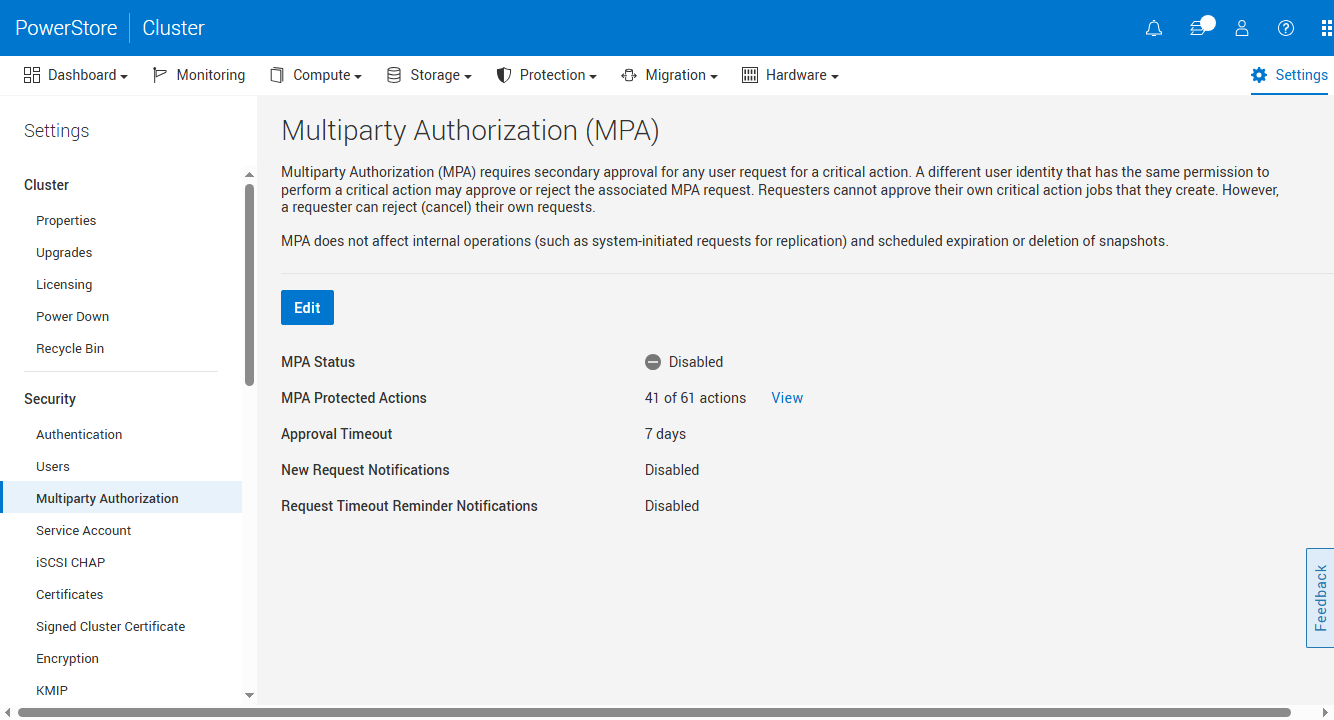
MPA in PowerStoreOS 5.0: le azioni protette ora vengono scelte, non imposte.
L'autorizzazione multiutente è stata introdotta in una versione precedente come un interruttore "tutto o niente": abilitandola, ogni azione distruttiva sul cluster richiedeva l'approvazione di un secondo amministratore. OS 5.0 la rende più granulare. Gli amministratori ora possono scegliere da un catalogo di 61 azioni protette nelle categorie di calcolo, archiviazione, protezione, sistema, hardware e impostazioni, con 41 protette per impostazione predefinita, e personalizzare l'elenco in base alle proprie esigenze. Ad esempio, un'azienda potrebbe richiedere l'approvazione per ogni eliminazione di snapshot, ma consentire le modifiche ai criteri di protezione; un'altra potrebbe volere una seconda approvazione per l'eliminazione degli utenti, ma non per le modifiche alle condivisioni SMB.
Ora i timeout di approvazione sono configurabili da tre a sette giorni anziché essere fissi a sette; le notifiche e i promemoria via e-mail impediscono che le richieste vadano perse in coda e l'intera configurazione si applica all'intero cluster, seguendo automaticamente l'aggiunta di una nuova appliance. Anche il flusso di approvazione stesso è protetto da MPA: la modifica dell'elenco delle azioni protette genera una richiesta che deve essere approvata da un secondo amministratore e il registro di controllo registra chi l'ha richiesta e chi l'ha approvata. Tutto è esposto tramite REST, quindi un fornitore di servizi con decine di array può creare uno script per una configurazione MPA standard per l'intera flotta.
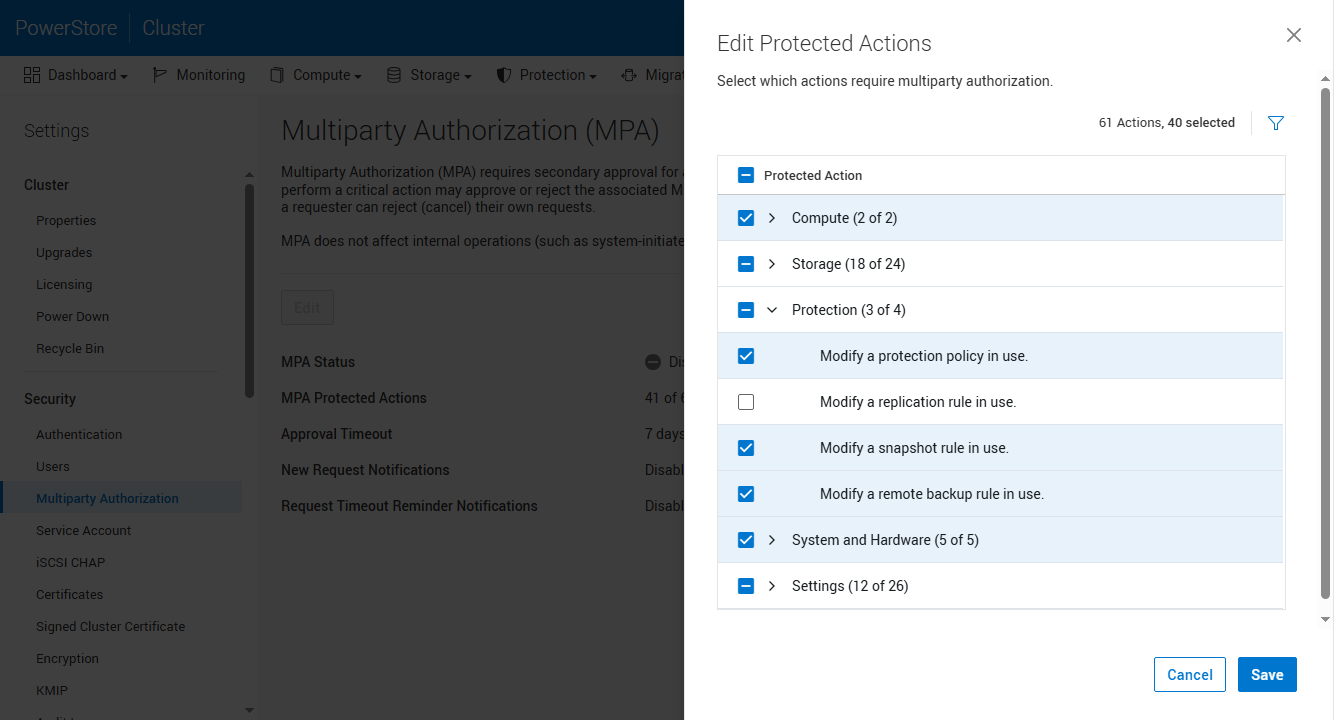
Livello di dettaglio per categoria relativo a elaborazione, archiviazione, protezione, sistema e impostazioni.
Dell Cyber Detect è la tecnologia CyberSense di Index Engines, integrata in PowerStore.
Dell Cyber Detect è l'integrazione da parte dell'azienda dell'analisi CyberSense di Index Engines, un'offerta integrata che viene eseguita a fianco dell'array anziché essere integrata nel codice di OS 5.0; si tratta dello stesso motore di analisi full-content già noto nel settore grazie a PowerProtect. Orientato verso PowerStore, analizza gli snapshot alla ricerca di impronte statistiche di corruzione ed eventi di crittografia, con policy configurabili tramite una procedura guidata che si connette all'array, seleziona gli host di produzione e pianifica le scansioni tramite iSCSI o FC. Gli amministratori ottengono così un catalogo di snapshot verificati come puliti, in modo che il ripristino dopo un attacco inizi da una copia sicura. Questo si combina con gli snapshot sicuri di PowerStore, che non possono essere eliminati prima della scadenza del periodo di conservazione, nemmeno da un amministratore, quindi le copie pulite identificate da Cyber Detect sono anche le copie che un aggressore non può rimuovere. Grazie a Cyber Detect sui dati, al monitoraggio ransomware AIOps sulla telemetria e a MPA sul piano di controllo, la gestione del ransomware ora copre contenuto, comportamento e raggio d'azione.
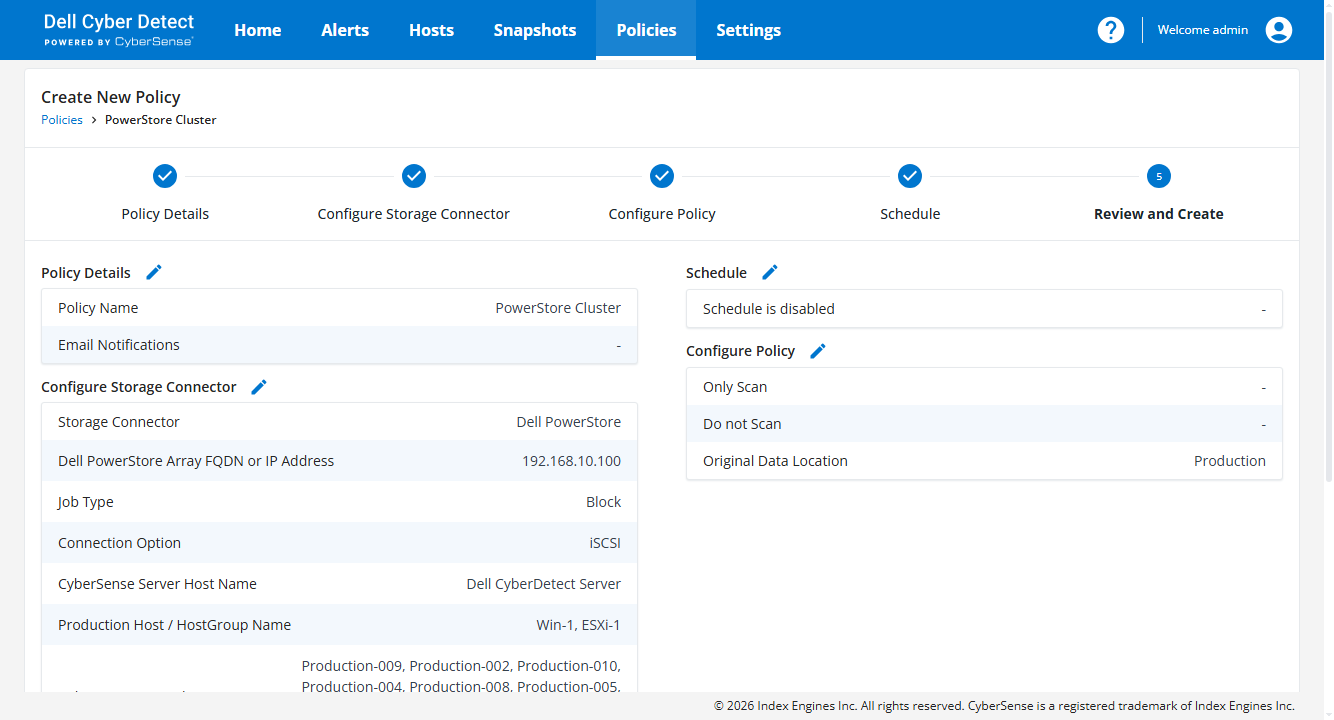
Prima della creazione, una policy di scansione di Cyber Detect viene esaminata in dettaglio: array, host, connessione e pianificazione.
La terza funzionalità è nata da una richiesta diretta dei clienti, in particolare da aziende che operano in settori affini alla pubblica amministrazione: la rotazione delle chiavi di crittografia per i dati a riposo (D@RE) è ora controllabile dall'utente. Mentre in precedenza la gestione delle chiavi era completamente automatizzata, la versione 5.0 consente a un amministratore di generare un nuovo set di chiavi su richiesta, secondo le proprie tempistiche di conformità, e di scaricare il keystore. Dell ha descritto questa come la prima fase, con la rotazione programmata prevista nella roadmap. L'hardware di terza generazione aggiunge altri due livelli: un firmware firmato con crittografia post-quantistica, che protegge la piattaforma dalle strategie di "raccolta ora, decrittazione successiva", e SDPM conforme a FIPS 140-3, in modo che i dati memorizzati nella cache in attesa di essere destagionati siano protetti con lo stesso standard dei dati presenti sulle unità.
Raccomandazioni basate sull'IA: dall'intuizione all'azione
A partire da luglio, Dell AIOps (precedentemente CloudIQ) e la Dell Automation Platform collaborano per connettere i suggerimenti basati sull'intelligenza artificiale con l'ottimizzazione automatizzata, tramite un'integrazione attualmente disponibile in misura limitata.
Questa combinazione offre agli operatori un percorso più diretto dall'intuizione all'azione, con la supervisione umana e la tecnologia del gemello digitale a supporto della fiducia nelle proposte del sistema. Gli utenti passano da una raccomandazione a un'azione automatizzata all'interno di un'unica interfaccia, che Dell ha riprogettato come un'interfaccia utente generativa: incentrata sulla chat e minimalista per impostazione predefinita, consente agli utenti di creare tabelle, grafici e visualizzazioni di cui hanno bisogno e di aggiungerli a spazi di lavoro personalizzati e persistenti.
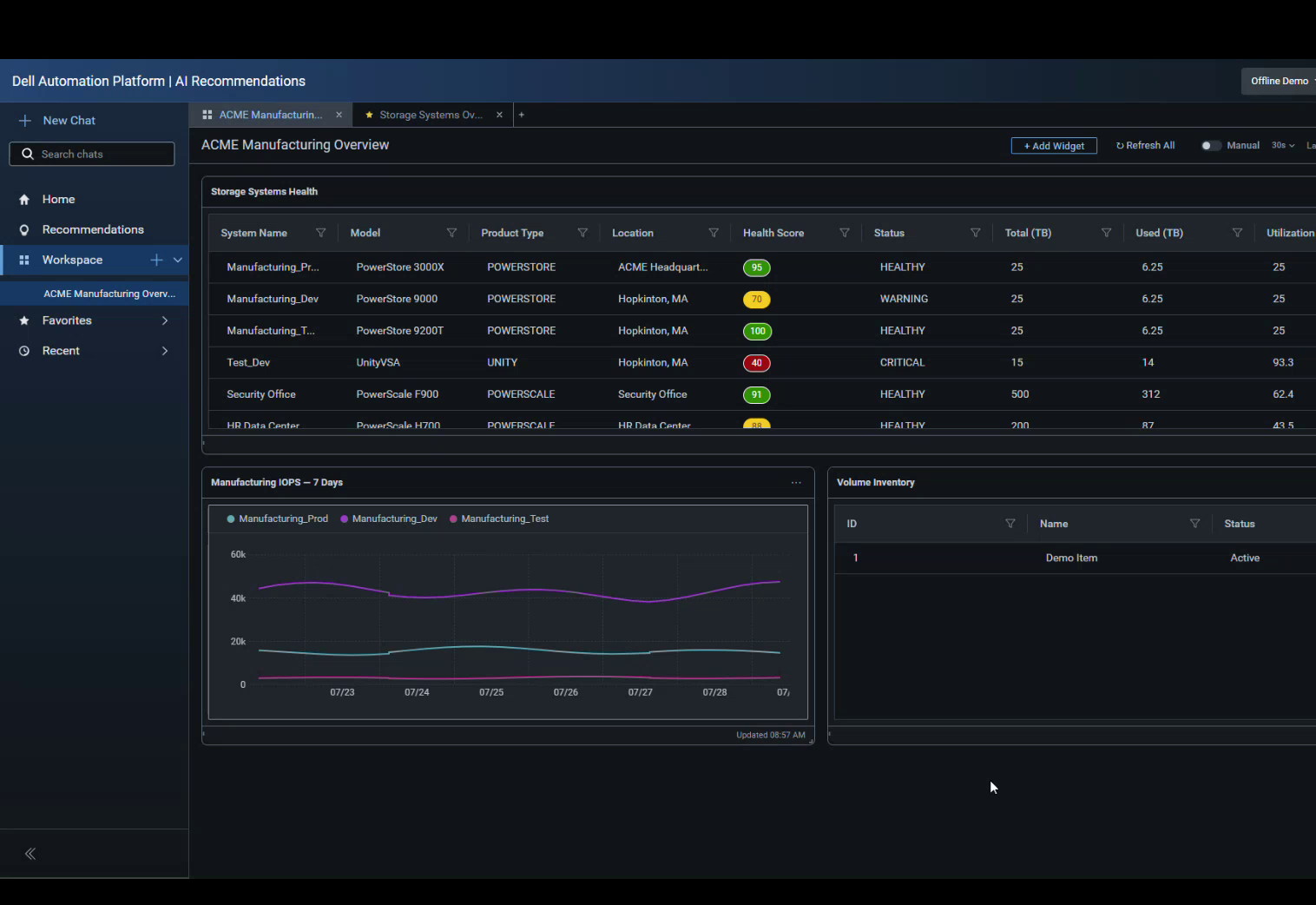
L'interfaccia utente generativa nella sua modalità scura di lancio: un'area di lavoro fissa con widget relativi allo stato della flotta, agli IOPS e all'inventario, generati dalla chat.
Al momento del lancio, sono disponibili tre casi d'uso concreti, due dei quali specifici per PowerStore. L'ottimizzazione continua della capacità individua lo spazio di archiviazione recuperabile, ovvero i volumi senza mappature host o senza I/O recenti, e guida l'amministratore dalla fase di raccomandazione fino al recupero effettivo, senza mai dover aprire PowerStore Manager. Gli aggiornamenti di sistema per PowerStore consentono all'amministratore di impostare una tolleranza a livello di codice, date di installazione target, dimensioni dei batch e controlli di integrità pre-aggiornamento ripetuti, per poi eseguire il piano di aggiornamento dalla stessa sessione; in caso di errore, viene generato un ticket di supporto. Il terzo caso d'uso prevede il dimensionamento dei cluster Dell Private Cloud, identificando i cluster basati su VMware sovradimensionati e consolidando i nodi non più necessari ai carichi di lavoro, mantenendo al contempo i nodi indispensabili al cluster.
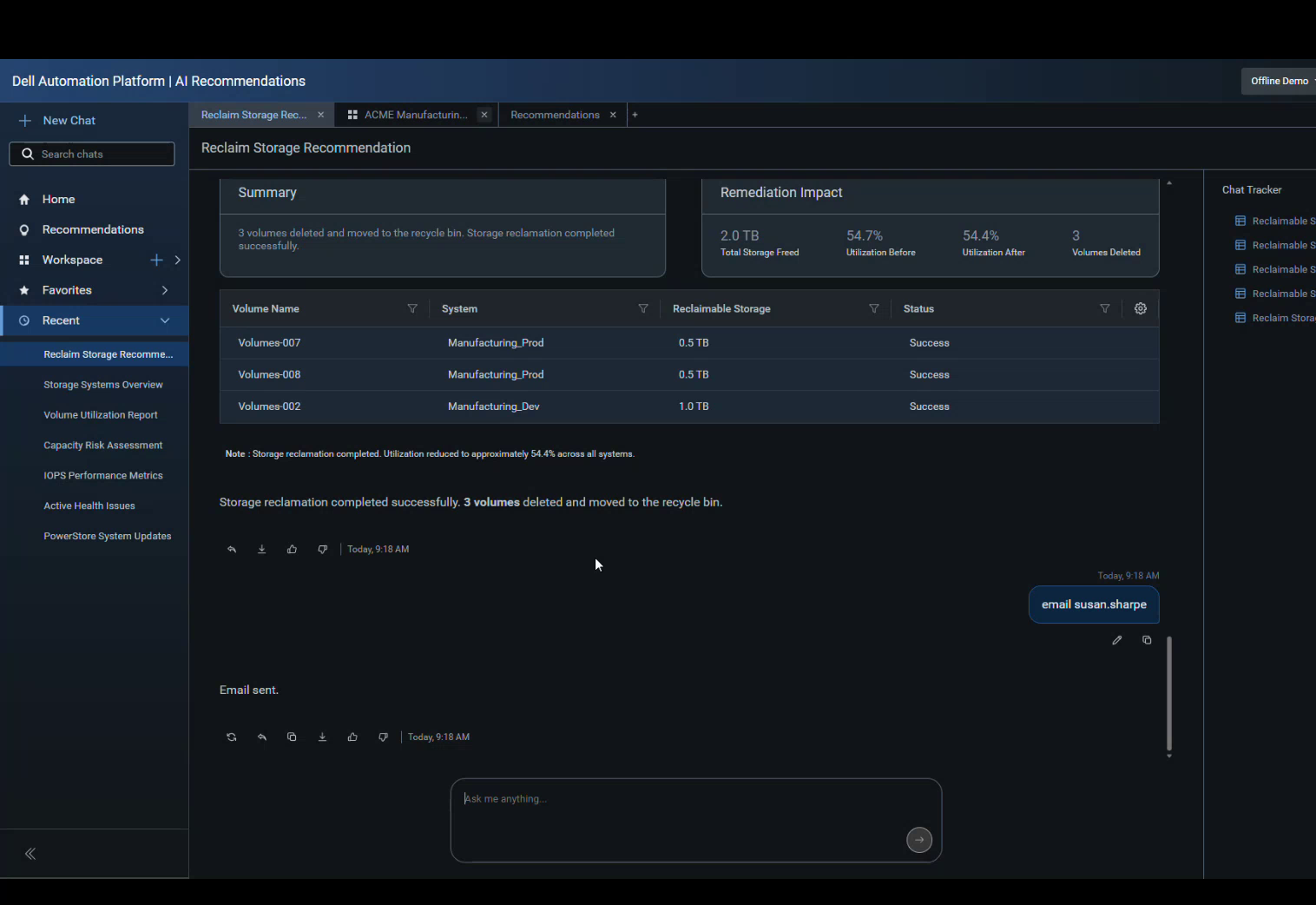
Ottimizzazione continua della capacità in azione: 2.0 TB liberati su tre volumi, con dati di utilizzo prima e dopo.
Due scelte di progettazione spiccano in particolare. Innanzitutto, ogni azione prevede l'intervento umano: il sistema presenta il proprio piano e le relative motivazioni, risponde alla domanda "Come sei arrivato a questa raccomandazione?" in un linguaggio semplice e attende l'approvazione esplicita. Un gemello digitale dell'ambiente del cliente, disponibile poco dopo il lancio iniziale, verificherà l'impatto a valle prima dell'esecuzione delle modifiche. L'integrazione con il sistema di gestione delle modifiche di ServiceNow è in fase di sviluppo, consentendo di limitare le approvazioni a un singolo ticket. In secondo luogo, la licenza rimane invariata: AI Recommendations è incluso in AIOps, a sua volta incluso in un contratto Dell ProSupport o superiore, pertanto la funzionalità è disponibile per la maggior parte delle aziende che utilizzano PowerStore.
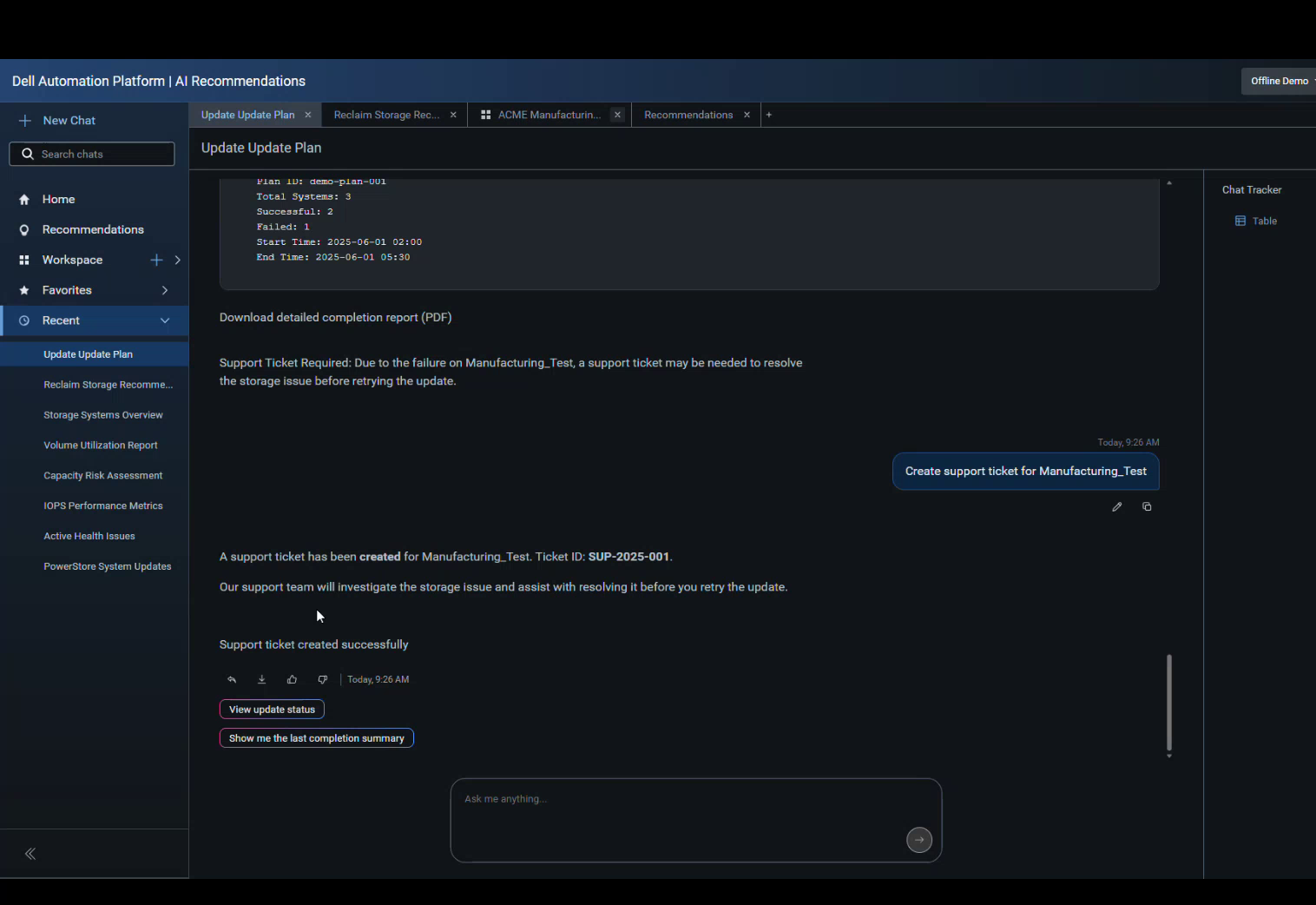
Intervento umano completo, dall'inizio alla fine: un piano di aggiornamento con un errore e il ticket di supporto aperto a seguito della stessa conversazione.
Cloud privato, piattaforma di automazione e MCP
Al di sotto del livello di raccomandazioni AI si trova il meccanismo che implementa e gestisce il cloud privato. Con l'orchestratore Dell Automation Platform, un amministratore seleziona un modello, carica una configurazione JSON (o inserisce manualmente i parametri) e osserva un grafico di esecuzione che illustra l'intero processo di implementazione dell'ambiente. Questo include la convalida dell'hardware PowerStore, la preparazione delle risorse di calcolo e di rete e l'installazione dell'hypervisor, con le fasi di storage integrate direttamente nel flusso di lavoro, dalla connessione dei volumi PowerStore agli adattatori VMkernel tramite iSCSI all'installazione dei driver CSI quando si utilizza Kubernetes. Il menu degli hypervisor comprende VMware, Red Hat, Nutanix e Microsoft Azure Local, e le estensioni Dell Private Cloud si installano nella console di ciascuna piattaforma, vSphere Client, OpenShift Web Console, Prism o nel portale di Azure. In questo modo, la gestione del ciclo di vita di VM e container avviene negli strumenti che i team già utilizzano. Dell può chiudere il ciclo implementando una VM Windows su KubeVirt su OpenShift tramite la stessa estensione, consolidando le operazioni su container e VM in un unico punto.
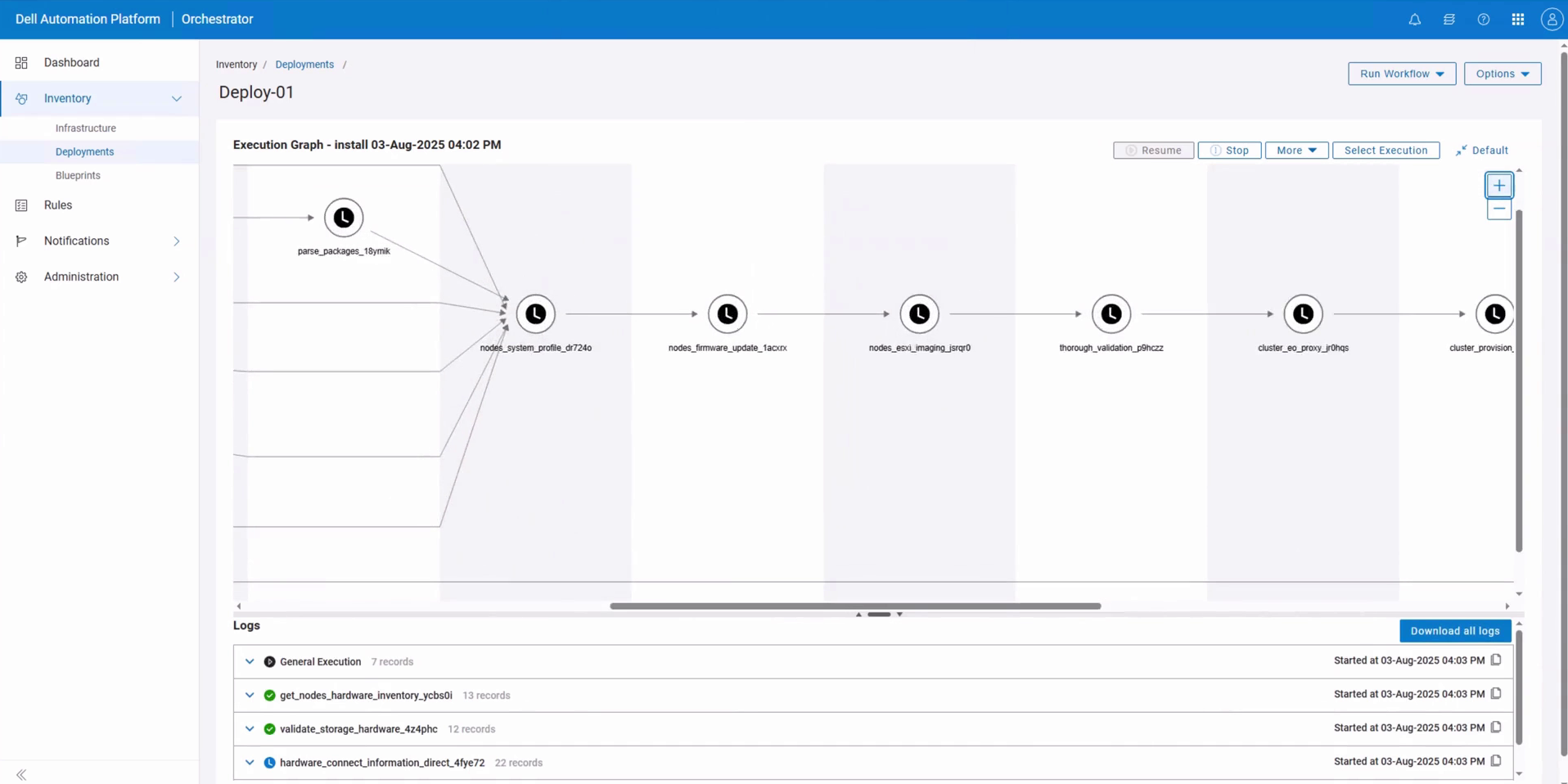
Il grafico di esecuzione dell'orchestratore illustra passo passo un'implementazione VMware basata su PowerStore, con registri per ogni passaggio.
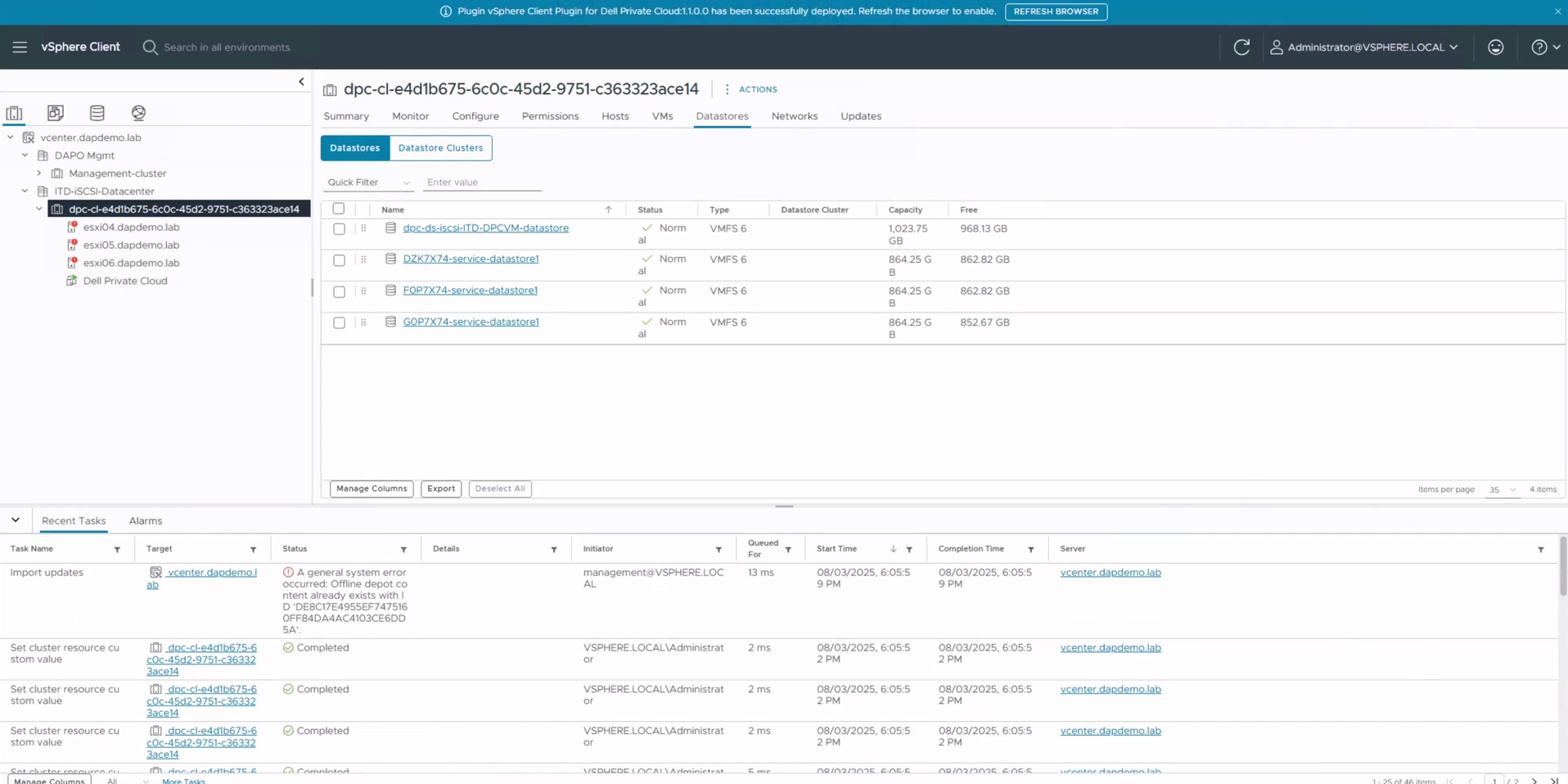
Il plugin Dell Private Cloud è ora disponibile in vSphere Client, con il datastore iSCSI PowerStore già pronto per il cluster.
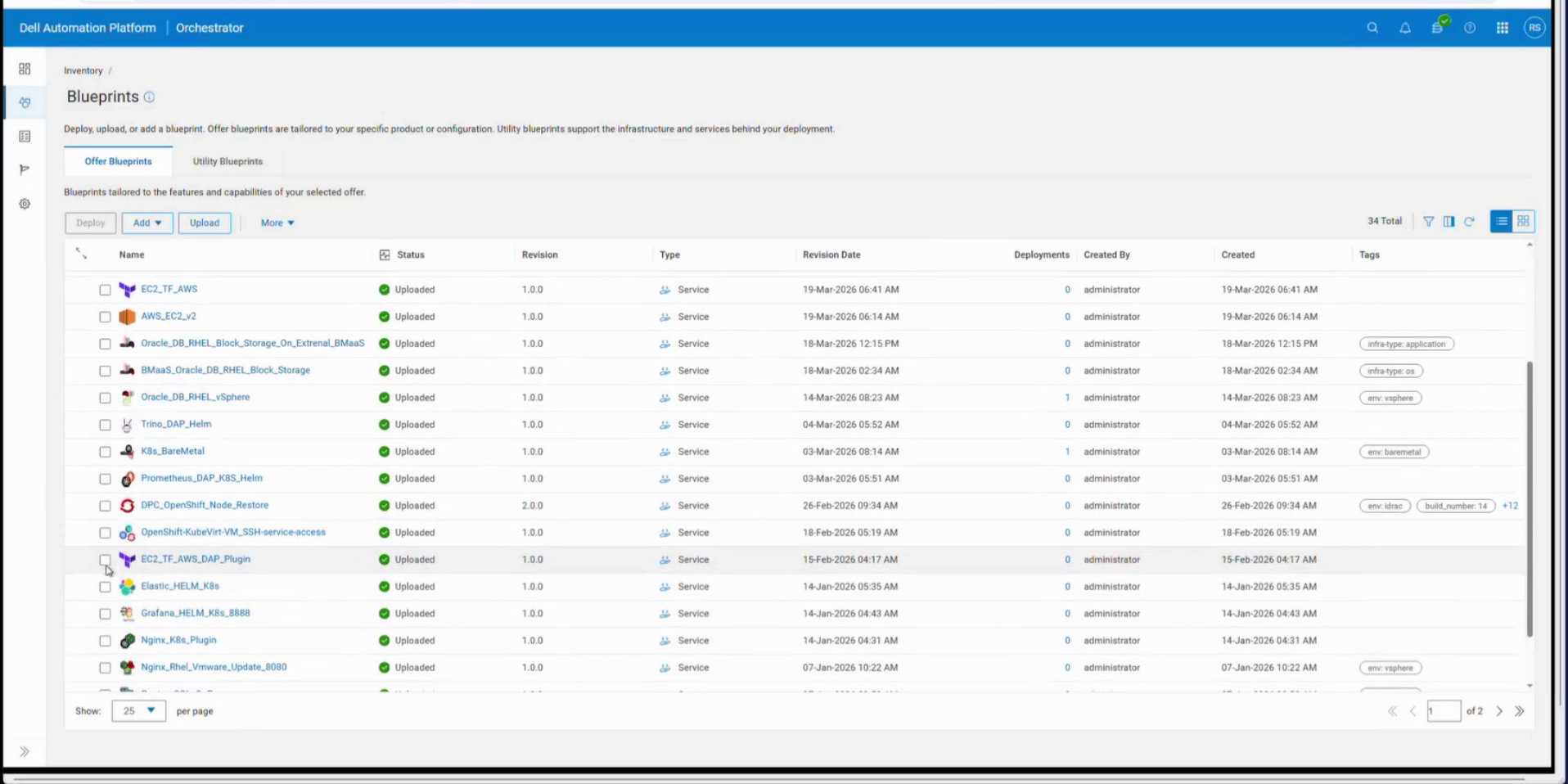
Il catalogo dei modelli comprende macchine virtuali, Kubernetes, cloud pubblico, sistemi operativi e database; Automation Studio aggiunge l'orchestrazione personalizzata assistita dall'intelligenza artificiale.
Il catalogo dei blueprint è la parte più interessante per i responsabili dei carichi di lavoro. Oltre ai blueprint di infrastruttura, Dell Automation Studio consente ai clienti di creare orchestrazioni personalizzate. La soluzione di Dell è un modello di database-as-a-service: un blueprint PostgreSQL distribuito su un datastore basato su PowerStore, a sua volta basato su vCenter, con l'applicazione installata tramite Ansible. La registrazione dei log è unificata per le fasi VMware e Red Hat del job, e i log in tempo reale di cloud-init e di inizializzazione delle VM vengono convogliati in un'unica visualizzazione di reporting mentre vSphere esegue la configurazione iniziale. Il lato vSphere viene eseguito tramite un plugin di piattaforma basato sull'SDK VMware e, al termine delle azioni Ansible, il database è attivo e funzionante. Il vantaggio per i clienti PowerStore è che l'array smette di essere una destinazione da predisporre e diventa una risorsa che la piattaforma compone automaticamente.
La direzione in cui tutto questo si sta muovendo è quella dell'agenzia. Il linguaggio di lancio di Dell è esplicito: la Automation Platform "abbina agenti AI a un'interfaccia conversazionale per trasformare il modo in cui le aziende implementano, monitorano e gestiscono l'infrastruttura", e le funzionalità di IA agentica della piattaforma sono previste per la fine di quest'anno. Dell ha riconosciuto di essere al lavoro sui server MCP in risposta alla richiesta dei clienti di utilizzare i propri agenti, con un server MCP per lo storage Dell in arrivo per primo. Il sito Dell Technologies Developer descrive già le novità in arrivo: oltre 100 strumenti MCP per PowerStore, PowerScale, PowerProtect, PowerFlex, PowerMax e ObjectScale, con disponibilità generale prevista per la fine dell'anno. Strumenti e parametri derivano dalle specifiche OpenAPI versionate di ciascuna piattaforma, quindi un modello non può inventare chiamate inesistenti. Può essere eseguito come processo locale, server HTTP o sidecar Kubernetes, ogni modifica viene registrata in un registro di controllo strutturato e le operazioni distruttive in blocco richiedono una doppia conferma. MCP è rapidamente diventata l'interfaccia standard per fornire agli agenti AI un accesso strutturato e autorizzato ai sistemi aziendali. Un server MCP per la piattaforma di automazione consentirebbe agli agenti del cliente di utilizzare gli stessi blueprint, raccomandazioni e dati di telemetria impiegati dagli agenti nativi della piattaforma. Prevediamo che la strategia MCP per la piattaforma si definirà contestualmente al lancio degli agenti e la tratteremo non appena sarà disponibile.
Cosa succederà dopo: il ritmo continua
PowerStoreOS 5.0 è ora disponibile, ma il ciclo di rilascio di Dell è rapido per soddisfare le esigenze dei clienti e il team è già impegnato nello sviluppo della versione 5.1, prevista per questo autunno. Dell non ha ancora svelato tutte le funzionalità della versione 5.1, ma un aspetto è già stato definito: la crittografia dei dati in volo.
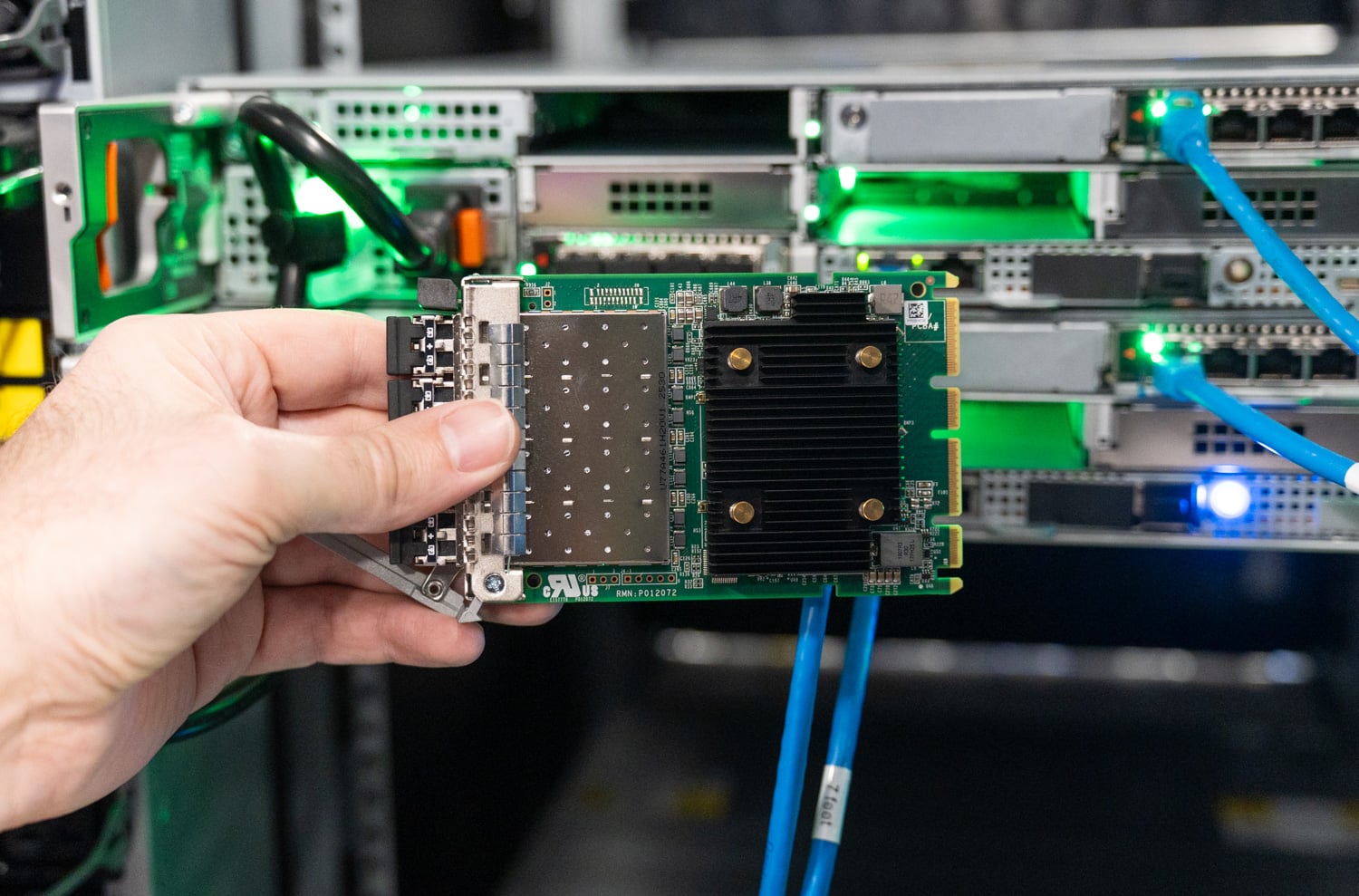
La scheda Fibre Channel OCP a quattro porte con supporto EDIF, proveniente dalla nostra unità di laboratorio di terza generazione; l'hardware viene spedito oggi, mentre la crittografia arriverà tramite software.
Oggigiorno, ogni PowerStore Gen 3 può essere configurato con schede Fibre Channel compatibili con EDIF negli slot OCP; la crittografia stessa viene implementata tramite un aggiornamento software non invasivo, ed è per questo che rappresenta il punto focale della discussione sulla versione 5.1. EDIF (Encrypted Data-in-Flight) crittografa il traffico Fibre Channel sul cavo tra host e array, o tra due array replicanti, colmando una lacuna che i firewall non avevano mai affrontato: il traffico SAN interno che si muove in chiaro. Poiché l'array decrittografa alla ricezione, la deduplicazione e la compressione vedono comunque dati riducibili, quindi il cavo viene protetto senza compromettere i vantaggi in termini di efficienza che questa versione si è impegnata a migliorare ulteriormente. Se la crittografia viene eseguita a livello host o applicativo, ogni blocco che arriva all'array rappresenta un rumore univoco; EDIF protegge il trasporto senza subire questo onere.
L'altra metà della storia risiede nel server. Abbiamo trattato in dettaglio gli HBA Emulex Secure , la crittografia basata su sessione con offload hardware nell'adattatore stesso, allineata allo standard emergente FC-SP-3 e progettata per un approccio zero-trust sul traffico interno, e abbiamo visto l'approccio maturare fino a diventare una crittografia autonoma a livello SAN. Quando la versione 5.1 verrà implementata sul lato array, la crittografia end-to-end di Fibre Channel diventerà una configurazione standard su PowerStore.
L'articolo che abbiamo scritto in occasione del lancio dell'hardware si concludeva con l'auspicio di vedere come la terza generazione e PowerStoreOS 5.0 si sarebbero integrate. Ora che abbiamo avuto modo di provare la versione GA, la risposta è che il software è all'altezza delle ambizioni dello chassis su cui gira. Un unico sistema operativo per tre generazioni di hardware, QLC come standard, un'efficienza nettamente superiore con garanzia alle spalle e un livello operativo che sta imparando a chiudere i propri cicli, ampliando rapidamente le possibilità degli amministratori dello storage.
C'è un altro dato su cui vale la pena soffermarsi. A luglio, la telemetria operativa di Dell ha superato il miliardo di ore cumulative di runtime di PowerStore sull'intera flotta di dispositivi utilizzati per il reporting, pari a sei anni di esperienza in produzione, ovvero più di 114,000 anni-macchina. L'apprendimento su scala così ampia ha permesso di addestrare i sistemi di ottimizzazione della riduzione dei dati, i modelli di rilevamento delle anomalie e il motore di raccomandazione descritti in precedenza, ed è il vantaggio alla base della maggior parte delle funzionalità di successo della versione 5.0. Il prossimo miliardo di ore della piattaforma si baserà su un software molto più intelligente, supportato da una piattaforma hardware altrettanto performante.
Pagina del prodotto PowerStore
Questo rapporto è sponsorizzato da Dell Technologies. Tutti i pareri e le opinioni espressi in questo rapporto si basano sulla nostra visione imparziale dei prodotti in esame.



 Amazon