

Since we first brought the QLC-based PowerStore 3200Q with PowerStoreOS 4.0 into the lab, Dell hasn’t slowed down. The company has expanded the lineup with the PowerStore 5200Q—a higher-performance, cost-optimized model built for a broader range of production workloads. At the same time, three major software releases (PowerStoreOS 4.1, 4.2, and 4.3) have added meaningful capabilities across the platform, spanning security, protection, efficiency, and day-to-day operations. Just as important, Dell has accelerated its AIOps approach, using telemetry and guided remediation to make PowerStore simpler to operate at scale.

Key Takeaways
- PowerStore 5200Q expands QLC into a higher-performance tier with more controller resources than 3200Q, plus higher-capacity QLC drive options for denser configurations.
- QLC is positioned for mainstream production workloads, balancing performance with better $/TB, rack efficiency, and capacity scaling.
- PowerStoreOS 4.1–4.3 is a cumulative hardening cycle, adding stronger security controls, governance features, and metro-class protection enhancements for file.
- Dell’s AIOps shift is becoming the operating model, using fleet telemetry and guided remediation to make PowerStore easier to run at scale.
- The Q and T portfolio approach stays flexible, letting customers mix QLC and TLC systems while keeping a consistent enterprise feature set across the line.
To understand what this all means, it helps to rewind briefly. PowerStoreOS 4.0 introduced QLC support, dramatically improved data reduction, enhanced replication, and integrated on-premise/cloud backup via StorageDirect/PowerProtect. Programmatically, it was also when Dell introduced PowerStore’s 5:1 Guarantee and Lifecycle Extension program. Our time with the 3200Q last year demonstrated how Dell leveraged QLC to deliver cost savings for high-capacity workloads while maintaining the same enterprise performance and feature set that defines the rest of the PowerStore line.
From there, each release has added another layer. PowerStoreOS 4.1 strengthened the fundamentals by introducing more robust access controls and improved file management. PowerStoreOS 4.2 introduced the 5200Q, deepened the self-healing and SSO story, and expanded replication options. PowerStoreOS 4.3 takes another step forward with metro-class protection for file services, multiparty authorization for high-impact operations, new QLC drive options for higher density and improved efficiency, and under-the-hood improvements that make the platform more versatile and robust.
We’ve been working to catch up on all the new developments with PowerStore; in fact, a 5200Q has been in our lab for the past several weeks, with access to the 4.3 bits. It is a fully featured, high-performance enterprise system that uses QLC to increase density and energy efficiency while maintaining the same high-availability design, unified block and file personality, and non-disruptive operations as the rest of the portfolio. In the sections that follow, we will walk through how we moved from 4.0 to 4.3, highlight the most important changes in each cumulative release, and then focus on where the 5200Q fits in the broader PowerStore lineup before branching into Dell Private Cloud, AI-driven operations, and the impact on modern workloads.
Dell PowerStore 5200Q
As we discovered from our review last year, the 3200Q is a high-performing box thanks to PowerStore’s “no trade-offs” approach to QLC. Now, Dell has raised the bar significantly by bringing QLC to its high-end 5200 model. Like the 3200Q, the new 5200Q is a dual-controller NVMe 2U appliance that scales up with NVMe expansion shelves and scales out to multi-node clusters. You get unified block and file storage, with the same always-on, zero-performance-impact data reduction that defines the platform. What changes is the media and the amount of horsepower Dell has wrapped around it, with up to 60% more IOPS than the 3200Q.
Both Q models now support industry-standard 30TB QLC drives, in addition to the original 15TB class. When data reduction is included, either model can achieve multi-petabyte effective capacity in a 2U appliance. And because PowerStore clusters can mix and match up to four appliances (including mixed T and Q models), customers can blend performance profiles while scaling to tens of petabytes without changing platforms.

From a performance perspective, the 5200Q gives QLC more headroom than the earlier 3200Q. Both systems use the same enterprise-class architecture: dual controllers, multi-core Intel Xeon processors, and large memory footprints. However, the 5200Q steps up the core count and DRAM capacity. That extra CPU and cache show up when you push harder on mixed workloads and higher object counts. Where 3200Q is a solid fit for broad consolidation and more traditional virtualized workloads, the 5200Q is tuned to sit deeper in the production stack with more active applications hitting the controllers.
Not to detract from the high-performing Q models, it is essential to clarify where the PowerStore T units sit. While Q and T models share the same core software, the T lineup encompasses a broader range of systems, from the 500T and 1200T at the lower end to the 9200T at the top. With TLC NVMe SSDs that offer lower starting capacities, T models are ideal for customers with modest initial storage requirements or those seeking a more granular choice of performance profiles, including the maximum speed offered by the high-end 9200T.
Where the Q systems, especially 5200Q, distinguish themselves is in how they balance performance, density, and cost without the trade-offs found in some other products. For most mainstream enterprise workloads, QLC performance on PowerStore is more than adequate—particularly when Dell’s no-impact data reduction, caching, and write handling are layered in. And according to Dell, more than 20% of the shipped capacity of PowerStore uses QLC.
At the same time, higher-capacity QLC drives deliver better rack efficiency and a lower cost per usable terabyte compared to equivalent TLC configurations. By optimizing data placement, streamlining the data path, and reducing unnecessary flash writes, PowerStore turns QLC into a high-speed, enterprise-level solution.

From our perspective in the lab, the right way to interpret the lineup is as a portfolio rather than a binary choice, since there are no restrictions on how models can be deployed together in a cluster or on how workloads can be moved between them. The Q models, 3200Q and now 5200Q, enable you to integrate QLC into the same operational and feature framework, with a cost-optimized, capacity-oriented focus. PowerStore 5200Q, in particular, is for customers who want dense, efficient flash in their high-performance production core, not just tertiary or archival data. The key takeaway, though, is that the PowerStore line offers many options to ensure a good fit between the property array and the workload.
In the near future, existing 3200Q customers will be able to upgrade their appliance to a 5200Q via a convenient data-in-place controller swap, unlocking additional performance at a cost-effective price with no interruption to workloads.
Dell PowerStore 5200Q Specifications
The following table highlights the hardware specifications and architectural differences between the PowerStore 3200Q and PowerStore 5200Q.
| Specification | PowerStore 3200Q | PowerStore 5200Q |
|---|---|---|
| System Architecture | ||
| Nodes per Appliance | 2 active/active | 2 active/active |
| Processors | 4 Intel Xeon CPUs, 64 cores, 2.1 GHz | 4 Intel Xeon CPUs, 96 cores, 2.2 GHz |
| System Memory | 768 GB | 1,152 GB |
| Storage | ||
| Flash Media | NVMe QLC | NVMe QLC |
| Max Drives | 93 NVMe | 93 NVMe |
| NVRAM Drives | 2 | 4 |
| Base Enclosure | 2U, 25 × 2.5-inch NVMe bays | 2U, 25 × 2.5-inch NVMe bays |
| Expansion Enclosures | 2U, 24 × 2.5-inch NVMe bays, up to 3 | 2U, 24 × 2.5-inch NVMe bays, up to 3 |
| Networking and I/O | ||
| Front-End Ports (All Types) | 24 | 24 |
| 16/32Gb Fibre Channel | Up to 16 ports | Up to 16 ports |
| 10/25GbE iSCSI | Up to 24 ports | Up to 24 ports |
| 100GbE iSCSI | Up to 8 ports | Up to 8 ports |
| Backend Expansion | 4 × 100GbE QSFP | 4 × 100GbE QSFP |
| Capacity and Scale | ||
| Max Capacity per Appliance* | 5.90 PBe (4,378.1 TB raw) | 5.90 PBe (4,378.1 TB raw) |
| Max Capacity per Cluster* | 23.60 PBe | 23.60 PBe |
| Max Appliances per Cluster | 4 | 4 |
| Data Services | ||
| Data Reduction | Inline deduplication and compression | Inline deduplication and compression |
| Data Protection |
|
|
* Effective capacity assumes an average 5:1 data reduction and double drive tolerance. Actual results vary.
What’s New in PowerStore OS 4.1-4.3
While the 5200Q is the obvious new hardware story, the real heartbeat of PowerStore is the software that has landed since 4.0. Over the last three releases, Dell has used PowerStoreOS 4.1, 4.2, and now 4.3 to tighten security, deepen data protection, and rely more heavily on telemetry and automation. Taken together, these updates do not reinvent the platform so much as round it out, bringing in practical features that make the array easier to operate, more secure, and a better fit for dense QLC configurations like the 5200Q.
Better than Ever
PowerStoreOS 4.3 is a feature-rich operating system upgrade for all PowerStore appliances, including the original 2020 release. The PowerStore line has built a strong reputation by continually adding functionality while maintaining high reliability and performance.
With its latest release, Dell is further advancing the platform’s capabilities, delivering significant improvements to systems using the Fibre Channel protocol and notable additions to its security and performance monitoring tools. Already capable of asynchronous replication of block storage volumes over Fibre Channel, PowerStoreOS 4.3 adds support for synchronous block and asynchronous file replication over Fibre Channel, as well as metro synchronous file replication with auto-failover using a third-site witness.
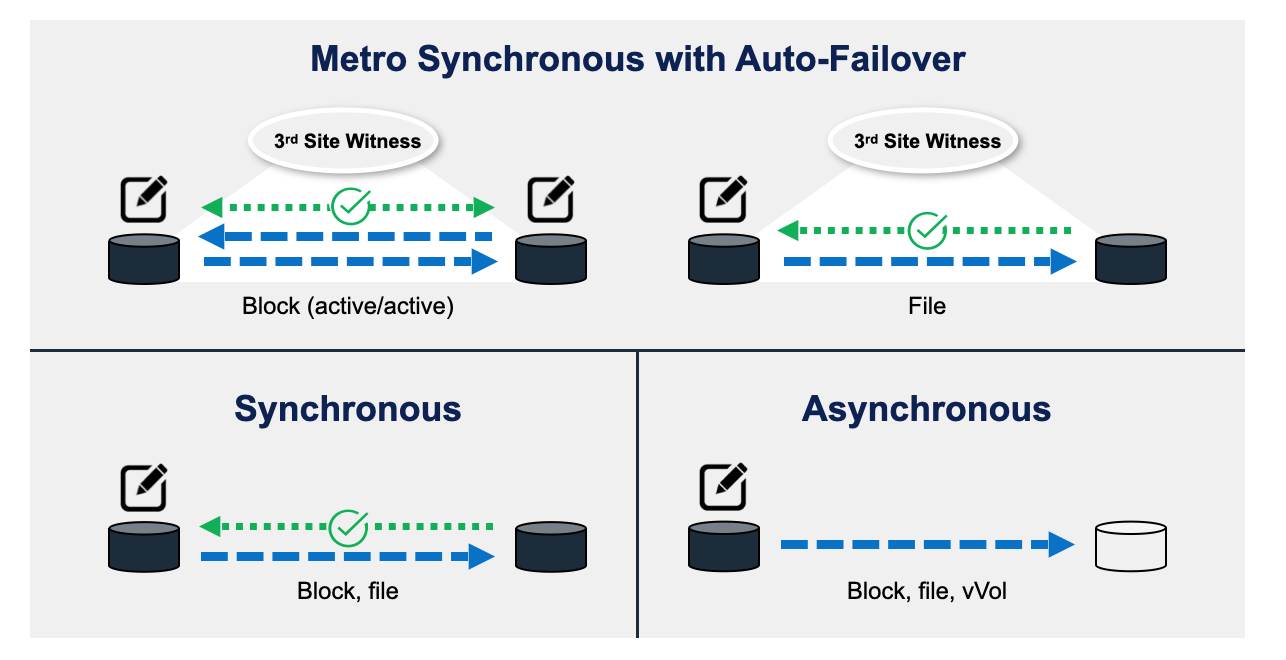
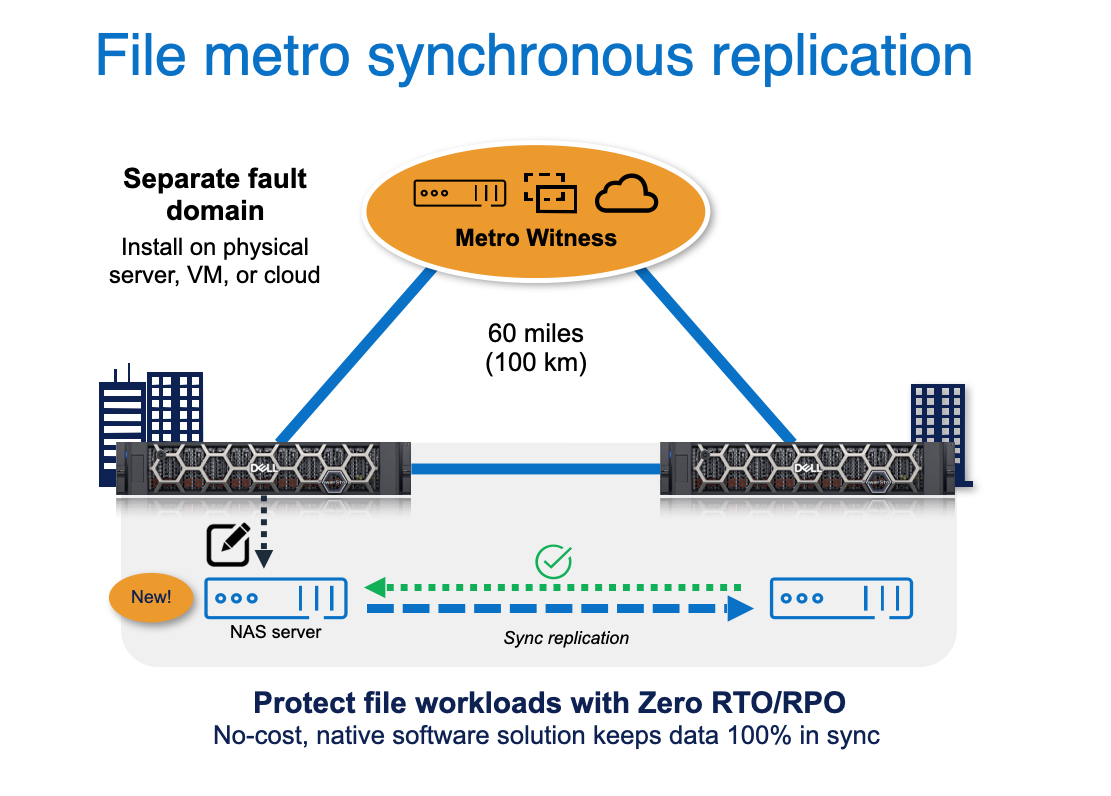
To avoid “split-brain” scenarios when implementing auto-failover in metro configuration, a witness is required. The witness software can run on physical or virtual hardware (including in the cloud), and is free to use, with no additional licensing or payment required. Resilience is built into PowerStoreOS, which provides error detection and automatic failover for synchronous setups and delivers quick recovery with a zero Recovery Time Objective (RTO)/Recovery Point Objective (RPO). The witness can detect if a failure occurs and promote the surviving appliance to resume operations immediately.
 Security is also a focus in PowerStoreOS 4.3, with the new “Multiparty Authorization” feature providing additional control. When enabled, critical actions such as deleting file systems, volumes, or NAS servers, and power actions (shutdowns/reboots) require authorization from at least one other user with the necessary permissions. This is a powerful policy enforcement tool that can prevent far-reaching actions, malicious or otherwise, from affecting data availability and security. Meanwhile, labeled NFS, which arrives on PowerStore as part of NFS V4.2, strengthens the product line’s security-first design by introducing Mandatory Access Control to the protocol. Defined by the Internet Engineering Task Force (IETF), “MAC systems bind security attributes to subjects (processes) and objects within a system. These attributes are used with other information in the system to make access control decisions.” This is a handy tool for keeping confidential data accessible to specifically designated applications, such as those used in high-security environments.
What About 4.1 and 4.2?
PowerStoreOS 4.3 builds on the releases that came before it. Since version 4.0, released alongside the 3200Q, there have been many modernizations across analytics, protection, and resilience. Release 4.1 added carbon footprint tracking and forecasting, a boon for organizations with ecological commitments and efficiency concerns. It also strengthened the performance measurement and prediction tools built into PowerStoreOS, including bottleneck diagnosis and metrics for individual system components.
For customers migrating from Dell’s Unity line, support for the “Cloud Tiering Appliance” feature also appeared in 4.1, enabling intelligent movement of file data to and from public cloud services to cost-effectively archive infrequently used data and reclaim PowerStore space for in-use objects. Furthermore, in a significant win for federal agencies, PowerStore received support for CAC and PIV smart card authentication. The PowerStore line is also STIG certified, making it an ideal choice for government deployments.
One of the most interesting features of 4.1 is “Secure Snapshots” for file resources, which rounds out the existing block capability. Like many backup and recovery platforms, Dell allows storage administrators to create snapshots that cannot be deleted manually and are governed by a retention policy. This is a very convenient and helpful feature for ensuring that temporary data objects, such as backups, are not prematurely removed before their planned end-of-life.

Many other features of PowerStoreOS 4.1 were included in this release, and we have listed a few of our favorites below:
- QoS for filesystems: Control bandwidth allocation for specific filesystems with customizable rule sets.
- Automatic certificate renewal and management: Renew PowerStore-generated certificates and alert on expiring third-party certificates.
- Storage Direct Protection enhancements: Dell claims up to 4x faster restores for customers leveraging PowerStore’s tight integration with PowerProtect backup appliances.
- Enhanced Performance Analytics: Advanced performance analytics, including the new Appliance Utilization metric, deliver detailed insights into maximum sustainable IOPS and visibility into the impact of host offload commands such as XCOPY, UNMAP, and WRITE_SAME.

Introduced alongside the PowerStore 5200Q, PowerStoreOS 4.2 marked another significant step forward. Its standout feature is native self-healing software that, when enabled, uses telemetry from Dell’s global PowerStore install base to identify and resolve issues without user intervention. Administrators can configure it to surface alerts with recommended fixes, or to go a step further by automatically applying the fixes, even opening support tickets and triggering part shipments when component failures are detected. The result is an appliance that gets smarter over time and, when allowed, takes corrective action autonomously.
Initial support for TLS 1.3 was also added in 4.2, along with integrations with HashiCorp Vault, improving security for web-based activities and the secure storage of secrets and cryptographic keys. Building on 4.2’s “hardening” theme, SMTP and biometric authentication became available, allowing users to log in to PowerStore appliances via options such as Windows Hello and user certificates. Multi-factor authentication and single sign-on access methods have also been improved, enabling users to manage multiple PowerStore appliances with a single login.
Making Better Best
Taken together, the 4.1–4.3 releases push PowerStore toward a more autonomous, policy-driven, and security-first platform. Dell’s rapid delivery of no-cost software enhancements keeps its premier storage solution top of mind for IT professionals seeking a continuously modern experience, challenging the notion that upgrading storage must be expensive and complex.
Dell AIOps and the Evolution from CloudIQ
If you have been around Dell storage for a while, the Dell AIOps story will sound familiar, as it is the next phase of CloudIQ. Dell has taken that cloud-based monitoring and analytics platform, folded it into a broader AIOps narrative, and wired PowerStore more tightly into it with each software release. For PowerStore customers, Dell AIOps is now less of an optional portal and more of the control plane for proactive health insights and alerts, system updates, and long-term planning.
Dell AIOps Assistant: Where PowerStore Insight Becomes Actionable
Within Dell AIOps, the primary interaction point for PowerStore customers is the AIOps Assistant. Rather than acting as a generic search tool, the AIOps Assistant serves as a conversational layer on top of PowerStore telemetry, support knowledge, and platform-specific intelligence.
What we find most compelling about the AIOps Assistant is its ability to train AI models on relevant materials, such as Dell Knowledge Base articles, white papers, best-practice guides, and other product documentation. It can then provide actionable outcomes (e.g., earlier warnings and guided remediation) based on telemetry from thousands of PowerStore systems.

In the example shown below, the AIOps Assistant proactively identifies a capacity issue on a PowerStore cluster and explains the condition in operational terms. Instead of stopping at an alert, it links the issue to a specific remediation path and notes that upgrading to a newer PowerStoreOS release would unlock a higher-efficiency guarantee. The AIOps Assistant translates that change into a concrete outcome, estimating additional effective capacity rather than simply referencing software versions or feature names.

The AIOps Assistant also understands the scope. When a condition applies across multiple systems with similar configurations, that context is surfaced automatically, prompting the user to apply it fleet-wide. This moves PowerStore operations beyond one-system-at-a-time management and into a more centralized, scalable, intent-driven workflow.
Powers: Guided Intelligence for PowerStore Operations
To help structure these interactions, the AIOps Assistant introduces Powers, which are tools and agents specific to the category a user selects, along with sample prompts to help users familiarize themselves with the types of queries that may be most helpful. For instance, when a user selects Update Power, the Update tools and agents (along with common prompts for this category) are presented to help them simplify and accelerate use of the information and capabilities provided by the AIOps Assistant.

For PowerStore environments, Powers span areas such as health analysis, anomaly detection, performance impact, reporting, documentation, updates, and capacity forecasting. Each Power provides curated prompts and context-aware responses, making it easier to repeatedly engage with complex operational data about the user’s infrastructure.
The Updates Power is particularly notable for PowerStore. Instead of presenting a static list of available software versions, it evaluates the system’s configuration and current code level, then highlights the features, fixes, and efficiency improvements that are relevant. This allows administrators to understand why an upgrade matters before proceeding, reinforcing Dell’s emphasis on guided remediation over blind automation.
Forecasting Through Powers: Capacity and Sustainability Planning
Forecasting capabilities in Dell AIOps can be simplified through Powers rather than navigating to standalone dashboards. By engaging the appropriate Power, administrators can request the AIOps Assistant to create visualizations of capacity forecasts, utilization thresholds, or sustainability-related insights using natural language.
As shown, simple queries generate a structured table that identifies systems exceeding defined capacity limits or ranks infrastructure by carbon footprint. These results are assembled on demand from the prompt, eliminating the need to build reports or export data for offline analysis manually.

For PowerStore customers, this approach ties forecasting directly into day-to-day operations. Capacity planning, sustainability tracking, and growth projections become part of the same conversational workflow used for health checks and remediation, helping teams move more seamlessly from insight to action.
PowerStore and Dell Private Cloud
Dell Private Cloud, built on disaggregated infrastructure, is designed to be fully transferable and reusable, enabling organizations to adapt their IT architecture as business needs evolve. This offering combines the flexibility of the traditional three-tier architecture with the operational and management simplicity of HCI. Unlike alternative architectures, Dell Private Cloud provides unified, full-stack composability across compute, storage, network, and security resources, enabling independent scaling while maintaining built-in security. It also offers software flexibility without license lock-in, as well as APIs for interoperability with hypervisors, storage management tools, and AIOps capabilities.
At a high level, it is a curated stack that can run both virtual machines and containerized workloads, with integration points for platforms such as VMware, Nutanix, Red Hat OpenShift, and Azure Local, giving customers a real choice in how they build out the compute layer.
PowerStore sits beneath that as the shared storage platform, providing resilient block and file services, data reduction, and protection features surfaced through Dell’s automation and lifecycle tools rather than as a one-off array. The simple way to think about it is that Dell Private Cloud is the standardized fabric, and PowerStore is the storage engine that makes those private cloud clusters practical for a wide range of enterprise workloads.
Within this model, PowerStore enables Dell Private Cloud to scale beyond the limits of traditional HCI without reintroducing the operational burden typically associated with three-tier infrastructure. Rather than operating as an external system that must be manually integrated, PowerStore is incorporated directly into Dell’s automation and lifecycle framework, allowing storage to be provisioned, updated, and validated alongside compute and networking resources.
Architecturally, this delivers a disaggregated design that preserves independent scaling and richer data services while still presenting an appliance-like operational experience. PowerStore provides enterprise-grade durability, efficiency, and protection, while the automation layer abstracts much of the complexity that would otherwise require dedicated storage expertise.
During deployment, PowerStore resources are consumed through declarative workflows rather than manual configuration. Volumes are created, hosts are mapped, and connectivity is established as part of the same automated process used to bring compute online. This tight integration allows storage to behave as an extension of the private cloud platform rather than a separate management domain, aligning PowerStore operations with the same repeatable patterns used across the rest of the stack.
PowerStore’s value becomes more pronounced in day-2 operations. Lifecycle management is decoupled across layers, enabling storage updates to occur independently of compute and hypervisor changes. This avoids the full-stack upgrade cycles common in tightly coupled HCI environments while still maintaining visibility into validated states and configuration drift through the automation layer.
Platform continuity is another key advantage. As organizations introduce new hypervisors or container platforms, PowerStore remains in place beneath the compute layer. Data does not need to be migrated simply because the orchestration layer changes, reducing friction during workload modernization or platform evaluation.
Operationally, this model aligns well with teams that have moved away from siloed infrastructure roles. Storage management is no longer isolated from the rest of the environment, yet PowerStore retains the depth and maturity expected of an enterprise storage platform. Most routine actions are surfaced through the same automation interfaces used elsewhere in the private cloud, with native PowerStore tools available when deeper control is required.
In practice, PowerStore acts as the storage engine that allows Dell Private Cloud to balance flexibility with operational simplicity. It delivers the data services required for enterprise workloads while the automation layer ensures those capabilities are applied consistently, repeatably, and at scale.
Dell Enterprise Hub and PowerStore as a Model Staging Ground
Dell Enterprise Hub on Hugging Face is a curated control plane for OpenAI models and applications, tuned for Dell hardware. Through a single portal, customers can browse a validated catalog of Llama, Mixtral, Gemma, Granite, GPT-OSS, and other open-source models, identify which Dell platforms they support, and deploy or fine-tune them using prebuilt containers and scripts tested on Dell AI servers.

That work will run on GPU-intensive systems in the Dell AI Factory, not on a PowerStore 5200Q. However, the array still plays an important role. PowerStore gives you a durable, efficient place to keep Dell-curated base models and your own fine-tuned variants close to the rest of your infrastructure, keeping them current as the Hub adds new releases. It also stages or replicates them onto the AI platforms when it is time to validate or promote a model to production. In other words, the 5200Q is not the scratch space for training runs; it is the model pantry sitting on the same enterprise storage fabric as everything else.
To put this into practice, we pulled the entire Dell Enterprise Hub catalog down to our PowerStore 5200Q. At the time of this report, that equaled roughly 4.5TB of models and associated assets stored on the array. For PowerStore, that is a rounding error in terms of capacity, but it changes the day-to-day experience of working with AI models. Instead of pointing every test or lab system at the internet and waiting on public bandwidth, the AI servers in our environment can mount storage on the same fabric as everything else and stream models in a reasonable time. GPU servers can be connected to your storage fabric via 10GbE, 25GbE, 100GbE, or 32Gb FC, delivering models substantially faster than over a WAN. You are effectively treating the 5200Q as a local, enterprise-grade model pantry that keeps Dell curated content close to where the work happens.
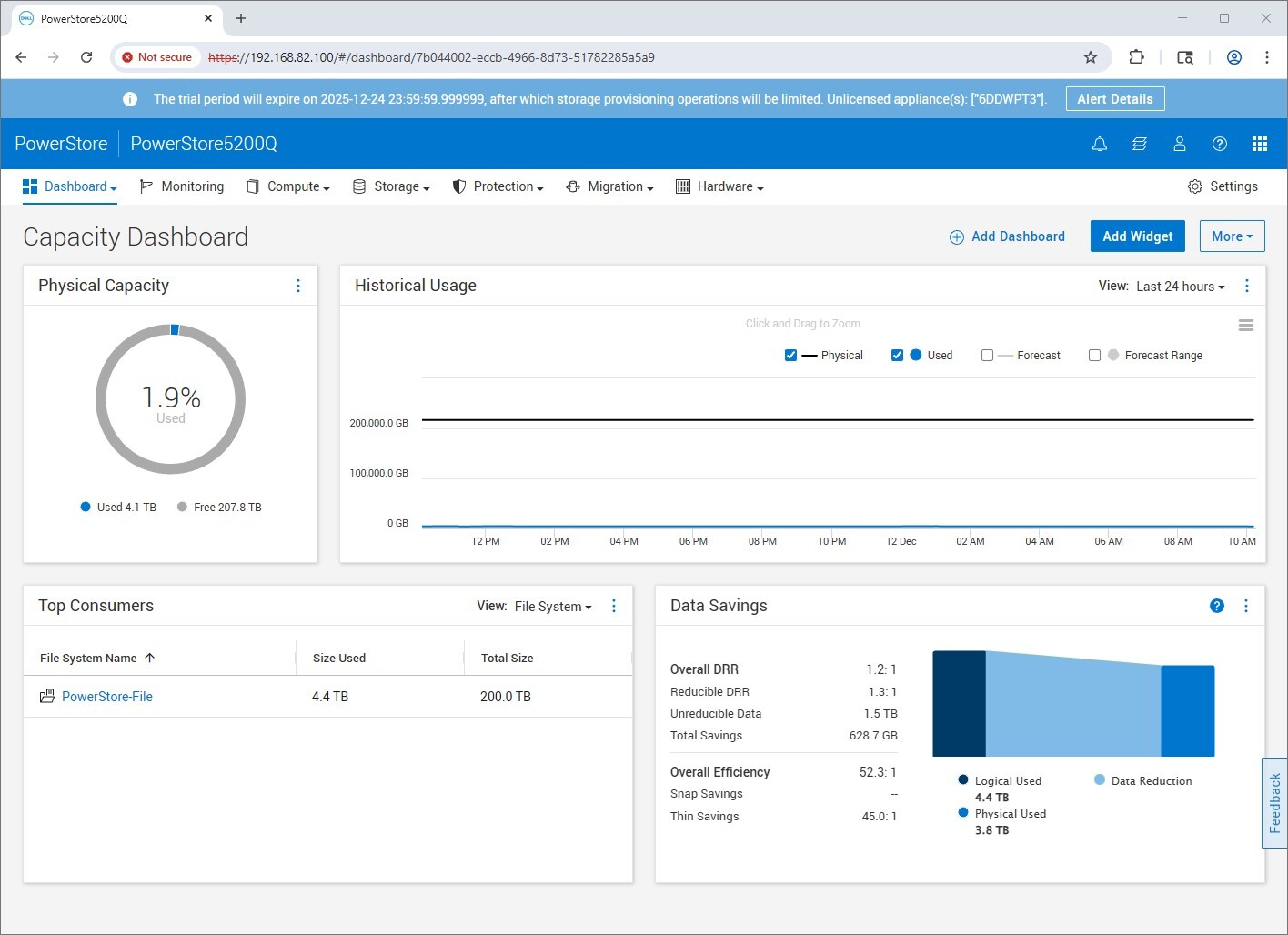
A central repository also gives organizations a clean way to stay current without turning each AI node into its own download manager. With a bit of scripting, we had our PowerStore 5200Q automatically save updated models as they were updated in Dell Enterprise Hub. This all occurred in the background, landing the updated models on a dedicated file share. When developers or data science teams want to try a new architecture, compare variants, or swap models as workloads change, the images are already on the 5200Q, ready to be copied or mounted on AI platforms without waiting for a long internet fetch. For environments that expect to iterate quickly on models or treat AI infrastructure as a shared service, using PowerStore 5200Q as a central staging ground is a simple way to reduce pipeline friction. This approach also turns model management into another familiar enterprise storage workflow. Incidentally, with the new QoS features, this file share can be rate-limited to ensure the model movement doesn’t impact other critical volumes on the appliance.
Building on a Hardened Foundation
PowerStore’s trajectory over the last few releases tells a consistent story. Dell has treated 4.1, 4.2, and 4.3 as cumulative steps toward a more autonomous, policy-driven, and operationally mature storage platform. Each release builds on the last, expanding protection for block and file workloads and further leveraging telemetry-driven operations to reduce manual effort at scale. The platform is becoming increasingly hardened with each update, without forcing customers into disruptive upgrade cycles or feature trade-offs.
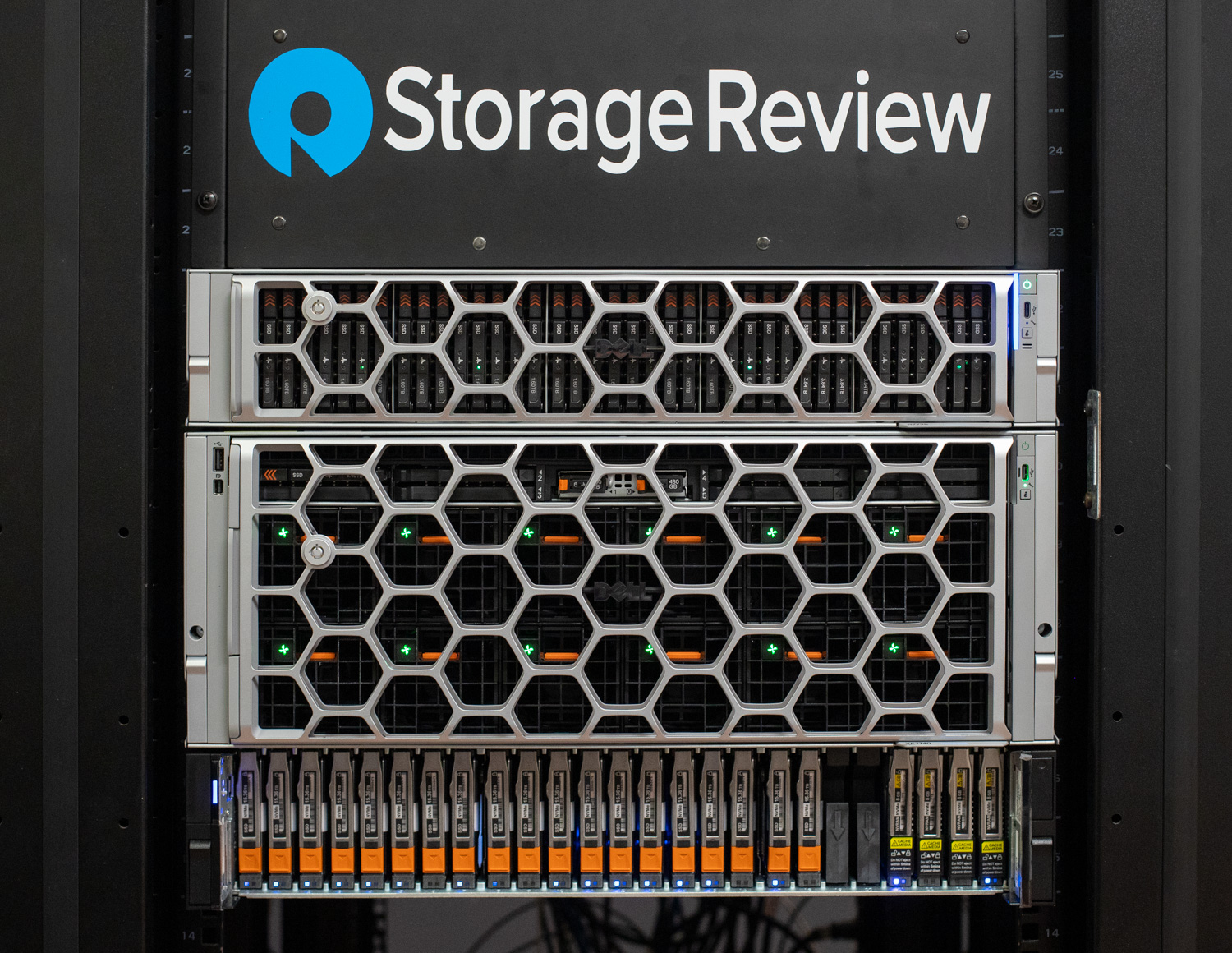
PowerStore 5200Q fits squarely into that progression. It brings QLC into a higher-performance tier of the portfolio, pairing dense flash with more controller resources and the same enterprise-grade architecture that defines the rest of the line. This is not QLC positioned as a compromise or a special-purpose tier, but as a practical option for mainstream production workloads where capacity efficiency, rack density, and cost matter just as much as performance. Alongside the T models, the 5200Q reinforces the idea that PowerStore is a portfolio designed to meet customers where their workloads are, rather than forcing a single storage profile across every environment.
More broadly, this reflects where enterprise storage is headed. As organizations modernize their infrastructure, adopt private cloud operating models, and integrate AI workflows into existing environments, demand is not just for faster storage but also for systems that are resilient, secure, and easier to operate over time. PowerStore’s recent evolution, combined with the flexibility of the 5200Q, shows Dell’s intent to deliver a storage platform that can serve as a stable foundation for those next-generation workloads, while still meeting the expectations of traditional enterprise IT.
This report is sponsored by Dell Technologies. All views and opinions expressed in this report are based on our unbiased view of the product(s) under consideration.



 Amazon