

Following our most recent review of the Dell Precision 7875 tower workstation, which explored its 96-core AMD Threadripper PRO foundation, expansive memory and storage support, and dual professional GPUs, this updated review focuses on the latest iteration of the platform. This version takes full advantage of NVIDIA RTX PRO 6000 Blackwell Max-Q Workstation GPUs and Threadripper PRO 9000WX Series CPUs to push professional visualization, AI, and compute workloads even further. While the core architecture and performance DNA of the Precision 7875 remain consistent with our previous test, this configuration’s substantial GPU and CPU upgrades bring a new level of performance density for graphics-intensive tasks and advanced AI workflows.
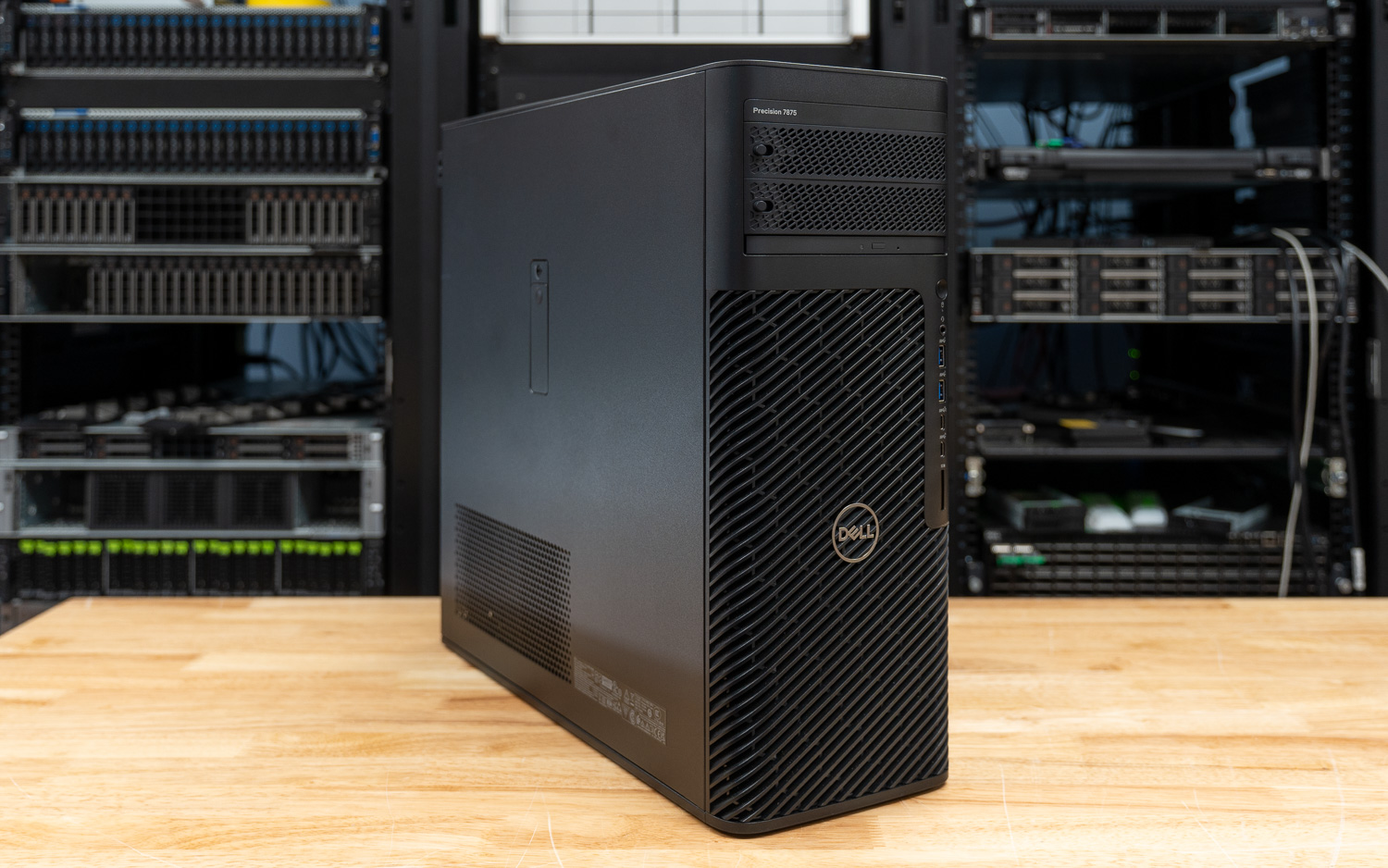
The Precision 7875 is engineered for the upper echelon of professional workflows, targeting larger corporations, engineering firms, and AI labs that require top-of-the-line processing power. By leveraging the AMD Ryzen Threadripper Pro platform, this workstation is a workhorse, designed for 3D rendering, local AI processing, and heavy data-intensive simulations. Our specific configuration features the flagship AMD Threadripper PRO 9995WX, a 96-core titan that pushes the boundaries of multithreaded performance. Combined with NVIDIA’s cutting-edge RTX PRO 6000 Blackwell GPUs, the 7875 provides the graphical and computational headroom needed to handle today’s most demanding creative and scientific tasks.
| Specification | Dell Precision 7875 |
|---|---|
| Processor Options (AMD Ryzen Threadripper PRO 9000WX Series) | |
| Flagship Model | 9995WX: 96 cores, 192 threads, 2.5GHz to 5.4GHz, 384MB L3 cache, 350W TDP |
| High-Core Options | 9985WX: 64 cores, 128 threads, 3.2GHz to 5.4GHz, 256MB L3 cache, 350W TDP 9975WX: 32 cores, 64 threads, 4.0GHz to 5.4GHz, 128MB L3 cache, 350W TDP |
| Performance Options | 9965WX: 24 cores, 48 threads, 4.2GHz to 5.4GHz, 128MB L3 cache, 350W TDP 9955WX: 16 cores, 32 threads, 4.5GHz to 5.4GHz, 64MB L3 cache, 350W TDP 9945WX: 12 cores, 24 threads, 4.7GHz to 5.4GHz, 350W TDP |
| Memory & Storage | |
| System Memory | 8 DIMM slots; Up to 2 TB DDR5 4800 MT/s to 5200 MT/s ECC RDIMM |
| Total Storage Capacity | Up to 56 TB |
| Internal NVMe Slots | Two M.2 2230/2280 slots (PCIe NVMe Gen4) |
| Front FlexBays | Two externally facing M.2 PCIe NVMe Gen4 storage flex bays (swappable) |
| SATA Support | Two 2.5-inch/3.5-inch SATA 3.0 bays; One SATA slot for Optical Drive |
| Graphics (NVIDIA RTX PRO Blackwell Series) | |
| GPU Architecture | NVIDIA Blackwell (5th Gen Tensor Cores, 4th Gen RT Cores) |
| Max-Q Specs (RTX PRO 6000) | 96 GB GDDR7 with ECC; 1792 GB/s bandwidth; 300W TBP; 24,064 CUDA cores |
| Multi-GPU Scalability | Supports up to two dual-width, full-height graphics cards (300W each) |
| I/O & Networking | |
| Front Ports | 2x USB 3.2 Gen 1 (5Gb/s) Type-A 1x USB 3.2 Gen 2 (10Gb/s) Type-C with PowerShare 1x USB 3.2 Gen 2 (10Gb/s) Type-C Universal audio jack; SD card reader |
| Rear Ports | 3x USB 3.2 Gen 2 (10Gb/s) Type-C 3x USB 3.2 Gen 1 (5Gb/s) Type-A (2 standard, 1 with Smart Power On) Audio line-out; Serial and PS/2 ports (optional) |
| Networking | 1x RJ45 1GbE; 1x RJ45 10GbE (Onboard) Optional Wi-Fi 6E (Intel AX1675) |
| Certifications & Software | |
| ISV Certifications | Tested and certified for professional apps (3ds Max, Catia, Maya, Solidworks, etc.) |
| Dell Optimizer for Precision | AI-based software for system optimization, battery, audio, and network tuning |
| Sustainability & Efficiency | ENERGY STAR certified; EPEAT registered; 41% post-consumer recycled plastic |
| Physical Specifications | |
| Dimensions (H x W x D) | 17.42 in x 6.79 in x 18.30 in (442.7 mm x 172.6 mm x 465 mm) |
| Weight | Min: 40.39 lb (18.34 kg) / Max: 56.34 lb (25.57 kg) |
| Power Supply | 1000W or 1350W Platinum internal PSU |
Design and Build
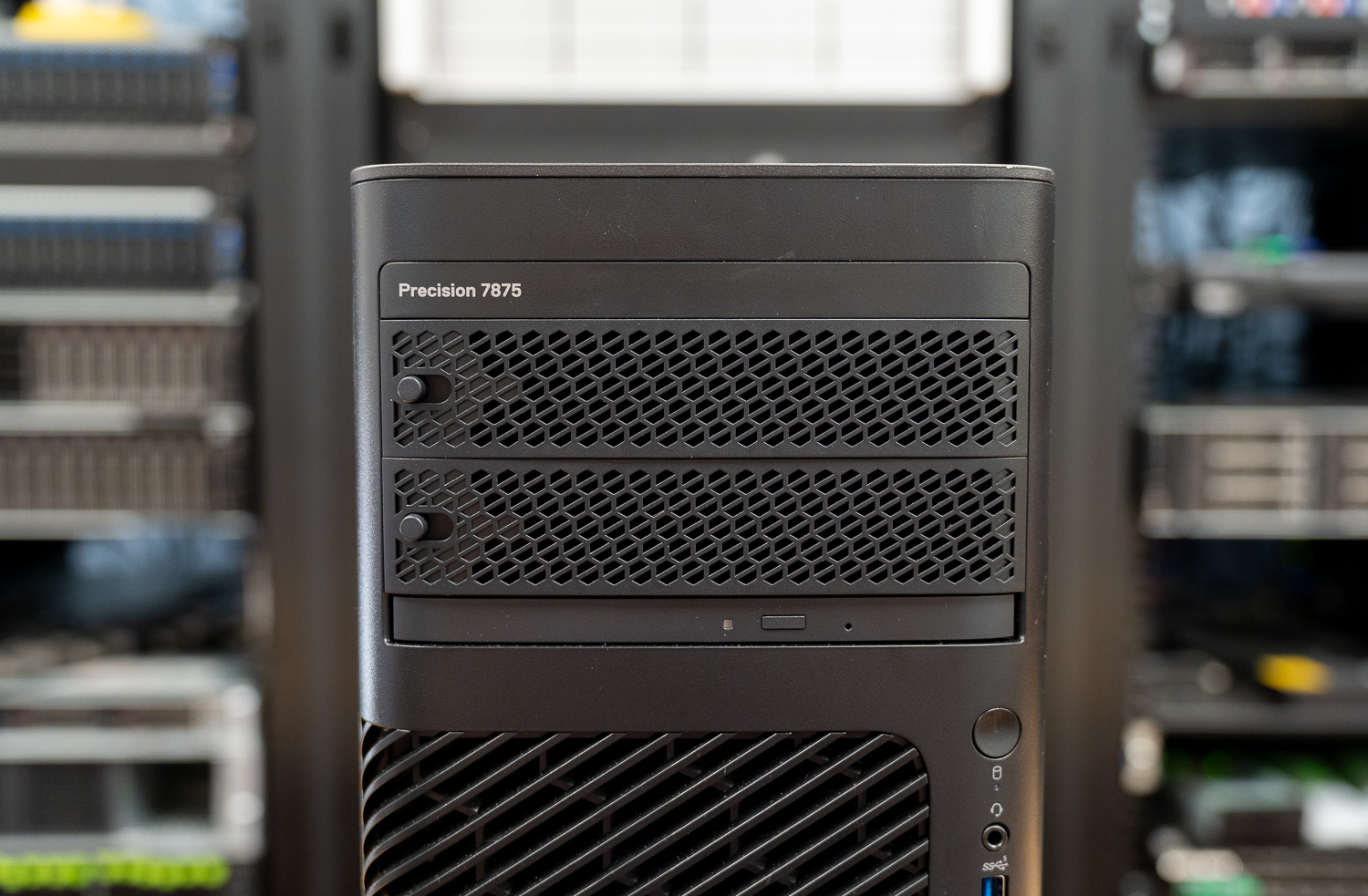
The Precision 7875 chassis architecture features an advanced thermal design with a “honeycomb” front grill that delivers outstanding airflow, essential for cooling high-wattage 350W processors and massive GPUs. Independent Software Vendor (ISV) certifications and the inclusion of Error Correcting Code (ECC) memory further bolster reliability. Furthermore, to prevent system-halting crashes, Dell uses its Reliable Memory Technology (RMT) Pro software to identify and isolate memory errors before they cause problems.
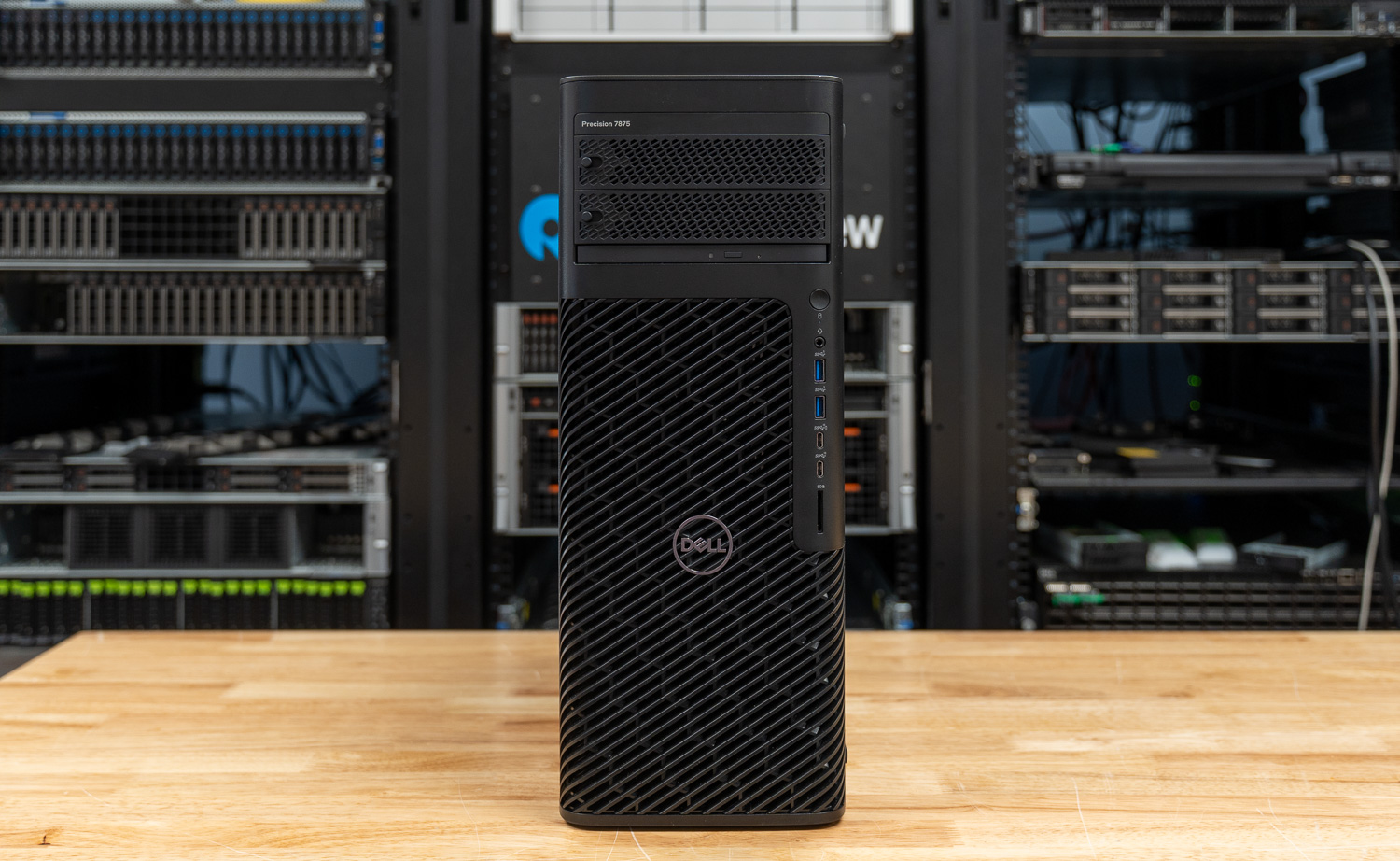
Physically, the tower feels incredibly rigid and professional, prioritizing airflow and internal accessibility. To preserve the integrity of the internal components, Dell engineered the cooling solution to maintain system stability even during 24/7 rendering or simulation cycles. Predictably, these certifications and thermal solutions make the entire system feel bulletproof.
Security and Upgradability
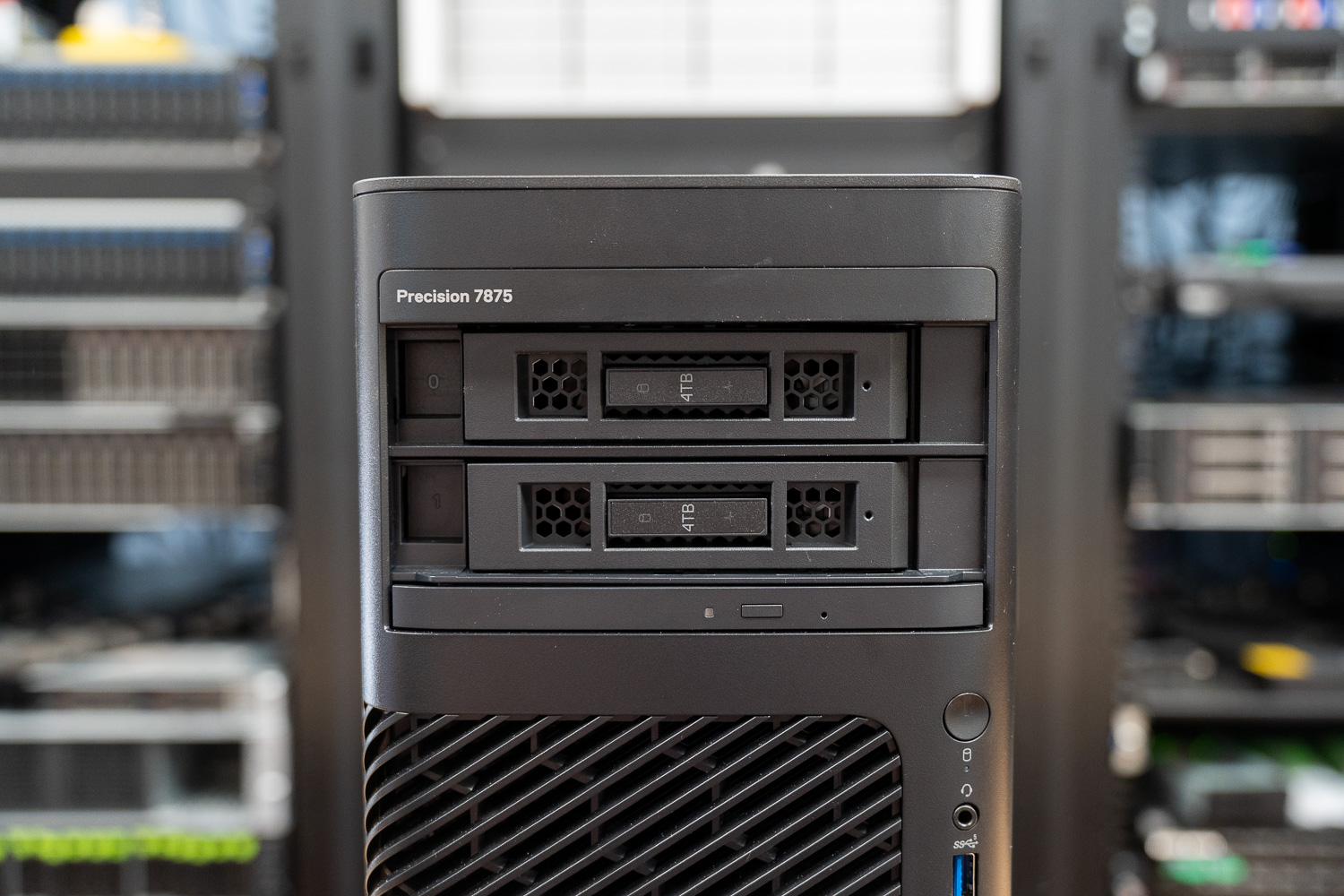
In high-stakes professional environments, physical and digital security remain just as critical as raw horsepower. For those handling sensitive data that cannot remain in the office overnight, Dell offers front-accessible “FlexBays.” These lockable, removable storage bays allow users to easily extract their M.2 NVMe or SATA drives. Additionally, a dedicated TPM 2.0 security chip (ControlVault) reinforces digital security by processing and storing end-user credentials. Meanwhile, SafeBIOS and off-host BIOS/firmware verification ensure no one has tampered with the system before it boots. The chassis includes a lock and an integrated intrusion-detection sensor that alerts administrators if someone opens the side panel without authorization. For additional data protection, the system supports self-encrypting drives (SEDs) and various enterprise encryption software suites, such as Dell Encryption Enterprise.
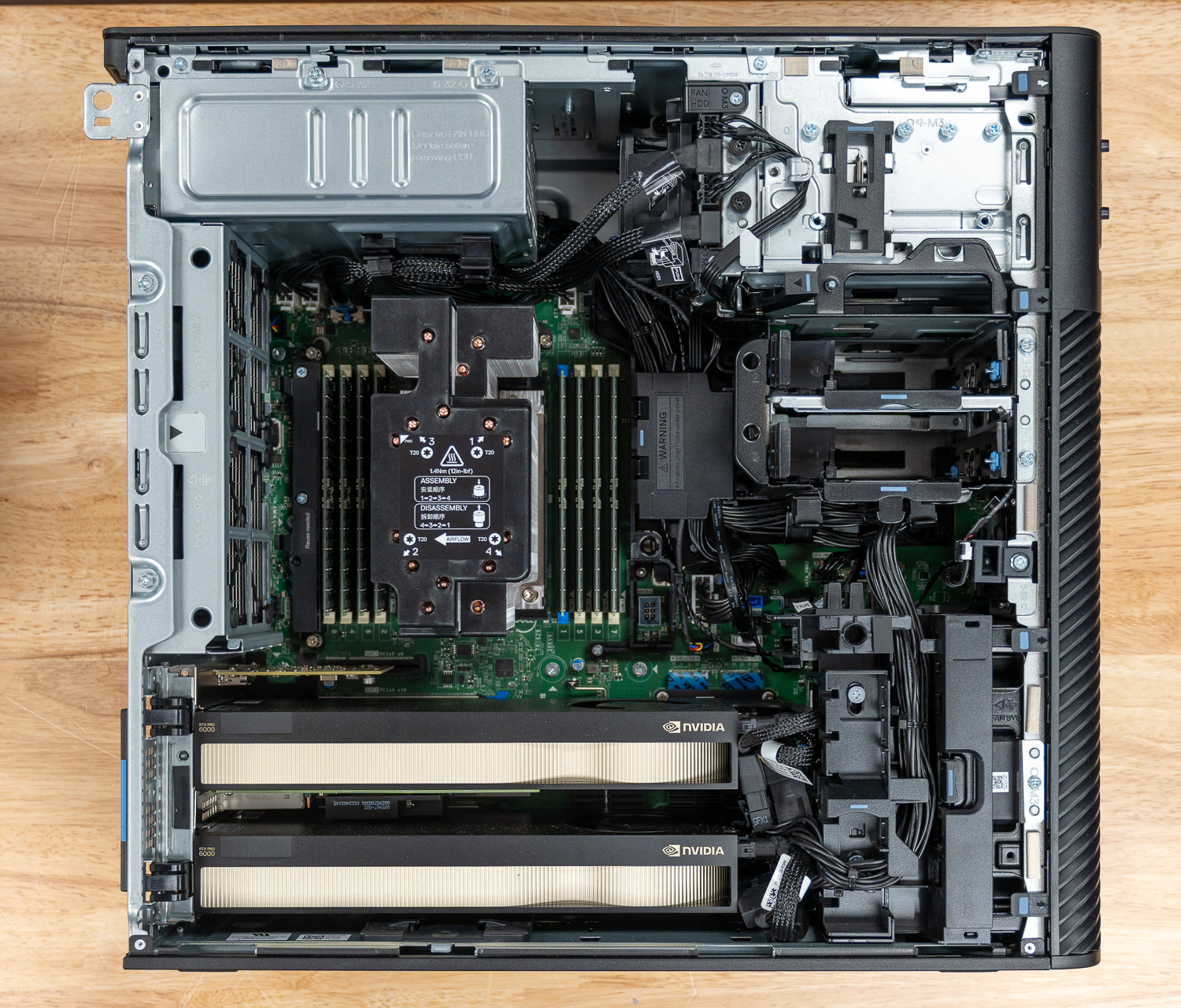
The 7875 also stands out as a champion of long-term upgradability, designed to scale with your workloads over several years. The motherboard features eight DIMM slots that users can populate with up to 2TB of DDR5 ECC memory, enough to handle massive datasets that would choke a standard desktop. Storage expansion is equally impressive, with support for up to 56TB of total capacity. You achieve this through a combination of internal M.2 2280 PCIe Gen4 slots, standard 3.5-inch or 2.5-inch SATA bays, and the aforementioned externally facing storage FlexBays.
I/O and Expansion
The port selection and internal expansion capabilities of the Precision 7875 are clearly tailored for high-level production environments. On the front panel, you have immediate access to a 3.5mm audio jack, two USB 3.2 Gen 1 (5 Gb/s) Type-A ports, one USB 3.2 Gen 2 (10 Gb/s) Type-C port, and a second USB 3.2 Gen 2 Type-C port with PowerShare for charging your mobile devices. Conveniently, the front also houses an SD card slot for quick media offloads.
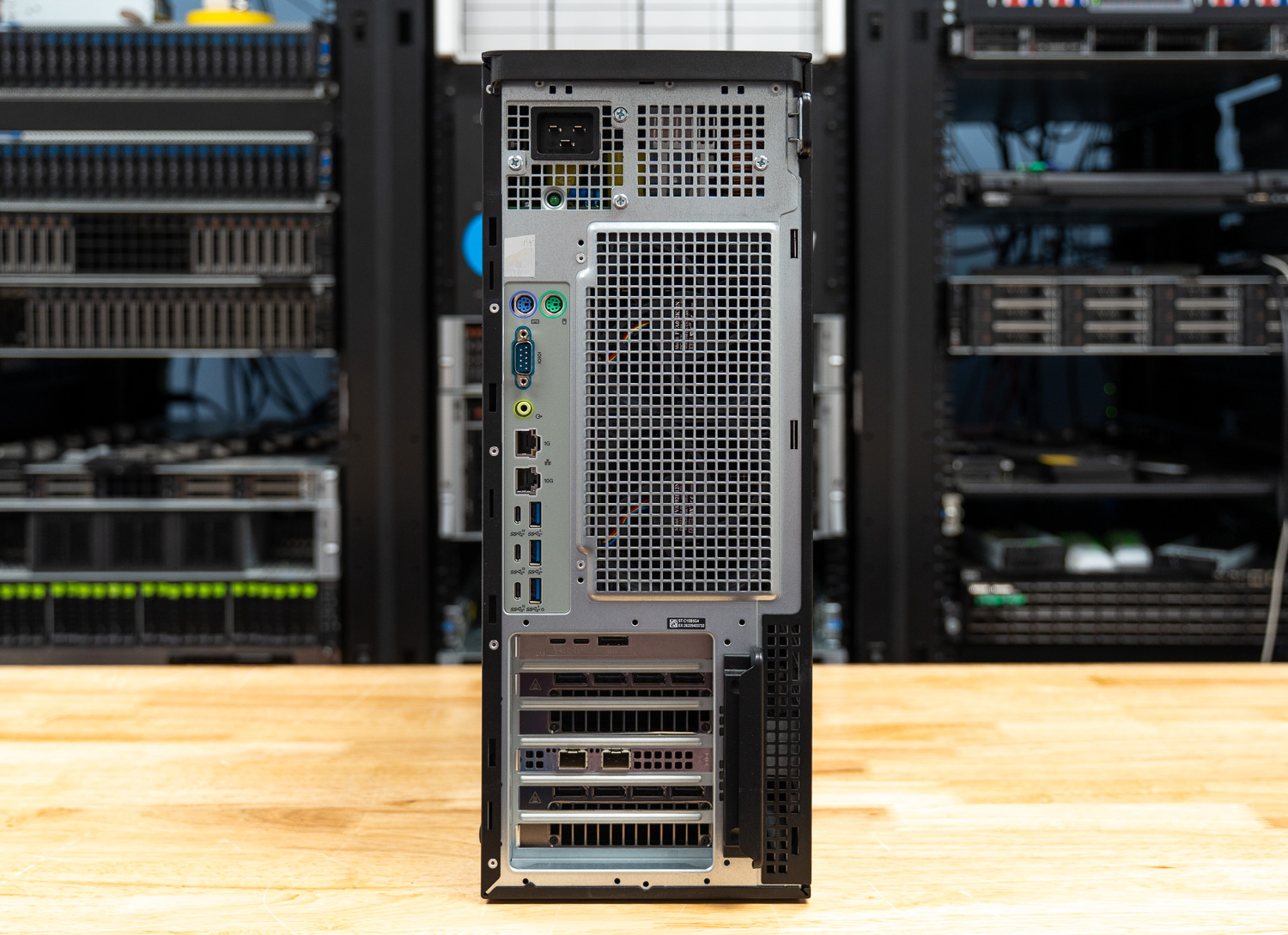
However, the rear of the machine is where the workstation truly flexes its muscle. It features three additional USB 3.2 Gen 2 Type-C ports and three USB 3.2 Gen 1 Type-A ports, one of which supports “Smart Power On.” Dual RJ45 ports handle networking—one standard 1GbE and one high-speed 10GbE for moving massive project files over a local network. For those working with legacy industrial equipment, optional serial and PS2 ports are also available.
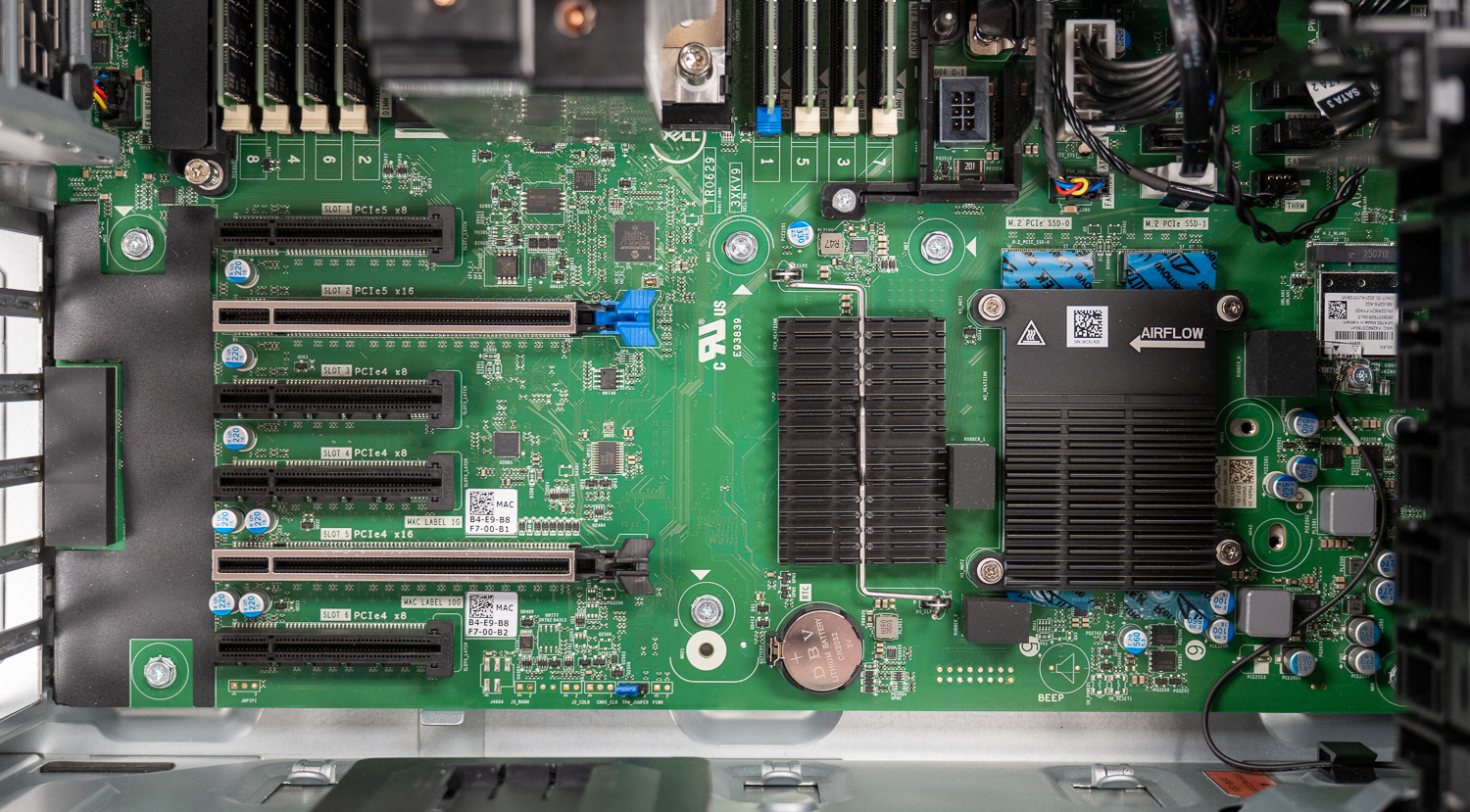
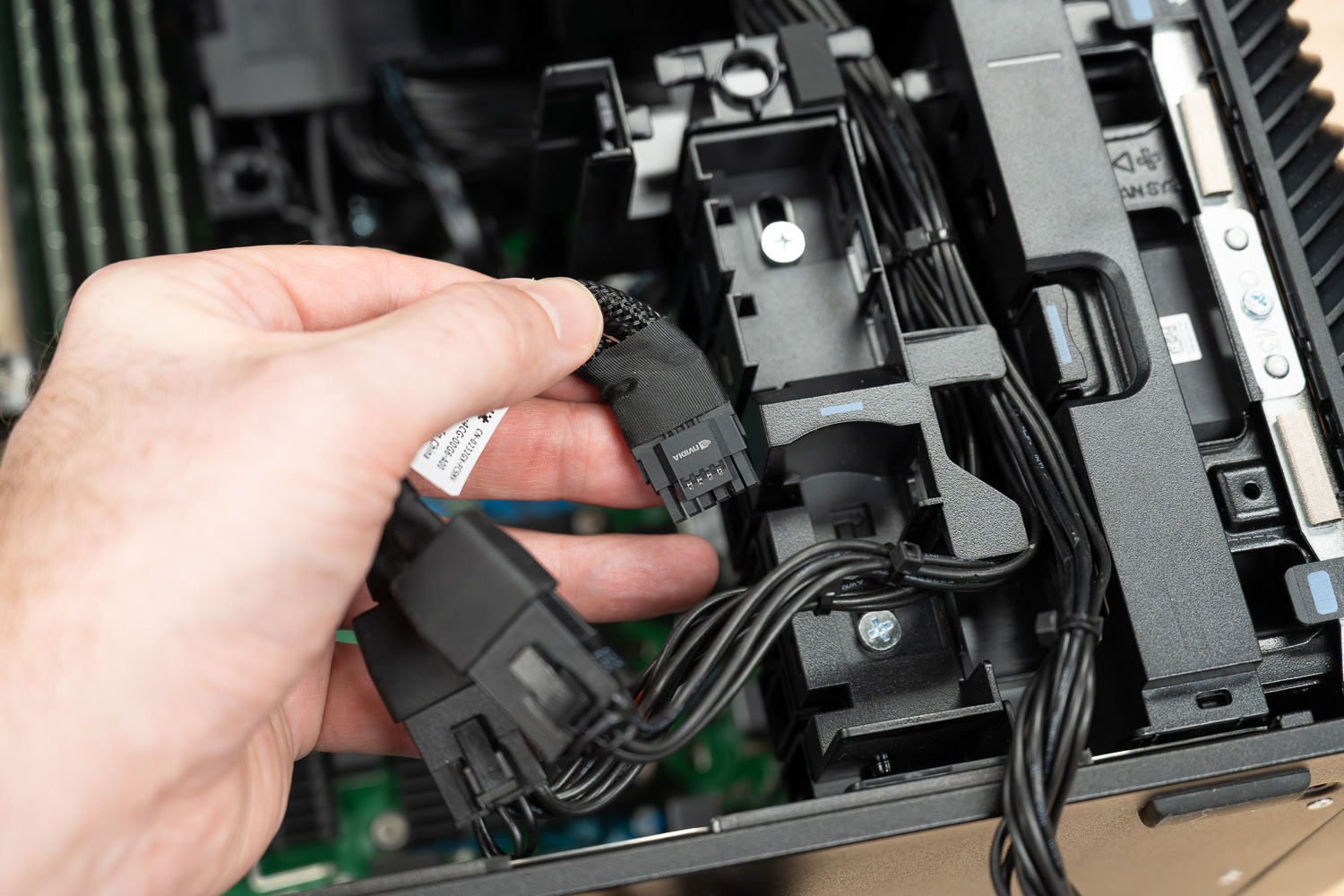
Internal expansion is where the 7875 stands apart from its competition, offering six full-height PCIe slots. This includes a top-tier Gen5 PCIe x16 slot and a Gen4 PCIe x16 slot for dual-GPU configurations. Additionally, there is a Gen5 PCIe x8 slot, two Gen4 PCIe x8 slots, and one Gen4 x8 slot wired for x4 electrical performance. This massive array of lanes allows you to populate the system with high-end graphics cards, dedicated RAID controllers, or high-speed fiber-optic networking cards without hitting a bandwidth bottleneck.
Fan Tray
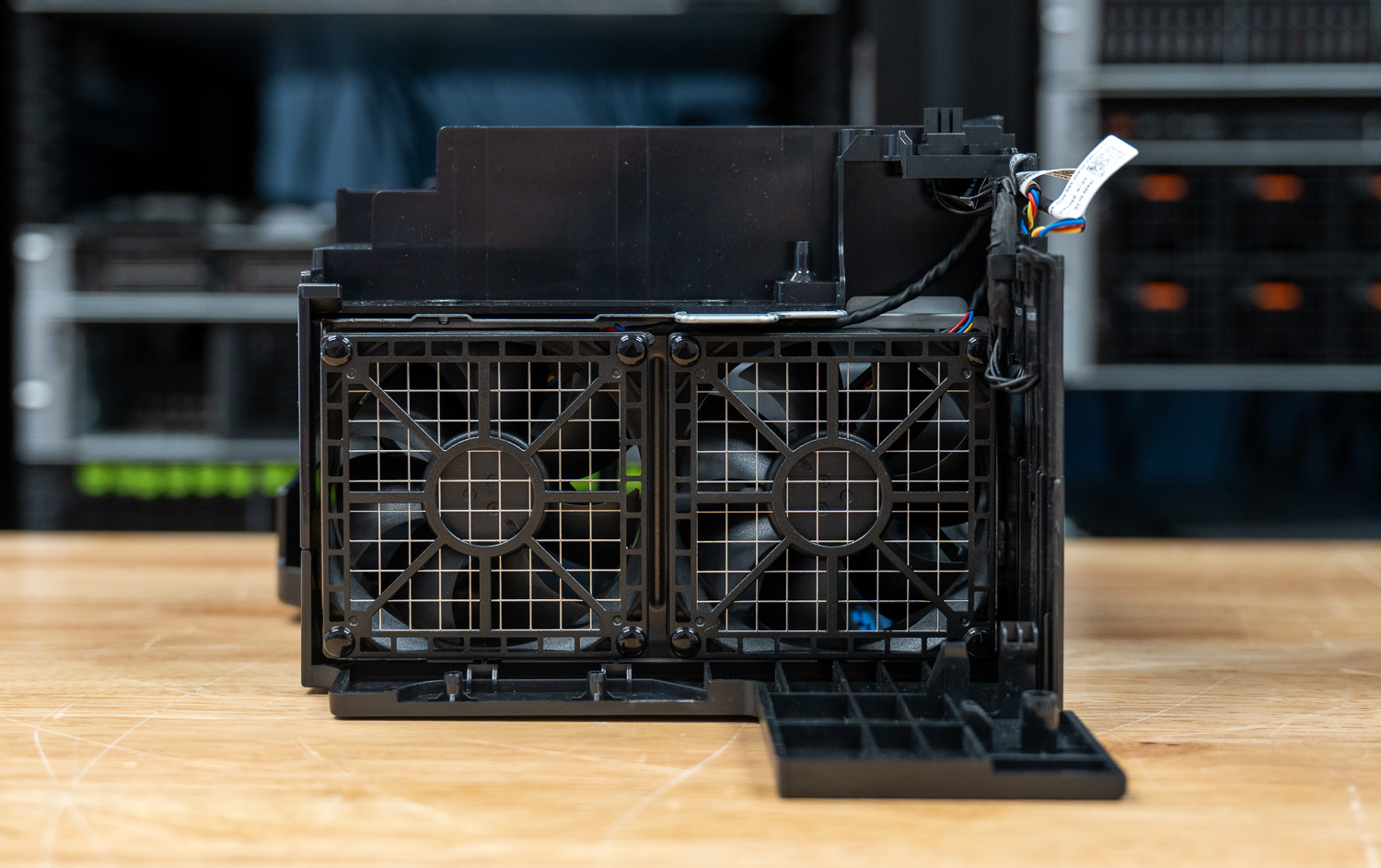
The Precision 7875 uses a modular dual-fan tray assembly secured behind a metal mesh guard. The entire unit pulls free from the chassis without tools, making it straightforward to service or swap out without disturbing surrounding components. This design reflects Dell’s broader philosophy of keeping critical cooling infrastructure accessible during maintenance, which is particularly important in 24/7 workstation deployments where downtime must remain minimal.
CPU Cooler
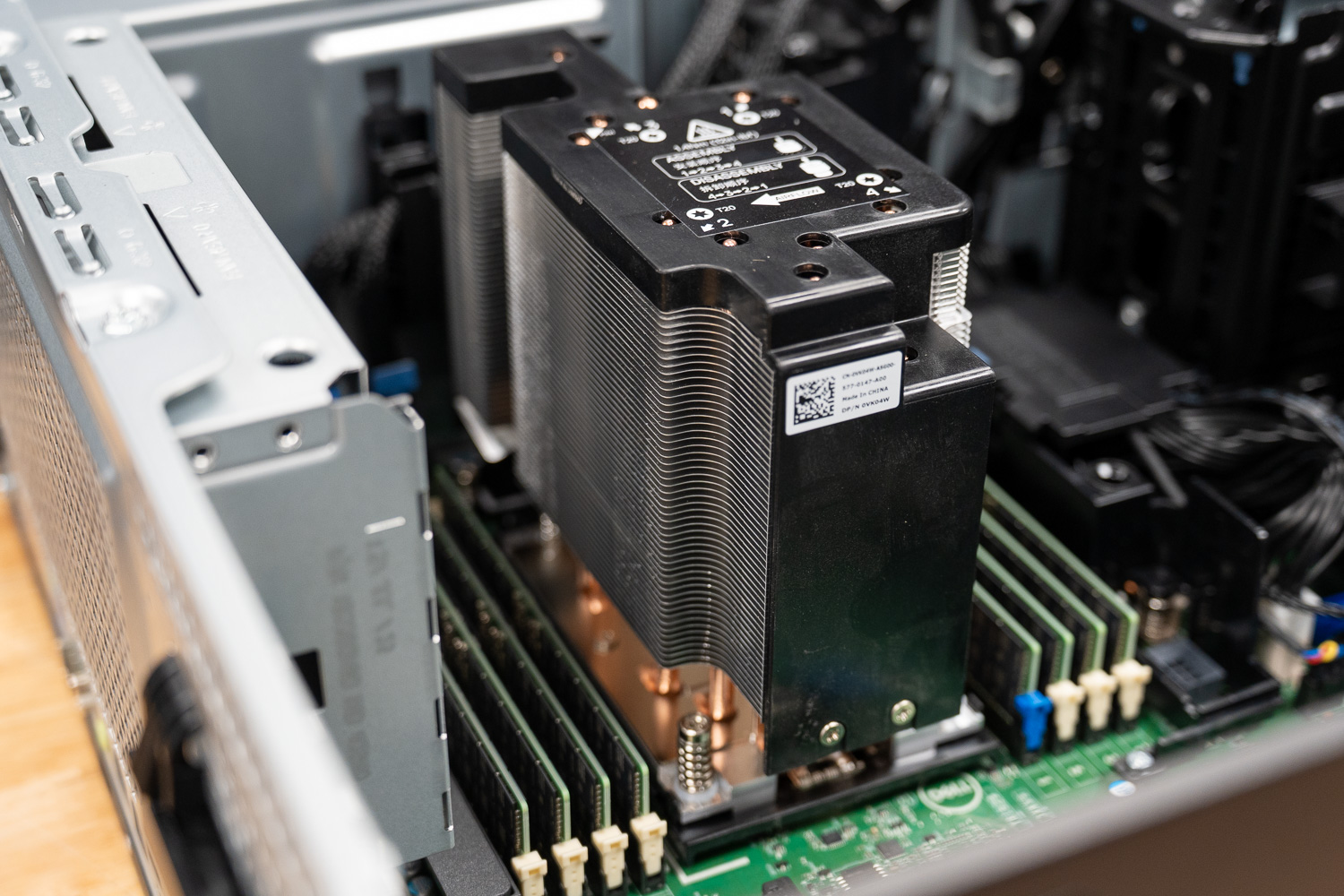
Handling thermals for the 350W AMD Ryzen Threadripper PRO processor is a substantial tower-style heatsink with copper heatpipes running from the base up through tightly packed aluminum fins. The cooler sits directly over the socket, with the heat pipes drawing heat away from the die and dispersing it across the fin stack, working in tandem with the fan tray airflow moving through the chassis. With all eight DDR5 DIMM slots populated, the internal layout is dense, but Dell’s component placement keeps the airflow path clear and the heatsink fully unobstructed.
Integrated Sensors
Under the hood, the tower features a suite of sensors to manage health and security. Specifically, thermal sensors work with the advanced cooling design to dynamically adjust fan speeds based on workload. Regarding physical security, an integrated chassis intrusion sensor alerts you if the side panel opens, while additional locking mechanisms monitor the status of the removable storage bays. These sensors ensure the system remains both physically secure and thermally stable during high-intensity operations.
Graphics and Audio
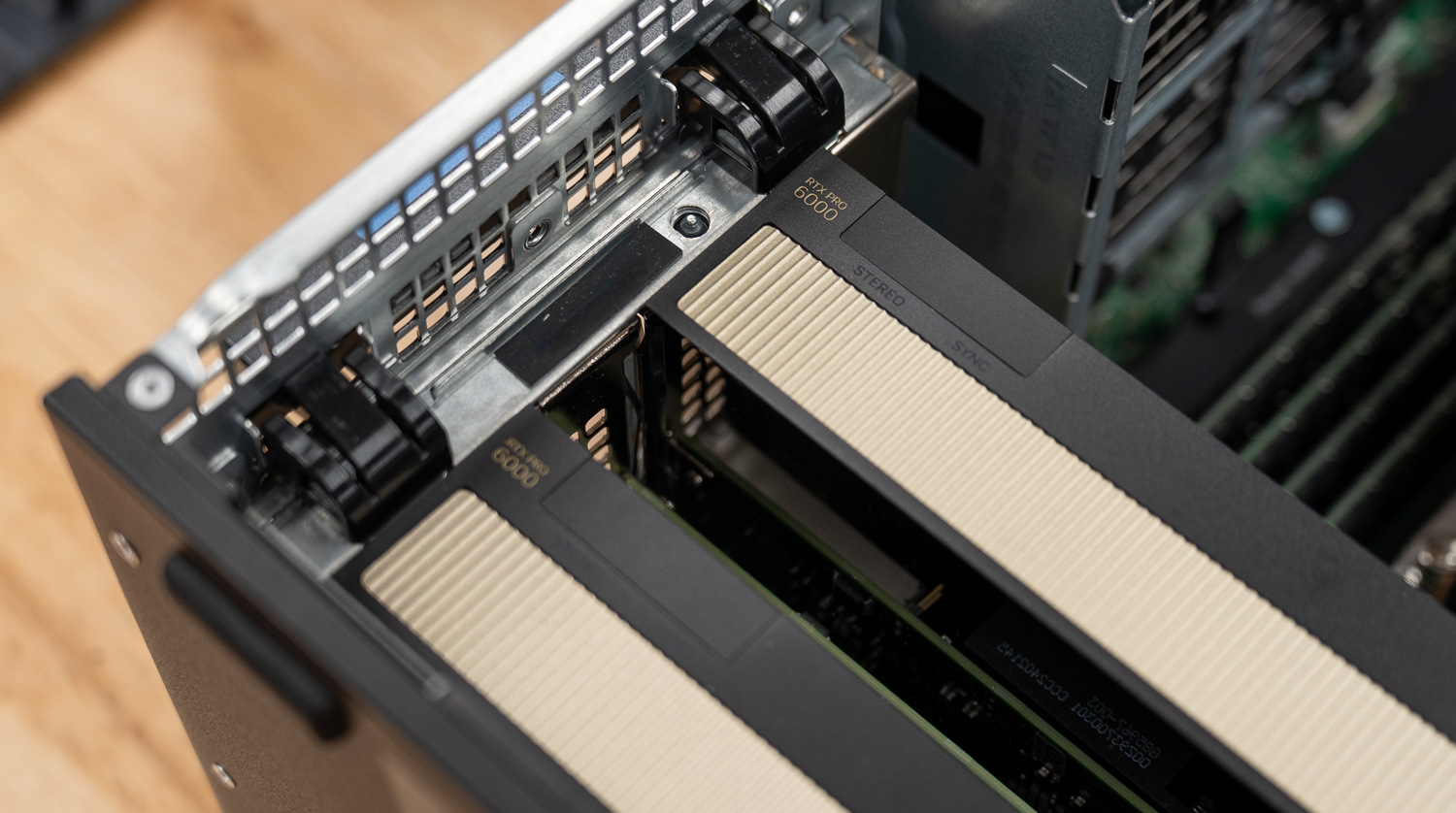
Elite graphics options drive the visual power of the 7875. Our review unit sports Dual NVIDIA RTX PRO 6000 Blackwell Max-Q cards, featuring a massive 96GB of GDDR7 memory. Because the 7875 lacks integrated graphics, a discrete graphics card is required for any display output. Consequently, these cards provide the massive bandwidth necessary for real-time 3D ray tracing and massive AI datasets.
On the other hand, audio performance is surprisingly robust for a workstation, featuring a Realtek ALC3246 controller and an internal speaker. This ensures that basic system alerts or communication remain somewhat audible, though most users should probably use the universal audio jack for high-fidelity or louder sound.
ISV Certifications
NVIDIA’s RTX professional GPUs benefit from exclusive software certifications for the world’s leading creative, engineering, scientific, and 3D design tools, providing highly optimized, tested, and stable experiences across workflows such as animation, CAD, simulation, rendering, and high-resolution video editing. That co-validation between GPU manufacturers and software developers shows up in the details: crashes, glitches, and redraw bugs are far less common with certified hardware.
Dell’s ISV certification portal lets you verify compatibility directly. The Precision 7875 supports over 2,800 applications and version combinations, depending on the GPU and OS. For Autodesk and Adobe workflows, certified drivers mean stable, validated performance without the glitches and instability that uncertified hardware can introduce. For SOLIDWORKS users, certification goes further. RealView Graphics and Order Independent Transparency are only enabled on certified professional graphics cards, features you paid for in the software, unlocked by the GPU certification. The Precision 7875 delivers all of it.
Review Unit Specifications
Our Dell Precision 7875 Tower review unit arrived with the following high-end specifications:
- CPU: AMD Threadripper PRO 9995WX (96 cores, 192 threads, up to 5.4GHz)
- GPU: Dual NVIDIA RTX PRO 6000 Blackwell Max-Q (96GB GDDR7 memory)
- RAM: 512GB DDR5 ECC (8x64GB) 8-channel, 5200MHz
- Storage: RAID 0 with 2 x 4TB Performance 2280 Class 40 SSDs
- Wireless: Qualcomm WCN6856-DBS (Wi-Fi 6E + Bluetooth 5.3)
Procyon AI Computer Vision
The Procyon AI Computer Vision Benchmark measures AI inference performance across CPUs, GPUs, and dedicated accelerators using a range of state-of-the-art neural networks. It evaluates tasks such as image classification, object detection, segmentation, and super-resolution using models that include MobileNet V3, Inception V4, YOLO V3, DeepLab V3, Real ESRGAN, and ResNet 50. Tests are run on multiple inference engines, including NVIDIA TensorRT, Intel OpenVINO, Qualcomm SNPE, Microsoft Windows ML, and Apple Core ML, providing a broad view of hardware and software efficiency. Results are reported for float- and integer-optimized models, providing a consistent, practical measure of machine vision performance for professional workloads.
The Dell Precision 7875 demonstrates a massive disparity between CPU-only inference and GPU-accelerated performance. While the AMD Threadripper PRO 9995WX is a powerhouse, the GPU-accelerated results show a roughly 10x increase in overall score (1,619 vs. 157).
For professionals working in machine learning, the sub-1ms inference times on MobileNet V3 and ResNet 50 in the accelerated test indicate that this system is capable of real-time video analysis and object detection without dropping frames. The CPU results, while slower, show that the 9995WX is still capable of handling fallback inference tasks, particularly in heavier models like DeepLab V3, where it maintains respectable latency.
| CPU Results | Dell Precision 7875 (AMD 9995WX 96C)(512GB RAM | 2x NVIDIA RTX PRO 6000) | |
|---|---|---|
| CPU Results | ||
| AI Computer Vision Overall Score | 157 | |
| MobileNet V3 | 5.74 ms | |
| ResNet 50 | 6.52 ms | |
| Inception V4 | 20.42 ms | |
| DeepLab V3 | 47.75 ms | |
| YOLO V3 | 21.97 ms | |
| REAL-ESRGAN | 1288.54 ms | |
| GPU Results | ||
| AI Computer Vision Overall Score | 1,619 | |
| MobileNet V3 | 0.45 ms | |
| ResNet 50 | 0.82 ms | |
| Inception V4 | 2.16 ms | |
| DeepLab V3 | 6.60 ms | |
| YOLO V3 | 3.48 ms | |
| REAL-ESRGAN | 47.33 ms | |
Blender 4.5
Blender is an open-source 3D modeling application. This benchmark was run using the Blender Benchmark utility. The score is measured in samples per minute, with higher values indicating better performance.
The Precision 7875 achieved a Blender CPU score of 1039.121 samples per minute in the Monster test, 744.601 samples per minute in Junkshop, and 574.705 samples per minute in Classroom.
| Blender CPU (samples per minute; higher is better) | Dell Precision 7875 (AMD 9995WX 96C)(512GB RAM | 2x NVIDIA RTX PRO 6000) |
|---|---|
| Monster | 1039.121 |
| Junkshop | 744.601 |
| Classroom | 574.705 |
However, the GPU scores confirm where the true speed lies. Scoring 7259.413 on the Monster test, the dual NVIDIA 6000 PRO setup offers nearly 7x the CPU’s throughput. For 3D artists, this means near-instant feedback in the viewport and significantly shorter wait times for final frame exports, even in complex scenes such as the “Classroom” benchmark.
| Blender GPU (samples per minute; higher is better) | Dell Precision 7875 (AMD 9995WX 96C)(512GB RAM | 2x NVIDIA RTX PRO 6000 ) |
|---|---|
| Monster | 7259.413 |
| Junkshop | 3943.343 |
| Classroom | 3665.272 |
PCMark 10
PCMark 10 is an industry-standard benchmark that measures overall system performance in modern office environments. It features updated workloads for Windows 10 or 11 and evaluates everyday tasks such as productivity, web browsing, video conferencing, and content creation. The benchmark is easy to run, delivers multi-level scoring (from high-level overall scores to detailed workload scores), and includes dedicated battery-life and storage tests. While UL Solutions now recommends Procyon for newer application-based testing, PCMark 10 remains a reliable and widely used tool for assessing overall PC performance.
With an overall score of 11,433, the Precision 7875 effectively maxes out the PCMark 10 general productivity score. This benchmark is often constrained by burst speed rather than core count, meaning the high score reflects excellent single-core IPC (Instructions Per Clock) and system responsiveness.
For the user, this confirms that despite being tuned for heavy server-grade workloads, the workstation will not feel sluggish during “daily driver” tasks. Web browsing, video conferencing, and application startup times will be instantaneous, ensuring that the overhead of a workstation-class OS and drivers does not impact general usability.
| PCMark10 (higher is better) | Dell Precision 7875 (AMD 9995WX 96C)(512GB RAM | 2x NVIDIA RTX PRO 6000) |
|---|---|
| Overall Score | 11,433 |
Blackmagic RAW Speed Test
The Blackmagic RAW Speed Test is a performance benchmarking tool that measures a system’s ability to handle video playback and editing with the Blackmagic RAW codec. It evaluates how well a system can decode and play back high-resolution video files, providing frame rates for both CPU- and GPU-based processing.
This is a critical benchmark for video editors. The CPU result of 158 FPS at 8K is the headline feature here. Most workstations rely entirely on the GPU for 8K playback, but the 96-core Threadripper PRO has enough raw horsepower to decode 8K streams in software in real-time.
This provides a massive safety net for editors: if GPU VRAM fills up during complex color grading or when using fusion effects, the CPU can take over playback without stuttering. The GPU score of 276 FPS ensures that, even with heavy noise reduction and multiple nodes applied, 8K footage will scrub significantly more smoothly than standard 24fps or 60fps timelines require.
| Blackmagic RAW (Higher FPS is better) | Dell Precision 7875 (AMD 9995WX 96C)(512GB RAM | 2x NVIDIA RTX PRO 6000) |
|---|---|
| 8K CPU | 158 |
| 8K GPU | 276 |
Blackmagic Disk Speed Test
The Blackmagic Disk Speed Test evaluates storage performance by measuring read and write speeds, providing insights into a system’s ability to handle data-intensive tasks, such as video editing and large file transfers.
The system is equipped with high-speed storage, PCIe Gen 4 NVMe, or a RAID 0 configuration, delivering symmetrical Read/Write speeds over 9,000 MB/s.
In a production environment, this completely eliminates the storage bottleneck. You can stream multiple angles of uncompressed 8K RAW footage simultaneously (multicam editing) without dropping frames. It also means that the massive scratch files generated by applications like Adobe After Effects or Nuke will be written to and read from almost instantly, keeping RAM free for active computations.
| DiskSpeedTest (higher is better) | Dell Precision 7875 (AMD 9995WX 96C)(512GB RAM | 2x NVIDIA RTX PRO 6000) |
|---|---|
| Read | 9,111.4 MB/s |
| Write | 9,292.0 MB/s |
3DMark CPU
The 3DMark CPU Profile evaluates processor performance across six threading levels: 1, 2, 4, 8, 16, and max threads. Each test runs the same boid-based simulation workload to assess how well the CPU scales under different thread counts, with minimal GPU involvement. The benchmark helps identify single-threaded efficiency and multithreaded potential for tasks such as gaming, content creation, and rendering. Scores on 8 threads often align with modern DirectX 12 gaming performance, while 1–4-thread results reflect older or esports scenarios.
The 3DMark CPU Profile perfectly illustrates the AMD Threadripper PRO 9995WX’s scaling capabilities. The jump from 1,237 (1 thread) to 27,670 (Max threads) demonstrates near-linear scaling, which is rare in consumer hardware.
The strong 16-thread score (15,378) also suggests that the system maintains high clock speeds even under moderate load, which is ideal for gaming development workflows or running virtual machines.
| 3DMark CPU (higher is better) | Dell Precision 7875 (AMD 9995WX 96C)(512GB RAM | 2x NVIDIA RTX PRO 6000) |
|---|---|
| Max Threads | 27,670 |
| 16 Threads | 15,378 |
| 8 Threads | 8,477 |
| 4 Threads | 4,701 |
| 2 Threads | 2,378 |
| 1 Threads | 1,237 |
3DMark Storage
The 3DMark Storage Benchmark tests your SSD’s gaming performance by measuring tasks like loading games, saving progress, installing game files, and recording gameplay. It evaluates how well your storage performs in real-world gaming and supports the latest storage technologies, providing accurate performance insights.
In the 3DMark Storage benchmark, the Dell Precision 7875 delivered a solid overall score of 3,221, reflecting strong storage responsiveness across common gaming-style workloads such as game loading, installs, and save operations.
| 3DMark Storage (higher is better) | Dell Precision 7875 (AMD 9995WX 96C)(512GB RAM | 2x NVIDIA RTX PRO 6000) |
|---|---|
| Overall Score | 3,221 |
LuxMark
LuxMark is a GPU benchmark that uses LuxRender, an open-source ray-tracing renderer, to evaluate a system’s performance on highly detailed 3D scenes. This benchmark is relevant for assessing the graphical rendering capabilities of servers and workstations, especially for visual effects and architectural visualization applications, where accurate light simulation is crucial.
In LuxMark, the Dell Precision 7875 demonstrates strong GPU rendering capability thanks to its dual RTX PRO 6000 GPUs. The system achieved 41,981 in the Food scene and 101,808 in the Hall scene, highlighting its ability to efficiently handle complex ray-traced workloads. These results reflect the workstation’s suitability for demanding rendering tasks such as visualization, simulation, and content creation, where GPU acceleration is critical.
| LuxMark (higher is better) | Dell Precision 7875 (AMD 9995WX 96C)(512GB RAM | 2x NVIDIA RTX PRO 6000) |
|---|---|
| Food | 41,981 |
| Hall | 101,808 |
Geekbench 6
Geekbench 6 is a cross-platform benchmark that measures overall system performance.
Geekbench 6 highlights the balanced compute capabilities of the Dell Precision 7875 across both CPU and GPU workloads. The system posted a single-core score of 3,240 and a multi-core score of 28,618, reflecting strong single-thread responsiveness alongside the massive parallel compute available from the 96-core AMD 9995WX processor. On the graphics side, the dual RTX PRO 6000 GPUs delivered impressive results, achieving 330,765 in OpenCL and 309,146 in Vulkan, demonstrating substantial GPU compute throughput for workloads such as rendering, simulation, and AI-accelerated tasks.
| GeekBench (higher is better) | Dell Precision 7875 (AMD 9995WX 96C)(512GB RAM | 2x NVIDIA RTX PRO 6000) |
|---|---|
| CPU Single Core | 3,240 |
| CPU Multi-Core | 28,618 |
| GPU OpenCl | 330,765 |
| GPU Vulkan | 309,146 |
y-cruncher
y-cruncher is a multithreaded and scalable program that can compute Pi and other mathematical constants to trillions of digits. Since its launch in 2009, it has become a popular benchmarking and stress-testing application for overclockers and hardware enthusiasts.
In the y-cruncher benchmark, the Dell Precision 7875 showcases the raw computational strength of the 96-core AMD 9995WX processor under heavy multithreaded workloads. The system completes the 250-million-digit test in 2.369 seconds and the 100-billion-digit test in 844.503 seconds, maintaining consistent progress as the workload size increases.
| y-Cruncher (lower duration is better) | Dell Precision 7875 (AMD 9995WX 96C)(512GB RAM | 2x NVIDIA RTX PRO 6000) |
|---|---|
| 250 Million | 2.369 s |
| 500 Million | 4.281 s |
| 1 Billion | 7.617 s |
| 2.5 Billion | 15.188 s |
| 5 Billion | 29.795 s |
| 10 Billion | 61.572 s |
| 25 Billion | 169.289 s |
| 50 Billion | 371.039 s |
| 100 Billion | 844.503 s |
7-Zip Compression
The 7-Zip Compression Benchmark evaluates CPU performance during compression and decompression, measuring GIPS (Giga Instructions Per Second) and CPU usage. Higher GIPS and efficient CPU usage indicate superior performance.
In the 7-Zip Compression Benchmark, the Dell Precision 7875 demonstrates strong multithreaded CPU performance driven by the 96-core AMD 9995WX. During compression, the system reached a resulting rating of 49.108 GIPS, while decompression climbed slightly higher to 51.181 GIPS. Combined, the platform achieved a total rating of 50.145 GIPS, reflecting the workstation’s ability to efficiently handle heavily threaded workloads, including large archive operations, data processing, and other CPU-intensive tasks.
| 7-Zip Compression Benchmark (higher is better) | Dell Precision 7875 (AMD 9995WX 96C)(512GB RAM | 2x NVIDIA RTX PRO 6000) | |
|---|---|---|
| Compression | ||
| Current CPU Usage | 6,445% | |
| Current Rating/Usage | 6.949 GIPS | |
| Current Rating | 48.392 GIPS | |
| Resulting CPU Usage | 701% | |
| Resulting Rating/Usage | 7.010 GIPS | |
| Resulting Rating | 49.108 GIPS | |
| Decompression | ||
| Current CPU Usage | 728% | |
| Current Rating/Usage | 6.801 GIPS | |
| Current Rating | 49.526 GIPS | |
| Resulting CPU Usage | 749% | |
| Resulting Rating/Usage | 6.832 GIPS | |
| Resulting Rating | 51.181 GIPS | |
| Total Rating | ||
| Total CPU Usage | 725% | |
| Total Rating/Usage | 6.921 GIPS | |
| Total Rating | 50.145 GIPS | |
Topaz Video AI
Topaz Video AI is a professional application for enhancing and restoring video using advanced AI models. It supports tasks such as upscaling footage to 4K or 8K, sharpening blurry content, reducing noise, improving facial details, colorizing black-and-white footage, and interpolating frames for smoother motion. The suite includes an onboard benchmark that measures system performance across its various video-enhancing algorithms, providing a clear view of how well hardware platforms handle demanding AI video-processing workloads.
In the Topaz Video AI benchmark, the Dell Precision 7875 shows strong performance across a wide range of AI-driven video enhancement models, leveraging its dual RTX PRO 6000 GPUs to accelerate demanding workloads. Models such as Iris (52.63 fps) and Nyx Fast (50.42 fps) demonstrate excellent throughput for real-time or near–real-time enhancement tasks. In comparison, heavier upscale operations like Artemis 4X (6.53 fps) and Proteus 4X (6.40 fps) maintain solid performance given the computational intensity of high-resolution AI upscaling.
The system also performs well in specialized workloads, including Gaia (14.71 fps at 1X) for high-quality enhancement and Nyx (22.90 fps) for strong denoise performance. In slow-motion generation tests, results remain consistently strong: 4X Apollo reached 37.51 fps, CHFast peaked at 38.86 fps, and the more demanding 16X Aion test achieved 37.29 fps.
| Test / Model | 1X | 2X | 4X |
|---|---|---|---|
| Benchmark results | |||
| Artemis | 46.87 fps | 22.99 fps | 06.53 fps |
| Iris | 52.63 fps | 20.24 fps | 06.53 fps |
| Proteus | 48.19 fps | 23.67 fps | 06.40 fps |
| Proteus Natural | – | 13.16 fps | – |
| Gaia | 14.71 fps | 10.36 fps | 06.04 fps |
| Nyx | 22.90 fps | 18.81 fps | – |
| Nyx Fast | 50.42 fps | – | – |
| Nyx XL | 03.66 fps | – | – |
| Rhea | – | – | 05.71 fps |
| RXL | – | – | 05.84 fps |
| Hyperion HDR | 28.57 fps | – | – |
| Slomo Test | Result |
|---|---|
| Slow Motion Benchmarks | |
| 4X Slowmo – Apollo | 37.51 fps |
| 4X Slowmo – APFast | 34.78 fps |
| 4X Slowmo – Chronos | 33.00 fps |
| 4X Slowmo – CHFast | 38.86 fps |
| 16X Slowmo – Aion | 37.29 fps |
V-Ray
The V-Ray Benchmark measures rendering performance on CPUs, NVIDIA GPUs, or both, using the advanced V-Ray 6 engines. It uses quick tests and a simple scoring system to help users evaluate and compare their systems’ rendering capabilities. It’s an essential tool for professionals seeking efficient performance insights.
| V-Ray (higher is better) | Dell Precision 7875 (AMD 9995WX 96C)(512GB RAM | 2x NVIDIA RTX PRO 6000) |
|---|---|
| Score | 30,356 |
Dell Precision 7875 vLLM Performance Testing
To evaluate the Dell Precision 7875, we tested configurations using the vLLM Online Serving benchmark, one of the most widely adopted high-throughput inference and serving engine for large language models. The vLLM online serving benchmark simulates real-world production workloads by sending concurrent requests to a running vLLM server and measuring key metrics, including total token throughput (tokens per second), time to first token, and time per output token, under varying load conditions.
Our testing spanned a range of models, from dense architectures to micro-scaling data types. The tests evaluated performance across three workload scenarios: Equal ISL/OSL, Prefill Heavy, and Decode Heavy. These scenarios represent distinct real-world serving patterns, from balanced input and output loads to compute-intensive prompt processing and memory-bandwidth-bound token generation.
To understand how the Dell Precision 7875 scales with additional GPU resources, we benchmarked single-GPU (1x NVIDIA RTX PRO 6000 Blackwell) and dual-GPU (2x NVIDIA RTX PRO 6000 Blackwell) configurations, quantifying the throughput gains and latency improvements achievable by moving from a single accelerator to a dual-GPU setup
GPT-OSS-120B
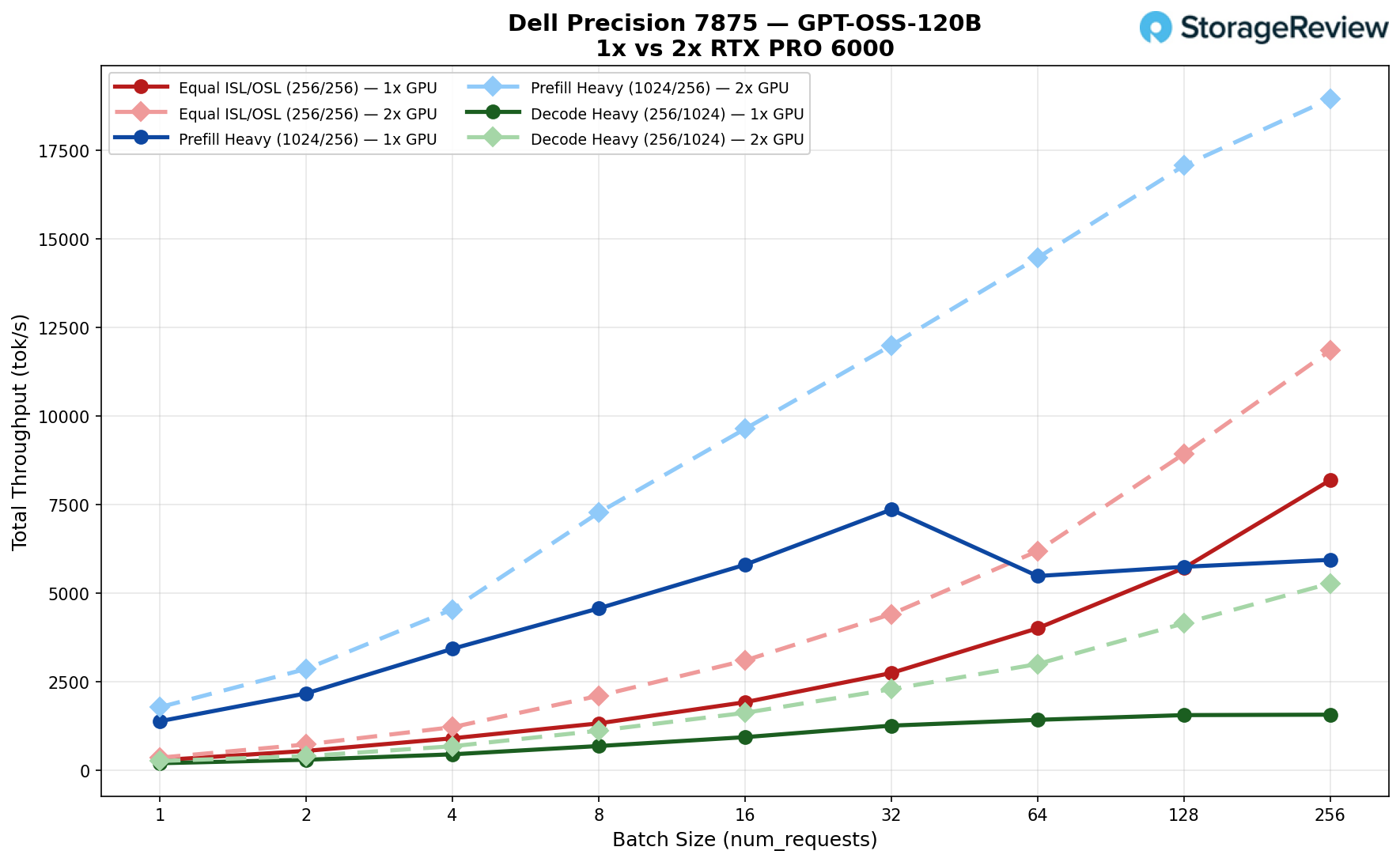
Equal ISL/OSL (256/256): The 1x started at 284 tok/s vs the 2x at 355. Through batch 32, the gap widened, 2,744 vs 4,409. At batch 256, the 1x peaked at 8,190 tok/s, while the 2x hit 11,848 tok/s, a 45% advantage for the dual-GPU setup.
Prefill Heavy (1024/256): The 1x opened at 1,384 vs 1,781 for the 2x. Both climbed through batch 32, with the 1x at 7,359 and the 2x at 11,995. But then the 1x stalled and actually dropped at batch 64 to 5,483, eventually peaking at 5,941 tok/s at batch 256. The 2x kept climbing to 18,954 tok/s, more than 3x higher.
Decode Heavy (256/1024): The 1x started at 198 vs 261 for the 2x. By batch 32, the 1x was at 1,259 vs 2,161. The 1x plateaued hard after batch 64, finishing at 1,569 tok/s at batch 256. The 2x reached 5,275 tok/s, more than 3x the single GPU result.
GPT-OSS-20B
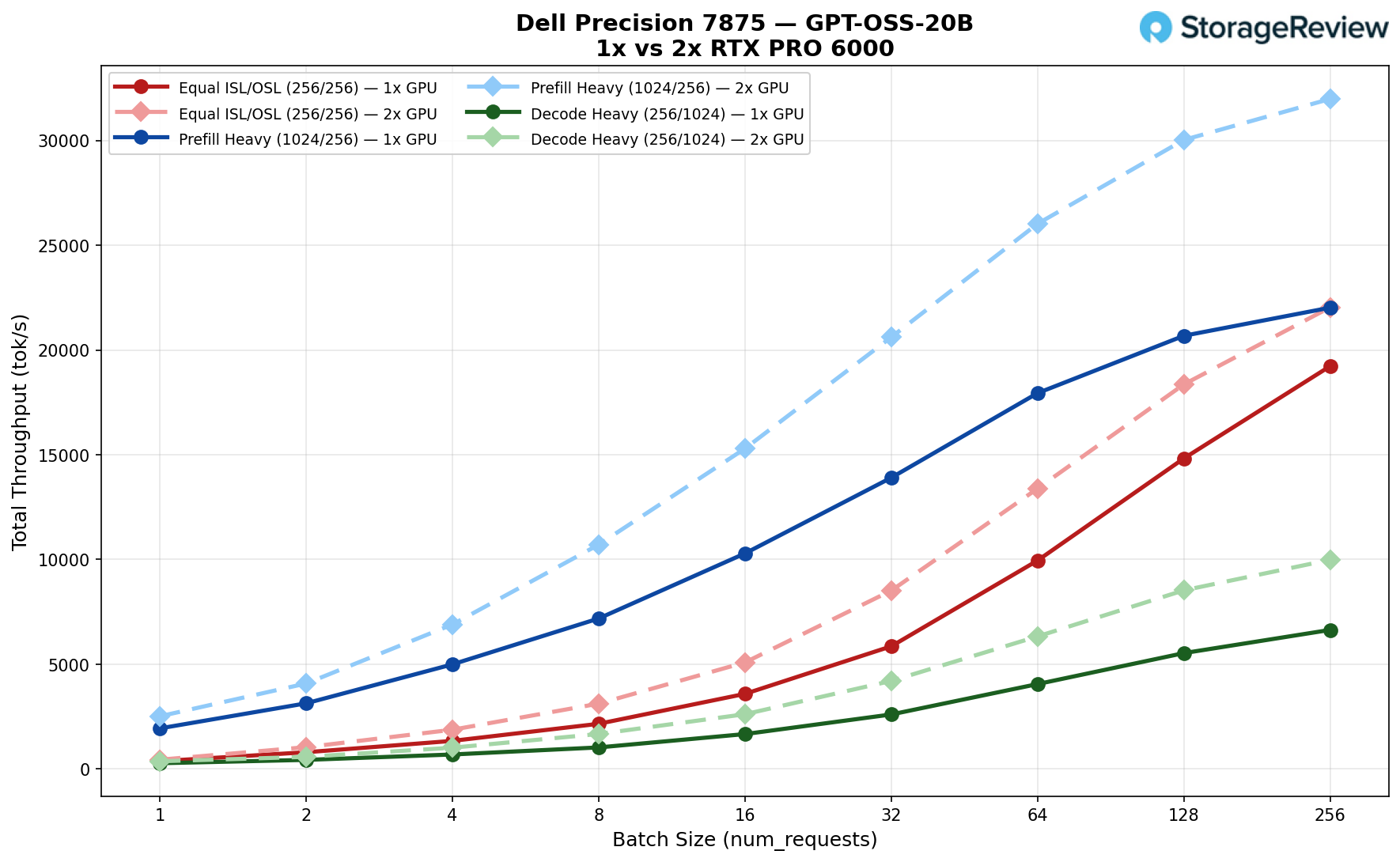
Equal ISL/OSL (256/256): The 1x started at 373 tok/s vs 425 for the 2x. By batch 32, the gap was already notable, 5,856 vs 8,514. Both peaked at batch 256, with the 1x at 19,228 tok/s and the 2x at 22,034 tok/s, giving the dual GPU about a 15% advantage.
Prefill Heavy (1024/256): The 1x opened at 1,938 tok/s vs 2,351 for the 2x. At batch 32, the gap widened considerably, 13,904 vs 20,120. Both peaked at batch 256 with the 1x at 22,019 tok/s and the 2x at 31,982 tok/s, a 45% lead for the 2x.
Decode Heavy (256/1024): The 1x started at 275 tok/s vs 340 for the 2x. At batch 32, the 2x pulled ahead more clearly, 4,204 vs 2,602. Both peaked at batch 256 with the 1x at 6,638 tok/s and the 2x at 9,985 tok/s, roughly 50% higher for the dual GPU.
Qwen3 Coder 30B
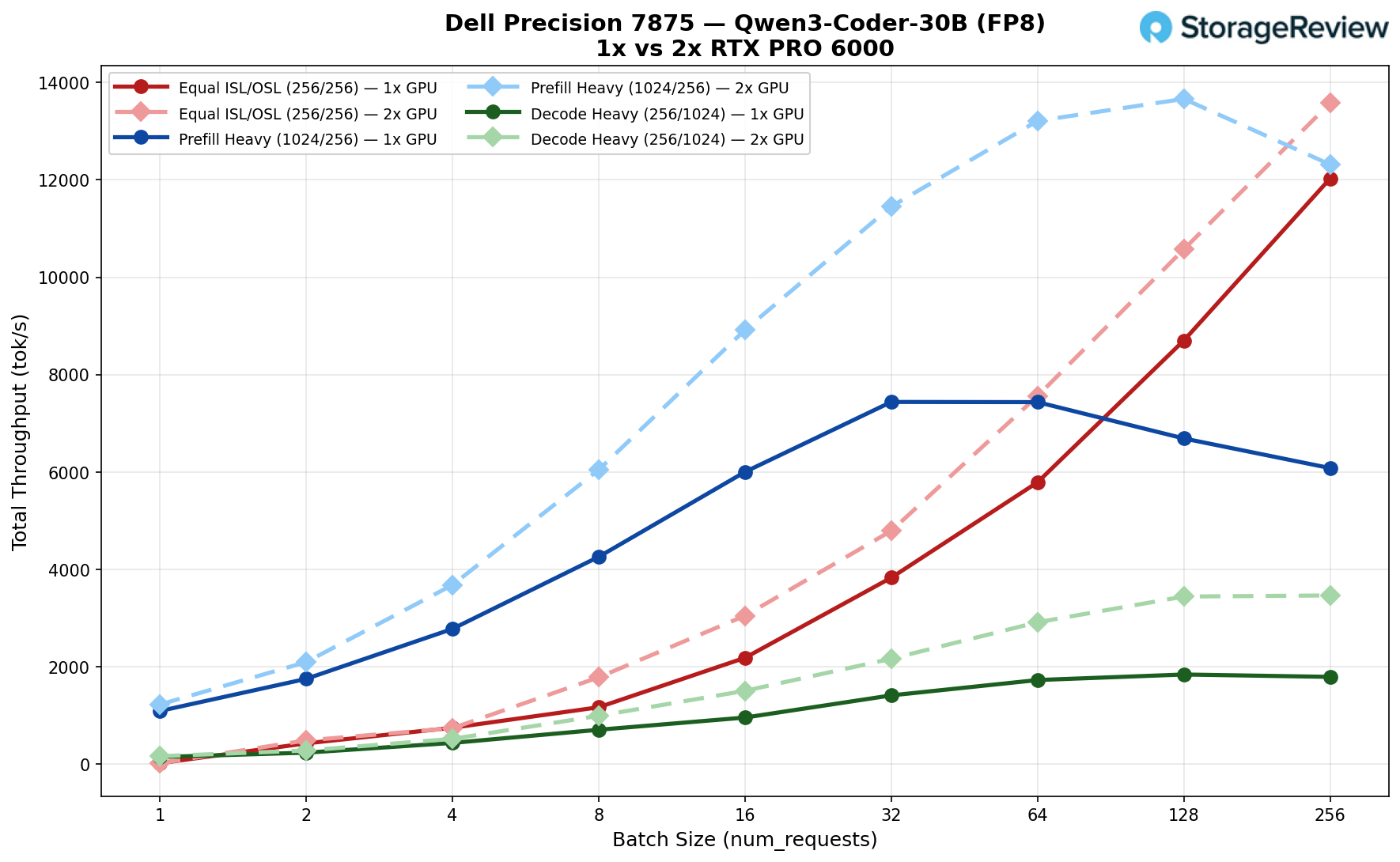
Equal ISL/OSL (256/256): Both started nearly at zero, 20 vs 19 tok/s at batch 1. By batch 32, the 2x pulled ahead, 4,600 vs 3,830. Both peaked at batch 256, with the 1x at 12,027 tok/s and the 2x at 13,577 tok/s, giving the dual GPU about a 13% advantage.
Prefill Heavy (1024/256): This one tells an interesting story. The 1x opened at 1,091 tok/s vs 1,177 for the 2x. At batch 32, the 1x hit its peak of 7,438 tok/s, then dropped off, finishing at just 6,080 at batch 256. The 2x had no such drop, climbing steadily to its peak of 13,661 tok/s at batch 128. That’s nearly double the 1x peak.
Decode Heavy (256/1024): The 1x started at 146 tok/s vs 157 for the 2x. At batch 32, the gap grew, 2,107 vs 1,412. The 1x peaked at 1,841 tok/s at batch 128, then flattened. The 2x setup kept climbing to 3,464 tok/s at batch size 256, nearly twice the single-GPU result.
Mistral Small 24B
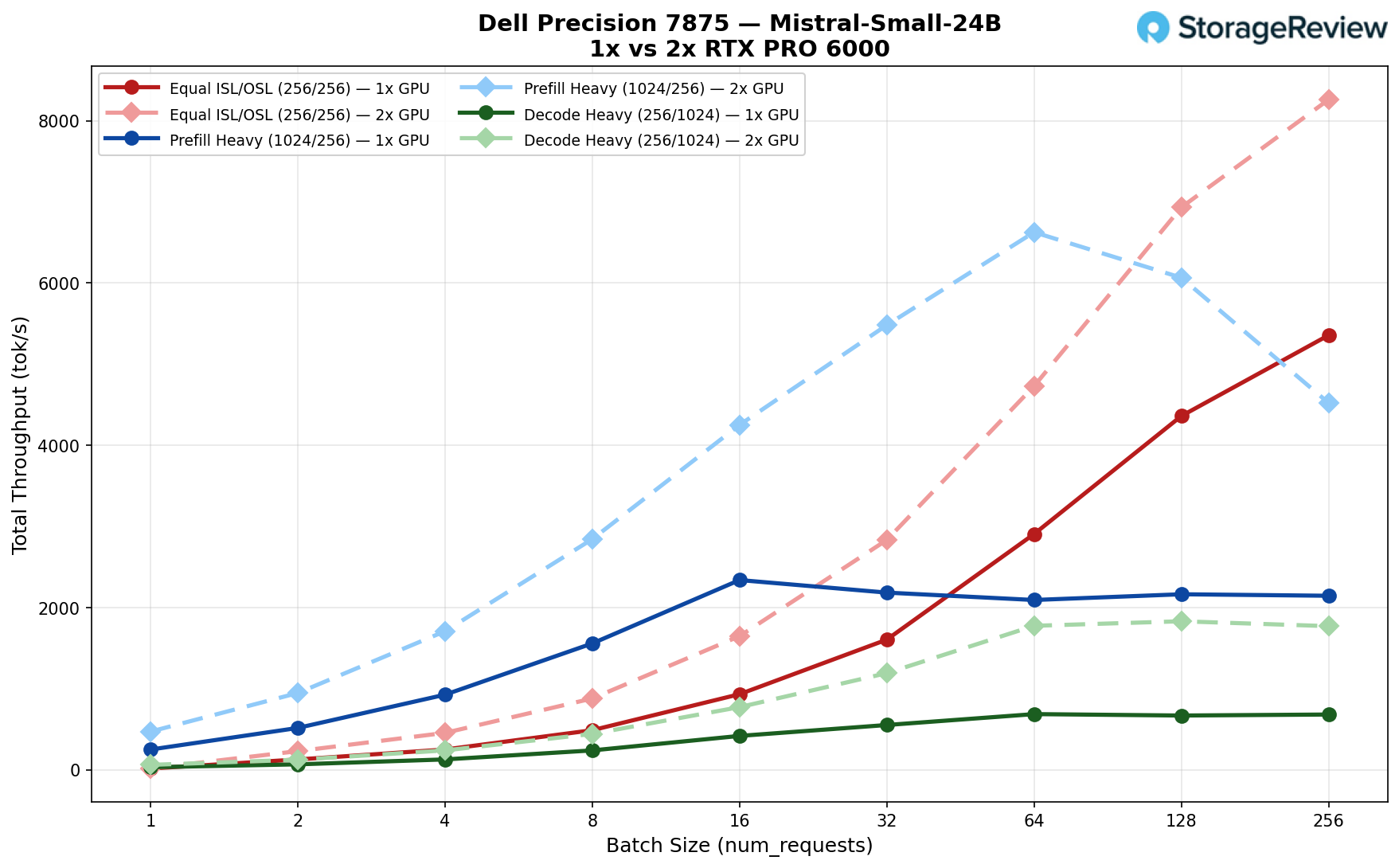
Equal ISL/OSL (256/256): Both starting even, 16 vs 17 tok/s. By batch 32, the 2x was already well ahead, 2,833 vs 1,605. Both peaked at batch 256, with the 1x at 5,357 tok/s and the 2x at 8,261 tok/s, a 54% advantage for the dual-GPU.
Prefill Heavy (1024/256): The 1x opened at 250 tok/s vs 471 for the 2x. The 1x peaked early at 2,339 tok/s in batch 16, then plateaued, finishing at 2,146 in batch 256. The 2x peaked at 6,627 tok/s in batch 64, then dropped to 4,522 tok/s in batch 256. Both configs hit their ceilings and fell back, but the 2x peaked nearly 3x higher.
Decode Heavy (256/1024): The 1x started at just 32 tok/s vs 61 for the 2x. At batch 32, the gap was clear: 1,192 vs 553. The 1x peaked at just 687 tok/s at batch 64 and flatlined. The 2x peaked at 1,831 tok/s in batch 128 before a slight dip, still nearly 2.7x the single-GPU result.
Llama 3.1 8B
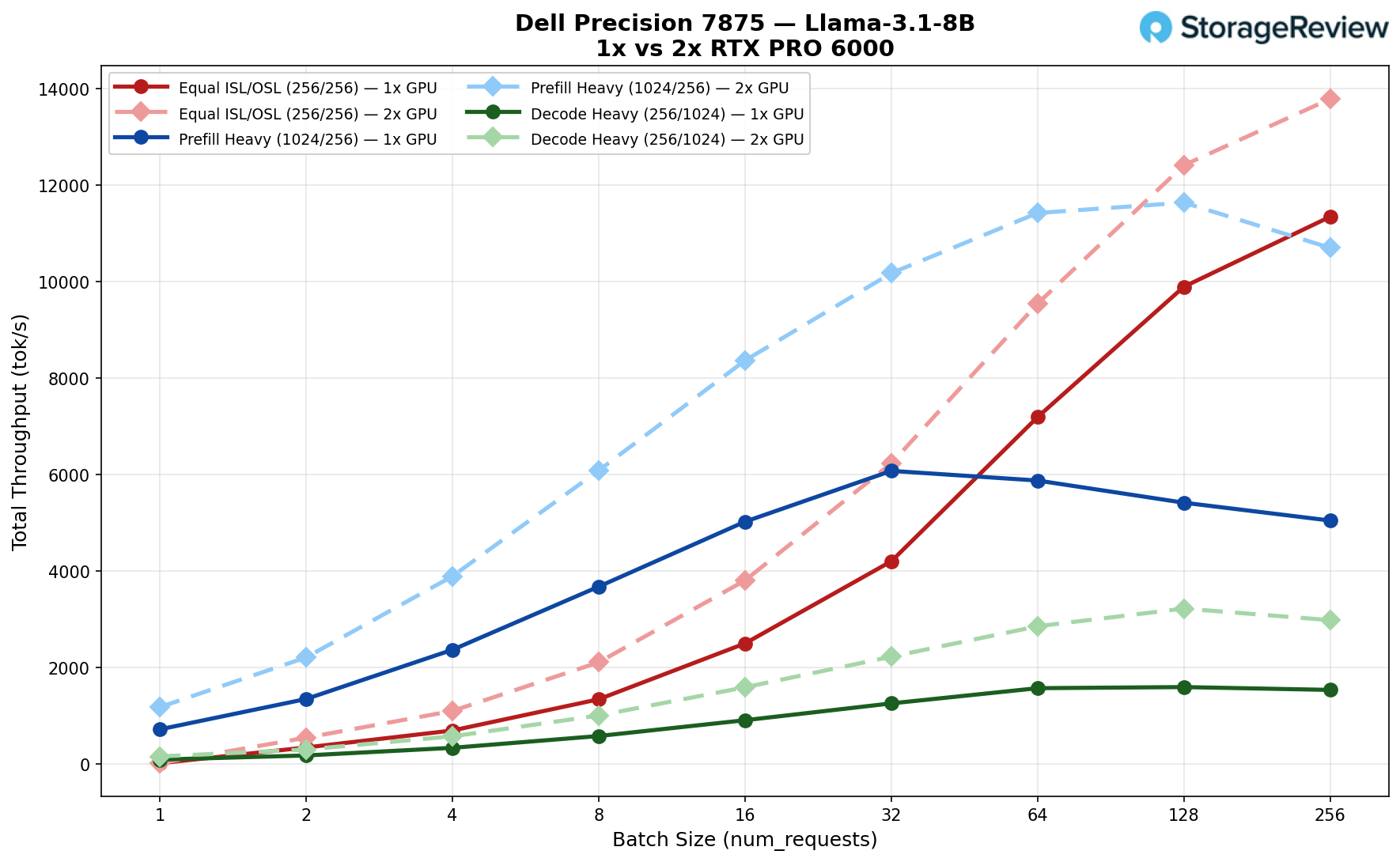
Equal ISL/OSL (256/256): The two configs were locked together at 19 tok/s apiece at batch 1. The 2x started separating through the mid-range, hitting 6,234 at batch 32 vs 4,205 for the 1x. Both kept climbing all the way to batch 256, with the 1x peaking at 11,346 tok/s and the 2x at 13,789 tok/s, a 21% edge for the dual GPU.
Prefill Heavy (1024/256): The 2x came out stronger at batch 1, 1,182 vs 721 tok/s. By batch 32, the gap was significant, 10,177 vs 6,079, which was actually the 1x GPU’s ceiling. The 1x fell back from there to 5,049 at batch 256. The 2x held its gains and peaked at 11,639 tok/s at batch 128, nearly double what the single GPU managed.
Decode Heavy (256/1024): The 2x carried a consistent 2x lead throughout the entire run. At batch 32, it was 2,227 vs 1,259, and both peaked at batch 128 with the 1x at 1,598 tok/s and the 2x at 3,225 tok/s. The 1x flattened after that, while the 2x finished at 2,985 at batch 256, still nearly double.
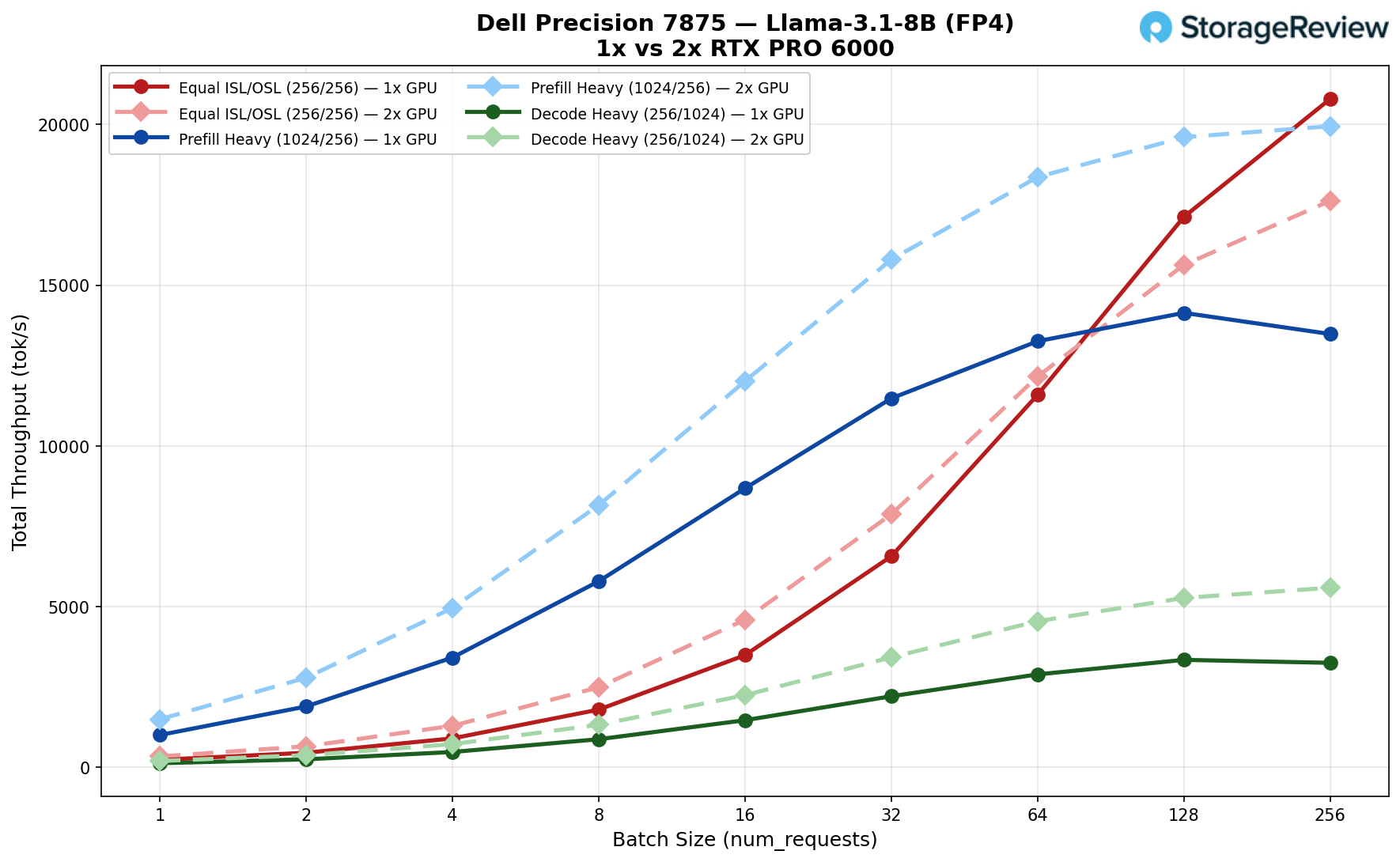
Llama 3.1 8B (FP4)
Equal ISL/OSL (256/256): The 2x had a stronger footing at batch 1, 345 vs 239 tok/s. Through the mid-range at batch 32, the 2x led, 7,873 vs 6,568. Then something interesting happens, the 1x kept climbing aggressively and overtook the 2x, finishing at 20,791 tok/s at batch 256 vs 17,621 for the dual GPU. The single GPU actually wins this test at high batch sizes.
Prefill Heavy (1024/256): The 2x held a consistent lead throughout. It came in at 1,499 vs 1,010 at batch 1, widened to 15,798 vs 11,478 at batch 32, and while the 1x peaked at 14,138 tok/s at batch 128, the 2x kept scaling to 19,941 tok/s at batch 256, a 41% advantage at peak.
Decode Heavy (256/1024): The 2x maintained roughly a 1.5-1.7x lead across the whole range, 3,426 vs 2,215 at batch 32. The 1x peaked at 3,347 tok/s at batch 128 before tailing off, while the 2x climbed to 5,589 tok/s at batch 256, its best result of the run.
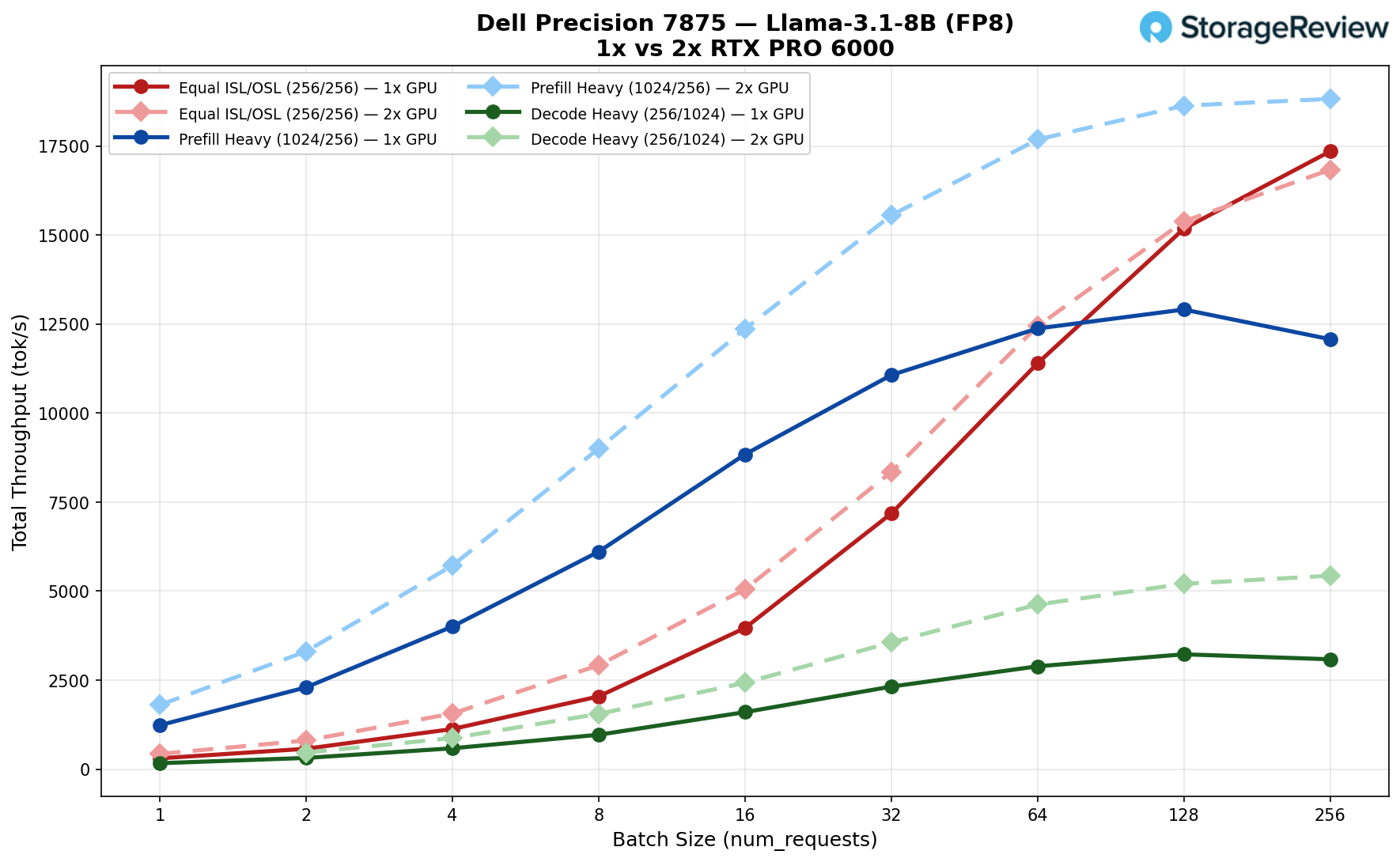
Llama 3.1 8B (FP8)
Equal ISL/OSL (256/256): The 2x had the stronger opening at 427 vs 302 tok/s and led through the mid-range, 8,341 vs 7,178 at batch 32. As with the FP4 results, the 1x overtook the 2x at the high end, finishing at 17,349 tok/s vs 16,833 tok/s for the dual-GPU at batch 256. Again, the single-GPU setup edges out the 2x setup when the batch size gets large enough.
Prefill Heavy (1024/256): The 2x pulled ahead early at 1,803 vs 1,233 tok/s and maintained a consistent lead throughout. At batch 32, it was 15,552 vs 11,067, and while the 1x peaked at 12,906 tok/s at batch 128 before leveling off, the 2x kept climbing to its peak of 18,822 tok/s at batch 256, a 46% advantage.
Decode Heavy (256/1024): The 2x data starts at batch 2 rather than batch 1 here. From batch 32 onward, the gap was steady, 3,558 vs 2,316. The 1x peaked at 3,224 tok/s at batch 128, then tailed off to 3,084. The 2x climbed all the way to 5,429 tok/s at batch 256, nearly 1.7x the single GPU result.
Conclusion
The Dell Precision 7875 with the AMD Threadripper PRO 9995WX and dual NVIDIA RTX PRO 6000 Blackwell GPUs represents the current high-water mark for a self-contained workstation. The chassis reflects that ambition at every level, from the tool-less fan tray and front-accessible FlexBays to the lockable storage bays. This is a machine built for environments where uptime, security, and serviceability matter as much as raw performance.
The internal layout reinforces that philosophy. Six full-height PCIe slots, eight DIMM slots supporting up to 2TB of ECC memory, and storage expansion up to 56TB give the platform genuine long-term headroom. Dell’s ISV certifications and Reliable Memory Technology software add another layer of confidence for studios and labs running mission-critical workloads around the clock. It does not feel like a desktop stretched to meet professional demands. It was designed from the start to carry them.
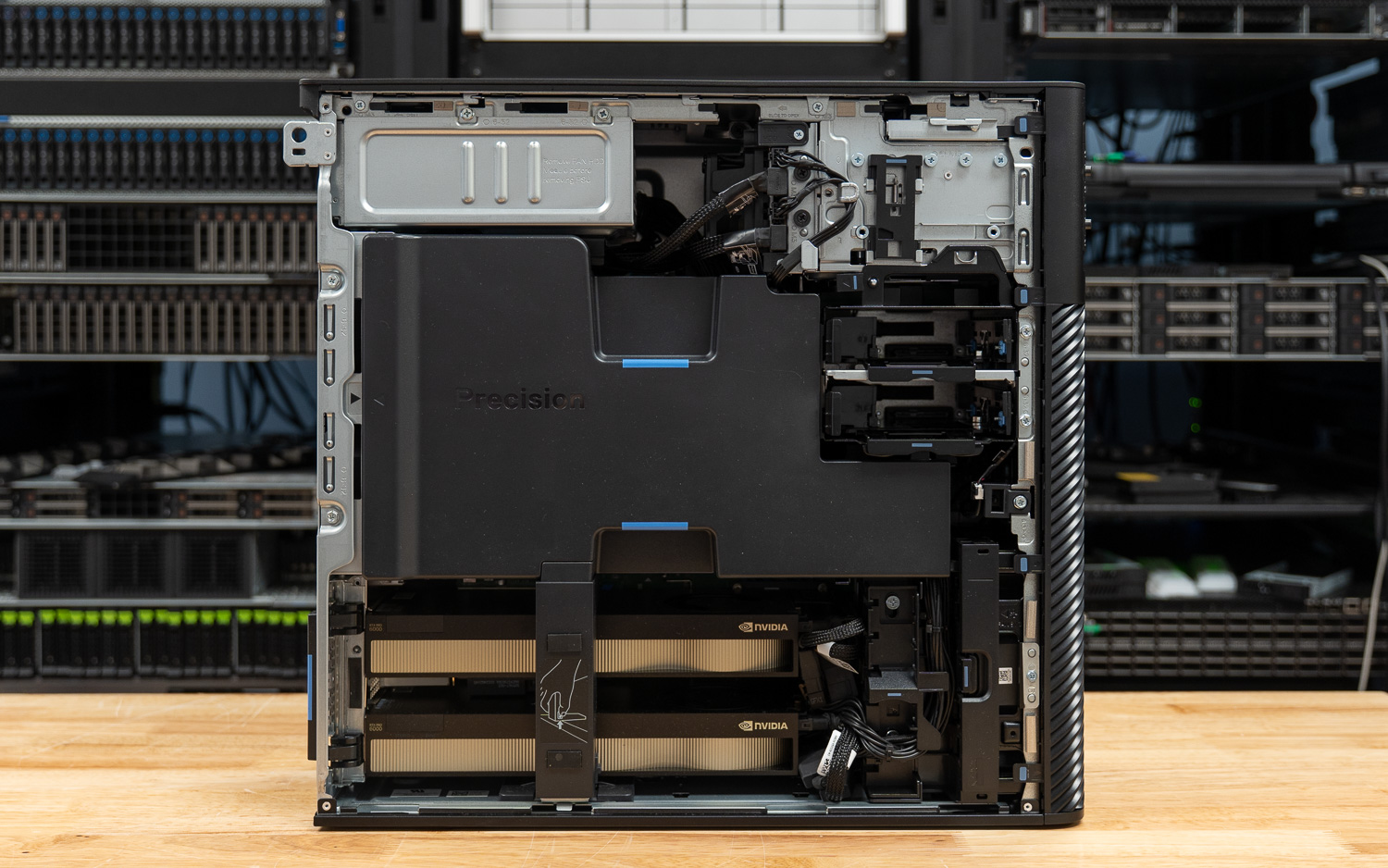
On the GPU configuration question, the answer depends entirely on what you are running. For smaller models, a single RTX PRO 6000 is not just sufficient; it can actually outperform a dual-GPU setup at high batch sizes and certain stages of the workload, where the overhead of splitting the model across two cards outweighs the added capacity. The calculus shifts dramatically with larger models. A single GPU stalls and flattens under memory pressure, while the dual-GPU setup continues to scale. The 192GB of combined GDDR7 becomes the deciding factor, and the performance gap widens considerably on prefill-heavy and decode-heavy workloads. For teams running production inference on frontier-class open-weight models, the second card is not a luxury. It is the capability tier.
The Precision 7875 is not a machine you buy speculatively. It targets professionals with specific, demanding workloads, and for those users, it delivers.
Product Page – Dell Precision 7875
Leaderboard: The Dell Precision 7875 holds the Best Tower for Local AI spot on our Best Desktops for Local AI leaderboard.
Leaderboard: The Dell Precision 7875 holds the Best for CPU-Heavy Workloads spot on the Best Desktop Workstations leaderboard.


 Amazon