

Most RMM (remote monitoring and management) platforms are very good at telling you something broke, but not much help with actually fixing it. Aipex, a clean-sheet, AI-first product from Tassient, is built to do both. Ask it in plain English why a machine crashed, and it will read the dump, name the kernel driver responsible, find an updated version, and install it, all with a human in the loop. After two weeks of pointing it at our own systems, that shift from monitoring to genuine remediation is what separates it from a category that has been around since the 1990s.
What is RMM
Before diving into why Aipex is so different from other RMM products, let’s take a closer look at what traditional RMM solutions have provided.
RMM tools originated in the 1990s, often as in-house tools, and were initially simple remote-access and network-monitoring tools used by IT departments and managed service providers (MSPs) to monitor the servers under their purview. Early platforms primarily focused on these systems’ uptime and network connectivity, offering basic support via remote-control software. As Windows PCs became the de facto standard in businesses and organizations expanded geographically, RMM solutions evolved to include automated patch management, software deployment, antivirus monitoring, and hardware inventory tracking.
During the 2000s and 2010s, the rise of managed services, virtualization, cloud computing, and mobile workforces drove rapid innovation in this space, transforming RMM platforms into centralized management systems capable of handling thousands of endpoints across multiple locations.
When the pandemic ushered in the work-from-anywhere era, RMM platforms became increasingly important in the End-User Computing (EUC) space. IT support organizations were required to monitor and manage the growing number of desktops, laptops, thin clients, and virtual workspaces spread across numerous locations.
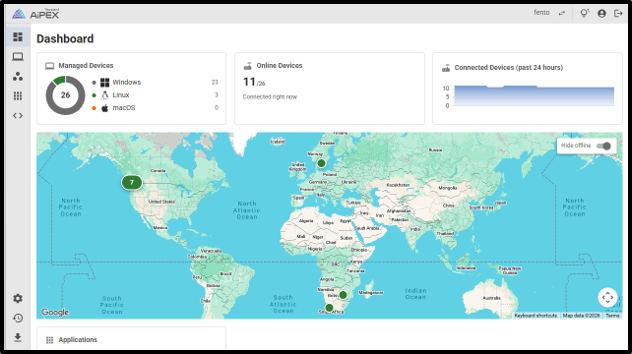
Today, RMM platforms play a critical role in the EUC space by supporting physical desktops, laptops, thin clients, VDI environments, and cloud-hosted workspaces while increasingly incorporating scripting, automation, and security features to improve endpoint reliability and user experience.
Modern RMM tools provide IT administrators with a centralized view of the devices they manage, including their health, performance, and applications.

Support organizations can identify and resolve issues before they impact users. RMM solutions often work beside VDI, DaaS, and physical endpoint platforms to automate software deployment, monitor resource utilization, manage updates, and provide remote support.
As hybrid work continues to expand with freelancers and contractors, RMM platforms have evolved from simple device-monitoring tools into sophisticated, critical operational platforms that help IT teams improve security, reduce downtime, streamline endpoint management, and deliver a consistent experience for their end users.
With that background, let’s dive into the newest entry into this field, Aipex by Tassient.
A Next-Gen RMM Product
When Tassient reached out to us to review their product, we politely declined, as this is an old category. However, they pitched a few ideas that set them apart from other RMM products. This is an entirely new, clean-sheet product based on an AI-first mentality, and, most importantly, what caught our eye is that it can perform agentic AI investigation and remediation on the devices it monitors.
Over the past two years, virtually every product we come in contact with has an AI story. These range from simply AI-washing to completely rewriting their product to incorporate AI. What intrigued us about Aipex was that it is less than a year old, and its main developer, Jon Rolls, designed it from the ground up to use AI, not simply to bolt AI functionality onto an existing product.
We, like the rest of the IT community, are normally leery of new products. Still, given Jon’s more than 30 years in the EUC field and his experience developing multiple RMM tools, we see this as a next-generation RMM product rather than a “new” product. Jon has brought all the lessons he has learned over the past decades into this product, without the legacy baggage and code base of an existing product. He brings all the “If I could do it again, I would …” knowledge into this product.
OS Crash Detection and Analysis
The first and most obvious thing the Tassient team did with Aipex was to design it around agentic AI as a built-in, marquee feature of the product. This translates into a couple of advantages: you ask natural-language questions about the systems you oversee, and the AI model has direct access to the remote device, with human-in-the-loop supervision.
Asking questions and getting answers is good, but remediating issues when they arise is better, and this is where Aipex really impressed us.
To drive home this point, Jon showed how Aipex is used to identify when and, more importantly, why it crashed. As with any system, an administrator can attest that analyzing crash dumps is time-consuming and requires extensive knowledge.
Jon showed us a system that experienced a BSOD and typed “When did this system last crash and why?” into the AI assistant, which reported the time and date of the crash.

More importantly, it then dug in, identified the kernel driver that caused it, and offered to look for an updated version of the driver and install it.

As any IT professional knows, finding and fixing the problem is only part of the solution; we also need to document the issue. Most IT professionals hate the documentation process. With Aipex, creating the ticket is as simple as typing “Create an ITSM formatted ticket,” and voilà, it’s created. We were even able to create JSON and XML-formatted output.

This is not a trivial example and it highlights a few key points: questions can be asked in natural language, the product isn’t limited to a set, canned set of products, problems, and most importantly, issues can be remotely identified and remedied in seconds without having to interact with the system directly, that is we didn’t have to type in any commands to fix the issue directly. This is the power of AI and AI agents.
We are cautious about canned demos. To ease our concerns, Jon offered to let us review the AI assistant on one of our systems.
Installing the Aipex Agent
Usually, at this point, we need a few days to set up and add the systems to the RMM platform. Still, as Aipex is totally SaaS based, to set up our Aipex dashboard, we received an email that enabled us to create an administrator account, which in turn allowed us to log in to the Aipex dashboard.
The Aipex agent was installed by issuing a single command on our Windows systems. We then asked which ports we needed to open, but Jon explained that Aipex uses a reverse proxy to a routable site to set up the connection. This is a huge advantage if you have ever tried to talk to a non-technical user by opening a firewall port on their PC and router, or, even worse, by asking a network administrator to open a port to the outside world. The agent operates entirely in user mode, making it more palatable to IT administrators and easier to deploy.
We then added the device to the group and, within seconds, had visibility into our devices.

Ad-Hoc AI Assistant Testing
Looking at the device’s homepage, we could see where it was located and the general information about it.
Clicking the performance tab showed us performance charts. When we asked why it didn’t show disk performance charts, Jon said we should ask the AI assistant for them; we did, and they appeared.

Jon explained that it not only can add OS charts, but you can also add application performance charts, such as for Zoom.

Remediation
Once we installed and used Aipex, we began to appreciate its power and how it could dramatically increase IT staff productivity.
Let’s start with the Zoom call we were on. After clicking on the user’s device, we asked a simple question: “Is there an active Zoom call?” This was a natural-language question; no special formatting was needed, and we didn’t need to provide additional information. A few seconds later, it returned the answer. Yes- Zoom is running.

Remediating Application Issues
One of the first issues we used Aipex for was remediating a WhatsApp issue. It was running (we could see its icon in the taskbar) but was not being displayed on the screen. We first asked Aipex’s AI assistant, “Is WhatsApp installed and running?” Within a couple of seconds, it confirmed that it was installed and running. We then entered “we cannot see it on the display.” A few seconds later, it came back, said the application’s stored location was incorrect, and asked if we wanted to correct it. We said “proceed,” and a few seconds later, the issue was fixed, and the application appeared on the screen. It reported that the GUI was not being displayed due to an incorrect screen location in the registry.
Over the next two weeks, we continued to ask the AI assistant questions; some were OS-related, others were application-related. Sometimes we asked it to identify issues, and sometimes to fix them. It usually came back within seconds when it needed to check logs and remediate issues; sometimes it took minutes.
Below is a sample of what we did.
In one instance, PowerPoint was running so slowly that it was virtually unusable. We asked Aipex, “Why is PowerPoint running so slow?”

Not only did it identify the issue, but it also corrected it.

During our product review, we used Aipex to remediate issues with WhatsApp “white screening” (corrupt cache) and a system being temporarily offline (due to lost DNS/network reachability).
Pushing it Further
After becoming comfortable and confident with Aipex, we even tried to push it beyond its advertised use. We had a new Windows 11 system and asked it to “create a virtual machine that has 32 GB of RAM, 8 vCPU cores, and an 84GB disk.”
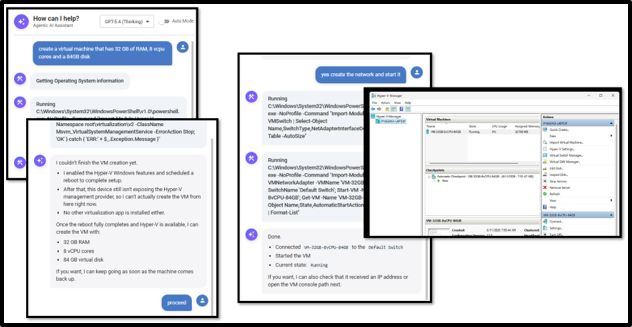
To our surprise, it actually did it. We had to tell it to proceed a couple of times, and it needed to reboot the machine, but it still created the VM. This took a fraction of the time that it would have taken us to do it manually. While perhaps this was not a core use case for Aipex, that is the point of using an AI model to power a solution like this—you aren’t bound by the constraints of canned scripts or fixed playbooks.
In another instance, we wanted to know which LLMs would run on a device; it looked at the system’s hardware and reported which LLMs were suitable for the machine.

Jon said that because Aipex uses best-of-breed Frontier AI models like GPT-5.4, it really isn’t limited to what you can ask it to do.
While the AI assistant is Aipex’s standout feature, the product also includes standard RMM capabilities.
Remote Access
Oftentimes, it is desirable and even necessary to see a remote system’s desktop. Aipex has a built-in remote console, shell, and file transfer capabilities.
We brought up the remote console and connected to our system without any issues. While doing so, we could view the display and ask for the user’s consent before connecting to it. Once connected, a pop-up window appeared on the user’s desktop, indicating that Tassient was connected.

We worked with the remote system as if it were local. Opening a shell on the remote system was also very responsive.
In many cases, we transfer files, such as benchmarking tools, between systems. We found that Aipex’s file transfer allowed us to do so directly from the Aipex dashboard. We can see how IT support organizations would find this useful if they need to pull log files and push files to remote systems.

Although remote access is not the sexiest feature, it is one that all RMM products need, and Aipex has done a good job of integrating and implementing it.
Mass Healing
Often, you need to remediate the same issue across multiple systems, or you want to run the same commands on multiple machines to enable this. To enable the “mass healing” of devices, Aipex has a powerful scripting feature.
Scripts can be created for and run on Windows, Linux, and macOS systems using literally any scripting language.

To run these scripts across multiple devices, select the group of devices you want to run them on and specify when you want them to run.

They are working to increase the number of predefined scripts, but Jon said most users generate their own scripts and add them to their personal script catalog.
To run the script on a single device, select the device, then select the Automation tab to schedule the script to run, or select the Script (<>) tab to run it on demand.

One of the things we like and haven’t seen in many other RMM systems is that when you run an on-demand script, it opens a window to show the output. It is a small thing, but it shows the years of experience that developers have put into this product.

Linux Servers and Desktops
Linux servers and desktops are usually a niche in most organizations, but when used, they are critical to their success. The two most common cases are when they are used with high-priced hardware for high-level compute and data-intensive work like AI, media, and entertainment, and, strangely enough, on the other end of the spectrum, on low-powered devices like kiosks and digital signage.
In most organizations, IT staff are unfamiliar with the commands needed to monitor and maintain various Linux distributions. An Aipex AI assistant can greatly assist IT staff, as they only need to ask it to complete the task. For example, if you need an additional Linux user on a system, you can type “create a local user on this system with a name of TomF, password or blahblahblah001,” and it will determine the correct syntax and create the user. However, it really shines when you need to perform more complex tasks, such as remediating issues or gathering more information from the Linux system.
Transparent Pricing
Oftentimes, finding the price of a SaaS application or piece of software is nearly impossible. Tassient has a website that displays its product prices.

We did some research and found hints about what other RMM products cost. One said it was equivalent to only a couple of cups of coffee per device per month, which works out to about $100 per device per year. So even a small deployment of 200 devices would cost $20K, whereas Aipex’s $50-per-administrator-per-month rate, with no device limit, comes to $600 per year!
We asked Jon how he keeps the price so low. He said a couple of factors come into play. First, just as his product uses AI, so does his development team. He said that, personally, it makes him far more productive when coding and, just as importantly, allows him to keep his development team small and nimble with minimal overhead. He also said that in a past project, he found that cloud storage costs could rack up quickly. With Aipex, most data is stored locally on the device itself. It does take up a small amount of disk space on the local device (about 100 MB), but most customers’ devices have more than enough disk space and find the trade-off worth it.
Final Thoughts
The Tassient team’s decades of experience and familiarity with the RMM market are evident in Aipex. Although it is still a relatively young product, its features make it seem more mature than its age would suggest; millennials would describe it as having an “old soul”.
Yes, there are some features we would like to see in this product, such as alerts and more predefined scripts, but overall, it is a solid product. Most importantly, because it does not rely on preconfigured scripts, its ability to identify and remediate issues is unmatched by anything else we have seen in this category.
Pricing is competitive, and if you even save just half an hour a month, the product pays for itself.
The pace at which AI has overtaken IT over the past two years is mind-boggling, and we are happy to see products like Aipex embrace it and make our time more productive.


 Amazon