---
description: Available in 8TB and 16TB, the Seagate FireCuda Gaming Hub is an external storage device meant to offload a good amount of storage from a PC
title: Seagate FireCuda Gaming Hub Review
image: https://www.storagereview.com/wp-content/uploads/2021/06/StorageReview-Seagate-FireCuda-Gaming-Hub-Branding.jpg
---

[![Storage Review]()](https://storagereview.com/)

---

[Facebook](https://www.facebook.com/@storagereview) [X (Twitter)](https://twitter.twitter.com/storagereview) [Instagram](https://www.instagram.com/storagereview/) [LinkedIn](https://www.linkedin.com/company/storagereview-com) [YouTube](https://www.youtube.com/user/storagereview?sub_confirmation=1) [Email](mailto:info@storagereview.com) [Spotify](https://open.spotify.com/show/1y6VnznABhHeOSMOmbDTz0) [Reddit](https://www.reddit.com/r/StorageReview/) [Discord](https://discord.gg/TwMHb4azdC) [RSS Feed](https://www.storagereview.com/rss.xml) [TikTok](https://www.tiktok.com/@storagereview)

[Facebook](https://www.facebook.com/@storagereview) [X (Twitter)](https://twitter.com/storagereview) [Instagram](https://www.instagram.com/storagereview/) [LinkedIn](https://www.linkedin.com/company/storagereview-com) [YouTube](https://www.youtube.com/user/storagereview?sub_confirmation=1) [Email](mailto:info@storagereview.com) [Spotify](https://open.spotify.com/show/1y6VnznABhHeOSMOmbDTz0) [Reddit](https://www.reddit.com/r/StorageReview/) [Discord](https://discord.gg/TwMHb4azdC) [RSS Feed](https://www.storagereview.com/rss.xml) [TikTok](https://www.tiktok.com/@storagereview)

[![StorageReview.com](https://www.storagereview.com/wp-content/uploads/2026/07/Storage-Review-2x.png)](https://www.storagereview.com)

≡ Menu

- [Home](https://www.storagereview.com/)
- [Storage Reviews](https://www.storagereview.com/review)
  - [Consumer Reviews](https://www.storagereview.com/consumer)
  - [Enterprise Reviews](https://www.storagereview.com/enterprise)
  - [Ubiquiti Reviews](https://www.storagereview.com/best/ubiquiti-reviews)
- [SR Merch](https://store.storagereview.com)
- [Leaderboards](https://www.storagereview.com/best)
  - [Best Storage Arrays](https://www.storagereview.com/best/storage-arrays)
  - [Best Enterprise SSDs](https://www.storagereview.com/best/enterprise-ssds)
  - [Best Servers](https://www.storagereview.com/best/servers)
  - [Best Desktops for Local AI](https://www.storagereview.com/best/desktops-local-ai)
  - [Best Laptops for Local AI](https://www.storagereview.com/best/laptops-local-ai)
  - [Best Local LLM Tools](https://www.storagereview.com/best/local-llm-tools)
  - [Agentic AI Hardware](https://www.storagereview.com/best/agentic-ai-hardware)
  - [Best SSDs & Hard Drives](https://www.storagereview.com/best_drives)
  - [Best Portable SSDs](https://www.storagereview.com/best/portable-ssds)
  - [Best Business Laptops](https://www.storagereview.com/best/business-laptops)
  - [Best Mobile Workstations](https://www.storagereview.com/best/mobile-workstations)
  - [Best Desktop Workstations](https://www.storagereview.com/best/desktop-workstations)
  - [Best Laptop Battery Life](https://www.storagereview.com/best/laptop-battery-life)
- [Storage Reference Guide](https://www.storagereview.com/storage-reference-guide)
- [About SR](https://www.storagereview.com/about-storagereview)
  - [StorageReview.com Sweepstakes Rules and Regulations](https://www.storagereview.com/storagereview-com-sweepstakes-rules-and-regulations)

Search

[Home](https://www.storagereview.com/) » [Review](https://www.storagereview.com/review) » Seagate FireCuda Gaming Hub Review

# Seagate FireCuda Gaming Hub Review

by Lyle Smith on June 7, 2021

[Consumer](https://www.storagereview.com/consumer)  ◇  [Desktop Storage (External)](https://www.storagereview.com/consumer/desktop-storage-external)

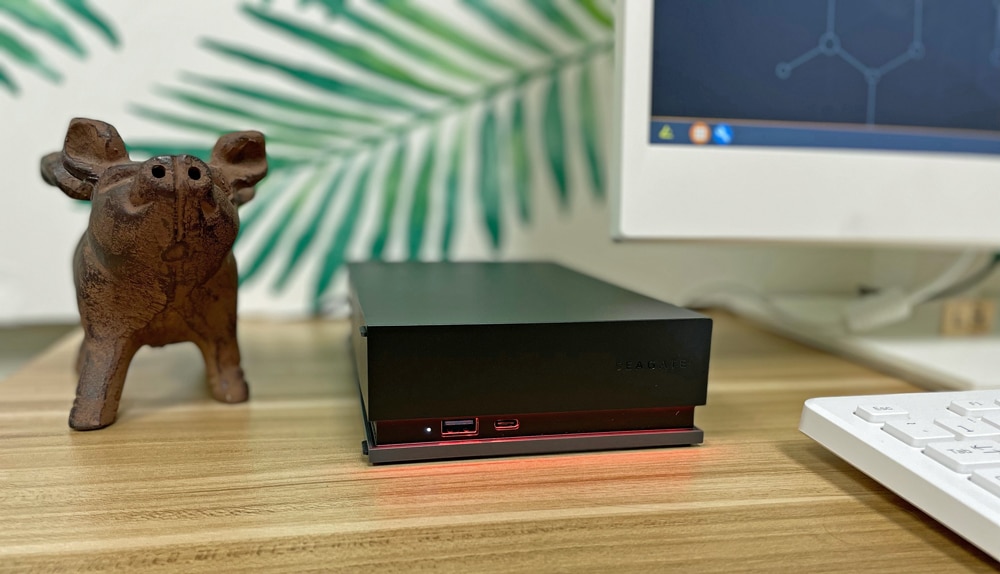
The Seagate FireCuda Gaming Hub is an external storage device meant to add a substantial amount of space for your games and other software. This hefty external drive also allows users to create (or add to) a colorful atmosphere with its customizable RGB LED lighting that runs along the front of the drive, which is often an important aesthetic feature for this demographic. The FireCuda Gaming Hub comes in capacities of 8TB and 16TB.

Gamers nowadays have massive libraries due to the constant sales (on Steam, Epic store, Humble Bundle, etc.), availability, and the overwhelming selection from Indie developers, the latter of which has exponentially grown over the past decade. Impulse buying seems to be the norm. And, if you’re like me, you have dozens of these games installed on your PC at one time, including those that you probably won’t even play.  So, supplemental external drives of this size definitely come in handy.

![Seagate FireCuda Gaming Hub](https://www.storagereview.com/wp-content/uploads/2021/06/StorageReview-Seagate-FireCUda-Gaming-Hub-Front.jpg)

That said, Seagate has not posted any quoted performance numbers, so be sure to pay extra attention to the performance section so you can determine whether or not it will be able to handle your use case.

## **Seagate FireCuda Gaming Hub vs. Seagate Expansion Desktop Drive**

The Seagate Expansion is one of the company’s other external desktop drives and shares a lot of the same features as the FireCuda Gaming Hub. Both are similar in size (though the Gaming Hub is slightly bigger), support USB 3.0 connectivity, and have a maximum capacity of up to 16TB. Both also include Seagate’s Rescue Data Recovery Services (which helps users recover their data due to an unexpected mechanical, accidental, or natural disaster) and warranty. However, they differ in some pretty important areas.

While they both offer the same maximum storage, the Seagate Expansion is available in a much wider variety of capacity models (as small as 4TB), allowing it to satisfy a broader range of needs. That said, the Gaming Hub is equipped with dual USB-C and USB-A ports, which give users a few extra options to power or charge their peripherals. They are also front-facing, so users will have easy access to these ports.

The most obvious difference is the Gaming Hub’s RGB LED lighting features, which certainly cater to the gaming demographic. This can be managed using Seagate’s drive management software, Toolkit. It’s highly customizable with a range of different RGB colors and light patterns.

As far as pricing goes, the Gaming Hub is slightly more expensive: The 16TB and 8TB models go for roughly $535 and $295, respectively, while the Seagate Expansion is currently priced at $530 and $255 for the same capacities.

## **Seagate FireCuda Gaming Hub Specifications**

| Model number | STKK16000400 |
| --- | --- |
| Capacity | 8TB, 16TB |
| Interface | USB 3.0 |
| Dimensions: L x W x D | 8.11in/206.0mm x 1.937in/49.2mm x 5.039in/128.0mm |
| Weight | 1354g/2.743lb |
| Included | ·         FireCuda Gaming Hub ·         4-foot (1.2M) USB 3.0 cable ·         Power adapter ·         Quick Start Guide ·         Rescue Data Recovery Services |
| Warranty | 2-year limited |

## **Design and Build**

At just over 8 inches in length and just under 2 inches in width (when standing horizontally), the Seagate FireCuda Gaming Hub is a fairly compact device for the amount of storage it offers. It also weighs in at 2.74 pounds for the 8TB model and 3 pounds for the 16TB model and can be placed both vertically and horizontally.

![Seagate FireCuda Gaming Hub branding]()

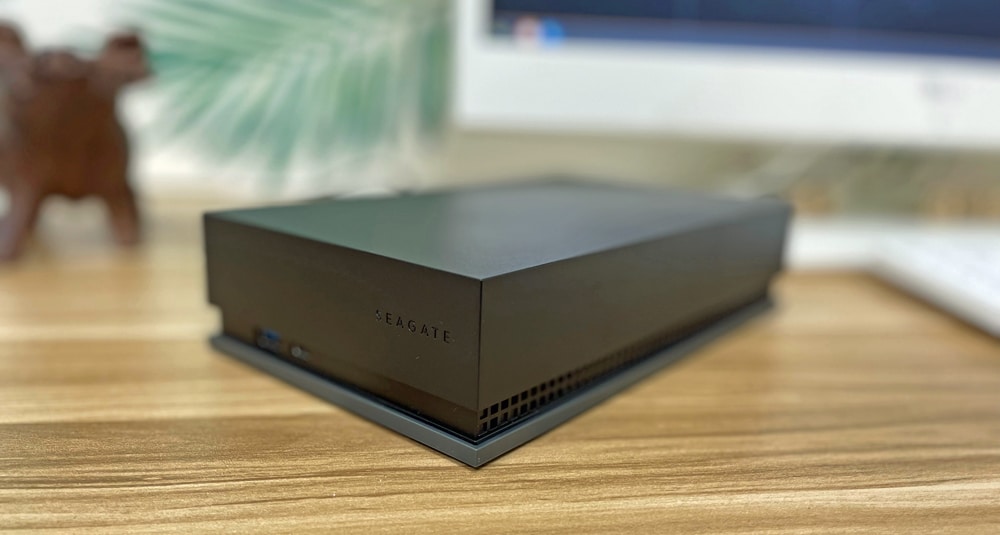
Though the design looks nice, it features a plastic build. It would have been nice of Seagate to go all out and use a more premium material. Nonetheless, it features a sizable groove that runs along the perimeter of the hub and the sides have ventilation to help exhaust the heat. Underneath the hub is the usual sticker with all the information about the drive.

The dual USB-C and USB-A ports are located on the front of the external drive, which means easy access to the peripherals you plug into it.

![]()

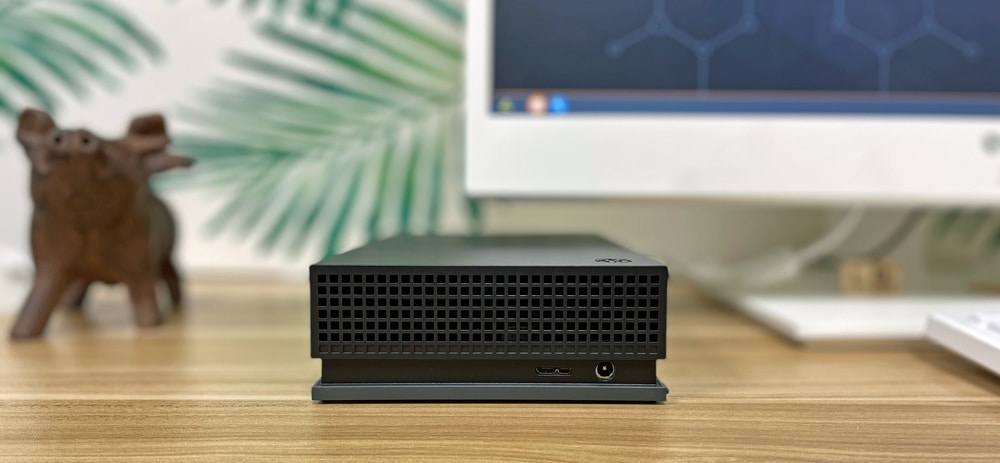
The FireCuda Gaming Hub uses a simple A/C adaptor to power the device while using a USB micro-B port to connect to the host computer. It’s a bit unfortunate that Seagate decided to go with an old-school USB 3.0 connection (not USB-C) because performance will be limited and won’t be producing a lot of bandwidth to connected devices. It’s also not as neat and tidy to plug into a new notebook. Regardless, all you need to do is plug it in and you’re good to go.

![Seagate FireCuda Gaming Hub rear]()

The RGB lights are located on the front of the Gaming Hub. They are fully customizable including pattern control, and Seagate indicates you can sync up all your FireCuda RGB products via the company’s free Toolkit software. It also supports Razer Chroma (an RGB lighting ecosystem for gaming devices), so those really into the RGB scene can further sync all their Chroma-enabled peripherals.

## **Seagate FireCuda Gaming Hub Performance**

To gauge the performance of the Seagate FireCuda Gaming Hub, we tested it via Blackmagic software and IOMeter, both on a  [Lenovo P520](https://www.storagereview.com/review/lenovo-thinkstation-p520-review).

We compared it to the following drives in IOmeter:

- [Seagate FireCuda Dock 235C w/ 4TB HDD](https://www.storagereview.com/review/seagate-firecuda-gaming-dock-review)

**Blackmagic**

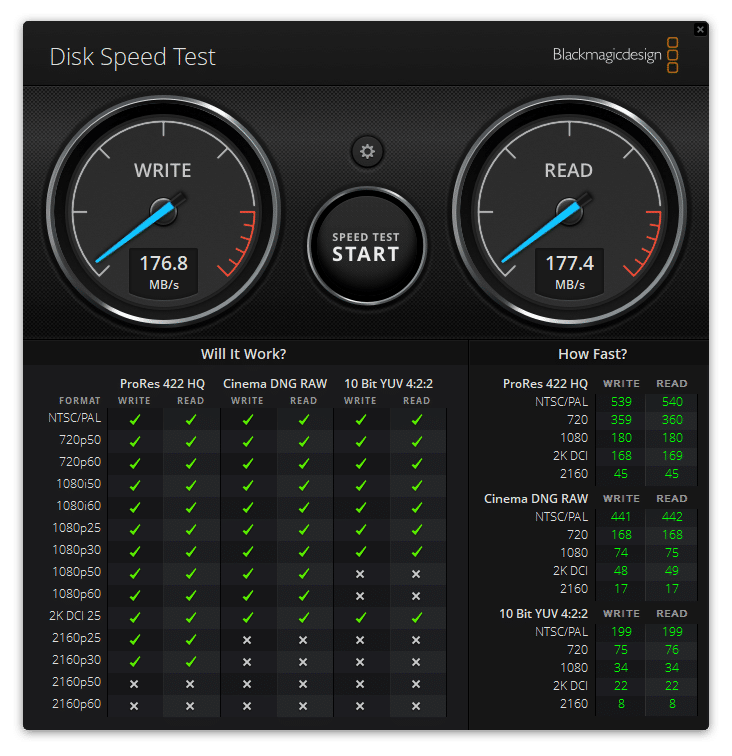
For Blackmagic, we saw 177.4MB/s read and 176.8MB/s write.

![-Seagate FireCuda 8TB Gaming Hub Blackmagic performance]()

**IOMeter**

Turning to IOMeter, the FireCuda Gaming Hub recorded 175.62MB/s read and 176.86MB/s write in 2MB sequential while 2MB random showed 124.22MB/s read and 102.52MB/s write. With 4K random, it was able to reach 124.2 IOPS read and 331.5 IOPS write.

| IOMeter | | | | | | |
| --- | --- | --- | --- | --- | --- | --- |
| USB 3.2 Performance | 2MB Sequential | | 2MB Random | | 4K Random | |
| Read | Write | Read | Write | Read | Write |
| **FireCuda Gaming Hub** | **175.62MB/s** | **176.86MB/s** | **124.22MB/s** | **102.52MB/s** | **124.2 IOPS** | **331.5 IOPS** |
| Seagate FireCuda Dock 235C w/ 4TB HDD | 249.1MB/s | 249.1MB/s | 141.3MB/s | 205MB/s | — | — |

**Conclusion**

Available in two sizeable capacities of 8TB and 16TB, the FireCuda Gaming Hub is an external storage device meant to offload a good amount of storage from a PC, something that is often needed for gamers.  While the market is already flooded with similar storage hubs, its customizable RGB LED lighting and its front-facing USB ports for powering and charging peripherals add a bit of uniqueness to Seagate’s Gaming Hub. The former allows the device to add a bit of atmosphere to your gaming setup, and can certainly integrate easily into existing RGB ecosystems due to its support for Razer Chroma.

Because it uses a spinning hard disk drive, you likely won’t want to install demanding and graphics-intensive games or applications like Call of Duty: Warzone, Cyberpunk 2077, or Adobe Creative Suite on the Hub, as you will undoubtedly experience much longer load times and potential slowdowns during gameplay and use. This was made clear during our benchmarking section, where it recorded 177.4MB/s read and 176.8MB/s write in our BlackMagic test, and 175.62MB/s read and 176.86MB/s write in 2MB sequential and 124.22MB/s read and 102.52MB/s write in 2MB random in IOmeter. Its use of an old-school USB 3.0 connection doesn’t help either.

While we don’t recommend this device for the hardcore gaming demographic as a landing spot for games themselves, it is a perfect platform for backups, movies, photos, and other bulk storage items. The FireCuda Gaming Hub might also appeal to anyone who wants an external storage drive with a bit of RGB flare or need a few extra, easy-accessible charging ports. In addition, though it certainly works as a viable non-Cloud backup solution, there are other less expensive and better-performing options out there minus the RGB lights.

[Seagate Gaming](https://www.seagate.com/products/gaming-drives/)

**Engage with StorageReview**

[Newsletter](https://www.storagereview.com/storage_newsletter) |  [YouTube](https://www.youtube.com/user/StorageReview "Opens in a new window") | Podcast  [iTunes](https://podcasts.apple.com/gb/podcast/storagereview-com-storage-reviews/id1060681115 "Opens in a new window")/ [Spotify](https://open.spotify.com/show/1y6VnznABhHeOSMOmbDTz0 "Opens in a new window") |  [Instagram](https://www.instagram.com/storagereview/ "Opens in a new window") |  [Twitter](https://twitter.com/storagereview "Opens in a new window") |  [TikTok](https://www.tiktok.com/@storagereview? "Opens in a new window") |  [RSS Feed](https://www.storagereview.com/rss.xml)

![]()

### Lyle Smith

Lyle is a writer for StorageReview, covering a broad set of end user and enterprise IT topics.

Previous post: [HPE ProLiant DL365 Gen10 Plus Server Review](https://www.storagereview.com/review/hpe-proliant-dl365-gen10-plus-server-review)

Next post: [NVIDIA GeForce RTX 3080 Ti Review](https://www.storagereview.com/review/nvidia-geforce-rtx-3080-ti-review)

Trusted Vendors

Products and solutions from our affiliate partners:

- [  
  ![Ubiquiti Logo](https://www.storagereview.com/wp-content/uploads/2024/11/2-1.webp)  
   Ubiquiti](https://store.ui.com/us/en?a_aid=StorageReview "Opens in a new window")
- [  
  ![Newegg Logo](https://www.storagereview.com/wp-content/uploads/2025/11/newegg.webp)  
   Newegg](https://click.linksynergy.com/fs-bin/click?id=g5terNMDhz0&offerid=1207190.18&subid=0&type=4 "Opens in a new window")
- [  
  ![Amazon Logo](https://www.storagereview.com/wp-content/uploads/2025/11/amazon.webp) Amazon](https://amzn.to/4fLJUEW "Opens in a new window")

Newsletter

Subscribe to the StorageReview newsletter to stay up to date on the latest news and reviews. We promise no spam!

1  

Leave this field empty if you’re human:

## Advertisement

Content Categories

[Facebook](https://www.facebook.com/@storagereview) [X](https://twitter.com/storagereview) [Instagram](https://www.instagram.com/storagereview/) [LinkedIn](https://www.linkedin.com/company/storagereview-com) [YouTube](https://www.youtube.com/user/storagereview?sub_confirmation=1) [Email](mailto:info@storagereview.com) [Spotify](https://open.spotify.com/show/1y6VnznABhHeOSMOmbDTz0) [Reddit](https://www.reddit.com/r/StorageReview/) [Discord](https://discord.gg/TwMHb4azdC) [RSS](https://www.storagereview.com/rss.xml) [TikTok](https://www.tiktok.com/@storagereview)

Copyright © 1998-2025 Flying Pig Ventures, LLC Cincinnati, Ohio. All rights reserved.

Manage your privacy

To provide the best experiences, we and our partners use technologies like cookies to store and/or access device information. Consenting to these technologies will allow us and our partners to process personal data such as browsing behavior or unique IDs on this site and show (non-) personalized ads. Not consenting or withdrawing consent, may adversely affect certain features and functions.

Click below to consent to the above or make granular choices. Your choices will be applied to this site only. You can change your settings at any time, including withdrawing your consent, by using the toggles on the Cookie Policy, or by clicking on the manage consent button at the bottom of the screen.

Functional Functional Always active

The technical storage or access is strictly necessary for the legitimate purpose of enabling the use of a specific service explicitly requested by the subscriber or user, or for the sole purpose of carrying out the transmission of a communication over an electronic communications network.

Preferences Preferences

The technical storage or access is necessary for the legitimate purpose of storing preferences that are not requested by the subscriber or user.

Statistics Statistics

The technical storage or access that is used exclusively for statistical purposes. The technical storage or access that is used exclusively for anonymous statistical purposes. Without a subpoena, voluntary compliance on the part of your Internet Service Provider, or additional records from a third party, information stored or retrieved for this purpose alone cannot usually be used to identify you.

Marketing Marketing

The technical storage or access is required to create user profiles to send advertising, or to track the user on a website or across several websites for similar marketing purposes.

Statistics

Marketing

Features

Always active

Always active

- Manage options
- Manage services
- Manage {vendor\_count} vendors
- [Read more about these purposes](https://cookiedatabase.org/tcf/purposes/)

Accept Deny Manage options Save preferences Manage options

- {title}
- {title}
- {title}

Manage your privacy

To provide the best experiences, we use technologies like cookies to store and/or access device information. Consenting to these technologies will allow us to process data such as browsing behavior or unique IDs on this site. Not consenting or withdrawing consent, may adversely affect certain features and functions.

Functional Functional Always active

The technical storage or access is strictly necessary for the legitimate purpose of enabling the use of a specific service explicitly requested by the subscriber or user, or for the sole purpose of carrying out the transmission of a communication over an electronic communications network.

Preferences Preferences

The technical storage or access is necessary for the legitimate purpose of storing preferences that are not requested by the subscriber or user.

Statistics Statistics

The technical storage or access that is used exclusively for statistical purposes. The technical storage or access that is used exclusively for anonymous statistical purposes. Without a subpoena, voluntary compliance on the part of your Internet Service Provider, or additional records from a third party, information stored or retrieved for this purpose alone cannot usually be used to identify you.

Marketing Marketing

The technical storage or access is required to create user profiles to send advertising, or to track the user on a website or across several websites for similar marketing purposes.

Statistics

Marketing

Features

Always active

Always active

- Manage options
- Manage services
- Manage {vendor\_count} vendors
- [Read more about these purposes](https://cookiedatabase.org/tcf/purposes/)

Accept Deny Manage options Save preferences Manage options

- {title}
- {title}
- {title}

Manage consent Manage consent

```json
{"@context":"https:\/\/schema.org","@graph":[{"@type":"WebPage","@id":"https:\/\/www.storagereview.com\/review\/seagate-firecuda-gaming-hub-review","url":"https:\/\/www.storagereview.com\/review\/seagate-firecuda-gaming-hub-review","name":"Seagate FireCuda Gaming Hub Review - StorageReview.com","isPartOf":{"@id":"https:\/\/www.storagereview.com\/#website"},"primaryImageOfPage":{"@id":"https:\/\/www.storagereview.com\/review\/seagate-firecuda-gaming-hub-review#primaryimage"},"image":{"@id":"https:\/\/www.storagereview.com\/review\/seagate-firecuda-gaming-hub-review#primaryimage"},"thumbnailUrl":"https:\/\/www.storagereview.com\/wp-content\/uploads\/2021\/06\/StorageReview-Seagate-FireCuda-Gaming-Hub-Branding.jpg","datePublished":"2021-06-07T14:29:30+00:00","description":"Available in 8TB and 16TB, the Seagate FireCuda Gaming Hub is an external storage device meant to offload a good amount of storage from a PC","breadcrumb":{"@id":"https:\/\/www.storagereview.com\/review\/seagate-firecuda-gaming-hub-review#breadcrumb"},"inLanguage":"en-US","potentialAction":[{"@type":"ReadAction","target":["https:\/\/www.storagereview.com\/review\/seagate-firecuda-gaming-hub-review"]}]},{"@type":"ImageObject","inLanguage":"en-US","@id":"https:\/\/www.storagereview.com\/review\/seagate-firecuda-gaming-hub-review#primaryimage","url":"https:\/\/www.storagereview.com\/wp-content\/uploads\/2021\/06\/StorageReview-Seagate-FireCuda-Gaming-Hub-Branding.jpg","contentUrl":"https:\/\/www.storagereview.com\/wp-content\/uploads\/2021\/06\/StorageReview-Seagate-FireCuda-Gaming-Hub-Branding.jpg","width":1000,"height":535},{"@type":"BreadcrumbList","@id":"https:\/\/www.storagereview.com\/review\/seagate-firecuda-gaming-hub-review#breadcrumb","itemListElement":[{"@type":"ListItem","position":1,"name":"Home","item":"https:\/\/www.storagereview.com\/"},{"@type":"ListItem","position":2,"name":"Review","item":"https:\/\/www.storagereview.com\/review"},{"@type":"ListItem","position":3,"name":"Seagate FireCuda Gaming Hub Review"}]},{"@type":"WebSite","@id":"https:\/\/www.storagereview.com\/#website","url":"https:\/\/www.storagereview.com\/","name":"StorageReview.com","description":"StorageReview.com is a leading provider of news and reviews throughout the entire IT stack - from the datacenter to the edge, and all points in between.","publisher":{"@id":"https:\/\/www.storagereview.com\/#organization"},"potentialAction":[{"@type":"SearchAction","target":{"@type":"EntryPoint","urlTemplate":"https:\/\/www.storagereview.com\/?s={search_term_string}"},"query-input":{"@type":"PropertyValueSpecification","valueRequired":true,"valueName":"search_term_string"}}],"inLanguage":"en-US"},{"@type":"Organization","@id":"https:\/\/www.storagereview.com\/#organization","name":"StorageReview.com","url":"https:\/\/www.storagereview.com\/","logo":{"@type":"ImageObject","inLanguage":"en-US","@id":"https:\/\/www.storagereview.com\/#\/schema\/logo\/image\/","url":"https:\/\/www.storagereview.com\/wp-content\/uploads\/2020\/02\/Storage-Reviews-2-2.png","contentUrl":"https:\/\/www.storagereview.com\/wp-content\/uploads\/2020\/02\/Storage-Reviews-2-2.png","width":344,"height":61,"caption":"StorageReview.com"},"image":{"@id":"https:\/\/www.storagereview.com\/#\/schema\/logo\/image\/"},"sameAs":["https:\/\/x.com\/storagereview","http:\/\/youtube.com\/user\/storagereview"]}]}
```