

AI-systemen voor op het bureau, gebouwd op NVIDIA's GB10, hebben één taak en die voeren ze goed uit: 128 GB aan uniform geheugen en een petaflop aan rekenkracht op een bureau plaatsen, dicht genoeg bij de gebruiker om iteratie direct mogelijk te maken. Wat ze echter missen, is een verbinding met de opslag die een organisatie al gebruikt. Elke DGX Spark en OEM-variant wordt geleverd met een enkele, korte M.2-sleuf, waardoor de lokale capaciteit beperkt is tot ongeveer 4 TB. Hierdoor bevinden alle datasets, modellen en checkpoints zich op die machine buiten het beheer, de toegangscontrole, de back-up en het auditspoor van het datacenter. Vermenigvuldig dat met een lab, een afdeling of een campus, en het resultaat zijn tientallen geïsoleerde eilanden van 4 TB, elk met een eigen kopie van dezelfde modellen en datasets, en elk slechts zo veilig als het bureau waarop het staat.
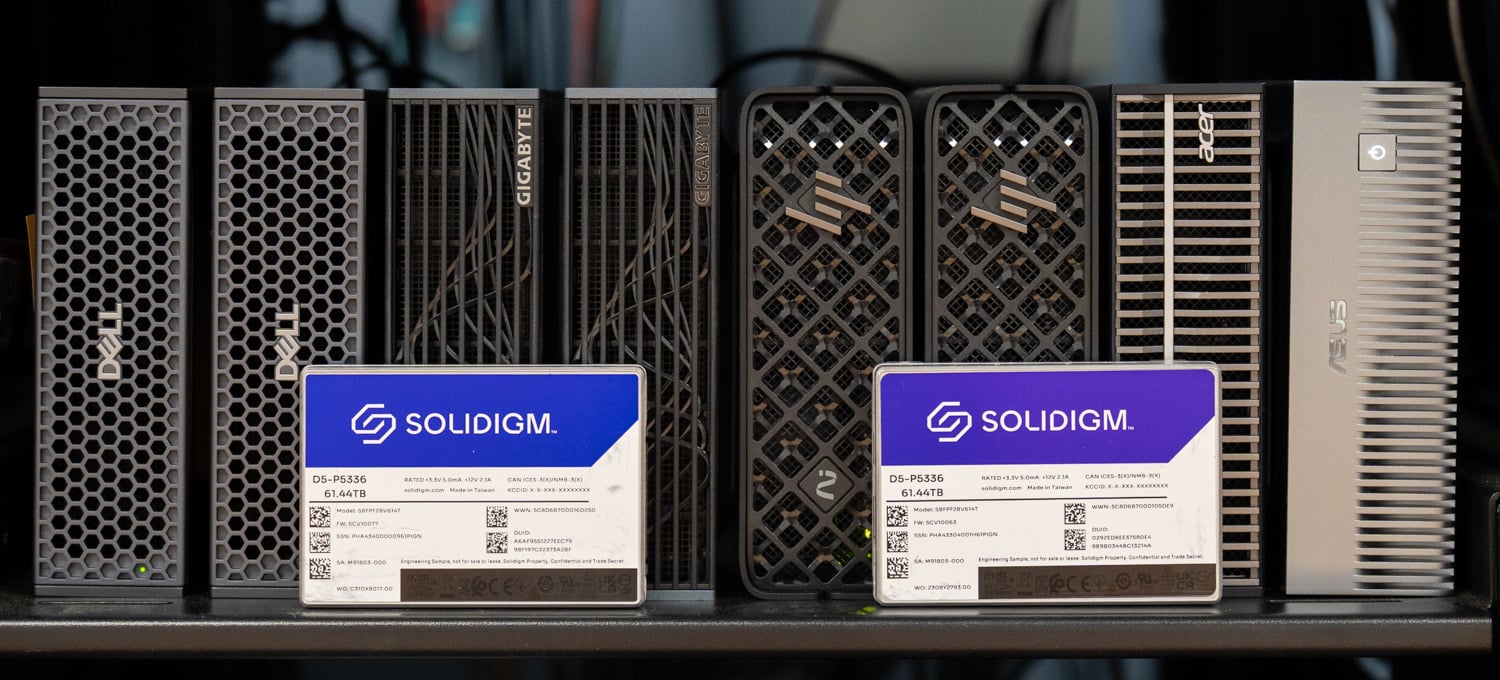
Dit project brengt het opslagprobleem terug naar het datacenter. We hebben een DGX Spark shared storage host gebouwd met een Dell PowerEdge R770AP, acht Solidigm D5-P5336 QLC SSD's in een Graid SupremeRAID RAID 5-configuratie, Broadcom 400GbE-netwerken en Tuxera Fusion voor NFS over RDMA. Vervolgens hebben we acht Sparks aangesloten op de 100GbE-poorten. Elke Spark in het netwerk is via één lijn verbonden met dezelfde beheerde, pariteitsbeveiligde opslagpool; één exemplaar van elk model en elke dataset is voldoende voor alle Sparks. Geen enkel werkstation heeft meer opslagruimte nodig dan waarmee het standaard wordt geleverd, en de Sparks zelf kunnen in het rack naast de array worden geplaatst, waar ze gemakkelijker te beveiligen, koelen en delen zijn. Het doel van deze configuratie is om de data daar te bewaren, en elke NVMe-server met snelle netwerkkaarten zou hiervoor geschikt zijn. Oregon State University, dat een grootschalig Spark-lab voor AI-leren onderzoekt en studenten toegang wil geven tot onderzoeksdatasets van tientallen terabytes, deelde haar ideeën met ons tijdens het ontwerpen van de build. Voor data van die omvang bleek gedeelde opslag de meest geschikte aanpak voor deze evaluatie.
Key Takeaways
- Eén array, acht Sparks, geen clientsoftware: Acht DGX Sparks van vijf verschillende OEM's koppelen NFS/RDMA-shares van één Solidigm D5-P5336 QLC-array achter Graid SupremeRAID en Tuxera Fusion, via de reeds aanwezige 100GbE-poorten, met een one-line mount op standaard Ubuntu.
- Gehoste modellen laden op dezelfde manier als lokale modellen: Een 78GB Qwen3.5-122B-A10B-NVFP4-model werd vanaf de gedeelde array in 269.6 seconden geladen op één Spark, binnen 13% van de 239.6 seconden die dezelfde Spark nodig had vanaf zijn interne NVMe-schijf. Acht Sparks die tegelijkertijd dezelfde kopie laadden, waren klaar tussen de 232.8 en 326.5 seconden.
- Eén exemplaar vervangt een silo op elk bureau: Modellen en datasets op gecontroleerde, met pariteit beveiligde datacenteropslag vervangen kopieën per werkstation op 4TB M.2-schijven, waardoor het gebruik toeneemt, het aantal gekopieerde gegevens afneemt en er geen Spark-installatie meer een opslagupgrade of een plek op een bureau nodig heeft. Voor een grootschalig AI-leerlab zoals datgene dat Oregon State onderzoekt, waar onderzoeksdatasets tientallen terabytes groot zijn, is dit de aanpak die het beste aansluit bij de use case in onze evaluatie.
- De schijven bepalen het plafond, en het netwerk heeft nog ruimte voor verbetering: Met alle acht Sparks die tegelijkertijd gegevens uitlezen, bereikte de RAID 5-array met acht schijven een maximale snelheid van bijna 25 GiB/s, oftewel ongeveer 214 Gb/s. Dit benutte 27% van de 800 Gb/s die de twee Broadcom BCM57608 NIC's in de host aankunnen. Eén Spark die gegevens uit de array leest met een snelheid van 10.8 GiB/s evenaart de snelste interne M.2-schijf die we in een GB10-systeem hebben gemeten.
- Bestuur hoort bij het protocol: NFS met RDMA plaatst gebruikersspecifieke mappen, gedeelde datasets en gehoste modellen in één naamruimte met Active Directory-, Kerberos- en LDAP-koppelingen. Hierdoor blijven de gegevens onder controle van het datacenter, terwijl Sparks naar het serverrack wordt verplaatst.
Het probleem met een AI-eiland op elk bureau.
De DGX Spark en de OEM-varianten van Dell, GIGABYTE, HP, Acer en ASUS delen allemaal het GB10-platform en dezelfde opslaglimiet. In onze oorspronkelijke review van de DGX Spark was opslag de grootste beperking van het platform. De interne sleuf accepteert korte M.2-schijven, waardoor de 8TB client-SSD's die in de 2280-vormfactor worden geleverd er fysiek niet in passen. De Luisuantech GP Spark die we in augustus hebben gerecenseerd, biedt hiervoor een oplossing met een M.2-behuizing met vier bays die is aangesloten op één 100GbE-poort. Dit is een nette oplossing voor één Spark op één bureau en, op labschaal, een grotere silo op elk bureau.
Capaciteit is de helft van het probleem; de andere helft is wat er met de data gebeurt zodra deze op een desktopcomputer terechtkomt. Een 78GB-model dat naar een Spark wordt gedownload, is een kopie die niemand bij IT kan inzien. Een onderzoeksdataset die op lokaal flashgeheugen is opgeslagen, is een kopie die buiten het back-upschema, het toegangsbeleid en de interne audits valt. Tien Sparks in een lab betekenen tien kopieën van dezelfde gegevens die 780GB flashgeheugen in beslag nemen, geheugen dat voor iets anders gebruikt zou kunnen worden, en tien plekken waar een dataset met de computer mee de deur uit kan lopen. Het probleem wordt erger naarmate het aantal toeneemt, of het nu gaat om GB10-systemen of een desktop AI-infrastructuur. Elke organisatie die een vloot laptops beheert, kent dit patroon, en het antwoord was toen hetzelfde: bewaar de data op gedeelde opslag in het datacenter en laat het eindpunt een eindpunt zijn.
Gelukkig heeft NVIDIA de Spark zo ontworpen dat dit mogelijk is. Elke unit heeft twee QSFP56-slots op een geïntegreerde ConnectX-7, met een platformlimiet van 200 Gb bruikbare bandbreedte achter een paar PCIe Gen5 x4-links. In onze review van het DGX Spark-cluster beschreven we de configuratie met gesplitste rollen, waarbij één slot naar een andere Spark gaat en het andere naar opslag. In dit project wordt één slot per Spark gebruikt voor opslag met 100 GbE, waardoor het tweede slot vrij blijft voor clustering of extra bandbreedte. Met 100 GbE heeft elke Spark een theoretische bandbreedte van ongeveer 12.5 GB/s naar de opslaghost, wat de bandbreedte van het interne M.2-slot op de meeste van deze systemen overtreft.
Zodra de data zich aan de andere kant van die verbinding bevindt, verandert de rol van de Spark. Het wordt een reken-endpoint met een opstartschijf en een lokale cacheschijf, en de capaciteit hoeft niet langer per werkstation te worden aangeschaft. Een model of dataset wordt eenmaal geschreven en door elke client gelezen, waardoor het opslaggebruik toeneemt en het aantal kopieën afneemt. Gegevensbescherming wordt verplaatst naar een met pariteit beveiligde array in een serverchassis, en toegangscontrole, encryptie van data in rust, back-up en auditing vinden allemaal plaats waar ze al voor alle andere systemen plaatsvinden. En omdat de Spark nu alleen nog maar stroom en een 100GbE-verbinding nodig heeft, hoeft hij helemaal niet meer op een bureau te staan. In een rack naast de opslaghost is hij koeler, stiller, fysiek beveiligd en beschikbaar voor iedereen die hem nodig heeft.
De opslaghost
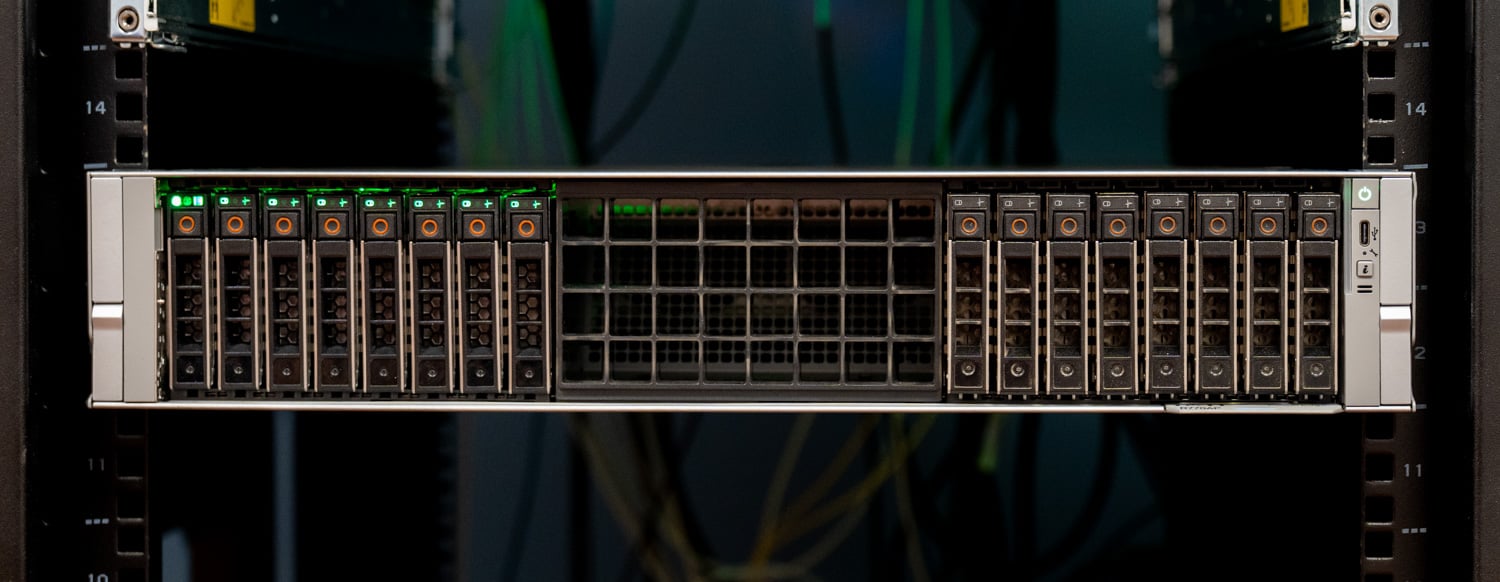
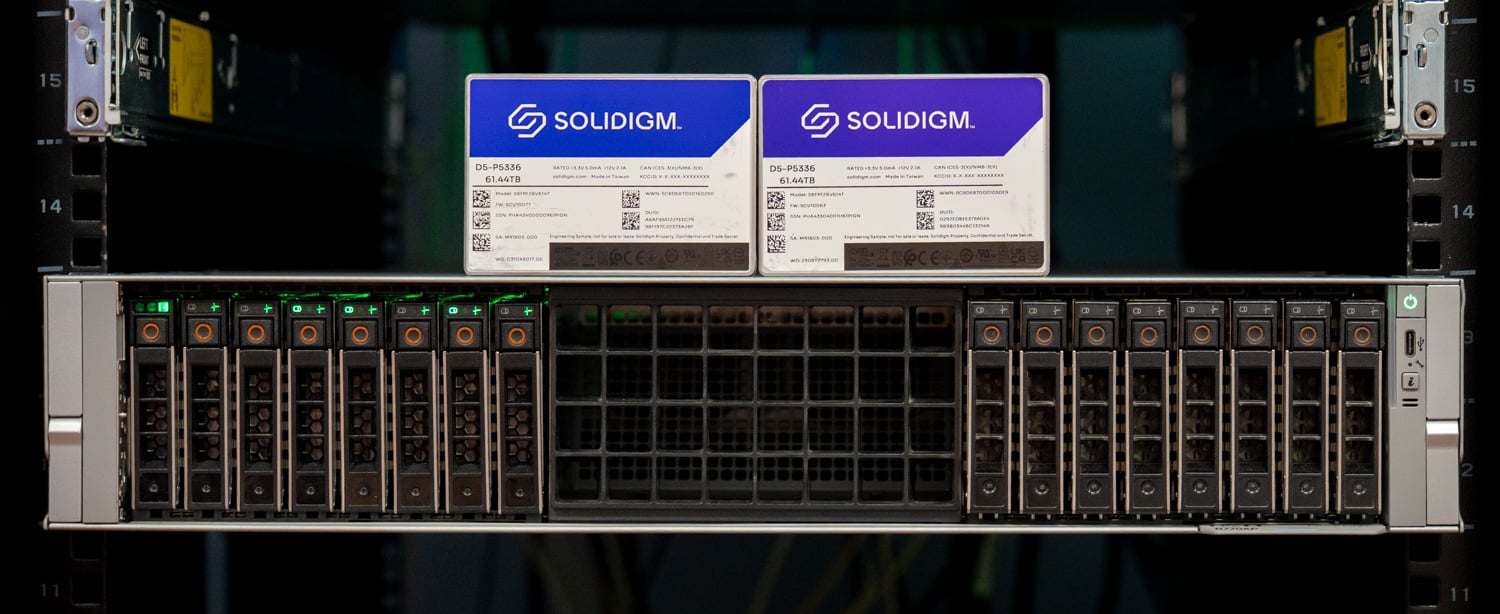
De opslaghost is een Dell PowerEdge R770AP , hetzelfde 2U Xeon 6-platform dat we eerder dit jaar hebben getest. We hebben deze server gebruikt omdat hij beschikbaar was in het lab toen het project van start ging. Elke NVMe-server met ruimte voor snelle netwerkkaarten en een kleine GPU zou de rol kunnen vervullen, en de R770AP is een manier om zo'n server samen te stellen, hoewel hij misschien iets te zwaar is uitgevoerd. Onze server draait op twee Xeon 6 6978P-processors met 1.5 TB DDR5-geheugen verdeeld over 24 DIMM's, gebruikt een van de twee banken met acht Gen5 NVMe-bays en heeft de schijven en de Graid GPU aangesloten op CPU 0, terwijl de twee 400GbE-adapters op CPU 1 zijn aangesloten. De server draait Ubuntu 24.04.
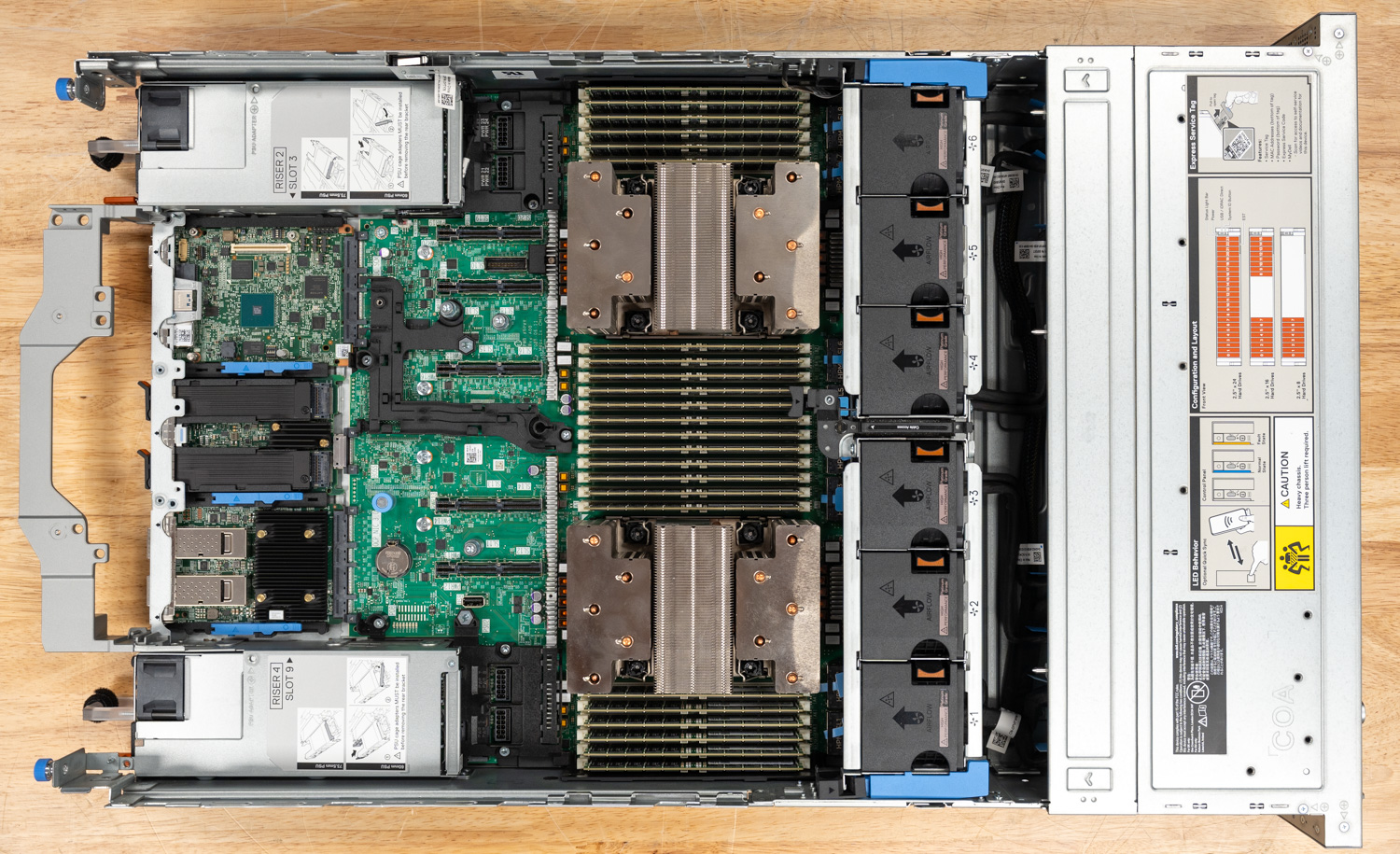
| Bestanddeel | Configuratie van de opslaghost |
|---|---|
| Server | Dell PowerEdge R770AP, 2U, 16x 2.5-inch Gen5 NVMe-bays |
| CPU | 2x Intel Xeon 6 6978P |
| Geheugen | 1.5 TB DDR5 (24x 64 GB) |
| Opslag | 8x Solidigm D5-P5336 61.44 TB U.2 PCIe 4.0 QLC (491.52 TB onbewerkt) |
| RAID | Graid SupremeRAID, RAID 5 over alle acht schijven, NVIDIA RTX A2000 GPU op CPU 0 |
| File System | XFS op de virtuele SupremeRAID-schijf |
| file Server | Tuxera Fusion (Fusion NFS, privé preview build), NFS 4.1 via RDMA (RPC-RDMA op poort 20049), gebruikersmodus |
| Netwerken | 2x Broadcom BCM57608 (Thor 2) single-port 400GbE, PCIe Gen5 x16 op CPU 1, RoCEv2 |
| Stap over voor slechts | Dell PowerSwitch Z9864F-ON, 64x 800GbE OSFP112, Enterprise SONiC |
| Client Links | 800G optisch netwerk opgesplitst in 8x100GbE, één link per Spark, vier Sparks per opslag-NIC op aparte VLAN's. |
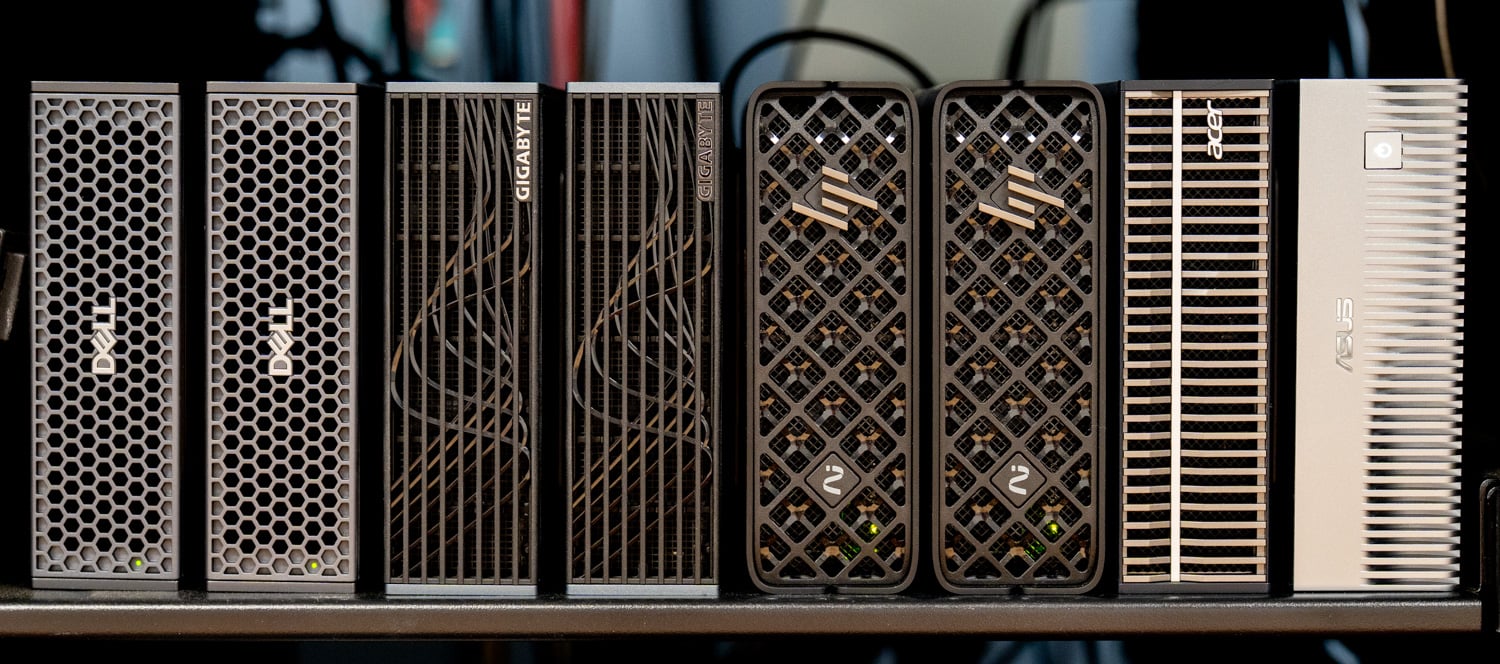
| Klanten | 2x Dell Pro Max met GB10, 2x GIGABYTE AI TOP ATOM, 2x HP ZGX Nano G1n, Acer Veriton GN100, ASUS Ascent GX10 |
| OS | Ubuntu LTS 24.04 |
Waarom QLC, en waarom de D5-P5336?
In onze gesprekken met Oregon State over het Spark-labconcept was capaciteit de eerste vereiste, omdat de onderzoeksdatasets groot zijn. De taak van deze server is om alles op te slaan wat een ruimte vol Sparks nodig zou kunnen hebben, en om het aan te bieden in een vorm die door veel clients tegelijk kan worden gelezen. Dat is een profiel met veel leesbewerkingen, grote blokken en een hoge capaciteit, en dat is precies waarvoor QLC is ontworpen. De D5-P5336- familie heeft capaciteiten van 7.68 TB tot 122.88 TB; de 61.44 TB U.2-schijven die hier worden gebruikt, hebben volgens Solidigm een sequentiële leessnelheid van maximaal 7,000 MB/s, een sequentiële schrijfsnelheid van 3,000 MB/s, 1.005 miljoen willekeurige 4K-lees-IOPS en een levensduur van 65.2 PBW, oftewel 0.58 schrijfbewerkingen per dag gedurende vijf jaar, op 192-laags QLC NAND met een 16 KB indirectie-eenheid.
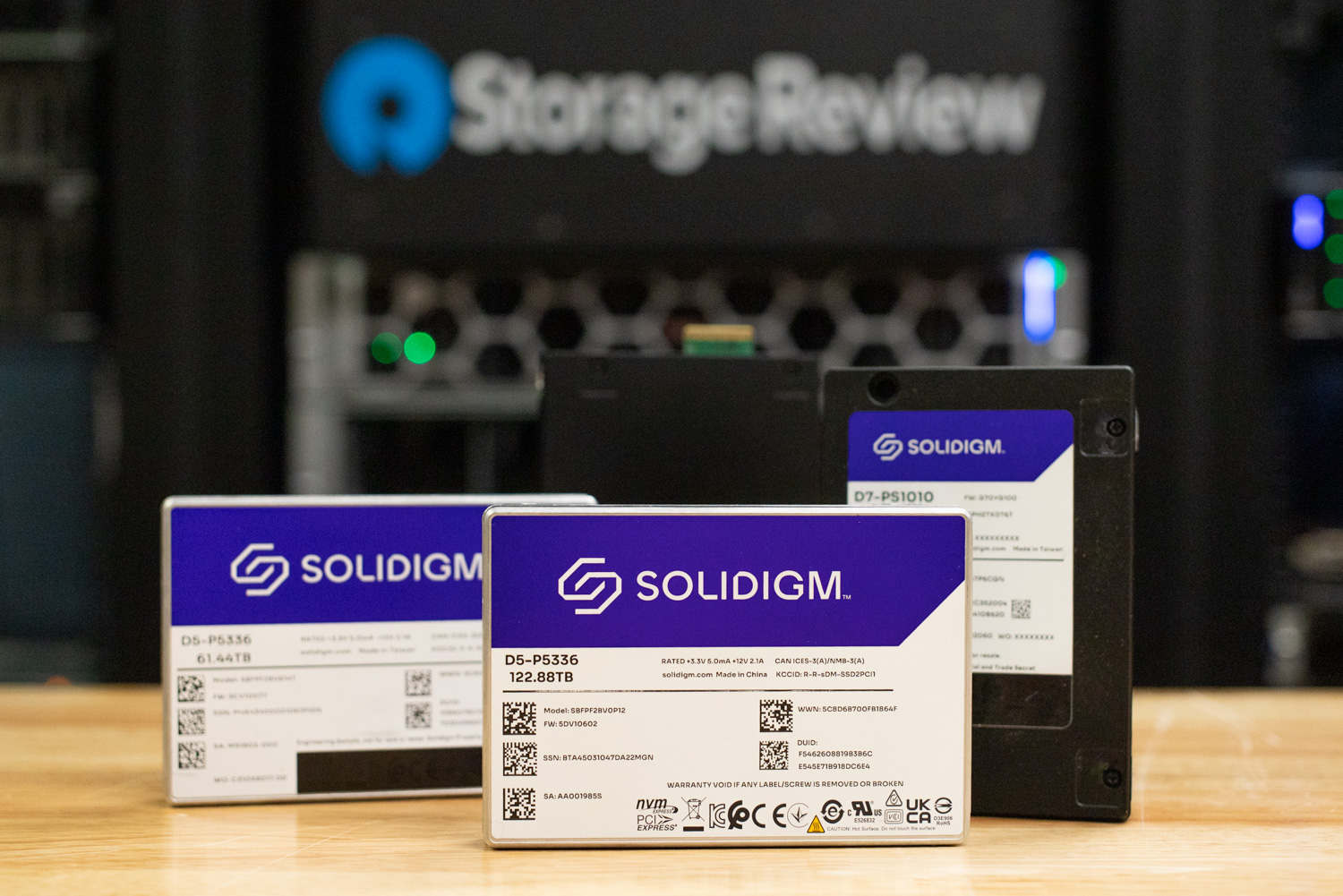
De acht schijven van 61.44 TB vullen de helft van de voorste bays van de R770AP, en in een productieconfiguratie kan men elke gewenste capaciteit en elk gewenst aantal bays kiezen. Zelfs dan bieden acht schijven in RAID 5 ongeveer 430 TB bruikbare ruimte met fouttolerantie voor individuele schijven. Dat is meer dan 100 keer zoveel als een M.2-slot van een Spark biedt en genoeg voor de modelbibliotheek van een afdeling, de gedeelde datasets waarmee studenten werken en de thuismap van elke gebruiker. Door de andere acht bays te vullen, wordt dat verdubbeld zonder het netwerkontwerp aan te passen, en de afmetingen die later in deze review worden besproken, laten zien waarom de schijven het onderdeel zijn dat kan worden uitgebreid.
De 16KB indirectie-eenheid is belangrijk voor deze workload, omdat de grotere IU van Solidigm de efficiëntie van kleine willekeurige schrijfbewerkingen opoffert voor dichtheid en kosten. Voor een share die modellen en datasets bedient, zijn kleine willekeurige schrijfbewerkingen echter in de minderheid. Het laden van modellen bestaat uit grote sequentiële leesbewerkingen. Het streamen van datasets bestaat eveneens uit grote sequentiële leesbewerkingen. Checkpoints en studentbestanden worden eenmalig geschreven en vaak gelezen. De taakverdeling die hieruit voortvloeit, is de juiste voor een Spark-lab: de gedeelde QLC-array bevat alles wat door meerdere apparaten wordt gelezen, en de eigen M.2-array van de Spark verwerkt het scratch- en swapverkeer dat door één apparaat wordt geschreven.
RAID op een GPU: Graid SupremeRAID
NVMe RAID op acht Gen4-schijven, elk met een leessnelheid van 7,000 MB/s, is het punt waarop een conventionele hardware-RAID-kaart de bottleneck wordt, omdat elke byte door het PCIe-slot van de kaart moet. Software-RAID kent een andere reeks uitdagingen op het gebied van resources. Graid SupremeRAID verplaatst de pariteitsberekeningen naar een GPU en houdt het datapad op de PCIe-lanes van de host. Daarom hebben we in onze SupremeRAID AE-tests met 16 schijven snelheden van meer dan 180 GB/s gezien. Voor deze host hebben we SupremeRAID uitgevoerd op een NVIDIA RTX A2000, een kleine workstation-GPU.
De acht D5-P5336-schijven werden veilig gewist en sequentieel gevuld voordat ze aan Graid werden overgedragen en vervolgens geconfigureerd als één RAID 5-array. De resulterende virtuele schijf werd geformatteerd met XFS en aangeboden door Tuxera. RAID 5 is het juiste niveau voor een dergelijke gedeelde map: een schijfstoring houdt de array online, herstelprocessen vinden plaats zonder dat gebruikersgegevens offline gaan en het capaciteitsverlies bedraagt slechts één schijf op de acht. RAID 6 of RAID 10 zouden redelijke keuzes zijn voor een productieomgeving waar bescherming tegen herstelproblemen belangrijker is dan capaciteit, en SupremeRAID ondersteunt beide.
Het netwerk: Broadcom 400GbE en een 800G-kern.
De opslagcomponent van het netwerk bestaat uit twee Broadcom BCM57608 Thor 2-adapters in de R770AP, elk een single-port 400GbE NIC op een PCIe Gen5 x16-interface. Broadcom positioneert de BCM57608 als de energiezuinigste 400G NIC in de branche, en de functionaliteit maakt hem zeer geschikt: RoCEv2 met verbeterde DCQCN-congestiecontrole, adaptieve routing, secure boot met een silicon root of trust en inline kTLS-encryptie-offload. RoCEv2 ondersteunt NFS over RDMA in dit ontwerp, en congestiecontrole voorkomt dat meerdere clients elkaar in de weg zitten wanneer ze allemaal tegelijk data proberen te verzamelen. Tijdens de bouw meldde de bnxt_en-driver dat de optische modules op de 400G-poorten de waarschuwingsdrempel van 70°C bereikten bij aanhoudende belasting. We hebben dit opgelost met een kleine aanpassing van het ventilatorprofiel op de R770AP, waarna de NIC's probleemloos functioneerden.
Beide netwerkkaarten zijn aangesloten op een Dell PowerSwitch Z9864F-ON , de 800G core-switch van ons lab, waarop Enterprise SONiC draait. De Z9864F-ON beschikt over 64 OSFP112-poorten met 800GbE en kan worden opgesplitst in 2x400G, 4x200G of 8x100G. Eén 800G optische kabel, opgesplitst in 8x100G, verbindt de acht Sparks, elk via één link, met dezelfde switch die ook de twee 400G-opslaglinks afhandelt. Elke 400G-netwerkkaart bevindt zich op een eigen VLAN en bedient vier Sparks, waardoor de opslaghost twee RDMA-targets presenteert en de belasting gelijkmatig over beide targets wordt verdeeld. In de praktijk is dit een topologie met volledige bandbreedte: 8x100G clientbandbreedte aan de ene kant, 2x400G opslagbandbreedte aan de andere kant en een switch met een capaciteit van 102.4 Tbps in het midden.
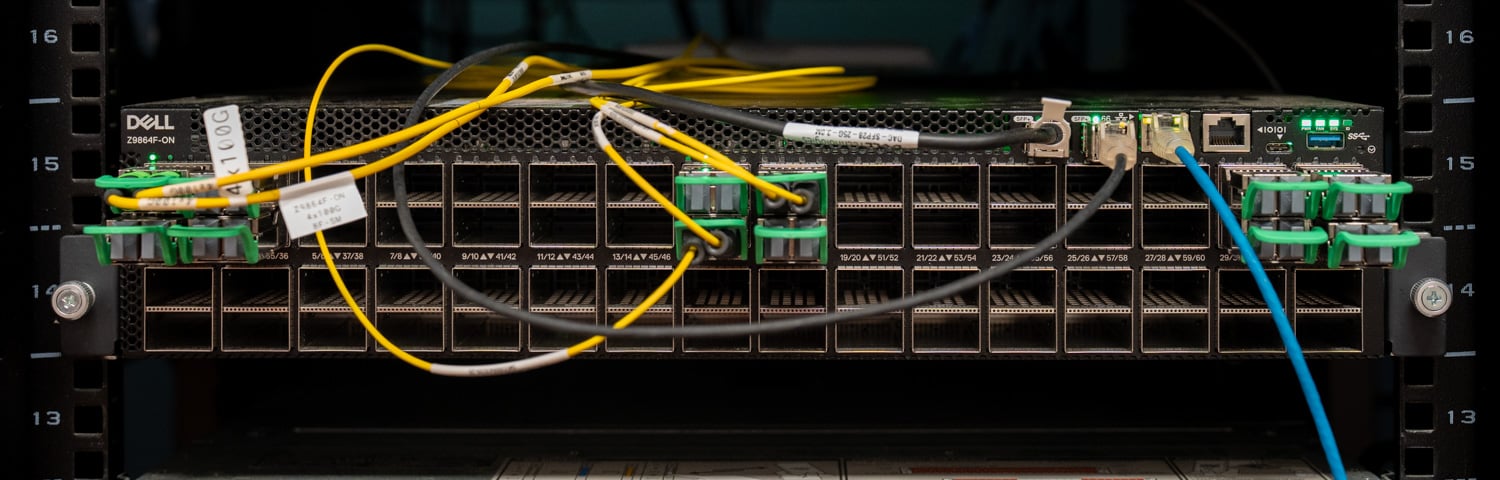
We hebben de infrastructuur gevalideerd voordat er opslagsoftware op werd toegepast. Server-naar-server-tests tussen de R770AP en een tweede host via de 400G-links draaiden op lijnsnelheid in beide richtingen, en RDMA-verkeer van de Sparks bevestigde dat de 100G-breakoutpoorten op volle snelheid werkten. Nadat de engineers van Tuxera de NFS-shares hadden geconfigureerd, toonde iperf3 van de Sparks naar hun respectievelijke NIC's een stabiele doorvoer van 99 Gbps met vier parallelle streams en nul herverzendingen.
Waarom NFS, en waarom Tuxera?
Met Graid als snel blokapparaat kon de opslaghost de Sparks bedienen als NVMe-oF-blokdoelen of als gedeelde bestanden. We hebben het blokpad getest in de GP Spark-review en het werkt goed voor één client. Voor een lab met meerdere Sparks wilden we iets anders. Blokvolumes zijn één-op-één; elke gebruiker zou een LUN nodig hebben, en zodra twee gebruikers dezelfde dataset willen, moet je die kopiëren, wat precies het probleem is dat dit hele ontwerp probeert op te lossen. NFS bevindt zich in het midden van het Venn-diagram: één namespace bevat gedeelde datasets, gehoste modellen en mappen per gebruiker. Elke Spark-mount gebruikt de NFS-client die al in Ubuntu zit, en de Kubernetes- en Slurm-tools die een universiteit bovenop een Spark-lab zou plaatsen, ondersteunen allemaal NFS.
Fusion NFS is het NFS-onderdeel van Tuxera Fusion, de multiprotocol-bestandsserver die SMB en NFS afhandelt op één multithreaded core in gebruikersmodus. We hebben Fusion SMB voor het eerst bekeken in een mediaworkflowproject van Solidigm en Tuxera in 2024. Tuxera claimt snelheden tot 22.7 GB/s over een enkele 200GbE-verbinding met RDMA, wat in eigen tests beter is dan kernel NFSD en Ganesha. Het product ondersteunt NFS 4.1, active-active scale-out clustering, transparante failover en integratie met Active Directory, Kerberos en LDAP. Die laatste functionaliteit is cruciaal voor governance: dezelfde directory die bepaalt wie toegang heeft tot Spark, bepaalt ook wat gebruikers op de share kunnen zien. Een belangrijke kanttekening is van toepassing op alle Tuxera-producten in dit artikel: de build die we hebben gebruikt, is een privé-preview van Fusion NFS die volgens Tuxera nog niet volledig is geoptimaliseerd voor prestaties en de software is nog niet commercieel verkrijgbaar. De algemene beschikbaarheid is gepland voor november, na SC'26.
Tuxera installeerde Fusion op de R770AP, formatteerde het Graid-volume met XFS en configureerde de server met NFS op de standaardpoort en RPC-RDMA op poort 20049. SMB-listeners werden weggelaten omdat dit project uitsluitend op NFS is gebaseerd. De initiële threadconfiguratie bestond uit vier protocolthreads, elk met acht threads voor transport (verzenden en ontvangen), VFS-data en VFS-metadata. Tuxera beschrijft dit als een startpunt voor verdere afstemming. Directoryservices werden bewust weggelaten uit de labomgeving; een universitaire implementatie zou zijn eigen identiteitsservices daar bovenop plaatsen. Aan de Spark-kant is het mounten van de share een kwestie van één commando:
sudo mount -t nfs -o proto=rdma,port=20049 :/mnt/shares/smbnfs1/ /localnfs
Die ene regel code omvat de volledige clientintegratie, zonder driver, initiatorconfiguratie of software van de leverancier op de Spark. Een gebruiker die morgen inlogt op een andere Spark, voert dezelfde regel code uit en ziet dezelfde bestanden.
Bewijs van configuratie: Acht Sparks op één dataset
Voordat we met het modelwerk begonnen, hebben we elke Spark afzonderlijk getest: een sequentiële fio-leesbewerking van 1 MB met 16 taken en een wachtrijdiepte van 16 naar de eigen map op de array. De acht units leverden tussen de 10.0 en 11.2 GiB/s op, waarmee de 100GbE-verbinding op elk apparaat volledig werd benut. Vervolgens hebben we een test uitgevoerd om te bewijzen dat alle acht units hun deel van de belasting aankonden. Elke test behield een vast aantal van 16 threads met een wachtrijdiepte van 16 en verdeelde deze over één, twee, vier en acht Sparks, met workloads van 1 MB sequentieel, 64 KB willekeurig, 16 KB sequentieel en 4 KB willekeurig, met lees- en schrijfbewerkingen, directe I/O, 60 seconden per test. Elke Spark schrijft naar zijn eigen map op de array, vier per storage NIC, en er is geen QoS in de stack. Met alle acht tegelijk belast, varieerden de sequentiële leesbewerkingen per eenheid van 1M van 3.09 tot 3.13 GiB/s, de willekeurige leesbewerkingen van 64K van 6,648 tot 6,779 IOPS en de willekeurige schrijfbewerkingen van 4K van 2,136 tot 2,155 IOPS, verdeeld over vijf OEM's op twee VLAN's zonder fairness-handhaving. Elke Spark bereikte de array, elke Spark kreeg een gelijk deel en de configuratie was klaar voor de belangrijkste workload.
| Spark (acht clients, 2 threads x QD16 elk) | Opslag-NIC | 1M sequentieel lezen | 64K willekeurig lezen IOPS | 4K willekeurig lezen IOPS | 4K willekeurig schrijven IOPS |
|---|---|---|---|---|---|
| Dell Pro Max met GB10 (1) | 1 | 3,176 MiB/s | 6,648 | 10,000 | 2,150 |
| GIGABYTE AI TOP ATOM (1) | 1 | 3,195 MiB/s | 6,779 | 10,300 | 2,142 |
| HP ZGX Nano G1n (1) | 1 | 3,201 MiB/s | 6,696 | 10,100 | 2,136 |
| Acer Veriton GN100 | 1 | 3,194 MiB/s | 6,670 | 10,100 | 2,149 |
| Dell Pro Max met GB10 (2) | 2 | 3,184 MiB/s | 6,694 | 10,200 | 2,155 |
| GIGABYTE AI TOP ATOM (2) | 2 | 3,187 MiB/s | 6,667 | 10,100 | 2,141 |
| HP ZGX Nano G1n (2) | 2 | 3,189 MiB/s | 6,678 | 10,100 | 2,151 |
| ASUS Ascent GX10 | 2 | 3,163 MiB/s | 6,734 | 10,300 | 2,145 |
De host qua afmetingen: twee netwerkkaarten en voldoende hoofdruimte.
Dezelfde analyse beantwoordt de vraag die een lab of een bedrijf zich moet stellen vóór de aanschaf: waar ligt de limiet en welk onderdeel van de host bepaalt die? De vier onderstaande panelen tonen de leesdoorvoer voor alle vier de workloads, waarbij de vaste belasting oploopt van één Spark tot acht; de schrijfdoorvoer wordt verderop in de tekst en tabel behandeld.
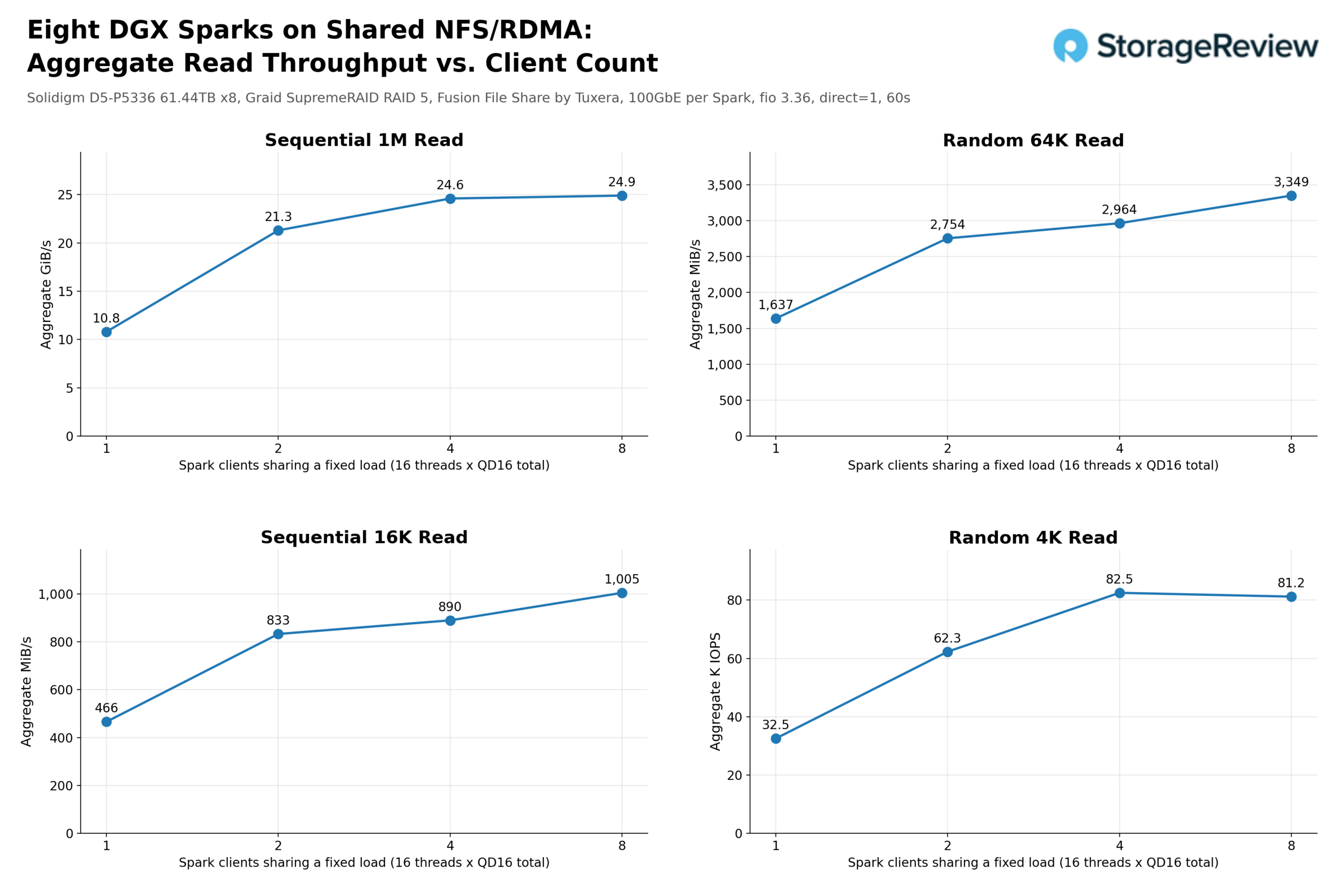
De gecombineerde sequentiële leessnelheid van 1M steeg van 10.8 GiB/s op één Spark naar 21.3 GiB/s op twee, 24.6 GiB/s op vier en 24.9 GiB/s op acht. In netwerktermen is dat respectievelijk 93 Gb/s, 183 Gb/s, 212 Gb/s en 214 Gb/s ten opzichte van de 800 Gb/s die de twee Broadcom 400GbE NIC's aankunnen. Bij een volledige belasting van acht clients gebruikte de array dus 27% van de netwerkcapaciteit van de host. Het plateau rond de 25 GiB/s werd bereikt door de RAID 5 QLC-array met acht schijven; de NIC's, de switch en de eigen 100GbE-verbindingen van de Sparks vormden nooit de limiet.
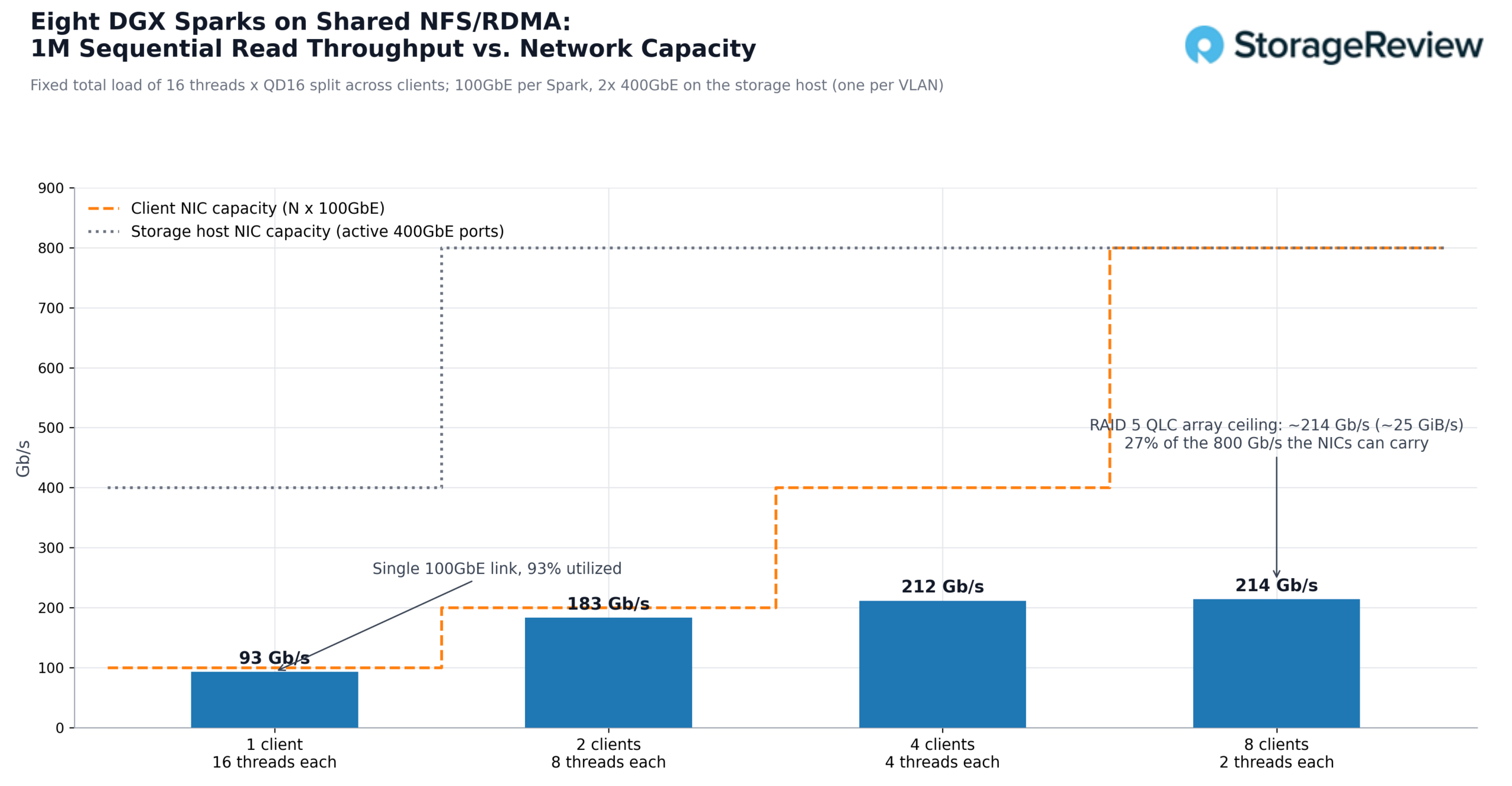
Twee server-side NIC's dekken al acht Sparks op lijnsnelheid, en ze zouden ook de andere acht bays in de R770AP dekken: het verdubbelen van het aantal schijven, ofwel als een tweede array of een bredere RAID-set, zorgt voor meer leesbandbreedte achter dezelfde twee poorten, met nog ruimte over. Hetzelfde geldt voor I/O. Willekeurige 4K-leesbewerkingen schaalden van 32.5 IOPS op één client naar een plateau van ongeveer 81 IOPS bij vier clients en meer, waarbij de latentie per I/O daalde van 7.9 ms naar 3.1 ms naarmate de wachtrij van elke client kleiner werd, en willekeurige 64K-leesbewerkingen gingen van 1,637 naar 3,349 MiB/s, waarbij het netwerk in beide gevallen ruim onder zijn limiet bleef.
Een andere belangrijke vergelijking is die met de opslag die een Spark al heeft. In onze individuele GB10-reviews bereikten GDSIO 1M-leessnelheden van de interne M.2-schijf een maximum van bijna 11.2 GiB/s op de Acer Veriton GN100 en GIGABYTE AI TOP ATOM. De Dell Pro Max met GB10 en HP ZGX Nano G1n haalden ongeveer 5.5 GiB/s, terwijl de ASUS Ascent GX10 de 5 GiB/s benaderde. Ter vergelijking: de externe NVMe-oF-box van de Luisuantech GP Spark leverde 9.5 GB/s via dezelfde 100GbE-poort. Een enkele Spark die leest van de gedeelde QLC-array met 10.8 GiB/s evenaart de snelste interne schijven in die groep en is ruwweg twee keer zo snel als de langzaamste, via één kabel, met data die elke andere Spark ook kan lezen. De gebruikte tools verschillen: GDSIO op de interne schijven en fio via NFS in dit geval, dus dit is een bereikvergelijking.
Het volledige overzicht staat hieronder, met geaggregeerde cijfers voor alle vier de workloads bij elk aantal clients. Elke leesrij neemt toe met het aantal clients totdat de array de maximale capaciteit bereikt, terwijl elke schrijfrij constant blijft van één tot acht Spark-processen. Dit komt doordat het RAID 5-pariteitspad de array op een vast schrijfplafond houdt, ongeacht hoeveel clients de array delen. Voor een gedeelde map die is ontworpen om door velen te worden gelezen en slechts één keer te worden beschreven bij de ingestie, is dit het profiel waarvoor het ontwerp is gemaakt.
| Totaal aantal threads (16) | 1 Spark | 2 Vonken | 4 Vonken | 8 Vonken |
|---|---|---|---|---|
| 1M sequentieel lezen | 10.8 GiB/s | 21.3 GiB/s | 24.6 GiB/s | 24.9 GiB/s |
| 1M sequentieel schrijven | 2.4 GiB/s | 2.4 GiB/s | 2.4 GiB/s | 2.4 GiB/s |
| 64K willekeurig lezen | 1,637 MiB/s | 2,754 MiB/s | 2,964 MiB/s | 3,349 MiB/s |
| Willekeurig schrijven in 64K | 722 MiB/s | 719 MiB/s | 723 MiB/s | 703 MiB/s |
| 16K sequentieel lezen | 466 MiB/s | 833 MiB/s | 890 MiB/s | 1,005 MiB/s |
| 16K sequentieel schrijven | 57 MiB/s | 60 MiB/s | 62 MiB/s | 28 MiB/s |
| 4K willekeurig lezen | 32.5K IOPS | 62.3K IOPS | 82.5K IOPS | 81.2K IOPS |
| Willekeurig schrijven in 4K | 17.8K IOPS | 17.7K IOPS | 17.5K IOPS | 17.2K IOPS |
Hostingmodellen op gedeelde opslag
De fio sweep bewijst dat de array en het netwerk meer dan capabel zijn. De volgende test die van belang is voor de use case, is of een model dat op de gedeelde array staat net zo goed laadt als een model dat op de eigen NVMe van de Spark staat. Dat is immers de workflow waarop het hele ontwerp is gebaseerd: één kopie, centraal gehost, die door iedereen kan worden geladen. We kozen voor Qwen3.5-122B-A10B in NVFP4, een mixture-of-experts-model met 122 miljard parameters dat 78 GB schijfruimte in beslag neemt en past in de 128 GB unified memory van één Spark. We hebben de tijd gemeten vanaf het opstarten van de inferentieserver tot het moment dat de server meldde dat alles in orde was, samen met de gemiddelde opslagbandbreedte gedurende die periode, in drie scenario's: één Spark die laadt vanaf zijn interne NVMe, dezelfde Spark die laadt via NFS/RDMA vanaf de gedeelde array, en alle acht Sparks die tegelijkertijd dezelfde kopie van de array laden.
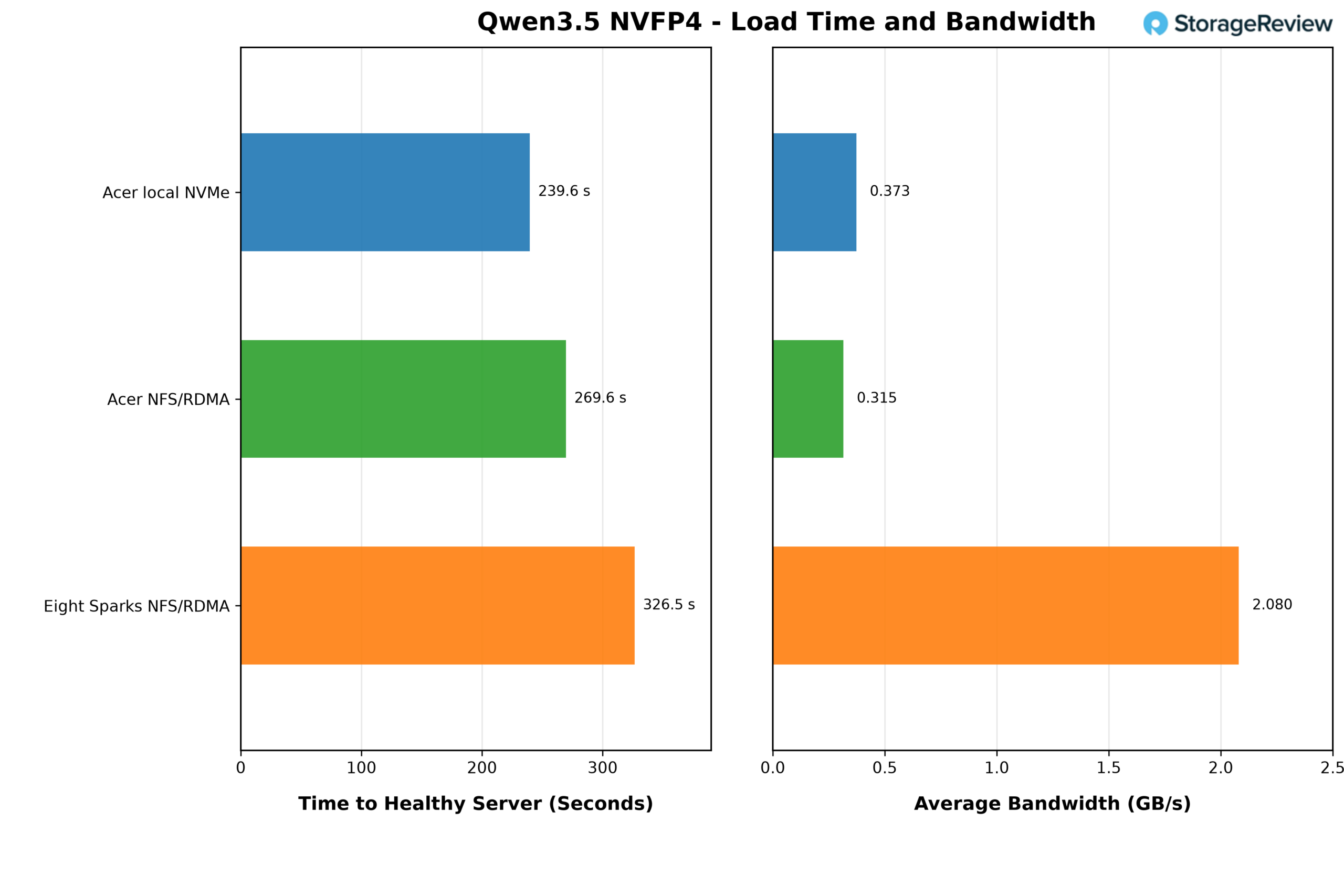
Vanuit de interne NVMe-opslag bereikte de Acer Veriton GN100 een gezonde server in 239.6 seconden met een gemiddelde snelheid van 0.373 GB/s. Vanaf de gedeelde opslag via NFS/RDMA duurde het laden van dezelfde Spark 269.6 seconden met een snelheid van 0.315 GB/s, ongeveer 30 seconden, of 13%, langer. De gemiddelden laten zien dat het laden van modellen op een Spark bij 78 GB over vier minuten in beide gevallen niet wordt beperkt door de opslagcapaciteit. De GB10 zelf bepaalt het tempo van de verwerking van de gewichten, en de opslag besteedt het grootste deel van de tijd aan wachten.
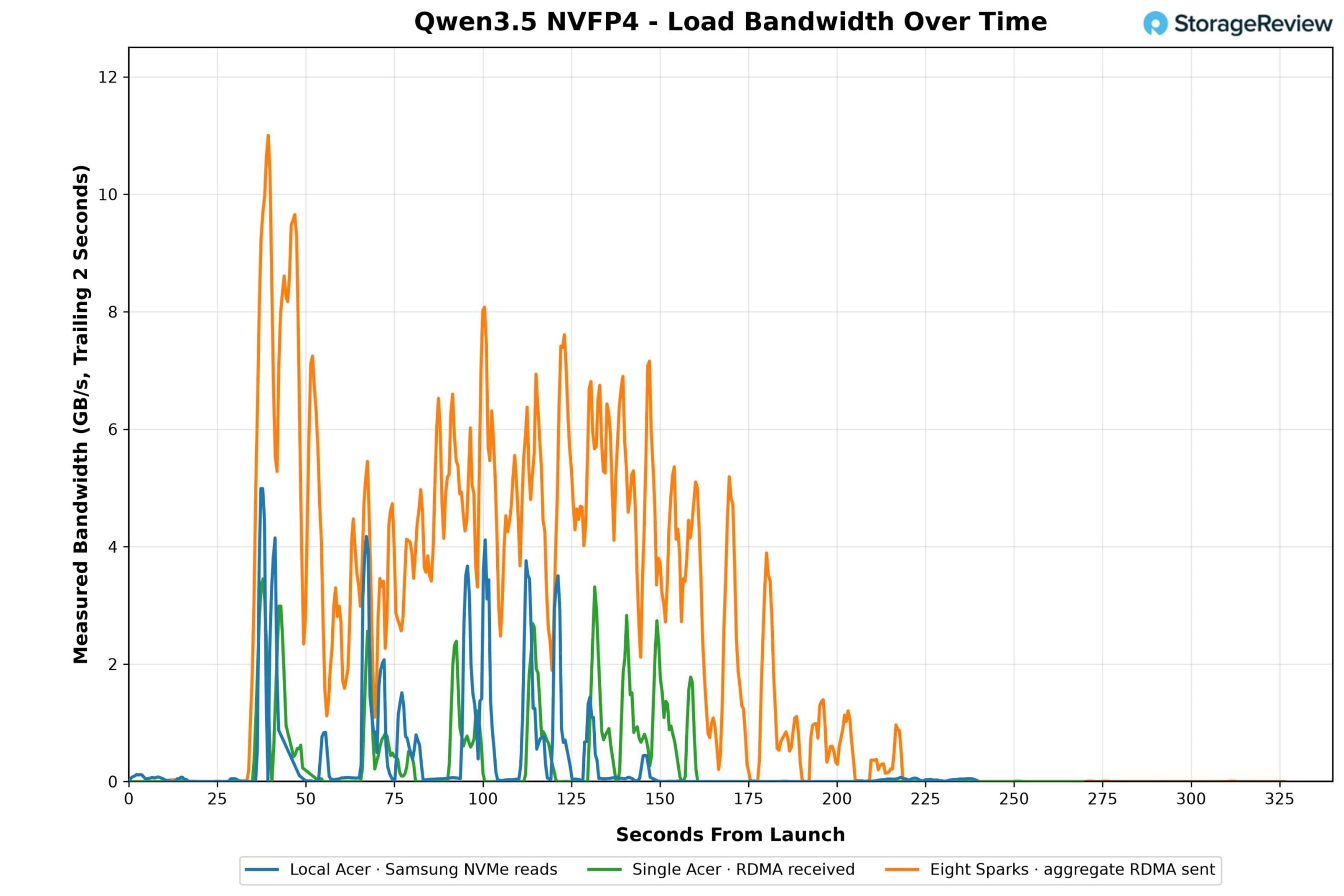
De bandbreedtegrafiek laat dat patroon zien: lokale NVMe-leesbewerkingen komen binnen in bursts die pieken rond de 5 GB/s met lange tussenpozen; de enkele NFS-client vertoont dezelfde burstvorm met iets lagere pieken. De geaggregeerde lijn van de acht Sparks laat de array onder gelijktijdige belasting zien. Met alle acht Sparks die tegelijkertijd 78 GB lezen, leverde de array een geaggregeerde piek van 11 GB/s in de eerste minuut, waarna deze zich gedurende de volgende twee minuten stabiliseerde tussen ongeveer 4 en 8 GB/s terwijl de Sparks hun taken uitvoerden, met een gemiddelde van 2.08 GB/s over het gehele tijdsvenster. In vergelijking met de 25 GiB/s die de fio-sweep aantoonde dat de array kan leveren, gebruikten acht Sparks die tegelijkertijd een model laden slechts een fractie van wat beschikbaar is.
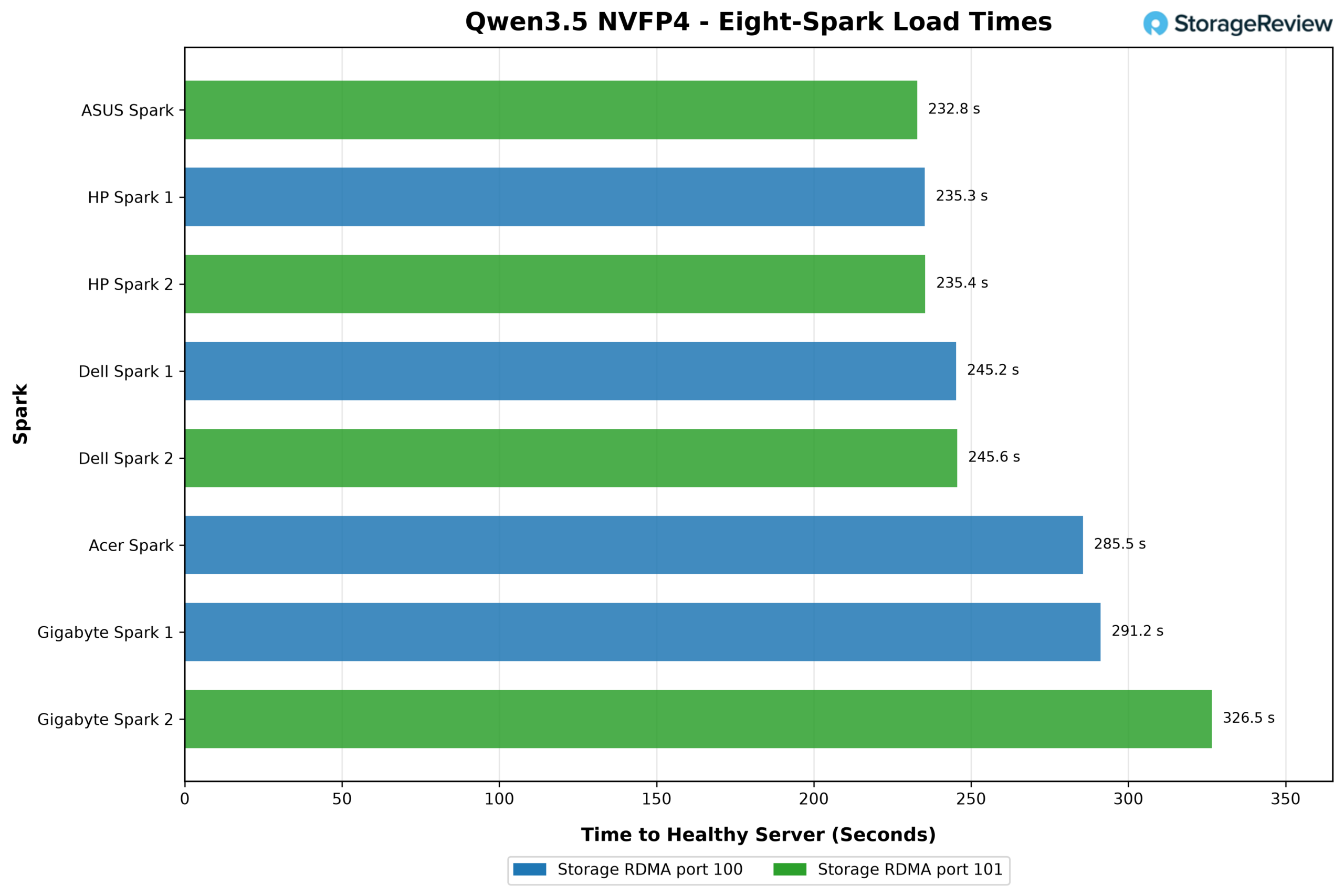
De laadtijden per eenheid in de test met acht apparaten varieerden van 232.8 seconden op de ASUS Ascent GX10 tot 326.5 seconden op een van de GIGABYTE AI TOP ATOM-eenheden. De twee HP ZGX Nano G1n-systemen zaten op 235.3 en 235.4 seconden, en de twee Dell Pro Max met GB10-eenheden op 245.2 en 245.6 seconden. Vijf van de acht Sparks die gelijktijdig vanuit de gedeelde array laadden, waren sneller dan de enkele Spark die via NFS/RDMA laadde, en drie ervan waren sneller dan de lokale NVMe-test. De spreiding is niet te wijten aan de fabrikant; zonder QoS in de stack verschuift de eenheid die op een bepaald moment op de array wacht van test tot test, en de twee eenheden op elke opslag-NIC zijn gelijkmatig verdeeld over de snelle en langzame uiteinden van de grafiek.
Voor een lab betekent dit dat er van elk model één kopie op de array bewaard kan worden, en dat elke Spark-processor, of elke Spark-processor, deze in ongeveer dezelfde tijd laadt als een lokale kopie, zonder downloadstap, zonder dat er lokale opslagruimte wordt verbruikt en zonder dat er een kopie van de gewichten op een bureau ligt.
Het voorbeeld van de staat Oregon
Het College of Earth, Ocean, and Atmospheric Sciences van Oregon State University is een terugkerende partner in ons werk aan AI-infrastructuur, van realtime oceaanonderzoek aan boord van een onderzoeksschip tot AI-ondersteunde academische beoordeling met Metrum AI . Chris Sullivan, directeur onderzoek en academische computerfaciliteiten van OSU, en zijn architect, Thomas Olson, onderzoeken een grootschalig Spark-lab voor AI-leren dat kan worden uitgebreid tot wel 100 units, en hun ideeën over opslag hebben ons ontwerp op twee specifieke manieren beïnvloed.
Ten eerste moet de opslag onafhankelijk zijn van de Sparks. OSU overwoog een bestandssysteem dat over de Sparks zelf was verspreid, maar verwierp dit voor een klaslokaal omdat het toevoegen of verwijderen van één enkele node de opslagservice voor iedereen zou verstoren. Een centrale array die door elke Spark kan worden gekoppeld, betekent dat een Spark kan worden toegevoegd, verwijderd, opnieuw geïnstalleerd of aan een andere student kan worden gegeven zonder de gegevens van anderen te beïnvloeden. Ten tweede moet de opslag de gebruiker volgen. We beschrijven de OSU-vereiste als een verbeterde versie van bestandsdeling voor AI-doeleinden, waarbij studenten permanente informatie opslaan terwijl ze tussen systemen wisselen. Met NFS is dat een map per student; log in op een Spark, koppel de gedeelde map en je werk is daar beschikbaar.
De datasets zijn de reden waarom dit voor OSU belangrijker is dan voor een gewone server. Het College of Earth, Ocean, and Atmospheric Sciences wil zijn onderzoeksdata, oceanografische en atmosferische collecties van tientallen terabytes, beschikbaar stellen aan studenten voor hun eigen onderzoek. Een dergelijke oplossing bestaat niet op desktopopslag: een 4TB M.2-slot kan niet eens één van die collecties bevatten, en zelfs een lab vol externe behuizingen zou betekenen dat er voor elke werkplek een kopie moet worden aangeschaft en gevuld, en dat elke kopie vervolgens actueel moet worden gehouden. Dat is voor geen enkele afdeling haalbaar. Het hosten van de data eenmalig op de array en het vervolgens beschikbaar maken via 100GbE bleek de beste aanpak in onze evaluatie. Dezelfde array host ook de modelbibliotheek, waardoor studenten tijdens hun sessie direct Qwen, Llama of een ander model kunnen gebruiken, zonder dat ze iets hoeven te downloaden. Hetzelfde principe geldt voor een bedrijf dat desktop AI-systemen inzet als ontwikkelwerkstations: koppel de productiedataset via een snel netwerk en laat het systeem er direct mee werken. Dit maakt het overbodig om een tweede data lake op te zetten zodat desktopcomputers iets te lezen hebben. De data blijft in het datacenter, onder de toegangscontrole, encryptie en back-upregeling die daar al van kracht zijn, en de Spark bevat niets van belang wanneer deze het datacenter verlaat.
Conclusie
Deskside AI-hardware is goed in veel dingen, maar is niet ideaal als onderdeel van de data-infrastructuur van een organisatie. De enkele M.2-sleuf in elk GB10-systeem zorgt daar wel voor: alles wat een gebruiker nodig heeft, wordt gekopieerd naar lokaal flashgeheugen, onzichtbaar voor IT, onbeveiligd en gedupliceerd op elke andere werkplek die hetzelfde nodig heeft. Voor een enkele Spark is een externe lokale opslagbox een redelijke oplossing. Maar voor een lab, een afdeling of een bedrijf dat deze apparaten met tientallen tegelijk inzet, is elke werkplek met zijn eigen data een silo. De oplossing is dan ook dezelfde als die datacenters jaren geleden al bedachten: plaats de capaciteit achter een snel netwerk, beheer het één keer en deel het. De Sparks beschikken al over een snelle netwerkverbinding; dit project laat zien wat er gebeurt als je die verbinding ergens naartoe stuurt, en het beargumenteert dat de Sparks zelf in het rack ernaast thuishoren.
Acht Solidigm D5-P5336 QLC-schijven in een Graid RAID 5-configuratie in een Dell-server gaven acht Sparks toegang tot één pariteitsbeveiligde dataset. Twee Broadcom 400GbE-netwerkkaarten en een Dell Z9864F-ON met een 800G-breakout gaven elk acht Sparks 100GbE-toegang. Tuxera's Fusion NFS over RDMA maakte die capaciteit toegankelijk via een enkele regel op standaard Ubuntu met directoryservice-hooks voor toegangscontrole. Onder een vaste belasting, verdeeld over alle acht, leverde de array een gecombineerde sequentiële leessnelheid van 24.9 GiB/s, gelijk verdeeld zonder QoS. Eén Spark alleen al benutte zijn verbinding maximaal met 10.8 GiB/s, net zo snel als de beste interne schijf in elk GB10-systeem dat we hebben getest. Deze maximale snelheid benutte 27% van de capaciteit van de twee netwerkkaarten aan de serverzijde, dus het netwerk is gedimensioneerd voor een server met een hogere capaciteit dan deze. De modeltest bevestigde de workflow: een model van 78 GB dat eenmaal op de gedeelde array is gehost, laadt op één Spark met een snelheid die binnen 13% van de lokale NVMe-snelheid ligt, en op acht Sparks tegelijk, waarbij vijf van de acht sneller klaar zijn dan de NFS-uitvoering op één server.
QLC-flash maakt deze economische voordelen mogelijk omdat de workload capaciteitsintensief en leesintensief is, de sterke punten van de D5-P5336, en één server kan opslaan wat honderd Sparks lokaal nooit zouden kunnen verwerken, met één kopie van alles en elke kopie onder controle van het datacenter. Oregon State beschikt over productieopslag voor onderzoek dat niet kan wachten. Het concept dat Chris Sullivan en Thomas Olson onderzoeken, is een educatieve opslaglaag die de universiteit momenteel niet heeft: een beheerde, gedeelde pool, groot genoeg voor een rack of meer Sparks, opgebouwd uit een server en een handvol schijven met hoge capaciteit, die tientallen terabytes aan echte oceanografische en atmosferische data beschikbaar zou kunnen stellen aan een grootschalig AI-leerlab op hetzelfde netwerk dat de Sparks gebruiken.
Dit rapport is gesponsord door Solidigm. Alle standpunten en meningen in dit rapport zijn gebaseerd op onze onbevooroordeelde kijk op het (de) product(en) in kwestie.
Verwijzingen naar commerciële producten in dit artikel dienen uitsluitend ter informatie en vormen geen goedkeuring door Oregon State University.



 Amazon