---
description: The HP Thunderbolt Dock G4 is a multi-port dock solution to help increase security, productivity, and connectivity.
title: HP Thunderbolt Dock G4 Review
image: https://www.storagereview.com/wp-content/uploads/2022/07/StorageReview-HP-Thunderbolt-G4-5.jpg
---

[![Storage Review]()](https://storagereview.com/)

---

[Facebook](https://www.facebook.com/@storagereview) [X (Twitter)](https://twitter.twitter.com/storagereview) [Instagram](https://www.instagram.com/storagereview/) [LinkedIn](https://www.linkedin.com/company/storagereview-com) [YouTube](https://www.youtube.com/user/storagereview?sub_confirmation=1) [Email](mailto:info@storagereview.com) [Spotify](https://open.spotify.com/show/1y6VnznABhHeOSMOmbDTz0) [Reddit](https://www.reddit.com/r/StorageReview/) [Discord](https://discord.gg/TwMHb4azdC) [RSS Feed](https://www.storagereview.com/rss.xml) [TikTok](https://www.tiktok.com/@storagereview)

[Facebook](https://www.facebook.com/@storagereview) [X (Twitter)](https://twitter.com/storagereview) [Instagram](https://www.instagram.com/storagereview/) [LinkedIn](https://www.linkedin.com/company/storagereview-com) [YouTube](https://www.youtube.com/user/storagereview?sub_confirmation=1) [Email](mailto:info@storagereview.com) [Spotify](https://open.spotify.com/show/1y6VnznABhHeOSMOmbDTz0) [Reddit](https://www.reddit.com/r/StorageReview/) [Discord](https://discord.gg/TwMHb4azdC) [RSS Feed](https://www.storagereview.com/rss.xml) [TikTok](https://www.tiktok.com/@storagereview)

[![StorageReview.com]()](https://www.storagereview.com)

≡ Menu

- [Home](https://www.storagereview.com/)
- [Storage Reviews](https://www.storagereview.com/review)
  - [Consumer Reviews](https://www.storagereview.com/consumer)
  - [Enterprise Reviews](https://www.storagereview.com/enterprise)
  - [Ubiquiti Reviews](https://www.storagereview.com/best/ubiquiti-reviews)
- [SR Merch](https://store.storagereview.com)
- [Leaderboards](https://www.storagereview.com/best)
  - [Best Storage Arrays](https://www.storagereview.com/best/storage-arrays)
  - [Best Enterprise SSDs](https://www.storagereview.com/best/enterprise-ssds)
  - [Best Servers](https://www.storagereview.com/best/servers)
  - [Best Desktops for Local AI](https://www.storagereview.com/best/desktops-local-ai)
  - [Best Laptops for Local AI](https://www.storagereview.com/best/laptops-local-ai)
  - [Best Local LLM Tools](https://www.storagereview.com/best/local-llm-tools)
  - [Agentic AI Hardware](https://www.storagereview.com/best/agentic-ai-hardware)
  - [Best SSDs & Hard Drives](https://www.storagereview.com/best_drives)
  - [Best Portable SSDs](https://www.storagereview.com/best/portable-ssds)
  - [Best Business Laptops](https://www.storagereview.com/best/business-laptops)
  - [Best Mobile Workstations](https://www.storagereview.com/best/mobile-workstations)
  - [Best Desktop Workstations](https://www.storagereview.com/best/desktop-workstations)
  - [Best Laptop Battery Life](https://www.storagereview.com/best/laptop-battery-life)
- [Storage Reference Guide](https://www.storagereview.com/storage-reference-guide)
- [About SR](https://www.storagereview.com/about-storagereview)
  - [StorageReview.com Sweepstakes Rules and Regulations](https://www.storagereview.com/storagereview-com-sweepstakes-rules-and-regulations)

Search

[Home](https://www.storagereview.com/) » [Review](https://www.storagereview.com/review) » HP Thunderbolt Dock G4 Review

# HP Thunderbolt Dock G4 Review

by Conner Crull on July 15, 2022

[Client Accessories](https://www.storagereview.com/consumer/client-accessories)  ◇  [Consumer](https://www.storagereview.com/consumer)

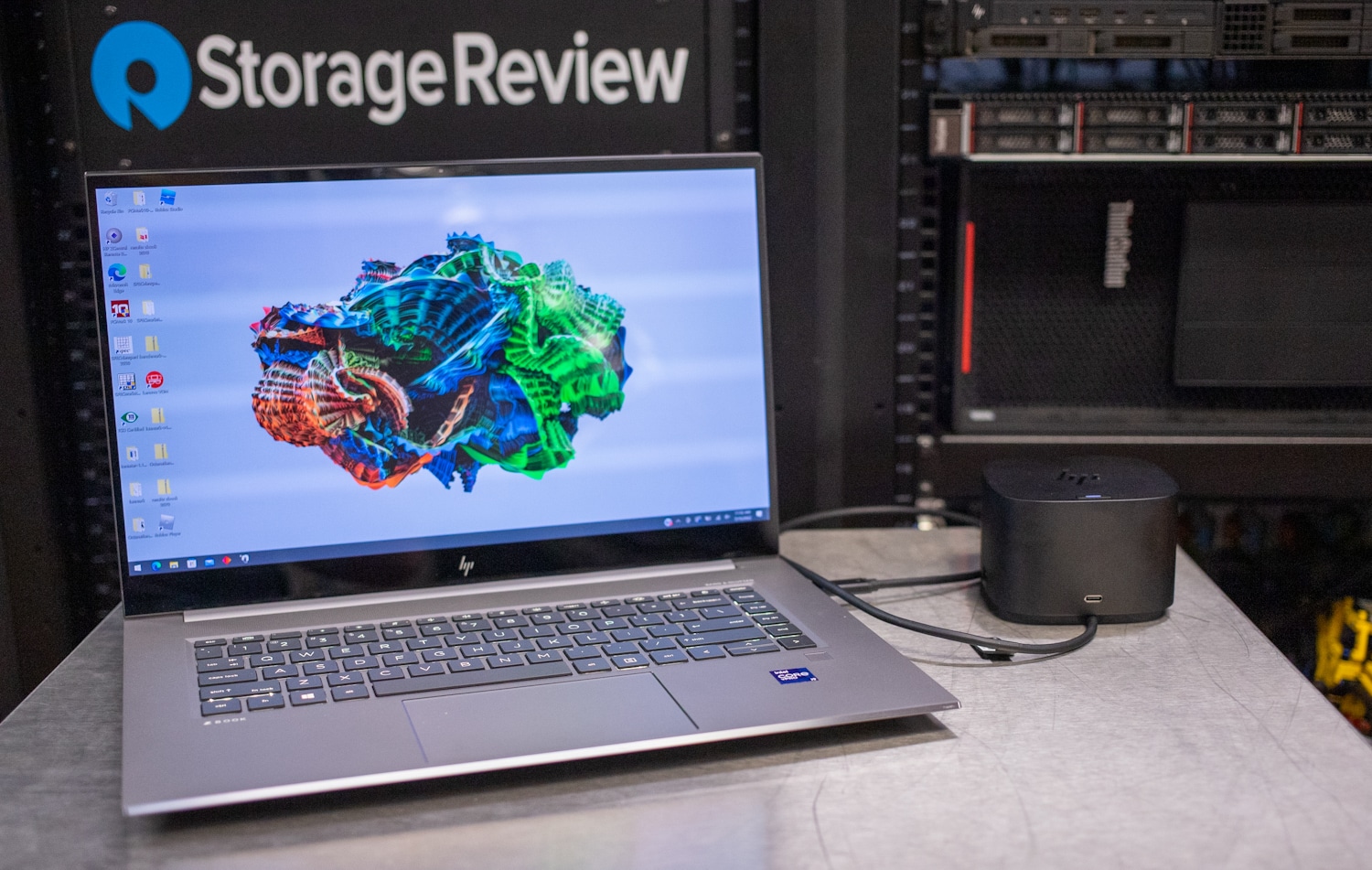
The HP Thunderbolt Dock G4 is a multi-port dock solution to help increase security, productivity, and connectivity. The dock is ideal for professionals that simply need more ports and organization at a home or office workspace. The Thunderbolt G4 supports multiple OSs and up to four different 4K displays for those needing crisp details.

![HP Thunderbolt Dock G4]()

## HP Thunderbolt Dock G4

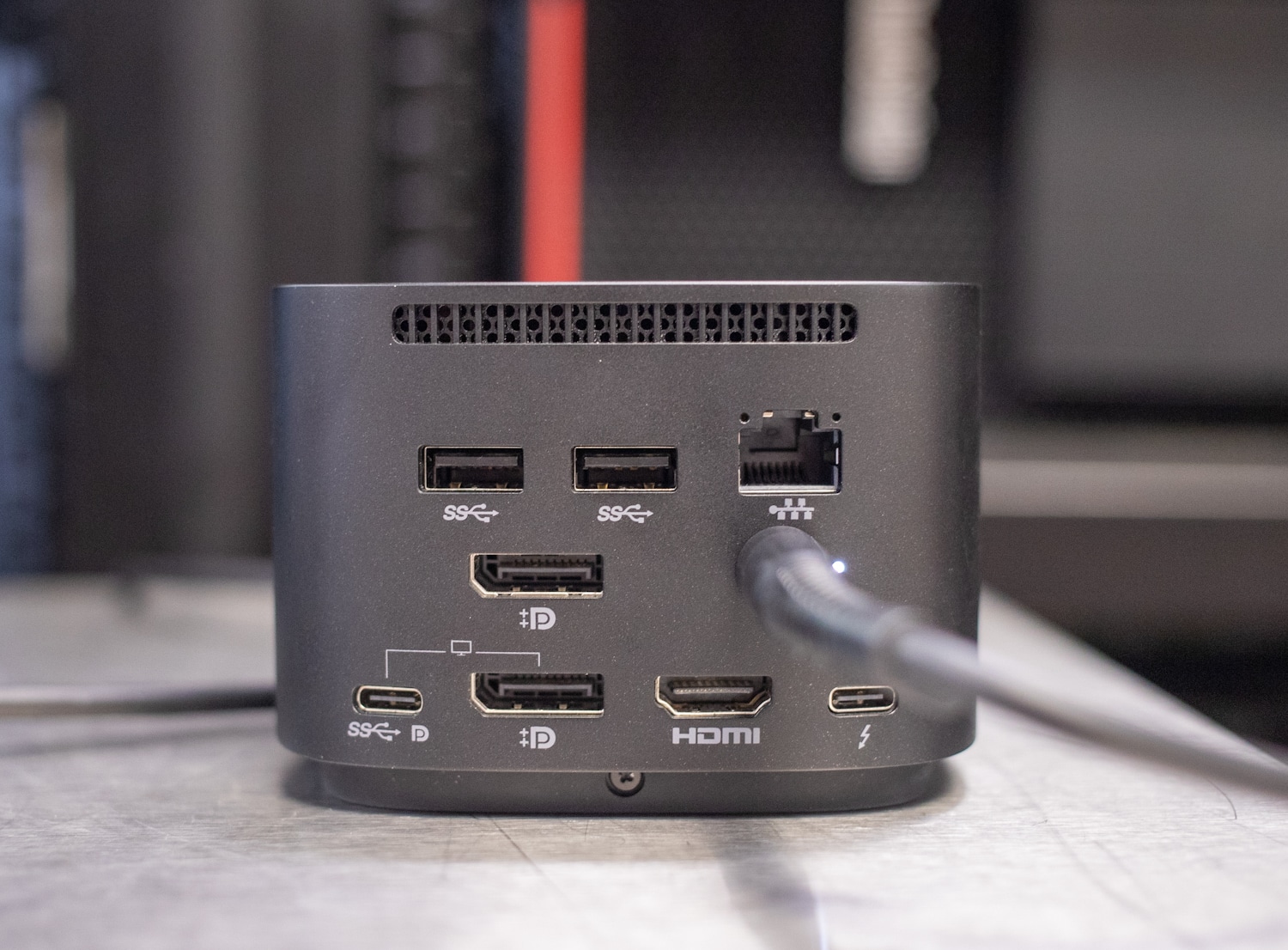
Connectivity-wise, the HP Thunderbolt Dock G4 features a wide variety of ports for any type of connection that might be needed. The rear has two USB-A 3.2 Gen2 ports, a USB Type-C Alt Mode Port (video, data, power), and a USB Type-C Thunderbolt 4 port. There are also two DisplayPort 1.4 connections, one HDMI 2.0 port, an RJ45 port, and lastly, the 4.5mm power adapter port.

![HP Thunderbolt Dock G4 top]()

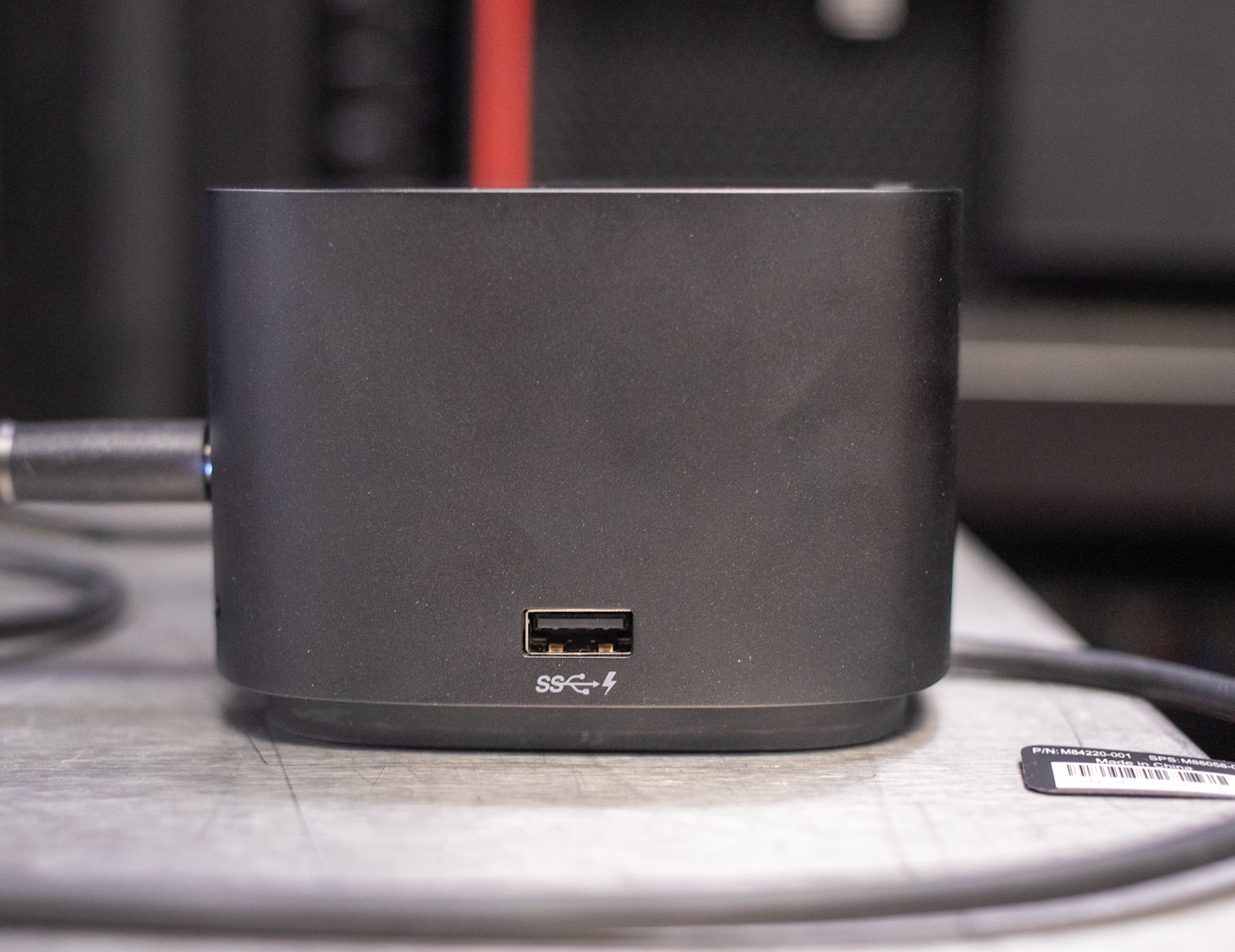
On the sides and front, there are also two USB-A 3.2 Gen2, a USB Type-C 3.2 Gen2 port (power and data), and a lock slot. This range of connectivity will most notably be for laptop users as most notebooks and Macbooks have such limited ports.

As mentioned before, there is a 100W power delivery port on the rear, delivered through the USB-C port. This power delivery port is able to charge any type of smaller device such as Apple or Android phones and tablets. However, the main reason for this port is to charge large devices such as laptops as it gives users the ability to everything connected via one device.

One of the most notable features of the Thunderbolt G4 is the ability to have up to four different displays connected to this hub that support up to 4K @ 60Hz. One of the reasons that this is possible is through the use of the Thunderbolt 4 connection on the rear of the device. Having the ability to use multiple monitors is a must for many users and with the ability of 4K support, the Thunderbolt Dock G4 might be the dock for the right user.

Since the Thunderbolt Dock G4 is Thunderbolt based, it natively passes monitor DisplayPort/HDMI signals, which means anything you can do on the host laptop display, you can do on an output display connected to the dock, this includes gaming. This makes it quite easy for users to continue to use the settings they have set up on their host devices as compared to some docks that can support 4K, however, what some dock devices have is a DisplayLink driver that mimics the display rather than passes through.

Backed by a 1-year limited warranty, the HP Thunderbolt Dock G4 goes for roughly [$299.00 currently](https://www.hp.com/us-en/shop/pdp/hp-thunderbolt-dock-120w-g4) on HP’s website.

## HP Thunderbolt Dock G4 Specifications

| Model | Thunderbolt Dock G4 |
| --- | --- |
| Color | Black |
| Size | 3.9in x 3.9in x 2.7in |
| Weight | 1.68lb |
| Connectivity | **Top Components:** Power Button**Front Components:** 1 x USB-C data/power out, (USB 3.2 Gen 2 10 Gbps Data only)**Side Components:** 1 x Kensington Standard Lock Slot 2 x USB 3.2 Gen 1 ports – 1 on each side (charging) (5 Gbps)**Back Components:** 2 x USB 3.2 Gen 1 (charging ports when docked) (5Gbps) 1 x HDMI 2.0 port 2 x DisplayPort 1.4 ports 1 AC adapter port 1 x Ethernet port: 2 internal NIC cards to support 1Gb and 2.5Gb Ethernet 1 x USB-C DP alt mode port 1 x Thunderbolt™ 4 port |
| Max Display Resolution | Up to four 4K displays at 60Hz |
| Compatible operating system | Windows 11; Windows 10; MacOS; Chrome |
| Minimum system requirements | Wired vPro Management |
| In the Box | Dock, power supply, power cord, warranty |
| Warranty | 1-year limited warranty |

## Design and Build

All docking stations are different, each dock comes in a different shape and size depending on the home/office needs. The HP Thunderbolt Dock G4 measures 3.9 inches x 3.9 inches x 2.7 inches and weighs 1.6lbs, making it compact but solid for a docking station. This is great for work spaces that have a little less room. Some other docks opt for a flat design that occupies more square inches on the work surface.

![]()

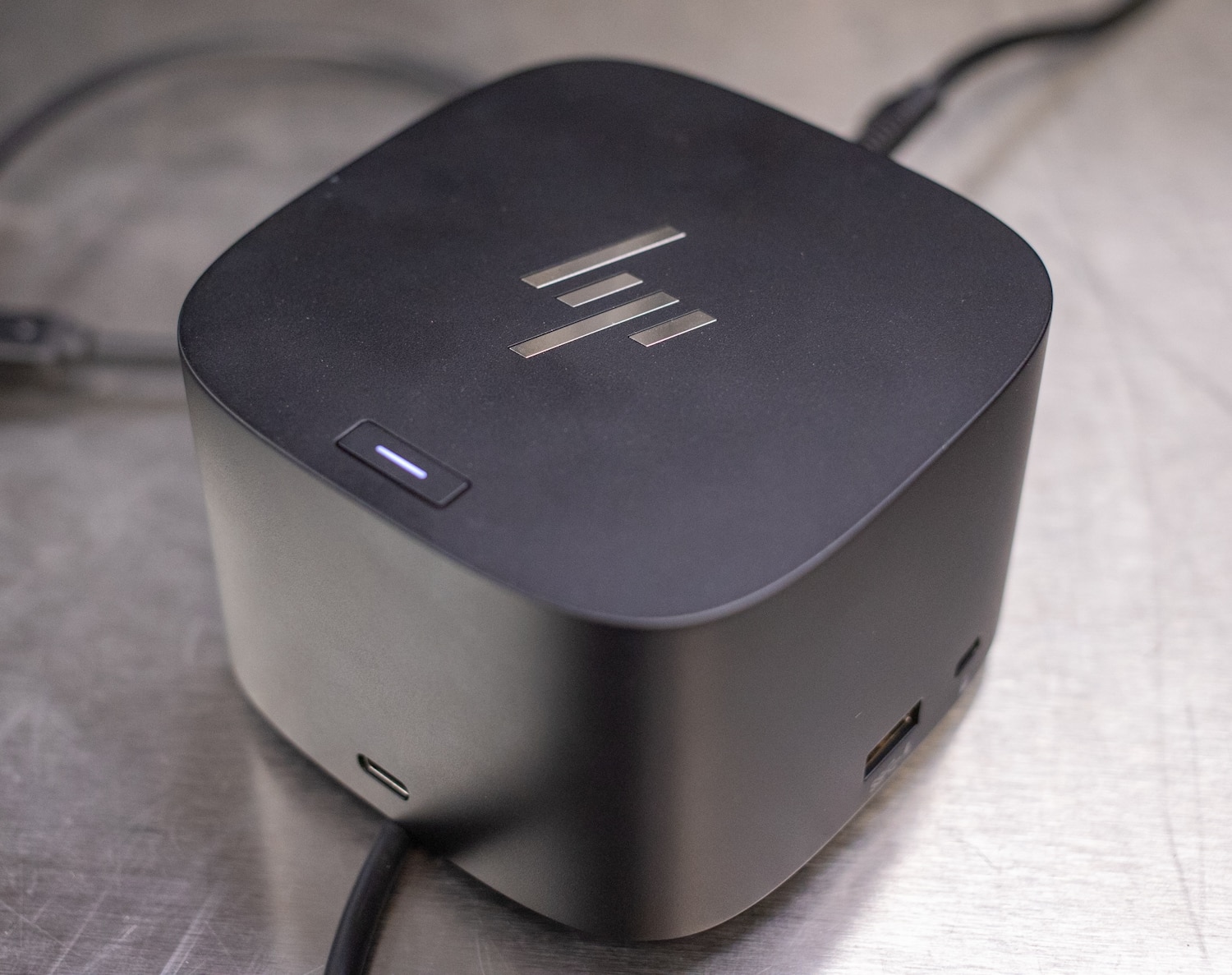
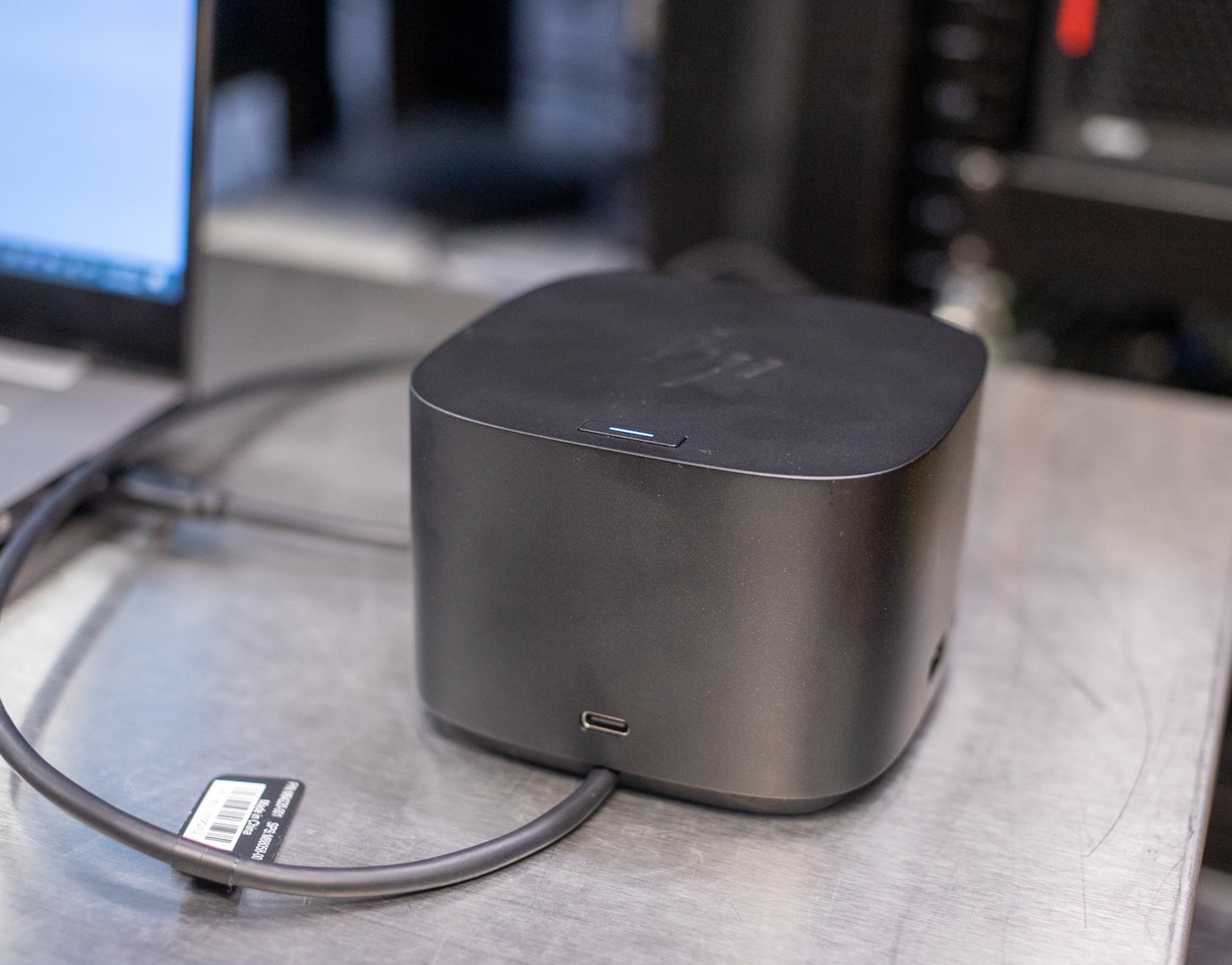
On the top of the Thunderbolt G4, the slick HP logo is shown with a chrome finish. Right underneath that is the power button shown by a solid white LED that glows when the device is on. A minimalist design overall on the top can draw attention away from the rest of the device when there are cables plugged in the rear.

The front of the Thunderbolt G4 features a smooth black finish along with one port on the bottom that is a USB-C that offers data transfer as well as offering a power out option. This would be ideal for those that might need a quick charge to a personal device such as a phone or tablet.

![]()

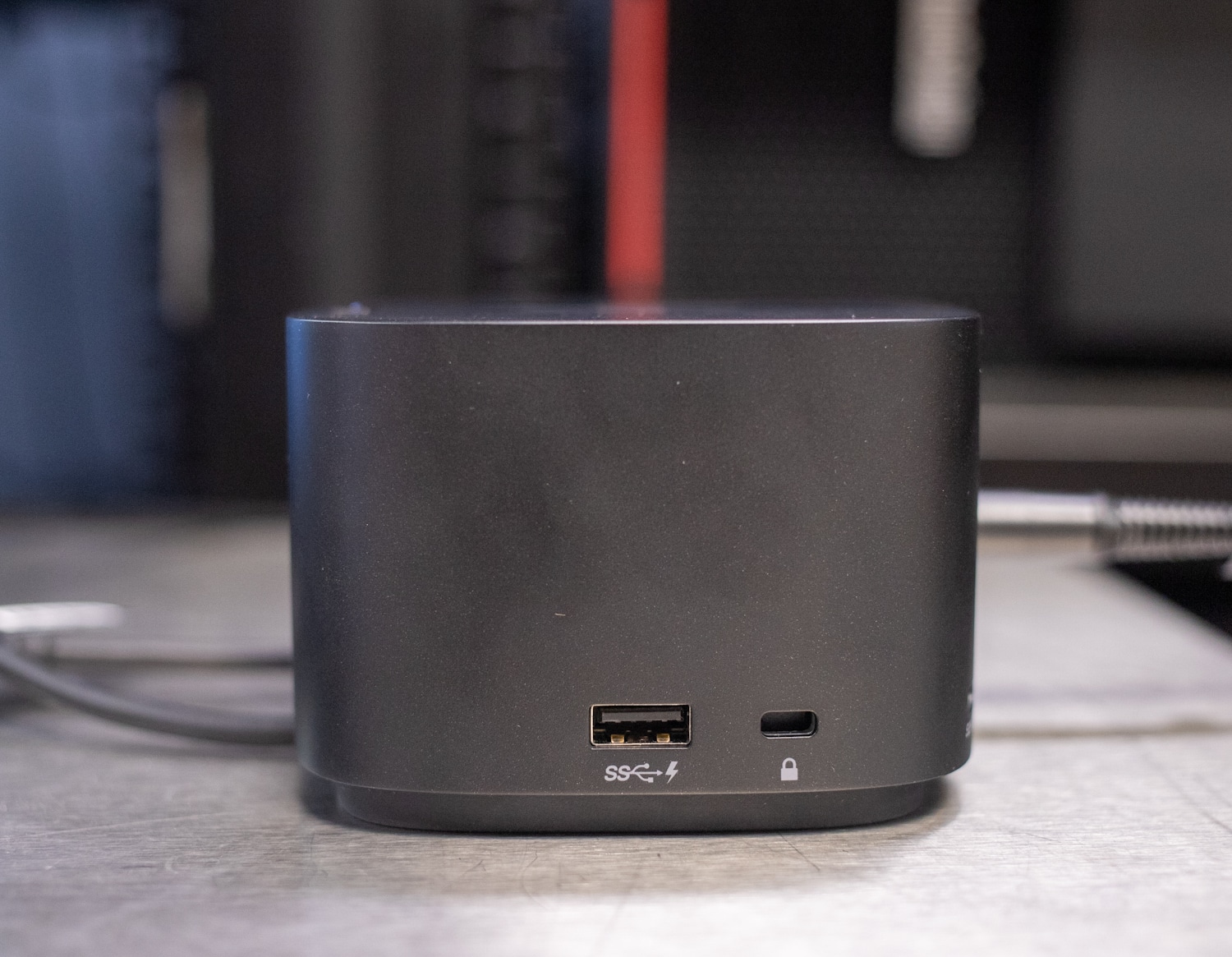
The sides of the Thunderbolt G4 both feature that same port. On the right side is a USB-A 3.2 Gen 1 port that can offer charging, along with a Kensington Standard lock. On the left side, it is the same story, a USB-A 3.2 Gen 1 port.

![HP Thunderbolt Dock G4 ports]()

On the rear of the Thunderbolt G4 is where all the main connectivity of the device can be found. Starting at the top, there is a small vent slit that offers ideal air cooling if the device were to warm up when there are multiple devices attached. The first row of ports offers two USB-A 3.2 Gen 1 charging ports when docked along with an RJ45 port for network connectivity. The second row has one of the DisplayPort 1.4 ports along with the power adapter port. The third/last row shows off an HDMI 2.0 port, another DisplayPort 1.4 port, one USB-C DP alt mode port, and the Thunderbolt 4 port.

![]()

We paired up the dock with several machines, HP and others. All worked as expected, and having Thunderbolt as the primary connection to the laptop means it’s possible to get true 4K out to monitors. We also like the tiny footprint and the unit itself feels well-built.

The main negative of the design is the lack of card readers. It would have been nice to have an SD reader at least. We also would prefer if the power adaptor plug was in a lower corner on the dock so it’s a bit more out of the way.

## Conclusion

Depending on your needs, the Thunderbolt G4 dock can be very useful as it offers a wide range of connectivity and functionality, especially for those that are looking to increase their number of screens to aid in productivity. This HP dock can be really useful for notebooks thanks to the dock’s ability to charge devices with the 100W PD port.

As with any dock on the market, there are some limitations that come with the Thunderbolt G4, the first being the lack of SD card ports and a 3.5mm jack port. For video editors, having the ability to use a dock for SD cards is a nice thing, however, this dock doesn’t allow that and users would either have to look at a different dock or buy another hub if the host device doesn’t have an SD slot.

All-in-all, for users that are looking to increase productivity and increase the number of displays available to one device, this might be the dock for you. At $300, it’s not inexpensive, but we’ve had many of the prior generations of HP docks in the office and they’re all still going, so there’s something to be said for the high-quality build.

[HP Thunderbolt Dock G4 at HP](https://www.hp.com/us-en/shop/pdp/hp-thunderbolt-dock-120w-g4)

**Engage with StorageReview**

[Newsletter](https://www.storagereview.com/storage_newsletter) |  [YouTube](https://www.youtube.com/user/StorageReview "Opens in a new window") | Podcast  [iTunes](https://podcasts.apple.com/gb/podcast/storagereview-com-storage-reviews/id1060681115 "Opens in a new window")/ [Spotify](https://open.spotify.com/show/1y6VnznABhHeOSMOmbDTz0 "Opens in a new window") |  [Instagram](https://www.instagram.com/storagereview/ "Opens in a new window") |  [Twitter](https://twitter.com/storagereview "Opens in a new window") |  [TikTok](https://www.tiktok.com/@storagereview? "Opens in a new window") |  [RSS Feed](https://www.storagereview.com/rss.xml)

![]()

### Conner Crull

Previous post: [Scale Computing: Unboxing to Up and Running in No Time](https://www.storagereview.com/review/scale-computing-unboxing-to-up-and-running-in-no-time)

Next post: [Lenovo ThinkSystem SR630 V2 Review](https://www.storagereview.com/review/lenovo-thinksystem-sr630-v2-review)

Trusted Vendors

Products and solutions from our affiliate partners:

- [  
  ![Ubiquiti Logo]()  
   Ubiquiti](https://store.ui.com/us/en?a_aid=StorageReview "Opens in a new window")
- [  
  ![Newegg Logo]()  
   Newegg](https://click.linksynergy.com/fs-bin/click?id=g5terNMDhz0&offerid=1207190.18&subid=0&type=4 "Opens in a new window")
- [  
  ![Amazon Logo]() Amazon](https://amzn.to/4fLJUEW "Opens in a new window")

Newsletter

Subscribe to the StorageReview newsletter to stay up to date on the latest news and reviews. We promise no spam!

1  

Leave this field empty if you’re human:

## Advertisement

Content Categories

[Facebook](https://www.facebook.com/@storagereview) [X](https://twitter.com/storagereview) [Instagram](https://www.instagram.com/storagereview/) [LinkedIn](https://www.linkedin.com/company/storagereview-com) [YouTube](https://www.youtube.com/user/storagereview?sub_confirmation=1) [Email](mailto:info@storagereview.com) [Spotify](https://open.spotify.com/show/1y6VnznABhHeOSMOmbDTz0) [Reddit](https://www.reddit.com/r/StorageReview/) [Discord](https://discord.gg/TwMHb4azdC) [RSS](https://www.storagereview.com/rss.xml) [TikTok](https://www.tiktok.com/@storagereview)

Copyright © 1998-2025 Flying Pig Ventures, LLC Cincinnati, Ohio. All rights reserved.

Manage your privacy

To provide the best experiences, we and our partners use technologies like cookies to store and/or access device information. Consenting to these technologies will allow us and our partners to process personal data such as browsing behavior or unique IDs on this site and show (non-) personalized ads. Not consenting or withdrawing consent, may adversely affect certain features and functions.

Click below to consent to the above or make granular choices. Your choices will be applied to this site only. You can change your settings at any time, including withdrawing your consent, by using the toggles on the Cookie Policy, or by clicking on the manage consent button at the bottom of the screen.

Functional Functional Always active

The technical storage or access is strictly necessary for the legitimate purpose of enabling the use of a specific service explicitly requested by the subscriber or user, or for the sole purpose of carrying out the transmission of a communication over an electronic communications network.

Preferences Preferences

The technical storage or access is necessary for the legitimate purpose of storing preferences that are not requested by the subscriber or user.

Statistics Statistics

The technical storage or access that is used exclusively for statistical purposes. The technical storage or access that is used exclusively for anonymous statistical purposes. Without a subpoena, voluntary compliance on the part of your Internet Service Provider, or additional records from a third party, information stored or retrieved for this purpose alone cannot usually be used to identify you.

Marketing Marketing

The technical storage or access is required to create user profiles to send advertising, or to track the user on a website or across several websites for similar marketing purposes.

Statistics

Marketing

Features

Always active

Always active

- Manage options
- Manage services
- Manage {vendor\_count} vendors
- [Read more about these purposes](https://cookiedatabase.org/tcf/purposes/)

Accept Deny Manage options Save preferences Manage options

- {title}
- {title}
- {title}

Manage your privacy

To provide the best experiences, we use technologies like cookies to store and/or access device information. Consenting to these technologies will allow us to process data such as browsing behavior or unique IDs on this site. Not consenting or withdrawing consent, may adversely affect certain features and functions.

Functional Functional Always active

The technical storage or access is strictly necessary for the legitimate purpose of enabling the use of a specific service explicitly requested by the subscriber or user, or for the sole purpose of carrying out the transmission of a communication over an electronic communications network.

Preferences Preferences

The technical storage or access is necessary for the legitimate purpose of storing preferences that are not requested by the subscriber or user.

Statistics Statistics

The technical storage or access that is used exclusively for statistical purposes. The technical storage or access that is used exclusively for anonymous statistical purposes. Without a subpoena, voluntary compliance on the part of your Internet Service Provider, or additional records from a third party, information stored or retrieved for this purpose alone cannot usually be used to identify you.

Marketing Marketing

The technical storage or access is required to create user profiles to send advertising, or to track the user on a website or across several websites for similar marketing purposes.

Statistics

Marketing

Features

Always active

Always active

- Manage options
- Manage services
- Manage {vendor\_count} vendors
- [Read more about these purposes](https://cookiedatabase.org/tcf/purposes/)

Accept Deny Manage options Save preferences Manage options

- {title}
- {title}
- {title}

Manage consent Manage consent

```json
{"@context":"https:\/\/schema.org","@graph":[{"@type":"WebPage","@id":"https:\/\/www.storagereview.com\/review\/hp-thunderbolt-dock-g4-review","url":"https:\/\/www.storagereview.com\/review\/hp-thunderbolt-dock-g4-review","name":"HP Thunderbolt Dock G4 Review - StorageReview.com","isPartOf":{"@id":"https:\/\/www.storagereview.com\/#website"},"primaryImageOfPage":{"@id":"https:\/\/www.storagereview.com\/review\/hp-thunderbolt-dock-g4-review#primaryimage"},"image":{"@id":"https:\/\/www.storagereview.com\/review\/hp-thunderbolt-dock-g4-review#primaryimage"},"thumbnailUrl":"https:\/\/www.storagereview.com\/wp-content\/uploads\/2022\/07\/StorageReview-HP-Thunderbolt-G4-5.jpg","datePublished":"2022-07-15T19:47:04+00:00","dateModified":"2022-08-02T18:33:13+00:00","description":"The HP Thunderbolt Dock G4 is a multi-port dock solution to help increase security, productivity, and connectivity.","breadcrumb":{"@id":"https:\/\/www.storagereview.com\/review\/hp-thunderbolt-dock-g4-review#breadcrumb"},"inLanguage":"en-US","potentialAction":[{"@type":"ReadAction","target":["https:\/\/www.storagereview.com\/review\/hp-thunderbolt-dock-g4-review"]}]},{"@type":"ImageObject","inLanguage":"en-US","@id":"https:\/\/www.storagereview.com\/review\/hp-thunderbolt-dock-g4-review#primaryimage","url":"https:\/\/www.storagereview.com\/wp-content\/uploads\/2022\/07\/StorageReview-HP-Thunderbolt-G4-5.jpg","contentUrl":"https:\/\/www.storagereview.com\/wp-content\/uploads\/2022\/07\/StorageReview-HP-Thunderbolt-G4-5.jpg","width":1500,"height":1175},{"@type":"BreadcrumbList","@id":"https:\/\/www.storagereview.com\/review\/hp-thunderbolt-dock-g4-review#breadcrumb","itemListElement":[{"@type":"ListItem","position":1,"name":"Home","item":"https:\/\/www.storagereview.com\/"},{"@type":"ListItem","position":2,"name":"Review","item":"https:\/\/www.storagereview.com\/review"},{"@type":"ListItem","position":3,"name":"HP Thunderbolt Dock G4 Review"}]},{"@type":"WebSite","@id":"https:\/\/www.storagereview.com\/#website","url":"https:\/\/www.storagereview.com\/","name":"StorageReview.com","description":"StorageReview.com is a leading provider of news and reviews throughout the entire IT stack - from the datacenter to the edge, and all points in between.","publisher":{"@id":"https:\/\/www.storagereview.com\/#organization"},"potentialAction":[{"@type":"SearchAction","target":{"@type":"EntryPoint","urlTemplate":"https:\/\/www.storagereview.com\/?s={search_term_string}"},"query-input":{"@type":"PropertyValueSpecification","valueRequired":true,"valueName":"search_term_string"}}],"inLanguage":"en-US"},{"@type":"Organization","@id":"https:\/\/www.storagereview.com\/#organization","name":"StorageReview.com","url":"https:\/\/www.storagereview.com\/","logo":{"@type":"ImageObject","inLanguage":"en-US","@id":"https:\/\/www.storagereview.com\/#\/schema\/logo\/image\/","url":"https:\/\/www.storagereview.com\/wp-content\/uploads\/2020\/02\/Storage-Reviews-2-2.png","contentUrl":"https:\/\/www.storagereview.com\/wp-content\/uploads\/2020\/02\/Storage-Reviews-2-2.png","width":344,"height":61,"caption":"StorageReview.com"},"image":{"@id":"https:\/\/www.storagereview.com\/#\/schema\/logo\/image\/"},"sameAs":["https:\/\/x.com\/storagereview","http:\/\/youtube.com\/user\/storagereview"]}]}
```