---
description: The Kingston XS2000 shows it is possible to achieve excellent performance without spending extra for a Thunderbolt NVMe drive.
title: Kingston XS2000 Review
image: https://www.storagereview.com/wp-content/uploads/2021/09/storagereview-kingston-xs2000-life.jpg
---

[![Storage Review]()](https://storagereview.com/)

---

[Facebook](https://www.facebook.com/@storagereview) [X (Twitter)](https://twitter.twitter.com/storagereview) [Instagram](https://www.instagram.com/storagereview/) [LinkedIn](https://www.linkedin.com/company/storagereview-com) [YouTube](https://www.youtube.com/user/storagereview?sub_confirmation=1) [Email](mailto:info@storagereview.com) [Spotify](https://open.spotify.com/show/1y6VnznABhHeOSMOmbDTz0) [Reddit](https://www.reddit.com/r/StorageReview/) [Discord](https://discord.gg/TwMHb4azdC) [RSS Feed](https://www.storagereview.com/rss.xml) [TikTok](https://www.tiktok.com/@storagereview)

[Facebook](https://www.facebook.com/@storagereview) [X (Twitter)](https://twitter.com/storagereview) [Instagram](https://www.instagram.com/storagereview/) [LinkedIn](https://www.linkedin.com/company/storagereview-com) [YouTube](https://www.youtube.com/user/storagereview?sub_confirmation=1) [Email](mailto:info@storagereview.com) [Spotify](https://open.spotify.com/show/1y6VnznABhHeOSMOmbDTz0) [Reddit](https://www.reddit.com/r/StorageReview/) [Discord](https://discord.gg/TwMHb4azdC) [RSS Feed](https://www.storagereview.com/rss.xml) [TikTok](https://www.tiktok.com/@storagereview)

[![StorageReview.com](https://www.storagereview.com/wp-content/uploads/2026/07/Storage-Review-2x.png)](https://www.storagereview.com)

≡ Menu

- [Home](https://www.storagereview.com/)
- [Storage Reviews](https://www.storagereview.com/review)
  - [Consumer Reviews](https://www.storagereview.com/consumer)
  - [Enterprise Reviews](https://www.storagereview.com/enterprise)
  - [Ubiquiti Reviews](https://www.storagereview.com/best/ubiquiti-reviews)
- [SR Merch](https://store.storagereview.com)
- [Leaderboards](https://www.storagereview.com/best)
  - [Best Storage Arrays](https://www.storagereview.com/best/storage-arrays)
  - [Best Enterprise SSDs](https://www.storagereview.com/best/enterprise-ssds)
  - [Best Servers](https://www.storagereview.com/best/servers)
  - [Best Desktops for Local AI](https://www.storagereview.com/best/desktops-local-ai)
  - [Best Laptops for Local AI](https://www.storagereview.com/best/laptops-local-ai)
  - [Best Local LLM Tools](https://www.storagereview.com/best/local-llm-tools)
  - [Agentic AI Hardware](https://www.storagereview.com/best/agentic-ai-hardware)
  - [Best SSDs & Hard Drives](https://www.storagereview.com/best_drives)
  - [Best Portable SSDs](https://www.storagereview.com/best/portable-ssds)
  - [Best Business Laptops](https://www.storagereview.com/best/business-laptops)
  - [Best Mobile Workstations](https://www.storagereview.com/best/mobile-workstations)
  - [Best Desktop Workstations](https://www.storagereview.com/best/desktop-workstations)
  - [Best Laptop Battery Life](https://www.storagereview.com/best/laptop-battery-life)
- [Storage Reference Guide](https://www.storagereview.com/storage-reference-guide)
- [About SR](https://www.storagereview.com/about-storagereview)
  - [StorageReview.com Sweepstakes Rules and Regulations](https://www.storagereview.com/storagereview-com-sweepstakes-rules-and-regulations)

Search

[Home](https://www.storagereview.com/) » [Review](https://www.storagereview.com/review) » Kingston XS2000 Review

# Kingston XS2000 Review

by Charles P. Jefferies on October 5, 2021

[Consumer](https://www.storagereview.com/consumer)  ◇  [Portable Storage](https://www.storagereview.com/consumer/portable-storage)

The Kingston XS2000 is a portable solid-state drive that connects via USB Type-C. Small enough to fit in your pocket, this drive demonstrated excellent performance in our testing, nearing Kingston’s 2,000MB/s read and write claims. It even carries a mild IP55 rating for water and dust protection and includes a rubberized sleeve.

A lack of encryption and other security features are its biggest downsides. Provided that you don’t need those, the XS2000 makes an excellent high-performance portable drive, especially for the price.

![Kingston XS2000 PORTABLE SSD](https://www.storagereview.com/wp-content/uploads/2021/09/storagereview-kingston-xs2000-life.jpg)

## **Kingston XS2000 Specifications**

Kingston offers the XS2000 in three capacities: [500GB for $99.99, 1TB for $159.99, and 2TB for $284.99](https://amzn.to/3uG6bxg). It’s less expensive than both the [WD My Passport NVMe](https://www.storagereview.com/review/wd-my-passport-nvme-ssd-review) and the [SanDisk Extreme Pro Portable SSD V2](https://www.storagereview.com/review/sandisk-extreme-pro-portable-ssd-v2-review). We’ll be using both drives for comparisons in the benchmarks to come.

The XS2000 relies on 3D TLC NAND flash memory and uses an SMI 2320 controller. Kingston’s claimed 2,000MB/s read and write numbers are impressive indeed and near the limit of what its USB 3.2 Gen 2×2 interface can handle (20Gbps). Thus, to get maximum performance from this drive, your computer must have that port. (A Thunderbolt 3 or 4 port will also do.) Using a regular USB 3.2 Gen 1 (5Gbps) or Gen 2 port (10Gbps) will drastically limit the drive’s capabilities.

The XS2000 has no special features apart from its ruggedization. Unlike the mentioned SanDisk drive, it lacks encryption and security features and does not come with any drive-management software. Thus, it’s strictly a storage drive.

Before we move on, here are the drive’s full specifications. The standard five-year warranty is notable.

| **Interface** | USB 3.2 Gen 2×2 |
| --- | --- |
| **Connector** | USB Type-C |
| **Speed** | 2,000MB/s read and write |
| **Capacities** | 500GB, 1TB, 2TB |
| **Dimensions (HWD)** | 0.53 by 1.28 by 2.74 inches |
| **Weight** | 1 ounce (28.9 grams) |
| **Casing Material** | Metal and plastic |
| **Operating Temperature** | 0 to 40 degrees C |
| **Storage Temperature** | -20 to 85 degrees C |
| **Warranty and Support** | 5-year limited warranty with free technical support |
| **Operating System Support** | Windows 8.1/10, Mac OS (v.10.14.x+), Linux (v.2.6.x+), Chrome OS |

## **Kingston XS2000 Design and Build**

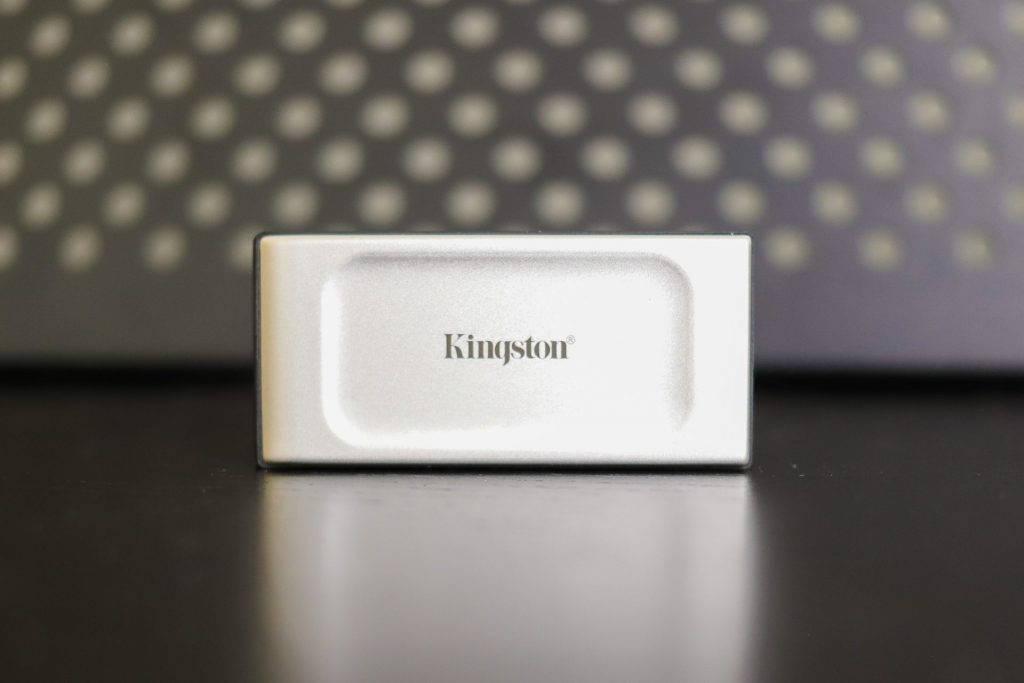
The XS2000 is compact for a portable SSD at just 0.53 by 1.28 by 2.74 inches. It’s wider and thicker than a large USB flash drive, such as Kingston’s own [DataTraveler Max](https://www.storagereview.com/review/kingston-datatraveler-max-review), if not quite as long. It’s also smaller than the SanDisk Extreme Pro Portable SSD V2, though it lacks a stylus loop.

![Kingston XS2000 Front]()

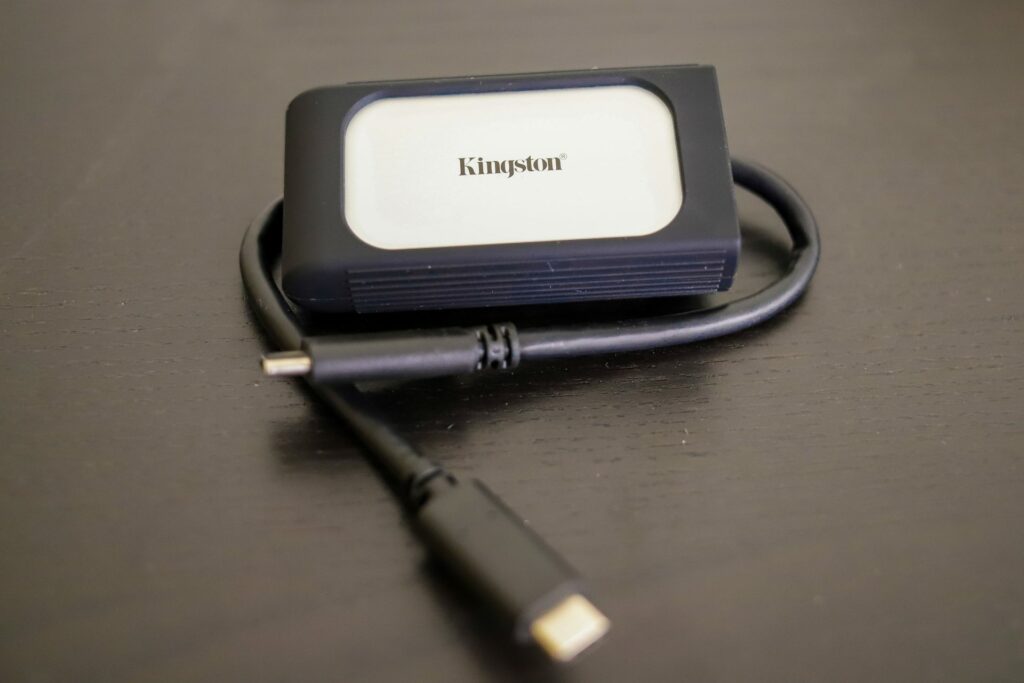
The metal and plastic outsides are rigid and flex-free. The drive carries an IP55 rating, meaning it’s protected from dust and spraying water but not immersion in water. Conveniently, Kingston includes a rubber sleeve for protection against bumps and drops.

![Kingston XS2000 Rubber Sleeve]()

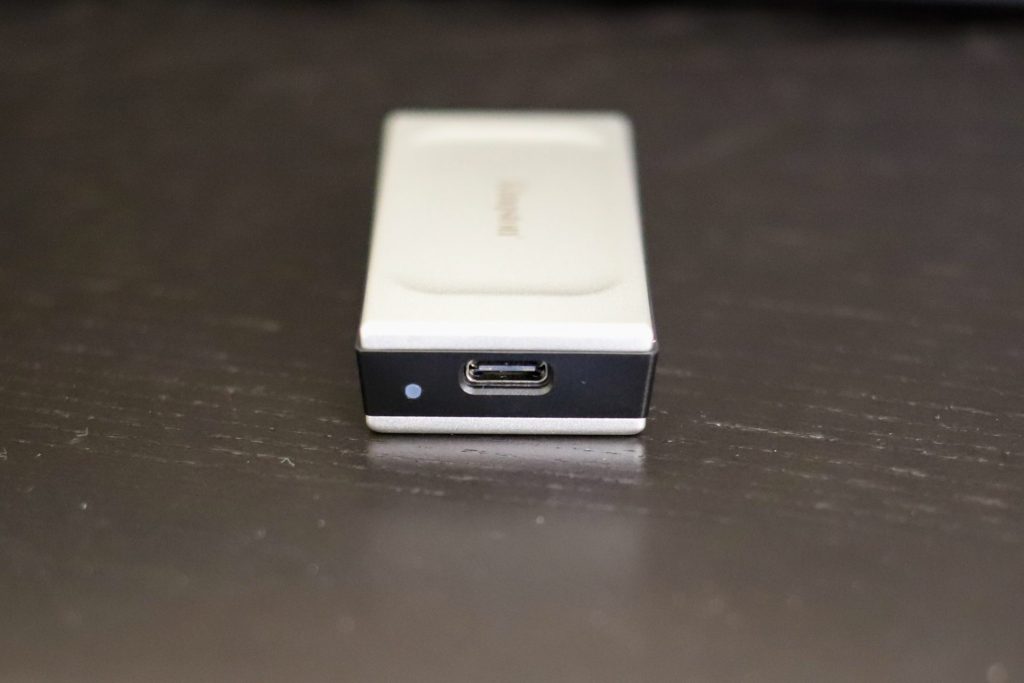
The included 12-inch USB Type-C cable is appreciably long and connects at one end. There’s a status light next to the connector.

![Kingston XS2000 USB Type-C Connector]()

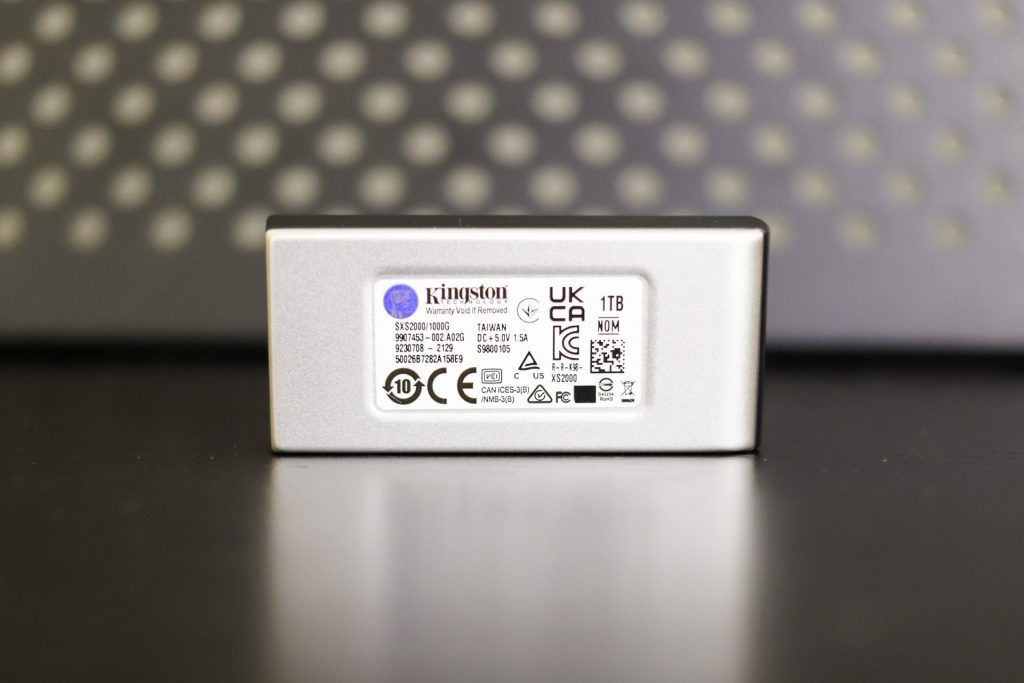
The drive’s capacity is listed on the bottom sticker.

![Kingston XS2000 Bottom]()

The XS2000’s simple design doesn’t warranty much more description. I suppose that Kingston could spruce things up by offering it in different colors, but that’s hardly a complaint. Let’s move to testing.

## **Kingston XS2000 Performance**

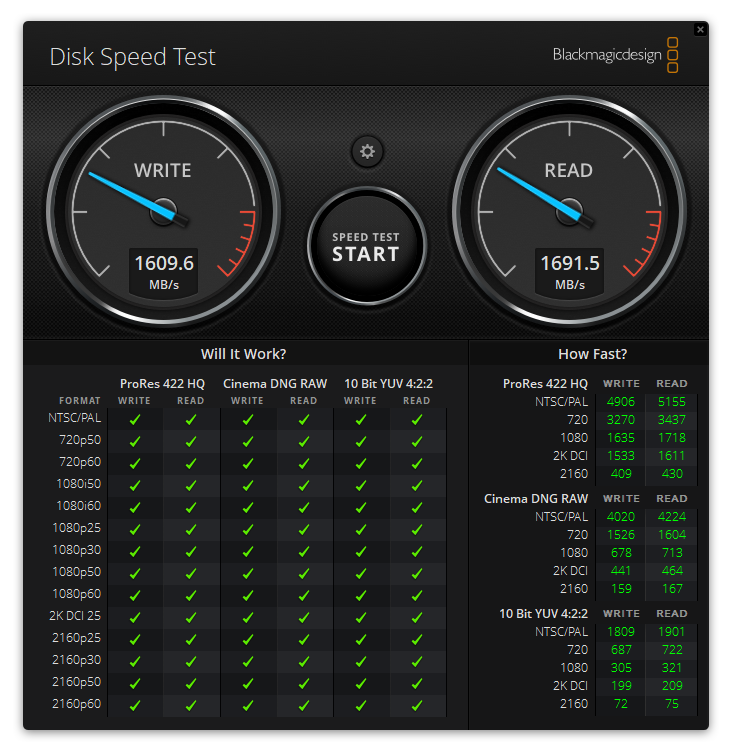
We started benchmarking our 1TB XS2000 with Blackmagic’s popular Disk Speed Test. It peaked at 1,609MB/s read and 1,691MB/s write, not too different from the SanDisk Extreme Pro Portable SSD V2’s 1,754MB/s and 1,556MB/s, but far better than the 893MB/s and 878MB/s that we saw from the WD My Passport NVMe SSD.

![Kingston XS2000 Disk Speed Test]()

Our next and final test is IOMeter. The XS2000 achieved closest to its rated numbers in the more demanding four-threaded 2MB sequential scenario, posting 1,987MB/s read and 1,792MB/s write. These numbers are slightly lower than the 1,990MB/s read and 1,980MB/s write that we saw from Extreme Portable Pro SSD V2, though there would be little practical difference in real-world applications. On the contrary, it vastly outperformed the My Passport NVMe SSD, which came in at 992MB/s read and 940MB/s write.

In the four-threaded 4K random testing, we saw the XS2000 hit a respectable 63,614 IOPS write, though its 14,182 IOPS read leaves something to be desired; the Extreme Pro Portable SSD V2 came in at 70,353 IOPS write but 30,723 IOPS read. The My Passport NVMe SSD reached 39,793 IOPS write and 17,616 IOPS read.

| **IOMeter (1-Thread)** | |
| --- | --- |
| **Test** | **Result** |
| 2MB sequential write | 1,283MB/s |
| 2MB sequential read | 1,430MB/s |
| 2MB random write | 1,193MB/ |
| 2MB random read | 1,305MB/s |
| 4K random write | 19,777 IOPS |
| 4K random read | 4,590 IOPS |
| **IOMeter (4-Thread)** | |
| 2MB sequential write | 1,792MB/s |
| 2MB sequential read | 1,987MB/s |
| 2MB random write | 1,620MB/s |
| 2MB random read | 1,822MB/s |
| 4K random write | 63,614 IOPS |
| 4K random read | 14,182 IOPS |

## **Conclusion**

Kingston’s XS2000 shows it is possible to achieve excellent performance without spending extra for a Thunderbolt NVMe drive. It makes the most of a highly compatible USB 3.2 Gen 2×2 Type-C interface, achieving reasonably close to Kingston’s rated maximums of 2,000MB/s read and write in our testing.

Its performance is slightly behind that of the SanDisk Extreme Pro Portable SSD V2, but ahead of other drives like the WD My Passport NVMe SSD. We also like this drive’s rugged design and included rubber sleeve. Beyond that, the XS2000 is purely a storage drive, lacking any kind of encryption or security features. But its price reflects that; at just $160 for the 1TB drive we tested, it’s an admirable value for someone looking for a high-performance drive in a compact package.

[Product Link (Amazon)](https://amzn.to/3uG6bxg)

**Engage with StorageReview**

[Newsletter](https://www.storagereview.com/storage_newsletter) |  [YouTube](https://www.youtube.com/user/StorageReview "Opens in a new window") | Podcast  [iTunes](https://podcasts.apple.com/gb/podcast/storagereview-com-storage-reviews/id1060681115 "Opens in a new window")/ [Spotify](https://open.spotify.com/show/1y6VnznABhHeOSMOmbDTz0 "Opens in a new window") |  [Instagram](https://www.instagram.com/storagereview/ "Opens in a new window") |  [Twitter](https://twitter.com/storagereview "Opens in a new window") |  [TikTok](https://www.tiktok.com/@storagereview? "Opens in a new window") |  [RSS Feed](https://www.storagereview.com/rss.xml)

![]()

### Charles P. Jefferies

I'm a lifelong technology enthusiast and have been reviewing consumer and enterprise technology since 2005. I specialize in laptops, tablets, and enterprise hardware. I'm a graduate of Rochester Institute of Technology. Outside of work, I love the gym, reading, and photography.

Previous post: [NETGEAR WAX620 Review](https://www.storagereview.com/review/netgear-wax620-review)

Next post: [Hands On with StarWind NVMe-oF Initiator for Windows](https://www.storagereview.com/review/hands-on-with-starwind-nvme-of-initiator-for-windows)

Trusted Vendors

Products and solutions from our affiliate partners:

- [  
  ![Ubiquiti Logo](https://www.storagereview.com/wp-content/uploads/2024/11/2-1.webp)  
   Ubiquiti](https://store.ui.com/us/en?a_aid=StorageReview "Opens in a new window")
- [  
  ![Newegg Logo](https://www.storagereview.com/wp-content/uploads/2025/11/newegg.webp)  
   Newegg](https://click.linksynergy.com/fs-bin/click?id=g5terNMDhz0&offerid=1207190.18&subid=0&type=4 "Opens in a new window")
- [  
  ![Amazon Logo](https://www.storagereview.com/wp-content/uploads/2025/11/amazon.webp) Amazon](https://amzn.to/4fLJUEW "Opens in a new window")

Newsletter

Subscribe to the StorageReview newsletter to stay up to date on the latest news and reviews. We promise no spam!

1  

Leave this field empty if you’re human:

## Advertisement

Content Categories

[Facebook](https://www.facebook.com/@storagereview) [X](https://twitter.com/storagereview) [Instagram](https://www.instagram.com/storagereview/) [LinkedIn](https://www.linkedin.com/company/storagereview-com) [YouTube](https://www.youtube.com/user/storagereview?sub_confirmation=1) [Email](mailto:info@storagereview.com) [Spotify](https://open.spotify.com/show/1y6VnznABhHeOSMOmbDTz0) [Reddit](https://www.reddit.com/r/StorageReview/) [Discord](https://discord.gg/TwMHb4azdC) [RSS](https://www.storagereview.com/rss.xml) [TikTok](https://www.tiktok.com/@storagereview)

Copyright © 1998-2025 Flying Pig Ventures, LLC Cincinnati, Ohio. All rights reserved.

Manage your privacy

To provide the best experiences, we and our partners use technologies like cookies to store and/or access device information. Consenting to these technologies will allow us and our partners to process personal data such as browsing behavior or unique IDs on this site and show (non-) personalized ads. Not consenting or withdrawing consent, may adversely affect certain features and functions.

Click below to consent to the above or make granular choices. Your choices will be applied to this site only. You can change your settings at any time, including withdrawing your consent, by using the toggles on the Cookie Policy, or by clicking on the manage consent button at the bottom of the screen.

Functional Functional Always active

The technical storage or access is strictly necessary for the legitimate purpose of enabling the use of a specific service explicitly requested by the subscriber or user, or for the sole purpose of carrying out the transmission of a communication over an electronic communications network.

Preferences Preferences

The technical storage or access is necessary for the legitimate purpose of storing preferences that are not requested by the subscriber or user.

Statistics Statistics

The technical storage or access that is used exclusively for statistical purposes. The technical storage or access that is used exclusively for anonymous statistical purposes. Without a subpoena, voluntary compliance on the part of your Internet Service Provider, or additional records from a third party, information stored or retrieved for this purpose alone cannot usually be used to identify you.

Marketing Marketing

The technical storage or access is required to create user profiles to send advertising, or to track the user on a website or across several websites for similar marketing purposes.

Statistics

Marketing

Features

Always active

Always active

- Manage options
- Manage services
- Manage {vendor\_count} vendors
- [Read more about these purposes](https://cookiedatabase.org/tcf/purposes/)

Accept Deny Manage options Save preferences Manage options

- {title}
- {title}
- {title}

Manage your privacy

To provide the best experiences, we use technologies like cookies to store and/or access device information. Consenting to these technologies will allow us to process data such as browsing behavior or unique IDs on this site. Not consenting or withdrawing consent, may adversely affect certain features and functions.

Functional Functional Always active

The technical storage or access is strictly necessary for the legitimate purpose of enabling the use of a specific service explicitly requested by the subscriber or user, or for the sole purpose of carrying out the transmission of a communication over an electronic communications network.

Preferences Preferences

The technical storage or access is necessary for the legitimate purpose of storing preferences that are not requested by the subscriber or user.

Statistics Statistics

The technical storage or access that is used exclusively for statistical purposes. The technical storage or access that is used exclusively for anonymous statistical purposes. Without a subpoena, voluntary compliance on the part of your Internet Service Provider, or additional records from a third party, information stored or retrieved for this purpose alone cannot usually be used to identify you.

Marketing Marketing

The technical storage or access is required to create user profiles to send advertising, or to track the user on a website or across several websites for similar marketing purposes.

Statistics

Marketing

Features

Always active

Always active

- Manage options
- Manage services
- Manage {vendor\_count} vendors
- [Read more about these purposes](https://cookiedatabase.org/tcf/purposes/)

Accept Deny Manage options Save preferences Manage options

- {title}
- {title}
- {title}

Manage consent Manage consent

```json
{"@context":"https:\/\/schema.org","@graph":[{"@type":"WebPage","@id":"https:\/\/www.storagereview.com\/review\/kingston-xs2000-review","url":"https:\/\/www.storagereview.com\/review\/kingston-xs2000-review","name":"Kingston XS2000 Review - StorageReview.com","isPartOf":{"@id":"https:\/\/www.storagereview.com\/#website"},"primaryImageOfPage":{"@id":"https:\/\/www.storagereview.com\/review\/kingston-xs2000-review#primaryimage"},"image":{"@id":"https:\/\/www.storagereview.com\/review\/kingston-xs2000-review#primaryimage"},"thumbnailUrl":"https:\/\/www.storagereview.com\/wp-content\/uploads\/2021\/09\/storagereview-kingston-xs2000-life.jpg","datePublished":"2021-10-05T15:09:23+00:00","description":"The Kingston XS2000 shows it is possible to achieve excellent performance without spending extra for a Thunderbolt NVMe drive.","breadcrumb":{"@id":"https:\/\/www.storagereview.com\/review\/kingston-xs2000-review#breadcrumb"},"inLanguage":"en-US","potentialAction":[{"@type":"ReadAction","target":["https:\/\/www.storagereview.com\/review\/kingston-xs2000-review"]}]},{"@type":"ImageObject","inLanguage":"en-US","@id":"https:\/\/www.storagereview.com\/review\/kingston-xs2000-review#primaryimage","url":"https:\/\/www.storagereview.com\/wp-content\/uploads\/2021\/09\/storagereview-kingston-xs2000-life.jpg","contentUrl":"https:\/\/www.storagereview.com\/wp-content\/uploads\/2021\/09\/storagereview-kingston-xs2000-life.jpg","width":1920,"height":1280},{"@type":"BreadcrumbList","@id":"https:\/\/www.storagereview.com\/review\/kingston-xs2000-review#breadcrumb","itemListElement":[{"@type":"ListItem","position":1,"name":"Home","item":"https:\/\/www.storagereview.com\/"},{"@type":"ListItem","position":2,"name":"Review","item":"https:\/\/www.storagereview.com\/review"},{"@type":"ListItem","position":3,"name":"Kingston XS2000 Review"}]},{"@type":"WebSite","@id":"https:\/\/www.storagereview.com\/#website","url":"https:\/\/www.storagereview.com\/","name":"StorageReview.com","description":"StorageReview.com is a leading provider of news and reviews throughout the entire IT stack - from the datacenter to the edge, and all points in between.","publisher":{"@id":"https:\/\/www.storagereview.com\/#organization"},"potentialAction":[{"@type":"SearchAction","target":{"@type":"EntryPoint","urlTemplate":"https:\/\/www.storagereview.com\/?s={search_term_string}"},"query-input":{"@type":"PropertyValueSpecification","valueRequired":true,"valueName":"search_term_string"}}],"inLanguage":"en-US"},{"@type":"Organization","@id":"https:\/\/www.storagereview.com\/#organization","name":"StorageReview.com","url":"https:\/\/www.storagereview.com\/","logo":{"@type":"ImageObject","inLanguage":"en-US","@id":"https:\/\/www.storagereview.com\/#\/schema\/logo\/image\/","url":"https:\/\/www.storagereview.com\/wp-content\/uploads\/2020\/02\/Storage-Reviews-2-2.png","contentUrl":"https:\/\/www.storagereview.com\/wp-content\/uploads\/2020\/02\/Storage-Reviews-2-2.png","width":344,"height":61,"caption":"StorageReview.com"},"image":{"@id":"https:\/\/www.storagereview.com\/#\/schema\/logo\/image\/"},"sameAs":["https:\/\/x.com\/storagereview","http:\/\/youtube.com\/user\/storagereview"]}]}
```